Introduction
Every missed appointment costs money. Every double-booked slot frustrates a customer. Every manual scheduling error chips away at your team’s productivity and your company’s reputation.
Consider these numbers:
- $150 billion — the estimated annual cost of no-shows in the U.S. healthcare industry alone
- 67% of customers say they’ve hung up a phone without resolving their issue because of poor scheduling or long hold times
- 30–40% of a service business’s revenue can be directly tied to how effectively it manages appointments and field operations
Whether you run a healthcare clinic, a financial consulting firm, a field service operation, or any business that relies on scheduled interactions with clients, appointment management is not a back-office function. It is a frontline business capability — and when it fails, customers notice.
The frustrating part? Most businesses already have the infrastructure to solve this problem. They just haven’t connected the dots.
If your organization uses Salesforce as its CRM, you are sitting on one of the most powerful platforms available for transforming how appointments are scheduled, managed, monitored, and optimized. A purpose-built appointment management application in Salesforce can eliminate scheduling chaos, improve customer experience, reduce revenue leakage, and give your team the visibility it needs to operate at peak efficiency.
This guide from RizeX Labs breaks down exactly what an appointment management system in Salesforce looks like, how it works, what it delivers, and how to implement it the right way.
Table of Contents
- What Is Appointment Management in Salesforce?
- Why Salesforce Is the Right Platform for Scheduling
Salesforce Health Cloud Appointment Management Data Model - Key Features of a Salesforce Appointment Scheduling Application
- Industry Use Cases: Where It Makes the Biggest Difference
- Business Benefits: Efficiency, Experience, and ROI
- Implementation Best Practices
- Common Mistakes to Avoid
- How RizeX Labs Approaches Appointment Scheduling Solutions
- Conclusion: Scheduling as a Competitive Advantage
1. What Is Appointment Management in Salesforce?
An appointment management system in Salesforce is a structured application — either natively built on the Salesforce platform, configured from AppExchange, or custom-developed — that allows businesses to schedule, track, assign, manage, and optimize appointments directly within their Salesforce environment.
At its core, the application connects three critical elements:
- People — customers, patients, clients, or prospects who need appointments
- Resources — staff members, service professionals, equipment, or locations that fulfill those appointments
- Time — availability windows, duration, buffer times, and scheduling rules that govern when appointments can happen
When these three elements are managed inside Salesforce, they don’t exist in isolation. They are connected to every other piece of customer data your business holds — contact history, case records, service contracts, pipeline opportunities, and communication logs. That connection transforms appointment scheduling from a logistics task into a customer relationship tool.
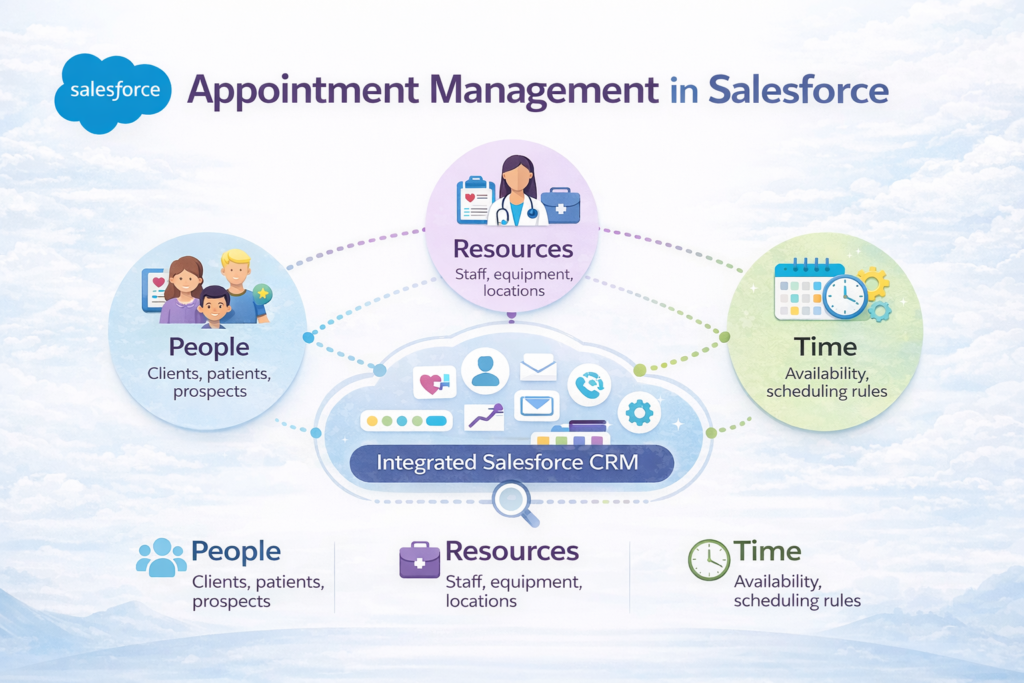
A Salesforce scheduling app can handle everything from simple one-on-one meetings to complex multi-resource service appointments that require specific skills, certifications, geographic availability, and equipment allocation.
Think of it this way: a standalone calendar tool knows when someone has an appointment. A Salesforce appointment scheduling solution knows who that person is, what their history looks like, what they need from this visit, who is best suited to serve them, and what should happen before, during, and after the appointment.
That is a fundamentally different — and vastly more powerful — level of scheduling capability.
Salesforce Health Cloud Appointment Management Data Model
This model represents how appointments are scheduled, assigned, and managed in Salesforce Health Cloud by connecting patients, providers, resources, and availability
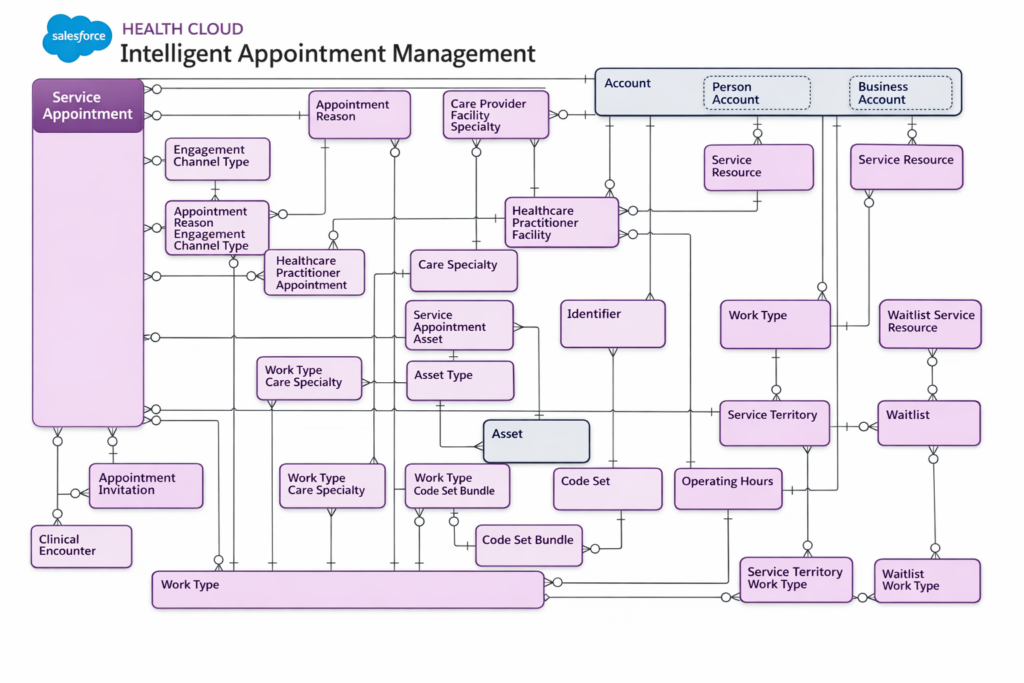
🔹 Key Objects (What actually matters)
1. Service Appointment (Center)
- The main record
- Stores: date, time, status, type
- Everything else connects to this
2. Who is involved
- Account (Person/Business) → Patient or organization
- Healthcare Practitioner / Facility → Doctor or hospital
- Service Resource → Actual resource (doctor, room, equipment)
👉 Translation: who needs the appointment + who delivers it
3. Why appointment exists
- Appointment Reason
- Care Specialty
- Engagement Channel (phone, online, etc.)
👉 Defines purpose + context
4. How it gets scheduled
- Work Type → Type of service (consultation, surgery)
- Service Territory → Location/area
- Operating Hours → Availability
- Work Type Care Specialty → links specialty with service
👉 This is the scheduling engine logic
5. Supporting structure
- Asset / Asset Type → Equipment used
- Code Set / Bundle → Standardized medical/service codes
- Identifier → Unique IDs for tracking
6. Advanced features
- Waitlist & Waitlist Service Resource
- Appointment Invitation
- Clinical Encounter
👉 Handles overflow, communication, and real care tracking
2. Why Salesforce Is the Right Platform for Scheduling
Before exploring the features and benefits, it is worth addressing a reasonable question: Why build or deploy an appointment scheduling application specifically within Salesforce, rather than using a standalone scheduling tool?
The answer lies in integration, automation, and data.
2.1 Unified Customer Data
Salesforce is your system of record for customer relationships. When scheduling lives inside the same platform, every appointment is automatically enriched with contextual customer data. A technician heading to a field service call can see the customer’s full service history. A sales rep scheduling a follow-up meeting can see every prior interaction with that prospect. A healthcare administrator booking a patient visit can see insurance information, previous visits, and outstanding items — all without switching systems.
2.2 Automation That Actually Works
Salesforce’s automation tools — including Flow Builder, Process Builder, and Apex triggers — make it possible to automate the entire appointment lifecycle. Confirmations send automatically. Reminders go out at exactly the right intervals. If an appointment is rescheduled, the system updates all related records, notifies the right team members, and adjusts resource allocations without manual intervention.
Standalone scheduling tools require integrations and workarounds to achieve this level of automation. Inside Salesforce, it is native.
2.3 Reporting and Analytics
With appointments living inside Salesforce, you gain immediate access to the platform’s powerful reporting and analytics capabilities. You can track no-show rates by service type, measure average appointment completion times, analyze resource utilization, and identify scheduling patterns that reveal opportunities for improvement. These insights are not available when scheduling data sits in a siloed external tool.
2.4 Scalability
Whether you are a five-person clinic or a 500-person field service organization, Salesforce scales with your business. The appointment management application grows with your needs — adding users, resources, locations, and service types without requiring a platform migration.
2.5 Security and Compliance
For industries like healthcare and financial services, data security is non-negotiable. Salesforce’s enterprise-grade security infrastructure, combined with granular permission controls, ensures that sensitive appointment and patient data is protected in compliance with regulations like HIPAA, GDPR, and SOC 2.
3. Key Features of a Salesforce Appointment Scheduling Application
A well-designed Salesforce scheduling app is more than a digital calendar. Here is a breakdown of the critical features that distinguish a high-functioning appointment management system from a basic booking tool:
3.1 Online Self-Scheduling for Customers
Customers want convenience. A self-scheduling portal — accessible via a website, community portal, or mobile application — allows customers, patients, or clients to book appointments on their own time, without waiting for a staff member to be available.
Practical benefit: Reduces inbound call volume by 30–50%, frees up staff for higher-value tasks, and extends your scheduling availability to 24/7 without adding headcount.
Self-scheduling interfaces built on Salesforce Experience Cloud can be branded to your company’s look and feel, display real-time availability, enforce business rules (minimum advance booking, service-specific durations, location constraints), and confirm bookings instantly.
3.2 Intelligent Resource Assignment
Not every appointment can be fulfilled by any available team member. Resource assignment logic ensures that appointments are matched to the right person or team based on:
- Skills and certifications — matching a patient to a specialist with the right credentials, or routing a technical service call to a certified engineer
- Geographic availability — assigning field technicians to appointments within their service territory
- Current workload — distributing appointments evenly to prevent burnout and optimize capacity
- Customer preference — honoring requests to see the same advisor, consultant, or technician as a previous visit
Practical benefit: Reduces appointment failures caused by wrong-resource assignments. Improves customer satisfaction by honoring preferences. Maximizes resource utilization across your workforce.
3.3 Real-Time Availability Management
The scheduling engine must reflect real-time availability. This means integrating with individual calendars (Google Calendar, Outlook, Salesforce Calendar), respecting time-off requests, accounting for travel time between appointments, and applying buffer periods between bookings.
Practical benefit: Eliminates double-booking, prevents scheduling collisions, and ensures that resources are never overcommitted. Customers always see accurate availability when self-scheduling.
3.4 Automated Reminders and Notifications
No-shows are expensive. Automated reminder sequences — sent via email, SMS, or in-app notification — dramatically reduce no-show rates by keeping appointments top-of-mind for customers.
A well-configured appointment management system in Salesforce can send:
- An initial confirmation immediately after booking
- A reminder 48 hours before the appointment
- A final reminder 2 hours before the appointment
- Post-appointment follow-up messages requesting feedback or confirming next steps
Practical benefit: Healthcare organizations that implement automated reminders typically see no-show rates drop by 20–30%. For field service businesses, this translates directly to fewer wasted technician trips.
3.5 Appointment Lifecycle Management
An appointment is not a single event. It moves through a lifecycle: requested → confirmed → in-progress → completed → followed-up. A robust Salesforce appointment scheduling solution tracks every stage of this lifecycle, triggers appropriate actions at each stage, and maintains a complete audit trail.
Stages typically include:
- Draft or Requested
- Scheduled and Confirmed
- Checked In or In Progress
- Completed
- No-Show
- Rescheduled or Cancelled
Each status change can trigger automated workflows — notifying the customer, updating related records, generating service reports, or creating follow-up tasks for the team.
Practical benefit: Nothing falls through the cracks. Every appointment has a clear status, responsible owner, and defined next step.
3.6 Multi-Location and Multi-Resource Management
For businesses operating across multiple locations or requiring multiple resources for a single appointment, the scheduling application must handle complex coordination scenarios.
Examples include:
- A consulting firm scheduling client workshops that require a lead consultant, a support analyst, and a specific conference room
- A healthcare system coordinating a procedure that requires a surgeon, an anesthesiologist, a specific operating room, and specialized equipment
- A field service company scheduling a large installation that needs a team of technicians plus a specialized vehicle
Practical benefit: Eliminates the manual coordination burden that typically falls on administrative staff. Ensures all required resources are confirmed and available before the appointment is locked.
3.7 Waitlist Management
When a preferred time slot is unavailable, customers should have the option to join a waitlist. If a cancellation occurs, the system should automatically notify waitlisted customers and offer them the open slot.
Practical benefit: Maximizes appointment slot utilization. Reduces the revenue impact of cancellations. Improves customer experience by proactively offering solutions rather than forcing customers to keep checking for availability.
3.8 Reporting and Analytics Dashboard
Management needs visibility. A built-in reporting dashboard should surface metrics including:
- Total appointments scheduled, completed, rescheduled, and cancelled
- No-show rates by service type, location, or time period
- Resource utilization percentages
- Average lead time from booking to appointment
- Customer satisfaction scores tied to appointment outcomes
- Revenue generated per appointment type
Practical benefit: Transforms scheduling from an operational function into a strategic one. Enables data-driven decisions about staffing, capacity, and service offering optimization.
3.9 Integration with Salesforce Service Cloud and Field Service
For businesses using Salesforce Service Cloud or Salesforce Field Service (formerly Field Service Lightning), the appointment management application should integrate natively with work order management, case management, and mobile workforce tools.
Practical benefit: Field technicians receive appointment details on their mobile device. Service cases are automatically updated when appointments are completed. Billing and invoicing can be triggered based on appointment completion status.
3.10 Mobile Accessibility
Both staff and customers need mobile access. Staff members should be able to view their schedule, update appointment status, and access customer information from a mobile device. Customers should be able to book, reschedule, or cancel appointments from their smartphone.
Practical benefit: Keeps remote and field-based teams connected and informed. Reduces the need for staff to call back into the office for scheduling updates.
4. Industry Use Cases: Where It Makes the Biggest Difference
The power of a Salesforce appointment scheduling application is best understood through real-world application. Here are the industries where this technology delivers the most significant impact:
4.1 Healthcare and Medical Services
Healthcare is perhaps the most appointment-intensive industry in existence. Clinics, hospitals, specialty practices, dental offices, and mental health providers all operate on appointment-based models where scheduling inefficiency directly impacts patient outcomes and financial performance.
Key challenges in healthcare:
- High no-show rates driving revenue loss
- Complex scheduling requirements (specific provider, specific equipment, specific location)
- Regulatory compliance requirements around patient data
- Need for patient-facing self-scheduling portals
- Care coordination across multiple providers or departments
How the Salesforce scheduling app solves these:
A healthcare organization using an appointment management system in Salesforce can give patients the ability to book appointments online, receive automated reminders, and easily reschedule without calling the front desk. On the back end, the system matches patients to providers based on specialty, insurance acceptance, and location preferences. Care coordinators have full visibility into patient visit history, upcoming appointments, and care plan adherence.
When integrated with Salesforce Health Cloud, appointment data is part of the complete patient record — giving care teams the context they need to deliver personalized, informed care at every touchpoint.
Measurable outcomes: Reduced no-show rates, improved patient satisfaction scores, decreased administrative burden, and optimized provider utilization.
4.2 Field Service and Maintenance Operations
Field service businesses — HVAC companies, utility providers, telecommunications firms, property management companies, and equipment maintenance organizations — manage large volumes of appointments in geographically dispersed locations. The scheduling complexity is enormous: matching technicians to work orders based on skills, certifications, location, and parts availability.
Key challenges in field service:
- Coordinating large workforces across wide geographic areas
- Managing appointment windows that customers expect to be accurate
- Reducing travel time between appointments
- Handling same-day emergency bookings without disrupting planned schedules
- Tracking appointment completion and triggering follow-up actions
How the Salesforce scheduling app solves these:
Salesforce Field Service, combined with a robust appointment management application, provides dispatchers with a real-time visual map of their workforce and active appointments. Intelligent scheduling algorithms can optimize appointment sequences to minimize travel time — effectively fitting more appointments into each technician’s day.
Customers receive arrival window notifications, real-time technician tracking, and instant confirmation when the appointment is marked complete. Work orders are automatically updated, triggering billing processes and inventory adjustments.
Measurable outcomes: Higher jobs-per-day rate, reduced fuel and vehicle costs, improved customer satisfaction with accurate arrival windows, and faster billing cycles.
4.3 Financial Services and Consulting
Financial advisors, wealth managers, insurance agents, management consultants, and professional services firms all rely on client meetings as the primary vehicle for delivering value. Scheduling these meetings efficiently — and ensuring they are properly prepared for — is critical to client retention and revenue growth.
Key challenges in financial services:
- Coordinating complex multi-party meetings
- Ensuring advisors have full client context before every meeting
- Managing recurring appointment schedules for ongoing client relationships
- Tracking meeting outcomes and tying them to pipeline progress
How the Salesforce scheduling app solves these:
When scheduling lives inside Salesforce CRM, every client meeting is connected to the client record, the open opportunities, and the activity history. A financial advisor can see everything relevant about a client before the meeting, log notes immediately after, and trigger follow-up tasks automatically.
Multi-party meeting coordination — scheduling a client, a portfolio manager, and a compliance officer all in the same meeting — is handled by the system’s resource coordination features, eliminating the email back-and-forth that typically wastes hours of administrative time.
Measurable outcomes: More client meetings per advisor per week, better meeting preparation, faster pipeline progression, and improved client retention rates.
4.4 Education and Training Organizations
Training companies, coaching businesses, tutoring centers, and professional certification programs all operate on appointment-based models. Managing instructor schedules, room availability, and student registrations simultaneously is a significant operational challenge.
How the Salesforce scheduling app solves these:
Students or participants can self-register for available sessions. Instructors receive their schedules automatically. Room or virtual meeting link assignments are handled by the system. If a session is cancelled, waitlisted participants are notified immediately and given priority access to rescheduled sessions.
Measurable outcomes: Higher session fill rates, reduced administrative overhead, improved participant experience, and better instructor utilization.
4.5 Government and Public Sector
Government agencies — from motor vehicle departments to social services agencies — handle massive volumes of citizen appointments. Long wait times and inefficient scheduling processes are chronic pain points that erode public trust.
How the Salesforce scheduling app solves these:
Citizens can schedule appointments online, selecting the appropriate service type and location. Automated confirmations and reminders reduce no-shows significantly. Agency staff can manage capacity by service type and ensure that the right personnel are available for each appointment category.
Measurable outcomes: Shorter citizen wait times, reduced no-show rates, better staff utilization, and improved citizen satisfaction scores.
5. Business Benefits: Efficiency, Experience, and ROI
Let’s move beyond features and use cases to articulate the tangible business value that a Salesforce appointment scheduling application delivers:
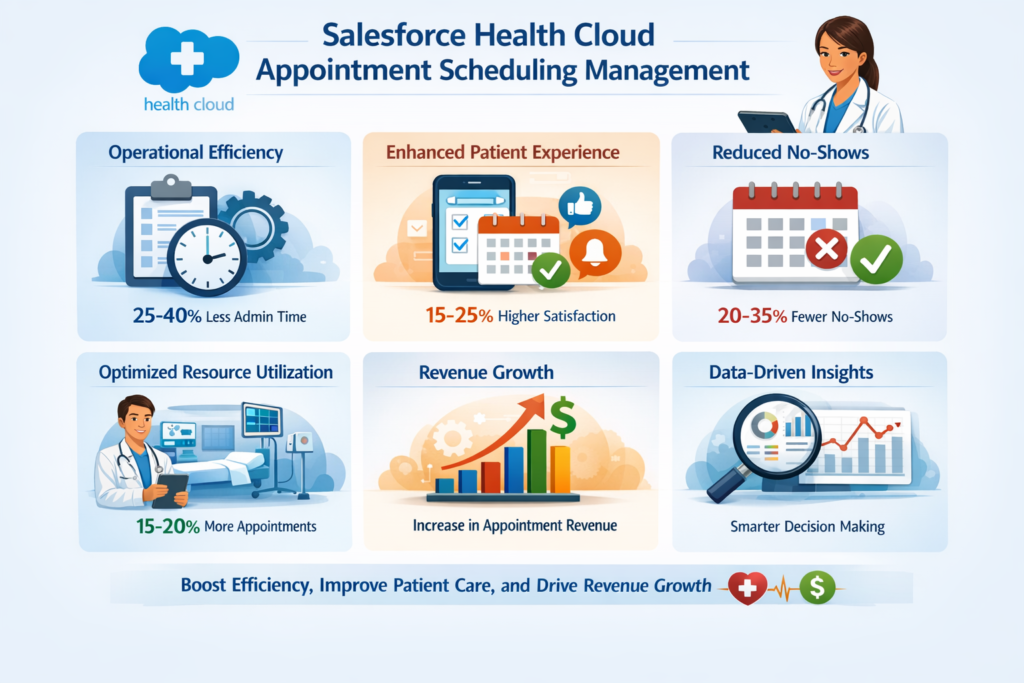
5.1 Operational Efficiency
Manual scheduling is labor-intensive. Staff members spend hours each week fielding calls, managing calendars, resolving conflicts, and sending reminders — time that could be spent on higher-value activities.
An automated appointment management system handles these tasks programmatically. The result is a dramatic reduction in administrative labor hours, elimination of scheduling errors, and a faster, smoother scheduling process for everyone involved.
Quantifiable impact: Organizations typically report 25–40% reductions in time spent on scheduling administration after implementing a Salesforce scheduling solution.
5.2 Improved Customer Experience
Today’s customers expect digital, self-service options. They want to book appointments at 11 PM on a Sunday without calling a phone line during business hours. They want reminders they can act on. They want the ability to reschedule easily if plans change.
A Salesforce appointment scheduling application delivers all of this — and because it lives within Salesforce, every customer interaction is informed by complete historical context. Customers feel known and valued, not like just another booking in a system.
Quantifiable impact: Self-scheduling options and automated communication typically improve customer satisfaction (CSAT) scores by 15–25%.
5.3 Reduced No-Show and Cancellation Rates
Every no-show represents lost revenue. Every last-minute cancellation that cannot be backfilled is a cost with no corresponding benefit. Automated reminders, easy rescheduling options, and waitlist management combine to minimize the revenue impact of appointment attrition.
Quantifiable impact: Businesses report 20–35% reductions in no-show rates following the implementation of automated reminder and waitlist management systems.
5.4 Maximized Resource Utilization
Idle resources are expensive. Whether it is an idle technician, an empty consultation room, or an unused equipment asset, under-utilization represents direct cost with no corresponding revenue. Intelligent scheduling and capacity management ensure that available slots are filled and resources are deployed effectively.
Quantifiable impact: Field service organizations using intelligent Salesforce scheduling solutions commonly report 15–20% increases in appointments completed per resource per day.
5.5 Revenue Growth
More efficient scheduling means more appointments fulfilled. Fewer no-shows mean fewer revenue gaps. Better resource utilization means more output from the same fixed cost base. Combined, these effects translate directly to revenue growth without requiring additional headcount.
For businesses that generate revenue on a per-appointment basis, the financial impact of improving scheduling efficiency is direct and measurable.
5.6 Data-Driven Decision Making
With appointment data living inside Salesforce, leaders gain access to reporting capabilities that reveal patterns, opportunities, and problems that would otherwise be invisible. Which service types have the highest no-show rates? Which locations are running at capacity? Which time slots are consistently underutilized?
These insights enable proactive management decisions — adjusting staffing, introducing promotions to fill slow periods, or expanding capacity in high-demand areas.
6. Implementation Best Practices
Implementing an appointment management system in Salesforce is not simply a matter of turning on a feature. Successful implementations require thoughtful planning, clear requirements definition, and disciplined execution. Here is the RizeX Labs approach to getting it right:
6.1 Start with a Requirements Discovery Process
Before selecting a Salesforce scheduling app or beginning custom development, conduct a thorough discovery process that maps your current scheduling workflows, identifies pain points, defines required features, and establishes success metrics.
Key questions to answer during discovery:
- What types of appointments do we manage, and what are their specific requirements?
- Who schedules appointments — customers, staff, or both?
- What resources need to be coordinated for each appointment type?
- What data does each appointment need to capture?
- What downstream processes does a completed appointment trigger?
- What does success look like, and how will we measure it?
Skipping this step is the single most common cause of failed scheduling implementations. Without a clear requirements baseline, you risk building or configuring a system that solves the wrong problem.
6.2 Choose the Right Approach: AppExchange vs. Custom Build
Salesforce offers multiple paths to appointment management capability:
AppExchange Solutions: Applications like Salesforce Scheduler (formerly Lightning Scheduler), Vonage Meetings, or industry-specific scheduling apps provide pre-built functionality that can be configured to your needs. These solutions are faster to deploy and lower in initial cost, but may have limitations in highly specialized scenarios.
Custom Development: For organizations with unique or complex scheduling requirements, custom Salesforce development using Apex, Lightning Web Components, and Flow Builder allows for a fully tailored solution. This approach requires more time and investment but delivers a solution that fits your business precisely.
Hybrid Approach: Many organizations benefit from a hybrid model — using a base AppExchange solution for standard scheduling functions while building custom extensions to handle unique requirements.
RizeX Labs recommends evaluating AppExchange options first. If a pre-built solution covers 80% or more of your requirements, it is almost always the faster and more cost-effective path. Custom development should be reserved for the gaps that the pre-built solution cannot fill.
6.3 Map Your Data Model Early
Appointment management touches multiple Salesforce objects — Contacts, Accounts, Cases, Opportunities, Custom Objects, and more. Define your data model early in the project to ensure that appointments are connected to the right records and that reporting relationships are established correctly.
Consider:
- What Salesforce objects will appointments be related to?
- What custom fields are needed on the appointment object?
- How will historical appointment data be migrated into the new system?
- What data will need to sync with external systems?
6.4 Design Automation Workflows Before Building
Before writing a single line of code or configuring a single flow, document all the automated actions that should occur at each point in the appointment lifecycle. This includes:
- Confirmation emails and SMS messages
- Reminder sequences and timing
- Calendar invites and updates
- Status updates on related records
- Post-appointment follow-up tasks
- Escalation triggers for missed appointments
Having these workflows documented in advance ensures that the build phase is efficient and that no automation requirements are discovered late — when changes are expensive.
6.5 Prioritize the User Experience for Both Staff and Customers
The best scheduling system in the world will fail if staff find it cumbersome to use or customers find the self-scheduling experience confusing. Invest time in UX design:
For staff: Ensure that appointment management interfaces are embedded logically in the workflows they already use. A service rep should not have to navigate to five different Salesforce screens to schedule an appointment — it should be accessible from the relevant record with minimal clicks.
For customers: Test the self-scheduling experience from the customer’s perspective. It should be intuitive, mobile-friendly, and fast. Remove unnecessary fields and steps. Make rescheduling and cancellation just as easy as booking.
6.6 Integrate with Existing Calendar Systems
If your team uses Google Calendar or Microsoft Outlook, bidirectional integration with Salesforce is essential. Staff members will not adopt a Salesforce scheduling solution that requires them to maintain two separate calendars.
Salesforce offers native integration capabilities with both Google Calendar and Outlook through Salesforce Inbox and Einstein Activity Capture. Ensure these integrations are configured and tested before go-live.
6.7 Conduct Thorough Testing
Testing for a scheduling application must go beyond functional testing. It should include:
- Load testing — how does the system perform when multiple users are booking simultaneously?
- Edge case testing — what happens when a resource is double-booked, when a customer books in a different time zone, or when an appointment is rescheduled at the last minute?
- Integration testing — do notifications send correctly? Do calendar updates sync in both directions? Do related records update as expected?
- User acceptance testing — do actual end users find the system intuitive and effective?
6.8 Plan for Training and Change Management
Technology is only as effective as the people using it. A comprehensive training program — tailored to different user roles — is essential for adoption. Administrators need deep system knowledge. Staff schedulers need workflow-specific training. Managers need to know how to access and interpret reports.
Equally important is change management: communicating the benefits of the new system, addressing concerns, and creating feedback channels so that issues are surfaced and resolved quickly during the go-live period.
7. Common Mistakes to Avoid
Even well-intentioned implementations can go off track. Here are the most common mistakes organizations make when deploying an appointment management system in Salesforce — and how to avoid them:
Mistake 1: Treating Scheduling as an IT Project
Scheduling is a business process. It must be owned by business stakeholders, not just the IT or Salesforce team. If frontline schedulers, service managers, and customer experience leaders are not actively involved in the requirements and design process, the resulting system will not reflect operational reality.
Fix: Assign a business owner to the project. Involve frontline users in requirements discovery and user acceptance testing.
Mistake 2: Underestimating Data Migration Complexity
If your organization has historical appointment data in legacy systems, migrating it cleanly into Salesforce is more complex than it appears. Inconsistent data formats, missing fields, and duplicate records can cause significant problems.
Fix: Audit your existing data before migration. Establish data quality standards. Run data migration tests in a sandbox environment before production.
Mistake 3: Over-Automating on Day One
Automation is powerful, but building every possible automated workflow on day one creates a system that is difficult to troubleshoot and hard for users to understand. When something goes wrong (and it will), it is much harder to diagnose in a heavily automated environment.
Fix: Launch with core automation — confirmations, basic reminders, status updates — and add complexity incrementally as users become comfortable with the system.
Mistake 4: Ignoring Mobile Users
If your staff or customers primarily interact on mobile devices, a scheduling solution that is optimized only for desktop will fail in the field.
Fix: Test every user journey on mobile before go-live. Ensure that self-scheduling portals are mobile-responsive and that the Salesforce Mobile App experience is configured for field users.
Mistake 5: Not Establishing Baseline Metrics
Without baseline measurements of your current scheduling performance — no-show rates, scheduling time, utilization rates — you cannot demonstrate the ROI of the new system.
Fix: Measure your current state before implementation. Use those baselines to set targets and track progress post-launch.
Mistake 6: Neglecting Post-Launch Optimization
Many organizations treat go-live as the finish line. It is actually the starting line. Real-world usage will reveal inefficiencies, edge cases, and improvement opportunities that were not visible during design.
Fix: Build a 90-day post-launch review into your project plan. Collect user feedback systematically. Establish a continuous improvement cycle for the scheduling system.
8. How RizeX Labs Approaches Appointment Scheduling Solutions
At RizeX Labs, we have implemented Salesforce scheduling solutions for organizations across healthcare, professional services, field operations, and government. Our approach is defined by three principles:
Business First: We start by understanding your business — your workflows, your customers, your pain points, and your goals. Technology decisions follow business requirements, not the other way around.
Right-Sized Solutions: We do not believe in over-engineering. We assess what you truly need, recommend the most appropriate path (AppExchange, custom build, or hybrid), and build a solution that fits your current needs while being scalable for the future.
Partnership, Not Projects: Our relationship does not end at go-live. We provide ongoing support, optimization recommendations, and platform expertise to ensure that your scheduling solution continues to deliver value as your business evolves.
Our Salesforce appointment scheduling implementations typically include:
- Discovery and requirements workshops with key stakeholders
- Solution design documentation covering data model, automation flows, and integration requirements
- Agile build and testing cycles with regular stakeholder reviews
- User training programs tailored to each role
- Post-launch support and optimization over the first 90 days
Whether you are starting from scratch or looking to optimize an existing Salesforce scheduling configuration, RizeX Labs brings the expertise and methodology to deliver a solution that drives real business impact.
9. Conclusion: Scheduling as a Competitive Advantage
Appointment management may not be the first thing that comes to mind when business leaders think about competitive advantage. But in a business environment where customer experience is increasingly the primary differentiator, the ability to schedule smoothly, reliably, and intelligently is a direct expression of how much you value your customers’ time.
An inefficient scheduling process sends an implicit message: We are difficult to work with. A streamlined, automated, customer-centric Salesforce appointment scheduling experience sends the opposite message: We have our act together, and we respect your time.
The businesses that are winning in service-intensive industries are not winning solely on the strength of their core service offering. They are winning on the entire experience — from the moment a customer requests an appointment to the moment that appointment is followed up on. Every friction point in that journey is a risk to the relationship. Every moment of seamless experience is an investment in loyalty.
Building an appointment management system in Salesforce is not a technology project. It is a strategic investment in your customer relationships, your operational efficiency, and your revenue potential.
The platform is already in your hands. The tools exist. The data is there. What remains is the decision to connect them — and the expertise to do it right.
RizeX Labs is ready to help you make that connection.
About RizeX Labs
At RizeX Labs, we specialize in delivering advanced healthcare solutions powered by Salesforce Health Cloud. Our expertise combines deep technical knowledge, healthcare industry best practices, and real-world implementation experience to help organizations improve patient care, streamline operations, and ensure compliance.
We empower healthcare providers, payers, and life sciences organizations to transform fragmented systems into unified, intelligent care platforms—enabling personalized patient engagement, coordinated care, and better health outcomes.
Internal Linking Opportunities:
External Linking Opportunities:
- Salesforce official website
- Salesforce Health Cloud overview
- Salesforce documentation
- Salesforce AppExchange
- Healthcare interoperability standard (FHIR)
- HIPAA compliance guidelines
- MuleSoft (for healthcare integrations)
Quick Summary
Salesforce Health Cloud is a powerful healthcare CRM platform designed to provide a 360-degree view of patients, enabling organizations to deliver personalized, connected, and proactive care. It integrates clinical and non-clinical data from multiple systems, helping care teams make informed decisions faster.
With Health Cloud, healthcare organizations can improve patient engagement, enhance care coordination, ensure regulatory compliance, and reduce operational inefficiencies. As the healthcare ecosystem becomes more data-driven, adopting Health Cloud is essential for delivering modern, patient-centric care at scale.
Quick Summary
An appointment management system built on Salesforce transforms scheduling from a manual, error-prone task into a fully automated, data-driven business function. By connecting customers, resources, and time within a single platform, it eliminates double bookings, reduces no-shows through automated reminders, and improves overall operational efficiency. More importantly, it integrates scheduling with customer data, enabling smarter decisions, better service delivery, and higher customer satisfaction. Businesses that implement it correctly see measurable gains in productivity, resource utilization, and revenue — turning scheduling from a bottleneck into a competitive advantage.