
ServiceNow Business Rules Examples: A Complete Guide with Practical Code Samples
Are you looking to automate workflows, enforce data integrity, or create powerful server-side logic in ServiceNow? Understanding ServiceNow Business rules is essential for every developer and administrator working on the Now Platform.
In this comprehensive guide, we’ll explore everything you need to know about ServiceNow Business rules—from basic concepts to advanced implementation strategies. Whether you’re a beginner just starting your ServiceNow journey or an experienced developer seeking to refine your skills, this article provides actionable ServiceNow Business rule examples that you can implement immediately.
What Are ServiceNow Business Rules?
A Business rule is a server-side script that executes when a record is displayed, inserted, updated, deleted, or queried from a database table. Think of Business rules as automated gatekeepers that respond to database operations and enforce your organization’s business logic.
Why Are Business Rules Important?
Business rules serve as the backbone of ServiceNow automation, offering several critical capabilities:
- Data Validation: Ensure data integrity before records are saved
- Automated Field Population: Auto-fill fields based on specific conditions
- Cross-Table Updates: Modify related records across multiple tables
- Workflow Triggering: Initiate complex processes based on record changes
- Security Enforcement: Implement row-level security and access controls
- Integration Support: Prepare data for external system integrations
Pro Tip: Understanding when and how to use a ServiceNow Business rule effectively can dramatically improve your instance’s performance and maintainability.
Types of Business Rules
ServiceNow categorizes Business rules into four distinct types based on their execution timing and capabilities. Mastering these types is crucial for implementing the right ServiceNow Business rule for your specific use case.
1. Before Business Rules
Before Business rules execute before the database operation occurs. They’re ideal for:
- Validating data before saving
- Setting field values
- Preventing record operations with
current.setAbortAction(true) - Modifying the
currentobject
Execution Context: Server-side, before database commit
2. After Business Rules
After Business rules run immediately after the database operation completes. Use them for:
- Creating related records
- Sending notifications
- Updating parent/child records
- Logging audit information
Execution Context: Server-side, after database commit
3. Async Business Rules
Async Business rules execute asynchronously in the background, making them perfect for:
- Long-running operations
- External integrations
- Bulk updates that shouldn’t delay user response
- Non-critical processing tasks
Execution Context: Scheduled job queue, separate transaction
4. Display Business Rules
Display Business rules execute when a form loads and can pass data to the client side. They’re useful for:
- Setting
g_scratchpadvariables - Calculating values for display
- Preparing client-side data
Execution Context: Server-side, on form load only
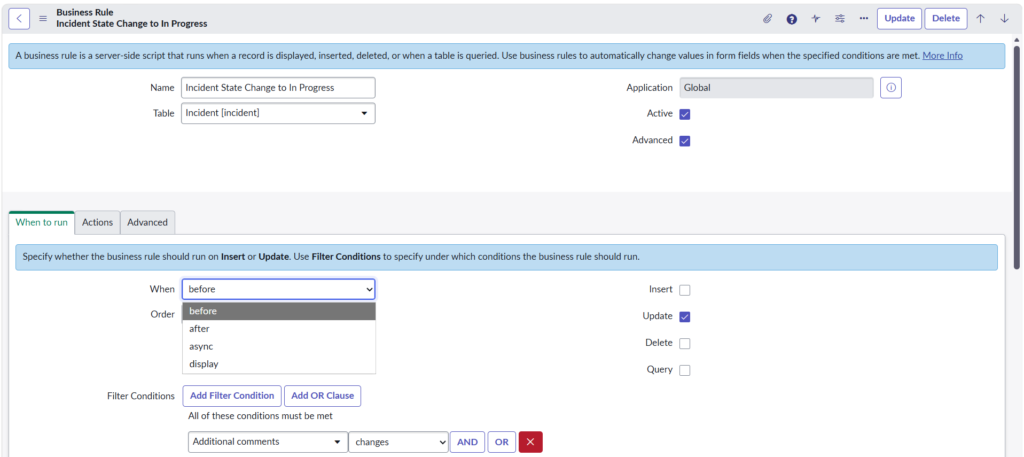
Understanding Business Rule Triggers
Every ServiceNow Business rule responds to specific database operations. Understanding these triggers is fundamental to creating effective automation.
| Trigger | When It Fires | Common Use Cases |
|---|---|---|
| Insert | New record creation | Default value assignment, notifications |
| Update | Existing record modification | Field change tracking, cascading updates |
| Delete | Record deletion | Cleanup tasks, referential integrity |
| Query | Database query execution | Row-level security, data filtering |
Trigger Combinations
You can configure a single ServiceNow Business rule to respond to multiple triggers. For example, a rule might execute on both insert and update operations to ensure consistent data handling.
Practical ServiceNow Business Rule Examples
Let’s dive into real-world ServiceNow Business rule examples that you can adapt for your organization’s needs.
Example 1: Auto-Populate Assignment Group Based on Category
Use Case: Automatically assign incidents to the appropriate support group based on the selected category.
Table: Incident
Type: Before Insert, Before Update
JavaScript:(function executeRule(current, previous /*null when async*/) {
// ServiceNow Business rule: Auto-populate assignment group
// Triggers on category change
if (current.category.changesTo('network')) {
current.assignment_group.setDisplayValue('Network Support');
} else if (current.category.changesTo('hardware')) {
current.assignment_group.setDisplayValue('Hardware Support');
} else if (current.category.changesTo('software')) {
current.assignment_group.setDisplayValue('Software Support');
}
})(current, previous);
Key Points:
- Uses
changesTo()method to detect field value changes - Executes before the record saves
setDisplayValue()resolves the reference field automatically
Example 2: Prevent Incident Closure Without Resolution Notes
Use Case: Enforce data quality by requiring resolution notes before closing incidents.
Table: Incident
Type: Before Update
JavaScript(function executeRule(current, previous /*null when async*/) {
// ServiceNow Business rule: Validate resolution notes
// Prevents closure without documentation
var closedStates = [6, 7]; // Resolved, Closed
if (closedStates.indexOf(parseInt(current.state)) !== -1) {
if (current.close_notes.nil()) {
current.setAbortAction(true);
gs.addErrorMessage('Please provide resolution notes before closing this incident.');
}
}
})(current, previous);
Key Points:
- Uses
setAbortAction(true)to prevent the save operation gs.addErrorMessage()provides user feedbacknil()method checks for empty values
Example 3: Create Child Tasks from Parent Request
Use Case: Automatically generate standard tasks when a new service request is created.
Table: Requests
Type: After Insert
JavaScript(function executeRule(current, previous /*null when async*/) {
// ServiceNow Business rule: Create child tasks
// Generates standard workflow tasks
var taskTemplates = [
{short_description: 'Review request details', order: 100},
{short_description: 'Gather requirements', order: 200},
{short_description: 'Implement solution', order: 300},
{short_description: 'Verify completion', order: 400}
];
for (var i = 0; i < taskTemplates.length; i++) {
var task = new GlideRecord('sc_task');
task.initialize();
task.parent = current.sys_id;
task.request = current.sys_id;
task.short_description = taskTemplates[i].short_description;
task.order = taskTemplates[i].order;
task.assignment_group = current.assignment_group;
task.insert();
}
gs.info('Created ' + taskTemplates.length + ' tasks for request: ' + current.number);
})(current, previous);
Key Points:
- Uses After Business rule because parent record must exist first
- Loops through template array for scalability
- Logs information for debugging purposes
Example 4: Send VIP Notification for High-Priority Incidents
Use Case: Immediately notify managers when VIP users submit high-priority incidents.
Table: Incident
Type: Async (After Insert)
JavaScript(function executeRule(current, previous /*null when async*/) {
// ServiceNow Business rule: VIP notification
// Async execution for performance optimization
var caller = new GlideRecord('sys_user');
if (caller.get(current.caller_id)) {
if (caller.vip == true && current.priority <= 2) {
// Trigger event for notification
gs.eventQueue('incident.vip.created', current,
caller.manager.getDisplayValue(),
current.short_description);
// Update incident to flag VIP handling
var incident = new GlideRecord('incident');
if (incident.get(current.sys_id)) {
incident.work_notes = 'VIP caller identified. Manager notification sent.';
incident.update();
}
}
}
})(current, previous);
Key Points:
- Async execution doesn’t delay the user interface
- Uses event queue for notification triggering
- Checks VIP status and priority combination
Example 5: Calculate SLA Breach Risk Score
Use Case: Dynamically calculate and display a risk score based on SLA progress.
Table: Incident
Type: Display Business Rule
JavaScript(function executeRule(current, previous /*null when async*/) {
// ServiceNow Business rule: Calculate risk score
// Display rule for form loading
var riskScore = 0;
var riskLevel = 'Low';
// Check SLA records
var sla = new GlideRecord('task_sla');
sla.addQuery('task', current.sys_id);
sla.addQuery('active', true);
sla.query();
while (sla.next()) {
var percentage = parseFloat(sla.percentage);
if (percentage >= 90) {
riskScore += 40;
} else if (percentage >= 75) {
riskScore += 25;
} else if (percentage >= 50) {
riskScore += 10;
}
}
// Determine risk level
if (riskScore >= 60) {
riskLevel = 'Critical';
} else if (riskScore >= 40) {
riskLevel = 'High';
} else if (riskScore >= 20) {
riskLevel = 'Medium';
}
// Pass to client via g_scratchpad
g_scratchpad.riskScore = riskScore;
g_scratchpad.riskLevel = riskLevel;
})(current, previous);
Key Points:
- Uses
g_scratchpadto pass data to client scripts - Only executes when form loads (not on list views)
- Calculates composite score from multiple SLAs
Best Practices for Writing Business Rules
Creating efficient ServiceNow Business rules requires following established best practices. These guidelines will help you write maintainable, performant code.
1. Use Conditions Before Script
Always utilize the built-in condition builder before writing script logic:
textCondition: current.category == 'hardware' && current.priority <= 2
Why? Conditions are evaluated before the script loads, improving performance.
2. Minimize Database Operations
JavaScript// ❌ Bad: Multiple queries in a loop
for (var i = 0; i < items.length; i++) {
var gr = new GlideRecord('table');
gr.get(items[i]);
// Process
}
// ✅ Good: Single query with encoded query
var gr = new GlideRecord('table');
gr.addEncodedQuery('sys_idIN' + items.join(','));
gr.query();
while (gr.next()) {
// Process
}
3. Use current.operation() for Multi-Trigger Rules
JavaScript(function executeRule(current, previous) {
if (current.operation() == 'insert') {
// Insert-specific logic
} else if (current.operation() == 'update') {
// Update-specific logic
}
})(current, previous);
4. Implement Proper Error Handling
JavaScript(function executeRule(current, previous) {
try {
// Your business logic here
var result = performOperation();
if (!result.success) {
throw new Error(result.message);
}
} catch (ex) {
gs.error('Business Rule Error [' + current.getTableName() + ']: ' + ex.message);
gs.addErrorMessage('An error occurred. Please contact support.');
current.setAbortAction(true);
}
})(current, previous);
5. Document Your Code
JavaScript/**
* Business Rule: Auto-Assignment Handler
* Table: incident
* Trigger: Before Insert, Before Update
*
* Purpose: Automatically assigns incidents based on category and location
* Author: RizeX Labs Development Team
* Last Modified: 2026-01-15
*
* Dependencies:
* - Assignment Group table must have location field populated
* - Category-to-Group mapping in sys_properties
*/
(function executeRule(current, previous) {
// Implementation
})(current, previous);
6. Avoid Infinite Loops
JavaScript(function executeRule(current, previous) {
// Prevent recursive updates
if (current.update_count > 0 && current.update_count == previous.update_count) {
return;
}
// Or use setWorkflow(false) when updating records
var gr = new GlideRecord('incident');
if (gr.get(current.sys_id)) {
gr.setWorkflow(false); // Prevents Business rules from firing
gr.update();
}
})(current, previous);
7. Performance Optimization Checklist
| Practice | Description | Impact |
|---|---|---|
| Use Filter Conditions | Evaluate before script execution | High |
| Limit GlideRecord Queries | Reduce database calls | High |
| Choose Async When Possible | Don’t block user transactions | Medium |
| Avoid getValue() in Loops | Cache values outside loops | Medium |
| Use GlideAggregate | For count/sum operations | Medium |
Common Issues and Troubleshooting
Even experienced developers encounter challenges with ServiceNow Business rules. Here’s how to diagnose and resolve common issues.
Issue 1: Business Rule Not Firing
Symptoms: Expected automation doesn’t occur
Troubleshooting Steps:
- Check Active Flagtext
Navigate to: System Definition > Business Rules Verify: Active = true - Verify Conditions
- Test condition separately using Scripts – Background
- Ensure condition syntax is correct
- Confirm Table and Trigger
- Verify rule is on the correct table
- Check inheritance (rules on parent tables affect children)
- Check User Role Requirements
- Some rules have role conditions
- Test as the affected user
- Review Execution Order
- Check Order field (lower numbers execute first)
- Another rule might be aborting the action
Debug Script:
JavaScript// Add to beginning of your Business rule
gs.info('BR Debug - Firing: ' + current.getTableName() + ' | ' + current.operation() + ' | ' + current.sys_id);
Issue 2: Infinite Loop Detection
Symptoms: “Business rule recursion limit reached” error
Solution:
JavaScript(function executeRule(current, previous) {
// Method 1: Use recursion flag
if (current.u_processing_flag == true) {
return;
}
current.u_processing_flag = true;
// Your logic here
// Method 2: Use gs.setProperty for cross-rule communication
var lockKey = 'br_lock_' + current.sys_id;
if (gs.getProperty(lockKey) == 'true') {
return;
}
gs.setProperty(lockKey, 'true');
try {
// Your logic here
} finally {
gs.setProperty(lockKey, 'false');
}
})(current, previous);
Issue 3: Performance Degradation
Symptoms: Slow form loads or saves
Diagnosis:
- Enable Transaction Logging
- Review System Diagnostics > Stats
- Use Session Debug > Debug Business Rules
Common Fixes:
JavaScript// Before: Slow - Multiple queries
var total = 0;
var items = current.line_items.split(',');
for (var i = 0; i < items.length; i++) {
var item = new GlideRecord('item_table');
if (item.get(items[i])) {
total += parseFloat(item.price);
}
}
// After: Fast - Single aggregate query
var agg = new GlideAggregate('item_table');
agg.addQuery('sys_id', 'IN', current.line_items);
agg.addAggregate('SUM', 'price');
agg.query();
if (agg.next()) {
total = parseFloat(agg.getAggregate('SUM', 'price'));
}
Issue 4: Previous Object is Null
Symptoms: previous.field causes error on insert
Solution:
JavaScript(function executeRule(current, previous) {
// Always check for previous existence
if (previous && current.state != previous.state) {
// State changed
}
// Or use changes() method
if (current.state.changes()) {
// Works for both insert and update
}
})(current, previous);
Issue 5: Script Errors in Production
Debugging Strategy:
JavaScript(function executeRule(current, previous) {
var DEBUG = gs.getProperty('company.businessrule.debug') == 'true';
function debugLog(message) {
if (DEBUG) {
gs.info('[BR Debug] ' + message);
}
}
debugLog('Starting execution for: ' + current.number);
try {
// Your logic
debugLog('Step 1 complete');
} catch (ex) {
gs.error('Business Rule Exception: ' + ex.message + '\nStack: ' + ex.stack);
}
})(current, previous);
Troubleshooting Quick Reference
| Issue | First Check | Quick Fix |
|---|---|---|
| Rule not firing | Active checkbox | Enable rule |
| Wrong data | Condition field | Adjust filter |
| Performance | Number of queries | Use GlideAggregate |
| Null errors | previous object | Add null check |
| Recursion | setWorkflow() calls | Add recursion guard |
Frequently Asked Questions
What is the difference between a Business rule and a Script Include?
A ServiceNow Business rule is event-driven and automatically executes based on database operations. Script Includes are reusable code libraries that must be explicitly called. Use Business rules for automation triggered by record changes, and Script Includes for shared logic accessed by multiple scripts.
Can Business rules access session data?
Yes, Business rules execute in the server context and can access session information using gs.getSession(), gs.getUser(), and similar methods. However, avoid storing session-dependent logic that might cause issues in async rules.
How do I test a Business rule without affecting production data?
Use the following approaches:
- Test in a sub-production instance first
- Create test records with specific identifiers
- Add debug conditions that only fire for test users
- Use the Scripts – Background module to simulate record operations
What’s the maximum execution time for a Business rule?
Standard synchronous Business rules share the transaction timeout (typically 300 seconds). Async rules have their own timeout governed by system properties. For long-running operations, always use async Business rules.
Conclusion
Mastering ServiceNow Business rules is essential for any developer or administrator working on the Now Platform. From simple field auto-population to complex cross-table updates, Business rules provide the foundation for powerful automation that drives organizational efficiency.
Key Takeaways:
✅ Choose the right Business rule type (Before, After, Async, Display) based on your use case
✅ Leverage conditions before script for better performance
✅ Follow best practices to create maintainable, efficient code
✅ Implement proper error handling and logging
✅ Use the troubleshooting techniques to quickly diagnose issues
Ready to Elevate Your ServiceNow Development?
At RizeX Labs, we specialize in ServiceNow implementation, customization, and optimization. Our certified developers have implemented hundreds of ServiceNow Business rules for organizations across industries.
How We Can Help:
🔧 Custom Development: Tailored Business rules for your specific workflows
📊 Performance Optimization: Audit and improve existing scripts
🎓 Training Programs: Upskill your team on ServiceNow best practices
🔍 Code Review Services: Ensure your Business rules follow standards
Let’s transform your ServiceNow instance into a high-performance automation powerhouse.