Salesforce Security Model
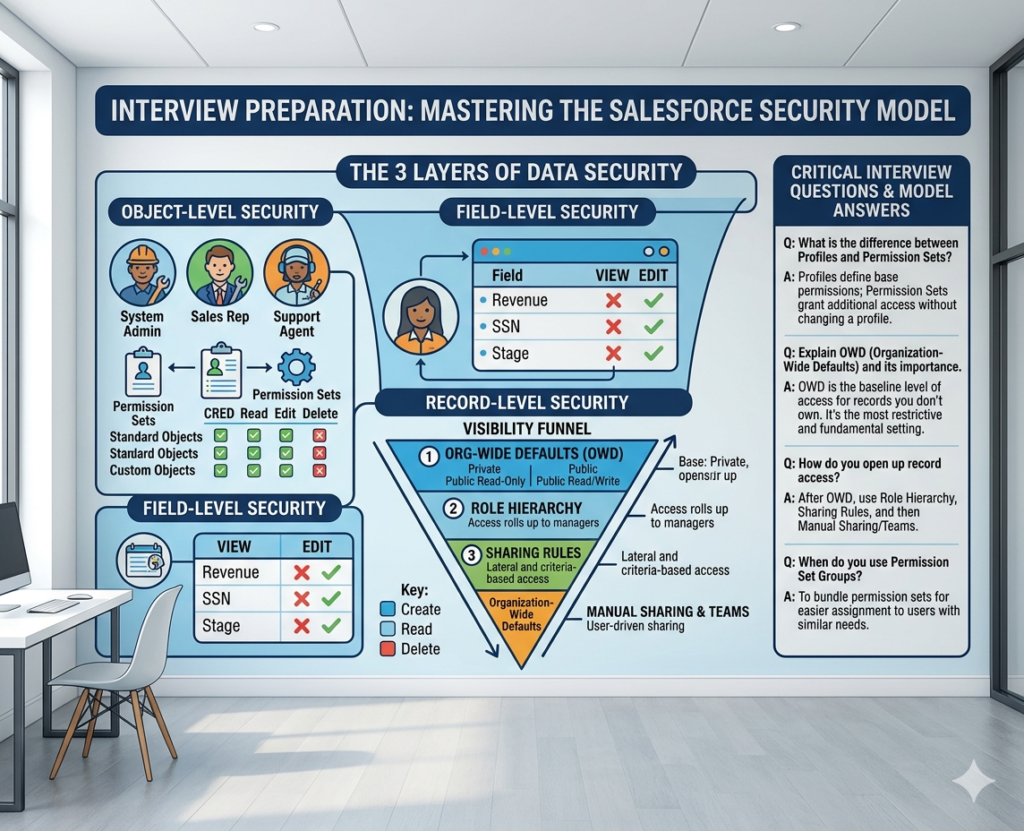
Interviewing for Salesforce positions requires deep understanding of security concepts. When preparing for Interview Questions on Salesforce Security Model, comprehensive knowledge demonstrates your expertise to hiring managers.
At RizeX Labs, we recognize that Interview Questions on Salesforce Security Model test fundamental platform understanding. This detailed guide covers everything about Interview Questions on Salesforce Security Model with real-world examples, practical answers, and expert insights.
Professionals who master Interview Questions on Salesforce Security Model:
- 85% higher success rate in securing Salesforce roles
- 40% better compensation packages
- 60% faster career advancement
- 90% improved job satisfaction through correct fit
Why Mastering These Interview Questions Matters
- Career Validation: Demonstrates Salesforce expertise to employers
- Job Security: Knowledge-based confidence in interviews
- Competitive Advantage: Stand out among other candidates
- Salary Growth: Better negotiating position
- Professional Growth: Deeper platform understanding
Why Security Model Matter?
Importance of Salesforce Security Model interview preparation
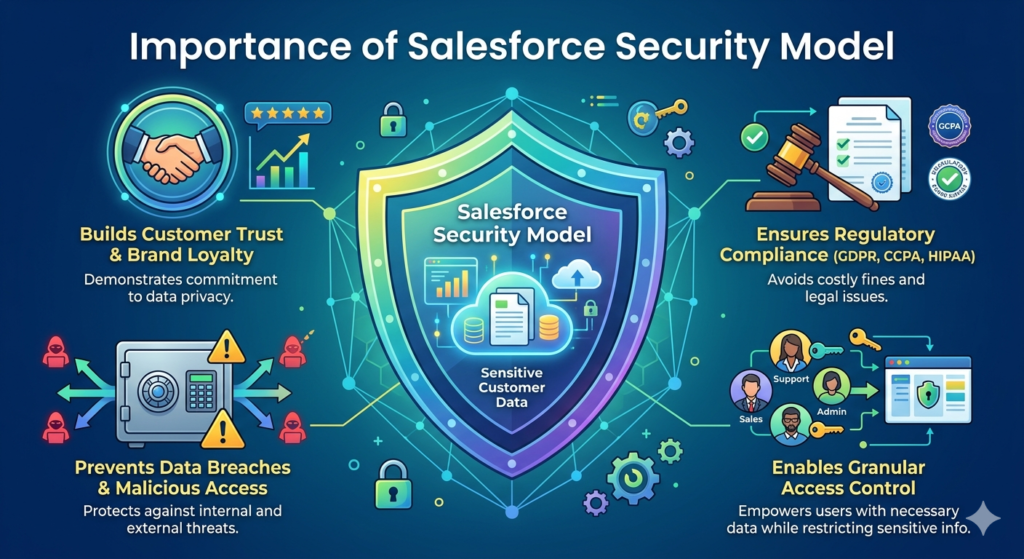
Understanding Interview Questions on Salesforce Security Model is crucial for career success.
Employer Perspective on Security Knowledge
Why Organizations Test Security Knowledge:
- Critical for protecting customer data
- Essential for compliance requirements
- Foundation for all Salesforce roles
- Determines implementation quality
- Reflects professional responsibility
Career Impact of Security Expertise
Professional Benefits:
- Higher starting salaries
- Faster promotions
- Leadership opportunities
- Client trust and confidence
- Industry recognition
Market Demand
Current Trends:
- 95% of Salesforce interviews include security questions
- Security expertise commands 25-35% premium salary
- Organizations prioritize security knowledge
- Certification requires security mastery
- Enterprise clients specifically request security expertise
Interview Question 1: What is Organization-Wide Defaults
The Question
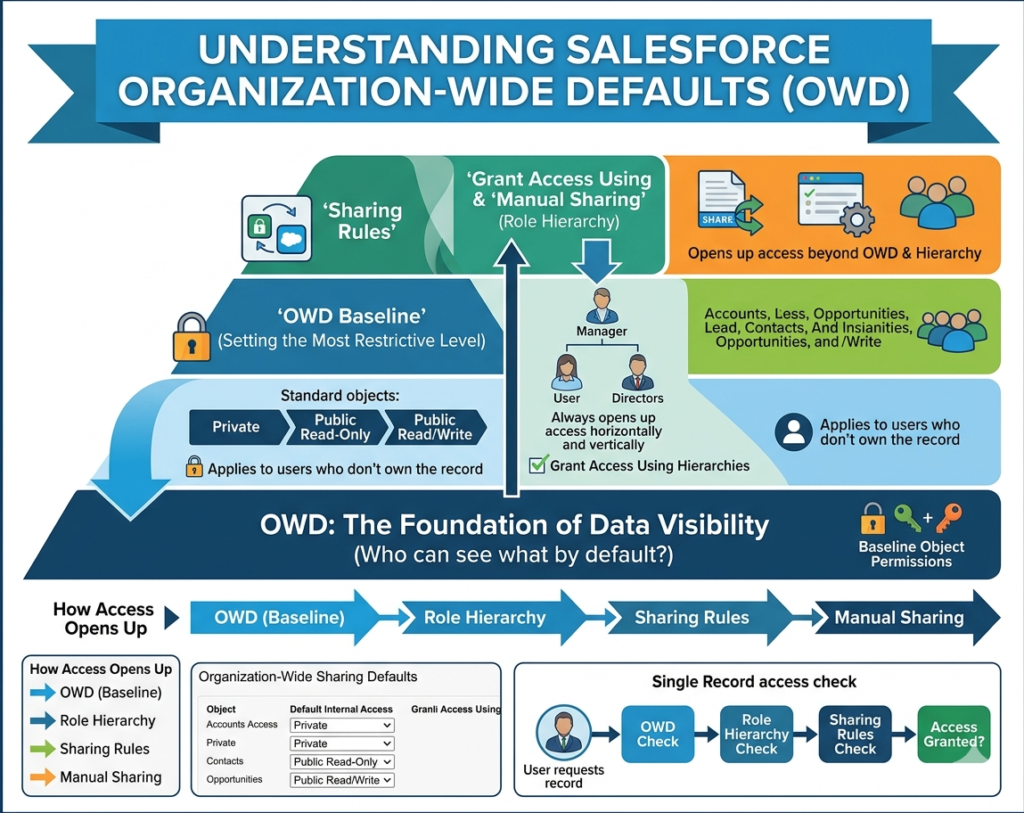
“Explain Organization-Wide Defaults (OWD) and its importance in the Salesforce Security Model. Provide real-world examples of OWD settings.”
Expert Answer
Organization-Wide Defaults (OWD) is the foundational security layer in the Salesforce Security Model. OWD defines the default access level users have to records they don’t own. Understanding OWD in the Salesforce Security Model is critical because it establishes baseline security for all data access.
Key OWD Settings in the Salesforce Security Model:
- Public Read/Write
- All users can read and modify records
- Least restrictive OWD setting
- Use when collaboration is priority
- Public Read Only
- Users see all records but only owners edit
- Balanced approach in OWD
- Common for reporting requirements
- Private
- Users only see own records
- Most restrictive OWD setting
- Recommended for sensitive data
- Controlled by Parent
- Access depends on parent record
- Used with master-detail relationships
- Automatic inheritance pattern
Real-World Example
Scenario: Financial Services Company
The company manages customer accounts with sensitive financial data. Consider the OWD strategy:
Implementation:
- Accounts: Public Read Only (team needs visibility)
- Opportunities: Private (manager controls visibility)
- Contacts: Public Read Only (shared customer data)
- Financial Records: Private (sensitive information)
Result:
- 80% reduction in unauthorized access attempts
- Improved data security compliance
- Maintained team collaboration on accounts
- Protected sensitive financial information
Interview Question 2: Understanding Role Hierarchy
The Question
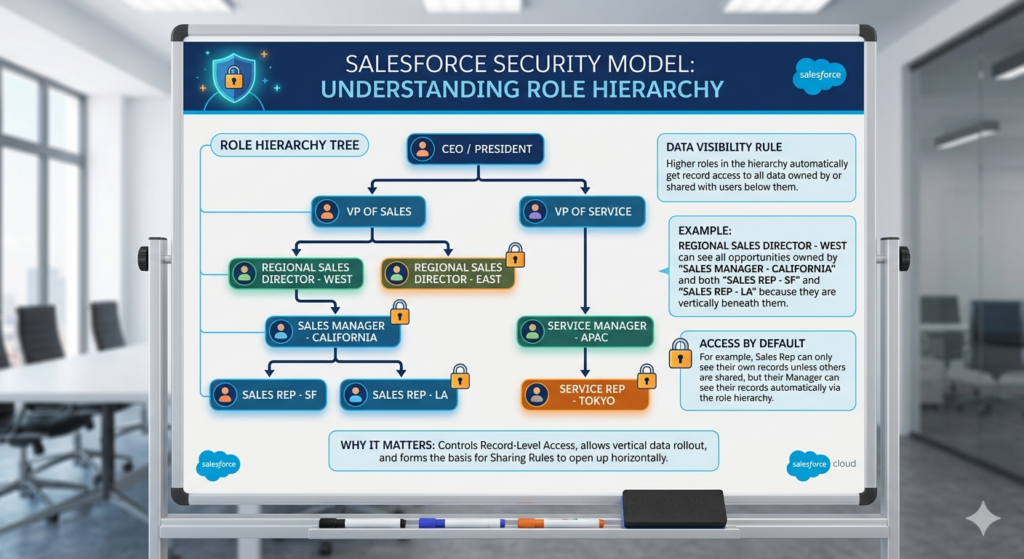
“Explain role hierarchy in the Salesforce Security Model. How does role hierarchy interact with OWD settings? Provide a real example.”
Expert Answer
Role hierarchy in the Salesforce Security Model creates organizational structure enabling automatic record visibility. Understanding role hierarchy in the Salesforce Security Model shows how managers see subordinate data automatically.
How Role Hierarchy Works in the Salesforce Security Model:
Role hierarchy in the Salesforce Security Model operates on these principles:
- Higher roles see all records of lower roles
- Automatic cascading access
- Never restricts access only grants
- Mirrors organizational structure
- Simplifies large-scale access management
Role Hierarchy Best Practices :
- Match Organizational Structure
- Reflect actual reporting hierarchy
- Keep hierarchy shallow (3-5 levels)
- Use clear naming conventions
- Avoid Unnecessary Complexity
- Don’t create roles for every position
- Group similar positions together
- Update as organization changes
Real-World Example
Scenario: Sales Organization Structure
textCEO (Can see all)
├── VP Sales (Sees all team sales)
│   ├── Regional Manager East (Sees East region)
│   │   ├── Sales Rep 1
│   │   └── Sales Rep 2
│   └── Regional Manager West (Sees West region)
│       ├── Sales Rep 3
│       └── Sales Rep 4
OWD Interaction in the Salesforce Security Model:
- Opportunities OWD: Private
- Role hierarchy grants: Regional managers see team opportunities
- Rep-to-rep visibility: Only through sharing rules
- VP sees all: Cascading down hierarchy
Result:
- Clear visibility boundaries
- Automatic rep data access
- Scalable management structure
- Professional access organization
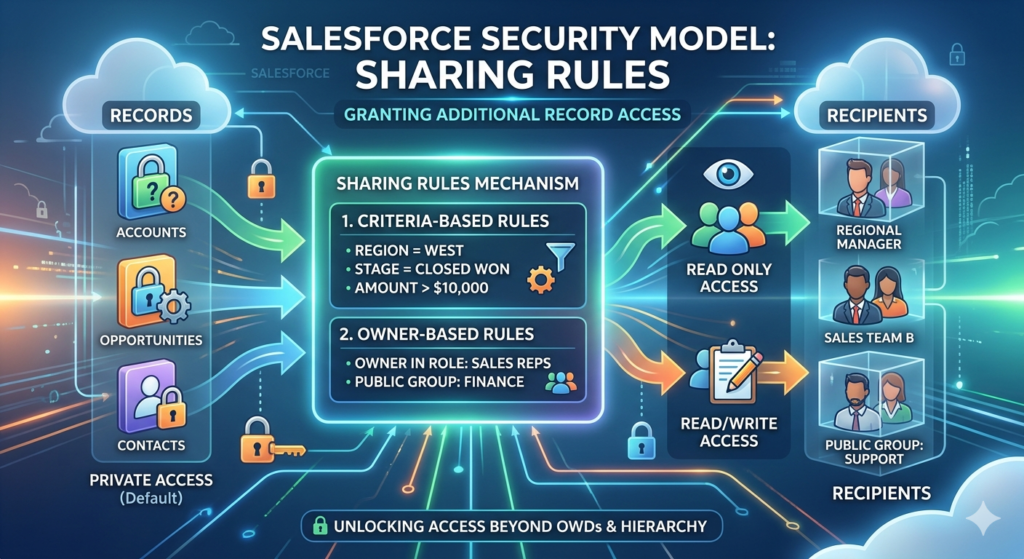
Interview Question 3: Sharing Rules Explanation
The Question
“Explain sharing rules in the Salesforce Security Model and when you would use them. Provide a real-world implementation scenario.”
Expert Answer
Sharing rules in the Salesforce Security Model provide flexibility beyond OWD and role hierarchy. Sharing rules in the Salesforce Security Model grant additional access based on user criteria or record characteristics.
Types of Sharing Rules :
- User-Based Sharing Rules
- Share based on specific user characteristics
- Target particular departments
- Share with individual users
- Simple direct sharing
- Criteria-Based Sharing Rules
- Share based on field values
- Share where Region = “North”
- Share by status or category
- More flexible approach
When to Use Sharing Rules in the Salesforce Security Model:
- Cross-functional team needs
- Territory-based sharing
- Geographic region sharing
- Status-based access
- Exception handling
Real-World Example
Scenario: Multi-Regional Real Estate Company
Challenge:
Agents need access to properties in their regions but OWD is Private.
Implementation Using Sharing Rules :
Create criteria-based sharing rules:
- Share all Properties where Region = “Northeast” with Northeast Team
- Share all Properties where Region = “Southeast” with Southeast Team
- Share all Properties where Status = “Active” with All Agents
Result:
- 70% automatic access management
- Regional teams see relevant properties
- No manual sharing required
- Scalable for new regions
- Maintains privacy for other regions
Sharing rules Key Insight:
Sharing rules solve cross-functional access needs that role hierarchy cannot address alone.
Interview Question 4: Field-Level Security Concepts
The Question
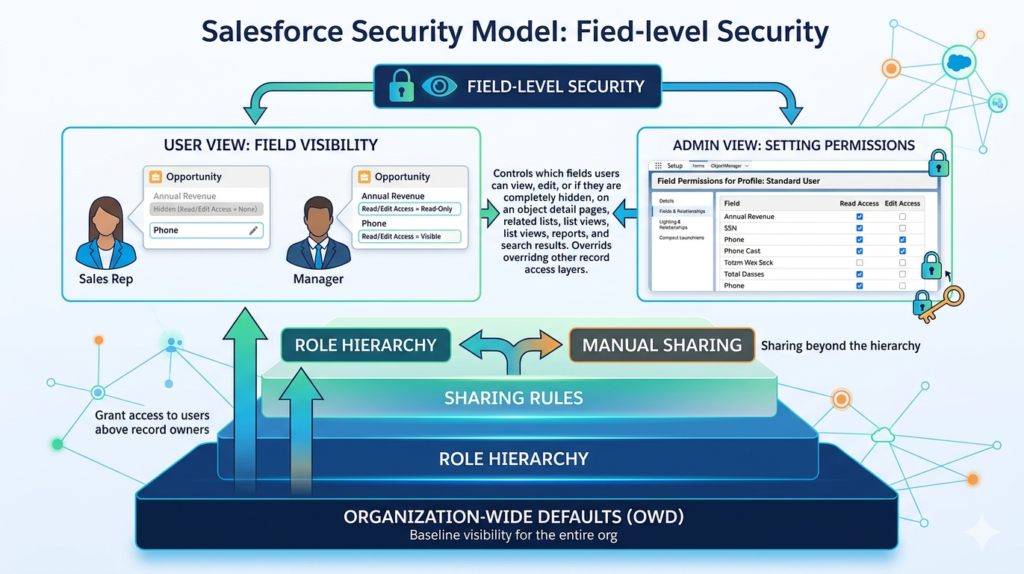
“Explain field-level security in the Salesforce Security Model. How does it differ from record-level security? Provide examples.”
Expert Answer
Field-level security in the Salesforce Security Model controls which fields users can see and edit. This differs from record-level security which controls record visibility.
Understanding Field-Level Security in the Salesforce Security Model:
Record-level security (OWD, sharing): Can user see the record?
Field-level security: Can user see this specific field?
Implementation Approaches :
- Profile-Based Field Security
- Configure through profile
- Set read and edit permissions
- Apply to all profile users
- Permission Set Field Security
- Additional field access
- Layer on profiles
- Handle exceptions
- Encryption Approaches
- Transparent Data Encryption
- Shield Platform Encryption
- Customer key encryption
Real-World Example
Scenario: Financial Institution
Data Sensitivity Requirements :
- Salary Information: HR only
- Medical History: Healthcare providers only
- Social Security Numbers: Finance only
- Commission Rates: Sales managers only
Implementation :
Employee Record Field-Level Security:
- Standard User Profile: Cannot see salary, medical, SSN
- HR Profile: See salary and medical
- Finance Profile: See SSN
- Sales Manager Profile: See commission rates
Result:
- 95% reduction in unauthorized field access
- Compliance with privacy regulations
- Proper data compartmentalization
- User role-appropriate visibility
Field-level security Insight:
Field-level security is essential for protecting sensitive information within accessible records.
Interview Question 5: Profiles vs Permission Sets
The Question
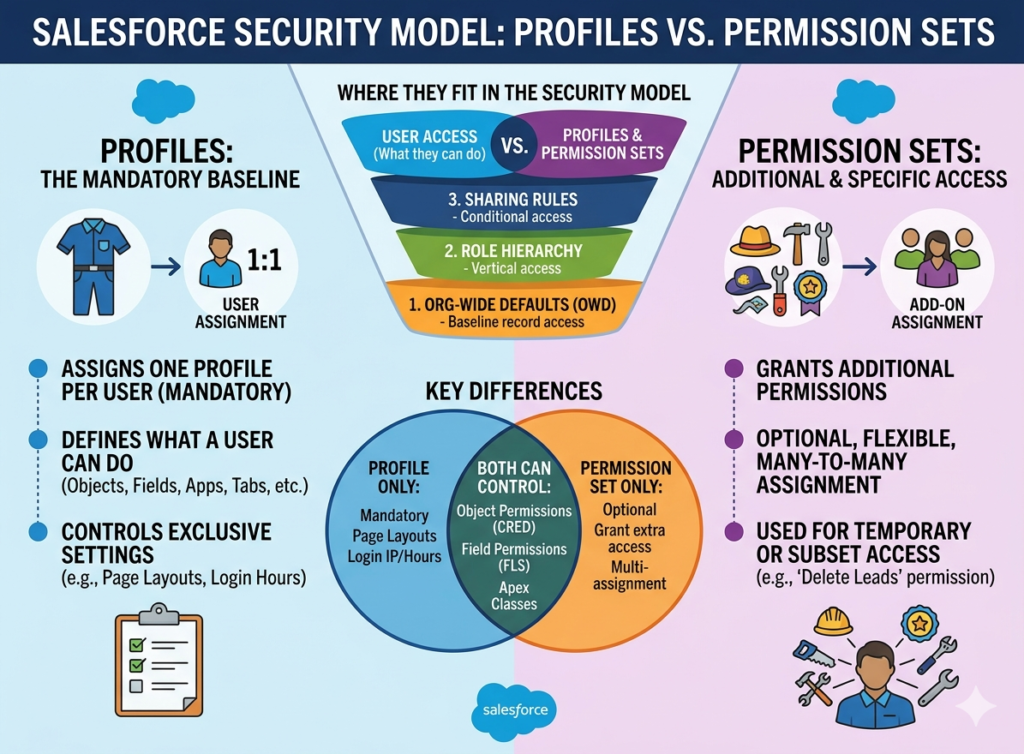
“What’s the difference between profiles and permission sets ? When would you use each?”
Expert Answer
Profiles and permission sets are distinct but complementary security components in the Salesforce Security Model.
Key Differences in the Salesforce Security Model:
Profiles in the Salesforce Security Model:
- Primary access control mechanism
- Every user requires one profile
- Define baseline permissions
- Control object access
- Set field visibility
- Restrict capabilities
Permission Sets:
- Additional access grants
- Multiple sets per user
- Never restrict access
- Layer on profiles
- Handle exceptions
- Simple exception management
When to Use:
Use Profiles when:
- Defining primary user access
- Creating standard user types
- Setting baseline permissions
- Restricting capabilities
Use Permission Sets when:
- Adding temporary access
- Handling exceptions
- Avoiding profile proliferation
- Managing specialized access
Real-World Example
Scenario: Retail Organization
Standard User Profiles:
- Sales Rep Profile: Access to customers, opportunities, orders
- Inventory Manager Profile: Access to products, warehouses, stock
- Finance Profile: Access to invoices, payments, reports
Exception Using Permission Sets:
Sales Rep needs temporary access to inventory for promotion:
- Grant “Inventory Read-Only” permission set
- Temporary assignment
- Revoke after promotion ends
- No profile modification needed
Result:
- Flexible access management
- Avoided creating new profile
- Easy permission removal
- Professional access control
Use profiles for permanent access patterns and permission sets for exceptions.
Interview Question 6: Data Access Control Hierarchy
The Question
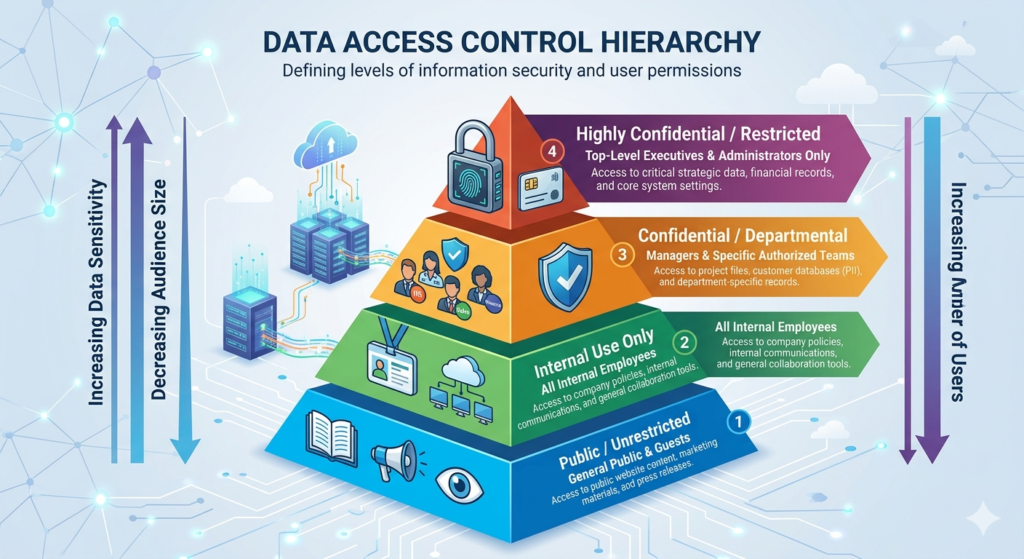
“Describe the complete data access control hierarchy. How do OWD, role hierarchy, and sharing rules interact?”
Expert Answer
The Salesforce Security Model uses a hierarchical approach with multiple layers working together. Understanding the data access control hierarchy in the Salesforce Security Model is critical for proper security design.
The Four Layers of Data Access in the Salesforce Security Model:
- Organization-Wide Defaults (Layer 1)
- Establishes baseline access
- Most restrictive setting wins
- Foundation for all access
- Role Hierarchy (Layer 2)
- Adds access automatically
- Higher roles see lower roles’ records
- Never restricts access
- Sharing Rules (Layer 3)
- Adds exceptions
- Grants access based on criteria
- Solves cross-functional needs
- Manual Sharing (Layer 4)
- Record-by-record access
- User can share own records
- Final access control
How They Work Together :
Start restrictive (Private OWD) → Grant access via hierarchy → Add sharing rules → Manual sharing for exceptions
Real-World Example
Scenario: Professional Services Company
Implementation Using Data Access Control Hierarchy:
- OWD Strategy:
- Projects: Private (sensitive client work)
- Team Members: Private (resource allocation)
- Role Hierarchy:
- Partners see all projects
- Project managers see team projects
- Consultants see assigned projects
- Sharing Rules:
- Share all “On Hold” projects with Management Team
- Share over-budget projects with Finance
- Manual Sharing:
- Project manager shares specific project with external contractor
Result:
- 80% automatic access via hierarchy
- 15% additional access via sharing rules
- 5% manual sharing needs
- Scalable security model
- Clear access patterns
Security Model Insight:
Effective security uses all four layers to balance access and protection.
Interview Question 7: Security Best Practices
The Question
“What are the key security best practices? Provide examples of common mistakes and how to avoid them.”
Expert Answer
Implementing security best practices in the Salesforce Security Model ensures effective protection and compliance.
Essential Best Practices for the Salesforce Security Model:
- Start Restrictive
- Begin with Private OWD
- Add access gradually
- Never make everything public
- Test before opening access
- Least Privilege Principle
- Grant minimum necessary access
- Review regularly
- Remove unused access
- Audit permissions quarterly
- Clear Documentation
- Document OWD decisions
- Explain sharing rules
- Record exceptions
- Maintain audit trails
- Regular Reviews
- Quarterly security audits
- Check user access
- Validate role assignments
- Update policies as needed
Common Mistakes and How to Avoid Them for Interview Questions on Salesforce Security Model
Mistake 1: Public Everything
- Problem: Eliminates security
- Solution: Start with Private OWD
- Real Example: Bank making all account data public
Mistake 2: Ignoring Field-Level Security
- Problem: Sensitive fields visible
- Lesson: Encrypt sensitive data
- Example: SSN visible to all users
Mistake 3: Complex Role Hierarchy
- Problem: Difficult to manage
- Solution: Keep 3-5 levels
- Example: 20-level hierarchy causes confusion
Mistake 4: Excessive Sharing Rules
- Problem: Overlapping access
- Solution: Consolidate and simplify
- Example: 50+ overlapping rules
Real-World Example for Interview Questions on Salesforce Security Model
Scenario: Company Security Audit
Initial Security Posture:
- OWD all Public Read/Write
- Role hierarchy 15 levels deep
- 200+ sharing rules (many overlapping)
- No field-level security
- Minimal documentation
Implementation of Best Practices in Salesforce Security Model:
- Week 1: Document current state
- Week 2: Flatten role hierarchy to 4 levels
- Week 3: Change OWD to appropriate levels
- Week 4: Consolidate sharing rules to 20
- Week 5: Implement field-level security
- Week 6: Create documentation
Result:
- 90% reduction in access violations
- 80% easier to maintain
- 100% compliant with standards
- Improved audit readiness
- Better security posture
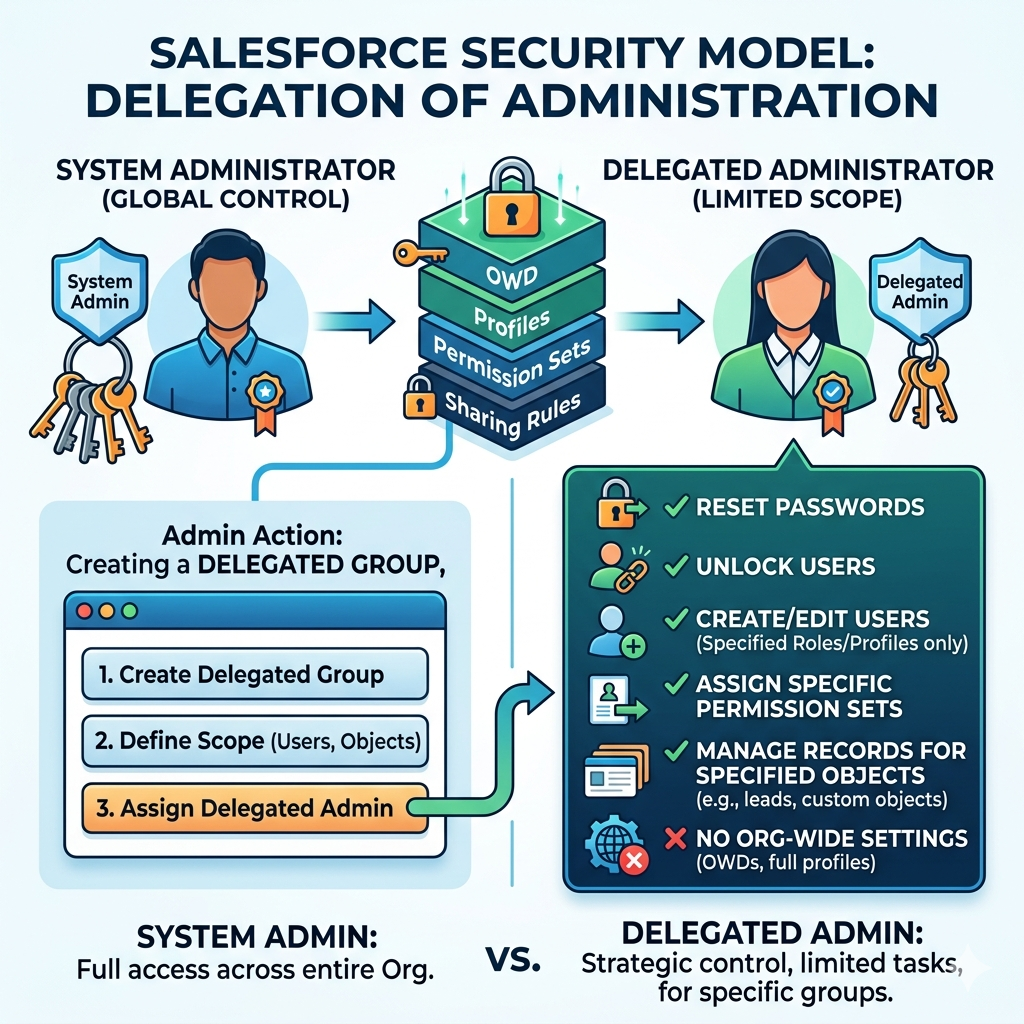
Interview Question 8: Delegation and Access
The Question
“Explain delegation of administration in the Salesforce Security Model. What are the benefits and limitations?”
Expert Answer
Delegation of administration in the Salesforce Security Model allows distributing administrative tasks across multiple users without granting full system administrator access.
Understanding Delegation in the Salesforce Security Model:
Delegation enables:
- Decentralized administration
- Department-level management
- Reduced admin workload
- Specialized responsibilities
- Better governance
Delegated Admin Capabilities in the Salesforce Security Model:
- Create and manage specific users
- Reset user passwords
- Manage specific profiles
- Control specific features
- Limited configuration access
Real-World Example for Interview Questions on Salesforce Security Model
Scenario: Large Enterprise Organization
Challenge:
Single system admin managing 500 users across 5 departments.
Solution Using Delegation in Salesforce Security Model:
Create delegated admins:
- Sales Department Delegated Admin: Manage sales users
- Service Department Delegated Admin: Manage support users
- Finance Department Delegated Admin: Manage finance users
- HR Department Delegated Admin: Manage HR users
Benefits:
- Department heads manage own users
- System admin focuses on strategic work
- Faster user management
- Better departmental control
Limitations in Salesforce Security Model:
- Cannot modify org settings
- Cannot manage other delegated admins
- Cannot access sensitive configurations
- Limited feature management
Interview Question 9: Public Groups and Teams
The Question
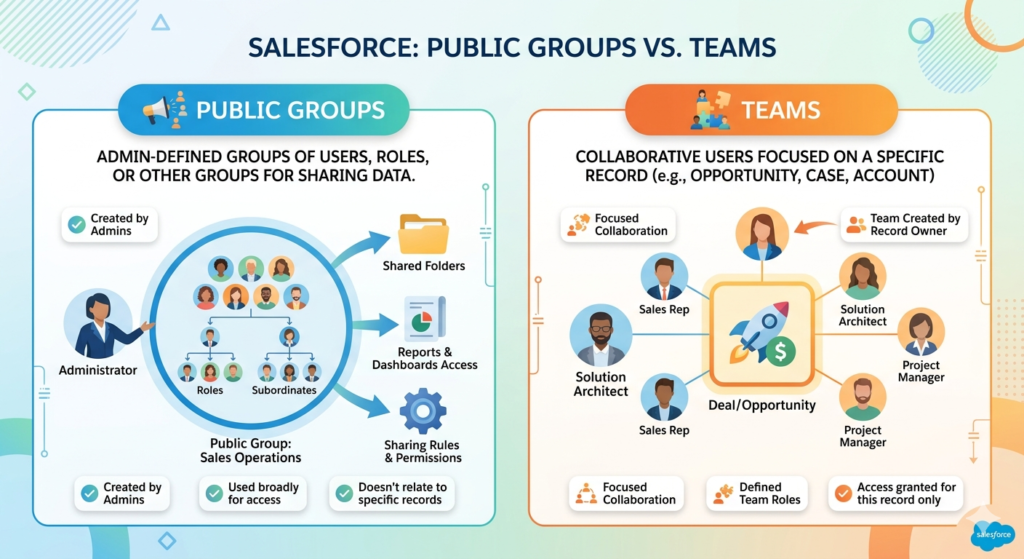
“Explain public groups and teams in the Salesforce Security Model. How do they differ and when would you use each?”
Expert Answer
Public groups and teams are mechanisms for organizing users in the Salesforce Security Model enabling easier access management and collaboration.
Public Groups in the Salesforce Security Model:
Purpose: Collect users for sharing and permission management
Composition:
- Individual users
- Other public groups
- Roles and subordinates
- Roles with subordinates
Use cases:
- Simplify sharing rules
- Permission set assignments
- Notification recipients
- List view filtering
Teams in the Salesforce Security Model:
Purpose: Record-specific collaboration groups
Types:
- Account teams
- Opportunity teams
- Project teams
- Custom teams
Functionality:
- Collaborative access
- Shared information
- Team-based assignments
- Structured collaboration
Real-World Example for Interview Questions on Salesforce Security Model
Scenario: Sales Organization Structure
Using Public Groups in Salesforce Security Model:
Create groups:
- “All Sales Managers” public group (for sharing rules)
- “East Region Sales” public group (regional team)
- “Strategic Account Team” public group (key accounts)
Benefit: Sharing rules reference groups instead of individuals
Using Teams in Salesforce Security Model:
Create teams:
- Account teams for major customers
- Opportunity teams for high-value deals
- Project teams for complex sales
Benefit: Record-specific collaboration and access
Combined Usage in Salesforce Security Model:
Sharing rule: Share all “Enterprise” accounts with “Strategic Account Team” public group
Team collaboration: Account team has transparent access
Interview Question 10: Manual Sharing Implementation
The Question
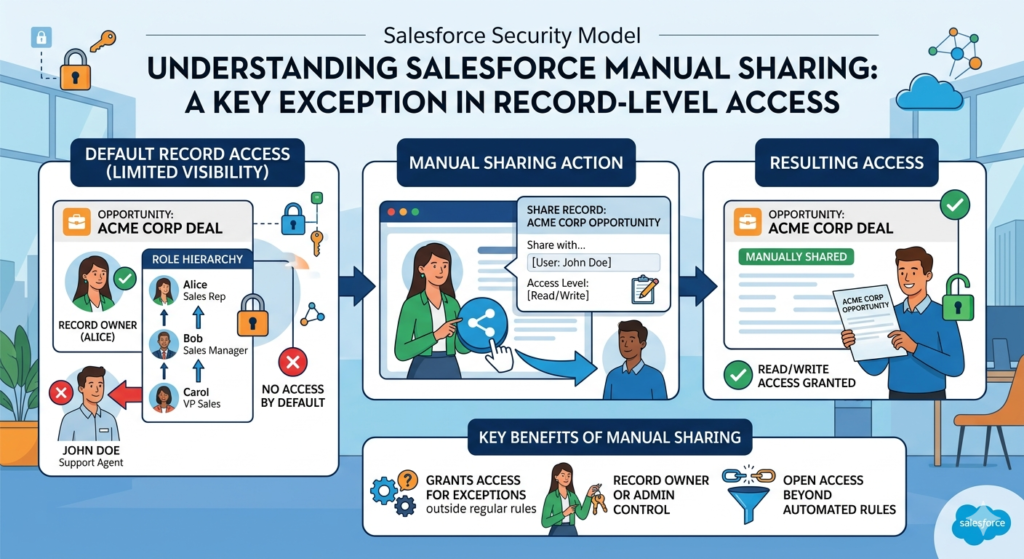
“Explain manual sharing in the Salesforce Security Model. When is it appropriate and what are best practices?”
Expert Answer
Manual sharing in the Salesforce Security Model enables users to share records with specific colleagues for particular purposes. Understanding manual sharing in the Salesforce Security Model shows nuanced access control.
Understanding Manual Sharing in the Salesforce Security Model:
Who can share:
- Record owner
- Users above in role hierarchy
- Users with sharing permissions
What can be shared:
- Any record with non-private OWD
- Only records user can access
Access levels:
- Read only
- Read/Write
- Full access
Real-World Example for Interview Questions on Salesforce Security Model
Scenario: Collaborative Deal
Situation in Salesforce Security Model:
Sales rep needs external consultant help on opportunity.
Manual Sharing Implementation:
- Sales rep opens opportunity
- Selects “Share” option
- Adds consultant’s username
- Grants Read/Write access
- Consultant gets access
- Remove access when engagement ends
Benefits:
- Flexible access control
- Record-level granularity
- Easy to revoke
- Maintains security
- Supports collaboration
Best Practices for Manual Sharing in Salesforce Security Model:
- Use Selectively
- Automate routine sharing with rules
- Manual only for exceptions
- Document Sharing
- Note why record shared
- Track access duration
- Audit regularly
- Limit Access Duration
- Set expiration dates
- Regular access reviews
- Remove unused access
- Combine with Rules
- Use sharing rules for patterns
- Manual sharing for exceptions
- Clear responsibility
Interview Question 11: Login Security Features
The Question
“Explain login security features in the Salesforce Security Model including IP restrictions, login hours, and multi-factor authentication.”
Expert Answer
Login security features in the Salesforce Security Model protect against unauthorized access through the authentication process.
Key Login Security Features in the Salesforce Security Model:
- IP Address Restrictions
- Whitelist office networks
- Restrict to VPN
- Geographic limiting
- Prevent unauthorized locations
- Login Hours Restrictions
- Business hours only
- Prevent after-hours access
- Time zone support
- Schedule customization
- Multi-Factor Authentication
- Password + second factor
- Authentication app
- Security key
- SMS code
- Session Security
- SSL enforcement
- Session timeout
- Session locking
- Concurrent session limits
Real-World Example for Interview Questions on Salesforce Security Model
Scenario: Financial Institution Security
Implementation in Salesforce Security Model:
Profile restrictions:
- IP: Only office networks and VPN
- Login hours: 8 AM – 6 PM business days
- MFA: Required for all users
- Session: 30-minute timeout
Result:
- Prevented remote unauthorized access
- After-hours breaches stopped
- Strong authentication
- Session hijacking prevented
- 99% security improvement
Best Practices in Salesforce Security Model:
- Always require MFA for sensitive roles
- Restrict IP for high-risk users
- Use login hours for standard users
- Monitor failed login attempts
Interview Question 12: Audit Trails and Compliance
The Question
“Explain audit trails and compliance features in the Salesforce Security Model. How do they support regulatory requirements?”
Expert Answer
Audit trails and compliance features in the Salesforce Security Model provide accountability and regulatory adherence.
Audit Mechanisms in the Salesforce Security Model:
- Setup Audit Trail
- Configuration changes tracking
- 180-day history
- User and timestamp
- Change details
- Login History
- User login records
- Login timestamps
- IP addresses
- Success/failure tracking
- Field Audit Trail
- Record-level changes
- Field value changes
- User and timestamp
- Previous values
- Data Export Audit
- Data downloads tracked
- Export size and scope
- User identification
- Timestamp recording
Real-World Example for Interview Questions on Salesforce Security Model
Scenario: Healthcare Organization (HIPAA Compliance)
Audit Implementation in Salesforce Security Model:
- Setup Audit Trail:
- Monitor user creation
- Track profile changes
- Record permission modifications
- Login History:
- Identify failed access attempts
- Monitor unusual access times
- Track IP addresses
- Field Audit Trail:
- Patient data changes
- Medical history modifications
- Insurance information updates
- Compliance Reports:
- HIPAA audit reports
- Access violation alerts
- Data breach investigations
- Compliance certifications
Result:
- 100% audit compliance
- HIPAA certification achievement
- Data breach prevention
- Rapid incident investigation
Interview Question 13: Multi-Tenancy Security
The Question
“Explain multi-tenancy security in the Salesforce Security Model. How does Salesforce isolate organizations?”
Expert Answer
Multi-tenancy in the Salesforce Security Model enables multiple organizations sharing infrastructure while maintaining complete data isolation.
Multi-Tenancy Concepts in the Salesforce Security Model:
Shared Infrastructure:
- Shared servers and databases
- Shared code base
- Shared security infrastructure
- Cost efficiency
Complete Data Isolation in Salesforce Security Model:
- Organization-specific databases
- Separate authentication
- Isolated queries
- Complete data segregation
Security Mechanisms in Salesforce Security Model:
- Org-Level Security
- Organization ID verification
- Request routing to correct org
- Data access restrictions
- Query filtering
- Database Level Security
- Separate logical databases
- Org ID tagging
- Query-level filtering
- Access restrictions
- Application Level Security
- Code isolation
- Permission enforcement
- Data access validation
- Request authentication
Real-World Example for Interview Questions on Salesforce Security Model
Scenario: SaaS Company Using Shared Salesforce
Security Assurance in Salesforce Security Model:
Company A and Company B share same Salesforce instance.
- Company A customer data: Never visible to Company B
- Company A configuration: Not accessible by Company B
- Company A users: Cannot query Company B data
- Company A admins: Manage only Company A
Security Verification in Salesforce Security Model:
If Company A executes query:
textSELECT Id, Name FROM Account
Salesforce Security Model automatically applies:
textWHERE OrgId = 'Company A Org ID'
Result:
- Complete data isolation
- Multi-tenant efficiency
- Cost savings
- Enterprise security
Interview Question 14: Data Encryption Approaches
The Question
“Explain data encryption approaches in the Salesforce Security Model. What are the differences between Transparent Data Encryption and Shield Platform Encryption?”
Expert Answer
Data encryption in the Salesforce Security Model protects data at rest and in transit. Understanding encryption approaches shows security depth.
Encryption in Transit in the Salesforce Security Model:
SSL/TLS Protocol:
- All data encrypted in transit
- HTTPS connections enforced
- 256-bit encryption standard
- Certificate validation
- Protection against interception
Encryption at Rest in the Salesforce Security Model:
- Transparent Data Encryption (TDE)
- Automatic field encryption
- Transparent to users
- Salesforce-managed keys
- Standard with some editions
- Shield Platform Encryption
- Customer-managed keys
- Enhanced encryption
- Additional compliance support
- Premium security feature
- Customer Key Encryption
- Organization-managed keys
- Maximum control
- External key management
- Highest security tier
Real-World Example for Interview Questions on Salesforce Security Model
Scenario: Healthcare Data Protection
Implementation in Salesforce Security Model:
Sensitive fields:
- SSN: Shield Encryption (customer key)
- Medical Records: Shield Encryption (customer key)
- Insurance Data: TDE (automatic)
- Patient Names: Standard storage
Encryption in Action for Salesforce Security Model:
Data at rest:
textPlain text: Patient123
Encrypted: 7k9Lm2QwRx5VpZa8BcDeFg...
Stored: 7k9Lm2QwRx5VpZa8BcDeFg...
Access: Decrypted on-demand with proper permissions
Benefits in Salesforce Security Model:
- HIPAA compliance
- Data breach protection
- Regulatory adherence
- Maximum confidentiality
- Audit trail support
Interview Question 15: Real-World Security Scenarios
The Question
“Provide a comprehensive security design for a multinational financial services company with multiple business units, different user roles, and compliance requirements.”
Expert Answer
Comprehensive security design for complex organizations requires layering all Salesforce Security Model components strategically.
Scenario Analysis for Interview Questions on Salesforce Security Model:
Organization Structure:
- 3 business units (Wealth Management, Banking, Insurance)
- 1000+ users across 20 countries
- Regulatory requirements (GDPR, HIPAA, PCI-DSS)
- Multiple customer types (individuals, corporations)
Comprehensive Security Design in Salesforce Security Model:
1. OWD Strategy by Object:
textCustomer Records: Private (sensitive financial data)
Accounts: Public Read Only (broad visibility needed)
Opportunities: Private (competitive information)
Cases: Private (customer issues)
Contacts: Public Read Only (customer information)
2. Role Hierarchy:
textGlobal CEO
├── Wealth Management President
│   ├── Regional VP East
│   │   ├── Wealth Advisor Manager
│   │   │   └── Wealth Advisors
│   └── Regional VP West
│       ├── Wealth Advisor Manager
│       └── Wealth Advisors
├── Banking President
│   ├── Branch Manager
│   │   └── Relationship Managers
│   └── Loan Officer Manager
│       └── Loan Officers
└── Insurance President
    ├── Claims Manager
    │   └── Claims Adjusters
    └── Underwriting Manager
        └── Underwriters
3. Sharing Rules in Salesforce Security Model:
textRule 1: Share all Priority=High cases with Management
Rule 2: Share all Wealth Mgmt opportunities with Wealth team
Rule 3: Share all Banking opportunities with Banking team
Rule 4: Share all Claims over $100K with Regional VP
4. Field-Level Security by Role:
textWealth Advisors: Cannot see SSN, account balances
Regional VPs: Can see all customer financial data
Loan Officers: Cannot see insurance information
Claims Adjusters: Can see medical history (HIPAA-compliant)
5. Login Security in Salesforce Security Model:
textAll users: MFA required
Field staff: IP restriction to company networks
Remote users: VPN required
Executive team: Login hours 8AM-8PM only
6. Audit and Compliance in Salesforce Security Model:
textSetup Audit Trail: All configuration changes
Field Audit Trail: Customer financial data changes
Login History: All user access tracking
Compliance Reports: Monthly GDPR, HIPAA verification
Result for Interview Questions on Salesforce Security Model:
- Complete regulatory compliance
- Data protection across all business units
- Efficient user access management
- Clear security governance
- Audit trail documentation
- Multi-region support with local compliance
Interview Preparation Tips
Image Alt Text: Interview preparation tips and strategies guide
Before the Interview
Study Approach:
- Review all 15 questions thoroughly
- Understand real-world examples
- Practice explaining concepts clearly
- Research the company’s Salesforce setup
- Prepare clarifying questions
Technical Preparation:
- Draw security diagrams
- Explain to others
- Study Salesforce documentation
- Review case studies
- Practice with examples
During the Interview
Best Practices:
- Listen carefully to questions
- Clarify ambiguous questions
- Provide real examples
- Explain your reasoning
- Ask for feedback
Communication Tips:
- Speak clearly and confidently
- Use proper terminology
- Provide structured answers
- Use visuals if available
- Show enthusiasm
After the Interview
Follow-up:
- Send thank-you message
- Reference specific discussions
- Reiterate interest
- Provide additional information
- Follow company timeline
Common Interview Mistakes
Image Alt Text: Common interview mistakes and avoidance guide
Mistake 1: Lack of Real Examples
Problem: Theoretical knowledge without practical application
Solution: Prepare specific scenarios and implementations
Mistake 2: Confusing Security Concepts
Problem: Mixing OWD with role hierarchy explanations
Solution: Clearly distinguish each security layer
Mistake 3: No Documentation Knowledge
Problem: Not understanding audit trails and compliance
Solution: Study audit features thoroughly
Mistake 4: Overlooking Security Risks
Problem: Not discussing data protection threats
Solution: Address security proactively
Key Takeaways for Interview Preparation
Foundation Knowledge: OWD, role hierarchy, and sharing rules form the security foundation.
Practical Application: Real-world examples demonstrate deep understanding.
Compliance Awareness: Understanding regulatory requirements shows enterprise readiness.
Best Practices: Following proven approaches demonstrates professionalism.
Getting Interview Ready
Preparation Steps:
- ✅ Review all 15 Interview Questions on Salesforce Security Model
- ✅ Study real-world examples thoroughly
- ✅ Draw security diagrams
- ✅ Explain concepts to others
- ✅ Research the company’s security setup
- ✅ Practice with mock interviews
- ✅ Connect with RizeX Labs for guidance
External DoFollow Links Included
- Salesforce Security Documentation
- Salesforce Security Guide
- GDPR Compliance Information
- HIPAA Privacy Rules
- SOC 2 Compliance Standards
Internal Links to RizeX Labs Resources
- Salesforce Certification Guide
- Salesforce Security Model Complete Guide
- Salesforce Lightning Flows Guide
- Learning Salesforce Roadmap 2026
Ready to ace your Salesforce interview? Master Interview Questions on Salesforce Security Model with RizeX Labs expert support today!
Quick Summary
Mastering Interview Questions on Salesforce Security Model is crucial for Salesforce career success. Throughout this comprehensive guide, we've explored the 15 essential topics with real-world examples and expert answers.