Introduction
Healthcare organizations today face an unprecedented challenge: coordinating complex patient care across multiple providers, settings, and timeframes while maintaining quality outcomes and compliance standards. According to recent healthcare statistics, care coordination failures contribute to an estimated 30% of preventable medical errors and billions in unnecessary healthcare costs annually.
The Care Plan App in Salesforce Health Cloud addresses this critical gap by providing a centralized, collaborative platform for patient care management. Unlike fragmented systems that leave care teams working in silos, this purposefully-built application transforms how healthcare organizations create, manage, and execute coordinated care strategies.
For healthcare professionals seeking to improve patient outcomes, Salesforce developers implementing Health Cloud solutions, and consultants advising healthcare organizations, understanding the Care Plan App’s capabilities isn’t optional—it’s essential. This guide provides practical insights into leveraging this powerful tool to transform patient care delivery.
Understanding the Care Plan App in Salesforce Health Cloud
What is the Care Plan App?
The Care Plan App is a native Salesforce Health Cloud application designed to standardize and streamline the creation, management, and execution of patient care plans. It functions as the operational hub where clinical objectives, care team activities, patient interventions, and outcome tracking converge into a unified workflow.
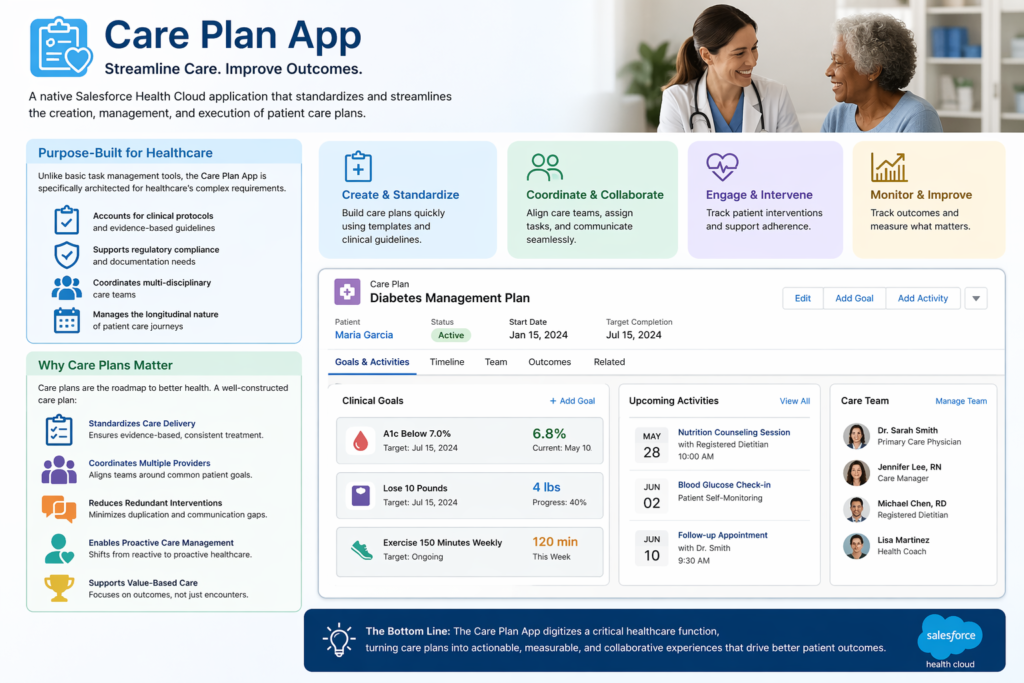
Unlike basic task management tools, the Care Plan App is specifically architected for healthcare’s complex requirements. It accounts for clinical protocols, regulatory compliance needs, multi-disciplinary care teams, and the longitudinal nature of patient care journeys.
Why Care Plans Matter in Modern Healthcare
Care plans serve as the roadmap for patient treatment, particularly for individuals managing chronic conditions, undergoing complex procedures, or transitioning between care settings. A well-constructed care plan:
- Standardizes care delivery according to evidence-based protocols
- Coordinates multiple providers working toward common patient goals
- Reduces redundant interventions and communication gaps
- Enables proactive care management rather than reactive responses
- Supports value-based care models by focusing on outcomes, not just encounters
The Care Plan App digitizes this critical healthcare function within Salesforce Health Cloud’s comprehensive ecosystem, connecting care planning with patient engagement, clinical data, and operational workflows.
Key Components of the Care Plan App
1. Care Plans: The Foundation
At its core, a Care Plan in Salesforce Health Cloud is a structured record that outlines specific health goals, problems being addressed, planned interventions, and expected outcomes for an individual patient.
Structure of a Care Plan
Each care plan contains:
- Patient Context: Direct linkage to the patient record with comprehensive medical history
- Care Plan Name and Type: Classification such as “Diabetes Management Plan” or “Post-Surgical Recovery Protocol”
- Start and End Dates: Temporal boundaries defining the care episode
- Status Tracking: Active, Completed, On Hold, or Cancelled
- Associated Problems: Clinical conditions being addressed (e.g., Hypertension, CHF, Depression)
- Goals: Measurable objectives like “Reduce HbA1c below 7.0% within 90 days”
- Owner Assignment: Primary care manager responsible for oversight
Practical Example
Consider a 65-year-old patient newly diagnosed with Type 2 Diabetes. The care plan might include:
- Problem: Type 2 Diabetes Mellitus (ICD-10: E11)
- Goals:
- Achieve HbA1c <7.0% within 3 months
- Patient demonstrates proper glucose monitoring technique
- Patient adheres to dietary modifications
- Duration: 6-month initial management phase
- Owner: Primary Care Physician with Diabetes Care Manager as collaborator
2. Care Plan Templates: Standardizing Excellence
Care Plan Templates enable healthcare organizations to codify best practices and clinical protocols into reusable frameworks. Rather than building each care plan from scratch, care managers can instantiate pre-configured templates that reflect evidence-based guidelines.
Template Components
Templates typically include:
- Pre-defined Problem Lists: Common conditions for specific protocols
- Standard Goal Statements: Evidence-based objectives
- Task Sequences: Predetermined intervention workflows
- Care Team Roles: Standard team composition requirements
- Timeline Defaults: Typical duration and milestone markers
Real-World Template Example: Heart Failure Management
A heart failure care plan template might include:
Standard Problems:
- Heart Failure with Reduced Ejection Fraction
- Fluid Overload Risk
- Medication Non-Adherence Risk
Standard Goals:
- Maintain NYHA Class I-II functionality
- Prevent hospital readmissions within 30 days
- Achieve medication adherence >90%
Pre-configured Tasks:
- Week 1: Initial nurse assessment call
- Week 2: Medication reconciliation review
- Weekly: Weight monitoring and reporting
- Monthly: Provider follow-up appointment
- As needed: Diuretic adjustment protocol
Templates dramatically reduce care plan creation time while ensuring compliance with organizational standards and clinical guidelines.
3. Care Plan Tasks: Driving Execution
Tasks are the actionable components that translate care plans from documentation into actual patient interventions. In the Care Plan App, tasks represent specific activities that care team members must complete to achieve care goals.
Task Characteristics
Each care plan task includes:
- Description: Clear action statement (e.g., “Conduct medication adherence counseling”)
- Assignment: Specific care team member responsible
- Priority Level: Critical, High, Normal, or Low
- Due Date/Time: Deadline for completion
- Status: Not Started, In Progress, Completed, Cancelled
- Related Goal: Link to the specific care objective
- Documentation: Notes, attachments, and outcome recording
Task Types in Practice
Care plan tasks span diverse activities:
Clinical Tasks:
- Schedule and conduct diabetes education session
- Order quarterly HbA1c lab test
- Titrate antihypertensive medication per protocol
Care Coordination Tasks:
- Arrange specialist referral to endocrinology
- Coordinate home health services setup
- Schedule follow-up telehealth appointment
Patient Engagement Tasks:
- Send medication reminder via preferred channel
- Deploy educational content about condition management
- Follow up on missed appointment
Automation and Dependencies
Advanced implementations leverage Salesforce automation to:
- Auto-create task sequences when care plans are activated
- Set task dependencies where Task B only appears after Task A completion
- Calculate dynamic due dates (e.g., “7 days after discharge”)
- Escalate overdue tasks to supervisors automatically
4. Care Teams: Coordinating Collaborative Care
The Care Team component recognizes that modern healthcare is inherently collaborative. A single patient’s care plan often involves primary care physicians, specialists, nurses, social workers, pharmacists, and other professionals.
Care Team Structure
Within the Care Plan App, care teams consist of:
- Care Team Members: Individual providers and support staff
- Roles: Defined responsibilities (Lead Physician, Care Coordinator, Specialist Consultant)
- Relationships: Patient-specific or general organizational relationships
- Contact Information: Integrated communication channels
- Permissions: Access levels to patient data and care plan components
Practical Care Team Example: Complex Diabetes Patient
For a diabetic patient with comorbidities, the care team might include:
- Primary Care Physician (Lead): Overall care direction
- Endocrinologist (Specialist): Diabetes medication management
- Certified Diabetes Educator: Patient education and lifestyle counseling
- Care Manager/RN: Coordination, monitoring, and patient communication
- Pharmacist: Medication therapy management
- Dietitian: Nutritional counseling and meal planning
- Behavioral Health Specialist: Address diabetes distress or depression
Each member sees relevant tasks, can document interventions, and receives notifications about patient status changes—all within the Care Plan App interface.
Real-World Healthcare Use Case: Post-Discharge Care Coordination
To illustrate how these components work together, let’s examine a common healthcare challenge: preventing hospital readmissions after heart failure exacerbation.
The Clinical Scenario
Patient Profile: Margaret, 72-year-old female with chronic heart failure (CHF), COPD, and diabetes. Hospitalized for acute decompensated heart failure, now being discharged.
Challenge: Patients like Margaret face 20-30% readmission risk within 30 days without structured post-discharge support.
Solution: Implementing a standardized “CHF Post-Discharge Care Plan” using the Care Plan App.
Implementation Walkthrough
Step 1: Care Plan Initiation
During discharge planning, the hospital care coordinator selects the “CHF 30-Day Readmission Prevention” template in Salesforce Health Cloud. The system:
- Creates a new care plan linked to Margaret’s patient record
- Sets start date as discharge date, end date 30 days forward
- Auto-populates standard problems, goals, and tasks
- Assigns the care team based on template defaults
Step 2: Care Team Assembly
The care team is automatically configured:
- Cardiologist (Dr. Smith): Medical oversight
- Outpatient Care Manager (Nurse Johnson): Primary coordinator
- Home Health Nurse (Based on geography): In-home assessments
- Pharmacist (Lisa Chen): Medication reconciliation
- Margaret’s Primary Care Physician: Continuity
Each receives notification of their role and can access Margaret’s care plan through their Salesforce interface.
Step 3: Task Execution
The template generates time-sequenced tasks:
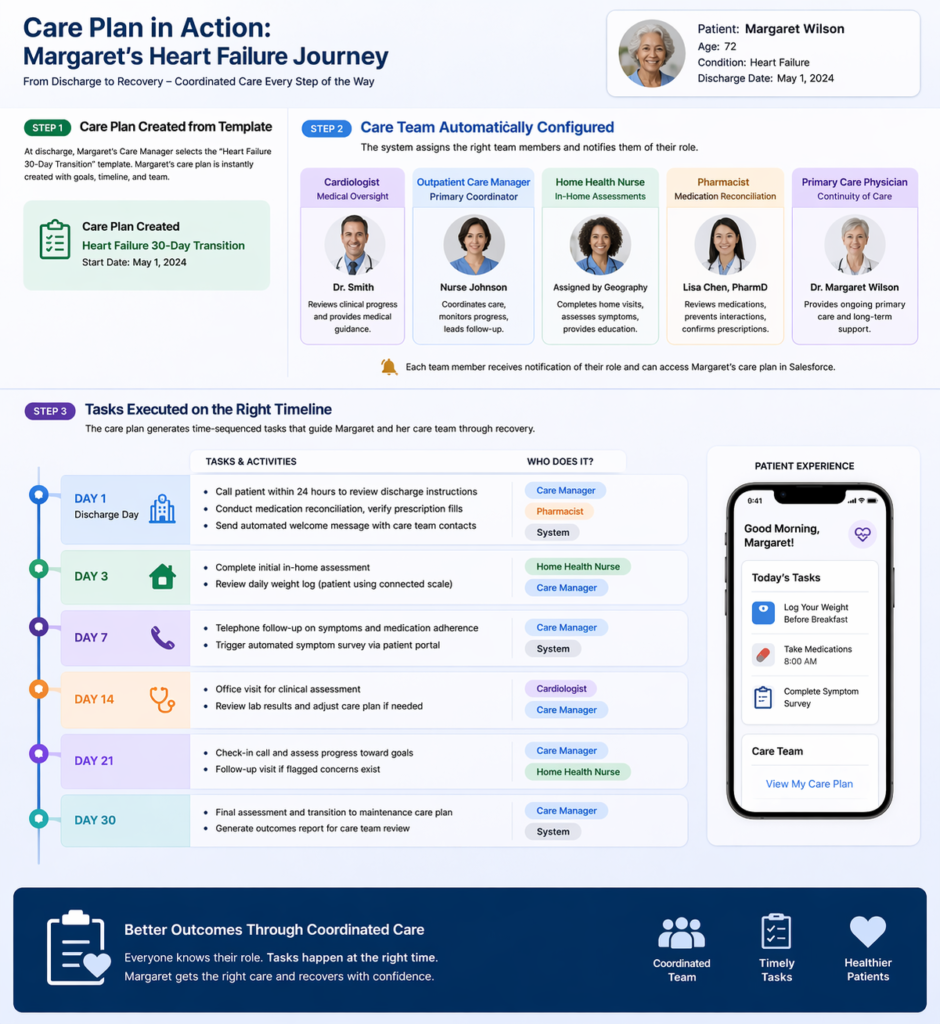
Day 1 (Discharge Day):
- Care Manager: Call patient within 24 hours to review discharge instructions
- Pharmacist: Conduct medication reconciliation, verify prescription fills
- System: Send automated welcome message with care team contacts
Day 3:
- Home Health: Complete initial in-home assessment
- Care Manager: Review daily weight log (patient using connected scale)
Day 7:
- Care Manager: Telephone follow-up on symptoms, medication adherence
- System: Trigger automated symptom survey via patient portal
Day 14:
- Cardiologist: Office visit for clinical assessment
- Care Manager: Review lab results, adjust care plan if needed
Day 21:
- Care Manager: Check-in call, assess progress toward goals
- Home Health: Follow-up visit if flagged concerns exist
Day 30:
- Care Manager: Final assessment, transition to maintenance care plan
- System: Generate outcomes report for care team review
Step 4: Real-Time Monitoring and Intervention
During week 2, Margaret’s connected scale shows a 5-pound weight gain over two days. The Care Plan App:
- Automatically flags the deviation from baseline
- Creates an urgent task for Nurse Johnson to call patient
- Notifies Dr. Smith of potential fluid retention
- Logs the alert in Margaret’s care plan timeline
Nurse Johnson calls Margaret, who reports increasing shortness of breath. Following the protocol embedded in the care plan:
- Nurse escalates to Dr. Smith immediately
- Dr. Smith orders increased diuretic dose via e-prescription
- Pharmacist receives notification to counsel on new dosing
- Follow-up task auto-created for next-day weight check
- All actions documented in the care plan record
This intervention prevents an ER visit and potential readmission.
Step 5: Outcome Tracking
At day 30, the care plan status changes to “Completed.” The system generates metrics:
- Primary Goal Achieved: No hospital readmission within 30 days ✓
- Secondary Goals:
- 95% medication adherence (tracked via pharmacy data) ✓
- Patient knowledge assessment score improved from 60% to 88% ✓
- Weight stabilization within target range ✓
- All Care Plan Tasks: 100% completion rate
- Patient Satisfaction Score: 9/10
These outcomes feed into organizational quality metrics and value-based care reporting.
The Impact
Without the Care Plan App, Margaret’s post-discharge care would likely involve:
- Fragmented communication among providers
- Paper-based task tracking with high error rates
- Delayed recognition of weight gain warning sign
- Possible readmission costing $15,000+
With the Care Plan App:
- Coordinated, protocol-driven care delivery
- Proactive intervention preventing crisis
- Documented evidence of quality care
- Estimated cost avoidance: $15,000-20,000
- Improved patient experience and outcomes
This scenario demonstrates the Care Plan App’s practical value in a high-stakes, real-world healthcare situation.
Integration with Salesforce Tools
The Care Plan App’s power multiplies when integrated with Salesforce’s broader ecosystem. Here’s how healthcare organizations can leverage key platforms.
Salesforce Flow: Automating Care Plan Workflows
Salesforce Flow enables no-code/low-code automation of care plan processes.
Practical Flow Examples
1. Automated Care Plan Assignment Based on Diagnosis
Create a Flow that:
- Triggers when a new diagnosis is added to a patient record
- Evaluates diagnosis code against template mapping
- Automatically creates appropriate care plan from template
- Assigns care team based on patient attributes (location, insurance, risk score)
- Notifies assigned care manager to review and activate
Implementation Benefit: A patient diagnosed with diabetes during a primary care visit automatically receives a diabetes management care plan within minutes, rather than days of manual processing.
2. Task Escalation for Overdue Actions
Build a scheduled Flow that:
- Runs daily to identify overdue high-priority care plan tasks
- Escalates task to care manager’s supervisor after 24 hours overdue
- Sends notification to patient if communication task is delayed
- Logs escalation in care plan activity history
Implementation Benefit: Ensures accountability and prevents critical patient interventions from falling through cracks.
3. Care Plan Transition Workflows
Design a Flow for transitions:
- Detects when acute care plan approaches end date
- Evaluates patient progress against goals
- Creates follow-on maintenance care plan if goals met
- Schedules transition consultation task for care team
- Generates care summary for patient and providers
Implementation Benefit: Ensures continuity as patients move between care phases without manual recreation of plans.
MuleSoft: Connecting Health Systems
MuleSoft provides enterprise integration to connect Salesforce Health Cloud with existing healthcare IT infrastructure.
Integration Architecture
Electronic Health Records (EHR) Integration
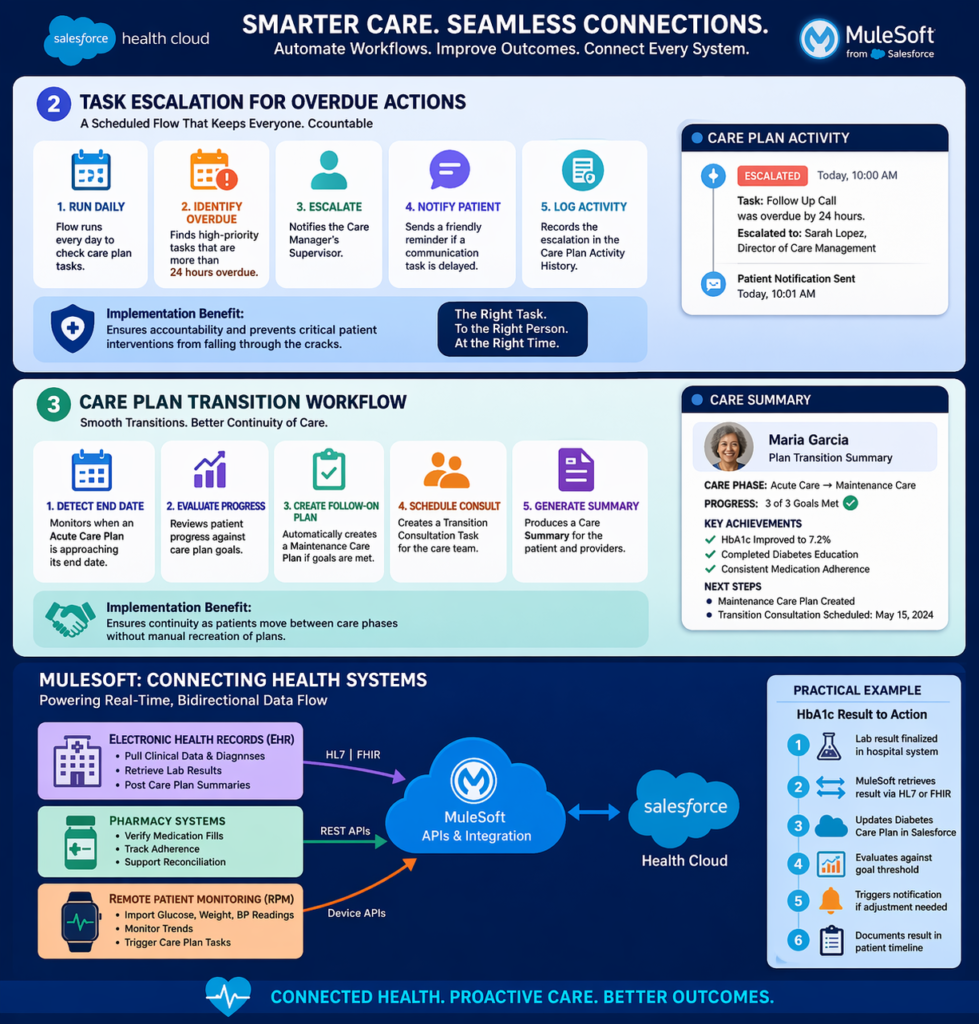
MuleSoft APIs can:
- Pull clinical data from Epic, Cerner, or other EHRs into care plans
- Sync diagnoses to ensure care plan problems reflect current conditions
- Retrieve lab results to auto-update care plan metrics
- Post care plan summaries back to EHR for clinician visibility
Practical Example: When a patient’s HbA1c result is finalized in the hospital lab system, MuleSoft:
- Retrieves the result via HL7 or FHIR interface
- Updates the diabetes care plan in Salesforce Health Cloud
- Evaluates result against care plan goal threshold
- Triggers notification if result requires care plan adjustment
- Documents result in patient timeline
Pharmacy Systems Integration
Connect to pharmacy platforms to:
- Verify medication fills and refill dates
- Calculate medication adherence rates
- Trigger care plan tasks when adherence drops below threshold
- Support medication reconciliation workflows
Remote Patient Monitoring (RPM) Devices
Integrate connected health devices:
- Import glucose readings from continuous monitors
- Pull weight data from smart scales
- Receive blood pressure measurements from home monitoring
- Automatically create care plan tasks when readings fall outside parameters
Practical Example: A patient with CHF uses a connected scale. MuleSoft:
- Receives daily weight transmission from device vendor
- Writes data to patient record in Health Cloud
- Triggers automated evaluation against care plan thresholds
- Creates urgent task if weight gain exceeds protocol limits
- All without manual data entry
Einstein AI: Intelligent Care Plan Management
Salesforce Einstein brings artificial intelligence capabilities to care plan management.
AI-Powered Features
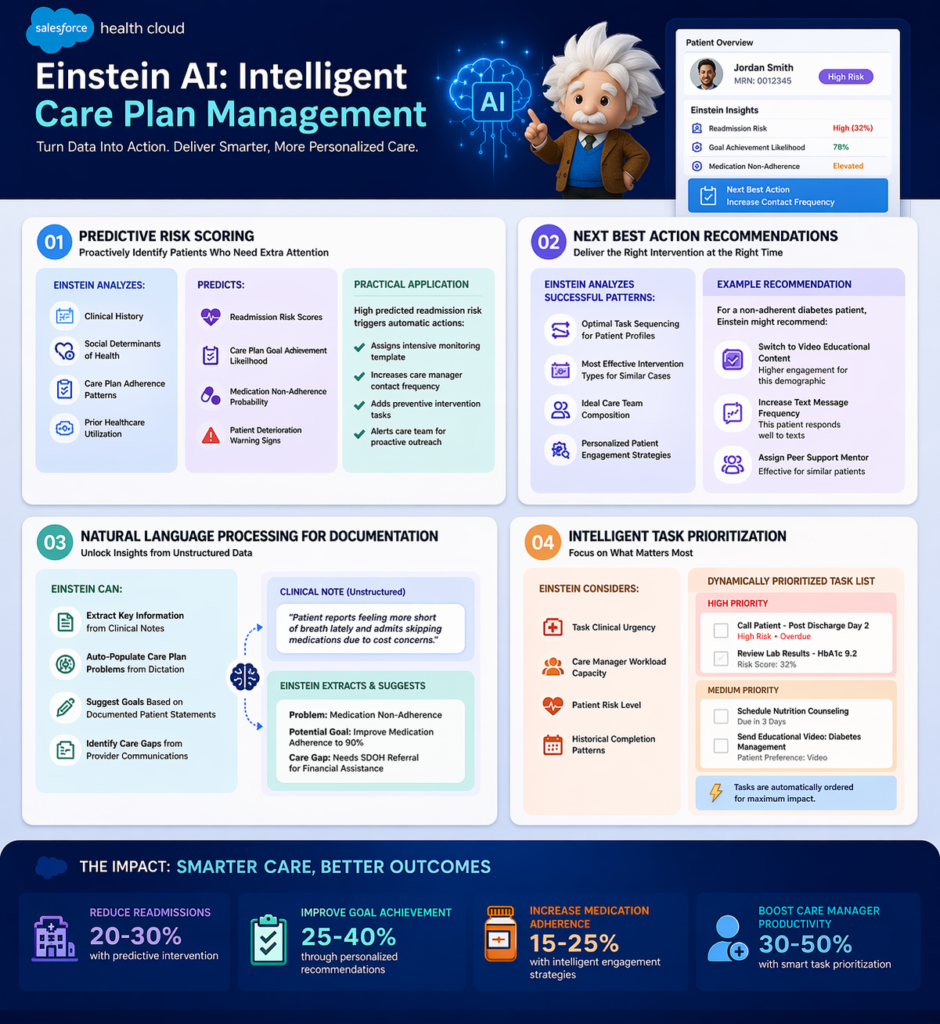
1. Predictive Risk Scoring
Einstein can analyze:
- Patient clinical history
- Social determinants of health
- Care plan adherence patterns
- Prior healthcare utilization
To predict:
- Readmission risk scores
- Care plan goal achievement likelihood
- Medication non-adherence probability
- Patient deterioration warning signs
Practical Application: Einstein flags patients with high predicted readmission risk. The Care Plan App automatically:
- Assigns more intensive monitoring template
- Increases care manager contact frequency
- Adds preventive intervention tasks
- Alerts care team to pay extra attention
2. Next Best Action Recommendations
Einstein analyzes successful care plan patterns to recommend:
- Optimal task sequencing for specific patient profiles
- Most effective intervention types for similar cases
- Ideal care team composition based on outcomes data
- Personalized patient engagement strategies
Example: For a non-adherent diabetes patient, Einstein might recommend:
- Switch from written to video educational content (higher engagement for this demographic)
- Increase text message frequency (this patient responds well to texts)
- Assign peer support mentor (effective for similar patients)
3. Natural Language Processing for Documentation
Einstein can:
- Extract key information from clinical notes
- Auto-populate care plan problems from dictation
- Suggest goals based on documented patient statements
- Identify care gaps from unstructured provider communications
4. Intelligent Task Prioritization
Einstein considers:
- Task clinical urgency
- Care manager workload capacity
- Patient risk level
- Historical completion patterns
To dynamically prioritize task lists, ensuring high-risk patients and time-sensitive interventions receive appropriate attention.
Einstein Bots: Automated Patient Engagement
Deploy chatbots that:
- Send care plan task reminders to patients
- Collect routine symptom assessments
- Answer common questions about care plans
- Escalate concerning responses to care managers
- Schedule appointments related to care plan tasks
Example Conversation:
Bot: “Hi John! Your diabetes care plan includes checking your blood sugar today. Have you completed your morning reading?”
Patient: “Yes, it was 145.”
Bot: “Thanks! I’ve logged that in your care plan. That’s within your target range. Great job! Don’t forget your afternoon check.”
If the patient reported 245, the bot would:
- Log the elevated reading
- Create a task for care manager to follow up
- Ask additional assessment questions per protocol
- Provide immediate guidance from care plan parameters
Benefits of the Care Plan App in Salesforce Health Cloud
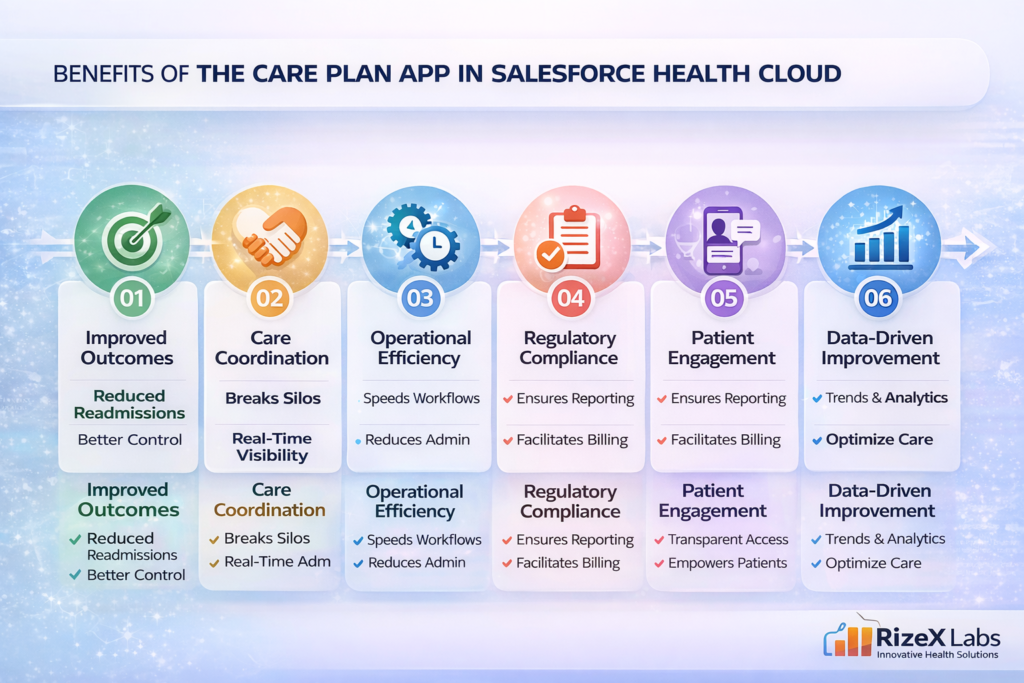
1. Improved Patient Outcomes
Quantifiable Impact:
- Healthcare organizations report 15-25% reduction in hospital readmissions with structured care plan implementation
- Improved chronic disease control through consistent protocol adherence
- Higher patient goal achievement rates through coordinated interventions
Mechanism: The Care Plan App ensures evidence-based protocols are consistently executed, reducing care variability that contributes to poor outcomes.
2. Enhanced Care Coordination
Tangible Benefits:
- Elimination of communication silos between providers
- Real-time visibility into who is doing what for each patient
- Reduced duplicated efforts and contradictory interventions
- Seamless transitions across care settings
Example: A specialist modifying a care plan goal automatically notifies the entire care team, preventing the primary care physician from pursuing outdated objectives.
3. Operational Efficiency
Measurable Improvements:
- 60-70% reduction in care plan creation time using templates
- Automated task generation eliminates manual workflow creation
- Streamlined documentation within unified platform
- Reduced administrative burden on clinical staff
ROI Example: A care management team of 10 RNs managing 500 chronic disease patients:
- Before: 45 minutes average to create and manage care plan weekly = 375 hours/week
- After: 15 minutes with Care Plan App templates and automation = 125 hours/week
- Time Savings: 250 hours/week = 6.25 FTEs redirected to direct patient care
4. Regulatory Compliance and Quality Reporting
Compliance Support:
- Documented evidence of care plan creation and updates for CMS requirements
- Audit trail of all care plan activities and modifications
- Quality measure calculation from care plan data (HEDIS, MIPS, etc.)
- Value-based care reporting directly from care plan outcomes
Example: CMS requires care plans for Medicare Chronic Care Management (CCM) billing. The Care Plan App provides:
- Compliant care plan documentation
- Time tracking for billable care management activities
- Patient consent management
- Automated CCM billing code eligibility flagging
5. Patient Engagement and Satisfaction
Engagement Mechanisms:
- Transparency: Patients access their care plans via portals or mobile apps
- Participation: Patients update goals, report progress, complete tasks
- Empowerment: Patients see their entire care team and can communicate
- Accountability: Shared responsibility between patients and providers
Impact: Organizations report 20-30% improvement in patient activation measures and satisfaction scores when implementing transparent, collaborative care planning.
6. Data-Driven Continuous Improvement
Analytics Capabilities:
- Care plan effectiveness analysis by template type
- Provider performance metrics on task completion and patient outcomes
- Population health trending across patient cohorts
- Intervention optimization based on outcome correlations
Example: Analytics reveal that diabetes care plans including dietitian involvement achieve HbA1c goals 40% more frequently. The organization updates standard templates to always include dietitian tasks, improving outcomes organization-wide.
Challenges and Limitations
While powerful, the Care Plan App in Salesforce Health Cloud presents implementation challenges that organizations should anticipate.
1. Clinical Adoption Resistance
Challenge: Healthcare providers accustomed to EHR-based workflows may resist adding another system.
Manifestations:
- “I don’t have time to learn another platform”
- Preference for familiar EHR care planning tools
- Concerns about duplicative documentation
Mitigation Strategies:
- Integration approach: Connect Health Cloud with EHR so providers see care plans in familiar interface via embedded views or synchronized data
- Role-based implementation: Start with care managers and coordinators who work primarily in coordination, not clinical documentation
- Value demonstration: Show providers how Care Plan App reduces their administrative burden through automated workflows
- Champions program: Identify early adopters to demonstrate success and mentor peers
2. Template Complexity and Maintenance
Challenge: Creating comprehensive, clinically-appropriate care plan templates requires significant clinical expertise and ongoing maintenance.
Issues:
- Templates need clinical validation to ensure evidence-based content
- Condition-specific protocols vary and change as guidelines evolve
- Over-complex templates become burdensome; over-simplified templates lack utility
- Template library requires governance to prevent proliferation
Solutions:
- Clinical governance committee: Establish multi-disciplinary team to develop and approve templates
- Start simple: Begin with 3-5 high-volume, high-impact conditions rather than attempting comprehensive library
- Version control: Implement systematic template review cycles (e.g., annual updates)
- External resources: Leverage published clinical pathways from professional societies as template foundations
3. Data Integration Complexity
Challenge: Healthcare data exists in numerous disparate systems with varying standards and access levels.
Technical Hurdles:
- Legacy systems without modern API capabilities
- Data standardization across different source systems
- FHIR adoption still incomplete across vendors
- Real-time vs. batch synchronization trade-offs
- HL7 interface costs and maintenance
Practical Approaches:
- Prioritize integrations: Start with highest-value data sources (ADT feeds for care transitions, lab results for chronic disease management)
- Phased approach: Manual data entry initially, add integrations incrementally
- Middleware investment: MuleSoft or similar platforms provide long-term integration scalability
- Realistic expectations: Perfect real-time integration may not be achievable; determine acceptable latency
4. Care Plan Sustainability
Challenge: Maintaining active, current care plans requires ongoing effort and can decay over time.
Common Problems:
- Care plans created but not actively updated
- Tasks become outdated or irrelevant but remain open
- Care team members change but records not updated
- Plans continue indefinitely without closure or transition
Sustainability Strategies:
- Automated reminders: Flow-based notifications for care plan reviews at set intervals
- Built-in closure workflows: Templates include plan completion criteria and transition tasks
- Dashboard monitoring: Management visibility into stale plans (e.g., >90 days without updates)
- KPIs and accountability: Care manager performance metrics include care plan maintenance standards
5. Patient Portal Adoption
Challenge: Making care plans accessible to patients requires them to adopt and use digital tools.
Barriers:
- Digital literacy limitations, especially in elderly populations
- Limited smartphone or internet access in underserved communities
- Preference for traditional communication methods
- Privacy and security concerns about online access
Inclusive Approaches:
- Multi-channel strategy: Portal access for digital-savvy patients; printed care plan summaries for others
- Digital navigation support: Staff assistance helping patients access and use portals
- Family caregiver access: Enable caregivers to participate in care plan monitoring
- Simplified mobile views: Easy-to-read formats for patients vs. detailed clinical views for providers
6. Licensing and Cost Considerations
Challenge: Salesforce Health Cloud represents significant investment.
Cost Factors:
- Health Cloud licenses (more expensive than standard Salesforce)
- Implementation services (consulting, customization, integration)
- Training and change management
- Ongoing administration and maintenance
- Integration platform costs (MuleSoft, etc.)
ROI Justification:
- Focus on measurable outcomes: readmission reduction, care management efficiency
- Consider value-based care payment opportunities that Care Plan App enables
- Calculate FTE savings from automation and efficiency
- Factor in compliance and quality reporting benefits
- Start with focused use case to prove value before full-scale rollout
Best Practices for Implementing the Care Plan App
Based on successful implementations across healthcare organizations, these practices drive optimal outcomes.
1. Start with Strategic Use Case Selection
Don’t: Try to implement care planning for all conditions and patient populations simultaneously.
Do: Select 1-2 high-impact use cases for initial implementation.
Ideal First Use Cases:
- Hospital readmission prevention: High costs, measurable outcomes, executive visibility
- Diabetes management: High prevalence, evidence-based protocols, clear quality metrics
- Care transitions: Clear start/end points, defined workflows, demonstrated ROI
Selection Criteria:
- Clinical significance and organizational priority
- Well-defined protocols suitable for templating
- Measurable outcomes to demonstrate success
- Manageable patient volume for initial rollout
- Engaged clinical champions available
2. Invest in Clinical Template Development
Critical Success Factor: Template quality determines Care Plan App value.
Template Development Process:
- Assemble Multi-Disciplinary Team: Physicians, nurses, care managers, quality specialists, and Salesforce developers
- Base on Evidence: Use published clinical guidelines (ADA for diabetes, ACC/AHA for heart failure, etc.) as foundation
- Customize for Organization: Adapt to your specific:
- Provider network and specialties available
- Patient population demographics
- Existing workflows and care delivery models
- Technology infrastructure
- Test and Iterate: Pilot templates with small patient cohort, gather frontline feedback, refine before full deployment
- Document and Train: Create template usage guides for care teams
Quality Indicators for Templates:
- Clinical accuracy validated by subject matter experts
- Appropriate detail level (specific enough to guide, not so prescriptive as to be rigid)
- Actionable tasks with clear ownership
- Measurable goals aligned with quality metrics
- Realistic timelines based on actual care delivery capacity
3. Design for Care Team Workflows, Not Technology Capabilities
User-Centered Approach:
Ask: “How does a care manager actually work with patients?” not “What features does Health Cloud offer?”
Example: Care managers spend significant time on phone calls with patients. Design Care Plan App interface so:
- Tasks can be quickly updated during calls
- Relevant patient information is immediately visible
- Notes can be captured efficiently
- Next steps are automatically generated
Practical Implementation:
- Shadow care team members to understand actual workflows
- Design screen layouts for how users actually navigate, not theoretical best practices
- Minimize clicks and screen transitions for common actions
- Mobile-optimize for care teams who work across settings
- Use Action Plans and Quick Actions for frequently performed activities
4. Implement Robust Change Management
Healthcare Context: Clinical staff face constant technology changes and initiative fatigue.
Change Management Essentials:
Executive Sponsorship: Visible leadership support from clinical and operational executives who communicate “why” this matters
Clinical Champions: Respected frontline providers who adopt early, provide peer influence, and offer credible feedback
Targeted Training:
- Role-specific training (care managers need different training than physicians)
- Just-in-time training close to go-live, not months in advance
- Recorded demonstrations for ongoing reference
- Super-user model with local experts for ongoing support
Communication Strategy:
- Regular updates on implementation progress
- Early wins and success stories
- Transparent acknowledgment of challenges and how they’re being addressed
- Celebration of milestones and team achievements
5. Build Measurement and Accountability from Day One
Establish KPIs Pre-Implementation:
Process Metrics:
- Percentage of eligible patients with active care plans
- Average time from patient identification to care plan activation
- Care plan task completion rates by role
- Care plan update frequency
Outcome Metrics:
- Patient goal achievement rates by care plan type
- Hospital readmission rates for care-planned vs. non-care-planned patients
- Emergency department utilization changes
- Patient satisfaction scores
- Clinical quality measure performance (HbA1c control, blood pressure control, etc.)
Efficiency Metrics:
- Time spent per care plan (creation and ongoing management)
- Care manager patient panel sizes
- Cost per managed patient
- Revenue from care management billing codes
Dashboard Strategy:
- Real-time dashboards for care managers showing their active care plans and overdue tasks
- Management dashboards showing team performance and outcomes
- Executive dashboards showing program ROI and strategic metrics
- Quality dashboards for regulatory and accreditation reporting
6. Plan for Integration from the Start
Integration Philosophy: Care Plan App shouldn’t be an island.
Prioritized Integration Roadmap:
Phase 1 – Foundation:
- Patient demographic synchronization from EHR
- Provider roster integration
- Basic appointment scheduling connectivity
Phase 2 – Clinical Data:
- Lab results (especially for chronic disease metrics)
- Diagnoses and problem lists
- Medication lists
Phase 3 – Advanced:
- Remote patient monitoring device data
- Pharmacy fill and adherence data
- Claims data for care gap identification
- Social determinants screening results
Technical Considerations:
- Document existing systems and data flows before designing integration
- Establish data governance: which system is source of truth for each data element
- Plan for error handling and data quality monitoring
- Budget for ongoing integration maintenance, not just initial build
7. Iterate Based on User Feedback
Continuous Improvement Cycle:
Regular Feedback Collection:
- Monthly care team meetings to discuss what’s working and what’s not
- Anonymous surveys to gather candid input
- Usage analytics to identify where users struggle (e.g., high abandon rates on certain screens)
- Patient feedback on their experience with care plan visibility and participation
Agile Refinement:
- Implement improvements in short cycles (monthly releases)
- Communicate changes to users with rationale
- Measure impact of changes on adoption and outcomes
- Be willing to roll back changes that don’t improve experience
Example: Initial implementation includes extensive task notes fields. Analytics show care managers rarely complete these fields. User feedback reveals notes are too time-consuming during patient calls. Solution: Implement quick-select checkboxes for common task outcomes, with optional notes for exceptions. Result: Task completion rate improves from 73% to 94%.
8. Enable Patient and Family Participation Thoughtfully
Patient-Centered Design:
Accessibility:
- Plain language care plan summaries, not clinical jargon
- Translation for non-English speaking patients
- Large fonts and clear visual design for elderly patients
- Mobile-responsive design for smartphone access
Meaningful Participation:
- Patients can view goals and track their progress
- Patients can report symptoms or measurements that update care plans
- Patients can message care team with questions
- Patients receive reminders for their care plan tasks (medication adherence, appointments, etc.)
Privacy and Control:
- Clear explanations of who sees their information
- Options to control which care team members have access
- Easy opt-in/opt-out for digital access (without losing care quality)
Support for Diverse Populations:
- Recognize digital divide and provide alternatives
- Caregiver access for pediatric or cognitively impaired patients
- Community health worker support for populations needing navigation assistance
Conclusion
The Care Plan App in Salesforce Health Cloud represents a fundamental shift in how healthcare organizations approach patient care management. Moving beyond fragmented, paper-based care planning, it provides a unified, intelligent platform that coordinates care teams, standardizes evidence-based protocols, automates workflows, and keeps patients engaged as active participants in their own health journeys.
For healthcare organizations navigating value-based care models, managing increasingly complex patient populations, and striving to improve outcomes while controlling costs, effective care planning is no longer optional—it’s essential. The Care Plan App delivers the operational infrastructure to make coordinated, proactive, outcome-focused care a reality at scale.
Key takeaways for implementation success:
- Start strategically with high-impact use cases that demonstrate measurable value
- Invest in clinical template quality as the foundation of effective care planning
- Design for actual user workflows, not theoretical best practices
- Integrate with existing systems to create seamless data flow, not isolated silos
- Measure outcomes rigorously to prove value and drive continuous improvement
- Support change management intentionally to drive clinical adoption
- Include patients as partners in their care planning and execution
For Salesforce developers and consultants, understanding the Care Plan App’s clinical context is crucial for building solutions that truly serve healthcare’s unique needs. Technical excellence matters, but clinical workflow knowledge and healthcare domain expertise transform good implementations into great ones that genuinely improve patient lives.
For healthcare professionals, embracing the Care Plan App means transitioning from reactive, episodic care to proactive, coordinated management. The initial learning curve is offset by the long-term benefits: better patient outcomes, more efficient workflows, and the satisfaction of delivering truly coordinated care.
The healthcare industry stands at a transformative moment. Organizations that successfully implement robust care planning capabilities will be positioned to excel in value-based payment models, improve population health outcomes, and deliver the coordinated, patient-centered care that defines healthcare excellence.
The Care Plan App in Salesforce Health Cloud provides the platform. Your strategic implementation and clinical commitment bring it to life
About RizeX Labs
At RizeX Labs, we specialize in delivering advanced healthcare solutions powered by Salesforce Health Cloud. Our expertise combines deep technical knowledge, healthcare industry best practices, and real-world implementation experience to help organizations improve patient care, streamline operations, and ensure compliance.
We empower healthcare providers, payers, and life sciences organizations to transform fragmented systems into unified, intelligent care platforms—enabling personalized patient engagement, coordinated care, and better health outcomes.
Internal Linking Opportunities:
- Link to your Salesforce course page:
https://rizexlabs.com/salesforce-admin-and-development-training
External Linking Opportunities:
- Salesforce official website: https://www.salesforce.com/
- Salesforce Health Cloud overview: https://www.salesforce.com/products/health-cloud/overview/
- Salesforce documentation: https://help.salesforce.com/
- Salesforce AppExchange: https://appexchange.salesforce.com/
- Healthcare interoperability standard (FHIR): https://www.hl7.org/fhir/
- HIPAA compliance guidelines: https://www.hhs.gov/hipaa/index.html
- MuleSoft (for healthcare integrations): https://www.mulesoft.com/
Quick Summary
Salesforce Health Cloud is a powerful healthcare CRM platform designed to provide a 360-degree view of patients, enabling organizations to deliver personalized, connected, and proactive care. It integrates clinical and non-clinical data from multiple systems, helping care teams make informed decisions faster.
With Health Cloud, healthcare organizations can improve patient engagement, enhance care coordination, ensure regulatory compliance, and reduce operational inefficiencies. As the healthcare ecosystem becomes more data-driven, adopting Health Cloud is essential for delivering modern, patient-centric care at scale.