
The Uncomfortable Truth About Coding in Salesforce
OmniStudio vs Apex – it’s the debate every Salesforce developer needs to have before writing another line of code. Here’s a truth that might sting a little: If you’re still reaching for Apex as your first solution to every Salesforce problem, you’re probably over-engineering.
I’ve seen it countless times. A developer receives a requirement for a multi-step intake form with conditional logic, API callouts, and PDF generation. Within minutes, they’re sketching out Apex classes, controller methods, and test coverage strategies. Three sprints later, they’ve built a custom solution that works beautifully—and will require specialized developer knowledge to maintain for the next five years.
Meanwhile, the same solution could have been configured in OmniStudio in a fraction of the time, maintained by admins, and evolved without code deployments.
This isn’t about dumbing down development or eliminating the need for skilled engineers. It’s about architectural intelligence—knowing when to code and when to configure. The best developers I’ve worked with aren’t the ones who write the most code; they’re the ones who know when not to write it.
Let’s challenge the coding bias that pervades Salesforce development and explore when OmniStudio should replace Apex in your technical architecture.
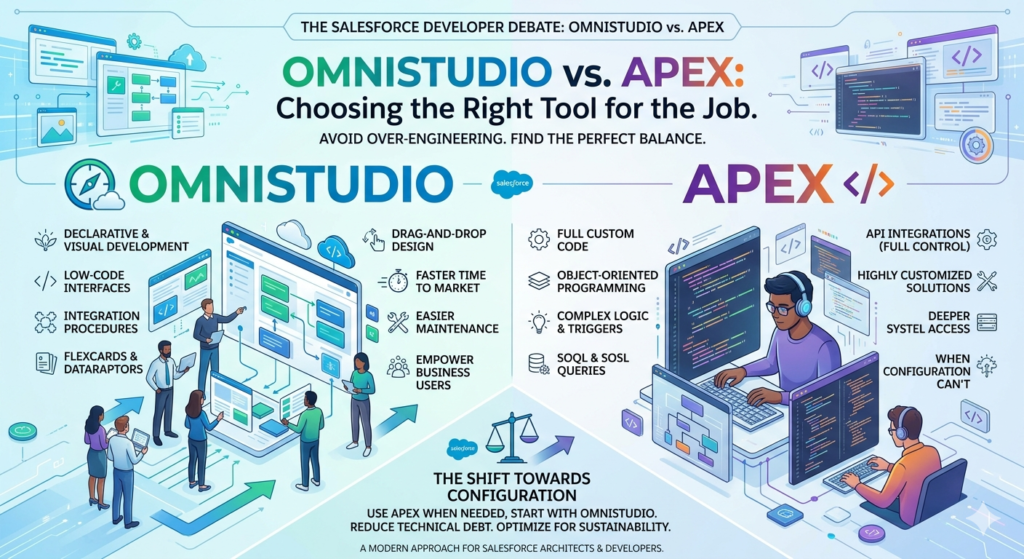
Understanding the Players: OmniStudio and Apex Explained
Before we dive into the comparison, let’s level-set on what we’re actually discussing.
What is Apex?
Apex is Salesforce’s proprietary, strongly-typed programming language that runs on the Lightning Platform. It’s similar to Java in syntax and serves as the backbone for custom business logic that can’t be achieved through declarative tools. Apex enables:
- Complex business logic and data manipulation
- Custom web services and API integrations
- Database operations with SOQL and DML
- Trigger-based automation
- Custom controllers for Visualforce and Lightning components
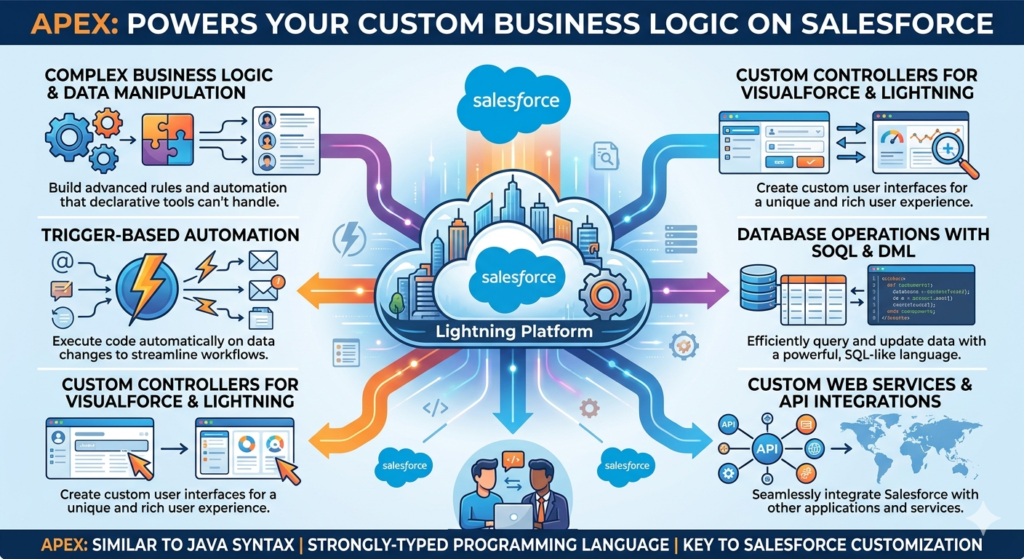
Apex has been the power tool in every developer’s belt since 2007. It’s mature, well-documented, and can accomplish virtually anything within the Salesforce ecosystem.
What is OmniStudio?
OmniStudio (formerly Vlocity) is Salesforce’s enterprise-grade low-code development suite that enables the rapid creation of industry-specific and custom applications. Think of it as a powerful declarative layer that sits above standard Salesforce configuration.
OmniStudio includes several key tools:
- OmniScripts: Guided, step-by-step processes (think wizards, intake forms, guided selling)
- Integration Procedures: Server-side data processing and orchestration (API calls, data transformations, complex logic)
- DataRaptors: Declarative data mapping and transformation tools
- FlexCards: Dynamic, contextual UI components that display data
- Expression Sets and Decision Matrices: Business rules and decision logic
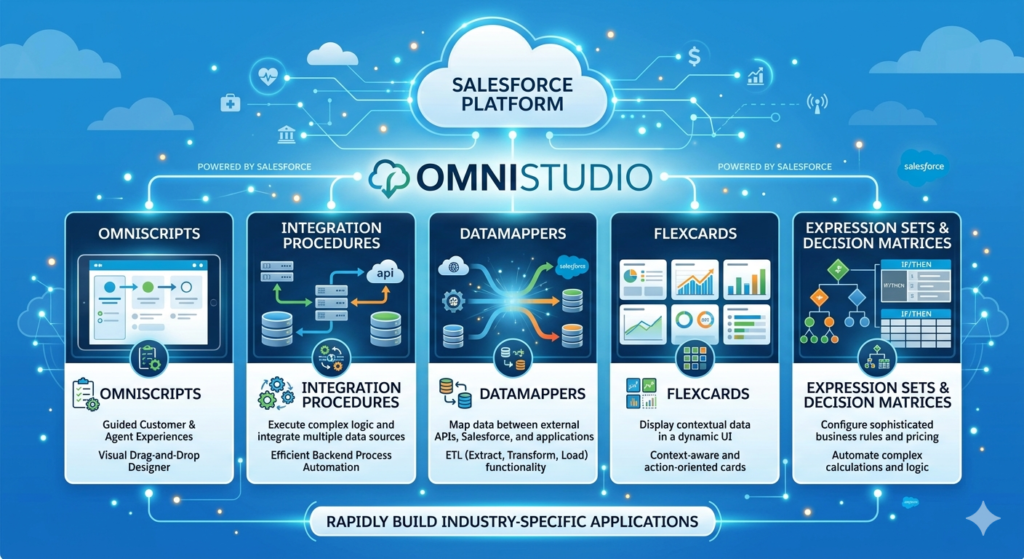
The critical distinction? OmniStudio is metadata-driven and configuration-based, not code-based. You’re building through declarative interfaces, yet achieving functionality that would traditionally require hundreds of lines of Apex.
The Great Comparison: OmniStudio vs Apex
Let’s break down how these approaches stack up across the dimensions that matter most.
Flexibility: Who Really Wins?
The Developer Perspective:
Apex offers ultimate flexibility. Need to implement a custom algorithm? Done. Want to integrate with an obscure API using specific OAuth flows? No problem. Apex gives you complete control over the execution logic.
The Reality Check:
Flexibility is only valuable when you actually need it. OmniStudio provides flexible configurations for 80-90% of use cases. For the vast majority of integrations, data transformations, and user interactions, OmniStudio’s declarative approach offers sufficient flexibility with dramatically less complexity.
The Verdict:
Apex wins on raw flexibility, but OmniStudio wins on practical flexibility for common enterprise scenarios. The question isn’t “what’s most flexible?” but rather “what flexibility do I actually require?”
Scalability: Handling Growth
Apex Scalability:
Well-written Apex with proper bulkification, efficient SOQL, and governor limit awareness scales excellently. However, scaling Apex solutions often means:
- Refactoring code as requirements evolve
- Adding more test classes (maintaining 75%+ coverage)
- Managing technical debt
- Knowledge transfer challenges as teams change
OmniStudio Scalability:
OmniStudio scales differently. Because it’s metadata-driven:
- Changes propagate through change sets or CI/CD pipelines like any metadata
- Business users can modify logic without development sprints
- Solutions remain maintainable as the original creators move on
- Governor limits are managed under the hood (though you still need to be mindful)
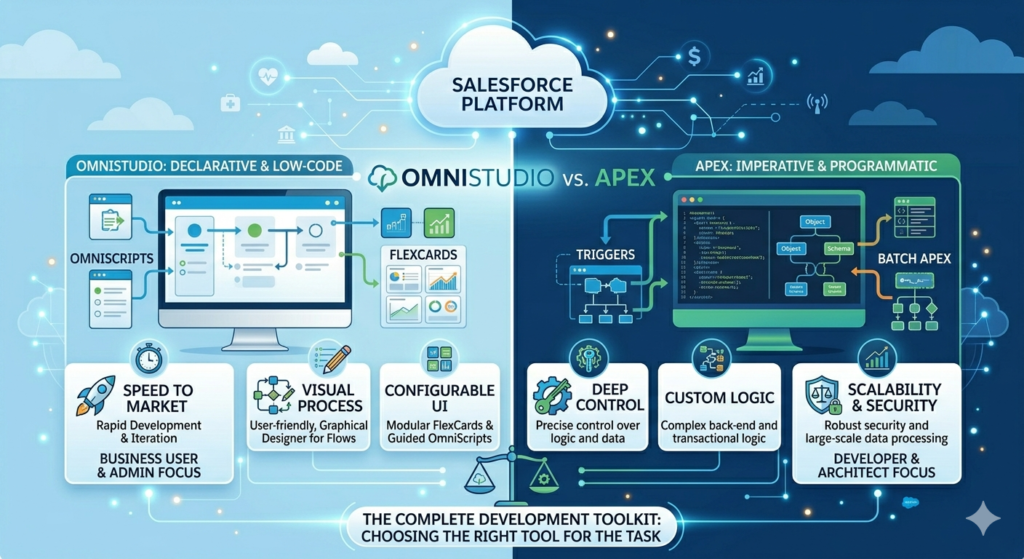
The Verdict:
Both scale well technically. OmniStudio scales better organizationally—your ability to maintain and evolve solutions doesn’t bottleneck on specialized developer knowledge.
Performance: Speed Matters
This is where misconceptions run rampant. Many developers assume code always outperforms configuration.
The Real Performance Story:
- OmniScripts render in Lightning Web Components (LWC) and are highly performant for user-facing interactions
- Integration Procedures are optimized server-side processes that often match or exceed custom Apex performance for data operations
- DataRaptors perform bulk operations efficiently without the developer needing to explicitly bulkify
I’ve conducted performance tests comparing Integration Procedures against equivalent Apex code for standard CRUD operations and API integrations. In most scenarios, the performance difference was negligible (often within milliseconds). In some cases, Integration Procedures performed better because they’re pre-optimized for common patterns.
When Apex Wins:
For computationally intensive algorithms, complex recursive operations, or scenarios requiring fine-tuned performance optimization, custom Apex provides better control.
The Verdict:
Performance is rarely the differentiator. Unless you’re building something highly specialized, both approaches perform adequately for enterprise needs.
Maintenance: The Long Game
This is where OmniStudio truly shines, and it’s often undervalued in initial architectural decisions.
Apex Maintenance Reality:
- Requires developer resources for any change
- Test class maintenance overhead (every code change needs test updates)
- Knowledge transfer challenges (understanding someone else’s code takes time)
- Documentation often lags behind implementation
- Debugging requires development environments and tools
OmniStudio Maintenance Advantages:
- Visual configuration is self-documenting
- Admin-level users can maintain many aspects
- Changes visible immediately in sandbox environments
- Faster iteration cycles (no compilation, deployment, or test running)
- Easier knowledge transfer (visual flows are easier to understand than code)
Real Cost Example:
I worked with a telecommunications client who built their product catalog and ordering system in Apex. Every product addition required developer involvement, test class updates, and full deployment cycles. After migrating to OmniStudio, product managers could configure new offerings themselves. Development velocity increased by 400% for product launches.
The Verdict:
OmniStudio dramatically reduces long-term maintenance costs and increases business agility. For solutions that evolve frequently, this advantage compounds over time.
Real-World Scenarios: When to STOP Using Apex
Let’s get practical. Here are specific scenarios where developers should resist the urge to code and embrace OmniStudio instead.
Scenario 1: Multi-Step Guided Processes
The Requirement:
Build a customer onboarding process with 8 steps, conditional branching based on customer type, document upload, e-signature integration, and PDF generation.
The Apex Approach:
You’d build:
- Custom Lightning Web Components for each step
- Apex controllers for data processing
- Custom API integration handlers
- PDF generation logic
- State management system
- Test classes for every component
Time estimate: 4-6 weeks for experienced developers
The OmniStudio Approach:
- Create one OmniScript with 8 steps
- Configure conditional logic using expression sets
- Add DocuSign action (pre-built)
- Configure PDF generation (declarative)
- Data integration via Integration Procedure
Time estimate: 1-2 weeks
Why OmniStudio Wins:
The business will inevitably want to modify this process—change the order of questions, add validation rules, update branding, or adjust workflows. With OmniScript, these changes happen in minutes. With custom code, they require development sprints.
Scenario 2: Third-Party API Integrations
The Requirement:
Integrate with a payment gateway API to process transactions, handle callbacks, update records, and send confirmations.
The Apex Approach:
apexpublic class PaymentGatewayIntegration {
    public static HttpResponse processPayment(PaymentRequest req) {
        // Authentication logic
        // Request construction
        // Callout
        // Response parsing
        // Error handling
        // Record updates
        // Logging
    }
    // Plus test classes with mock callouts
}
The OmniStudio Approach:
Create an Integration Procedure that:
- Extracts required data (DataRaptor Extract)
- Makes HTTP callout (HTTP Action)
- Transforms response (DataRaptor Transform)
- Updates Salesforce records (DataRaptor Load)
- Error handling (declarative)
Why OmniStudio Wins:
When the API changes (and it will), you modify the configuration, not the code. No test classes to update. No deployment windows to coordinate. The Integration Procedure is also reusable—call it from OmniScripts, Flow, or even Apex when needed.
Scenario 3: Complex Data Transformation
The Requirement:
Transform Account, Contact, and Opportunity data into a specific JSON structure for an external system, with conditional field inclusion based on record type.
The Apex Approach:
apexpublic class DataTransformer {
    public static String transformAccountData(Account acc) {
        Map<String, Object> dataMap = new Map<String, Object>();
        // 100+ lines of transformation logic
        // Conditional field handling
        // Nested object construction
        // JSON serialization
        return JSON.serialize(dataMap);
    }
}
The OmniStudio Approach:
Configure a DataRaptor Transform with:
- Visual field mapping
- Conditional formulas for field inclusion
- Output format specification
- Reusable across multiple contexts
Why OmniStudio Wins:
Business analysts can understand and validate the transformation logic. When field mappings change (they always do), updates happen in minutes without code deployment. The transformation is version-controlled metadata that migrates cleanly across environments.
Scenario 4: Dynamic, Contextual UI Components
The Requirement:
Display a customer’s policy information differently based on policy type, status, and user profile, with real-time data refresh and action buttons.
The Apex Approach:
Build custom Lightning Web Components with:
- Apex controllers for data retrieval
- Client-side logic for display rules
- Wire services for reactivity
- Custom CSS for different layouts
The OmniStudio Approach:
Build FlexCards with:
- Declarative data source configuration
- State-based layouts
- Conditional rendering rules
- Pre-built action framework
Why OmniStudio Wins:
FlexCards are designed specifically for this use case. They’re responsive, performant, and configurable by admins. When business rules change, you update the card configuration, not component code.
Debunking Common Misconceptions About Low-Code
Let’s address the elephant in the room: developer skepticism about low-code platforms.
Misconception 1: “Low-Code Means Less Powerful”
Reality: OmniStudio is enterprise-grade tooling built for complex use cases. Fortune 500 companies run mission-critical processes on OmniStudio. It’s not a toy—it’s an architectural choice.
Integration Procedures can handle complex orchestration involving multiple systems, conditional logic, error handling, and data transformation that would require hundreds of lines of Apex.
Misconception 2: “I’ll Hit Platform Limitations”
Reality: You might—but you’d hit them with Apex too. Both approaches share the same Salesforce governor limits. The difference? OmniStudio handles many optimizations automatically that you’d have to code manually in Apex.
When you do hit genuine platform limitations, you can extend OmniStudio with custom Apex classes. It’s not either/or; it’s layered architecture.
Misconception 3: “Low-Code Creates Technical Debt”
Reality: Poorly architected solutions create technical debt, regardless of whether they’re coded or configured.
I’ve seen horrific technical debt in both Apex codebases and OmniStudio implementations. The difference? OmniStudio’s visual nature makes bad architecture more visible and easier to refactor. Spaghetti code can hide in classes; spaghetti configurations are obvious in visual designers.
Misconception 4: “Developers Won’t Be Needed”
Reality: Smart developers evolve from code writers to solution architects. You’re still designing the architecture, making technical decisions, handling complex edge cases, and building custom components when truly needed.
OmniStudio doesn’t eliminate the need for developers; it elevates their role to higher-value activities. Instead of coding standard CRUD operations, you’re designing integration architectures and solving genuinely complex problems.
Misconception 5: “It’s Just for Simple Use Cases”
Reality: I’ve seen OmniStudio implementations handling:
- Multi-million dollar quote-to-cash processes
- Healthcare patient intake with HIPAA compliance
- Complex insurance underwriting workflows
- Telecommunications service activation across 15+ systems
- Financial services account opening with KYC integration
These aren’t simple use cases. They’re complex, regulated, mission-critical business processes.
The Decision Framework: OmniStudio vs Apex
Here’s a practical decision tree to guide your architectural choices:
Choose OmniStudio When:
✅ Building guided user processes (wizards, intake forms, multi-step workflows)
- OmniScripts are purpose-built for this
- Faster development and easier maintenance
- Business users can modify flows
✅ Integrating with standard REST/SOAP APIs
- Integration Procedures handle 90% of integration patterns
- Declarative error handling and retry logic
- No mock testing complexity
✅ Transforming data between systems
- DataRaptors excel at extract-transform-load operations
- Visual field mapping reduces errors
- Reusable across multiple processes
✅ Displaying contextual, dynamic data
- FlexCards provide enterprise-grade UI components
- Faster than building custom LWCs
- Admin-maintainable
✅ Requirements will evolve frequently
- Configuration changes are faster than code changes
- Lower maintenance overhead
- Business agility matters more than perfect optimization
✅ Business users need visibility into logic
- Visual configuration is self-documenting
- Easier stakeholder validation
- Supports citizen development where appropriate
Choose Apex When:
Implementing complex, custom algorithms
- Mathematical computations
- Custom encryption or data processing
- Recursive logic requiring fine-tuned control
Building platform events or triggers requiring specific execution context
- Platform event publishers/subscribers with complex routing
- Trigger frameworks requiring precise order of operations
- Custom trigger context handling
Requiring performance optimization beyond declarative capabilities
- Query optimization requiring specific SOQL patterns
- Batch processing with custom chunking logic
- Memory-intensive operations requiring manual management
Extending Salesforce platform capabilities
- Custom REST/SOAP web services
- Implementing interfaces (Queueable, Schedulable, Batchable)
- Custom Lightning Web Component controllers with unique requirements
Integration requires non-standard authentication or protocols
- Custom OAuth implementations
- Certificate-based authentication with complex key management
- Proprietary protocols not supported by standard HTTP actions
Regulatory requirements mandate code-based solutions
- Some compliance frameworks require code-level audit trails
- Specific testing documentation requiring unit tests
- Code signing or verification requirements
Consider Hybrid Approaches When:
You need the best of both worlds
- Use OmniStudio for user interface and standard operations
- Call custom Apex for specialized processing
- Example: OmniScript for data collection, Integration Procedure for orchestration, custom Apex for complex calculation
Extending OmniStudio with custom functions
- Build custom Apex actions callable from Integration Procedures
- Create custom LWCs embedded in OmniScripts
- Leverage formulas calling custom Apex utilities
Practical Implementation Guidelines
Start with These Principles:
1. Default to Declarative, Justify Code
Flip your decision-making process. Instead of asking “Can I build this with OmniStudio?” ask “Why would I use Apex for this?” Make code the exception that requires justification, not the default.
2. Layer Your Architecture
Build solutions in layers:
- Presentation Layer: OmniScripts and FlexCards for user interaction
- Orchestration Layer: Integration Procedures for business logic
- Data Layer: DataRaptors for transformation
- Computation Layer: Apex for complex algorithms (when needed)
This separation of concerns makes your architecture more maintainable and testable.
3. Measure the Right Metrics
Don’t just measure initial build time. Consider:
- Time to modify: How long does a business rule change take?
- Knowledge transfer: How quickly can someone new understand the solution?
- Maintenance cost: What’s the annual cost to maintain and evolve?
- Business agility: How quickly can we respond to market changes?
4. Invest in OmniStudio Skills
OmniStudio has a learning curve. Invest in training for your team. Developers who understand both code and configuration become architectural multipliers.
Common Anti-Patterns to Avoid:
Writing Apex to do what Integration Procedures do natively
- Don’t code standard HTTP callouts
- Don’t build custom data transformation when DataRaptors suffice
Building custom UI when FlexCards or OmniScripts fit
- Avoid “not invented here” syndrome
- Custom LWCs should solve unique problems, not replicate standard patterns
Over-engineering OmniStudio solutions
- Don’t create overly complex Integration Procedures that would be clearer in Apex
- Know when declarative becomes more complex than code
Ignoring governor limits in either approach
- Both Apex and OmniStudio share platform limits
- Bulk operations need consideration regardless of implementation
The Mindset Shift: From Developer to Architect
Here’s what I’ve observed in my years working with Salesforce teams: The best technical leaders aren’t the best coders—they’re the best problem solvers.
When you reach for Apex as your first tool, you’re thinking like a developer. When you evaluate the full spectrum of available tools and choose based on long-term value, you’re thinking like an architect.
This doesn’t diminish the importance of coding skills. Your ability to write excellent Apex makes you a better OmniStudio implementer because you understand what’s happening under the hood. You know when declarative tools are abstractions that serve you well and when they’re limitations you need to bypass.
The Career Evolution
Junior developers write code. Senior developers write good code. Architects know when not to write code at all.
OmniStudio skills don’t replace development expertise—they multiply it. A developer who masters both code and configuration can:
- Deliver solutions 2-3x faster
- Build more maintainable systems
- Enable business agility
- Focus energy on genuinely complex problems
- Provide better architectural guidance
The Business Impact
Let’s talk about what matters to leadership: business outcomes.
Faster Time to Market:
Solutions built primarily in OmniStudio ship faster. I’ve seen teams reduce project timelines from months to weeks by defaulting to declarative approaches.
Lower Total Cost of Ownership:
The TCO calculation is clear: OmniStudio solutions cost less to maintain, require less specialized knowledge, and evolve more quickly. Over a three-year horizon, the cost difference is dramatic.
Improved Business Agility:
Markets change. Regulations shift. Competitors innovate. Organizations that can rapidly evolve their Salesforce solutions without extensive development cycles have a competitive advantage.
Risk Reduction:
Every line of custom code is a potential bug, a maintenance obligation, and a knowledge transfer challenge. Reducing custom code reduces risk—when done appropriately.
Real-World Success Stories
Let me share a few anonymized examples from my consulting experience:
Case Study 1: Insurance Quote-to-Bind
Before OmniStudio:
A property and casualty insurer built their entire quote-to-bind process in Apex and Visualforce. The system worked but required constant developer involvement. Adding a new product type took 6-8 weeks. Making changes to underwriting rules required code updates and regression testing.
After OmniStudio Migration:
Rebuilt using OmniScripts for quote capture, Integration Procedures for rating engine calls, and FlexCards for agent dashboards.
Results:
- New product setup reduced from 6 weeks to 3 days
- Underwriting rule changes completed by business analysts, not developers
- Developer capacity freed up for genuinely complex features (predictive modeling, fraud detection)
- User satisfaction improved due to faster iterations
Case Study 2: Healthcare Patient Intake
The Challenge:
A healthcare provider needed compliant patient intake across multiple specialties, each with unique workflows, data requirements, and integration points to EMR systems.
The Solution:
Built specialty-specific OmniScripts with shared Integration Procedures for EMR integration. DataRaptors handled FHIR format transformations. Custom Apex handled PHI encryption beyond standard platform security.
Results:
- Deployed 12 specialty-specific workflows in the time originally estimated for 3
- Clinical staff could modify workflows without IT involvement
- HIPAA audit trails maintained through platform features
- Integration maintenance reduced by 70%
Case Study 3: Telecommunications Service Activation
The Requirement:
Orchestrate service activation across 15+ backend systems with complex error handling, rollback logic, and state management.
The Hybrid Approach:
- OmniScript for sales agent workflow
- Integration Procedures for standard system callouts (70% of integrations)
- Custom Apex for proprietary protocol integration (30% of integrations)
- FlexCards for service status monitoring
Results:
- Activation process time reduced from 48 hours to 4 hours
- Error handling visible to agents without IT investigation
- New service types configured in days, not months
- Developer team focused on complex integration protocols, not UI code
Addressing the Skeptics
I know some developers reading this are skeptical. Let me address your concerns directly:
“I’m faster in Apex than learning new tools.”
Today, yes. But calculate the total lifecycle, not just initial build. Factor in maintenance, knowledge transfer, and evolution. OmniStudio’s visual nature compresses those later phases dramatically.
Also, investment in learning pays compound returns. OmniStudio skills are increasingly valuable in the Salesforce ecosystem, especially as industries cloud solutions (which are built on OmniStudio) become more prevalent.
“My Apex code is well-architected and maintainable.”
Excellent. But is it maintainable by non-developers? Can business analysts validate the logic? How long does onboarding a new developer take? Code quality is important, but organizational agility matters too.
“OmniStudio feels like giving up control.”
You’re not giving up control; you’re choosing a higher abstraction level. You gave up control when you chose Salesforce over building on AWS. You chose a platform that handles infrastructure so you could focus on business logic. OmniStudio is the next level of that abstraction.
When you need lower-level control, drop down to Apex. It’s there when you need it.
“What about performance?”
I’ve addressed this earlier, but it bears repeating: performance differences are negligible for most use cases. When they matter, you can optimize. But premature optimization is still the root of much evil in software engineering.
Build for maintainability first, optimize when measurement proves it necessary.
The Decision Checklist
When faced with a new requirement, run through this checklist:
Business Evaluation:
- How frequently will requirements change?
- Who needs to maintain this solution long-term?
- What’s the total cost of ownership over 3 years?
- How quickly do we need to deliver?
Technical Evaluation:
- Does this fit standard OmniStudio patterns?
- Are there performance requirements beyond normal operations?
- Do we need custom algorithms or calculations?
- Will this integrate with standard APIs or require custom protocols?
Team Evaluation:
- What skills does our team have?
- Who will maintain this in 12 months?
- Can we train admins to evolve this solution?
- Do we have OmniStudio licensing?
Risk Evaluation:
- What are the compliance requirements?
- How critical is this to business operations?
- What’s our rollback strategy?
- How will we test this solution?
If the majority of answers point toward frequent changes, admin maintenance, standard patterns, and business agility—choose OmniStudio.
If answers point toward custom algorithms, unique requirements, performance sensitivity, or developer-maintained complexity—choose Apex.
If it’s mixed—use a hybrid approach.
The Future is Hybrid
Let’s be clear about where the industry is heading: The future isn’t code vs. no-code; it’s intelligent architecture using the right tool for each job.
Salesforce continues investing heavily in OmniStudio. Industries clouds are built on it. The acquisition of Vlocity for $1.33 billion signaled strategic commitment. As AI and automation capabilities expand, declarative tools become more powerful, not less.
This doesn’t mean Apex is going away. Complex systems will always need custom code. But the definition of “complex enough to require code” continues to rise. What required Apex five years ago can be configured today. What requires Apex today might be configurable tomorrow.
Developers who embrace this evolution position themselves as valued architects. Those who resist become increasingly expensive resources for accomplishing what could be configured.
Conclusion: Smart Architecture Over Coding Bias
Here’s my challenge to you: For the next month, default to OmniStudio.
When a new requirement comes in, start by asking “How would I build this in OmniStudio?” Only after you’ve explored the declarative approach should you consider custom code. Document your decision rationale either way.
I predict you’ll discover:
- More requirements than you expected can be solved declaratively
- Your solutions become more maintainable
- Your delivery velocity increases
- Your strategic value to the organization grows
The mark of an excellent Salesforce professional isn’t how much code they write—it’s how effectively they solve business problems with the most appropriate tools. Sometimes that’s elegant Apex. Often, it’s smart OmniStudio configuration.
About RizeX Labs
RizeX Labs is a leading IT training institute specializing in Salesforce and emerging technologies. Our programs focus on real-world skills, hands-on learning, and industry-relevant tools like OmniStudio and Apex. We help developers and architects build scalable, future-proof Salesforce solutions by understanding when to use code—and when not to.
Internal Linking Opportunities:
External Linking Opportunities:
Trailhead (OmniStudio & Apex modules)
