
In today’s digital-first world, customers, partners, and employees expect seamless, personalized experiences across every touchpoint. They want instant access to information, self-service options, and communities where they can collaborate and grow. But delivering these experiences at scale? That’s where many organizations struggle.
Enter Salesforce Experience Cloud – a powerful digital experience platform that enables businesses to create branded, connected portals and communities that bring people together in meaningful ways.
Whether you’re looking to empower customers with self-service resources, enable partners with collaborative tools, or connect employees across your organization, Experience Cloud provides the foundation for building exceptional digital experiences that drive engagement, loyalty, and business growth.
In this comprehensive guide, we’ll explore everything you need to know about Salesforce Experience Cloud – from its architecture and key capabilities to real-world use cases and implementation best practices. Let’s dive in.
What is Salesforce Experience Cloud?
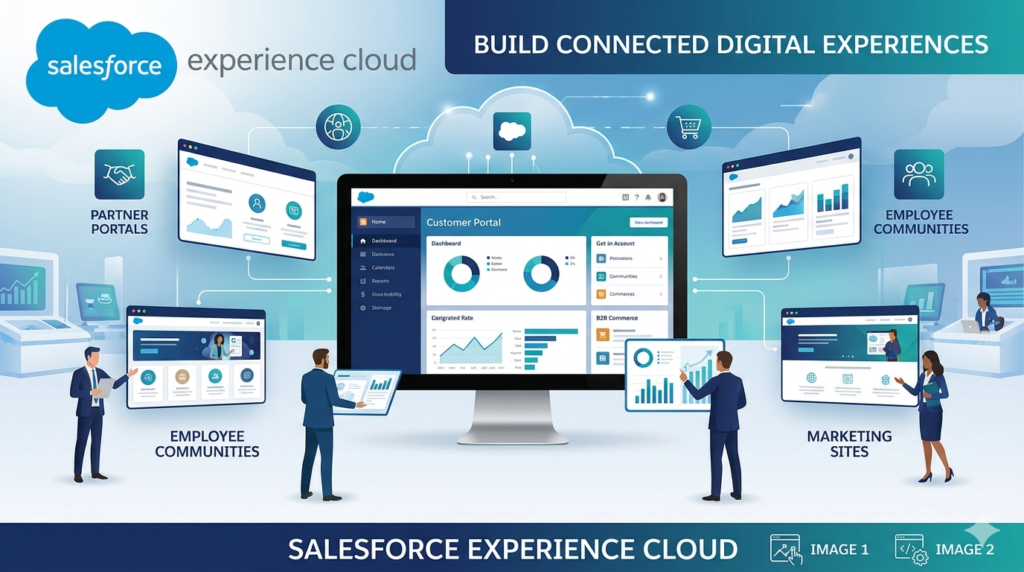
Salesforce Experience Cloud (formerly known as Community Cloud) is a digital experience platform that allows organizations to create custom-branded websites, portals, and mobile apps that connect employees, customers, and partners with relevant data and people.
Think of it as an extension of your Salesforce CRM that enables external audiences to interact with your organization in self-service environments. Instead of limiting Salesforce access to internal teams, Experience Cloud opens controlled pathways for external users to access information, collaborate, submit cases, track orders, access knowledge articles, and much more – all within a branded digital experience.
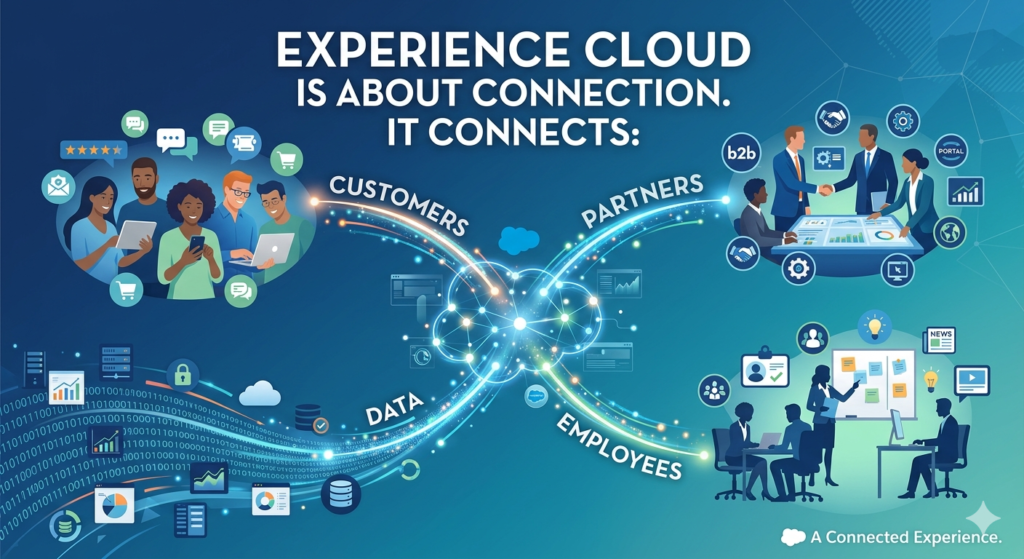
At its core, Experience Cloud is about connection. It connects:
- Customers to support resources, product information, and peer communities
- Partners to sales tools, lead management systems, and collaboration spaces
- Employees to internal knowledge bases, company news, and collaboration hubs
- Data across your Salesforce ecosystem to deliver personalized, contextual experiences
Unlike traditional standalone portals that require complex integrations and custom development, Experience Cloud is built natively on the Salesforce platform. This means it automatically inherits the power of Salesforce’s data model, security framework, and ecosystem of tools – creating a seamless, unified experience.
From Community Cloud to Experience Cloud: The Evolution
In 2020, Salesforce rebranded Community Cloud as Experience Cloud, reflecting an expanded vision beyond simple community forums. This wasn’t just a name change – it represented a strategic evolution toward comprehensive digital experience management.
Today’s Experience Cloud is a sophisticated platform that combines community functionality with advanced personalization, content management, e-commerce capabilities, and AI-powered recommendations. It’s designed to help organizations create complete digital experiences, not just discussion forums.
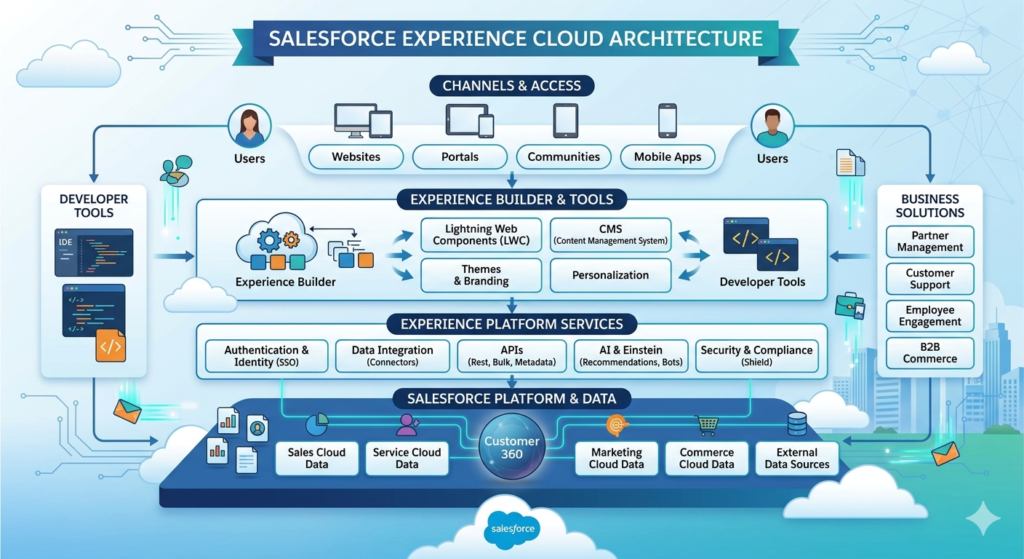
The Architecture of Salesforce Experience Cloud
Understanding the architecture of Experience Cloud is essential for leveraging its full potential and making informed implementation decisions. Let’s break down the key architectural components that make this platform so powerful.
Multi-Layered Architecture Overview
Experience Cloud is built on a multi-layered architecture that ensures scalability, security, and flexibility:
1. Foundation Layer: Salesforce Platform
At the base of Experience Cloud lies the robust Salesforce platform, which includes:
- Database Layer: Salesforce’s multi-tenant architecture provides secure data storage and retrieval
- Metadata Framework: Customization and configuration capabilities that don’t require coding
- Security Model: Role hierarchies, sharing rules, and object-level security
- Lightning Platform: The development framework that powers custom functionality
This foundation ensures that Experience Cloud inherits all the enterprise-grade capabilities of Salesforce, including reliability, scalability, and compliance certifications.
2. Data Access Layer
Experience Cloud uses Salesforce’s sophisticated data access layer to control what users can see and do:
- Sharing Sets: Define which records external users can access based on field values
- Sharing Groups: Enable access to records for community members
- External Organization-Wide Defaults: Set baseline access levels for external users
- Guest User Sharing Rules: Control what anonymous visitors can access
This layer ensures that customers only see their own cases, partners only access their deals, and employees see information relevant to their department – all automatically enforced.
3. Experience Layer: Templates and Components
The user-facing layer consists of:
- Pre-built Templates: Industry-specific starting points (Customer Service, Partner Central, etc.)
- Lightning Components: Reusable building blocks for functionality
- Experience Builder: Drag-and-drop tool for visual customization
- Lightning Web Components (LWC): Modern web standard components for custom development
- Content Management: Digital asset management and content publishing
This modular approach allows for rapid development while maintaining consistency and flexibility.
4. Integration Layer
Experience Cloud doesn’t exist in isolation. The integration layer enables:
- MuleSoft Integration: Connect to external systems and data sources
- APIs: RESTful and SOAP APIs for custom integrations
- AppExchange Apps: Third-party applications that extend functionality
- Single Sign-On (SSO): Authentication with external identity providers
- Heroku Connect: Real-time synchronization with external databases
5. Personalization and Intelligence Layer
At the top of the architecture, AI and analytics capabilities deliver smart experiences:
- Einstein Recommendations: AI-powered content and product suggestions
- Audience Targeting: Deliver different content to different user segments
- Analytics: Built-in dashboards to measure engagement and performance
- Einstein Bots: Automated chatbot assistance
Architectural Principles
Several key principles guide Experience Cloud’s architecture:
Multi-Tenancy: All customers share the same infrastructure while maintaining complete data isolation and security. This enables Salesforce to deliver continuous improvements without disrupting your implementation.
Metadata-Driven: Customizations are stored as metadata rather than code, making them easier to maintain, upgrade, and migrate.
Mobile-First Design: Responsive templates ensure experiences work seamlessly across devices without separate mobile development.
API-First Approach: Everything in Experience Cloud can be accessed and modified through APIs, enabling limitless integration possibilities.
Composability: Mix and match pre-built components with custom development to achieve exactly what you need without over-engineering.
Deployment Architecture Options
Experience Cloud offers flexible deployment options:
- Salesforce-Hosted Domains: Sites hosted on force.com domains with optional custom domain mapping
- Custom Domains: Fully branded URLs that feel native to your business
- Multiple Experiences: Run different portals for different audiences on the same Salesforce org
- Sandbox Environments: Test and develop in sandbox environments before production deployment
This architectural flexibility ensures that Experience Cloud can adapt to your specific technical requirements and branding needs.
Key Features and Capabilities of Experience Cloud
Now that we understand the architecture, let’s explore the powerful features that make Experience Cloud a comprehensive digital experience platform.
1. Pre-Built Templates for Rapid Deployment
Experience Cloud offers professionally designed templates tailored to specific use cases:
- Customer Service: Self-service support portals with case management and knowledge bases
- Partner Central: Collaboration hubs for channel partners with deal registration and co-branding
- Customer Account Portal: Order tracking, invoice management, and account information
- Help Center: FAQ-focused support sites with search and community forums
- Build Your Own: Start from scratch with complete customization freedom
These templates significantly reduce time-to-value, allowing organizations to launch experiences in weeks rather than months.
2. Visual Customization with Experience Builder
Experience Builder is a powerful drag-and-drop tool that empowers administrators and business users to customize their digital experiences without coding:
- WYSIWYG Editor: See exactly what users will see as you build
- Component Palette: Drag standard and custom components onto pages
- Theme Management: Control colors, fonts, and branding globally
- Responsive Preview: Check how your site looks on different devices
- Version Control: Save and compare different page versions
The visual approach democratizes customization, reducing dependency on developers for routine updates.
3. Comprehensive Content Management
Experience Cloud includes robust content management capabilities:
- CMS Collections: Organize and manage digital content (images, documents, videos)
- Content Delivery Network (CDN): Fast, global content distribution
- Content Scheduling: Publish and unpublish content automatically
- Multi-Language Support: Serve content in users’ preferred languages
- Rich Text Editor: Create formatted content without HTML knowledge
These features enable marketing and content teams to keep experiences fresh and relevant without technical assistance.
4. Community Collaboration Tools
Foster engagement and knowledge sharing with built-in social features:
- Discussion Forums: Topic-based conversations with threading
- Questions and Answers: Crowd-sourced problem solving with best answer voting
- Groups: Private or public spaces for focused discussions
- Direct Messaging: Secure peer-to-peer communication
- Activity Feeds: Social streams showing relevant updates
- Gamification: Badges, points, and reputation levels to encourage participation
These tools transform static portals into vibrant communities where users help each other.
5. Advanced Personalization and Targeting
Deliver tailored experiences based on user attributes and behavior:
- Audience Targeting: Show different content to different user segments
- Dynamic Components: Display personalized recommendations
- Custom Navigation: Present relevant menu options based on user profiles
- Conditional Visibility: Hide or show page elements based on criteria
- Einstein Recommendations: AI-powered suggestions for articles, products, and content
Personalization increases engagement by ensuring users see only what’s relevant to them.
6. Robust Security and Access Control
Enterprise-grade security protects your data while enabling controlled sharing:
- User Profiles and Permission Sets: Granular control over what users can access and do
- Two-Factor Authentication: Enhanced login security
- IP Restrictions: Limit access from specific geographic locations
- Login Hours: Control when users can access the community
- Single Sign-On (SSO): Integrate with identity providers like Okta or Azure AD
- Data Encryption: Protect sensitive information in transit and at rest
Security isn’t an afterthought – it’s built into every layer of Experience Cloud.
7. Self-Service Capabilities
Empower users to find answers and complete tasks independently:
- Knowledge Base Integration: Surface relevant articles automatically
- Case Deflection: Suggest solutions before users create support tickets
- Search Optimization: Powerful search with filters and facets
- FAQ Components: Organize common questions by topic
- Einstein Bots: Automated chat assistance for common inquiries
- Account Management: View and update personal information
Self-service reduces support costs while improving customer satisfaction through instant resolution.
8. Seamless Salesforce Integration
Access and update Salesforce data directly within experiences:
- Standard Object Access: Work with Accounts, Contacts, Cases, Leads, Opportunities, and more
- Custom Object Support: Extend functionality with your custom data models
- Real-Time Sync: Changes reflect immediately across all connected systems
- Record-Level Security: Automatic enforcement of Salesforce sharing rules
- Flow Integration: Guide users through complex processes with automation
This native integration eliminates data silos and ensures a single source of truth.
9. Mobile Responsiveness
Every Experience Cloud template is designed mobile-first:
- Responsive Design: Automatically adapts to screen sizes
- Mobile Publisher: Create native mobile apps from your experience
- Progressive Web App (PWA): App-like experiences without app store downloads
- Touch-Optimized: Interface elements designed for touch interaction
With mobile traffic dominating web usage, this capability ensures you meet users where they are.
10. Analytics and Insights
Measure engagement and optimize experiences with built-in analytics:
- Community Engagement Dashboards: Track active users, page views, and contributions
- Search Analytics: Understand what users are searching for
- Content Performance: See which articles and resources drive engagement
- User Adoption Metrics: Monitor login frequency and feature usage
- Custom Reports: Build specific analytics using Salesforce reporting tools
Data-driven insights enable continuous improvement of your digital experiences.
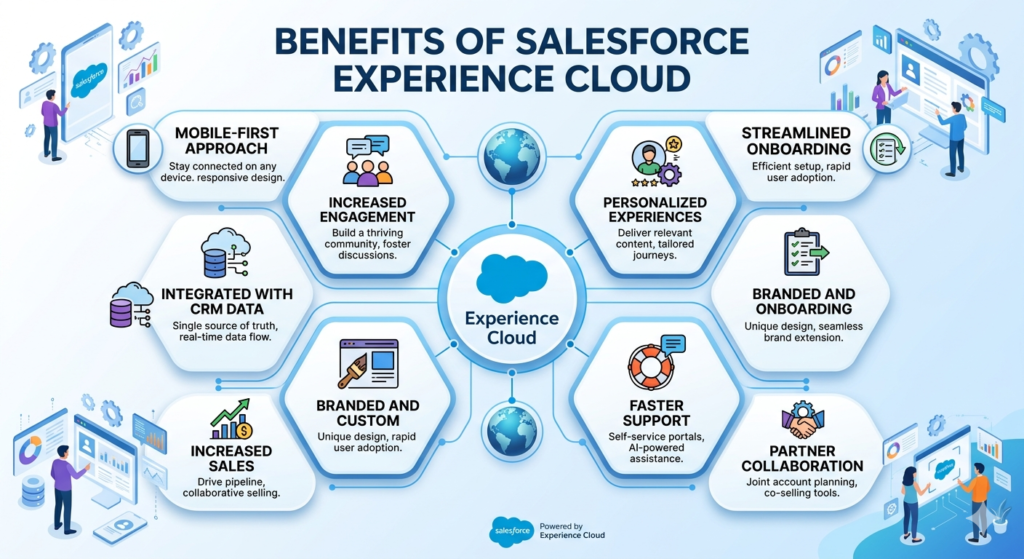
Business Benefits of Salesforce Experience Cloud
Beyond features and functionality, Experience Cloud delivers tangible business value across multiple dimensions.
Enhanced Customer Engagement
24/7 Availability: Customers can find answers, track orders, and resolve issues anytime, anywhere – not just during business hours.
Personalized Experiences: Tailored content and recommendations increase relevance, keeping customers engaged longer and returning more frequently.
Community Connection: Peer-to-peer support and user-generated content create emotional connections with your brand beyond transactional relationships.
Reduced Friction: Self-service tools eliminate waiting in phone queues or exchanging lengthy email threads, improving customer satisfaction.
Operational Efficiency and Cost Reduction
Case Deflection: Knowledge bases and community forums resolve common issues before support tickets are created, reducing support volume by 20-40% in many implementations.
Automation: Self-service processes for tasks like password resets, order status checks, and document downloads free staff for higher-value work.
Scalability: Serve thousands of users simultaneously without proportional increases in headcount.
Reduced Training Costs: Centralized, searchable knowledge repositories reduce repetitive training questions.
Improved Partner Collaboration
Deal Transparency: Partners access real-time information about leads, opportunities, and pipeline, reducing status update requests.
Resource Sharing: Distribute marketing materials, training resources, and best practices efficiently.
Streamlined Processes: Deal registration, MDF requests, and co-marketing workflows move faster with online tools.
Performance Visibility: Partners track their performance metrics, fostering healthy competition and goal achievement.
Accelerated Sales Cycles
Educated Buyers: Self-service resources help prospects educate themselves, arriving at sales conversations better informed and further along the buying journey.
Partner Enablement: Well-equipped channel partners close deals faster with easy access to collateral, training, and support.
Reduced Sales Admin: Automated quote generation, order placement, and account management free sales reps to focus on selling.
Data-Driven Decision Making
Unified View: All customer, partner, and employee interactions flow into Salesforce, creating comprehensive profiles for better decision-making.
Behavioral Insights: Analytics reveal what content resonates, where users struggle, and what features drive engagement.
Trend Identification: Aggregate data across thousands of interactions highlights emerging issues before they become widespread problems.
Brand Consistency and Control
Centralized Branding: Maintain consistent visual identity across all digital touchpoints from a single platform.
Governed Experiences: IT and compliance teams maintain oversight while business users manage content within guardrails.
Version Control: Track changes and revert if needed, reducing risk of breaking changes.
Competitive Differentiation
Modern Experience: Sleek, responsive designs create positive brand impressions compared to competitors with outdated portals.
Innovation Showcase: Advanced features like AI recommendations and chatbots position your organization as forward-thinking.
Customer Retention: Superior digital experiences increase switching costs, as customers become embedded in your ecosystem.
Real-World Use Cases: Experience Cloud in Action
Let’s explore how organizations across industries leverage Experience Cloud to solve real business challenges.
Use Case 1: Customer Support Portal for SaaS Company
Challenge: A rapidly growing SaaS company was drowning in support tickets. Their small team couldn’t scale fast enough to meet demand, and customer satisfaction was declining.
Solution: They implemented an Experience Cloud customer portal featuring:
- Comprehensive knowledge base with hundreds of how-to articles
- Community forum where users help each other
- Einstein Bots for initial triage and common questions
- Case submission for issues requiring human support
- System status dashboard showing service uptime
Results:
- 35% reduction in support tickets within six months
- Customer satisfaction scores increased from 72% to 88%
- Support costs per customer decreased by 40%
- Community became a source of product feedback and feature ideas
- Average resolution time dropped from 18 hours to 6 hours
Use Case 2: Partner Portal for Manufacturing Company
Challenge: A manufacturer with 200+ distributors struggled with partner communications. Distributors couldn’t access current pricing, marketing materials were outdated, and deal registration was manual and slow.
Solution: Custom Experience Cloud partner portal including:
- Real-time pricing and product availability
- Deal registration workflow with automated approval routing
- Marketing asset library with co-brandable materials
- Training certification program with progress tracking
- Performance dashboards showing sales by partner
Results:
- Deal registration processing time reduced from 5 days to 4 hours
- Partner satisfaction increased by 45%
- 23% increase in partner-sourced revenue
- Marketing asset downloads increased 300%
- Reduced channel conflict through transparent deal registration
Use Case 3: Employee Community for Global Enterprise
Challenge: A 10,000-person organization spanning 40 countries lacked effective internal communication. Employees felt disconnected, knowledge was siloed in departmental systems, and onboarding took months.
Solution: Internal Experience Cloud employee community with:
- Department-specific groups and discussion forums
- Searchable knowledge base for policies and procedures
- New hire onboarding hub with checklists and resources
- Executive blog and company news feed
- Employee directory with expertise tags
Results:
- Onboarding time reduced from 90 days to 45 days
- Employee engagement scores improved by 30%
- Internal help desk tickets decreased by 28%
- Cross-department collaboration increased measurably
- Single source of truth for company policies
Use Case 4: Customer Account Portal for Financial Services
Challenge: A financial services firm needed to provide clients with secure access to account information, statements, and investment performance while maintaining strict compliance requirements.
Solution: Secure Experience Cloud account portal offering:
- Real-time account balances and portfolio performance
- Document library with statements and tax documents
- Secure messaging with advisors
- Educational resources about financial planning
- Transaction history and downloadable reports
Results:
- 60% reduction in “account balance” phone calls
- 99.9% uptime meeting SLA commitments
- Passed all security and compliance audits
- Client satisfaction increased by 25%
- Advisors saved 10 hours per week on administrative tasks
Use Case 5: Patient Portal for Healthcare Provider
Challenge: A healthcare network wanted to improve patient engagement while reducing administrative burden on staff.
Solution: HIPAA-compliant patient portal built on Experience Cloud:
- Appointment scheduling and reminders
- Lab results and medical records access
- Prescription refill requests
- Bill pay integration
- Health education resources personalized by condition
Results:
- Appointment no-shows reduced by 40%
- Phone volume decreased by 35%
- Patient satisfaction scores increased to 92%
- Average revenue cycle time shortened by 15 days
- Staff could focus on patient care instead of administrative tasks
These examples demonstrate Experience Cloud’s versatility across industries and use cases, consistently delivering measurable business value.
Why Companies Should Invest in Salesforce Experience Cloud
With numerous digital experience platforms available, why should organizations specifically invest in Salesforce Experience Cloud? Here are compelling reasons:
1. Native Salesforce Integration
Unlike standalone portal solutions that require complex integrations, Experience Cloud is built on the Salesforce platform. This means:
- Zero integration effort to access Salesforce data
- Automatic updates when Salesforce releases new features
- Unified security model across all systems
- Single vendor relationship simplifying support and accountability
- Consistent user experience for internal and external users
If you’re already using Salesforce, Experience Cloud is the natural choice for extending those capabilities externally.
2. Rapid Time-to-Value
Pre-built templates and declarative customization tools enable:
- Launch in weeks rather than months
- Minimal development resources required
- Business users can manage content and basic customization
- Faster ROI compared to custom-built solutions
Organizations can deploy initial experiences quickly, then iterate based on user feedback.
3. Scalability and Reliability
Salesforce’s enterprise infrastructure provides:
- 99.9% uptime SLA
- Automatic scaling to handle traffic spikes
- Global CDN for fast content delivery
- Disaster recovery and business continuity built-in
- Regular security updates and monitoring
Your experiences grow with your business without infrastructure concerns.
4. Future-Proof Investment
Salesforce’s commitment to innovation means:
- Regular platform updates (three times per year)
- Continuous feature enhancements without additional cost
- Access to emerging technologies (AI, IoT, blockchain)
- Active developer community and ecosystem
- Long-term vendor stability
Your investment won’t become obsolete as technology evolves.
5. Comprehensive Ecosystem
Experience Cloud integrates with the broader Salesforce ecosystem:
- Marketing Cloud: Personalized email campaigns based on community activity
- Commerce Cloud: Embedded e-commerce experiences
- Service Cloud: Seamless case management
- Sales Cloud: Partner relationship management
- AppExchange: Thousands of pre-built integrations
This ecosystem approach creates connected experiences across the customer journey.
6. Low Total Cost of Ownership
While licensing costs exist, Experience Cloud often provides lower TCO than alternatives:
- Minimal infrastructure costs (cloud-based)
- Reduced development resources needed
- Lower maintenance and upgrade effort
- Operational efficiencies reducing support costs
- Single platform reducing technology sprawl
The subscription model also provides predictable costs without surprise expenses.
7. Compliance and Security
For regulated industries, Experience Cloud offers:
- SOC 2, ISO 27001, and other certifications
- GDPR, HIPAA, and PCI compliance capabilities
- Enterprise-grade encryption and security controls
- Audit trails and monitoring
- Data residency options for regional requirements
Security and compliance are built-in, not bolted on.
8. Competitive Necessity
Digital expectations are rising. Organizations that don’t provide modern self-service experiences risk:
- Losing customers to competitors with better digital experiences
- Higher support costs from outdated service models
- Reduced partner loyalty due to friction
- Talent challenges attracting digitally-native employees
Experience Cloud isn’t just an advantage – it’s increasingly necessary for competitiveness.
How RizeX Labs Can Help: Your Experience Cloud Implementation Partner
Implementing Experience Cloud successfully requires more than just technical knowledge – it demands strategic thinking, design expertise, change management, and deep Salesforce platform understanding. That’s where RizeX Labs comes in.
Why Partner with RizeX Labs?
Salesforce Expertise: Our team consists of certified Salesforce professionals with extensive Experience Cloud implementation experience across industries. We understand not just the “how” but the “why” behind best practices.
Strategic Approach: We don’t just build what you ask for – we work collaboratively to understand your business objectives and design solutions that deliver measurable outcomes.
End-to-End Services: From initial strategy through implementation, training, and ongoing optimization, we’re with you throughout the entire journey.
Industry Experience: We’ve implemented Experience Cloud solutions for financial services, healthcare, manufacturing, technology, and non-profit organizations, bringing relevant insights to your project.
Proven Methodology: Our structured implementation approach reduces risk, ensures quality, and delivers on time and budget.
Our Experience Cloud Services
1. Strategy and Consulting
Before writing a single line of code, we help you:
- Define clear business objectives and success metrics
- Identify target audiences and their specific needs
- Map user journeys and identify pain points
- Design information architecture and navigation
- Create content strategies
- Develop governance models for ongoing management
- Plan phased rollouts for complex implementations
This strategic foundation ensures your investment delivers maximum value.
2. Design and User Experience
Beautiful, functional design is critical for adoption. Our design team:
- Creates custom branded themes matching your visual identity
- Designs intuitive navigation and information architecture
- Develops wireframes and prototypes for stakeholder review
- Conducts usability testing with representative users
- Ensures responsive design across all devices
- Applies accessibility best practices (WCAG compliance)
We balance aesthetics with usability to create experiences users love.
3. Implementation and Development
Our certified developers and administrators:
- Configure Experience Cloud using best practices
- Develop custom Lightning components for unique requirements
- Implement integrations with external systems
- Configure security and sharing models
- Set up workflows and automation
- Migrate and structure content
- Build analytics and reporting dashboards
We leverage declarative tools where possible and custom code only when necessary, optimizing maintainability.
4. Data Migration and Integration
Connecting your ecosystem requires expertise in:
- Migrating legacy portal data to Experience Cloud
- Integrating with ERP, marketing automation, and other systems
- Implementing single sign-on (SSO) with identity providers
- Setting up real-time and batch data synchronization
- Creating custom APIs for unique integration needs
We ensure seamless data flow across your technology landscape.
5. Training and Enablement
Technology alone doesn’t drive adoption – people do. We provide:
- Administrator training for ongoing management
- Content author training for non-technical users
- End-user training and communication materials
- Train-the-trainer programs for distributed organizations
- Documentation and quick reference guides
- Video tutorials for on-demand learning
We empower your team to manage and grow your Experience Cloud environment independently.
6. Launch and Change Management
Successful launches require planning beyond technology:
- Communication strategies to build excitement
- Phased rollout plans to manage risk
- User feedback collection and rapid iteration
- Success metrics tracking from day one
- Executive reporting on adoption and business impact
We’ve learned that communication and change management often determine success more than technology.
7. Ongoing Optimization and Support
Experience Cloud isn’t a “set it and forget it” solution. We offer:
- Managed services for ongoing administration
- Performance monitoring and optimization
- Feature enhancement planning and implementation
- Regular health checks and best practice reviews
- Support packages tailored to your needs
- Quarterly business reviews
Our partnership extends beyond launch to ensure continuous improvement.
The RizeX Labs Implementation Process
Our proven methodology follows six phases:
Phase 1: Discovery – Understanding your business, users, and objectives through workshops and stakeholder interviews.
Phase 2: Design – Creating the strategic blueprint, including architecture, user experience design, and technical specifications.
Phase 3: Build – Configuring and developing your Experience Cloud environment in a sandbox for testing.
Phase 4: Test – Rigorous quality assurance, user acceptance testing, and performance validation.
Phase 5: Deploy – Carefully managed production deployment with rollback plans and monitoring.
Phase 6: Optimize – Post-launch support, adoption monitoring, and continuous improvement based on user feedback and analytics.
Each phase includes clear deliverables, stakeholder reviews, and approvals before proceeding.
Success Stories
Our clients consistently achieve measurable results:
- Financial Services Client: 50% reduction in customer service calls, 40% increase in customer satisfaction
- Manufacturing Partner: 35% faster partner onboarding, 28% increase in partner-sourced revenue
- Healthcare Provider: 99.2% patient portal adoption, 60% reduction in appointment scheduling calls
- Technology Company: Community of 50,000+ users, 45% case deflection rate
These aren’t exceptions – they’re the norm when Experience Cloud is implemented strategically.
Why Organizations Choose RizeX Labs
Client-Centric Approach: Your success is our success. We measure our performance by your outcomes, not just deliverables.
Transparent Communication: Regular updates, honest assessments, and collaborative problem-solving throughout the engagement.
Flexibility: We adapt to your working style, methodologies, and constraints rather than forcing you into rigid processes.
Knowledge Transfer: We don’t create dependency – we empower your team to independently manage and evolve your Experience Cloud environment.
Competitive Pricing: Fair, transparent pricing with no hidden costs or surprise fees.
Long-Term Partnership: Many clients who started with a single project have expanded into multi-year relationships across their entire Salesforce ecosystem.
Conclusion: Transform Your Digital Experiences with Experience Cloud
The digital landscape has fundamentally changed how organizations interact with customers, partners, and employees. Static websites and basic portals no longer meet the expectations of today’s connected, mobile-first audiences. They demand personalized, self-service experiences that respect their time and empower them with information and tools.
Salesforce Experience Cloud provides the platform to meet and exceed these expectations. Its powerful architecture, comprehensive feature set, native Salesforce integration, and continuous innovation make it the ideal foundation for building customer portals, partner communities, employee hubs, and any other digital experience you can imagine.
The business benefits are clear and measurable:
- Reduced support costs through self-service deflection
- Increased customer satisfaction and loyalty
- Stronger partner relationships and collaboration
- Improved operational efficiency through automation
- Data-driven insights for continuous improvement
- Competitive differentiation through superior experiences
Organizations across industries have proven that Experience Cloud delivers ROI – typically within the first year of deployment. The question isn’t whether to invest in better digital experiences, but how quickly you can get started.
About RizeX Labs
About RizeX Labs: We’re Pune’s leading IT training and consulting institute specializing in emerging technologies and Salesforce solutions. Our Salesforce programs combine expert instruction, real-world project experience, and career support to help professionals become industry-ready Salesforce experts.
With a strong focus on platforms like Salesforce Experience Cloud, we empower learners and businesses to build scalable, connected digital experiences.
