Introduction
Salesforce Health Cloud isn’t just another CRM—it’s the healthcare industry’s answer to fragmented patient data, disconnected care teams, and inefficient patient engagement. Built on the world’s #1 CRM platform, Health Cloud transforms how healthcare organizations manage patient relationships, coordinate care, and drive better health outcomes.
If you’re a healthcare professional tired of juggling multiple systems, a Salesforce admin tasked with implementing Health Cloud, or a developer looking to customize healthcare solutions, this comprehensive guide cuts through the marketing fluff and delivers exactly what you need to know.
We’ve structured this as 30 critical questions spanning three levels: beginner basics, intermediate practical applications, and advanced technical concepts. No filler, no generic statements—just actionable insights you can use today.
Level 1: Basic (Beginner-Friendly Questions)
1. What exactly is Salesforce Health Cloud?
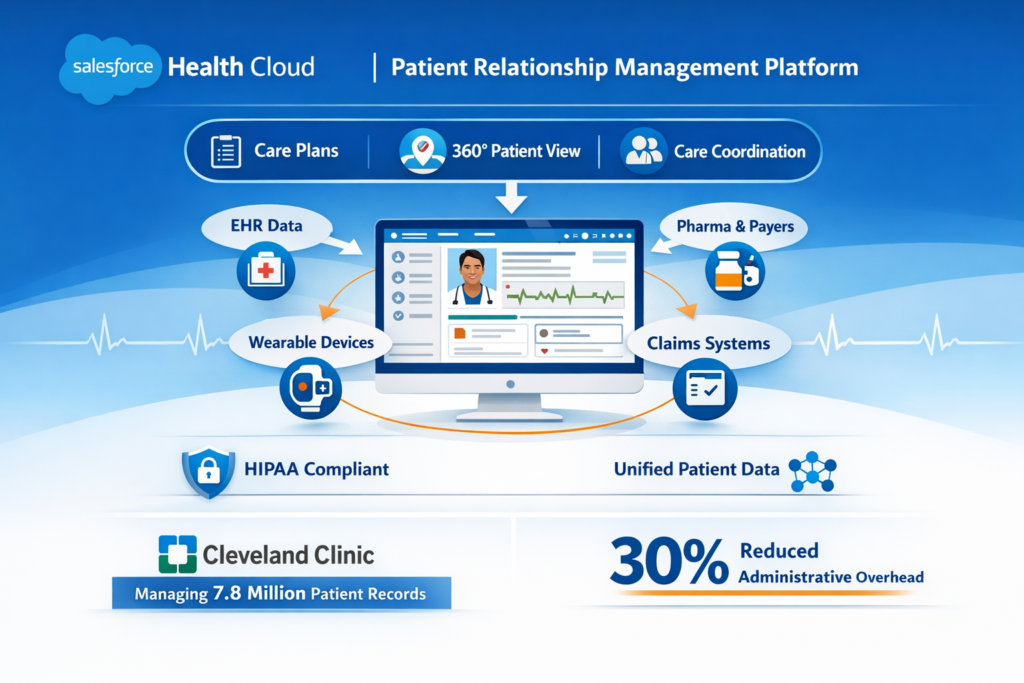
Salesforce Health Cloud is a patient relationship management platform specifically designed for healthcare organizations. Unlike generic CRMs, it’s built on the HIPAA-compliant Salesforce platform with healthcare-specific features like care plans, care coordination tools, and a 360-degree patient view.
Think of it as the central nervous system for your healthcare organization—connecting patient data from EHRs, wearables, claims systems, and more into a single, actionable interface. It’s used by hospitals, health systems, pharmaceutical companies, medical device manufacturers, and payers.
Real-world impact: Cleveland Clinic uses Health Cloud to manage over 7.8 million patient records, improving care coordination and reducing administrative overhead by 30%.
2. Why can’t healthcare organizations just use standard Salesforce?
You could use standard Salesforce, but you’d be building everything from scratch. Health Cloud comes pre-configured with healthcare data models that understand patients, providers, care plans, and clinical relationships.
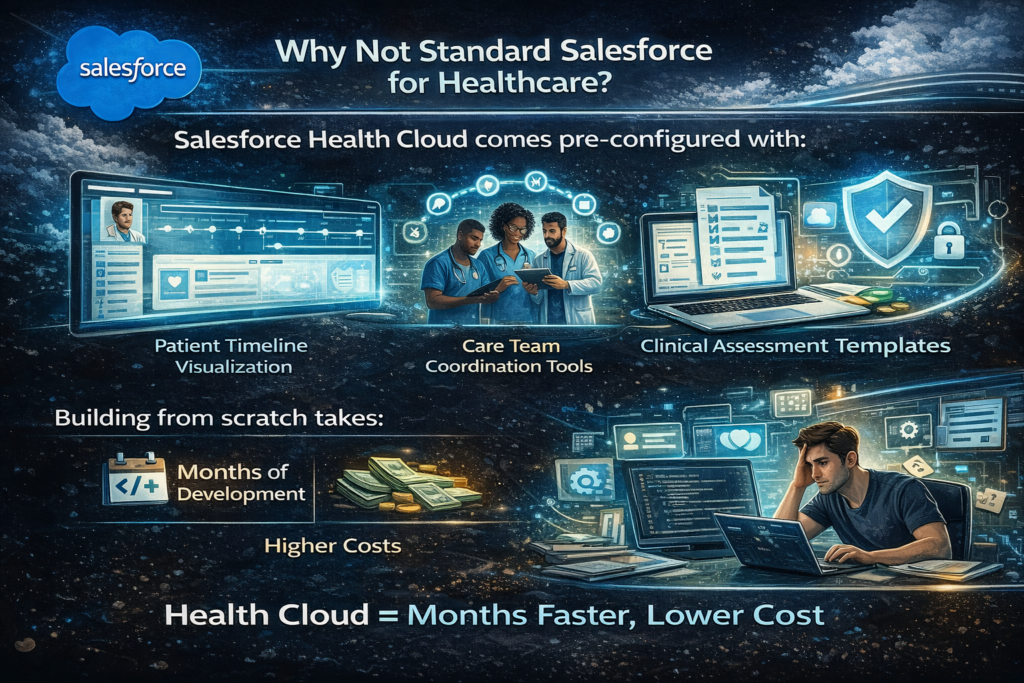
It includes out-of-the-box components like:
- Patient timeline visualization
- Care team coordination tools
- Clinical assessment templates
- Healthcare-specific security and compliance features
Building these capabilities on standard Salesforce would take months of development and cost significantly more than licensing Health Cloud.
3. Is Salesforce Health Cloud HIPAA compliant?
Yes, but with important caveats. Salesforce provides a HIPAA-compliant platform and will sign a Business Associate Agreement (BAA). However, compliance is a shared responsibility.
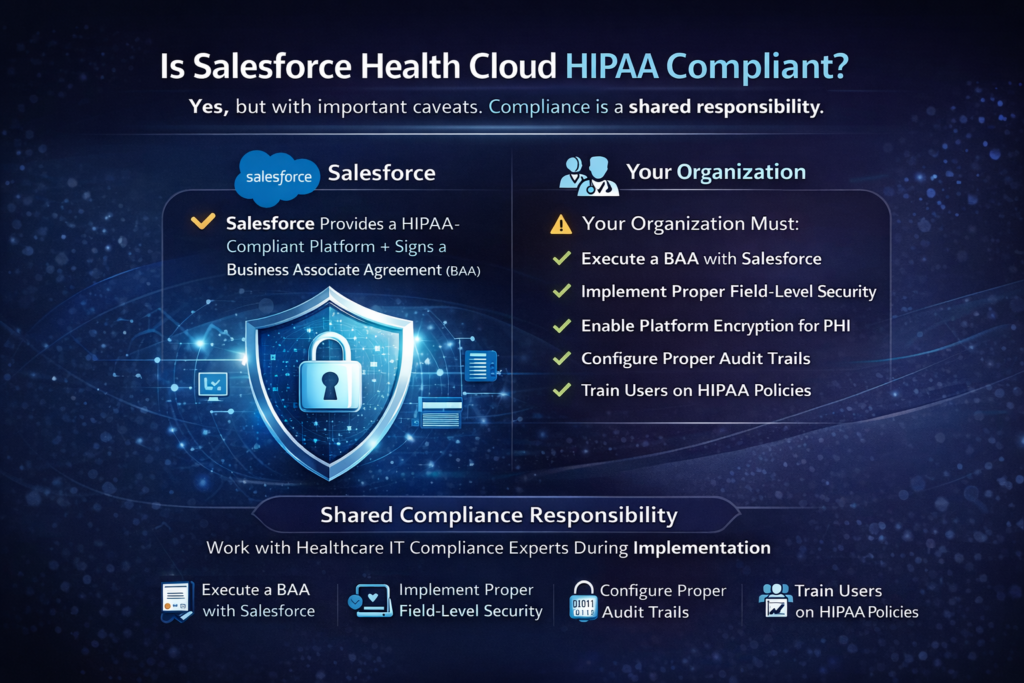
Your organization must:
- Execute a BAA with Salesforce
- Implement proper field-level security
- Enable platform encryption for PHI
- Configure proper audit trails
- Train users on HIPAA policies
Health Cloud provides the tools; your implementation determines actual compliance. Don’t assume turning it on makes you compliant—work with healthcare IT compliance experts during implementation.
4. What’s the difference between Health Cloud and electronic health records (EHRs)?
This confuses many beginners. Health Cloud is not an EHR replacement—it’s a complementary relationship management tool.
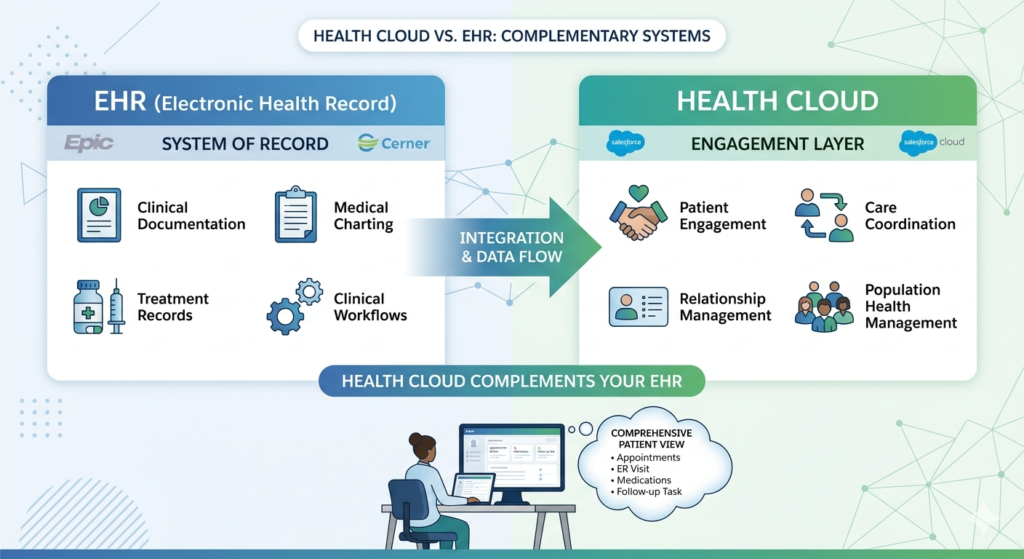
EHRs (Epic, Cerner): Clinical documentation, medical charting, treatment records, clinical workflows
Health Cloud: Patient engagement, care coordination, relationship management, population health management
Health Cloud integrates with your EHR to pull clinical data and display it in a relationship-focused context. It’s the engagement layer on top of your clinical systems, not a replacement for them.
Use case: A care coordinator uses Health Cloud to see a patient’s upcoming appointments (from EHR), recent ER visit (from EHR), active medications (from EHR), and then coordinates a follow-up call—all from one screen.
5. Who are the typical users of Health Cloud?
Health Cloud serves multiple personas across healthcare organizations:
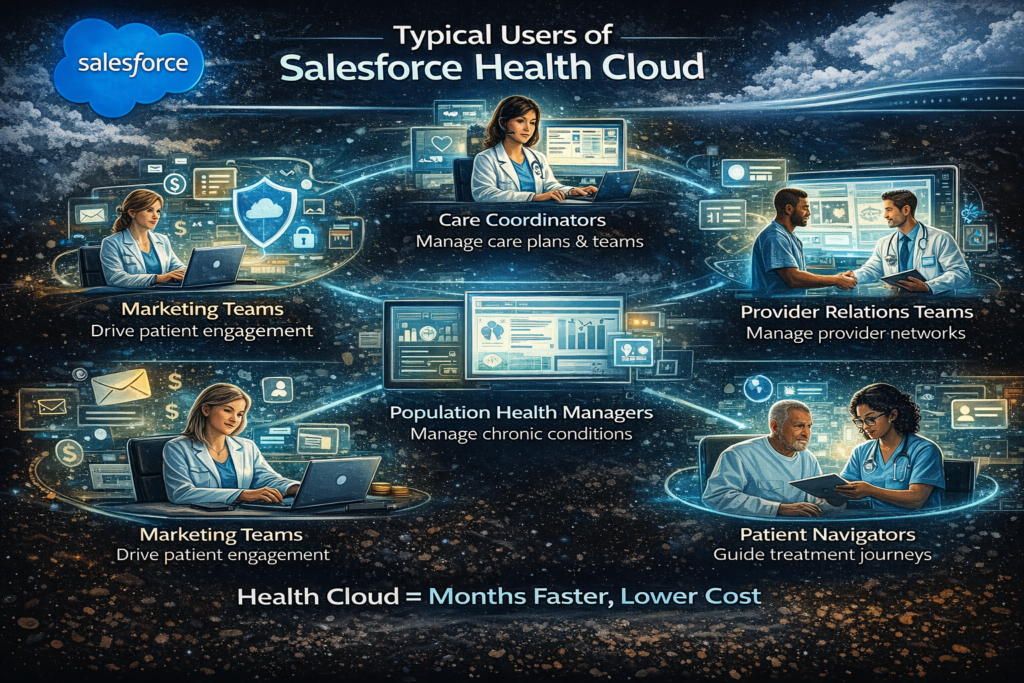
Care coordinators: Manage care plans, track patient outreach, coordinate care teams
Case managers: Handle complex cases, track interventions, measure outcomes
Provider relations teams: Manage provider networks and referral relationships
Patient navigators: Guide patients through treatment journeys
Population health managers: Identify high-risk patients, manage chronic conditions
Marketing teams: Run targeted patient engagement campaigns
Each persona sees relevant data and tools based on their role—not a one-size-fits-all interface.
6. What does a “360-degree patient view” actually mean?
Marketing loves this phrase, but here’s what it means practically: a single screen showing everything relevant about a patient from multiple data sources.
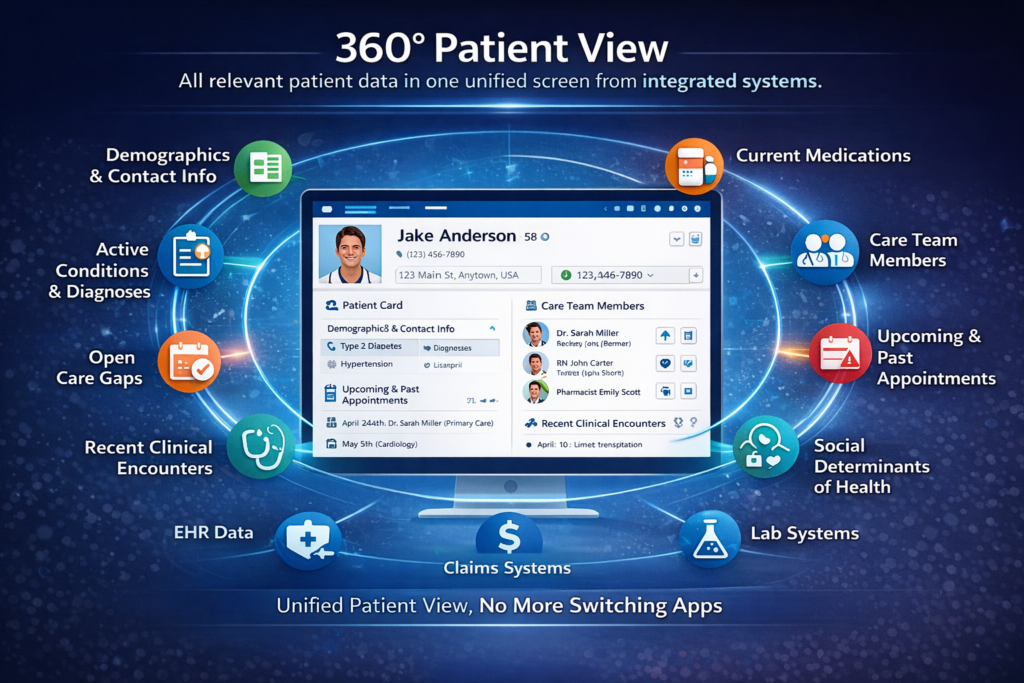
In Health Cloud’s Patient Card, users see:
- Demographics and contact information
- Active conditions and diagnoses
- Current medications
- Care team members
- Upcoming and past appointments
- Open care gaps
- Recent clinical encounters
- Social determinants of health
- Communication preferences
- Active care plans
All this data comes from integrated systems (EHR, claims, lab systems) but displays in one unified view. No more switching between 5 different applications to understand your patient’s status.
7. What are Care Plans in Health Cloud?
Care Plans are structured workflows that guide patients and care teams through treatment journeys. They contain:
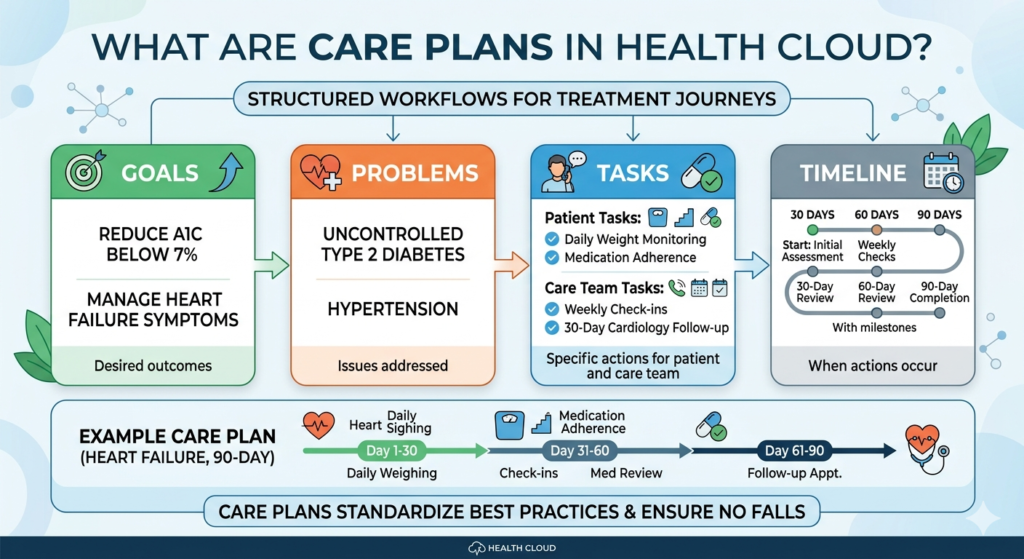
- Goals: What are we trying to achieve? (e.g., “Reduce A1C to below 7%”)
- Problems: What are we addressing? (e.g., “Uncontrolled Type 2 Diabetes”)
- Tasks: Specific actions for patients or care team members
- Timeline: When things should happen
Example Care Plan: A heart failure patient might have a 90-day care plan with tasks like “Daily weight monitoring,” “Weekly phone check-ins,” “Medication adherence review,” and “30-day cardiology follow-up.”
Care Plans standardize best practices and ensure nothing falls through the cracks.
8. How much does Salesforce Health Cloud cost?
Salesforce doesn’t publicly publish pricing, but here’s realistic guidance based on market rates:
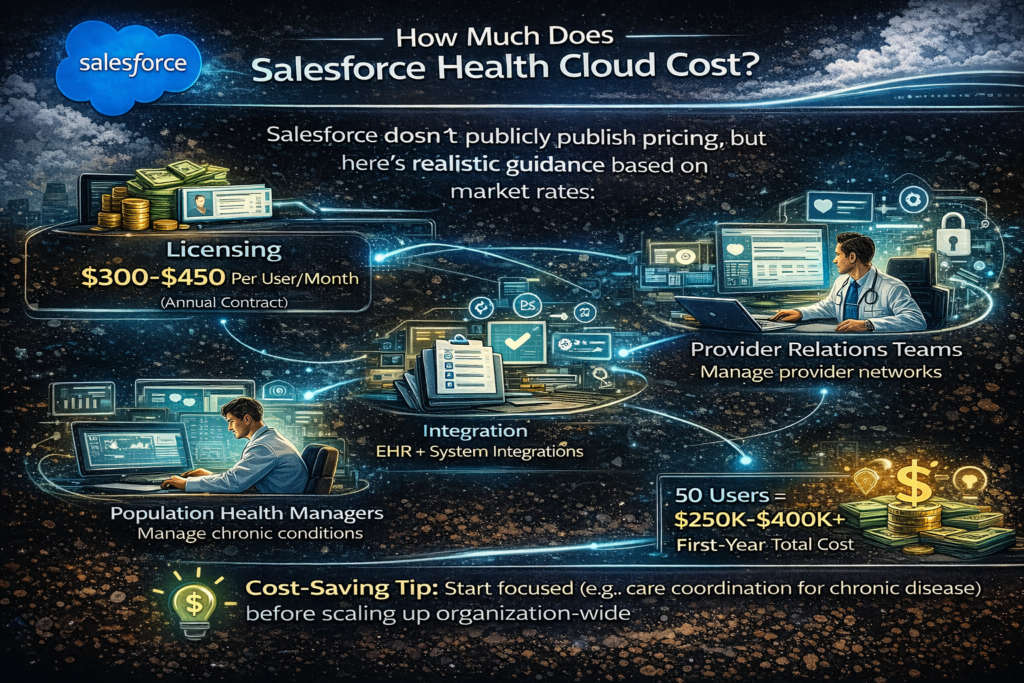
Licensing: $300-$450 per user/month (annual contract)
Implementation: $100,000-$500,000+ depending on complexity
Integration costs: $50,000-$200,000+ for EHR and other system integrations
Ongoing support: 15-20% of license costs annually
For a 50-user deployment, expect $250,000-$400,000 first-year total cost. This seems expensive until you compare it to building custom healthcare CRM software (typically $500,000-$2 million).
Cost-saving tip: Start with a focused use case (like care coordination for chronic disease) rather than trying to deploy organization-wide immediately.
9. Can small healthcare practices use Health Cloud, or is it only for large hospitals?
Honestly? Health Cloud is overkill for most small practices (under 10 providers). The licensing costs and implementation complexity don’t justify ROI for small practices that need basic appointment scheduling and patient communication.
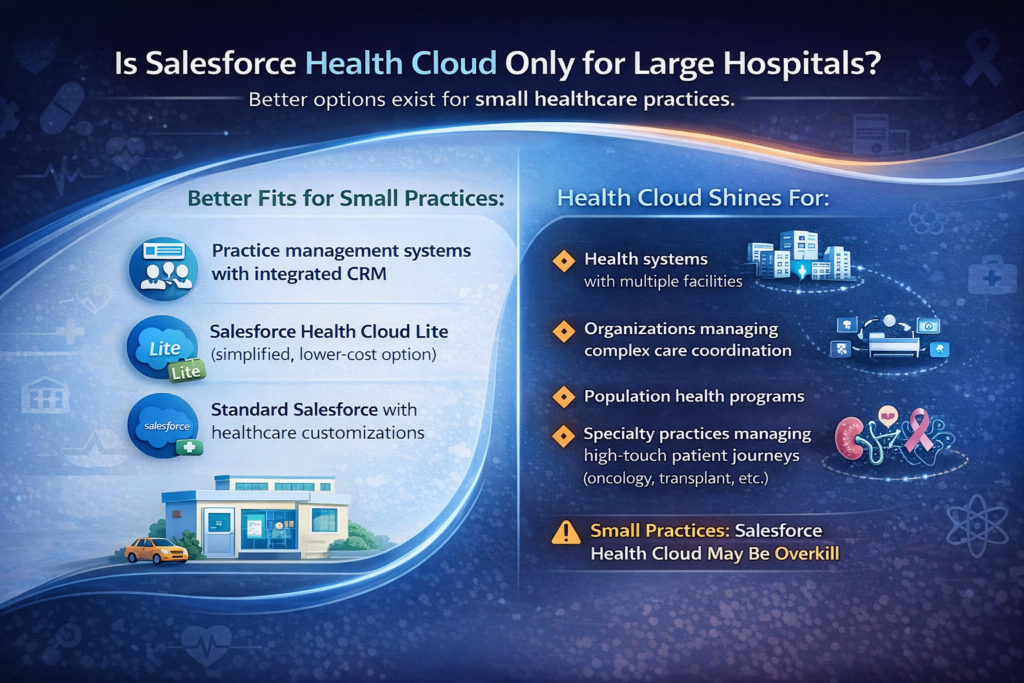
Better fits for small practices:
- Practice management systems with integrated CRM
- Salesforce Health Cloud Lite (simplified, lower-cost option)
- Standard Salesforce with healthcare customizations
Health Cloud shines for:
- Health systems with multiple facilities
- Organizations managing complex care coordination
- Population health programs
- Specialty practices managing high-touch patient journeys (oncology, transplant, etc.)
10. How long does Health Cloud implementation typically take?
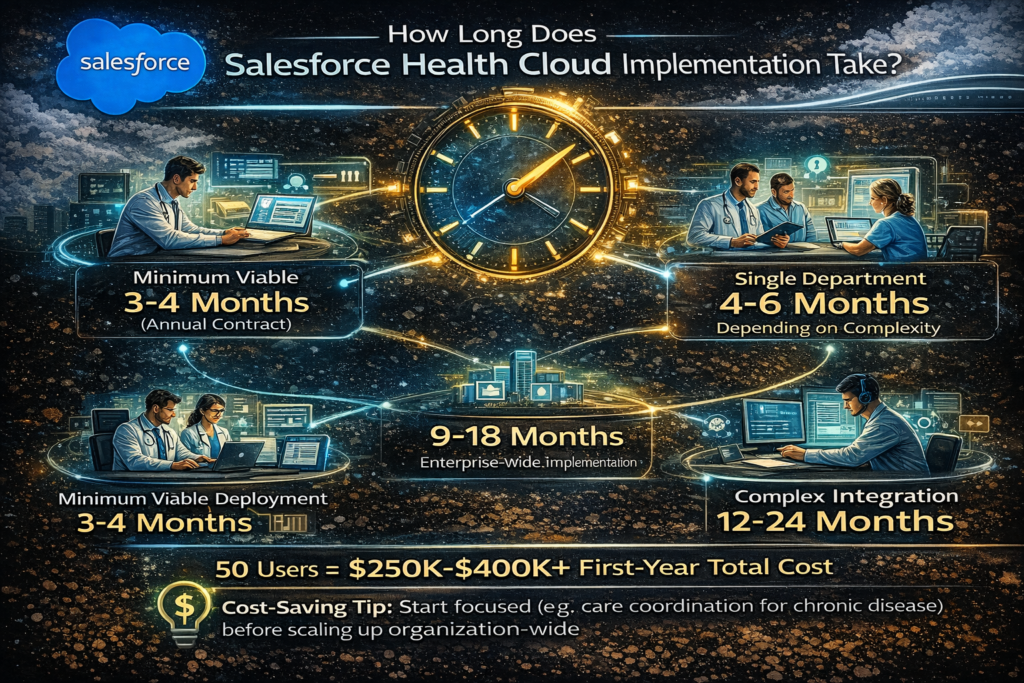
Realistic timelines:
- Minimum viable deployment: 3-4 months
- Single department rollout: 4-6 months
- Enterprise-wide implementation: 9-18 months
- Complex multi-system integration: 12-24 months
These timelines assume:
- Clear requirements and executive sponsorship
- Dedicated project resources
- Experienced implementation partner
- Reasonable scope (not trying to solve every problem in phase one)
Warning sign: Any partner promising full deployment in 6-8 weeks is either underestimating complexity or planning a bare-bones implementation that won’t meet your needs.
Level 2: Intermediate (Practical Usage Questions)
11. How does Health Cloud integrate with Epic, Cerner, or other EHRs?
EHR integration is critical but complex. Here are the common approaches:
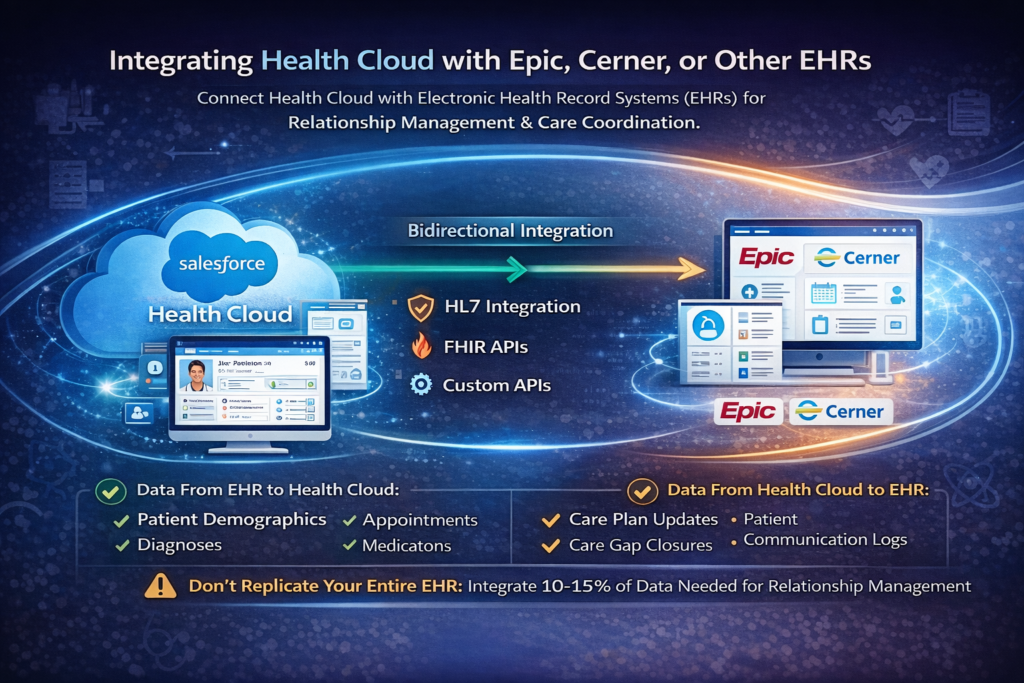
HL7 Integration: Traditional healthcare messaging standard for clinical data exchange. Requires middleware (Mirth, Rhapsody, Corepoint) to translate HL7 messages into Salesforce objects.
FHIR APIs: Modern RESTful API standard for healthcare. Health Cloud has native FHIR support, making integration cleaner. Epic and Cerner both provide FHIR endpoints.
Custom APIs: Direct API connections using the EHR’s proprietary APIs.
Real-world setup: Most organizations use bidirectional integration:
- From EHR to Health Cloud: Patient demographics, appointments, diagnoses, medications, encounters
- From Health Cloud to EHR: Care plan updates, patient communication logs, care gap closures
Critical point: Don’t try to replicate your entire EHR in Health Cloud. Integrate what’s needed for relationship management and care coordination—typically 10-15% of EHR data.
12. What’s the Provider Network Management feature, and who needs it?
Provider Network Management helps health plans, ACOs, and health systems manage their provider relationships. It tracks:
- Provider credentials and specialties
- Contract terms and reimbursement rates
- Performance metrics and quality scores
- Referral patterns
- Network adequacy
Use case: A health plan uses Health Cloud to ensure network adequacy by ZIP code. When a provider retires or leaves the network, automated workflows alert network management to recruit replacement providers in that geographic area and specialty.
Who needs this: Health insurance companies, accountable care organizations (ACOs), large health systems managing employed and affiliated providers. Not relevant for single-practice organizations.
13. How do care teams collaborate within Health Cloud?
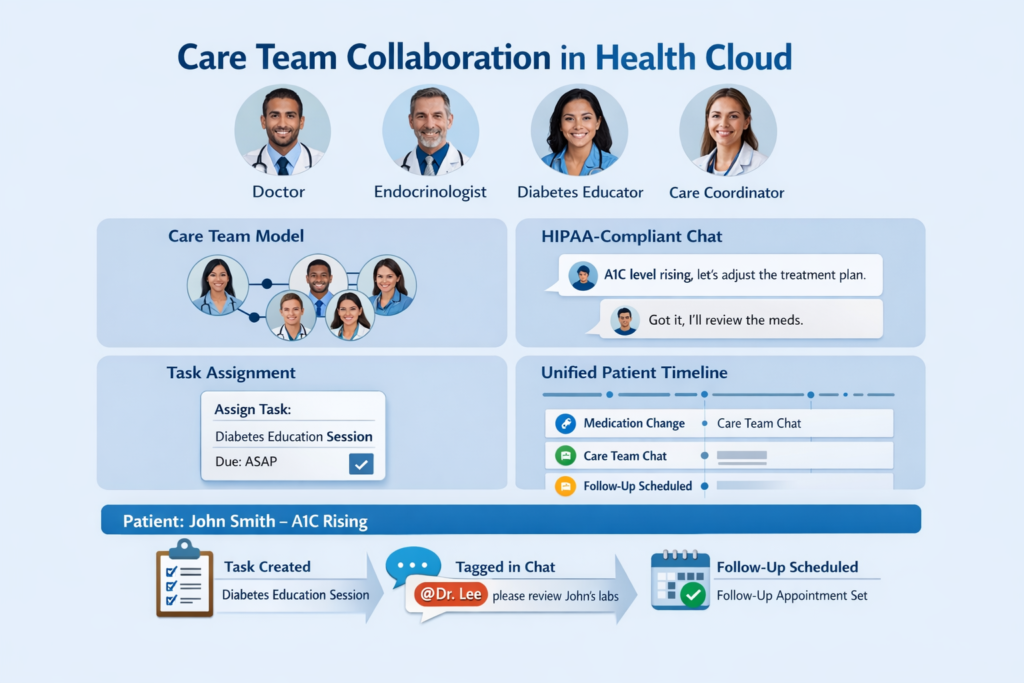
Health Cloud leverages Salesforce’s collaboration features with healthcare-specific enhancements:
Care Team Model: Define multidisciplinary teams (physician, nurse, dietitian, social worker, pharmacist) associated with specific patients or care plans.
Chatter Integration: HIPAA-compliant internal messaging where care team members can discuss cases, share updates, and coordinate interventions.
Task Assignment: Route specific care plan tasks to appropriate team members based on role and availability.
Unified Timeline: All care team members see the same patient timeline showing interventions, communications, and clinical events.
Real example: A diabetic patient’s care team includes a PCP, endocrinologist, certified diabetes educator, and care coordinator. When the patient’s A1C rises, the coordinator creates a task for the diabetes educator, tags the endocrinologist in Chatter, and schedules a follow-up—all within one platform.
14. Can patients access Health Cloud directly, or is it only for staff?
Health Cloud includes Patient Community (previously called Health Cloud for Patients)—a patient-facing portal built on Salesforce Experience Cloud.
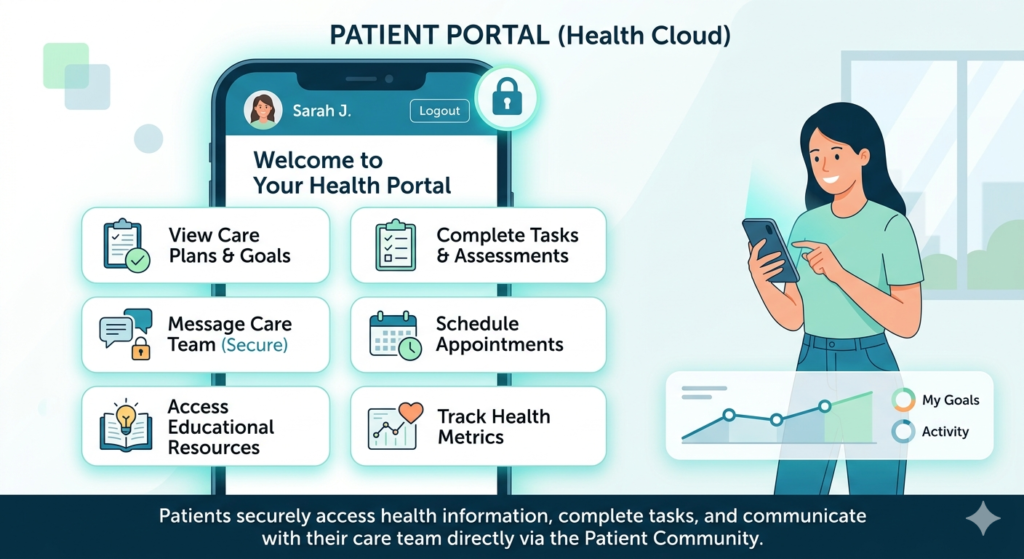
Patient capabilities:
- View their care plans and goals
- Complete tasks and assessments
- Message their care team (secure messaging)
- Schedule appointments
- Access educational resources
- Track health metrics
Implementation considerations:
- Requires additional licensing (Experience Cloud)
- Must design patient-friendly interfaces (most healthcare staff interfaces are too complex for patients)
- Integration with patient authentication systems
- Mobile responsiveness is essential
Adoption reality: Patient portal adoption averages 30-40% even with good design. Success requires active promotion, clear value proposition, and ongoing engagement strategies.
15. What are Health Cloud’s capabilities for managing social determinants of health (SDOH)?
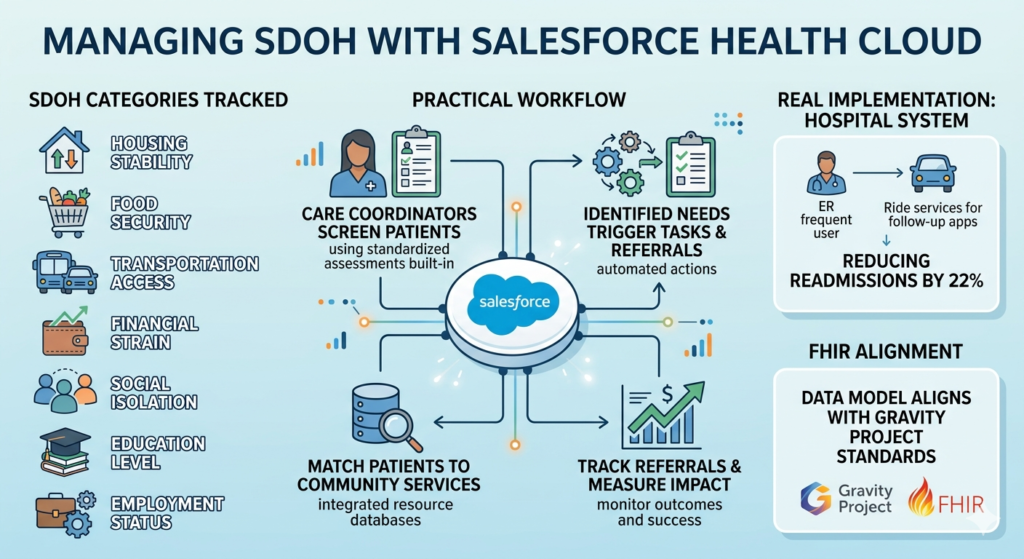
Health Cloud includes structured data models for capturing and acting on SDOH factors:
SDOH Categories tracked:
- Housing stability
- Food security
- Transportation access
- Financial strain
- Social isolation
- Education level
- Employment status
Practical workflow:
- Care coordinators screen patients using standardized assessments (built into Health Cloud)
- Identified needs trigger tasks or referrals
- Integration with community resource databases matches patients to services
- Track referrals and measure impact on health outcomes
Real implementation: A hospital system uses Health Cloud to screen ER frequent users for SDOH needs. Patients lacking transportation get connected to ride services for follow-up appointments, reducing readmissions by 22%.
FHIR alignment: Health Cloud’s SDOH data model aligns with Gravity Project standards, ensuring interoperability.
16. How does intelligent appointment scheduling work?
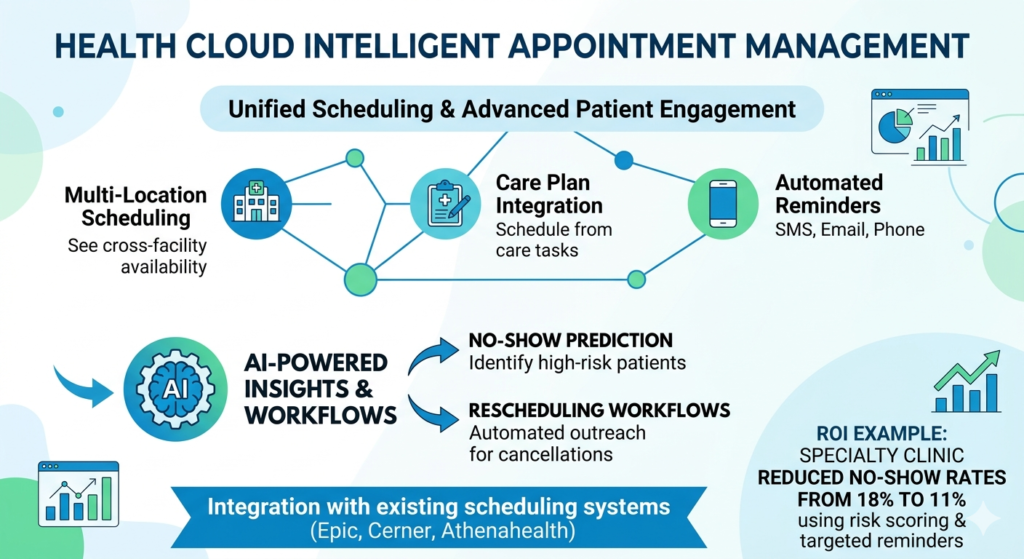
Health Cloud’s Intelligent Appointment Management goes beyond basic scheduling:
Smart features:
- Multi-location scheduling: See availability across all facilities and providers
- Care plan integration: Schedule appointments directly from care plan tasks
- Automated reminders: SMS, email, or phone call reminders
- No-show prediction: AI identifies patients at high risk of missing appointments
- Rescheduling workflows: Automated outreach to reschedule cancelled appointments
Integration requirement: This requires integration with your scheduling system (Epic Cadence, Cerner Scheduling, Athenahealth, etc.). Health Cloud doesn’t replace these systems but provides a unified view and patient-friendly booking interface.
ROI example: A specialty clinic reduced no-show rates from 18% to 11% by using Health Cloud’s risk scoring to implement targeted reminder campaigns for high-risk patients.
17. What reporting and analytics capabilities does Health Cloud provide?
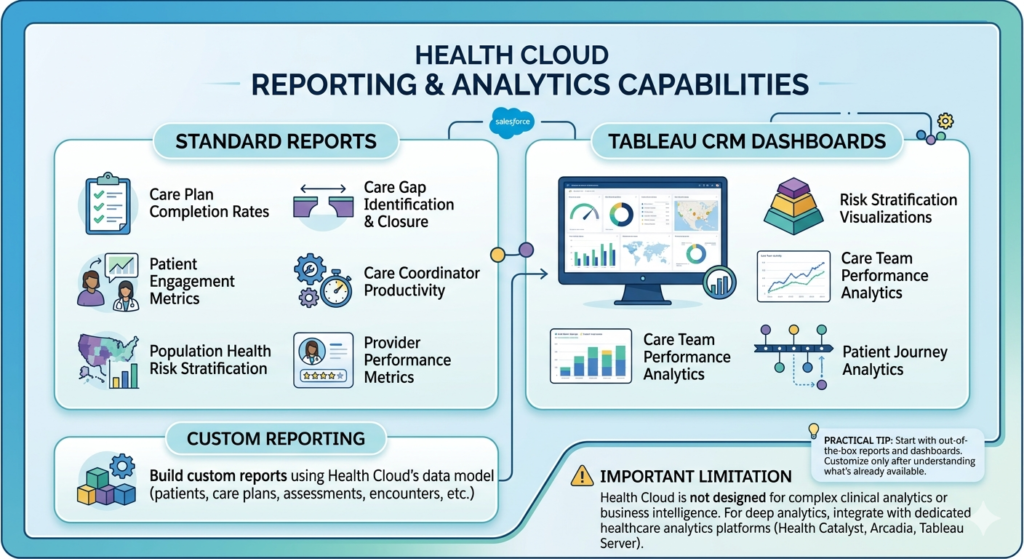
Health Cloud includes healthcare-specific analytics built on Salesforce’s reporting and Tableau CRM:
Standard reports:
- Care plan completion rates
- Care gap identification and closure
- Patient engagement metrics
- Care coordinator productivity
- Population health risk stratification
- Provider performance metrics
Tableau CRM dashboards:
- Real-time population health monitoring
- Risk stratification visualizations
- Care team performance analytics
- Patient journey analytics
Custom reporting: Build custom reports using Health Cloud’s data model (patients, care plans, assessments, encounters, etc.)
Important limitation: Health Cloud is not designed for complex clinical analytics or business intelligence. For deep analytics, integrate with dedicated healthcare analytics platforms (Health Catalyst, Arcadia, Tableau Server).
Practical tip: Start with out-of-the-box reports and dashboards. Customize only after understanding what’s already available—many organizations waste money building custom reports that already exist.
18. How do you handle patient consent and privacy preferences?
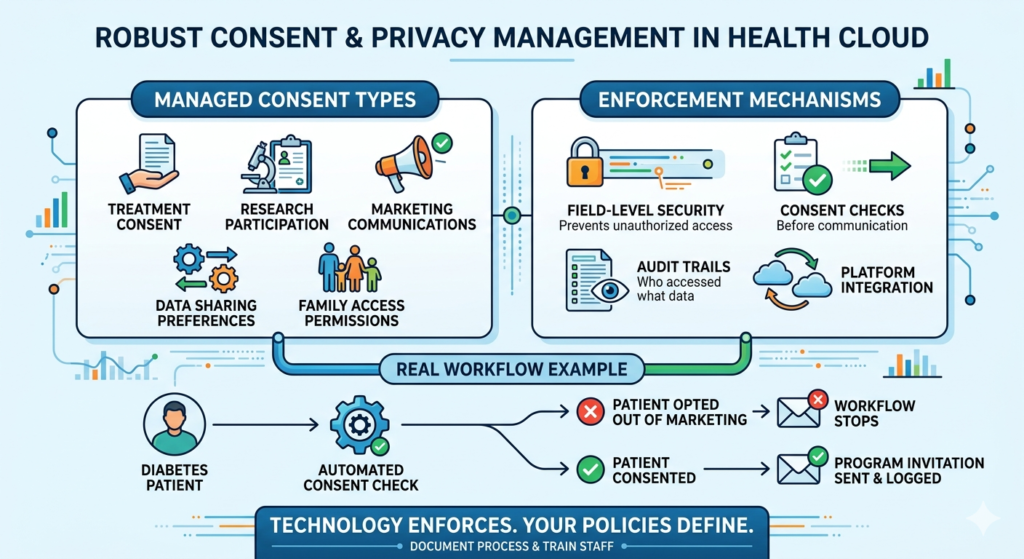
Health Cloud includes robust consent management critical for HIPAA and privacy regulations:
Consent types managed:
- Treatment consent
- Research participation
- Marketing communications
- Data sharing preferences
- Family member access permissions
Enforcement mechanisms:
- Field-level security prevents unauthorized data access
- Consent checks before communications
- Audit trails of who accessed what data
- Integration with consent management platforms
Real workflow: Before sending a diabetes management program invitation, Health Cloud checks the patient’s consent preferences. If they’ve opted out of marketing communications, the workflow stops. If they’ve consented, it proceeds and logs the communication.
Compliance requirement: Document your consent capture process and train staff. Technology enforces consent, but your policies define what requires consent.
19. Can Health Cloud support telehealth and virtual care?
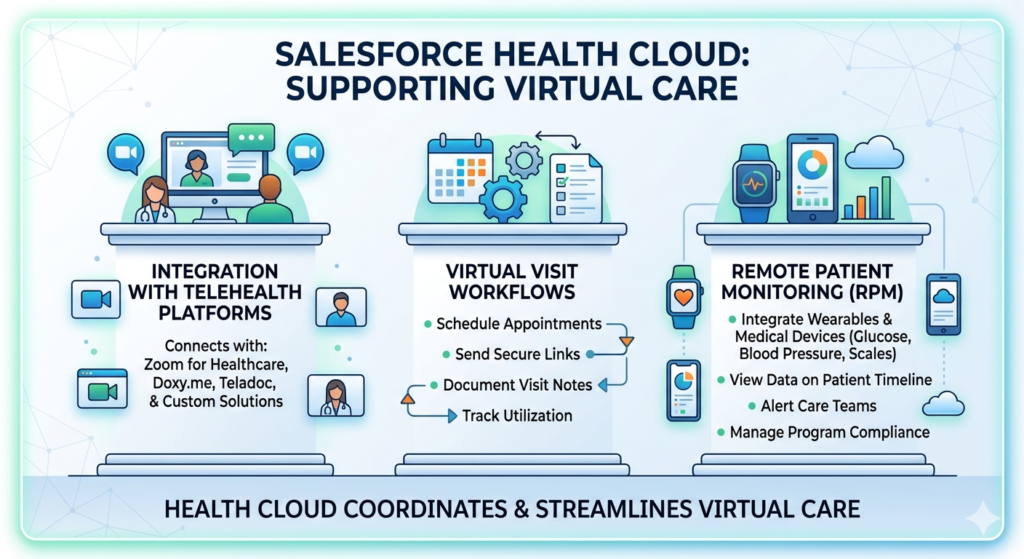
Yes, though it’s not a telehealth platform itself. Health Cloud coordinates virtual care through:
Integration with telehealth platforms: Connect with Zoom for Healthcare, Doxy.me, Teladoc, or custom telehealth solutions.
Virtual visit workflows:
- Schedule virtual appointments
- Send patients secure links
- Document virtual visit notes
- Track virtual care utilization
- Manage remote patient monitoring data
Remote patient monitoring (RPM):
- Integrate wearables and medical devices (glucose meters, blood pressure cuffs, scales)
- Display patient-generated health data on patient timeline
- Alert care teams to concerning trends
- Track RPM program enrollment and compliance
Pandemic example: Health systems rapidly deployed Health Cloud-coordinated virtual care programs during COVID-19, managing symptom screening, virtual triage, and remote monitoring for thousands of patients.
20. What’s the difference between Health Cloud and Salesforce’s Life Sciences Cloud?
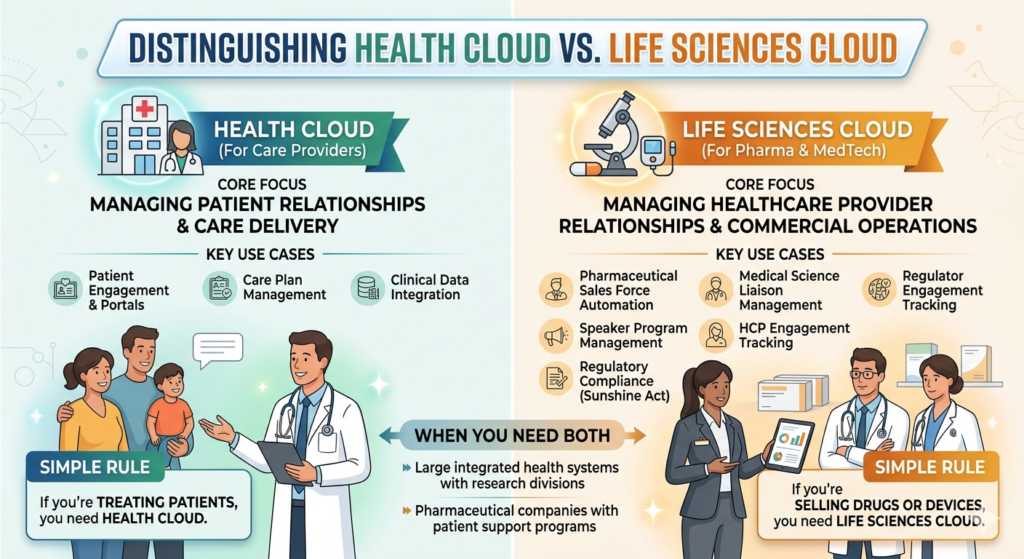
This confuses many people because both serve healthcare. Here’s the distinction:
Health Cloud: For care providers (hospitals, clinics, health plans) managing patient relationships and care delivery.
Life Sciences Cloud: For pharmaceutical and medical device companies managing healthcare provider relationships and commercial operations.
Life Sciences Cloud use cases:
- Pharmaceutical sales force automation
- Medical science liaison management
- Speaker program management
- HCP engagement tracking
- Regulatory compliance (Sunshine Act reporting)
When you need both: Large integrated health systems with research divisions or pharmaceutical companies with patient support programs might use both platforms.
Simple rule: If you’re treating patients, you need Health Cloud. If you’re selling drugs or devices to providers, you need Life Sciences Cloud.
Level 3: Advanced (Technical Concepts Questions)
21. What’s the underlying data model architecture of Health Cloud?
Health Cloud is built on HealthCare Data Model (HCDM), which extends Salesforce’s standard objects with healthcare-specific entities:
Core objects:
- Account: Organizations (hospitals, clinics, practices)
- Contact → Patient: Individual patients (still a Contact, with patient-specific fields)
- Care Plan: Treatment plans with goals, problems, and tasks
- Care Plan Template: Reusable care plan structures
- Clinical Encounter: Healthcare visits and interactions
- Care Request: Orders or requests for services
- Care Team: Groups of providers managing a patient
- Medication Statement: Current and past medications
- Problem: Conditions and diagnoses
- Procedure: Medical procedures performed
- Observation: Clinical observations (vitals, lab results)
Relationship model: Uses Healthcare Provider Taxonomy for provider-to-provider relationships and Care Team Members for patient-to-provider relationships.
FHIR alignment: HCDM maps closely to FHIR resources, enabling standards-based integration.
Custom development tip: Extend standard Health Cloud objects rather than creating custom objects when possible. This maintains upgrade compatibility and leverages out-of-the-box functionality.
22. How do you implement HL7/FHIR integration with Health Cloud?
FHIR Integration (Recommended approach):
Health Cloud includes FHIR API support for bi-directional data exchange:
- Inbound FHIR: External systems POST FHIR resources to Health Cloud’s FHIR endpoint
- Salesforce Health Cloud Accelerator: Maps FHIR resources to Salesforce objects
- Custom mapping: Use Apex or MuleSoft to handle complex transformations
Example FHIR implementation:
apex// Simplified FHIR Patient resource mapping
public class FHIRPatientMapper {
    public static void processFHIRPatient(String fhirJson) {
        Map<String, Object> fhirData = (Map<String, Object>) JSON.deserializeUntyped(fhirJson);

        Contact patient = new Contact();
        patient.FirstName = getNestedValue(fhirData, 'name.0.given.0');
        patient.LastName = getNestedValue(fhirData, 'name.0.family');
        patient.HealthCloudGA__MedicareId__c = getIdentifier(fhirData, 'medicare');

        upsert patient HealthCloudGA__MedicareId__c;
    }
}
HL7 Integration (Legacy but common):
- HL7 Messages: EHR sends ADT (admissions), ORM (orders), or ORU (results) messages
- Integration Engine: Middleware (Mirth Connect, Rhapsody) receives HL7
- Transformation: Convert HL7 segments to JSON/XML
- Salesforce API: Push transformed data via REST/SOAP API
- Custom Processing: Apex code processes and maps to Health Cloud objects
Performance consideration: For high-volume integrations (1000+ messages/hour), use MuleSoft or dedicated integration platform. Native Salesforce API limits may be insufficient.
23. What are the platform encryption requirements for PHI in Health Cloud?
Standard Salesforce encryption isn’t sufficient for PHI. You need Salesforce Shield Platform Encryption:
What it encrypts:
- Data at rest (database level)
- File attachments
- Search indexes
Implementation steps:
- Purchase Shield Platform Encryption license
- Generate or upload tenant secret
- Enable encryption for specific fields containing PHI
- Test performance impact (encryption can slow queries)
- Manage key rotation policies
Fields requiring encryption:
- Patient identifiers (SSN, MRN, Medicare ID)
- Diagnosis and condition descriptions
- Clinical notes
- Medication details
- Any field containing PHI
Performance impact: Encrypted fields cannot be used in certain SOQL operations (LIKE queries, some aggregations). Design your data model accordingly.
Backup consideration: Back up your tenant secret securely. Losing it means permanent data loss.
Code example:
apex// Querying encrypted fields requires special consideration
List<Contact> patients = [
    SELECT Id, FirstName, HealthCloudGA__MedicareId__c
    FROM Contact
    WHERE HealthCloudGA__MedicareId__c = :encryptedId
    // Direct equality works, but LIKE doesn't
];
24. How do you build custom clinical assessments in Health Cloud?
Health Cloud provides Assessment Templates for structured data collection. Advanced implementations require custom development:
Standard approach:
- Create Assessment object record defining assessment type
- Build Assessment Indicator (question) records
- Create Assessment Indicator Definition (answer options)
- Use OmniStudio or Lightning components for custom UI
Advanced custom assessment:
apexpublic class CustomClinicalAssessment {
    @AuraEnabled
    public static Assessment createAssessment(Id patientId, String assessmentType) {
        Assessment newAssessment = new Assessment();
        newAssessment.Name = assessmentType + ' - ' + Date.today();
        newAssessment.AccountId = patientId;
        newAssessment.AssessmentDate = DateTime.now();
        insert newAssessment;
        return newAssessment;
    }

    @AuraEnabled
    public static void saveAssessmentResponse(Id assessmentId, Map<String, Object> responses) {
        List<AssessmentIndicator> indicators = new List<AssessmentIndicator>();

        for(String questionId : responses.keySet()) {
            AssessmentIndicator indicator = new AssessmentIndicator();
            indicator.AssessmentId = assessmentId;
            indicator.IndicatorDefinitionId = questionId;
            indicator.Value = String.valueOf(responses.get(questionId));
            indicators.add(indicator);
        }

        insert indicators;

        // Calculate risk score based on responses
        calculateRiskScore(assessmentId, indicators);
    }

    private static void calculateRiskScore(Id assessmentId, List<AssessmentIndicator> indicators) {
        // Custom risk stratification logic
        Decimal riskScore = 0;
        for(AssessmentIndicator indicator : indicators) {
            // Logic based on responses
        }

        Assessment a = new Assessment(Id = assessmentId);
        a.TotalScore = riskScore;
        update a;
    }
}
OmniStudio integration: Use OmniScripts for dynamic, branching assessments without custom code. Better for non-developers but requires OmniStudio license.
25. What are the API limits and scalability considerations for Health Cloud?
Health Cloud inherits Salesforce’s API limits with healthcare-specific considerations:
Standard API limits (per 24 hours):
- Enterprise Edition: 1,000 API calls per user
- Unlimited Edition: Unlimited API calls
- Bulk API: 15,000 batches per rolling 24 hours
Healthcare-specific scalability challenges:
1. Integration volume: EHR integrations can generate massive API traffic
- Solution: Use Bulk API for large data loads; implement caching strategies
2. Real-time updates: Care team notifications and alerts
- Solution: Use Platform Events or Streaming API instead of polling
3. Large patient populations: Millions of patient records
- Solution: Implement data archiving strategies; use Big Objects for historical data
Performance optimization patterns:
apex// BAD: Individual API calls in loop
for(HL7Message msg : messages) {
    processMessage(msg); // Makes API call each iteration
}

// GOOD: Bulkified processing
List<Contact> patientsToUpdate = new List<Contact>();
for(HL7Message msg : messages) {
    patientsToUpdate.add(mapToPatient(msg));
}
upsert patientsToUpdate ExternalId__c;
Platform Events for real-time integration:
apex// Publish event when critical care gap identified
List<Care_Gap_Alert__e> events = new List<Care_Gap_Alert__e>();
events.add(new Care_Gap_Alert__e(
    PatientId__c = patientId,
    GapType__c = 'Diabetic Eye Exam Overdue',
    Severity__c = 'High'
));
EventBus.publish(events);
Monitoring: Implement System.Limits class checks to monitor API usage and prevent hitting limits.
26. How do you implement role-based access control for care team members?
Healthcare requires granular access control based on care team relationships:
Standard Salesforce security model:
- Profiles: Define object-level and field-level permissions
- Permission Sets: Grant additional permissions to specific users
- Sharing Rules: Define record access
Health Cloud-specific security:
Care Team-based sharing:
- Patients visible only to their assigned care team members
- Care plan access restricted to active care team
- Clinical data segmentation by department
Implementation approach:
apex// Custom sharing rule based on Care Team membership
public class CareTeamSharingService {
    public static void shareCareRecordsWithTeam(Id carePlanId) {
        // Get care team members
        List<CareTeamMember> teamMembers = [
            SELECT MemberId
            FROM CareTeamMember
            WHERE CareTeamId IN (
                SELECT CareTeamId
                FROM CarePlan
                WHERE Id = :carePlanId
            )
        ];

        // Create sharing records
        List<CarePlan__Share> shares = new List<CarePlan__Share>();
        for(CareTeamMember member : teamMembers) {
            CarePlan__Share share = new CarePlan__Share();
            share.ParentId = carePlanId;
            share.UserOrGroupId = member.MemberId;
            share.AccessLevel = 'Edit';
            share.RowCause = Schema.CarePlan__Share.RowCause.Care_Team__c;
            shares.add(share);
        }

        insert shares;
    }
}
Role-based data access:
- Physicians see clinical notes; care coordinators don’t
- Billing staff see payment data; clinicians don’t
- Use field-level security for PHI elements
Audit trail requirement: Enable Field History Tracking on all PHI fields for HIPAA compliance.
27. What are the best practices for care plan automation and workflow?
Advanced care plan implementations use Process Builder, Flows, and Apex for automation:
Automated care plan assignment:
apextrigger PatientDiagnosisTrigger on Problem (after insert) {
    Set<Id> patientIds = new Set<Id>();
    Map<String, Id> diagnosisToTemplate = new Map<String, Id>{
        'Diabetes Type 2' => 'a1X3h000000XXXX',
        'Heart Failure' => 'a1X3h000000YYYY',
        'COPD' => 'a1X3h000000ZZZZ'
    };

    for(Problem diagnosis : Trigger.new) {
        if(diagnosisToTemplate.containsKey(diagnosis.Name)) {
            patientIds.add(diagnosis.AccountId);
        }
    }

    // Async processing to avoid governor limits
    if(!patientIds.isEmpty()) {
        CareplanAutomationService.createCarePlans(patientIds);
    }
}
Dynamic task generation based on patient risk:
apexpublic class CareplanAutomationService {
    @future
    public static void createCarePlans(Set<Id> patientIds) {
        List<CarePlan> plans = new List<CarePlan>();

        for(Id patientId : patientIds) {
            Contact patient = getPatientWithRiskScore(patientId);
            CarePlan plan = new CarePlan();
            plan.AccountId = patientId;
            plan.Name = 'Chronic Disease Management';
            plan.StartDate = Date.today();
            plan.EndDate = Date.today().addMonths(6);

            // Customize based on risk
            if(patient.RiskScore__c > 70) {
                plan.ContactFrequency__c = 'Weekly';
            } else {
                plan.ContactFrequency__c = 'Monthly';
            }

            plans.add(plan);
        }

        insert plans;

        // Generate tasks for each care plan
        createCarePlanTasks(plans);
    }
}
Flow-based task reminders:
- Schedule-Triggered Flow runs daily
- Identifies care plan tasks due in 48 hours
- Sends email/SMS reminders to assigned care team members
- Escalates overdue tasks to care managers
Best practice: Use declarative tools (Flow) for simple workflows; reserve Apex for complex business logic or integration points.
28. How do you handle data archiving and purge in Health Cloud for long-term scalability?
Healthcare data accumulates rapidly. Strategic archiving prevents performance degradation:
Data archiving strategies:
1. Big Objects for historical data:
apex// Define Big Object for archived encounters
object Archived_Encounter__b {
    fields {
        EncounterId__c Index
        PatientId__c Index
        EncounterDate__c
        EncounterType__c
        ArchiveDate__c
    }
}

// Archive encounters older than 2 years
public class EncounterArchivalBatch implements Database.Batchable<sObject> {
    public Database.QueryLocator start(Database.BatchableContext bc) {
        Date cutoffDate = Date.today().addYears(-2);
        return Database.getQueryLocator([
            SELECT Id, AccountId, ActivityDateTime, Type
            FROM ClinicalEncounter
            WHERE ActivityDateTime < :cutoffDate
        ]);
    }

    public void execute(Database.BatchableContext bc, List<ClinicalEncounter> encounters) {
        List<Archived_Encounter__b> archived = new List<Archived_Encounter__b>();

        for(ClinicalEncounter enc : encounters) {
            Archived_Encounter__b archiveRec = new Archived_Encounter__b();
            archiveRec.EncounterId__c = enc.Id;
            archiveRec.PatientId__c = enc.AccountId;
            archiveRec.EncounterDate__c = enc.ActivityDateTime;
            archiveRec.ArchiveDate__c = DateTime.now();
            archived.add(archiveRec);
        }

        // Insert into Big Object (async, doesn't count against DML limits)
        database.insertImmediate(archived);

        // Delete from standard object
        delete encounters;
    }
}
2. External storage for attachments:
- Store large files (imaging, PDFs) in AWS S3 or Azure Blob Storage
- Keep metadata in Salesforce with external URLs
- Reduces storage costs significantly
3. Retention policies:
- Define legal retention requirements (typically 7-10 years for medical records)
- Automate purge after retention period
- Maintain audit trail of deletions
Performance monitoring:
SQL-- SOQL query to monitor object size
SELECT COUNT()
FROM ClinicalEncounter
WHERE ActivityDateTime > LAST_N_YEARS:1
Run this monthly and establish data volume thresholds for archival triggers.
29. What are the considerations for multi-language and multi-region Health Cloud deployments?
Global healthcare organizations need localization:
Translation Workbench:
- Translate custom labels, field names, picklist values
- Support patient-facing portals in multiple languages
- Requires Translation Workbench license
Region-specific compliance:
apexpublic class ComplianceConfigurationService {
    private static Map<String, ComplianceRules> regionRules = new Map<String, ComplianceRules>{
        'US' => new ComplianceRules('HIPAA', true, 6),
        'EU' => new ComplianceRules('GDPR', true, 30),
        'CANADA' => new ComplianceRules('PIPEDA', true, 7)
    };

    public static void enforceConsentRules(Contact patient) {
        String region = getPatientRegion(patient);
        ComplianceRules rules = regionRules.get(region);

        // GDPR requires explicit consent renewal
        if(rules.regulation == 'GDPR' && patient.ConsentDate__c.addYears(1) < Date.today()) {
            // Trigger consent renewal workflow
        }
    }
}
Data residency:
- Store EU patient data in EU Salesforce instances (GDPR requirement)
- Use Salesforce’s multi-cloud architecture for geographic data isolation
- Configure separate orgs for different regions if necessary
Timezone handling:
apex// Always store in UTC, display in user's timezone
DateTime appointmentTime = DateTime.newInstanceGmt(2024, 1, 15, 14, 0, 0);
String userTimezone = UserInfo.getTimeZone().getID();
String displayTime = appointmentTime.format('MM/dd/yyyy hh:mm a', userTimezone);
Currency considerations: If billing internationally, enable multi-currency in Salesforce.
30. How do you implement AI and predictive analytics in Health Cloud?
Health Cloud integrates with Einstein AI and external ML models:
Einstein Analytics for population health:
apex// Custom prediction model integration
public class ReadmissionPredictionService {
    @future(callout=true)
    public static void predictReadmissionRisk(Set<Id> patientIds) {
        List<Contact> patients = [
            SELECT Id, LastAdmissionDate__c, ChronicConditionCount__c,
                   Age, PriorReadmissions__c
            FROM Contact
            WHERE Id IN :patientIds
        ];

        // Call external ML model API
        HttpRequest req = new HttpRequest();
        req.setEndpoint('https://ml-api.healthcare.org/predict');
        req.setMethod('POST');
        req.setBody(JSON.serialize(patients));

        Http http = new Http();
        HttpResponse res = http.send(req);

        if(res.getStatusCode() == 200) {
            Map<Id, Decimal> predictions =
                (Map<Id, Decimal>) JSON.deserialize(res.getBody(), Map<Id, Decimal>.class);

            List<Contact> toUpdate = new List<Contact>();
            for(Id patientId : predictions.keySet()) {
                Contact p = new Contact(Id = patientId);
                p.ReadmissionRiskScore__c = predictions.get(patientId);

                // Auto-enroll high-risk patients in care program
                if(p.ReadmissionRiskScore__c > 0.7) {
                    p.HighRiskProgram__c = true;
                }
                toUpdate.add(p);
            }

            update toUpdate;
        }
    }
}
Einstein Next Best Action:
Recommend interventions based on patient characteristics:
- High A1C → Recommend diabetes education enrollment
- Missed appointments + transportation barrier → Offer ride service
- Polypharmacy → Flag for medication reconciliation
Implementation pattern:
- Define recommendation strategies in Einstein Next Best Action
- Create acceptance criteria (patient conditions triggering recommendations)
- Build Flow to execute recommended actions
- Track acceptance rates and outcomes
External ML integration:
apex// Azure ML or AWS SageMaker integration
public class ExternalMLService {
    public static Decimal predictNoShowProbability(Id appointmentId) {
        // Get appointment and patient data
        Appointment__c appt = getAppointmentWithPatientData(appointmentId);

        // Call cloud ML service
        MLServiceRequest request = new MLServiceRequest();
        request.features = buildFeatureVector(appt);

        Decimal probability = callMLService(request);

        // Store prediction
        appt.NoShowProbability__c = probability;
        update appt;

        return probability;
    }
}
Model governance: Document model versions, training data, accuracy metrics, and bias testing for regulatory compliance.
Conclusion
Salesforce Health Cloud represents a fundamental shift in how healthcare organizations manage patient relationships—moving from transactional encounters to continuous, coordinated care.
Key takeaways:
For beginners: Health Cloud is a specialized CRM for healthcare, not an EHR replacement. It excels at patient engagement, care coordination, and population health management. Start with a focused use case like chronic disease management before expanding.
For practitioners: Success depends on clean EHR integration, thoughtful care team workflows, and user adoption strategies. Don’t underestimate change management—technology is only 30% of the solution.
For developers: Leverage Health Cloud’s standard data model before building custom objects. Focus integration efforts on FHIR standards, implement robust security and encryption, and design for scalability from day one.
The hard truth: Health Cloud implementations fail when organizations treat it as an IT project rather than a care transformation initiative. Executive sponsorship, clinician buy-in, and clear success metrics matter more than technical architecture.
What’s next? Health Cloud is evolving rapidly with enhanced AI capabilities, deeper EHR integration, and expanded telehealth features. Organizations that master the fundamentals now will be positioned to leverage advanced capabilities as they emerge.
Whether you’re a healthcare administrator evaluating CRM options, a Salesforce admin tasked with implementation, or a developer building custom healthcare solutions, Health Cloud offers powerful capabilities—if implemented strategically.
Start small, measure outcomes, iterate, and scale. That’s the path to Health Cloud success
Conclusion
Salesforce Health Cloud isn’t just another healthcare technology purchase—it’s a strategic commitment to patient-centered care delivery. After examining 30 critical questions across beginner, intermediate, and advanced levels, one truth stands out: Health Cloud succeeds when organizations focus on care transformation, not just technology deployment.
What You Should Remember
For Healthcare Leaders:
Health Cloud delivers ROI through improved care coordination, reduced readmissions, and enhanced patient engagement—but only when coupled with workflow redesign and organizational change management. The $250,000-$400,000 first-year investment for a 50-user deployment pays for itself when readmissions drop 15-20% or care coordinator productivity increases 30%. Technology alone won’t achieve this; engaged clinical champions and executive sponsorship will.
For Salesforce Administrators:
Master the healthcare data model before building custom objects. Understand the difference between Accounts, Contacts, Patients, Care Plans, and Care Teams. Prioritize HIPAA compliance from day one—implement Shield Platform Encryption, establish field-level security, and configure proper audit trails. Your technical decisions have regulatory and patient safety implications that go far beyond typical CRM implementations.
For Developers:
Build on Health Cloud’s FHIR-aligned architecture rather than fighting it. Focus integration efforts on bidirectional EHR connectivity using modern FHIR APIs over legacy HL7 messages when possible. Design for scale—healthcare data grows exponentially, so implement archival strategies and bulkified code patterns from the start. Your custom components should enhance Health Cloud’s native capabilities, not replace them.
For Healthcare IT Professionals:
Health Cloud complements your EHR—it doesn’t replace it. Epic, Cerner, or Athenahealth handle clinical documentation; Health Cloud manages the relationships, engagement, and coordination surrounding that clinical data. The most successful implementations integrate both systems seamlessly, creating a unified experience for care teams without duplicating functionality.
The Hard Truths Nobody Tells You
Implementation timelines are longer than vendors promise. A meaningful Health Cloud deployment takes 6-12 months minimum, not the 6-8 weeks some consultants suggest. Factor in EHR integration complexity, care team training, workflow redesign, and user adoption campaigns.
User adoption determines success more than features. Care coordinators won’t use Health Cloud if it adds 10 clicks to their workflow. Physicians won’t document in yet another system. Design implementations that reduce friction, not increase it. Measure adoption rates weekly and course-correct quickly.
Data quality makes or breaks analytics. Sophisticated care gap identification and risk stratification algorithms are worthless with incomplete or inaccurate patient data. Invest in data governance, master data management, and integration quality assurance before building advanced analytics.
HIPAA compliance is your responsibility, not Salesforce’s. Yes, Salesforce provides a HIPAA-compliant platform and signs BAAs. But you must configure encryption, implement access controls, train users, and maintain audit trails. A compliant platform doesn’t automatically make your implementation compliant.
What’s Next in Health Cloud Evolution
The platform is rapidly expanding capabilities in three key areas:
1. AI-Driven Care Recommendations: Einstein AI is moving beyond basic analytics to prescriptive guidance—recommending specific interventions based on patient characteristics, predicting no-shows before they happen, and identifying patients at risk of deterioration.
2. Deeper EHR Integration: FHIR R4 support is becoming standard, enabling near-real-time clinical data exchange. Expect tighter Epic and Cerner integrations with less custom middleware required.
3. Patient-Generated Health Data: Integration with wearables, remote monitoring devices, and patient-reported outcomes is becoming table stakes. Health Cloud will increasingly serve as the aggregation point for clinical and lifestyle data.
Organizations mastering Health Cloud fundamentals now will be positioned to leverage these advanced capabilities as they mature.
Your Path Forward
If you’re just starting:
- Define one high-value use case (chronic disease management, care transitions, or patient navigation)
- Assemble a cross-functional team including clinicians, IT, and operations
- Select an experienced implementation partner with healthcare expertise
- Plan for 6-9 months minimum from kickoff to go-live
- Measure specific outcomes (readmission rates, care plan completion, patient engagement)
If you’re mid-implementation:
- Obsess over user adoption metrics—track login frequency and feature usage
- Iterate quickly based on care team feedback
- Don’t let perfect be the enemy of good—launch with core features and expand
- Build champions among clinicians who can drive peer adoption
- Document workflows and create role-based training
If you’re optimizing existing deployment:
- Audit data quality and integration reliability
- Identify unused features that could drive value
- Expand from pilot department to enterprise-wide deployment
- Implement advanced analytics and AI capabilities
- Continuously measure ROI and adjust strategy
The Bottom Line
Health Cloud transforms healthcare delivery when implemented strategically as part of broader care model redesign. It fails when treated as an isolated IT project or CRM replacement.
Start with clear clinical objectives, engage frontline care teams, design for simplicity, and measure outcomes relentlessly. Technology enables transformation; people drive it.
The future of healthcare is coordinated, personalized, and data-driven. Health Cloud provides the platform to deliver that future—but only if you focus on patient outcomes over technical features, adoption over implementation, and continuous improvement over one-time deployment.
Your next step: Choose one question from this guide that addresses your biggest current challenge. Whether it’s understanding EHR integration, implementing care plans, or optimizing security, take action on that specific area this week.
Healthcare transformation doesn’t happen all at once. It happens one improved care plan, one engaged patient, one coordinated intervention at a time. Health Cloud makes those improvements scalable, measurable, and sustainable.
Now it’s your turn to make it happen.
About RizeX Labs
At RizeX Labs, we focus on delivering industry-specific Salesforce solutions, with strong expertise in Salesforce Health Cloud.
Our approach is simple: no generic CRM setups. We build systems tailored for real healthcare use cases—patient management, care coordination, and data-driven decision-making.
We combine:
- Deep Salesforce technical expertise
- Real healthcare domain understanding
- Practical, implementation-level experience
This allows us to help healthcare organizations design, implement, and scale Health Cloud the right way, without wasting time on unnecessary complexity.
If you’re serious about building a career in Salesforce, start here:
Internal Links:
- Salesforce Admin & Development Training
- Remote Patient Monitoring (RPM) in Salesforce Health Cloud: Transforming Connected Healthcare Delivery
- How to Use AI in Salesforce Health Cloud for Predictive Patient Care (Einstein + Real Use Cases)
- New Releases in Salesforce Health Cloud Spring ’26: What Healthcare Organizations Need to Know
- How to Customize Salesforce Health Cloud Using Lightning Web Components (LWC) for Healthcare Use Cases
- 30 Essential Questions About Salesforce Health Cloud Answered: Beginner to Advanced Guide
- Salesforce Sales Cloud vs Health Cloud: The Strategic CRM Decision That Defines Your Healthcare Business Trajectory
- Using Salesforce Health Cloud for Insurance & Claims Coordination: Beyond the Hospital Walls
External Links:
Salesforce Health Cloud Overview
Salesforce Revenue Cloud Overview
Salesforce AppExchange (CLM tools)
Quick Summary
This isn’t complicated, but people overthink it. Salesforce Health Cloud exists for one reason: to manage patients, not customers. It provides: A 360-degree patient view (clinical + non-clinical data) Care plan management and coordination Care team collaboration tools Built-in handling of sensitive healthcare data with compliance in mind Here’s the reality: If you're working in healthcare and not using a system like Health Cloud, you're operating inefficiently. If you try to manage patients like sales leads, your workflows will break. If you ignore compliance (like HIPAA), you're setting yourself up for serious risk. Health Cloud is not optional in serious healthcare tech environments—it’s a necessity if you want: Better patient outcomes Scalable operations Structured, usable healthcare data