
The Spring ’26 release of Salesforce Health Cloud represents a significant step forward in healthcare technology, bringing practical improvements that address the daily challenges faced by healthcare providers, administrators, and patients. At RizeX Labs, we’ve thoroughly analyzed these updates to help you understand not just what’s new, but what it actually means for your organization’s operations, patient care quality, and bottom line.
Introduction: Why This Release Matters for Healthcare
Healthcare organizations today are navigating an increasingly complex landscape. Patient expectations have evolved dramatically—people now expect the same level of digital convenience from their healthcare providers as they get from their banks or favorite retailers. Meanwhile, regulatory requirements continue to tighten, operational costs are rising, and staff burnout remains a critical concern across the industry.
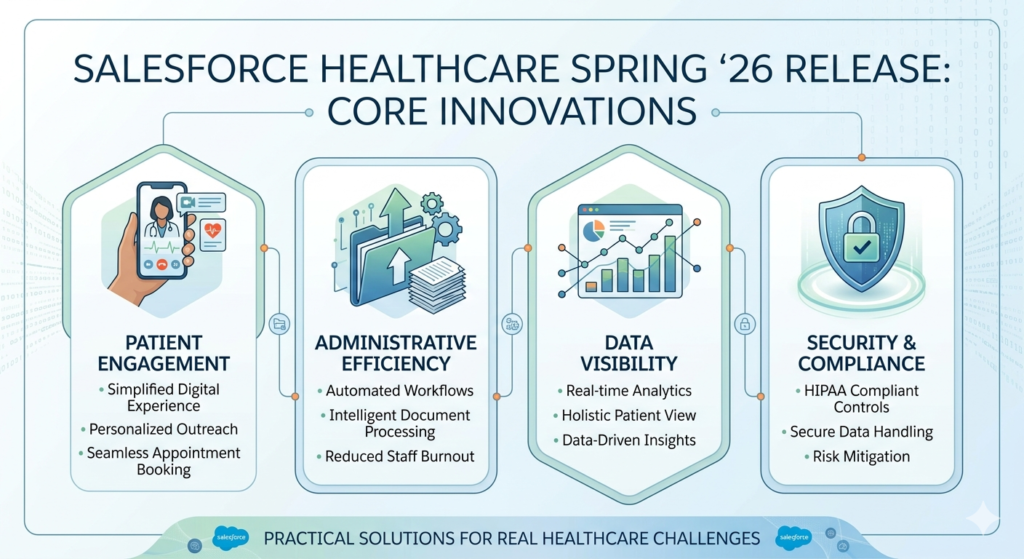
The Spring ’26 release addresses these challenges head-on with features designed to improve patient engagement, reduce administrative burden, enhance data visibility, and strengthen security—all while maintaining compliance with healthcare regulations like HIPAA.
What sets this release apart is its focus on practical implementation. Rather than introducing flashy features that look good in demonstrations but prove difficult to deploy, Salesforce has concentrated on enhancements that solve real problems healthcare organizations face every day.
In this comprehensive guide, we’ll walk through each major update, explain what it means in plain language, provide real-world examples of how these features work in practice, and offer honest insights about both the benefits and limitations you should consider before implementation.
AI-Powered Patient Engagement: Making Artificial Intelligence Work for Healthcare
What’s New in AI Capabilities
The Spring ’26 release brings substantial improvements to Einstein AI specifically tailored for healthcare environments:
- Enhanced predictive analytics for patient no-show rates that analyze multiple data points to identify at-risk appointments
- Intelligent appointment scheduling recommendations that consider patient preferences, provider availability, and optimal care timing
- Care coordination suggestions that help care teams proactively identify patients who may need additional support
- Treatment adherence predictions that flag patients likely to struggle with medication compliance or care plan follow-through
Understanding the Technology in Simple Terms
If you’re new to AI in healthcare, think of these features as pattern-recognition tools that learn from your historical data. The system looks at thousands of past patient interactions, identifies patterns that humans might miss, and makes recommendations based on those patterns.
For example, the no-show prediction doesn’t just look at whether a patient missed appointments before. It considers factors like:
- Day of the week and time of appointment
- How far in advance the appointment was scheduled
- Patient’s transportation challenges (if documented)
- Weather patterns in your area
- The type of appointment scheduled
- Patient’s previous engagement with appointment reminders
Real-World Business Impact
Let’s examine a concrete scenario from a multi-specialty clinic we worked with at RizeX Labs:
The Challenge:
The clinic experienced a 22% no-show rate, resulting in approximately $180,000 in lost revenue annually. Staff spent significant time manually calling patients to confirm appointments, yet still couldn’t prevent most no-shows.
The Solution:
After implementing the enhanced Einstein AI predictions, the clinic gained the ability to:
- Identify high-risk appointments 72 hours in advance with 78% accuracy
- Trigger automated outreach to patients flagged as high-risk
- Offer flexible rescheduling options before the appointment slot was wasted
- Prioritize staff calling efforts on the highest-risk appointments only
The Results:
- No-show rate decreased from 22% to 14% within three months
- Staff time spent on confirmation calls reduced by 40%
- Patient satisfaction scores improved as patients received more personalized, timely communication
- Revenue recovery of approximately $72,000 annually
Practical Use Cases Across Healthcare Settings
Primary Care Practices:
Use predictive analytics to identify patients who haven’t scheduled necessary preventive care visits. The system can automatically suggest which patients to reach out to based on care gaps and likelihood of response.
Specialty Clinics:
Deploy intelligent scheduling to optimize complex appointment sequences. For patients requiring multiple procedures or consultations, the AI can suggest optimal scheduling patterns that improve patient compliance and clinical outcomes.
Hospital Systems:
Leverage care coordination suggestions to identify recently discharged patients at high risk for readmission. Care teams can intervene proactively with home visits, medication reconciliation, or additional follow-up appointments.
Honest Insights and Limitations
While the AI capabilities in this release are impressive, they’re not magic solutions. Here’s what you need to know before implementation:
Data Quality is Critical:
The AI is only as good as the data you feed it. If your patient contact information is outdated, appointment history is incomplete, or demographic data has gaps, you’ll receive unreliable predictions. Before implementing these features, invest time in data cleanup.
At RizeX Labs, we recommend organizations plan for 4-6 weeks of data quality improvement before activating AI features. This includes:
- Verifying patient contact information
- Standardizing data entry practices
- Ensuring consistent documentation across teams
- Establishing data governance policies
Cultural Adoption Takes Time:
Your staff needs to trust the AI recommendations before they’ll act on them. We’ve seen organizations where care coordinators initially ignored AI suggestions because they didn’t understand how the system reached its conclusions.
Plan for training that explains not just how to use the features, but why the recommendations matter and how the system generates them. Include real examples from your own data to build confidence.
Not a Replacement for Clinical Judgment:
These AI tools support decision-making; they don’t replace it. Clinical staff should always review recommendations in the context of individual patient circumstances. The AI might flag a patient as low-risk for no-show, but if the care coordinator has recent knowledge of a family emergency, human judgment should prevail.
Agentforce Capabilities: 24/7 Patient Support That Actually Works
Understanding Agentforce in Healthcare Context
Agentforce represents Salesforce’s approach to AI-powered autonomous agents—essentially, digital assistants that can handle complete tasks without constant human supervision. In healthcare, this technology has been carefully designed to manage patient interactions while respecting the complexity and sensitivity of healthcare communications.
What’s New in Spring ’26
The latest release brings healthcare-specific Agentforce capabilities:
- Patient inquiry handling for routine questions about appointments, locations, and services
- Prescription refill request processing integrated with clinical workflows
- Insurance verification automation that checks coverage and benefits
- Care plan question answering for patients enrolled in chronic disease management programs
- Appointment self-scheduling with intelligent availability matching
- Post-visit follow-up coordination for routine check-ins
Breaking Down How This Technology Works
Agentforce uses natural language processing to understand patient questions, access relevant information from your Salesforce Health Cloud database, and provide accurate responses—all while maintaining conversation context.
Here’s what happens when a patient contacts your organization through Agentforce:
- Patient asks a question via your patient portal, SMS, or chat interface
- Agentforce analyzes the inquiry and determines if it can be handled automatically
- The system accesses relevant data from the patient’s record and your organization’s knowledge base
- Agentforce provides a response in conversational language
- If needed, the conversation escalates to a human staff member with full context
Real-World Implementation Example
Consider this scenario from a family medicine practice with three locations:
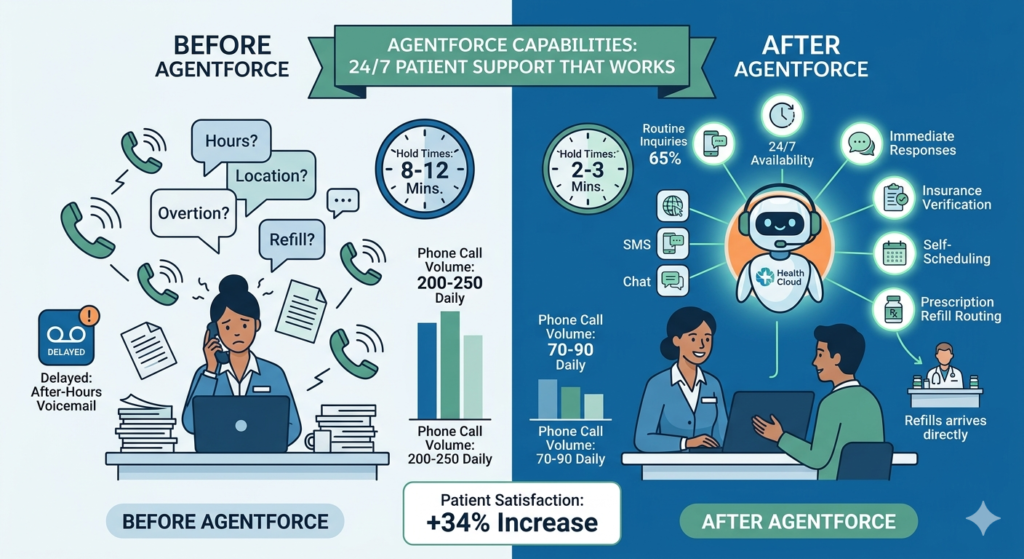
Before Agentforce:
- Front desk staff answered 200-250 calls daily
- 60% of calls were routine questions (hours, locations, prescription refills)
- Average hold time: 8-12 minutes during peak hours
- Staff frequently interrupted during patient check-in to answer phones
- After-hours calls went to voicemail, with responses delayed until the next business day
After Agentforce Implementation:
- Agentforce handles 65% of routine inquiries automatically
- Phone call volume reduced to 70-90 daily
- Hold times decreased to 2-3 minutes
- Front desk staff can focus on in-person patient experience
- Patients receive immediate responses 24/7, including evenings and weekends
- Prescription refill requests route directly to clinical staff for review
- Patient satisfaction scores for “ease of contact” increased by 34%
Specific Use Cases That Deliver Value
Insurance Verification:
Patients can ask Agentforce about their coverage for specific services. The system checks their insurance information on file, verifies benefits (if integrated with your verification system), and provides clear information about coverage, copays, and deductibles.
Example conversation:
- Patient: “Is my annual physical covered by insurance?”
- Agentforce: “Based on your Blue Cross Blue Shield PPO plan, your annual preventive visit is covered at 100% with no copay. You’re due for your annual physical—would you like to schedule an appointment?”
Prescription Refill Management:
Rather than playing phone tag, patients can request refills through Agentforce, which verifies the medication, checks refill availability, and routes the request to the appropriate clinical staff for approval.
This reduces administrative burden while maintaining clinical oversight. The system can also identify when medications require new prescriptions and prompt patients to schedule necessary follow-up appointments.
Care Plan Support:
For patients enrolled in chronic disease management programs, Agentforce can answer common questions about care plans, medication instructions, and lifestyle recommendations without requiring care coordinator intervention for every inquiry.
Business Impact Analysis
Cost Reduction:
Healthcare organizations typically spend $8-12 per patient phone call when accounting for staff time, infrastructure, and overhead. By automating 40-60% of routine inquiries, a practice with 10,000 active patients can save $50,000-$90,000 annually in call center costs alone.
Revenue Protection:
Faster response times and 24/7 availability reduce patient frustration that might otherwise lead them to seek care elsewhere. In competitive healthcare markets, patient experience directly impacts retention and reputation.
Staff Satisfaction:
Reducing repetitive questions allows staff to focus on complex patient needs and meaningful interactions. Multiple organizations we’ve worked with report improved staff satisfaction and reduced turnover after implementing conversational AI.
Important Limitations and Considerations
Clinical Boundaries:
Agentforce cannot and should not provide clinical advice, diagnose conditions, or make treatment recommendations. Clear boundaries must be established, and the system should immediately escalate any clinically-oriented questions to appropriate staff.
During implementation, you’ll need to:
- Define exactly which questions Agentforce can handle
- Create clear escalation protocols for clinical questions
- Train the system to recognize urgent or emergency situations
- Establish fail-safe mechanisms for when the AI is uncertain
Patient Acceptance Varies:
While many patients appreciate instant responses, some prefer human interaction, especially older patients or those dealing with complex health situations. Your implementation should always offer easy paths to reach human staff members.
We recommend a hybrid approach where Agentforce handles initial inquiries but seamlessly transfers to staff when patients request or situations require it.
Training and Maintenance Required:
Agentforce needs ongoing training based on actual patient conversations. Plan for:
- Initial training period of 2-4 weeks with close monitoring
- Regular review of conversations to identify improvement opportunities
- Updates when your services, policies, or protocols change
- Continuous refinement of response quality
Automation Enhancements: Reducing Administrative Burden
New Automation Capabilities
The Spring ’26 release significantly expands automation possibilities within Health Cloud:
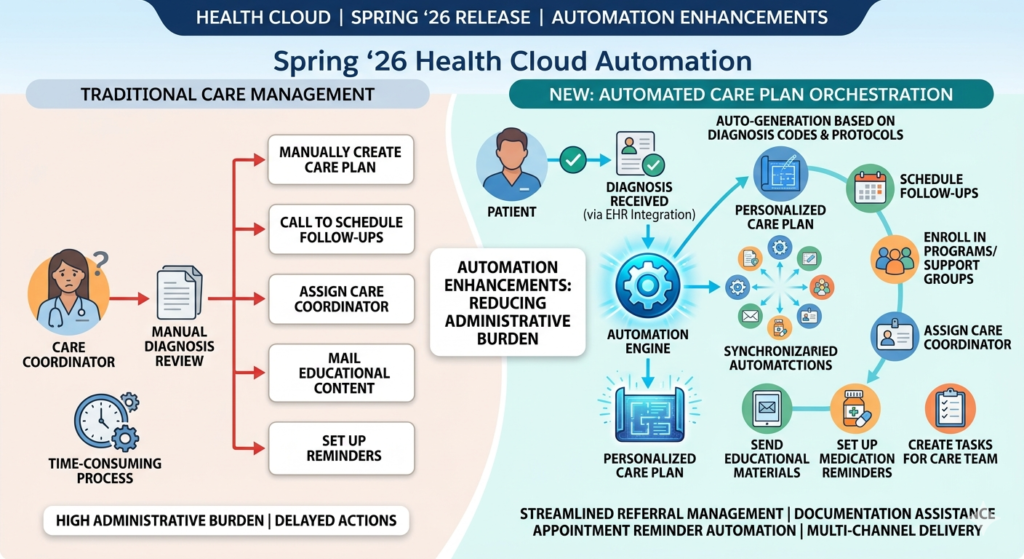
- Care plan auto-generation based on diagnosis codes and clinical protocols
- Automated patient journey orchestration that triggers appropriate actions based on patient status changes
- Streamlined referral management with automatic routing and follow-up
- Documentation assistance that pre-populates forms based on available data
- Appointment reminder automation with multi-channel delivery and intelligent timing
Care Plan Automation in Detail
One of the most impactful updates is the enhanced ability to automatically create and manage care plans based on specific diagnoses or conditions.
How It Works:
When a patient receives a diagnosis (entered via EHR integration or directly in Health Cloud), the system can automatically:
- Create a personalized care plan based on clinical best practices and your organization’s protocols
- Schedule required follow-up appointments at clinically appropriate intervals
- Enroll the patient in relevant educational programs or support groups
- Assign a care coordinator based on availability and specialization
- Send educational materials specific to the condition
- Set up medication reminders if prescriptions are part of the care plan
- Create tasks for care team members with specific responsibilities
- Establish check-in schedules for monitoring patient progress
Practical Implementation Example
Let’s examine how this works for a patient newly diagnosed with Type 2 diabetes:
Traditional Process (Manual):
- Care coordinator receives notification of diagnosis
- Manually creates care plan in the system (20-30 minutes)
- Looks up available diabetes education classes
- Calls patient to schedule follow-up appointments
- Sends educational materials
- Documents everything in patient record
- Total time: 45-60 minutes per patient
Automated Process:
- Diagnosis entered triggers automated workflow
- Care plan generated from template with patient-specific customization
- System automatically:
- Schedules 3-month follow-up with physician
- Enrolls patient in next available diabetes education class
- Assigns care coordinator based on current caseload
- Sends welcome packet with educational materials
- Creates medication adherence monitoring schedule
- Sets up appointment reminders
- Care coordinator receives task to call patient and review care plan
- Total time: 5-8 minutes for care coordinator review and patient call
Business Impact:
For an organization managing 500 new chronic disease diagnoses monthly, this automation saves approximately 375-435 hours of staff time, allowing care coordinators to manage larger patient panels or provide more intensive support to high-risk patients.
Referral Management Automation
The referral process in healthcare is notoriously complex and fragmented. This release streamlines it significantly:
Automated Referral Routing:
When a provider creates a referral, the system can automatically:
- Identify appropriate specialists based on condition, insurance network, and proximity
- Check specialist availability
- Send referral information to the specialist’s office
- Provide patients with specialist contact information and appointment scheduling instructions
- Track referral status
- Follow up if appointments aren’t scheduled within specified timeframes
Closing the Referral Loop:
A common problem in healthcare is losing track of referrals—patients don’t schedule appointments, specialists don’t send reports back, and primary care providers never know what happened.
Automation addresses this by:
- Sending reminders to patients who haven’t scheduled specialist appointments
- Alerting care coordinators when referrals remain incomplete
- Automatically requesting consultation reports from specialists
- Notifying primary care providers when specialist reports are received
- Tracking quality metrics around referral completion rates
Real-World Results
A multi-specialty medical group we worked with implemented referral automation and achieved:
- Referral completion rate increase from 62% to 84%
- Time to specialist appointment decreased from 23 days to 14 days average
- Administrative time per referral reduced from 25 minutes to 7 minutes
- Patient satisfaction with referral process improved by 41 percentage points
- Better care coordination as PCPs received specialist feedback more consistently
Best Practices for Automation Implementation
Start Small and Expand:
Don’t try to automate everything at once. We recommend this phased approach:
Phase 1 (Weeks 1-4):
Select one high-volume, straightforward process to automate. For most organizations, appointment reminders or care plan creation for a single condition works well as a starting point.
Phase 2 (Weeks 5-12):
Once the first automation is working smoothly and staff are comfortable, add 2-3 additional workflows. This might include referral management or patient education enrollment.
Phase 3 (Weeks 13+):
Expand to more complex automations like comprehensive patient journey orchestration across multiple conditions or touchpoints.
Involve Clinical Staff Early:
The biggest mistake organizations make with automation is having IT or administrators design workflows without deep clinical input. The people who currently perform these tasks know the nuances, exceptions, and special cases that must be accommodated.
At RizeX Labs, we insist on including frontline staff in workflow design sessions. This ensures:
- Automations reflect actual workflows, not idealized versions
- Edge cases and exceptions are identified early
- Staff buy-in increases because they helped design the solution
- Training is more effective because staff understand the “why” behind the automation
Build in Quality Checkpoints:
Automation should enhance quality, not sacrifice it. Include checkpoints where clinical staff review automated actions, especially initially. For example:
- Care coordinators review auto-generated care plans before they’re finalized
- Referral coordinators verify specialist selection before sending referrals
- Clinical staff approve prescription refill requests even if the request was handled automatically
Over time, as confidence in automation grows, some checkpoints can be reduced or eliminated for routine cases while maintaining them for complex situations.
Data Cloud Integration: Creating Unified Patient Views
Understanding the Data Challenge in Healthcare
Healthcare data is notoriously fragmented. A single patient’s information typically lives in:
- Electronic Health Record (EHR) systems
- Practice management and billing systems
- Patient portals
- Lab systems
- Imaging systems
- Pharmacy systems
- Health insurance databases
- Wearable devices and health apps
- Social determinants of health databases
This fragmentation creates several problems:
- Providers waste time searching for information across systems
- Incomplete information leads to suboptimal clinical decisions
- Patient experience suffers when they have to repeat information
- Population health management is difficult without comprehensive data
- Care coordination breaks down when team members can’t see the complete picture
What’s Enhanced in Spring ’26
The Spring ’26 release strengthens the connection between Health Cloud and Salesforce Data Cloud, making it easier to create unified patient views that pull information from multiple sources:
Improved Integration Capabilities:
- Real-time data synchronization with major EHR systems
- Bi-directional data flow that keeps Health Cloud and source systems updated
- Enhanced data mapping tools that simplify connecting disparate systems
- Patient matching algorithms that correctly identify the same patient across different systems
- Data quality monitoring that flags inconsistencies or gaps
Unified Patient Profile:
The result is a comprehensive patient view within Health Cloud that includes:
- Complete clinical history from EHR
- All appointments and encounters
- Insurance and billing information
- Patient communications and engagement history
- Social determinants of health data
- Patient-reported outcomes from surveys or apps
- Care team members and their roles
- Medications and allergies
- Lab results and imaging reports
Real-World Impact on Clinical Workflows
Before Data Cloud Integration:
Dr. Johnson is seeing a patient with chest pain. To gather necessary information, she:
- Reviews the EHR for clinical history (2 minutes)
- Switches to the billing system to check insurance coverage (1 minute)
- Opens the patient portal to see recent messages (1 minute)
- Checks the lab system for recent results (1 minute)
- Calls the pharmacy to verify current medications (3 minutes)
- Total time: 8 minutes of system navigation before even starting the clinical assessment
After Data Cloud Integration:
Dr. Johnson opens the unified patient profile in Health Cloud and immediately sees:
- Complete clinical history
- Active insurance coverage with benefits
- Recent patient portal messages
- All lab results with trending
- Current medications verified from pharmacy
- Total time: 30 seconds to access comprehensive information
The Business Impact:
For a provider seeing 20-25 patients daily, this saves 2.5-3 hours of system navigation time. Multiplied across an organization with 50 providers, that’s 125-150 hours daily—time that can be redirected to patient care or used to see additional patients.
Population Health Management Applications
Unified data becomes even more powerful for population health initiatives:
Identifying Care Gaps:
With comprehensive data, organizations can easily identify:
- Patients overdue for preventive screenings
- Diabetic patients who haven’t had recent A1C testing
- Patients with chronic conditions not engaged in care management programs
- High-risk patients who haven’t been seen recently
Example: A health system used Data Cloud integration to identify 3,200 diabetic patients who hadn’t had eye exams in over 18 months. They created an outreach campaign that resulted in 1,850 patients scheduling appointments, preventing potential vision complications and improving HEDIS quality measures.
Predictive Analytics:
When all patient data is in one place, predictive models become more accurate. Organizations can:
- Identify patients at high risk for hospital admission
- Predict which patients may develop chronic conditions
- Determine optimal intervention timing
- Forecast resource needs based on patient population trends
Care Coordination:
For complex patients seeing multiple providers, unified data ensures everyone works from the same information:
- Primary care physician sees specialist reports immediately
- Care coordinators know about all patient touchpoints
- Hospital discharge planners can see complete outpatient history
- Home health agencies receive comprehensive patient information
Implementation Considerations
Data Governance is Essential:
Before connecting multiple data sources, establish clear governance:
Who owns each data element?
Define which system is the “source of truth” for different data types. For example:
- EHR owns clinical data
- Practice management system owns scheduling and billing
- Health Cloud owns care coordination and engagement data
What are your data quality standards?
Establish requirements for:
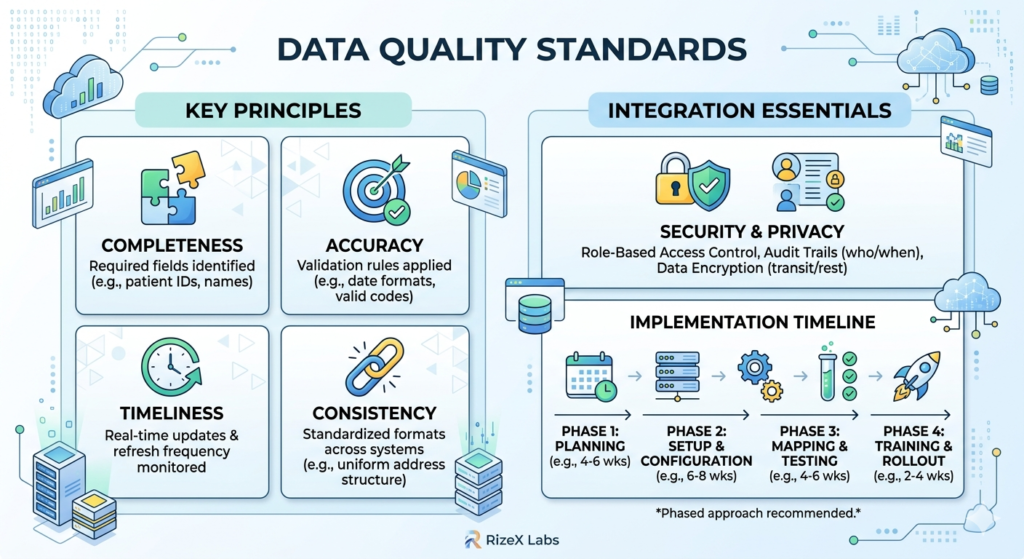
- Completeness (which fields are required)
- Accuracy (validation rules and checks)
- Timeliness (how current must data be)
- Consistency (standardization across systems)
How will you handle conflicts?
When the same information appears differently in multiple systems, what’s your resolution process?
Privacy and Security:
Data Cloud integration means more data is accessible in more places. This requires:
Enhanced access controls:
Not everyone should see everything. Implement role-based access that limits data visibility to what each user needs for their job function.
Audit trails:
Track who accesses patient information and when. This is essential for HIPAA compliance and investigating potential breaches.
Data encryption:
Ensure data is encrypted both in transit (as it moves between systems) and at rest (when stored).
Consent management:
Some data sharing requires patient consent. Implement mechanisms to track and respect patient preferences about data sharing.
Technical Requirements:
Successful Data Cloud integration requires:
- Strong IT partnership: Your IT team or EHR vendor must be involved
- Integration tools: APIs, middleware, or integration platforms
- Testing environment: Never test data integration in production systems
- Rollback plan: Know how to undo changes if integration causes problems
- Ongoing monitoring: Integration isn’t “set and forget”—it requires continuous monitoring
Realistic Timeline:
Organizations often underestimate the time required for data integration:
- Planning and governance: 4-6 weeks
- Technical setup and configuration: 6-8 weeks
- Data mapping and testing: 4-6 weeks
- User acceptance testing: 2-3 weeks
- Training and rollout: 2-4 weeks
- Total: 18-27 weeks for comprehensive implementation
RizeX Labs recommends a phased approach where you integrate one data source at a time, validate it’s working correctly, then add the next source.
Security and Compliance Updates: Protecting Patient Information
Why Security Matters More Than Ever
Healthcare data breaches are increasing in frequency and severity. According to recent industry reports:
- The average cost of a healthcare data breach is $10.93 million
- Healthcare experiences more data breaches than any other industry
- 89% of healthcare organizations experienced at least one data breach in the past two years
- Each stolen health record sells for $250-$1,000 on the dark web (compared to $1-$2 for credit card information)
Beyond financial costs, data breaches damage patient trust, result in regulatory penalties, and can lead to medical identity theft that harms patient safety.
New Security Features in Spring ’26
Enhanced Audit Trails:
The release provides more comprehensive tracking of all system activities:
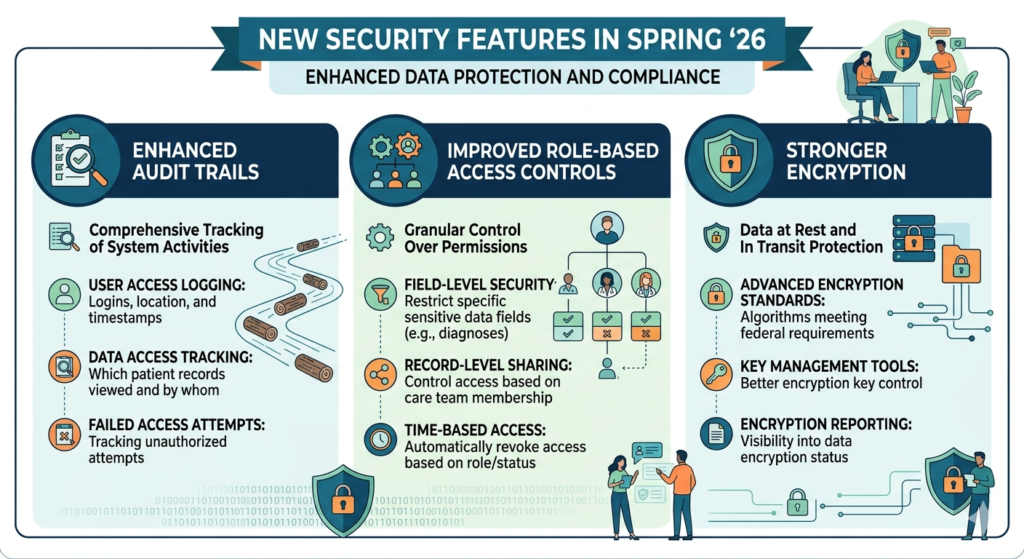
- User access logging: Who logged in, when, and from where
- Data access tracking: Which patient records were viewed and by whom
- Changes documentation: What data was modified, by whom, and when
- Export monitoring: When patient data was downloaded or printed
- Failed access attempts: Tracking of unsuccessful login attempts or unauthorized access efforts
Improved Role-Based Access Controls:
More granular control over who can see and do what:
- Field-level security: Restrict access to specific data fields (like mental health diagnoses or substance abuse treatment) to only those with appropriate permissions
- Record-level sharing: Control access to specific patient records based on care team membership
- Time-based access: Automatically revoke access when staff leave or change roles
- Conditional access: Require additional authentication for access to sensitive information
- Delegation controls: Better management of when staff can access records on behalf of providers
Stronger Encryption:
Enhanced protection for data at rest and in transit:
- Advanced encryption standards: Updated encryption algorithms that meet federal security requirements
- Key management: Better tools for managing encryption keys
- Encryption reporting: Visibility into what data is encrypted and how
Practical Applications for Compliance
HIPAA Compliance:
The enhanced audit trails make HIPAA compliance significantly easier:
Access Tracking:
HIPAA requires organizations to track who accesses protected health information. The new audit capabilities automatically log this information and can generate reports showing:
- All accesses to a specific patient’s record
- All records accessed by a specific user
- Unusual access patterns that might indicate inappropriate snooping
- Access by users who aren’t part of a patient’s care team
Example: When a celebrity patient was treated at a hospital we worked with, the security team used audit logs to identify 47 unauthorized access attempts by staff not involved in the patient’s care. Those staff members were immediately disciplined, and the audit trail provided documentation that the organization took appropriate action—critical for HIPAA compliance.
Breach Notification:
If a breach occurs, HIPAA requires notification to affected patients and sometimes to HHS and media. Enhanced audit trails help organizations quickly:
- Determine exactly what information was accessed
- Identify which patients were affected
- Understand the scope and timeline of the breach
- Document their response for regulatory reporting
Business Associate Management:
Healthcare organizations often share data with business associates (billing companies, IT vendors, etc.). The new security features help:
- Track exactly what data was shared with each business associate
- Monitor business associate access to your systems
- Audit compliance with business associate agreements
- Quickly revoke access when relationships end
Real-World Security Scenarios
Scenario 1: Insider Threat Detection
A care coordinator’s account shows unusual activity—accessing 200+ patient records outside her normal patient panel, mostly during evening hours.
Without Enhanced Audit Trails:
This activity might go unnoticed until patients complain or a random audit catches it months later.
With Enhanced Audit Trails:
Automated monitoring flags the unusual access pattern within 24 hours. Security team investigates and discovers the care coordinator’s account was compromised. Access is immediately revoked, affected patients are identified and notified, and passwords are reset. Total impact: 200 patients, 1 day. Without quick detection, this could have affected thousands of patients over months.
Scenario 2: Role-Based Access Prevents Data Exposure
A billing specialist attempts to access clinical notes to resolve a billing question.
Without Field-Level Security:
The billing specialist sees complete clinical documentation, including sensitive mental health information unrelated to the billing issue. This violates the minimum necessary principle under HIPAA.
With Field-Level Security:
The system allows the billing specialist to see diagnosis codes and procedure codes necessary for billing, but automatically hides detailed clinical notes, mental health information, and other data not required for billing functions.
Scenario 3: Automated Compliance Reporting
Your organization needs to provide documentation to auditors showing compliance with access control requirements.
Traditional Approach:
IT staff spend 20-30 hours manually compiling access logs, creating reports, and documenting security measures.
With Enhanced Audit and Reporting:
Pre-built compliance reports automatically show:
- User access permissions and how they align with job roles
- Any instances of excessive access rights
- Access patterns that demonstrate minimum necessary principle
- Documentation of security awareness training
- Reports generated in 2-3 hours instead of 20-30
Implementation Best Practices
Conduct Security Assessment First:
Before implementing new security features, understand your current state:
- Who has access to what systems and data?
- Are current access rights appropriate for job functions?
- What security gaps exist?
- Where are you most vulnerable?
RizeX Labs recommends a formal security assessment that includes:
- Access rights review for all users
- Evaluation of current authentication methods
- Analysis of audit trail capabilities
- Review of encryption implementation
- Testing of incident response procedures
Right-Size Your Security:
More security isn’t always better—excessive restrictions can interfere with patient care:
Example: One hospital implemented such strict access controls that emergency department physicians couldn’t quickly access patient records during true emergencies. After a near-miss patient safety incident, they had to create emergency access protocols that balanced security with clinical needs.
The key is risk-based security:
- Highest restrictions for most sensitive data (mental health, substance abuse, HIV status)
- Moderate restrictions for general clinical data
- Reasonable restrictions for demographic and appointment information
- Emergency access protocols for urgent patient care situations
Train Staff Thoroughly:
Technology alone doesn’t ensure security—your staff needs to understand:
- Why security matters (patient privacy, regulatory compliance, organizational reputation)
- What they’re responsible for (password management, not sharing credentials, appropriate access)
- How to handle security incidents (who to contact, what to do if they suspect a breach)
- Consequences of security violations (disciplinary action, legal liability)
Plan for:
- Initial security training during onboarding
- Annual refresher training for all staff
- Special training for staff with elevated access rights
- Regular security reminders and updates
Monitor Continuously:
Security isn’t a one-time implementation—it requires ongoing attention:
- Regular access reviews: Quarterly review of user access rights
- Audit log monitoring: Automated alerts for unusual access patterns
- Security testing: Annual penetration testing and vulnerability assessments
- Policy updates: Regular review and update of security policies
- Incident response drills: Practice your breach response procedures
Bringing It All Together: Strategic Implementation Approach
Avoid the “Boil the Ocean” Trap
The biggest mistake organizations make with major system updates is trying to implement everything simultaneously. This leads to:
- Overwhelmed staff who can’t absorb all the changes
- Incomplete implementations that don’t deliver value
- Frustrated users who abandon new features
- Budget overruns and extended timelines
- Leadership skepticism about future technology investments
Recommended Phased Approach
Phase 1: Foundation (Months 1-3)
Focus on data quality and security:
- Conduct data quality assessment and cleanup
- Implement enhanced security features and audit trails
- Establish data governance policies
- Update security training and policies
- Set up compliance reporting
Why start here: These foundational elements are prerequisites for other features to work well. Clean data makes AI accurate. Strong security protects your implementation. Good governance prevents future problems.
Phase 2: Quick Wins (Months 3-6)
Implement features that deliver immediate value with minimal complexity:
- Deploy Agentforce for routine patient inquiries
- Automate appointment reminders
- Implement one care plan automation for a high-volume condition
- Enhance patient portal experience
Why these features: They solve obvious pain points, generate staff and patient goodwill, demonstrate ROI to leadership, and build momentum for subsequent phases.
Phase 3: Advanced Capabilities (Months 6-12)
Expand to more sophisticated features:
- Full AI-powered predictive analytics
- Comprehensive patient journey automation
- Complete Data Cloud integration
- Population health management tools
Why wait: These features require the foundation from Phase 1 and the organizational learning from Phase 2. Staff need experience with simpler automation before tackling complex workflows.
Phase 4: Optimization (Months 12+)
Refine and expand based on experience:
- Analyze what’s working and what isn’t
- Expand successful implementations
- Modify or abandon unsuccessful initiatives
- Train power users who can support ongoing optimization
- Document best practices and lessons learned
Building Your Business Case
When presenting these updates to leadership, focus on measurable outcomes:
Financial Impact:
- Cost reduction from automation (quantify staff time saved)
- Revenue protection from improved patient retention
- Revenue growth from improved appointment utilization
- Reduced compliance risk (cost of potential breaches avoided)
Quality Improvement:
- Better patient outcomes from enhanced care coordination
- Fewer medical errors from unified data access
- Improved HEDIS or other quality measure scores
- Higher patient satisfaction scores
Operational Efficiency:
- Reduced administrative burden on clinical staff
- Faster patient throughput
- Improved staff satisfaction and retention
- Better resource utilization
Strategic Positioning:
- Competitive advantage from superior patient experience
- Foundation for value-based care contracts
- Reputation enhancement as a technology-forward organization
- Ability to attract and retain top clinical talent
Success Metrics to Track
For AI and Predictive Analytics:
- No-show rate reduction
- Accuracy of predictions over time
- Time saved on patient outreach
- Revenue recovered from reduced no-shows
- Patient satisfaction with communication
For Agentforce:
- Percentage of inquiries handled automatically
- Average response time
- Patient satisfaction with self-service options
- Reduction in phone call volume
- Cost per patient interaction
- Staff satisfaction with reduced routine inquiries
For Automation:
- Time saved per automated workflow
- Compliance rate with care protocols
- Referral completion rates
- Care plan adherence
- Staff satisfaction with administrative burden
- Patient engagement with automated outreach
For Data Integration:
- Time saved per patient encounter
- Data completeness scores
- Provider satisfaction with information access
- Care coordination effectiveness
- Population health initiative outcomes
For Security Enhancements:
- Time to generate compliance reports
- Number of unauthorized access attempts detected
- Mean time to detect security incidents
- Audit findings and deficiencies
- Staff compliance with security training
Getting Expert Help: When and Why
Some organizations can successfully implement these updates with internal resources. Others benefit from external expertise. Consider partnering with a Salesforce Health Cloud consultant like RizeX Labs when:
You Lack Internal Expertise:
Health Cloud is specialized—generic Salesforce knowledge isn’t enough. Healthcare-specific consulting firms understand clinical workflows, healthcare regulations, and industry best practices.
You Need to Move Quickly:
Consultants who’ve implemented these features dozens of times can help you avoid common pitfalls and accelerate implementation.
You Want to Avoid Costly Mistakes:
The cost of poor implementation—wasted staff time, abandoned features, security gaps—typically exceeds consulting fees. Expert guidance helps you get it right the first time.
You Need Objective Recommendations:
Internal politics and organizational history sometimes prevent honest assessment. External consultants can provide objective recommendations about what will actually work in your environment.
Your IT Team is Overwhelmed:
Healthcare IT departments are notoriously understaffed. Consultants can provide temporary capacity during implementation, then transition to your internal team for ongoing support.
Conclusion: Turning Features Into Value
The Salesforce Health Cloud Spring ’26 release offers substantial improvements that can transform how your organization delivers care, engages patients, and manages operations. However, features alone don’t create value—thoughtful implementation does.
Key Takeaways
Start with Clear Objectives:
Don’t implement features because they’re new and exciting. Identify specific problems you’re trying to solve and specific outcomes you’re trying to achieve. Choose features that address those objectives.
Prioritize Data Quality:
Every feature in this release depends on good data. Before implementing AI, automation, or integration, invest in data cleanup and governance. This foundational work multiplies the value of everything else.
Involve the Right People:
Include clinical staff, front-line workers, IT professionals, compliance officers, and patient representatives in planning. Their insights will help you design implementations that actually work in real-world conditions.
Plan for Change Management:
Technology changes are easier than behavior changes. Plan adequate time and resources for training, communication, and support. Expect resistance and address it proactively with clear explanations of benefits.
Measure What Matters:
Establish baseline metrics before implementation and track progress consistently. Use data to demonstrate value, identify problems early, and continuously improve.
Think Long-Term:
These implementations aren’t projects with defined end dates—they’re ongoing commitments to digital transformation. Plan for continuous optimization, not one-time deployment.
Don’t Try to Do Everything:
Focus on features that will deliver the most value for your specific organization. A few well-implemented capabilities deliver far more value than many poorly-implemented ones.
Your Next Steps
Within the Next Week:
- Share this overview with key stakeholders in your organization
- Identify which features align with your strategic priorities
- Schedule a meeting to discuss potential implementation
Within the Next Month:
- Conduct an assessment of your current Health Cloud utilization
- Evaluate your data quality and governance
- Review your security posture and compliance status
- Identify quick wins that could demonstrate value
Within the Next Quarter:
- Develop a phased implementation plan
- Allocate budget and resources
- Begin Phase 1 foundational work
- Consider whether external consulting support would be valuable
How RizeX Labs Can Help
At RizeX Labs, we specialize in Salesforce Health Cloud implementations that work in real healthcare environments. We don’t just configure systems—we partner with you to solve actual problems and achieve measurable outcomes.
Our approach includes:
- Healthcare-specific expertise: We understand clinical workflows, not just Salesforce features
- Practical focus: We prioritize solutions that work in your real-world environment
- Change management support: We help your staff adopt and optimize new capabilities
- Measurable outcomes: We define success metrics and track progress
- Knowledge transfer: We train your team so you’re not dependent on consultants long-term
Ready to explore what the Spring ’26 release can do for your organization?
Contact RizeX Labs for a complimentary assessment where we’ll:
- Review your current Health Cloud implementation
- Identify opportunities from the Spring ’26 release
- Recommend a phased approach tailored to your priorities
- Provide realistic estimates of costs, timelines, and expected outcomes
The Spring ’26 release offers real opportunities to improve patient care, reduce administrative burden, and strengthen your organization’s competitive position. With thoughtful planning and expert implementation, these features can deliver substantial value for your organization, your staff, and most importantly, your patients.
About RizeX Labs
At RizeX Labs, we help healthcare organizations implement and optimize Salesforce Health Cloud to improve patient care, streamline operations, and adopt the latest innovations faster.
Internal Links:
- Salesforce Admin & Development Training
- Remote Patient Monitoring (RPM) in Salesforce Health Cloud: Transforming Connected Healthcare Delivery
- How to Use AI in Salesforce Health Cloud for Predictive Patient Care (Einstein + Real Use Cases)
- New Releases in Salesforce Health Cloud Spring ’26: What Healthcare Organizations Need to Know
- How to Customize Salesforce Health Cloud Using Lightning Web Components (LWC) for Healthcare Use Cases
- 30 Essential Questions About Salesforce Health Cloud Answered: Beginner to Advanced Guide
- Salesforce Sales Cloud vs Health Cloud: The Strategic CRM Decision That Defines Your Healthcare Business Trajectory
- Using Salesforce Health Cloud for Insurance & Claims Coordination: Beyond the Hospital Walls
External Links:
- Salesforce Official Website
- Salesforce Health Cloud Overview
- Salesforce Revenue Cloud Overview
- Salesforce AppExchange (CLM tools)
- Salesforce CPQ Documentation
What’s New (Key Updates)
- AI-powered care management with smarter recommendations
- Salesforce Einstein + Agentforce integration for automation
- Enhanced Data Cloud for unified patient data
- Improved care coordination and patient journey tracking
- Advanced automation using Flow Builder
- Stronger security and compliance monitoring
- Better APIs and system integrations
Why It Matters
- Faster and more accurate care decisions
- Reduced manual work and operational cost
- Improved patient engagement and outcomes
- Competitive advantage with AI-driven healthcare
