
Salesforce Flows vs Apex: The Honest Guide for 2026 — No Fluff, Just Real Decisions
1. Introduction: The Problem Nobody Talks About Honestly
Here’s what actually happens inside real Salesforce teams — not the polished version you see on Trailhead.
Ravi is a Salesforce Admin at a mid-sized fintech company in Pune. His business team asks for a “simple” automation:
When a Lead becomes Qualified → create an Opportunity → assign it by region → send a Slack notification.
Sounds basic. It’s not.
Ravi opens Flow Builder. Starts building.
Three hours later:
- 14 elements
- Multiple decision nodes
- A loop
- A subflow
- Fault paths he doesn’t fully trust
It works in sandbox — until bulk data hits. Then it breaks.
Now look at Priya, a Salesforce Developer.
She writes ~45 lines of Apex:
- Bulk-safe logic
- Proper error handling
- 95%+ test coverage
- Done in ~2 hours
Clean. Efficient. Scalable.
But here’s where most people stop thinking — and this is where they’re wrong.
Three months later:
- Business wants to tweak assignment logic
- Priya is gone
- No one understands her code
- Change request sits for 2 weeks
- Sales team loses patience
That’s the reality.
The Brutal Truth Most Blogs Won’t Say
This is not a “Flow vs Apex” debate.
If you’re still thinking like that, you’re already making bad architectural decisions.
The real question is:
For this exact requirement, with this exact team skill level, and this exact future change probability — what’s the right tool?
Because:
- Flow can become a visual mess that nobody can debug
- Apex can become a black box nobody can maintain
Both can fail. Just in different ways.
What You’re Actually Going to Learn Here
If you’re expecting generic advice like:
- “Use Flow for simple things”
- “Use Apex for complex things”
That’s useless. Everyone says that. It doesn’t help you decide anything.
Instead, this guide will show you:
- When Flow looks easy but will break later
- When Apex looks powerful but will slow your team down
- How to decide based on team capability, scale, and future changes
- What actually works in Indian companies in 2026 (not theory — reality)
Reality Check Before You Continue
If you:
- Blindly choose Flow because “no-code is the future” → you’ll build fragile systems
- Blindly choose Apex because “code is powerful” → you’ll create bottlenecks
Both are bad engineering decisions.
And if you don’t learn how to choose correctly, you’ll keep rebuilding the same automation twice — once in Flow, then again in Apex.
2. What Is Salesforce Flow? (The Real Explanation)
Forget the Salesforce marketing language. Here’s what Flow actually is in practice.
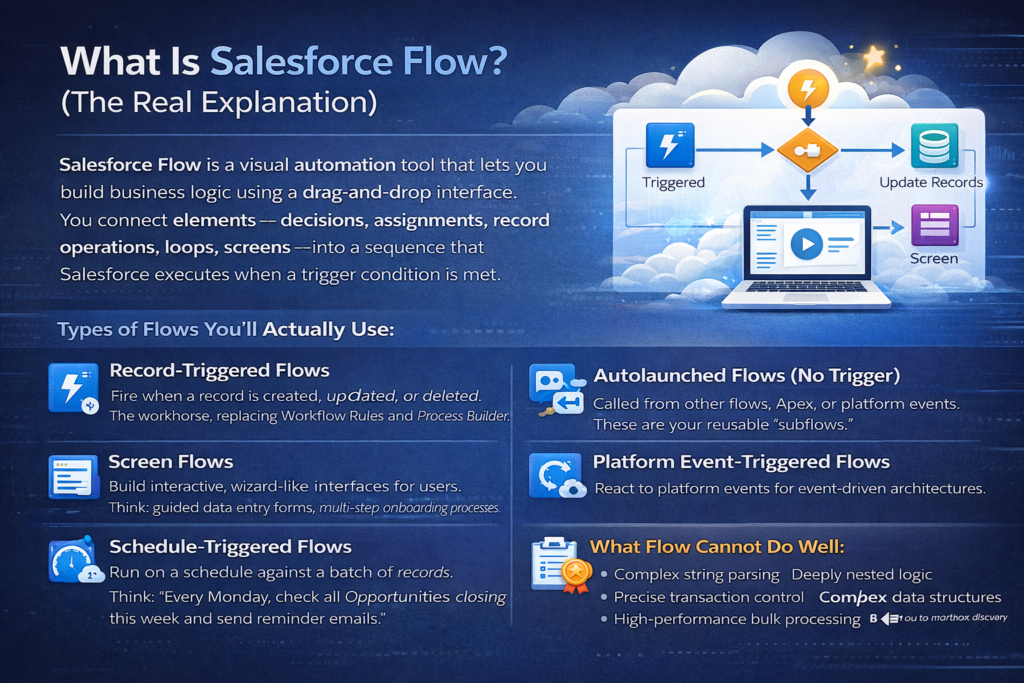
Salesforce Flow is a visual automation tool that lets you build business logic using a drag-and-drop interface. You connect elements — decisions, assignments, record operations, loops, screens — into a sequence that Salesforce executes when a trigger condition is met.
Types of Flows You’ll Actually Use:
- Record-Triggered Flows: Fire when a record is created, updated, or deleted. This is the workhorse. It replaced Workflow Rules and Process Builder entirely.
- Screen Flows: Build interactive wizard-like interfaces for users. Think: guided data entry forms, multi-step onboarding processes.
- Schedule-Triggered Flows: Run on a schedule against a batch of records. Think: “Every Monday, check all Opportunities closing this week and send reminder emails.”
- Autolaunched Flows (No Trigger): Called from other flows, Apex, or platform events. These are your reusable “subflows.”
- Platform Event-Triggered Flows: React to platform events for event-driven architectures.
What Flow Can Do in 2026:
Flow has evolved dramatically. In 2026, Flow can:
- Query and manipulate records (SOQL-like Get Records, Create, Update, Delete)
- Handle complex branching logic with Decision elements
- Loop through collections of records
- Call Apex classes as invocable actions
- Call external APIs using HTTP Callout actions (this is relatively new and powerful)
- Handle errors with Fault paths
- Use formulas and text templates
- Work with custom metadata and custom settings
- Transform data using Collection Filters, Sorts, and selection operators
What Flow Cannot Do Well:
- Complex string parsing or data transformation
- Deeply nested logic with multiple interconnected loops
- Operations requiring precise transaction control
- Anything requiring complex data structures (maps of maps, custom sorting algorithms)
- High-performance bulk processing where every millisecond matters
- Complex integration patterns with retry logic, OAuth flows, or webhook handling
The honest truth: Flow in 2026 is incredibly powerful. It can handle 70-80% of automation requirements in a typical Salesforce org. But “can handle” and “should handle” are two different things.
3. What Is Apex? (The Real Explanation)
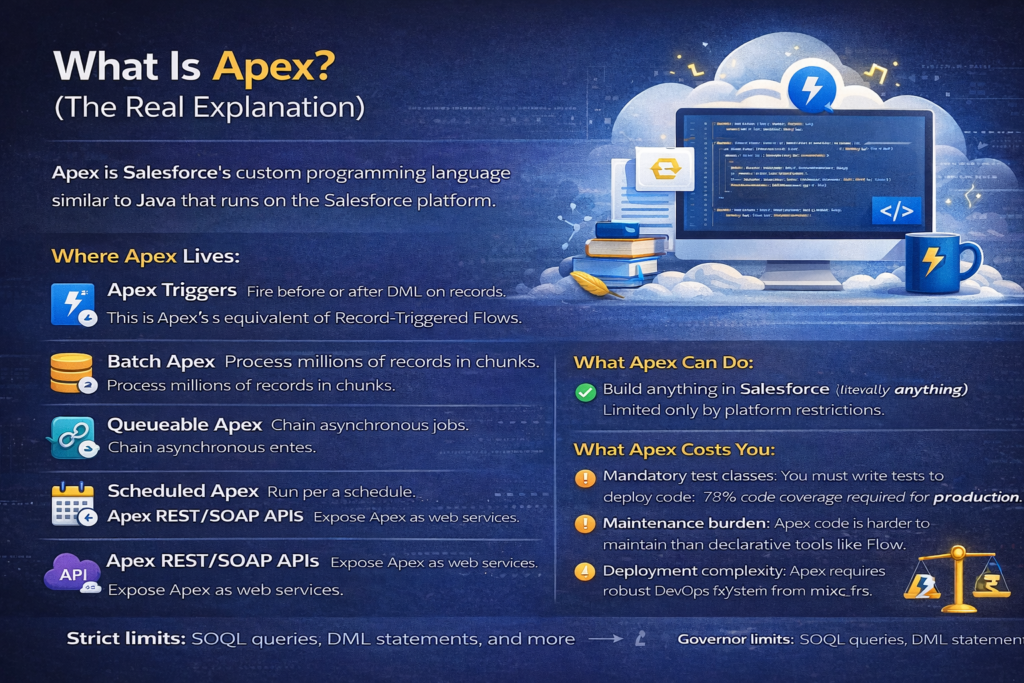
Apex is Salesforce’s proprietary, strongly-typed programming language that runs on Salesforce servers. It’s syntactically similar to Java. If you can write Java or C#, you can learn Apex in a few weeks.
Where Apex Lives:
- Apex Triggers: Fire before or after DML operations on records. This is Apex’s equivalent of Record-Triggered Flows.
- Apex Classes: Standalone classes containing business logic. Called from triggers, other classes, Flows, Lightning components, REST APIs, batch jobs, etc.
- Batch Apex: Process large volumes of records (millions) in chunks of 200.
- Queueable Apex: Asynchronous processing with the ability to chain jobs.
- Scheduled Apex: Run Apex on a cron schedule.
- Future Methods: Simple asynchronous callouts or processing.
- Apex REST/SOAP Web Services: Expose Salesforce logic as API endpoints.
What Apex Can Do:
Everything. Literally everything the Salesforce platform allows programmatically. There is no automation scenario where Apex is technically incapable if the platform supports it.
What Apex Costs You:
- Mandatory test classes: You must write test classes covering at least 75% of your code to deploy to production. This adds development time.
- Maintenance burden: Someone needs to read and understand the code months or years later.
- Deployment complexity: Apex requires proper DevOps — sandboxes, version control, change sets or CI/CD pipelines.
- Talent cost: Apex developers in India command higher salaries than admins. In 2026, a solid Salesforce developer in Bangalore or Hyderabad costs ₹12-25 LPA. An admin with Flow skills costs ₹6-14 LPA.
- Governor limits: Apex has strict limits — 100 SOQL queries per transaction, 150 DML statements, 6MB heap size, etc. Bad Apex code hits these limits and crashes.
The honest truth: Apex gives you unlimited power but demands discipline, testing, and ongoing maintenance. It’s overkill for simple automations, but irreplaceable for complex ones.
4. Direct Comparison Table: Flow vs Apex
Let’s cut through the noise with a direct, honest comparison.
| Criteria | Salesforce Flow | Apex |
|---|---|---|
| Learning Curve | Low to moderate. Visual, drag-and-drop. | Steep. Requires programming knowledge. |
| Who Can Build It | Admins, Business Analysts, Junior Developers | Developers only |
| Who Can Maintain It | Admins (mostly) | Developers only |
| Speed of Development | Fast for simple/moderate logic | Faster for complex logic, slower for simple |
| Bulk Data Handling | Improved in 2026, but still tricky with loops | Excellent when written properly (bulkified) |
| Error Handling | Basic fault paths. Limited debugging. | Full try-catch, custom exceptions, debug logs |
| Testing | No mandatory test coverage. Manual testing. | Mandatory 75% test coverage. Enforced. |
| Debugging | Flow debug tool (improved but limited) | Debug logs, checkpoints, Apex Replay Debugger |
| Complex Logic | Becomes visually messy beyond 15-20 elements | Handles complexity cleanly in code |
| Reusability | Subflows, invocable actions | Classes, interfaces, inheritance, utility methods |
| Version Control | Difficult to track changes meaningfully | Full Git integration, code review, PR workflows |
| Performance | Good for most scenarios. Can be slower in complex cases. | Optimal when well-written |
| Governor Limit Risk | Moderate (auto-bulkification helps, but loops can cause issues) | High if poorly written, Low if properly bulkified |
| Integration (APIs) | HTTP Callout action (basic). Limited error handling. | Full HTTP, REST, SOAP, named credentials, retry logic |
| Deployment | Change sets, metadata API, packages | Same, plus requires test class deployment |
| Platform Direction | Salesforce is heavily investing here. “Clicks not code” is the official strategy. | Still fully supported, but Flow-first is the Salesforce stance |
| Long-term Maintainability | Easy for simple flows. Nightmare for complex ones. | Consistent if code standards are followed. |
| Cost to Organization | Lower (admin-level talent) | Higher (developer-level talent) |
5. When to Use Flow (With Real Examples)
Here’s a clear list of scenarios where Flow is the right choice. No ambiguity.
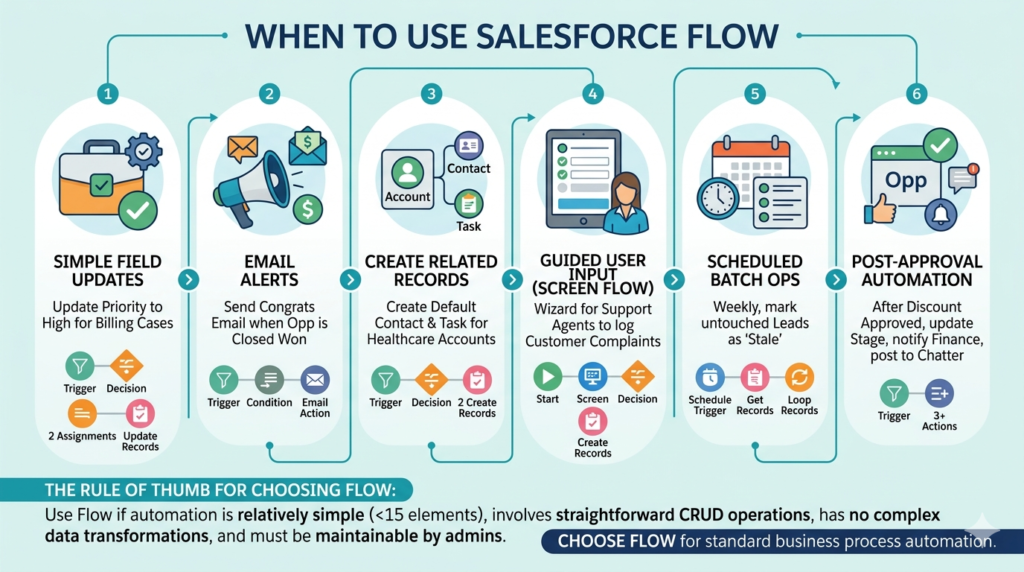
Scenario 1: Simple Field Updates Based on Conditions
Requirement: When a Case is created with Type = “Billing,” automatically set the Priority to “High” and assign it to the Billing queue.
Why Flow: This is a two-step automation. One decision, two field assignments, one record update. Building this in Apex would be like using a sledgehammer to hang a picture frame. A Record-Triggered Flow handles this in 10 minutes.
Scenario 2: Sending Email Alerts Based on Record Changes
Requirement: When an Opportunity’s Stage changes to “Closed Won,” send a congratulatory email to the Account Owner with deal details.
Why Flow: Record-triggered flow with a condition, one email action. Simple, maintainable, and any admin can modify the email template or conditions later without touching code.
Scenario 3: Creating Related Records Automatically
Requirement: When a new Account is created with Industry = “Healthcare,” automatically create a default Contact record with placeholder values and a Task for the Account Owner to complete onboarding.
Why Flow: Two Create Records elements after a Decision. Clean, visual, easy to understand. If the business later wants to add “Financial Services” to the logic, an admin adds one more condition in the Decision node. No deployment, no test classes, no developer ticket.
Scenario 4: Guided User Input with Screen Flows
Requirement: Build a step-by-step wizard for support agents to log a customer complaint — collecting complaint type, severity, description, and related product, then creating a Case with all the right field values.
Why Flow: Screen Flows are purpose-built for this. Apex literally cannot do this on its own — you’d need a Lightning Web Component combined with Apex, which is 5x the effort. Screen Flow is the clear winner.
Scenario 5: Scheduled Batch Operations (Simple)
Requirement: Every Friday, find all Leads that haven’t been contacted in 30 days and update their Status to “Stale.”
Why Flow: A Schedule-Triggered Flow with a Get Records, a Loop, and an Update. Simple, no-code, and a Salesforce admin can adjust the criteria or schedule without any developer intervention. This is exactly the kind of thing Salesforce built scheduled flows for.
Scenario 6: Approval Process Automation Enhancements
Requirement: After an Opportunity discount above 20% is approved, automatically update the Opportunity Stage, create a notification for the finance team, and log a Chatter post.
Why Flow: Combine a Record-Triggered Flow (triggered by approval status change) with a few actions. Perfectly within Flow’s wheelhouse.
The Rule of Thumb for Choosing Flow:
If your automation has fewer than 15 elements, involves straightforward create/update/delete operations, doesn’t require complex data transformations, and needs to be maintainable by a non-developer — use Flow.
6. When to Use Apex (With Real Examples)
Here’s where Apex becomes not just preferable but necessary.
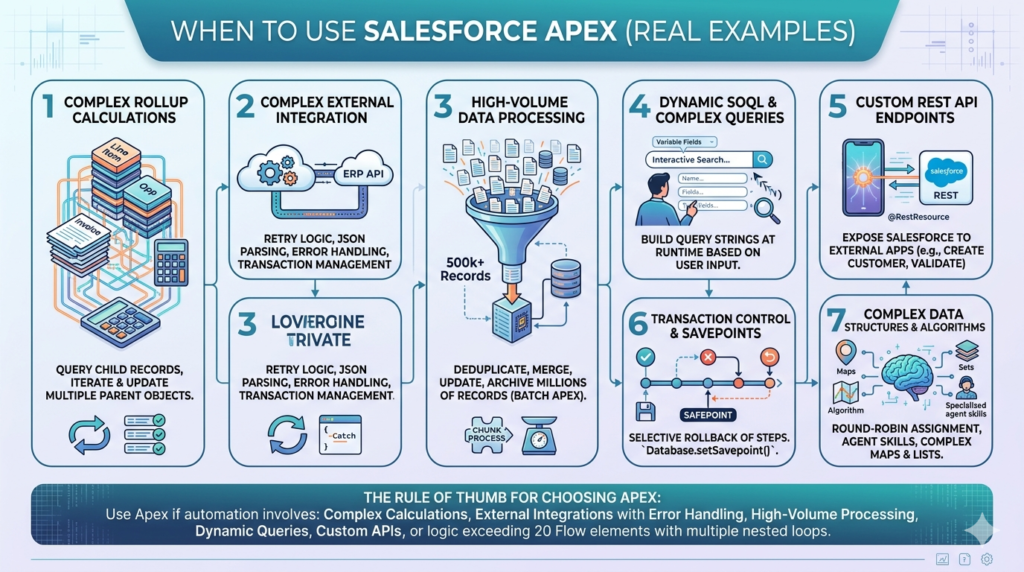
Scenario 1: Complex Rollup Calculations Across Multiple Objects
Requirement: When a Line Item on a custom Invoice object is created, updated, or deleted, recalculate the total invoice amount, apply tiered discount logic (different discount percentages at different quantity thresholds), update the parent Invoice, and cascade changes to the related Opportunity’s Amount field.
Why Apex: This involves querying child records, iterating through them with calculation logic, applying conditional math across tiers, and updating multiple parent objects in a single transaction. In Flow, you’d need nested loops, multiple Get Records elements, complex formulas, and the visual canvas would become an unreadable spaghetti mess. An Apex trigger with a well-structured handler class does this cleanly in 60-80 lines.
Scenario 2: Complex Integration with External Systems
Requirement: When an Order is confirmed, call an external ERP API to reserve inventory. If the API fails, retry once after 5 seconds. If it still fails, create a failed integration log record, notify the integration team, and mark the Order for manual processing. Parse the JSON response to update Salesforce with the ERP order ID and estimated delivery date.
Why Apex: Flow’s HTTP Callout action can make basic API calls. But retry logic? Conditional parsing of complex JSON responses? Error classification? Transaction management across callout and DML? This is Apex territory — specifically, a combination of Apex triggers, Queueable Apex (for retry logic), and proper try-catch-finally blocks.
Scenario 3: High-Volume Data Processing
Requirement: Every night, process 500,000 Lead records — deduplicate based on email and phone, merge duplicate records, update scoring based on a custom algorithm, and archive leads older than 2 years to a custom archive object.
Why Apex: Batch Apex exists for exactly this. It processes records in chunks of 200 (configurable up to 2,000), respects governor limits, and can handle millions of records. Flow’s Schedule-Triggered Flow has a limit of querying 250,000 records and isn’t designed for this scale of data manipulation. No contest.
Scenario 4: Dynamic SOQL and Complex Queries
Requirement: Build a search utility that lets users search Accounts by any combination of 8 different fields, with partial matching, and returns results sorted by a relevance score that’s calculated based on how many fields matched.
Why Apex: Dynamic SOQL — building query strings at runtime based on user input — is impossible in Flow. Flow’s Get Records element requires you to define conditions at design time. Apex lets you construct query strings dynamically, execute them, and process results with full flexibility.
Scenario 5: Custom REST API Endpoints
Requirement: An external mobile app needs to call Salesforce to create a Customer record, validate the data against custom rules, create related records, and return a custom response with the new record ID and a status message.
Why Apex: You need @RestResource annotated Apex classes. Flow cannot expose custom REST endpoints. Period.
Scenario 6: Transaction Control and Savepoints
Requirement: In a complex order processing flow, if step 3 of 5 fails, roll back steps 1 and 2 and restore the original state.
Why Apex: Database.setSavepoint() and Database.rollback() give you precise transaction control. Flow doesn’t have this concept. If a Flow fails midway through, you get a partially completed transaction — or the whole thing rolls back. You can’t selectively roll back.
Scenario 7: Complex Data Structures and Algorithms
Requirement: Assign incoming Cases to agents based on a round-robin algorithm that considers agent availability, current case load, skill matching, and time zone — and this assignment needs to happen in real-time as Cases come in.
Why Apex: You need Maps, Sets, Lists, sorting algorithms, and potentially custom Comparable implementations. Flow’s collection handling is improving but cannot handle this level of data structure manipulation efficiently or readably.
The Rule of Thumb for Choosing Apex:
If your automation involves complex calculations, external integrations with error handling, high-volume processing, dynamic queries, custom APIs, or logic that would require more than 20 Flow elements with multiple nested loops — use Apex.
7. Common Mistakes People Make
Let me be direct about the mistakes I see repeatedly in the Salesforce ecosystem in India. I’m calling these out because they cost real time, money, and sanity.
Mistake 1: Building Everything in Flow Because “Salesforce Says So”
Salesforce’s official guidance is “Flow-first.” They want you to use clicks before code. This makes sense from Salesforce’s perspective — it lowers the barrier to entry and reduces platform complexity for their ecosystem.
But “Flow-first” doesn’t mean “Flow-only.”
I’ve seen admins build Flows with 40+ elements that look like a city metro map. Nobody can understand them. Nobody can debug them. When they break, the entire team stares at the screen trying to trace the path through six decision nodes and three loops. This is worse than bad code — it’s unmaintainable visual spaghetti with no version control, no meaningful diff, and no test coverage.
The fix: Use Flow for what it’s good at. Recognize when you’ve crossed the complexity threshold and bring in Apex.
Mistake 2: Writing Apex for Everything Because “It’s More Professional”
Some developers I’ve worked with in Hyderabad and Bangalore have an allergic reaction to Flow. “It’s for admins,” they say. “Real work needs code.”
This is ego talking, not engineering judgment.
When you write Apex for a simple field update that could be a 5-element Flow, you’ve:
- Added code that needs test classes
- Created a maintenance burden for future developers
- Made a simple change require a deployment cycle
- Locked out admins from making quick adjustments
The fix: Swallow the pride. If it’s simple, use Flow. Save your Apex skills for problems that actually need them.
Mistake 3: Not Considering Who Will Maintain This
This is the biggest mistake, and it’s an organizational one, not a technical one.
Before choosing Flow or Apex, ask: “Six months from now, when the business wants to change this logic, who will be available to make that change?”
If your team has three admins and one developer who’s overloaded — build it in Flow wherever possible. If your team has a strong dev team with CI/CD pipelines and no dedicated admin — Apex might be more maintainable for you.
The context matters more than the technology.
Mistake 4: Mixing Flow and Apex Without a Clear Architecture
This creates absolute chaos. Here’s what happens:
- An admin builds a Record-Triggered Flow on Account.
- A developer writes an Apex trigger on Account.
- The Flow calls an Apex invocable action.
- The Apex invocable action updates Account.
- This fires the Flow again.
- The Flow fires the trigger again.
- Recursion. Errors. Tears.
The fix: Establish a clear automation strategy for your org. Document which objects have Flows, which have triggers, and what the order of execution is. Use a trigger handler framework (like the widely-used TriggerHandler pattern) and consolidate all Apex logic through it. If you must mix Flow and Apex on the same object, understand Salesforce’s order of execution intimately.
Mistake 5: Not Testing Flows Rigorously
Flows don’t require test classes for deployment. This leads many teams to skip thorough testing entirely. “It worked when I clicked Save and ran it once — ship it!”
Then bulk data loads happen. Or a user enters data in an unexpected combination. Or a null value hits a formula element. And the Flow crashes in production with a cryptic error email.
The fix: Test Flows with:
- Single record creation (happy path)
- Single record creation (edge cases — null values, unexpected field values)
- Bulk operations (use Data Loader with 200+ records)
- Different user profiles and permission sets
- Scenarios where related records don’t exist
Mistake 6: Ignoring Governor Limits in Both Flow and Apex
“But Flows auto-bulkify!” Yes, mostly. Record-Triggered Flows in 2026 handle bulkification better than ever. But if you put a Get Records or a DML operation inside a Loop element in a Flow, you’ll hit governor limits on bulk operations just as surely as non-bulkified Apex would.
Similarly, Apex developers who don’t bulkify their trigger code — running SOQL inside for loops — create the exact same problem.
The fix: Whether you’re using Flow or Apex, understand that Salesforce processes records in batches of 200. Your automation must be designed to handle 200 records in a single transaction without exceeding limits.
Mistake 7: Not Using Invocable Apex (The Best of Both Worlds)
Many teams treat Flow and Apex as an either/or decision. They forget that you can build Apex classes with @InvocableMethod annotations and call them from Flows.
This means:
- The overall orchestration stays in Flow (visible to admins)
- The complex piece — a calculation, an API call, a data transformation — lives in Apex
- You get the maintainability of Flow with the power of Apex
This is often the best approach, and it’s criminally underused.
8. Decision Framework: The Practical Checklist
Stop debating in abstract. Use this checklist every time you face an automation requirement.
Step 1: Define the Requirement Clearly
Write down exactly what the automation should do. Input → Logic → Output. No ambiguity. If you can’t define it clearly, you’re not ready to build it in either tool.
Step 2: Assess Complexity
Ask these questions:
| Question | If Yes → Likely… |
|---|---|
| Can the logic be described in fewer than 5 “if-then” rules? | Flow |
| Does it involve more than 3 objects in a single transaction? | Apex |
| Does it need loops within loops (nested iteration)? | Apex |
| Is it a straightforward record create/update/delete? | Flow |
| Does it involve complex math, algorithms, or scoring? | Apex |
| Does it need to call an external API with error handling and retry? | Apex |
| Does it need a user interface (wizard/form)? | Screen Flow |
| Does it process more than 50,000 records in a batch? | Batch Apex |
| Can the logic change frequently based on business rules? | Flow (if simple) or Flow + Custom Metadata |
| Does it need a custom REST/SOAP endpoint? | Apex |
Step 3: Assess Your Team
| Question | Consideration |
|---|---|
| Who will maintain this automation in 6-12 months? | If admins → Flow. If devs → either. |
| Does your team have a CI/CD pipeline and code review process? | If yes → Apex is safe. If no → Flow is safer. |
| What’s your team’s Apex skill level? | If weak → Flow, unless you can hire/train. |
| How fast does the business need changes to this logic? | If fast → Flow (no deployment needed for many changes). |
Step 4: Consider the Hybrid Approach
Before committing to 100% Flow or 100% Apex, consider:
- Can the orchestration be Flow, with complex pieces in Invocable Apex?
- Can you use Apex for the trigger handler and call Flows as autolaunched subflows for configurable logic?
The hybrid approach often gives you the best balance of power and maintainability.
Step 5: Evaluate Long-Term Maintainability
Imagine this scenario: A new team member joins and needs to understand and modify this automation.
- If it’s a 10-element Flow, they can visually trace it in 15 minutes.
- If it’s a 40-element Flow with subflows, they’ll spend a full day and still be confused.
- If it’s well-structured Apex with comments and a clear handler pattern, a developer can read it in 30 minutes.
- If it’s poorly written Apex with no comments and business logic scattered across 5 classes, they’ll want to quit.
The tool doesn’t determine maintainability. The discipline of the builder does. But the tool does have a “natural complexity ceiling” — Flow’s ceiling is lower than Apex’s.
Step 6: Check for Platform Constraints
Some things simply can’t be done in Flow:
- ❌ Custom REST/SOAP API endpoints
- ❌ Database savepoints and selective rollbacks
- ❌ Dynamic SOQL/SOSL
- ❌ Complex Apex interfaces and inheritance patterns
- ❌ Custom Visualforce/LWC controller logic
- ❌ Implementing custom iterator patterns
- ❌ Websocket or long-polling patterns
If your requirement hits any of these, the decision is made for you. Use Apex.
Step 7: Document Your Decision
Write down:
- What the automation does
- Why you chose Flow or Apex (or hybrid)
- Who is responsible for maintaining it
- What the test plan is
This takes 10 minutes and saves hours of confusion later. I’ve seen organizations in India — from small startups in HSR Layout to large IT services companies in HITEC City — waste days reverse-engineering automations because nobody documented the “why” behind the choice.
9. The Hybrid Approach: Why It’s Often the Best Answer in 2026
Let me be specific about how the hybrid approach works in practice, because this is where most mature Salesforce teams land.
Pattern 1: Flow Orchestration + Invocable Apex for Complex Logic
Example: Lead assignment based on complex scoring.
- Flow handles the trigger (when Lead is created/updated), checks basic conditions (Is Status = New? Is the Lead from a target region?), and orchestrates the overall sequence.
- Invocable Apex handles the scoring algorithm — querying historical data, applying weighted scoring across 8 dimensions, and returning the assigned owner ID.
- Flow takes the returned owner ID and updates the Lead.
Why this works: The admin can see the overall process visually. They can modify the trigger conditions or add a new notification step without touching code. But the complex scoring — which would be a nightmare in Flow — lives in clean, testable Apex.
Pattern 2: Apex Trigger Framework + Flow for Configurable Business Rules
Example: Opportunity validation.
- Apex Trigger Handler fires on Opportunity before update. It calls a validation service class.
- The validation service checks if the Opportunity meets hard-coded technical rules (e.g., Amount > 0, CloseDate is not in the past).
- For business rules that change frequently (e.g., “Opportunities in the ‘Government’ segment need approval if discount > 10%”), the trigger launches an Autolaunched Flow that reads the rules from Custom Metadata and applies them.
Why this works: Technical validations that never change live in robust, tested Apex. Business rules that change quarterly live in a configurable Flow that admins can update without a deployment.
Pattern 3: Screen Flow + Apex for Data-Heavy Wizards
Example: Customer onboarding wizard.
- Screen Flow collects information across 4 screens — company details, primary contact, product preferences, billing information.
- At the end, the Flow passes all collected data to an Invocable Apex method.
- The Apex method creates the Account, Contact, Opportunity, and custom onboarding records in a single transaction with proper error handling and rollback if any step fails.
Why this works: Screen Flows are great at collecting input. But creating 4+ related records with validation and error handling? Let Apex handle the backend work while Flow handles the frontend experience.
10. Salesforce Automation Best Practices for 2026
Let me close with concrete Salesforce automation best practices that apply regardless of whether you choose Flow or Apex.
Practice 1: One Automation Per Object, Per Type
Don’t create 5 Record-Triggered Flows on the Account object. Consolidate them into one with clear Decision elements separating the logic paths. Same for Apex — one trigger per object, with a handler class pattern.
Practice 2: Name Everything Meaningfully
- Bad Flow name: “My Flow 3”
- Good Flow name: “Account – After Create – Assign Default Team and Create Onboarding Task”
- Bad Apex trigger name: “AccountTrigger2”
- Good Apex trigger name: “AccountTrigger” (with handler class “AccountTriggerHandler”)
Practice 3: Add Descriptions and Comments
Every Flow element should have a description. Every Apex method should have a comment explaining what it does. Your future self — or the person who inherits your org — will thank you.
Practice 4: Handle Errors Explicitly
In Flow: Use Fault connectors on every DML or callout action. Route faults to a “Create Error Log” subflow.
In Apex: Use try-catch blocks. Log errors to a custom Error_Log__c object. Never swallow exceptions silently.
Practice 5: Test Like a Pessimist
Assume users will enter garbage data. Assume bulk data loads will happen at midnight when nobody’s watching. Assume that field value you’re depending on will be null. Test for all of it.
Practice 6: Monitor After Deployment
Use Salesforce’s built-in Flow error emails, debug logs, and monitoring tools. Set up alerts. Don’t assume “it works in sandbox” means “it works in production.”
Practice 7: Review the Salesforce Order of Execution
This is non-negotiable knowledge. Salesforce executes automations in a specific order:
- Validation rules
- Before-save flows
- Before triggers
- After triggers
- After-save flows
- Assignment rules, auto-response rules
- Workflow rules (legacy)
- Escalation rules
- Roll-up summary fields
- Cross-object formula fields
- Repeat the process if DML fires again
If you don’t understand this order, your automations will conflict with each other in ways that are incredibly difficult to debug.
Practice 8: Establish an Automation Inventory
Maintain a simple spreadsheet or Confluence page listing every automation in your org:
| Object | Automation Name | Type | What It Does | Owner | Last Modified |
|---|---|---|---|---|---|
| Account | Account – After Create – Default Team | Record-Triggered Flow | Assigns default team based on industry | Ravi (Admin) | Jan 2026 |
| Opportunity | OpportunityTrigger | Apex Trigger | Complex discount validation + ERP sync | Priya (Dev) | Mar 2026 |
This takes minimal effort to maintain and saves enormous time when troubleshooting or onboarding new team members.
11. Final Verdict: The Strong Takeaway
Here’s the bottom line, and I’ll say it as directly as I can.
There is no universal winner between Salesforce Flow and Apex. Anyone who tells you “always use Flow” or “always use Apex” either doesn’t understand the nuance or is trying to sell you something.
Here’s what I want you to walk away with:
The 80/20 Rule of Salesforce Automation in 2026:
80% of your automations should be in Flow. Field updates, record creation, simple notifications, guided wizards, scheduled simple batch operations — all of these belong in Flow. They’re faster to build, easier to maintain, and accessible to a broader team.
20% of your automations should be in Apex. Complex integrations, high-volume data processing, advanced algorithms, custom APIs, and anything that would make a Flow unreadably complex — these belong in code.
And the smartest teams use both together — Flow for orchestration and user-facing logic, Apex for heavy lifting behind the scenes, connected through Invocable Actions.
Your Decision in 30 Seconds:
- Is it simple and needs to be admin-maintainable? → Flow.
- Is it complex, performance-critical, or technically demanding? → Apex.
- Is it a mix — simple overall flow but with one complex step? → Flow + Invocable Apex.
- Are you unsure? → Start with Flow. If you find yourself fighting the tool after 15-20 elements, switch to Apex for the complex parts.
The Real Competitive Advantage:
In 2026’s Indian Salesforce market — where companies are hiring architects who can make smart technology decisions, not just people who can click buttons or write code — your ability to choose the right tool for the right job is what sets you apart.
An admin who knows when to escalate to Apex is more valuable than one who forces everything into Flow.
A developer who uses Flow for simple things and saves their Apex skills for real problems is more efficient than one who writes 200 lines of code for a field update.
Be the person who makes the right call. Not the person who only has one tool.
Summary Cheat Sheet
| Use Flow When… | Use Apex When… |
|---|---|
| Simple field updates | Complex multi-object calculations |
| Record creation based on conditions | External API integrations with error handling |
| Email/notification automations | Batch processing 50K+ records |
| Screen wizards for users | Dynamic SOQL/SOSL |
| Simple scheduled operations | Custom REST/SOAP endpoints |
| Logic that changes frequently | Transaction savepoints and rollbacks |
| Your team is admin-heavy | Complex data structures and algorithms |
| Fewer than 15 Flow elements needed | Anything requiring nested loops or complex iteration |
Remember: The question is never “Flow or Apex?” The question is “For this requirement, this team, and this context — what’s the smartest choice?”
Now go make the smart choice.
Conclusion: Stop Debating, Start Deciding
The Salesforce ecosystem in India is growing at a pace that rewards people who can think clearly and act decisively. And the Flow vs Apex debate — honestly — should never be a debate at all. It should be a decision. A quick, logical, context-driven decision.
Let me bring everything in this blog down to its sharpest point.
Flow is not the “easy option.” Apex is not the “professional option.” They are two different tools built for two different categories of problems. Using either one outside its strength zone doesn’t make you lazy or smart — it makes you wrong.
If you’re a Salesforce Admin in India trying to grow into an Architect or Senior Consultant role, here’s the skill that will actually get you there: judgment. Not knowing how to build a Flow. Not knowing how to write a trigger. Knowing when to build a Flow and when to write a trigger. That judgment — sharpened by real-world experience, honest self-assessment of your team’s capabilities, and a clear understanding of each tool’s limits — is what separates a ₹8 LPA admin from a ₹25 LPA Solution Architect.
If you’re a Salesforce Developer who’s been dismissing Flow as “admin stuff,” stop. Every hour you spend writing Apex for a problem Flow could solve in 20 minutes is an hour you’re stealing from your organization. Use the right tool. Save your development bandwidth for problems that genuinely need it.
If you’re a Team Lead or Salesforce Manager making architectural decisions for your org, the most important thing you can do right now is establish a clear automation governance policy. Decide — as a team — what goes in Flow, what goes in Apex, and what goes in the hybrid model. Write it down. Enforce it in code and design reviews. An org with a clear automation strategy is an org that scales without chaos.
The Three Rules to Remember Forever:
Rule 1: If a business analyst can describe the logic in a single paragraph with no “if it depends” clauses — build it in Flow.
Rule 2: If a developer needs a whiteboard and 20 minutes to explain the logic to another developer — build it in Apex.
Rule 3: If the logic is simple to describe but has one technically complex step in the middle — build the wrapper in Flow, put the complex step in Invocable Apex, and get the best of both worlds.
That’s it. That’s the entire framework distilled to three rules.
The Salesforce platform in 2026 is more powerful than it has ever been. Flow is more capable than ever. Apex is as robust as ever. The organizations and professionals who win are not the ones who pick a side — they’re the ones who pick the right tool, every single time, without ego and without hesitation.
Clicks where clicks make sense. Code where code is necessary. Judgment always.
About RizeX Labs
At RizeX Labs, we specialize in delivering cutting-edge Salesforce solutions, helping businesses choose the right automation approach—whether it’s no-code tools like Flows or powerful custom development using Apex.
Our expertise combines deep technical knowledge with real-world implementation experience. We help organizations design scalable automation strategies that balance speed, flexibility, and long-term maintainability.
We empower businesses to move beyond confusion between “Flow vs Apex” and instead make clear, strategic decisions that improve efficiency, reduce technical debt, and accelerate digital transformation.
Internal Links:
- Salesforce Field Service Lightning (FSL): Overview, Features & Career Scope
- How Long Does It Take to Learn Salesforce and Get a Job? Honest Timeline (India, 2026)
- How to Get Your First Salesforce Job with Zero Experience in India: The 2026 Reality Check
- How to Use Salesforce Reports & Dashboards: A Beginner’s Practical Guide
- Salesforce Trailhead vs Paid Training: Which Is Better for Getting a Job in India (2026)?
- Top Companies Hiring Salesforce Professionals in Pune in 2026: Your Complete Career Guide
- Salesforce Flows vs Apex: When Should You Use Code vs No-Code Automation?
- Salesforce Nonprofit Cloud: Features, Use Cases, and Career Opportunities (2026 Guide)
- Salesforce Net Zero Cloud: What It Is and Why It’s the Next Green Career Niche (2026 Guide)
- Salesforce Slack Integration: How It Works and What Developers Need to Know
- Salesforce Named Credentials: What They Are and How to Use Them Safely
- Salesforce Deployment Best Practices: Change Sets vs Salesforce CLI vs Gearset
External Links:
McKinsey Sales Growth Reports
Gartner Sales Automation Insights
