
Introduction
In today’s data-driven business world, protecting sensitive customer and enterprise information is no longer optional — it is an absolute necessity. Organizations across banking, healthcare, insurance, and government sectors handle millions of records containing personally identifiable information (PII), financial data, and confidential business intelligence every single day. When that data lives in a cloud platform like Salesforce, the stakes around security, compliance, and governance become even higher.
Salesforce is trusted by over 150,000 businesses globally, and with that trust comes a profound responsibility to protect the data stored within the platform. While Salesforce’s core platform includes a robust set of built-in security controls — role-based access, sharing rules, two-factor authentication, and TLS encryption in transit — many enterprises operating in regulated industries need a significantly deeper level of data protection, visibility, and auditability.
That’s precisely where Salesforce Shield enters the picture.
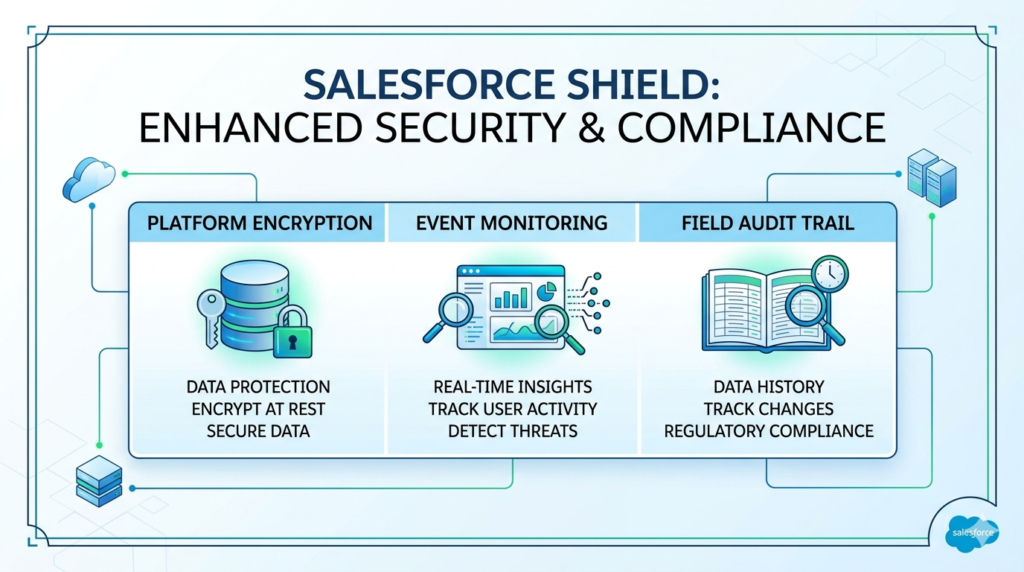
Salesforce Shield is a powerful suite of advanced security and compliance tools designed specifically for organizations that need to go beyond standard Salesforce security features. It gives administrators, security teams, architects, and compliance professionals the tools they need to encrypt sensitive data at rest, monitor every user action across the platform, and maintain a comprehensive historical record of every field change — all natively within Salesforce.
In this comprehensive guide, we’ll break down every component of Salesforce Shield — what it does, how it works, who needs it, and why it matters — with real-world examples and practical insights to help you understand whether Salesforce Shield is the right investment for your organization.
What Is Salesforce Shield?
Definition and Overview
Salesforce Shield is a premium add-on security and compliance toolkit offered by Salesforce. It is built on top of the core Salesforce platform and provides three primary capabilities that work together to create a comprehensive enterprise-grade security framework:
- Platform Encryption (Salesforce Field Encryption)
- Event Monitoring (Salesforce Event Monitoring)
- Field Audit Trail
Together, these three components address the most critical security and compliance challenges that enterprises face when storing and managing sensitive data in Salesforce. Rather than requiring organizations to build custom security solutions or integrate third-party tools, Salesforce Shield delivers these capabilities natively — meaning they work seamlessly within the Salesforce ecosystem without compromising platform functionality.
Why Salesforce Created Shield
Salesforce recognized that as enterprises in highly regulated industries — banking, healthcare, insurance, government — adopted the platform at scale, their security and compliance requirements exceeded what standard Salesforce security features could provide. Regulatory frameworks like HIPAA, GDPR, CCPA, PCI-DSS, SOX, and FINRA demanded encryption at rest, comprehensive audit trails, and real-time activity monitoring that the base platform wasn’t designed to deliver out of the box.
Salesforce Shield was created to close that gap — giving regulated enterprises the confidence to store their most sensitive data in Salesforce while meeting the strictest regulatory and internal governance requirements.
Salesforce Field Encryption Explained
What Platform Encryption Is
Salesforce Platform Encryption — commonly referred to as Salesforce field encryption — is one of the most powerful components of Salesforce Shield. It allows organizations to encrypt sensitive data at rest within Salesforce, meaning that even if someone gains unauthorized access to the underlying data storage infrastructure, the data remains unreadable without the proper encryption keys.
It is important to distinguish Platform Encryption from Salesforce’s standard encryption. Salesforce has always encrypted data in transit using TLS (Transport Layer Security) — meaning data is protected as it travels between your browser and Salesforce’s servers. However, standard Salesforce does not encrypt all data at rest within the application layer. Platform Encryption addresses this critical gap.
How Salesforce Field Encryption Works
Salesforce Platform Encryption uses AES 256-bit encryption, one of the strongest encryption standards available, to protect field-level data at rest. Here’s how the process works in practical terms:
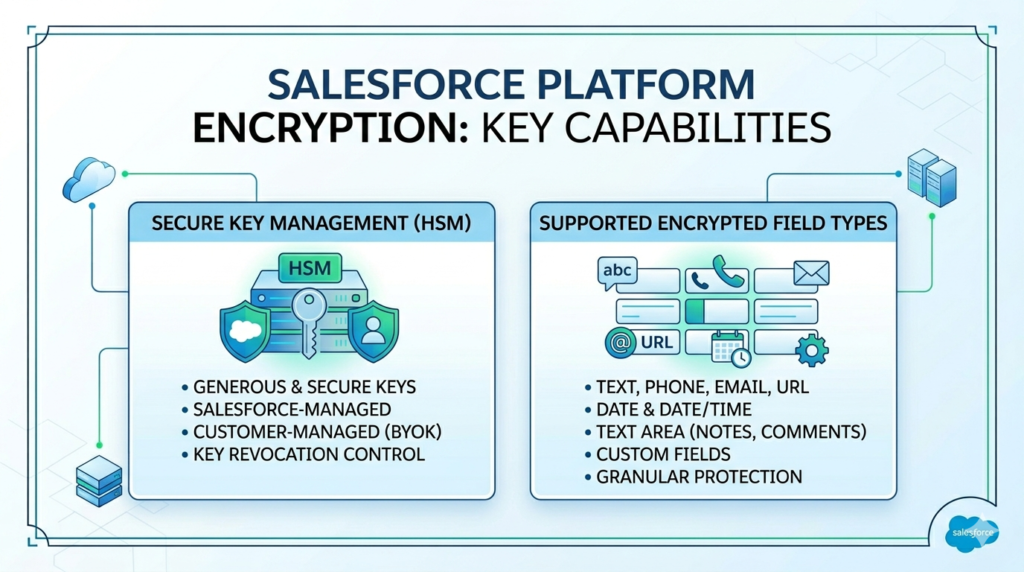
Key Management is central to how Platform Encryption operates. Salesforce Shield uses a Hardware Security Module (HSM) to generate and store encryption keys securely. Organizations can choose between:
- Salesforce-managed keys — Salesforce generates and manages the encryption keys on your behalf
- Customer-managed keys (BYOK — Bring Your Own Key) — Your organization generates and controls the encryption keys, giving you complete ownership and the ability to revoke access to your data at any time
When a user enters data into an encrypted field — say, a customer’s Social Security Number or bank account number — Salesforce encrypts that data before writing it to the database. When an authorized user retrieves the data, Salesforce decrypts it in real time so the user sees the readable value. This entire process is transparent to end users and happens automatically within the platform.
Supported Encrypted Fields
Salesforce field encryption can be applied to a wide range of standard and custom field types, including:
- Text fields — Names, addresses, identification numbers
- Phone fields — Contact phone numbers
- Email fields — Customer email addresses
- URL fields — Web addresses
- Date and Date/Time fields — Birthdates, appointment dates
- Text Area fields — Notes, descriptions, case comments
- Custom fields — Any custom field your organization has created
It is important to note that not every Salesforce field type supports encryption, and enabling encryption on certain fields may affect some platform features like filtering, sorting, and certain formula field calculations — considerations we’ll discuss in the limitations section.
Encryption at Rest vs In Transit
| Encryption Type | What It Protects | Standard Salesforce | Salesforce Shield |
|---|---|---|---|
| In Transit | Data moving between user and server | ✅ Included (TLS) | ✅ Included (TLS) |
| At Rest (Storage) | Data stored in Salesforce database | ❌ Limited | ✅ Full AES-256 |
| Key Management | Control over encryption keys | ❌ Not available | ✅ HSM + BYOK |
| Field-Level Control | Encrypt specific fields | ❌ Not available | ✅ Granular control |
Real-World Use Cases for Salesforce Field Encryption
Healthcare Organization: A hospital system storing patient records in Salesforce Health Cloud can use Platform Encryption to encrypt fields containing patient Social Security Numbers, medical record numbers, diagnosis codes, and insurance policy numbers — ensuring HIPAA compliance and protecting patient privacy even in the event of a data breach.
Financial Services Firm: A wealth management company can encrypt client account numbers, tax identification numbers, and net worth information stored in Salesforce Financial Services Cloud — meeting PCI-DSS and SOX compliance requirements while maintaining full CRM functionality for their relationship managers.
Insurance Company: An insurance provider handling sensitive policyholder data can encrypt coverage details, claim amounts, and beneficiary information — satisfying both regulatory requirements and customer trust expectations.
Salesforce Event Monitoring Explained
What Event Monitoring Tracks
Salesforce Event Monitoring is the second core component of Salesforce Shield, and it provides organizations with unprecedented visibility into what users are doing inside Salesforce. Think of it as a comprehensive activity log that records every significant interaction a user has with the platform — every login, every report run, every record accessed, every API call made, and every file downloaded.
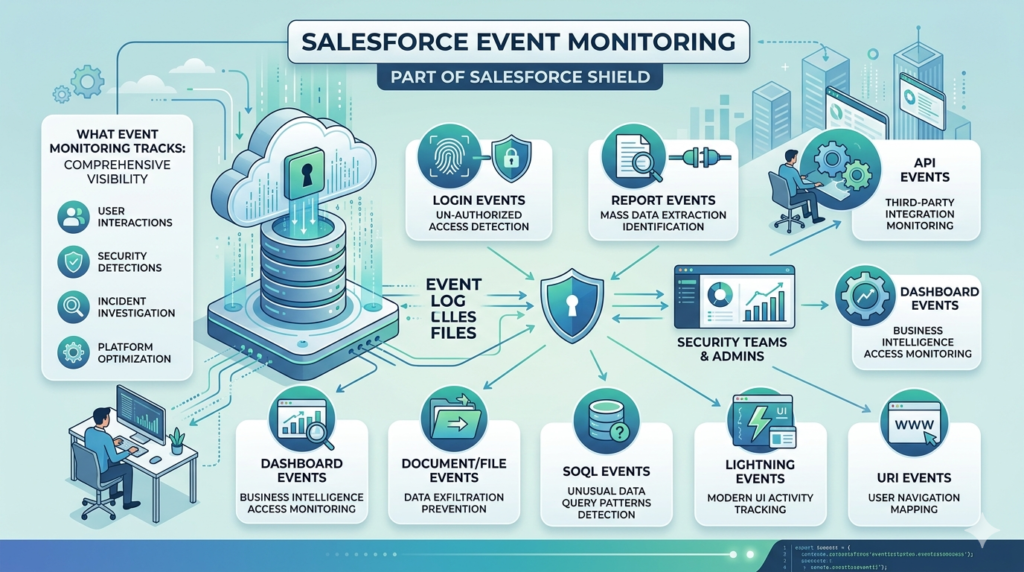
Without Event Monitoring, Salesforce administrators have very limited visibility into user behavior beyond basic login history. With Salesforce event monitoring, organizations gain access to detailed event log files that capture granular activity data across the entire platform — enabling security teams to detect suspicious behavior, investigate incidents, demonstrate compliance, and optimize platform usage.
Key Event Log Files Available
Salesforce Event Monitoring captures data across more than 50 different event types. Some of the most critical include:
| Event Type | What It Captures | Security/Compliance Value |
|---|---|---|
| Login Events | Who logged in, when, from where, using what browser/IP | Detect unauthorized access attempts |
| Report Events | Which reports were run, by whom, how many records returned | Identify mass data extraction attempts |
| API Events | Every API call made to Salesforce | Monitor third-party integrations and data access |
| Visualforce Page Events | User interactions with custom pages | Track custom application usage |
| Dashboard Events | Dashboard views and interactions | Monitor business intelligence access |
| Document/File Events | File uploads, downloads, and deletions | Prevent unauthorized data exfiltration |
| URI Events | Every page a user navigates to | Comprehensive user activity mapping |
| SOQL Events | Database queries executed | Detect unusual data query patterns |
| Bulk API Events | Large-scale data operations | Monitor mass data access or modifications |
| Lightning Events | User interactions in Lightning Experience | Modern UI activity tracking |
Security and Compliance Benefits
The Salesforce security monitoring capabilities delivered by Event Monitoring provide multiple layers of value for organizations:
Threat Detection: Security teams can analyze event log data to identify anomalous behavior — for example, a user who suddenly downloads 10,000 records at 2:00 AM, or a login from an unrecognized IP address in a foreign country. These patterns can indicate account compromise, insider threats, or data exfiltration attempts.
Compliance Demonstration: Regulated organizations can use Event Monitoring data to demonstrate to auditors that they have comprehensive visibility into who accessed sensitive data, when, and how — satisfying requirements under GDPR, HIPAA, SOX, and other regulatory frameworks.
Performance Optimization: Beyond security, Event Monitoring data reveals how users interact with the platform — which pages are slow to load, which reports are run most frequently, and where users experience friction — enabling administrators to optimize the Salesforce experience.
Incident Investigation: When a security incident occurs, Event Monitoring provides the forensic trail needed to understand exactly what happened, which data was accessed, and which accounts were involved.
Monitoring Suspicious User Activity
One of the most powerful applications of Salesforce event monitoring is the ability to detect and investigate suspicious user behavior in near real-time. Organizations can integrate Event Monitoring data with Security Information and Event Management (SIEM) tools like Splunk, IBM QRadar, or Microsoft Sentinel to set up automated alerts for high-risk activities.
Real-World Example: A financial services company notices through Event Monitoring that one of their sales representatives ran a report containing all client account numbers at 11:45 PM on a Friday — the day before that employee was scheduled to leave the company. The security team is automatically alerted, can review the full activity log, and can take immediate action to investigate and prevent potential data theft. Without Event Monitoring, this activity would have gone completely undetected.
Field Audit Trail in Salesforce Shield
What It Is
Field Audit Trail is the third core component of Salesforce Shield, and it addresses a specific but critically important compliance requirement: the ability to track and retain a complete historical record of how data has changed over time.
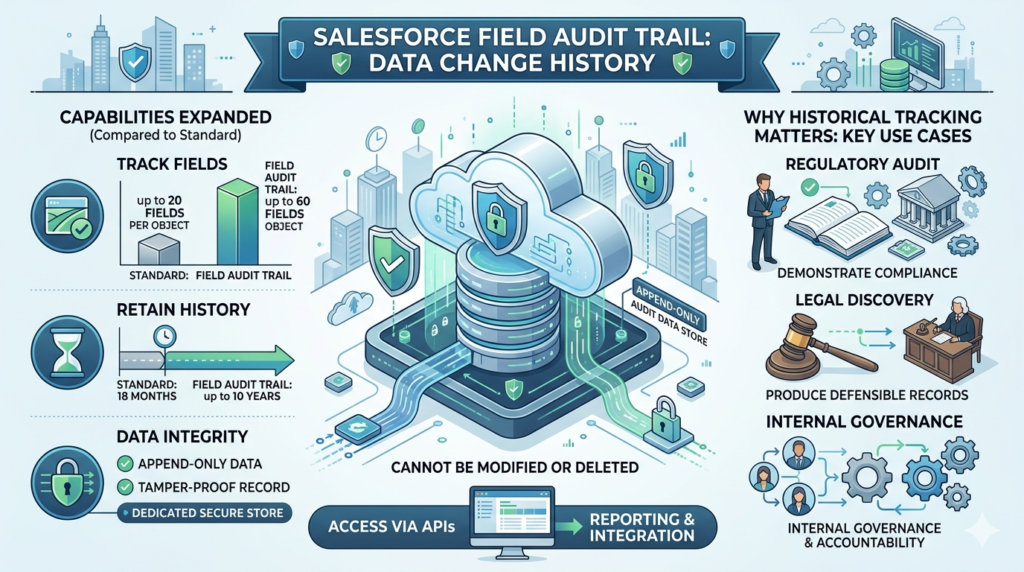
Standard Salesforce includes a basic field history tracking feature that allows administrators to track changes to up to 20 fields per object, with a retention period of 18 months. For many regulated organizations, this is simply not sufficient. They need to track more fields, retain history for longer periods, and have that history available for legal discovery, regulatory audit, and internal governance purposes.
Salesforce Field Audit Trail dramatically expands these capabilities. It allows organizations to:
- Track up to 60 fields per object (compared to 20 in standard history tracking)
- Retain field history for up to 10 years (compared to 18 months standard)
- Store historical data in a dedicated, append-only audit data store that cannot be modified or deleted
- Access comprehensive change history through standard Salesforce APIs for reporting and integration
Why Historical Field Tracking Matters
Consider a real-world scenario: A bank is subject to a regulatory audit and the auditor asks for a complete record of every change made to a customer’s credit limit over the past five years — including who made each change, when it was made, and what the previous and new values were. Without Field Audit Trail, that data may simply not exist. With Field Audit Trail, the bank can produce a complete, tamper-proof record that demonstrates compliance and governance.
Legal Discovery: In litigation scenarios, organizations may be required to produce historical records of data changes as part of the discovery process. Field Audit Trail ensures that this data is available, reliable, and defensible in court.
Regulatory Compliance: FINRA, for example, requires broker-dealers to retain records of certain customer communications and transactions for up to seven years. Field Audit Trail helps financial services organizations meet these retention requirements without building custom archival solutions.
Retention and Compliance Benefits
| Feature | Standard Field History | Field Audit Trail (Shield) |
|---|---|---|
| Fields Tracked Per Object | Up to 20 | Up to 60 |
| Data Retention Period | 18 months | Up to 10 years |
| Storage Type | Standard database | Dedicated audit data store |
| Tamper Protection | Limited | Append-only, cannot be modified |
| API Access | Limited | Full API access |
| Compliance Support | Basic | Enterprise-grade |
Key Benefits of Salesforce Shield
Data Protection
Salesforce Shield’s Platform Encryption ensures that sensitive data stored in Salesforce is protected at the field level using military-grade AES-256 encryption. Even in the unlikely event of a data breach at the infrastructure level, encrypted data remains unreadable without the proper decryption keys — dramatically reducing the risk and potential impact of a data exposure event.
Compliance Support
For organizations subject to regulatory frameworks including HIPAA, GDPR, CCPA, PCI-DSS, SOX, FINRA, and FedRAMP, Salesforce Shield provides the technical controls required to demonstrate compliance. Platform Encryption satisfies encryption-at-rest requirements, Event Monitoring satisfies audit logging requirements, and Field Audit Trail satisfies data retention and change tracking requirements.
Audit Readiness
With Field Audit Trail maintaining up to 10 years of complete field change history and Event Monitoring capturing every user action, organizations can respond to internal audits, regulatory examinations, and legal discovery requests quickly, confidently, and completely — without scrambling to reconstruct records from disparate systems.
Threat Detection
Salesforce security monitoring through Event Monitoring gives security teams the visibility needed to detect and respond to threats — whether they originate from external attackers who have compromised user credentials or from malicious or negligent insiders who are misusing their legitimate access to sensitive data.
Enhanced Governance
Salesforce Shield gives administrators and security architects the tools to enforce and demonstrate governance policies across the entire Salesforce org — ensuring that sensitive data is only accessed by authorized users, that all access is logged, and that historical records are preserved in accordance with organizational and regulatory policies.
Salesforce Shield Use Cases by Industry
Banking and Financial Services
Banks and financial institutions use Salesforce Shield to encrypt customer account numbers, Social Security Numbers, tax identification numbers, and financial profile data. Event Monitoring helps detect unusual data access patterns that could indicate fraud or insider threats. Field Audit Trail maintains the comprehensive change records required by SOX, FINRA, and other financial regulators.
Healthcare
Healthcare organizations using Salesforce Health Cloud rely on Platform Encryption to protect Protected Health Information (PHI) in compliance with HIPAA. Event Monitoring tracks who accesses patient records and when, satisfying HIPAA’s audit control requirements. Field Audit Trail documents changes to clinical and demographic data for medical record integrity.
Insurance
Insurance companies handle highly sensitive policyholder data including health information, financial details, and claims history. Salesforce Shield helps insurance providers encrypt this sensitive data, monitor adjuster and agent activity for compliance, and maintain the long-term historical records required by state insurance regulators.
Government
Government agencies adopting Salesforce for citizen services, case management, and internal operations use Shield to meet FedRAMP requirements and other government data security mandates. Customer-managed encryption keys (BYOK) give government agencies complete control over their data sovereignty.
Enterprise Security Teams
Large enterprises across all industries use Salesforce event monitoring as part of their broader security operations strategy — integrating Event Monitoring data with SIEM platforms to get a unified view of security events across their entire technology stack, with Salesforce activity included alongside network, endpoint, and application security data.
Salesforce Shield Limitations and Considerations
Licensing Requirements
Salesforce Shield is not included in any standard Salesforce edition — it is a premium add-on that requires separate licensing. Shield is typically priced as a percentage of your total Salesforce contract value (generally around 30%), which means it represents a significant additional investment for organizations. This cost is justified for regulated enterprises with genuine compliance requirements, but may be difficult to justify for smaller organizations or those in non-regulated industries.
Performance Considerations
Enabling Salesforce field encryption on a large number of fields can have performance implications. Because Salesforce must encrypt and decrypt data in real time as users interact with the platform, heavily encrypted orgs may experience slightly slower query and page load times — particularly for complex reports and list views that span large volumes of encrypted data. Organizations should carefully plan their encryption strategy, prioritizing the fields that genuinely require encryption rather than encrypting everything indiscriminately.
Encryption Limitations
Not all Salesforce features work seamlessly with encrypted fields. Some Salesforce security features and platform capabilities have restrictions when applied to encrypted data:
- Formula fields cannot reference encrypted fields in certain contexts
- Deterministic encryption is required for fields that need to be filtered, sorted, or used in WHERE clauses — and deterministic encryption provides slightly less security than probabilistic encryption
- Certain AppExchange packages may not be compatible with encrypted fields
- Duplicate management rules may not function correctly with encrypted fields
Is Salesforce Shield Worth It?
When Organizations Should Invest
Salesforce Shield is a compelling investment for organizations that meet one or more of the following criteria:
- Operating in a regulated industry (healthcare, financial services, insurance, government) with specific data encryption, monitoring, or retention requirements
- Handling large volumes of sensitive personal data subject to GDPR, CCPA, or similar privacy regulations
- Subject to industry-specific compliance frameworks like HIPAA, PCI-DSS, SOX, or FINRA
- Managing significant legal or reputational risk associated with a data breach involving Salesforce data
- Operating large Salesforce orgs with many users where insider threat detection is a genuine concern
Best-Fit Company Size and Use Case
While Salesforce Shield is most commonly deployed by large enterprises and mid-market organizations in regulated industries, it is not exclusively limited to these contexts. Any organization that stores genuinely sensitive data in Salesforce and has a clear compliance or security requirement that Shield addresses can derive strong value from the investment.
For smaller organizations without specific regulatory requirements, the cost-benefit analysis may not favor Shield. In these cases, ensuring proper configuration of standard Salesforce security features — strong password policies, multi-factor authentication, appropriate sharing rules, and regular permission audits — may be sufficient.
Final Thoughts
Salesforce Shield represents one of the most comprehensive native security and compliance toolkits available for any cloud enterprise platform. By combining Salesforce field encryption through Platform Encryption, comprehensive user activity tracking through Salesforce event monitoring, and long-term historical data retention through Field Audit Trail, Shield gives regulated enterprises the complete security framework they need to store their most sensitive data in Salesforce with confidence.
For Salesforce Admins, the key takeaway is that Shield is not just a security tool — it’s an enablement tool. It allows your organization to unlock the full power of Salesforce for mission-critical, sensitive-data use cases that would otherwise be too risky or non-compliant to pursue on the platform.
For Architects and Security Teams, Shield provides the technical controls needed to satisfy regulatory requirements, pass security audits, and demonstrate a mature, defensible data governance posture to regulators, customers, and leadership.
For Compliance Professionals, Shield transforms Salesforce from a CRM into a compliance-ready platform — one that can meet the strictest requirements of HIPAA, GDPR, SOX, PCI-DSS, and beyond without compromising the user experience or business functionality your teams depend on.
If your organization handles sensitive data in Salesforce and operates in a regulated industry, Salesforce Shield deserves serious evaluation. The investment is significant, but so is the risk of operating without it.
About RizeX Labs
At RizeX Labs, we help businesses and professionals unlock the full potential of Salesforce through expert consulting, implementation, and training across advanced Salesforce products and security solutions.
Our team brings deep platform expertise and practical implementation knowledge to help organizations secure sensitive customer data, maintain compliance, and maximize the value of their Salesforce investment.
Whether you are learning Salesforce security or implementing enterprise-grade protection features, RizeX Labs provides the guidance needed to build secure and scalable Salesforce environments.
Internal Link:
- Link to your Salesforce Security Training page
- DevOps Roadmap for Salesforce: Tools, Skills, and Certifications You Need in 2026
- How to Build a Salesforce Portfolio That Gets You Hired (With Project Ideas)
- Salesforce Admin vs Developer: Which Career Path is Right for You in 2026?
- Wealth Management App in Financial Services Cloud
External Link:
- Salesforce Official Website
- Salesforce Shield Overview
- Salesforce Platform Encryption Docs
- Salesforce Event Monitoring Docs
- Salesforce Security Guide
Quick Summary
Salesforce Shield is an advanced security suite designed to help organizations protect sensitive data, monitor user activity, and maintain compliance within Salesforce. It includes powerful features such as platform encryption, event monitoring, and field audit trail to strengthen enterprise security.
For businesses handling regulated or confidential data, Salesforce Shield adds an extra layer of protection beyond standard Salesforce security capabilities. It enables organizations to encrypt sensitive fields, track suspicious activity, and retain detailed historical data for audits and compliance requirements.
Understanding these Salesforce Shield features is essential for admins, architects, and security teams looking to build secure and enterprise-ready Salesforce environments in 2026.