
As organizations increasingly rely on data-driven insights to guide their business decisions, the importance of robust analytics tools cannot be overstated. Salesforce, the world’s leading customer relationship management platform, offers multiple analytics solutions to meet varying business needs. Two of the most commonly used options are Salesforce native reports and Tableau CRM (formerly known as Einstein Analytics).
For Salesforce users, admins, and business decision-makers, choosing between these two powerful tools can be challenging. While native reports have been a staple of the Salesforce ecosystem for years, Tableau CRM represents a more sophisticated, AI-powered analytics platform designed for deeper insights and advanced data exploration.
This comprehensive guide will help you understand the fundamental differences between Salesforce Tableau CRM and native reports, explore use cases for each tool, and provide practical recommendations to help you make the right choice for your organization. Whether you’re a Tableau CRM beginner or an experienced Salesforce administrator, this article will equip you with the knowledge needed to leverage these analytics tools effectively.
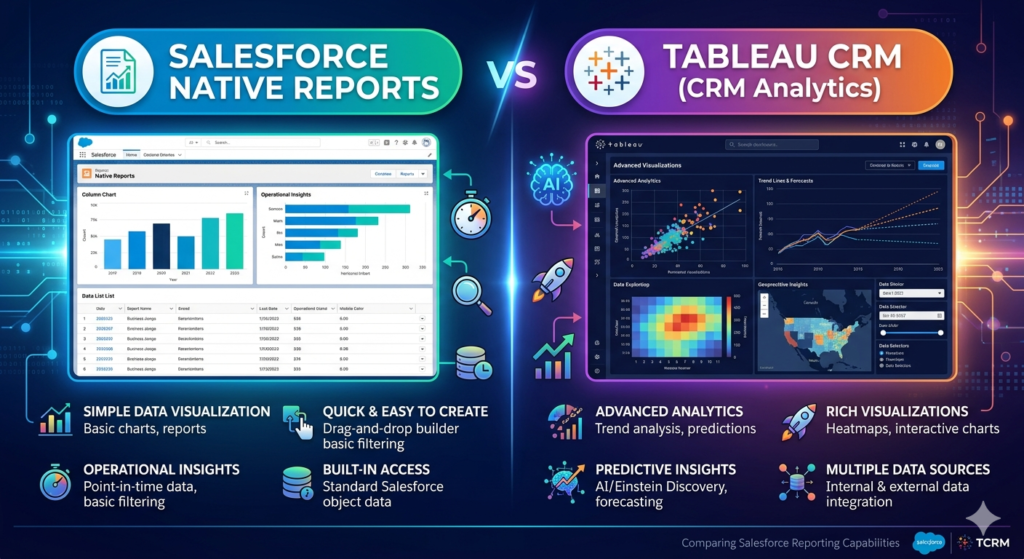
Understanding Salesforce Native Reports
Salesforce native reports are built-in reporting tools that come standard with your Salesforce license. These reports allow users to create tabular, summary, matrix, and joined reports directly from Salesforce data without any additional licensing costs.
Key Features of Native Reports:
- Pre-built and custom report types: Access to standard report types or the ability to create custom report types based on object relationships
- Dashboards: Combine multiple reports into visual dashboards with charts and tables
- Filters and groupings: Apply criteria to narrow down data and group records by specific fields
- Export capabilities: Download reports as Excel, CSV, or formatted reports
- Scheduled reports: Automate report delivery to stakeholders via email
- Lightning Report Builder: A user-friendly interface for building reports without code
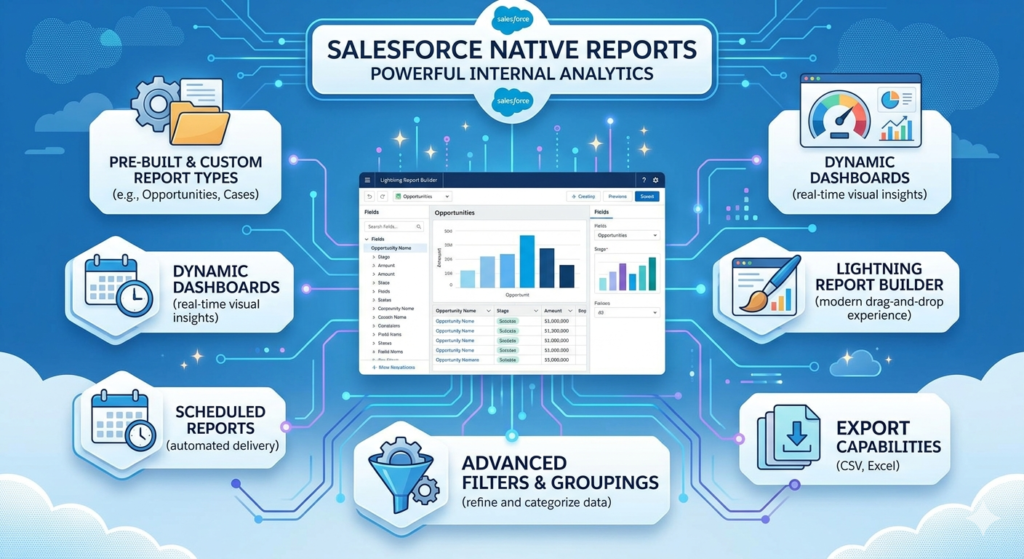
Native reports are ideal for operational reporting, tracking KPIs, and answering straightforward business questions using data directly from Salesforce objects.
Understanding Salesforce Tableau CRM: A Beginner’s Guide
Tableau CRM (previously called Einstein Analytics and Wave Analytics) is Salesforce’s premium analytics platform that combines advanced data visualization, artificial intelligence, and powerful data manipulation capabilities. For the Tableau CRM beginner, it’s helpful to think of it as an analytics layer that sits on top of your Salesforce data (and can integrate external data sources as well).
Key Features of Tableau CRM:
- AI-powered insights: Einstein Discovery provides automatic insights, predictions, and recommendations
- Advanced visualizations: Interactive dashboards with sophisticated charts and data exploration capabilities
- Data integration: Combine Salesforce data with external sources for comprehensive analysis
- Mobile-optimized: Purpose-built mobile apps for analytics on the go
- Embedded analytics: Integrate dashboards directly into Salesforce pages and apps
- Predictive analytics: Build and deploy machine learning models without coding
- SAQL (Salesforce Analytics Query Language): Advanced users can write queries for complex data manipulation
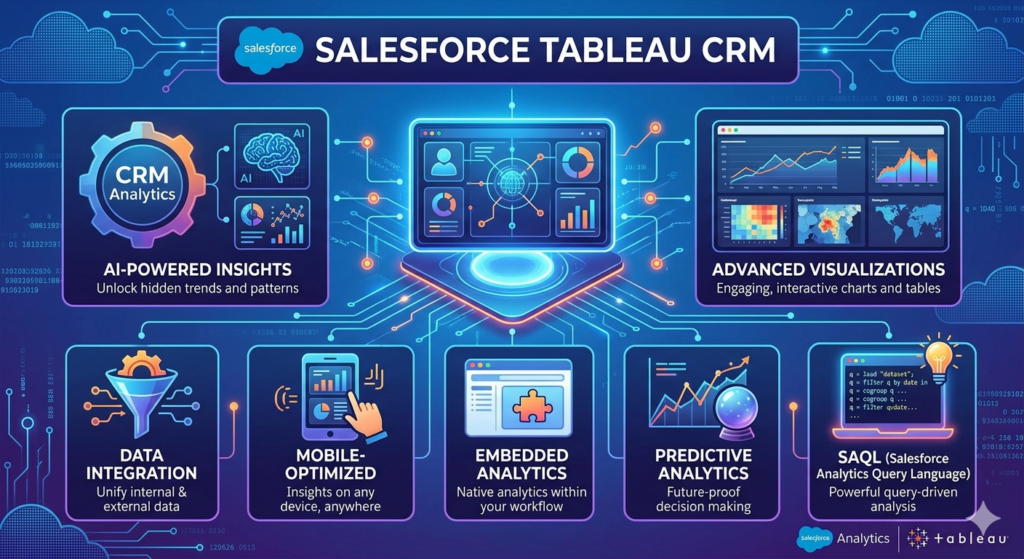
For the Tableau CRM beginner, the platform might seem intimidating at first, but it’s designed with a progressive disclosure interface—meaning you can start simple and gradually explore more advanced features as your expertise grows.
Salesforce Einstein Analytics vs Reports: Key Differences
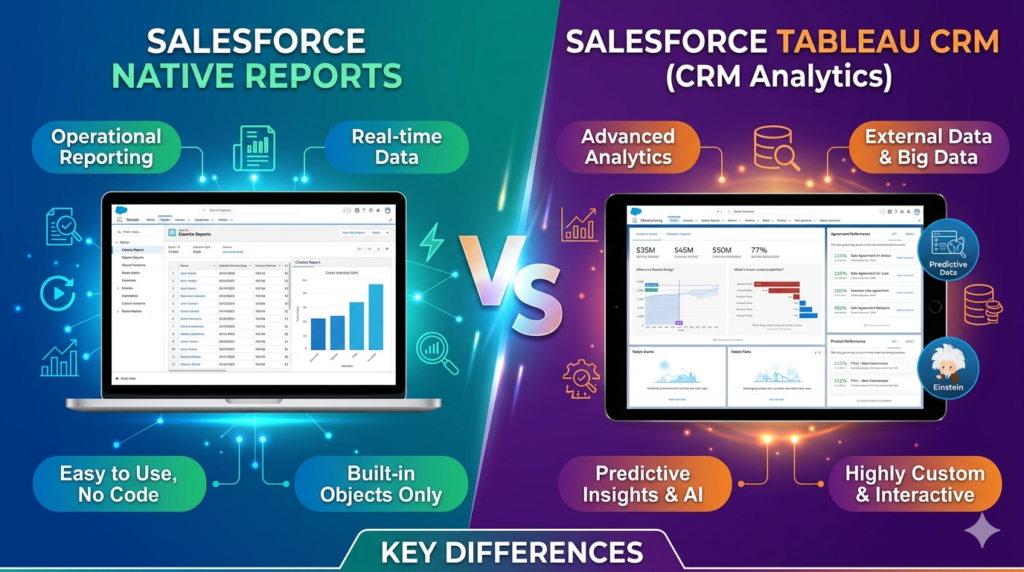
When comparing salesforce einstein analytics vs reports, it’s essential to understand that these tools serve different purposes and audiences within your organization. Let’s explore the key differences across multiple dimensions:
1. Data Handling and Integration
Native Reports:
- Work exclusively with data stored in Salesforce objects
- Limited to relationships between Salesforce objects (typically up to four objects in a report type)
- Data is queried in real-time from the Salesforce database
- No data modeling beyond standard object relationships
Tableau CRM:
- Can integrate data from external sources (databases, cloud storage, APIs, and third-party applications)
- Uses a data modeling approach with datasets that can combine multiple data sources
- Data is typically loaded into the Einstein Analytics data store, enabling faster query performance
- Supports complex data transformations using dataflow or recipes
- Can work with both current and historical data snapshots for trend analysis
For organizations that need to combine Salesforce data with ERP systems, marketing platforms, or financial databases, Tableau CRM offers significantly more flexibility.
2. Usability and Learning Curve
Native Reports:
- Intuitive drag-and-drop interface familiar to most Salesforce users
- Minimal training required for basic report creation
- Report types define what data can be included, which can be limiting but also simplifying
- Quick to build simple reports (minutes rather than hours)
- Limited customization options
Tableau CRM:
- Steeper learning curve, especially for users new to analytics platforms
- Requires understanding of concepts like datasets, lenses, and dashboards
- More powerful but more complex interface
- For the Tableau CRM beginner, initial dashboard creation may take longer
- Extensive customization options for advanced users
- Requires specific user license (separate cost)
The salesforce einstein analytics vs reports comparison clearly shows that native reports are more accessible for everyday users, while Tableau CRM is better suited for analysts and power users who need advanced capabilities.
3. Visualization and Interactivity
Native Reports:
- Standard chart types (bar, column, line, pie, funnel, scatter, donut)
- Basic dashboard components with limited interactivity
- Dashboard filters affect all components
- Static visualizations with limited drill-down capabilities
- No embedded analytics in record pages (except Lightning Report components)
Tableau CRM:
- Wide variety of advanced visualization types
- Highly interactive dashboards with faceting, brushing, and cross-filtering
- Ability to create step-by-step guided analytics experiences
- Drill-down to record-level detail from any chart
- Embedded dashboards can be placed directly on Lightning pages
- Custom widgets and components using Einstein Analytics UI framework
- Animation and transition effects for data storytelling
If compelling data visualization and interactive exploration are priorities, Tableau CRM provides significantly more capabilities than native reports.
4. AI and Predictive Capabilities
Native Reports:
- No built-in artificial intelligence or machine learning
- Historical reporting only (what happened)
- Limited to descriptive analytics
- No automated insights or anomaly detection
Tableau CRM:
- Einstein Discovery for automated insights and pattern detection
- Predictive modeling to forecast outcomes (what will happen)
- Prescriptive recommendations (what should we do)
- “Why it Happened” explanations for metric changes
- Automated story generation that explains data trends in plain language
- No-code machine learning model deployment
The inclusion of AI capabilities is one of the most significant distinctions when examining salesforce einstein analytics vs reports. Organizations seeking to move from reactive to proactive decision-making will find Tableau CRM’s AI features invaluable.
5. Performance and Scalability
Native Reports:
- Performance depends on data volume and complexity of report logic
- May experience slow load times with large datasets or complex report types
- Governor limits apply (e.g., 2,000 records maximum for dashboard components)
- Limited ability to analyze millions of records efficiently
- Real-time data access (always current)
Tableau CRM:
- Data is optimized and stored in a columnar format for faster queries
- Can handle millions of records with fast query response times
- Pre-aggregated data enables rapid dashboard loading
- May have data latency depending on dataflow schedule
- Better suited for large-scale enterprise analytics
For organizations with massive datasets or performance-critical analytics needs, Tableau CRM generally provides superior performance.
6. Cost Considerations
Native Reports:
- Included with all Salesforce licenses
- No additional per-user cost
- Development costs limited to admin time
Tableau CRM:
- Requires separate licensing (Einstein Analytics Plus or Growth licenses)
- Additional cost per user per month
- May require specialized consultants for implementation
- Potential costs for training and enablement
Cost is often a decisive factor, and native reports have a clear advantage for budget-conscious organizations.
Use Cases for Native Reports
Salesforce native reports are ideal for numerous business scenarios, particularly when:
1. Operational Reporting
Daily, weekly, or monthly operational reports that track standard metrics:
- Sales pipeline reports showing opportunities by stage
- Case aging reports for customer support teams
- Lead conversion tracking
- Activity reports showing calls, emails, and meetings
- Opportunity forecasting for sales managers
2. Compliance and Auditing
Standard reports required for regulatory compliance or internal audits:
- User login history
- Data modification tracking
- Role and permission auditing
- Record access tracking
3. Quick Ad Hoc Analysis
When users need immediate answers to simple questions:
- “Show me all accounts in California with annual revenue over $1 million”
- “Which opportunities are closing this quarter?”
- “How many open cases do we have by priority?”
4. Budget-Constrained Projects
Organizations that:
- Have limited analytics budgets
- Don’t need advanced visualization or AI capabilities
- Have small user bases requiring analytics access
- Are satisfied with standard Salesforce data
5. Simple Dashboard Requirements
Scenarios requiring basic visualization:
- Executive dashboards with key performance indicators
- Team dashboards showing individual performance metrics
- Territory performance comparisons
- Product line sales tracking
Example Scenario: A small sales organization with 20 sales representatives needs to track pipeline, closed-won deals, and individual rep performance. The sales manager can create native reports and a dashboard showing these metrics without additional software investments. The reporting requirements are straightforward, data volumes are manageable, and real-time data visibility is essential.
Use Cases for Tableau CRM
Salesforce Tableau CRM shines in more sophisticated analytics scenarios, particularly when:
1. Cross-System Analysis
Combining data from multiple sources:
- Linking Salesforce opportunity data with ERP fulfillment data
- Combining marketing automation metrics with sales outcomes
- Integrating financial data with customer relationship data
- Analyzing e-commerce transactions alongside CRM data
2. Advanced Data Exploration
When users need to:
- Explore data dynamically without pre-built report structures
- Ask complex questions requiring multi-step analysis
- Discover patterns and correlations not immediately obvious
- Perform cohort analysis and customer segmentation
3. Predictive and Prescriptive Analytics
Organizations seeking to:
- Predict which leads are most likely to convert
- Forecast churn risk for customer accounts
- Identify which factors drive deal closure
- Recommend next-best actions for sales or service teams
- Score opportunities based on likelihood to close
4. Embedded Analytics for Customers
Providing analytics directly to external users:
- Partner portals with performance metrics
- Customer portals showing usage analytics
- Distributor dashboards with sales data
- Mobile apps with embedded analytics
5. Executive and Strategic Analysis
High-level strategic decision support:
- Market trend analysis combining internal and external data
- Customer lifetime value modeling
- Product portfolio performance analysis
- Territory optimization and resource allocation
- Competitive intelligence dashboards
6. Large-Scale Data Analysis
Organizations dealing with:
- Millions of records requiring analysis
- Complex data relationships
- Historical trend analysis over multiple years
- High-performance requirements for dashboard loading
Example Scenario: A multinational enterprise selling complex B2B solutions wants to understand which combination of factors leads to successful deal closure. They need to combine Salesforce opportunity data with product configuration data from their CPQ system, financial data from their ERP, and customer interaction data from their support platform. Using Tableau CRM, they build predictive models that score opportunities and recommend specific actions to sales reps, resulting in a 15% increase in win rates.
Tableau CRM Beginner: Getting Started
For those new to the platform, here’s a practical guide to getting started with Tableau CRM:
Step 1: Understand the Core Concepts
Before diving in, familiarize yourself with these fundamental concepts:
- Dataset: A collection of data optimized for analysis, similar to a table but stored in Einstein’s data store
- Dataflow: A process that extracts data from Salesforce or external sources, transforms it, and loads it into datasets
- Recipe: A visual, no-code alternative to dataflows for data preparation
- Lens: An exploratory view of a dataset where you can drag and drop fields to analyze data
- Dashboard: An interactive collection of charts, tables, and visualizations that tell a data story
Step 2: Start with Pre-Built Apps
Salesforce provides numerous pre-built analytics apps:
- Sales Analytics
- Service Analytics
- Marketing Analytics
- Adoption Analytics
These apps come with ready-to-use dashboards and datasets. As a Tableau CRM beginner, starting with these templates helps you understand what’s possible before building custom solutions.
Step 3: Explore with Lenses
Lenses provide a forgiving environment for exploration:
- Select a dataset
- Drag fields to the visualization canvas
- Choose chart types
- Apply filters
- Save your lens for future use
Step 4: Build Your First Dashboard
Start simple:
- Create a new dashboard
- Add a chart component
- Connect it to a dataset
- Configure the chart type and measures
- Add filters for interactivity
- Add additional components
- Configure interactions between components
Step 5: Take Advantage of Learning Resources
For Tableau CRM beginners, Salesforce offers:
- Trailhead modules specifically for Einstein Analytics
- Documentation and implementation guides
- Community forums and user groups
- YouTube tutorials and webinars
Common Beginner Mistakes to Avoid
- Trying to build complex dashboards immediately: Start simple and add complexity gradually
- Not planning your data model: Understand your data structure before building dataflows
- Ignoring dataset refresh schedules: Ensure your data updates at appropriate intervals
- Overcomplicating dashboards: Focus on clarity and user experience, not cramming every possible metric
- Not considering mobile users: Design with mobile experience in mind from the start
Salesforce Einstein Analytics vs Reports: A Practical Comparison
To help clarify the salesforce einstein analytics vs reports decision, here’s a side-by-side comparison of practical considerations:
When to Choose Native Reports
Choose native reports if you:
- Need reporting capabilities for all Salesforce users without additional costs
- Require real-time data visibility for operational decisions
- Work primarily with standard Salesforce objects and relationships
- Have straightforward reporting requirements
- Need quick deployment with minimal training
- Have limited IT or analytics resources
- Require basic dashboard visualization
- Work with smaller data volumes
Best for these roles:
- Sales representatives tracking their own pipelines
- Sales managers monitoring team performance
- Customer service agents viewing case workloads
- Marketing operations tracking campaign responses
- System administrators monitoring platform usage
When to Choose Tableau CRM
Choose Tableau CRM if you:
- Need to integrate data from multiple systems
- Require advanced, interactive visualizations
- Want predictive analytics and AI-driven insights
- Have data analysts or power users who need exploration capabilities
- Work with large datasets requiring optimized performance
- Need embedded analytics in custom applications or customer portals
- Have complex analytical requirements beyond standard reporting
- Can justify the additional licensing cost with expected business value
Best for these roles:
- Data analysts performing deep-dive analysis
- Business intelligence teams building enterprise analytics
- Executives requiring strategic dashboards
- Product managers analyzing usage patterns
- Revenue operations teams optimizing processes
- Partners or customers needing embedded analytics
Hybrid Approach: Using Both Tools
Many organizations don’t need to choose exclusively—they can use both tools strategically:
Native Reports for:
- Operational day-to-day reporting
- Standard compliance reports
- Quick ad hoc queries
- Broad user base with basic needs
Tableau CRM for:
- Strategic executive dashboards
- Advanced analysis by dedicated analysts
- Predictive modeling for key business processes
- Cross-system integrated views
This hybrid approach optimizes costs while ensuring the right tool for each use case.
Implementation Considerations
Assessing Your Organization’s Needs
Before deciding between Salesforce Tableau CRM and native reports, conduct a thorough needs assessment:
1. Define Your Analytics Maturity:
- Descriptive: What happened? (Native reports may suffice)
- Diagnostic: Why did it happen? (Consider Tableau CRM)
- Predictive: What will happen? (Tableau CRM required)
- Prescriptive: What should we do? (Tableau CRM with Einstein Discovery)
2. Evaluate Your Data Landscape:
- How many data sources need to be integrated?
- What are your data volumes?
- How complex are your data relationships?
- Do you need historical trend analysis?
3. Identify Your User Personas:
- How many users need analytics access?
- What are their technical skill levels?
- What types of questions do they need to answer?
- Do they need mobile access?
4. Consider Your Resources:
- What is your analytics budget?
- Do you have dedicated analytics staff?
- What training resources are available?
- What is your timeline for implementation?
5. Define Success Metrics:
- What business outcomes do you expect?
- How will you measure ROI?
- What adoption rates are you targeting?
Migration Path for Growing Organizations
Organizations often start with native reports and migrate to Tableau CRM as needs evolve:
Phase 1: Foundation (Native Reports)
- Implement standard operational reports
- Build basic dashboards for management
- Establish reporting governance and data quality practices
- Train users on Salesforce reporting basics
Phase 2: Enhancement (Pilot Tableau CRM)
- Identify high-value use cases for Tableau CRM
- Implement a pilot with a small group of power users
- Build proof-of-concept dashboards demonstrating value
- Develop internal Tableau CRM expertise
Phase 3: Expansion (Hybrid Environment)
- Scale Tableau CRM to additional use cases
- Maintain native reports for operational needs
- Establish governance for both platforms
- Continue user training and enablement
Phase 4: Optimization (Strategic Analytics)
- Leverage Einstein Discovery for predictive analytics
- Embed analytics throughout the user experience
- Integrate additional external data sources
- Continuously optimize based on user feedback
Practical Recommendations for Businesses
Based on company size, industry, and use case, here are specific recommendations:
For Small Businesses (Under 50 Employees)
Recommendation: Start with native reports
Rationale:
- Cost-effectiveness is critical for small businesses
- Reporting needs are typically operational rather than strategic
- User base is small enough to manage without advanced self-service analytics
- Limited IT resources make simpler solutions more practical
When to reconsider: If you’re experiencing rapid growth, need to integrate external data sources, or have a data-savvy executive team demanding more sophisticated analysis.
For Mid-Market Companies (50-500 Employees)
Recommendation: Hybrid approach with selective Tableau CRM deployment
Rationale:
- Budget for analytics exists but must be allocated strategically
- Growing complexity creates needs beyond basic reporting
- Competitive pressure requires more sophisticated analytics
- Dedicated analytics roles may exist or be emerging
Implementation Strategy:
- Maintain native reports for operational users (sales reps, service agents)
- Deploy Tableau CRM for analytics team, executive dashboards, and strategic analysis
- Focus Tableau CRM on high-ROI use cases (e.g., predictive lead scoring, churn prevention)
For Enterprise Organizations (500+ Employees)
Recommendation: Full Tableau CRM implementation with governance framework
Rationale:
- Scale demands enterprise analytics capabilities
- Multiple data sources require integration
- Competitive advantage depends on data-driven decision making
- Resources exist for dedicated analytics teams
- ROI justification is achievable at scale
Implementation Strategy:
- Deploy Tableau CRM broadly across the organization
- Maintain native reports for specific operational use cases
- Establish Center of Excellence for analytics governance
- Invest in training and change management
- Leverage Einstein Discovery for strategic initiatives
Industry-Specific Recommendations
Financial Services:
- Tableau CRM for regulatory reporting, risk analysis, and customer lifetime value modeling
- Native reports for operational compliance tracking
Healthcare:
- Tableau CRM for patient outcomes analysis, operational efficiency, and population health management
- Native reports for provider productivity and appointment scheduling
Manufacturing:
- Tableau CRM for supply chain optimization, quality analysis, and warranty claims prediction
- Native reports for sales performance and inventory levels
Retail:
- Tableau CRM for customer segmentation, product performance analysis, and store optimization
- Native reports for daily sales tracking and inventory management
Technology/SaaS:
- Tableau CRM for product usage analytics, churn prediction, and expansion opportunities
- Native reports for pipeline management and customer support metrics
Best Practices for Maximizing Value
Regardless of which tool you choose, follow these best practices:
For Native Reports:
- Standardize report types: Create custom report types that match common analytical needs
- Organize with folders: Use a clear folder structure to help users find reports
- Document report logic: Add descriptions explaining what each report shows
- Schedule strategically: Automate routine report delivery but avoid email overload
- Clean up regularly: Archive or delete unused reports to reduce clutter
- Optimize performance: Limit the number of records and fields to improve load times
For Tableau CRM:
- Start with the business question: Design dashboards around specific decisions, not just available data
- Optimize datasets: Include only necessary fields and pre-aggregate when appropriate
- Design for mobile: Consider mobile users from the beginning, not as an afterthought
- Tell a story: Guide users through insights with logical flow and annotations
- Iterate based on feedback: Release dashboards early, gather user feedback, and continuously improve
- Establish governance: Define standards for naming, security, and data refresh schedules
- Monitor adoption: Track usage metrics and provide support to increase adoption
- Invest in training: Even the best dashboards provide little value if users don’t understand them
The Future of Salesforce Analytics
Understanding the trajectory of Salesforce analytics helps inform long-term planning:
Recent Developments:
- Tableau CRM rebranding: The rebranding from Einstein Analytics to Tableau CRM signals Salesforce’s integration of Tableau capabilities
- Embedded analytics: Increasingly sophisticated options for embedding analytics in apps and pages
- Einstein Discovery democratization: Making predictive analytics accessible to business users, not just data scientists
- Mobile-first design: Enhanced mobile apps and mobile-optimized dashboards
Emerging Trends:
- Natural language queries: Ask questions in plain English and receive visual answers
- Automated insight generation: AI identifies significant patterns without user prompting
- Augmented analytics: AI assists with data preparation, insight discovery, and explanation
- Deeper Tableau integration: Convergence between Tableau CRM and Tableau Desktop/Server capabilities
- Industry-specific analytics: Pre-built solutions tailored to industry requirements
What This Means for Your Decision:
If you’re considering investing in Tableau CRM, these trends suggest that:
- The platform will become more user-friendly, reducing the learning curve for Tableau CRM beginners
- AI capabilities will continue expanding, increasing the value proposition
- Integration with broader Tableau ecosystem provides future scalability
- Mobile and embedded analytics will become even more critical
Organizations investing in Tableau CRM now are positioning themselves for increasingly sophisticated capabilities in the future.
Conclusion: Making the Right Choice
The question of salesforce einstein analytics vs reports doesn’t have a one-size-fits-all answer. The right choice depends on your organization’s specific needs, resources, and strategic objectives.
Choose Salesforce Native Reports if:
- You need cost-effective reporting for all users
- Your requirements are primarily operational and straightforward
- You work exclusively with Salesforce data
- Real-time data visibility is essential
- You have limited analytics resources or budget
Choose Salesforce Tableau CRM if:
- You need advanced visualization and interactivity
- Predictive analytics will drive business value
- You must integrate multiple data sources
- You have dedicated analytics professionals
- You can justify the investment with clear ROI
- Strategic decision-making depends on sophisticated analysis
Consider a Hybrid Approach if:
- You have diverse user personas with varying needs
- You want to optimize costs while providing advanced capabilities where needed
- You’re in a growth phase and scaling analytics maturity
- Different departments have different requirements
Final Recommendations:
- Start with a pilot: Whether testing Tableau CRM or enhancing native reports, start small and demonstrate value before scaling
- Focus on adoption: The best analytics tool is the one your users actually use—invest in training and change management
- Think strategically: Consider where your organization is heading, not just where it is today
- Measure outcomes: Track business results, not just usage metrics, to validate your investment
- Stay current: Both platforms evolve rapidly—stay informed about new capabilities through Trailhead and release notes
For the Tableau CRM beginner, the learning curve might seem steep, but the platform offers remarkable capabilities once mastered. For organizations satisfied with native reports, there’s no pressure to upgrade—Salesforce continues investing in both platforms.
Ultimately, the salesforce tableau CRM and native reports comparison reveals that these aren’t competing tools but complementary options designed for different use cases. By understanding your organization’s needs and matching them to the right tool’s strengths, you can build an analytics strategy that drives real business value.
Whether you choose native reports, Tableau CRM, or a combination of both, the most important factor is creating a data-driven culture where insights inform decisions at every level of your organization. With the right approach, either tool can transform how your business leverages Salesforce data to achieve strategic objectives.
About RizeX Labs
We’re Pune’s leading IT training institute specializing in emerging technologies like Salesforce and data analytics. At RizeX Labs, we help professionals master tools like Salesforce Tableau CRM through hands-on training, real-world projects, and expert mentorship. Our programs are designed to transform learners into job-ready Salesforce professionals with strong analytical and reporting skills.
Internal Links:
- Salesforce Admin & Development Training
- Salesforce Apex Triggers: Beginner’s Guide with Real-Time Examples
- Salesforce Lightning Web Components (LWC) vs Aura: Which Should You Learn First
