
Introduction
Salesforce has long stood at the pinnacle of customer relationship management, but even the most powerful CRM is only as effective as the tools and extensions that surround it. For Salesforce admins, the daily reality involves juggling data quality, automating repetitive workflows, generating complex reports, managing security permissions, and keeping stakeholders happy—all while maintaining system performance and integrity.
Enter Salesforce AppExchange tools—a vast marketplace of purpose-built applications designed to extend, enhance, and optimize your Salesforce org. Whether you are a solo admin managing a small business instance or a seasoned consultant overseeing enterprise-grade deployments, the right AppExchange apps can dramatically reduce manual effort, eliminate errors, and unlock capabilities that native Salesforce features simply cannot match.
In 2026, the AppExchange ecosystem is more mature, more innovative, and more essential than ever. New categories of apps have emerged around AI-driven analytics, advanced compliance, and hyper-automation, while established favorites have evolved with deeper integrations and smarter interfaces.
This comprehensive guide walks you through the best AppExchange apps every admin should know about in 2026. We will explore what each tool does, highlight key features, identify ideal use cases, and explain why admins love them. Along the way, we will also discuss how to evaluate, select, and safely install these salesforce admin productivity tools so you can make informed decisions for your organization.
Let’s dive in.
What Is Salesforce AppExchange?
Salesforce AppExchange is the world’s leading enterprise cloud marketplace. Launched in 2006, it hosts thousands of applications, components, consulting services, and pre-built solutions that integrate directly with the Salesforce platform. Think of it as an “app store” specifically designed for businesses running Salesforce.
Key Benefits for Admins and Organizations
- Rapid Deployment: Most apps install in minutes and integrate seamlessly with your existing Salesforce configuration.
- Vetted Security: Every listed app undergoes Salesforce’s rigorous security review process before publication.
- Diverse Categories: From data management and reporting to marketing automation and project management, the AppExchange marketplace covers virtually every business need.
- Community Reviews: Transparent ratings and reviews from real users help admins make confident purchasing decisions.
- Free and Paid Options: Many tools offer free editions or trial periods, making it easy to test before committing budget.
For admins, the AppExchange is not just a convenience—it is a strategic resource that can transform how they manage, optimize, and scale their Salesforce environments.
Why Salesforce Admins Use AppExchange Tools
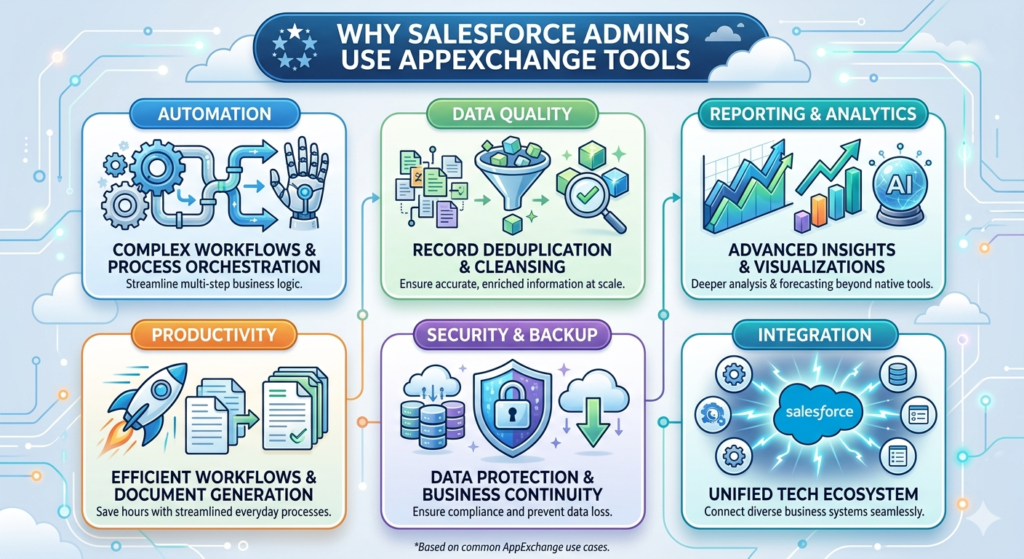
Salesforce admins wear many hats. On any given day, they might be cleaning up duplicate records, building automation flows, configuring dashboards, onboarding new users, or troubleshooting integration issues. Native Salesforce features are powerful, but they have limitations. That’s precisely where Salesforce AppExchange tools fill the gap.
Here are the primary reasons admins turn to the AppExchange marketplace:
1. Automation
Apps like process orchestrators and workflow enhancers allow admins to automate complex, multi-step business processes that go beyond what Flow Builder or Process Builder can handle natively.
2. Data Quality
Duplicate records, incomplete fields, and outdated information plague every Salesforce org. Dedicated data management tools help admins cleanse, deduplicate, and enrich records at scale.
3. Reporting and Analytics
While Salesforce offers robust native reporting, advanced analytics apps provide deeper insights, more flexible visualizations, and AI-powered forecasting.
4. Productivity
Document generation, e-signature workflows, form builders, and task management apps streamline everyday processes that would otherwise consume hours of admin and end-user time.
5. Security and Backup
Data loss and unauthorized access represent existential risks. Backup and security tools ensure business continuity and regulatory compliance.
6. Integration
Modern businesses rely on dozens of software platforms. Integration apps connect Salesforce with project management tools, marketing platforms, ERP systems, and more—creating a unified tech ecosystem.
Top Salesforce AppExchange Tools Every Admin Should Know About in 2026
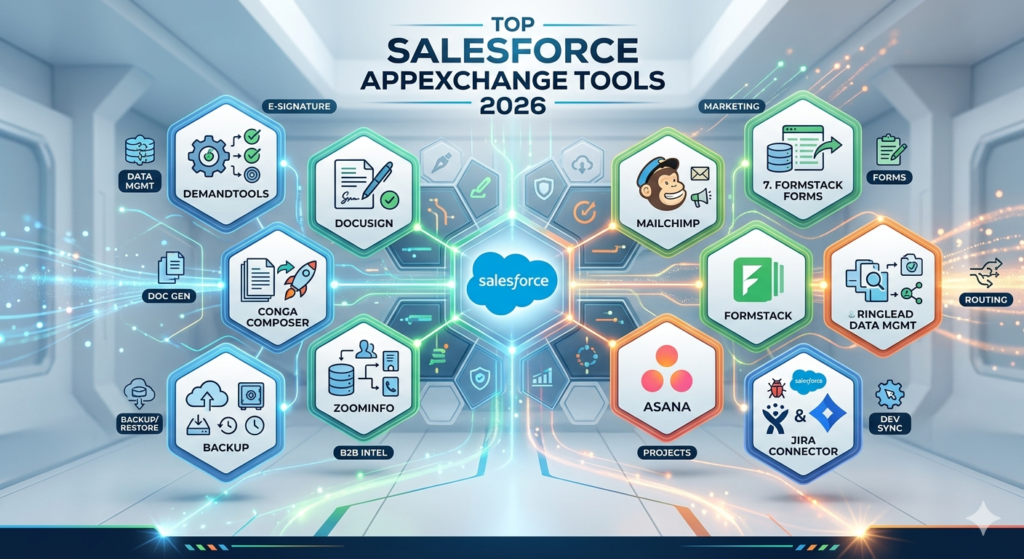
Below, we examine ten of the best AppExchange apps that have earned their place in every forward-thinking admin’s toolkit this year.
1. DemandTools by Validity
What It Does:
DemandTools is a comprehensive data quality platform that helps admins manage, deduplicate, standardize, and mass-manipulate Salesforce data with precision and speed.
Key Features:
- Mass record updates across multiple objects
- Advanced duplicate identification and merging with customizable matching rules
- Data standardization for fields like phone numbers, addresses, and titles
- Scheduled automated data quality jobs
- Detailed audit trails for every operation
Best Use Case:
Organizations struggling with duplicate records, inconsistent data entry, and large-scale data migrations.
Why Admins Love It:
DemandTools gives admins granular control over data operations that would be impossibly tedious using native tools alone. The ability to preview changes before committing them reduces risk, while scheduled jobs ensure data quality is maintained continuously—not just during occasional cleanup sprints.
2. DocuSign for Salesforce
What It Does:
DocuSign integrates electronic signature and agreement workflows directly into Salesforce, enabling users to send, sign, and manage documents without leaving the platform.
Key Features:
- Send documents for e-signature directly from Salesforce records
- Pre-populate document fields with Salesforce data
- Real-time status tracking and automated reminders
- Secure, legally binding digital signatures
- Workflow triggers based on signature completion
Best Use Case:
Sales teams that need to close deals faster, HR departments managing employee agreements, and any organization that handles high volumes of contracts.
Why Admins Love It:
DocuSign eliminates the manual back-and-forth of document signing, reduces deal cycle times, and integrates beautifully with Salesforce workflows. Admins appreciate that it significantly reduces support tickets related to contract status inquiries because users can track everything in real time.
3. Conga Composer
What It Does:
Conga Composer automates document generation by pulling data from Salesforce records to create polished proposals, invoices, contracts, reports, and other documents in formats like Word, Excel, PDF, and PowerPoint.
Key Features:
- Template-based document generation with dynamic data merging
- Batch document creation for high-volume use cases
- Integration with e-signature platforms
- Support for complex document logic and conditional formatting
- Delivery via email, Salesforce Files, or external storage
Best Use Case:
Organizations that need to generate standardized, data-rich documents quickly—such as sales proposals, compliance reports, or customer-facing statements.
Why Admins Love It:
Conga Composer replaces hours of manual copy-paste work with one-click document generation. Admins can build templates once and empower end users to generate professional documents on their own, reducing admin workload and improving consistency across the organization.
4. OwnBackup (Own Company)
What It Does:
OwnBackup provides comprehensive data backup, recovery, and sandbox seeding for Salesforce, ensuring that critical business data is protected against accidental deletion, corruption, or malicious changes.
Key Features:
- Automated daily backups of all Salesforce data and metadata
- Granular restore capabilities—down to individual records and fields
- Data comparison tools to identify changes over time
- Sandbox seeding with production-quality data
- Compliance-ready audit trails and reporting
Best Use Case:
Any organization where data integrity is critical, especially those in regulated industries like healthcare, finance, and government.
Why Admins Love It:
Native Salesforce backup options are limited and cumbersome. OwnBackup gives admins peace of mind with automated, reliable backups and the ability to quickly restore data after incidents. The sandbox seeding feature alone saves admins countless hours when preparing testing environments.
5. ZoomInfo for Salesforce
What It Does:
ZoomInfo enriches Salesforce records with accurate, up-to-date contact and company data sourced from one of the largest B2B intelligence databases in the world.
Key Features:
- Automatic record enrichment with verified contact details
- Advanced company and contact search within Salesforce
- Intent data and buying signals
- Lead scoring based on firmographic and technographic data
- Real-time data updates and alerts
Best Use Case:
Sales and marketing teams that need accurate, enriched data to drive prospecting, lead qualification, and account-based marketing strategies.
Why Admins Love It:
Bad data is an admin’s worst nightmare. ZoomInfo proactively fills in missing fields, corrects outdated information, and provides actionable intelligence—all without requiring manual data entry. This directly improves adoption rates because users trust the data they see in Salesforce.
6. Mailchimp for Salesforce
What It Does:
Mailchimp for Salesforce syncs marketing campaign data between the two platforms, enabling teams to create targeted email campaigns based on Salesforce data and track results within the CRM.
Key Features:
- Bi-directional sync of contacts, leads, and campaign data
- Segmentation based on Salesforce fields and custom criteria
- Campaign performance metrics visible within Salesforce
- Automated list management and unsubscribe handling
- Support for A/B testing and automated email journeys
Best Use Case:
Small to mid-sized businesses using Mailchimp for email marketing that want tighter alignment between marketing campaigns and CRM data.
Why Admins Love It:
The integration bridges the gap between sales and marketing. Admins can configure syncing rules to ensure the right contacts land in the right Mailchimp audiences, and marketing performance data flows back into Salesforce for unified reporting.
7. Formstack Forms
What It Does:
Formstack allows admins and users to build dynamic, mobile-responsive forms that push data directly into Salesforce—no coding required.
Key Features:
- Drag-and-drop form builder with Salesforce field mapping
- Conditional logic and multi-page form support
- Pre-population of form fields from Salesforce data
- HIPAA-compliant and GDPR-ready configurations
- Workflow automation triggered by form submissions
Best Use Case:
Organizations that collect data from external sources—such as event registrations, customer feedback surveys, support intake forms, or patient information—and need that data to flow seamlessly into Salesforce.
Why Admins Love It:
Formstack eliminates the need for custom Visualforce pages or complex web-to-lead configurations. Admins can spin up professional forms in minutes and ensure data lands in the correct Salesforce objects with proper validation, reducing data cleanup work downstream.
8. RingLead (Validity) Data Management
What It Does:
RingLead provides real-time duplicate prevention, data normalization, and lead-to-account routing within Salesforce.
Key Features:
- Real-time duplicate blocking at the point of entry
- Fuzzy matching algorithms for intelligent deduplication
- Automated lead routing based on territory or account ownership
- Data normalization rules for consistent formatting
- Bulk deduplication for existing records
Best Use Case:
High-growth organizations with large sales teams where leads pour in from multiple channels and duplicate prevention is critical for accurate reporting and fair lead distribution.
Why Admins Love It:
Rather than cleaning up duplicates after the fact, RingLead prevents them from being created in the first place. This proactive approach saves admins significant time and ensures reporting accuracy—a top priority for leadership.
9. Asana for Salesforce
What It Does:
Asana for Salesforce connects project management workflows with CRM data, allowing teams to create, track, and manage Asana tasks and projects directly from Salesforce records.
Key Features:
- Create Asana tasks from Salesforce opportunities, cases, or accounts
- Bi-directional sync of task status and details
- Customizable field mappings between platforms
- Visibility into project timelines within Salesforce
- Automated task creation based on Salesforce triggers
Best Use Case:
Organizations where post-sale handoffs, customer onboarding, or cross-departmental projects require tight coordination between CRM and project management teams.
Why Admins Love It:
Asana for Salesforce eliminates the silos between sales and delivery teams. Admins can configure automated workflows that create onboarding projects the moment a deal closes, ensuring nothing falls through the cracks during critical handoff moments.
10. Jira Connector for Salesforce
What It Does:
The Jira Connector bridges Salesforce and Atlassian Jira, synchronizing support cases, bugs, and feature requests between customer-facing teams and engineering teams.
Key Features:
- Bi-directional sync of Salesforce cases and Jira issues
- Real-time status updates visible in both platforms
- Customizable sync rules and field mappings
- Comment synchronization for collaborative resolution
- Support for Jira Cloud, Server, and Data Center
Best Use Case:
Technology companies where support agents use Salesforce Service Cloud and developers work in Jira, requiring seamless communication between the two teams.
Why Admins Love It:
This connector eliminates the “black hole” that often exists between support and engineering. Agents can see real-time development progress on reported issues, and engineers receive rich customer context without leaving Jira. Admins love it because it reduces escalation tickets and improves cross-team transparency.
Best AppExchange Apps by Category
| Category | Top Picks |
|---|---|
| Productivity Tools | Conga Composer, DocuSign, Formstack Forms |
| Data Management Tools | DemandTools, RingLead, ZoomInfo |
| Reporting & Analytics | Tableau CRM (native), ZoomInfo Intent Data |
| Security & Backup | OwnBackup |
| Automation Tools | Conga Composer, Asana for Salesforce |
| Integration Tools | Jira Connector, Mailchimp for Salesforce |
How to Choose the Right AppExchange Tool
With thousands of apps available on the AppExchange marketplace, selecting the right one requires a structured approach. Here are the Salesforce admin best practices for evaluating and choosing tools:
1. Evaluate Reviews and Ratings
Read both positive and critical reviews. Look for feedback from organizations similar to yours in size, industry, and use case.
2. Check Compatibility
Ensure the app supports your Salesforce edition (Essentials, Professional, Enterprise, Unlimited) and any other Salesforce products you use (Service Cloud, Marketing Cloud, etc.).
3. Understand Pricing
Many apps offer tiered pricing. Clarify per-user versus per-org licensing, and factor in long-term costs—not just initial subscription fees.
4. Test in a Sandbox
Never install an AppExchange app directly into production. Always deploy to a sandbox first to test functionality, performance impact, and integration behavior.
5. Review Security and Compliance
Verify that the app has passed Salesforce’s security review. For regulated industries, confirm compliance with standards like GDPR, HIPAA, SOC 2, or ISO 27001.
Common Mistakes Admins Make When Installing AppExchange Apps
Even experienced admins can stumble when it comes to AppExchange adoption. Avoid these common pitfalls:
Installing Too Many Apps
More is not always better. Every installed app adds complexity to your org—additional managed packages, custom objects, and potential conflicts. Be strategic and install only what you genuinely need.
Ignoring Security Reviews
Just because an app is on the AppExchange does not mean it is risk-free. Review the permissions each app requests and ensure they align with your organization’s security policies.
Skipping Sandbox Testing
This cannot be emphasized enough. Production-first installations can lead to unexpected errors, data corruption, or performance degradation. Always test thoroughly in a sandbox environment.
Failing to Plan for User Adoption
An app is only valuable if people use it. Invest time in training, documentation, and change management to ensure end users understand and embrace the new tool.
Neglecting Ongoing Maintenance
AppExchange apps require updates, configuration adjustments, and periodic reviews. Schedule regular audits to ensure installed apps remain relevant, functional, and compatible with Salesforce platform updates.
Final Thoughts
The Salesforce AppExchange is far more than a marketplace—it is a strategic ecosystem that empowers admins to extend the platform’s capabilities in ways that drive real business value. In 2026, the best AppExchange apps are smarter, more integrated, and more essential than ever before.
Mastering the AppExchange is no longer optional for modern Salesforce admins. It is a core competency. The admins who thrive are those who know how to identify the right salesforce admin productivity tools, evaluate them rigorously, deploy them safely, and leverage them to reduce manual work, improve data quality, and deliver measurable impact to their organizations.
Whether you are exploring data management powerhouses like DemandTools, streamlining document workflows with Conga Composer, or protecting your org with OwnBackup, the tools covered in this guide represent the best of what the AppExchange has to offer in 2026.
Ready to level up your Salesforce admin game? Start by exploring the Salesforce AppExchange today. Identify one or two tools from this list that address your most pressing challenges, test them in your sandbox, and experience the difference that the right Salesforce AppExchange tools can make.
Have questions about which tools are right for your org? Drop a comment below or reach out to our team for a personalized consultation. We are here to help you build a smarter, more efficient Salesforce environment.
About RizeX Labs
At RizeX Labs, we help Salesforce professionals and organizations maximize the value of their Salesforce investment through expert consulting, admin training, and real-world platform optimization strategies.
Our team brings hands-on experience across Salesforce administration, AppExchange implementation, automation, and ecosystem best practices—helping admins work smarter and more efficiently.
Whether you’re discovering productivity-boosting AppExchange tools or optimizing your Salesforce org, RizeX Labs provides practical guidance to help you succeed as a modern Salesforce admin.
Internal Links:
- Link to your Salesforce Admin Training page
- Salesforce Managed Packages vs Unmanaged Packages: What Every Developer Must Know
- ServiceNow vs Salesforce: Which Cloud Platform Has Better Job Scope in India?
- Salesforce Shield: Encryption, Event Monitoring and Field Audit Trail Explained
- DevOps Roadmap for Salesforce: Tools, Skills, and Certifications You Need in 2026
- How to Build a Salesforce Portfolio That Gets You Hired (With Project Ideas)
- Salesforce Admin vs Developer: Which Career Path is Right for You in 2026?
External Links:
- Salesforce Official Website
- Salesforce AppExchange Marketplace
- Salesforce Admin Trailhead
- Salesforce AppExchange Security Review Info
- Salesforce Help Documentation
Quick Summary
The Salesforce AppExchange offers thousands of tools that help admins extend platform functionality, automate repetitive tasks, improve data quality, and boost overall productivity. With the right apps, Salesforce admins can save time, reduce manual work, and deliver greater value to their organizations.
From data management and document generation to backup solutions and workflow automation, the best AppExchange apps have become essential for modern Salesforce administration in 2026.
Knowing which AppExchange tools provide the most impact helps admins build more efficient, scalable, and high-performing Salesforce environments.
