
Introduction
Let’s cut to the chase. If you’ve spent any meaningful time building on Salesforce, you’ve run into a wall where clicking around in Setup just doesn’t scale. You need to deploy custom fields across five orgs. You need to pull Apex code programmatically. You need to query validation rules, check code coverage, or build a custom deployment tool. That’s exactly where the Metadata API and the Tooling API step in.
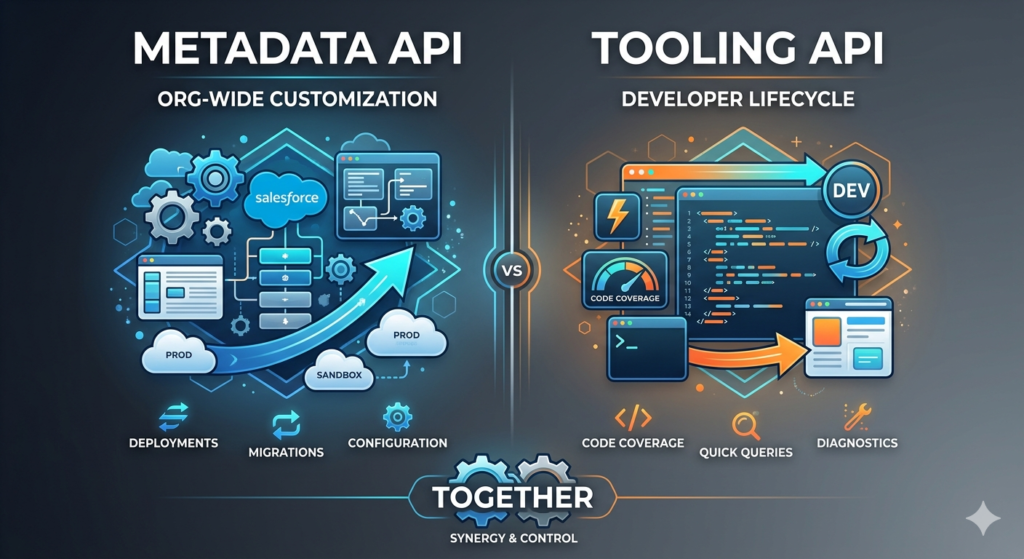
Here’s the problem: most developers either confuse the two, use the wrong one for the job, or don’t realize they can use them together. The official Salesforce documentation, while comprehensive, reads like a legal contract. It’s accurate, but it won’t teach you when to reach for which tool or why one fails where the other succeeds.
This guide fixes that.
We’re going to break down exactly how each API works under the hood, show you real scenarios where each one shines, compare them head-to-head, and arm you with the decision-making framework you need to pick the right one every single time. We’ll also cover the mistakes that trip up even experienced developers.
No filler. No recycled definitions. Just practical, battle-tested knowledge.
What Is Metadata API?
The Big Picture
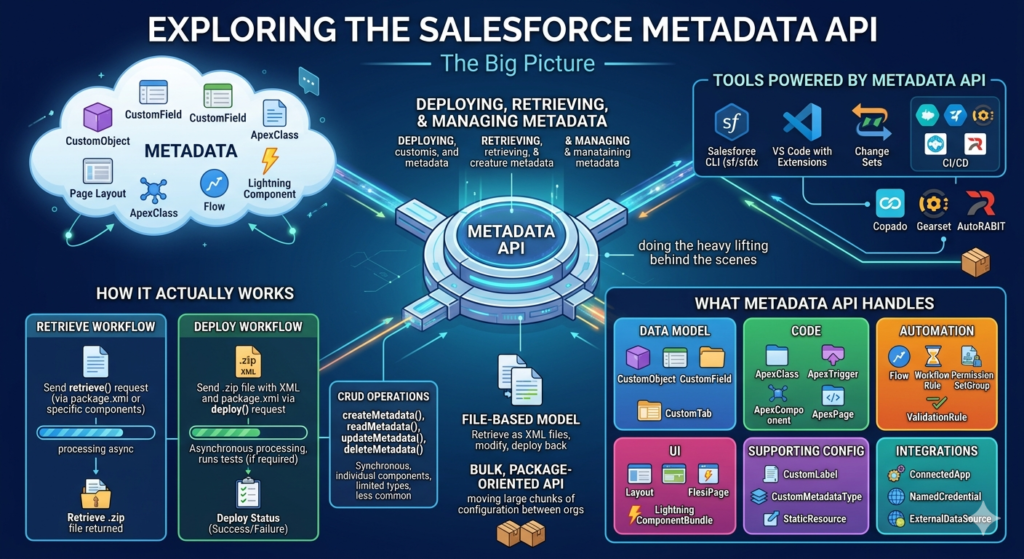
The Metadata API is Salesforce’s original mechanism for deploying, retrieving, and managing metadata — the structural components that define how your org is configured. Think custom objects, fields, page layouts, profiles, permission sets, workflows, flows, Apex classes, Lightning components, and hundreds of other component types.
When you use tools like Salesforce CLI (sf/sfdx), VS Code with Salesforce Extensions, change sets (partially), or third-party CI/CD tools like Copado, Gearset, or AutoRABIT, the Metadata API is doing the heavy lifting behind the scenes.
It operates on a file-based model. You retrieve metadata as XML files, modify those files, and deploy them back. It’s fundamentally a bulk, package-oriented API designed for moving large chunks of configuration between orgs.
How It Actually Works
The Metadata API uses SOAP-based web services. Here’s the real workflow:
- Retrieve: You send a
retrieve()request specifying what you want (via apackage.xmlmanifest or by listing specific components). Salesforce packages the requested metadata into a.zipfile and returns it asynchronously. - Deploy: You send a
.zipfile containing your metadata XML files along with apackage.xmlmanifest via adeploy()request. Salesforce processes the deployment asynchronously, runs any associated tests (if required), and returns a deployment status. - CRUD Operations: For simpler operations, you can use
createMetadata(),readMetadata(),updateMetadata(), anddeleteMetadata()for synchronous, individual component-level operations. But these are limited in the component types they support and are less commonly used than deploy/retrieve.
What Metadata API Handles
The Metadata API covers over 400 metadata types. Here’s what you’ll work with most frequently:
- CustomObject, CustomField, CustomTab — your data model
- ApexClass, ApexTrigger, ApexComponent, ApexPage — your code
- Profile, PermissionSet, PermissionSetGroup — security configuration
- Flow, WorkflowRule, ValidationRule — automation
- Layout, FlexiPage, LightningComponentBundle — UI components
- CustomLabel, CustomMetadataType, StaticResource — supporting config
- ConnectedApp, NamedCredential, ExternalDataSource — integrations
Real-World Use Cases
1. CI/CD Pipeline Deployments
This is the Metadata API’s bread and butter. Your team stores metadata in Git. A developer pushes changes to a branch. Your CI/CD pipeline (Jenkins, GitHub Actions, GitLab CI, Bitbucket Pipelines) uses the Salesforce CLI — which calls the Metadata API — to deploy those changes to a staging org, run tests, and promote to production.
Bashsf project deploy start --source-dir force-app --target-org production --test-level RunLocalTests
Behind the scenes, this command packages your local source files into a zip, sends a deploy() SOAP request to the Metadata API, and polls for the deployment result.
2. Org-to-Org Migration
You’re standing up a new sandbox or merging two business units. You need to move hundreds of custom objects, fields, flows, and permission sets. You define a package.xml, retrieve everything from the source org, and deploy to the target.
XML<?xml version="1.0" encoding="UTF-8"?>
<Package xmlns="http://soap.sforce.com/2006/04/metadata">
    <types>
        <members>Account</members>
        <members>Contact</members>
        <members>Custom_Object__c</members>
        <name>CustomObject</name>
    </types>
    <types>
        <members>*</members>
        <name>ApexClass</name>
    </types>
    <types>
        <members>*</members>
        <name>Flow</name>
    </types>
    <version>59.0</version>
</Package>
3. Backup and Version Control Initialization
When a team first adopts source-driven development, they retrieve the entire org’s metadata to establish a baseline in Git. The Metadata API handles this full-org retrieval.
4. Automated Org Configuration
DevOps teams use Metadata API to apply standard configurations — field-level security, record types, page layouts — across dozens of orgs automatically. Instead of clicking through Setup in each org, they deploy XML files.
The Key Constraint You Must Understand
The Metadata API is asynchronous for deploy and retrieve operations. When you call deploy(), Salesforce doesn’t immediately process your changes. It queues the request, processes it, and you poll for the status using checkDeployStatus(). This means:
- Deployments can take seconds to hours depending on the size and test requirements.
- You can’t get real-time, granular feedback during the process.
- You’re working with files and packages, not individual records you can query.
This asynchronous, file-based nature is both its strength (it handles massive deployments) and its limitation (it’s not great for quick, interactive operations).
What Is Tooling API?
The Big Picture
The Tooling API is Salesforce’s developer-centric API designed for building development tools, IDE features, diagnostic utilities, and lightweight metadata interactions. If the Metadata API is a freight truck for moving configuration between orgs, the Tooling API is a precision instrument for inspecting, querying, and performing targeted operations on individual components.
It was introduced because the Metadata API, while powerful, couldn’t serve the needs of IDEs and development tools that require speed, granularity, and queryability. You can’t run a SOQL query against the Metadata API. You can’t check code coverage for a specific Apex class. You can’t get a list of all validation rules on an object with their formulas. The Tooling API fills every one of those gaps.
How It Actually Works
The Tooling API is REST-based (it also has a SOAP interface, but REST is dominant). It exposes metadata components as sObjects that you can query using SOQL, just like you’d query Accounts or Contacts. This is its superpower.
Here’s the practical workflow:
- Query Metadata as Records: Use SOQL to query metadata types like
ApexClass,CustomField,ValidationRule,FlowDefinition,ApexCodeCoverage, and more. - CRUD on Specific Components: Create, update, or delete individual metadata components via standard REST calls.
- Execute Anonymous Apex: Run Apex code on the fly without deploying a class.
- Run Tests Selectively: Trigger specific test classes or methods and retrieve results.
- Access Compilation and Save Results: Get real-time compilation errors when saving Apex code, just like an IDE would.
What Tooling API Handles
The Tooling API supports a more focused set of metadata types — roughly 70+ sObjects compared to the Metadata API’s 400+. But the ones it supports, it handles with far more depth. Key types include:
- ApexClass, ApexTrigger, ApexPage, ApexComponent — code artifacts
- CustomField, CustomObject, EntityDefinition — data model (queryable)
- ValidationRule, WorkflowRule, FlowDefinition — automation components
- ApexCodeCoverage, ApexCodeCoverageAggregate — test coverage data
- ApexTestResult, ApexTestRunResult, ApexTestQueueItem — test execution
- MetadataContainer, ContainerAsyncRequest — lightweight deployments
- TraceFlag, DebugLevel, ApexLog — debugging infrastructure
- SymbolTable — code analysis and dependency data
- LightningComponentBundle, AuraDefinitionBundle — UI components
Real-World Use Cases
1. Querying Code Coverage Before Deployment
Before deploying to production, you need to verify that your org meets the 75% code coverage threshold. The Tooling API lets you query this directly:
SQLSELECT ApexClassOrTrigger.Name, NumLinesCovered, NumLinesUncovered
FROM ApexCodeCoverageAggregate
WHERE ApexClassOrTrigger.Name = 'AccountService'
You can also get aggregate org-wide coverage:
SQLSELECT PercentCovered FROM ApexOrgWideCoverage
No other API gives you this data this cleanly.
2. Finding All Validation Rules Across Objects
An admin asks: “Can you give me a list of all active validation rules in the org with their error messages?” With the Tooling API, this is a single query:
SQLSELECT Id, ValidationName, EntityDefinition.QualifiedApiName,
       ErrorMessage, Active, ErrorConditionFormula
FROM ValidationRule
WHERE Active = true
Try doing that with the Metadata API. You’d have to retrieve every object’s metadata as XML, then parse through each file to extract validation rules. With the Tooling API, it’s one REST call.
3. Building Custom Development Tools
If you’re building an internal tool — say, a dashboard that shows all Apex classes modified in the last 30 days, or a utility that checks for hard-coded IDs in Apex code — the Tooling API is your foundation.
SQLSELECT Id, Name, Body, LastModifiedDate, LastModifiedBy.Name
FROM ApexClass
WHERE LastModifiedDate = LAST_N_DAYS:30
ORDER BY LastModifiedDate DESC
4. Running Specific Apex Tests Programmatically
You’re building a custom CI tool or pre-deployment check. You want to run only the tests related to the classes you’ve changed, not the entire test suite:
httpPOST /services/data/v59.0/tooling/runTestsAsynchronous/
{
    "classids": "01p5g00000XXXXX,01p5g00000YYYYY",
    "testLevel": "RunSpecifiedTests"
}
Then query for results:
SQLSELECT ApexClass.Name, MethodName, Outcome, Message
FROM ApexTestResult
WHERE AsyncApexJobId = '7075g000XXXXX'
5. Executing Anonymous Apex
For debugging, data fixes, or quick scripts, the Tooling API’s executeAnonymous endpoint lets you run Apex without creating a class:
httpGET /services/data/v59.0/tooling/executeAnonymous/?anonymousBody=System.debug('Hello from Tooling API');
6. Managing Debug Logs
Setting up trace flags, configuring debug levels, and retrieving Apex logs — all Tooling API territory:
SQLSELECT Id, LogLength, Operation, Status, StartTime
FROM ApexLog
WHERE StartTime = TODAY
ORDER BY StartTime DESC
LIMIT 10
The MetadataContainer Pattern
One of the Tooling API’s most powerful (and least understood) features is the MetadataContainer pattern for deploying individual code changes. Here’s how it works:
- Create a
MetadataContainer(think of it as a temporary workspace). - Add members to it —
ApexClassMember,ApexTriggerMember,ApexPageMember, etc. — each containing the updated code body. - Create a
ContainerAsyncRequestlinked to the container. This triggers compilation. - Poll the
ContainerAsyncRequestfor status. If successful, the code is saved.
This is how Salesforce’s own Developer Console and VS Code extensions save individual Apex files without doing a full Metadata API deployment. It’s faster because it compiles and saves a single component rather than processing an entire package.
httpPOST /services/data/v59.0/tooling/sobjects/MetadataContainer/
{ "Name": "MyContainer" }

POST /services/data/v59.0/tooling/sobjects/ApexClassMember/
{
    "MetadataContainerId": "0Dc...",
    "ContentEntityId": "01p...",
    "Body": "public class MyClass { // updated code }"
}

POST /services/data/v59.0/tooling/sobjects/ContainerAsyncRequest/
{
    "MetadataContainerId": "0Dc...",
    "IsCheckOnly": false
}
Comparison: Metadata API vs. Tooling API
Here’s the direct, no-ambiguity comparison:
| Criteria | Metadata API | Tooling API |
|---|---|---|
| Primary Protocol | SOAP (XML-based) | REST (JSON-based), also SOAP |
| Data Format | XML files in ZIP packages | JSON/XML via REST endpoints |
| Number of Supported Types | 400+ metadata types | ~70+ metadata sObjects |
| Queryable via SOQL | No | Yes — this is its killer feature |
| Deployment Model | Package-based (ZIP with package.xml) | Component-level (MetadataContainer) |
| Operation Mode | Primarily asynchronous | Both synchronous and asynchronous |
| Speed for Single Components | Slower (packages entire deployment) | Faster (targets individual items) |
| Speed for Bulk Operations | Optimized for large-scale moves | Not designed for bulk metadata moves |
| Code Coverage Data | Not accessible | Fully queryable |
| Test Execution | Triggered during deploy only | Can run independently, any time |
| Execute Anonymous Apex | Not supported | Fully supported |
| Debug Logs & Trace Flags | Not accessible | Fully manageable |
| Symbol Tables & Dependencies | Not available | Available for code analysis |
| Profile/Permission Set Deploy | Full support | Limited support |
| Flow Deployment | Full support | Limited (FlowDefinition is read-only for activation; Flow metadata itself requires Metadata API for deploy) |
| Custom Metadata Type Records | Deploy via packages | Queryable, some CRUD support |
| Destructive Changes | Supported via destructiveChanges.xml | Delete via REST DELETE on supported types |
| Primary Use Case | DevOps, CI/CD, migrations, backups | IDEs, dev tools, diagnostics, analysis |
| Typical Consumers | SF CLI, Gearset, Copado, Jenkins pipelines | Developer Console, VS Code, custom dashboards |
| API Limit Impact | Uses its own deploy/retrieve limits | Counts against REST API limits |
| Learning Curve | Moderate (XML, package.xml structure) | Lower (familiar REST + SOQL patterns) |
When to Use Each: Decision-Based Guidance
Stop guessing. Use this decision tree:
Use Metadata API When:
1. You’re deploying to production or across orgs.
Any CI/CD pipeline, any migration, any change set replacement — this is Metadata API territory. Full stop. The Tooling API’s MetadataContainer pattern is for saving individual files during development, not for production deployments.
2. You’re moving a large number of components at once.
Need to deploy 50 Apex classes, 200 custom fields, 30 flows, and 15 permission sets together? Package them up and let Metadata API handle it. It’s designed for exactly this.
3. You’re working with metadata types the Tooling API doesn’t support.
Profiles, permission sets, sharing rules, custom settings schema, email templates, reports, dashboards, territories, and many other types are only fully supported by the Metadata API.
4. You need destructive changes.
Deleting metadata components in a deployment (removing an old field, decommissioning a class) requires destructiveChanges.xml — a Metadata API construct.
5. You’re building or using a CI/CD pipeline.
Every serious Salesforce CI/CD tool relies on the Metadata API for its deploy and retrieve operations. If you’re automating deployments, you’re using this API.
6. You’re retrieving full org configuration for backup or version control.
Full-org retrieval with wildcard * members in package.xml — that’s Metadata API.
Use Tooling API When:
1. You need to query metadata.
“Show me all Apex classes that were modified this month.” “List all validation rules on the Account object.” “What’s the code coverage for this trigger?” If you’re asking a question about metadata, the Tooling API answers it.
2. You’re building a development tool or IDE feature.
Code completion, error highlighting, save-and-compile, dependency analysis — all Tooling API. This is literally why it was created.
3. You need code coverage data.
There is no other API that gives you line-by-line code coverage information. Period.
4. You want to run tests outside of a deployment.
Run specific test classes, get results, check for regressions — all without deploying anything.
5. You need to execute anonymous Apex.
Quick scripts, data investigation, debugging — the executeAnonymous endpoint is invaluable.
6. You’re managing debug logs.
Setting trace flags, adjusting debug levels, retrieving log bodies — all Tooling API.
7. You need real-time compilation feedback.
When saving a single Apex class, the MetadataContainer pattern gives you immediate compilation results, including error line numbers and messages.
The Gray Area
Some scenarios could go either way:
- Retrieving a single Apex class body: You can use Tooling API (
SELECT Body FROM ApexClass WHERE Name = 'MyClass') or Metadata API retrieve. Tooling API is faster for single-item retrieval. - Creating a single custom field: Both APIs can do it. Metadata API via
createMetadata()or deploy. Tooling API via REST POST to/tooling/sobjects/CustomField. For a quick, one-off field creation in a script, Tooling API is simpler. For a field that needs to be part of a tracked, deployable package, Metadata API is better. - Checking Flow details: You can query
FlowDefinitionandFlowvia Tooling API to inspect versions and active status. But deploying or modifying Flow content requires Metadata API.
How They Work Together
Here’s what experienced Salesforce developers know: these APIs are complementary, not competing. The most powerful workflows combine both.
Scenario 1: Smart CI/CD Pipeline
A sophisticated CI/CD pipeline uses both APIs in a single deployment cycle:
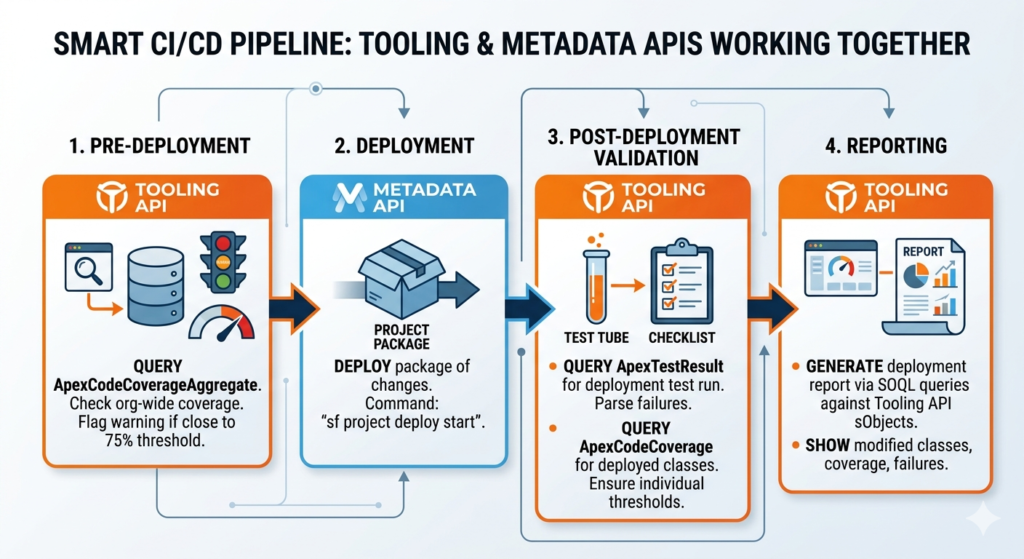
- Pre-deployment (Tooling API): Query
ApexCodeCoverageAggregateto check current org-wide coverage. If it’s dangerously close to 75%, flag a warning before even attempting the deployment. - Deployment (Metadata API): Deploy the package of changes using
sf project deploy start. - Post-deployment Validation (Tooling API): Query
ApexTestResultfor the test run triggered by the deployment. Parse failures. QueryApexCodeCoveragefor the specific classes that were deployed to ensure they individually meet coverage thresholds. - Reporting (Tooling API): Generate a deployment report showing which classes were modified, their current coverage, and any test failures — all from SOQL queries against Tooling API sObjects.
Scenario 2: Org Health Dashboard
You’re building an internal dashboard for your Salesforce Center of Excellence:
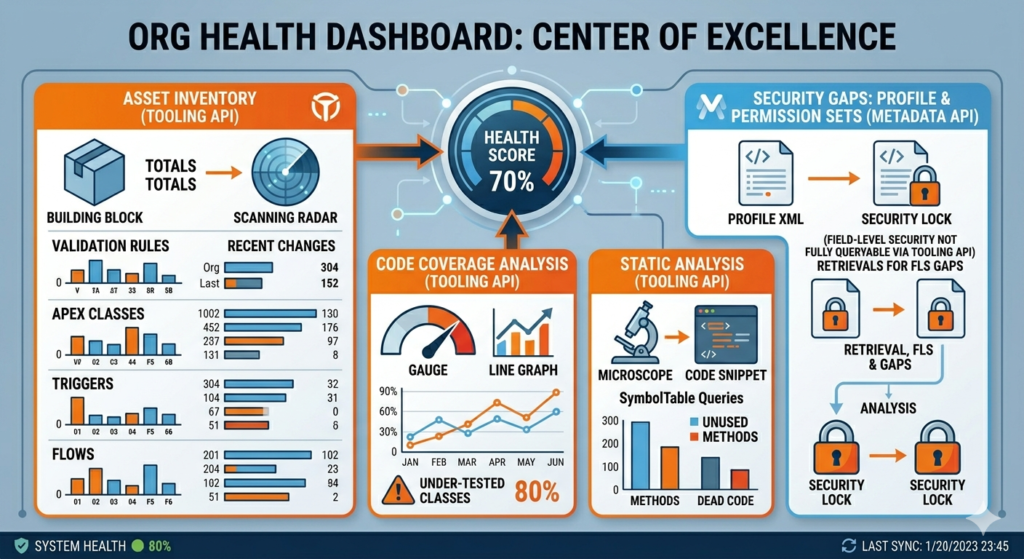
- Tooling API queries validation rules, Apex classes, triggers, and flows to build an inventory.
- Tooling API pulls code coverage data to identify under-tested classes.
- Tooling API queries
ApexClasswithSymbolTableto identify unused methods or dead code. - Metadata API retrieves profile and permission set XML to analyze field-level security gaps (since these aren’t fully queryable via Tooling API).
Scenario 3: Automated Code Review Bot
A Slack bot that reviews Apex code before it’s deployed:
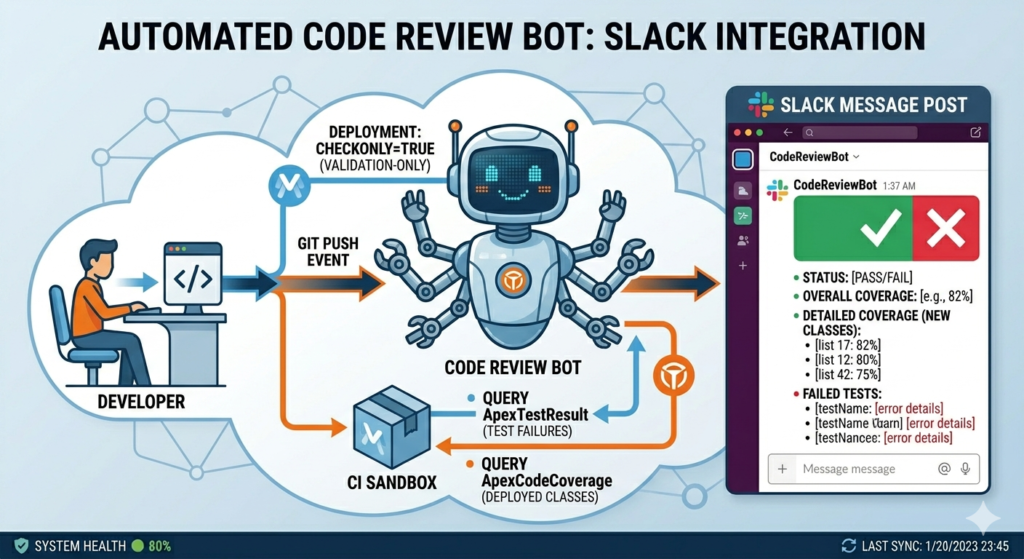
- Developer pushes code to a branch.
- The bot uses Metadata API to deploy the changes to a CI sandbox with
checkOnly=true(validation-only deployment). - The bot uses Tooling API to query
ApexTestResultfrom the validation run and check for failures. - The bot uses Tooling API to query
ApexCodeCoveragefor the deployed classes. - The bot posts results to Slack with pass/fail status, coverage percentages, and failed test details.
Scenario 4: Development Environment Setup
When a developer gets a fresh scratch org:
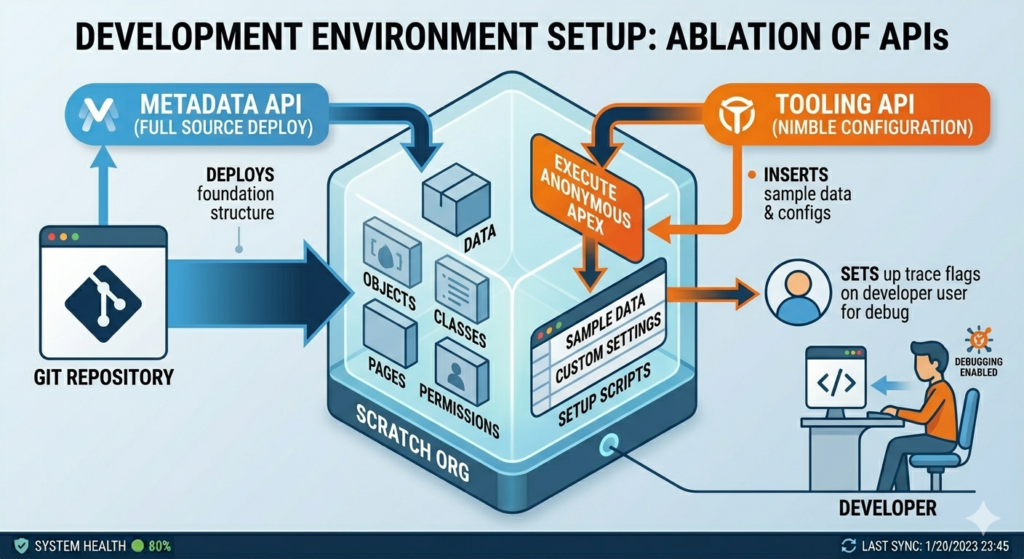
- Metadata API deploys the full project source from Git — objects, classes, pages, permissions, everything.
- Tooling API executes anonymous Apex to insert sample data, configure custom settings, or run setup scripts.
- Tooling API sets up trace flags on the developer’s user for debugging.
Common Mistakes Developers Make
Mistake 1: Using Metadata API to Query Metadata
This is the most common mistake. A developer needs a list of all custom fields on an object. They write a script that calls retrieve() for the entire object, downloads the ZIP, parses the XML, and extracts field information.
Why it’s wrong: The Tooling API can do this in one SOQL query:
SQLSELECT QualifiedApiName, DataType, Description, IsNillable
FROM FieldDefinition
WHERE EntityDefinition.QualifiedApiName = 'Account'
Or using the CustomField sObject:
SQLSELECT DeveloperName, TableEnumOrId, Metadata
FROM CustomField
WHERE TableEnumOrId = 'Account'
Rule of thumb: If you’re reading metadata to analyze or display it, use Tooling API. If you’re reading it to move it somewhere else, use Metadata API.
Mistake 2: Using Tooling API for Production Deployments
The MetadataContainer pattern in the Tooling API is tempting. It’s fast, it’s REST-based, and it gives immediate feedback. But it was designed for development-time saves, not production deployments. It doesn’t support:
- Package-level dependencies and ordering
- Running a full test suite as part of the save
- Deploying non-code components like profiles, objects, or flows
- Rollback semantics for multi-component changes
- Destructive changes
For production, always use Metadata API. No exceptions.
Mistake 3: Not Understanding API Limits
The Tooling API counts against your REST API daily limits (the same pool as your data API calls). If you’re building a tool that makes hundreds of Tooling API queries per hour, you can exhaust your API limits and impact other integrations.
The Metadata API has its own limits — primarily around concurrent deployments and retrieve requests — but doesn’t consume REST API calls.
Plan your API consumption. Use bulk Tooling API queries (SOQL with broader WHERE clauses) instead of making one query per component. Use composite requests where possible.
Mistake 4: Ignoring the Asynchronous Nature of Metadata API
Developers new to Metadata API often write deployment scripts that call deploy() and assume the deployment is done when the call returns. It’s not. The call returns a deployment ID, and you must poll checkDeployStatus() until the deployment completes.
Salesforce CLI handles this polling for you. But if you’re calling the API directly (via Postman, custom code, or third-party tools), you must implement polling logic with appropriate intervals and timeouts.
Python# Pseudocode for proper Metadata API deployment polling
deployment_id = metadata_api.deploy(zip_file)
status = "InProgress"
while status in ["InProgress", "Pending"]:
    time.sleep(5)  # Poll every 5 seconds
    result = metadata_api.check_deploy_status(deployment_id)
    status = result.status

if status == "Succeeded":
    print("Deployment successful")
else:
    print(f"Deployment failed: {result.error_message}")
Mistake 5: Hardcoding Metadata API Version Numbers
Both APIs are versioned (e.g., v59.0, v60.0, v61.0). A common mistake is hardcoding the version in your scripts or tools. When Salesforce releases a new version, your hardcoded version might miss new features or metadata types.
Best practice: Query the /services/data/ endpoint to get the latest version dynamically, or maintain the version as a configurable parameter.
Mistake 6: Not Handling Partial Failures
A Metadata API deployment with rollbackOnError=false can partially succeed — some components deploy, others fail. If your script assumes all-or-nothing behavior but doesn’t set rollbackOnError=true, you can end up with a half-deployed configuration.
Always set rollbackOnError=true for production deployments. For sandbox deployments during development, false can be acceptable because it lets the successful components go through while you fix the failures.
Mistake 7: Retrieving Metadata You Don’t Need
When using package.xml with wildcard members (<members>*</members>), developers often retrieve entire metadata types when they only need a few components. Retrieving all Profile metadata, for instance, can produce enormous XML files and slow down your pipeline.
Be surgical with your package.xml. List only the components you need. Use the Tooling API to first query what exists, then build a targeted package.xml for the Metadata API to retrieve only those items.
Mistake 8: Forgetting the Tooling API Compound Fields
Some Tooling API sObjects have compound fields (like Metadata or FullName) that contain nested JSON structures. These fields can’t be used in SOQL WHERE clauses, and they can’t always be queried alongside relationship fields.
For example, this query will fail:
SQLSELECT Metadata, EntityDefinition.QualifiedApiName
FROM CustomField
You’d need to query them separately or use a different approach. Always check the Tooling API sObject reference for field-level queryability constraints.
Mistake 9: Using the Wrong API for Test Execution Analysis
If you want to run tests as part of a deployment validation, use Metadata API’s deploy() with checkOnly=true and the appropriate test level. The tests run in the deployment context with proper dependency resolution.
If you want to analyze test results, coverage gaps, or test history independently of a deployment, use the Tooling API. These are different use cases requiring different APIs, and mixing them up leads to incomplete data or unnecessary deployment overhead.
Mistake 10: Not Leveraging EntityDefinition and FieldDefinition
Many developers don’t realize that the Tooling API includes EntityDefinition and FieldDefinition sObjects, which provide a clean, queryable view of your entire data model:
SQLSELECT QualifiedApiName, Label, IsCustomizable, KeyPrefix
FROM EntityDefinition
WHERE IsCustomSetting = false AND IsCustomizable = true
ORDER BY QualifiedApiName
SQLSELECT QualifiedApiName, DataType, IsCompound, Length,
       EntityDefinition.QualifiedApiName
FROM FieldDefinition
WHERE EntityDefinition.QualifiedApiName = 'Custom_Object__c'
This is far more efficient than retrieving object XML through the Metadata API just to list fields.
Advanced Considerations
API Access and Permissions
Both APIs require specific permissions:
- Metadata API: The user needs “Modify All Data” or “Modify Metadata Through Metadata API Functions” permission. The latter was introduced to provide more granular access without granting full “Modify All Data.”
- Tooling API: Requires API Enabled permission. Some operations (like modifying Apex) additionally require “Author Apex” or “Modify All Data.”
For service accounts used in CI/CD pipelines, carefully scope permissions to the minimum required. Don’t use a System Administrator profile for your CI user just because it’s easier.
Handling Large Deployments
The Metadata API has a deployment size limit of approximately 39 MB (compressed ZIP). For very large orgs, you might need to split deployments into multiple packages. Static resources (especially large ones) can quickly eat into this limit.
Strategy: Split deployments by metadata type or functional area. Deploy code first, then configuration, then static resources.
Tooling API and Managed Packages
When querying metadata via the Tooling API, you’ll see components from installed managed packages. These components are typically not editable, but they’re visible in query results. Filter them out using the NamespacePrefix field:
SQLSELECT Name, NamespacePrefix, Body
FROM ApexClass
WHERE NamespacePrefix = ''  -- Only unmanaged (your own) classes
This prevents confusion when analyzing code coverage or building component inventories.
Rate Limiting and Performance
For high-volume Tooling API usage, be aware of:
- Concurrent API request limits: Salesforce limits the number of concurrent long-running requests.
- Query timeout: Complex Tooling API SOQL queries can time out, especially with relationship queries or large result sets.
- Daily API call limits: Varies by edition. Enterprise Edition gets 100,000+ calls per day (varies by license count). Developer Edition gets only 15,000.
If you’re hitting limits, consider:
- Caching query results
- Using bulk queries (broader WHERE clauses, fewer individual calls)
- Scheduling intensive operations during off-peak hours
Quick Reference: API Selection Cheat Sheet
Still not sure which API to use? Here’s the rapid-fire guide:
| I need to… | Use This |
|---|---|
| Deploy changes to production | Metadata API |
| Migrate configuration between orgs | Metadata API |
| Back up org metadata to Git | Metadata API |
| Delete components from an org | Metadata API (destructiveChanges.xml) |
| Deploy profiles and permission sets | Metadata API |
| Query all Apex classes modified recently | Tooling API |
| Check code coverage percentages | Tooling API |
| Run specific test classes on demand | Tooling API |
| List all validation rules in the org | Tooling API |
| Execute anonymous Apex scripts | Tooling API |
| Set up debug logging and trace flags | Tooling API |
| Save a single Apex class during development | Tooling API (MetadataContainer) |
| Build a metadata inventory dashboard | Tooling API |
| Analyze code dependencies | Tooling API (SymbolTable) |
| Deploy Flows | Metadata API |
| Query Flow versions and active status | Tooling API |
| Retrieve email templates and reports | Metadata API |
| Check org-wide test coverage | Tooling API |
Conclusion
The Metadata API and the Tooling API aren’t interchangeable. They’re two distinct tools built for two distinct jobs, and the best Salesforce developers know exactly when to reach for each one.
Metadata API is your deployment engine. It’s the backbone of CI/CD, migrations, and org management. It’s file-based, package-oriented, and built for moving large chunks of configuration reliably between environments.
Tooling API is your development cockpit. It’s the intelligence layer that lets you query, analyze, test, debug, and build developer tools on top of your org’s metadata. It brings the power of SOQL to the metadata world.
Together, they form a complete toolkit. Your CI/CD pipeline uses Metadata API for deployments and Tooling API for validation checks. Your development tools use Tooling API for real-time feedback and Metadata API for persistent saves. Your org management scripts use Tooling API to audit and analyze, then Metadata API to remediate and standardize.
Stop treating them as competing options. Start treating them as complementary capabilities. That shift in mindset is what separates developers who merely use Salesforce from developers who master it.
About RizeX Labs
Know your tools. Use the right one. Build better
At RizeX Labs, we specialize in delivering advanced Salesforce solutions that empower developers and enterprises to build scalable, efficient, and maintainable systems. Our expertise spans Salesforce APIs, automation, DevOps, and custom application development.
We help teams move beyond manual processes by leveraging powerful tools like Metadata API and Tooling API to streamline development, improve deployment workflows, and maintain high-quality code across environments.
Internal Links:
- Salesforce Field Service Lightning (FSL): Overview, Features & Career Scope
- How Long Does It Take to Learn Salesforce and Get a Job? Honest Timeline (India, 2026)
- How to Get Your First Salesforce Job with Zero Experience in India: The 2026 Reality Check
- How to Use Salesforce Reports & Dashboards: A Beginner’s Practical Guide
- Salesforce Trailhead vs Paid Training: Which Is Better for Getting a Job in India (2026)?
- Top Companies Hiring Salesforce Professionals in Pune in 2026: Your Complete Career Guide
- Salesforce Flows vs Apex: When Should You Use Code vs No-Code Automation?
- Salesforce Nonprofit Cloud: Features, Use Cases, and Career Opportunities (2026 Guide)
- Salesforce Net Zero Cloud: What It Is and Why It’s the Next Green Career Niche (2026 Guide)
- Salesforce Slack Integration: How It Works and What Developers Need to Know
- Salesforce Named Credentials: What They Are and How to Use Them Safely
- Salesforce Deployment Best Practices: Change Sets vs Salesforce CLI vs Gearset
External Links:
McKinsey Sales Growth Reports
Gartner Sales Automation Insights
