
Introduction: Why Salesforce Integration Is Mission-Critical for Modern Enterprises
In today’s hyper-connected digital landscape, Salesforce rarely operates in isolation. Whether you’re a Fortune 500 enterprise or a rapidly scaling startup, your Salesforce instance needs to communicate seamlessly with ERP systems, marketing automation platforms, legacy databases, e-commerce platforms, and dozens of other applications.
The challenge? Choosing the wrong integration pattern can lead to performance bottlenecks, scalability issues, data inconsistencies, and exponentially increasing technical debt.
The opportunity? When done right, Salesforce integration transforms your CRM into a central nervous system—orchestrating data flows, automating business processes, and delivering a unified customer experience across every touchpoint.
This comprehensive guide examines the four fundamental Salesforce integration patterns that enterprise architects and CTOs must understand: REST APIs, SOAP APIs, Platform Events, and Middleware solutions. We’ll cut through the marketing fluff and focus on practical decision-making criteria, real-world use cases, and architectural best practices that matter in production environments.
Whether you’re architecting a greenfield integration or modernizing legacy connections, this guide will equip you with the insights needed to make informed technology decisions.
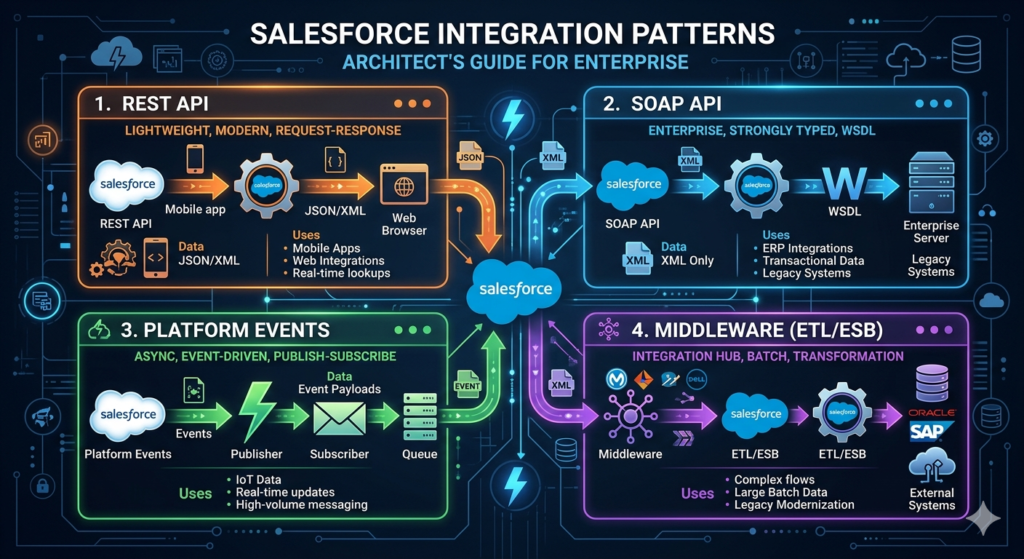
Understanding Salesforce Integration Patterns: The Foundation
Before diving into specific patterns, let’s establish a shared understanding of what we mean by “integration patterns” in the Salesforce context.
What Are Integration Patterns?
Integration patterns are standardized, proven approaches to connecting Salesforce with external systems. Each pattern addresses specific technical requirements around:
- Data synchronization needs (real-time vs. batch)
- Volume and throughput requirements
- Direction of data flow (inbound, outbound, or bidirectional)
- Latency tolerance (immediate vs. eventual consistency)
- Security and compliance mandates
- Transaction complexity (simple CRUD vs. complex orchestration)
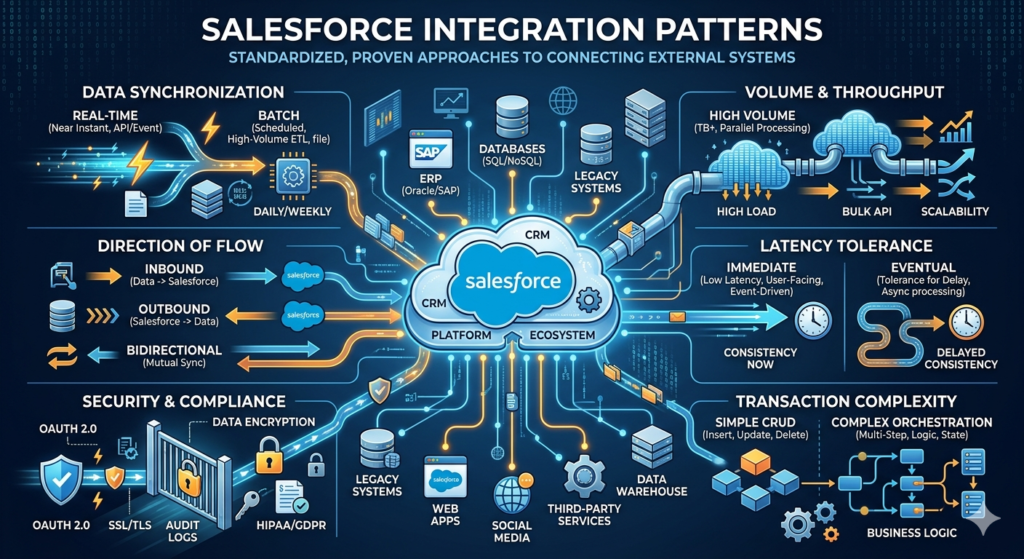
The Integration Landscape
Salesforce provides native integration capabilities through multiple channels:
- API-based integration (REST, SOAP, Bulk API)
- Event-driven architecture (Platform Events, Change Data Capture)
- Middleware platforms (MuleSoft, Dell Boomi, Informatica, Jitterbit)
- Custom integration (Apex callouts, webhooks, streaming APIs)
The right choice depends on your specific business requirements, technical constraints, and long-term scalability goals.
REST API in Salesforce: Modern, Lightweight, and Developer-Friendly
What Is the Salesforce REST API?
The Salesforce REST API provides a simple, lightweight interface for interacting with Salesforce data using standard HTTP methods. It leverages JSON or XML for data exchange and follows RESTful architectural principles, making it the go-to choice for modern web and mobile applications.
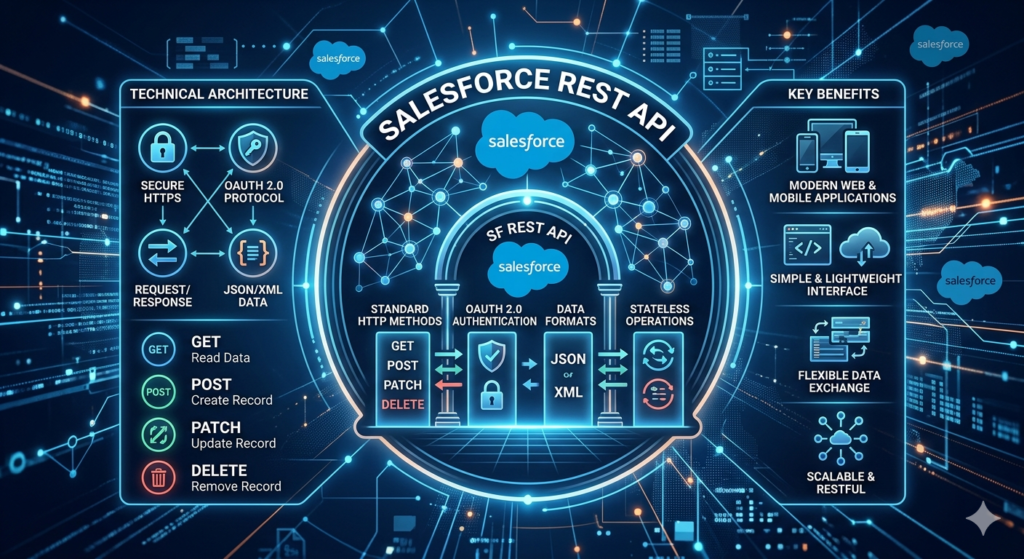
Technical Architecture
REST API Salesforce operates over HTTPS and supports:
- Standard HTTP verbs: GET (read), POST (create), PATCH (update), DELETE (remove)
- OAuth 2.0 authentication: Industry-standard security framework
- JSON/XML payloads: Flexible data formatting
- Stateless operations: Each request contains all necessary information
Real-World Use Cases for REST API
1. Mobile Application Integration
A retail company building a native mobile app for field sales representatives needs real-time access to customer data, product catalogs, and order history. REST API’s lightweight nature and JSON support make it ideal for mobile bandwidth constraints.
2. Single-Page Applications (SPAs)
Modern web applications built with React, Angular, or Vue.js require fast, asynchronous data operations. REST API enables seamless integration without page refreshes.
3. Microservices Architecture
When building event-driven microservices that need to read or write Salesforce data, REST API provides a clean, standardized interface that fits naturally into containerized environments.
4. Third-Party Application Integration
SaaS applications (marketing automation, customer support platforms, analytics tools) typically consume REST APIs for cross-platform data synchronization.
Pros and Cons of REST API Integration
Advantages
✅ Developer-friendly: Intuitive HTTP-based interface familiar to modern developers
✅ Lightweight: Minimal overhead, faster response times compared to SOAP
✅ Mobile-optimized: JSON payloads reduce bandwidth consumption
✅ Flexible data formats: Supports both JSON and XML
✅ Stateless: Easier to scale horizontally
✅ Wide tooling support: Works with virtually any programming language or platform
Limitations
❌ Governor limits: 15,000 API calls per 24 hours (varies by Salesforce edition)
❌ No built-in error handling: Requires custom implementation
❌ Limited transaction support: Not ideal for complex, multi-object operations
❌ Payload size restrictions: 50 MB maximum for synchronous requests
❌ Rate limiting concerns: High-volume scenarios may require careful throttling management
When to Choose REST API
Select REST API Salesforce when you need:
- Real-time, lightweight data operations
- Integration with modern web or mobile applications
- Bidirectional, on-demand data synchronization
- Simple CRUD operations on standard or custom objects
- Developer-friendly, widely supported technology
SOAP API in Salesforce: Enterprise-Grade Reliability and Standards Compliance
What Is the Salesforce SOAP API?
SOAP (Simple Object Access Protocol) API is an XML-based, standards-compliant web service protocol that provides robust, enterprise-grade integration capabilities. While considered “legacy” by some, SOAP remains critical for enterprise scenarios requiring formal contracts, transaction support, and built-in error handling.
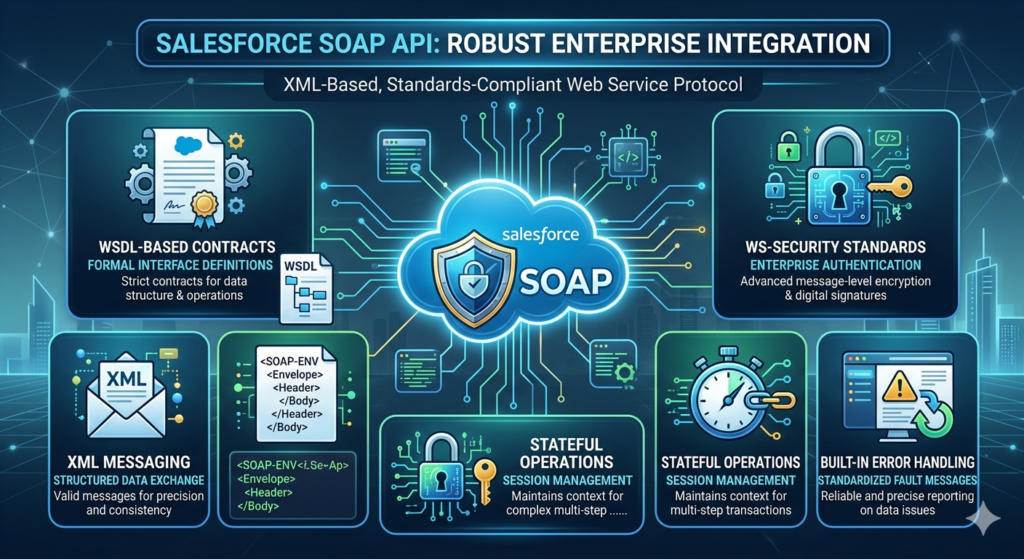
Technical Architecture
SOAP API Salesforce provides:
- WSDL-based contracts: Formal interface definitions
- XML messaging: Structured, validated data exchange
- WS-Security standards: Enterprise authentication and encryption
- Stateful operations: Session management for complex transactions
- Built-in error handling: Standardized fault messages
Real-World Use Cases for SOAP API
1. Enterprise ERP Integration
A manufacturing company integrating Salesforce with SAP ERP requires transactional integrity, formal service contracts, and robust error handling. SOAP API’s WSDL definitions and transaction support make it the natural choice.
2. Legacy System Migration
When migrating data from decades-old systems that already support SOAP web services, maintaining SOAP for Salesforce integration minimizes architectural disruption.
3. Complex Multi-Object Transactions
Financial services firms processing loan applications need to create multiple related records (accounts, contacts, opportunities, custom objects) in a single, atomic transaction.
4. Compliance-Driven Industries
Healthcare and government organizations requiring formal API contracts for audit trails and compliance documentation benefit from WSDL’s self-documenting nature.
Pros and Cons of SOAP API Integration
Advantages
✅ Built-in error handling: Standardized fault messages
✅ Transaction support: AllOrNone operations for data integrity
✅ Formal contracts: WSDL provides clear interface definitions
✅ Enterprise security: WS-Security standards for authentication
✅ Stateful sessions: Efficient for bulk operations
✅ Type safety: Strong typing reduces integration errors
Limitations
❌ Heavier payload: XML verbosity increases bandwidth requirements
❌ Steeper learning curve: More complex than REST for developers
❌ Slower performance: XML parsing overhead
❌ Less mobile-friendly: Not optimized for bandwidth-constrained environments
❌ Tooling dependencies: Requires SOAP client libraries
When to Choose SOAP API
Select SOAP API Salesforce when you need:
- Transactional integrity across multiple objects
- Formal API contracts for compliance or governance
- Integration with enterprise systems (ERP, legacy applications)
- Built-in, standardized error handling
- Complex, stateful operations requiring session management
Platform Events in Salesforce: Modern Event-Driven Architecture
What Are Salesforce Platform Events?
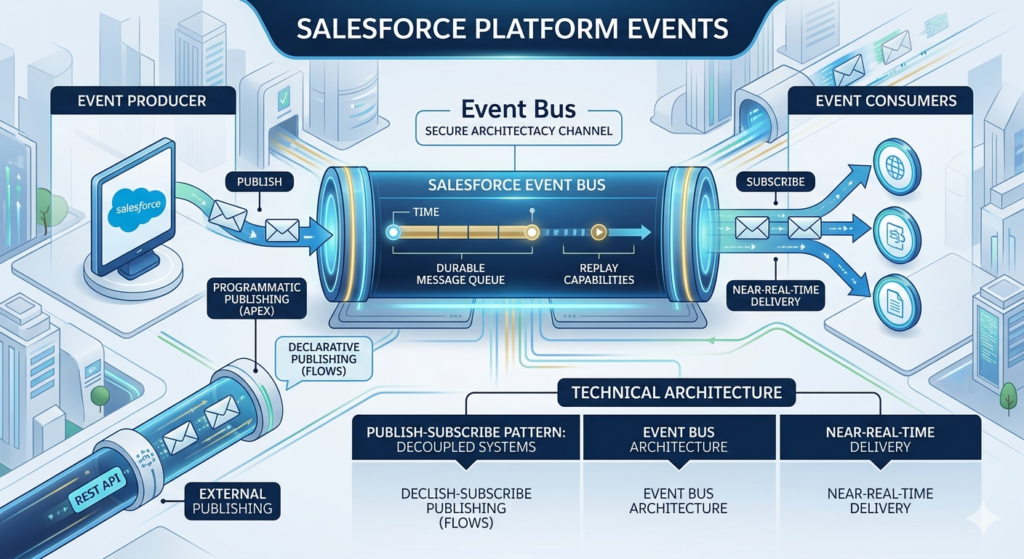
Platform Events enable event-driven integration patterns within Salesforce’s Event Bus architecture. Unlike request-response APIs, Platform Events support publish-subscribe messaging, allowing systems to react to business events in near-real-time without tight coupling.
Technical Architecture
Platform Events Salesforce provide:
- Publish-subscribe pattern: Decoupled event producers and consumers
- Event Bus: Durable message queue with replay capabilities
- Near-real-time delivery: Sub-second event propagation
- Declarative and programmatic publishing: Flows, Process Builder, or Apex
- External publishing: REST API for external event sources
Real-World Use Cases for Platform Events
1. Order Processing Orchestration
An e-commerce company publishes “Order Placed” events from Salesforce. Multiple systems subscribe: inventory management decrements stock, fulfillment centers receive picking instructions, marketing automation triggers confirmation emails—all without direct system coupling.
2. IoT Device Monitoring
Manufacturing equipment publishes sensor data as Platform Events. Salesforce consumes these events to trigger field service cases when equipment requires maintenance, without polling external systems.
3. Microservices Coordination
A fintech company’s microservices architecture uses Platform Events to coordinate between payment processing, fraud detection, and customer notification services—all while maintaining Salesforce as the source of truth.
4. Data Change Notifications
When critical customer data changes (credit limit, payment terms), Platform Events notify downstream systems immediately, eliminating batch synchronization delays.
Pros and Cons of Platform Events Integration
Advantages
✅ Loose coupling: Systems don’t need direct knowledge of each other
✅ Scalability: Designed for high-volume event processing
✅ Near-real-time: Sub-second event delivery
✅ Durability: 24-hour event replay window
✅ Flexibility: Multiple subscribers per event
✅ No polling required: Push-based architecture reduces API consumption
Limitations
❌ 24-hour retention: Events older than 24 hours can’t be replayed
❌ Event limits: Daily limits based on Salesforce edition
❌ Eventual consistency: Not suitable for immediate synchronous responses
❌ Complexity: Requires architectural shift for teams new to event-driven patterns
❌ Debugging challenges: Distributed event flows harder to troubleshoot
When to Choose Platform Events
Select Platform Events Salesforce when you need:
- Event-driven, reactive architecture
- Decoupled system integration
- Near-real-time data propagation
- Multiple systems reacting to single events
- Scalable, high-volume event processing
Middleware Integration: The Enterprise Orchestration Layer
What Is Middleware in Salesforce Integration?
Middleware platforms provide a centralized integration layer that connects Salesforce with multiple systems while handling data transformation, routing, error handling, and orchestration. Popular options include MuleSoft (Salesforce-owned), Dell Boomi, Informatica, Jitterbit, and Workato.
Technical Architecture
Enterprise integration patterns through middleware typically provide:
- Visual integration design: Low-code/no-code development
- Pre-built connectors: Hundreds of out-of-the-box system adapters
- Data transformation: Complex mapping and business logic
- Orchestration: Multi-step, cross-system workflows
- Error handling and retry logic: Enterprise-grade resilience
- API management: Gateway, throttling, and security
Real-World Use Cases for Middleware
1. Complex Multi-System Orchestration
A healthcare provider synchronizes patient data between Salesforce, Epic EHR, billing systems, and appointment scheduling platforms. Middleware handles complex transformations, business rules, and sequencing.
2. Legacy System Modernization
A financial institution maintains mainframe systems alongside Salesforce. Middleware translates between modern APIs and legacy protocols (COBOL, flat files, AS/400).
3. High-Volume Batch Processing
An insurance company processes millions of policy updates nightly. Middleware batches, transforms, and loads data while respecting Salesforce governor limits.
4. API Aggregation and Composition
E-commerce platforms aggregate data from Salesforce, inventory systems, pricing engines, and shipping providers into unified customer experiences.
Pros and Cons of Middleware Integration
Advantages
✅ Centralized integration logic: Single source of truth for all integrations
✅ Pre-built connectors: Accelerates time-to-market
✅ Complex transformations: Handles sophisticated data mapping
✅ Error handling: Enterprise-grade retry, logging, and alerting
✅ Scalability: Built for high-volume, enterprise workloads
✅ Monitoring and observability: Centralized dashboards and analytics
Limitations
❌ Cost: Enterprise middleware licensing can be substantial
❌ Vendor lock-in: Migration between platforms is complex
❌ Learning curve: Platform-specific skills required
❌ Maintenance overhead: Additional infrastructure to manage
❌ Over-engineering risk: Can be overkill for simple integrations
When to Choose Middleware
Select middleware integration when you need:
- Integration with 5+ systems
- Complex, multi-step orchestration
- Enterprise-grade error handling and monitoring
- High-volume batch processing
- Legacy system connectivity
- Centralized governance and reusability
Salesforce Integration Patterns Comparison Table
| Criteria | REST API | SOAP API | Platform Events | Middleware |
|---|---|---|---|---|
| Best For | Modern apps, mobile, microservices | Enterprise systems, transactional integrity | Event-driven architecture, real-time notifications | Complex multi-system orchestration |
| Communication | Synchronous request-response | Synchronous request-response | Asynchronous pub-sub | Both synchronous and asynchronous |
| Data Format | JSON/XML | XML only | JSON | Platform-dependent (usually JSON/XML) |
| Complexity | Low | Medium | Medium-High | High |
| Performance | Fast (lightweight) | Moderate (heavier payloads) | Near-real-time | Varies (optimized for throughput) |
| Transaction Support | Limited | Strong (AllOrNone) | None (event-based) | Strong (orchestrated) |
| Coupling | Tight | Tight | Loose | Configurable |
| Cost | Included with Salesforce | Included with Salesforce | Included with Salesforce | Additional licensing required |
| Scalability | Good (with limits) | Good (with limits) | Excellent | Excellent |
| Error Handling | Custom required | Built-in | Custom required | Enterprise-grade built-in |
| Learning Curve | Low | Medium | Medium-High | High |
| Use Case Volume | Low to medium API calls | Medium API calls | High event volumes | Very high, complex integrations |
How to Choose the Right Salesforce Integration Pattern: A Decision Framework
Selecting the optimal integration approach requires analyzing multiple dimensions:
1. Synchronization Requirements
Real-time, low-latency needs?
→ REST API or Platform Events
Batch processing acceptable?
→ Middleware with scheduled jobs or Bulk API
2. Data Volume and Frequency
High-volume, continuous data flow?
→ Middleware or Platform Events
Moderate, on-demand requests?
→ REST or SOAP API
Massive batch operations?
→ Middleware with Bulk API
3. System Landscape Complexity
Single system integration?
→ Direct API (REST or SOAP)
3-5 systems?
→ Consider middleware for future scalability
Enterprise-wide integration (5+ systems)?
→ Middleware essential
4. Transaction and Data Integrity
Atomic, all-or-nothing operations required?
→ SOAP API or middleware with transaction management
Eventual consistency acceptable?
→ Platform Events or REST API
5. Development Team Skills
Modern web developers?
→ REST API
Enterprise integration specialists?
→ SOAP API or middleware
Limited development resources?
→ Middleware with low-code capabilities
6. Budget and Timeline
Tight budget, simple use case?
→ Direct API integration
Enterprise budget, complex requirements?
→ Middleware investment justified
7. Future Scalability
Anticipating significant growth?
→ Start with middleware or Platform Events to avoid costly refactoring
Best Practices for Salesforce Integration
Regardless of which pattern you choose, follow these enterprise integration best practices:
1. Implement Robust Error Handling
- Build retry logic with exponential backoff
- Log all errors with sufficient context for troubleshooting
- Implement circuit breakers for failing external systems
- Create monitoring alerts for integration failures
2. Respect Salesforce Governor Limits
- Monitor API usage against daily limits
- Implement request throttling and queuing
- Use Bulk API for large data volumes
- Cache frequently accessed reference data
3. Design for Idempotency
- Use external IDs to prevent duplicate record creation
- Implement upsert operations instead of insert/update conditionals
- Design retry-safe operations
4. Secure Your Integrations
- Use OAuth 2.0 for API authentication
- Implement IP whitelisting where appropriate
- Encrypt sensitive data in transit and at rest
- Rotate credentials regularly
- Apply principle of least privilege for integration users
5. Implement Comprehensive Logging and Monitoring
- Log all integration transactions with correlation IDs
- Monitor integration performance metrics
- Set up proactive alerting for anomalies
- Create dashboards for business and technical stakeholders
6. Version Your APIs
- Design for backward compatibility
- Use API versioning strategies
- Communicate deprecation timelines clearly
- Test thoroughly before upgrading versions
7. Optimize for Performance
- Batch operations when possible
- Use field projection to retrieve only necessary data
- Implement caching strategies
- Query filters to reduce data transfer
8. Document Everything
- Maintain integration architecture diagrams
- Document data mappings and transformations
- Create runbooks for common issues
- Keep API contracts current
9. Test Thoroughly
- Unit test integration code
- Integration test with sandboxes
- Performance test with production-like data volumes
- Implement automated regression testing
10. Plan for Disaster Recovery
- Define RTO and RPO for each integration
- Implement backup and rollback procedures
- Test failover scenarios regularly
- Document recovery procedures
Conclusion: Strategic Salesforce Integration Drives Business Value
Salesforce integration isn’t just a technical exercise—it’s a strategic enabler of digital transformation. The right integration pattern choice impacts:
- Operational efficiency: Automated data flows eliminate manual processes
- Customer experience: Unified data creates seamless journeys
- Business agility: Faster time-to-market for new capabilities
- Scalability: Foundation for future growth
- ROI: Maximized value from technology investments
The bottom line: There’s no one-size-fits-all answer. REST API offers modern simplicity. SOAP API provides enterprise reliability. Platform Events enable event-driven innovation. Middleware orchestrates complex ecosystems.
Your optimal approach may combine multiple patterns—REST for real-time mobile apps, Platform Events for internal notifications, and middleware for legacy ERP synchronization.
About RizeX Labs
We’re Pune’s leading IT training institute specializing in emerging technologies like Salesforce and data architecture. At RizeX Labs, we help professionals master complex concepts like REST/SOAP APIs and Event-Driven Architecture through hands-on, real-world projects and expert mentorship. Our programs are designed to transform learners into job-ready Salesforce Architects and Developers with a deep understanding of enterprise-grade connectivity.
Internal Links:
- Salesforce Admin & Development Training
- Mastering Apex Callouts: A Step-by-Step Guide for Developers
- Salesforce Integration vs. AppExchange: When to Build or Buy?
