
If you’ve ever tried deploying code to production in Salesforce and hit that frustrating “insufficient test coverage” error, you already know how quickly things can go from smooth to stressful. That moment isn’t just annoying—it exposes a deeper issue: relying on code that hasn’t been properly validated. Test classes aren’t just a mandatory step in the deployment process; they’re a core part of building stable, reliable applications.
In this Salesforce test classes tutorial, the goal isn’t to throw theory at you. It’s to break down how test classes actually work, why they matter, and how you should be thinking about them if you want to write production-ready code—not just pass deployment checks.
What Are Test Classes in Salesforce?
At a basic level, test classes are pieces of Apex code written specifically to test other Apex code—like triggers, classes, and controllers. But thinking of them as just “tests” is underselling their role. A better way to look at them is as a safety mechanism built into your development process.
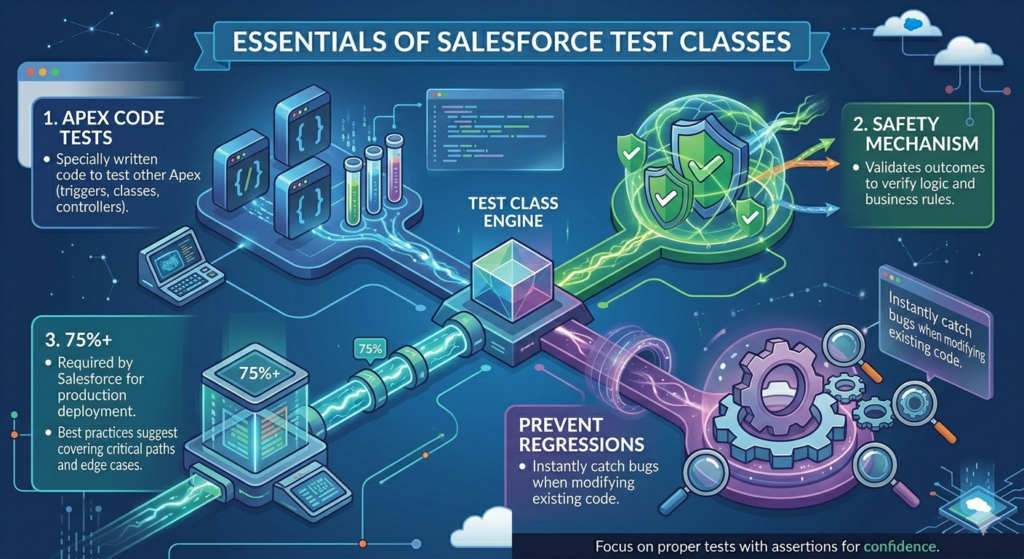
When you write a test class, you simulate real scenarios and verify that your logic behaves exactly as expected. That means checking whether records are created correctly, whether business rules are enforced, and whether edge cases are handled without breaking anything.
Here’s what test classes actually do in practice:
- They verify your logic works under real conditions
- They block bad code from reaching production
- They help meet Salesforce’s minimum 75% code coverage requirement
- They act as living documentation for how your code is supposed to behave
- They catch regressions when you modify existing functionality
That last point matters more than most developers realize. Without tests, every change you make is a gamble. With proper tests, you immediately know when something breaks.
The Reality Behind the 75% Rule
Now here’s where most developers mess up. Salesforce requires at least 75% code coverage to deploy to production. So what do people do? They write the bare minimum tests just to hit that number.
That approach is lazy—and dangerous.
Coverage is just a metric. It tells you how much of your code ran during testing, not whether it actually worked correctly. You can hit 90% coverage and still have completely broken logic if your tests don’t include meaningful assertions.
For example, executing a method without checking the outcome is useless. A proper test should validate results—did the record update correctly? Did the trigger fire as expected? Did the system handle invalid input properly?
If your test class isn’t actively trying to break your code, it’s not doing its job.
What You Should Actually Focus On
Stop thinking in terms of “How do I reach 75%?” and start thinking “How do I prove this code won’t fail in production?”
That means:
- Testing both positive and negative scenarios
- Creating realistic test data, not random junk
- Using assertions to validate outcomes, not just execute lines
- Covering edge cases that could break your logic
Good test classes don’t just help you deploy—they give you confidence. And if you’re serious about building anything scalable on Salesforce, that confidence isn’t optional.
Anatomy of a Test Class: Understanding the Structure
Let’s start with a basic test class structure and break down each component:
apex@isTest
public class AccountTriggerTest {

    @TestSetup
    static void setupTestData() {
        // Create test data once for all test methods
        Account testAccount = new Account(
            Name = 'Test Account',
            Industry = 'Technology'
        );
        insert testAccount;
    }

    @isTest
    static void testAccountCreation() {
        // Test method - notice it's static and returns void
        Test.startTest();

        Account acc = new Account(Name = 'New Account');
        insert acc;

        Test.stopTest();

        // Verify the result
        Account insertedAccount = [SELECT Id, Name FROM Account WHERE Id = :acc.Id];
        System.assertEquals('New Account', insertedAccount.Name, 'Account name should match');
    }
}
Breaking Down the Components
@isTest Annotation: This test annotation tells Salesforce this class contains test code. It doesn’t count against your org’s code limit, which is a nice bonus.
Class Declaration: Test classes should be public or private (I recommend public for visibility). The naming convention is typically [ClassName]Test or Test[ClassName].
Test Methods: Individual methods that test specific functionality. They must be:
- Static
- Return void (nothing)
- Marked with @isTest or testMethod keyword (deprecated but still works)
@TestSetup: Creates data once that all test methods can use. This makes your tests run faster.
The Critical Role of Assertions
Assertions are where the magic happens. Without them, you’re just running code—not testing it.
System.assertEquals() – Your Best Friend
apex@isTest
static void testDiscountCalculation() {
    Decimal originalPrice = 100;
    Decimal discountPercent = 20;

    Test.startTest();
    Decimal finalPrice = PriceCalculator.applyDiscount(originalPrice, discountPercent);
    Test.stopTest();

    System.assertEquals(80, finalPrice, 'Discount calculation is incorrect');
}
The third parameter (the message) is optional but invaluable when tests fail. You’ll thank yourself later.
System.assertNotEquals() – Checking What Shouldn’t Happen
apex@isTest
static void testUniqueEmailValidation() {
    Contact con1 = new Contact(LastName = 'Smith', Email = 'test@example.com');
    insert con1;

    Contact con2 = new Contact(LastName = 'Jones', Email = 'test@example.com');

    Test.startTest();
    Database.SaveResult result = Database.insert(con2, false);
    Test.stopTest();

    System.assertEquals(false, result.isSuccess(), 'Duplicate email should fail');
    System.assertNotEquals(null, result.getErrors(), 'Should have error messages');
}
System.assert() – Simple True/False Checks
apex@isTest
static void testAccountIsActive() {
    Account acc = new Account(Name = 'Test', Status__c = 'Active');
    insert acc;

    Boolean isActive = AccountService.checkActiveStatus(acc.Id);

    System.assert(isActive, 'Account should be marked as active');
}
Pro tip: Always include that third parameter message. When a test fails at 2 AM during a deployment, that message will save you hours of debugging.
Test.startTest() and Test.stopTest(): The Governor Limit Reset Button
This is one of the most misunderstood concepts in Salesforce apex test class examples. Let me clear it up.
apex@isTest
static void testBulkProcessing() {
    List<Account> accounts = new List<Account>();

    // Create 200 accounts
    for(Integer i = 0; i < 200; i++) {
        accounts.add(new Account(Name = 'Bulk Account ' + i));
    }
    insert accounts;

    Test.startTest(); // Governor limits reset here

    // This code gets fresh limits
    BatchAccountProcessor batch = new BatchAccountProcessor();
    Database.executeBatch(batch, 200);

    Test.stopTest(); // Batch jobs complete here synchronously

    // Verify results
    List<Account> processedAccounts = [SELECT Id, Processed__c FROM Account];
    for(Account acc : processedAccounts) {
        System.assertEquals(true, acc.Processed__c, 'All accounts should be processed');
    }
}
What Actually Happens
Before Test.startTest():
- Setup code runs
- Uses the same governor limits as your setup
Between startTest() and stopTest():
- You get a fresh set of governor limits
- Asynchronous code (batch, future, queueable) runs synchronously
- Maximum execution time is enforced
After Test.stopTest():
- All async jobs finish
- You can verify the results
- Back to setup governor limits
Common Mistake to Avoid
apex// DON'T DO THIS
@isTest
static void badExample() {
    // Creating data after startTest wastes your fresh limits
    Test.startTest();

    Account acc = new Account(Name = 'Test');
    insert acc;

    // Now your actual test code has reduced limits
    SomeProcessor.process(acc.Id);

    Test.stopTest();
}

// DO THIS INSTEAD
@isTest
static void goodExample() {
    // Create data before startTest
    Account acc = new Account(Name = 'Test');
    insert acc;

    Test.startTest();
    // Now you have full governor limits for your test
    SomeProcessor.process(acc.Id);
    Test.stopTest();
}
Creating Test Data: The Right Way
Never, ever use @SeeAllData=true unless you absolutely must (like when testing standard price books). Here’s why:
apex// BAD - Uses org data, unreliable
@isTest(SeeAllData=true)
static void unreliableTest() {
    Account acc = [SELECT Id FROM Account LIMIT 1]; // Might not exist!
    // Test code...
}

// GOOD - Creates its own data
@isTest
static void reliableTest() {
    Account acc = new Account(Name = 'Test Account');
    insert acc;
    // Test code...
}
Creating Related Data
apex@isTest
static void testContactWithAccount() {
    // Create parent record
    Account acc = new Account(
        Name = 'Parent Company',
        Industry = 'Manufacturing'
    );
    insert acc;

    // Create child record
    Contact con = new Contact(
        FirstName = 'John',
        LastName = 'Doe',
        AccountId = acc.Id,
        Email = 'john@example.com'
    );
    insert con;

    Test.startTest();
    // Your test logic
    Test.stopTest();

    // Verify relationship
    Contact queriedContact = [SELECT Id, Account.Name FROM Contact WHERE Id = :con.Id];
    System.assertEquals('Parent Company', queriedContact.Account.Name);
}
Test Data Factory: Scale Your Testing
When you write multiple test classes, you’ll create the same test data over and over. Test data factories solve this:
apex@isTest
public class TestDataFactory {

    public static Account createAccount(String name, Boolean doInsert) {
        Account acc = new Account(
            Name = name,
            Industry = 'Technology',
            BillingCity = 'San Francisco',
            BillingCountry = 'USA'
        );

        if(doInsert) {
            insert acc;
        }

        return acc;
    }

    public static List<Account> createAccounts(Integer count, Boolean doInsert) {
        List<Account> accounts = new List<Account>();

        for(Integer i = 0; i < count; i++) {
            accounts.add(new Account(
                Name = 'Test Account ' + i,
                Industry = 'Technology'
            ));
        }

        if(doInsert) {
            insert accounts;
        }

        return accounts;
    }

    public static Contact createContact(Id accountId, Boolean doInsert) {
        Contact con = new Contact(
            FirstName = 'Test',
            LastName = 'Contact',
            AccountId = accountId,
            Email = 'test@example.com'
        );

        if(doInsert) {
            insert con;
        }

        return con;
    }

    public static Opportunity createOpportunity(Id accountId, Boolean doInsert) {
        Opportunity opp = new Opportunity(
            Name = 'Test Opportunity',
            AccountId = accountId,
            StageName = 'Prospecting',
            CloseDate = Date.today().addDays(30),
            Amount = 10000
        );

        if(doInsert) {
            insert opp;
        }

        return opp;
    }
}
Using Your Test Data Factory
apex@isTest
static void testOpportunityCreation() {
    // Much cleaner!
    Account acc = TestDataFactory.createAccount('Test Corp', true);

    Test.startTest();
    Opportunity opp = TestDataFactory.createOpportunity(acc.Id, true);
    Test.stopTest();

    System.assertNotEquals(null, opp.Id);
    System.assertEquals('Prospecting', opp.StageName);
}

@isTest
static void testBulkProcessing() {
    // Easy to create bulk data
    List<Account> accounts = TestDataFactory.createAccounts(200, true);

    Test.startTest();
    // Your bulk logic
    Test.stopTest();
}
Real-World Example: Testing a Trigger
Let’s test an actual trigger that updates related opportunities when an account’s status changes.
The Trigger:
apextrigger AccountTrigger on Account (after update) {
    if(Trigger.isAfter && Trigger.isUpdate) {
        AccountTriggerHandler.handleStatusChange(Trigger.new, Trigger.oldMap);
    }
}
The Handler:
apexpublic class AccountTriggerHandler {

    public static void handleStatusChange(List<Account> newAccounts, Map<Id, Account> oldAccountMap) {
        Set<Id> accountIds = new Set<Id>();

        for(Account acc : newAccounts) {
            Account oldAccount = oldAccountMap.get(acc.Id);

            if(acc.Status__c != oldAccount.Status__c && acc.Status__c == 'Inactive') {
                accountIds.add(acc.Id);
            }
        }

        if(!accountIds.isEmpty()) {
            closeRelatedOpportunities(accountIds);
        }
    }

    private static void closeRelatedOpportunities(Set<Id> accountIds) {
        List<Opportunity> oppsToUpdate = [
            SELECT Id, StageName
            FROM Opportunity
            WHERE AccountId IN :accountIds
            AND IsClosed = false
        ];

        for(Opportunity opp : oppsToUpdate) {
            opp.StageName = 'Closed Lost';
        }

        if(!oppsToUpdate.isEmpty()) {
            update oppsToUpdate;
        }
    }
}
The Test Class:
apex@isTest
public class AccountTriggerTest {

    @TestSetup
    static void setupTestData() {
        Account acc = new Account(
            Name = 'Test Account',
            Status__c = 'Active'
        );
        insert acc;

        List<Opportunity> opps = new List<Opportunity>();
        for(Integer i = 0; i < 5; i++) {
            opps.add(new Opportunity(
                Name = 'Test Opp ' + i,
                AccountId = acc.Id,
                StageName = 'Prospecting',
                CloseDate = Date.today().addDays(30)
            ));
        }
        insert opps;
    }

    @isTest
    static void testStatusChangeToInactive_closesOpportunities() {
        Account acc = [SELECT Id, Status__c FROM Account LIMIT 1];

        Test.startTest();

        acc.Status__c = 'Inactive';
        update acc;

        Test.stopTest();

        List<Opportunity> closedOpps = [
            SELECT Id, StageName
            FROM Opportunity
            WHERE AccountId = :acc.Id
        ];

        System.assertEquals(5, closedOpps.size(), 'Should have 5 opportunities');

        for(Opportunity opp : closedOpps) {
            System.assertEquals('Closed Lost', opp.StageName,
                'All opportunities should be closed lost');
        }
    }

    @isTest
    static void testStatusChangeToActive_doesNotCloseOpportunities() {
        Account acc = [SELECT Id, Status__c FROM Account LIMIT 1];

        // Set to inactive first
        acc.Status__c = 'Inactive';
        update acc;

        Test.startTest();

        // Change back to active
        acc.Status__c = 'Active';
        update acc;

        Test.stopTest();

        List<Opportunity> opportunities = [
            SELECT Id, StageName
            FROM Opportunity
            WHERE AccountId = :acc.Id
            AND StageName = 'Prospecting'
        ];

        System.assertEquals(0, opportunities.size(),
            'Opportunities should remain closed lost');
    }

    @isTest
    static void testBulkStatusChange() {
        // Test with multiple accounts
        List<Account> accounts = new List<Account>();

        for(Integer i = 0; i < 200; i++) {
            accounts.add(new Account(
                Name = 'Bulk Account ' + i,
                Status__c = 'Active'
            ));
        }
        insert accounts;

        List<Opportunity> bulkOpps = new List<Opportunity>();
        for(Account acc : accounts) {
            bulkOpps.add(new Opportunity(
                Name = 'Bulk Opp',
                AccountId = acc.Id,
                StageName = 'Qualification',
                CloseDate = Date.today().addDays(60)
            ));
        }
        insert bulkOpps;

        Test.startTest();

        for(Account acc : accounts) {
            acc.Status__c = 'Inactive';
        }
        update accounts;

        Test.stopTest();

        List<Opportunity> closedOpps = [
            SELECT Id
            FROM Opportunity
            WHERE StageName = 'Closed Lost'
        ];

        System.assertEquals(200, closedOpps.size(),
            'All 200 opportunities should be closed');
    }
}
Common Mistakes to Avoid
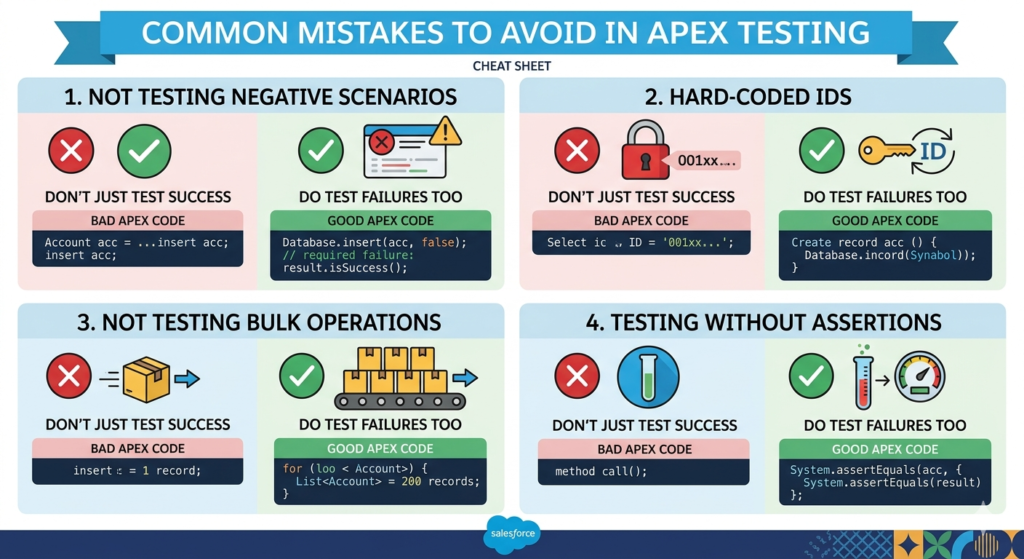
Mistake 1: Not Testing Negative Scenarios
apex// DON'T just test success
@isTest
static void testCreateAccount() {
    Account acc = new Account(Name = 'Test');
    insert acc;
    System.assertNotEquals(null, acc.Id);
}

// DO test failures too
@isTest
static void testCreateAccount_withoutRequiredFields() {
    Account acc = new Account(); // Missing required Name

    Test.startTest();
    Database.SaveResult result = Database.insert(acc, false);
    Test.stopTest();

    System.assertEquals(false, result.isSuccess(), 'Should fail without name');
}
Mistake 2: Hard-Coded IDs
apex// NEVER DO THIS
@isTest
static void terribleTest() {
    Account acc = [SELECT Id FROM Account WHERE Id = '001xx000003DHIC'];
    // This will fail in any other org!
}

// DO THIS
@isTest
static void betterTest() {
    Account acc = new Account(Name = 'Test');
    insert acc;
    // Now you have a valid ID in any org
}
Mistake 3: Not Testing Bulk Operations
apex// DON'T just test single records
@isTest
static void testSingleRecord() {
    Account acc = new Account(Name = 'Test');
    insert acc;
    // What if someone inserts 200 at once?
}

// DO test bulk scenarios
@isTest
static void testBulkInsert() {
    List<Account> accounts = new List<Account>();
    for(Integer i = 0; i < 200; i++) {
        accounts.add(new Account(Name = 'Test ' + i));
    }

    Test.startTest();
    insert accounts;
    Test.stopTest();

    System.assertEquals(200, [SELECT COUNT() FROM Account]);
}
Mistake 4: Testing Without Assertions
apex// This is pointless - just gives coverage
@isTest
static void wastefulTest() {
    Account acc = new Account(Name = 'Test');
    insert acc;
    AccountService.doSomething(acc.Id);
    // No assertions = no verification!
}

// Actually verify behavior
@isTest
static void meaningfulTest() {
    Account acc = new Account(Name = 'Test');
    insert acc;

    Test.startTest();
    AccountService.doSomething(acc.Id);
    Test.stopTest();

    Account updated = [SELECT Id, SomeField__c FROM Account WHERE Id = :acc.Id];
    System.assertEquals('Expected Value', updated.SomeField__c);
}
Best Practices for Writing Test Classes
1. One Assert Per Test Method (When Possible)
apex// Instead of this giant test
@isTest
static void testEverything() {
    // Tests 10 different things
    // Hard to debug when it fails
}

// Write focused tests
@isTest
static void testAccountNameUpdate() {
    // Tests one thing clearly
}

@isTest
static void testAccountIndustryUpdate() {
    // Tests another thing clearly
}
2. Use Meaningful Test Names
apex// Vague
@isTest
static void test1() { }

// Clear and descriptive
@isTest
static void testAccountCreation_withRequiredFields_succeeds() { }

@isTest
static void testAccountCreation_withoutName_fails() { }
3. Use @TestSetup When Possible
apex@isTest
public class MyTest {

    @TestSetup
    static void setup() {
        // Runs once, data available to all tests
        TestDataFactory.createAccounts(10, true);
    }

    @isTest
    static void test1() {
        List<Account> accounts = [SELECT Id FROM Account];
        System.assertEquals(10, accounts.size());
    }

    @isTest
    static void test2() {
        // Same data available here
        List<Account> accounts = [SELECT Id FROM Account];
        System.assertEquals(10, accounts.size());
    }
}
4. Test User Context and Permissions
apex@isTest
static void testWithDifferentUser() {
    // Create a user with specific profile
    Profile p = [SELECT Id FROM Profile WHERE Name='Standard User' LIMIT 1];

    User testUser = new User(
        Alias = 'tuser',
        Email = 'testuser@example.com',
        EmailEncodingKey = 'UTF-8',
        LastName = 'Testing',
        LanguageLocaleKey = 'en_US',
        LocaleSidKey = 'en_US',
        ProfileId = p.Id,
        TimeZoneSidKey = 'America/Los_Angeles',
        UserName = 'testuser' + DateTime.now().getTime() + '@example.com'
    );
    insert testUser;

    System.runAs(testUser) {
        Test.startTest();

        // Code runs with testUser's permissions
        Account acc = new Account(Name = 'Test');
        insert acc;

        Test.stopTest();

        System.assertNotEquals(null, acc.Id);
    }
}
5. Clean Up Your Debug Logs
apex// Remove System.debug() from test classes before deployment
// Or use this pattern:
@isTest
static void testWithLogging() {
    Boolean debugMode = false; // Set to true when debugging

    if(debugMode) System.debug('Starting test...');

    // Test code

    if(debugMode) System.debug('Result: ' + result);
}
6. Test Exception Handling
apex@isTest
static void testExceptionHandling() {
    Account acc = new Account(Name = 'Test');
    insert acc;

    Test.startTest();

    try {
        AccountService.dangerousOperation(acc.Id);
        System.assert(false, 'Should have thrown exception');
    } catch(AccountService.CustomException e) {
        System.assert(true, 'Caught expected exception');
        System.assert(e.getMessage().contains('expected error text'));
    }

    Test.stopTest();
}
Advanced: Testing Callouts
If your code makes HTTP callouts, you need mock classes:
apex@isTest
global class MockHttpResponse implements HttpCalloutMock {
    global HTTPResponse respond(HTTPRequest req) {
        HttpResponse res = new HttpResponse();
        res.setHeader('Content-Type', 'application/json');
        res.setBody('{"status":"success"}');
        res.setStatusCode(200);
        return res;
    }
}

@isTest
static void testCallout() {
    Test.setMock(HttpCalloutMock.class, new MockHttpResponse());

    Test.startTest();
    String response = MyCalloutClass.makeCallout();
    Test.stopTest();

    System.assertEquals('success', response);
}
Checking Your Coverage
Run your tests from:
- Developer Console: Test > New Run
- VS Code: Right-click test class > Run Apex Tests
- Setup: Apex Test Execution
To see overall coverage:
- Go to Setup
- Search “Apex Test Execution”
- Click “View Test History”
- Select “Apex Classes” or “Apex Triggers”
Remember: 75% is the minimum. Aim for 85-95% with meaningful tests.
Conclusion
If you think writing test classes is just about crossing the 75% code coverage line, you’re already doing it wrong. That mindset is exactly why poorly tested code makes it to production and breaks things the moment real users touch it. Test classes are not a formality—they’re your only proof that your logic actually works under real conditions.
Strong test classes give you confidence. Not fake confidence from green checkmarks, but real confidence that your code won’t collapse when faced with edge cases, bad data, or scale. If your tests don’t actively try to break your code, they’re useless.
Let’s be clear about what actually matters.
First, assertions are non-negotiable. If you’re not validating outcomes, you’re not testing—you’re just executing code. A test without assertions is dead weight. It might boost coverage, but it adds zero value.
Second, stop testing only happy paths. Real systems fail in ugly ways. You need to test negative scenarios just as aggressively as positive ones. What happens when required fields are missing? When invalid data is passed? When limits are hit? If you don’t test failure conditions, your users will.
Third, relying on existing org data is lazy and dangerous. Your tests should be isolated and predictable. That means creating your own test data every single time. If your test depends on org state, it’s fragile—and fragile tests are worse than no tests.
Fourth, use Test.startTest() and Test.stopTest() properly. Not randomly, not blindly. Set up your data first, then execute your logic within the test context, and finally validate results. If you don’t understand this flow, you’re not really controlling your test execution.
Fifth, repetition is a sign of bad design—even in tests. If you’re writing the same data setup again and again, build a test data factory. Clean, reusable test data isn’t optional at scale—it’s necessary.
Sixth, if your tests only handle one record, they’re incomplete. Salesforce runs in a multi-record environment. Bulk operations are the default, not the edge case. If your logic breaks with 200 records, your test strategy has failed.
Seventh, naming matters more than you think. When someone reads your test method, they should instantly understand what it’s validating. If your naming is vague, your tests become hard to maintain—and eventually ignored.
Here’s the uncomfortable truth: most developers write weak test classes because they treat testing as an afterthought. That’s why deployments fail, bugs slip through, and technical debt builds up fast.
Start fixing that now. Don’t try to overhaul everything at once—that’s unrealistic. Pick one class or trigger and write proper, thorough tests for it. Push it until you’re confident it can’t easily break. Then move to the next one.
Do this consistently, and you’ll notice the difference. Deployments become smoother. Debugging becomes easier. And most importantly, your code becomes reliable.
Testing isn’t the boring part of development. It’s the part that separates amateurs from professionals.
About RizeX Labs
At RizeX Labs, we specialize in delivering high-quality Salesforce solutions with a strong focus on scalability, performance, and clean code practices. Our team ensures that every implementation follows industry standards, including robust test class development for reliable deployments.
We help developers and organizations build maintainable Salesforce systems by emphasizing best practices, automation, and real-world problem-solving approaches.
Internal Links:
- Salesforce Admin course page
Salesforce Flows vs Apex: When Should You Use Code vs No-Code Automation? - Salesforce Nonprofit Cloud: Features, Use Cases, and Career Opportunities (2026 Guide)
- Salesforce Net Zero Cloud: What It Is and Why It’s the Next Green Career Niche (2026 Guide)
- Salesforce Slack Integration: How It Works and What Developers Need to Know
- Salesforce Named Credentials: What They Are and How to Use Them Safely
- Salesforce Deployment Best Practices: Change Sets vs Salesforce CLI vs Gearset
External Links:
McKinsey Sales Growth Reports
Gartner Sales Automation Insights
