
Introduction: Why Account Hierarchies Are the Backbone of B2B CRM
In B2B sales, your customers are rarely simple. A single deal might involve a regional office, a corporate headquarters, a procurement team, and a subsidiary operating under a completely different brand name. When your CRM fails to capture these relationships accurately, the consequences ripple across your entire revenue operation — missed cross-sell opportunities, duplicated outreach, inaccurate forecasting, and frustrated sales reps who can’t see the full picture.

This is precisely why Salesforce account hierarchies are not a nice-to-have feature for B2B companies. They are fundamental to building a CRM that reflects how your customers actually operate in the real world.
A well-structured Salesforce account hierarchy gives every stakeholder — from an account executive managing a Fortune 500 relationship to a revenue operations manager building pipeline reports — the contextual clarity they need to make informed decisions. It transforms a flat list of company records into an intelligent, interconnected map of your business relationships.
This blog is written for Salesforce admins, consultants, and B2B business owners who want more than a surface-level explanation. You will find practical strategies, setup recommendations, real-world examples, and automation patterns that you can apply directly to your Salesforce org. Whether you are starting from scratch or restructuring a messy existing setup, this guide covers what you need to know.
What Are Salesforce Account Hierarchies?
At its core, a Salesforce account hierarchy is a structured relationship between Account records that reflects the organizational structure of a company or enterprise. In Salesforce, this relationship is defined using the Parent Account field — a standard lookup field on the Account object that references another Account record.
When you link accounts using this field, Salesforce automatically generates a visual hierarchy tree you can access directly from the Account record. This tree shows you all related accounts organized by their parent-child relationships, giving you a bird’s-eye view of an entire enterprise in a single click.
The Basic Structure
The hierarchy typically consists of three tiers:
- Ultimate Parent (Global HQ): The top-level account that represents the global or national parent organization
- Parent Accounts (Regional/Divisional): Mid-level accounts representing subsidiaries, business units, or regional offices that report to the ultimate parent
- Child Accounts (Local/Operational): The most granular level — individual offices, departments, or operating entities where day-to-day business occurs
For example:
textAcme Corporation (Ultimate Parent)
├── Acme North America (Parent Account)
│   ├── Acme New York Office (Child Account)
│   └── Acme Chicago Office (Child Account)
└── Acme Europe (Parent Account)
    ├── Acme UK (Child Account)
    └── Acme Germany (Child Account)
The Parent Account Field
The Parent Account field is a native Salesforce field on the Account object. It creates a self-referential lookup relationship, meaning the Account object references itself. There is no hard technical limit on the depth of hierarchy levels you can create, but Salesforce’s built-in hierarchy viewer displays up to ten thousand child accounts and supports a hierarchy depth that is practically unlimited for most enterprise use cases.
One important technical note: the built-in hierarchy viewer in Salesforce Classic and Lightning Experience shows the full tree, but it is read-only. You cannot drag and drop records to reorganize — changes to parent-child relationships must be made by editing individual records or through automation.
Why B2B Companies Need Salesforce Account Hierarchies
The case for properly configured Salesforce account hierarchies becomes undeniable when you consider the realities of B2B customer relationships. Here are the core business reasons why they matter:
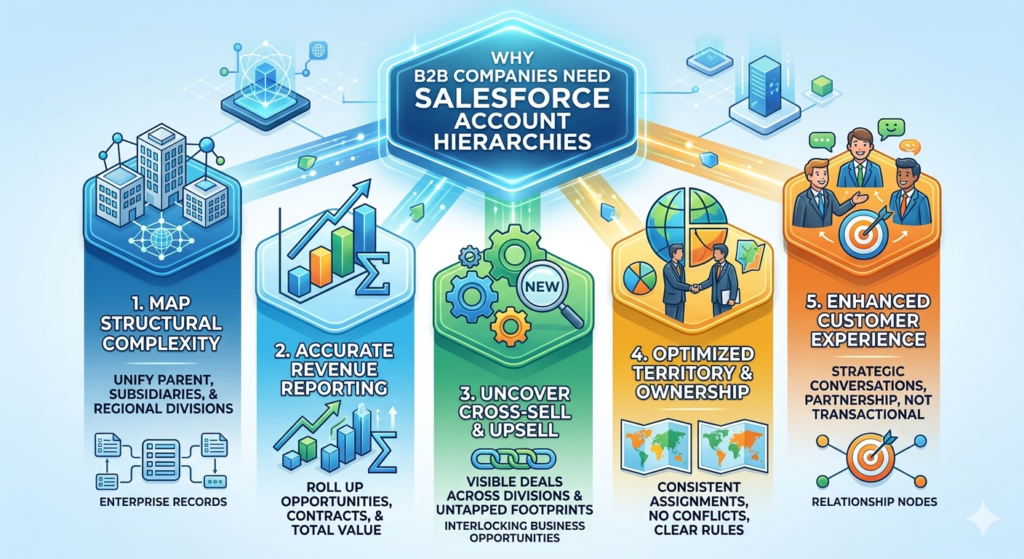
1. Enterprise Accounts Are Structurally Complex
A single corporate client might have dozens of subsidiaries, regional divisions, and operational entities. Without a hierarchy, each of these entities becomes an isolated record with no connection to the others. Sales reps lose visibility into the broader relationship, and leadership cannot accurately measure the total revenue or opportunity value associated with the parent enterprise.
2. Accurate Revenue Reporting Across the Organization
With proper parent-child account relationships in Salesforce, you can roll up opportunity amounts, contracts, and revenue figures from child accounts to their parent accounts. This gives your finance and RevOps teams an accurate view of total account value — something that is critical for enterprise account planning and executive reporting.
3. Improved Cross-Sell and Upsell Identification
When your account team can see that a parent organization already uses your product in one division, they can proactively target other divisions where you have no footprint. Without a hierarchy, this visibility simply does not exist.
4. Cleaner Territory and Ownership Management
For companies that assign territories based on company size or corporate affiliation, account hierarchies allow consistent ownership assignment. You can apply rules that ensure all child accounts fall under the same territory or account team as the parent, preventing internal conflicts over account ownership.
5. Better Customer Experience
When your sales reps have full visibility into the corporate structure of their accounts, conversations become more strategic. They can reference activity happening at other divisions, acknowledge enterprise-level commitments, and engage as a true partner rather than a transactional vendor.
Salesforce B2B Data Model and Account Relationships
Understanding the Salesforce B2B data model is essential before you build or restructure your account hierarchy. The Account object sits at the center of the Salesforce CRM data model, and virtually every other object connects to it.
Core Objects in the B2B Data Model
Here is how key objects relate to accounts in a typical B2B setup:
| Object | Relationship to Account | Purpose |
|---|---|---|
| Contact | Many Contacts to one Account | Individuals at the company |
| Opportunity | Many Opportunities to one Account | Deals being pursued |
| Case | Many Cases to one Account | Support issues |
| Contract | Many Contracts to one Account | Signed agreements |
| Activity (Tasks/Events) | Logged against Account | Engagement history |
How Account Hierarchies Interact with the Data Model
This is where it gets practically important. In Salesforce’s standard data model, Opportunities, Contacts, and Cases are associated with the specific account record they are created under — not automatically with the parent account.
This means that if a deal is closed with Acme New York Office, the Opportunity is linked to that child account, not to Acme Corporation at the top of the hierarchy. This is architecturally correct, because it preserves granularity. However, it creates a reporting challenge: you cannot run a standard Salesforce report and see all opportunities rolled up to the ultimate parent by default.
Solutions for Hierarchical Rollups
There are several approaches to address this:
Option 1: Rollup Summary Fields
Rollup Summary fields are not natively available on lookup relationships in standard Salesforce. However, since Account to Account is a lookup (not a master-detail), you cannot use standard rollup summaries between parent and child accounts out of the box.
Option 2: Custom Rollup Fields + Flows
You can create custom currency or number fields on the Account object and use Scheduled Flows or Record-Triggered Flows to aggregate child data into parent account fields. This requires intentional design but gives you persistent data accessible in reports and dashboards.
Option 3: Third-Party Tools
Tools like Rollup Helper or DLRS (Declarative Lookup Rollup Summaries) from the AppExchange allow you to define rollup calculations on lookup relationships without code. These are widely used by Salesforce admins who need rollup functionality without custom development.
Option 4: Reports with Hierarchy Filtering
Salesforce reports allow you to filter by Account Hierarchy, which lets you see all opportunities associated with an account and all of its descendants. This is often the most practical reporting solution for most organizations and requires no custom configuration.
The Parent-Child Account Relationship in Salesforce’s Architecture
The parent child account Salesforce relationship is technically a self-referential lookup. Key architectural facts to understand:
- It is a lookup relationship, not a master-detail relationship
- Deleting a parent account does not delete child accounts (no cascade delete)
- Ownership of child accounts is independent of the parent account owner
- Sharing rules and role hierarchy visibility still apply based on your org’s configuration
Best Practices for Setting Up Salesforce Account Hierarchies
Now we move into the practical core of this guide. These are the setup strategies that separate well-functioning CRM environments from chaotic ones.
1. Define Your Hierarchy Model Before You Build
Before creating or restructuring accounts in Salesforce, document your intended hierarchy model. Answer these questions:
- How many tiers do you need? (Two tiers are often sufficient for mid-market; three or more for enterprise)
- What defines the top-level account? (Global HQ, legal entity, billing entity?)
- How do you handle subsidiaries that have been acquired?
- What happens when a company is restructured or acquired after you have records in Salesforce?
Document this as a formal data governance decision and share it with your sales, RevOps, and leadership teams before implementation. Retroactively fixing a poorly planned hierarchy is significantly more expensive than planning correctly upfront.
2. Standardize Account Naming Conventions
Without naming standards, your hierarchy becomes unreadable. Adopt a consistent naming format across all accounts:
Recommended format:
- Ultimate Parent:
[Company Name] - Regional Parent:
[Company Name] - [Region/Country] - Child Account:
[Company Name] - [City/Office/Division]
Examples:
GlobalTech IndustriesGlobalTech Industries - North AmericaGlobalTech Industries - Austin TX
This makes hierarchy trees scannable and prevents duplicate records created under slightly different names.
3. Use the “Parent Account” Field Consistently and Immediately
Train your sales team and admins to populate the Parent Account field at the time of record creation, not as a cleanup task later. The longer this field goes unpopulated, the more difficult it becomes to reconstruct the intended hierarchy.
Consider making the Parent Account field required on your page layouts for certain Account Types (like “Subsidiary” or “Regional Office”) using validation rules. This enforces data completeness without blocking legitimate standalone account creation.
4. Leverage Account Type and Record Types
Use the Account Type field (or a custom field if needed) to define where each account sits in the hierarchy:
- Enterprise / Global HQ — top-level parent
- Subsidiary — mid-level parent or child with its own subsidiaries
- Branch / Office — operational child account
- Partner — non-customer relationship (keep separate from customer hierarchy)
- Prospect — pre-opportunity accounts
Record Types can enforce different page layouts and required fields based on account type, ensuring the right data is captured for each tier of your hierarchy.
5. Assign a “Ultimate Parent Account” Field
Salesforce’s built-in hierarchy viewer shows the full tree, but you cannot easily filter or report on “all accounts under Acme Corporation” without navigating to that record. Create a custom lookup field called Ultimate Parent Account on the Account object and populate it (via Flow automation) with the top-level parent for every account.
This single field unlocks powerful reporting — you can now group any report by Ultimate Parent Account to see all activity, revenue, and engagement across an entire enterprise in one view.
6. Design Ownership and Sharing Rules Around the Hierarchy
Decide early how account ownership will be managed:
- Option A: Each account has its own owner. Useful when different reps manage different divisions. Requires clear rules about when to escalate and collaborate.
- Option B: Account team model. The parent account has a primary owner, and Account Teams grant visibility to reps managing child accounts.
- Option C: Territory Management. Use Salesforce Territory Management to assign accounts based on geography, industry, or size — and ensure parent and child accounts fall into consistent territories.
The Account Team approach is the most flexible for enterprise B2B accounts where multiple reps touch the same corporate relationship at different levels.
7. Plan for Mergers, Acquisitions, and Reorganizations
In B2B markets, the companies you sell to change constantly. Build a documented process for:
- When a client is acquired: Should the acquired company become a child of the acquirer’s account?
- When a subsidiary is divested: Should it become an independent Ultimate Parent?
- When a client reorganizes internally: How do you restructure child accounts?
Having a process defined before these events occur prevents ad-hoc decisions that create inconsistency.
Common Mistakes to Avoid
Even experienced Salesforce admins make structural mistakes when setting up account hierarchies. Here are the most frequent and costly ones:
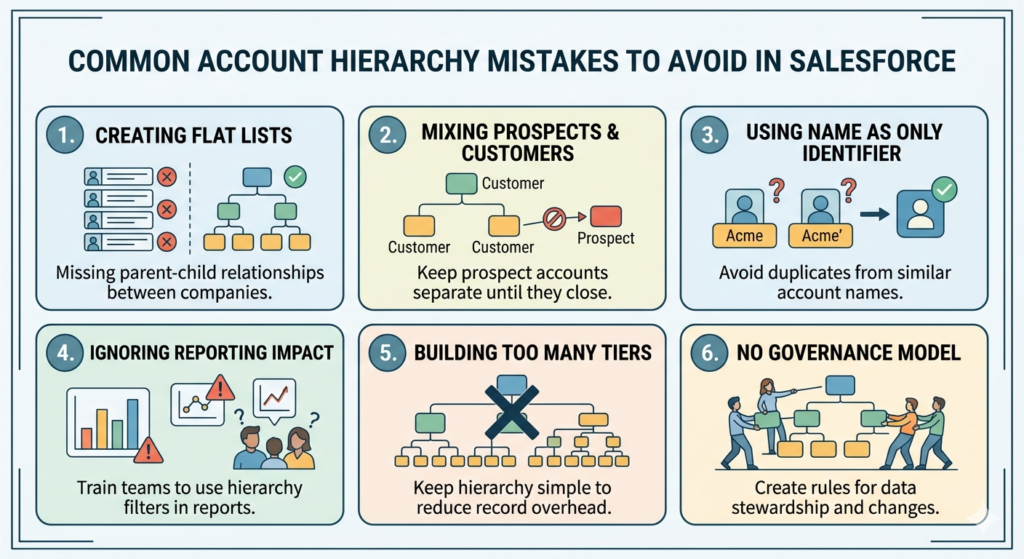
Mistake 1: Creating Flat Account Lists
Many Salesforce orgs have hundreds or thousands of accounts with no parent-child relationships at all. Every company is a standalone record. This is the single biggest missed opportunity in B2B CRM configuration. If this describes your org, a hierarchy cleanup project should be a top priority.
Mistake 2: Mixing Prospects and Customers in the Same Hierarchy
Attaching a prospect account (someone you are trying to sell to) as a child of a current customer creates data confusion. Keep prospect accounts separate until they become customers, then evaluate whether they belong in an existing hierarchy.
Mistake 3: Using Account Name as the Only Identifier
Relying on account name alone for hierarchy management leads to duplicates. If a rep creates “Acme Corp” and another creates “Acme Corporation,” you now have two top-level parents for what should be one hierarchy. Implement deduplication tools and matching rules (covered in the Tools section below).
Mistake 4: Ignoring the Reporting Impact
Setting up a hierarchy is only half the work. If your reports do not leverage the hierarchy structure, you are not getting the value from the data. Train your report builders to use Account Hierarchy filters and configure key dashboards to display enterprise-level metrics.
Mistake 5: Building Too Many Tiers
More tiers does not mean better data. Adding unnecessary layers (like creating a separate account for every department within an office) creates record management overhead and clutters the hierarchy view. Keep it to the minimum number of tiers that meaningfully reflects how you sell and manage relationships.
Mistake 6: No Governance Model
Without clear governance — documented rules about who can create parent-child relationships, what naming conventions to follow, and how hierarchy changes are approved — the structure degrades rapidly as more users interact with the system. Assign a data steward and create a written account hierarchy policy.
Real-World Use Case Example
Company: Meridian Industrial Supply (a fictional B2B manufacturer)
Challenge: Meridian sells industrial equipment to large manufacturing conglomerates. One client — Hartwell Group — has 14 subsidiary companies operating across North America and Europe. Meridian’s Salesforce org had 14 separate, unrelated account records for each Hartwell subsidiary. Sales reps had no visibility into the group’s full relationship with Meridian, resulting in:
- Multiple reps unknowingly pursuing separate deals with different Hartwell subsidiaries
- No accurate view of total Hartwell Group revenue (which, when added up, made Hartwell their second-largest customer)
- No consolidated Account Plan or executive sponsor relationship for the Hartwell enterprise
Solution: Meridian’s Salesforce admin and RevOps consultant designed a three-tier account hierarchy:
- Ultimate Parent:
Hartwell Group(new account record created, owned by the Senior Enterprise AE) - Regional Parents:
Hartwell North AmericaandHartwell Europe - Child Accounts: All 14 existing subsidiary records, re-parented under the appropriate regional parent
An Account Team was established on the Hartwell Group record, granting visibility to all reps managing individual subsidiaries.
A custom rollup field called Total Group Revenue (Active Contracts) was built using DLRS, aggregating contract values from all child accounts into the Hartwell Group record.
An Ultimate Parent Account lookup field was populated for all 14 subsidiaries via a one-time data update.
Results after 90 days:
- Sales leadership discovered that Hartwell Group represented $3.2M in active contracts — a figure no one had visibility into before
- A cross-sell initiative was launched targeting the 6 Hartwell subsidiaries that had never purchased from Meridian
- Two reps who had been unknowingly competing for the same Hartwell subsidiary deal were realigned, and the deal closed within 30 days under a unified account strategy
This example is representative of what most B2B companies experience when they properly implement Salesforce account hierarchies for the first time.
Tools and Automation: Flows, Validation, and Deduplication
Building the hierarchy structure is essential, but keeping it clean and functional over time requires the right tools and automation patterns. Here are the most practical options available in Salesforce today.
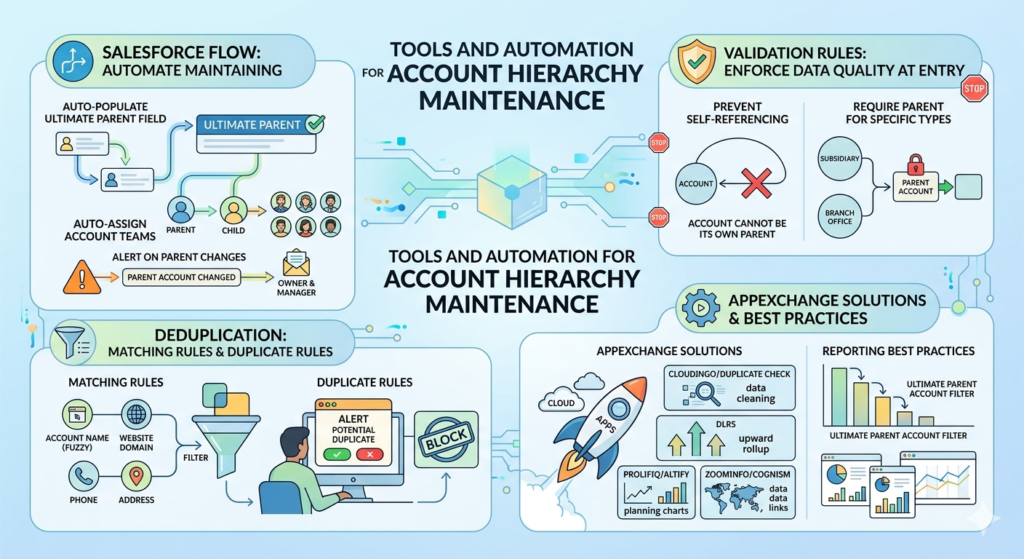
Salesforce Flow: Automate Hierarchy Maintenance
Flow is the most powerful native automation tool available to Salesforce admins, and it has multiple applications in account hierarchy management.
Use Case 1: Auto-Populate the Ultimate Parent Account Field
When a new child account is created and the Parent Account field is populated, a Record-Triggered Flow can traverse the hierarchy to find and stamp the Ultimate Parent Account automatically.
Flow Logic:
- Trigger: Account record is created or updated
- Condition: Parent Account field is not null
- Action: Look up the Parent Account, then check if that record has its own Parent. Repeat until you find an account with no parent. Write that account’s ID into the Ultimate Parent Account field.
Note: For hierarchies with more than a few levels, this may require a Loop element or a recursive approach. For very deep hierarchies, consider an Apex solution for performance.
Use Case 2: Auto-Assign Account Teams
When a new child account is created under a parent account, a Flow can automatically add the parent account’s Account Team members to the child account’s Account Team. This ensures visibility without requiring manual steps from account owners.
Use Case 3: Alert on Parent Account Changes
When the Parent Account field changes on an existing account, trigger a notification Flow that alerts the account owner and their manager. Unauthorized reparenting can corrupt your hierarchy, so visibility into these changes is important.
Validation Rules: Enforce Data Quality at Entry
Use validation rules to prevent bad data from entering the hierarchy in the first place:
Validation Rule 1: Prevent Self-Referencing
Ensure an account cannot be set as its own parent:
textAND(
  NOT(ISBLANK(ParentId)),
  ParentId = Id
)
Validation Rule 2: Require Parent Account for Specific Account Types
If Account Type = “Subsidiary” or “Branch Office,” the Parent Account field must be populated:
textAND(
  ISPICKVAL(Type, "Subsidiary"),
  ISBLANK(ParentId)
)
Validation Rule 3: Naming Convention Enforcement
Use regex patterns to enforce naming conventions, though use this selectively — overly restrictive naming rules can frustrate users and lead to workarounds.
Deduplication: Matching Rules and Duplicate Rules
Duplicate accounts are the enemy of clean hierarchies. Salesforce provides native deduplication tools that every B2B org should have configured:
Matching Rules: Define how Salesforce determines whether two records are potential duplicates. For accounts, configure matching on:
- Account Name (fuzzy match)
- Website domain
- Phone number
- Billing Address
Duplicate Rules: Once matching rules are in place, configure duplicate rules to either:
- Alert the user that a potential duplicate exists (recommended for most orgs)
- Block the creation of a record that matches an existing account (more aggressive, use carefully)
AppExchange Tools Worth Evaluating
Beyond native Salesforce tools, several AppExchange solutions can significantly improve hierarchy management:
- Cloudingo or Duplicate Check: Advanced deduplication with merge capabilities, useful for cleaning up large account databases
- DLRS (Declarative Lookup Rollup Summaries): Free, open-source tool for creating rollup summaries on lookup relationships — essential for rolling up opportunity or contract data to parent accounts
- Prolifiq CRUSH or Altify: Account planning tools built on Salesforce that leverage account hierarchies for strategic account management
- ZoomInfo or Cognism (Data Enrichment): These tools can automatically identify corporate hierarchy relationships based on company data, helping you build hierarchies from external data sources
Reporting Best Practices for Hierarchies
To get maximum value from your hierarchy:
- Use “Account Hierarchy” filter in Account and Opportunity reports to include all child records under a selected parent
- Build a dedicated “Enterprise Account Summary” report type that shows parent accounts with rolled-up pipeline and revenue
- Create a dashboard for enterprise account health that uses the Ultimate Parent Account field to group metrics by corporate group
- Schedule reports for account teams that show all activity across their hierarchy rather than just their directly owned records
Conclusion: Structure Your Data the Way Your Business Actually Works
Salesforce account hierarchies are not a configuration detail — they are a strategic foundation for B2B CRM success. When your data structure mirrors the real-world complexity of your customer relationships, everything downstream improves: your reporting becomes more accurate, your sales team becomes more effective, your customer experience becomes more strategic, and your revenue operations become more reliable.
The key takeaways from this guide:
- Plan before you build. Define your hierarchy model, naming conventions, and governance rules before touching any records.
- Use the Parent Account field consistently and automate the Ultimate Parent Account field for easier reporting.
- Leverage the Salesforce B2B data model intentionally — understand how Opportunities, Contacts, and Contracts relate to parent and child accounts differently.
- The parent child account Salesforce relationship is a lookup, which means you need custom rollups or third-party tools for aggregated reporting across the hierarchy.
- Automate maintenance using Flows and validation rules to keep the hierarchy clean as your data grows.
- Deduplicate proactively using Salesforce’s native Matching and Duplicate Rules, supplemented by AppExchange tools where needed.
- Train your users. The best-designed hierarchy falls apart if reps are not consistently populating the Parent Account field or following naming conventions.
If your Salesforce org currently has a flat list of unrelated account records, the investment required to restructure them into a proper hierarchy will pay back quickly — often within a single quarter — in the form of identified cross-sell opportunities, cleaner forecasting, and more strategic enterprise account management.
Start with your top 20 accounts by revenue. Map their corporate structures, build the hierarchy for those accounts, and validate the model before rolling it out org-wide. Iterate and refine. The clarity you gain from those first properly structured hierarchies will make the case for doing the rest.
Your CRM should reflect reality. Salesforce account hierarchies are how you make that happen.
About RizeX Labs
At RizeX Labs, we specialize in delivering cutting-edge Salesforce solutions that help businesses build scalable and intelligent data models. Our expertise includes designing optimized account structures, implementing parent-child relationships, and enabling seamless data visibility across B2B organizations.
We help companies move from disconnected account records to structured, hierarchy-driven systems that improve reporting, sales alignment, and decision-making.
Internal Links:
- Salesforce Admin course page
- Salesforce Flows vs Apex: When Should You Use Code vs No-Code Automation?
- Salesforce Page Layouts vs Lightning App Builder
- Salesforce Custom Objects: Complete Build Guide for Beginners
- Salesforce Headless 360: The Complete Guide to Building the Agentic Enterprise
- Salesforce Email Templates: Complete Guide (Classic vs Lightning)
- Salesforce Queues: Setup and Use Cases Explained
External Links:
McKinsey Sales Growth Reports
