
Introduction: The Evolution of Salesforce Automation Tools
The Salesforce automation landscape has undergone dramatic transformation over the past few years. If you’re still debating whether to build that new automation in Process Builder, you’re already behind the curve. With Salesforce’s official retirement timeline for Process Builder announced and Flow Builder becoming the dominant automation framework, 2026 marks a pivotal year for organizations to reassess their automation strategies.
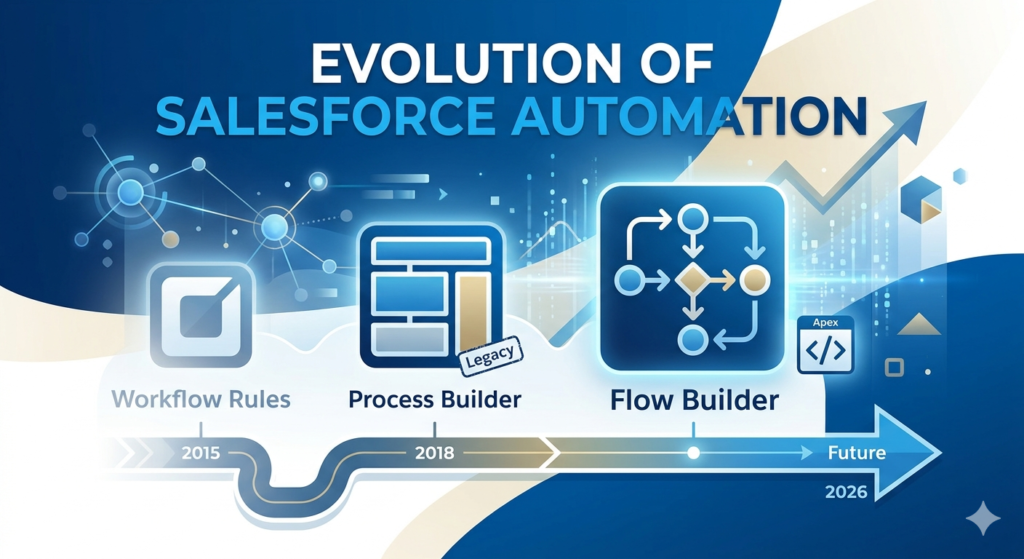
The salesforce automation comparison 2026 landscape looks radically different from even two years ago. Salesforce has made its position clear: Flow is the future of declarative automation, Process Builder is legacy technology, and Apex remains the powerhouse for complex, performance-critical operations. Yet many organizations still operate with a patchwork of automation tools—some workflows from 2015, Process Builders from 2018, and newer Flows all running simultaneously, creating maintenance nightmares and performance bottlenecks.
This comprehensive guide cuts through the noise to deliver actionable insights for Salesforce admins, developers, and architects. We’ll examine the current state of salesforce automation tools, provide detailed performance comparisons, and give you clear decision frameworks for choosing the right tool for each scenario. Whether you’re migrating legacy automations or building new processes from scratch, this guide will help you make informed architectural decisions that scale with your organization.
Overview of Salesforce Automation Tools in 2026
Flow Builder: The Modern Standard
Flow Builder has evolved from a clunky, limited tool into Salesforce’s most versatile automation platform. In 2026, Flow encompasses multiple automation types:
Record-Triggered Flows replace Process Builder functionality, executing when records are created, updated, or deleted. With advanced features like scheduled paths (previously only available in Process Builder), entry condition optimization, and trigger ordering, record-triggered Flows now handle 90% of declarative automation use cases.
Screen Flows power guided user experiences, replacing custom Visualforce pages and Lightning components for many standard use cases. With dynamic forms, improved navigation options, and native accessibility features, Screen Flows deliver sophisticated user interfaces without code.
Autolaunched Flows execute background logic invoked by other processes, APIs, or scheduled jobs. These serve as reusable automation modules that other Flows, Apex classes, or external systems can call.
Schedule-Triggered Flows run at specified times, replacing many scheduled Apex jobs for declarative use cases like daily data cleanup or weekly notification batches.
Platform Event-Triggered Flows respond to platform events, enabling event-driven architectures without Apex.
The key advancement in 2026 is Flow’s performance optimization engine, which automatically analyzes Flow logic and suggests governor limit optimizations, bulkification improvements, and SOQL query consolidation.
Process Builder: The Deprecated Legacy
Process Builder officially enters its sunset phase in 2026. While existing Process Builders continue to function, Salesforce has disabled the creation of new Process Builders in most new orgs, and migration tools actively push organizations toward Flow conversion.
Process Builder was revolutionary when introduced, offering a visual interface for complex automation that previously required code. However, its limitations have become increasingly apparent:
- Non-bulkified architecture causing governor limit issues
- Inability to handle complex conditional logic efficiently
- Performance degradation in orgs with multiple active Process Builders
- Limited debugging capabilities compared to Flow
- No version control or proper testing frameworks
Organizations still running critical Process Builders should prioritize migration in 2026. Salesforce provides automated conversion tools, but these require careful review and testing, as the converted Flows may not preserve exact functionality or may introduce performance issues.
Apex Triggers: The Performance Powerhouse
Apex Triggers remain the foundation for complex, performance-critical automation. Despite advances in declarative tools, Apex provides capabilities that Flow simply cannot match:
Precise Governor Limit Management: Developers can implement sophisticated bulkification patterns, utilize dynamic SOQL, and optimize DML operations in ways that declarative tools cannot achieve.
Complex Business Logic: Multi-object transactions, advanced data transformations, integration with external systems via REST/SOAP callouts with complex error handling, and algorithms requiring loops within loops all require Apex.
Framework-Level Operations: Trigger frameworks, recursive trigger prevention, trigger ordering control, and platform event publishing at scale operate most efficiently in Apex.
Performance at Scale: For organizations processing thousands of records in single transactions, properly written Apex consistently outperforms declarative alternatives.
The 2026 Apex landscape includes enhanced debugging tools, improved test execution performance, and better integration with DevOps pipelines, making Apex development more accessible while maintaining its power.
Detailed Comparison: Flow vs Process Builder vs Apex
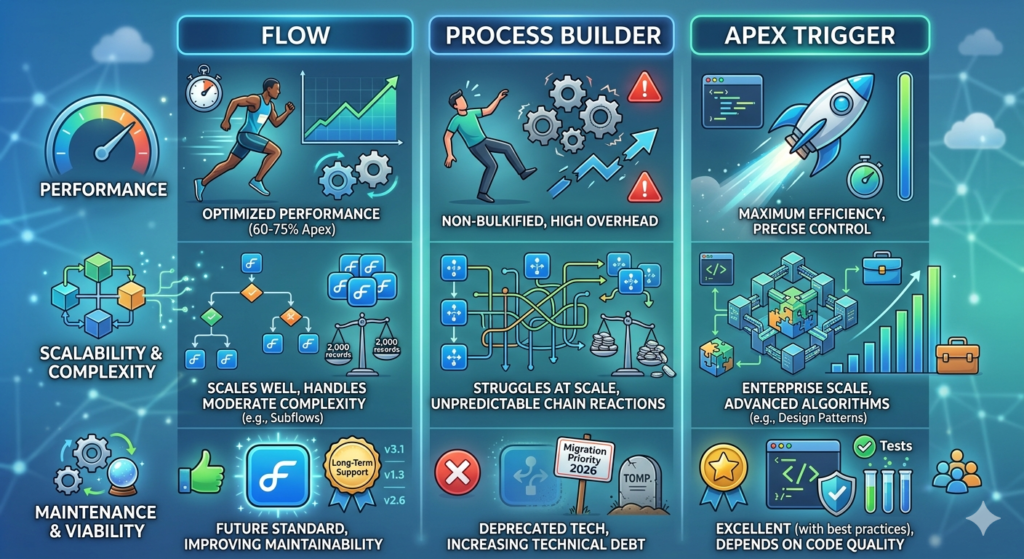
Performance Analysis
Flow Performance (2026 Edition)
Flow performance has improved significantly with Salesforce’s runtime optimization engine. A well-designed record-triggered Flow now executes at approximately 60-75% of equivalent Apex code performance in most scenarios.
Key performance characteristics:
- Execution Time: Record-triggered Flows process 200 records in bulk operations averaging 2-4 seconds for simple logic, 5-10 seconds for complex logic with multiple SOQL queries
- Resource Consumption: Flows consume 1.5-2x more CPU time than equivalent Apex code
- Governor Limits: Flows count against the same governor limits as Apex but provide less control over optimization
- Query Optimization: Flow’s query engine automatically consolidates queries in many scenarios but can’t match hand-optimized Apex
Real-world example: A Flow updating related contacts when an account changes processes 200 accounts with 5 contacts each (1,000 total records) in approximately 8-12 seconds, consuming 12,000-15,000ms of CPU time.
Process Builder Performance
Process Builder performance has become a significant liability in modern Salesforce orgs:
- Non-Bulkified Architecture: Each Process Builder evaluation happens per record, not per batch
- Execution Overhead: Process Builder adds 30-50% more overhead than equivalent Flow logic
- Chain Reactions: Multiple Process Builders on the same object create exponential performance degradation
- Resource Intensive: Processing 200 records through a moderately complex Process Builder can consume 20,000-30,000ms CPU time
Organizations with 5+ Process Builders on the same object frequently encounter governor limit exceptions during bulk data loads.
Apex Trigger Performance
Properly architected Apex triggers deliver optimal performance:
- Execution Time: Well-written triggers process 200 records with related updates in 1-3 seconds
- Resource Efficiency: Apex code typically consumes 8,000-12,000ms CPU time for operations that cost Flows 12,000-15,000ms
- Governor Limit Control: Developers can implement precise bulkification, selective querying, and optimal DML patterns
- Scalability: Apex triggers scale linearly with record volume when properly designed
Real-world example: An Apex trigger performing the same account-contact update scenario completes in 4-6 seconds, consuming 8,000-10,000ms CPU time—approximately 30-40% more efficient than Flow.
Scalability Comparison
Flow Scalability
Flows scale reasonably well for most business scenarios but hit limitations:
- Record Volume: Handles up to 2,000 records per transaction effectively with proper design
- Complexity Scaling: Performance degrades noticeably when Flows exceed 50+ elements or include nested decision logic 4+ levels deep
- Maintenance at Scale: Organizations running 50+ Flows benefit from naming conventions and documentation but lack sophisticated dependency tracking
- Version Control: Flow metadata deploys through change sets or CI/CD but lacks granular diff capabilities
Best scalability zone: 25-50 well-organized record-triggered Flows across an org, each handling specific business processes.
Process Builder Scalability
Process Builder fails at scale:
- Multiple Process Problem: Running 3+ Process Builders on one object creates unpredictable execution orders and performance issues
- Organizational Chaos: Many orgs have 100+ Process Builders created over years by different admins with no documentation
- Migration Complexity: Converting Process Builders to Flow requires significant effort as orgs scale
- No Dependency Mapping: Process Builders lack tools to understand cross-process dependencies
Organizations with 50+ Process Builders face significant technical debt.
Apex Scalability
Apex scales exceptionally well with proper architecture:
- Enterprise Volume: Properly designed trigger frameworks handle millions of records daily
- Complexity Management: Object-oriented design patterns, service layer architecture, and selector classes create maintainable code at scale
- Version Control: Full git integration, code review processes, and deployment automation
- Testing Infrastructure: Comprehensive test coverage enables confident modifications
Enterprise orgs successfully run hundreds of Apex classes with sophisticated trigger frameworks managing complex business logic across all major objects.
Complexity Handling
Flow Complexity Capabilities
Modern Flows handle moderate complexity well:
Strengths:
- Conditional logic up to 3-4 levels deep remains manageable
- Loop collections of 100-200 records with processing logic
- Invoke Apex actions for complex calculations while maintaining declarative framework
- Subflows enable modular design and reusability
- Record collections support filtering, sorting, and transformation
Limitations:
- No native support for recursive logic or advanced algorithms
- Limited string manipulation and data transformation capabilities
- Cannot implement complex design patterns (factory, strategy, observer)
- Debugging nested subflows becomes difficult
- No native try-catch error handling (introduced basic error handling in Winter ’26 but still limited)
Complexity sweet spot: Business logic requiring 5-10 decision points, 2-3 SOQL queries, and updates to 2-3 related objects.
Process Builder Complexity
Process Builder struggles with any significant complexity:
Limitations:
- Criteria nodes become unmanageable beyond 3-4 conditions
- Cannot call other Process Builders (unlike Flow’s subflow capability)
- Limited variable support makes data manipulation difficult
- No looping capabilities
- Formula complexity limits create workarounds
Organizations attempting complex logic in Process Builder often create multiple interconnected Processes, leading to maintenance nightmares and unpredictable behavior.
Apex Complexity Management
Apex handles any level of complexity:
Capabilities:
- Full object-oriented programming with inheritance, polymorphism, and encapsulation
- Custom algorithms including recursive logic, graph traversal, and optimization routines
- Advanced data structures (maps, sets, lists) with unlimited nesting
- Comprehensive error handling with try-catch-finally blocks
- Design patterns enabling enterprise-scale architecture
- Integration frameworks for complex external system communication
The challenge with Apex is managing complexity through architecture, not tool limitations. Poor Apex code becomes unmaintainable; well-architected Apex scales indefinitely.
Maintenance and Long-Term Viability
Flow Maintenance
Flow maintenance has improved significantly:
Advantages:
- Visual flowchart makes logic somewhat self-documenting
- Built-in version history tracks changes
- Flow Scanner tools identify performance issues and best practice violations
- Migration tools help update older Flows to modern patterns
- Salesforce’s Flow as the official automation standard ensures long-term support
Challenges:
- Large Flows become visually overwhelming (50+ elements)
- No native commenting within Flow elements (descriptions only)
- Comparing Flow versions requires third-party tools
- Debugging requires reproducing issues in test environments
- Limited code review processes compared to Apex
Maintenance rating: Good for organizations with governance processes and naming conventions; problematic without standardization.
Process Builder Maintenance
Process Builder maintenance is increasingly problematic:
- Deprecated Technology: Salesforce actively encourages migration, signaling end-of-life
- Limited Tooling: Few modern tools support Process Builder analysis or optimization
- Knowledge Gap: Newer Salesforce professionals learn Flow, not Process Builder
- Migration Burden: Organizations must budget for conversion projects
- Frozen Features: No new capabilities being developed
Maintenance rating: Poor and declining. Migration should be a 2026 priority.
Apex Maintenance
Apex maintenance depends entirely on code quality:
Best-Case Scenario (Well-architected code):
- Comprehensive test coverage enables confident modifications
- Clear separation of concerns makes locating logic straightforward
- Code comments and documentation explain complex business rules
- Version control provides complete change history
- IDE tools offer refactoring support and dependency analysis
Worst-Case Scenario (Legacy code):
- Monolithic trigger handlers with thousands of lines
- No test coverage beyond minimum deployment requirements
- Hardcoded values and business logic scattered throughout
- No documentation or original developers long gone
Maintenance rating: Excellent with proper development practices; nightmare with poor code quality.
When to Use Flow vs Apex: Real-World Decision Framework
Understanding when to use apex vs flows is crucial for building scalable Salesforce architectures. Here’s a practical decision framework based on 2026 best practices.
Use Flow When:
1. Standard CRUD Operations with Moderate Complexity
Scenario: When an Opportunity closes, create a Project record, update the Account’s total revenue, and send a notification email to the Account Team.
Why Flow: This involves straightforward record creation and updates with simple conditional logic. Flow handles this efficiently without code maintenance overhead.
Implementation: Record-triggered Flow on Opportunity with “After Save” timing, entry condition checking Stage = “Closed Won”, and three action sequences: Create Project, Update Account, Send Email.
2. User-Interactive Processes
Scenario: A guided case resolution wizard where support agents answer questions, the Flow determines the solution path, and creates relevant records based on responses.
Why Flow: Screen Flows excel at multi-step user interfaces, conditional screen display, and guided data collection without custom Lightning components.
Implementation: Screen Flow with dynamic choice selection, conditional screen visibility, and record creation upon completion.
3. Time-Based Actions
Scenario: Seven days before a contract expires, create a renewal opportunity and assign it to the account owner.
Why Flow: Scheduled paths in record-triggered Flows handle time-based actions natively without custom scheduled jobs.
Implementation: Record-triggered Flow with scheduled path executing 7 days before Contract.EndDate, creating Opportunity and sending notification.
4. Simple Data Integration
Scenario: When a new lead is created in Salesforce, call an external marketing automation platform API to create a corresponding prospect record.
Why Flow: Flow can invoke Apex actions or make declarative HTTP callouts (with proper external services configuration), handling simple API integration without full code development.
Implementation: Record-triggered Flow calling an Apex-defined action that handles the external callout with basic error handling.
5. Process Migration from Process Builder
Scenario: Your org has 50 Process Builders that need migration by year-end.
Why Flow: Salesforce provides automated conversion tools, and Flow’s official status ensures long-term support and continuous improvement.
Implementation: Use Salesforce’s Process Builder to Flow migration tool, then manually review and optimize converted Flows.
Use Apex When:
1. High-Volume Bulk Processing
Scenario: Nightly batch job processing 50,000+ records, performing complex calculations, and updating related records across multiple objects.
Why Apex: Batch Apex with proper chunking, selective querying, and optimized DML operations handles this volume efficiently while managing governor limits precisely.
Implementation: Database.Batchable class with optimized query locator, 200-record batch size, and bulkified processing logic.
2. Complex Multi-Object Transactions
Scenario: When an Account is merged, transfer all opportunities, update related pipeline reports, recalculate territory assignments across 5 objects, and maintain audit history.
Why Apex: This requires transaction control, rollback capabilities for failures, complex conditional logic, and precise DML sequencing that Flow cannot manage efficiently.
Implementation: Trigger framework with service layer handling business logic, utilizing savepoint/rollback for transaction management.
3. Advanced Algorithms and Calculations
Scenario: Implement a commission calculation engine with tiered rates, accelerators, splits among multiple team members, and custom rounding rules based on product categories.
Why Apex: Complex mathematical operations, nested loops with conditional logic, and sophisticated business rules require programming language capabilities.
Implementation: Service class with calculation methods, utilizing maps for performance, comprehensive test coverage validating calculation scenarios.
4. External System Integration with Complex Error Handling
Scenario: Real-time inventory synchronization with ERP system requiring retry logic, circuit breaker patterns, transformation of complex XML payloads, and logging.
Why Apex: HTTP callout management, XML/JSON parsing with transformation logic, comprehensive error handling with retry mechanisms, and integration logging require full programming capabilities.
Implementation: Integration service class implementing retry logic, platform event publishing for failures, and custom logging framework.
5. Platform Event Processing at Scale
Scenario: Subscribe to high-volume platform events (1,000+ per hour) from multiple sources, apply business logic, and update records across your org.
Why Apex: Platform event triggers in Apex provide bulkified processing, controlled error handling, and performance optimization unavailable in platform event-triggered Flows.
Implementation: Platform event trigger with handler class implementing bulkification patterns and replay ID tracking.
6. Regulatory Compliance and Audit Requirements
Scenario: Financial services org requiring detailed audit trails, data integrity verification, and complex validation rules enforced programmatically with detailed logging.
Why Apex: Complete control over audit logging, ability to implement cryptographic signatures, integration with external compliance systems, and detailed error tracking.
Implementation: Trigger framework with audit service layer, custom objects for audit storage, and compliance validation methods.
7. Performance-Critical Operations
Scenario: Point-of-sale system updating inventory across thousands of products in real-time with sub-second response requirements.
Why Apex: Hand-optimized code with precise governor limit management, selective queries with specific field retrieval, and minimal processing overhead.
Implementation: Optimized trigger handler with map-based lookups, single DML operation per transaction, and performance monitoring.
The Hybrid Approach: Flow + Apex Together
Modern salesforce automation tools work best in combination:
Pattern 1: Flow Orchestration with Apex Workers
Flow handles the business process flow, user interaction, and simple logic, while invocable Apex methods handle complex calculations or operations.
Example: Quote approval Flow guides users through screens, checks basic validation declaratively, then calls Apex for complex pricing calculations before final submission.
Pattern 2: Apex Foundation with Flow Extensions
Apex trigger framework handles core business logic and data integrity, while Flows manage time-based follow-ups and notifications.
Example: Apex trigger on Case manages field updates and related record creation; Flow scheduled path sends follow-up email 48 hours later.
Pattern 3: Apex for Backend, Flow for Frontend
Apex processes batch jobs, integrations, and complex operations; Flows provide user interfaces and guided processes.
Example: Nightly Apex batch processes orders; Screen Flow allows sales ops to manually trigger processing for urgent orders.
Why Process Builder is Becoming Obsolete
Salesforce’s official stance is clear: Process Builder is legacy technology. Understanding why helps organizations prioritize migration efforts.
Technical Limitations
Non-Bulkified Architecture: Process Builder evaluates criteria for each record individually rather than processing records in bulk. When 200 Account records update simultaneously, a Flow evaluates entry conditions once for the batch; Process Builder evaluates 200 times. This fundamental architectural limitation causes:
- CPU timeout errors during bulk data loads
- Excessive SOQL queries when checking criteria
- Unpredictable performance degradation as data volumes grow
Single-Thread Execution: Process Builders cannot leverage Salesforce’s parallel processing capabilities, creating bottlenecks in high-volume scenarios.
Limited Error Handling: When Process Builder encounters an error, it fails without granular error context, making debugging difficult. Flow’s error handling provides specific fault paths, error messages, and recovery options.
Maintenance Burden
Version Control Challenges: Unlike Flow versions that can be activated/deactivated easily, Process Builder versions create confusion. Organizations often run multiple versions simultaneously without realizing it.
Documentation Gap: Process Builder lacks built-in description fields for individual actions, making complex Processes difficult to document and understand months after creation.
Dependency Tracking: Tools like Salesforce’s Setup Dependency API provide limited visibility into Process Builder dependencies, making impact analysis before changes difficult.
Migration Reality
Salesforce provides automated migration tools, but the conversion isn’t one-click:
Conversion Success Rate: Approximately 70% of Process Builders convert cleanly to Flow; 30% require manual review and adjustment for:
- Hardcoded IDs that should be dynamic
- Formula fields that can be optimized
- Complex criteria that convert to inefficient decision logic
- Time-based actions that don’t map perfectly to scheduled paths
Testing Requirements: Even clean conversions require comprehensive testing. Converted Flows may execute in slightly different sequences, potentially revealing issues that existed in the original Process Builder but went unnoticed.
Training Investment: Admin teams skilled in Process Builder need training on Flow Builder’s interface, debug capabilities, and optimization techniques.
Timeline for Obsolescence
- 2024: Salesforce announced official deprecation timeline
- 2025: New orgs disabled Process Builder creation
- 2026: Migration push intensifies with in-app prompts and recommendations
- 2027-2028: Expected full deprecation with Process Builders potentially becoming view-only
- 2029+: Process Builder likely removed from platform entirely
Organizations should complete Process Builder migration by end of 2026 to avoid rushed conversions under pressure.
Best Practices for Salesforce Automation in 2026
Implementing these best practices ensures scalable, maintainable automation architecture.
1. One Automation Per Object Per Trigger Event (Flow)
Run a single record-triggered Flow per object per trigger event (before save, after save, before delete). Consolidate logic that previously ran across multiple Process Builders or Flows.
Implementation:
- Create “Account – Before Save” Flow handling all before-save logic
- Use decision elements to route to different logic branches
- Order decision branches by priority
- Document each branch’s purpose
Benefits:
- Predictable execution order
- Easier debugging (single Flow to review)
- Better performance (consolidated queries and DML)
- Simplified maintenance
2. Implement Trigger Frameworks (Apex)
Use established trigger handler patterns with clear separation of concerns.
Recommended Structure:
textOpportunityTrigger (trigger) → OpportunityTriggerHandler (handler logic) → OpportunityService (business logic) → OpportunitySelector (queries)
Benefits:
- Recursive trigger prevention
- Ordered execution control
- Testable business logic separate from trigger context
- Reusable service methods
3. Design for Bulkification
Whether using Flow or Apex, always consider bulk scenarios:
Flow Bulkification:
- Use Get Records with “All records” consideration
- Avoid putting queries inside loops
- Use record collections and Loop elements properly
- Test with 200+ records before deploying
Apex Bulkification:
- Process Trigger.new/Trigger.old collections, never single records
- Build maps for related record lookups
- Perform DML operations outside loops
- Query for all necessary data upfront
4. Implement Error Handling
Flow Error Handling:
- Configure fault paths for critical operations
- Store error details in custom objects for review
- Send notifications for failures requiring attention
- Provide user-friendly error messages in Screen Flows
Apex Error Handling:
- Use try-catch blocks around external callouts
- Implement logging frameworks for debugging
- Create custom exceptions for business logic violations
- Provide meaningful error messages
5. Establish Naming Conventions
Consistent naming enables team collaboration and maintenance:
Flow Naming: [Object] – [Trigger Type] – [Purpose]
- “Account – Record-Triggered – Revenue Updates”
- “Case Resolution – Screen Flow”
- “Opportunity – Scheduled – Contract Renewal”
Apex Naming: [Object][Type]
- AccountTrigger
- AccountTriggerHandler
- AccountService
- AccountSelector
6. Document Business Logic
Flow Documentation:
- Use description fields on Flow properties
- Name elements descriptively (“Check if Annual Revenue > $1M”, not “Decision 1”)
- Create external documentation for complex Flows
- Maintain a Flow inventory spreadsheet
Apex Documentation:
- Write clear method-level comments explaining business context
- Document complex algorithms with inline comments
- Maintain README files in repositories
- Use Javadoc-style documentation
7. Implement Version Control
Flow Version Control:
- Use descriptive version notes in Flow properties
- Deploy Flows through CI/CD pipelines when possible
- Maintain only necessary active Flow versions
- Document changes in external tracking systems
Apex Version Control:
- Commit all changes to git with descriptive messages
- Implement code review processes
- Use feature branches for development
- Tag releases aligned with deployment schedule
8. Build Comprehensive Tests
Flow Testing:
- Create test data representing edge cases
- Debug Flows with various record volumes
- Test scheduled paths using future date manipulation
- Verify error handling paths
Apex Testing:
- Achieve 100% code coverage (not just 75% minimum)
- Test bulk scenarios (200 records minimum)
- Test positive and negative scenarios
- Create test utilities for reusable test data
9. Monitor Performance
Flow Monitoring:
- Review Flow execution logs regularly
- Use Flow Scanner tools to identify issues
- Monitor CPU time consumption
- Set up alerts for Flow failures
Apex Monitoring:
- Implement custom logging frameworks
- Use Salesforce Event Monitoring for performance analysis
- Review debug logs for optimization opportunities
- Monitor governor limit consumption trends
10. Plan for Scalability
Design automation considering future growth:
- Current State: Handles current record volumes with 50% capacity buffer
- Growth Projection: Accommodates 3x record volume without redesign
- Modular Design: New requirements can be added without wholesale changes
- Migration Path: Clear strategy for converting declarative to code if needed
Common Mistakes to Avoid
Learning from common pitfalls accelerates successful automation implementation.
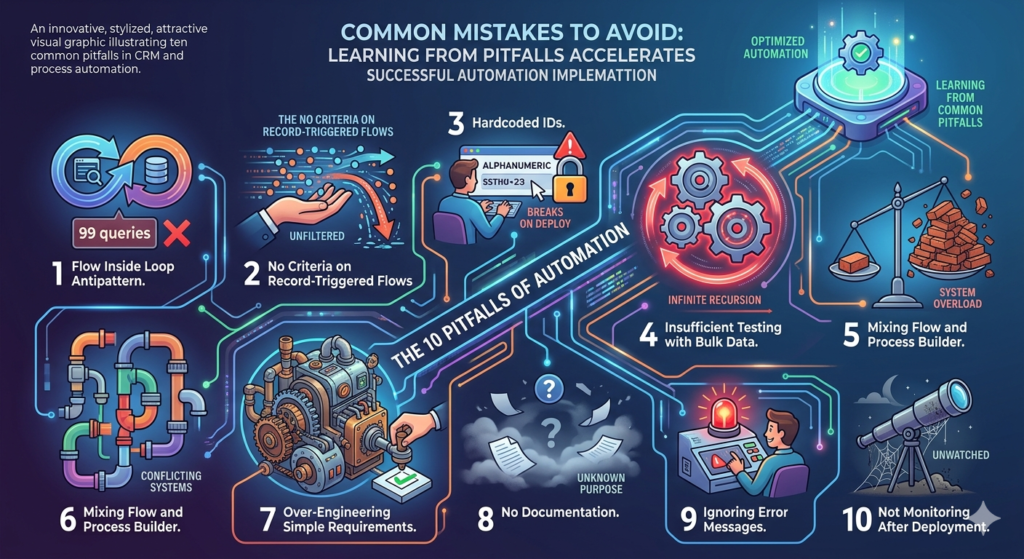
Mistake 1: Flow Inside Loop Antipattern
The Problem: Placing Get Records or Update Records elements inside a Loop element.
Why It Fails: Each loop iteration executes the query or DML, consuming governor limits exponentially.
Example of Failure:
Looping through 100 Opportunities, querying related Contacts in each iteration = 100 SOQL queries (limit is 100).
Correct Approach:
Query all related Contacts before the loop using a collection variable, then reference the collection inside the loop.
Mistake 2: No Criteria on Record-Triggered Flows
The Problem: Creating record-triggered Flows without entry criteria, causing execution on every record change.
Why It Fails: Flows run unnecessarily, consuming resources and potentially causing unexpected updates.
Example of Failure:
Flow without criteria runs on all Account updates, even when the automation only needs to execute for Accounts with Type = “Customer”.
Correct Approach:
Set entry criteria filtering to only relevant records, preventing unnecessary executions.
Mistake 3: Hardcoded IDs
The Problem: Using specific record IDs directly in Flow or Apex rather than dynamic references.
Why It Fails: IDs differ between sandboxes and production, breaking automation after deployment.
Example of Failure:
Flow updates records to “Default Owner” with hardcoded User ID that doesn’t exist in production.
Correct Approach:
Use Custom Labels, Custom Settings, or Custom Metadata Types for configurable values.
Mistake 4: Recursive Automation Loops
The Problem: Automation triggering itself infinitely (Flow updating field that triggers same Flow).
Why It Fails: Creates infinite loops consuming governor limits and causing errors.
Example of Failure:
Account Flow updates Last Modified Date, which triggers the same Flow again, which updates Last Modified Date…
Correct Approach:
- Implement entry criteria excluding automated updates
- Use static variables in Apex to prevent recursion
- Design logic to avoid self-triggering updates
Mistake 5: Insufficient Testing with Bulk Data
The Problem: Testing automation with 1-5 records rather than realistic bulk scenarios.
Why It Fails: Governor limit issues and performance problems only appear with volume.
Example of Failure:
Flow works perfectly in testing with 2 Accounts but hits CPU timeout when 200 Accounts update during data load.
Correct Approach:
Always test with 200+ records minimum, mimicking real-world bulk operations.
Mistake 6: Mixing Flow and Process Builder
The Problem: Running both Flow and Process Builder on the same object for different purposes.
Why It Fails: Creates unpredictable execution order, performance issues, and maintenance confusion.
Example of Failure:
Process Builder updates Account field, triggering Flow, which updates another field, potentially re-triggering the Process Builder.
Correct Approach:
Migrate all automation for an object to Flow, consolidating into single automation per trigger type.
Mistake 7: Over-Engineering Simple Requirements
The Problem: Building complex Apex solutions for requirements Flow handles easily.
Why It Fails: Increases maintenance burden, requires developer resources for simple changes, and adds technical debt.
Example of Failure:
Writing 200 lines of Apex to update a field and send an email when a 10-element Flow accomplishes the same outcome.
Correct Approach:
Use the simplest tool that meets requirements; reserve Apex for genuinely complex scenarios.
Mistake 8: No Documentation
The Problem: Implementing automation without documenting business rules, logic, or purpose.
Why It Fails: Future developers/admins cannot understand, maintain, or modify automation confidently.
Example of Failure:
Six months later, no one remembers why a specific Flow exists or what business process it supports.
Correct Approach:
Document every automation with purpose, business owner, modification history, and logic explanation.
Mistake 9: Ignoring Error Messages
The Problem: Suppressing errors or failing to implement error handling in automation.
Why It Fails: Silent failures create data inconsistencies without alerting anyone to problems.
Example of Failure:
Flow fails to create related records due to validation rule, but no one notices until customer complains.
Correct Approach:
Implement fault paths, error logging, and notifications for automation failures.
Mistake 10: Not Monitoring After Deployment
The Problem: Deploying automation and assuming it works correctly without ongoing monitoring.
Why It Fails: Changing data patterns, org configuration changes, or edge cases cause failures over time.
Example of Failure:
Flow runs successfully for months, then new product category introduces data format that breaks logic.
Correct Approach:
Schedule regular Flow execution log reviews, monitor error rates, and establish alerts for failures.
Future of Salesforce Automation
Understanding emerging trends helps future-proof automation strategies.
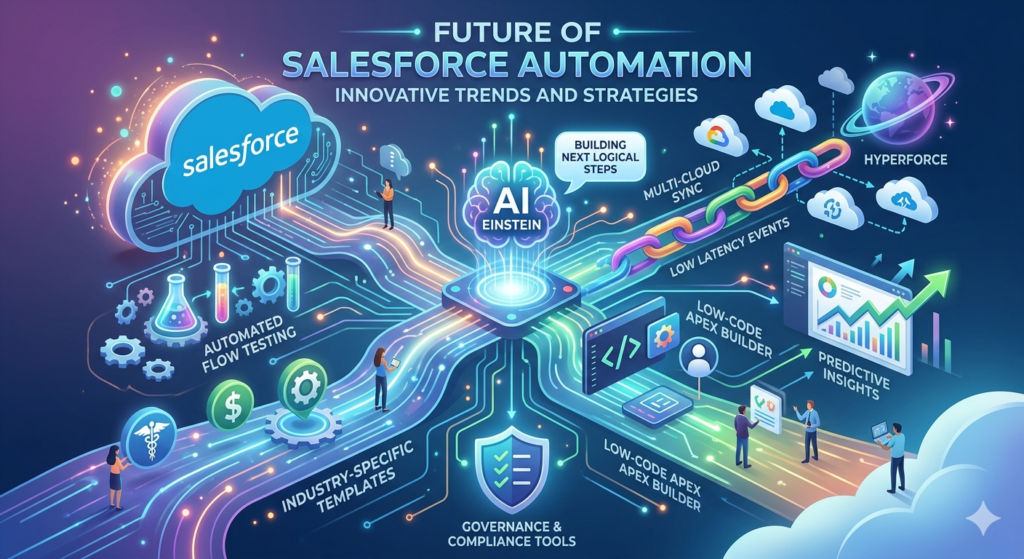
AI-Assisted Flow Building
Salesforce Einstein is integrating into Flow Builder, offering:
Intelligent Suggestions: As you build Flows, AI suggests next logical elements based on patterns in your org and similar Salesforce environments.
Automatic Optimization: AI analyzes complete Flows, recommending bulkification improvements, query optimization, and element consolidation.
Natural Language Flow Creation: Describe automation requirements in plain language; AI generates initial Flow structure requiring only refinement.
Expected Timeline: Beta features in late 2026; general availability 2027.
Enhanced Flow Testing Tools
Salesforce is developing sophisticated Flow testing capabilities:
Automated Test Generation: Tools that analyze Flows and generate test scenarios covering all paths and edge cases.
Performance Benchmarking: Built-in performance testing showing CPU time, SOQL consumption, and DML usage before deployment.
Regression Test Suites: Automated testing that runs whenever Flows are modified, validating no existing functionality breaks.
Expected Timeline: Initial releases throughout 2026; mature toolset by 2027.
Hyperforce and Multi-Cloud Automation
As Salesforce migrates to Hyperforce architecture:
Improved Performance: Cloud-native execution environments delivering 20-30% performance improvements for both Flow and Apex.
Cross-Cloud Automation: Easier integration patterns between Salesforce and other cloud platforms (AWS, Google Cloud, Azure) through standardized connectors.
Event-Driven Architecture: Enhanced platform event capabilities enabling truly reactive systems with microsecond latency.
Expected Timeline: Ongoing rollout; most orgs migrated by 2027.
Low-Code Apex
Salesforce is exploring middle-ground tools between Flow and full Apex:
Guided Apex Builders: Visual interfaces generating optimized Apex code for common patterns (trigger handlers, batch classes, schedulable classes).
Code Snippet Libraries: Reusable, tested Apex components callable from Flows without writing custom code.
Citizen Developer Apex: Simplified Apex subset with guardrails preventing common mistakes while enabling more complex logic than Flow allows.
Expected Timeline: Experimental features in 2027; production-ready 2028+.
Advanced Analytics Integration
Flow and Apex will integrate more deeply with Salesforce analytics:
Automation Insights: Dashboards showing which automations execute most frequently, consume most resources, and fail most often.
Business Impact Tracking: Correlation between automation and business outcomes (e.g., this Flow increased opportunity conversion by 12%).
Predictive Automation: AI suggesting new automation opportunities based on manual user actions and data patterns.
Expected Timeline: Initial features late 2026; comprehensive analytics 2027.
Industry-Specific Automation Templates
Salesforce is developing vertical-specific automation libraries:
Healthcare Automation: HIPAA-compliant Flow templates for patient management, consent tracking, and care coordination.
Financial Services Automation: Regulatory compliance-focused automation for KYC, transaction monitoring, and risk assessment.
Manufacturing Automation: Supply chain management, inventory optimization, and production scheduling Flows.
Expected Timeline: Initial industry packs 2026; expanded coverage 2027-2028.
Governance and Compliance Tools
Enhanced tools for managing automation at scale:
Automation Catalogs: Centralized registries documenting all automations, their purpose, owners, and dependencies.
Impact Analysis Tools: Before making changes, see exactly which automations, processes, and integrations are affected.
Automated Compliance Scanning: Tools that verify automations meet regulatory requirements and flag potential violations.
Expected Timeline: Enterprise-focused features rolling out throughout 2026-2027.
Conclusion: Building the Right Automation Strategy for 2026
The salesforce automation comparison 2026 landscape presents clear choices: Flow for declarative automation, Apex for complex and performance-critical scenarios, and Process Builder only as legacy technology requiring migration.
Successful Salesforce automation strategies in 2026 follow these principles:
Flow First: Default to Flow for new automations unless specific requirements demand Apex. The platform’s continued investment in Flow capabilities ensures long-term viability and continuous improvement.
Apex When Necessary: Don’t avoid Apex when scenarios genuinely require its power. Performance-critical operations, complex algorithms, and sophisticated integrations benefit from code’s precision and control.
Migrate Process Builders: Treat Process Builder migration as a 2026 priority rather than deferring to future years. The technical debt and performance issues only worsen with time.
Design for Scale: Build every automation considering bulk operations, future growth, and maintenance by team members who weren’t involved in original creation.
Monitor and Optimize: Automation isn’t “deploy and forget.” Regular performance reviews, error monitoring, and optimization ensure automation continues delivering value efficiently.
Invest in Governance: As automation proliferates, governance frameworks prevent chaos. Naming conventions, documentation standards, testing requirements, and deployment processes scale automation successfully.
The future of Salesforce automation is increasingly intelligent, performant, and accessible. AI-assisted building, enhanced testing tools, and industry-specific templates will accelerate automation development while improving quality. Organizations that establish strong foundations now—migrating from Process Builder, implementing best practices, and building scalable architectures—will maximize these future capabilities.
Whether you’re a Salesforce admin building your first record-triggered Flow, a developer architecting enterprise trigger frameworks, or an architect designing automation strategy for your organization, understanding when to use apex vs flows and how to implement salesforce automation tools effectively determines your platform’s long-term success.
The question isn’t whether to automate—it’s how to automate intelligently, maintainably, and at scale. In 2026, that means embracing Flow for declarative power, leveraging Apex for complex requirements, and leaving Process Builder behind as the legacy tool it has become.
About RizeX Labs
At RizeX Labs, we specialize in delivering cutting-edge Salesforce solutions, including automation strategies across Process Builder, Flow, and Apex within the Salesforce ecosystem. Our expertise combines deep technical knowledge, industry best practices, and real-world implementation experience to help businesses streamline operations, reduce manual effort, and scale efficiently.
We empower organizations to transition from outdated automation tools to modern, scalable solutions—leveraging Salesforce Flow and Apex to build intelligent, future-ready systems that drive productivity and innovation.
Internal Links:
- Salesforce Admin course page
- Salesforce Flows vs Apex: When Should You Use Code vs No-Code Automation?
- Salesforce Page Layouts vs Lightning App Builder
- Salesforce Custom Objects: Complete Build Guide for Beginners
- Salesforce Headless 360: The Complete Guide to Building the Agentic Enterprise
- Salesforce Email Templates: Complete Guide (Classic vs Lightning)
- Salesforce Queues: Setup and Use Cases Explained
External Links:
McKinsey Sales Growth Reports
