
Introduction: What is Automation Studio in Salesforce Marketing Cloud?
In today’s data-driven marketing landscape, automation has become the cornerstone of efficient campaign management. Salesforce Marketing Cloud’s Automation Studio is a powerful workflow management tool that enables marketers to automate repetitive tasks, streamline data management processes, and execute complex marketing operations without manual intervention.
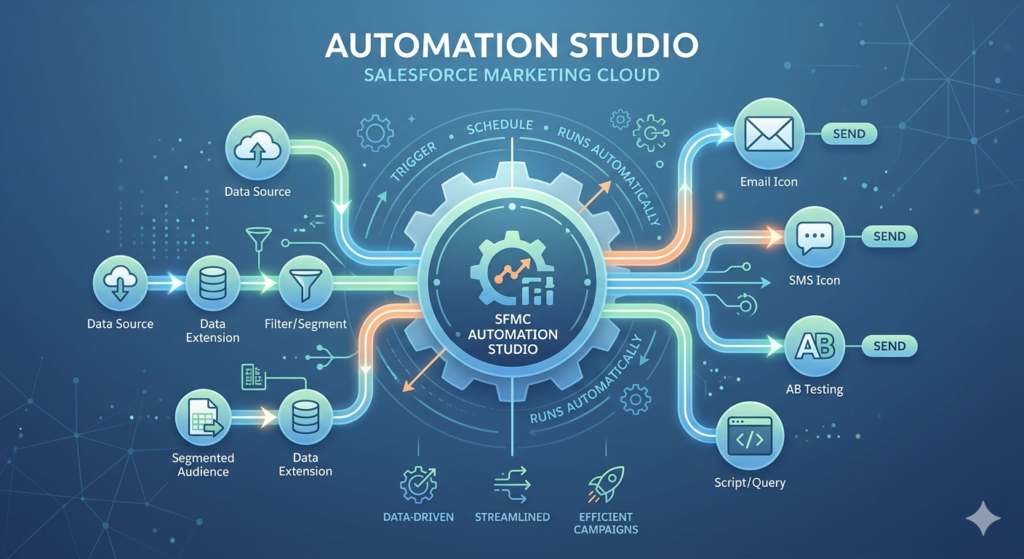
This comprehensive sfmc automation studio guide will walk you through everything you need to know about leveraging Automation Studio to maximize your marketing efficiency. Whether you’re looking to automate data imports, segment audiences, or schedule recurring campaigns, understanding marketing cloud automation capabilities is essential for modern marketing success.
Automation Studio serves as the backbone of many Marketing Cloud operations, allowing you to create sophisticated workflows that run on specific schedules or triggers. Unlike manual processes that require constant attention, SFMC scheduled automation enables your marketing operations to run seamlessly in the background, freeing your team to focus on strategy and creative execution.
Understanding Automation Studio: The Foundation of Marketing Cloud Automation
Automation Studio is a dedicated application within Salesforce Marketing Cloud designed to automate multi-step processes involving data management, audience segmentation, file transfers, and campaign execution. It operates independently from other Marketing Cloud studios while integrating seamlessly with Email Studio, Mobile Studio, and Journey Builder.
The platform provides a visual interface where marketers can design automation workflows by connecting different activities in a logical sequence. This drag-and-drop functionality makes complex automation accessible even to users with limited technical expertise, though understanding the underlying concepts enhances your ability to create more sophisticated automations.
Why Automation Studio Matters
Marketing cloud automation through Automation Studio addresses several critical business needs:
- Efficiency: Eliminates manual, repetitive tasks that consume valuable time
- Consistency: Ensures processes execute the same way every time
- Scalability: Handles large-scale operations that would be impossible manually
- Timeliness: Executes tasks precisely when needed, including off-hours
- Accuracy: Reduces human error in data processing and campaign execution
Key Features and Components of Automation Studio
1. Activities: The Building Blocks
Activities are individual tasks that perform specific functions within your automation workflow. Each activity type serves a distinct purpose in your marketing cloud automation strategy. Understanding these components is crucial to mastering this sfmc automation studio guide.
The main activity types include:
- Import Activities: Transfer data from external sources into Marketing Cloud data extensions
- SQL Query Activities: Execute SQL queries to segment, transform, or aggregate data
- Filter Activities: Create audience segments based on specific criteria
- Data Extract Activities: Export data from Marketing Cloud to external locations
- Script Activities: Execute SSJS (Server-Side JavaScript) or AMPscript code
- File Transfer Activities: Move files between FTP locations and Marketing Cloud
- Send Email Activities: Trigger email sends to specified audiences
2. Workflows: Connecting Activities into Processes
Workflows represent the complete automation process, connecting multiple activities in a specific sequence. When building workflows in this sfmc automation studio guide framework, you arrange activities in logical order, with each step completing before the next begins.
Workflows support:
- Sequential execution: Activities run one after another
- Conditional logic: Different paths based on success or failure
- Error handling: Alternative actions when activities fail
- Parallel processing: Multiple activities running simultaneously (within limits)
3. Scheduling: Timing Your Automations
SFMC scheduled automation capabilities allow you to control exactly when your workflows execute. Scheduling options include:
One-Time Schedules: Execute automation once at a specific date and time, ideal for single campaign launches or one-off data processing tasks.
Recurring Schedules: Run automations repeatedly based on:
- Hourly intervals: Execute multiple times per day
- Daily schedules: Run at specific times each day
- Weekly patterns: Execute on selected days of the week
- Monthly schedules: Run on specific dates each month
Trigger-Based Execution: Launch automations based on specific events:
- File Drop: When a file appears in a designated location
- API Trigger: When an external system calls the automation
- Completion of Another Automation: Chain automations together
How Automation Studio Works: Step-by-Step Process
Understanding the mechanics of marketing cloud automation helps you design more effective workflows. Here’s how Automation Studio processes work from creation to execution:
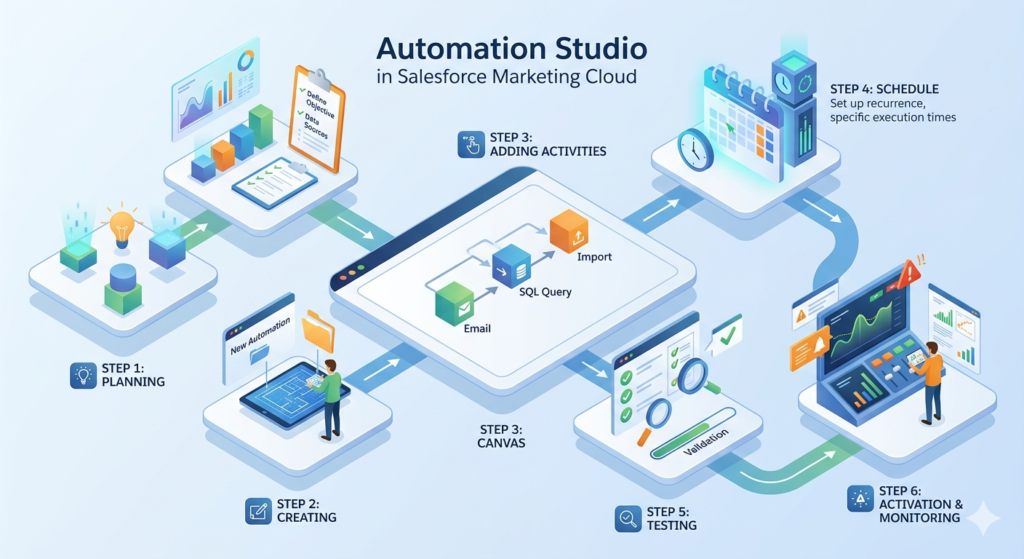
Step 1: Planning Your Automation
Before building, clearly define:
- Objective: What should this automation accomplish?
- Data Sources: Where does necessary data originate?
- Processing Steps: What transformations or actions are needed?
- Timing Requirements: When and how often should this run?
- Success Metrics: How will you measure effectiveness?
Step 2: Creating the Automation
- Navigate to Automation Studio in Marketing Cloud
- Click “New Automation” and provide a descriptive name
- Select the appropriate folder for organization
- Add a clear description explaining the automation’s purpose
Step 3: Adding Activities to Your Workflow
This critical phase of our sfmc automation studio guide involves:
- Dragging activities from the activity library onto the workflow canvas
- Configuring each activity with specific parameters and settings
- Connecting activities by drawing lines between them to establish sequence
- Setting success criteria to determine how the workflow proceeds
Step 4: Configuring the Schedule
Based on your requirements, configure the SFMC scheduled automation settings:
- Select schedule type (one-time, recurring, or triggered)
- Specify exact timing parameters
- Set timezone preferences
- Configure start and end dates for recurring schedules
Step 5: Testing and Validation
Before activating production automations:
- Test with sample data to verify expected outcomes
- Review activity logs to identify any errors or warnings
- Validate data quality in destination data extensions
- Confirm timing meets business requirements
Step 6: Activation and Monitoring
Once validated:
- Activate the automation to begin scheduled execution
- Monitor initial runs closely for unexpected issues
- Set up notifications for failures or completion
- Document the automation for team reference
Deep Dive: Different Activity Types in Automation Studio
Understanding each activity type is essential to this comprehensive sfmc automation studio guide. Let’s explore the most commonly used activities in detail.
SQL Query Activity: Data Transformation Powerhouse
SQL Query activities enable sophisticated data manipulation using SQL syntax. This activity is fundamental to advanced marketing cloud automation strategies.
Key Capabilities:
- Join multiple data extensions to create unified customer views
- Segment audiences based on complex business logic
- Calculate metrics and aggregate data
- Clean and standardize data formats
- Create derived attributes from existing data
Common Use Cases:
- Building segmented audiences for targeted campaigns
- Creating customer lifecycle stage classifications
- Calculating customer lifetime value or engagement scores
- Aggregating transactional data for reporting
- Deduplicating records across multiple sources
Best Practices:
- Always specify target data extensions with appropriate data retention policies
- Use indexes on frequently queried fields for better performance
- Test queries on sample data before production deployment
- Include WHERE clauses to limit processing to necessary records
- Document complex query logic for future maintenance
Import Activity: Bringing External Data into Marketing Cloud
Import activities transfer data from external sources into Marketing Cloud data extensions, forming the foundation of many SFMC scheduled automation workflows.
Import Sources:
- FTP locations: Files uploaded to Marketing Cloud’s Enhanced FTP
- Safehouse locations: Secure internal file storage
- Web locations: Files accessible via HTTP/HTTPS URLs
Configuration Options:
- File naming patterns: Support for wildcards and date tokens
- Column mapping: Match source columns to target fields
- Data action: Overwrite, update, or append to existing records
- Field types: Text, number, date, email address, phone, etc.
Import Scenarios:
- Daily customer data updates from CRM systems
- Product catalog refreshes from e-commerce platforms
- Transactional data imports for triggered campaigns
- Subscriber preference updates
- List imports from external data providers
Filter Activity: Audience Segmentation Made Simple
Filter activities create targeted audience segments based on data extension criteria without requiring SQL knowledge, making marketing cloud automation accessible to non-technical users.
Filter Capabilities:
- Simple conditions: Single criteria filtering (e.g., State equals “California”)
- Complex conditions: Multiple AND/OR criteria combinations
- Date-based filtering: Relative or absolute date comparisons
- Numerical ranges: Greater than, less than, between operations
- Text matching: Contains, begins with, ends with patterns
Advantages:
- User-friendly interface for basic segmentation
- No SQL knowledge required
- Quick setup for straightforward filtering needs
- Built-in validation of filter criteria
Limitations:
- Cannot join multiple data extensions
- Limited to single data extension as source
- Less flexible than SQL for complex logic
- Performance constraints on very large data sets
Script Activity: Extending Automation Capabilities
Script activities execute custom code (SSJS or AMPscript) within your automation workflow, enabling advanced marketing cloud automation scenarios beyond standard activity capabilities.
Common Script Applications:
- API calls: Interact with external systems via REST or SOAP APIs
- Complex calculations: Perform mathematical operations beyond SQL capabilities
- Data validation: Implement custom business rules
- Dynamic configuration: Adjust automation behavior based on conditions
- Custom logging: Create detailed audit trails
Considerations:
- Requires JavaScript or AMPscript programming knowledge
- Script execution time limits apply (30 minutes maximum)
- Error handling must be coded explicitly
- Debugging can be challenging without proper logging
Example Use Case:
A script activity might call an external weather API to determine if promotional emails about outdoor products should be sent based on forecasted conditions in each customer’s region.
Data Extract Activity: Exporting Marketing Cloud Data
Data Extract activities export data from Marketing Cloud to external locations, completing the data lifecycle in your sfmc automation studio guide framework.
Extract Types:
- Data Extension Extract: Export specific data extensions
- Tracking Extract: Export email tracking data (opens, clicks, bounces)
- Subscriber Extract: Export subscriber information
- Unsubscribe Extract: Export opt-out data
Extract Destinations:
- Enhanced FTP: Marketing Cloud’s secure FTP location
- Safehouse: Internal secure storage
- Shared FTP: Custom FTP locations (requires configuration)
Business Applications:
- Daily data syncs to external data warehouses
- Reporting exports for business intelligence tools
- Compliance-related data archiving
- Integration with downstream marketing systems
- Backup and disaster recovery processes
Real-World Use Cases and Practical Examples
Understanding theoretical concepts is valuable, but seeing marketing cloud automation applied to real business scenarios brings this sfmc automation studio guide to life.
Use Case 1: Daily Customer Data Synchronization
Business Need: A retail company needs to update customer profiles daily with purchase data from their e-commerce platform.
Automation Workflow:
- Import Activity: Import nightly customer transaction file from Enhanced FTP
- SQL Query Activity: Join transaction data with master customer profile
- SQL Query Activity: Calculate updated customer lifetime value and segment
- Send Email Activity: Trigger personalized thank-you email to new purchasers
- Data Extract Activity: Export updated customer segments for external analytics
Schedule: Daily at 2:00 AM (after e-commerce system completes nightly export)
Business Impact: Ensures marketing campaigns always target customers based on most recent purchase behavior, improving relevance and conversion rates.
Use Case 2: Abandoned Cart Recovery
Business Need: Send automated reminders to customers who added items to their cart but didn’t complete purchase.
Automation Workflow:
- Import Activity: Import hourly cart abandonment data
- SQL Query Activity: Identify carts abandoned 2+ hours ago (not already contacted)
- Filter Activity: Exclude customers who purchased in the last hour
- Send Email Activity: Send personalized cart reminder with product details
- SQL Query Activity: Update tracking table to prevent duplicate reminders
Schedule: Hourly during business hours
Business Impact: Recovers 15-20% of abandoned carts through timely, relevant outreach.
Use Case 3: Monthly Engagement Re-activation
Business Need: Identify and re-engage customers who haven’t opened emails in 60 days.
Automation Workflow:
- SQL Query Activity: Identify subscribers with no opens in past 60 days
- SQL Query Activity: Exclude recent purchasers (engaged through other channels)
- Filter Activity: Segment by customer tier (VIP vs. standard)
- Send Email Activity: Send tier-appropriate re-engagement campaign
- SQL Query Activity: Update customer engagement status
Schedule: Monthly on the 1st at 9:00 AM
Business Impact: Prevents list decay and reduces deliverability issues by proactively addressing disengagement.
Use Case 4: Weekly Performance Reporting
Business Need: Automatically distribute weekly campaign performance reports to stakeholders.
Automation Workflow:
- SQL Query Activity: Aggregate email performance metrics from past week
- SQL Query Activity: Calculate week-over-week performance changes
- Data Extract Activity: Export formatted report to shared location
- Send Email Activity: Distribute report to marketing leadership
- Script Activity: Post summary metrics to company dashboard API
Schedule: Every Monday at 8:00 AM
Business Impact: Ensures consistent reporting cadence and reduces manual reporting effort by 10+ hours weekly.
Automation Studio vs. Journey Builder: Understanding the Differences
A common question in any sfmc automation studio guide concerns when to use Automation Studio versus Journey Builder. While both enable marketing cloud automation, they serve different purposes.
Automation Studio: Operational Efficiency
Primary Focus: Data management and operational marketing tasks
Best For:
- Scheduled, recurring data processes
- Batch processing of large data sets
- File imports and exports
- Data preparation and segmentation
- Administrative tasks and housekeeping
Execution Model:
- Runs on predetermined schedules
- Processes all qualifying records simultaneously
- Optimized for bulk operations
- Limited personalization capabilities
Journey Builder: Customer Experience
Primary Focus: Individual customer journey orchestration
Best For:
- Event-triggered communications
- Multi-channel customer journeys
- Behavior-based messaging
- Decision splits based on engagement
- Real-time personalized experiences
Execution Model:
- Contacts enter individually based on triggers or criteria
- Each contact progresses independently
- Supports wait periods and engagement-based branching
- Rich personalization and dynamic content
When to Use Each Platform
Choose Automation Studio When:
- Processing needs happen on a regular schedule
- Working with large batch data operations
- Preparing data for other Marketing Cloud uses
- Managing infrastructure tasks (imports, exports, archiving)
- Budget constraints limit Journey Builder licenses
Choose Journey Builder When:
- Customer experience requires multi-touch orchestration
- Messages should respond to individual behaviors
- Cross-channel coordination is necessary
- Timing varies by individual customer actions
- Personalization depth drives campaign success
Using Both Together:
Many sophisticated SFMC scheduled automation strategies combine both platforms:
- Automation Studio prepares and segments data daily
- Journey Builder uses those segments for personalized customer journeys
- Automation Studio handles periodic cleanup and maintenance
- Journey Builder responds to real-time customer behaviors
Benefits of Using Automation Studio
Implementing robust marketing cloud automation through Automation Studio delivers substantial business value:
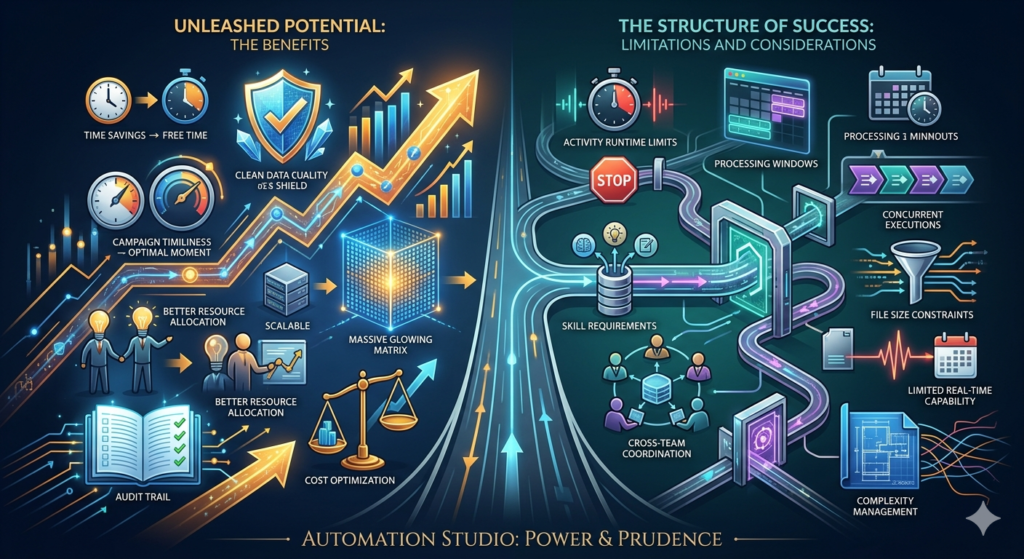
Time Savings and Efficiency
Marketing teams report saving 20-40 hours weekly by automating routine tasks. Processes that previously required manual execution daily now run automatically, freeing marketers for strategic work.
Improved Data Quality
Automated processes execute consistently according to defined rules, eliminating human error in data transfers, transformations, and segmentation. This reliability improves campaign targeting accuracy.
Enhanced Campaign Timeliness
SFMC scheduled automation ensures campaigns execute exactly when planned, including nights and weekends. Time-sensitive communications reach audiences at optimal moments without requiring staff availability.
Scalability
Automation Studio handles processing volumes that would be impractical manually. Whether processing millions of records or orchestrating dozens of simultaneous campaigns, automation scales efficiently.
Better Resource Allocation
By automating operational tasks, marketing teams redirect expertise toward strategy, creative development, and analysis—activities that directly impact business outcomes.
Audit Trail and Compliance
Automation Studio maintains detailed logs of all automation runs, creating comprehensive audit trails for compliance purposes and troubleshooting.
Cost Optimization
While there are licensing costs, automation typically delivers positive ROI through labor savings, improved campaign performance, and reduced errors requiring remediation.
Limitations and Considerations
No sfmc automation studio guide would be complete without acknowledging limitations and considerations:
Technical Limitations
Activity Runtime Limits: Script activities have 30-minute maximum execution times. Complex scripts may require optimization or splitting into multiple activities.
Processing Windows: Large data processing operations may need scheduling during off-peak hours to avoid timeout issues.
Concurrent Executions: Only a limited number of automations can run simultaneously, requiring careful scheduling for organizations with many automations.
File Size Constraints: Import files have maximum size limits, requiring file splitting for very large data sets.
Functional Constraints
Limited Real-Time Capability: Automation Studio operates on schedules or file triggers, not immediate behavioral responses like Journey Builder.
Complexity Management: As automation libraries grow, managing and documenting numerous automations becomes challenging without proper governance.
Error Recovery: Failed automations may require manual intervention to correct underlying issues before re-running.
Testing Environment: Comprehensive testing can be difficult since some activities (like email sends) require production-like data and configurations.
Organizational Challenges
Skill Requirements: Effective use requires SQL knowledge for advanced segmentation and data manipulation.
Documentation Needs: Teams must maintain current documentation as automations evolve and team members change.
Change Management: Modifying production automations requires careful planning to avoid disrupting critical business processes.
Cross-Team Coordination: Automations often depend on data from other systems, requiring coordination with IT and other departments.
Best Practices for Automation Studio Success
Following these proven practices ensures your marketing cloud automation delivers optimal results:
1. Establish Naming Conventions
Implement consistent naming standards for automations, activities, and data extensions:
- Include dates: “Import_Customer_Data_YYYYMMDD”
- Indicate purpose: “Weekly_Engagement_Reactivation”
- Show sequence: “01_Import_02_Transform_03_Send”
- Use consistent separators: Underscores or camel case, applied uniformly
2. Organize with Folders
Create logical folder structures that reflect:
- Business function: Customer acquisition, retention, service
- Frequency: Daily, weekly, monthly
- Status: Active, testing, archived
- Owner: Team or individual responsible
3. Document Thoroughly
Maintain documentation including:
- Purpose: What business need does this automation address?
- Dependencies: What external systems or processes must complete first?
- Schedule rationale: Why does this timing make sense?
- Error handling: What should happen if activities fail?
- Change history: Track modifications over time
4. Implement Error Notifications
Configure automations to notify appropriate team members when:
- Activities fail or encounter errors
- Processing completes successfully (for critical automations)
- Data quality issues are detected
- Thresholds or anomalies occur
5. Build in Data Validation
Include validation steps that:
- Check row counts: Verify expected data volumes
- Validate required fields: Ensure critical data is present
- Identify duplicates: Flag data quality issues
- Compare to baselines: Detect unusual patterns
6. Test Before Production
Always test new automations:
- Use test data extensions: Avoid impacting production data
- Verify each activity: Confirm individual components work correctly
- Test end-to-end: Run complete workflow with representative data
- Validate outputs: Confirm results match expectations
7. Monitor Regularly
Establish monitoring practices:
- Review automation logs weekly for errors or warnings
- Track runtime trends to identify performance degradation
- Audit automation usage to identify unused or redundant processes
- Measure business outcomes to confirm automations deliver value
8. Optimize Performance
Improve automation efficiency by:
- Limiting query scope: Use WHERE clauses to process only necessary records
- Scheduling strategically: Avoid peak times when system load is high
- Indexing data extensions: Speed up queries on large data sets
- Archiving old data: Prevent tables from growing unnecessarily large
9. Maintain Version Control
Track automation changes:
- Clone before modifying: Keep backup copies of working automations
- Document changes: Note what was modified and why
- Test changes thoroughly: Never modify production automations without testing
- Coordinate updates: Ensure team members know when changes occur
10. Plan for Continuity
Ensure business continuity through:
- Cross-training: Multiple team members understand critical automations
- Documentation: Detailed guides enable new team members to understand quickly
- Access management: Ensure appropriate personnel have necessary permissions
- Regular reviews: Periodically audit all automations for continued relevance
Advanced Strategies for Marketing Cloud Automation
Once you’ve mastered the basics in this sfmc automation studio guide, consider these advanced strategies:
Dynamic Automation with Script Activities
Use SSJS to create automations that adapt behavior based on conditions:
JavaScript<script runat="server">
  Platform.Load("core", "1");

  // Check current day of week
  var today = new Date().getDay();

  // Different processing logic for weekdays vs weekends
  if (today >= 1 && today <= 5) {
    // Weekday logic
    var de = DataExtension.Init("Weekday_Audience");
  } else {
    // Weekend logic
    var de = DataExtension.Init("Weekend_Audience");
  }
</script>
Chained Automations for Complex Workflows
Break complex processes into multiple automations that trigger sequentially:
Automation 1: Data collection and initial processing
Automation 2: Advanced segmentation and scoring (triggered on Automation 1 completion)
Automation 3: Campaign execution (triggered on Automation 2 completion)
This approach improves maintainability and allows parallel development.
Conditional Workflow Paths
Design automations with branching logic based on success/failure:
- Primary path: Normal processing flow
- Success path: Additional activities after successful completion
- Failure path: Alternative processing or notification when errors occur
Data-Driven Scheduling
Use script activities to determine whether subsequent activities should run:
JavaScript// Check if sufficient records exist before sending
var de = DataExtension.Init("Campaign_Audience");
var data = de.Rows.Lookup(["Status"], ["Active"]);

if (data.length >= 100) {
  // Proceed with send
  Variable.SetValue("@SendReady", "true");
} else {
  // Skip send, insufficient audience
  Variable.SetValue("@SendReady", "false");
}
Troubleshooting Common Automation Studio Issues
Even well-designed SFMC scheduled automation workflows occasionally encounter issues. Here’s how to address common problems:
Import Activity Failures
Symptoms: Import activities show “Error” status
Common Causes:
- File not present at scheduled time
- File format doesn’t match expected structure
- Column mapping misalignment
- Data type mismatches
Solutions:
- Verify file naming patterns match actual filenames
- Confirm source system successfully generates files
- Review file format and delimiter settings
- Check column mapping configuration
- Validate data types align between source and target
SQL Query Errors
Symptoms: Query activities fail or produce unexpected results
Common Causes:
- Syntax errors in SQL code
- Missing or renamed data extensions
- Insufficient permissions
- Timeout due to query complexity
Solutions:
- Test queries in Query Studio before adding to automation
- Verify all referenced data extensions exist
- Simplify complex queries or add indexes
- Break large queries into smaller steps
- Use proper JOIN syntax and WHERE clauses
Schedule Not Triggering
Symptoms: Automation doesn’t run at expected times
Common Causes:
- Automation not activated
- Incorrect timezone configuration
- End date in the past
- Schedule conflicts
Solutions:
- Confirm automation status is “Scheduled”
- Verify timezone matches your business location
- Check start and end date settings
- Review automation history for clues
Performance Issues
Symptoms: Automations run slowly or timeout
Common Causes:
- Large data volumes without optimization
- Complex queries without indexes
- Multiple automations competing for resources
- Peak-time scheduling
Solutions:
- Add WHERE clauses to limit data processing
- Create indexes on frequently queried fields
- Schedule resource-intensive automations during off-peak hours
- Break monolithic automations into smaller components
Measuring Automation Studio Success
Effective marketing cloud automation requires measuring performance and business impact:
Operational Metrics
Automation Success Rate: Percentage of scheduled runs completing successfully (target: >95%)
Average Runtime: Time required for automations to complete (monitor trends)
Error Frequency: Number of failed activities or automations (minimize through optimization)
Data Processing Volume: Records processed per automation (ensure scaling appropriately)
Business Impact Metrics
Time Savings: Hours saved through automation vs. manual processes
Campaign Timeliness: Percentage of campaigns executing on schedule (target: 100%)
Data Freshness: Average age of data when campaigns execute (minimize lag)
Cost per Automation: Total ownership cost divided by automations managed
Quality Metrics
Data Accuracy: Error rate in processed data (target: <0.1%)
Duplicate Rate: Percentage of duplicate records in automated processes
Delivery Success: Email deliverability for automation-triggered campaigns
Engagement Performance: Open and click rates for automated campaigns vs. manual
Future of Marketing Cloud Automation
The marketing cloud automation landscape continues evolving. Emerging trends shaping the future include:
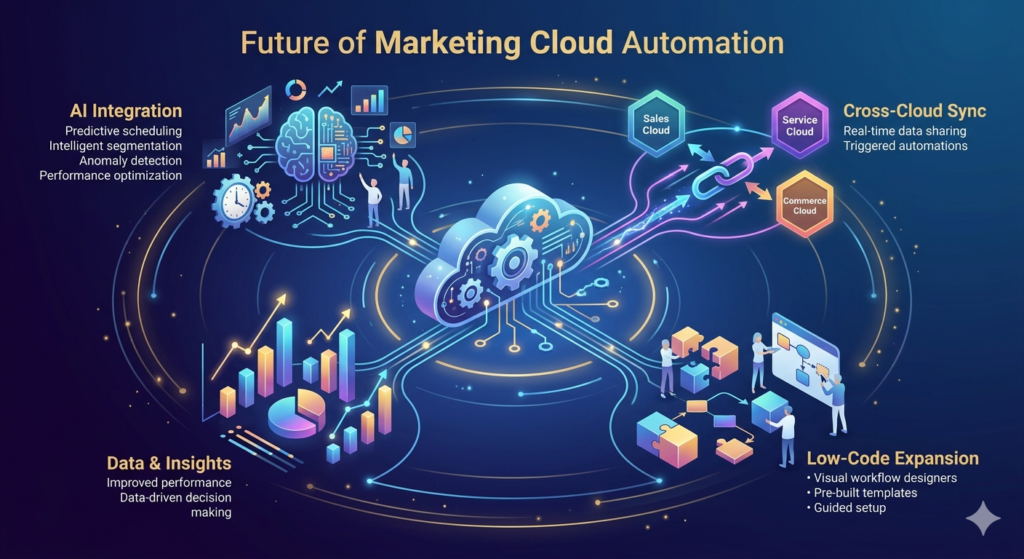
Artificial Intelligence Integration
AI-powered features will enhance automation with:
- Predictive scheduling: Optimal send times determined by AI
- Intelligent segmentation: Machine learning identifies high-value audience characteristics
- Anomaly detection: Automated identification of data quality issues
- Performance optimization: AI recommends automation improvements
Enhanced Cross-Cloud Integration
Deeper integration with Salesforce’s broader ecosystem:
- Sales Cloud synchronization: Real-time data sharing between clouds
- Service Cloud triggers: Automations responding to service interactions
- Commerce Cloud integration: Seamless e-commerce data flow
Low-Code/No-Code Expansion
Continued democratization of automation:
- Visual workflow designers: Even more intuitive interfaces
- Pre-built templates: Industry-specific automation frameworks
- Guided setup: Wizards for common automation patterns
Actionable Insights and Conclusion
This comprehensive sfmc automation studio guide has covered the essential concepts, capabilities, and best practices for leveraging Automation Studio effectively. Let’s consolidate the key takeaways into actionable insights:
Immediate Actions You Can Take
- Audit your current manual processes to identify automation opportunities with highest ROI potential
- Start simple with basic import and send automations before attempting complex workflows
- Establish naming conventions and folder structures before your automation library grows unwieldy
- Document as you build rather than postponing documentation until later
- Implement monitoring and notifications to catch issues before they impact business outcomes
Building Long-Term Automation Maturity
Foundational Phase (Months 1-3):
- Master basic activity types (Import, Filter, Send Email)
- Create first scheduled automations for routine tasks
- Establish documentation and governance practices
Intermediate Phase (Months 4-6):
- Implement SQL Query activities for segmentation
- Build multi-step workflows with conditional logic
- Integrate automations with Journey Builder
Advanced Phase (Months 7-12):
- Leverage Script activities for custom functionality
- Develop complex chained automation sequences
- Optimize performance and scalability
Optimization Phase (Ongoing):
- Regular automation audits and refinement
- Continuous measurement and improvement
- Stay current with new platform capabilities
Critical Success Factors
The most successful marketing cloud automation implementations share common characteristics:
Executive Sponsorship: Leadership understands automation value and supports necessary investment in training and resources.
Cross-Functional Collaboration: Marketing, IT, and data teams work together to ensure automations have necessary data access and technical support.
Continuous Learning: Teams invest in ongoing education about new features and best practices.
Governance Framework: Clear policies govern who can create automations, naming standards, testing requirements, and change management.
Performance Culture: Regular measurement and optimization ensure automations continue delivering business value.
Final Thoughts
Automation Studio represents one of Salesforce Marketing Cloud’s most powerful capabilities for driving marketing efficiency and effectiveness. While the learning curve can seem steep initially, the investment pays substantial dividends through time savings, improved campaign performance, and enhanced customer experiences.
Success with SFMC scheduled automation doesn’t require mastering every feature immediately. Start with clear business objectives, build foundational skills progressively, and expand capabilities as your confidence grows. Focus on solving real business problems rather than building automation for its own sake.
Remember that automation is a means to an end, not the end itself. The ultimate goal is creating more relevant, timely, and personalized customer experiences while freeing your marketing team to focus on strategy and creativity. When implemented thoughtfully following the guidance in this sfmc automation studio guide, Automation Studio becomes an indispensable partner in achieving those goals.
As marketing technology continues evolving, the organizations that thrive will be those that effectively balance human creativity with automated efficiency. Automation Studio provides the foundation for that balance, enabling marketers to work smarter, not just harder.
About RizeX Labs
At RizeX Labs, we specialize in delivering advanced Salesforce Marketing Cloud solutions, helping businesses automate, personalize, and optimize their marketing operations. Our expertise in Automation Studio enables organizations to streamline workflows, manage data efficiently, and execute high-performing campaigns at scale.
With a strong focus on real-world implementation and best practices, we help companies move from manual marketing processes to fully automated, data-driven ecosystems that drive engagement and ROI.
Internal Links:
- Salesforce Admin course page
- Salesforce Marketing Cloud vs Pardot: Which Is Right for You in 2026
- Salesforce Data Import Wizard vs Data Loader: Full Comparison (2024 Guide)
- Salesforce Custom Objects: Complete Build Guide for Beginners
- Salesforce Headless 360: The Complete Guide to Building the Agentic Enterprise
- Salesforce Mobile App: Complete Admin Configuration Guide for Enterprise Deployment
- Salesforce Currency Management: Multi-Currency Setup Guide
External Links:
McKinsey Sales Growth Reports
