
Introduction
Every enterprise organization faces the same fundamental integration challenge: critical business data lives in multiple systems simultaneously. Customer order history sits in SAP. Financial records live in Oracle. Product inventory is managed in a legacy database. Employee records are stored in Workday. And your sales team needs to see all of it — right now, from inside Salesforce, while talking to a customer on the phone.
The traditional solution is data replication: copy everything into Salesforce using ETL pipelines, scheduled batch jobs, or API integrations. But replication creates its own problems. Data goes stale between sync cycles. Storage costs escalate as data volumes grow. Compliance teams worry about maintaining duplicate copies of sensitive financial or healthcare records. And every time the source system changes its schema, your integration breaks.
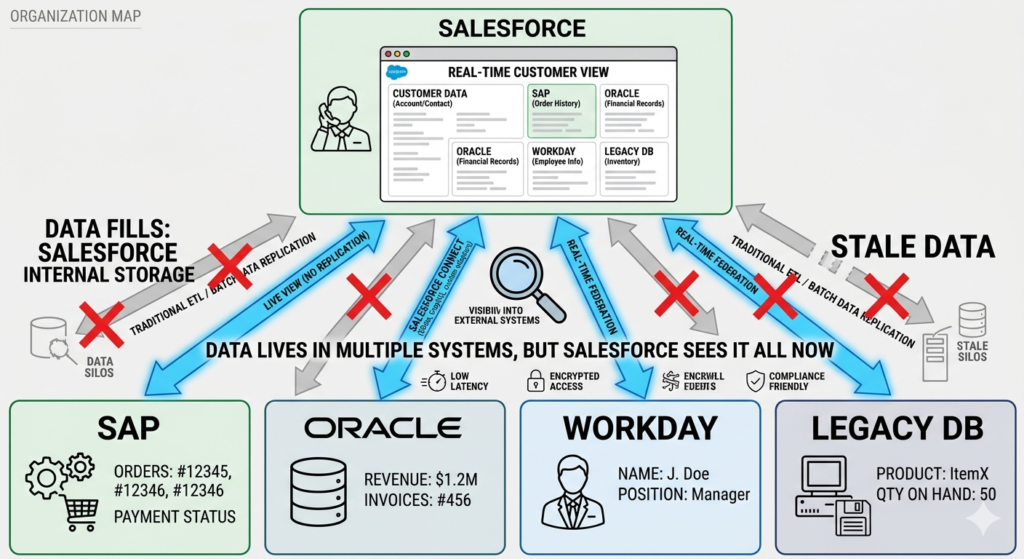
Salesforce External Objects offer a fundamentally different approach. Instead of copying external data into Salesforce, External Objects create a live window into external systems — letting Salesforce users see real-time data from ERP systems, databases, middleware platforms, and third-party applications directly on Salesforce records, without ever storing that data inside Salesforce itself.
Powered by Salesforce Connect, External Objects transform how enterprise organizations think about CRM integration. Rather than asking “How do we move data into Salesforce?” the question becomes “How do we give Salesforce users real-time visibility into data wherever it lives?”
This guide answers that question comprehensively. We’ll cover what external data Salesforce access looks like in practice, how Salesforce Connect works under the hood, step-by-step setup instructions, architecture patterns for common enterprise systems, performance considerations, security requirements, real limitations, and the strategic framework for deciding when External Objects are the right integration choice — and when they’re not.
Let’s build your external data strategy.
2. What Are Salesforce External Objects?
Salesforce External Objects are a special type of Salesforce object that map to data stored and managed entirely outside of Salesforce. Unlike standard objects (like Account or Contact) or custom objects (like Project__c) where data is stored within Salesforce’s database, External Objects act as a virtual representation of external data — a live pointer to records that exist in another system.
Architecture Overview
Think of External Objects as a structured view into an external data source. When a Salesforce user opens a record that includes an External Object, Salesforce issues a real-time query to the external system, retrieves the data, and displays it on the page — all within seconds, and all without ever persisting that data in Salesforce storage.
text[Salesforce User] → [External Object] → [Salesforce Connect] → [External System]
                                               ↕
                                        Real-time query
                                        (data never stored)
[Architecture diagram suggestion: Flow showing Salesforce UI → External Object → Salesforce Connect adapter → OData endpoint → External Database/ERP]
How External Objects Differ from Standard and Custom Objects
| Characteristic | Standard Object | Custom Object | External Object |
|---|---|---|---|
| Data Storage | Salesforce database | Salesforce database | External system only |
| Data Freshness | Current (stored) | Current (stored) | Real-time (queried) |
| API Name Suffix | None (e.g., Account) | __c (e.g., Project__c) | __x (e.g., Orders__x) |
| Storage Cost | Uses Salesforce storage | Uses Salesforce storage | No Salesforce storage |
| Reporting | Full report support | Full report support | Limited |
| Triggers/Flows | Full support | Full support | Very limited |
| Search | Global search | Global search | Limited |
| Offline Access | ✅ Yes | ✅ Yes | ❌ No |
| SOQL Queries | Full SOQL | Full SOQL | Limited SOQL |
Supported External Systems
Salesforce Connect can integrate with virtually any system that exposes data through a supported protocol:
- OData 2.0 and 4.0 — Most common; supported by SAP, Microsoft, Oracle, and many databases
- Custom adapters (Apex) — For systems without native OData support
- Cross-org adapters — Connect two Salesforce orgs via External Objects
- Amazon DynamoDB (via partner adapters)
- Middleware platforms — MuleSoft, Boomi, Informatica exposing OData endpoints
The External Object Identifier (__x)
Every External Object carries the __x suffix in its API name — a clear signal that data lives outside Salesforce. This naming convention helps developers and admins immediately recognize external data sources when writing code or building automations.
3. What Is Salesforce Connect?
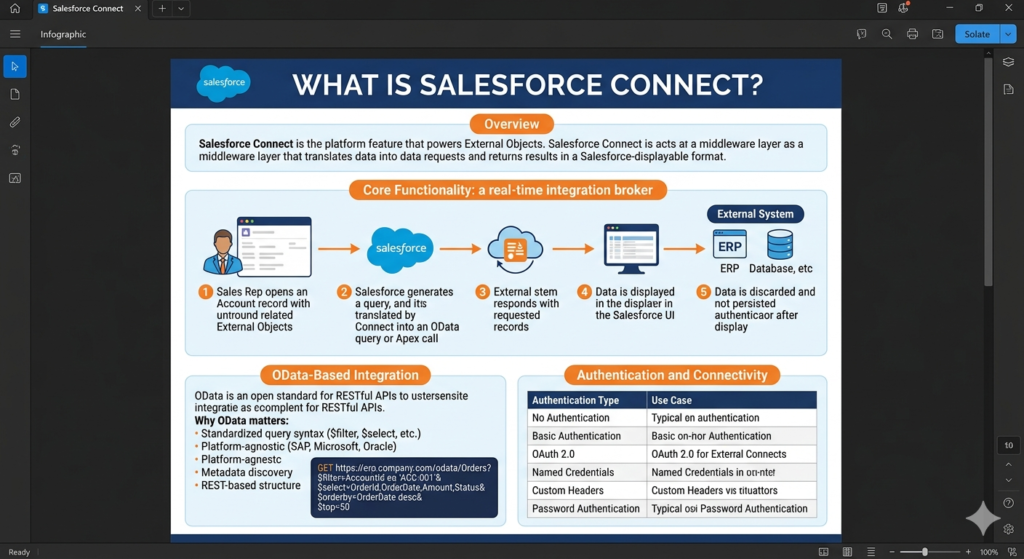
Salesforce Connect is the platform feature that powers External Objects — the middleware layer that manages the connection between Salesforce and external data sources, translating Salesforce data requests into queries that external systems can understand and returning results in a format Salesforce can display.
Core Functionality
Salesforce Connect acts as a real-time integration broker:
- User requests data — A sales rep opens an Account record with a related Orders External Object
- Salesforce generates a query — Connect translates the request into an OData query (or Apex adapter call)
- External system responds — The ERP or database returns the requested records
- Data is displayed — Connect formats and presents the data in Salesforce UI
- Data is discarded — After display, the data is not persisted in Salesforce
OData-Based Integration Explained
OData (Open Data Protocol) is an open standard for building and consuming RESTful APIs. It defines a consistent query language for accessing structured data across different systems — similar to how SQL works for relational databases, but over HTTP.
Why OData matters for Salesforce Connect:
- Standardized query syntax (
$filter,$select,$orderby,$top) - Platform-agnostic — works with SAP, Microsoft, Oracle, custom implementations
- Supports metadata discovery — Salesforce can automatically detect the external data schema
- REST-based — works over standard HTTPS with familiar authentication patterns
OData query example that Salesforce Connect generates:
textGET https://erp.company.com/odata/Orders?
  $filter=AccountId eq 'ACC-001'&
  $select=OrderId,OrderDate,Amount,Status&
  $orderby=OrderDate desc&
  $top=50
Authentication and Connectivity
Salesforce Connect supports multiple authentication models:
| Authentication Type | Use Case |
|---|---|
| No Authentication | Internal, trusted network endpoints |
| Basic Authentication | Simple username/password (not recommended for production) |
| OAuth 2.0 | Preferred for modern REST APIs |
| Named Credentials | Salesforce-managed credential store (strongly recommended) |
| Custom Headers | API key-based authentication |
| Password Authentication | Legacy system compatibility |
[Internal Link: Salesforce Named Credentials Setup — Secure credential management for external connections]
4. Salesforce External Objects vs Traditional Data Integration
Understanding when salesforce external objects outperform traditional integration approaches — and when they don’t — is fundamental to making the right architectural decision.
Comprehensive Comparison Table
| Dimension | External Objects (Salesforce Connect) | ETL / Batch Integration | Real-Time API Integration |
|---|---|---|---|
| Data Storage | No Salesforce storage | Full Salesforce storage | Full Salesforce storage |
| Data Freshness | Real-time (on access) | Stale between sync cycles | Real-time (on trigger) |
| Storage Cost | None for external data | High for large datasets | High for large datasets |
| Setup Complexity | Medium | Medium-High | High |
| Maintenance | Low (schema sync) | High (sync management) | High (API management) |
| Reporting | Very limited | Full Salesforce reports | Full Salesforce reports |
| Automation | Very limited | Full automation support | Full automation support |
| Performance | Dependent on external system | Fast (local data) | Fast (local data) |
| Offline Access | No | Yes | Yes |
| Best For | Read-heavy, high-volume reference data | Process-critical, frequently used data | Event-driven, transactional data |
| Compliance | Data stays in source system | Data duplicated in Salesforce | Data duplicated in Salesforce |
| Integration Failure Impact | Data unavailable (graceful) | No impact (local copy) | Depends on implementation |
The Strategic Framework
Use this three-question framework to guide your architectural decision:
- Does the data need to be current at the moment of access? → External Objects (real-time) or API integration
- Does the data drive Salesforce automation, reports, or dashboards? → ETL or API integration
- Is the dataset too large or sensitive to replicate into Salesforce? → External Objects
Most enterprise architectures use all three approaches simultaneously — External Objects for reference data, ETL for reporting data, and real-time API for transactional data.
5. Key Benefits of Salesforce External Objects
The value proposition of salesforce external objects is compelling for specific enterprise scenarios. Here’s where they genuinely shine.
5a. Real-Time External Data Access
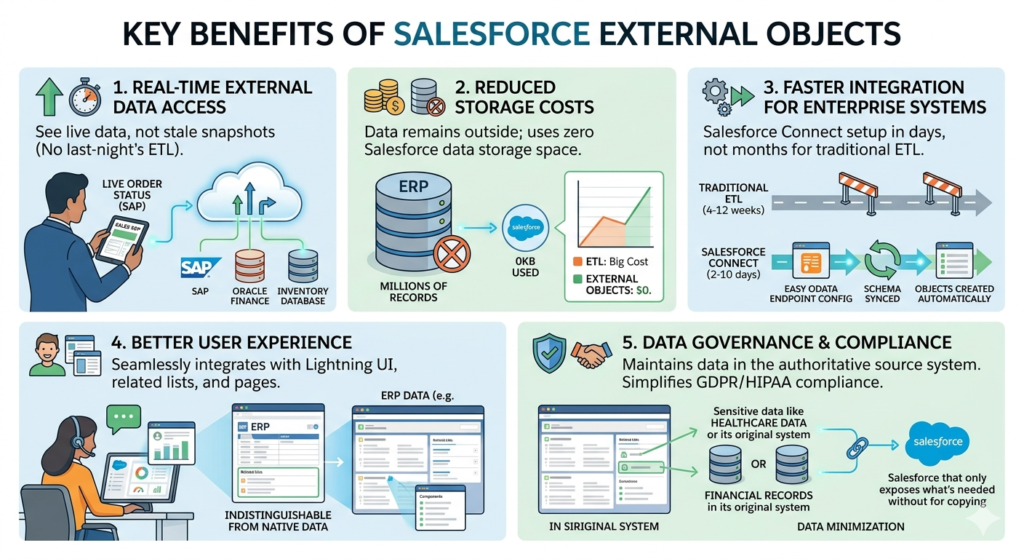
The defining benefit: when a Salesforce user opens a record containing External Object data, they see the current state of that data — not a snapshot from last night’s ETL job.
Business impact:
- Customer service rep sees live order status from SAP while talking to a customer
- Account executive sees current credit limit from Oracle Finance during a negotiation
- Support agent sees real-time inventory availability during an upsell conversation
- No more “let me check the system and call you back” conversations caused by stale CRM data
5b. Reduced Storage Costs
Salesforce storage pricing is significant at enterprise scale. A large ERP system might contain millions of order records, transaction histories, or inventory items — data that’s valuable for context but expensive to replicate.
Storage cost example:
| Scenario | Records | Avg Record Size | Salesforce Storage | Annual Cost (est.) |
|---|---|---|---|---|
| ETL: Order history | 5M records | 2KB | 10GB | $2,500–$5,000+ |
| External Objects: Same data | 5M records | 0KB in Salesforce | 0GB | $0 |
5c. Faster Integration for Enterprise Systems
Traditional ETL integrations for systems like SAP or Oracle can take months to design, build, test, and deploy. Salesforce Connect can be operational in days:
- OData endpoint exposed by the source system
- External Data Source configured in Salesforce Setup
- Schema synced and External Objects created automatically
- Relationships configured and page layouts updated
Time to value: 2–10 days vs. 4–12 weeks for traditional ETL
5d. Better User Experience
For Salesforce users, the experience is seamless. External data appears in related lists, record pages, and Lightning components — indistinguishable from native Salesforce data in the UI.
A customer service agent doesn’t need to:
- Switch to the ERP system
- Log in with separate credentials
- Search for the customer record manually
- Copy information back into Salesforce
Everything appears in one unified workspace.
5e. Data Governance and Compliance
For industries with strict data governance requirements — healthcare (HIPAA), financial services (SOX, GDPR), or government — keeping sensitive data in its authoritative source system rather than creating duplicate copies in Salesforce can significantly simplify compliance posture.
External Objects support the principle of data minimization: only expose what’s needed, when it’s needed, without creating unnecessary copies.
6. Common Use Cases for External Data Salesforce
External data Salesforce access through External Objects is most valuable in these enterprise scenarios.
Use Case 1: ERP Order History in Salesforce
Scenario: A manufacturing company runs SAP for order management. Sales reps need to see customer order history during account reviews without switching systems.
Implementation: External Object SAP_Orders__x surfaced on the Account record as a related list. Reps see order number, date, amount, status, and delivery date in real time from SAP — without any data leaving the ERP system.
Use Case 2: Financial Systems Integration
Scenario: A bank uses an internal loan management system. Relationship managers need current loan balances, payment status, and credit scores during client meetings in Salesforce.
Implementation: External Object Loan_Records__x connected via OData adapter to the loan management system. Sensitive financial data stays in the authoritative banking system, but is visible to authorized Salesforce users during client interactions.
Use Case 3: Product Inventory Visibility
Scenario: A wholesale distributor manages inventory in a legacy warehouse management system. Inside sales reps need real-time stock availability to promise accurate delivery dates.
Implementation: External Object Inventory__x connected to the warehouse system via a MuleSoft OData endpoint. Reps see live inventory counts by product and location directly from the Opportunity record.
Use Case 4: Healthcare Records Access
Scenario: A healthcare network uses an Epic EHR system for patient records. Patient services coordinators need basic patient information in Salesforce Health Cloud without duplicating PHI.
Implementation: External Object Patient_Summary__x exposing non-PHI reference fields from Epic, minimizing protected health information stored in Salesforce while providing coordinators necessary context.
Use Case 5: Legacy Database Access
Scenario: A telecommunications company has 20 years of customer interaction history in a legacy Oracle database they can’t retire but won’t migrate.
Implementation: External Object Legacy_Interactions__x connected via OData layer exposing historical records. New interactions captured in Salesforce; historical context visible through External Objects.
7. Salesforce Connect Setup (Step-by-Step)
Follow this step-by-step guide for a complete salesforce connect implementation.
7a. Prerequisites
Before beginning setup, verify:
Licensing Requirements:
| License Type | What It Enables |
|---|---|
| Salesforce Connect — OData 4.0 | Connect to OData 4.0 endpoints |
| Salesforce Connect — OData 2.0 | Connect to OData 2.0 endpoints |
| Salesforce Connect — Cross-Org | Connect two Salesforce orgs |
| Salesforce Connect — Custom Adapter | Apex-based custom connections |
Important: Salesforce Connect licensing is per-org, not per-user. Verify your org’s current license via Setup → Company Information → Salesforce Connect.
External System Readiness:
- OData endpoint is deployed and accessible from Salesforce IP ranges
- Authentication credentials or OAuth configuration is ready
- Firewall rules allow Salesforce outbound IP addresses
- OData metadata document is accessible at
$metadataendpoint - Test the endpoint independently using Postman or similar tool
Security Review:
- Named Credentials created for storing authentication details
- SSL certificate valid on the external endpoint
- Data sensitivity classification reviewed with security team
7b. Create External Data Source
Navigation Path:Setup → Quick Find → "External Data Sources" → New External Data Source
Step-by-Step:
- Click “New External Data Source”
- External Data Source Name: SAP Order History (display name)
- Name: SAP_Order_History (API name — auto-populated)
- Type: Select your adapter:
- Salesforce Connect: OData 4.0
- Salesforce Connect: OData 2.0
- Salesforce Connect: Cross-Org
- Salesforce Connect: Custom (Apex)
- URL: Enter your OData service root URL
- Example:
https://sap-gateway.company.com/sap/opu/odata/sap/ZORDERS_SRV
- Example:
- Identity Type: Select authentication approach:
- Named Principal — All users share one credential
- Per User — Each user authenticates separately (more secure, more complex)
- Authentication Protocol: Select OAuth 2.0, Password, or Custom Header
- Named Credential: Select your pre-configured Named Credential (strongly recommended)
- Request Compression: Enable if the external system supports gzip compression (improves performance)
- Response Compression: Enable for large response payloads
- Click “Save and Sync” to connect and discover available entities
[Screenshot suggestion: External Data Source configuration form showing URL, type, and authentication fields]
7c. Sync External Objects
After saving the External Data Source, Salesforce Connect queries the OData $metadata endpoint and discovers all available entities.
Sync Process:
- After “Save and Sync,” the External Object Sync screen displays all available tables/entities from the external system
- Select the entities you want to expose as External Objects in Salesforce
- Click “Sync” — Salesforce creates External Object definitions with fields matching the external schema
- Navigate to Object Manager — your new External Objects (with
__xsuffix) now appear
Post-Sync Configuration:
For each External Object:
- Review fields — Verify field types are correctly mapped
- Set field-level security — Control which profiles see which fields
- Add to page layouts — Place the External Object as a related list on relevant standard or custom objects
- Configure search layouts — Define which fields appear in list views
7d. Configure Relationships
External Objects support two specialized relationship types that don’t exist for standard or custom objects:
Indirect Lookup Relationship:
Links an External Object to a Salesforce standard or custom object using an external identifier field — useful when the external system stores a Salesforce field value (like Account Number) as its key.
textSAP_Orders__x → [Indirect Lookup on Account_Number__c] → Account
Setup:
- Open the External Object in Object Manager
- Click “Fields & Relationships” → “New”
- Select “Indirect Lookup Relationship”
- Select the parent object (e.g., Account)
- Select the external column that contains the matching value
- Select the Salesforce field to match against (must be indexed, unique)
- Save
External Lookup Relationship:
Links a Salesforce standard or custom object to an External Object as the parent.
textOrder_Line_Item__c → [External Lookup] → SAP_Orders__x
Standard Lookup to External Object:
Links an External Object to another External Object — for hierarchical external data relationships.
8. Security & Governance
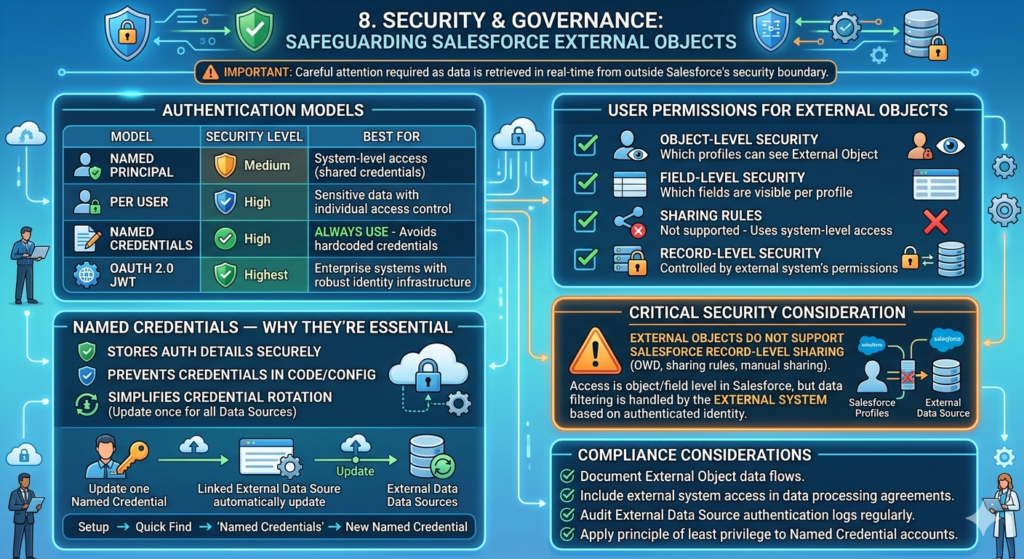
Security for salesforce external objects requires careful attention because data is retrieved in real time from systems outside Salesforce’s security boundary.
Authentication Models
| Model | Security Level | Best For |
|---|---|---|
| Named Principal | Medium | System-level access where all users share credentials |
| Per User | High | Sensitive data where individual access control matters |
| Named Credentials | High | Always use — avoids hardcoded credentials |
| OAuth 2.0 JWT | Highest | Enterprise systems with robust identity infrastructure |
Named Credentials — Why They’re Essential
Named Credentials store authentication details securely in Salesforce, preventing credentials from being exposed in code or configuration. They also simplify credential rotation — update the Named Credential once and all External Data Sources using it automatically use the new credentials.
Configuration path:Setup → Quick Find → "Named Credentials" → New Named Credential
User Permissions for External Objects
| Permission | Controls |
|---|---|
| Object-level security | Which profiles can see the External Object |
| Field-level security | Which fields are visible per profile |
| Sharing rules | Not supported — External Objects use system-level access |
| Record-level security | Controlled by the external system’s own permissions |
Critical Security Consideration
External Objects do not support Salesforce record-level sharing (OWD, sharing rules, manual sharing). Access is controlled at the object and field level within Salesforce, but the actual data filtering is handled by the external system based on the authenticated identity.
Compliance considerations:
- Document External Object data flows in your security architecture
- Include external system access in your data processing agreements
- Audit External Data Source authentication logs regularly
- Apply the principle of least privilege to Named Credential authentication accounts
9. Performance Considerations
Performance is the most operationally significant consideration for salesforce external objects implementations. Because every data access triggers a live query to an external system, performance depends heavily on factors outside Salesforce’s control.
Key Performance Factors
| Factor | Impact | Optimization |
|---|---|---|
| External system response time | Direct impact on page load | Optimize external queries; add indexes |
| Network latency | Adds to every request | Co-locate systems; use regional endpoints |
| Query complexity | Slower for complex filters | Pre-filter at OData layer; limit fields |
| Concurrent users | External system load | Implement caching at OData layer |
| OData pagination | Large datasets slow to load | Configure $top limits; use server-side pagination |
| SSL handshake overhead | Minor latency per request | Use connection pooling at external endpoint |
Salesforce-Side Limits
| Limit | Value |
|---|---|
| Max records per page | 2,000 (OData) |
| Max OData callouts per transaction | 100 |
| Timeout per callout | 120 seconds |
| Concurrent External Object queries | Platform-governed |
Optimization Tips
- Implement caching at the OData layer — cache frequently accessed, slowly changing reference data (e.g., product catalog) to avoid hitting the source system on every access
- Limit returned fields using
$selectin OData queries — don’t return all columns when only three are displayed - Use server-side pagination rather than loading all records into Salesforce
- Add database indexes on the external system for fields used as join keys and filter criteria
- Monitor external system response times separately from Salesforce performance
10. Salesforce External Objects Limitations
(Target: 250–300 words)
Honest assessment of limitations is essential before committing to salesforce external objects for a production implementation.
Reporting Restrictions
This is the most significant limitation for most organizations:
- External Objects cannot be included in standard Salesforce reports or dashboards
- You cannot create a report that joins External Object data with Salesforce record data
- KPI dashboards, pipeline analytics, and management reporting cannot reference External Object data
- Workaround: Use Tableau CRM (Einstein Analytics) with custom data connectors for analytical use cases
Search Limitations
- External Object records do not appear in Salesforce Global Search results by default
- Search functionality is limited and may not support full-text search depending on the OData implementation
- SOSL (Salesforce Object Search Language) does not support External Objects
Automation Restrictions
- Apex triggers cannot fire on External Object changes (data is not stored in Salesforce)
- Flow and Process Builder cannot use External Object changes as triggers
- Workflow Rules are not supported on External Objects
- Read-only operations only — External Objects cannot be used to write back to external systems via standard DML
Additional Limitations
| Feature | External Object Support |
|---|---|
| Formula fields | Limited |
| Validation rules | Not supported |
| Duplicate rules | Not supported |
| Field history tracking | Not supported |
| Sharing rules | Not supported |
| List views | Basic support |
| Mobile offline | Not supported |
| Bulk API | Not supported |
| Write operations | Not supported via standard UI |
11. Best Practices for Salesforce Connect Implementation
(Target: 250–300 words)
These best practices consistently distinguish successful salesforce connect implementations from problematic ones.
11a. Use for High-Volume External Data
External Objects are ideal when the dataset is too large to practically replicate into Salesforce. If the external system contains 10 million historical transaction records but users only need to see the 20 most recent records for a given account, External Objects provide that visibility without the storage and ETL cost of importing 10 million records.
11b. Prioritize Read-Heavy Scenarios
External Objects excel in read-heavy contexts where users need to view external data but don’t need to act on it within Salesforce automation. Customer service agents viewing order history, sales reps reviewing account financial data, or managers checking inventory levels are all ideal read-heavy use cases.
11c. Optimize OData Performance at the Source
Work with the team managing the external system to:
- Add indexes on fields used for filtering and joining
- Implement server-side caching for frequently accessed data
- Configure OData service to return only necessary fields by default
- Set up monitoring for OData endpoint response times
11d. Secure Access Carefully
- Always use Named Credentials — never hardcode credentials
- Implement per-user authentication for sensitive data when possible
- Regularly audit which Salesforce profiles have access to External Objects
- Monitor authentication logs on the external system for unusual access patterns
11e. Test at Scale Before Production
Performance characteristics at 5 concurrent users look very different from 500 concurrent users. Load test your OData endpoint before production rollout — particularly during business hours when Salesforce usage peaks.
12. Common Mistakes to Avoid
These are the most frequent errors in salesforce external objects implementations — and how to prevent them.
Mistake 1: Poor External Endpoint Performance
Problem: Deploying External Objects without performance testing the external endpoint. When 200 agents simultaneously open Account records with External Object related lists, the external system receives 200 concurrent queries — potentially overwhelming an ERP or legacy database.
Fix: Load test the OData endpoint with realistic concurrent user volumes. Implement caching for slowly changing data.
Mistake 2: Overusing External Objects for Transactional Processes
Problem: Using External Objects for data that drives active business processes — like current opportunity status or case assignment — rather than reference/history data.
Fix: External Objects are reference windows, not operational data stores. Process-critical data belongs in Salesforce proper.
Mistake 3: Ignoring Reporting Requirements
Problem: Stakeholders expect to report on External Object data in standard Salesforce dashboards — which is not supported.
Fix: Communicate reporting limitations before implementation. Plan for Tableau CRM or external BI tools for analytical use cases.
Mistake 4: Missing Governance
Problem: External Data Sources created without documentation, ownership, or change management processes. When the external system schema changes, External Objects break silently.
Fix: Document every External Data Source with owner, purpose, connection details, and change notification process. Include External Object schema validation in your release testing checklist.
13. Real-World Architecture Example
(Target: 300–400 words)
These architecture examples illustrate how external data Salesforce access works across common enterprise integration scenarios.
Architecture 1: Salesforce + SAP
Business scenario: Global manufacturing company. Sales reps manage customer relationships in Salesforce. Orders, invoices, and delivery status are managed in SAP ECC.
Architecture:
textSalesforce (Account record)
    └── SAP_Orders__x (External Object — related list)
    └── SAP_Invoices__x (External Object — related list)
         ↕
    SAP Gateway (OData service layer)
         ↕
    SAP ECC (ERP system)
Data flow:
- Sales rep opens Account record in Salesforce
- Related list “SAP Orders” loads — Salesforce Connect queries SAP Gateway via OData
- SAP Gateway queries SAP ECC for orders where Customer ID matches
- Results returned and displayed in Salesforce related list
- No order data stored in Salesforce
Key configuration decisions:
- Indirect Lookup Relationship:
SAP_Orders__x.Customer_ID→Account.SAP_Customer_Number__c - Named Principal authentication (all Salesforce users share a dedicated SAP Gateway service account)
- OData caching layer on SAP Gateway for frequently accessed order summaries
Architecture 2: Salesforce + SQL Database
Business scenario: Regional bank. Relationship managers use Salesforce. Loan data lives in an internal SQL Server database.
Architecture:
textSalesforce (Contact record)
    └── Loan_Accounts__x (External Object)
         ↕
    MuleSoft API (OData wrapper exposing SQL data)
         ↕
    SQL Server (Loan Management Database)
Key decision: MuleSoft provides the OData layer, handles SQL query translation, implements field-level filtering for compliance, and caches product reference data.
Architecture 3: Enterprise Customer Service
Business scenario: Telecommunications company. 500 customer service agents use Service Cloud. Customer billing and service history lives in a legacy Oracle database.
Architecture:
textSalesforce Service Console (Case record)
    └── Billing_History__x (External Object)
    └── Service_Subscriptions__x (External Object)
    └── Usage_Summary__x (External Object — aggregated data)
         ↕
    Custom OData Middleware (Node.js service)
         ↕
    Oracle Legacy Database
Result: Agents resolve billing inquiries 40% faster. Average handle time drops from 8 minutes to 4.8 minutes. Escalations requiring system switching reduced by 60%.
14. Salesforce Connect vs ETL vs API Integration
Choosing the right integration approach is one of the most consequential architectural decisions in enterprise Salesforce implementation.
Strategic Comparison
| Scenario | Best Approach | Reason |
|---|---|---|
| Historical reference data (read-only) | External Objects | No storage cost; real-time access |
| Reporting and dashboards | ETL | Data must be in Salesforce for standard reports |
| Process-critical automation | ETL or API | Automation requires local data |
| Event-driven triggers | API Integration | Real-time bidirectional with automation |
| Large historical datasets | External Objects | Storage cost avoidance |
| Sensitive data (minimize copies) | External Objects | Data stays in source system |
| Mobile or offline access | ETL | External Objects require connectivity |
| Write operations to external system | API Integration | External Objects are read-only |
| Data that feeds Flow automation | ETL | Automation requires Salesforce-stored data |
Decision Flowchart Logic
textDoes the data need to drive Salesforce automation?
├── YES → ETL or API Integration
└── NO → Does it need to appear in standard reports?
    ├── YES → ETL Integration
    └── NO → Is the dataset large or sensitive to replicate?
        ├── YES → External Objects (Salesforce Connect)
        └── NO → Either approach works (choose based on freshness requirements)
Hybrid Architecture (Most Enterprise Scenarios)
Most mature enterprise Salesforce implementations use all three approaches:
- External Objects for large reference datasets (order history, financial records)
- ETL/batch integration for reporting data and process-supporting records
- Real-time API for event-driven triggers and bidirectional transactional operations
15. Expert Recommendations
(Target: 200–250 words)
After architecting salesforce external objects implementations across diverse enterprise environments, these recommendations consistently drive successful outcomes.
Ideal Scenarios for Salesforce External Objects
✅ Dataset too large to practically store in Salesforce (millions of records)
✅ Data changes frequently and staleness of even one hour is unacceptable
✅ Data is sensitive and minimizing copies improves compliance posture
✅ Use case is primarily read-only reference and context
✅ External system already exposes OData or can easily be wrapped with middleware
✅ Time-to-value is critical and ETL build time is prohibitive
When Not to Use Salesforce Connect
❌ Data must appear in standard Salesforce reports or dashboards
❌ Flows, triggers, or automation must react to the external data
❌ Users need mobile or offline access to the data
❌ Write-back to the external system from Salesforce UI is required
❌ External system performance cannot meet sub-3-second response time requirements
❌ External system has no API or OData exposure capability
Scalability Planning Tips
- Plan for endpoint scaling — as Salesforce adoption grows, External Object query volume grows proportionally
- Implement OData caching early — don’t wait for performance problems to add caching
- Monitor continuously — set up alerting for External Data Source connectivity failures
- Document schema dependencies — External Object field mappings must be updated when source schemas change
- Governance from day one — treat External Data Sources as critical infrastructure with formal change management
16. Conclusion
(Target: 200–250 words)
Salesforce External Objects represent a mature, strategically valuable approach to enterprise integration — one that solves a specific set of problems better than any alternative while being completely wrong for others. That combination of power and specificity is what makes understanding them so important for anyone designing Salesforce integration architecture.
The core value proposition is clear: salesforce connect enables real-time visibility into external systems without the storage cost, ETL complexity, or compliance risk of data replication. For high-volume reference data — ERP order history, financial records, legacy transaction data, inventory systems — External Objects deliver genuine business value that justifies the implementation investment.
But they’re not a universal integration solution. The absence of reporting support, automation triggers, and write capability means External Objects serve a specific architectural role — a real-time viewing window into external data — and that role should be clearly understood and communicated before implementation begins.
The most successful enterprise Salesforce architectures use External Objects as one tool in a broader integration strategy: External Objects for reference data, ETL for reporting, real-time API for events and transactions. Together, these three approaches create a unified CRM experience that gives every Salesforce user the data they need, when they need it, regardless of where that data lives.
In 2026, with data volumes growing and compliance requirements tightening, external data Salesforce access through External Objects is no longer an advanced feature — it’s an essential architectural capability for enterprise organizations.
About RizeX Labs
At RizeX Labs, we specialize in delivering cutting-edge Salesforce solutions, including External Data Integration using External Objects within Salesforce.
Our expertise combines deep technical knowledge, industry best practices, and real-world implementation experience to help businesses seamlessly connect external systems without storing large volumes of data inside Salesforce.
We empower organizations to transform their data architecture—from siloed and duplicated data sources to unified, real-time access using External Objects that ensure efficiency, scalability, and data consistency.
Internal Links:
External Links:
- Salesforce official website
- Salesforce External Objects overview
- Salesforce Connect documentation
- Salesforce AppExchange
- External data integration tools (MuleSoft)
- REST API concepts
Quick Summary
Salesforce External Objects allow organizations to access and work with data stored outside Salesforce in real time, without actually importing or storing it within the platform. Using features like Salesforce Connect, businesses can integrate external systems such as ERP, databases, or third-party applications and view the data just like standard objects.
With External Objects, organizations can reduce data storage costs, eliminate redundancy, and ensure real-time data accuracy. This approach is especially useful for handling large datasets, legacy systems, and frequently changing data sources.
By leveraging External Objects, businesses can maintain a single source of truth, improve system performance, and enable seamless integration between Salesforce and external platforms—making it a critical capability for scalable and modern data architecture.
