
Introduction: One Platform, Many Starting Points
Salesforce has quietly become one of the most sought-after skill sets in the global technology job market. With over 150,000 companies using the platform worldwide and the Salesforce ecosystem projected to create millions of new jobs over the next several years, the question for most aspiring professionals is no longer whether to learn Salesforce — it is how to learn it based on where they are starting from.
And that distinction matters enormously.
A fresh graduate exploring Salesforce for the first time is in a fundamentally different position than a Java developer with eight years of experience who wants to pivot into the Salesforce ecosystem. A marketing manager who has been running email campaigns for a decade approaches Salesforce Marketing Cloud training very differently than a college student who has never worked in a corporate environment. The platform is the same. The learning journey is not.
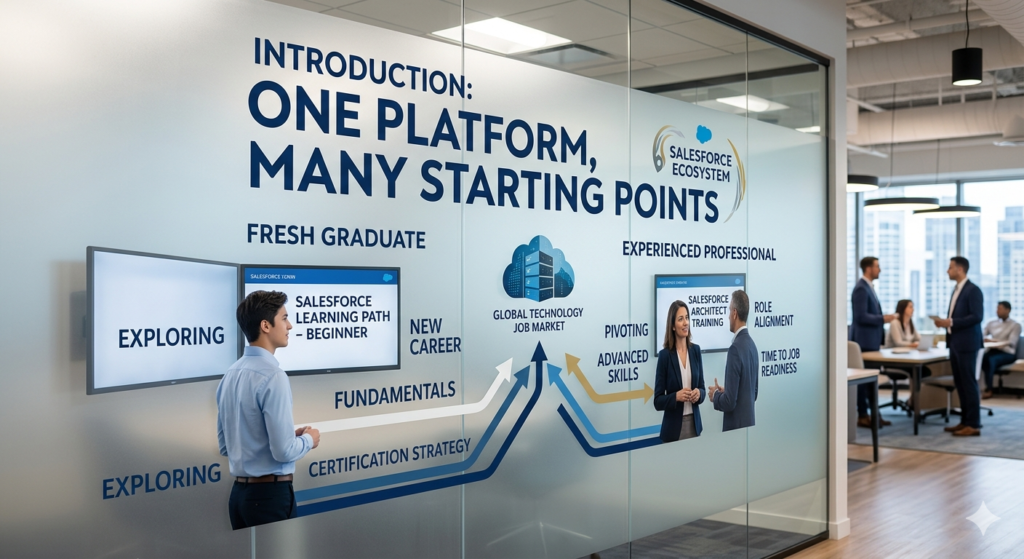
This blog post is designed to help you understand exactly how Salesforce training for freshers vs experienced professionals differs — not just in terms of content, but in terms of pace, depth, certification strategy, role alignment, and time to job readiness. Whether you are a recent graduate looking to break into tech, an IT professional considering a career switch, or a non-technical professional exploring new directions, the right Salesforce learning path exists for you. The key is finding the one that matches your background, your goals, and your timeline.
Let us break it all down.
Why Salesforce Is One of the Strongest Career Choices Right Now
Before comparing learning approaches, it is worth understanding why Salesforce commands such strong career interest across such a diverse range of professionals.
Growing Demand Across Every Industry
Salesforce is no longer exclusively a sales tool. It powers customer service operations, marketing automation, healthcare patient management, financial services client portals, nonprofit donor management, e-commerce experiences, and enterprise analytics. This cross-industry adoption means Salesforce professionals are in demand far beyond the technology sector — in banking, insurance, retail, healthcare, education, and government.
A Wide Spectrum of Roles to Suit Different Strengths
One of Salesforce’s most compelling career attributes is the sheer variety of professional roles within the ecosystem:
- Salesforce Administrator: Manages platform configuration, security, automation, and user support. No coding required.
- Salesforce Developer: Builds custom applications using Apex, Lightning Web Components, and APIs.
- Salesforce Business Analyst: Bridges business requirements and technical solutions.
- Salesforce Consultant: Advises organizations on Salesforce strategy and implementation.
- Salesforce Architect: Designs enterprise-scale Salesforce solutions across multiple clouds.
- Salesforce Marketing Cloud Specialist: Manages marketing automation and customer journeys.
This diversity means that technical and non-technical professionals alike can find a meaningful, well-compensated Salesforce career path aligned with their natural strengths.
Strong Salary Potential and a Credentialing Ecosystem
Salesforce certifications are recognized, respected, and actively sought by employers worldwide. According to the Salesforce Talent Ecosystem Report, certified Salesforce professionals consistently earn higher salaries than their non-certified counterparts. Entry-level Salesforce Administrators in the United States earn between $60,000 and $85,000 annually, while experienced Salesforce Architects can command $150,000 to $200,000 or more. The certification ecosystem — with over 40 credentials spanning administration, development, architecture, marketing, and consulting — gives professionals a clear, progressive credentialing ladder to climb throughout their careers.
Salesforce Training for Freshers: Building From the Ground Up
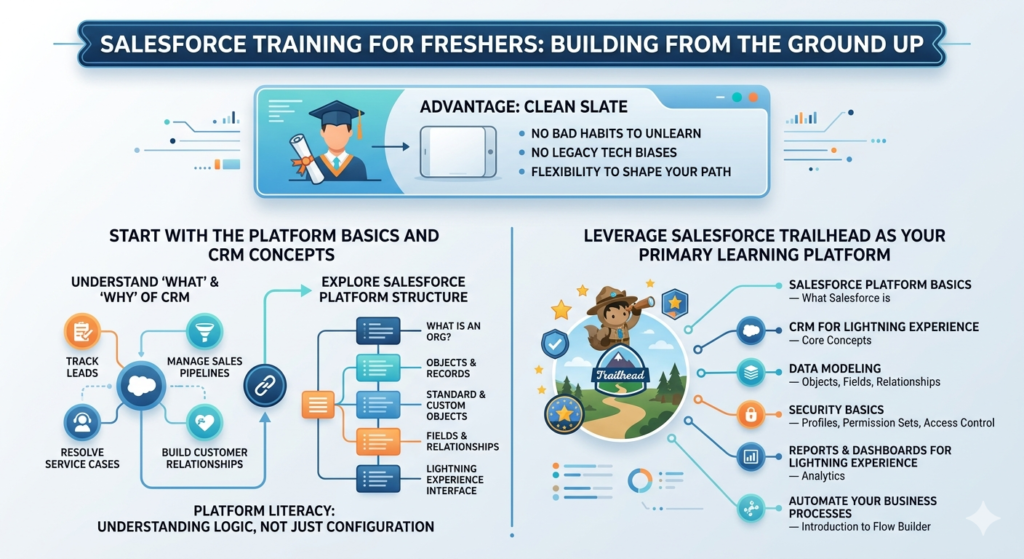
If you are a college student, recent graduate, or someone with little to no professional IT experience, you are starting your Salesforce journey from a clean slate. That is actually a significant advantage — you have no bad habits to unlearn, no legacy technology biases to overcome, and the full flexibility to shape your Salesforce career path from the beginning.
Here is what effective Salesforce training for beginners looks like:
Start With the Platform Basics and CRM Concepts
Before you touch any technical Salesforce feature, you need to understand what a CRM is and why businesses use one. Customer Relationship Management is about managing interactions with current and potential customers — tracking leads, managing sales pipelines, resolving service cases, and building long-term customer relationships. Understanding these business concepts first gives every technical feature you subsequently learn a meaningful context.
From there, explore the Salesforce platform structure: what an org is, how objects and records work, the difference between standard and custom objects, how fields and relationships connect data across the platform, and how users interact with the interface through the Lightning Experience.
Do not rush this phase. Freshers who skip the conceptual foundation and jump straight into configuration often struggle later when they need to make judgment calls about how to solve a business problem. Platform literacy — understanding not just how Salesforce works but why it is designed the way it is — is what separates effective admins and developers from button-pushers who follow instructions without understanding the underlying logic.
Leverage Salesforce Trailhead as Your Primary Learning Platform
Salesforce Trailhead is genuinely one of the best free learning resources in the enterprise software world. It is gamified, structured, hands-on, and comprehensive. For freshers, Trailhead is your curriculum, your practice environment, and your portfolio all in one.
Begin with these foundational trails and modules:
- Salesforce Platform Basics — Understand what Salesforce is and how it works
- CRM for Lightning Experience — Core CRM concepts and functionality
- Data Modeling — Objects, fields, and relationships
- Security Basics — Profiles, permission sets, and access control
- Reports & Dashboards for Lightning Experience — Analytics and data visualization
- Automate Your Business Processes — Introduction to Flow Builder
Complete these with the goal of understanding, not speed. Work through each module until you can explain the concepts in your own words, not just answer the quiz questions.
Practice in a Free Developer Org
Trailhead Playground environments are excellent for module-specific exercises, but setting up your own free Salesforce Developer Org gives you a persistent personal sandbox where you can experiment freely, build mini-projects, break things, and fix them without consequence. This is where real learning happens for freshers.
Use your Developer Org to build small, realistic scenarios:
- Set up a simple lead management process with custom fields and validation rules
- Build an automated email notification using Flow
- Create a report showing monthly sales activity by territory
- Design a custom app for a fictional business using App Builder
These small projects become portfolio items that demonstrate practical capability to future employers — and they are far more convincing than a list of Trailhead badges alone.
Target the Salesforce Certified Administrator as Your First Credential
For freshers, the Salesforce Certified Administrator certification is the right first target — full stop. It is the foundational credential of the Salesforce ecosystem, it validates practical platform knowledge across all core functional areas, and it is the credential most commonly required for entry-level Salesforce roles.
The exam covers:
- Configuration and setup
- Object Manager and Lightning App Builder
- Sales and Marketing applications
- Service and Support applications
- Productivity and collaboration features
- Data and analytics management
- Workflow and process automation
- Security and access
A focused fresher typically needs three to five months of consistent study and hands-on practice to be ready for this exam. The timeline is realistic if you are dedicating eight to ten hours per week to structured learning.
Build Business Context Alongside Technical Skills
One of the most common gaps in fresher Salesforce training is a lack of business context. Freshers who have never worked in a sales organization, customer service environment, or marketing department may struggle to understand why certain Salesforce features exist and how they are actually used day-to-day.
Bridge this gap by:
- Reading case studies about how companies use Salesforce
- Watching Salesforce demo videos on YouTube showing real-world usage
- Following Salesforce admin community blogs and forums like Admin Hero and Salesforce Ben
- Engaging with the Salesforce Trailblazer Community to connect with practicing professionals
The Salesforce Admin role in particular is deeply business-facing. An admin who understands the sales process, the customer service workflow, and the marketing funnel is dramatically more effective than one who only knows how to configure the platform mechanically.
Salesforce Training for Experienced Professionals: Accelerating Into a New Domain
If you are coming to Salesforce with years of professional experience — as a developer, tester, business analyst, marketing professional, or CRM specialist — your training journey looks significantly different. You are not starting from scratch. You are mapping existing expertise onto a new platform, and that mapping is where the real strategy lies.
Career change Salesforce training is about leverage: identifying where your existing skills give you a head start, closing the specific gaps that Salesforce introduces, and moving to job readiness faster than a fresher because of what you already know.
Here is how each professional background maps to the Salesforce ecosystem:
For Java and .NET Developers: The Fastest Technical Transition
Java and .NET developers have one of the shortest learning curves of any professional group transitioning into the Salesforce ecosystem. The parallels are significant and immediate:
| Your Existing Skill | Salesforce Equivalent |
|---|---|
| Java / C# | Apex (Salesforce’s proprietary language, heavily Java-influenced) |
| SQL | SOQL (Salesforce Object Query Language) |
| JUnit / NUnit | Apex Test Classes |
| REST API Development | Salesforce REST API / Apex Callouts |
| JavaScript / React | Lightning Web Components (LWC) |
| Git / CI/CD | SFDX / Copado / Gearset |
| Spring / Hibernate | Salesforce Data Model + DML |
Your focus areas in Salesforce training should be:
Apex Programming: Learn the syntax, understand governor limits (the most significant conceptual shift from traditional development — Salesforce enforces resource consumption limits on all code execution), master SOQL queries, and build trigger logic using established trigger handler frameworks.
Lightning Web Components: If you have JavaScript experience, LWC will feel relatively familiar. If your background is primarily backend Java or .NET, budget extra time for the JavaScript and modern web component model.
Integration Architecture: Your experience with REST/SOAP APIs, authentication patterns, and middleware tools maps directly to Salesforce integration work. Focus on Salesforce-specific patterns: named credentials, connected apps, OAuth flows, and platform events.
Declarative-First Philosophy: This is the most important mindset shift for experienced developers. In Salesforce, the first question is always: can this be done declaratively without code? Flow Builder, Process Builder (legacy), and standard configuration should always be evaluated before writing Apex. Developers who instinctively reach for code when a Flow would suffice create technical debt and maintenance burden on Salesforce orgs.
Target Certification: Salesforce Platform Developer I — aim for this within 8 to 12 weeks of focused training alongside your existing workload. Many experienced Java developers achieve this faster.
For Software Testers and QA Engineers
Quality assurance professionals have highly transferable skills in Salesforce testing roles. Your understanding of test case design, defect lifecycle management, regression testing strategy, and UAT coordination applies directly.
Key Learning Focus Areas:
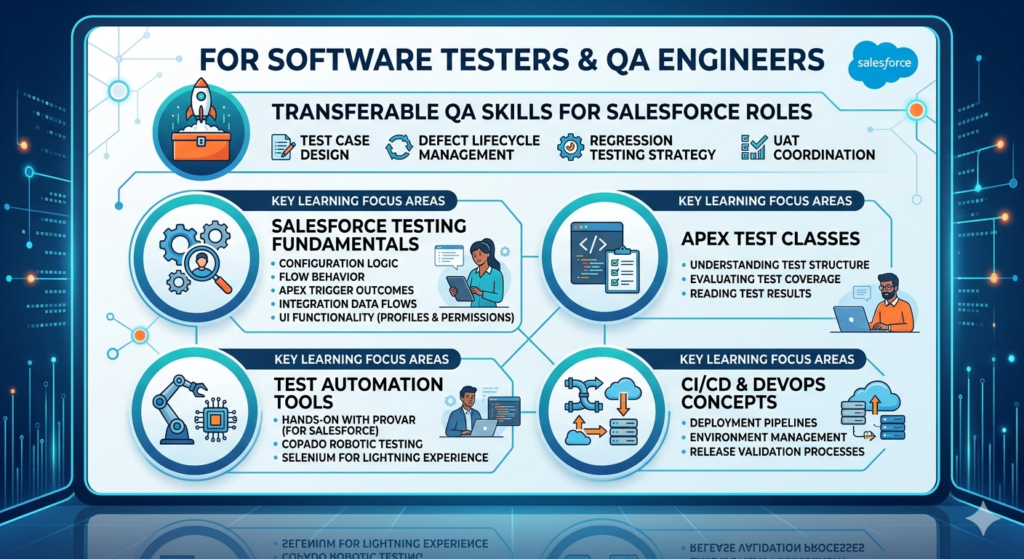
- Salesforce Testing Fundamentals: Understanding what to test in a Salesforce org — configuration logic, Flow behavior, Apex trigger outcomes, integration data flows, and UI functionality across different user profiles and permission sets.
- Apex Test Classes: Even if you are not writing production Apex code, understanding test classes — how they are structured, what good test coverage looks like, and how to read test results — is essential for a Salesforce QA professional.
- Test Automation Tools: Get hands-on with Provar (purpose-built for Salesforce testing), Copado Robotic Testing, or Selenium-based approaches adapted for the Salesforce Lightning Experience. These tools are in active demand at Salesforce implementation partners and enterprise customers.
- CI/CD and DevOps Concepts: QA professionals who understand deployment pipelines, environment management, and release validation processes are increasingly valuable as organizations mature their Salesforce DevOps practices.
Target Certification: Start with the Salesforce Certified Administrator to build platform literacy, then explore Salesforce-specific testing professional credentials and the Copado DevOps certification pathway.
For Business Analysts
Business analysts are extraordinarily well-positioned for Salesforce BA and functional consultant roles. Your skills in requirements gathering, stakeholder management, process documentation, and solution design translate almost directly.
Key Learning Focus Areas:
- Salesforce Data Model and Object Structure: Understanding how Salesforce organizes data is essential for translating business requirements into functional specifications that developers and admins can implement.
- Process Mapping for Salesforce: Learn to document current-state and future-state business processes using Salesforce-specific terminology and capability constraints. Tools like Lucidchart, Miro, and Salesforce’s own process mapping conventions are your working environment.
- User Story Writing for Salesforce Projects: Salesforce user stories follow specific patterns that account for roles, permission requirements, automation logic, and integration dependencies. Developing fluency in Salesforce-specific user story formats accelerates your value in Agile delivery teams.
- Declarative Configuration Familiarity: Business analysts who can demonstrate solutions in sandbox environments — building basic Flows, configuring page layouts, setting up validation rules — are dramatically more effective at requirements validation than those who can only document requirements on paper.
Target Certification: Salesforce Business Analyst certification — purpose-built for this role and a powerful differentiator in the job market. Pair it with the Salesforce Certified Administrator credential.
For Marketing Professionals
Marketing professionals with experience in email marketing, campaign management, digital marketing, or marketing operations have a natural path into the Salesforce Marketing Cloud ecosystem.
Key Learning Focus Areas:
- Salesforce Marketing Cloud Architecture: Understand the Marketing Cloud platform structure — Studios (Email Studio, Social Studio, Advertising Studio), Builders (Journey Builder, Content Builder, Automation Studio), and how data flows between Marketing Cloud and the core Salesforce CRM.
- Email Studio and Journey Builder: These are the workhorses of Marketing Cloud and the skills most in demand. Build, test, and analyze email campaigns, and design automated customer journeys triggered by behavioral and transactional data.
- AMPscript and SSJS: Marketing Cloud’s scripting languages for dynamic content personalization. Marketers with any coding exposure pick these up quickly; those without can start with drag-and-drop content tools and progress over time.
- Data Extensions and Segmentation: Understanding how Marketing Cloud stores and segments subscriber data is fundamental to effective campaign execution.
Target Certification: Salesforce Marketing Cloud Administrator certification is the right starting point, followed by Marketing Cloud Email Specialist for deeper specialization.
For CRM Professionals and Existing Salesforce Users
If you already work with Salesforce in a business user or power user capacity — running reports, managing records, configuring basic fields — you are not starting from zero, but you may be significantly underestimating the depth of the platform relative to what you have been exposed to.
Your training focus should be on moving from surface-level usage to genuine platform expertise:
- Deep dive into Flow Builder for complex automation
- Understand the security model at a governance level, not just a user level
- Learn change management, sandbox strategy, and deployment processes
- Explore advanced analytics with Salesforce Reports, Dashboards, and Einstein Analytics
Target Certification: Salesforce Certified Administrator to formalize and validate your existing knowledge, then Advanced Administrator to demonstrate expert-level platform management capability.
Salesforce Training Freshers vs Experienced: Key Differences at a Glance
The table below captures the most important structural differences in how freshers and experienced professionals should approach Salesforce training:
| Dimension | Freshers | Experienced Professionals |
|---|---|---|
| Starting Point | Platform concepts and CRM basics | Mapping existing skills to Salesforce roles |
| Learning Speed | Gradual — 4 to 6 months to job readiness | Accelerated — 8 to 16 weeks depending on background |
| Technical Depth (Initial) | Declarative tools, admin configuration | Role-specific depth (Apex, APIs, testing, analytics) |
| Business Context | Needs significant development | Often already strong from prior professional experience |
| First Target Certification | Salesforce Certified Administrator | Varies by role (Developer I, BA, Marketing Cloud Admin) |
| Practice Approach | Mini projects in Developer Org, Trailhead superbadges | Hands-on projects mimicking real-world work scenarios |
| Portfolio Building | Demonstrates basic configurations and automation | Showcases solutions aligned with professional background |
| Biggest Challenge | Lack of business context and real-world exposure | Unlearning platform-specific assumptions from prior tools |
| Recommended Role Targets | Salesforce Admin, Junior Developer, Junior Analyst | Developer, Senior Admin, BA, Consultant, QA Specialist |
| Time to First Job | 4 to 6 months (with consistent effort) | 2 to 4 months (leveraging transferable skills) |
| Community Engagement | Critical for mentorship and exposure | Valuable for network building and market positioning |
| Study Approach | Structured trails and guided curriculum | Targeted gap-filling with role-specific deep dives |
A Suggested Salesforce Learning Path That Works for Both Groups
Regardless of your starting point, an effective Salesforce learning path follows a progression from understanding to application to validation. Here is a universal framework that both freshers and experienced professionals can adapt to their specific context:
Stage 1: Understand Salesforce Fundamentals
Before anything else, build foundational platform literacy. Understand what Salesforce does, how it is organized, and what the core objects and processes look like. For freshers, this is a multi-week phase. For experienced professionals, this can often be compressed into one to two weeks of intensive Trailhead engagement.
Resources: Salesforce Platform Basics trail, CRM Basics module, Data Modeling module on Trailhead.
Stage 2: Complete Targeted Trailhead Modules
Select your Trailhead learning path based on your target role. Trailhead offers curated role-based trails for administrators, developers, business analysts, architects, and marketing specialists. Work through these systematically, completing the hands-on challenges — not just the reading — in every module.
Resources: Trailhead role-based trails, Superbadge projects, Trailhead Live sessions.
Stage 3: Practice in a Free Developer Org
Set up your free Developer Org at developer.salesforce.com and begin building. Do not wait until you feel ready. Start with simple configurations and progressively take on more complex scenarios as your confidence grows. Document everything you build — screenshots, notes on design decisions, explanations of what each component does. This documentation becomes your portfolio.
Stage 4: Build Mini Projects
Design and build two to three small but complete Salesforce solutions that demonstrate your capability across multiple platform areas. A mini project for an admin might be a complete lead-to-opportunity process with automated follow-up, custom reporting, and a permission-based access model. A mini project for a developer might be a custom LWC component backed by Apex logic with full test coverage.
Make your projects realistic. Base them on actual business scenarios — a retail company’s customer service process, a nonprofit’s donor management workflow, a real estate company’s property listing and inquiry tracking system. Realistic projects demonstrate business understanding, not just technical execution.
Stage 5: Earn Your First Certification
Prepare for and schedule your first certification exam. Use the official Salesforce Certification Guide on Trailhead as your primary preparation resource, supplemented by practice exam platforms like Focus on Force. Schedule the exam before you feel completely ready — the deadline creates urgency and accountability that accelerates your final preparation.
Stage 6: Prepare for Interviews
Salesforce interviews combine technical platform knowledge with scenario-based problem-solving and communication skills. Prepare by:
- Practicing explaining your mini projects clearly and concisely
- Working through common Salesforce admin and developer interview questions
- Demonstrating your Trailhead profile and certification credentials
- Being ready to discuss design trade-offs — why would you use a Flow versus Apex for a specific requirement?
For freshers, the interview preparation phase is about demonstrating potential, enthusiasm, and a genuine foundation of knowledge. For experienced professionals, it is about clearly articulating how your prior experience gives you a head start and what you have specifically done to close the Salesforce-specific gaps.
Career Change Salesforce Training: A Strategic Approach for Professionals in Transition
For working professionals making a deliberate career transition into the Salesforce ecosystem, the training strategy goes beyond completing modules and earning certifications. Career change Salesforce training is a holistic process that includes skills mapping, portfolio development, community engagement, and market positioning.
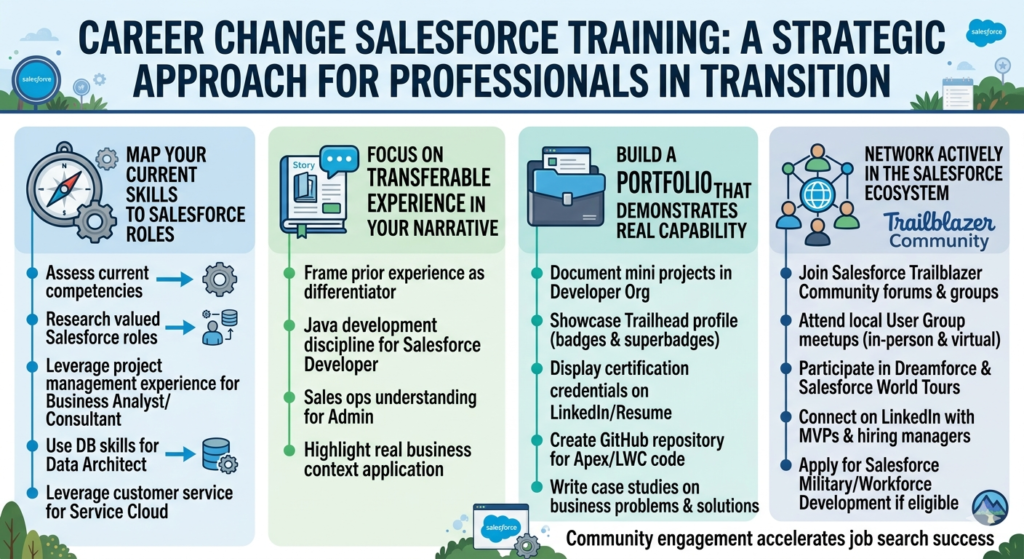
Map Your Current Skills to Salesforce Roles
Start by honestly assessing what you bring to the table. Write down your top five professional competencies — the things you do best in your current role. Then research which Salesforce roles value those competencies most highly.
A project manager with strong stakeholder communication skills and process documentation experience is a natural fit for a Salesforce Business Analyst or functional consultant role. A database administrator with SQL expertise and data governance experience maps well to a Salesforce Admin or Data Architect trajectory. A customer service team lead who understands service workflows and escalation management is exceptionally positioned for a Service Cloud consulting specialization.
This mapping exercise prevents the most common career change mistake: trying to become something completely different when you should be becoming a Salesforce-specialized version of what you already are.
Focus on Transferable Experience in Your Narrative
When you are applying for Salesforce roles, your prior experience is not irrelevant — it is a differentiator. A Salesforce developer who previously built enterprise Java applications brings architectural thinking and software engineering discipline that pure Salesforce-native developers may lack. A Salesforce admin who spent five years in sales operations understands the sales process at a level that freshers simply cannot replicate.
Frame your career transition narrative around what you bring from your previous career, not just what you are learning. Employers hiring for Salesforce roles are not only looking for platform knowledge — they are looking for professionals who can apply that platform knowledge intelligently in real business contexts.
Build a Portfolio That Demonstrates Real Capability
Your Salesforce portfolio for a career change should include:
- Two to three documented mini projects in your Developer Org with screenshots, a brief problem statement, your design decisions, and the outcome.
- Your Trailhead profile showing badges earned, points accumulated, and superbadges completed.
- Your certification credentials prominently displayed on LinkedIn and your resume.
- A GitHub repository (for developers) containing your Apex and LWC code with clear documentation.
- A brief written case study explaining one project in detail — the business problem, your approach, the solution you built, and what you would do differently with more time or resources.
Network Actively in the Salesforce Ecosystem
The Salesforce community is genuinely one of the most welcoming and active professional communities in enterprise technology. Take full advantage of it:
- Join the Salesforce Trailblazer Community — the official Salesforce community platform with forums, groups, and local user groups.
- Attend local Salesforce User Groups — free meetups organized by the community in cities worldwide, both in person and virtually.
- Participate in Dreamforce and Salesforce World Tour events — Salesforce’s flagship conference and regional events attract tens of thousands of professionals and offer networking, learning, and career opportunities.
- Connect on LinkedIn — follow Salesforce MVPs, hiring managers at Salesforce implementation partners, and active community contributors. Engage genuinely with their content rather than simply broadcasting your own career change.
- Apply for the Salesforce Military or Workforce Development programs if eligible — these programs provide structured pathways for specific groups transitioning into the Salesforce ecosystem.
Community engagement for career changers is not optional — it is often the difference between a job search that takes six months and one that takes six weeks.
Recommended Salesforce Certifications: The Right Credential for Every Starting Point
| Profile | First Certification | Second Certification | Advanced Path |
|---|---|---|---|
| Fresher / No IT Background | Salesforce Certified Administrator | Platform App Builder | Advanced Administrator |
| Java / .NET Developer | Platform App Builder | Salesforce Platform Developer I | Platform Developer II |
| Software Tester / QA | Salesforce Certified Administrator | Copado / Provar Specialist | DevOps Credentials |
| Business Analyst | Salesforce Business Analyst | Salesforce Certified Administrator | CPQ Specialist / Consultant |
| Marketing Professional | Marketing Cloud Administrator | Marketing Cloud Email Specialist | Marketing Cloud Developer |
| CRM / Power User | Salesforce Certified Administrator | Advanced Administrator | Sales / Service Cloud Consultant |
Best Learning Resources for Every Stage of Your Salesforce Journey
Salesforce Trailhead
The free, official, gamified learning platform from Salesforce. Comprehensive role-based trails, hands-on challenges, superbadges, and live Trailhead events make this the essential starting point for every learner regardless of background. Access at trailhead.salesforce.com.
Salesforce Developer Documentation
The complete technical reference for Apex, LWC, APIs, SFDX, and integration patterns. Developers should bookmark and regularly reference developer.salesforce.com. This is not a learning resource in the traditional sense — it is your professional reference library.
Salesforce Credentials Overview
The official overview of all Salesforce certifications, including exam guides, topic breakdowns, and preparation recommendations. Available through Trailhead’s certification section. Use this as the authoritative source for certification preparation rather than third-party summaries.
Supplementary Resources Worth Bookmarking
- Focus on Force — High-quality practice exams and study guides for certification preparation
- Salesforce Ben — Practical tutorials, admin tips, and career advice
- Salesforce YouTube Channel — Official tutorials, release highlights, and feature demos
- Salesforce Stack Exchange — Community Q&A for technical problem-solving
- Admin Hero — Admin-focused community resources and blog content
- Salesforce Trailblazer Community Groups — Role-specific communities for admins, developers, architects, and more
Common Mistakes to Avoid in Salesforce Training
Whether you are a fresher or an experienced professional, these mistakes consistently derail Salesforce learning journeys:
Jumping Into Coding Too Early (Freshers)
The Salesforce platform philosophy is declarative first, code second. Freshers who rush to learn Apex before mastering Flows, validation rules, and standard configuration end up building code-heavy solutions for problems that the platform already solves natively. Master the declarative tools first — always.
Studying Without Hands-On Practice (Everyone)
Reading about Salesforce and watching videos about Salesforce are not the same as building in Salesforce. If you are not working in a Developer Org or Trailhead Playground regularly, you are not actually learning the platform — you are memorizing facts about it. The hands-on component is non-negotiable for genuine competency.
Ignoring Business Use Cases (Experienced Developers)
Experienced developers are sometimes guilty of focusing entirely on technical implementation while ignoring the business context that drives every Salesforce design decision. The question “how do I write this Apex trigger?” is less important than “should this be an Apex trigger at all, or does a Flow solve this requirement better?” Business thinking must accompany technical execution.
Pursuing Too Many Certifications at Once (Everyone)
The Salesforce certification ecosystem is extensive and impressive, and it is tempting to pursue multiple credentials simultaneously. Resist this temptation. Depth in one certification beats shallow preparation across three. Pass your first certification with a strong score, apply that knowledge practically, and then pursue the next credential when you are genuinely ready.
Skipping the Community (Career Changers)
Professionals in career transition sometimes focus entirely on learning and certification while neglecting community engagement. This is a strategic mistake. The Salesforce community is where career advice is shared, job opportunities are surfaced informally, and professional relationships that lead to referrals are built. Learning in isolation is less effective and less efficient than learning within a community of practice.
Underestimating Governor Limits (Experienced Developers)
Developers transitioning from traditional programming environments consistently cite Salesforce’s governor limits as the steepest learning curve. These are not bugs or limitations to work around — they are fundamental to how Salesforce’s multi-tenant architecture operates, and writing code that respects them is a core professional competency. Study governor limits deeply and early.
Real-World Examples: What Success Actually Looks Like
Fresh Graduate to Salesforce Admin in Four Months
Priya graduated with a business administration degree in May and had no prior IT experience. She discovered Salesforce through a LinkedIn post about the Trailblazer community and decided to invest four months in a structured self-study program before applying for jobs.
Her approach:
- Month 1: Completed the Salesforce Admin Beginner trail on Trailhead and set up her Developer Org. Spent weekends building simple configurations based on fictional business scenarios she invented herself.
- Month 2: Completed the Admin Intermediate trail, built her first complete mini project (a volunteer management system for a nonprofit), and started engaging in the Trailblazer Community forums.
- Month 3: Completed the Admin Superbadge, registered for the Administrator certification exam, and attended two virtual Salesforce user group meetups where she connected with practicing admins.
- Month 4: Passed the Salesforce Certified Administrator exam on her first attempt, updated her LinkedIn profile, and began actively applying. She received an interview invitation within two weeks from a Salesforce implementation partner who had seen her Trailhead profile in the Trailblazer Community directory.
She accepted a Junior Salesforce Admin offer at a competitive entry-level salary within four and a half months of starting her training journey.
Experienced Java Developer to Salesforce Developer in Ten Weeks
Marcus had spent seven years as a senior Java developer at a logistics company when he decided to transition into the Salesforce ecosystem after seeing a significant salary premium for Salesforce Platform Developer roles in his city.
His approach:
- Weeks 1–2: Completed Salesforce Platform Basics, Data Modeling, and Security modules on Trailhead. The conceptual framework took him less than a week to absorb given his enterprise software background.
- Weeks 3–4: Deep dived into Apex — the syntax felt familiar, but he invested significant time understanding governor limits, bulkification patterns, and the trigger framework. He pushed all his practice code to a personal GitHub repository from day one.
- Weeks 5–6: Studied Lightning Web Components. His limited JavaScript background meant this required more effort than the Apex content. He supplemented Trailhead with the official LWC developer documentation and YouTube tutorials.
- Weeks 7–8: Built a complete sandbox project — a custom inventory tracking application with Apex triggers, a LWC-based inventory dashboard, and a REST integration with a mock external supplier API.
- Weeks 9–10: Intensive certification preparation using the official exam guide and Focus on Force practice exams. He passed the Salesforce Platform Developer I exam in Week 10.
Marcus received three interviews within two weeks of updating his LinkedIn profile with his certification and GitHub portfolio. He accepted a Salesforce Developer role at a salary 22% above his previous Java developer compensation.
Conclusion: The Right Salesforce Learning Path Is the One That Fits Your Starting Point
The comparison of Salesforce training for freshers vs experienced professionals ultimately comes down to this: the destination is the same, but the journey should be calibrated to where you are starting from.
Freshers bring curiosity, flexibility, and the absence of platform bias. Their journey requires more time to build foundational knowledge, develop business context, and accumulate the practical experience that employers look for. With consistency, structured learning through Salesforce Trailhead, hands-on practice in a Developer Org, and a focused approach to the Salesforce Certified Administrator credential, freshers can be genuinely job-ready in four to six months.
Experienced professionals bring transferable technical skills, professional business judgment, and the ability to contextualize Salesforce features within real-world workflows they have already navigated. Their career change Salesforce training journey is faster but requires deliberate skills mapping, a willingness to learn platform-specific constraints and philosophies, and a community engagement strategy that connects existing expertise with new ecosystem relationships.
What is true for both groups is that Salesforce rewards genuine effort. The platform is deep, the community is generous, the certifications are respected, and the career opportunities are real and growing. Whether you are starting from zero or building on years of professional experience, the right Salesforce learning path is available to you — and the return on that investment, measured in career growth, salary progression, and professional fulfillment, is among the strongest in the technology industry today.
About RizeX Labs
At RizeX Labs, we specialize in delivering industry-focused Salesforce training programs designed for both freshers and experienced professionals. Our courses combine practical exercises, certification guidance, and real-world project scenarios to help learners build job-ready Salesforce skills.
Whether you are starting your career or transitioning from another role, our experts create structured learning paths that match your current skill level and career goals.
We help individuals and organizations accelerate Salesforce adoption by providing hands-on training that leads to certifications, practical experience, and successful career outcomes.
Internal Linking Opportunities:
External Linking Opportunities:
- Salesforce
- Trailhead by Salesforce
- Salesforce Credentials
- Salesforce Developer Documentation
- Salesforce Architects
- Glassdoor and LinkedIn Jobs
Quick Summary
Salesforce training requirements differ significantly for freshers and experienced professionals. Freshers typically need a structured introduction to CRM concepts, Salesforce fundamentals, and hands-on practice, while experienced professionals can leverage their existing technical or business skills to follow a faster and more specialized Salesforce learning path.
Understanding the differences between salesforce training freshers vs experienced helps learners choose the right roadmap. Whether you are following a beginner-friendly salesforce learning path or pursuing career change Salesforce training, the right approach can shorten your learning curve and improve your chances of landing a Salesforce role quickly.
