
Introduction
Salesforce developer interview questions 2026 — if you are searching for these right now, you are already one step ahead of the competition.
The Salesforce ecosystem is booming and it shows no signs of slowing down in 2026.
According to IDC, the Salesforce economy is projected to create 9.3 million new jobs and generate $2.02 trillion in new business revenues by 2028. With Salesforce evolving rapidly through releases like Einstein AI integrations, Data Cloud, and Agentforce, the demand for skilled Salesforce developers has never been higher.
Whether you are a fresher preparing for your very first Salesforce developer interview, a mid-level developer looking to level up, or an experienced Apex specialist switching jobs — walking into a technical interview without solid preparation is a risk you simply cannot afford.
This guide by RizeX Labs gives you the top 50 Salesforce developer interview questions and answers for 2026, covering everything from basic platform concepts to advanced architecture decisions. Each question includes a clear answer, practical examples, code snippets where relevant, and common mistakes candidates make — so you don’t just memorize, you actually understand.
Let’s get into it.
Let’s get into it.
Pro Tip: Don’t just read these questions. Open a Salesforce Developer org and practice each concept hands-on. Theory without practice rarely lands offers.
Section 1: Basic Salesforce Questions
Ideal for freshers and those warming up for a Salesforce dev interview.
Q1. What is Salesforce, and what makes it different from traditional CRM software?
Answer:
Salesforce is a cloud-based Customer Relationship Management (CRM) platform built on a multi-tenant architecture. Unlike traditional on-premise CRM systems, Salesforce:
- Requires no hardware or software installation
- Offers automatic upgrades three times a year (Spring, Summer, Winter releases)
- Provides a metadata-driven development model allowing extensive customization without touching core code
- Is built on the Force.com platform, enabling developers to build custom applications on top of Salesforce infrastructure
Practical Example: A telecom company can use Salesforce to manage leads, automate billing follow-ups, and integrate with their ERP — all without maintaining a single server.
Common Mistake: Candidates often confuse Salesforce CRM with just a “contact management tool.” In 2026, Salesforce is a full enterprise platform covering sales, service, marketing, commerce, analytics, and AI.
Q2. What is the difference between a Salesforce Administrator and a Salesforce Developer?
Answer:
| Aspect | Salesforce Admin | Salesforce Developer |
|---|---|---|
| Primary Tool | Declarative (clicks, not code) | Programmatic (Apex, LWC, APIs) |
| Automation | Flows, Workflow Rules, Process Builder | Apex Triggers, Batch Classes, APIs |
| Data Management | Reports, Dashboards, Data Loader | SOQL, SOSL, Data Integration |
| Customization | Custom Objects, Fields, Layouts | Custom Apps, Visualforce, LWC |
| Typical Certifications | Admin, Advanced Admin | Platform Developer I & II |
Common Mistake: Many freshers underestimate Flows. In 2026, Salesforce heavily promotes Flow-first development. Expect interviewers to ask why you chose Apex over Flow for a given scenario.
Q3. What is a Salesforce Object? Explain Standard vs. Custom Objects.
Answer:
A Salesforce Object is essentially a database table that stores specific data.
- Standard Objects come out-of-the-box:
Account,Contact,Lead,Opportunity,Case - Custom Objects are created by developers/admins for business-specific needs, always suffixed with
__c(e.g.,Invoice__c)
Practical Example: A real estate firm might create a Property__c custom object with fields like Bedrooms__c, Price__c, and Location__c.
Q4. What are the different types of relationships in Salesforce?
Answer:
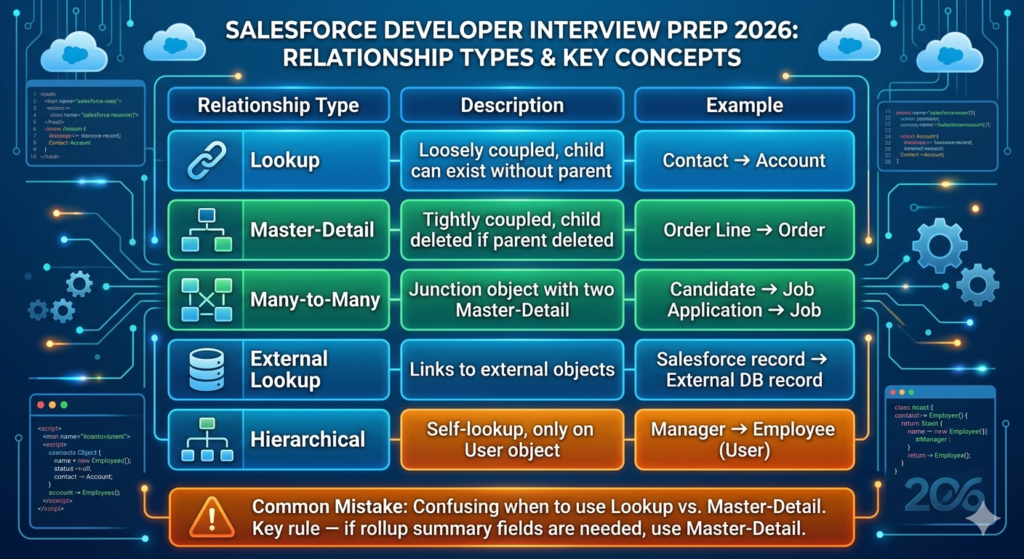
| Relationship Type | Description | Example |
|---|---|---|
| Lookup | Loosely coupled, child can exist without parent | Contact → Account |
| Master-Detail | Tightly coupled, child deleted if parent deleted | Order Line → Order |
| Many-to-Many | Junction object with two Master-Detail | Candidate → Job Application → Job |
| External Lookup | Links to external objects | Salesforce record → External DB record |
| Hierarchical | Self-lookup, only on User object | Manager → Employee (User) |
Common Mistake: Confusing when to use Lookup vs. Master-Detail. Key rule — if rollup summary fields are needed, use Master-Detail.
Q5. What is a Governor Limit in Salesforce, and why does it exist?
Answer:
Governor Limits are runtime limits enforced by Salesforce to ensure no single customer’s code monopolizes shared resources in the multi-tenant environment.
Key Governor Limits (per transaction):
- SOQL queries: 100
- DML statements: 150
- Records per DML operation: 10,000
- CPU time: 10,000 ms
- Heap size: 6 MB (synchronous) / 12 MB (asynchronous)
Why it exists: Multiple customers share the same application server. Without limits, one bad piece of code could degrade performance for thousands of other orgs.
🚨 Interview Alert: Governor Limits are one of the most tested topics across all levels. Know the key numbers cold.
Q6. What is the difference between Declarative and Programmatic development in Salesforce?
Answer:
- Declarative Development: Using point-and-click tools — Flows, Validation Rules, Custom Fields, Page Layouts. No code required.
- Programmatic Development: Writing custom code using Apex (Java-like), Lightning Web Components (JavaScript), Visualforce, or REST/SOAP APIs.
Salesforce Best Practice: Always prefer declarative solutions first. Use programmatic development only when declarative tools cannot meet the business requirement.
Q7. What is a Salesforce Sandbox, and what are the different types?
Answer:
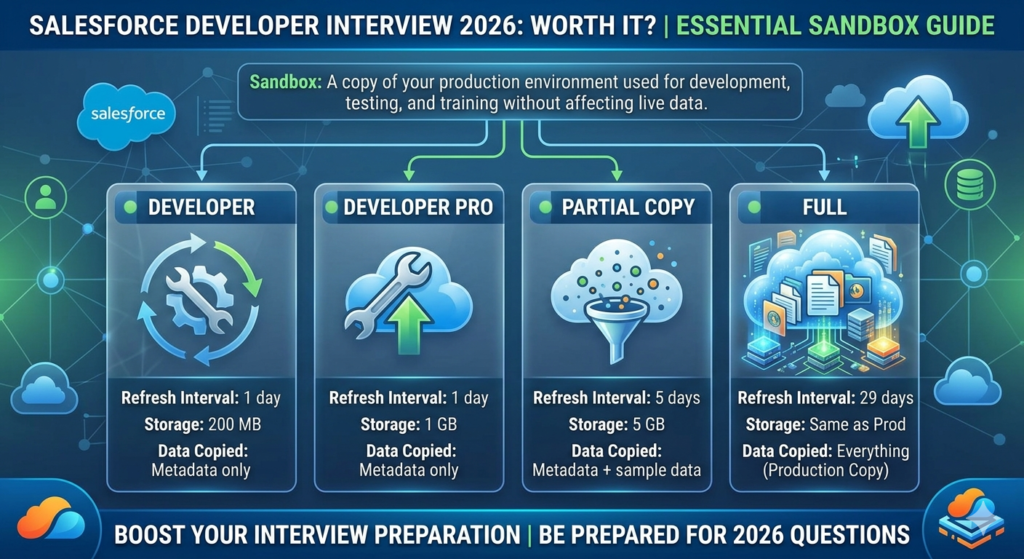
A Sandbox is a copy of your production environment used for development, testing, and training without affecting live data.
| Sandbox Type | Refresh Interval | Storage | Data Copied |
|---|---|---|---|
| Developer | 1 day | 200 MB | Metadata only |
| Developer Pro | 1 day | 1 GB | Metadata only |
| Partial Copy | 5 days | 5 GB | Metadata + sample data |
| Full | 29 days | Same as Prod | Everything |
Q8. What is the Salesforce deployment process?
Answer:
Salesforce supports multiple deployment methods:
- Change Sets – GUI-based, org-to-org deployment
- Salesforce CLI (sf/sfdx) – Command-line, source-driven development
- ANT Migration Tool – XML-based, legacy approach
- Salesforce DX (SFDX) – Modern, Git-based, CI/CD friendly
- Third-party tools – Copado, Gearset, AutoRABIT
Common Mistake: Not understanding the difference between metadata API and tooling API during deployment conversations.
Section 2: Apex Interview Questions
Core territory for any Salesforce developer interview.
Q9. What is Apex, and how is it different from Java?
Answer:
Apex is Salesforce’s proprietary, strongly-typed, object-oriented programming language that runs on Force.com platform servers.
Apex vs. Java — Key Differences:
| Feature | Apex | Java |
|---|---|---|
| Execution Environment | Salesforce servers only | Any JVM |
| Database Access | Native SOQL/DML | JDBC |
| Governor Limits | Yes, enforced | No |
| Multithreading | Not supported | Supported |
| UI Framework | Visualforce / LWC | Various |
Common Mistake: Writing Apex as if it were pure Java — especially attempting multithreading or file I/O operations, which are not supported.
Q10. What are the different data types in Apex?
Answer:
apex// Primitive Types
Integer count = 100;
Long bigNumber = 9999999999L;
Decimal price = 19.99;
Double rate = 3.14;
Boolean isActive = true;
String name = 'RizeX Labs';
Date today = Date.today();
DateTime now = DateTime.now();
ID recordId = '0012400001AbcDE';
Blob fileContent = Blob.valueOf('Hello');

// Collections
List<String> skills = new List<String>{'Apex', 'LWC', 'SOQL'};
Set<Integer> uniqueIds = new Set<Integer>{1, 2, 3};
Map<String, Integer> scoreMap = new Map<String, Integer>{'Alice' => 95, 'Bob' => 87};

// sObject
Account acc = new Account(Name = 'Acme Corp');
Q11. What is the difference between a List, Set, and Map in Apex?
Answer:
| Collection | Ordered | Allows Duplicates | Key-Value | Use Case |
|---|---|---|---|---|
| List | Yes | Yes | No | Ordered records, iterations |
| Set | No | No | No | Unique values, deduplication |
| Map | No | Keys: No, Values: Yes | Yes | Fast lookup by key |
Practical Example:
apex// Using Map to avoid SOQL in loops
Map<Id, Account> accountMap = new Map<Id, Account>(
    [SELECT Id, Name FROM Account WHERE Id IN :accountIds]
);

for (Contact con : contacts) {
    Account relatedAcc = accountMap.get(con.AccountId);
    // Access without querying inside loop
}
Q12. What are Apex Classes? Explain access modifiers.
Answer:
apexpublic class OpportunityService {

    // Public - accessible from anywhere
    public static void processOpportunity(Id oppId) {
        Opportunity opp = [SELECT Id, Amount FROM Opportunity WHERE Id = :oppId];
        calculateDiscount(opp);
    }

    // Private - accessible only within this class
    private static Decimal calculateDiscount(Opportunity opp) {
        return opp.Amount * 0.10;
    }

    // Protected - accessible within class and subclasses
    protected void logAction(String message) {
        System.debug(message);
    }

    // Global - accessible across namespaces (use sparingly)
    global static String getVersion() {
        return 'v2.0';
    }
}
Common Mistake: Using global unnecessarily. Use public unless you’re building a managed package that needs cross-namespace access.
Q13. What is the difference between static and instance methods in Apex?
Answer:
- Static methods belong to the class itself and can be called without instantiating the class.
- Instance methods require an object instance to be called.
apexpublic class MathUtils {

    // Static method - no instance needed
    public static Integer square(Integer num) {
        return num * num;
    }

    // Instance method - requires new MathUtils()
    public Integer cube(Integer num) {
        return num * num * num;
    }
}

// Usage
Integer sq = MathUtils.square(5);      // Works directly

MathUtils utils = new MathUtils();
Integer cb = utils.cube(3);            // Needs instance
Q14. What are Apex Interfaces and Abstract Classes? When would you use each?
Answer:
apex// Interface - defines a contract, no implementation
public interface Discountable {
    Decimal applyDiscount(Decimal amount);
}

// Abstract Class - partial implementation allowed
public abstract class BaseNotification {
    public abstract void send();   // Must be implemented

    public void log(String msg) {  // Can be inherited as-is
        System.debug('Notification logged: ' + msg);
    }
}

// Concrete Implementation
public class EmailNotification extends BaseNotification
    implements Discountable {

    public override void send() {
        System.debug('Email sent!');
    }

    public Decimal applyDiscount(Decimal amount) {
        return amount * 0.85;
    }
}
Use Interface when: You want multiple unrelated classes to follow a common contract.
Use Abstract Class when: You have shared behavior that subclasses should inherit.
Q15. What is the difference between synchronous and asynchronous Apex?
Answer:
| Feature | Synchronous | Asynchronous |
|---|---|---|
| Execution | Real-time | Queued |
| CPU Limit | 10,000 ms | 60,000 ms |
| Heap Size | 6 MB | 12 MB |
| SOQL Limit | 100 | 200 |
| DML Limit | 150 | 150 |
Asynchronous Apex Types:
- Future Methods (
@future) – Simple async, no chaining - Queueable Apex – Chainable, supports non-primitive types
- Batch Apex – Process millions of records in chunks
- Scheduled Apex – Run at specific times (like a cron job)
Q16. Write a Batch Apex class to update all Accounts where the Industry is ‘Technology’.
Answer:
apexpublic class UpdateTechAccountsBatch
    implements Database.Batchable<sObject>, Database.Stateful {

    private Integer processedCount = 0;

    // Start: Define scope of records
    public Database.QueryLocator start(Database.BatchableContext bc) {
        return Database.getQueryLocator(
            'SELECT Id, Industry, Description FROM Account WHERE Industry = \'Technology\''
        );
    }

    // Execute: Process each batch chunk
    public void execute(Database.BatchableContext bc, List<Account> scope) {
        List<Account> toUpdate = new List<Account>();

        for (Account acc : scope) {
            acc.Description = 'Verified Tech Partner - 2026';
            toUpdate.add(acc);
        }

        if (!toUpdate.isEmpty()) {
            Database.update(toUpdate, false); // Partial success allowed
            processedCount += toUpdate.size();
        }
    }

    // Finish: Post-processing actions
    public void finish(Database.BatchableContext bc) {
        System.debug('Total records updated: ' + processedCount);
        // Could send an email or trigger another batch here
    }
}

// Execute the batch
// Database.executeBatch(new UpdateTechAccountsBatch(), 200);
Common Mistake: Not using Database.Stateful when you need to maintain state (like counters) across batch chunks.
Q17. What is Apex Test Classes? What are the best practices?
Answer:
apex@isTest
private class OpportunityServiceTest {

    @TestSetup
    static void makeData() {
        Account acc = new Account(Name = 'Test Account');
        insert acc;

        Opportunity opp = new Opportunity(
            Name = 'Test Opp',
            AccountId = acc.Id,
            Amount = 1000,
            StageName = 'Prospecting',
            CloseDate = Date.today().addDays(30)
        );
        insert opp;
    }

    @isTest
    static void testProcessOpportunity() {
        Opportunity opp = [SELECT Id FROM Opportunity LIMIT 1];

        Test.startTest();
        OpportunityService.processOpportunity(opp.Id);
        Test.stopTest();

        Opportunity result = [SELECT Amount FROM Opportunity WHERE Id = :opp.Id];
        System.assertEquals(900, result.Amount, 'Discount should be applied');
    }
}
Test Class Best Practices:
- Minimum 75% code coverage is required (aim for 90%+)
- Always use
Test.startTest()/Test.stopTest()to reset governor limits - Never use
seeAllData = true— create your own test data - Use
@TestSetupfor shared test data across test methods
Section 3: Triggers & Governor Limits
A must-know for every Salesforce developer interview.
Q18. What is an Apex Trigger, and what are the trigger contexts?
Answer:
An Apex Trigger is code that executes before or after a DML event (insert, update, delete, undelete) on an sObject.
apextrigger AccountTrigger on Account (
    before insert, before update, before delete,
    after insert, after update, after delete, after undelete
) {
    if (Trigger.isBefore && Trigger.isInsert) {
        AccountTriggerHandler.onBeforeInsert(Trigger.new);
    }
    if (Trigger.isAfter && Trigger.isUpdate) {
        AccountTriggerHandler.onAfterUpdate(Trigger.new, Trigger.oldMap);
    }
}
Trigger Context Variables:
| Variable | Description |
|---|---|
Trigger.new | New versions of records (insert/update) |
Trigger.old | Old versions of records (update/delete) |
Trigger.newMap | Map of new records keyed by Id |
Trigger.oldMap | Map of old records keyed by Id |
Trigger.isBefore | True if before trigger |
Trigger.isAfter | True if after trigger |
Q19. What is the Trigger Handler Pattern, and why is it important?
Answer:
The Trigger Handler Pattern separates trigger logic from trigger code, making it maintainable and testable.
apex// Trigger - thin, delegates all logic
trigger ContactTrigger on Contact (before insert, after update) {
    ContactTriggerHandler handler = new ContactTriggerHandler();

    if (Trigger.isBefore && Trigger.isInsert) {
        handler.onBeforeInsert(Trigger.new);
    }
    if (Trigger.isAfter && Trigger.isUpdate) {
        handler.onAfterUpdate(Trigger.new, Trigger.oldMap);
    }
}

// Handler Class - all business logic lives here
public class ContactTriggerHandler {

    public void onBeforeInsert(List<Contact> newContacts) {
        for (Contact con : newContacts) {
            if (String.isBlank(con.Email)) {
                con.addError('Email is required for all new contacts.');
            }
        }
    }

    public void onAfterUpdate(List<Contact> newContacts, Map<Id, Contact> oldMap) {
        List<Task> tasksToCreate = new List<Task>();
        for (Contact con : newContacts) {
            if (con.Email != oldMap.get(con.Id).Email) {
                tasksToCreate.add(new Task(
                    Subject = 'Email changed - verify contact',
                    WhoId = con.Id
                ));
            }
        }
        if (!tasksToCreate.isEmpty()) insert tasksToCreate;
    }
}
Common Mistake: Writing business logic directly inside the trigger. This makes unit testing painful and the code nearly impossible to maintain.
Q20. How do you avoid SOQL queries inside loops?
Answer:
apex// ❌ BAD - SOQL inside loop (hits governor limits fast)
for (Contact con : contacts) {
    Account acc = [SELECT Name FROM Account WHERE Id = :con.AccountId];
    System.debug(acc.Name);
}

// ✅ GOOD - Bulk query outside loop
Set<Id> accountIds = new Set<Id>();
for (Contact con : contacts) {
    accountIds.add(con.AccountId);
}

Map<Id, Account> accountMap = new Map<Id, Account>(
    [SELECT Id, Name FROM Account WHERE Id IN :accountIds]
);

for (Contact con : contacts) {
    Account acc = accountMap.get(con.AccountId);
    System.debug(acc.Name);
}
🚨 Interview Alert: “Bulkification” — writing code that works for 1 record AND 200 records — is a core concept interviewers test heavily. Always query and DML outside loops.
Q21. What is a recursive trigger, and how do you prevent it?
Answer:
A recursive trigger fires itself repeatedly when trigger logic performs DML that triggers the same object again, potentially causing infinite loops.
Prevention using a static Boolean flag:
apexpublic class TriggerHelper {
    public static Boolean isFirstRun = true;
}

trigger AccountTrigger on Account (after update) {
    if (TriggerHelper.isFirstRun) {
        TriggerHelper.isFirstRun = false;
        AccountTriggerHandler.onAfterUpdate(Trigger.new);
    }
}
Common Mistake: Not accounting for recursion when using @future methods or workflow rules that update the same record.
Q22. What is the difference between before and after triggers? When do you use each?
Answer:
| Trigger | Record State | Can Modify Fields? | Can Access Record ID? | Use For |
|---|---|---|---|---|
| Before | Not yet saved | ✅ Yes | ❌ No (insert) | Validation, field updates |
| After | Already saved | ❌ No | ✅ Yes | Related record updates, callouts |
Rule of Thumb:
- Need to modify the triggering record? →
before - Need to create related records or use the new record’s
Id? →after
Q23. What are the most important Salesforce Governor Limits a developer must know?
Answer:
| Limit | Synchronous | Asynchronous |
|---|---|---|
| SOQL Queries | 100 | 200 |
| DML Statements | 150 | 150 |
| Records per DML | 10,000 | 10,000 |
| CPU Time | 10,000 ms | 60,000 ms |
| Heap Size | 6 MB | 12 MB |
| Callouts per transaction | 100 | 100 |
| Future method calls | 50 | — |
| Queueable jobs added | 50 | — |
Q24. How do you handle bulk DML operations safely using Database methods?
Answer:
apexList<Account> accounts = new List<Account>();
accounts.add(new Account(Name = 'Good Account'));
accounts.add(new Account());  // This will fail - Name is required

// ❌ All-or-nothing (throws exception on first failure)
// insert accounts;

// ✅ Partial success - process results individually
Database.SaveResult[] results = Database.insert(accounts, false);

for (Integer i = 0; i < results.size(); i++) {
    if (results[i].isSuccess()) {
        System.debug('Inserted: ' + results[i].getId());
    } else {
        for (Database.Error err : results[i].getErrors()) {
            System.debug('Error on record ' + i + ': ' + err.getMessage());
        }
    }
}
Section 4: SOQL & SOSL Questions
Q25. What is SOQL? How is it different from SQL?
Answer:
SOQL (Salesforce Object Query Language) is used to query Salesforce data. It’s similar to SQL but with key differences:
| Feature | SOQL | SQL |
|---|---|---|
| JOIN | No — uses relationship traversal | Yes |
| Subqueries | Only for child-to-parent | Full support |
| Multiple tables | No (one primary object) | Yes |
| DML | Query only | SELECT, INSERT, UPDATE, DELETE |
apex// SOQL Example - Parent-to-Child (Subquery)
List<Account> accounts = [
    SELECT Id, Name,
           (SELECT Id, FirstName, Email FROM Contacts WHERE IsDeleted = false)
    FROM Account
    WHERE Industry = 'Technology'
    AND AnnualRevenue > 1000000
    ORDER BY Name ASC
    LIMIT 50
];
Q26. What is a relationship query in SOQL? Explain parent-to-child and child-to-parent.
Answer:
apex// Child-to-Parent: Traverse up the relationship
List<Contact> contacts = [
    SELECT Id, FirstName, Account.Name, Account.Industry
    FROM Contact
    WHERE Account.Industry = 'Healthcare'
];

// Parent-to-Child: Use subquery
List<Account> accounts = [
    SELECT Id, Name,
           (SELECT Id, Subject FROM Cases ORDER BY CreatedDate DESC LIMIT 5)
    FROM Account
    WHERE Id IN :accountIds
];

// Accessing child records
for (Account acc : accounts) {
    for (Case c : acc.Cases) {
        System.debug(acc.Name + ' - Case: ' + c.Subject);
    }
}
Q27. What is SOSL, and when would you use it over SOQL?
Answer:
SOSL (Salesforce Object Search Language) performs full-text searches across multiple objects simultaneously.
apex// SOQL - Search within one object on specific fields
List<Contact> contacts = [SELECT Id, Name FROM Contact WHERE Name LIKE '%John%'];

// SOSL - Search across multiple objects simultaneously
List<List<SObject>> results = [
    FIND 'John*'
    IN ALL FIELDS
    RETURNING
        Contact(Id, Name, Email),
        Lead(Id, Name, Company),
        Account(Id, Name)
    LIMIT 20
];

List<Contact> foundContacts = (List<Contact>) results[0];
List<Lead> foundLeads = (List<Lead>) results[1];
Use SOQL when: You know the exact object and fields to search.
Use SOSL when: You need full-text search across multiple objects (like a global search bar).
Q28. What are aggregate functions in SOQL?
Answer:
apex// COUNT, SUM, AVG, MIN, MAX with GROUP BY
AggregateResult[] results = [
    SELECT Industry,
           COUNT(Id) totalAccounts,
           SUM(AnnualRevenue) totalRevenue,
           AVG(NumberOfEmployees) avgEmployees
    FROM Account
    WHERE Industry != null
    GROUP BY Industry
    HAVING COUNT(Id) > 5
    ORDER BY totalRevenue DESC
];

for (AggregateResult ar : results) {
    System.debug(
        'Industry: ' + ar.get('Industry') +
        ' | Accounts: ' + ar.get('totalAccounts') +
        ' | Revenue: ' + ar.get('totalRevenue')
    );
}
Q29. What is a dynamic SOQL query, and when should you use it?
Answer:
apexpublic List<SObject> queryRecords(String objectName, String conditions) {
    // ⚠️ Always sanitize inputs to prevent SOQL injection
    String query = 'SELECT Id, Name FROM ' + objectName;

    if (String.isNotBlank(conditions)) {
        // Use bind variables or String.escapeSingleQuotes()
        query += ' WHERE ' + conditions;
    }

    query += ' LIMIT 100';

    return Database.query(query);
}

// Safer approach using bind variables
String searchName = 'Acme%';
List<Account> accounts = Database.query(
    'SELECT Id, Name FROM Account WHERE Name LIKE :searchName'
);
🚨 Security Alert: Never concatenate user input directly into dynamic SOQL. Use
String.escapeSingleQuotes()or bind variables to prevent SOQL injection attacks.
Q30. What is the difference between COUNT() and COUNT(fieldName) in SOQL?
Answer:
apex// COUNT() - Returns total number of rows (includes nulls)
Integer total = [SELECT COUNT() FROM Account WHERE Industry = 'Technology'];

// COUNT(fieldName) - Counts non-null values of that field
AggregateResult[] result = [
    SELECT COUNT(AnnualRevenue) revenueCount
    FROM Account
];
// Only counts Accounts where AnnualRevenue is NOT null
Q31. What are SOQL best practices for performance?
Answer:
- ✅ Always filter on indexed fields (Id, Name, standard fields, custom indexed fields)
- ✅ Use selective queries — avoid queries that return more than 30% of total records
- ✅ Avoid
SELECT *— only retrieve fields you actually need - ✅ Use
LIMITin non-batch contexts - ✅ Use relationship queries instead of multiple separate SOQL calls
- ❌ Never use SOQL inside loops
- ❌ Avoid
LIKE '%value%'— leading wildcards prevent index use
Section 5: Lightning Web Components (LWC)
LWC interview questions are increasingly important in 2026 Salesforce developer interviews.
Q32. What is LWC, and how is it different from Aura Components?
Answer:
Lightning Web Components (LWC) is Salesforce’s modern component framework based on native Web Standards — HTML, JavaScript, and CSS.
| Feature | LWC | Aura Components |
|---|---|---|
| Technology Base | Web Standards (modern JS) | Proprietary framework |
| Performance | Faster (native browser support) | Slower |
| Learning Curve | Lower (standard JS) | Higher |
| Interoperability | Can be used in Aura | Aura cannot run inside LWC |
| Testing | Jest (standard) | Custom approach |
| Release | 2019+ | 2014+ |
Common Mistake: Trying to use Aura-specific features like $A.enqueueAction in LWC. LWC uses @wire, @api, and standard JS promises.
Q33. What are the key decorators in LWC? Explain @api, @track, and @wire.
Answer:
JavaScript// myComponent.js
import { LightningElement, api, track, wire } from 'lwc';
import getAccountDetails from '@salesforce/apex/AccountController.getAccountDetails';

export default class MyComponent extends LightningElement {

    // @api - Makes property publicly accessible from parent component
    @api recordId;

    // @track - Makes object/array reactive (primitive types are reactive by default)
    @track address = { street: '', city: '', state: '' };

    // @wire - Calls Apex or Wire adapters reactively
    @wire(getAccountDetails, { accountId: '$recordId' })
    account;

    updateCity(event) {
        // @track ensures template re-renders when nested property changes
        this.address.city = event.target.value;
    }
}
Note for 2026: As of recent releases,
@trackis largely unnecessary for primitives. All component properties are reactive.@trackis mainly needed for changes to nested properties of objects/arrays.
Q34. How does component communication work in LWC?
Answer:
Three communication patterns:
JavaScript// 1. Parent → Child: Using @api property
// parent.html
// <c-child-component title={parentTitle}></c-child-component>

// child.js
@api title;   // Receives value from parent

// ---

// 2. Child → Parent: Using Custom Events
// child.js
handleClick() {
    const event = new CustomEvent('buttonclicked', {
        detail: { message: 'Hello from child!' }
    });
    this.dispatchEvent(event);
}

// parent.html
// <c-child-component onbuttonclicked={handleChildEvent}></c-child-component>

// parent.js
handleChildEvent(event) {
    console.log(event.detail.message);
}

// ---

// 3. Unrelated Components: Lightning Message Service (LMS)
import { publish, subscribe, MessageContext } from 'lightning/messageService';
import MY_CHANNEL from '@salesforce/messageChannel/MyChannel__c';
Q35. What is the LWC component lifecycle?
Answer:
LWC lifecycle hooks execute in this order:
constructor()– Component is created, DOM not readyconnectedCallback()– Component inserted into DOMrender()– Returns template to renderrenderedCallback()– After every render (use carefully — can cause loops)disconnectedCallback()– Component removed from DOMerrorCallback(error, stack)– Catches errors in child components
JavaScriptimport { LightningElement } from 'lwc';

export default class LifecycleDemo extends LightningElement {

    constructor() {
        super();  // Always call super() first
        console.log('1. Constructor: Component created');
    }

    connectedCallback() {
        console.log('2. Connected: Component in DOM');
        // Great place to subscribe to message channels or add event listeners
    }

    renderedCallback() {
        console.log('3. Rendered: DOM is ready');
        // Access DOM elements here - but be careful of infinite loops
    }

    disconnectedCallback() {
        console.log('4. Disconnected: Cleanup here');
        // Unsubscribe from message channels, clear timers
    }
}
Q36. How do you call Apex from LWC? What are the two methods?
Answer:
JavaScriptimport { LightningElement, wire } from 'lwc';
import getContacts from '@salesforce/apex/ContactController.getContacts';

export default class ContactList extends LightningElement {

    // Method 1: @wire - Automatic, reactive
    @wire(getContacts)
    wiredContacts({ data, error }) {
        if (data) {
            this.contacts = data;
        } else if (error) {
            console.error('Wire error:', error);
        }
    }

    // Method 2: Imperative - Manual call, use when you need control
    async loadContacts() {
        try {
            this.contacts = await getContacts();
        } catch (error) {
            console.error('Imperative error:', error);
        }
    }
}
When to use which:
- @wire → Read operations that depend on reactive properties
- Imperative → On user actions (button click), conditional calls, error handling control
Q37. What is the difference between connectedCallback and renderedCallback?
Answer:
connectedCallbackruns once when the component is inserted into the DOM. Perfect for initializations, subscriptions, and setting up resources.renderedCallbackruns every time the component renders (including re-renders). Use it carefully — code that changes reactive properties here can cause an infinite render loop.
Q38. How do you handle errors in LWC?
Answer:
JavaScript// Proper error handling in LWC
async saveRecord() {
    try {
        const result = await updateAccount({ accountId: this.recordId, data: this.accountData });
        this.dispatchEvent(
            new ShowToastEvent({
                title: 'Success',
                message: 'Account updated successfully',
                variant: 'success'
            })
        );
    } catch (error) {
        this.dispatchEvent(
            new ShowToastEvent({
                title: 'Error',
                message: error.body?.message || 'An unexpected error occurred',
                variant: 'error'
            })
        );
    }
}
Section 6: Integration & APIs
Q39. What are the types of Salesforce integration APIs?
Answer:
| API | Use Case | Format |
|---|---|---|
| REST API | Modern integrations, mobile apps | JSON/XML |
| SOAP API | Enterprise legacy systems | XML |
| Bulk API 2.0 | Mass data loading (millions of records) | CSV/JSON |
| Streaming API | Real-time data change notifications | JSON (CometD) |
| Metadata API | Deploy/retrieve metadata | XML |
| Tooling API | Build dev tools, query metadata | JSON/XML |
| GraphQL API | Flexible, efficient data queries | JSON |
Q40. How do you make an HTTP callout from Apex?
Answer:
apexpublic class WeatherService {

    public static String getWeatherData(String city) {
        // Must set up Remote Site Setting or Named Credential first
        Http http = new Http();
        HttpRequest request = new HttpRequest();

        // Using Named Credential (recommended - handles auth securely)
        request.setEndpoint('callout:Weather_API/current?city=' + EncodingUtil.urlEncode(city, 'UTF-8'));
        request.setMethod('GET');
        request.setHeader('Content-Type', 'application/json');
        request.setTimeout(10000); // 10 seconds

        HttpResponse response = http.send(request);

        if (response.getStatusCode() == 200) {
            return response.getBody();
        } else {
            throw new CalloutException('API Error: ' + response.getStatusCode() + ' ' + response.getBody());
        }
    }
}
Common Mistakes:
- Forgetting to add Remote Site Settings or Named Credentials
- Making callouts inside triggers (not allowed in synchronous triggers — use
@future(callout=true)) - Not handling timeout scenarios
Q41. What is a Named Credential, and why should you use it?
Answer:
A Named Credential is a Salesforce configuration that stores the URL and authentication settings for an external service. It prevents hardcoding sensitive credentials in Apex code.
Benefits:
- ✅ Credentials stored securely in Salesforce (not in code)
- ✅ Easy to update without code changes or deployment
- ✅ Supports OAuth, Basic Auth, JWT, and more
- ✅ Works seamlessly in sandbox and production without changing code
Q42. What is Platform Events in Salesforce?
Answer:
Platform Events are Salesforce’s event-driven messaging framework for real-time integrations, both within Salesforce and with external systems.
apex// Publishing a Platform Event
Order_Update__e orderEvent = new Order_Update__e(
    Order_Id__c = '001...',
    Status__c = 'Shipped',
    Tracking_Number__c = 'TRK123456'
);

Database.SaveResult result = EventBus.publish(orderEvent);

if (result.isSuccess()) {
    System.debug('Event published successfully');
}
apex// Subscribing via Trigger
trigger OrderUpdateTrigger on Order_Update__e (after insert) {
    for (Order_Update__e event : Trigger.new) {
        System.debug('Order shipped: ' + event.Order_Id__c);
        // Update related records, send notifications, etc.
    }
}
Q43. What is the difference between Outbound Messages and Platform Events?
Answer:
| Feature | Outbound Messages | Platform Events |
|---|---|---|
| Direction | Salesforce → External | Salesforce ↔ Salesforce, External |
| Setup | Declarative (Workflow/Flow) | Programmatic/Declarative |
| Format | SOAP/XML | JSON |
| Real-time | Near real-time | Real-time |
| Retry | Yes (automatic) | No built-in retry |
| Use Case | Simple notifications | Complex event-driven architecture |
Section 7: Scenario-Based Questions
These are designed to test your practical thinking — common in mid-to-senior level Salesforce dev interviews.
Q44. Scenario: A trigger is running too slow on the Account object, causing timeouts. How would you diagnose and fix this?
Answer:
Diagnosis Steps:
- Check Debug Logs for CPU time and SOQL count
- Look for SOQL inside loops (most common culprit)
- Check for complex rollup queries or nested relationship queries
- Review for recursive trigger execution
- Use Salesforce Optimizer and Developer Console Query Plan Tool for index analysis
Fixes:
- Bulkify SOQL — move queries outside loops using Maps
- Add custom indexes on frequently filtered fields
- Move heavy processing to Queueable or Batch Apex
- Use selective SOQL filters on indexed fields
- Implement the Trigger Handler Pattern to control execution
Q45. Scenario: You need to send 50,000 emails when a campaign is launched. What approach would you take?
Answer:
Direct DML or synchronous Apex won’t work — governor limits would block it. Here’s the right approach:
- Batch Apex — Process contacts in chunks of 200 per batch
- Use
Messaging.sendEmail()within batch execute — limited to 5,000 emails/day per org (check limits) - For large volumes — integrate with Salesforce Marketing Cloud or a third-party email service via REST API
- Use Platform Events to trigger email workflows asynchronously
- Consider Email Studio in Marketing Cloud for proper campaign email management
Q46. Scenario: A client says “My Flow is not firing.” How do you troubleshoot?
Answer:
- Check Flow status — Is it Active?
- Check trigger criteria — Is the record meeting entry conditions?
- Check object and trigger — Correct object? Correct DML event?
- Verify record-triggered vs. scheduled — Is it the right flow type?
- Check Flow Error Emails or Debug Logs for runtime errors
- Use Flow Debugger in Flow Builder
- Check Profile/Permission — Does the running user have access?
- Look for order of execution conflicts with triggers
Q47. Scenario: You have a class with 60% code coverage, but a specific method is not covered. What do you do?
Answer:
- Open the Apex Test Execution or Developer Console — check which lines are highlighted red (uncovered)
- Review the specific uncovered method — what input/scenario does it require?
- Write a specific test method that exercises that code path (e.g., the else branch of an if statement)
- Check for exception handlers — write tests that trigger those exceptions
- Avoid code coverage “tricks” — like calling System.debug just to add lines. Meaningful assertions matter.
- Aim for 90%+ coverage with real scenario tests
Section 8: Advanced Salesforce Architecture Questions
Q48. What is the Salesforce Order of Execution?
Answer:
When a record is saved in Salesforce, the following sequence executes:
- Old record loaded from database
- New values override old record fields
- System Validation Rules (required fields, data types)
- Apex before triggers execute
- Custom Validation Rules run
- Duplicate Rules checked
- Record saved to database (not committed)
- Apex after triggers execute
- Assignment Rules (Leads/Cases)
- Auto-Response Rules (Cases)
- Workflow Rules (legacy)
- Escalation Rules
- Processes (Process Builder — legacy)
- Flows (Record-Triggered, after save)
- Roll-up Summary Fields recalculated
- Criteria-Based Sharing Rules evaluated
- Commit to database
- Post-commit logic (emails, async Apex enqueued)
🚨 This is one of the most-asked advanced questions in Salesforce developer interviews. Knowing this cold demonstrates real platform depth.
Q49. What is Apex Managed Sharing, and when would you use it?
Answer:
Apex Managed Sharing allows developers to programmatically share records when standard sharing mechanisms (OWD, Role Hierarchy, Sharing Rules) are insufficient.
apex// Share an Account with a specific User
AccountShare shareRecord = new AccountShare();
shareRecord.AccountId = accountId;
shareRecord.UserOrGroupId = userId;
shareRecord.AccountAccessLevel = 'Edit';
shareRecord.OpportunityAccessLevel = 'Read';
shareRecord.CaseAccessLevel = 'None';
shareRecord.RowCause = Schema.AccountShare.RowCause.Manual;

insert shareRecord;
Use when:
- Business rules require complex, dynamic sharing that standard tools can’t handle
- Multi-territory setups where users need access based on custom logic
- Partner portals with custom visibility rules
Q50. What are the key differences between Enterprise Edition and Unlimited Edition relevant to a Salesforce developer?
Answer:
| Feature | Professional | Enterprise | Unlimited |
|---|---|---|---|
| API Access | Limited | Full | Full |
| Apex Classes/Triggers | 3,000 / 3,000 | 3,000 / 3,000 | Unlimited |
| Sandboxes (Full) | 0 | 1 | Unlimited |
| Sandboxes (Dev) | 0 | 10 | 100+ |
| Custom Objects | 50 | 200 | 2,000 |
| Process Automation | Limited | Full | Full + Premier Support |
Developer Impact: Unlimited Edition gives much more headroom for development, testing, and sandbox workflows — critical in large enterprise projects.
Quick Reference: Interview Cheat Sheet
| Topic | Key Concepts to Remember |
|---|---|
| Governor Limits | 100 SOQL, 150 DML, 10k records/DML, 10s CPU |
| Trigger Contexts | new, old, newMap, oldMap, isBefore, isAfter |
| Async Apex | Future, Queueable, Batch, Scheduled |
| LWC Decorators | @api (public), @track (reactive), @wire (data service) |
| SOQL vs SOSL | SOQL = one object, SOSL = multi-object full-text |
| Order of Execution | Before Trigger → Validation → After Trigger → Workflow → Flow → Commit |
| Relationship Types | Lookup, Master-Detail, Many-to-Many (Junction), Hierarchical |
| Test Best Practices | 75% min, 90%+ target, no seeAllData=true, Test.startTest/stopTest |
Conclusion
Landing your next Salesforce developer role in 2026 takes more than memorizing answers — it requires genuine platform understanding and hands-on experience.
Here’s how to make the most of your preparation:
- Practice in a real Salesforce Developer org — sign up for a free Developer Edition
- Stay updated with Trailhead — complete relevant Superbadges and Trails
- Write test classes for every class you create — it builds both coverage habits and debugging skills
- Follow Salesforce Release Notes — with three releases a year, staying current is non-negotiable
- Review RizeX Labs’ Salesforce development resources for project-based learning and real-world use cases
The Salesforce ecosystem rewards those who keep learning. Whether you’re aiming for your first Salesforce developer job or targeting a senior architect role, consistent practice and a deep understanding of the platform’s core concepts will set you apart in every technical round.
💡 Final Interview Tip: When you don’t know an answer, be honest and talk through how you’d find the solution — using Trailhead, Salesforce documentation, or the developer community. Problem-solving mindset matters as much as raw knowledge.
About RizeX Labs
We’re Pune’s leading IT training institute specializing in emerging technologies like Salesforce and data analytics. At RizeX Labs, we help professionals master tools like Apex development, Lightning Web Components (LWC), and integration patterns through hands-on training, real-world projects, and expert mentorship. Our programs are designed to transform learners into job-ready Salesforce professionals with strong technical, analytical, and problem-solving skills.
Internal Links:
- Salesforce Admin & Development Training
- Salesforce Apex Triggers: Beginner’s Guide with Real-Time Examples
- Salesforce Lightning Web Components (LWC) vs Aura: Which Should You Learn First
External Links:
- Salesforce official website
- Salesforce Developer Center
- Trailhead learning platform
- Salesforce Help Docs (Apex Developer Guide)
