
Introduction: Understanding ServiceNow CMDB and Its Critical Role in Modern IT
In today’s rapidly evolving digital landscape, organizations manage thousands of interconnected IT assets, applications, and infrastructure components. The ServiceNow Configuration Management Database (CMDB) serves as the central nervous system of IT service management, providing a unified repository that maps the intricate relationships between all configuration items (CIs) within your technology ecosystem.
At its core, ServiceNow CMDB is more than just an asset inventory—it’s a dynamic, intelligent system that enables IT teams to:
- Visualize dependencies between applications, servers, and business services
- Accelerate incident resolution by understanding impact and root causes
- Optimize change management by assessing downstream effects before implementation
- Ensure compliance through accurate configuration tracking and auditing
- Drive informed decision-making with real-time asset intelligence
According to Gartner, organizations with mature CMDB implementations experience 40% faster incident resolution and 30% reduction in change-related failures. This guide will demystify ServiceNow CMDB for beginners while providing advanced insights for seasoned IT professionals looking to maximize their CMDB investment.
Core Concepts: The Foundation of ServiceNow CMDB
What Are Configuration Items (CIs)?
Configuration Items (CIs) represent any component that needs to be managed to deliver IT services. In ServiceNow CMDB, CIs are classified into several categories:
1. Hardware CIs
- Physical servers and virtual machines
- Network equipment (routers, switches, firewalls)
- End-user devices (laptops, desktops, mobile devices)
- Storage arrays and backup systems
2. Software CIs
- Operating systems and middleware
- Business applications and databases
- Licensed software and SaaS subscriptions
- Custom-developed applications
3. Service CIs
- Business services (e.g., Email Service, CRM Application)
- Technical services (e.g., Database Service, Web Server)
- Cloud services and third-party integrations
Understanding CI Relationships: The Power of Connected Data
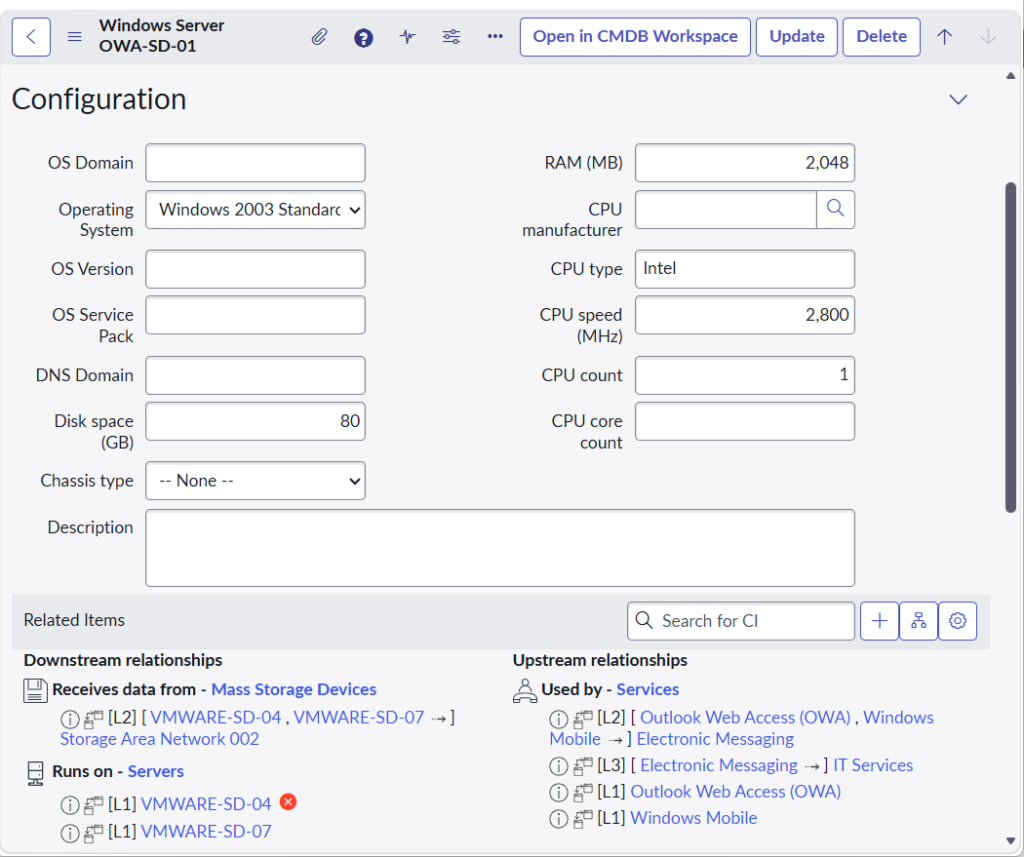
The true value of ServiceNow CMDB emerges through relationship mapping. Unlike traditional asset databases, CMDB captures how CIs interconnect and depend on each other:
Common Relationship Types:
- Runs on::Runs – Applications running on servers
- Depends on::Used by – Service dependencies
- Contains::Contained by – Physical/logical containment
- Connects to::Connected by – Network connections
- Manages::Managed by – Management relationships
- Provides service to::Receives service from – Service delivery chains
Real-World Example:
textBusiness Service: Online Shopping Portal
├── Depends on → Application: E-commerce Platform
│   ├── Runs on → Server: PROD-APP-01
│   │   └── Contains → Virtual Machine (VMware)
│   └── Connects to → Database: Customer_DB
│       └── Runs on → Server: PROD-DB-01
└── Depends on → Application: Payment Gateway
    └── Provides service from → Third-party: Stripe API
The CMDB Data Model: Structure and Hierarchy
ServiceNow employs a hierarchical class structure where CI types inherit attributes from parent classes:
Base Configuration Item (cmdb_ci)
- Common attributes: Name, Status, Operational Status, Company, Location
- Custom fields can be added at any level
Specialized Classes:
cmdb_ci_server→ Physical and virtual serverscmdb_ci_appl→ Applicationscmdb_ci_service→ Business and technical servicescmdb_ci_network_gear→ Network devicescmdb_ci_database→ Database instances
This inheritance model ensures data consistency while allowing flexibility for organization-specific requirements.
CMDB Health: The Foundation of Accuracy
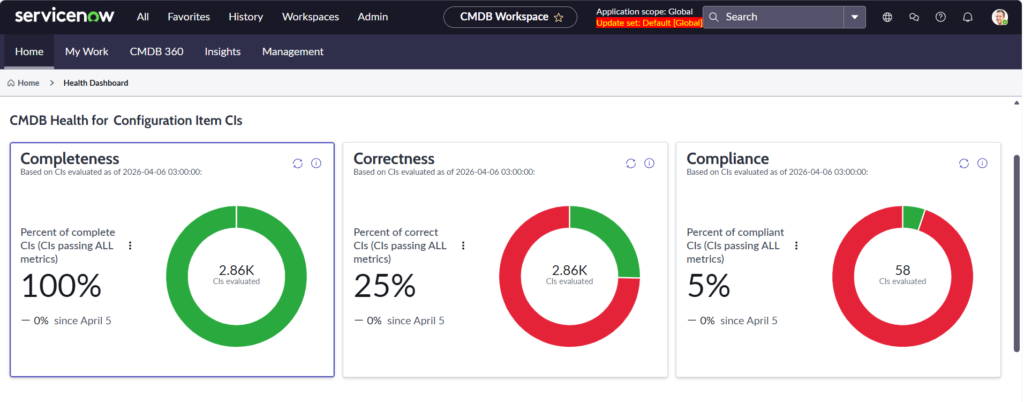
ServiceNow includes built-in CMDB Health capabilities that monitor:
- Completeness – Are all required attributes populated?
- Compliance – Do CIs follow defined rules and standards?
- Correctness – Is the data accurate and validated?
- Relationships – Are CI relationships properly defined?
- Duplicate Detection – Are there redundant CI records?
Pro Tip: Maintain a CMDB Health score above 85% to ensure reliable service mapping and impact analysis.
Real-Time Features: Powering Dynamic IT Service Management
1. Discovery and Service Mapping: Automated CI Population
ServiceNow Discovery eliminates manual data entry by automatically identifying and populating CIs across your infrastructure in ServiceNow CMDB:
Discovery Capabilities:
- Agentless scanning of network devices, servers, and applications
- Cloud discovery for AWS, Azure, Google Cloud, and multi-cloud environments
- Application dependency mapping showing how applications communicate
- Scheduled updates ensuring CMDB stays current with infrastructure changes
Real-Time Benefit: When a new server is provisioned, Discovery automatically adds it to CMDB within minutes, including all relationships to dependent services.
2. Event Management Integration: Real-Time Status Updates
ServiceNow Event Management continuously monitors CI operational status:
- Automated status changes based on monitoring tool alerts (Nagios, Splunk, Dynatrace)
- Operational state tracking (Operational, Non-Operational, Repair in Progress)
- Real-time dashboards showing CI health across your environment
- Proactive alerting before issues impact business services
Use Case: When a database server experiences high CPU utilization, Event Management updates the CI’s operational status and triggers automated correlation to identify affected business services.
3. Integration Hub: Connecting Your Technology Ecosystem
Integration Hub enables real-time data synchronization between ServiceNow CMDB and external systems:
Common Integrations:
- Cloud platforms (AWS, Azure, GCP) for dynamic infrastructure updates
- Monitoring tools (Datadog, New Relic, AppDynamics) for performance data
- ITSM tools for cross-platform configuration tracking
- Security tools (vulnerability scanners, SIEM) for risk assessment
- HR systems for user-CI ownership mapping
Bi-directional synchronization ensures CMDB remains the single source of truth while feeding data to specialized tools.
4. Service Mapping: Visualizing Real-Time Dependencies
Service Mapping provides dynamic, visual representations of application and business service architectures:
Key Features:
- Automated topology discovery using traffic-based mapping
- Real-time relationship updates as infrastructure evolves
- Business service views showing technical components supporting business capabilities
- Impact simulation before making changes
Advanced Capability: Service Mapping uses machine learning to identify previously unknown dependencies, continuously improving CMDB accuracy.
5. CMDB Workspace: Modern User Experience
The CMDB Workspace provides a unified interface for managing configuration data:
- 360-degree CI views with relationships, history, and associated records
- Visual relationship explorer for interactive dependency navigation
- Bulk operations for efficient CI management
- Health insights at the individual CI level
- Predictive intelligence suggesting missing relationships
Use Cases: ServiceNow CMDB in Action
Use Case 1: Accelerated Incident Management
Scenario: A critical production database becomes unresponsive at 2 AM.
Traditional Approach: IT teams scramble to identify affected applications, manually checking documentation and contacting application owners—taking 45+ minutes.
With ServiceNow CMDB:
- Incident automatically links to database CI
- Impact Analysis instantly identifies 12 dependent applications
- Affected business services displayed with real-time status
- Automated notifications sent to relevant application owners
- Historical incident data surfaces similar past issues and resolutions
Result: MTTR (Mean Time to Resolve) reduced by 60%—from 45 minutes to 18 minutes.
Use Case 2: Risk-Aware Change Management
Scenario: Infrastructure team plans to upgrade a critical middleware component.
ServiceNow CMDB Implementation:
- Change request automatically populates with affected CIs through Service Mapping
- Conflict detection identifies 3 other changes scheduled for dependent systems
- Impact assessment reveals 47 applications would be affected
- Risk score calculated based on CI criticality and change history
- Automated CAB (Change Advisory Board) scheduling with stakeholder notifications
Outcome: Change window optimized, stakeholders proactively informed, change-related incidents reduced by 45%.
Use Case 3: Cloud Cost Optimization
Scenario: Organization seeks to reduce cloud infrastructure costs without impacting services.
CMDB-Driven Approach:
- Discovery identifies all AWS and Azure resources
- Service Mapping shows which cloud resources support business services
- Analysis reveals orphaned instances with no business service relationships
- Underutilized resources identified through integration with cloud monitoring
- Decommissioning candidates validated against CMDB before removal
Financial Impact: $180,000 annual savings from eliminating orphaned and underutilized cloud resources.
Use Case 4: Compliance and Audit Readiness
Scenario: Annual SOX compliance audit requires documentation of all financial systems and their components.
ServiceNow CMDB Solution:
- Business services tagged with compliance requirements
- Relationship queries generate complete technology stacks for financial applications
- Change history provides audit trail of all modifications
- Automated reporting shows configuration drift from approved baselines
- Real-time compliance dashboards track remediation progress
Audit Result: 100% compliance achieved with 70% less preparation time compared to previous year.
Use Case 5: Application Portfolio Rationalization
Scenario: Enterprise with 800+ applications needs to identify rationalization candidates.
CMDB Analytics:
- Complete application inventory with usage metrics from monitoring integrations
- Dependency analysis identifies functionally redundant applications
- Cost allocation based on infrastructure CIs supporting each application
- Business criticality assessment through service relationships
- Decommission roadmap generated based on complexity and risk
Business Value: Retirement of 127 redundant applications, $2.4M annual cost reduction.
Optimization Tips: Maximizing Your ServiceNow CMDB Implementation
Data Governance Best Practices
1. Define CI Ownership
- Assign data stewards for each CI class
- Implement approval workflows for CI modifications
- Establish regular review cycles (quarterly recommended)
2. Establish Data Quality Standards
- Mandate minimum completeness thresholds (e.g., 90% for critical CIs)
- Create validation rules for key attributes
- Implement duplicate prevention through identification rules
3. Limit Manual Data Entry
- Prioritize automated discovery over manual CI creation
- Use import sets with transformation rules for bulk updates
- Implement API integrations for authoritative sources
Technical Optimization Strategies
1. Right-Size Your CMDB Scope
Don’t attempt to track everything—focus on CIs that support:
- Business-critical services
- Compliance requirements
- Incident and change management processes
Recommendation: Start with 3-5 critical business services and expand gradually.
2. Optimize Discovery Schedules
- Critical infrastructure: Daily discovery
- Standard servers/applications: Weekly discovery
- Network devices: Bi-weekly discovery
- Workstations: Monthly or on-demand
3. Leverage Identification and Reconciliation (IRE)
Configure IRE rules in ServiceNow CMDB to:
- Prevent duplicate CI creation
- Merge data from multiple discovery sources
- Maintain data accuracy across integrations
4. Implement Relationship Validation
- Enable relationship health checks
- Remove stale relationships automatically after defined period
- Create alerts for missing critical relationships
Performance Optimization
1. Database Optimization
- Regularly archive obsolete CIs (retired/decommissioned)
- Create database indexes on frequently queried CI attributes
- Use ACLs judiciously to avoid performance impact
2. Query Optimization
- Leverage encoded queries for complex CI searches
- Use reference qualifiers to limit relationship dropdowns
- Implement lazy loading for relationship explorers
Measuring CMDB Success: KPIs and Metrics
Technical Metrics
| Metric | Target | Measurement Frequency |
|---|---|---|
| CMDB Health Score | >85% | Weekly |
| CI Completeness | >90% (critical CIs) | Weekly |
| Duplicate CIs | <2% | Monthly |
| Stale Relationships | <5% | Monthly |
| Discovery Success Rate | >95% | Weekly |
| Integration Sync Errors | <1% | Daily |
Business Impact Metrics
| Metric | Target Improvement | Tracking |
|---|---|---|
| Mean Time to Resolve (MTTR) | 40-60% reduction | Monthly |
| Change Success Rate | 30-45% improvement | Monthly |
| Incident Reoccurrence | 50% reduction | Quarterly |
| Audit Preparation Time | 70% reduction | Per audit |
| Asset Utilization | 20-30% improvement | Quarterly |
User Adoption Metrics
- Active CMDB users: Target 80%+ of IT staff
- Self-service CI updates: Target 60%+ via automated processes
- Data steward engagement: 100% quarterly participation
- Training completion: 95%+ within 30 days of role assignment
Dashboard Recommendation: Create executive dashboard showing top 5-7 metrics with trend analysis.
Resources and Next Steps
ServiceNow CMDB Official Documentation
RizeX Labs Resources
Recommended Internal Links:
- IT Service Management Consulting – Optimize your ITSM processes
- Discovery and Service Mapping Workshop – Hands-on training for your team
- CMDB Health Assessment – Free evaluation of your current state

Professional Development
- ServiceNow Certified System Administrator (CSA)
- ServiceNow CMDB Implementation Specialist certification
- ITIL 4 Foundation and Practitioner
- ServiceNow Discovery and Service Mapping workshops
Conclusion: Transform Your IT Operations with ServiceNow CMDB
ServiceNow CMDB represents far more than a database—it’s the intelligent foundation that transforms reactive IT support into proactive service delivery. By providing real-time visibility into your technology ecosystem, CMDB empowers organizations to:
✅ Resolve incidents 40-60% faster through accurate impact analysis
✅ Reduce change-related failures by 30-45% with dependency mapping
✅ Optimize costs by 20-30% through improved asset utilization
✅ Achieve compliance with comprehensive configuration tracking
✅ Make data-driven decisions backed by current, accurate information
Key Takeaways
- Start focused: Begin with critical business services rather than attempting complete infrastructure documentation
- Automate relentlessly: Discovery and integrations ensure accuracy while reducing manual effort
- Govern continuously: Establish clear ownership, standards, and regular review processes
- Integrate broadly: Connect CMDB with incident, change, asset, and monitoring tools for maximum value
- Measure success: Track both technical metrics (health, completeness) and business outcomes (MTTR, change success)
- Optimize continuously: CMDB is a journey, not a destination—refine and expand based on demonstrated value
Your CMDB Journey Starts Now
Whether you’re just beginning to explore ServiceNow CMDB or looking to optimize an existing implementation, the insights and strategies outlined in this guide provide your roadmap to success.
The question isn’t whether you need CMDB—it’s how quickly you can realize its transformative potential.
We Want to Hear From You!
Have questions about ServiceNow CMDB? Drop them in the comments below, and our expert team will provide personalized guidance.
Share your CMDB success story or challenges you’ve encountered—your experience helps the entire community learn and grow.
Ready to transform your IT operations? Contact RizeX Labs for a complimentary CMDB assessment and discover how we can accelerate your journey to IT service management excellence.
Join the Conversation
💬 Comment below: What’s your biggest CMDB challenge?
📧 Subscribe: Get exclusive ServiceNow insights delivered monthly
🔗 Share: Help your network discover the power of CMDB
⭐ Rate: Was this guide helpful? Let us know!
