
In the modern B2B SaaS and consulting landscape, the speed of commerce is dictated by the efficiency of your back-office systems. As companies scale, the complexity of managing Salesforce Revenue Cloud—specifically Salesforce CPQ (Configure, Price, Quote) and Salesforce Billing—grows exponentially.
For years, Revenue Operations (RevOps) and IT teams have struggled with a fundamental paradox: while Salesforce is a cloud-first platform, deploying CPQ and Billing configurations often feels like a legacy manual process. The stakes are high. A single misconfigured pricing rule or an error in a billing schedule can lead to millions in lost revenue, compliance failures, or destroyed customer trust.
Enter Revenue Cloud DevOps. By applying CI/CD (Continuous Integration/Continuous Deployment) principles to the Quote-to-Cash (QTC) process, organizations can transform their Revenue Cloud from a bottleneck into a competitive advantage.
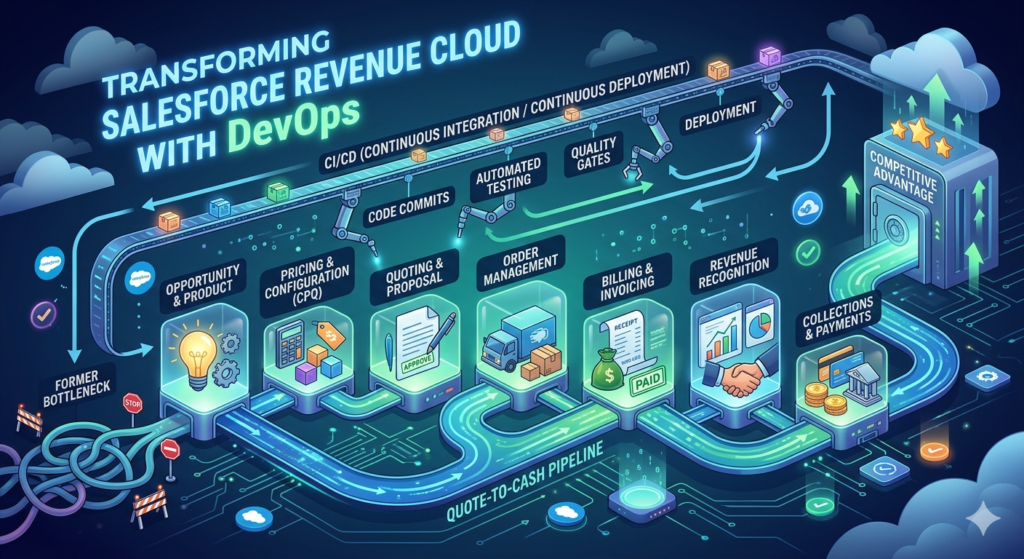
This comprehensive guide explores the challenges of managing CPQ, Billing, and Pricing configurations and outlines how to implement a world-class DevOps strategy for Revenue Cloud.
1. The Complexity Crisis: Why Revenue Cloud is Different
Most Salesforce professionals are familiar with standard DevOps for metadata—moving custom fields, Apex classes, and Flows from Sandbox to Production. However, Revenue Cloud introduces a unique challenge: Data-as-Configuration.
The "Data-as-Configuration" Paradox
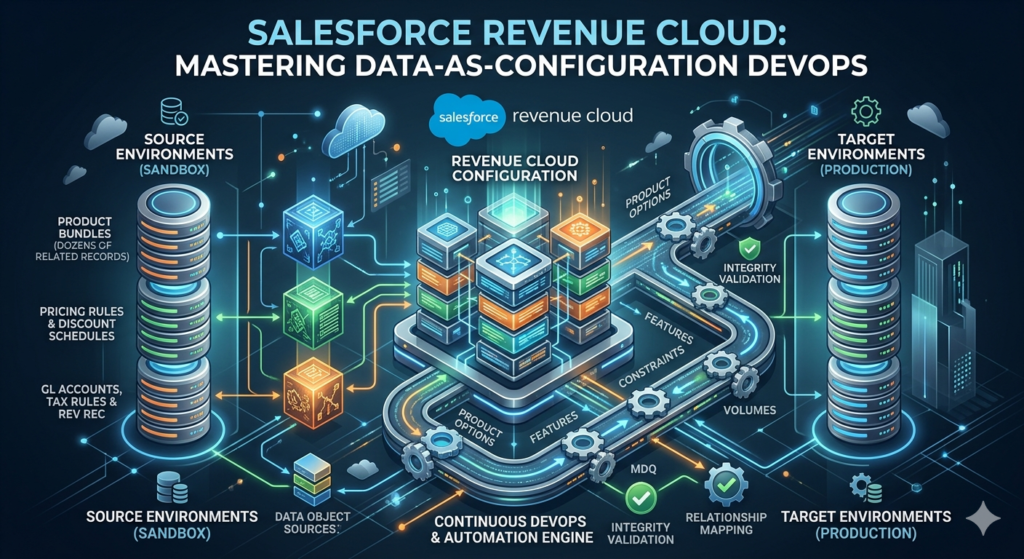
Unlike standard Salesforce features, CPQ and Billing logic are primarily stored as record data, not metadata. Your product bundles, pricing rules, discount schedules, and tax rules are rows in a database, not XML files in a repository.
- Salesforce CPQ Automation: A single product bundle can involve dozens of related records (Options, Features, Constraints).
- Pricing Configuration Management: Multi-dimensional pricing and volume discounts require precise data relationships.
- Billing Automation: GL Accounts, Tax Rules, and Revenue Recognition Policies must be perfectly synced across environments.
Because these are records, standard Change Sets cannot move them. Historically, this forced admins to use Data Loader or manual "re-keying," both of which are prone to human error and lack version control.
2. Challenges in Managing CPQ, Billing, and Pricing Configurations
Before we dive into the CI/CD solution, we must identify the specific friction points that stall Revenue Cloud projects.
A. The Dependency Web
In Salesforce CPQ, a "Product Rule" isn't an isolated entity. It depends on Product records, Configuration Attributes, and Lookup Queries. If you deploy the rule without its dependencies, the system breaks. Managing these circular and deep dependencies manually is a logistical nightmare.
B. Lack of Version Control
When configurations are data records, you lose the ability to see "who changed what and when." There is no native "Audit Trail" for record-level configuration changes in the way Git provides for code. This makes rolling back an erroneous price change nearly impossible without a full backup restoration.
C. Testing Bottlenecks
Without CI/CD for CPQ, testing is often a manual process. QA teams must create quotes manually in a sandbox to ensure a new discount schedule works. As the product catalog grows, manual regression testing becomes unsustainable, leading to bugs reaching production.
D. Environment Out-of-Sync (Sandbox Drift)
Sandboxes quickly become out-of-sync with Production. If a developer builds a new pricing model in a sandbox that has stale product data, the configuration will fail the moment it hits the real-world environment.
3. The Pillars of Revenue Cloud DevOps
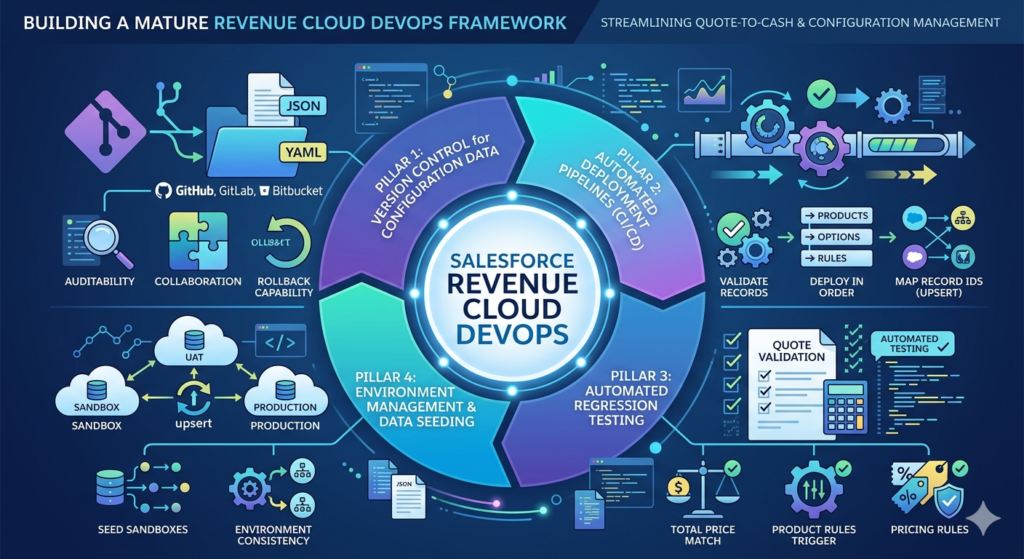
To solve these challenges, organizations must adopt a DevOps framework specifically tailored for Revenue Cloud. This involves four key pillars.
Pillar 1: Version Control for Configuration Data
The first step in Revenue Cloud DevOps is treating configuration data like code. Tools must be used to extract CPQ and Billing records into a readable format (like JSON or YAML) and commit them to a Git repository (GitHub, GitLab, Bitbucket). This provides:
- Auditability: A clear history of changes.
- Collaboration: Multiple admins can work on different pricing models without overwriting each other.
- Rollback Capability: Reverting a botched deployment becomes a matter of "merging" a previous state.
Pillar 2: Automated Deployment Pipelines (CI/CD)
CI/CD for CPQ means that once a configuration change is committed to Git, an automated pipeline triggers. This pipeline:
- Validates the records against the target org.
- Deploys the records in the correct order (e.g., Products first, then Options, then Rules).
- Maps Record IDs across environments (handling the "Upsert" logic required when IDs differ between Sandbox and Prod).
Pillar 3: Automated Regression Testing
In the context of Salesforce CPQ automation, testing should focus on "Quote Validation." Automated scripts should simulate a sales rep building a quote to ensure that:
- The total price matches expectations.
- Product rules trigger correctly.
- Pricing rules apply the right discounts.
Pillar 4: Environment Management & Data Seeding
A mature DevOps process includes the ability to "seed" sandboxes with a subset of production configuration data. This ensures that developers are always building against an accurate representation of the current product catalog.
4. Deep Dive: CI/CD for CPQ and Pricing Configurations
Pricing is the heart of Revenue Cloud. Managing it through a CI/CD pipeline requires a specific approach to Pricing Configuration Management.
Handling Multi-Dimensional Quoting (MDQ)
MDQ adds layers of complexity, where prices change over time (Year 1 vs. Year 2). When deploying MDQ configurations via CI/CD, the pipeline must maintain the integrity of "Price Dimensions" and "Price Book Entries."
The Order of Operations
A successful CI/CD pipeline for CPQ must follow a strict hierarchy to avoid "Record Not Found" errors:
- Foundational Data: Price Books, Products, and Categories.
- Structural Data: Product Features, Options, and Attributes.
- Logic Data: Summary Variables, Price Rules, and Product Rules.
- Action Data: Price Actions, Product Actions, and Lookup Queries.
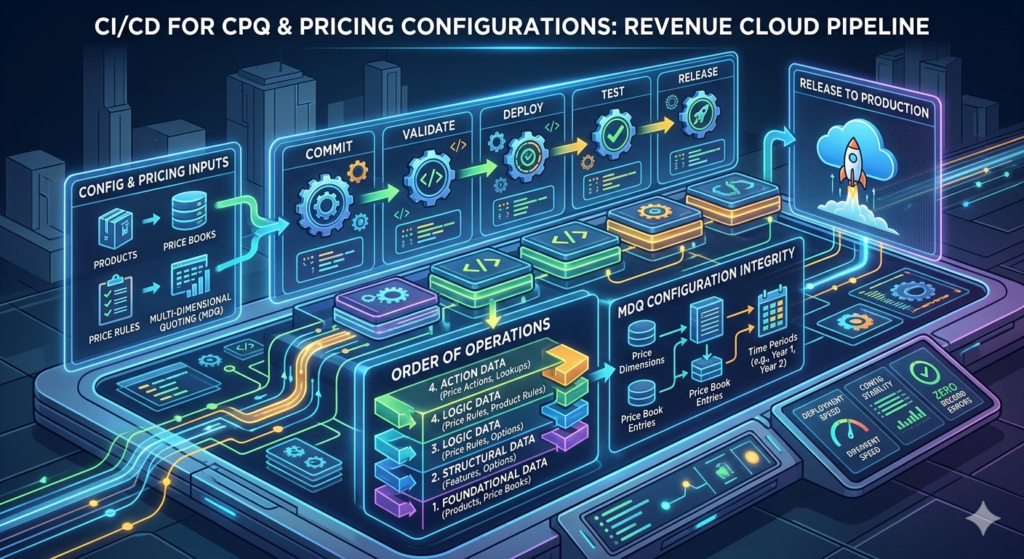
By automating this sequence, teams reduce deployment time from days to minutes.
5. Billing Automation: The Final Frontier of DevOps
Billing automation is often the most sensitive part of Revenue Cloud. While an error in CPQ affects a quote, an error in Billing affects the General Ledger and financial compliance (ASC 606).
Revenue Recognition and Tax Rules
Deploying Billing configurations requires syncing:
- Tax Integration: Ensuring tax engines (like Avalara) are correctly mapped.
- Revenue Schedules: Deploying the logic that dictates how revenue is recognized over the life of a contract.
- GL Accounts: Mapping Salesforce Billing records to the ERP system (like NetSuite or SAP).
DevOps for Billing ensures that these high-stakes configurations are peer-reviewed in Git and tested in a Full Sandbox before ever touching the "real money" in Production.
6. Benefits of Revenue Cloud DevOps
Implementing CI/CD for your revenue operations isn't just a technical upgrade—it’s a business transformation.
1. Increased Agility and Speed to Market
In a competitive B2B market, the ability to launch a new pricing bundle in hours rather than weeks is a superpower. DevOps removes the manual "bottleneck," allowing RevOps to respond to market shifts instantly.
2. Higher Accuracy and Reduced Risk
Automated deployments eliminate "copy-paste" errors. When you automate Pricing configuration management, you ensure that the price a customer sees on their quote is exactly what was intended by the product team.
3. Improved Compliance and Auditability
For public companies, SOX compliance is critical. DevOps provides a transparent trail of every change made to the billing and pricing logic, satisfying auditors and reducing the risk of financial restatements.
4. Scalability
Manual processes don't scale. As your product catalog grows from 100 SKUs to 10,000, only an automated CI/CD pipeline can manage the resulting complexity without a linear increase in headcount.
7. Real-World Use Case: Global SaaS Expansion
The Scenario: A global SaaS company is expanding into the European market. This requires:
- New Price Books in EUR and GBP.
- New VAT-compliant Tax Rules in Salesforce Billing.
- Localized Product Bundles with different discount schedules.
The Old Way: Admins spend three weekends manually recreating records in Production, hoping they didn't forget a single Product Option or Tax Rule. They find five bugs in Production on Monday morning.
The DevOps Way:
- The team creates the new configurations in a Developer Sandbox.
- The changes are committed to a Git branch called
feature/europe-expansion. - A CI/CD for CPQ tool automatically deploys the changes to a QA sandbox.
- Automated tests run 500 quote simulations to verify VAT calculations and bundle logic.
- With a single click, the "Pull Request" is merged, and the configurations are deployed to Production with 100% accuracy.
8. Best Practices for Implementing Revenue Cloud DevOps
Transitioning to a DevOps model requires a shift in both tools and mindset. Follow these best practices:
1. External IDs are Your Best Friend
To sync records across different Salesforce Orgs, you must use External IDs. Ensure every CPQ and Billing object has a unique, indexed External ID field. This allows your CI/CD tool to match records even if the Salesforce Record ID is different.
2. Automate Your Backups
Before any automated deployment, ensure you have a fresh backup of your configuration data. Revenue Cloud is "mission-critical"—always have a safety net.
3. Implement Peer Reviews
Force all configuration changes through a "Pull Request" process. Having a second pair of eyes on a new "Price Rule" can catch logic errors that automated tests might miss.
4. Start Small
Don't try to automate the entire QTC lifecycle on day one. Start with Salesforce CPQ automation for Product Bundles, then move to Pricing, and finally Billing.
5. Invest in Specialized Tools
While you can build your own scripts using the Salesforce CLI, the complexity of CPQ relationships often justifies investing in specialized DevOps tools (like Gearset, Copado, or Flosum) that have built-in "CPQ-aware" deployment engines.
9. Actionable Insights: Your Revenue Cloud DevOps Roadmap
Ready to modernize your Revenue Cloud? Here is a step-by-step checklist:
- Audit Your Current Process: Track how many hours your team spends on manual deployments and how many "hotfixes" are required after a go-live.
- Establish a Git-Based Workflow: Start by exporting your CPQ data and committing it to a repository to create a "source of truth."
- Define Your Environment Strategy: Move from "Developing in Prod" to a structured path: Dev -> QA -> UAT -> Prod.
- Standardize External IDs: Clean up your Product and Price Book data to ensure every record has a unique identifier.
- Automate Regression Testing: Identify your top 10 most common quote configurations and write automated tests for them.
10. The "Cash" in Quote-to-Cash: ERP and Ledger Integration
While DevOps focuses on getting configurations into Salesforce, the ultimate goal of Revenue Cloud is to feed the General Ledger.
- Bridging the Salesforce-ERP Divide: Discuss the transition from Salesforce Billing to ERP systems like NetSuite, SAP, or Sage Intacct. This involves "Invoice Integration" and "Payment Sync."
- The Sub-Ledger Debate: Should Salesforce Billing act as your sub-ledger, or should it simply pass transaction data to the ERP?
- Actionable Insight: Implement a "Financial Source of Truth" matrix. Define which system (Salesforce or ERP) owns the Customer Master, the Product Master, and the Revenue Recognition Schedule.
11. Revenue Intelligence: Beyond Configuration to Optimization
DevOps ensures your pricing rules deploy correctly, but Revenue Intelligence ensures those rules are actually profitable.
- AI-Driven Pricing: Discuss using Salesforce Einstein for "Propensity to Buy" and "Optimal Discount" recommendations. Instead of static discount schedules, use data science to suggest the "sweet spot" price.
- Leakage Detection: Many B2B companies suffer from "Revenue Leakage" (unbilled services or unapplied price increases). Content could focus on using Tableau CRM (CRMA) to audit Quote-to-Cash data and find where money is falling through the cracks.
- Predictive Forecasting: How Revenue Cloud data feeds into sales forecasting. When your CPQ data is structured, your "Commit" and "Best Case" forecasts become much more accurate.
12. Governance and the Revenue Center of Excellence (CoE)
DevOps is a tool, but it requires a human framework to function. A Revenue CoE is the governing body that manages the platform.
- Stakeholder Alignment: In Revenue Cloud, you have three masters: Sales (wants speed), Finance (wants accuracy), and Legal (wants compliance). How do you build a governance board to balance these?
- The "Product Council": A specialized group that meets monthly to decide which new products or bundles are added to CPQ, preventing "SKU Creep" (where the product catalog becomes unmanageably large).
- Change Management: The human side of deploying new pricing. Even with perfect CI/CD, if the sales team isn't trained on the new bundle, the deployment is a failure.
13. Advanced Subscription Models: Usage-Based and Evergreen
Traditional B2B SaaS is moving from flat-fee subscriptions to more complex models.
- Usage-Based Billing: Deep dive into "Consumption Schedules" in Salesforce. This requires integrating a "usage mediation" engine that counts API calls, gigabytes, or seats and feeds that data into Salesforce Billing in real-time.
- Evergreen Subscriptions: Moving away from 12-month contracts to "Evergreen" contracts that never expire. This changes how you handle renewals and "Price Lift" (automatic annual percentage increases).
- The "Amend/Renew" Lifecycle: Discussing the technical complexity of co-terminating contracts and handling mid-term swaps or "down-sells."
14. Compliance and the Regulatory Landscape (ASC 606 & SOX)
For B2B SaaS, especially those eyeing an IPO or already public, Revenue Cloud is a compliance tool.
- ASC 606 / IFRS 15: Content regarding how Salesforce Billing automates "Revenue Recognition." This involves separating the billing (when you send the invoice) from the revenue (when you earn the money).
- Audit-Ready Systems: How a Git-based DevOps history (from the previous blog) serves as a primary artifact for SOX auditors to prove that no unauthorized person changed the company’s pricing logic.
- Tax Automation: Integrating third-party tax engines like Avalara or Vertex with Salesforce Billing to ensure global tax compliance (VAT, Sales Tax, GST).
15. Contract Lifecycle Management (CLM) Integration
The "Quote" is a digital record; the "Contract" is a legal document.
- Closing the Gap: Discussing how Salesforce CPQ integrates with CLM tools (like Salesforce CLM, Conga, or Ironclad).
- Redlining Automation: How to use DevOps to manage the "Clause Library." Just as pricing is data-as-configuration, legal clauses can be treated as modular data components that are dynamically inserted into a contract based on the products selected in the quote.
16. Solving the "Spinning Wheel": CPQ Performance Tuning
Even with perfect CI/CD, a Revenue Cloud implementation can fail if it is slow. High-growth B2B companies often struggle with "Quote Calculator" lag.
- The Quote Calculator Plugin (QCP): Moving beyond standard Price Rules into JavaScript-based logic. Discuss when to use custom scripts versus declarative rules to optimize the "Save" and "Calculate" times.
- Large Quote Experience: Strategies for handling quotes with 1,000+ line items. This includes "Group" optimization and asynchronous calculation.
- Optimizing the Price Waterfall: Reducing the number of lookup queries the system makes during a pricing cycle to minimize CPU timeout errors.
- Actionable Insight: Conduct a "Calculations Audit." If a quote takes more than 10 seconds to calculate, sales adoption will drop. Use the Salesforce "CPQ Timings Log" to identify which specific rule is the bottleneck.
17. Industry-Specific Revenue Cloud Architectures
Not all B2B SaaS is the same. The Revenue Cloud needs of a hardware-software hybrid are different from a pure-play digital platform.
- Manufacturing & "Asset-Based" Ordering: For industries where you sell physical goods + service contracts. How to track the "Asset" on the account and trigger "Add-on" quotes based on physical inventory.
- Media & Ad-Sales: Handling "Flighting" and "Pacing" in Salesforce Billing. This involves complex delivery schedules where revenue is recognized based on impressions delivered, not just the passage of time.
- Professional Services (PSA) Integration: Connecting Revenue Cloud to tools like FinancialForce or Kantata. Moving from a "Quote" to a "Project" and ensuring that time-and-materials billing flows back into the Salesforce invoice.
18. The "Unified Commerce" Vision: B2B Self-Service
The future of B2B is "Headless" or "Self-Service." Customers want to buy without talking to a rep.
- B2B Commerce + CPQ Integration: Using the same "Pricing Engine" for your customer-facing web store and your internal sales team. This ensures a customer sees the same negotiated price online as they would on a rep-generated quote.
- The Customer Portal: Building a "Manage My Subscription" interface. How to let customers upgrade their own licenses or add features through a Lightning Web Component (LWC) that triggers a CPQ "Amendment" in the background.
- Headless CPQ APIs: Discussing the Salesforce "CPQ API" and how to use it to push pricing logic into external mobile apps or third-party websites.
19. Data Migration: The "Big Bang" vs. Phased Transition
The hardest part of a Revenue Cloud project isn't the configuration—it's moving millions of dollars in active subscriptions from a legacy system (like spreadsheets or an old Apttus/Oracle instance).
- Mapping Heritage Data: How to transform legacy "Contract" data into the Salesforce "Subscription" and "Asset" model without breaking the renewal cycle.
- The "Delta" Problem: Managing data migration during the "Cutover" period when sales reps are still closing deals in the old system while you are trying to go live in the new one.
- Validation Strategies: How to run "Parallel Invoicing"—running your old billing system and Salesforce Billing at the same time for 2-3 months to ensure the totals match to the penny before switching over.
20. Managing the "Partner" Revenue Stream (PRM)
Most B2B SaaS companies rely on a channel ecosystem (Resellers, Distributors, Referrals).
- Partner Community CPQ: Extending your CPQ logic to your partners via the Experience Cloud. How to ensure partners only see their specific "Wholesale" price book while the end customer sees the "MSRP."
- Automating Commission Calculations: While Salesforce doesn't have a native "Commissions" engine (often requiring tools like CaptivateIQ or Spiff), the data must flow from the Billing record to ensure commissions are paid on collected revenue, not just booked revenue.
- Deal Registration Sync: Ensuring that when a partner registers a deal, the CPQ quote automatically applies the correct "Partner Discount" based on their tier (Gold, Silver, Bronze).
21. Revenue Cloud Data Science: The "Propensity" Model
Once you have 2–3 years of data in Revenue Cloud, you can stop guessing and start predicting.
- Churn Prediction: Using Billing data (late payments, decreased usage) to trigger an automated "At-Risk" task for the Customer Success Manager.
- Expansion Modeling: Identifying which customer segments are most likely to accept a "Price Lift" or a specific "Cross-Sell" bundle based on historical Quote-to-Cash patterns.
- Discount Effectiveness: Analyzing the "Discount vs. Win Rate" curve. Does a 20% discount actually increase the chance of winning, or is the sales rep giving away margin for no reason?
Conclusion: The Future of Revenue Operations
As we move toward an era of "Composed Commerce" and increasingly complex B2B subscription models, the traditional manual approach to managing Salesforce Revenue Cloud is no longer viable. Revenue Cloud DevOps is the bridge between technical excellence and commercial success.
By embracing CI/CD for CPQ, Billing, and Pricing configurations, organizations can ensure their revenue engine is fast, accurate, and resilient. No more deployment-day anxiety, no more pricing errors, and no more "data silos." Just a streamlined, automated path from quote to cash.
The question is no longer if you should adopt DevOps for Revenue Cloud, but how fast you can implement it to stay ahead of the competition.
About RizeX Labs
We’re Pune’s leading IT training institute specializing in emerging technologies like Salesforce and data analytics. At RizeX Labs, we help professionals master complex ecosystems like Salesforce Revenue Cloud through hands-on training, real-world deployment scenarios, and expert DevOps mentorship. Our programs are designed to transform learners into high-impact architects capable of managing mission-critical Quote-to-Cash lifecycles with precision.
Internal Links:
- Salesforce CPQ Fundamentals: Mastering Product Bundles & Rules
- Advanced Salesforce Billing: From Invoicing to Revenue Recognition
- The Architect's Guide to Salesforce Data Migration Strategies
External Links:
- Salesforce Revenue Cloud Official Documentation
- Salesforce DevOps Center Overview
- Trailhead: Governance & Development Lifecycle Management
- Salesforce Help Docs (CPQ Pricing Logic)