
Introduction: Why Avoiding Early Mistakes Matters for Salesforce Admins
Every Salesforce Admin remembers their early days — the excitement of logging into a live org for the first time, the satisfaction of building your first Flow, the pride of creating a dashboard that a sales manager actually uses. But alongside those early wins, almost every fresher also carries memories of mistakes. A validation rule that locked everyone out of a record. An automation that fired hundreds of emails to the wrong contacts. A permission change that accidentally removed access for an entire team.
These are not just embarrassing moments. In the world of Salesforce administration, Salesforce admin mistakes in a live production environment have real business consequences — lost data, broken workflows, frustrated users, and eroded trust. For a fresher still building their reputation, a significant error early in the role can set your career back considerably.
The good news is that most common Salesforce admin errors are entirely predictable. They follow recognizable patterns, and every experienced admin who went before you has made at least some of them. That means they are also entirely preventable — if you know what to look for and apply the right Salesforce admin tips for freshers from the very beginning of your career.
This guide is written specifically for beginner Salesforce Admins, freshers entering their first admin role, and aspiring professionals preparing for the Salesforce ecosystem. We will walk through the top 10 Salesforce admin mistakes that freshers make, explain why they happen, show you real-world examples of their impact, and give you practical strategies to avoid them from day one.
Let us dive in.
Why Freshers Often Struggle as New Salesforce Admins
Before we get into the specific Salesforce admin mistakes, it is worth understanding why new admins struggle in the first place. Recognizing these root causes helps you approach your role with the right mindset from the start — and makes every piece of Salesforce admin tips for freshers more actionable and relevant.
The gap between certification and real-world work is significant. Salesforce certifications test your theoretical knowledge of the platform. They do not fully prepare you for the complexity of real business environments — messy data, conflicting stakeholder requirements, legacy configurations, and the pressure of making changes that affect hundreds of active users.
Freshers often feel pressure to demonstrate value quickly. When you are new to a role, the natural instinct is to show results fast. This can lead to rushing changes, skipping testing, and implementing solutions without fully understanding the business impact — which is precisely how the most damaging Salesforce admin mistakes happen.
Salesforce is incredibly powerful — and that power cuts both ways. The same declarative tools that let you automate complex processes in minutes can also create serious problems if used without proper planning. New admins sometimes treat Salesforce's ease of configuration as an invitation to experiment freely in production environments.
The scope of the Salesforce admin role is often underestimated. Many freshers expect an admin role to be primarily technical. In reality, it sits at the intersection of technology, business analysis, project management, and stakeholder communication. Admins who focus only on the platform and ignore the business and people sides of the role frequently run into problems that no amount of Salesforce admin tips for freshers can fix after the fact.
Understanding these dynamics sets the foundation for genuinely becoming a better Salesforce Admin — not just one who knows the platform features, but one who applies them thoughtfully and responsibly.
Top 10 Salesforce Admin Mistakes Freshers Make
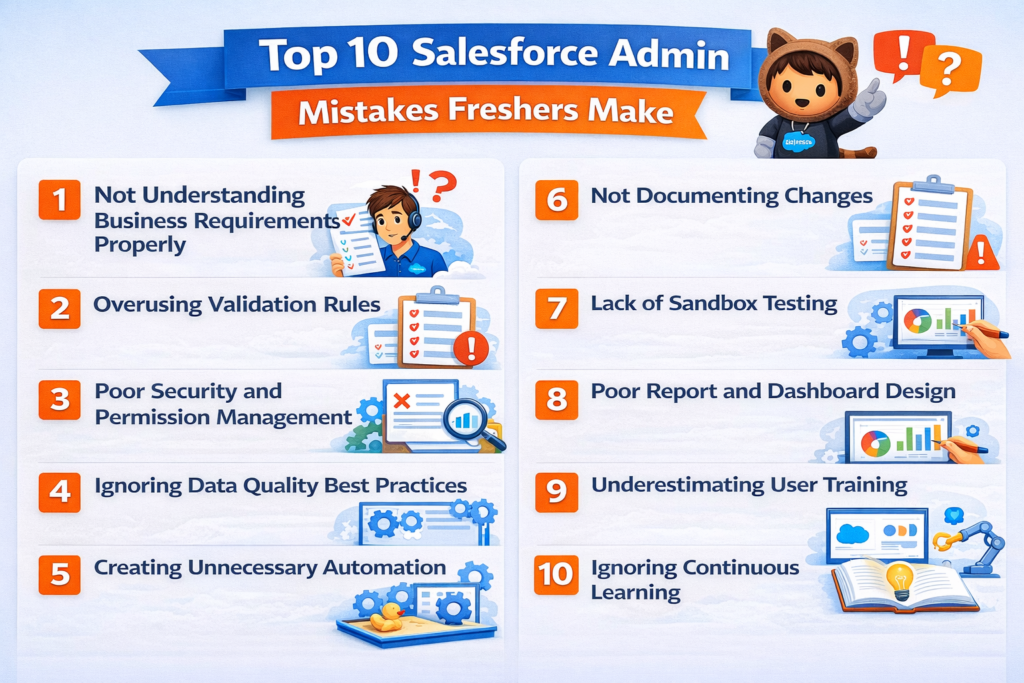
Mistake 1: Not Understanding Business Requirements Properly
This is the most fundamental of all Salesforce admin mistakes — and it is also the most consequential. Many freshers receive a request from a stakeholder, assume they understand what is needed, and immediately start building in Salesforce. The result is often a solution that technically works but does not actually solve the business problem.
Real-world example: A sales manager asks for a new field to track "customer priority." The fresher admin creates a text field where users can type anything. The business actually needed a picklist with standardized values (High, Medium, Low) that feeds into an automated workflow and a dashboard report. The free-text field is useless for automation and creates inconsistent, uncleanable data.
Why it happens: Freshers often lack confidence in asking clarifying questions. They worry it will make them look uninformed. So they make assumptions and build — one of the most avoidable Salesforce admin mistakes in the beginner playbook.
How to avoid it:
- Always schedule a requirements-gathering conversation before building anything
- Use structured questions: What problem are you trying to solve? Who will use this? What does success look like?
- Sketch or wireframe your proposed solution and confirm it with the stakeholder before building
- Document requirements formally, even for small requests, so both parties have clear expectations
Taking time to fully understand requirements is one of the most important Salesforce admin tips for freshers you will ever receive. Build the right thing once rather than the wrong thing twice.
Mistake 2: Overusing Validation Rules
Validation rules are powerful tools for ensuring data quality. But freshers frequently over-engineer them, creating rules that are too restrictive, too numerous, or poorly written. The result is a Salesforce org where users feel blocked at every turn, leading to frustration, workarounds, and ultimately, poor user adoption — a pattern that appears consistently among common Salesforce admin mistakes.
Real-world example: A fresher admin creates 12 validation rules on the Opportunity object in their first week, requiring fields that sales reps do not always have available at the early stages of a deal. Sales reps start creating duplicate records or manipulating fields to bypass the rules, which creates worse data quality than existed before.
Why it happens: New admins learn about validation rules and become enthusiastic about data quality. Without experience, they do not yet understand that enforcing too many rules too early undermines user trust and adoption.
How to avoid it:
- Implement validation rules incrementally, starting with the most critical data quality requirements
- Consider using required fields on page layouts for truly mandatory data rather than validation rules for everything
- Always pilot new validation rules with a small group of users before rolling them out broadly
- Write clear, user-friendly error messages that explain exactly what the user needs to do
- Review existing rules regularly and remove any that are no longer serving their intended purpose
Mistake 3: Poor Security and Permission Management
Security and permissions are among the most complex — and most consequential — areas of Salesforce administration. Common Salesforce admin mistakes in this area range from giving users more access than they need to accidentally locking entire teams out of critical records.
Real-world example: A fresher admin needs to give a new sales team member access to a specific report folder. Not fully understanding the sharing model, they modify the Organization-Wide Defaults (OWDs) to make Accounts visible to all users. This exposes sensitive customer data across the entire organization, including finance records that should have been restricted.
Why it happens: Salesforce's security model — OWDs, roles, profiles, permission sets, and sharing rules — is layered and nuanced. Freshers often do not fully understand how these layers interact, leading to blunt, overly broad changes when surgical precision is required. This is one of the most technically risky Salesforce admin mistakes a fresher can make.
How to avoid it:
- Invest serious study time in understanding the Salesforce security model before making any changes in production
- Follow the principle of least privilege — grant users the minimum access they need to do their job
- Always use permission sets to add specific access rather than modifying profiles for individual exceptions
- Test security changes thoroughly in a sandbox before applying them to production
- Document every security change with a clear rationale
Mistake 4: Ignoring Data Quality Best Practices
Data is the foundation of everything Salesforce does. Poor data quality undermines reports, breaks automations, confuses users, and makes the entire platform feel unreliable. Yet many fresher admins treat data management as an afterthought rather than a core responsibility — a habit that ranks among the most impactful Salesforce admin mistakes for long-term org health.
Real-world example: A fresher admin imports 5,000 lead records using the Data Import Wizard without checking for duplicates first. The org ends up with hundreds of duplicate leads, corrupting existing records and triggering automation workflows multiple times for the same prospects.
Why it happens: Freshers are often eager to complete imports quickly and underestimate the complexity of data quality management. They also may not fully understand the downstream impact of poor data on automation, reporting, and user experience.
How to avoid it:
- Always audit and clean data thoroughly before importing it into Salesforce
- Use duplicate rules and matching rules to prevent duplicate records from entering the system
- Perform data imports in a sandbox first to identify issues before touching production
- Establish clear data governance standards — naming conventions, required fields, data entry protocols — and communicate them to users
- Schedule regular data quality audits to identify and address issues proactively
One of the most practical Salesforce admin tips for freshers around data is simple: treat every data import as a high-risk operation until you have enough experience to assess the risk accurately.
Mistake 5: Creating Unnecessary Automation
Salesforce Flow Builder is one of the most powerful tools available to admins. It is also one of the most commonly misused. Fresher admins sometimes create complex automation for processes that do not need it, build redundant flows that conflict with each other, or automate workflows without fully understanding the business process they are supporting — making this one of the more technically complex Salesforce admin mistakes to diagnose and fix.
Real-world example: A fresher builds three separate record-triggered flows on the Contact object that all fire when a contact is updated. Two of the flows overlap in their logic, causing contacts to be updated twice, sending duplicate email alerts, and occasionally throwing governor limit errors that prevent records from saving at all.
Why it happens: New admins discover the power of automation and want to use it everywhere. Without experience, they do not yet recognize when automation adds genuine value versus when it adds unnecessary complexity.
How to avoid it:
- Before building any automation, map the business process manually first and confirm that automation genuinely improves it
- Follow Salesforce's best practice of consolidating automation — use one flow per object and trigger type rather than multiple overlapping automations
- Always document automation logic clearly, including what triggers it, what conditions it evaluates, and what actions it performs
- Test all automation thoroughly in a sandbox with representative data before deploying to production
- Regularly audit existing automations to identify redundancies and conflicts
Mistake 6: Not Documenting Changes
Ask any experienced Salesforce Admin what the most underrated best practice is, and documentation will be near the top of the list. Yet freshers almost universally skip or minimize documentation, treating it as optional rather than essential. This is one of the most quietly damaging Salesforce admin mistakes — because its consequences often appear months or years after the fact.
Real-world example: A fresher admin makes a series of configuration changes over three months — new fields, modified page layouts, updated flows, and new validation rules — without documenting any of them. When they leave the organization, the new admin inherits an org with no change history, no rationale for existing configurations, and no map of how different elements interact. What should have been a smooth transition turns into months of confusion and re-work.
Why it happens: Documentation feels slow and unproductive when you are in the middle of building. Freshers prioritize the visible work of configuring the platform over the invisible but equally important work of documenting it.
How to avoid it:
- Maintain a change log for every modification made to the Salesforce org — what changed, why, when, and who requested it
- Use Salesforce's built-in description fields on every field, object, flow, validation rule, and automation you create
- Store technical documentation in a shared, accessible location — Google Docs, Confluence, or a dedicated documentation tool
- Create a simple template for documenting each configuration change and use it consistently
- Treat documentation as part of the definition of "done" — a change is not complete until it is documented
Among all Salesforce admin tips for freshers, this one has the longest-lasting positive impact on your professional reputation and on the org you manage.
Mistake 7: Lack of Sandbox Testing
Making changes directly in a production Salesforce org without testing them first in a sandbox environment is one of the riskiest Salesforce admin mistakes a fresher can make. Production orgs contain real business data and are used by real people doing real work. An untested change that breaks something in production can have immediate, serious business consequences.
Real-world example: A fresher admin makes what they believe is a simple change to a record-triggered flow in production — adding a new condition to an existing branch. The change inadvertently breaks the flow's error handling logic. For the next four hours, critical customer service cases fail to be assigned to the correct team, delaying resolution for dozens of active support issues.
Why it happens: Freshers sometimes skip sandbox testing because it feels like extra work or because they are confident the change is simple enough to be safe. Experience teaches you that "simple" changes in complex Salesforce orgs are rarely as simple as they seem — a lesson most admins learn the hard way when they make this particular Salesforce admin mistake.
How to avoid it:
- Make it an absolute personal rule — never make significant changes directly in production without sandbox testing first
- Maintain an up-to-date sandbox that reflects the current state of your production org
- Test changes with realistic data scenarios, not just ideal-case testing
- Have a second person review and test significant changes before deployment
- Use change sets or Salesforce DX for controlled, documented deployments from sandbox to production
Mistake 8: Poor Report and Dashboard Design
Reports and dashboards are among the most visible outputs of a Salesforce Admin's work. They are what business leaders see every day. Poorly designed reports — wrong filters, confusing layouts, irrelevant metrics, or inaccurate data — erode trust in both the admin and the Salesforce platform itself. This is one of the Salesforce admin mistakes that directly affects your professional credibility with leadership.
Real-world example: A fresher creates a "Monthly Sales Performance" dashboard for the leadership team. The report counts all opportunities regardless of stage, includes test records that were never cleaned from the org, uses a fiscal year filter but the company uses a calendar year, and displays numbers in a table format when a visual chart would communicate trends far more effectively. Leadership loses confidence in the data within the first week.
Why it happens: Freshers often know how to build reports technically but lack the business context to design them meaningfully. They focus on what data they can pull rather than what decisions the report needs to support — a subtle but critical distinction that separates good Salesforce admin tips for freshers from surface-level advice.
How to avoid it:
- Before building any report, ask the stakeholder what business question the report needs to answer
- Use appropriate chart types — line charts for trends over time, bar charts for comparisons, funnel charts for pipeline stages
- Always filter out test data, inactive records, and data that would skew results
- Keep dashboards focused — no more than 6 to 8 components per dashboard, each serving a clear purpose
- Review reports with stakeholders after delivery to confirm the data matches their expectations
Mistake 9: Underestimating User Training
Even the most beautifully configured Salesforce org will fail if the people using it do not understand how to use it effectively. Many fresher admins treat user training as someone else's responsibility or as a one-time event rather than an ongoing practice. This is one of the most impactful — and most overlooked — Salesforce admin mistakes in the beginner playbook.
Real-world example: A fresher admin deploys a brand-new lead qualification process in Salesforce, complete with a guided screen flow, new fields, and updated page layouts. They send an email announcement and assume users will figure it out. Adoption is poor, users complain, and the sales manager reports that the "new system" is slowing the team down. The technical solution was good — the change management was not.
Why it happens: Freshers often see their role as purely technical. They underestimate the importance of the human side of Salesforce administration — communication, enablement, and change management. No list of Salesforce admin tips for freshers is complete without addressing this reality directly.
How to avoid it:
- Plan user training as an integral part of every significant configuration change, not an afterthought
- Create simple, role-specific training materials — short videos, step-by-step guides, or quick reference cards work better than lengthy documents
- Conduct live training sessions or lunch-and-learn workshops for major changes
- Establish a feedback channel where users can report issues or ask questions after deployment
- Build a relationship with power users in each department who can provide peer-to-peer support
Mistake 10: Ignoring Continuous Learning
The Salesforce platform evolves constantly. Three major releases per year — Spring, Summer, and Winter — bring new features, updated tools, and changes to existing functionality. Freshers who complete their Admin certification and then stop learning quickly find themselves falling behind both the platform and their peers. In 2026, this particular Salesforce admin mistake carries more professional risk than ever before.
Real-world example: A fresher admin who earned their certification in early 2024 continues using Process Builder for all automation in 2026, unaware that Salesforce has been deprecating Process Builder in favor of Flow Builder. Their org is running on outdated automation that is increasingly unsupported, and they are not positioned to take on more advanced projects because their knowledge has not kept pace with the platform.
Why it happens: After the intensity of certification preparation, many freshers experience learning fatigue and reduce their study efforts once they land their first role. The demands of day-to-day work make structured learning feel difficult to prioritize — but the admins who commit to continuous growth avoid this Salesforce admin mistake and consistently outperform their peers.
How to avoid it:
- Read the Salesforce Release Notes for every major release — even a quick review of the highlights keeps you current
- Maintain an active Trailhead profile and work toward Superbadges and advanced Trailmixes consistently
- Follow Salesforce thought leaders, community blogs, and YouTube channels (Salesforce Ben, Admin Hero, and official Salesforce channels are excellent starting points)
- Attend Salesforce events — Dreamforce, TrailblazerDX, and local community events offer invaluable learning and networking
- Pursue your next certification within 12 months of your first to demonstrate consistent momentum in your Salesforce admin career
How to Avoid These Salesforce Admin Mistakes
Avoiding Salesforce admin mistakes is not about being perfect — it is about building good habits and professional practices from the very beginning of your career. Here is a consolidated framework that ties together all the Salesforce admin tips for freshers covered in this guide:
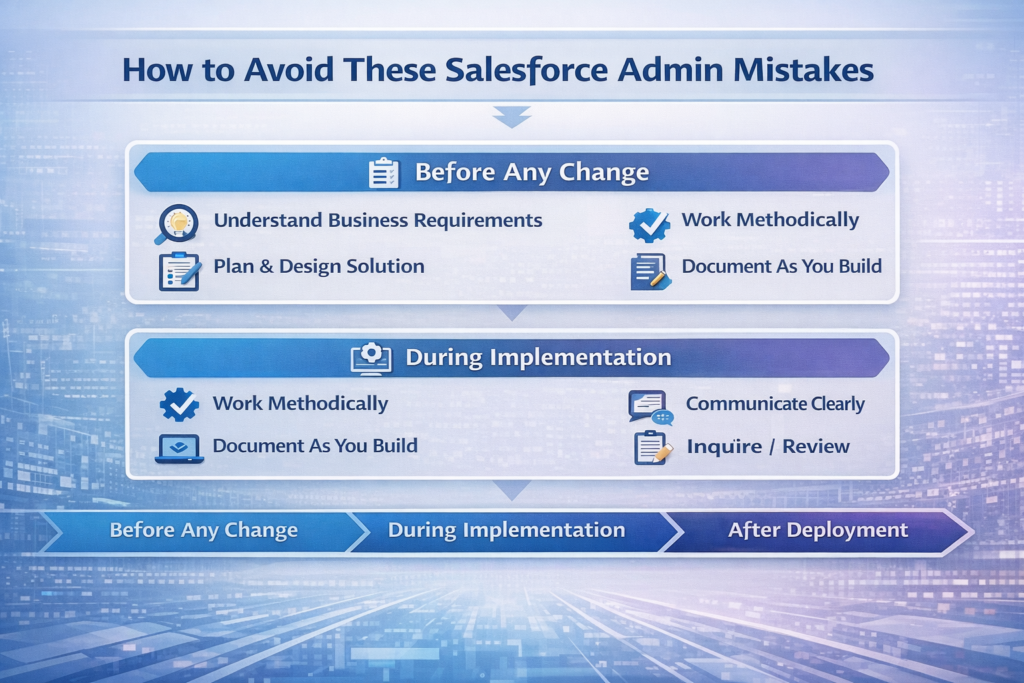
Before any change:
- Fully understand the business requirement through structured discovery conversations
- Design your solution clearly before building it in the platform
- Test thoroughly in a sandbox environment with realistic, representative data
- Get peer review for any significant or high-impact changes
During implementation:
- Work systematically and methodically rather than rushing to show results
- Document as you build, not after the work is complete
- Communicate clearly with stakeholders about timelines, decisions, and expectations throughout
After deployment:
- Monitor the change closely for unexpected behavior in the first 24 to 48 hours
- Gather user feedback actively and address issues promptly and professionally
- Update your documentation to reflect the final implemented state accurately
- Conduct a brief retrospective on what went well and what you would do differently next time
This disciplined, structured approach is the core of becoming a high-performing Salesforce Admin — and it is especially transformative for freshers who are still building their professional instincts and technical confidence.
Best Salesforce Admin Tips for Freshers in 2026
Beyond avoiding specific Salesforce admin mistakes, here are the most impactful Salesforce admin tips for freshers to accelerate your growth and establish yourself as a trusted, capable professional in 2026:
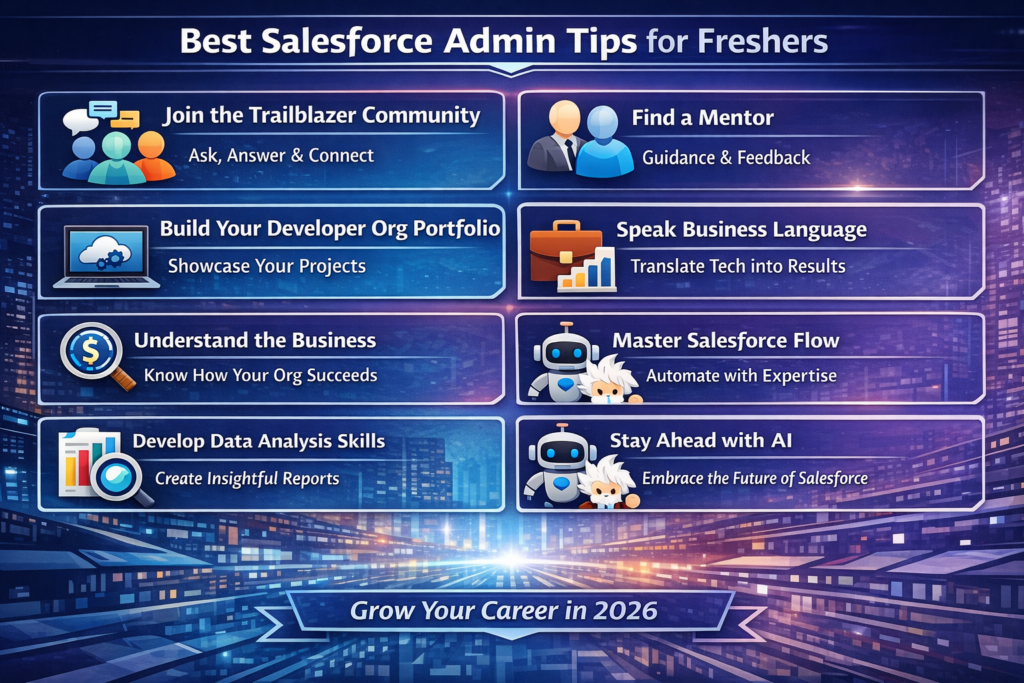
- Join the Trailblazer Community actively — Ask questions, answer questions from others, and connect with admins at all experience levels. The community accelerates learning faster than almost any other resource available to fresher admins
- Find a mentor — An experienced Salesforce Admin who can review your work, share their perspective, and warn you about common Salesforce admin mistakes before you make them is invaluable in your first year
- Build a personal developer org portfolio — Create and document your own projects to demonstrate skills and problem-solving ability to future employers
- Learn to communicate in business language — Translate technical concepts into business outcomes when speaking with non-technical stakeholders. This is one of the most underrated Salesforce admin tips for freshers because it directly affects how leadership perceives your value
- Understand the business deeply, not just the platform — The best admins understand how their organization makes money, serves customers, and measures success
- Master Salesforce Flow Builder — Flow is the present and future of Salesforce automation, and deep mastery of it dramatically expands your professional value and separates you from admins who only know basic configuration
- Develop your data analysis skills — Understanding how to tell meaningful stories with data through reports and dashboards sets you apart from admins who focus only on platform configuration
- Stay curious about AI features — Einstein AI, Agentforce, and AI-powered automation within Salesforce are reshaping the admin role in 2026. Early familiarity gives you a significant competitive advantage and helps you avoid the Salesforce admin mistake of falling behind platform evolution
Tools and Resources to Improve Faster
The right tools and resources make a meaningful difference in how quickly you grow and avoid common Salesforce admin mistakes. Here are the most valuable ones for beginner admins in 2026:
| Resource | Type | Why It Helps |
|---|---|---|
| Salesforce Trailhead | Learning Platform | Free, gamified learning covering every aspect of Salesforce admin skills and best practices |
| Salesforce Release Notes | Official Documentation | Keeps you current with every platform update — essential for avoiding outdated-knowledge mistakes |
| Salesforce Ben Blog | Community Blog | Practical, beginner-friendly guides packed with real-world Salesforce admin tips for freshers |
| Admin Hero | Community Resource | Admin-focused tutorials and career advice from experienced practitioners |
| Focus on Force | Exam Prep | High-quality certification practice exams to validate your knowledge |
| Salesforce Trailblazer Community | Community Forum | Peer support, questions, answers, and professional networking |
| VS Code with Salesforce Extensions | Development Tool | Essential for admins moving toward more technical work and automation |
| Lucidchart or Draw.io | Diagramming Tool | Invaluable for mapping processes, data models, and flow logic before building |
| Salesforce Setup Audit Trail | Built-in Tool | Tracks all configuration changes in your org — use it to review your own change history and catch mistakes |
| Data Loader | Data Management Tool | Essential for bulk data operations, imports, and exports with proper control |
Career Growth Advice for Beginner Salesforce Admins
Your first Salesforce admin role is the beginning of a career journey, not the destination. Here is how to use it as the strongest possible foundation for long-term growth — while consistently applying the Salesforce admin tips for freshers that keep your trajectory moving upward.
In your first 90 days:
- Focus on learning the existing org deeply before making changes — understanding what already exists prevents a significant category of Salesforce admin mistakes
- Build genuine relationships with key stakeholders and understand their business priorities
- Identify the biggest pain points users experience with the platform and prioritize addressing them
- Establish your documentation and change management practices from day one, before they become habits you have to form under pressure
In your first year:
- Pursue your Salesforce Advanced Administrator or Platform App Builder certification to deepen your expertise
- Take full ownership of at least one significant project from requirements gathering through deployment
- Expand your Salesforce product knowledge beyond your daily work — explore Marketing Cloud, Service Cloud, and Financial Services Cloud
- Start contributing to the Trailblazer Community by answering questions in areas where you now have real experience
Long-term career growth:
- Consider specialization in high-demand areas like Financial Services Cloud, Health Cloud, or CPQ — specialization significantly increases both your value and your earning potential
- Explore the path to Salesforce Consultant, which leverages Admin expertise in a higher-impact, higher-compensation role
- Build your personal brand through community contributions, blog writing, or speaking at local Salesforce user groups
- Stay current with AI features in Salesforce — admins who understand Einstein AI and Agentforce in 2026 are commanding premium rates and accessing more advanced career opportunities
The beginner admin mindset — focused on learning, avoiding Salesforce admin mistakes, and applying the best Salesforce admin tips for freshers consistently — should evolve over time into the senior admin expertise and T-shaped professional profile that the Salesforce ecosystem most highly values and rewards.
Conclusion
Every experienced Salesforce Admin you admire today was once a fresher making the same Salesforce admin mistakes you might be making right now. The difference between those who build exceptional careers and those who struggle is not raw talent — it is the willingness to learn deliberately, practice good habits consistently, and treat every mistake as a professional development opportunity rather than a reason for discouragement.
The Salesforce admin mistakes covered in this guide are not meant to discourage you. They are meant to give you a significant head start — a clear map of the pitfalls that trip up most beginners, paired with actionable Salesforce admin tips for freshers to help you navigate around every one of them. Understanding requirements before building, testing in sandboxes before deploying, documenting every change, investing in user training, and committing to continuous learning are not just good habits. They are the professional foundations of a long, successful, and genuinely fulfilling Salesforce admin career.
The Salesforce ecosystem in 2026 is full of extraordinary opportunity — for admins who bring not just technical knowledge but genuine professionalism, business acumen, and an unwavering commitment to quality. You now have the roadmap. The next step is entirely yours.
At RizeX Labs, we are dedicated to helping beginner Salesforce Admins accelerate their learning, avoid costly Salesforce admin mistakes, and build careers they are genuinely proud of. Our team of certified Salesforce professionals offers mentorship, hands-on training programs, and real-world project experience that bridges the gap between certification and career success.
Whether you are just starting your Salesforce admin journey or looking to level up your skills after your first role, RizeX Labs has the expertise, resources, and professional community to support your growth every step of the way.
About RizeX Labs
At RizeX Labs, we specialize in empowering aspiring Salesforce professionals through expert-led Salesforce consulting, implementation services, and practical career-focused training. With deep expertise across Salesforce Administration, Development, Financial Services Cloud, Revenue Cloud, and enterprise automation, we help individuals and organizations succeed in the Salesforce ecosystem.
Our team combines real-world implementation experience with industry best practices to provide actionable guidance, hands-on learning, and strategic mentorship for Salesforce beginners and professionals alike.
Whether you're starting your Salesforce journey or advancing your admin career, RizeX Labs helps you build the knowledge and confidence needed to thrive in 2026 and beyond.
Internal Linking Opportunities:
- Link to your Salesforce training page
- DevOps Roadmap for Salesforce: Tools, Skills, and Certifications You Need in 2026
- How to Build a Salesforce Portfolio That Gets You Hired (With Project Ideas)
- Salesforce Admin vs Developer: Which Career Path is Right for You in 2026?
- Wealth Management App in Financial Services Cloud
External Linking Opportunities:
- Salesforce Official Website
- Salesforce Admin Career Path
- Salesforce Admin Certification Guide
- Salesforce Help Documentation
- Salesforce Trailhead Learning Platform
- salesforce Admin Community / Forums
Quick Summary
Starting a career as a Salesforce Admin can be exciting, but many freshers make avoidable mistakes that slow their growth and impact their effectiveness. From overcomplicating automation and mismanaging permissions to neglecting documentation and testing, these common Salesforce admin mistakes can create long-term challenges for both the admin and the organization.
Understanding the top 10 Salesforce Admin mistakes freshers make in 2026 helps beginners build stronger platform management habits, avoid technical debt, and become more confident administrators. By following proven Salesforce admin tips for freshers and learning from common pitfalls, new admins can accelerate their career growth and deliver greater value from day one.