
Introduction: Why Salesforce Integrations Can Make or Break Your Architecture
Modern enterprises rarely run on a single platform. Your sales team lives in Salesforce. Your finance team works in SAP. Your marketing runs on HubSpot. Your support team uses ServiceNow. And somewhere in the middle, critical business data is stuck in silos — duplicated, inconsistent, or simply inaccessible when it matters most.
This is the core challenge that integration architecture exists to solve.
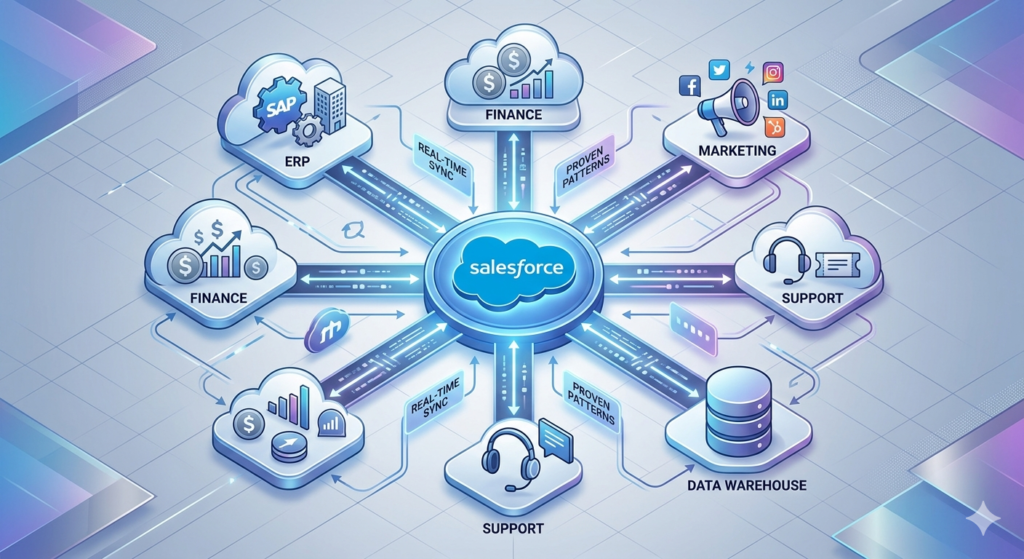
For Salesforce developers, integration is not an optional skill. It is a core competency. Every large Salesforce implementation eventually reaches a point where data must flow in and out — to ERPs, billing systems, data warehouses, third-party APIs, and legacy databases.
The question is not whether to integrate. The question is how to integrate — and making the wrong architectural decision early can cost your organization months of rework and thousands of dollars in technical debt.
That is exactly why salesforce integration patterns exist. These are proven, reusable architectural blueprints that help developers make the right decisions before writing a single line of code.
This guide covers everything you need — from core integration patterns to middleware options, MuleSoft vs direct API comparisons, and real-world best practices that senior Salesforce architects use every day.
📌 Internal Link Suggestion: New to Salesforce development? Start with our Complete Salesforce Developer Training Guide before diving into integration architecture.
What Are Salesforce Integration Patterns?
In software architecture, a pattern is a reusable solution to a commonly occurring problem. Integration patterns are no different.
Salesforce integration patterns are standardized approaches to connecting Salesforce with external systems. They define:
- How data flows — inbound, outbound, or bidirectional
- When data flows — real-time, near-real-time, or batch
- What triggers the flow — a user action, a scheduled job, a system event, or a data change
- How errors are handled — retries, dead-letter queues, or manual intervention
Without patterns, every developer solves the same integration problem in a different way. This leads to inconsistent code, unpredictable behavior, and systems that are nearly impossible to maintain.
With patterns, your entire team speaks the same architectural language. Senior developers can review a design instantly. New developers can understand the system faster. And stakeholders can trust that proven approaches are being applied.
Overview of Pattern Categories
Salesforce integration patterns generally fall into three categories:
- Synchronous patterns — Caller waits for a response before proceeding
- Asynchronous patterns — Caller sends a request and continues without waiting
- Batch patterns — Large volumes of data are processed in scheduled intervals
Each category has specific use cases, and choosing the wrong one can introduce latency, data inconsistency, or scalability problems.
📌 External Reference: Salesforce officially documents integration patterns in their Integration Patterns and Practices guide.
Types of Salesforce Integration Patterns
Let us explore the five core salesforce integration patterns every developer must understand.
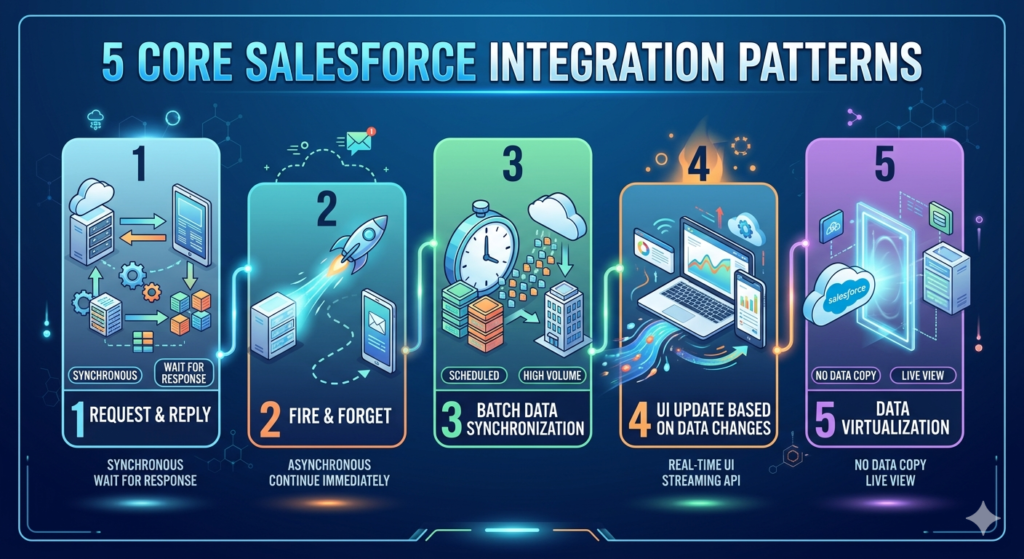
1. Remote Process Invocation — Request and Reply (Synchronous)
What It Is
The calling system (Salesforce or external) sends a request to a remote system, waits for a response, and then continues processing based on that response.
This is a synchronous pattern — meaning the process is blocked until the response arrives.
When to Use
- When you need an immediate response to continue processing
- When data must be validated by an external system before saving in Salesforce
- Example: Credit check during opportunity close, real-time inventory lookup during order creation
How It Works in Salesforce
textUser Action in Salesforce
        ↓
Apex Callout (HTTP/REST or SOAP)
        ↓
External System Processes Request
        ↓
Response Returned to Salesforce
        ↓
Salesforce Updates Record / Shows Result
Implementation Options
- Apex HTTP Callouts — REST or SOAP calls from Apex code
- External Services — Declarative callouts using OpenAPI specs
- Named Credentials — Secure endpoint and authentication management
Pros
- ✅ Immediate feedback to the user
- ✅ Simple to implement for low-complexity scenarios
- ✅ Easy to debug and trace
Cons
- ❌ Tight coupling between systems
- ❌ Governor limits apply (10-second timeout for Apex callouts)
- ❌ Failure in external system blocks Salesforce transaction
Real-World Use Case
An e-commerce company uses Salesforce for order management. When a sales rep creates an order, Salesforce makes a synchronous callout to the inventory system to confirm product availability before the order is saved.
2. Fire and Forget — Asynchronous Request
What It Is
Salesforce sends a message or event to an external system and does not wait for a response. Processing continues immediately in Salesforce regardless of what happens on the other end.
This is the most commonly used pattern in enterprise integrations.
When to Use
- When the calling system does not need an immediate response
- When you want to decouple systems for scalability
- Example: Sending a notification to an ERP when an opportunity is won
Implementation Options
- Platform Events — Publish-subscribe messaging on the Salesforce platform
- Outbound Messages — SOAP-based push to external endpoints
- Salesforce Connect / Change Data Capture — Streaming events on data changes
- Queueable Apex — Async processing with chaining capabilities
Pros
- ✅ Highly scalable and decoupled
- ✅ No blocking of Salesforce transactions
- ✅ Better fault tolerance — messages can be queued and retried
Cons
- ❌ No immediate confirmation of success
- ❌ Requires more robust error monitoring
- ❌ Data consistency must be managed carefully
Real-World Use Case
When a deal is marked "Closed Won" in Salesforce, a Platform Event is published. A MuleSoft flow subscribes to this event and triggers order creation in SAP — without Salesforce waiting for SAP to respond.
3. Batch Data Synchronization
What It Is
Large volumes of data are transferred between Salesforce and an external system on a scheduled basis — typically nightly, weekly, or at defined intervals.
When to Use
- When real-time sync is not required
- When dealing with large data volumes that would hit API limits if processed individually
- Example: Nightly sync of customer records from Salesforce to a data warehouse
Implementation Options
- Batch Apex — Process up to 50 million records in Salesforce
- Bulk API 2.0 — High-volume data operations with minimal API calls
- Scheduled Flows — Declarative batch processing for simpler use cases
- ETL Tools — External tools like Informatica, Talend, or MuleSoft Batch
Pros
- ✅ Efficient for large data volumes
- ✅ Reduces real-time API load
- ✅ Cost-effective for non-time-sensitive data
Cons
- ❌ Data is not real-time — always has a lag
- ❌ Complex error handling when partial batches fail
- ❌ Requires careful scheduling to avoid conflicts
Real-World Use Case
A retail company syncs 500,000 customer records from Salesforce to their data warehouse every night at 2 AM using Bulk API 2.0. The data warehouse then feeds dashboards in Tableau for business reporting.
4. UI Update Based on Data Changes
What It Is
The Salesforce user interface updates dynamically based on changes happening in an external system — without the user needing to refresh the page.
When to Use
- When field agents need real-time status updates from backend systems
- When Salesforce records need to reflect external system changes instantly
- Example: A support case automatically updates when the backend ticketing system changes its status
Implementation Options
- Change Data Capture (CDC) — Streams Salesforce data change events to external systems
- Platform Events — External systems publish events that Salesforce subscribes to
- Lightning Web Components (LWC) with Streaming API — Real-time UI updates
- Bayeux Protocol / CometD — Long-polling for streaming event subscriptions
Pros
- ✅ Real-time user experience
- ✅ Eliminates manual refresh and data staleness
- ✅ Improves agent productivity
Cons
- ❌ More complex to implement
- ❌ Requires streaming API knowledge
- ❌ Event delivery is "at least once" — duplicates must be handled
Real-World Use Case
A logistics company tracks shipment status in an external system. When a shipment status changes, the external system publishes a Platform Event. A Lightning component on the Salesforce Case record listens to this event and updates the status field in real time — without page refresh.
5. Data Virtualization
What It Is
Instead of copying data into Salesforce, the system reads data directly from an external source in real time — making it appear as if the data lives in Salesforce when it actually does not.
When to Use
- When data does not need to be stored in Salesforce permanently
- When read-only access to external data is sufficient
- Example: Displaying live financial data from an ERP inside a Salesforce record
Implementation Options
- Salesforce Connect — Maps external objects from OData-compliant services
- External Objects — Salesforce objects that represent external data
- Apex Callouts in LWC — Fetch and display external data on demand
Pros
- ✅ No data duplication or storage costs
- ✅ Always shows live, current data
- ✅ Reduces Salesforce storage usage
Cons
- ❌ Performance depends on external system speed
- ❌ Cannot use all Salesforce features on external objects (e.g., triggers, workflow)
- ❌ Requires OData compliance for Salesforce Connect
Real-World Use Case
A financial services firm uses Salesforce Connect to display live account balances from their core banking system directly on Salesforce Account records — without storing financial data inside Salesforce.
Salesforce Integration Architecture
Choosing the right pattern is step one. Designing the right architecture around that pattern is step two.
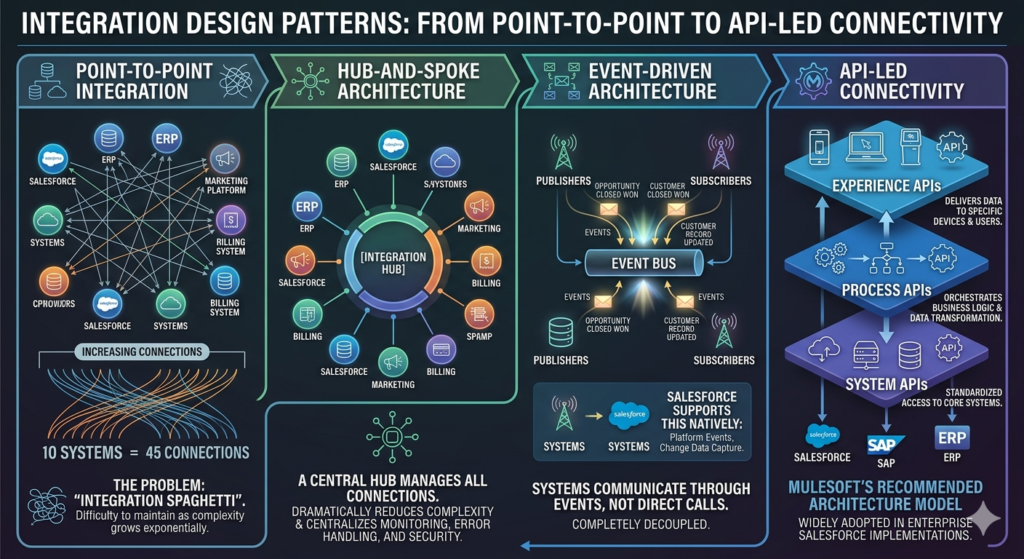
Point-to-Point Integration
The simplest form — two systems connected directly.
textSalesforce ←→ ERP
Salesforce ←→ Marketing Platform
Salesforce ←→ Billing System
Problem: As you add more systems, the number of connections grows exponentially. With 5 systems, you potentially have 10 direct connections. With 10 systems, you have 45. This is called integration spaghetti — and it is extremely difficult to maintain.
Hub-and-Spoke Architecture
A central integration hub manages all connections. Every system connects to the hub, not to each other.
textERP ←→ [Integration Hub] ←→ Salesforce
Marketing ←→ [Integration Hub] ←→ Billing
This dramatically reduces complexity and centralizes monitoring, error handling, and security.
Event-Driven Architecture
Systems communicate through events rather than direct calls. An event is a notification that something happened — "Opportunity Closed Won," "Customer Record Updated," "Invoice Created."
- Systems publish events to an event bus
- Other systems subscribe to events they care about
- Publisher and subscriber are completely decoupled
Salesforce supports this natively through Platform Events and Change Data Capture.
API-Led Connectivity
This is MuleSoft's recommended integration architecture model, and it is widely adopted in enterprise Salesforce implementations.
It organizes APIs into three layers:
| Layer | Purpose | Example |
|---|---|---|
| System APIs | Connect to specific systems | Salesforce API, SAP API |
| Process APIs | Orchestrate business logic | Order fulfillment process |
| Experience APIs | Expose data to consumers | Mobile app, partner portal |
This layered approach promotes reusability — a System API built once can be used by multiple Process APIs.
Salesforce Middleware Integration
What Is Middleware?
Middleware is a software layer that sits between Salesforce and external systems, acting as a translator, orchestrator, and traffic controller.
Instead of Salesforce talking directly to your ERP, it talks to the middleware. The middleware handles transformation, routing, error handling, and monitoring — and then communicates with the ERP.
Why Use Middleware for Salesforce?
Salesforce middleware integration solves several critical problems:
- Data transformation — Converting Salesforce data formats to formats external systems understand
- Protocol translation — Salesforce speaks REST; your legacy system speaks SOAP or FTP
- Error handling — Centralized retry logic and dead-letter queues
- Security — Centralized OAuth token management and encryption
- Monitoring — Single dashboard to see all integration activity
- Scalability — Handle traffic spikes without impacting Salesforce performance
Popular Middleware Platforms
| Tool | Best For | Salesforce Native? |
|---|---|---|
| MuleSoft | Enterprise-grade, API-led connectivity | Yes (Salesforce owned) |
| Dell Boomi | Mid-market, low-code integrations | No |
| Informatica | Data-heavy, ETL workloads | No |
| Jitterbit | SMB and mid-market use cases | No |
| Azure Logic Apps | Microsoft ecosystem integrations | No |
| MuleSoft RPA | Robotic process automation | Yes (Salesforce owned) |
MuleSoft is the most powerful option for Salesforce-heavy architectures because it is owned by Salesforce and offers native connectors, Anypoint Platform monitoring, and deep integration with Salesforce's API-led connectivity model.
📌 External Reference: Explore MuleSoft's Anypoint Platform at mulesoft.com.
MuleSoft vs Direct API Integration
One of the most debated decisions in Salesforce architecture is mulesoft vs direct api integration. Here is an honest breakdown.
Comparison Table
| Criteria | MuleSoft | Direct API (Apex Callouts) |
|---|---|---|
| Complexity | Higher setup complexity | Lower initial complexity |
| Scalability | Highly scalable | Limited by Salesforce governor limits |
| Cost | High licensing cost | No additional license needed |
| Maintenance | Centralized, easier long-term | Scattered across Apex classes |
| Error Handling | Built-in retry, dead-letter queues | Manual implementation required |
| Monitoring | Anypoint Platform dashboard | Custom logging required |
| Security | Centralized token management | Named Credentials + Apex |
| Speed to Implement | Slower (more setup) | Faster for simple integrations |
| Transformation | DataWeave (powerful) | Apex JSON/XML parsing |
| Best For | Complex, multi-system enterprise | Simple, point-to-point integrations |
When to Choose MuleSoft
- You have multiple systems that all need to talk to each other
- You need real-time monitoring and centralized error management
- Your integrations involve complex data transformations
- Your organization already uses or is investing in MuleSoft
When to Choose Direct API
- You have a simple, single integration with low complexity
- Budget is a constraint — MuleSoft licensing is expensive
- The integration is temporary or low-volume
- Your team has strong Apex development skills
The honest answer? For most enterprise Salesforce implementations with 3 or more integrated systems, MuleSoft wins long-term. For smaller projects or startups, direct API integration is perfectly valid and much faster to deploy.
Best Practices for Salesforce Integrations
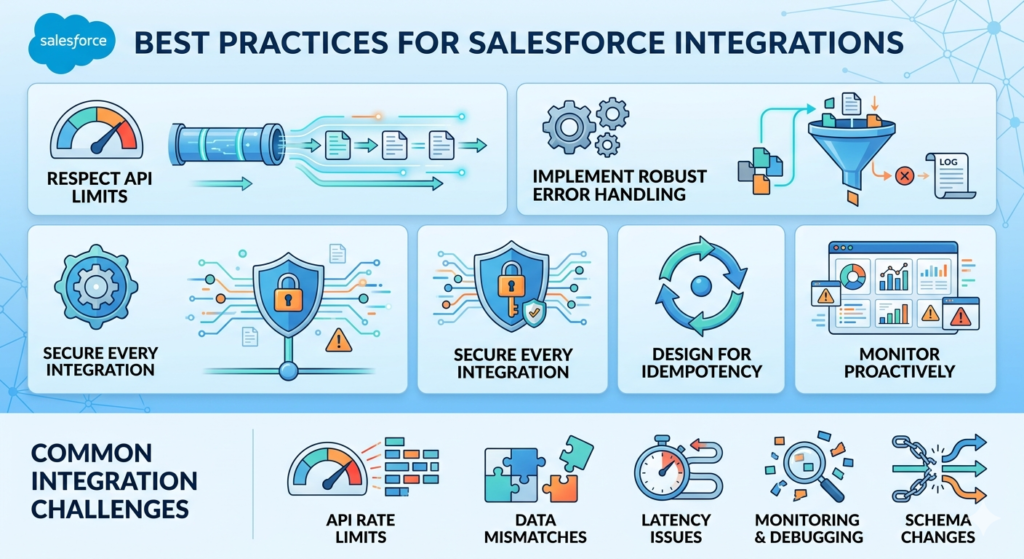
1. Respect API Limits
Salesforce enforces strict API call limits based on your edition and user licenses. Exceeding them causes integrations to fail.
- Use Bulk API for large data volumes instead of making thousands of individual REST calls
- Implement caching for frequently read external data
- Monitor API usage in Setup → System Overview
2. Implement Robust Error Handling
- Always use try-catch blocks in Apex callouts
- Log errors to a custom object for visibility and debugging
- Implement retry logic with exponential backoff for transient failures
- Use Platform Events as a dead-letter queue for failed messages
3. Secure Every Integration
- Use Named Credentials — never hardcode endpoints or credentials in Apex
- Implement OAuth 2.0 for all API authentication
- Use Connected Apps with minimal required scopes
- Encrypt sensitive data in transit (TLS 1.2+) and at rest
4. Design for Idempotency
External systems may deliver the same message more than once. Your integration must handle duplicate messages gracefully.
- Use External IDs to prevent duplicate record creation
- Store message IDs and check for duplicates before processing
- Design upsert operations instead of separate insert/update logic
5. Monitor Proactively
- Set up API usage alerts in Salesforce Setup
- Use MuleSoft Anypoint Monitoring or a custom logging framework
- Create dashboards in Salesforce to track integration health
Common Integration Challenges
API Rate Limits
Hitting Salesforce's API limits is the most common integration failure. Plan your call volume carefully and use Bulk API for high-volume operations.
Data Mismatches
Field types, date formats, and picklist values often differ between systems. Invest time in data mapping before development begins.
Latency Issues
Synchronous integrations with slow external systems create poor user experiences. Set realistic timeout thresholds and consider switching to async patterns for slow endpoints.
Monitoring and Debugging
Without centralized logging, debugging integration failures is painful. Build logging from day one — not as an afterthought.
Schema Changes
When the external system updates its API, your integration breaks. Version your APIs and set up automated testing to catch breaking changes early.
Tools and Technologies for Salesforce Integration
REST API
Salesforce's primary API for most integrations. Supports CRUD operations on all standard and custom objects. Best for real-time, lightweight integrations.
SOAP API
Older but still widely used, especially with legacy enterprise systems (SAP, Oracle). Supports more complex operations like merge and undelete.
Bulk API 2.0
Designed for loading and extracting large data volumes. Can handle up to 150 million records per day. Uses asynchronous processing with job-based architecture.
Platform Events
Salesforce's publish-subscribe messaging framework. Enables real-time, event-driven integrations both within Salesforce and with external systems.
Change Data Capture (CDC)
Streams change events (create, update, delete, undelete) from Salesforce objects to subscribers. Ideal for keeping external systems in sync with Salesforce data.
External Services
Declarative tool for making callouts to external REST APIs without writing Apex. Define the API using an OpenAPI spec, and Salesforce generates invocable actions for Flows.
Salesforce Connect
Enables real-time access to external data using OData protocol. Powers External Objects and Data Virtualization pattern.
Conclusion: Build Integrations That Scale
Salesforce integration patterns are not just theoretical concepts — they are the practical foundation of every successful enterprise integration. Choosing the right pattern before you write a single line of code determines whether your integration is maintainable, scalable, and reliable for years to come.
Here are the key takeaways:
- Use Request-Reply when you need immediate responses
- Use Fire and Forget to decouple systems and improve scalability
- Use Batch Sync for large-volume, non-time-sensitive data
- Use UI Update patterns for real-time user experiences
- Use Data Virtualization to avoid unnecessary data duplication
- Choose MuleSoft for complex, multi-system enterprise architectures
- Choose Direct API for simple, budget-conscious integrations
- Always design for security, error handling, and monitoring from day one
The future of Salesforce integration is moving toward event-driven, API-led, and AI-augmented architectures. With Salesforce's continued investment in MuleSoft, Data Cloud, and Einstein AI, the integrations of tomorrow will be smarter, faster, and more autonomous.
Master these patterns today, and you will have the architectural foundation to build anything Salesforce throws at you tomorrow.
About RizeX Labs
At RizeX Labs, we specialize in delivering cutting-edge Salesforce solutions, including robust system integrations using proven Salesforce integration patterns. Our expertise combines deep technical knowledge, industry best practices, and real-world implementation experience to help businesses connect Salesforce with external systems seamlessly and efficiently.
We empower organizations to transform their integration approach—from disconnected systems and manual data transfers to scalable, secure, and automated integration architectures that ensure real-time data flow and operational efficiency.
Internal Links:
- Link to your Salesforce course page
- How to Build a Salesforce Portfolio That Gets You Hired (With Project Ideas)
- Salesforce Admin vs Developer: Which Career Path is Right for You in 2026?
- Wealth Management App in Financial Services Cloud
- Salesforce Dev course page
External Links:
- Salesforce official website
- Salesforce Integration documentation
- MuleSoft official website
- Salesforce AppExchange
- REST API documentation (Salesforce)
Quick Summary
Salesforce integration patterns provide a structured approach for connecting Salesforce with external systems, applications, and databases. These patterns help developers design efficient and scalable solutions based on specific business needs, such as real-time data synchronization, batch processing, or event-driven communication.
By leveraging the right integration architecture, organizations can eliminate data silos, improve system interoperability, and ensure consistent data flow across platforms. Whether using direct API integrations or middleware solutions like MuleSoft, choosing the correct pattern is essential for performance and maintainability.
With Salesforce middleware integration, businesses gain enhanced scalability, better error handling, and centralized control over integrations. Understanding concepts like MuleSoft vs direct API and modern integration architecture helps developers build reliable, future-ready systems that support business growth and digital transformation.