
Introduction: Why Most Candidates Fail Salesforce Interviews
Let's be honest. Most people fail Salesforce interviews not because they lack certifications or credentials, but because they prepare the wrong way.
I've seen countless candidates with Admin and Platform Developer I certifications stumble through basic questions about sharing rules or when to use Process Builder versus Flow. I've watched others recite textbook definitions of OWD (Organization-Wide Defaults) without being able to explain when you'd actually use "Private" versus "Public Read/Write."
The problem? They memorized concepts for exams instead of understanding how Salesforce actually works in real business scenarios.
Here's what typically happens: Candidates spend weeks reviewing Trailhead modules linearly, taking notes on everything equally. They treat all topics as equally important. They focus on breadth instead of depth in critical areas. Then they walk into interviews unable to answer "Why would you choose a validation rule over a trigger for this scenario?"
This Salesforce interview preparation guide will help you avoid these mistakes. We'll focus on what interviewers actually ask, how to structure your preparation efficiently, and what practical knowledge you need beyond certification materials.
Whether you're preparing for a Salesforce Administrator, Developer, or Consultant role, this guide gives you a realistic 30-day preparation timeline and the specific topics that appear in 90% of Salesforce interviews.
What Makes Salesforce Interviews Different
Before diving into what to study, understand what makes Salesforce interviews unique:
Scenario-based questions dominate. Interviewers don't just ask "What is a lookup relationship?" They ask "A client needs to link Contacts to multiple Accounts. How would you design this?" You need to think architecturally, not just theoretically.
They test decision-making, not memorization. The question isn't whether you know what a custom object is. It's whether you know when to create one versus using a standard object with custom fields.
Practical experience matters more than certifications. A certification proves you studied. Practical examples from projects (even personal dev org projects) prove you can actually implement solutions.
They want to know your thought process. When you answer, interviewers are listening for how you approach problems, what factors you consider, and whether you understand trade-offs.
Now let's break down exactly what to study.
SF Interview Checklist: Critical Topics You Must Know
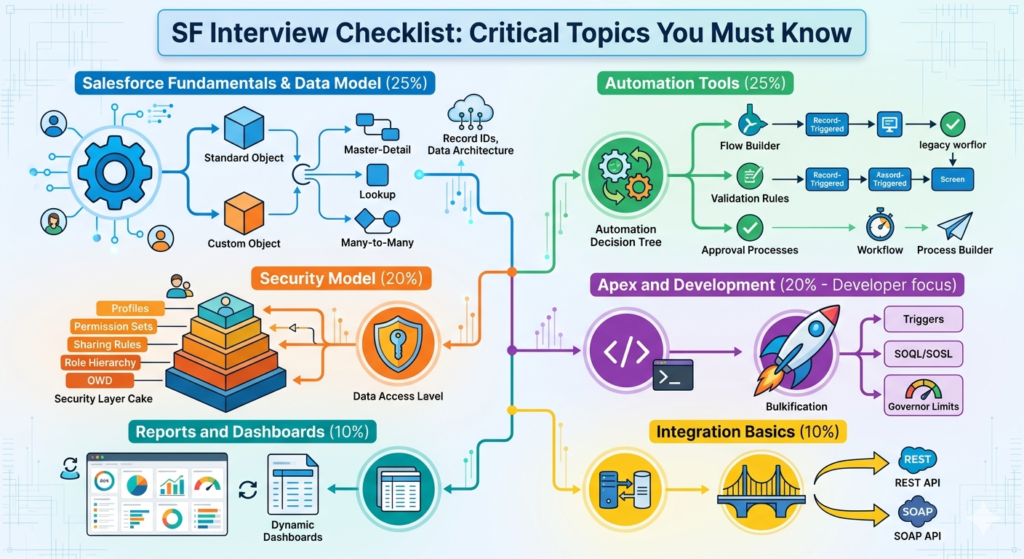
1. Salesforce Fundamentals & Data Model (25% of Interview Questions)
This forms the foundation. You'll get asked about these concepts in nearly every interview.
Objects and Relationships
- Standard vs. Custom Objects: Know when to customize standard objects versus creating custom ones
- Relationship types: Master-Detail, Lookup, and Many-to-Many (junction objects)
- The practical implications: What happens to child records when you delete a master record? How does roll-up summary work?
- External Objects and when to use them
What interviewers actually ask:
- "A company tracks Projects and Tasks. Multiple employees can work on a single task. How would you model this?"
- "What's the difference between Master-Detail and Lookup beyond the technical definition?"
What you need to know: Don't just memorize definitions. Create these relationships in a dev org. Delete a master record and watch what happens to children. Try creating a roll-up summary field. See what limits you hit.
Record IDs and Data Architecture
- 15-character vs 18-character IDs and when each is used
- How Salesforce stores data (understand the multi-tenant architecture conceptually)
- Standard fields on every object (CreatedBy, LastModifiedBy, OwnerId, etc.)
2. Security Model (20% of Interview Questions)
Security questions separate junior candidates from mid-level ones. This is where many people struggle.
The Security Layer Cake (in order of restrictiveness):
- Organization-Wide Defaults (OWD)
- Role Hierarchy
- Sharing Rules
- Manual Sharing
- Apex Managed Sharing
You must understand not just what each layer does, but when to use each one and how they interact.
Profiles vs. Permission Sets
- When to use which (hint: permission sets for additive permissions)
- Permission set groups and their advantages
- How CRUD and FLS work together
Field-Level Security
- How it differs from page layout visibility
- What happens when a user can't see a field but a formula references it
What interviewers actually ask:
- "Sales managers should see all opportunities for their team. Sales reps should only see their own. How do you configure this?"
- "What's the difference between Role Hierarchy and Sharing Rules? When would you use each?"
- "A user has a profile that denies access to an object but a permission set that grants it. What happens?"
What you need to know: Security is about layering. Most real-world scenarios require multiple security features working together. Practice designing security for realistic business scenarios, not just understanding individual features in isolation.
3. Automation Tools (25% of Interview Questions)
This is the most tested area for both Admin and Developer roles. You must know not just how each tool works, but when to use each one.
The Automation Decision Tree:
Workflow Rules (legacy, but still tested)
- When they still make sense (simple field updates)
- Why they're being phased out
- Migration considerations to Flow
Process Builder (also legacy, but still in many orgs)
- What it can do that Workflow can't
- Why Salesforce is moving away from it
- Current best practices (spoiler: use Flow instead)
Flow Builder (current recommended tool)
- Record-Triggered Flows (before-save and after-save)
- Screen Flows
- Scheduled Flows
- Autolaunched Flows
- When to use before-save vs. after-save logic
- Flow best practices (bulkification, when to use fast field updates)
Validation Rules
- When to use them vs. Flow
- Formula syntax for common patterns
- Error message placement strategies
Approval Processes
- When they're the right solution
- How they interact with other automation
- Common configuration pitfalls
What interviewers actually ask:
- "When would you use a before-save Flow versus an after-save Flow?"
- "A company needs to update a field on the parent Account when a child Opportunity closes. What automation would you use and why?"
- "What are the governor limits you need to consider with Flows?"
- "When should you use a validation rule versus Flow validation?"
What you need to know: Create each automation type in your dev org. Build a record-triggered Flow that updates related records. Create an approval process with multiple steps. Understand the order of execution—this comes up constantly.
4. Reports and Dashboards (10% of Interview Questions)
You won't get many questions here, but the ones you get will test practical knowledge.
Report Types
- Standard vs. Custom Report Types
- When to create a custom report type
- How relationships affect what data appears in reports
Report Formats
- Tabular, Summary, Matrix, and Joined Reports
- When to use each format
- Limitations of each
Dashboards
- Dynamic dashboards and their limitations
- Component types and when to use each
- Refresh frequency and scheduling
What interviewers actually ask:
- "A manager wants to see Opportunities grouped by Stage and Owner. What report format would you use?"
- "How would you create a report showing Accounts with their related Opportunities, including Accounts with zero Opportunities?"
- "What's a dynamic dashboard and when would you use it?"
What you need to know: Build 5-10 reports with different formats. Create a custom report type. Make a dashboard with filters. This isn't heavily tested, but you should be able to answer basic questions confidently.
5. Apex and Development (20% for Developer Roles)
If you're interviewing for a Developer or Technical Consultant role, expect significant Apex testing.
Apex Fundamentals
- Triggers (when to use them, best practices, trigger frameworks)
- Classes and methods
- SOQL and SOSL
- DML operations
- Collections (Lists, Sets, Maps)
- Governor limits and bulkification
Trigger Best Practices
- One trigger per object
- Logic in handler classes, not in triggers
- Trigger context variables (Trigger.new, Trigger.old, etc.)
- Preventing recursion
SOQL
- Relationship queries (parent-to-child and child-to-parent)
- Aggregate functions
- SOQL limits (50,000 records per transaction)
- When to use SOQL vs. SOSL
Governor Limits
- 100 SOQL queries per transaction
- 150 DML statements per transaction
- 10,000 records retrieved by SOQL
- 6 MB heap size
- How to write bulkified code
What interviewers actually ask:
- "Write a trigger that prevents duplicate Accounts based on Account Name."
- "What's wrong with having a SOQL query inside a for loop?"
- "Explain the difference between Trigger.new and Trigger.newMap."
- "How do you handle bulk operations in Apex?"
- "What happens if you exceed a governor limit?"
What you need to know: Write actual code. Don't just read about triggers—create them. Practice common scenarios: preventing duplicates, updating related records, sending emails based on field changes. Understand bulkification by breaking code, then fixing it.
6. Integration Basics (10% of Interview Questions)
Even for admin roles, basic integration knowledge helps.
REST vs. SOAP APIs
- When to use each
- Basic understanding of API calls
- Authentication concepts
Common Integration Patterns
- Real-time vs. batch
- Inbound vs. outbound
- Middleware platforms (conceptual understanding)
What interviewers actually ask:
- "How would you integrate Salesforce with an external system?"
- "What's the difference between REST and SOAP APIs?"
- "What are some ways to get data into Salesforce from external sources?"
What you need to know: You don't need deep technical knowledge for most roles, but understand the concepts. Know that Salesforce has APIs, what they're used for, and basic patterns.
How to Prepare for Salesforce Interview: 30-Day Timeline
Let's structure your preparation realistically. This assumes you already have basic Salesforce knowledge (Admin certification level or equivalent experience).
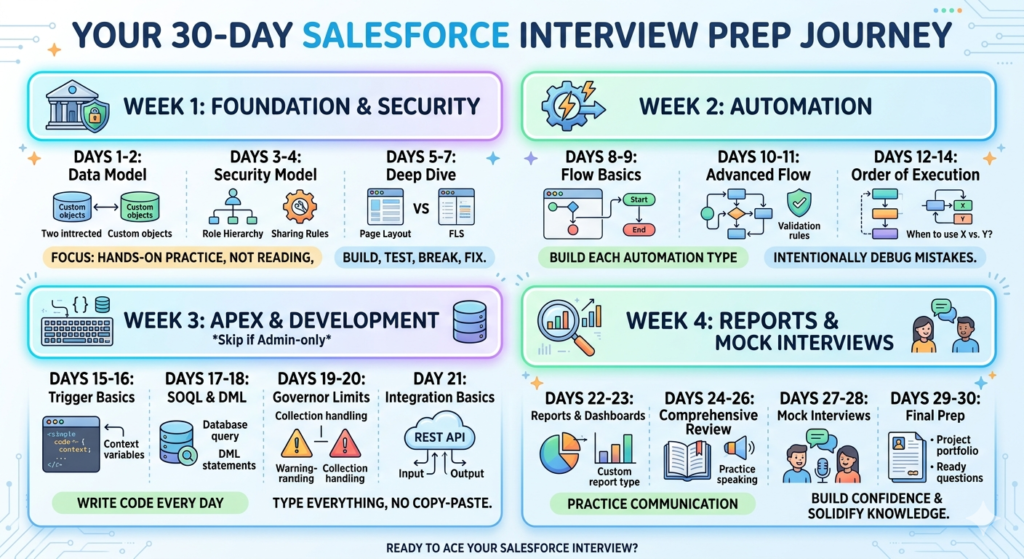
Week 1: Foundation & Security (Days 1-7)
Days 1-2: Data Model & Relationships
- Create a dev org (free at developer.salesforce.com)
- Build three custom objects with different relationship types
- Create a many-to-many relationship using a junction object
- Practice explaining why you chose each relationship type
Days 3-4: Security Model
- Configure OWD settings for different objects
- Create a role hierarchy (at least 4 levels)
- Build sharing rules based on ownership and criteria
- Create profiles and permission sets
- Test what happens when you layer different security settings
Practical Exercise: Design security for a sales organization where:
- Sales reps see only their Opportunities
- Sales managers see their team's Opportunities
- Sales VPs see all Opportunities
- Marketing can see all Accounts but only their Campaign records
Days 5-7: Security Deep Dive & Review
- Practice explaining the security model out loud
- Write down answers to common security questions
- Review field-level security and page layouts
- Understand the difference between hiding fields (page layouts) vs. security (FLS)
Daily Study Time: 2-3 hours
Focus: Hands-on practice, not reading. Build, test, break things, fix them.
Week 2: Automation (Days 8-14)
Days 8-9: Flow Builder Basics
- Create a screen Flow (simple wizard for data entry)
- Build a record-triggered Flow (after-save) that updates a field
- Create a scheduled Flow that finds and updates records
- Understand Fast Field Updates vs. regular Updates in Flows
Days 10-11: Advanced Flow & Other Automation
- Build a before-save Flow (validation or field updates before record saves)
- Create a Flow that updates related parent records
- Build a validation rule with complex formula logic
- Create a simple approval process
Practical Exercise: Build automation for:
- When an Opportunity closes, update a field on the related Account
- Prevent duplicate Contacts based on email
- Auto-assign Leads based on state using Flow
- Create an approval process for discounts over 20%
Days 12-14: Automation Review & Order of Execution
- Study the order of execution diagram
- Practice answering "When would you use X vs. Y?" questions
- Build one complex automation using multiple tools
- Document why you chose each tool
Daily Study Time: 3-4 hours
Focus: Build each automation type. Intentionally make mistakes and debug them.
Week 3: Apex & Development (Days 15-21)
Skip this week if you're interviewing for admin-only roles. For developer or technical consultant roles:
Days 15-16: Trigger Basics
- Create a simple trigger that runs on insert
- Write a trigger that prevents duplicates
- Build a trigger with a handler class pattern
- Understand all trigger context variables
Days 17-18: SOQL & DML
- Write SOQL queries with different complexity levels
- Practice relationship queries (parent-to-child and child-to-parent)
- Write code that performs DML operations
- Intentionally write non-bulkified code, then fix it
Days 19-20: Governor Limits & Best Practices
- Study all major governor limits
- Practice bulkification patterns
- Write code that handles collections properly
- Debug code that hits governor limits
Day 21: Integration Basics
- Understand REST API basics
- Learn about callouts (conceptual level)
- Study common integration patterns
Daily Study Time: 3-4 hours
Focus: Write code every day. Copy-paste doesn't teach you. Type everything out.
Week 4: Reports, Review & Mock Interviews (Days 22-30)
Days 22-23: Reports & Dashboards
- Create reports in all formats (Tabular, Summary, Matrix, Joined)
- Build a custom report type
- Create a dashboard with multiple components
- Practice explaining report filters and cross-filters
Days 24-26: Comprehensive Review
- Review all notes from previous weeks
- Practice answering questions out loud
- Focus on weak areas from your preparation
- Build one comprehensive project using multiple features
Days 27-28: Mock Interviews
- Find someone to conduct mock interviews (online communities, study partners)
- Practice the STAR method for behavioral questions
- Record yourself answering questions and review
- Focus on explaining your thinking, not just answers
Days 29-30: Final Preparation
- Review common interview questions (listed in next section)
- Prepare 3-5 project examples you can discuss
- Review your resume and be ready to explain everything on it
- Prepare questions to ask interviewers
Daily Study Time: 2-3 hours
Focus: Solidifying knowledge, practicing communication, building confidence.
What Interviewers Actually Expect: Real-World Insights
After conducting and participating in dozens of Salesforce interviews, here's what interviewers are really looking for:
They Want to Hear Your Thinking Process
When asked "How would you design a solution for X?", the interviewer isn't looking for an instant perfect answer. They want to hear:
- What questions you'd ask to understand requirements
- What options you're considering
- Why you'd choose one approach over another
- What trade-offs you're aware of
Good answer structure:
"First, I'd want to understand [specific requirement]. If [condition], I'd probably use [solution A] because [reason]. However, if [different condition], [solution B] might be better because [reason]. I'd also consider [potential issue] and [how to handle it]."
Poor answer structure:
"I'd use a Flow." [Stops there]
They Value Practical Experience Over Theory
Every single answer should include practical context when possible:
- "In a project I worked on..." (even if it's a dev org project)
- "I've configured this before when..."
- "I've seen this pattern used for..."
If you lack professional experience, build projects in your dev org and discuss them. "I built a project tracking system in my dev org where I needed to..." is infinitely better than purely theoretical answers.
They're Testing Your Humility and Honesty
If you don't know something, say so—but show resourcefulness:
"I haven't worked with that specific feature, but based on my understanding of [related concept], I'd approach it by [logical guess]. I'd verify this by [checking documentation/testing in dev org]."
Never fake knowledge. Interviewers can tell, and it destroys trust.
They Want to Know You Understand Limits
Every Salesforce feature has limitations. Show you understand:
- Governor limits for Apex
- Automation limits (e.g., Flow interviews per hour)
- Reporting limitations
- API limits
- When you'd hit scalability issues
Example: "Flow would work for this, but if we're processing more than 2,000 records per hour, we might hit governor limits. In that case, we'd need to consider a batch Apex solution."
They're Checking If You Stay Current
Salesforce changes constantly. Show you're aware:
- "I know Workflow and Process Builder are being phased out, so I'd use Flow for this."
- "With the newer before-save Flow feature, we can handle this more efficiently than with triggers."
- "I've been following the updates to permission set groups..."
This doesn't mean you need to know every beta feature, but show you understand the platform's direction.
Common Mistakes to Avoid
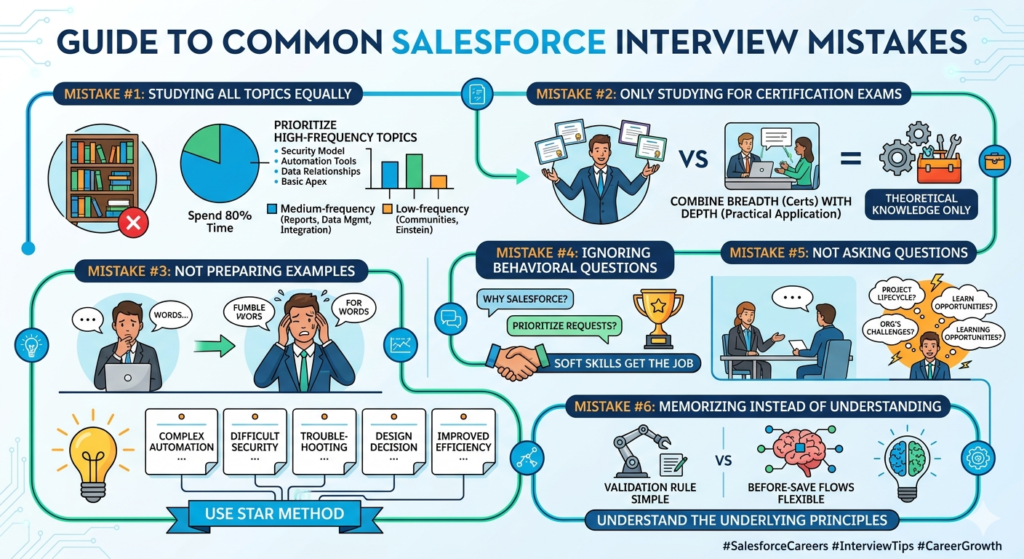
Mistake #1: Studying All Topics Equally
Not all Salesforce topics appear equally in interviews. Spending equal time on everything is inefficient.
High-frequency topics (appear in 80%+ of interviews):
- Security model
- Automation tools
- Data relationships
- Basic Apex (for developer roles)
Medium-frequency topics (appear in 40-60% of interviews):
- Reports and dashboards
- Data management
- Integration basics
Low-frequency topics (appear in <20% of interviews):
- Salesforce Communities
- Einstein Analytics
- Specific AppExchange products
Allocate your study time accordingly.
Mistake #2: Only Studying for Certification Exams
Certification exams test differently than interviews. Exams focus on features and theoretical knowledge. Interviews focus on application and decision-making.
You need both breadth (certifications) and depth (practical implementation) to succeed in interviews.
Mistake #3: Not Preparing Examples
When asked "Tell me about a time you had to..." or "Describe a project where...", you can't improvise good answers on the spot.
Prepare 5-7 specific examples covering:
- A complex automation you built
- A difficult security requirement you solved
- A time you had to troubleshoot something
- A time you had to make a design decision between multiple options
- A time you improved performance or efficiency
Use the STAR method: Situation, Task, Action, Result.
Mistake #4: Ignoring Behavioral Questions
Technical skills get you to the interview. Soft skills get you the job.
Prepare for:
- "Why Salesforce?"
- "How do you handle conflicting requirements from stakeholders?"
- "Tell me about a time you made a mistake."
- "How do you prioritize when you have multiple urgent requests?"
- "Describe how you stay current with Salesforce updates."
Mistake #5: Not Asking Questions
When they ask "Do you have questions for us?", saying "No, I think you covered everything" is a missed opportunity.
Ask questions like:
- "What does a typical project lifecycle look like in your team?"
- "What Salesforce products/clouds does your org use?"
- "What's the biggest Salesforce challenge your team is currently facing?"
- "How is the Salesforce team structured here?"
- "What opportunities are there for learning and growth?"
These show genuine interest and help you evaluate if the role is right for you.
Mistake #6: Memorizing Instead of Understanding
You cannot memorize your way through a Salesforce interview. When asked "Why would you use a before-save Flow instead of a validation rule?", a memorized answer sounds robotic and doesn't hold up to follow-up questions.
Instead, understand the underlying principles:
- Before-save Flows can perform complex logic and update fields; validation rules only prevent saves
- Before-save Flows are better for conditional validation based on multiple criteria
- Validation rules are simpler for straightforward field requirements
Understanding lets you adapt your answer based on the specific scenario presented.
How to Answer Interview Questions Effectively
Structure for Technical Questions
Use this framework for scenario-based technical questions:
1. Clarify requirements (30 seconds)
"Just to make sure I understand, you need [restate the requirement]. Are there any specific constraints or additional requirements I should consider?"
2. Outline your approach (1 minute)
"I'd approach this by [high-level strategy]. The main considerations are [list 2-3 key factors]."
3. Explain your solution (1-2 minutes)
"Specifically, I would [detailed solution]. I'd choose this over [alternative] because [reasoning]."
4. Address potential issues (30 seconds)
"One thing to watch out for would be [potential limitation]. I'd handle that by [mitigation strategy]."
Example of a Good Answer
Question: "A company has 10,000 Cases created daily. They need to auto-assign Cases to agents based on the Case category and agent availability. How would you design this?"
Poor Answer:
"I'd use a Flow to assign Cases based on category."
Good Answer:
"First, I'd want to understand how agent availability is tracked—is there a field on the User record, or a separate availability system? I'd also ask about assignment logic: round-robin, workload-based, or skill-based matching?
Assuming availability is tracked in Salesforce and we want round-robin assignment, I'd use a record-triggered Flow that runs when a Case is created. The Flow would:
- Query available agents for that Case category
- Determine which agent should receive the next Case (using a counter or last-assigned field)
- Assign the Case to that agent
- Update the assignment counter
However, with 10,000 Cases daily, I'd be concerned about governor limits. We might need to implement this as a batch process that assigns Cases every 5-10 minutes rather than real-time, or potentially use Apex for more efficient bulk processing.
I'd also configure appropriate sharing rules so agents only see their assigned Cases for privacy and performance reasons."
This answer shows:
- You ask clarifying questions
- You think through implementation details
- You consider scalability and limits
- You think about related requirements (security, performance)
Framework for Behavioral Questions (STAR Method)
Situation: Briefly set the context (1-2 sentences)
Task: Explain what needed to be done (1-2 sentences)
Action: Describe what you specifically did (2-4 sentences)
Result: Share the outcome and what you learned (1-2 sentences)
Example:
Question: "Tell me about a time you had to solve a difficult technical problem."
Answer:
"In a previous project [Situation], we had a Flow that was timing out because it was processing too many records at once. The business required real-time updates, so batch processing wasn't an option.
I was tasked with [Task] fixing the Flow without changing the business requirements.
I approached this by [Action] first analyzing where the Flow was inefficient. I found it was querying related records inside a loop. I restructured it to collect all IDs first, then perform a single query outside the loop using a collection. I also switched to Fast Field Updates where possible to reduce overhead. Finally, I added error handling to catch any edge cases.
As a result [Result], the Flow processing time dropped from 8 seconds to under 2 seconds, eliminating the timeouts. I also documented this pattern for the team to use in other Flows. This taught me the importance of understanding Flow optimization techniques and proactively considering performance in automation design."
Final Preparation Checklist
One week before your interview, verify you can confidently answer these:
Security Model:
- Explain the security layer cake (OWD, Role Hierarchy, Sharing Rules, Manual Sharing)
- Describe when to use Profile vs. Permission Set
- Explain Field-Level Security vs. Page Layouts
Data Model:
- Explain Master-Detail vs. Lookup relationships with practical examples
- Describe when you'd use a junction object
- Explain what happens to child records when master is deleted
Automation:
- Explain when to use Flow vs. Validation Rule vs. Apex Trigger
- Describe before-save vs. after-save Flows
- Outline the order of execution
- Explain how to prevent automation recursion
Apex (Developer Roles):
- Write a simple trigger that prevents duplicates
- Explain bulkification with an example
- List the main governor limits
- Describe best practices for SOQL queries
General:
- Prepare 5 specific project examples
- Prepare answers to 5 common behavioral questions
- Prepare 5 questions to ask the interviewer
- Review everything on your resume
Conclusion: Execution Over Perfection
Here's the truth: You'll never feel 100% prepared for a Salesforce interview. The platform is too vast, and questions can cover countless scenarios.
But you don't need perfect knowledge. You need:
- Solid understanding of core concepts (security, automation, data model)
- Practical experience implementing solutions (even in dev orgs)
- Ability to think through problems out loud
- Honesty about what you know and don't know
- Evidence that you can learn and adapt
This 30-day preparation guide gives you a realistic path to interview readiness. The candidates who succeed aren't the ones who know everything—they're the ones who can demonstrate practical problem-solving skills and clear thinking.
Start with Week 1 tomorrow. Build everything hands-on. Practice explaining your reasoning out loud. Prepare specific examples. And remember: the interview is a conversation, not an interrogation. Show them how you think, not just what you know.
Your preparation starts now. Open a dev org and start building.
Good luck with your Salesforce interview preparation. You've got this.
About RizeX Labs
At RizeX Labs, we specialize in delivering cutting-edge Salesforce solutions, helping individuals and businesses build strong, scalable careers in the Salesforce ecosystem. Our expertise combines real-world project experience, industry best practices, and hands-on training to prepare candidates for high-impact roles.
We focus on bridging the gap between theoretical learning and practical implementation—so you’re not just interview-ready, but job-ready.
nternal Links:
- Salesforce Admin course page
Salesforce Flows vs Apex: When Should You Use Code vs No-Code Automation? - Salesforce Nonprofit Cloud: Features, Use Cases, and Career Opportunities (2026 Guide)
- Salesforce Net Zero Cloud: What It Is and Why It's the Next Green Career Niche (2026 Guide)
- Salesforce Slack Integration: How It Works and What Developers Need to Know
- Salesforce Named Credentials: What They Are and How to Use Them Safely
- Salesforce Deployment Best Practices: Change Sets vs Salesforce CLI vs Gearset
External Links:
McKinsey Sales Growth Reports
Gartner Sales Automation Insights