
Introduction
If you've ever hardcoded an API key in Apex or stored sensitive credentials in Custom Settings, you've created a security vulnerability. Named Credentials in Salesforce exist to solve this exact problem, yet many developers still don't use them correctly—or at all.
This guide cuts through the documentation noise and shows you exactly how to implement Salesforce Named Credentials for secure external callouts. We'll cover the architecture, the confusing distinction between Named Credentials and External Credentials, real implementation patterns, and the security pitfalls that can land you in a compliance audit.
What Are Salesforce Named Credentials?
Named Credentials are a Salesforce feature that stores authentication details for external services in encrypted metadata. Instead of managing credentials in your code or custom objects, you define them once in Setup and reference them in callouts.
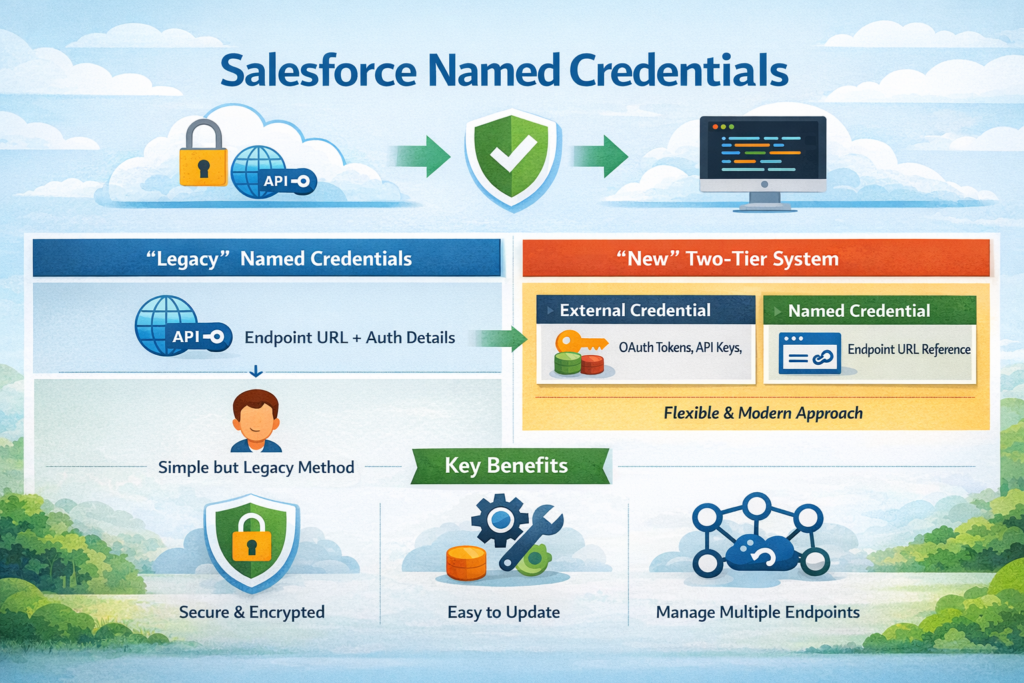
The core benefit: Your authentication logic lives outside your codebase, credentials are encrypted by Salesforce, and you can update them without touching code.
The Architecture: Named Credentials vs External Credentials
Salesforce complicated things in Spring '21 by introducing a two-tier system. Here's the breakdown:
Named Credentials (Legacy):
- Single object containing both the endpoint URL and authentication details
- Simpler to set up for basic use cases
- Still fully supported but considered legacy
Named Credentials (New) + External Credentials:
- External Credential: Stores only authentication information (OAuth tokens, API keys, etc.)
- Named Credential: References an External Credential and adds the endpoint URL
- More flexible for managing multiple endpoints with the same auth
- Required for certain modern auth flows
When to use which:
textLegacy Named Credentials:
├── Simple API integrations
├── Single endpoint per credential
└── Basic Auth, OAuth 2.0, JWT

New Named Credentials + External Credentials:
├── Multiple endpoints sharing auth
├── AWS Signature authentication
├── Custom headers and authentication protocols
└── Per-user authentication contexts
Why Named Credentials Matter for Salesforce Authentication
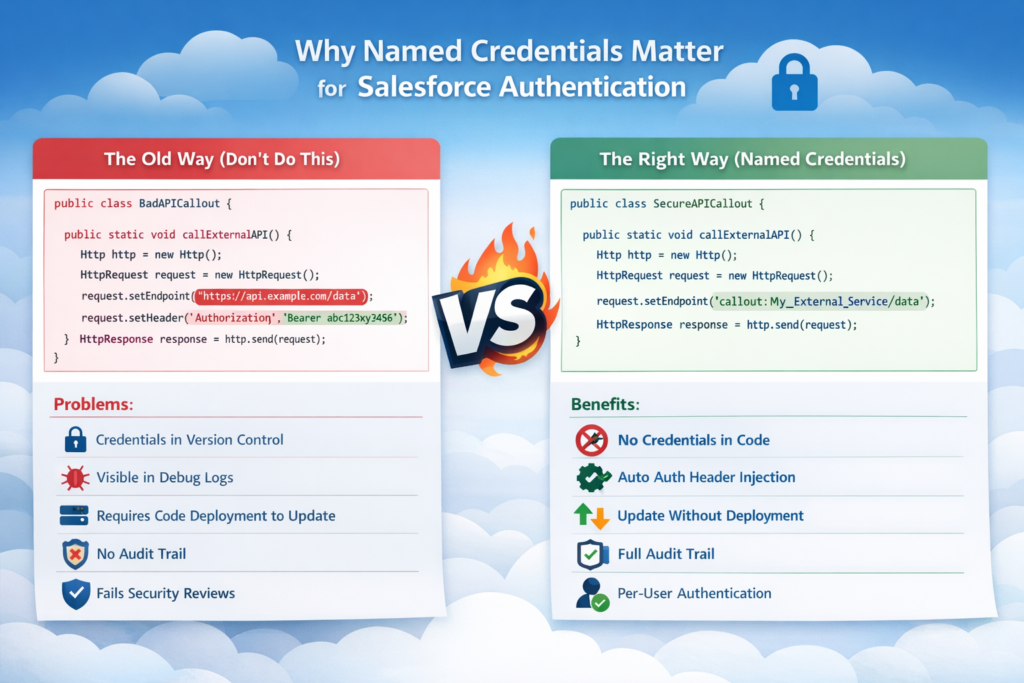
The Old Way (Don't Do This)
apex// Security nightmare
public class BadAPICallout {
    public static void callExternalAPI() {
        Http http = new Http();
        HttpRequest request = new HttpRequest();
        request.setEndpoint('https://api.example.com/data');
        request.setMethod('GET');

        // Hardcoded credentials - visible in repository, logs, debug sessions
        request.setHeader('Authorization', 'Bearer abc123xyz456');

        HttpResponse response = http.send(request);
    }
}
Problems:
- Credentials in version control
- Visible in debug logs
- Requires code deployment to update
- No audit trail
- Fails security reviews
The Right Way (Named Credentials)
apexpublic class SecureAPICallout {
    public static void callExternalAPI() {
        Http http = new Http();
        HttpRequest request = new HttpRequest();

        // Named Credential handles auth automatically
        request.setEndpoint('callout:My_External_Service/data');
        request.setMethod('GET');

        HttpResponse response = http.send(request);
    }
}
Benefits:
- No credentials in code
- Automatic authentication header injection
- Update credentials without deployment
- Full audit trail
- Per-user authentication possible
Step-by-Step Implementation
Scenario 1: Setting Up Legacy Named Credentials (Basic Auth)
Use case: Connecting to a REST API that uses basic authentication.
Step 1: Create the Named Credential
- Navigate to Setup → Named Credentials → Named Credentials (Legacy)
- Click New Named Credential
- Configure:
textLabel: External Payment Gateway
Name: External_Payment_Gateway
URL: https://api.paymentgateway.com
Identity Type: Named Principal
Authentication Protocol: Password Authentication
Username: your_api_username
Password: your_api_password
Generate Authorization Header: ✓ (checked)
Allow Merge Fields in HTTP Header: □ (unchecked for basic auth)
Allow Merge Fields in HTTP Body: □ (unchecked for basic auth)
Step 2: Configure Remote Site Settings
This happens automatically when you save the Named Credential, but verify:
- Setup → Remote Site Settings
- Confirm
https://api.paymentgateway.comis listed
Step 3: Implement the Callout
apexpublic class PaymentGatewayService {

    public static PaymentResponse processPayment(Decimal amount, String currency) {
        Http http = new Http();
        HttpRequest request = new HttpRequest();

        // Use Named Credential - no auth headers needed
        request.setEndpoint('callout:External_Payment_Gateway/v1/payments');
        request.setMethod('POST');
        request.setHeader('Content-Type', 'application/json');

        Map<String, Object> requestBody = new Map<String, Object>{
            'amount' => amount,
            'currency' => currency,
            'idempotency_key' => generateIdempotencyKey()
        };

        request.setBody(JSON.serialize(requestBody));

        HttpResponse response = http.send(request);

        if (response.getStatusCode() == 200) {
            return (PaymentResponse) JSON.deserialize(
                response.getBody(),
                PaymentResponse.class
            );
        } else {
            throw new PaymentException(
                'Payment failed: ' + response.getStatus()
            );
        }
    }

    private static String generateIdempotencyKey() {
        return String.valueOf(Crypto.getRandomLong()) +
               String.valueOf(DateTime.now().getTime());
    }

    public class PaymentResponse {
        public String transactionId;
        public String status;
        public Decimal amount;
    }

    public class PaymentException extends Exception {}
}
Key points:
- Endpoint uses
callout:prefix followed by the Named Credential's API name - Authentication header is injected automatically
- Path appended after the Named Credential name (
/v1/payments)
Scenario 2: OAuth 2.0 with External Credentials
Use case: Connecting to a third-party API that uses OAuth 2.0 with client credentials flow.
Step 1: Create External Credential
- Navigate to Setup → Named Credentials → External Credentials
- Click New
- Configure:
textLabel: Marketing Platform OAuth
Name: Marketing_Platform_OAuth
Authentication Protocol: OAuth 2.0
Authentication Flow Type: Client Credentials Flow
- In Authentication Parameters section:
- Token Endpoint URL:
https://oauth.marketingplatform.com/token - Scope:
read:campaigns write:campaigns(space-separated)
- Token Endpoint URL:
- In Principals section, click New:
textParameter Name: Client ID
Parameter Value: your_client_id_from_provider
Parameter Type: Client Credentials
- Click New again for client secret:
textParameter Name: Client Secret
Parameter Value: your_client_secret_from_provider
Parameter Type: Client Credentials
Step 2: Create Named Credential
- Navigate to Setup → Named Credentials → Named Credentials
- Click New
- Configure:
textLabel: Marketing Platform API
Name: Marketing_Platform_API
URL: https://api.marketingplatform.com
External Credential: Marketing Platform OAuth (select from dropdown)
- Under Callout Options:
- Generate Authorization Header: ✓ (checked)
- Allow Formulas in HTTP Header: □ (leave unchecked unless needed)
- Allow Formulas in HTTP Body: □ (leave unchecked unless needed)
Step 3: Implement the Callout
apexpublic class MarketingPlatformService {

    private static final String NAMED_CREDENTIAL = 'Marketing_Platform_API';

    public class Campaign {
        public String id;
        public String name;
        public String status;
        public Integer reach;
    }

    public static List<Campaign> getCampaigns() {
        HttpRequest request = new HttpRequest();
        request.setEndpoint('callout:' + NAMED_CREDENTIAL + '/v2/campaigns');
        request.setMethod('GET');
        request.setHeader('Accept', 'application/json');

        Http http = new Http();
        HttpResponse response = http.send(request);

        if (response.getStatusCode() == 200) {
            return (List<Campaign>) JSON.deserialize(
                response.getBody(),
                List<Campaign>.class
            );
        }

        handleErrorResponse(response);
        return null;
    }

    public static Campaign createCampaign(String name, String targetAudience) {
        HttpRequest request = new HttpRequest();
        request.setEndpoint('callout:' + NAMED_CREDENTIAL + '/v2/campaigns');
        request.setMethod('POST');
        request.setHeader('Content-Type', 'application/json');
        request.setHeader('Accept', 'application/json');

        Map<String, Object> campaignData = new Map<String, Object>{
            'name' => name,
            'target_audience' => targetAudience,
            'status' => 'draft'
        };

        request.setBody(JSON.serialize(campaignData));

        Http http = new Http();
        HttpResponse response = http.send(request);

        if (response.getStatusCode() == 201) {
            return (Campaign) JSON.deserialize(
                response.getBody(),
                Campaign.class
            );
        }

        handleErrorResponse(response);
        return null;
    }

    private static void handleErrorResponse(HttpResponse response) {
        String errorMessage = String.format(
            'API Error: {0} - {1}',
            new List<String>{
                String.valueOf(response.getStatusCode()),
                response.getStatus()
            }
        );

        System.debug(LoggingLevel.ERROR, errorMessage);
        System.debug(LoggingLevel.ERROR, 'Response Body: ' + response.getBody());

        throw new MarketingPlatformException(errorMessage);
    }

    public class MarketingPlatformException extends Exception {}
}
What happens behind the scenes:
- Salesforce requests OAuth token from the provider using client credentials
- Token is cached and automatically refreshed when expired
- Each callout includes the Bearer token in the Authorization header
- You never handle tokens in your code
Scenario 3: Per-User Authentication with External Credentials
Use case: Integration where each Salesforce user needs their own authentication to the external system.
Step 1: Create External Credential with Per-User Authentication
- Setup → Named Credentials → External Credentials → New
textLabel: Document Management System
Name: Document_Management_System
Authentication Protocol: OAuth 2.0
Authentication Flow Type: Authorization Code
- Configure OAuth settings:
textAuthorization Endpoint URL: https://docs.example.com/oauth/authorize
Token Endpoint URL: https://docs.example.com/oauth/token
Scope: read:documents write:documents
- Add Client Credentials as Authentication Parameters:
- Client ID
- Client Secret
- In Permission Set Mappings section, map which permission sets can use this credential
Step 2: Create Named Credential
textLabel: Document API
Name: Document_API
URL: https://api.docs.example.com
External Credential: Document Management System
Step 3: Authentication Setup Page
Create a Visual Force page or Lightning component for users to authenticate:
apexpublic class DocumentAuthController {

    @AuraEnabled
    public static String getAuthURL() {
        // The External Credential handles the OAuth flow
        // Users click this URL to authorize
        return '/services/auth/sso/Document_Management_System';
    }

    @AuraEnabled
    public static Boolean isAuthenticated() {
        try {
            HttpRequest request = new HttpRequest();
            request.setEndpoint('callout:Document_API/v1/user/profile');
            request.setMethod('GET');

            Http http = new Http();
            HttpResponse response = http.send(request);

            return response.getStatusCode() == 200;
        } catch (Exception e) {
            return false;
        }
    }
}
Step 4: Make Per-User Callouts
apexpublic class DocumentService {

    public static List<Document> getMyDocuments() {
        HttpRequest request = new HttpRequest();
        // This callout uses the CURRENT USER's OAuth token
        request.setEndpoint('callout:Document_API/v1/documents');
        request.setMethod('GET');

        Http http = new Http();
        HttpResponse response = http.send(request);

        if (response.getStatusCode() == 200) {
            return parseDocuments(response.getBody());
        } else if (response.getStatusCode() == 401) {
            throw new AuthenticationRequiredException(
                'User needs to authenticate with Document Management System'
            );
        }

        throw new DocumentException('Failed to retrieve documents');
    }

    private static List<Document> parseDocuments(String jsonResponse) {
        // Parse implementation
        return new List<Document>();
    }

    public class Document {
        public String id;
        public String title;
        public DateTime createdDate;
    }

    public class AuthenticationRequiredException extends Exception {}
    public class DocumentException extends Exception {}
}
Salesforce External Callouts: Advanced Patterns
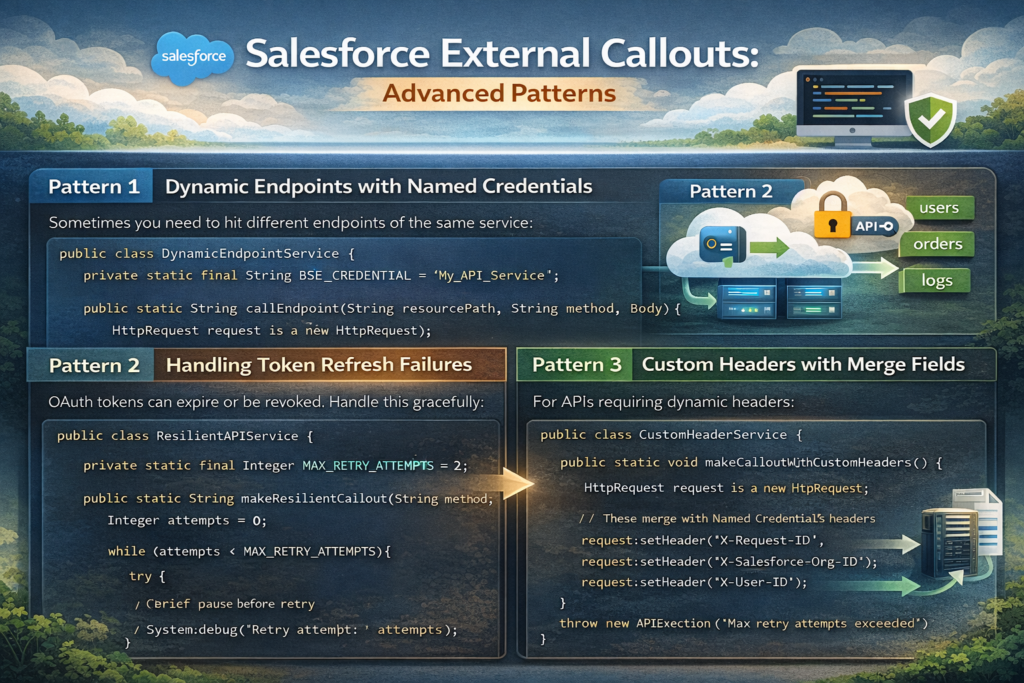
Pattern 1: Dynamic Endpoints with Named Credentials
Sometimes you need to hit different endpoints of the same service:
apexpublic class DynamicEndpointService {

    private static final String BASE_CREDENTIAL = 'My_API_Service';

    public static String callEndpoint(String resourcePath, String method, String body) {
        HttpRequest request = new HttpRequest();

        // Dynamic path construction
        String endpoint = 'callout:' + BASE_CREDENTIAL + resourcePath;
        request.setEndpoint(endpoint);
        request.setMethod(method);

        if (String.isNotBlank(body)) {
            request.setHeader('Content-Type', 'application/json');
            request.setBody(body);
        }

        Http http = new Http();
        HttpResponse response = http.send(request);

        return response.getBody();
    }

    // Usage examples
    public static void examples() {
        // GET request
        String users = callEndpoint('/v1/users', 'GET', null);

        // POST request
        String newUser = callEndpoint(
            '/v1/users',
            'POST',
            '{"name":"John Doe","email":"john@example.com"}'
        );

        // Dynamic resource
        String userId = '12345';
        String userDetail = callEndpoint('/v1/users/' + userId, 'GET', null);
    }
}
Pattern 2: Handling Token Refresh Failures
OAuth tokens can expire or be revoked. Handle this gracefully:
apexpublic class ResilientAPIService {

    private static final Integer MAX_RETRY_ATTEMPTS = 2;

    public static String makeResilientCallout(String endpoint, String method) {
        Integer attempts = 0;

        while (attempts < MAX_RETRY_ATTEMPTS) {
            try {
                HttpRequest request = new HttpRequest();
                request.setEndpoint('callout:' + endpoint);
                request.setMethod(method);
                request.setTimeout(120000);

                Http http = new Http();
                HttpResponse response = http.send(request);

                if (response.getStatusCode() == 401 && attempts == 0) {
                    // First 401 might be stale token - Salesforce will refresh
                    // Retry once
                    attempts++;
                    continue;
                }

                if (response.getStatusCode() >= 200 && response.getStatusCode() < 300) {
                    return response.getBody();
                }

                throw new APIException(
                    'API returned status: ' + response.getStatusCode()
                );

            } catch (CalloutException e) {
                attempts++;
                if (attempts >= MAX_RETRY_ATTEMPTS) {
                    throw e;
                }
                // Brief pause before retry
                System.debug('Retry attempt: ' + attempts);
            }
        }

        throw new APIException('Max retry attempts exceeded');
    }

    public class APIException extends Exception {}
}
Pattern 3: Custom Headers with Merge Fields
For APIs requiring dynamic headers:
Named Credential Configuration:
- Enable "Allow Formulas in HTTP Header"
Apex Implementation:
apexpublic class CustomHeaderService {

    public static void makeCalloutWithCustomHeaders() {
        HttpRequest request = new HttpRequest();
        request.setEndpoint('callout:My_Service/endpoint');
        request.setMethod('GET');

        // These merge with Named Credential's headers
        request.setHeader('X-Request-ID', generateRequestId());
        request.setHeader('X-Salesforce-Org-ID', UserInfo.getOrganizationId());
        request.setHeader('X-User-ID', UserInfo.getUserId());

        Http http = new Http();
        HttpResponse response = http.send(request);
    }

    private static String generateRequestId() {
        return String.valueOf(Crypto.getRandomLong());
    }
}
Security Best Practices
1. Principle of Least Privilege
Don't grant broad access to Named Credentials. Use Permission Sets:
Setup → Named Credentials → [Your Named Credential] → Manage Assignments
apex// Check access in code before making sensitive callouts
public class SecureService {

    public static void makeSensitiveCallout() {
        if (!FeatureManagement.checkPermission('Access_External_Finance_API')) {
            throw new SecurityException('Insufficient privileges');
        }

        // Proceed with callout
        HttpRequest request = new HttpRequest();
        request.setEndpoint('callout:Finance_API/sensitive-data');
        request.setMethod('GET');

        Http http = new Http();
        HttpResponse response = http.send(request);
    }

    public class SecurityException extends Exception {}
}
2. Never Log Sensitive Data
Even with Named Credentials, be careful about logging:
apex// BAD - May log sensitive response data
public class InsecureLogging {
    public static void makeCallout() {
        HttpRequest request = new HttpRequest();
        request.setEndpoint('callout:My_API/users');
        request.setMethod('GET');

        Http http = new Http();
        HttpResponse response = http.send(request);

        // DON'T DO THIS
        System.debug('Full response: ' + response.getBody());
    }
}

// GOOD - Sanitized logging
public class SecureLogging {
    public static void makeCallout() {
        HttpRequest request = new HttpRequest();
        request.setEndpoint('callout:My_API/users');
        request.setMethod('GET');

        Http http = new Http();
        HttpResponse response = http.send(request);

        // Only log what's necessary
        System.debug('Status Code: ' + response.getStatusCode());

        if (response.getStatusCode() != 200) {
            // Log errors (but not full response if it contains PII)
            System.debug('Error Status: ' + response.getStatus());
        }
    }
}
3. Rotate Credentials Regularly
Set up a rotation schedule:
text1. Update External Credential/Named Credential in sandbox
2. Test all integrations
3. Update production during low-traffic window
4. Monitor for failures
5. Keep old credentials active for 24 hours (if API supports it)
6. Revoke old credentials
4. Use Different Credentials Per Environment
Never share credentials between sandbox and production:
textProduction Named Credential:
Name: Payment_Gateway_API
URL: https://api.paymentgateway.com

Sandbox Named Credential:
Name: Payment_Gateway_API
URL: https://sandbox-api.paymentgateway.com
Same API name means no code changes during deployment.
5. Implement Request Signing for Critical APIs
For financial or healthcare integrations, add request signing:
apexpublic class SignedRequestService {

    public static void makeSignedCallout(String requestBody) {
        HttpRequest request = new HttpRequest();
        request.setEndpoint('callout:Critical_API/transaction');
        request.setMethod('POST');
        request.setBody(requestBody);

        // Generate signature
        String timestamp = String.valueOf(DateTime.now().getTime());
        String signature = generateSignature(requestBody, timestamp);

        request.setHeader('X-Timestamp', timestamp);
        request.setHeader('X-Signature', signature);
        request.setHeader('Content-Type', 'application/json');

        Http http = new Http();
        HttpResponse response = http.send(request);
    }

    private static String generateSignature(String payload, String timestamp) {
        // Get signing key from Protected Custom Metadata
        String signingKey = getSigningKey();

        String dataToSign = timestamp + '.' + payload;
        Blob signature = Crypto.generateMac(
            'hmacSHA256',
            Blob.valueOf(dataToSign),
            Blob.valueOf(signingKey)
        );

        return EncodingUtil.base64Encode(signature);
    }

    private static String getSigningKey() {
        // Retrieve from Protected Custom Metadata Type
        API_Config__mdt config = [
            SELECT Signing_Key__c
            FROM API_Config__mdt
            WHERE DeveloperName = 'Critical_API'
            LIMIT 1
        ];
        return config.Signing_Key__c;
    }
}
Common Mistakes Developers Make
Mistake 1: Hardcoding Credential Names
Don't do this:
apexpublic class BadPractice {
    public static void makeCallout() {
        HttpRequest request = new HttpRequest();
        // Hardcoded credential name
        request.setEndpoint('callout:Production_API/endpoint');
        request.setMethod('GET');
    }
}
Do this instead:
apexpublic class GoodPractice {

    // Use Custom Metadata to store credential names
    private static String getNamedCredential() {
        Integration_Config__mdt config = [
            SELECT Named_Credential__c
            FROM Integration_Config__mdt
            WHERE DeveloperName = 'Primary_API'
            LIMIT 1
        ];
        return config.Named_Credential__c;
    }

    public static void makeCallout() {
        HttpRequest request = new HttpRequest();
        String credential = getNamedCredential();
        request.setEndpoint('callout:' + credential + '/endpoint');
        request.setMethod('GET');
    }
}
Mistake 2: Not Handling Authentication Failures
apex// BAD - No auth failure handling
public class NoAuthHandling {
    public static void makeCallout() {
        HttpRequest request = new HttpRequest();
        request.setEndpoint('callout:My_API/data');
        request.setMethod('GET');

        Http http = new Http();
        HttpResponse response = http.send(request);

        // Assumes success
        return JSON.deserializeUntyped(response.getBody());
    }
}

// GOOD - Proper auth failure handling
public class ProperAuthHandling {
    public static Object makeCallout() {
        HttpRequest request = new HttpRequest();
        request.setEndpoint('callout:My_API/data');
        request.setMethod('GET');

        Http http = new Http();
        HttpResponse response = http.send(request);

        switch on response.getStatusCode() {
            when 200 {
                return JSON.deserializeUntyped(response.getBody());
            }
            when 401 {
                throw new AuthenticationException(
                    'Authentication failed. Check Named Credential configuration.'
                );
            }
            when 403 {
                throw new AuthorizationException(
                    'Access forbidden. Verify API permissions.'
                );
            }
            when else {
                throw new APIException(
                    'API Error: ' + response.getStatusCode() +
                    ' - ' + response.getStatus()
                );
            }
        }
    }

    public class AuthenticationException extends Exception {}
    public class AuthorizationException extends Exception {}
    public class APIException extends Exception {}
}
Mistake 3: Ignoring Certificate Validation
Some developers disable certificate validation in sandboxes:
apex// NEVER DO THIS IN PRODUCTION
public class DangerousCode {
    public static void makeCallout() {
        HttpRequest request = new HttpRequest();
        request.setEndpoint('callout:My_API/data');
        request.setMethod('GET');

        // This bypasses SSL certificate validation
        // EXTREMELY DANGEROUS
        request.setClientCertificateName('Self_Signed_Cert');
    }
}
Instead: Use proper SSL certificates even in sandboxes. Most API providers offer sandbox environments with valid certificates.
Mistake 4: Not Testing Token Refresh
OAuth tokens expire. Test this scenario:
apex@isTest
private class APIServiceTest {

    @isTest
    static void testTokenRefreshScenario() {
        // Mock initial 401 response (expired token)
        Test.setMock(HttpCalloutMock.class, new Multi401Mock());

        Test.startTest();
        String result = APIService.makeCallout();
        Test.stopTest();

        // Verify retry logic worked
        System.assertNotEquals(null, result, 'Should succeed after token refresh');
    }

    private class Multi401Mock implements HttpCalloutMock {
        private Integer callCount = 0;

        public HttpResponse respond(HttpRequest request) {
            callCount++;

            HttpResponse response = new HttpResponse();

            if (callCount == 1) {
                // First call returns 401 (expired token)
                response.setStatusCode(401);
                response.setBody('{"error":"token_expired"}');
            } else {
                // Second call succeeds (after refresh)
                response.setStatusCode(200);
                response.setBody('{"success":true}');
            }

            return response;
        }
    }
}
Mistake 5: Mixing Named Credentials with Manual Auth
Pick one approach and stick with it:
apex// CONFUSING AND ERROR-PRONE
public class MixedApproach {
    public static void makeCallout() {
        HttpRequest request = new HttpRequest();
        request.setEndpoint('callout:My_API/data');
        request.setMethod('GET');

        // Named Credential already adds Authorization header
        // This creates duplicate or conflicting headers
        request.setHeader('Authorization', 'Bearer ' + getSomeToken());

        Http http = new Http();
        HttpResponse response = http.send(request);
    }
}

// CORRECT
public class CleanApproach {
    public static void makeCallout() {
        HttpRequest request = new HttpRequest();
        request.setEndpoint('callout:My_API/data');
        request.setMethod('GET');

        // Let Named Credential handle all authentication
        // Only add non-auth headers
        request.setHeader('Content-Type', 'application/json');
        request.setHeader('X-Request-ID', generateRequestId());

        Http http = new Http();
        HttpResponse response = http.send(request);
    }

    private static String generateRequestId() {
        return String.valueOf(Crypto.getRandomLong());
    }
}
Testing Named Credentials
Unit Testing with HttpCalloutMock
apex@isTest
private class PaymentGatewayServiceTest {

    @isTest
    static void testSuccessfulPayment() {
        Test.setMock(HttpCalloutMock.class, new PaymentSuccessMock());

        Test.startTest();
        PaymentGatewayService.PaymentResponse response =
            PaymentGatewayService.processPayment(100.00, 'USD');
        Test.stopTest();

        System.assertEquals('SUCCESS', response.status);
        System.assertNotEquals(null, response.transactionId);
    }

    @isTest
    static void testFailedPayment() {
        Test.setMock(HttpCalloutMock.class, new PaymentFailureMock());

        Test.startTest();
        try {
            PaymentGatewayService.processPayment(100.00, 'USD');
            System.assert(false, 'Should have thrown exception');
        } catch (PaymentGatewayService.PaymentException e) {
            System.assert(e.getMessage().contains('Payment failed'));
        }
        Test.stopTest();
    }

    private class PaymentSuccessMock implements HttpCalloutMock {
        public HttpResponse respond(HttpRequest request) {
            // Verify Named Credential is used
            System.assert(
                request.getEndpoint().startsWith('callout:'),
                'Should use Named Credential'
            );

            HttpResponse response = new HttpResponse();
            response.setStatusCode(200);
            response.setBody(JSON.serialize(new Map<String, Object>{
                'transactionId' => 'TXN-123456',
                'status' => 'SUCCESS',
                'amount' => 100.00
            }));

            return response;
        }
    }

    private class PaymentFailureMock implements HttpCalloutMock {
        public HttpResponse respond(HttpRequest request) {
            HttpResponse response = new HttpResponse();
            response.setStatusCode(400);
            response.setStatus('Bad Request');
            response.setBody(JSON.serialize(new Map<String, Object>{
                'error' => 'Invalid payment details'
            }));

            return response;
        }
    }
}
Integration Testing
For integration tests in sandboxes, create separate Named Credentials pointing to test environments:
textSandbox Named Credential:
Name: Payment_Gateway (same as production)
URL: https://sandbox.paymentgateway.com
Username: sandbox_api_user
Password: sandbox_api_password
This allows the same code to run in different environments without modification.
Deployment Best Practices
Using Change Sets
Named Credentials and External Credentials can be deployed via Change Sets:
- Setup → Outbound Change Sets → New
- Add Components:
- Named Credential
- External Credential (if using new model)
- Remote Site Settings (usually auto-included)
Important: Credentials are NOT included in change sets for security reasons. You must manually configure credentials in the target org.
Using Salesforce CLI
Bash# Retrieve Named Credentials
sfdx force:source:retrieve -m NamedCredential

# Deploy to target org
sfdx force:source:deploy -m NamedCredential -u targetOrg

# Note: Still need to manually configure sensitive credentials
Metadata API Deployment
Sample package.xml:
XML<?xml version="1.0" encoding="UTF-8"?>
<Package xmlns="http://soap.sforce.com/2006/04/metadata">
    <types>
        <members>Payment_Gateway_API</members>
        <name>NamedCredential</name>
    </types>
    <types>
        <members>Payment_Gateway_OAuth</members>
        <name>ExternalCredential</name>
    </types>
    <version>57.0</version>
</Package>
Post-Deployment Checklist
text□ Verify Remote Site Settings are active
□ Configure authentication credentials (not in metadata)
□ Assign permission sets for Named Credential access
□ Test callouts in target environment
□ Verify OAuth flows complete successfully
□ Check debug logs for authentication errors
□ Validate certificate chains
□ Confirm API rate limits and quotas
Monitoring and Debugging
Enable Debug Logs
textSetup → Debug Logs → New
User: [Your User]
Debug Level: [Create custom level]
- Callout: FINEST
- System: DEBUG
Interpreting Callout Logs
text|CALLOUT_REQUEST|[XXX]|
External endpoint: callout:Payment_Gateway_API/v1/payments
Request headers:
- Authorization: [REDACTED]
- Content-Type: application/json

|CALLOUT_RESPONSE|[XXX]|
Status: 200
Response body: {"transactionId":"TXN-123","status":"SUCCESS"}
Key things to check:
- Endpoint resolution (should show full URL)
- Authorization header presence (value will be redacted)
- Response status codes
- Response times
Custom Logging Framework
apexpublic class APILogger {

    public static void logCallout(
        String credentialName,
        String endpoint,
        String method,
        Integer statusCode,
        Long executionTime
    ) {
        API_Callout_Log__c log = new API_Callout_Log__c(
            Named_Credential__c = credentialName,
            Endpoint__c = endpoint,
            Method__c = method,
            Status_Code__c = statusCode,
            Execution_Time_MS__c = executionTime,
            User__c = UserInfo.getUserId(),
            Timestamp__c = DateTime.now()
        );

        insert log;
    }

    public static void logCalloutError(
        String credentialName,
        String endpoint,
        String errorMessage,
        String stackTrace
    ) {
        API_Callout_Error__c error = new API_Callout_Error__c(
            Named_Credential__c = credentialName,
            Endpoint__c = endpoint,
            Error_Message__c = errorMessage,
            Stack_Trace__c = stackTrace,
            User__c = UserInfo.getUserId(),
            Timestamp__c = DateTime.now()
        );

        insert error;
    }
}

// Usage in service class
public class MonitoredAPIService {

    public static String makeCallout() {
        Long startTime = System.now().getTime();
        String credentialName = 'My_API';
        String endpoint = '/v1/data';

        try {
            HttpRequest request = new HttpRequest();
            request.setEndpoint('callout:' + credentialName + endpoint);
            request.setMethod('GET');

            Http http = new Http();
            HttpResponse response = http.send(request);

            Long executionTime = System.now().getTime() - startTime;

            APILogger.logCallout(
                credentialName,
                endpoint,
                'GET',
                response.getStatusCode(),
                executionTime
            );

            return response.getBody();

        } catch (Exception e) {
            APILogger.logCalloutError(
                credentialName,
                endpoint,
                e.getMessage(),
                e.getStackTraceString()
            );
            throw e;
        }
    }
}
Real-World Use Case: Multi-System Integration
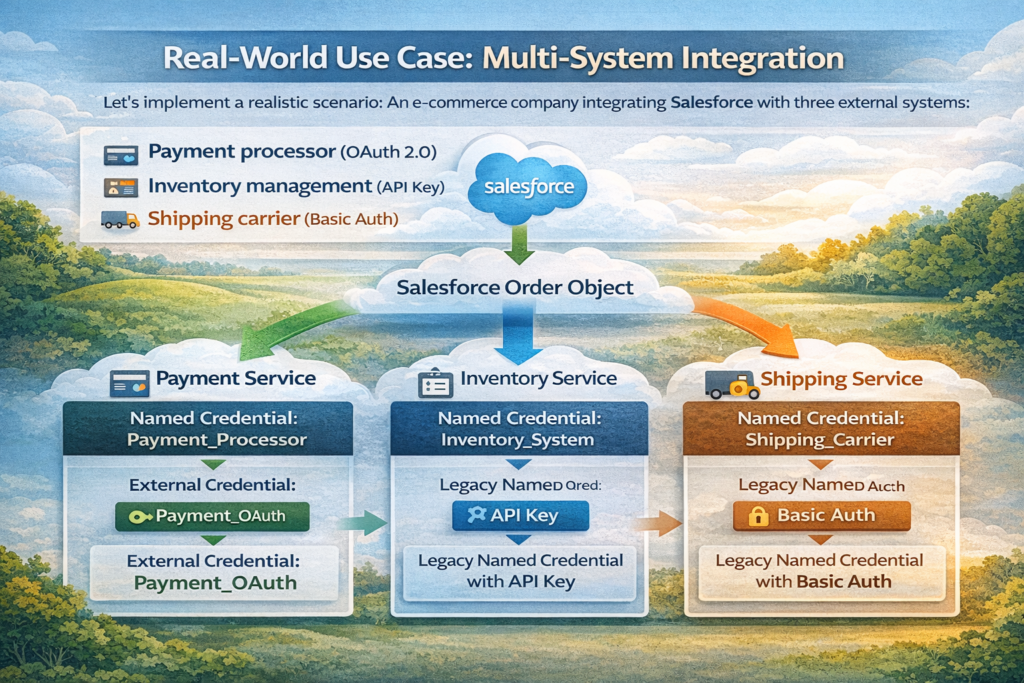
Let's implement a realistic scenario: An e-commerce company integrating Salesforce with three external systems:
- Payment processor (OAuth 2.0)
- Inventory management (API Key)
- Shipping carrier (Basic Auth)
Architecture
textSalesforce Order Object
    │
    ├─→ Payment Service (Named Credential: Payment_Processor)
    │   └─→ External Credential: Payment_OAuth
    │
    ├─→ Inventory Service (Named Credential: Inventory_System)
    │   └─→ Legacy Named Credential with API Key
    │
    └─→ Shipping Service (Named Credential: Shipping_Carrier)
        └─→ Legacy Named Credential with Basic Auth
Implementation
apexpublic class OrderFulfillmentService {

    public class FulfillmentResult {
        public Boolean success;
        public String orderId;
        public String paymentStatus;
        public String inventoryStatus;
        public String shippingStatus;
        public List<String> errors;

        public FulfillmentResult() {
            this.errors = new List<String>();
        }
    }

    public static FulfillmentResult processOrder(Order order) {
        FulfillmentResult result = new FulfillmentResult();
        result.orderId = order.Id;

        Savepoint sp = Database.setSavepoint();

        try {
            // Step 1: Process Payment
            Boolean paymentSuccess = processPayment(order, result);
            if (!paymentSuccess) {
                Database.rollback(sp);
                return result;
            }

            // Step 2: Reserve Inventory
            Boolean inventorySuccess = reserveInventory(order, result);
            if (!inventorySuccess) {
                // Refund payment
                refundPayment(order);
                Database.rollback(sp);
                return result;
            }

            // Step 3: Create Shipment
            Boolean shippingSuccess = createShipment(order, result);
            if (!shippingSuccess) {
                // Release inventory and refund
                releaseInventory(order);
                refundPayment(order);
                Database.rollback(sp);
                return result;
            }

            result.success = true;
            return result;

        } catch (Exception e) {
            Database.rollback(sp);
            result.success = false;
            result.errors.add('Critical error: ' + e.getMessage());
            return result;
        }
    }

    private static Boolean processPayment(Order order, FulfillmentResult result) {
        try {
            HttpRequest request = new HttpRequest();
            request.setEndpoint('callout:Payment_Processor/v2/charges');
            request.setMethod('POST');
            request.setHeader('Content-Type', 'application/json');

            Map<String, Object> paymentData = new Map<String, Object>{
                'amount' => order.TotalAmount,
                'currency' => 'USD',
                'order_id' => order.OrderNumber,
                'customer_id' => order.AccountId
            };

            request.setBody(JSON.serialize(paymentData));

            Http http = new Http();
            HttpResponse response = http.send(request);

            if (response.getStatusCode() == 200) {
                Map<String, Object> responseData =
                    (Map<String, Object>) JSON.deserializeUntyped(response.getBody());
                result.paymentStatus = 'SUCCESS';
                return true;
            } else {
                result.paymentStatus = 'FAILED';
                result.errors.add('Payment failed: ' + response.getStatus());
                return false;
            }

        } catch (Exception e) {
            result.paymentStatus = 'ERROR';
            result.errors.add('Payment error: ' + e.getMessage());
            return false;
        }
    }

    private static Boolean reserveInventory(Order order, FulfillmentResult result) {
        try {
            HttpRequest request = new HttpRequest();
            request.setEndpoint('callout:Inventory_System/api/v1/reservations');
            request.setMethod('POST');
            request.setHeader('Content-Type', 'application/json');

            // Build inventory reservation payload
            List<Map<String, Object>> items = new List<Map<String, Object>>();
            for (OrderItem item : order.OrderItems) {
                items.add(new Map<String, Object>{
                    'sku' => item.Product2.ProductCode,
                    'quantity' => item.Quantity
                });
            }

            Map<String, Object> reservationData = new Map<String, Object>{
                'order_id' => order.OrderNumber,
                'items' => items
            };

            request.setBody(JSON.serialize(reservationData));

            Http http = new Http();
            HttpResponse response = http.send(request);

            if (response.getStatusCode() == 201) {
                result.inventoryStatus = 'RESERVED';
                return true;
            } else {
                result.inventoryStatus = 'FAILED';
                result.errors.add('Inventory reservation failed: ' + response.getStatus());
                return false;
            }

        } catch (Exception e) {
            result.inventoryStatus = 'ERROR';
            result.errors.add('Inventory error: ' + e.getMessage());
            return false;
        }
    }

    private static Boolean createShipment(Order order, FulfillmentResult result) {
        try {
            HttpRequest request = new HttpRequest();
            request.setEndpoint('callout:Shipping_Carrier/v1/shipments');
            request.setMethod('POST');
            request.setHeader('Content-Type', 'application/json');

            Map<String, Object> shipmentData = new Map<String, Object>{
                'order_id' => order.OrderNumber,
                'recipient' => new Map<String, Object>{
                    'name' => order.ShipToContactId.Name,
                    'address' => order.ShippingAddress,
                    'phone' => order.ShipToContactId.Phone
                },
                'service_level' => order.Shipping_Method__c
            };

            request.setBody(JSON.serialize(shipmentData));

            Http http = new Http();
            HttpResponse response = http.send(request);

            if (response.getStatusCode() == 200 || response.getStatusCode() == 201) {
                Map<String, Object> responseData =
                    (Map<String, Object>) JSON.deserializeUntyped(response.getBody());
                result.shippingStatus = 'CREATED';

                // Update order with tracking number
                String trackingNumber = (String) responseData.get('tracking_number');
                updateOrderTracking(order.Id, trackingNumber);

                return true;
            } else {
                result.shippingStatus = 'FAILED';
                result.errors.add('Shipment creation failed: ' + response.getStatus());
                return false;
            }

        } catch (Exception e) {
            result.shippingStatus = 'ERROR';
            result.errors.add('Shipping error: ' + e.getMessage());
            return false;
        }
    }

    private static void refundPayment(Order order) {
        // Implementation for payment refund
    }

    private static void releaseInventory(Order order) {
        // Implementation for inventory release
    }

    private static void updateOrderTracking(Id orderId, String trackingNumber) {
        // Implementation for tracking update
    }
}
Performance Considerations
Callout Limits
Salesforce imposes these limits on HTTP callouts:
textSingle transaction:
- Maximum callouts: 100
- Maximum callout time: 120 seconds total
- Maximum single callout timeout: 120 seconds

24-hour period:
- No hard limit, but governor limits on CPU time apply
Optimization Strategies
1. Batch Callouts When Possible:
apexpublic class BatchAPIService {

    public static void processBatchUpdate(List<Id> recordIds) {
        // Instead of 100 individual callouts, batch them
        HttpRequest request = new HttpRequest();
        request.setEndpoint('callout:My_API/v1/batch-update');
        request.setMethod('POST');
        request.setHeader('Content-Type', 'application/json');

        Map<String, Object> batchData = new Map<String, Object>{
            'records' => recordIds
        };

        request.setBody(JSON.serialize(batchData));

        Http http = new Http();
        HttpResponse response = http.send(request);
    }
}
2. Implement Asynchronous Patterns:
apexpublic class AsyncCalloutService {

    @future(callout=true)
    public static void makeAsyncCallout(String endpoint, String data) {
        HttpRequest request = new HttpRequest();
        request.setEndpoint('callout:My_API' + endpoint);
        request.setMethod('POST');
        request.setBody(data);

        Http http = new Http();
        HttpResponse response = http.send(request);

        // Process response asynchronously
        processResponse(response);
    }

    private static void processResponse(HttpResponse response) {
        // Handle response without blocking main transaction
    }
}
3. Use Queueable for Complex Scenarios:
apexpublic class QueueableCalloutService implements Queueable, Database.AllowsCallouts {

    private List<String> endpoints;
    private Integer currentIndex;

    public QueueableCalloutService(List<String> endpoints) {
        this.endpoints = endpoints;
        this.currentIndex = 0;
    }

    public void execute(QueueableContext context) {
        if (currentIndex < endpoints.size()) {
            String endpoint = endpoints[currentIndex];
            makeCallout(endpoint);

            // Chain next callout
            currentIndex++;
            if (currentIndex < endpoints.size()) {
                System.enqueueJob(new QueueableCalloutService(endpoints, currentIndex));
            }
        }
    }

    private void makeCallout(String endpoint) {
        HttpRequest request = new HttpRequest();
        request.setEndpoint('callout:My_API' + endpoint);
        request.setMethod('GET');

        Http http = new Http();
        HttpResponse response = http.send(request);
    }

    private QueueableCalloutService(List<String> endpoints, Integer startIndex) {
        this.endpoints = endpoints;
        this.currentIndex = startIndex;
    }
}
Troubleshooting Guide
Issue: "Unauthorized endpoint" error
Problem: Remote Site Settings not configured
Solution:
text1. Check Setup → Remote Site Settings
2. Verify endpoint URL matches Named Credential
3. Ensure Remote Site is Active
4. For new Named Credentials, wait 5 minutes for cache refresh
Issue: 401 Unauthorized on every request
Problem: Authentication credentials are incorrect or expired
Solution:
text1. Verify credentials in Named Credential/External Credential
2. Test credentials directly with API (Postman/curl)
3. Check OAuth token expiration
4. Verify client ID/secret haven't been rotated by provider
5. Check API endpoint URL is correct
Issue: Named Credential not appearing in callout dropdown
Problem: Named Credential may not be deployed or active
Solution:
text1. Verify Named Credential exists in Setup
2. Check your user has access (Permission Sets)
3. For External Credentials, verify mapping is complete
4. Refresh metadata cache: Setup → Development → Apex Classes → New (cancel - this refreshes)
Issue: OAuth flow not completing for per-user auth
Problem: Redirect URL mismatch or scope issues
Solution:
text1. In external OAuth provider, verify callback URL:
   https://[instance].salesforce.com/services/authcallback/[ExternalCredentialName]
2. Check requested scopes match what's configured
3. Verify user has permissions to access External Credential
4. Check OAuth provider's application is active
Issue: Intermittent 401 errors
Problem: Token refresh timing issues
Solution:
apex// Implement retry logic
public class RobustCalloutService {
    private static final Integer MAX_RETRIES = 2;

    public static String makeCallout(String endpoint) {
        Integer attempts = 0;

        while (attempts < MAX_RETRIES) {
            HttpRequest request = new HttpRequest();
            request.setEndpoint('callout:My_API' + endpoint);
            request.setMethod('GET');

            Http http = new Http();
            HttpResponse response = http.send(request);

            if (response.getStatusCode() == 401 && attempts < MAX_RETRIES - 1) {
                attempts++;
                continue; // Let Salesforce refresh token
            }

            if (response.getStatusCode() == 200) {
                return response.getBody();
            }

            throw new CalloutException('Failed after ' + attempts + ' attempts');
        }

        return null;
    }
}
Conclusion
Named Credentials are non-negotiable for production Salesforce integrations. They eliminate hardcoded credentials, provide automatic authentication, and give you a central point of control for external system access.
Key takeaways:
- Always use Named Credentials for external callouts—no exceptions
- Understand the difference between External Credentials and Named Credentials
- Implement proper error handling especially for auth failures
- Use Permission Sets to control Named Credential access
- Never log sensitive response data even with Named Credentials
- Test OAuth token refresh scenarios in your integration tests
- Deploy credentials carefully between environments
- Monitor callout performance and implement async patterns when needed
The initial setup takes more time than hardcoding credentials, but you'll save countless hours in maintenance, security audits, and incident response. Your future self (and your security team) will thank you.
For complex integrations involving multiple systems, the pattern shown in the e-commerce example demonstrates how to orchestrate multiple Named Credentials with proper error handling and rollback logic.
Named Credentials aren't just a best practice—they're the only secure way to handle Salesforce external callouts in production environments.
About RizeX Labs
At RizeX Labs, we specialize in delivering advanced Salesforce solutions, including secure integrations using Named Credentials. Our expertise combines deep technical knowledge, best practices, and real-world implementation experience to help businesses connect external systems safely and efficiently.
We help organizations eliminate insecure authentication methods, streamline API integrations, and ensure compliance with modern security standards using Salesforce-native tools.
Internal Links:
- Salesforce Field Service Lightning (FSL): Overview, Features & Career Scope
- How Long Does It Take to Learn Salesforce and Get a Job? Honest Timeline (India, 2026)
- How to Get Your First Salesforce Job with Zero Experience in India: The 2026 Reality Check
- How to Use Salesforce Reports & Dashboards: A Beginner's Practical Guide
- Salesforce Trailhead vs Paid Training: Which Is Better for Getting a Job in India (2026)?
- Top Companies Hiring Salesforce Professionals in Pune in 2026: Your Complete Career Guide
- Salesforce Flows vs Apex: When Should You Use Code vs No-Code Automation?
- Salesforce Nonprofit Cloud: Features, Use Cases, and Career Opportunities (2026 Guide)
- Salesforce Net Zero Cloud: What It Is and Why It's the Next Green Career Niche (2026 Guide)
- Salesforce Slack Integration: How It Works and What Developers Need to Know
- Salesforce Named Credentials: What They Are and How to Use Them Safely
- Salesforce Deployment Best Practices: Change Sets vs Salesforce CLI vs Gearset
External Links:
McKinsey Sales Growth Reports
Gartner Sales Automation Insights