
Introduction: Why SOQL Is the Most Important Skill for Salesforce Developers
Every piece of data in Salesforce lives in objects. Accounts, Contacts, Opportunities, Cases, custom objects — they're all database tables under the hood. And the only way to read that data programmatically is through SOQL.
SOQL (Salesforce Object Query Language) is Salesforce's proprietary query language for retrieving records from the Salesforce database. If you're writing Apex code, building integrations, debugging data issues, or working in the Developer Console — you are using SOQL. There is no way around it.
Here's why SOQL is critical for every Salesforce developer:
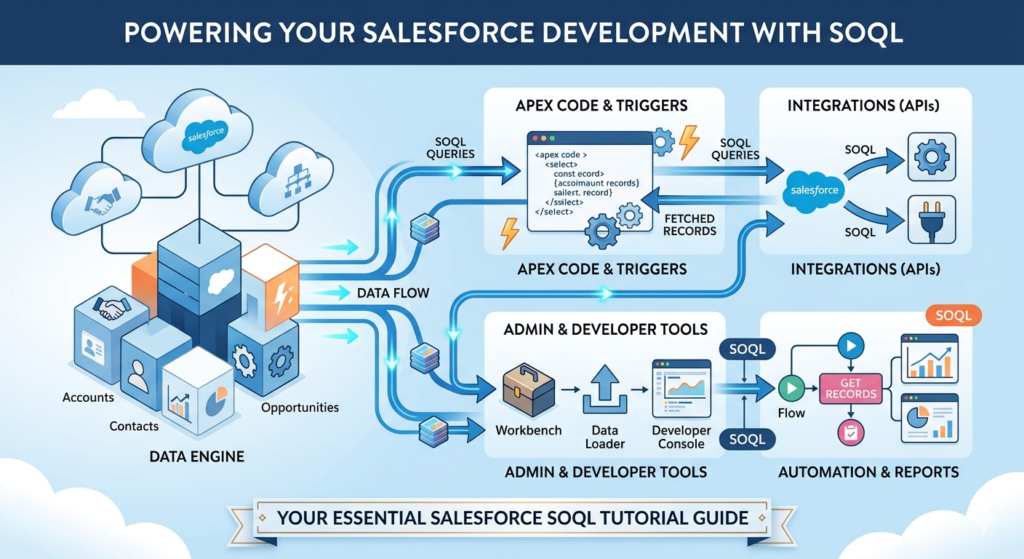
- Apex triggers and classes use SOQL to fetch records before processing them
- Reports and dashboards are powered by query logic under the surface
- REST and SOAP APIs accept SOQL queries to return specific datasets
- Data Loader and Workbench use SOQL for targeted data exports
- Flow Builder generates SOQL behind the scenes in Get Records elements
In short: if Apex is the engine of Salesforce development, SOQL is the fuel.
This Salesforce SOQL tutorial covers everything — from basic syntax to advanced relationship queries, aggregate functions, dynamic SOQL, and the 20 must-know queries you'll use in real projects and interviews. Whether you're just starting your Salesforce tutorial journey or preparing for a developer interview, this guide gives you practical, immediately applicable knowledge.
Let's build your SOQL expertise from the ground up.
Section 1: What Is SOQL in Salesforce?
SOQL (Salesforce Object Query Language) is a query language designed specifically for the Salesforce platform. It allows you to search Salesforce records, retrieve specific fields, apply filters, sort results, and traverse object relationships.
SOQL is read-only — it only retrieves data. To create, update, or delete records, you use DML (Data Manipulation Language) statements in Apex.
Where Is SOQL Used?
| Context | How SOQL Is Used |
|---|---|
| Apex Code | Inline queries to fetch records for processing |
| Developer Console | Query Editor tab for ad-hoc data exploration |
| Salesforce CLI | sf data query command for terminal-based queries |
| Workbench | SOQL query interface for testing and data export |
| REST API | /services/data/vXX.0/query?q=SELECT... endpoint |
| SOAP API | query() and queryMore() calls |
| Flow Builder | Behind the scenes in Get Records elements |
What Makes SOQL Different From Standard Database Queries?
SOQL is purpose-built for Salesforce's multi-tenant architecture. Unlike a traditional database where you have direct table access, Salesforce:
- Enforces sharing rules and field-level security automatically
- Applies governor limits to prevent one org from consuming too many resources
- Provides relationship traversal syntax for parent-child object navigation
- Includes Salesforce-specific date literals like
TODAY,LAST_N_DAYS:30 - Returns sObjects (Salesforce objects) rather than generic rows
Section 2: SOQL vs SQL — Key Differences
This is one of the most common topics in Salesforce interviews. If you already know SQL from another platform, understanding these differences is critical before you write your first Salesforce query language statement.
Comparison Table
| Feature | SQL | SOQL |
|---|---|---|
| Purpose | General-purpose relational DB queries | Salesforce-specific data retrieval |
| SELECT * | ✅ Supported | ❌ Not supported |
| JOINs | ✅ Full JOIN support (INNER, LEFT, etc.) | ❌ No JOINs — uses relationship queries |
| INSERT/UPDATE/DELETE | ✅ Full DML in queries | ❌ Read-only — DML done separately in Apex |
| Multiple tables | ✅ Query multiple tables in one statement | ⚠️ Only one primary object, related via subquery |
| Wildcards in SELECT | ✅ SELECT * | ❌ Must specify field names |
| Date literals | Limited (database-specific) | ✅ Rich date literals (TODAY, LAST_WEEK, etc.) |
| Aggregate functions | COUNT, SUM, AVG, MIN, MAX | COUNT, COUNT_DISTINCT, SUM, AVG, MIN, MAX |
| HAVING clause | ✅ Supported | ✅ Supported (with GROUP BY) |
| OFFSET | ✅ Supported | ✅ Supported (max 2000) |
| Subqueries | ✅ Full subquery support | ⚠️ Limited — only on child relationships |
| Sharing rules enforced | ❌ No | ✅ Yes (unless WITH SECURITY_ENFORCED) |
| Record limit | Database-dependent | 50,000 records per query (synchronous) |
| Null comparison | IS NULL / IS NOT NULL | = null / != null |
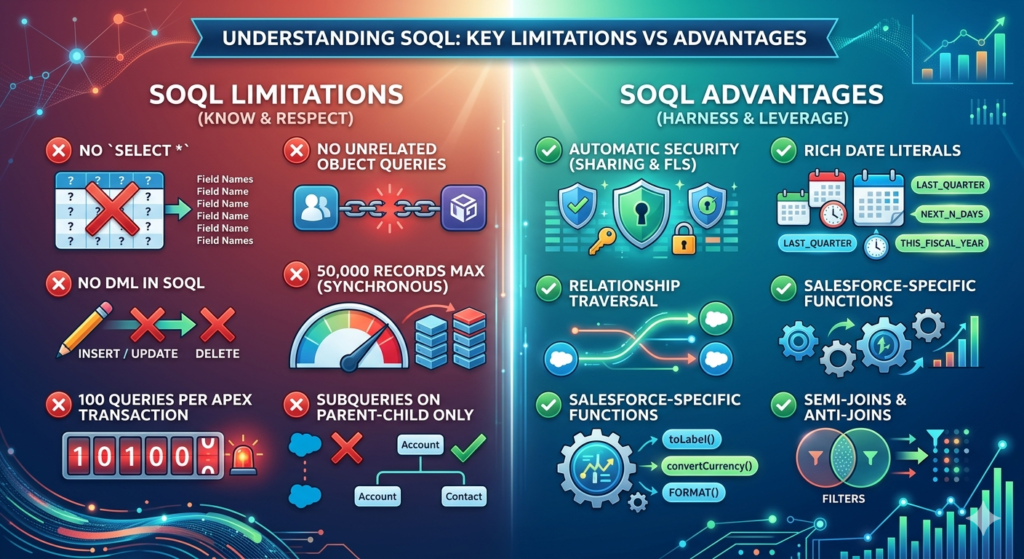
SOQL Limitations to Know
- ❌ Cannot use
SELECT *— you must name every field - ❌ Cannot query two unrelated objects in a single SOQL statement
- ❌ Cannot perform DML (INSERT, UPDATE, DELETE) within SOQL
- ❌ Maximum of 50,000 records returned in a synchronous query
- ❌ Maximum 100 SOQL queries per Apex transaction (governor limit)
- ❌ Subqueries only work on child relationships, not arbitrary joins
SOQL Advantages Over Generic SQL
- ✅ Automatic security enforcement — sharing rules and FLS applied by default
- ✅ Rich date literals —
LAST_QUARTER,NEXT_N_DAYS:30,THIS_FISCAL_YEAR - ✅ Relationship traversal — navigate parent-child hierarchies without JOINs
- ✅ Salesforce-specific functions —
toLabel(),convertCurrency(),FORMAT() - ✅ Semi-joins and anti-joins — powerful filtering using EXISTS-style patterns
Section 3: Basic SOQL Syntax
Every SOQL query follows this fundamental structure:
SQLSELECT field1, field2, field3
FROM ObjectAPIName
WHERE condition
ORDER BY field ASC|DESC
LIMIT n
Clause Breakdown
| Clause | Required? | Purpose |
|---|---|---|
SELECT | ✅ Yes | Specifies which fields to return |
FROM | ✅ Yes | Specifies the object to query |
WHERE | ❌ Optional | Filters records by condition |
ORDER BY | ❌ Optional | Sorts results |
LIMIT | ❌ Optional | Restricts number of records returned |
OFFSET | ❌ Optional | Skips a number of records (for pagination) |
GROUP BY | ❌ Optional | Groups results for aggregate queries |
HAVING | ❌ Optional | Filters aggregate results (used with GROUP BY) |
Your First SOQL Query
SQLSELECT Id, Name, Industry, AnnualRevenue
FROM Account
WHERE Industry = 'Technology'
ORDER BY AnnualRevenue DESC
LIMIT 10
What this does: Retrieves the Id, Name, Industry, and Annual Revenue of the top 10 Technology accounts, sorted by revenue from highest to lowest.
Important Syntax Rules
- Field and object names are case-insensitive in SOQL (
Account=account) - String values in WHERE clauses are case-insensitive by default (
'Salesforce'='salesforce') - Always use the API name, not the label (e.g.,
Annual_Revenue__c, not "Annual Revenue") - Custom fields always end in
__c, custom objects always end in__c - Custom relationship fields end in
__r
Section 4: 20 Must-Know SOQL Examples
This is the core of the guide. Every query here is based on real scenarios you'll encounter in production orgs, Apex development, and interviews.
Query 1: Fetch Basic Account Records
Scenario: Get the name, phone, and website of all accounts in the org.
SQLSELECT Id, Name, Phone, Website, Industry
FROM Account
LIMIT 100
Explanation:
- Always include
Id— you'll need it for DML operations later LIMIT 100is a safety net; without it you could retrieve thousands of records- In Apex, omitting
LIMITin large orgs will hit the 50,000 record governor limit
Query 2: Filter Records with WHERE Clause
Scenario: Find all Contacts who work at companies in the Finance industry.
SQLSELECT Id, FirstName, LastName, Email, AccountId
FROM Contact
WHERE Account.Industry = 'Finance'
AND Email != null
Explanation:
Account.Industrytraverses the relationship from Contact to its parent Account (child-to-parent)Email != nullfilters out contacts without email addresses- Both conditions must be true (AND logic)
Query 3: AND / OR Conditions
Scenario: Find Opportunities that are either in "Proposal" stage OR have an amount greater than $500,000.
SQLSELECT Id, Name, StageName, Amount, CloseDate, OwnerId
FROM Opportunity
WHERE StageName = 'Proposal/Price Quote'
OR Amount > 500000
ORDER BY Amount DESC
Explanation:
- Records matching either condition are returned
- Use parentheses to control complex AND/OR logic:
SQL-- More complex example with parentheses
SELECT Id, Name, StageName, Amount
FROM Opportunity
WHERE (StageName = 'Proposal/Price Quote' OR StageName = 'Negotiation/Review')
AND Amount > 100000
AND IsClosed = false
Query 4: ORDER BY and LIMIT
Scenario: Find the 5 most recently created Cases that are still open.
SQLSELECT Id, CaseNumber, Subject, Status, Priority, CreatedDate
FROM Case
WHERE IsClosed = false
ORDER BY CreatedDate DESC
LIMIT 5
Explanation:
ORDER BY CreatedDate DESCsorts newest first- Use
ASCfor oldest first (default if ORDER BY is omitted) LIMIT 5ensures we only get the top 5- This exact pattern is used in dashboards showing "latest open cases"
Query 5: COUNT — Aggregate Function
Scenario: How many Leads were created in the system from the "Web" source?
SQLSELECT COUNT(Id)
FROM Lead
WHERE LeadSource = 'Web'
AND IsConverted = false
Explanation:
COUNT(Id)returns the number of records matching the filter- In Apex, access the result like this:
apexInteger webLeadCount = [
    SELECT COUNT(Id)
    FROM Lead
    WHERE LeadSource = 'Web'
    AND IsConverted = false
].size();

// Or using AggregateResult:
AggregateResult[] result = [
    SELECT COUNT(Id) cnt
    FROM Lead
    WHERE LeadSource = 'Web'
];
Integer count = (Integer) result[0].get('cnt');
Query 6: SUM and AVG Aggregate Functions
Scenario: What is the total value and average deal size of all Closed Won opportunities this year?
SQLSELECT
    SUM(Amount) totalRevenue,
    AVG(Amount) averageDeal,
    COUNT(Id) totalDeals,
    MIN(Amount) smallestDeal,
    MAX(Amount) largestDeal
FROM Opportunity
WHERE StageName = 'Closed Won'
AND CloseDate = THIS_YEAR
Explanation:
- Aliases (
totalRevenue,averageDeal) are required when using aggregate functions alongside others THIS_YEARis a SOQL date literal — no need to hardcode year values- In Apex, these results come back as
AggregateResultobjects:
apexAggregateResult[] results = [
    SELECT SUM(Amount) totalRevenue, AVG(Amount) averageDeal
    FROM Opportunity
    WHERE StageName = 'Closed Won'
    AND CloseDate = THIS_YEAR
];

Decimal total = (Decimal) results[0].get('totalRevenue');
Decimal average = (Decimal) results[0].get('averageDeal');
Query 7: GROUP BY
Scenario: Show the total number of Opportunities and total amount, grouped by Stage.
SQLSELECT StageName, COUNT(Id) oppCount, SUM(Amount) totalAmount
FROM Opportunity
WHERE IsClosed = false
GROUP BY StageName
ORDER BY SUM(Amount) DESC
Explanation:
GROUP BYcollapses multiple records into one row per unique value- Every field in
SELECTmust either be inGROUP BYor wrapped in an aggregate function ORDER BYcan use aggregate expressions directly
Query 8: GROUP BY with HAVING
Scenario: Find Lead sources that have generated more than 50 leads.
SQLSELECT LeadSource, COUNT(Id) leadCount
FROM Lead
GROUP BY LeadSource
HAVING COUNT(Id) > 50
ORDER BY COUNT(Id) DESC
Explanation:
HAVINGfilters on aggregate results — it's theWHEREclause for GROUP BY- You cannot use
WHERE COUNT(Id) > 50— that's a SQL misconception that breaks SOQL - This query is useful for marketing analytics and source attribution reporting
Query 9: Child-to-Parent Relationship Query
Scenario: Get Contact names along with their parent Account's name, industry, and phone number.
SQLSELECT
    Id,
    FirstName,
    LastName,
    Email,
    Account.Name,
    Account.Industry,
    Account.Phone,
    Account.BillingCity
FROM Contact
WHERE Account.Industry = 'Technology'
AND Account.BillingCity = 'San Francisco'
Explanation:
- Use dot notation (
Account.Name) to traverse the parent relationship - For standard relationships: use the relationship name (e.g.,
Account,Owner,CreatedBy) - For custom relationships: use the relationship API name ending in
__r(e.g.,Custom_Object__r.Field__c) - You can traverse up to 5 levels of parent relationships in one query
SQL-- Custom object example
SELECT
    Id,
    Name,
    Project__r.Name,
    Project__r.Account__r.Name
FROM Task__c
WHERE Project__r.Status__c = 'Active'
Query 10: Parent-to-Child Relationship Query (Subquery)
Scenario: Fetch all Accounts and their associated open Opportunities in a single query.
SQLSELECT
    Id,
    Name,
    Industry,
    (
        SELECT Id, Name, StageName, Amount, CloseDate
        FROM Opportunities
        WHERE IsClosed = false
        ORDER BY Amount DESC
    )
FROM Account
WHERE Industry = 'Technology'
AND IsActive__c = true
Explanation:
- The inner
SELECTinside parentheses is a subquery (also called a nested query) - Use the relationship name (plural for standard:
Opportunities,Contacts,Cases) - For custom child relationships, use the child relationship name defined on the lookup field
- In Apex, access child records like this:
apexList<Account> accounts = [
    SELECT Id, Name,
        (SELECT Id, Name, Amount FROM Opportunities WHERE IsClosed = false)
    FROM Account
    WHERE Industry = 'Technology'
];

for (Account acc : accounts) {
    List<Opportunity> childOpps = acc.Opportunities;
    System.debug('Account: ' + acc.Name + ' has ' + childOpps.size() + ' open opps');
}
Query 11: LIKE Operator for Pattern Matching
Scenario: Find all Contacts whose last name starts with "Smith" or whose email contains "gmail."
SQL-- Pattern: Last name starts with 'Smith'
SELECT Id, FirstName, LastName, Email
FROM Contact
WHERE LastName LIKE 'Smith%'

-- Pattern: Email contains 'gmail'
SELECT Id, FirstName, LastName, Email
FROM Contact
WHERE Email LIKE '%gmail%'

-- Pattern: Exactly 5 characters (use underscores)
SELECT Id, Name
FROM Account
WHERE Name LIKE '_____'
Explanation:
%matches any sequence of characters (zero or more)_matches exactly one character- LIKE is case-insensitive in SOQL
- Combine multiple LIKE patterns with AND/OR
Query 12: Date Literals and Date Filters
Scenario: Find all Opportunities closing in the next 30 days, and all Leads created last week.
SQL-- Opportunities closing in next 30 days
SELECT Id, Name, StageName, Amount, CloseDate
FROM Opportunity
WHERE CloseDate = NEXT_N_DAYS:30
AND IsClosed = false
ORDER BY CloseDate ASC

-- Leads created last week
SELECT Id, FirstName, LastName, LeadSource, CreatedDate
FROM Lead
WHERE CreatedDate = LAST_WEEK
AND IsConverted = false
Complete Date Literals Reference:
| Date Literal | What It Represents |
|---|---|
TODAY | Current day (midnight to midnight) |
YESTERDAY | Previous day |
TOMORROW | Next day |
THIS_WEEK | Sunday to Saturday of current week |
LAST_WEEK | Previous Sunday to Saturday |
NEXT_WEEK | Next Sunday to Saturday |
THIS_MONTH | First to last day of current month |
LAST_MONTH | Previous calendar month |
THIS_QUARTER | Current fiscal/calendar quarter |
THIS_YEAR | January 1 to December 31 of current year |
LAST_N_DAYS:n | Last n days including today |
NEXT_N_DAYS:n | Next n days starting tomorrow |
LAST_N_MONTHS:n | Last n calendar months |
NEXT_N_WEEKS:n | Next n weeks |
THIS_FISCAL_YEAR | Current fiscal year (org-configured) |
Query 13: NULL Handling
Scenario: Find all Contacts with no email address, and all Accounts with no assigned owner.
SQL-- Contacts missing email
SELECT Id, FirstName, LastName, AccountId
FROM Contact
WHERE Email = null
ORDER BY LastName ASC

-- Accounts with a description (NOT null)
SELECT Id, Name, Description, Industry
FROM Account
WHERE Description != null
AND Industry != null
Explanation:
- SOQL uses
= nulland!= null(NOTIS NULL/IS NOT NULLlike SQL) - Null checks are essential for data quality automations and cleanup scripts
- Combine null checks with other conditions to build targeted cleanup queries
Query 14: IN Clause
Scenario: Find all Contacts who work at a specific set of named accounts.
SQL-- Static IN clause
SELECT Id, FirstName, LastName, Email, AccountId
FROM Contact
WHERE Account.Name IN ('Salesforce', 'Google', 'Microsoft', 'Amazon', 'Apple')

-- Dynamic IN clause from a Set in Apex
apex// In Apex — dynamic IN clause
Set<String> targetIndustries = new Set<String>{'Technology', 'Finance', 'Healthcare'};

List<Account> accounts = [
    SELECT Id, Name, Industry, AnnualRevenue
    FROM Account
    WHERE Industry IN :targetIndustries
    AND AnnualRevenue > 1000000
    ORDER BY AnnualRevenue DESC
];
Explanation:
INaccepts a comma-separated list of values or (in Apex) a bound Set/List variable- The
:variableNamesyntax in Apex is called variable binding — it's secure and prevents SOQL injection NOT INworks the same way to exclude records
Query 15: OFFSET for Pagination
Scenario: Build a paginated list of Accounts, showing records 21–40 (page 2 with 20 records per page).
SQL-- Page 1: Records 1-20
SELECT Id, Name, Industry, AnnualRevenue
FROM Account
WHERE IsActive__c = true
ORDER BY Name ASC
LIMIT 20
OFFSET 0

-- Page 2: Records 21-40
SELECT Id, Name, Industry, AnnualRevenue
FROM Account
WHERE IsActive__c = true
ORDER BY Name ASC
LIMIT 20
OFFSET 20

-- Page 3: Records 41-60
SELECT Id, Name, Industry, AnnualRevenue
FROM Account
WHERE IsActive__c = true
ORDER BY Name ASC
LIMIT 20
OFFSET 40
Explanation:
OFFSETskips the specified number of records before returning results- Maximum OFFSET value is 2,000 — for larger datasets, use cursor-based pagination
- Always use
ORDER BYwith OFFSET — without it, the record order is unpredictable and your pagination will be unreliable - In Apex:
OFFSET (pageNumber - 1) * pageSize
Query 16: Semi-Join (Filter Using a Subquery)
Scenario: Find all Contacts who are linked to Accounts that have at least one Closed Won Opportunity.
SQLSELECT Id, FirstName, LastName, Email, AccountId
FROM Contact
WHERE AccountId IN (
    SELECT AccountId
    FROM Opportunity
    WHERE StageName = 'Closed Won'
    AND CloseDate = THIS_YEAR
)
ORDER BY LastName ASC
Explanation:
- A semi-join filters the outer query based on the results of an inner query
- The inner query must return a single field that matches the outer query's filter field
- Both fields must be ID fields (or the same type)
- Semi-joins are powerful for targeted list building without complex Apex logic
Query 17: Anti-Join (Exclude Based on Subquery)
Scenario: Find all Accounts that have never had an Opportunity created.
SQLSELECT Id, Name, Industry, CreatedDate, OwnerId
FROM Account
WHERE Id NOT IN (
    SELECT AccountId
    FROM Opportunity
    WHERE AccountId != null
)
ORDER BY CreatedDate DESC
Explanation:
- An anti-join uses
NOT INwith a subquery to find records that don't match the inner query - This is the SOQL equivalent of a SQL
LEFT JOIN ... WHERE right_table.id IS NULL - Critical for data quality: finding orphan records, uncovered accounts, leads never followed up
Query 18: Query on Custom Objects and Fields
Scenario: Query a custom object Project__c to find active projects with a budget over $100,000.
SQLSELECT
    Id,
    Name,
    Project_Status__c,
    Budget__c,
    Start_Date__c,
    End_Date__c,
    Project_Manager__r.Name,
    Project_Manager__r.Email,
    Account__r.Name,
    Account__r.Industry,
    (
        SELECT Id, Name, Status__c, Due_Date__c
        FROM Tasks__r
        WHERE Status__c != 'Completed'
        ORDER BY Due_Date__c ASC
    )
FROM Project__c
WHERE Project_Status__c = 'Active'
AND Budget__c > 100000
AND Start_Date__c <= TODAY
AND End_Date__c >= TODAY
ORDER BY Budget__c DESC
Explanation:
- Custom object API names end in
__c(e.g.,Project__c) - Custom field API names end in
__c(e.g.,Budget__c,Project_Status__c) - Custom lookup relationships use
__rfor traversal (e.g.,Project_Manager__r.Name) - Custom child relationship names end in
__r(defined on the lookup field's "Child Relationship Name") - This query demonstrates a complete real-world pattern: filtering by date, status, and amount while joining parent and child records
Query 19: FOR UPDATE (Record Locking)
Scenario: You need to read Account records and update them in Apex, ensuring no other process modifies them simultaneously.
SQLSELECT Id, Name, AnnualRevenue, Rating
FROM Account
WHERE Industry = 'Technology'
AND Rating = 'Cold'
LIMIT 50
FOR UPDATE
In Apex context:
apexList<Account> accountsToProcess = [
    SELECT Id, Name, AnnualRevenue, Rating
    FROM Account
    WHERE Industry = 'Technology'
    AND Rating = 'Cold'
    LIMIT 50
    FOR UPDATE
];

// These records are now locked — no other process can update them
// until this transaction completes

List<Account> toUpdate = new List<Account>();

for (Account acc : accountsToProcess) {
    if (acc.AnnualRevenue >= 1000000) {
        acc.Rating = 'Hot';
        toUpdate.add(acc);
    }
}

if (!toUpdate.isEmpty()) {
    update toUpdate;
}
// Lock is released when the transaction ends
Explanation:
FOR UPDATElocks the queried records so no other process can modify them during your transaction- Essential in concurrent environments where multiple processes might update the same records
- Records are automatically unlocked when the transaction completes (success or failure)
- Cannot be used in Visualforce controllers or read-only contexts
Query 20: Dynamic SOQL
Scenario: Build a flexible search feature where the object name, fields, and filter conditions are determined at runtime.
apexpublic class DynamicSOQLExample {

    public static List<SObject> searchRecords(
        String objectName,
        String searchField,
        String searchValue,
        Integer recordLimit
    ) {
        // Build query string dynamically
        String query = 'SELECT Id, Name, CreatedDate ' +
                       'FROM ' + objectName + ' ' +
                       'WHERE ' + searchField + ' LIKE :searchPattern ' +
                       'ORDER BY CreatedDate DESC ' +
                       'LIMIT :lim';

        // Use variable binding for security (prevents SOQL injection)
        String searchPattern = '%' + searchValue + '%';
        Integer lim = (recordLimit != null && recordLimit > 0) ?
                       recordLimit : 50;

        // Execute dynamic query
        return Database.query(query);
    }

    // ⚠️ NEVER do this — SOQL Injection vulnerability
    public static List<SObject> unsafeQuery(String userInput) {
        // DANGEROUS: User input directly in query string
        String badQuery = 'SELECT Id, Name FROM Account WHERE Name = \'' +
                          userInput + '\'';
        return Database.query(badQuery);
    }

    // ✅ SAFE Dynamic SOQL with String.escapeSingleQuotes()
    public static List<SObject> safeQuery(String userInput) {
        // Sanitize user input first
        String safeInput = String.escapeSingleQuotes(userInput);
        String goodQuery = 'SELECT Id, Name, Industry FROM Account ' +
                           'WHERE Name = \'' + safeInput + '\'';
        return Database.query(goodQuery);
    }
}
Explanation:
Database.query(queryString)executes a dynamic SOQL query at runtime- Use variable binding (
:variableName) wherever possible in dynamic queries - When you must embed user input as a string, always use
String.escapeSingleQuotes() - Dynamic SOQL enables building generic search components, configurable automation, and flexible reporting tools
- Cannot use variable binding for object names, field names, or operators — only for values
Section 5: SOQL in Apex — Practical Usage
Inline SOQL (Static SOQL)
Inline SOQL is written directly inside Apex code, enclosed in square brackets.
apex// Single record — use List to avoid exceptions if no record found
List<Account> accounts = [
    SELECT Id, Name, Industry, AnnualRevenue
    FROM Account
    WHERE Name = 'Salesforce'
    LIMIT 1
];

if (!accounts.isEmpty()) {
    Account salesforceAccount = accounts[0];
    System.debug('Found: ' + salesforceAccount.Name);
}

// Multiple records in a list
List<Opportunity> openOpps = [
    SELECT Id, Name, StageName, Amount, CloseDate
    FROM Opportunity
    WHERE IsClosed = false
    AND OwnerId = :UserInfo.getUserId()
    ORDER BY CloseDate ASC
];

// Aggregate query
AggregateResult[] stageGroups = [
    SELECT StageName, COUNT(Id) cnt, SUM(Amount) total
    FROM Opportunity
    WHERE IsClosed = false
    GROUP BY StageName
];

for (AggregateResult ar : stageGroups) {
    String stage = (String) ar.get('StageName');
    Integer count = (Integer) ar.get('cnt');
    Decimal total = (Decimal) ar.get('total');
    System.debug(stage + ': ' + count + ' deals worth $' + total);
}
Dynamic SOQL
Dynamic SOQL uses Database.query() with a string-based query.
apex// Use when the object or fields are determined at runtime
public static List<SObject> getRecordsByStatus(
    String objectAPI,
    String statusField,
    String statusValue
) {
    String safeStatus = String.escapeSingleQuotes(statusValue);
    String safeField  = String.escapeSingleQuotes(statusField);

    String query = 'SELECT Id, Name, CreatedDate, LastModifiedDate ' +
                   'FROM '  + objectAPI + ' ' +
                   'WHERE ' + safeField + ' = \'' + safeStatus + '\' ' +
                   'ORDER BY CreatedDate DESC ' +
                   'LIMIT 200';

    return Database.query(query);
}
When to Use Each
| Situation | Use Inline SOQL | Use Dynamic SOQL |
|---|---|---|
| Object and fields known at design time | ✅ | ❌ |
| Object or fields determined at runtime | ❌ | ✅ |
| Maximum compile-time safety needed | ✅ | ❌ |
| Building a generic search/filter component | ❌ | ✅ |
| Configurable automation (CMT-driven) | ❌ | ✅ |
| User input directly in filter | ❌ | ✅ (with sanitization) |
Default choice: Always prefer inline SOQL. Use dynamic SOQL only when runtime flexibility is genuinely required.
Section 6: SOQL Best Practices
These aren't theoretical suggestions — they're the difference between code that works in a demo and code that survives production.
1. Never Use SELECT * Thinking
SOQL doesn't allow SELECT *, and that's a feature, not a limitation. Always select only the fields you need.
apex// ❌ BAD — querying unnecessary fields wastes heap memory
List<Account> accs = [SELECT Id, Name, Industry, AnnualRevenue,
                       BillingCity, BillingState, BillingCountry,
                       Phone, Website, Description, NumberOfEmployees,
                       // ... 30 more fields you'll never use
                       FROM Account];

// ✅ GOOD — query only what you need
List<Account> accs = [SELECT Id, Name, Industry FROM Account];
Why it matters: Every unnecessary field increases heap memory consumption. With 50,000 records, fetching 40 unnecessary fields can hit the 12MB heap limit.
2. Write Selective Queries
A query is selective when its WHERE clause filters out a large percentage of records. Salesforce uses indexes on specific fields to make selective queries fast.
Always-indexed fields:
IdNameCreatedDateSystemModStampOwnerId- Fields marked as External ID
- Fields marked as Unique
SQL-- ✅ Selective — uses indexed Id field
SELECT Id, Name FROM Account WHERE Id IN :accountIds

-- ✅ Selective — uses indexed OwnerId
SELECT Id, Name FROM Opportunity WHERE OwnerId = :userId

-- ❌ Non-selective — Description is not indexed, full table scan
SELECT Id, Name FROM Account WHERE Description LIKE '%cloud%'
3. Respect Governor Limits
| Limit | Value | How to Avoid Hitting It |
|---|---|---|
| SOQL queries per transaction | 100 | Batch queries, avoid SOQL in loops |
| Records returned per query | 50,000 | Use LIMIT, pagination, SOQL for loops |
| Aggregate query rows | 50,000 | Filter aggressively with WHERE |
| Total heap size | 6MB (sync) / 12MB (async) | Select fewer fields, process in batches |
apex// ✅ SOQL for loop — processes records in chunks, avoids heap limit
for (Account acc : [SELECT Id, Name, AnnualRevenue FROM Account WHERE Industry = 'Finance']) {
    // Process each record without loading all into memory simultaneously
}
4. Use Variable Binding in Apex
apexString industry = 'Technology';
Decimal minRevenue = 1000000;

// ✅ Variable binding — safe, compiled, faster
List<Account> accounts = [
    SELECT Id, Name
    FROM Account
    WHERE Industry = :industry
    AND AnnualRevenue > :minRevenue
];
Variable binding:
- Prevents SOQL injection
- Improves performance (query is cached/optimized)
- Reduces errors from string concatenation
5. Use LIMIT in Every Query
Always add a LIMIT unless you have a specific reason to retrieve all records. Even in production data, assume the worst.
6. Understand Relationship Query Directions
- Child-to-Parent: Dot notation (
Account.Name) — always works - Parent-to-Child: Subquery with relationship name — only works when a relationship exists
Section 7: Common Mistakes Beginners Make
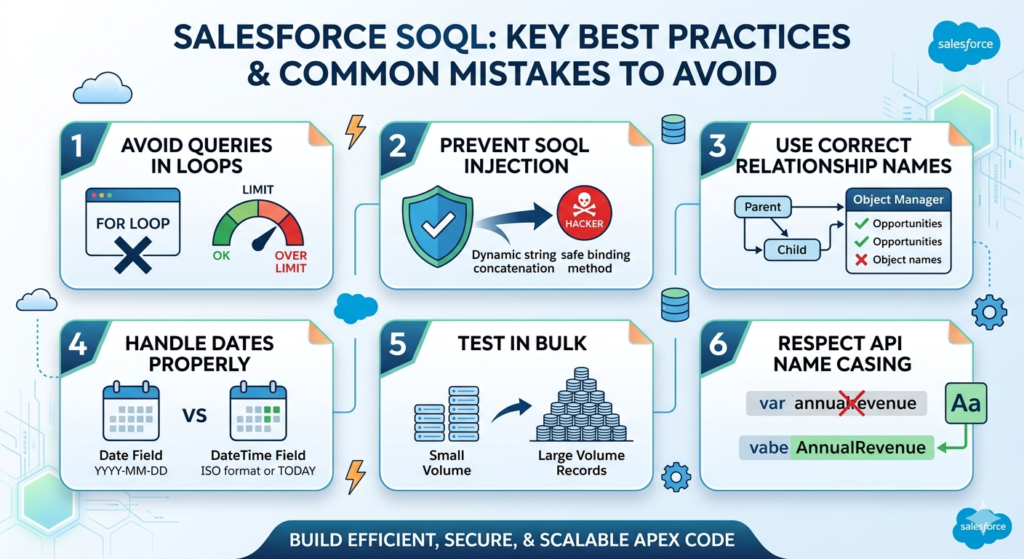
Mistake 1: SOQL Inside Loops
apex// ❌ WRONG — One query per account (hits 101 SOQL limit fast)
for (Account acc : accounts) {
    List<Contact> contacts = [SELECT Id FROM Contact WHERE AccountId = :acc.Id];
}

// ✅ CORRECT — One query for all accounts
Set<Id> accountIds = new Map<Id, Account>(accounts).keySet();
List<Contact> allContacts = [
    SELECT Id, AccountId FROM Contact WHERE AccountId IN :accountIds
];
Mistake 2: Using String Concatenation with User Input
apex// ❌ SOQL injection vulnerability
String query = 'SELECT Id FROM Account WHERE Name = \'' + userInput + '\'';

// ✅ Safe approach
String safe = String.escapeSingleQuotes(userInput);
String query = 'SELECT Id FROM Account WHERE Name = \'' + safe + '\'';
// Better: use variable binding wherever possible
Mistake 3: Incorrect Relationship Names
apex// ❌ WRONG — 'Opportunity' is the object name, not the relationship name
SELECT Id, (SELECT Id FROM Opportunity) FROM Account

// ✅ CORRECT — 'Opportunities' is the child relationship name
SELECT Id, (SELECT Id FROM Opportunities) FROM Account
Rule: Standard child relationship names are usually the plural of the object name. Check them in Object Manager → Relationships.
Mistake 4: Comparing Dates Incorrectly
apex// ❌ WRONG — comparing a DateTime field using a Date literal incorrectly
WHERE CreatedDate = '2024-01-15'  // This doesn't work

// ✅ CORRECT — proper date formats
WHERE CreatedDate = TODAY
WHERE CreatedDate >= 2024-01-15T00:00:00Z
WHERE CloseDate = 2024-01-15  // Date field (not DateTime) — this works
Mistake 5: Querying Without Testing in Bulk
Always test your SOQL queries with realistic data volumes. A query returning 10 records in dev sandbox might return 48,000 in production — and behave completely differently.
Mistake 6: Forgetting That SOQL Is Case-Insensitive for Values but Not for API Names
apex// ✅ This works — string values are case-insensitive
WHERE Industry = 'technology'  // Matches 'Technology'

// ❌ This fails — wrong API name (case matters for field names in Apex)
acc.annualrevenue  // Wrong
acc.AnnualRevenue  // Correct
You've now covered every major SOQL concept a developer needs — from fundamental syntax to advanced relationship queries, aggregate functions, date literals, semi-joins, dynamic SOQL, and real production patterns.
Key takeaways from this salesforce soql tutorial:
- ✅ SOQL is the only way to read data from Salesforce programmatically
- ✅ SOQL is not SQL — it has no JOINs, no SELECT *, and has governor limits
- ✅ 20 must-know queries cover 90% of real-world development scenarios
- ✅ Never put SOQL inside loops — collect, query once, process
- ✅ Selective queries using indexed fields are essential for performance
- ✅ Dynamic SOQL requires strict input sanitization to prevent injection
- ✅ Relationship queries replace JOINs with dot notation and subqueries
Where to Practice SOQL
- Developer Console — Setup → Developer Console → Query Editor tab
- Workbench — workbench.developerforce.com — free, powerful SOQL interface
- Salesforce CLI —
sf data query --query "SELECT Id FROM Account LIMIT 5" - Trailhead — Complete the "SOQL for Admins" and "Apex Basics & Database" modules
- VS Code + Salesforce Extension Pack — Execute SOQL directly from the editor
Your Next Actions
- Open your Developer Org right now and run every query in this guide
- Modify each query — change filters, add fields, combine techniques
- Build an Apex class that uses at least 5 of these query patterns together
- Practice the interview questions until you can answer them without notes
- Build a real project — create a contact search component or a reporting dashboard using SOQL queries from this guide
SOQL mastery is not about memorizing syntax — it's about knowing which query pattern solves which problem. The 20 examples in this guide are your toolkit. Practice them until reaching for the right query feels instinctive.
The Developer Console is open. Start querying.
About RizeX Labs
At RizeX Labs, we specialize in delivering cutting-edge Salesforce solutions, including advanced development practices and data-driven architectures within the Salesforce ecosystem. Our expertise combines deep technical knowledge, industry best practices, and real-world implementation experience to help developers and organizations build scalable and efficient Salesforce applications.
We empower professionals to master Salesforce development—from understanding core concepts like SOQL (Salesforce Object Query Language) to implementing optimized queries that improve performance, data retrieval, and application efficiency.
Internal Linking Opportunities:
- Link to your Salesforce course page
- How to Build a Salesforce Portfolio That Gets You Hired (With Project Ideas)
- Salesforce Admin vs Developer: Which Career Path is Right for You in 2026?
- Wealth Management App in Financial Services Cloud
- Enroll in Salesforce Dev batch
External Linking Opportunities:
- Salesforce official website
- SOQL and SOSL reference
- Salesforce Developer Guide
- Salesforce Trailhead (SOQL modules)
- Salesforce Object Reference
Quick Summary
Salesforce Object Query Language (SOQL) is a powerful tool that enables developers to retrieve and manipulate data efficiently within Salesforce. Mastering SOQL is essential for building scalable applications, optimizing performance, and working effectively with large datasets.
In this tutorial, developers will learn 20 essential SOQL queries that cover everything from basic data retrieval to advanced filtering, relationships, and aggregation. By understanding these queries, developers can reduce execution time, improve data accuracy, and build more efficient Salesforce solutions.