
Introduction: Why Your SFMC Preference Center Could Be Your Most Important Marketing Asset
Here's a scenario that plays out thousands of times every day across every industry:
A subscriber receives one too many promotional emails, feels overwhelmed, and clicks "Unsubscribe." In seconds, they're gone — permanently removed from your list, taking their lifetime value with them. What if, at that critical moment, instead of a simple "You've been unsubscribed" confirmation page, they were greeted with a thoughtfully designed page that said: "We'd hate to see you go. Would you prefer to hear from us less often? Or only about the topics that matter to you?"
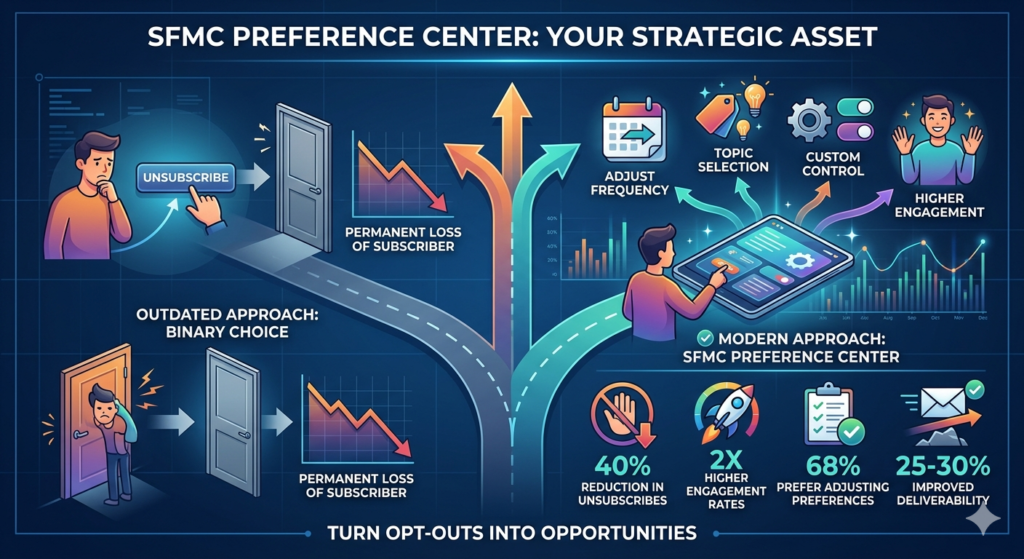
That's the power of a well-built SFMC preference center.
In modern email marketing, the binary choice of "subscribe or unsubscribe" is painfully outdated. Subscribers are not a monolith — they have different interests, different communication preferences, and different tolerance levels for email frequency. Forcing a full SFMC opt-out on someone who simply wanted fewer emails is like closing an entire store because one customer wanted to browse more quietly.
A properly built marketing cloud subscription center gives subscribers control. And when people feel in control, they stay engaged. Research backs this up:
- Brands with preference centers see up to 40% reduction in unsubscribe rates
- Subscribers who manage their own preferences have 2x higher engagement rates
- 68% of subscribers say they'd rather adjust email preferences than fully unsubscribe
- Companies using preference centers report 25-30% improvement in email deliverability scores
This guide will walk you through everything you need to build an SFMC preference center that doesn't just exist — but actually works. We're talking about practical implementation, real code snippets, design principles, compliance handling, and lessons from real-world deployments.
Let's build something that makes your subscribers glad they stayed.
What Is an SFMC Preference Center and How Is It Different From a Basic Unsubscribe Page?
Before we dive into the build, let's establish a clear understanding of what we're actually creating.
The Basic Unsubscribe Page: The Blunt Instrument
The default SFMC opt-out experience is a simple, system-generated unsubscribe confirmation page. When a subscriber clicks "Unsubscribe" in any SFMC email, they're directed to a page that confirms their removal from all communications. It's:
- Binary (subscribe or unsubscribe — nothing in between)
- Generic (no branding, no personalization)
- Final (no options to adjust rather than fully leave)
- Passive (no attempt to retain the subscriber)
It serves its legal purpose — honoring opt-out requests — but leaves enormous value on the table.
The Marketing Cloud Subscription Center: The Smart Alternative
A marketing cloud subscription center is a fully customized, branded web page (typically built on SFMC CloudPages) that gives subscribers granular control over their communication experience. It can include:
- Frequency controls: "Email me daily / weekly / monthly"
- Topic preferences: "I'm interested in: Product Updates / Industry News / Promotions / Events"
- Channel preferences: "Contact me via: Email / SMS / Both"
- Complete opt-out option: Still legally required and prominently available
- Pause option: "Take a break — no emails for 30 days"
- Personalized messaging: Uses subscriber data to show current preferences
The difference is philosophy. A basic unsubscribe page says, "Okay, you're gone." A preference center says, "Let's make this work for you."
Legal Distinction: Preference Center vs. Unsubscribe
Critically important: A preference center does not replace the legal requirement to honor unsubscribe requests. Under CAN-SPAM, GDPR, and CASL, subscribers must always have the ability to fully opt out. Your SFMC preference center must include a clear global unsubscribe option. The preference center enhances the experience — it doesn't restrict subscriber rights.
The Business Case: Why Every Brand Needs a Marketing Cloud Subscription Center
Protect Your Most Valuable Asset: Your List
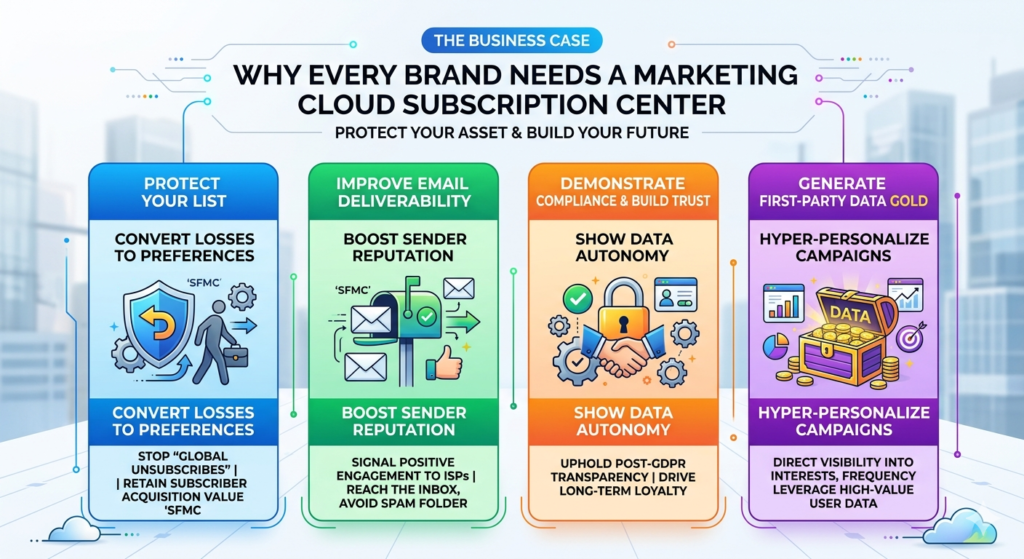
Every subscriber on your list represents acquisition cost — paid ads, SEO investment, content creation, word-of-mouth. When they unsubscribe, that investment walks out the door. A preference center converts potential permanent losses into manageable preference adjustments.
Improve Email Deliverability
When subscribers receive emails they actually want, they engage with them. Higher engagement rates — opens, clicks, positive interactions — signal to ISPs (Gmail, Outlook, Yahoo) that your emails are wanted. This improves your sender reputation and ensures more of your emails reach the inbox rather than the spam folder.
Demonstrate Compliance and Build Trust
In a post-GDPR world, subscribers are increasingly conscious of how brands use their data. A transparent, easy-to-use SFMC preference center demonstrates that you respect subscriber autonomy — which builds the kind of trust that drives long-term loyalty.
Generate First-Party Data Gold
When subscribers tell you their interests, frequency preferences, and channel preferences, they're handing you first-party data that's more valuable than anything you could infer from behavioral tracking. This data powers hyper-personalized campaigns that perform significantly better than generic blasts.
Prerequisites Before Building Your SFMC Preference Center
Technical Requirements
- Salesforce Marketing Cloud account with:
- CloudPages or MicroSite functionality
- Email Studio access
- Contact Builder access
- Journey Builder (for integration)
- Web Studio (for CloudPages)
- Basic familiarity with:
- AMPscript (SFMC's scripting language)
- HTML/CSS (for page styling)
- Data Extensions in SFMC
- SFMC publication lists and subscriber attributes
Strategic Requirements
Before touching any technical configuration, define:
- What preference categories will you offer? (Topics, frequency, channels)
- How many options is too many? (Aim for 5-8 maximum)
- What's your "stay engaged" alternative to full unsubscribe?
- How will preference data flow into your sending logic?
- Who owns ongoing maintenance of the preference center?
Step-by-Step Guide: Building Your SFMC Preference Center
Step 1: Plan Your Preference Architecture
Before writing a single line of code or creating a Data Extension, document your complete preference architecture. Answer these questions:
Communication Topics (what they receive):
- Product announcements and updates
- Industry news and thought leadership
- Promotional offers and discounts
- Event invitations and webinars
- Customer success stories and case studies
- Tips, tutorials, and educational content
Frequency Options (how often they receive):
- As they happen (real-time)
- Daily digest
- Weekly summary
- Monthly roundup
- "Only the most important" (limit to 1-2 per month)
Channel Preferences (where they receive):
- Email only
- SMS only
- Email and SMS
- Push notifications
Global Options:
- Pause communications for 30/60/90 days
- Unsubscribe from all communications permanently
Document this architecture in a simple spreadsheet before proceeding. Every subsequent step will reference this document.
Step 2: Set Up Your Data Extensions
Your preference center needs properly structured Data Extensions to store and retrieve subscriber preferences.
Primary Preference Data Extension
Create a DE called Preference_Center_Data with the following fields:
| Field Name | Data Type | Length | Required | Description |
|---|---|---|---|---|
| SubscriberKey | Text | 254 | Yes | Unique subscriber identifier |
| EmailAddress | — | Yes | Subscriber email address | |
| FirstName | Text | 50 | No | For personalization |
| LastName | Text | 50 | No | For personalization |
| Pref_ProductUpdates | Boolean | — | No | Product update emails |
| Pref_IndustryNews | Boolean | — | No | Industry news emails |
| Pref_Promotions | Boolean | — | No | Promotional emails |
| Pref_Events | Boolean | — | No | Event invitation emails |
| Pref_Educational | Boolean | — | No | Tutorial/educational emails |
| Freq_Preference | Text | 20 | No | daily/weekly/monthly |
| Channel_Email | Boolean | — | No | Receives emails |
| Channel_SMS | Boolean | — | No | Receives SMS |
| GlobalOptOut | Boolean | — | No | Globally unsubscribed |
| OptOutDate | Date | — | No | Date of global opt-out |
| PauseUntilDate | Date | — | No | Communications paused until |
| LastUpdated | Date | — | No | Last preference update timestamp |
Configuration Settings:
- Set
EmailAddressas the subscriber key relationship - Create a sendable relationship with All Subscribers
- Enable field-level encryption for sensitive fields if required by your compliance team
Preference Audit Log Data Extension
Create a secondary DE called Preference_Audit_Log to track all preference changes:
| Field Name | Data Type | Description |
|---|---|---|
| AuditID | Text (50) | Unique audit record ID |
| SubscriberKey | Text (254) | Subscriber identifier |
| ChangeDate | Date | When change was made |
| ChangeType | Text (50) | "OptOut", "Preference Update", "Pause" |
| PreviousValue | Text (500) | JSON string of previous preferences |
| NewValue | Text (500) | JSON string of new preferences |
| IPAddress | Text (50) | Subscriber's IP (for GDPR records) |
This audit log is essential for GDPR compliance — you need to demonstrate that you're honoring subscriber preferences with a documented record.
Step 3: Configure Subscriber Attributes in Contact Builder
For preference data to flow seamlessly through SFMC, create corresponding Profile Attributes in Contact Builder:
- Navigate to Audience Builder → Contact Builder → Attributes
- Click Create Attribute Group → Name it "Communication Preferences"
- Add individual attributes matching your Data Extension fields
- Link these attributes to your
Preference_Center_DataDE
This linkage allows Journey Builder and Email Studio to access preference data when making send decisions.
Step 4: Create Publication Lists
Publication Lists in SFMC are the mechanism for managing subscription status across different communication types. Create a Publication List for each major category:
- Navigate to Email Studio → Subscribers → Publication Lists
- Click Create for each category:
- "Product Updates Subscribers"
- "Industry News Subscribers"
- "Promotions Subscribers"
- "Events Subscribers"
- "Educational Content Subscribers"
These lists will be updated when subscribers change their topic preferences in the preference center.
Step 5: Build the CloudPage — Your Preference Center Frontend
The CloudPage is the actual web page subscribers see. Here's how to build it:
Create the CloudPage
- Navigate to Web Studio → CloudPages
- Click Create → Landing Page
- Name it: "Communication Preference Center"
- Select HTML as the content type
The Page Structure
Your preference center CloudPage needs several key sections. Here's the complete architectural breakdown:
Page Header Section:
HTML<!-- Brand header with logo -->
<header class="pref-header">
  <img src="[your-logo-url]" alt="[Brand Name] Logo" />
  <h1>Manage Your Communication Preferences</h1>
  <p>We want to send you only what matters most to you.
  Update your preferences below — your changes take effect immediately.</p>
</header>
Subscriber Identification (AMPscript):
ampscript%%[
/* Retrieve subscriber data from URL parameter */
VAR @subKey, @email, @firstName, @row, @rowCount
SET @subKey = QueryParameter("subKey")

/* Look up subscriber preferences from Data Extension */
SET @row = LookupRows("Preference_Center_Data", "SubscriberKey", @subKey)
SET @rowCount = RowCount(@row)

IF @rowCount > 0 THEN
  SET @dataRow = Row(@row, 1)
  SET @email = Field(@dataRow, "EmailAddress")
  SET @firstName = Field(@dataRow, "FirstName")
  SET @pref_product = Field(@dataRow, "Pref_ProductUpdates")
  SET @pref_news = Field(@dataRow, "Pref_IndustryNews")
  SET @pref_promo = Field(@dataRow, "Pref_Promotions")
  SET @pref_events = Field(@dataRow, "Pref_Events")
  SET @freq = Field(@dataRow, "Freq_Preference")
ENDIF
]%%
Personalized Welcome Message:
HTML%%[ IF NOT EMPTY(@firstName) THEN ]%%
<div class="welcome-message">
  <h2>Hi, %%=v(@firstName)=%%!</h2>
  <p>Here are your current communication preferences for
  <strong>%%=v(@email)=%%</strong>.
  Update anything below and click Save.</p>
</div>
%%[ ELSE ]%%
<div class="welcome-message">
  <h2>Manage Your Preferences</h2>
  <p>Update your communication preferences below.</p>
</div>
%%[ ENDIF ]%%
Topic Preferences Section:
HTML<section class="preference-section">
  <h3>📧 What Would You Like to Receive?</h3>
  <p>Select the types of content you're interested in:</p>

  <div class="preference-options">

    <label class="pref-option">
      <input type="checkbox" name="pref_product" value="true"
        %%[ IF @pref_product == "true" THEN ]%% checked %%[ ENDIF ]%%>
      <div class="pref-content">
        <span class="pref-title">🔔 Product Updates</span>
        <span class="pref-desc">New features, releases, and improvements</span>
      </div>
    </label>

    <label class="pref-option">
      <input type="checkbox" name="pref_news" value="true"
        %%[ IF @pref_news == "true" THEN ]%% checked %%[ ENDIF ]%%>
      <div class="pref-content">
        <span class="pref-title">📰 Industry News</span>
        <span class="pref-desc">Trends, insights, and market updates</span>
      </div>
    </label>

    <label class="pref-option">
      <input type="checkbox" name="pref_promo" value="true"
        %%[ IF @pref_promo == "true" THEN ]%% checked %%[ ENDIF ]%%>
      <div class="pref-content">
        <span class="pref-title">🎁 Exclusive Offers</span>
        <span class="pref-desc">Discounts, promotions, and special deals</span>
      </div>
    </label>

    <label class="pref-option">
      <input type="checkbox" name="pref_events" value="true"
        %%[ IF @pref_events == "true" THEN ]%% checked %%[ ENDIF ]%%>
      <div class="pref-content">
        <span class="pref-title">🎤 Events & Webinars</span>
        <span class="pref-desc">Invitations to live and virtual events</span>
      </div>
    </label>

  </div>
</section>
Frequency Preferences Section:
HTML<section class="preference-section">
  <h3>⏰ How Often Would You Like to Hear From Us?</h3>

  <div class="frequency-options">

    <label class="freq-option">
      <input type="radio" name="freq_pref" value="realtime"
        %%[ IF @freq == "realtime" THEN ]%% checked %%[ ENDIF ]%%>
      <span>As it happens</span>
    </label>

    <label class="freq-option">
      <input type="radio" name="freq_pref" value="weekly"
        %%[ IF @freq == "weekly" OR EMPTY(@freq) THEN ]%% checked %%[ ENDIF ]%%>
      <span>Weekly digest</span>
    </label>

    <label class="freq-option">
      <input type="radio" name="freq_pref" value="monthly"
        %%[ IF @freq == "monthly" THEN ]%% checked %%[ ENDIF ]%%>
      <span>Monthly summary only</span>
    </label>

  </div>
</section>
Global Opt-Out Section (Required for Compliance):
HTML<section class="preference-section opt-out-section">
  <h3>🚪 Need a Break?</h3>

  <div class="break-option">
    <button type="button" class="btn-secondary" onclick="pauseCommunications()">
      Pause Emails for 30 Days
    </button>
    <p class="option-desc">Take a break without fully unsubscribing</p>
  </div>

  <div class="unsubscribe-option">
    <h4>Unsubscribe From All Communications</h4>
    <p>This will remove you from all marketing emails from [Brand Name].
    You'll still receive transactional emails (receipts, account alerts).</p>
    <label class="pref-option opt-out-label">
      <input type="checkbox" name="global_optout" value="true">
      <span>Yes, unsubscribe me from all marketing communications</span>
    </label>
  </div>
</section>
Save Button and Form Submission:
HTML<div class="cta-section">
  <button type="submit" class="btn-primary">Save My Preferences</button>
  <p class="save-note">Your preferences are saved immediately and take effect within 24 hours.</p>
</div>
Step 6: Handle Form Submission with AMPscript
When a subscriber submits the preference form, AMPscript processes the data and updates your Data Extension:
ampscript%%[
IF RequestParameter("submitted") == "true" THEN

  /* Capture form values */
  VAR @pref_product, @pref_news, @pref_promo, @pref_events
  VAR @freq, @global_optout, @subKey

  SET @subKey = RequestParameter("subKey")
  SET @pref_product = RequestParameter("pref_product")
  SET @pref_news = RequestParameter("pref_news")
  SET @pref_promo = RequestParameter("pref_promo")
  SET @pref_events = RequestParameter("pref_events")
  SET @freq = RequestParameter("freq_pref")
  SET @global_optout = RequestParameter("global_optout")

  /* Handle empty checkboxes (unchecked = false) */
  IF EMPTY(@pref_product) THEN SET @pref_product = "false" ENDIF
  IF EMPTY(@pref_news) THEN SET @pref_news = "false" ENDIF
  IF EMPTY(@pref_promo) THEN SET @pref_promo = "false" ENDIF
  IF EMPTY(@pref_events) THEN SET @pref_events = "false" ENDIF

  /* Update the Preference Data Extension */
  UpsertDE("Preference_Center_Data",
    1, "SubscriberKey", @subKey,
    "Pref_ProductUpdates", @pref_product,
    "Pref_IndustryNews", @pref_news,
    "Pref_Promotions", @pref_promo,
    "Pref_Events", @pref_events,
    "Freq_Preference", @freq,
    "LastUpdated", Now()
  )

  /* Handle Global Opt-Out */
  IF @global_optout == "true" THEN
    UpsertDE("Preference_Center_Data",
      1, "SubscriberKey", @subKey,
      "GlobalOptOut", "true",
      "OptOutDate", Now()
    )
    /* Unsubscribe from All Subscribers list */
    UnsubscribeSuppressionList("All Subscribers", @subKey)
  ENDIF

  SET @successMessage = "true"

ENDIF
]%%
Step 7: Add the Preference Center Link to Your Emails
The preference center link must be embedded in every email you send. Use SFMC's built-in %%subscription_center_url%% as the base, or create a custom link with subscriber key parameters:
Standard approach using AMPscript:
HTML<a href="%%=RedirectTo(CloudPagesURL(YOUR_PAGE_ID, 'subKey', _subscriberkey))=%%">
  Manage Your Email Preferences
</a>
Replace YOUR_PAGE_ID with the actual CloudPage ID found in Web Studio.
In your email footer, include both options:
HTML<p>
  <a href="%%=RedirectTo(CloudPagesURL(PAGE_ID, 'subKey', _subscriberkey))=%%">
    Manage Preferences
  </a> |
  <a alias="Unsubscribe" href="%%unsub_center_url%%">
    Unsubscribe
  </a>
</p>
Step 8: Integrate With Journey Builder and Email Studio
Your preference data needs to actually influence what gets sent. Here's how to close the loop:
Filter Sends Based on Preferences in Email Studio
Create Filtered Data Extensions that only include subscribers who opted in to specific content types:
- In Contact Builder, create a new Data Extension with a filter:
- Source:
Preference_Center_Data - Filter:
Pref_Promotions = true AND GlobalOptOut = false AND Channel_Email = true - Name:
Active_Promo_Subscribers
- Source:
- Use this filtered DE as your send audience in Email Studio
Integrate With Journey Builder
In Journey Builder, add Decision Splits based on preference data:
- After an entry source, add a Decision Split
- Configure condition:
Pref_Events = true - Path A (Yes): Send event invitation email
- Path B (No): Skip to next relevant activity
You can also use preference data in Entry Source filters to ensure only relevant subscribers enter specific journeys.
Best Practices for a High-Converting Marketing Cloud Subscription Center
✅ Design for Clarity, Not Cleverness
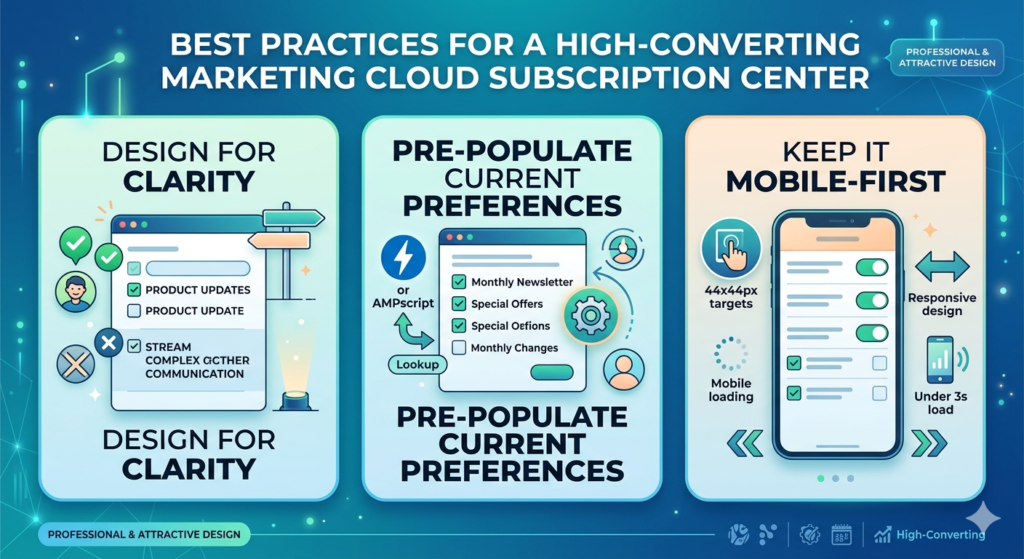
Your preference center is a utility page — subscribers come here with a specific intent. Don't obscure options with clever design. Make every option immediately understandable. Use plain language like "Send me product updates" rather than jargon like "Opt into product communication streams."
✅ Pre-Populate Current Preferences
Nothing frustrates subscribers more than landing on a preference center and seeing blank options when they already have preferences set. Always pre-populate the page with their current settings using AMPscript lookups. This confirms their data is saved and makes updates faster.
✅ Keep it Mobile-First
A significant percentage of subscribers will access your preference center from a mobile device — often immediately after reading a mobile email. Your CloudPage must be fully responsive:
- Use large touch-friendly checkboxes and radio buttons (minimum 44x44px tap targets)
- Stack options vertically on mobile
- Use high-contrast text for readability
- Test on iOS Safari and Android Chrome before launch
- Keep load time under 3 seconds on mobile networks
Mobile-Friendly CSS Approach:
CSS.preference-section {
  max-width: 600px;
  margin: 0 auto;
  padding: 20px;
}

.pref-option {
  display: flex;
  align-items: flex-start;
  padding: 15px;
  margin-bottom: 10px;
  border: 1px solid #e0e0e0;
  border-radius: 8px;
  cursor: pointer;
  transition: background-color 0.2s;
}

.pref-option:hover {
  background-color: #f5f9ff;
}

input[type="checkbox"],
input[type="radio"] {
  width: 20px;
  height: 20px;
  margin-right: 15px;
  margin-top: 2px;
  cursor: pointer;
}

@media (max-width: 480px) {
  .preference-section {
    padding: 15px;
  }
  .pref-option {
    padding: 12px;
  }
}
✅ Offer a "Pause" Option as a Retention Tool
One of the most effective preference center features is the communication pause. Many subscribers who feel overwhelmed don't want to permanently unsubscribe — they just need a break. A "Pause for 30 days" button can save a significant percentage of potential opt-outs.
Implement this using a date field in your Data Extension:
ampscript%%[
/* Check if subscriber is in pause period */
VAR @pauseDate, @today
SET @pauseDate = Field(@dataRow, "PauseUntilDate")
SET @today = Now()

IF NOT EMPTY(@pauseDate) AND DateDiff(@pauseDate, @today, "D") > 0 THEN
  /* Don't send — subscriber is in pause period */
  RaiseError("Subscriber in pause period", true)
ENDIF
]%%
✅ Show the Value of Each Content Type
When presenting topic options, don't just list names — briefly explain what each type includes and how often it's sent. This helps subscribers make informed choices and demonstrates transparency:
Instead of: ☐ Product Updates
Use: ☐ Product Updates — New features, releases, and improvements (typically 2-4x per month)
✅ Send a Preference Confirmation Email
After a subscriber updates their preferences, send an immediate confirmation email:
- Summarize their new preferences
- Provide a direct link back to the preference center for further adjustments
- Thank them for staying connected
- Set expectations for what they'll receive next
This confirmation email has an extremely high open rate because it's expected and relevant — use it wisely.
Handling SFMC Opt-Out Properly: Compliance Essentials
Legal Requirements You Must Fulfill
CAN-SPAM Act Requirements:
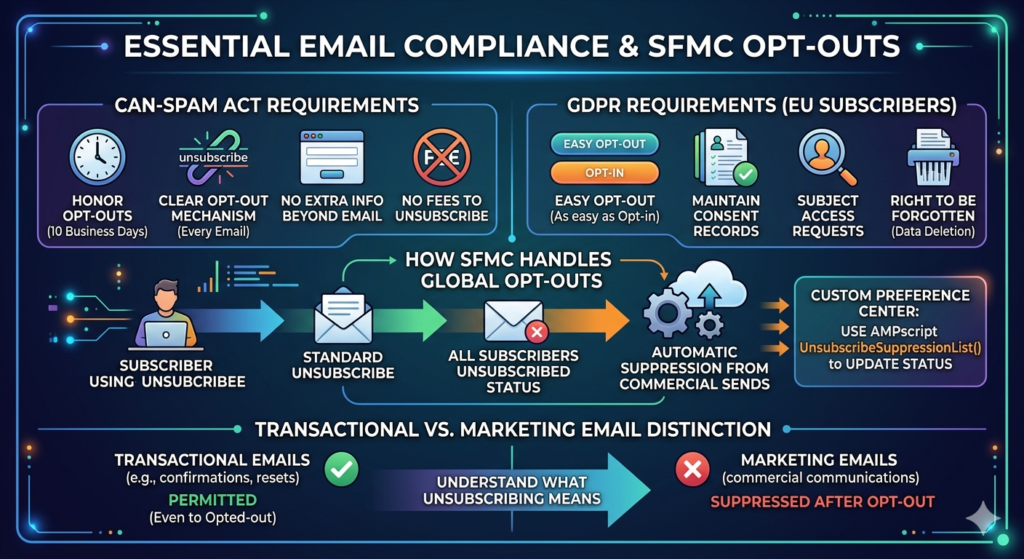
- Honor opt-out requests within 10 business days (best practice: within 24 hours)
- Provide a clear and conspicuous mechanism to opt out in every commercial email
- Not require subscribers to provide any information beyond email address to opt out
- Not charge any fee for opting out
GDPR Requirements (for EU subscribers):
- Opt-out must be as easy as opting in
- Maintain records of consent and preference changes (your Audit Log DE handles this)
- Respond to Subject Access Requests that include preference history
- Allow full data deletion requests (Right to be Forgotten)
How SFMC Handles Global Opt-Outs
When a subscriber globally opts out in SFMC (via the standard unsubscribe mechanism), they are added to the All Subscribers Unsubscribed status. SFMC automatically suppresses these contacts from all future sends — you don't need to manage this manually.
However, when using a custom preference center, you must ensure that your global opt-out process also updates the All Subscribers status. Use AMPscript's UnsubscribeSuppressionList() function (shown in Step 6) to ensure this is handled correctly.
Transactional vs. Marketing Email Distinction
Critical compliance concept: Transactional emails (order confirmations, password resets, account security alerts) can still be sent to globally opted-out subscribers because they are not commercial communications. However, your preference center should clearly communicate this distinction so subscribers understand what "unsubscribing" actually means.
Real-World Use Cases: SFMC Preference Centers in Action
Case Study 1: SaaS Company Reduces Unsubscribes by 38%
A mid-size SaaS company was seeing a 2.8% monthly unsubscribe rate — well above industry average. After implementing a preference center with topic categories (Product Updates, Tips & Tutorials, Industry News, Promotional Offers) and a frequency selector (weekly vs. monthly), their monthly unsubscribe rate dropped to 1.7% — a 38% reduction.
The most selected option? "Monthly summary" — which told them they had been sending too frequently. They adjusted their default cadence, and engagement rates climbed 22% in the following quarter.
Case Study 2: E-Commerce Brand Recovers 15% of Would-Be Unsubscribers
An online retailer added a "Pause for 30 days" button to their preference center as a secondary option to full unsubscribe. Over six months, 15% of subscribers who visited the unsubscribe page chose the pause option instead of fully opting out. When their pause period ended, 62% of those subscribers remained on the list and continued engaging — representing significant recovered revenue.
Case Study 3: B2B Publisher Increases Email Revenue Through Segmentation
A B2B media company replaced their single newsletter with a marketing cloud subscription center offering five distinct topic newsletters. Subscribers could choose one, some, or all. Within 90 days:
- Average subscriber received 1.8 newsletters (vs. 1 previously)
- Open rates increased from 18% to 31% (because content was more relevant)
- Click-through rates doubled
- Overall email revenue increased 45%
The preference center didn't just reduce opt-outs — it actively grew the value of their email program.
Common Mistakes to Avoid When Building Your SFMC Preference Center
❌ Mistake 1: Hiding the Unsubscribe Option
Some brands bury the full opt-out option at the bottom in light gray text, hoping subscribers won't find it. This is both legally problematic and strategically counterproductive. Subscribers who can't easily find the option they want become frustrated — and frustrated subscribers file spam complaints, which damage your sender reputation far more than an unsubscribe would.
Fix: Display the global opt-out option prominently, with clear language. Trust that a well-designed preference center will retain subscribers who are on the fence.
❌ Mistake 2: Overcomplicating the Options
A preference center with 20 categories, 5 frequency options, and 3 channels is overwhelming. When presented with too many choices, subscribers experience decision paralysis — and many simply click "Unsubscribe" to end the confusion.
Fix: Limit categories to 5-8 maximum. Focus on the highest-value distinctions. You can always add more options later as subscribers become comfortable with the preference center.
❌ Mistake 3: Not Pre-Populating Existing Preferences
Forcing subscribers to re-declare all their preferences from scratch every time they visit feels disrespectful of their time and erodes trust in your data management.
Fix: Always use AMPscript to look up and pre-populate current preferences before the page renders.
❌ Mistake 4: Building the Page But Not Connecting the Data
The most common technical failure: a beautifully designed preference center that captures data but doesn't actually influence what emails are sent. The preference data sits in a DE, unused, while subscribers continue receiving content they opted out of.
Fix: Build the sending suppression logic before launching the preference center. Test the complete loop — preference change → data update → send suppression — before going live.
❌ Mistake 5: Not Making It Mobile-Friendly
A preference center that's hard to use on mobile creates friction at exactly the wrong moment — when a subscriber is trying to maintain a relationship with your brand.
Fix: Build mobile-first, test on actual devices, and ensure tap targets, font sizes, and form elements work perfectly on small screens.
❌ Mistake 6: Forgetting the Confirmation Email
Subscribers who update preferences and receive no confirmation wonder if their changes were actually saved. This uncertainty sometimes leads them to visit again and over-correct — or simply give up and unsubscribe entirely.
Fix: Always send an immediate preference confirmation email. Make it warm, personal, and reassuring.
❌ Mistake 7: Not Maintaining and Updating the Preference Center
Brands build their preference center and never touch it again. Months later, the page references content categories that no longer exist, or misses new communication types that have been launched.
Fix: Schedule quarterly preference center audits to ensure all options remain current and relevant.
Conclusion: Your SFMC Preference Center Is a Relationship Investment
An SFMC preference center is far more than a technical compliance checkbox. It's a statement about the kind of relationship you want to have with your subscribers. It says: "We see you as an individual. We respect your time. We want to earn your attention, not demand it."
That philosophy, embedded in a well-built marketing cloud subscription center, translates into measurable business outcomes: lower unsubscribe rates, higher engagement, better deliverability, richer first-party data, and ultimately, more revenue from your email program.
Every day you send emails without a proper preference center is a day you're converting potentially salvageable subscribers into permanent opt-outs. Every one of those opt-outs represents acquisition cost wasted, potential revenue lost, and a relationship that didn't have to end.
Building this right takes time — but you've now got everything you need. The architecture, the AMPscript, the design principles, the compliance framework, and the real-world proof that it works.
Your action plan starts now:
- Document your preference architecture (this week)
- Set up your Data Extensions (next week)
- Build your CloudPage (week 3)
- Test the complete data loop (week 4)
- Launch and start recovering subscribers (week 5)
Your subscribers are ready to tell you exactly what they want. Build them a preference center, and actually listen.
About RizeX Labs
At RizeX Labs, we specialize in delivering high-impact Salesforce Marketing Cloud (SFMC) solutions, including building robust and user-friendly Preference Centers that actually work in real-world scenarios.
Our expertise combines deep technical knowledge of SFMC (Email Studio, Journey Builder, AMPscript, Data Extensions) with practical implementation strategies to help businesses manage subscriber preferences effectively—without creating messy or disconnected data.
We help organizations move from basic unsubscribe pages to intelligent Preference Centers that give users control over communication types, frequency, and channels—while ensuring data accuracy, compliance, and better engagement.
Internal Links:
- Link to your Salesforce Marketing Cloud course page
- How to Build a Salesforce Portfolio That Gets You Hired (With Project Ideas)
- Salesforce Admin vs Developer: Which Career Path is Right for You in 2026?
- Wealth Management App in Financial Services Cloud
- Salesforce Admin And Development Course
External Links:
- Salesforce official website: https://www.salesforce.com
- SFMC documentation: https://help.salesforce.com
- Preference Center best practices: https://help.salesforce.com/s/articleView?id=mc_es_preference_center.htm
- AMPscript guide: https://ampscript.guide
- Journey Builder overview: https://help.salesforce.com/s/articleView?id=mc_jb.htm
- CAN-SPAM & GDPR basics: https://gdpr.eu
Quick Summary
A Salesforce Marketing Cloud Preference Center is not just a compliance requirement—it’s a critical tool for improving customer experience and reducing unsubscribes.
Instead of forcing users to completely opt out, a well-designed Preference Center allows them to:
- Choose the type of emails they want (promotions, updates, newsletters)
- Control how often they receive communication
- Update personal details easily
Using tools like Data Extensions, AMPscript, and CloudPages, businesses can build dynamic Preference Centers that store user choices in real time and integrate seamlessly with Journey Builder.
A properly built Preference Center helps reduce email fatigue, improves engagement rates, and ensures compliance with regulations like GDPR and CAN-SPAM. It also creates a single source of truth for subscriber preferences, making your marketing more targeted and effective.