
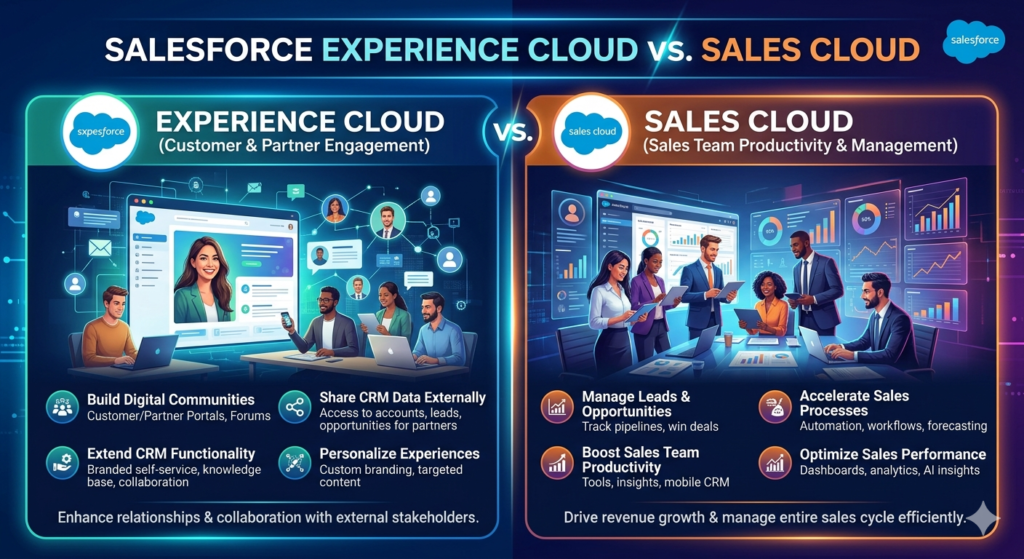
Experience Cloud vs Sales Cloud: Understanding the difference between these two Salesforce platforms is essential for making the right technology investment. In today’s digital-first business landscape, choosing the right solution can make or break your customer engagement strategy.
Salesforce, the world’s leading Customer Relationship Management (CRM) platform, offers a comprehensive suite of cloud solutions designed to address different business needs. Among these, Experience Cloud and Sales Cloud stand out as two powerful yet distinctly different offerings.
If you’re a business leader, IT decision-maker, or Salesforce administrator trying to understand which solution fits your organization’s needs—or whether you need both—you’ve come to the right place. At RizeX Labs, we’ve helped hundreds of companies navigate their Salesforce journey, and the Experience Cloud vs Sales Cloud comparison is one of the most common questions we encounter.
This comprehensive guide will demystify both platforms, explore their unique features, compare their capabilities, and help you determine which solution aligns with your business objectives. Whether you’re looking to empower your sales team, create engaging customer portals, or build a thriving online community, understanding these two Salesforce clouds is essential for making an informed decision.
What is Salesforce Sales Cloud?
Sales Cloud is Salesforce’s flagship CRM product and the foundation upon which the company built its empire. Launched in 1999, it revolutionized how businesses manage their sales processes, customer relationships, and revenue pipelines.
At its core, Sales Cloud is designed specifically for internal sales teams. It’s a comprehensive sales force automation platform that helps organizations streamline their entire sales cycle—from lead generation and opportunity management to closing deals and forecasting future revenue.
Think of Sales Cloud as your sales team’s command center. It’s where your sales representatives track every customer interaction, manage their pipeline, collaborate with colleagues, and ultimately drive revenue growth. The platform provides complete visibility into your sales process, enabling managers to coach their teams effectively and executives to make data-driven strategic decisions.
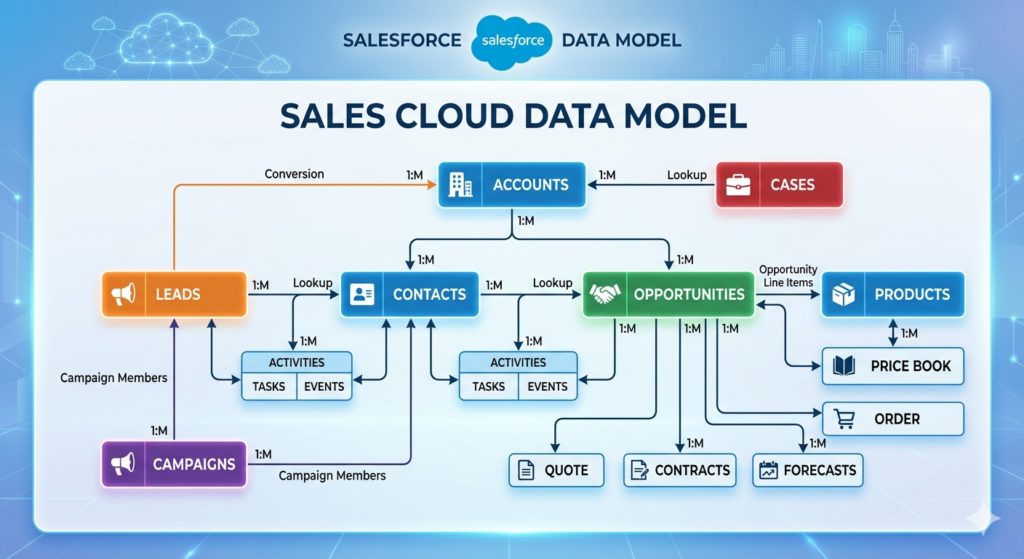
The Primary Purpose of Sales Cloud
Sales Cloud serves several critical functions:
- Customer Relationship Management: Maintain a 360-degree view of every customer and prospect
- Sales Process Automation: Automate repetitive tasks so salespeople can focus on selling
- Pipeline Management: Track opportunities through every stage of your sales funnel
- Performance Analytics: Monitor team performance and forecast revenue with precision
- Collaboration: Enable seamless communication between sales team members
For example, imagine a software company with a 50-person sales team. With Sales Cloud, each sales representative can access detailed information about their prospects, track email interactions, schedule follow-up tasks, and log meeting notes—all in one centralized platform. Sales managers can monitor their team’s progress in real-time, identify coaching opportunities, and ensure no deal falls through the cracks.
What is Salesforce Experience Cloud?
Experience Cloud (formerly known as Community Cloud until 2020) represents Salesforce’s answer to a different but equally important business challenge: creating connected digital experiences for external audiences.
While Sales Cloud focuses inward on your sales team, Experience Cloud looks outward toward your customers, partners, and other external stakeholders. It’s a platform for building branded, customizable websites, portals, and digital experiences that extend your Salesforce data and functionality beyond your internal teams.
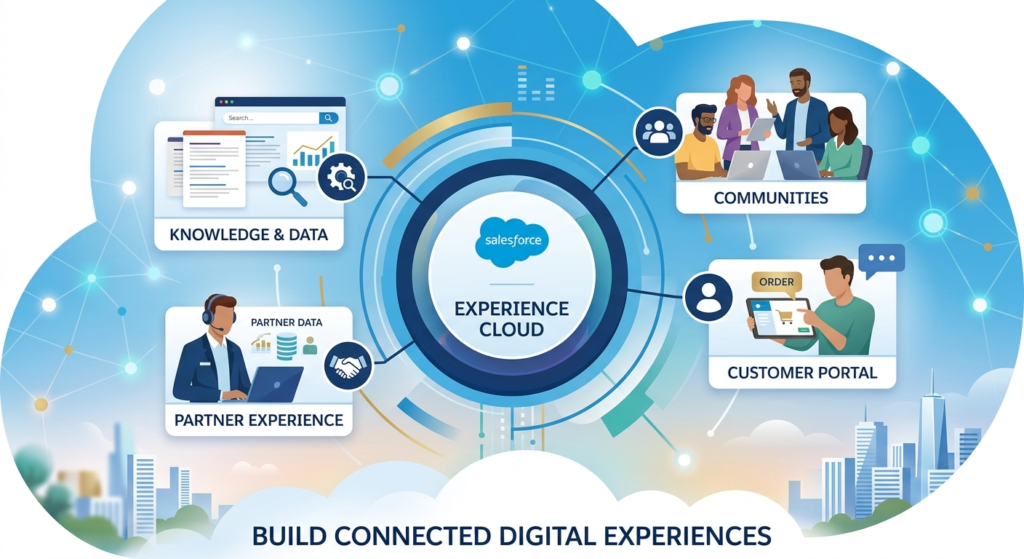
Experience Cloud enables you to create dedicated online spaces where external users can:
- Access self-service support resources
- Collaborate with your team and each other
- Complete transactions
- Access personalized content
- Engage with your brand community
The Primary Purpose of Experience Cloud
Experience Cloud addresses several key business needs:
- Customer Self-Service: Empower customers to find answers and resolve issues independently
- Partner Enablement: Provide partners with the tools, resources, and data they need to succeed
- Community Building: Create engaging spaces where users can connect, share knowledge, and support each other
- Brand Extension: Deliver branded digital experiences that reflect your company’s identity
- External Collaboration: Facilitate seamless communication between your organization and external stakeholders
Consider a manufacturing company that works with hundreds of distributors worldwide. Using Experience Cloud, they could create a partner portal where distributors log in to access product information, submit orders, track shipments, view their sales performance, and communicate with the manufacturer’s support team. This portal becomes a central hub that strengthens the partnership and streamlines operations.
Key Features of Sales Cloud
Sales Cloud offers a robust set of features designed to supercharge your sales team’s productivity and effectiveness. Let’s explore the most impactful capabilities:
1. Lead Management
Sales Cloud captures leads from multiple sources—website forms, social media, trade shows, and more—and routes them to the right sales representatives based on customizable criteria. The platform helps you qualify leads, track their engagement, and convert them into opportunities when they’re ready to buy.
Example: A B2B marketing agency receives inquiries through their website. Sales Cloud automatically assigns leads based on company size and industry, ensuring enterprise leads go to senior account executives while small business leads route to inside sales representatives.
2. Opportunity Management
Track every deal through your sales pipeline with complete visibility. Opportunity records store all relevant information—deal size, close date, stage, competitors, products involved, and associated contacts. Sales reps can update opportunities as they progress, and managers can spot risks or acceleration opportunities.
Example: A sales representative working on a $100,000 software deal can track all stakeholders involved, document objections discussed, attach proposals, and set reminders for follow-up activities—all within the opportunity record.
3. Contact and Account Management
Maintain comprehensive profiles for every person and company in your database. Sales Cloud stores contact information, communication history, relationship hierarchies, and custom data relevant to your business. This 360-degree view ensures every team member has the context they need for meaningful conversations.
Example: Before calling a prospect, a sales rep reviews their complete profile in Sales Cloud, seeing that they attended a recent webinar, downloaded three whitepapers, and were previously a customer at another company—valuable insights for personalizing the conversation.
4. Sales Forecasting
Predict future revenue with accuracy using AI-powered forecasting tools. Sales Cloud aggregates data from your pipeline, applies historical trends, and generates forecasts by representative, team, or product line. This visibility helps leadership make informed decisions about resource allocation and growth strategies.
Example: A sales director reviews quarterly forecasts in Sales Cloud, identifying that the team is 15% short of quota. They can drill down to see which opportunities need attention and reallocate resources accordingly.
5. Email Integration and Tracking
Connect your email system (Gmail or Outlook) directly with Sales Cloud. Send emails from within the platform, automatically log correspondence to the appropriate records, and track when prospects open emails or click links. This integration ensures no communication gets lost and provides valuable engagement insights.
Example: A sales rep sends a proposal via Sales Cloud’s email integration. When the prospect opens it three times in one day, the rep receives a notification and knows it’s the perfect time to follow up.
6. Salesforce Mobile App
Access your entire Sales Cloud database from anywhere using the Salesforce mobile application. Update records, log activities, and respond to customers while on the go, ensuring your data stays current even when you’re away from your desk.
Example: After meeting a prospect at a conference, a sales rep immediately creates a contact record and logs meeting notes using their smartphone, capturing valuable information while it’s fresh.
7. Workflow Automation
Automate repetitive tasks using Sales Cloud’s powerful workflow and process builder tools. Create rules that automatically update records, send emails, assign tasks, or trigger alerts based on specific criteria, freeing your team to focus on high-value activities.
Example: When an opportunity reaches the “Proposal Sent” stage, Sales Cloud automatically creates a task for the sales rep to follow up in three days and notifies the sales manager to review the proposal.
8. Reports and Dashboards
Generate detailed reports on any aspect of your sales operation and visualize data through intuitive dashboards. Track KPIs, monitor team performance, and identify trends that inform strategy—all with real-time data.
Example: A VP of Sales reviews a dashboard showing pipeline by stage, win rates by product, and individual rep performance, spotting that one product line is underperforming and needs additional marketing support.
9. Einstein AI
Leverage artificial intelligence to score leads, predict which opportunities will close, recommend next actions, and generate insights from your data. Einstein AI helps sales teams work smarter by surfacing the most relevant information at the right time.
Example: Einstein Lead Scoring automatically prioritizes leads based on their likelihood to convert, helping sales reps focus their energy on the hottest prospects rather than cold leads.
10. CPQ (Configure, Price, Quote)
For organizations with complex pricing models, Sales Cloud offers CPQ functionality to streamline quote generation. Create accurate quotes with approved pricing, discounts, and product configurations in minutes rather than hours.
Example: A telecommunications sales rep configures a complex service package with multiple add-ons, automatically applies appropriate discounts based on contract length, and generates a professional quote—all within Sales Cloud.
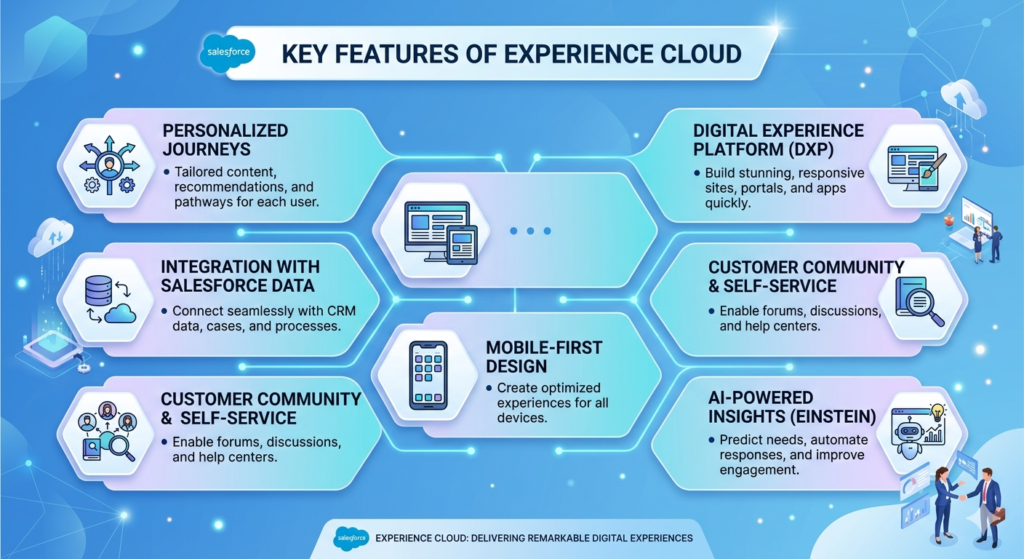
Key Features of Experience Cloud
Experience Cloud provides a completely different set of capabilities focused on creating exceptional external digital experiences. Here are the platform’s standout features:
1. Customizable Templates
Experience Cloud offers pre-built templates for common use cases like customer self-service portals, partner relationship management sites, and online communities. These templates accelerate deployment while still allowing full customization to match your brand.
Example: A financial services company uses the Customer Service template as a starting point for their client portal, then customizes colors, logos, and layouts to match their corporate brand guidelines.
2. Drag-and-Drop Page Builder
Create and modify pages without coding using the intuitive Experience Builder tool. Drag components onto pages, configure their properties, and preview how they’ll appear across different devices—all through a visual interface.
Example: A marketing team member with no technical background updates the community homepage to feature a new product launch, adding banners, video content, and discussion forums without involving IT.
3. Knowledge Base and Self-Service
Empower customers to find answers independently by publishing articles, FAQs, and documentation through your Experience Cloud site. Integrate Salesforce Knowledge to provide searchable, categorized content that reduces support ticket volume.
Example: A SaaS company publishes implementation guides, troubleshooting articles, and video tutorials in their customer portal, reducing support calls by 40% as customers find answers themselves.
4. Case Management Integration
When self-service isn’t enough, customers can seamlessly submit support cases through the portal. These cases automatically flow into your Salesforce Service Cloud, and customers can track their progress directly through the Experience Cloud site.
Example: A customer encounters an issue they can’t resolve through knowledge articles, so they submit a case through the portal. They receive updates as the support team works on their issue and can reply to questions—all without leaving the portal.
5. Discussion Forums and Groups
Build community by enabling users to start discussions, ask questions, and share knowledge with each other. Organize conversations by topic, moderate content, and recognize valuable contributors to foster engagement.
Example: A software company’s customer community includes forums where users share best practices, answer each other’s questions, and vote on feature requests, creating a self-sustaining support ecosystem.
6. Personalization Engine
Deliver tailored experiences based on user attributes, behavior, and preferences. Show different content, recommendations, or navigation options to different audience segments, ensuring each user sees what’s most relevant to them.
Example: Partners who sell Product A see case studies and sales resources specific to that product, while partners selling Product B see completely different content—all on the same portal but personalized to their needs.
7. Mobile-Responsive Design
Every Experience Cloud site automatically adapts to any device—desktop, tablet, or smartphone. Users enjoy seamless experiences regardless of how they access your portal.
Example: A field technician accesses the partner portal from their smartphone to check inventory availability and submit an order while at a customer site, with the interface perfectly optimized for mobile viewing.
8. Gamification
Drive engagement by incorporating game mechanics like points, badges, and leaderboards into your community. Reward users for contributions, encourage participation, and recognize your most active members.
Example: A customer community awards points for posting helpful answers, completing profile information, and sharing content. Top contributors earn badges displayed on their profiles, motivating ongoing participation.
9. Commerce Integration
Transform your Experience Cloud site into a transaction-capable portal by integrating Salesforce Commerce Cloud. Enable partners to place orders, customers to make purchases, or members to register for events—all within the portal.
Example: A wholesale distributor’s partner portal includes a product catalog where partners can browse inventory, check pricing specific to their tier, and submit orders that automatically flow into the fulfillment system.
10. Analytics and Reporting
Track portal performance through comprehensive analytics. Monitor user engagement, identify popular content, track page views, and measure community health to continuously optimize the experience.
Example: A community manager reviews analytics showing that knowledge articles about a specific product feature are viewed 500 times monthly but have a low satisfaction rating, signaling that the content needs improvement.
11. Secure Access Control
Define precisely who can access what content through sophisticated permission settings. Create different user profiles, sharing rules, and access levels to ensure users only see data appropriate for their role.
Example: In a partner portal, premium partners see margin information and promotional programs that basic partners cannot access, all managed through Experience Cloud’s security settings.
12. Integration with Salesforce Data
Experience Cloud sites natively integrate with your Salesforce data. Display account information, opportunity details, case history, or any other Salesforce data directly within the portal while respecting security and sharing rules.
Example: A customer logs into a portal and immediately sees their account summary, open support cases, recent orders, and renewal dates—all pulled directly from Salesforce with no additional integration work required.
Use Cases: When Businesses Use Sales Cloud
Sales Cloud shines in scenarios where organizations need to manage internal sales operations effectively. Here are common use cases:
B2B Sales Teams
Companies selling to other businesses use Sales Cloud to manage complex, multi-touch sales cycles. With multiple stakeholders, longer decision timelines, and higher deal values, B2B sales teams need the visibility and organization Sales Cloud provides.
Example: An enterprise software company with a 90-day average sales cycle uses Sales Cloud to track engagement with IT directors, CFOs, and other decision-makers across multiple departments, ensuring coordinated outreach and no missed opportunities.
B2C Direct Sales Operations
Businesses selling directly to consumers—whether financial services, insurance, real estate, or telecommunications—use Sales Cloud to manage high-volume customer interactions and shorter sales cycles.
Example: A mortgage lender uses Sales Cloud to track loan applications from initial inquiry through approval, automatically updating applicants on their status and ensuring compliance with follow-up requirements.
Account-Based Marketing Alignment
Organizations implementing account-based marketing strategies use Sales Cloud to tightly align sales and marketing efforts around target accounts, tracking engagement across all touchpoints.
Example: A cybersecurity firm identifies 50 target enterprise accounts and uses Sales Cloud to coordinate personalized marketing campaigns, track executive engagement, and ensure sales reps follow up on marketing-generated interest immediately.
Channel Sales Management
Companies that sell through indirect channels use Sales Cloud to manage relationships with resellers, distributors, and other partners, tracking deal registration and partner-sourced opportunities.
Example: A hardware manufacturer tracks which partners are working with which prospects, manages deal registration to prevent channel conflict, and compensates partners based on their Sales Cloud-tracked contributions.
Sales Performance Optimization
Organizations focused on improving sales productivity and effectiveness use Sales Cloud’s analytics and forecasting to identify improvement opportunities and hold teams accountable.
Example: A fast-growing startup uses Sales Cloud reports to identify that their top performers spend 60% of their time on qualified opportunities while struggling reps chase unqualified leads, informing coaching and process improvements.
Territory and Quota Management
Large sales organizations use Sales Cloud to define territories, assign accounts, set quotas, and track performance against targets across complex organizational hierarchies.
Example: A pharmaceutical company divides the country into territories by geography and specialty, assigns quotas based on market potential, and tracks rep performance against these targets in real-time.
Use Cases: When Businesses Use Experience Cloud
Experience Cloud addresses entirely different scenarios focused on external engagement and self-service:
Customer Self-Service Portals
Organizations looking to deflect support volume and empower customers use Experience Cloud to provide 24/7 access to knowledge bases, case submission, and account management tools.
Example: A telecommunications provider creates a customer portal where subscribers check data usage, pay bills, troubleshoot common issues, upgrade plans, and submit support requests—reducing call center volume by 35%.
Partner Relationship Management
Companies working with channel partners, resellers, affiliates, or franchisees use Experience Cloud to provide partners with sales resources, training, deal registration, and performance tracking.
Example: A commercial HVAC manufacturer builds a partner portal where installers access product specifications, submit warranty claims, order parts, track their sales performance, and complete certification training.
Customer Communities
Brands building engaged customer communities use Experience Cloud to create spaces where customers connect, share experiences, provide peer support, and offer product feedback.
Example: A fitness equipment company creates a community where customers share workout routines, post progress photos, encourage each other, and provide product reviews—building brand loyalty beyond the initial purchase.
B2B Buyer Portals
Business-to-business companies use Experience Cloud to give corporate customers visibility into their orders, invoices, support tickets, and account details.
Example: An office supplies distributor creates a portal where corporate clients view their order history, track shipments, download invoices, manage user access, and submit bulk orders—all while the distributor maintains complete control over pricing and terms.
Employee Onboarding and Engagement
Organizations use Experience Cloud to create internal portals for new employee onboarding, ongoing training, and employee engagement—extending beyond traditional HR systems.
Example: A retail chain creates an employee portal where new hires complete onboarding paperwork, watch training videos, take quizzes to certify on procedures, and connect with mentors—all before their first day.
Education and Certification Programs
Companies offering training, certification, or educational programs use Experience Cloud to deliver content, track progress, and build learning communities.
Example: A professional association creates a portal where members access continuing education courses, track their certification status, take exams, and discuss industry topics with peers.
Event Management
Organizations hosting conferences, user groups, or regular events use Experience Cloud to manage registrations, share agendas, facilitate networking, and provide post-event resources.
Example: A software company hosts an annual user conference and creates an Experience Cloud site where attendees register, build their schedule, connect with other attendees, and access presentation recordings after the event.
Product Idea Exchange
Innovative companies use Experience Cloud to crowdsource product ideas from customers, allowing users to submit suggestions, vote on others’ ideas, and see which features the company plans to implement.
Example: A project management software company creates an ideas portal where users suggest features, vote on priorities, and comment on feasibility—directly informing the product roadmap.
Experience Cloud vs Sales Cloud: Detailed Comparison
To help clarify the differences between these two powerful platforms, here’s a comprehensive comparison table:
| Aspect | Sales Cloud | Experience Cloud |
|---|---|---|
| Primary Users | Internal sales teams, sales managers, sales operations | External customers, partners, community members |
| Core Purpose | Manage sales processes and customer relationships internally | Create branded digital experiences for external audiences |
| Primary Focus | Sales automation and pipeline management | Self-service, collaboration, and community building |
| Typical Access | Licensed Salesforce users within your organization | External users with portal/community licenses |
| Main Activities | Lead tracking, opportunity management, forecasting, reporting | Knowledge access, case submission, discussion participation, content consumption |
| Data Visibility | Full access to all customer data (based on permissions) | Limited, controlled access to specific data relevant to each external user |
| Customization Approach | Lightning App Builder, custom objects, workflows | Experience Builder, templates, components |
| Licensing Model | Per-user licenses for internal employees | Member/login-based licenses for external users (typically less expensive per user) |
| Integration Requirements | Native Salesforce platform | Integrates with Salesforce but exists as external-facing sites |
| Typical ROI Drivers | Increased sales productivity, higher win rates, better forecasting accuracy | Reduced support costs, improved partner performance, increased customer satisfaction |
| Technical Complexity | Moderate (requires Salesforce admin expertise) | Moderate to high (requires both admin and web design skills) |
| Branding Requirements | Internal tool; limited branding needs | Extensive branding to match corporate identity |
| Security Model | Role-based access control for employees | Guest user access, sharing sets, community-specific security |
| Mobile Strategy | Salesforce mobile app for reps in the field | Mobile-responsive portal websites |
| Reporting Audience | Internal leadership and managers | Both internal teams (portal analytics) and external users (their own data) |
| Collaboration Style | Internal team collaboration (Chatter) | External community discussions, forums, groups |
| Content Management | Minimal (focused on CRM data) | Extensive (knowledge base, files, documents, media) |
| Self-Service Capability | Not applicable (attended by sales team) | Core functionality |
| E-commerce Integration | Limited (CPQ for quoting) | Strong (can include full commerce capabilities) |
| Learning Curve | Moderate for sales users | Low for end users (portal visitors), moderate for administrators |
When to Use Sales Cloud
Sales Cloud is the right choice when your primary objective is empowering and enabling your internal sales organization. Consider implementing Sales Cloud if:
You Need to Manage a Sales Team
If you have sales representatives—whether two or two thousand—who need to track prospects, manage relationships, and close deals, Sales Cloud provides the foundational tools they need to succeed.
Your Sales Process is Complex
Organizations with multi-stage sales cycles, multiple stakeholders, and complex decision-making processes benefit tremendously from Sales Cloud’s opportunity management and collaboration features.
You Lack Pipeline Visibility
If leadership doesn’t have clear visibility into what deals are in progress, their likelihood of closing, or accurate revenue forecasts, Sales Cloud solves this problem with comprehensive reporting and forecasting tools.
Manual Processes Are Slowing Your Team
When your sales team spends hours on administrative tasks—updating spreadsheets, searching for customer information, or manually following up—Sales Cloud’s automation capabilities free them to focus on selling.
You’re Scaling Rapidly
Growing companies need scalable systems that can accommodate more users, higher deal volumes, and increasing complexity without breaking. Sales Cloud grows with your organization.
Cross-Team Collaboration is Difficult
If your sales, marketing, and customer success teams work in silos with disconnected systems, Sales Cloud (often as part of a broader Salesforce implementation) creates a single source of truth that aligns everyone.
You Need Better Sales Performance Insights
Organizations committed to continuous improvement use Sales Cloud’s analytics to identify what’s working, what isn’t, and where to invest in coaching and enablement.
Important Note: Sales Cloud is specifically designed for internal users. If your goal is to provide tools or information to people outside your organization—customers, partners, or community members—you need Experience Cloud instead (or in addition to Sales Cloud).
When to Use Experience Cloud
Experience Cloud is the ideal solution when you want to extend your Salesforce data and functionality to external audiences. Consider implementing Experience Cloud if:
Support Tickets Are Overwhelming Your Team
If your support team is buried in routine questions that customers could answer themselves with the right resources, Experience Cloud’s knowledge base and self-service capabilities can dramatically reduce ticket volume.
You Work with Partners or Distributors
Organizations that sell through channel partners need to equip those partners with product information, sales tools, training resources, and order management capabilities—exactly what Experience Cloud partner portals provide.
Customer Engagement is Low
If you’re struggling to build meaningful relationships with customers beyond the initial sale, creating a community where customers can connect, learn, and engage with your brand deepens loyalty and increases lifetime value.
Customers Need 24/7 Access to Information
When customers expect instant access to their account details, order status, support case updates, or product documentation outside business hours, a customer portal provides always-available self-service.
You Want to Build Brand Loyalty
Communities foster belonging and turn customers into brand advocates. If building a passionate user base is part of your strategy, Experience Cloud provides the platform to make it happen.
Manual Partner Management is Inefficient
If you’re managing partner relationships through email, spreadsheets, and occasional phone calls, a partner portal centralizes communication, streamlines processes, and provides partners with the information they need to succeed.
You Need to Capture Customer Feedback
Experience Cloud provides structured ways to gather feature requests, conduct surveys, and crowdsource ideas directly from your customer base, informing product development with real user needs.
Scaling Support is Becoming Expensive
Rather than hiring additional support staff proportionally with customer growth, Experience Cloud enables peer-to-peer support and self-service, allowing you to scale support without proportional cost increases.
You Want Data-Driven External Engagement
Because Experience Cloud integrates natively with Salesforce, you can personalize portal experiences based on customer data, provide users with relevant content, and track engagement metrics to optimize over time.
Important Note: Experience Cloud requires external users to create accounts and log in. If you simply need a public website, you might consider other solutions. Experience Cloud specifically provides authenticated, personalized portal experiences tied to Salesforce data.
How Sales Cloud and Experience Cloud Work Together
While we’ve discussed Sales Cloud and Experience Cloud as separate solutions, many organizations implement both platforms to create a comprehensive, end-to-end customer experience. Here’s how they complement each other:
Seamless Data Flow
Both platforms sit on the same Salesforce infrastructure, meaning data flows seamlessly between them. When a customer submits a support case through an Experience Cloud portal, it creates a Case record in Salesforce that your internal teams access through Sales Cloud or Service Cloud. When a sales rep closes a deal in Sales Cloud, that customer can immediately access a portal created in Experience Cloud with no additional integration work.
Complete Customer Lifecycle Management
- Acquisition (Sales Cloud): Sales reps use Sales Cloud to pursue and close new customers
- Onboarding (Experience Cloud): New customers receive login credentials to an onboarding portal built with Experience Cloud
- Engagement (Experience Cloud): Customers access support resources, participate in community discussions, and manage their accounts through the portal
- Expansion (Sales Cloud): When customers indicate interest in additional products (through portal activity), sales reps receive notifications in Sales Cloud to follow up
- Renewal (Sales Cloud + Experience Cloud): Customers can renew through the portal, or sales reps can proactively reach out based on usage data visible in Sales Cloud
Enhanced Partner Ecosystems
Organizations with channel sales models benefit enormously from combining both platforms:
- Partner Recruitment (Sales Cloud): Your channel team uses Sales Cloud to track potential partners through the recruitment process
- Partner Onboarding (Experience Cloud): Approved partners access an onboarding portal with training, certifications, and resources
- Deal Registration (Experience Cloud): Partners register opportunities through the portal, creating opportunity records in Salesforce
- Deal Management (Sales Cloud): Your internal team collaborates with partners on registered deals, visible in both platforms
- Performance Tracking (Sales Cloud + Experience Cloud): Partners view their performance through portal dashboards while your team analyzes aggregate partner performance in Sales Cloud
Unified Customer View
Support and sales teams gain a complete picture of each customer:
- Sales reps see when customers log into the portal, what knowledge articles they view, and what questions they ask in the community—valuable signals about product usage, potential upsell opportunities, or churn risk
- Support teams see the complete sales history, understanding what solutions customers purchased and any commitments made during the sales process
- Customers experience consistency because both teams work from the same data
Real-World Integration Example
Consider a cybersecurity software company (a hypothetical RizeX Labs client):
- Sales Process: The sales team uses Sales Cloud to manage the sales cycle, from initial demo through contract negotiation. When a deal closes, the account executive creates a customer portal user account for the primary contact.
- Implementation Support: The new customer receives login credentials to an Experience Cloud portal where they access implementation guides, schedule training sessions, and ask questions to the implementation team.
- Ongoing Usage: Post-implementation, customers use the portal to submit support tickets, access product documentation, download reports on their security posture, and participate in a user community where they discuss best practices.
- Community Intelligence: The product team monitors community discussions, identifying common feature requests. They create an ideas board in Experience Cloud where customers vote on future enhancements.
- Expansion Opportunities: When Sales Cloud’s Einstein AI detects that a customer has been actively using the portal and engaging with content about a specific advanced feature, it alerts the account executive to reach out with an expansion proposal.
- Renewal Management: As renewal dates approach, Sales Cloud sends renewal reminders to account executives. Simultaneously, customers see renewal options directly in their portal, with self-service renewal capabilities for straightforward renewals and the option to contact their rep for custom arrangements.
This integrated approach creates a seamless experience from prospect to loyal customer while giving internal teams the tools they need to deliver exceptional service.
Making the Right Choice: A Decision Framework
Choosing between Sales Cloud and Experience Cloud—or determining whether you need both—depends on your specific business challenges and objectives. Here’s a decision framework to guide your thinking:
Start with Your Primary Pain Point
If your main challenge is…
- Sales team productivity: Start with Sales Cloud
- Support ticket volume: Start with Experience Cloud
- Pipeline visibility: Start with Sales Cloud
- Partner enablement: Start with Experience Cloud
- Revenue forecasting accuracy: Start with Sales Cloud
- Customer self-service: Start with Experience Cloud
Consider Your Audience
If you primarily need to serve…
- Internal sales teams: Sales Cloud
- Customers seeking support: Experience Cloud (Customer Portal)
- Sales managers needing reports: Sales Cloud
- Channel partners: Experience Cloud (Partner Portal)
- Executive leadership wanting forecasts: Sales Cloud
- Brand community members: Experience Cloud (Community)
Think About Your Maturity Stage
Early-stage companies often start with Sales Cloud to establish fundamental sales processes and CRM capabilities. As they grow and customer bases expand, they add Experience Cloud to scale support and engagement.
Mature enterprises frequently need both from the start, as they have established sales teams and large customer bases that benefit from self-service options.
Evaluate Your Budget
Sales Cloud and Experience Cloud have different licensing models:
- Sales Cloud: Typically requires fewer licenses (just your sales team) but higher per-user costs
- Experience Cloud: May require many more licenses (every customer or partner who accesses the portal) but significantly lower per-user costs
Your budget should account for both licensing costs and implementation expenses, as Experience Cloud often requires more upfront design and development work to create branded portals.
Assess Your Technical Resources
- Sales Cloud implementation primarily requires Salesforce administration expertise—process design, configuration, reporting, and automation.
- Experience Cloud implementation requires those same admin skills plus web design, user experience design, and content management capabilities.
If you lack in-house technical resources, partnering with a Salesforce implementation specialist like RizeX Labs can accelerate deployment and ensure best practices.
Plan for Integration
If you’re implementing one now and might add the other later, that’s perfectly viable. Both platforms integrate seamlessly because they share the same underlying Salesforce platform. However, thinking about your long-term vision helps ensure you configure the first platform in a way that makes future expansion smooth.
Common Misconceptions Clarified
Let’s address some frequent misunderstandings about these platforms:
Misconception 1: “We have Sales Cloud, so we don’t need Experience Cloud”
Sales Cloud and Experience Cloud serve fundamentally different purposes. Sales Cloud helps your internal team sell more effectively. Experience Cloud extends capabilities to external audiences. Many organizations need both to serve different constituencies effectively.
Misconception 2: “Experience Cloud is just for customer support”
While customer support portals are a common use case, Experience Cloud powers partner portals, brand communities, employee portals, and many other external-facing experiences beyond support.
Misconception 3: “We can build everything we need with Sales Cloud”
Sales Cloud excels at CRM and sales automation but lacks the external-facing portal capabilities, community features, and self-service tools that Experience Cloud provides. Trying to force Sales Cloud to serve external users typically results in security concerns and poor user experience.
Misconception 4: “Experience Cloud is just a website builder”
Experience Cloud is much more than a content management system. It’s a full Salesforce-integrated platform that extends your CRM data, workflows, and business logic to external users in secure, personalized ways that generic websites cannot achieve.
Misconception 5: “These platforms are only for large enterprises”
While enterprises commonly use both platforms, businesses of all sizes benefit. A 10-person startup with 500 customers can benefit from Experience Cloud’s self-service capabilities just as a 10,000-person enterprise can. The key is matching the platform to your specific needs, not your company size.
Conclusion: Choosing Your Path Forward
As we’ve explored throughout this comprehensive guide, Experience Cloud and Sales Cloud are both powerful Salesforce platforms that serve distinctly different—yet complementary—purposes in your business technology ecosystem.
Sales Cloud empowers your internal sales team to work more efficiently, close more deals, and drive predictable revenue growth. It’s the engine that powers your sales organization, providing the visibility, automation, and intelligence that modern sales teams need to compete and win.
Experience Cloud extends your Salesforce investment outward, creating engaging digital experiences for customers, partners, and community members. It transforms how external audiences interact with your organization, enabling self-service, fostering collaboration, and building lasting relationships beyond the initial transaction.
For many organizations, the question isn’t “Which one should we choose?” but rather “Which should we implement first, and when should we add the other?” The platforms work beautifully together, creating a comprehensive customer experience that spans from initial prospecting through long-term engagement and advocacy.
Your Next Steps
If you’re considering either or both of these platforms, we recommend:
- Assess your current pain points: Are you struggling more with internal sales effectiveness or external customer/partner engagement?
- Define clear objectives: What specific outcomes do you want to achieve? Increased sales productivity? Reduced support costs? Better partner performance?
- Map your customer journey: Understand how customers currently interact with your organization and where technology could improve those interactions.
- Evaluate your resources: Do you have the internal expertise to implement and manage these platforms, or do you need a partner?
- Start with a pilot: Rather than a massive deployment, consider starting with one use case or team to prove value before expanding.
- Plan for integration: Even if you’re starting with just one platform, think about how it might integrate with other systems—and potentially the other Salesforce cloud—in the future.
About RizeX Labs
At RizeX Labs is a leading IT training and consulting company specializing in Salesforce technologies and digital transformation. We empower professionals and businesses with hands-on expertise in Salesforce platforms, including Sales Cloud and Experience Cloud. Our programs combine real-world project experience, expert mentorship, and industry-focused training to help individuals and organizations maximize their Salesforce investment.
Whether you’re just beginning to explore these platforms, need help deciding which solution fits your needs, or are ready to implement, we’re here to help you maximize your Salesforce investment and achieve your business objectives.
The right technology platform can transform your business. Sales Cloud and Experience Cloud—separately or together—provide powerful capabilities to elevate your sales performance and customer engagement. The question isn’t whether these platforms can help your organization, but rather how quickly you can harness their power to drive growth and competitive advantage.
Internal Linking Opportunities:
External Linking Opportunities:
- Salesforce official website: https://www.salesforce.com/
- Salesforce Experience Cloud overview: https://www.salesforce.com/products/experience-cloud/overview/
- Salesforce Sales Cloud overview: https://www.salesforce.com/products/sales-cloud/overview/
- Salesforce Trailhead learning platform: https://trailhead.salesforce.com/
- Salesforce Developer Documentation: https://developer.salesforce.com/
