
Introduction: AI Is No Longer Just for Data Scientists
Not long ago, building an artificial intelligence model meant writing thousands of lines of code, holding a PhD in statistics, and spending months cleaning and analyzing datasets. For most Salesforce admins, business analysts, and consultants, that world felt completely out of reach.
But that narrative has fundamentally changed.

Salesforce Einstein has brought AI directly into the CRM platform, and more importantly, it has made AI accessible to people who have never written a single line of machine learning code. You don’t need Python. You don’t need R. You don’t need to understand neural networks or regression algorithms.
What you do need is a clear business question, reasonably good data in your Salesforce org, and about an hour of focused effort.
The specific tool making this possible is Salesforce Einstein Prediction Builder—a no-code AI solution that allows administrators, consultants, and business users to build custom prediction models directly within Salesforce. This Einstein builder tutorial will walk you through everything you need to know, from understanding what the tool does to deploying your first working prediction model.
If you’ve been watching the AI revolution from the sidelines because you thought it required technical expertise you don’t have, this guide is your invitation to step onto the field.
What Is Salesforce Einstein Prediction Builder?
The Simple Definition
Salesforce Einstein Prediction Builder is a point-and-click tool that allows you to create custom AI models that predict outcomes on any Salesforce object. It analyzes your historical data, identifies patterns, builds a predictive model, and then automatically scores current records based on the likelihood of a specific outcome occurring.
Think of it as having a data scientist working silently in the background of your Salesforce org—except you built that data scientist using a wizard-style interface.
How It Works: From Data to Insight
The process follows a logical, four-stage sequence:
Stage 1 — Data: Einstein accesses your existing Salesforce records and historical data. This is the foundation everything else is built on.
Stage 2 — Model: Einstein automatically analyzes your data, identifies which fields correlate with your desired outcome, and builds a predictive model. No manual algorithm selection required.
Stage 3 — Prediction: The trained model scores your existing and future records, assigning each one a prediction score indicating the probability of the outcome occurring.
Stage 4 — Insight: These scores appear directly on Salesforce records as prediction fields, enabling your team to prioritize, act, and make smarter decisions in real time.
A Real-Life Example
Imagine you’re a Salesforce admin at a mid-sized B2B software company. Your sales team has 500 open leads but only capacity to actively work 100 of them this week.
Which 100 should they focus on?
Without AI, the answer usually comes down to gut instinct or manual lead scoring rules someone configured years ago. With Einstein Prediction Builder, you can create a model that analyzes your historical lead data—industry, company size, lead source, email engagement, website visits, and dozens of other factors—and predicts which current leads are most likely to convert.
The model learns from leads that actually converted historically, identifies what those leads had in common, and applies those patterns to score current leads automatically. Your sales team wakes up each morning with a prioritized list grounded in data, not guesswork.
That’s the power of Salesforce Einstein Prediction Builder working in practice.
Why You Don’t Need to Be a Data Scientist
Breaking the Myth
The biggest barrier between most Salesforce professionals and AI isn’t capability—it’s perception. The assumption that AI requires specialized technical skills keeps otherwise capable people from exploring tools that could genuinely transform their work.
Here’s the reality: Einstein Prediction Builder was specifically designed to eliminate the technical barriers to AI adoption.
Salesforce has packaged the complex data science work inside the platform itself. When you use Prediction Builder, Salesforce is handling the hard parts automatically:
What Salesforce Automates for You
Model Creation: You don’t select algorithms or tune hyperparameters. Salesforce evaluates your data and constructs an appropriate model automatically. The sophisticated statistical work happens behind the scenes.
Data Analysis: Feature engineering—the process of determining which variables actually matter for prediction—is handled by Einstein. The platform analyzes field relationships, correlations, and predictive power without you needing to understand how those calculations work.
Prediction Logic: Once the model is trained, Einstein automatically applies it to new and existing records. You don’t write scoring logic or update formulas. The predictions update dynamically as new data enters your system.
Performance Evaluation: Einstein provides model performance metrics in plain language, including an overall model quality score, so you understand how reliable your predictions are without interpreting complex statistical outputs.
What You Bring to the Table
As a non-technical professional, you actually bring something data scientists often lack—business context. You understand:
- Which business problems genuinely need solving
- What your data represents in real-world terms
- Which predictions would actually change how your team works
- What good outcomes look like for your organization
That business knowledge, combined with Einstein’s technical automation, is a genuinely powerful combination. Salesforce AI no code tools like Prediction Builder are designed specifically for this partnership.
Key Features of Einstein Prediction Builder
Before diving into the tutorial, understanding the core capabilities helps you envision what’s possible.
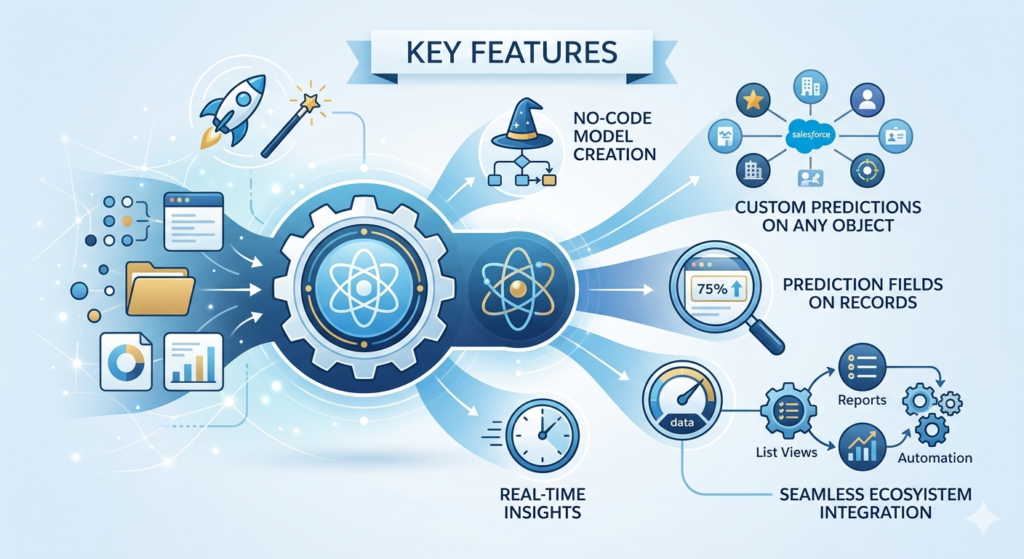
No-Code Model Creation
The entire model-building process operates through a guided wizard interface. No scripting, no data preparation scripts, no algorithm configuration. If you can navigate Salesforce Setup, you can build an Einstein prediction model.
Custom Predictions on Any Object
Einstein Prediction Builder isn’t limited to standard objects. You can build predictions on leads, opportunities, cases, contacts, accounts, and any custom object in your org. This flexibility means virtually any business process with historical data can benefit from AI prediction.
Prediction Fields on Records
Trained models add custom fields to your Salesforce records displaying the prediction score and outcome. These fields behave like standard Salesforce fields—they appear on page layouts, work in list views, function in reports, and can trigger flows and process automations.
Real-Time Insights
Prediction scores update automatically as record data changes. When a lead’s engagement level increases or an opportunity’s activity pattern shifts, Einstein recalculates the prediction score accordingly. Your team always works with current intelligence, not stale snapshots.
Seamless Integration with Salesforce Ecosystem
Because predictions appear as standard Salesforce fields, they integrate naturally with:
- List views and filters for prioritization
- Reports and dashboards for performance analysis
- Flows and automation for triggered actions
- Page layouts for contextual visibility
Step-by-Step Einstein Builder Tutorial
This tutorial walks you through building your first prediction model from start to deployment. We’ll use lead conversion prediction as our example throughout.
Prerequisites:
- Einstein Prediction Builder license (included in Sales Cloud Einstein or available as an add-on)
- At least 400 historical records with known outcomes for your chosen object
- Salesforce System Administrator permissions
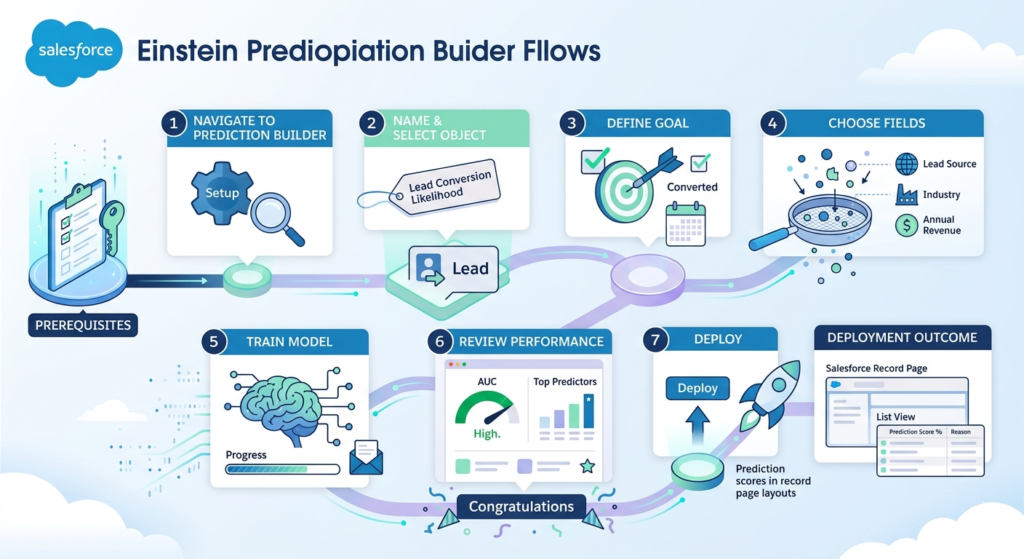
Step 1: Navigate to Prediction Builder
- Click the Setup gear icon in the top-right corner of Salesforce
- In the Quick Find search box, type “Prediction Builder”
- Select Einstein Prediction Builder from the results
- Click New Prediction to begin the creation wizard
If you don’t see Prediction Builder in Setup, verify your Einstein license is active under Company Information in Setup.
Step 2: Name Your Prediction and Select the Object
- Enter a clear, descriptive Prediction Name (e.g., “Lead Conversion Likelihood”)
- Write a brief Description explaining what this prediction does—useful for your future self and team members
- Select the Salesforce Object this prediction applies to. For our example, select Lead
- Click Next to continue
Pro Tip: Choose a name your sales team will understand. Prediction fields appear on records with the name you assign here. “High Conversion Probability” communicates more clearly than “Prediction Score Alpha.”
Step 3: Define Your Prediction Goal
This is the most important step—you’re telling Einstein what outcome you want to predict.
- Select the Outcome Field—this is the field that records the result you want to predict. For lead conversion, select Converted (a standard checkbox field on the Lead object)
- Define Positive Outcome—what value in that field represents success? For converted leads, this is True (or “Yes”)
- Select the Historical Timeframe—how far back should Einstein look for training data? Generally, 12–24 months provides a good balance of volume and relevance
- Click Next
Why This Step Matters: You’re essentially saying, “Einstein, I want to predict which current leads will eventually show Converted = True.” Everything else flows from this definition.
Step 4: Choose Relevant Fields (Feature Selection)
Einstein automatically analyzes all available fields on your selected object, but you can guide the process by including or excluding specific fields.
- Review the Suggested Fields Einstein identifies as potentially predictive
- Include fields that logically connect to your prediction goal:
- Lead Source
- Industry
- Annual Revenue
- Number of Employees
- Lead Score (if existing)
- Activity metrics (emails, calls)
- Exclude fields that shouldn’t influence predictions:
- Fields populated after conversion occurs (these create data leakage)
- Highly unique identifiers like email addresses or phone numbers
- Fields with very sparse data
- Click Next when your field selection is complete
Critical Warning: Avoid including fields that only get populated when the outcome has already occurred. For example, if “Opportunity Created Date” only appears on converted leads, including it makes your model appear accurate in training but useless in practice.
Step 5: Train the Model
- Review your configuration summary on the training screen
- Click Train Model to initiate the training process
- Wait for training to complete—this typically takes 30 minutes to 2 hours depending on your data volume
During training, Einstein:
- Analyzes historical records matching your criteria
- Evaluates each field’s predictive power
- Builds and validates the predictive model
- Generates performance metrics
You’ll receive an email notification when training completes. You don’t need to keep the browser window open.
Step 6: Review Model Performance
Once training completes, Einstein presents a Model Insights dashboard. Here’s how to interpret the key metrics:
| Metric | What It Means | What’s Good |
|---|---|---|
| AUC Score | Overall model accuracy (0–1 scale) | Above 0.7 is acceptable; above 0.8 is strong |
| Precision | When it predicts positive, how often is it right? | Higher is better; context-dependent |
| Recall | Of all actual positives, how many did it catch? | Higher is better; context-dependent |
| Top Predictors | Fields most influential in the model | Validates your field selection logic |
Review the Top Predictors section carefully. If Einstein identifies fields as highly predictive that make intuitive business sense (Lead Source = Web is highly predictive of conversion), that validates your model. If illogical fields appear, investigate potential data quality issues.
If AUC is below 0.7: Consider improving data quality, expanding your historical timeframe, or reviewing field selections before proceeding.
Step 7: Deploy the Prediction
When you’re satisfied with model performance:
- Click Deploy on the model insights screen
- Confirm deployment in the dialog box
- Einstein automatically creates two new fields on your selected object:
- Prediction Score: A percentage (0–100) indicating likelihood of the positive outcome
- Prediction Score Reason: Top factors influencing the specific score
- Add these fields to relevant page layouts so your team can see predictions on records
- Create list views filtered and sorted by prediction score for easy prioritization
- Build reports and dashboards using prediction score fields for management visibility
Congratulations—you’ve just deployed an AI model without writing a single line of code.
Real Use Cases: Where Einstein Prediction Builder Delivers Value
1. Lead Scoring and Prioritization
The Problem: Sales teams waste time on leads unlikely to convert while high-potential leads go cold.
The Prediction: Which leads are most likely to convert to opportunities?
The Impact: Sales reps focus energy on statistically likely converters. Marketing identifies what characteristics correlate with conversions and adjusts targeting accordingly. Organizations typically see 20–35% improvements in sales productivity after implementing intelligent lead scoring.
2. Opportunity Win Prediction
The Problem: Sales forecasting relies on rep-reported probabilities that are often optimistic and inconsistent.
The Prediction: Which open opportunities are most likely to close as won?
The Impact: Sales managers get an objective second opinion on pipeline. Forecast accuracy improves significantly. Resources flow toward deals with genuine win probability rather than deals reps are emotionally attached to.
3. Customer Churn Prediction
The Problem: Customer success teams discover churned customers after they’ve already decided to leave.
The Prediction: Which accounts are most likely to not renew or cancel?
The Impact: At-risk accounts receive proactive intervention before churn occurs. Customer success teams prioritize outreach based on risk scores rather than arbitrary schedules. Retention rates improve as interventions happen earlier in the churn cycle.
4. Case Resolution Prediction
The Problem: Support teams struggle to prioritize cases effectively, leading to SLA breaches on complex issues.
The Prediction: Which cases are likely to require escalation or extended resolution time?
The Impact: Support managers proactively route complex cases to senior agents. SLA compliance improves. Customer satisfaction increases as high-complexity issues receive appropriate resources immediately.
Best Practices: What Actually Makes the Difference
Prioritize Data Quality Over Data Volume
Five hundred clean, accurate records outperform 5,000 records with inconsistent values and missing fields. Before building your prediction, audit your data for:
- Consistent field values (no “NY” vs. “New York” inconsistencies)
- Appropriate field population rates (fields that are 80%+ empty add noise, not signal)
- Accurate outcome recording (did you actually capture the outcomes reliably?)
Keep Field Selection Focused
The temptation is to include every available field and let Einstein sort it out. Resist this instinct. Including irrelevant fields introduces noise that can actually reduce model performance. Start with 10–15 fields that logically connect to your outcome, review performance, and adjust thoughtfully.
Validate Before Full Rollout
After deployment, don’t immediately change your entire sales process based on prediction scores. Spend 4–6 weeks monitoring whether highly-scored records actually convert at higher rates. Compare prediction performance against your baseline. Build confidence in the model before making it central to your operations.
Retrain Models Periodically
Your business changes. New products launch, market conditions shift, and customer profiles evolve. Einstein prediction models built on historical data can become less accurate over time as circumstances change. Establish a quarterly or bi-annual model review and retraining schedule.
Communicate Transparently with Users
Your sales team will be skeptical if prediction scores suddenly appear on records without explanation. Invest time in explaining how the model was built, what it predicts, and how it should influence (not replace) their judgment. Adoption depends on understanding.
Limitations You Should Know
Honest evaluation of any tool’s limitations builds better long-term outcomes than overselling capabilities.
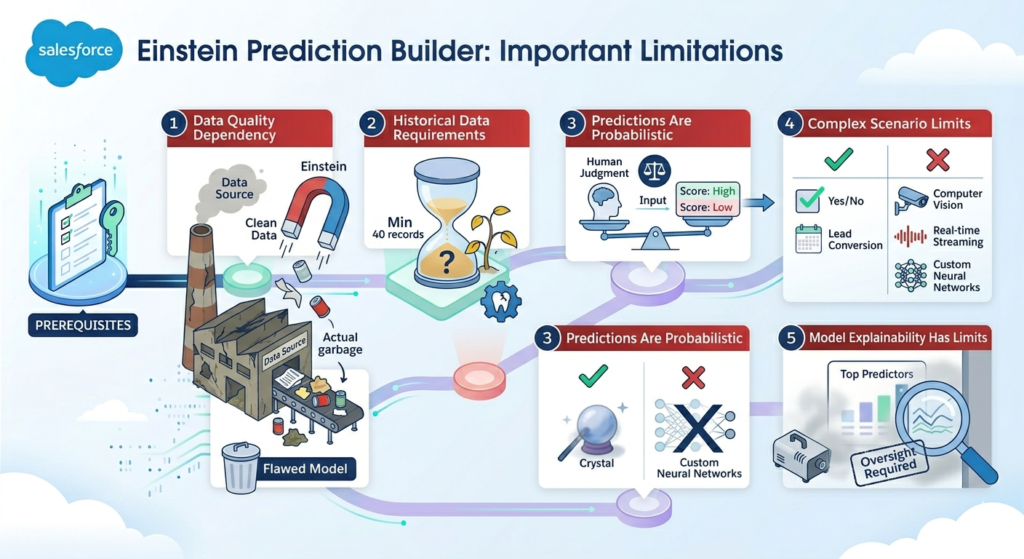
Data Quality Dependency
Einstein Prediction Builder cannot compensate for poor data. If your historical records are incomplete, inconsistently populated, or contain inaccurate outcomes, your model will reflect those flaws. “Garbage in, garbage out” applies here as firmly as in any traditional data science project.
Historical Data Requirements
The minimum threshold of approximately 400 records with known outcomes sounds achievable, but in practice, more data consistently produces more reliable models. Niche processes with limited historical records may not generate sufficient model quality for production deployment.
Predictions Are Probabilistic, Not Prescriptive
A high prediction score doesn’t guarantee the outcome will occur. It indicates statistical likelihood based on historical patterns. Teams should use prediction scores as one input among several, not as definitive answers replacing human judgment.
Limited Handling of Complex Scenarios
Salesforce AI no code tools excel at binary prediction problems (will this lead convert: yes or no?) on structured CRM data. They’re not designed for computer vision applications, real-time streaming data analysis, or scenarios requiring custom neural network architectures. For those use cases, dedicated machine learning platforms remain necessary.
Model Explainability Has Limits
While Einstein provides top predictor insights, it doesn’t offer the granular model explainability that regulated industries sometimes require. Organizations in heavily regulated environments should consult compliance requirements before making critical decisions based on Einstein predictions.
Why This Matters for Your Career
The AI Skill Gap Is Real—and Closing It Is Valuable
Organizations everywhere are trying to leverage AI capabilities, and the bottleneck isn’t usually access to tools—it’s people who understand both the technology and the business context. Salesforce professionals who can confidently build, deploy, and govern AI predictions occupy a genuinely valuable position.
Understanding Salesforce Einstein Prediction Builder and Salesforce AI no code tools signals to employers and clients that you’re not waiting for AI to happen to your industry—you’re actively implementing it.
Salesforce + AI Skills Command Market Premium
The intersection of Salesforce expertise and AI implementation experience is precisely where hiring managers and clients are looking right now. Certifications like the Salesforce Einstein Analytics and Discovery Consultant credential, combined with hands-on prediction builder experience, differentiate your profile in an increasingly competitive market.
It Opens Doors to Larger AI Conversations
Building no-code AI predictions gives you practical vocabulary and experience that extends into larger technology conversations. You’ll understand data requirements, model validation, prediction deployment, and AI governance from direct experience—not theoretical reading. That practical knowledge makes you a more credible voice in AI strategy discussions.
Conclusion: AI Is Accessible—Starting Today
The perception that artificial intelligence belongs exclusively to data scientists and technical specialists is outdated and, importantly, it’s holding people back from tools that could genuinely transform their work.
Salesforce Einstein Prediction Builder removes the technical barriers that historically made AI inaccessible. The data science complexity is handled automatically by the platform. What remains is the work that business-savvy Salesforce professionals are uniquely positioned to do—identifying valuable business problems, ensuring quality data foundations, validating predictions against real-world outcomes, and driving adoption across teams.
You don’t need a statistics degree to predict which leads will convert. You don’t need to write a single line of code to identify at-risk customer accounts before they churn. You don’t need a data science team to build AI capabilities that improve sales forecasting accuracy.
You need good data, a clear business question, and the willingness to work through the seven steps outlined in this Einstein builder tutorial.
About RizeX Labs
At RizeX Labs, we specialize in delivering cutting-edge Salesforce solutions, including AI-driven capabilities powered by Salesforce Einstein. Our expertise combines deep technical knowledge, industry best practices, and real-world implementation experience to help businesses unlock the full potential of Salesforce AI.
We empower organizations to move from manual decision-making to intelligent, data-driven processes using tools like Einstein Prediction Builder—without requiring complex data science expertise.
Internal Link:
- Link to your Salesforce course page
- Salesforce Managed Packages vs Unmanaged Packages: What Every Developer Must Know
- ServiceNow vs Salesforce: Which Cloud Platform Has Better Job Scope in India?
- Salesforce Shield: Encryption, Event Monitoring and Field Audit Trail Explained
- DevOps Roadmap for Salesforce: Tools, Skills, and Certifications You Need in 2026
- How to Build a Salesforce Portfolio That Gets You Hired (With Project Ideas)
- Salesforce Admin vs Developer: Which Career Path is Right for You in 2026?
External Link:
- Salesforce official website
- Einstein Prediction Builder documentation
- Salesforce Trailhead (AI modules)
- Salesforce AppExchange
- Salesforce Admin Blog
- Salesforce Developer Blog
Quick Summary
Salesforce Einstein Prediction Builder is a powerful no-code AI tool that enables users to create predictions directly within Salesforce without writing code or having a data science background. By leveraging historical data, it automatically builds machine learning models that help businesses make smarter decisions—such as predicting lead conversion, opportunity success, or customer churn.
With the rise of salesforce AI no code solutions, tools like Prediction Builder are making AI accessible to admins and business users. Instead of relying on complex algorithms, users can follow a simple setup process to generate accurate predictions and actionable insights.
However, success with Prediction Builder depends on one thing: data quality. It’s not magic. If your data is messy, your predictions will be useless. But if your data is structured and relevant, this tool can significantly improve decision-making, efficiency, and business outcomes.
