
Introduction: The Strategic Imperative for Modern Patient Portals
The healthcare industry has undergone a profound digital transformation, with patient portals emerging as critical infrastructure rather than optional features. Today’s patients expect the same seamless digital experiences they receive from banking, retail, and travel industries. According to recent healthcare analytics, patient portal adoption has surged beyond 75% in major health systems, driven by regulatory requirements, value-based care models, and consumer demand for healthcare transparency.
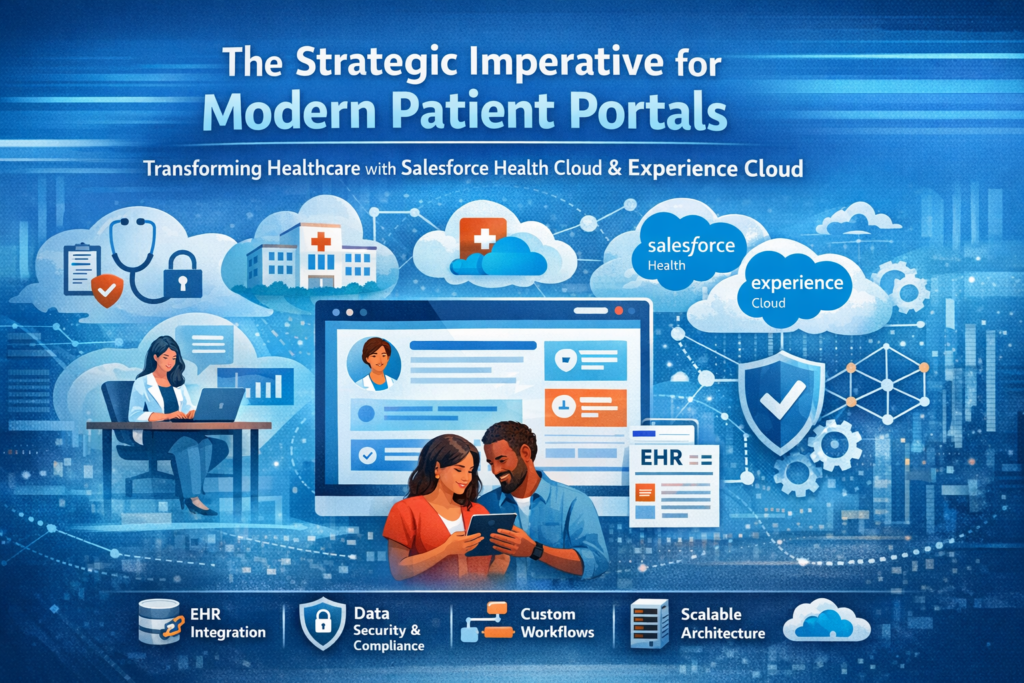
For Healthcare IT professionals, Salesforce developers, and enterprise architects, building patient portals represents a complex intersection of user experience design, healthcare data interoperability, stringent compliance requirements, and scalable cloud architecture. This article explores how combining Salesforce Health Cloud with Experience Cloud creates a powerful foundation for next-generation patient engagement platforms that go beyond basic appointment scheduling and lab result viewing.
Unlike generic portal solutions, the Health Cloud + Experience Cloud combination offers healthcare organizations a 360-degree view of patient interactions while maintaining the flexibility to customize workflows, integrate with existing Electronic Health Record (EHR) systems, and scale across multiple care settings. We’ll examine the architectural patterns, integration strategies, compliance considerations, and implementation best practices that separate successful patient portal deployments from those that struggle to achieve meaningful adoption.
Understanding Patient Portals in the Modern Healthcare Ecosystem
Beyond Basic Functionality: What Patients Actually Need
Traditional patient portals have historically suffered from poor adoption rates, with studies showing that only 15-30% of patients actively use basic portal features beyond initial registration. The disconnect stems from portals designed around organizational convenience rather than patient needs.
Modern patient portals must serve as comprehensive health management platforms that enable:
- Longitudinal health record access with context, not just raw clinical data dumps
- Bidirectional communication that supports care coordination across multiple providers
- Personalized care plans with actionable recommendations and tracking capabilities
- Integrated scheduling that accounts for care dependencies and preparation requirements
- Financial transparency including cost estimation, insurance verification, and payment options
- Care team visibility showing the entire network of providers involved in a patient’s care
- Medication management with refill capabilities, interaction checking, and adherence monitoring
The Salesforce Health Cloud + Experience Cloud architecture supports these sophisticated use cases while maintaining the extensibility to evolve as patient expectations continue to advance.
The Business Case: ROI Beyond Patient Satisfaction
While patient satisfaction metrics matter, healthcare executives need concrete business outcomes. Well-implemented patient portals deliver measurable value:
Operational Efficiency: Automated appointment scheduling reduces call center volume by 30-40%. Self-service prescription refills decrease pharmacy staff workload. Pre-visit digital intake forms improve clinical workflow efficiency.
Revenue Cycle Improvement: Digital payment options increase collection rates by 20-35%. Cost transparency tools reduce bad debt. Insurance verification automation decreases claim denials.
Clinical Outcomes: Medication adherence tracking and automated reminders improve compliance rates. Remote monitoring integration enables early intervention. Care plan engagement correlates with better health outcomes and reduced hospital readmissions.
Competitive Differentiation: In markets with patient choice, digital experience quality influences provider selection, particularly among younger patient demographics and commercial insurance populations.
Salesforce Health Cloud: The Clinical Data Foundation
Architecture Overview and Core Data Model
Salesforce Health Cloud extends the standard Salesforce platform with healthcare-specific data models based on HL7 FHIR (Fast Healthcare Interoperability Resources) standards. This architectural decision has profound implications for integration strategy and long-term scalability.
The Health Cloud data model includes:
Patient Object Hierarchy: The Person Account model represents patients with comprehensive demographic data, extending beyond simple contact records to include household relationships, communication preferences, and consent management.
Care Plan Framework: Structured care plans that map clinical protocols to trackable problems, goals, and tasks. Unlike generic project management tools, these care plans understand clinical dependencies, evidence-based interventions, and outcome measurement.
Clinical Timeline: A longitudinal view aggregating encounters, procedures, medications, lab results, and other clinical events from multiple source systems. This timeline provides context often missing from source EHR systems.
Care Team Management: Explicit modeling of care relationships including primary care providers, specialists, care coordinators, and family caregivers with defined roles and communication pathways.
Health Cloud Intelligence Layer
Health Cloud’s intelligence capabilities transform raw clinical data into actionable insights:
Risk Stratification: Machine learning models identify patients requiring proactive intervention based on clinical indicators, utilization patterns, and social determinants of health.
Care Gaps Identification: Automated detection of missed preventive screenings, overdue follow-ups, and incomplete care plan tasks.
Population Health Segmentation: Dynamic cohort creation for targeted outreach campaigns, quality reporting, and value-based care contract management.
For patient portal implementations, these intelligence capabilities enable personalized content delivery, proactive notifications, and care recommendations that increase engagement and clinical value.
Integration with Clinical Systems: Technical Deep Dive
Health Cloud’s value proposition depends entirely on bi-directional integration with existing clinical systems. Most healthcare organizations operate a heterogeneous IT environment with multiple EHR systems, practice management platforms, lab systems, imaging repositories, and specialty applications.
FHIR API Strategy: Modern EHR systems (Epic, Cerner/Oracle Health, Meditech, Allscripts) expose FHIR-compliant APIs for data exchange. Health Cloud’s FHIR data model alignment simplifies mapping and transformation logic. Key FHIR resources for patient portals include:
- Patient (demographics and identifiers)
- Encounter (visit history)
- Condition (problem list)
- Medication (prescription history)
- Observation (lab results and vital signs)
- DocumentReference (clinical documents and images)
- Appointment (scheduling data)
- Coverage (insurance information)
Integration Middleware Options: Direct point-to-point integrations work for simple scenarios but don’t scale across enterprise health systems. Successful implementations typically employ:
- MuleSoft Anypoint Platform: Salesforce’s integration platform provides healthcare-specific connectors, FHIR transformation accelerators, and API management capabilities. MuleSoft’s Healthcare Accelerator includes pre-built integration templates for major EHR systems.
- Healthcare Integration Engines: Rhapsody, Corepoint, and Mirth Connect offer HL7 v2.x message handling for legacy system integration, with FHIR transformation capabilities.
- Cloud Integration Services: AWS HealthLake, Google Cloud Healthcare API, and Azure API for FHIR provide managed FHIR data stores that can serve as intermediary layers between Health Cloud and source systems.
Data Synchronization Patterns: Consider these architectural patterns based on data type and latency requirements:
- Real-time Synchronization: Appointment data, medication orders, and critical alerts require near real-time updates using event-driven integration (Platform Events, Streaming API).
- Batch Synchronization: Lab results, imaging reports, and billing data often follow batch processing patterns with scheduled ETL jobs.
- On-Demand Retrieval: Historical clinical documents and archived records may be retrieved on demand to minimize storage costs while maintaining access.
Data Volume Considerations and Scalability
Healthcare data volumes present unique challenges. A single patient may accumulate thousands of clinical observations over a lifetime. Enterprise health systems manage millions of patient records with billions of associated clinical data points.
Storage Strategy: Not all clinical data belongs in Salesforce. Implement a tiered storage approach:
- Hot Storage (Salesforce): Active care plans, recent encounters (12-24 months), current medications, active problems, and frequently accessed data.
- Warm Storage (External Objects/Big Objects): Historical data accessible through Salesforce queries but stored externally in data lakes (Amazon S3, Azure Data Lake, Google Cloud Storage).
- Cold Storage (Deep Archive): Long-term retention for compliance with document links but no direct querying capability.
Performance Optimization: Large data volumes require careful attention to:
- Skinny Tables: For frequently queried large objects, Salesforce creates skinny tables with commonly accessed fields for improved performance.
- Selective Querying: Implement date-range filters and pagination for clinical timeline displays.
- Asynchronous Processing: Use batch Apex and queueable jobs for bulk data processing outside user interaction paths.
Experience Cloud: Building Engaging Patient Interfaces
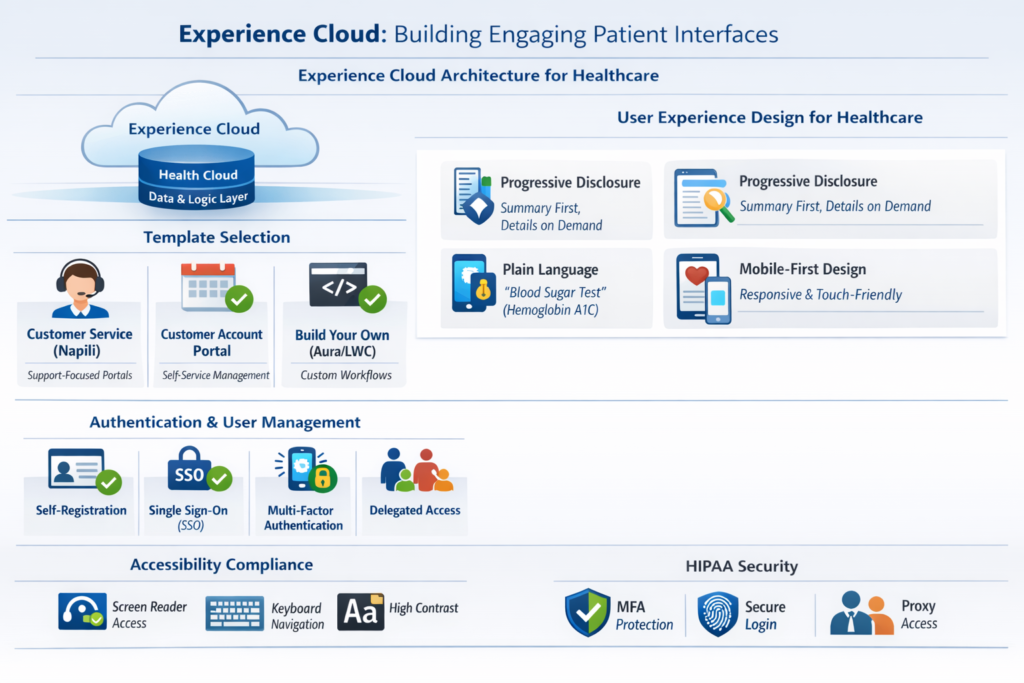
Experience Cloud Architecture for Healthcare
Experience Cloud (formerly Community Cloud) provides the digital experience layer for patient portals, sitting above Health Cloud’s data and business logic layer. Understanding the architecture is crucial for making informed design decisions.
Template Selection: Experience Cloud offers multiple templates optimized for different use cases:
- Customer Service (Napili): Best for support-focused portals with case management and knowledge base integration. Works well for patient services and non-clinical questions.
- Customer Account Portal: Designed for self-service account management, suitable for appointment scheduling, billing inquiries, and demographic updates.
- Build Your Own (Aura/LWC): Maximum flexibility using Lightning Web Components for custom healthcare workflows. Required for complex clinical applications.
Authentication and User Management: Patient portals require robust identity management:
- Self-Registration: Implement secure patient enrollment with identity verification (email verification, SMS OTP, or integration with patient matching systems like Experian or LexisNexis).
- Single Sign-On (SSO): SAML or OpenID Connect integration with hospital enterprise identity providers or third-party identity management solutions.
- Multi-Factor Authentication (MFA): Essential for HIPAA compliance, particularly for accessing sensitive clinical information.
- Delegated Access: Enable proxy access for caregivers, parents managing children’s records, or legal guardians with proper authorization workflows.
User Experience Design Principles for Healthcare
Healthcare portals face unique UX challenges. Users range from tech-savvy millennials to elderly patients with limited digital literacy. Medical information complexity requires careful information architecture.
Progressive Disclosure: Present information in digestible layers. Show summary views with drill-down capability rather than overwhelming users with clinical data.
Plain Language Translation: Clinical terminology means nothing to most patients. Implement layered explanations:
- Display patient-friendly term (e.g., “Blood Sugar Test”)
- Include clinical term for reference (e.g., “Hemoglobin A1C”)
- Provide contextual explanations of results with normal ranges
- Link to educational resources for complex concepts
Mobile-First Design: Over 60% of patient portal access occurs on mobile devices. Responsive design isn’t optional:
- Implement mobile-optimized authentication flows
- Design touch-friendly interfaces with appropriate tap target sizes
- Optimize clinical data displays for small screens
- Enable biometric authentication (fingerprint, Face ID) for returning users
Accessibility Compliance: WCAG 2.1 AA compliance is both a legal requirement and UX imperative:
- Implement screen reader compatibility for visual impairments
- Provide keyboard navigation alternatives to mouse interactions
- Ensure sufficient color contrast for readability
- Include alt text for all images and icons
Key Feature Implementation: Technical Patterns
Let’s examine technical implementation patterns for essential patient portal features:
Appointment Scheduling
Effective appointment scheduling requires integration with multiple systems:
Data Sources:
- Provider availability (from EHR scheduling system)
- Patient eligibility (insurance verification)
- Appointment type rules (visit duration, preparation requirements)
- Location and resource availability (rooms, equipment)
Technical Implementation:
text// Pseudo-code for appointment availability check
public class AppointmentAvailabilityService {
    public List<AvailabilitySlot> getAvailableSlots(
        String providerId,
        String appointmentType,
        Date startDate,
        Date endDate
    ) {
        // Query Health Cloud provider availability
        // Filter by appointment type constraints
        // Check patient eligibility via insurance API
        // Apply business rules (minimum notice, max booking window)
        // Return filtered availability
    }

    public Boolean bookAppointment(
        AvailabilitySlot slot,
        String patientId,
        String reason
    ) {
        // Create FHIR Appointment resource
        // Call EHR API to reserve slot
        // Create Health Cloud appointment record
        // Send confirmation notifications
        // Add to patient calendar
    }
}
User Flow Considerations:
- Implement appointment type selection based on symptoms or visit reason
- Show preparation requirements (fasting, forms to complete)
- Enable appointment modification with business rule validation
- Send multi-channel reminders (email, SMS, push notification)
- Provide telehealth joining instructions for virtual visits
Secure Messaging
Secure messaging requires careful design to prevent HIPAA violations while enabling efficient communication:
Architecture Pattern:
- Use Salesforce Cases or custom messaging objects for thread management
- Implement message routing rules to appropriate care team members
- Set response time SLAs with escalation logic
- Enable file attachments with virus scanning and file type restrictions
- Archive messages in compliance with retention policies
Clinical Triage Integration:
text// Message triage automation
public class MessageTriageHandler {
    public void routeMessage(PatientMessage msg) {
        // Analyze message content for urgency indicators
        TriageLevel triage = analyzeUrgency(msg.content);

        if (triage == TriageLevel.EMERGENCY) {
            // Create high-priority case
            // Route to on-call provider
            // Send urgent notification
            // Optionally trigger automated patient callback
        } else {
            // Route to care team inbox with priority
            // Apply response time SLA
        }
    }
}
Compliance Safeguards:
- Disable message forwarding to external email addresses
- Implement automatic message expiration for non-archived threads
- Log all message access for audit purposes
- Display warnings about appropriate message content (no emergencies)
Lab Results Display
Lab results present unique challenges combining data visualization, clinical context, and patient education:
Data Transformation:
- Normalize lab codes (LOINC mapping) from multiple lab systems
- Apply age and gender-specific reference ranges
- Flag abnormal results with appropriate severity indicators
- Group related tests into panels for easier comprehension
Visualization Strategies:
- Trend charts for repeated tests (glucose, cholesterol, blood pressure)
- Color-coded indicators (green/yellow/red for normal/borderline/abnormal)
- Comparison to previous results and population norms
- Provider interpretation notes with results
Educational Integration:
- Link lab codes to plain-language explanations
- Provide contextual information about clinical significance
- Connect abnormal results to relevant care plans or recommendations
- Include next steps and follow-up requirements
Medication Management
Comprehensive medication management extends beyond simple list display:
Medication Reconciliation:
- Import active medications from EHR and pharmacy systems
- Enable patient confirmation of current medications
- Identify discrepancies for provider review
- Support medication discontinuation workflows
Refill Management:
text// Refill request workflow
public class MedicationRefillService {
    public RefillRequest submitRefillRequest(
        String medicationId,
        String pharmacyId
    ) {
        // Validate refill eligibility
        // Check prescription remaining refills
        // Verify last fill date against refill-too-soon rules
        // Create task for pharmacy team review
        // Send ePrescribe transaction if auto-approved
        // Notify patient of status
    }
}
Adherence Support:
- Medication reminders via SMS or push notifications
- Track medication taking (patient-reported)
- Identify adherence patterns for clinical intervention
- Connect to smart pill bottles or medication dispensing devices
Integration Architecture: Connecting the Healthcare Ecosystem
EHR Integration Patterns: Deep Dive
While we’ve touched on FHIR APIs, successful patient portal implementations require sophisticated integration strategies that account for real-world constraints.
Bi-Directional Synchronization Strategy
Read Operations (EHR → Health Cloud):
Most patient portal data originates in the EHR and flows to Health Cloud for display. Implement these patterns:
Initial Patient Onboarding:
When a patient registers for the portal, trigger a comprehensive data load:
- Demographics and identifiers (MRN, SSN, insurance IDs)
- Active problems and diagnoses
- Current medications and allergies
- Recent encounters (12-24 months)
- Active care plans and treatment protocols
- Scheduled appointments
- Active insurance coverage
Incremental Updates:
After initial load, implement event-driven updates:
- Subscribe to EHR ADT (Admission, Discharge, Transfer) feeds for demographic changes
- Receive real-time appointment updates (scheduled, confirmed, cancelled)
- Get notified of new lab results, imaging reports, and clinical documents
- Update medication changes (new prescriptions, discontinuations)
Technical Implementation with MuleSoft:
text// MuleSoft flow for incremental lab result updates
<flow name="lab-results-sync">
    // EHR publishes HL7 ORU message to queue
    <jms:inbound-endpoint queue="ehr.lab.results"/>

    // Transform HL7 to FHIR Observation
    <hl7:hl7-to-fhir transformer="oru-to-observation"/>

    // Enrich with patient matching
    <enricher target="#[payload.patient]">
        <salesforce:query
            query="SELECT Id FROM Patient__c WHERE MRN__c = #[payload.mrn]"/>
    </enricher>

    // Upsert to Health Cloud
    <salesforce:upsert
        type="Observation__c"
        externalIdFieldName="SourceId__c"/>

    // Trigger patient notification
    <vm:outbound-endpoint path="patient.notifications"/>
</flow>
Write Operations (Health Cloud → EHR):
Patient-initiated actions often require updates back to the EHR:
Appointment Scheduling:
- Create FHIR Appointment resource
- POST to EHR FHIR API or convert to HL7 SIU message
- Handle booking conflicts and error responses
- Implement compensating transactions for failed bookings
Demographic Updates:
- Validate updated information (address, phone, email)
- Create HL7 ADT^A08 update message or FHIR Patient resource update
- Handle data stewardship rules (some systems don’t accept external demographic updates)
Form Submissions:
- Patient intake forms and questionnaires completed in portal
- Map to FHIR QuestionnaireResponse resources
- Store as clinical documents in EHR
- Route to provider inbox for review
Handling Multiple EHR Instances
Large health systems often operate multiple EHR instances across hospitals, physician practices, and specialty facilities. Your integration architecture must accommodate this complexity:
Enterprise Master Patient Index (EMPI):
- Implement patient matching across disparate systems
- Maintain golden record with all identifiers
- Resolve duplicate patient records
- Support probabilistic matching for new registrations
Aggregated Data Views:
- Merge medication lists from multiple sources
- De-duplicate appointments across facilities
- Consolidate problem lists with conflict resolution
- Combine lab results with standardized reference ranges
Context-Aware Routing:
text// Route appointment requests to appropriate EHR instance
public class AppointmentRouter {
    public String determineTargetSystem(
        String providerId,
        String facilityId
    ) {
        // Query provider-to-system mapping
        ProviderMapping mapping = [
            SELECT EHR_Instance__c
            FROM Provider_System_Mapping__c
            WHERE Provider__c = :providerId
            AND Facility__c = :facilityId
        ];

        return mapping.EHR_Instance__c;
    }
}
Beyond EHR: Ecosystem Integration Requirements
Comprehensive patient portals integrate with systems beyond the EHR:
Revenue Cycle Management (RCM):
- Display outstanding balances and payment history
- Integrate payment processing (Stripe, Authorize.net, InstaMed)
- Show itemized bills with cost transparency
- Support payment plans and financial assistance applications
Laboratory Information Systems (LIS):
- Retrieve resulted tests not yet in EHR
- Access detailed test methodologies and reference labs
- Support test ordering for direct-to-consumer lab services
- Provide specimen collection appointment scheduling
Radiology PACS/VNA:
- Display imaging reports
- Enable patient access to actual images via embedded DICOM viewers
- Support CD burning or image sharing capabilities
- Show radiologist interpretations with patient-friendly summaries
Health Information Exchanges (HIEs):
- Query for care received at external organizations
- Display aggregated medication history from SureScripts
- Access Commonwell or Carequality networks for care continuity
- Support patient-directed information exchange
Pharmacy Management:
- Real-time pharmacy benefit checking
- Cost comparison across pharmacy networks
- Mail-order pharmacy integration
- Specialty pharmacy coordination for high-cost medications
Remote Patient Monitoring Devices:
- Import data from wearables (Apple Health, Fitbit, Garmin)
- Integrate medical device data (glucose meters, blood pressure cuffs, scales)
- Support connected inhaler and medication dispensing devices
- Display trends and alert on out-of-range values
Social Determinants of Health (SDOH) Resources:
- Connect patients to community resources (food assistance, transportation, housing)
- Integrate with 211 databases and findhelp.org
- Support SDOH screening and referral workflows
- Track resource utilization and outcomes
Security and HIPAA Compliance: Non-Negotiable Requirements
HIPAA Technical Safeguards Implementation
HIPAA compliance isn’t a checkbox exercise—it requires architectural decisions, operational procedures, and continuous monitoring. Salesforce provides a HIPAA-compliant infrastructure, but implementation teams bear responsibility for configuration and usage patterns.
Access Controls and Audit Logging
Minimum Necessary Access:
Implement fine-grained data access controls ensuring patients only view their own records:
text// Sharing model configuration
public class PatientDataSecurity {
    // Set organization-wide defaults to Private
    // Use sharing rules to grant access

    public static void configurePatientSharing() {
        // Ensure patient portal users only see their records
        // Use Account.PersonContactId == User.ContactId criteria

        // Implement custom sharing for delegated access
        // Create sharing records for proxy relationships

        // Apply field-level security for sensitive data
        // Restrict access to mental health, substance abuse,
        // HIV status, and genetic information
    }
}
Comprehensive Audit Trails:
Beyond Salesforce’s standard audit logging, implement healthcare-specific tracking:
- Data Access Logging: Record every view of patient clinical data with timestamp, user, and purpose
- Disclosure Tracking: Maintain accounting of disclosures as required by HIPAA
- Administrative Actions: Log all security configuration changes
- Integration Audit: Track all data exchanges with external systems
text// Custom audit logging framework
public class ClinicalDataAuditLogger {
    public static void logDataAccess(
        String patientId,
        String dataType,
        String userId,
        String accessReason
    ) {
        Clinical_Data_Access_Log__c log = new Clinical_Data_Access_Log__c(
            Patient__c = patientId,
            Data_Type__c = dataType,
            Accessing_User__c = userId,
            Access_Timestamp__c = System.now(),
            Access_Reason__c = accessReason,
            IP_Address__c = getClientIP(),
            Session_Id__c = UserInfo.getSessionId()
        );
        insert log;
    }
}
Data Encryption and Transmission Security
Encryption at Rest:
- Enable Salesforce Shield Platform Encryption for PHI fields
- Implement field-level encryption keys with regular rotation
- Use separate encryption keys for different data sensitivity levels
- Maintain key backup and recovery procedures
Encryption in Transit:
- Enforce TLS 1.2 or higher for all connections
- Implement certificate pinning for mobile applications
- Use VPN tunnels for integrations with on-premise systems
- Apply mutual TLS authentication for high-security interfaces
Data Masking for Non-Production Environments:
Never use real PHI in sandbox environments:
text// Automated data masking for sandbox refresh
public class SandboxDataMasker implements SandboxPostCopy {
    public void runApexClass(SandboxContext context) {
        // Mask patient names
        for (Account patient : [SELECT Id, FirstName, LastName
                                FROM Account WHERE IsPersonAccount = true]) {
            patient.FirstName = 'Patient' + String.valueOf(Math.random());
            patient.LastName = 'Test' + String.valueOf(Math.random());
            patient.PersonEmail = generateFakeEmail();
            patient.Phone = generateFakePhone();
        }
        update patients;

        // Remove clinical data entirely
        delete [SELECT Id FROM Observation__c];
        delete [SELECT Id FROM CarePlan__c];
        delete [SELECT Id FROM Medication__c];
    }
}
Business Associate Agreements and Vendor Management
Your patient portal ecosystem involves multiple vendors, each requiring Business Associate Agreements (BAAs):
Primary BAAs Required:
- Salesforce (platform provider)
- MuleSoft or other integration middleware
- SMS/email notification services (Twilio, SendGrid)
- Payment processors handling patient billing
- Identity verification services
- Cloud storage providers (AWS, Azure, GCP)
- Analytics and monitoring tools
BAA Compliance Verification:
- Maintain current BAA inventory with expiration tracking
- Conduct annual vendor security assessments
- Require vendors to report security incidents within contractual timeframes
- Verify vendor employee HIPAA training programs
- Audit vendor access to PHI regularly
Breach Notification Procedures
Despite best efforts, security incidents occur. Implement breach response procedures:
Detection and Assessment:
- Monitor access logs for anomalous patterns (unusual volume, off-hours access, geographic anomalies)
- Implement automated alerts for suspicious activities
- Establish threshold criteria for breach determination
- Document assessment process and decisions
Response and Notification:
- Contain the incident and prevent further exposure
- Determine affected individuals
- Notify patients within 60 days if more than 500 affected
- Report to HHS and potentially media
- Document all actions taken
text// Anomaly detection for potential security incidents
public class SecurityAnomalyDetector {
    @InvocableMethod
    public static void detectAnomalies() {
        // Query recent access logs
        List<Clinical_Data_Access_Log__c> recentAccess = [
            SELECT User__c, COUNT(Id) accessCount
            FROM Clinical_Data_Access_Log__c
            WHERE Access_Timestamp__c = LAST_N_HOURS:1
            GROUP BY User__c
            HAVING COUNT(Id) > 100  // Threshold for investigation
        ];

        // Generate security alerts
        for (AggregateResult ar : recentAccess) {
            createSecurityAlert(
                (String)ar.get('User__c'),
                (Integer)ar.get('accessCount')
            );
        }
    }
}
Implementation Strategy: From Planning to Launch
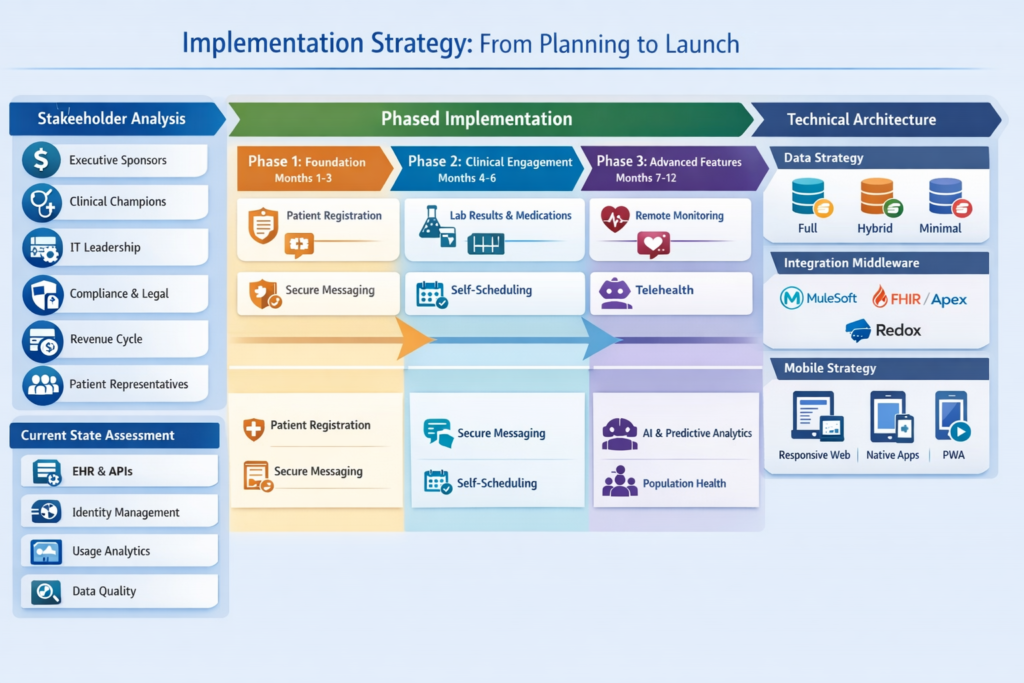
Assessment and Planning Phase
Successful patient portal implementations begin with thorough planning, not immediate development:
Stakeholder Analysis:
Identify and engage all stakeholder groups:
- Executive Sponsors: Secure budget and organizational commitment
- Clinical Champions: Physicians, nurses, care coordinators who will promote adoption
- IT Leadership: Architecture approval and resource allocation
- Compliance/Legal: HIPAA, privacy, consent management requirements
- Revenue Cycle: Billing integration and payment processing
- Patient Representatives: Patient advisory councils for UX feedback
Current State Assessment:
Document existing systems and capabilities:
- EHR versions and API capabilities
- Identity management infrastructure
- Existing patient portal (if any) with usage analytics
- Integration middleware and data flow patterns
- Data quality assessment (demographic accuracy, contact information completeness)
Requirements Prioritization:
Not all features launch simultaneously. Implement phased approach:
Phase 1 – Foundation (Months 1-3):
- Patient registration and authentication
- Basic profile management
- Appointment viewing (read-only)
- Secure messaging
- Educational content library
Phase 2 – Clinical Engagement (Months 4-6):
- Lab results display with trend analysis
- Medication list with refill requests
- Appointment self-scheduling
- Pre-visit questionnaires and intake forms
- Visit summaries and after-visit care instructions
Phase 3 – Advanced Features (Months 7-12):
- Care plan engagement and task tracking
- Remote patient monitoring integration
- Family/caregiver proxy access
- Telehealth integration
- Bill payment and financial transparency
Phase 4 – Optimization (Ongoing):
- AI-powered chatbots and virtual assistants
- Predictive analytics for proactive outreach
- Social determinants of health integration
- Population health management tools
- Advanced analytics and reporting
Technical Architecture Decisions
Critical architectural decisions impact long-term success:
Data Residency Strategy:
- Full Replication: Copy all relevant clinical data to Health Cloud for performance and offline resilience. Requires significant storage and synchronization logic.
- Hybrid Approach: Store frequently accessed data in Health Cloud, query external systems on-demand for historical data. Balances performance with storage costs.
- Minimal Replication: Maintain only reference data in Health Cloud, retrieve clinical data in real-time from source systems. Reduces storage but creates EHR availability dependencies.
Recommendation: Hybrid approach with intelligent caching based on access patterns.
Integration Middleware Selection:
- MuleSoft: Best for complex enterprise scenarios with multiple systems, existing MuleSoft investments, or sophisticated transformation requirements. Higher cost but comprehensive capabilities.
- Salesforce Platform Events + Apex: Suitable for simpler integrations with modern FHIR APIs. Lower cost but limited transformation capabilities.
- Third-Party Healthcare Integration Platforms: Consider Redox, Datica, or HealthJump for turnkey EHR connectivity with pre-built integrations.
Mobile Strategy:
- Responsive Web: Single codebase, easier maintenance, no app store approval process. Limited access to native device capabilities.
- Native Mobile Apps: Superior UX, full device integration (biometric auth, push notifications, camera). Separate iOS/Android development and maintenance.
- Progressive Web App (PWA): Middle ground offering app-like experience without app store distribution. Growing capability support.
Recommendation: Start with responsive web, add native apps for competitive differentiation or specific use cases requiring deep device integration.
Development and Testing Approach
Environment Strategy:
Maintain separate environments for different purposes:
- Developer Sandboxes: Individual developer playgrounds
- Integration Sandbox: Full integration with EHR test instances
- UAT Environment: User acceptance testing with clinical stakeholders
- Performance Testing: Load testing with production-like data volumes
- Training Environment: Persistent environment for staff training
- Production: Live patient-facing portal
Testing Pyramid:
Unit Tests (60% of test effort):
- Test individual Apex classes and Lightning Web Components
- Mock external service calls
- Achieve 85%+ code coverage
- Automate execution in CI/CD pipeline
Integration Tests (30% of test effort):
- Validate end-to-end data flows between systems
- Test error handling and timeout scenarios
- Verify data transformation accuracy
- Confirm authentication and authorization controls
User Acceptance Tests (10% of test effort):
- Clinical stakeholder validation of workflows
- Patient usability testing with diverse demographics
- Accessibility compliance verification
- Load and performance testing under realistic conditions
Continuous Integration/Deployment:
text// Sample SFDX pipeline configuration
pipeline {
    stages {
        stage('Unit Tests') {
            steps {
                sh 'sfdx force:apex:test:run -l RunLocalTests -r human'
            }
        }

        stage('Security Scan') {
            steps {
                sh 'sfdx scanner:run --target "force-app/**/*.cls" --severity-threshold=2'
            }
        }

        stage('Integration Tests') {
            steps {
                sh 'npm run integration-tests'
            }
        }

        stage('Deploy to UAT') {
            steps {
                sh 'sfdx force:source:deploy -x manifest/package.xml -u UAT'
            }
        }
    }
}
Change Management and Adoption Strategy
Technology success depends on user adoption. Implement comprehensive change management:
Provider Engagement:
- Demonstrate how portal reduces call volume and improves efficiency
- Train on responding to patient messages effectively
- Share patient feedback and success stories
- Incorporate portal usage into quality metrics
Patient Onboarding:
- In-person registration at check-in desks
- Phone-based enrollment with identity verification
- Self-service registration with multi-factor authentication
- Targeted campaigns for specific patient populations (chronic disease, surgical patients)
Communication Plan:
- Pre-launch announcement campaign
- Phased rollout by patient cohorts
- Multi-channel promotion (email, text, mailings, in-clinic signage)
- Tutorial videos and help documentation
- Patient support resources (help desk, chat support)
Success Metrics:
Track meaningful adoption and engagement metrics:
Activation Metrics:
- Registration conversion rate
- Time from registration to first login
- Account activation by demographic segment
Engagement Metrics:
- Monthly active users (MAU)
- Average features used per session
- Return visit frequency
- Time spent in portal
Transaction Metrics:
- Appointment scheduled online vs. phone
- Prescription refill requests submitted
- Secure messages sent
- Bills paid online
- Forms completed digitally
Outcome Metrics:
- Patient satisfaction scores (NPS, CAHPS)
- Call center volume reduction
- No-show rate reduction
- Cost per patient interaction
- Clinical quality measure improvement
Common Implementation Mistakes to Avoid
Learning from others’ failures accelerates your success. Avoid these common pitfalls:
Technical Mistakes
Insufficient Performance Planning:
Mistake: Failing to account for data volume growth and query performance degradation.
Impact: Slow page loads, timeouts, user frustration.
Prevention: Implement selective queries, pagination, asynchronous processing. Load test with realistic data volumes early and often.
Over-Reliance on Real-Time Integration:
Mistake: Requiring EHR availability for all portal functions.
Impact: Portal unavailability during EHR maintenance windows or outages.
Prevention: Cache frequently accessed data in Health Cloud. Implement graceful degradation when external systems are unavailable.
Inadequate Error Handling:
Mistake: Exposing technical error messages to patients or failing silently.
Impact: User confusion, data integrity issues, difficult troubleshooting.
Prevention: Implement comprehensive exception handling with user-friendly messages and detailed logging for technical teams.
text// Robust error handling pattern
public class AppointmentBookingController {
    @AuraEnabled
    public static AppointmentResult bookAppointment(
        String slotId,
        String patientId
    ) {
        try {
            // Business logic
            return new AppointmentResult(true, 'Appointment confirmed', appt);

        } catch (IntegrationException e) {
            // Log detailed error for technical troubleshooting
            logError(e, 'Integration failure during booking', patientId);

            // Return user-friendly message
            return new AppointmentResult(
                false,
                'We are unable to complete your booking right now. Please call us at 555-1234.',
                null
            );

        } catch (Exception e) {
            // Catch-all for unexpected errors
            logError(e, 'Unexpected booking failure', patientId);
            return new AppointmentResult(
                false,
                'An unexpected error occurred. Our team has been notified.',
                null
            );
        }
    }
}
Ignoring Mobile Experience:
Mistake: Designing primarily for desktop with mobile as afterthought.
Impact: Poor mobile usability, low adoption among mobile-first users.
Prevention: Mobile-first design approach. Test on actual devices across iOS and Android. Optimize for touchscreens and limited bandwidth.
Process and Organizational Mistakes
Launching Without Clinical Workflow Integration:
Mistake: Building portal without understanding provider workflows for responding to messages, reviewing form submissions, or addressing patient-reported concerns.
Impact: Provider frustration, delayed responses, patient dissatisfaction.
Prevention: Map clinical workflows before development. Pilot with small provider groups. Iterate based on feedback.
Insufficient Training and Support:
Mistake: Expecting intuitive design to eliminate need for patient education.
Impact: Low adoption, high support call volume, abandoned registrations.
Prevention: Comprehensive onboarding materials. Multi-channel support (phone, chat, in-person assistance). Ongoing education campaigns.
Neglecting Content Strategy:
Mistake: Building portal features without curated educational content.
Impact: Patients view portal as transactional tool, not health management resource.
Prevention: Develop content library aligned with common conditions and patient questions. Integrate contextual education with clinical data displays.
Feature Overload at Launch:
Mistake: Attempting to launch comprehensive functionality immediately.
Impact: Delayed timelines, quality issues, overwhelming user experience.
Prevention: Phased rollout focusing on high-value, high-adoption features first. Iterate based on usage data.
Security and Compliance Mistakes
Treating Compliance as Checkbox Exercise:
Mistake: Assuming Salesforce HIPAA compliance equals implementation compliance.
Impact: Potential breaches, regulatory penalties, loss of patient trust.
Prevention: Engage compliance and legal teams early. Conduct security assessments. Implement defense-in-depth approach.
Weak Identity Verification:
Mistake: Simple knowledge-based authentication (mother’s maiden name, date of birth).
Impact: Account takeover, unauthorized access to PHI.
Prevention: Multi-factor authentication. Integration with identity proofing services. Monitoring for suspicious access patterns.
Inadequate Consent Management:
Mistake: Failing to track patient consent for data sharing, proxy access, or research participation.
Impact: Regulatory violations, ethical concerns, patient privacy breaches.
Prevention: Implement granular consent tracking. Enable patient control over data sharing. Document all consent decisions with audit trails.
Poor Third-Party Vendor Management:
Mistake: Integrating services without proper BAAs or security assessments.
Impact: Expanded attack surface, liability exposure, compliance violations.
Prevention: Maintain vendor inventory. Require BAAs before PHI access. Conduct regular vendor security reviews.
Future Trends: What’s Next for Patient Portals
Artificial Intelligence and Personalization
The next generation of patient portals will leverage AI for hyper-personalized experiences:
Intelligent Triage and Routing:
Natural language processing analyzes patient messages to:
- Determine clinical urgency and route appropriately
- Suggest self-service resources before human escalation
- Extract structured data from unstructured text
- Identify trends across patient populations
Predictive Health Insights:
Machine learning models integrated with Health Cloud:
- Predict no-show likelihood and proactively intervene
- Identify patients at risk for specific conditions based on clinical and social data
- Recommend preventive screenings and wellness activities
- Personalize health education content delivery
Conversational Interfaces:
Chatbots and virtual health assistants powered by Einstein Bot or third-party NLP platforms:
- Answer common questions 24/7 without human intervention
- Guide symptom checking and triage
- Facilitate appointment scheduling through natural conversation
- Support medication adherence through conversational reminders
Implementation Considerations:
- Train AI models on healthcare-specific datasets
- Validate clinical accuracy and safety
- Implement human oversight for clinical recommendations
- Monitor for algorithmic bias across demographic groups
Social Determinants of Health Integration
Recognition that health outcomes depend on social factors drives deeper integration:
Screening and Assessment:
- Embed SDOH screening tools (Protocol for Responding to and Assessing Patients’ Assets, Risks, and Experiences – PRAPARE)
- Integrate housing stability, food security, transportation access assessments
- Connect screening results to clinical care plans
Community Resource Coordination:
- Real-time integration with community resource databases
- Facilitate referrals to food banks, transportation services, housing assistance
- Track resource utilization and outcomes
- Measure impact on clinical outcomes and utilization
Example Architecture:
text// SDOH screening and referral workflow
public class SDOHNavigatorService {
    public void processScreening(
        String patientId,
        Map<String, Object> screeningResponses
    ) {
        // Analyze responses for risk factors
        List<SDOHRisk> risks = identifyRisks(screeningResponses);

        // Query community resource database
        List<CommunityResource> resources = findMatchingResources(
            risks,
            getPatientLocation(patientId)
        );

        // Create care plan tasks for resource connection
        createReferralTasks(patientId, resources);

        // Surface resources in patient portal
        displayRecommendedResources(patientId, resources);

        // Track referral outcomes
        monitorResourceUtilization(patientId, resources);
    }
}
Omnichannel Patient Engagement
Patient portals will evolve into comprehensive engagement platforms spanning multiple touchpoints:
Channel Integration:
- Unified experience across web portal, mobile app, SMS, voice, and email
- Context preservation as patients switch channels
- Consistent branding and messaging across touchpoints
- Channel preference management by patient
IoT and Remote Monitoring:
- Direct integration with consumer wearables and medical devices
- Real-time data streaming to clinical teams
- Automated alert generation for out-of-range values
- Patient-facing dashboards with trends and insights
Ambient Computing:
- Voice-activated health assistants (Alexa, Google Home) for hands-free interaction
- Smart home integration for medication reminders and wellness coaching
- Augmented reality for medication identification or wound care guidance
Interoperability Advancements
Evolving standards and regulations drive greater data liquidity:
Patient Access APIs (21st Century Cures Act):
- Standardized FHIR API access to patient clinical data
- Elimination of information blocking practices
- Patient data portability across health systems
- Third-party app ecosystem integration
TEFCA and Nationwide Interoperability:
- Trusted Exchange Framework and Common Agreement enabling broad data sharing
- Patient access to comprehensive health history regardless of care location
- Integration with multiple health information networks
- Support for care coordination across organizational boundaries
SMART on FHIR Applications:
- Patient-directed apps connecting to portal via standardized SMART launch framework
- Specialty applications for chronic disease management, mental health, pregnancy tracking
- Patient control over app data access and permissions
- Marketplace of verified applications for various health needs
Value-Based Care Alignment
Patient portals become strategic tools for value-based care success:
Care Gap Closure:
- Proactive notification of preventive care due dates
- Automated outreach for quality measure compliance
- Self-scheduling for screenings and preventive visits
- Patient education on importance of recommended care
Population Health Management:
- Stratification of patient populations by risk
- Targeted interventions for high-risk cohorts
- Remote monitoring for chronic disease populations
- Medication adherence programs for complex regimens
Shared Decision-Making Tools:
- Interactive tools helping patients understand treatment options
- Cost and outcome comparisons for elective procedures
- Patient preference integration into care planning
- Documentation of shared decisions for regulatory compliance
Conclusion: Strategic Imperatives for Success
Building patient portals with Salesforce Health Cloud and Experience Cloud represents a strategic investment in digital health transformation. Success requires more than technical implementation—it demands a patient-centered design philosophy, robust integration architecture, uncompromising security practices, and ongoing commitment to improvement.
Key Takeaways for Healthcare IT Leaders
Start with Patient Needs: Technology serves patients, not organizational convenience. Conduct user research, test with diverse patient populations, and iterate based on feedback.
Invest in Integration Architecture: Patient portals are only as valuable as the data they access. Prioritize robust, scalable integration with clinical source systems using modern standards like FHIR.
Prioritize Security from Day One: HIPAA compliance isn’t optional and can’t be retrofitted. Build security into architecture, processes, and culture.
Plan for Scale: Patient portals grow in both users and functionality. Design data models, integration patterns, and infrastructure to accommodate growth.
Measure What Matters: Track meaningful metrics beyond basic registration counts. Focus on engagement, outcomes, efficiency gains, and patient satisfaction.
Embrace Iteration: Launch with core functionality and improve continuously based on data. Perfect is the enemy of good in digital health.
For Salesforce Developers and Architects
Master Healthcare Domain Knowledge: Understanding clinical workflows, care coordination, and patient needs is as important as technical skills. Invest time learning healthcare operations.
Design for Extensibility: Healthcare requirements evolve rapidly. Build flexible architectures that accommodate new use cases without major refactoring.
Leverage Platform Capabilities: Health Cloud, Experience Cloud, and Einstein offer powerful out-of-box capabilities. Customize thoughtfully but avoid reinventing standard functionality.
Focus on Performance: Healthcare data volumes strain platform limits. Implement performance best practices from project inception.
Collaborate Across Disciplines: Successful implementations require partnership between technical teams, clinical stakeholders, compliance experts, and user experience designers.
The healthcare industry’s digital transformation is accelerating, driven by regulatory requirements, competitive pressure, and patient expectations shaped by consumer technology experiences. Patient portals built on Salesforce Health Cloud and Experience Cloud offer healthcare organizations a strategic platform for meeting these demands while maintaining the flexibility to evolve with changing needs.
Organizations that approach patient portal development as a strategic capability—not a compliance checkbox—will differentiate themselves through superior patient experiences, operational efficiency, and clinical outcomes. The technical patterns, architectural decisions, and implementation strategies outlined in this article provide a foundation for building portals that deliver measurable value today while positioning organizations for the future of digital health.
The question is no longer whether to invest in patient portals, but how to build portals that truly transform the patient-provider relationship and drive meaningful health outcomes. With thoughtful architecture, patient-centered design, and commitment to continuous improvement, Salesforce Health Cloud and Experience Cloud provide the foundation for that transformation
About RizeX Labs
At RizeX Labs, we specialize in delivering advanced Salesforce solutions tailored for healthcare organizations. Our expertise in Salesforce Health Cloud and Experience Cloud enables us to build secure, scalable, and patient-centric digital experiences.
We combine deep technical knowledge with real-world implementation experience to help healthcare providers streamline patient engagement, improve care coordination, and ensure compliance with healthcare regulations.
Our goal is to transform traditional healthcare systems into intelligent, connected ecosystems that enhance both patient outcomes and operational efficiency.
Internal Links:
- Salesforce Admin & Development Training
- Remote Patient Monitoring (RPM) in Salesforce Health Cloud: Transforming Connected Healthcare Delivery
- How to Use AI in Salesforce Health Cloud for Predictive Patient Care (Einstein + Real Use Cases)
- New Releases in Salesforce Health Cloud Spring ’26: What Healthcare Organizations Need to Know
- How to Customize Salesforce Health Cloud Using Lightning Web Components (LWC) for Healthcare Use Cases
- 30 Essential Questions About Salesforce Health Cloud Answered: Beginner to Advanced Guide
- Salesforce Sales Cloud vs Health Cloud: The Strategic CRM Decision That Defines Your Healthcare Business Trajectory
- Using Salesforce Health Cloud for Insurance & Claims Coordination: Beyond the Hospital Walls
