
Introduction: The Automation Dilemma Every Salesforce Team Faces
Salesforce triggers vs flows — this is the debate every Salesforce admin and developer faces sooner or later. Picture this: Your sales team just closed a deal, and the moment an Opportunity is marked “Closed Won,” a whole chain of events needs to happen — create a follow-up task, notify the account manager, update a related record, send a welcome email to the customer, and log the activity. Now the question hits your Salesforce admin or developer like a ton of bricks:
“Should I build this in a Flow or write an Apex Trigger?”
If you’ve spent any time working with Salesforce, you’ve probably had this conversation — or at least heard it echoing in a Slack channel somewhere. It’s one of the most debated topics in the Salesforce ecosystem, and for good reason. Both Flows and Apex Triggers are powerful automation tools, but they serve different purposes, have different strengths, and making the wrong choice can lead to unmaintainable code, governor limit violations, or automation that breaks down at scale.
Here at RizeX Labs, we work with Salesforce organizations across industries — from startups scaling fast to enterprise teams managing complex multi-cloud implementations. And this question — Triggers or Flows? — comes up in almost every project kickoff. So we decided to put together the definitive 2026 guide to help you make the right call every single time.
Whether you’re a Salesforce admin who’s just discovered Flow Builder, a developer who writes Apex in your sleep, or a business stakeholder trying to understand why your dev team is debating this for three hours — this guide is for you.
Let’s break it all down.
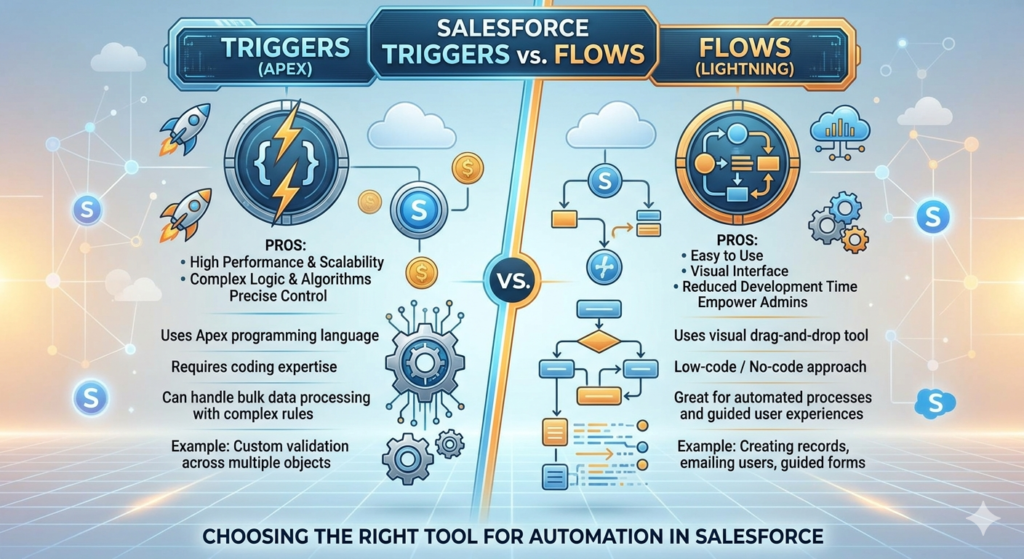
What Are Salesforce Triggers? (And Why Developers Love Them)
The Basics of Apex Triggers
An Apex Trigger is a block of code written in Salesforce’s proprietary programming language, Apex, that automatically executes when specific database events occur on a Salesforce record. Think of it like a tripwire — when something happens to a record (insert, update, delete, undelete), the trigger fires and runs your custom logic.
Here’s a simple example of what an Apex Trigger looks like:
apextrigger OpportunityTrigger on Opportunity (after insert, after update) {
    if (Trigger.isAfter && Trigger.isInsert) {
        OpportunityTriggerHandler.handleAfterInsert(Trigger.new);
    }
    if (Trigger.isAfter && Trigger.isUpdate) {
        OpportunityTriggerHandler.handleAfterUpdate(Trigger.new, Trigger.oldMap);
    }
}
Triggers run server-side, directly within Salesforce’s execution engine, giving developers precise control over complex business logic.
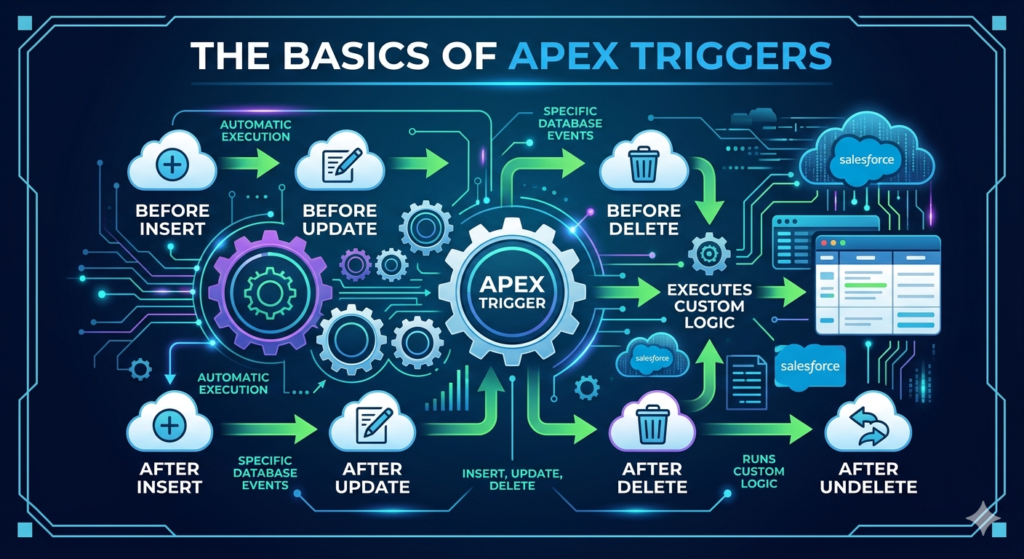
Types of Trigger Events
Salesforce Triggers can be configured to fire on the following events:
- before insert — Before a new record is saved to the database
- before update — Before an existing record is updated
- before delete — Before a record is deleted
- after insert — After a new record is saved
- after update — After an existing record is updated
- after delete — After a record is deleted
- after undelete — After a record is restored from the Recycle Bin
Why Do Developers Love Triggers?
Apex Triggers give developers surgical precision. You can handle thousands of records in bulk, write complex conditional logic, call external APIs, process data transformations, and handle exceptions in ways that declarative tools simply can’t match — at least not without becoming a tangled mess of Flow elements.
Triggers are also testable. In Salesforce, Apex code requires at least 75% test coverage to deploy to production. This forces a culture of quality and makes triggers reliable in enterprise-grade environments.
What Are Salesforce Flows? (And Why Admins Are Obsessed With Them)
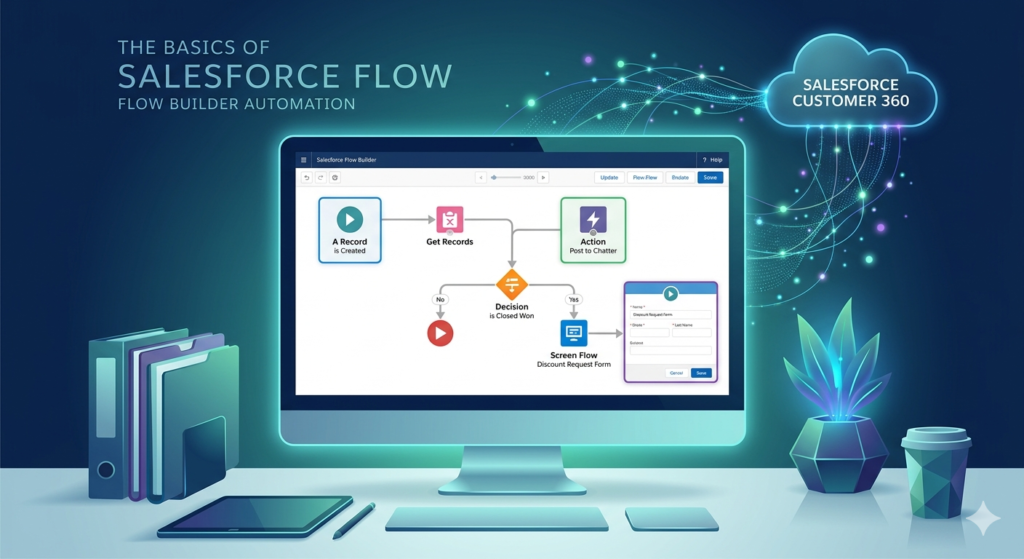
The Basics of Salesforce Flow
Salesforce Flow (now officially called Flow Builder) is Salesforce’s declarative, point-and-click automation tool. It allows Salesforce admins — and even non-developers — to build complex automated processes without writing a single line of code.
Flow Builder has evolved dramatically over the past few years. What started as a basic workflow automation tool has transformed into a full-featured automation platform capable of handling complex logic, data manipulation, screen prompts, subflows, and even Apex integrations.
Types of Flows in Salesforce (2026 Overview)
Here are the main types of Flows you’ll work with in Salesforce today:
| Flow Type | Trigger Condition | Best Used For |
|---|---|---|
| Record-Triggered Flow | When a record is created, updated, or deleted | Automating record changes, notifications, and field updates |
| Screen Flow | User clicks a button or link | Guided user experiences, data entry wizards |
| Schedule-Triggered Flow | On a defined schedule | Batch processing, nightly jobs, recurring tasks |
| Platform Event-Triggered Flow | When a platform event fires | Event-driven automation, integration scenarios |
| Autolaunched Flow | Called by another process | Reusable logic, called from Apex or other Flows |
Why Admins Love Flows
The biggest advantage of Flows is accessibility. An admin who understands your business processes can build a Flow without needing to raise a ticket with the development team. This dramatically reduces bottlenecks and speeds up time-to-value for business changes.
Flows are also visually transparent. You can click through a Flow and see exactly what it does, step by step. Try doing that with 500 lines of Apex code when you’re troubleshooting at 11pm.
Since 2023, Salesforce has officially positioned Flow as the preferred automation tool, deprecating Process Builder and Workflow Rules. In 2026, Flow is more capable than ever, with features like Flow Orchestration, Flow Testing (Flow Test records), Enhanced Flow Debugger, and Auto-Layout Canvas making it a production-grade tool for complex automations.
Salesforce Triggers vs Flows: The Head-to-Head Comparison
Now for the part you’ve been waiting for — let’s put these two tools side by side and see how they stack up across every dimension that matters.
Comparison Table: Salesforce Triggers vs Flows
| Feature / Criteria | Apex Triggers | Salesforce Flows |
|---|---|---|
| Requires Coding | Yes (Apex) | No (declarative) |
| Who Can Build It | Salesforce Developer | Admin or Developer |
| Execution Speed | Faster (compiled code) | Slightly slower (interpreted) |
| Bulk Processing | Excellent (bulkification) | Good (but limited in complex scenarios) |
| Testability | Strong (Apex Test Classes) | Moderate (Flow Test records, debug logs) |
| Debugging | Apex Debug Logs, Developer Console | Flow Debugger, Flow Error Emails |
| Governor Limits | Shared with other Apex | Shared limits, slightly different caps |
| Error Handling | Full try-catch control | Limited (fault paths available) |
| Callouts (API calls) | Yes (via @future or Queueable) | Yes (via HTTP Callout element, 2024+) |
| Complex Logic | Excellent | Moderate (gets complex quickly) |
| Maintainability | Requires developer to update | Admin-friendly to update |
| Reusability | Apex classes, shared methods | Subflows, invocable methods |
| Version Control | Yes (via Git/IDEs) | Limited (Salesforce CLI, metadata) |
| Deployment | Change sets, CI/CD pipelines | Change sets, CI/CD pipelines |
| Learning Curve | High (requires programming) | Low to Medium |
| Salesforce Recommended | For complex logic only | Preferred for most automations |
| Performance at Scale | Excellent | Good (can degrade with complexity) |
| Cross-Object Updates | Yes | Yes (with limitations on related records) |
| Real-Time Execution | Before/After save | Before/After save (Record-Triggered) |
| Cost of Maintenance | Higher (dev time) | Lower (admin-managed) |
Real-World Use Cases: Triggers vs Flows in Action
Theory is great, but let’s talk about real scenarios. Here are actual use cases from projects that RizeX Labs has worked on, and what tool we used — and why.
Use Case 1: Auto-Creating Onboarding Tasks When a Deal Closes
Scenario: A SaaS company wants to automatically create a set of 12 onboarding tasks assigned to different team members the moment an Opportunity is marked “Closed Won.”
Tool Used: Record-Triggered Flow
Why Flow?
This is a perfect Flow use case. The logic is straightforward — check if the Stage equals “Closed Won,” then create Task records. A Flow can handle this without any code, it’s visible to admins, and business stakeholders can easily request changes (like adding a 13th task) without developer involvement.
Flow Configuration:
- Trigger: Opportunity updated, when Stage changes to “Closed Won”
- Action: Create 12 Task records with specific subjects, due dates, and owners
- Condition: Only if Stage changed (using
ISCHANGEDformula)
Use Case 2: Complex Revenue Recognition Logic Across Multiple Objects
Scenario: A financial services firm needs to recalculate revenue allocations across Opportunity Line Items, a custom Revenue Schedule object, and a third-party billing system — all triggered by changes to a contract record.
Tool Used: Apex Trigger + Handler Class
Why Trigger?
This scenario involves:
- Querying and updating multiple objects in complex sequences
- Calling an external billing API via a REST callout
- Handling rollback logic if the API call fails
- Processing potentially thousands of records in a single batch
Flow simply wasn’t built for this level of complexity. An Apex Trigger with a proper handler pattern gave the development team full control over the execution sequence, error handling, and API retry logic.
Use Case 3: Sending a Welcome Email Series When a Contact Is Created
Scenario: A real estate company wants to enroll new Contacts into a 3-email welcome sequence when they’re added to Salesforce.
Tool Used: Record-Triggered Flow with Email Alerts
Why Flow?
Email automation with time delays is exactly what Flow was designed for. Using a Flow with scheduled paths, the team configured:
- Immediate email on Contact creation
- Follow-up email after 3 days if no response
- Final welcome email after 7 days
No code required. The marketing team could even adjust the email content and timing themselves after training.
Use Case 4: Preventing Duplicate Account Creation with Custom Matching Logic
Scenario: A healthcare company has strict data quality rules — no two Accounts can share the same Tax ID, even if the names are slightly different. Standard Duplicate Rules weren’t enough.
Tool Used: Apex Trigger (before insert, before update)
Why Trigger?
This required a before save operation that queries existing records and throws a custom error to prevent the save entirely. While Flow’s before-save option can update fields, throwing a user-friendly validation error with complex cross-record querying was more reliable and maintainable in Apex.
apextrigger AccountTrigger on Account (before insert, before update) {
    AccountValidationHandler.checkDuplicateTaxId(Trigger.new);
}
Use Case 5: Syncing Salesforce Data to an External ERP System
Scenario: Every time an Account’s billing address changes, the updated address needs to be pushed to an external ERP system via REST API.
Tool Used: Record-Triggered Flow + Invocable Apex Method
Why This Hybrid?
This is where the Flow + Apex hybrid approach shines. The Flow detects the change (declaratively, easy to maintain), and calls an Invocable Apex Method to handle the actual HTTP callout. This way:
- Admins control the trigger condition
- Developers handle the integration complexity
- Both teams are happy
This hybrid pattern is a 2026 best practice that we’ll cover in detail in the next section.
When to Use Apex Triggers vs Flows: The Decision Framework
Let’s cut through the noise and give you a clear, actionable decision framework.
Use Salesforce Flow When…
The logic is straightforward and declarative — Field updates, record creation, email notifications, and approval kickoffs are Flow territory.
Business users or admins need to maintain it — If the marketing team or a Salesforce admin will be managing this automation going forward, Flow keeps it accessible.
You’re building guided user experiences — Screen Flows are unbeatable for creating wizard-like experiences for data entry, approvals, or case management.
You need scheduled automation — Nightly batch jobs, weekly report refreshes, and time-based follow-ups are perfect for Schedule-Triggered Flows.
The automation involves a linear process — If the logic flows (pun intended) in a clear A → B → C sequence, Flow handles it beautifully.
Salesforce recommends it for the use case — Salesforce’s official recommendation since 2022 is “Flow first.” If Flow can do it cleanly, use Flow.
Time-to-market matters — Building in Flow is significantly faster than writing and testing Apex. If speed is critical, Flow wins.
Use Apex Triggers When…
You need complex conditional logic — Multi-level if-else trees, loops within loops, and complex algorithmic logic belong in Apex.
Bulk processing is critical — If you’re processing 10,000+ records at a time (data migrations, integrations, batch jobs), Apex Triggers with proper bulkification patterns are essential.You need full error handling control — Try-catch blocks, custom exceptions, and rollback logic require Apex.
The automation involves external API callouts with retry logic — While Flow supports HTTP callouts now, complex integration scenarios with retry mechanisms, OAuth token refreshes, and error handling need Apex.
You need to enforce data integrity at the database level — Preventing saves, throwing system exceptions, and running cross-record validation before a DML operation is Apex territory.
Performance is non-negotiable — For high-volume orgs where every millisecond counts, Apex runs faster than Flow.
You’re building a managed package or ISV product — Packaging complex logic in Apex is more reliable and secure than packaging Flows.
Use the Flow + Apex Hybrid When…
The trigger is simple, but the action is complex — Let Flow detect the condition and call Apex (via Invocable Methods) to execute complex logic.
You want admin-friendly maintenance with developer-grade execution — This is the sweet spot for most enterprise organizations.
You’re integrating with external systems — Flow for the orchestration, Apex for the integration.
2026 Salesforce Automation Best Practices
The Salesforce platform evolves every year with three major releases (Spring, Summer, Winter). Here’s what RizeX Labs considers to be the definitive best practices for Salesforce automation in 2026.
Best Practice 1: Flow First — Always Evaluate Flow Before Writing Code
Salesforce’s official stance is clear: attempt to solve problems declaratively before writing code. This isn’t just a philosophical preference — it has practical implications for maintainability, upgrade compatibility, and cost of ownership.
Before you spin up VS Code to write a trigger, ask yourself: “Can Flow do this in a clean, maintainable way?” If the answer is yes, use Flow.
Best Practice 2: One Trigger Per Object (The Trigger Framework Pattern)
If you do use Apex Triggers, follow the one trigger per object rule. Multiple triggers on the same object create unpredictable execution order and are a maintenance nightmare.
Use a Trigger Handler Framework (like the popular FFLIB framework or a custom Handler pattern) to keep trigger logic organized:
textOpportunityTrigger.apex → Calls → OpportunityTriggerHandler.apex
This separates concerns, makes testing easier, and keeps your org clean.
Best Practice 3: Avoid Logic Directly in Triggers
Never put business logic directly inside a trigger file. The trigger should only be a router — it identifies the event and delegates to a handler class:
apex// Good Practice ✅
trigger ContactTrigger on Contact (before insert, after update) {
    ContactTriggerHandler handler = new ContactTriggerHandler();
    if (Trigger.isBefore && Trigger.isInsert) {
        handler.onBeforeInsert(Trigger.new);
    }
}

// Bad Practice ❌
trigger ContactTrigger on Contact (before insert) {
    for (Contact c : Trigger.new) {
        // 200 lines of logic directly here
        c.Phone = c.Phone.replace('-', '');
        // ...more logic
    }
}
Best Practice 4: Build Flows for Maintainability — Document Everything
Flows can become complex quickly. In 2026, use these Flow hygiene practices:
- Name every element clearly (not “Decision 1” — use “Check if Opportunity is Closed Won”)
- Add descriptions to every Flow explaining what it does and why
- Use Subflows to break large Flows into reusable components
- Enable Flow versioning and keep old versions until new ones are validated in production
- Test Flows using Flow Test records (introduced in Winter ’24, expanded since)
Best Practice 5: Respect Governor Limits — Design for Bulk from Day One
Whether you’re in Flow or Apex, Salesforce enforces governor limits to protect the multi-tenant environment. Design every automation assuming it will process records in bulk:
- In Apex: Always use collections (Lists, Sets, Maps) instead of SOQL queries inside loops
- In Flow: Be cautious with loops in Flows that contain DML operations — this can hit limits fast
- Use before-save Flows for field updates (no DML required, much more efficient)
Best Practice 6: Use Before-Save Flows for Field Updates
One of the most important performance optimizations available in 2026: if your Flow is just updating fields on the same record, use a before-save Record-Triggered Flow instead of an after-save flow.
Before-save Flows:
- Run before the record hits the database
- Don’t consume DML statements
- Execute significantly faster
- Reduce governor limit usage
Best Practice 7: Adopt the Invocable Method Pattern for Flow-Apex Integration
When you need Flow to call Apex logic, use @InvocableMethod to expose Apex methods to Flow. This is the cleanest integration pattern:
apexpublic class SendWelcomeEmailAction {
    @InvocableMethod(label='Send Welcome Email' description='Sends welcome email to contact')
    public static void sendEmail(List<Id> contactIds) {
        // Complex email logic here
    }
}
This lets admins drag-and-drop your Apex logic into any Flow — keeping automation flexible and maintaining a clean separation of concerns.
Best Practice 8: Monitor and Maintain Your Automation Stack
In 2026, use Salesforce’s Automation Lightning App and Flow Error Emails to monitor your automation health. Set up:
- Error email alerts for Flow failures
- Debug log monitoring for Trigger exceptions
- Regular automation audits (quarterly is a good cadence)
- A centralized automation registry documenting every Flow and Trigger in your org
Best Practice 9: Leverage Flow Orchestration for Complex Multi-Step Processes
For enterprise-grade, multi-step processes that span multiple teams and require human approvals, Flow Orchestration (generally available since Spring ’23, significantly enhanced in 2025-2026) is the tool to use. It allows you to build coordinated, stage-based processes that combine automated steps and human interaction in a single, manageable canvas.
Best Practice 10: Test Before You Deploy — Always
This sounds obvious, but it’s broken constantly. In 2026:
- All Apex Triggers must have test coverage above 75% (aim for 95%+)
- All Flows should be tested using Flow Test records in a sandbox
- Use a Full Sandbox or Partial Sandbox to test data volume scenarios before pushing to production
- Implement a CI/CD pipeline (using Salesforce DX, GitHub Actions, or a tool like Copado or Gearset) for automated testing and deployment
Common Mistakes to Avoid
Learning what not to do is just as important as knowing best practices. Here are the most common mistakes RizeX Labs sees in Salesforce orgs.
Mistake 1: Using Flows for Everything Regardless of Complexity
Flow-first is the right philosophy, but it doesn’t mean “Flow-only.” We’ve seen Flows with 150+ elements, deeply nested decision loops, and 20 subflows chained together. At that point, the Flow has become harder to maintain than the Apex alternative would have been. Know when to draw the line.
Mistake 2: Logic-Heavy Triggers Without Handler Classes
Writing hundreds of lines of logic directly inside a trigger file is one of the fastest ways to create unmaintainable code. Five developers, five opinions, and six months later — nobody knows what anything does.
Mistake 3: SOQL Queries Inside Loops (The Classic Performance Killer)
apex// This is a disaster waiting to happen ❌
for (Account acc : Trigger.new) {
    List<Contact> contacts = [SELECT Id FROM Contact WHERE AccountId = :acc.Id];
    // This hits governor limits fast!
}
Always bulkify your code. Query outside the loop, use Maps, and process collections.
Mistake 4: Multiple Overlapping Automations on the Same Object
Having a Workflow Rule, a Process Builder (legacy), a Flow, and a Trigger all firing on the same object when a record is updated is a recipe for confusion, conflicts, and very difficult debugging sessions. Consolidate your automation and document what runs when.
Mistake 5: Ignoring Flow Error Emails
Salesforce sends Flow error emails to the admin when a Flow fails. Many teams have these going to an unmonitored inbox or directly to the Recycle Bin. Set up a monitored alert alias and review Flow errors regularly.
Mistake 6: Not Considering the Order of Execution
Salesforce has a specific order of execution when a record is saved (validation rules, before triggers, flows, after triggers, etc.). Not understanding this order leads to automation that fires at the wrong time or conflicts with validation rules. Study the order of execution and design your automation accordingly.
Mistake 7: Deploying Untested Automation to Production
We’ve seen it happen more times than we’d like to admit. A quick “it’ll be fine” Flow deployed directly to production on a Friday afternoon. Always test. Always.
The Final Decision Guide: Triggers vs Flows at a Glance
Here’s your quick-reference table for making the automation decision fast:
| Scenario | Recommended Tool | Reason |
|---|---|---|
| Update a field when a record status changes | Flow (Before-Save) | Simple, efficient, no DML needed |
| Send an email when a case is closed | Flow | Email alerts + declarative logic |
| Create related records when an opportunity closes | Flow | Record creation is native to Flow |
| Time-delayed follow-up actions | Flow (Scheduled Paths) | Built for time-based logic |
| Guided data entry wizard for users | Screen Flow | Purpose-built UI automation |
| Complex revenue calculation across 5 objects | Apex Trigger | Complex logic, multiple objects |
| Callout to external API with retry logic | Apex (Queueable/Future) | Full control over async callouts |
| Prevent duplicate records with custom logic | Apex Trigger (Before Save) | Throw custom errors before DML |
| Process 50,000 records in a data migration | Apex Batch Class | Bulk processing at scale |
| Admin-maintained automation with API integration | Flow + Invocable Apex | Best of both worlds |
| Nightly batch job to update stale records | Schedule-Triggered Flow | Easy scheduling, no code needed |
| Multi-step approval with parallel tracks | Flow Orchestration | Built for complex human+auto workflows |
| Enforce field format validation | Validation Rule (not trigger/flow) | Simplest tool for the job |
| Real-time sync to external ERP | Flow + Invocable Apex Callout | Declarative trigger, code-level integration |
| Complex event-driven integration | Platform Event + Apex Trigger | Scalable, decoupled architecture |
Conclusion: Making the Right Call in 2026
The debate between Salesforce Triggers vs Flows isn’t really about which tool is “better” — it’s about which tool is right for the job. In 2026, the Salesforce ecosystem has matured to the point where both tools are genuinely powerful and production-ready. The skill lies in knowing when to use each one.
Here’s the simplified framework to take away from this guide:
- Start with Flow — It’s faster to build, easier to maintain, and Salesforce’s preferred approach
- Reach for Apex when complexity demands it — Bulk processing, complex logic, full error control, and integrations
- Use the Flow + Apex hybrid for the best of both worlds in mid-complexity scenarios
- Follow best practices religiously — One trigger per object, handler patterns, bulkification, and documentation
- Avoid the common pitfalls — Overlapping automations, untested deployments, and SOQL in loops
- Monitor your automation stack — Actively review errors, audit regularly, and consolidate
The best Salesforce teams we work with don’t pick sides. They treat Flows and Triggers as complementary tools in the same toolbox — knowing that the right automation strategy uses each one where it shines.
About RizeX Labs
We’re Pune’s leading IT training institute specializing in emerging technologies like Salesforce and cloud architecture. At RizeX Labs, we help professionals master complex ecosystems like Salesforce Revenue Cloud and Multi-Cloud Integration through hands-on training, real-world project simulations, and expert mentorship. Our programs are designed to transform technical learners into high-impact Salesforce Architects and Developers with a deep understanding of enterprise-grade automation.
Internal Links:
- Salesforce Integration Patterns: A Comprehensive Guide for 2026
- Salesforce Apex Triggers: Advanced Handler Patterns & Best Practices
- Mastering Salesforce Flow: From Record-Triggered to Flow Orchestration
