
Introduction: The Integration Career Dilemma Every Beginner Faces
If you’re a college student, recent graduate, or someone looking to switch into tech, you’ve probably heard people talk about Salesforce certifications and MuleSoft skills. Both are hot in the job market, both promise good salaries, and both are related to “integration” — a term that sounds technical but is actually quite straightforward.
But here’s the confusion: Should you learn Salesforce or MuleSoft?

Maybe you’ve seen job postings asking for “Salesforce Integration Specialist” or “MuleSoft Developer” and wondered what the difference is. Perhaps a friend got certified in Salesforce and landed a job, while another learned MuleSoft and is working on complex enterprise projects. Who made the better choice?
The truth is, there’s no one-size-fits-all answer. The right choice depends on your career goals, learning style, and how quickly you want to become job-ready. This guide will give you complete clarity on the Salesforce vs MuleSoft career debate, with real-world insights, salary data for India, and a practical decision framework.
By the end of this article, you’ll know exactly which path suits you — or whether you should learn both strategically.
Understanding Salesforce: The CRM Platform That Runs Modern Business
What is Salesforce?
Salesforce is the world’s leading Customer Relationship Management (CRM) platform. Think of it as software that helps companies manage their relationships with customers — tracking sales leads, customer support tickets, marketing campaigns, and more.
But Salesforce is much more than just CRM. Over the years, it has evolved into a complete cloud platform with tools for:
- Sales automation (Sales Cloud)
- Customer service (Service Cloud)
- Marketing (Marketing Cloud)
- Custom application development (Force.com platform)
- Analytics (Tableau CRM)
- E-commerce (Commerce Cloud)
For beginners, here’s what matters: Salesforce is a low-code/no-code platform, meaning you can build powerful business applications without writing much traditional code. It has its own programming language called Apex and a component framework called Lightning Web Components (LWC), but many tasks can be done through clicks, not code.
What Does Integration Mean in Salesforce?
No company uses just one software. A typical business might use:
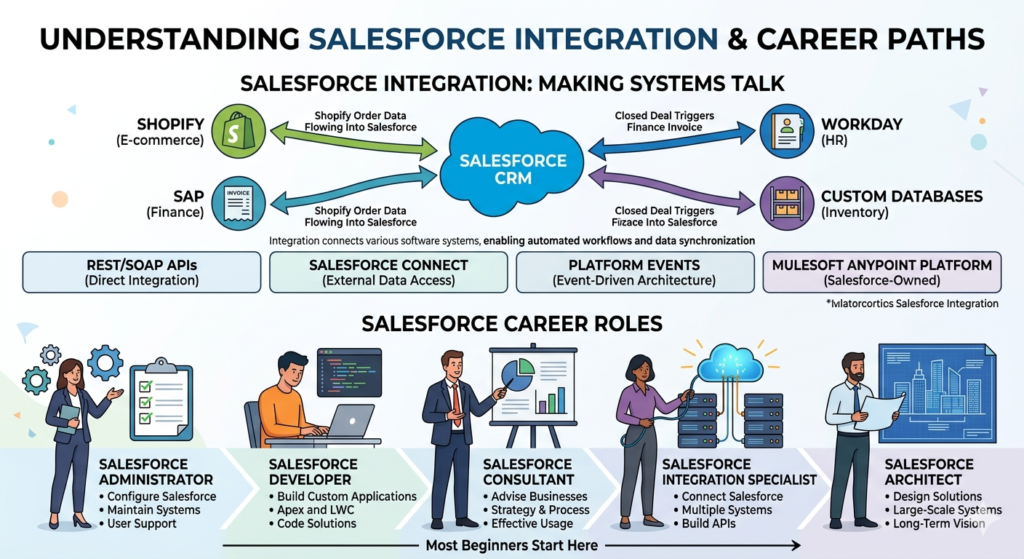
- Salesforce for CRM
- SAP for finance
- Workday for HR
- Shopify for e-commerce
- Custom databases for inventory
Integration means making all these systems talk to each other. For example:
- When a customer places an order on Shopify, that information should automatically flow into Salesforce
- When a sales rep closes a deal in Salesforce, the finance system should automatically generate an invoice
Salesforce offers several integration tools:
- REST/SOAP APIs for direct integration
- Salesforce Connect for external data access
- Platform Events for event-driven architecture
- MuleSoft Anypoint Platform (yes, Salesforce owns MuleSoft!)
Career Roles in Salesforce
When you learn Salesforce, you can pursue roles like:
- Salesforce Administrator — Configure and maintain Salesforce for businesses
- Salesforce Developer — Build custom applications using Apex and LWC
- Salesforce Consultant — Advise companies on how to use Salesforce effectively
- Salesforce Integration Specialist — Connect Salesforce with other systems
- Salesforce Architect — Design large-scale Salesforce solutions
Most beginners start as Salesforce Administrators or Developers.
Understanding MuleSoft: The Integration Platform That Connects Everything
What is MuleSoft?
MuleSoft is an Integration Platform as a Service (iPaaS). While Salesforce is a CRM that happens to have integration capabilities, MuleSoft is purpose-built entirely for integration.
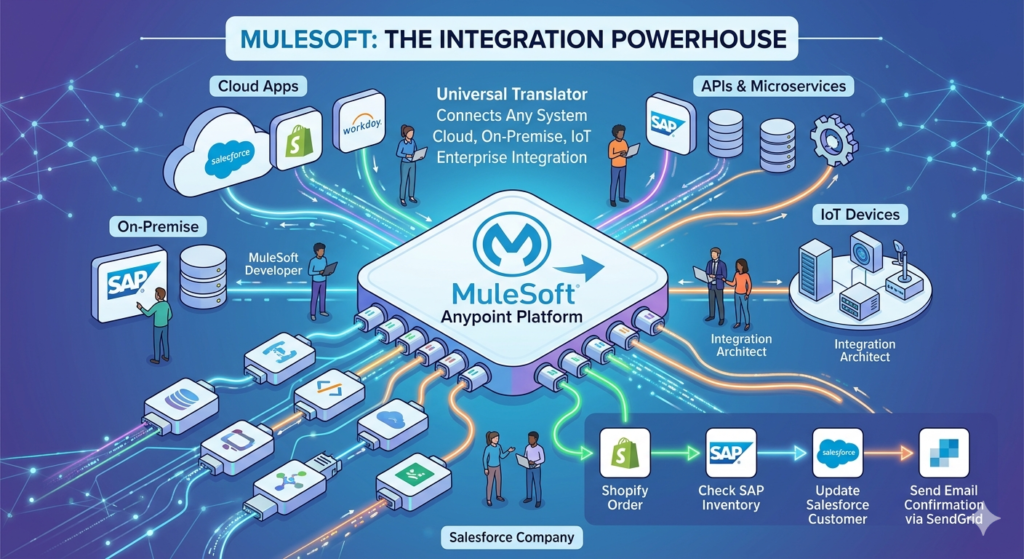
Think of MuleSoft as the universal translator for software systems. It helps companies connect:
- Cloud applications (Salesforce, Workday, ServiceNow)
- On-premise systems (SAP, Oracle databases)
- APIs and microservices
- IoT devices and legacy systems
The core product is MuleSoft Anypoint Platform, which includes:
- Anypoint Studio — A development environment where you build integrations
- API Designer — Tools to design and document APIs
- Runtime Manager — Deploy and monitor your integrations
- API Manager — Secure and manage APIs
- Anypoint Exchange — Library of pre-built connectors and templates
How MuleSoft Works: A Simple Example
Let’s say a retail company wants to:
- Pull customer orders from Shopify
- Check inventory in their SAP system
- Update customer records in Salesforce
- Send order confirmation emails via SendGrid
- Log everything in a database
Without MuleSoft, developers would need to write custom code for each connection. With MuleSoft, you use pre-built connectors and design the integration flow visually (though you still need to understand logic and sometimes write code).
The MuleSoft vs Salesforce Integration Difference
Here’s a key distinction: Salesforce integration tools work best when Salesforce is the center of your ecosystem. If your primary system is Salesforce and you’re connecting a few other apps to it, Salesforce’s native tools may be enough.
MuleSoft shines when you have multiple systems that all need to talk to each other, not just to Salesforce. It’s vendor-agnostic and enterprise-grade.
That’s why in 2018, Salesforce acquired MuleSoft for $6.5 billion — to offer complete integration capabilities to large enterprises.
Career Roles in MuleSoft
MuleSoft professionals typically work as:
- MuleSoft Developer — Build integration flows and APIs
- Integration Architect — Design integration strategies for enterprises
- API Specialist — Focus on API design, security, and governance
- MuleSoft Consultant — Implement MuleSoft solutions for clients
- Platform Engineer — Manage MuleSoft infrastructure and deployments
Most beginners start as MuleSoft Developers.
Salesforce vs MuleSoft: Key Differences in Table Format
| Aspect | Salesforce | MuleSoft |
|---|---|---|
| Primary Purpose | CRM platform with integration capabilities | Pure integration platform (iPaaS) |
| What You Build | Business applications, CRM customizations, workflows | Integration flows, APIs, data transformations |
| Target Users | Business users, admins, developers | Developers, architects, integration specialists |
| Learning Curve | Beginner-friendly (low-code/no-code options) | Steeper (requires programming fundamentals) |
| Coding Required | Moderate (Apex, LWC for advanced roles) | High (Java knowledge beneficial, DataWeave for transformations) |
| Job Market (Entry-level) | High demand for admins and developers | Growing demand, fewer entry-level roles |
| Certifications | Multiple (Admin, Developer, Architect tracks) | Developer and Architect certifications |
| Typical First Job | Salesforce Administrator | MuleSoft Developer |
| Salary Range (India, Fresher) | ₹3.5-6 LPA | ₹4-7 LPA |
| Salary Range (3-5 years) | ₹8-15 LPA | ₹10-18 LPA |
| Company Types | All sizes (startups to enterprises) | Primarily mid-to-large enterprises |
| Learning Resources | Trailhead (free, gamified) | MuleSoft Training (some free, some paid) |
| Community Support | Massive global community | Growing but smaller community |
| Flexibility | Salesforce-ecosystem focused | Works with any system (vendor-agnostic) |
| Freelance Opportunities | High (many small businesses need Salesforce help) | Moderate (mostly enterprise projects) |
Career Paths Comparison: Salesforce vs MuleSoft
The Salesforce Career Path
Entry Point: Salesforce Administrator
- Timeline to job-ready: 2-3 months of focused learning
- What you’ll do: Configure Salesforce, create reports, manage users, automate workflows
- Certification: Salesforce Certified Administrator
- Typical starting salary in India: ₹3.5-5.5 LPA
Next Level: Salesforce Developer
- Timeline: 4-6 months additional learning (or parallel with admin studies)
- What you’ll do: Write Apex code, build Lightning components, create custom applications
- Certification: Salesforce Certified Platform Developer I
- Typical salary (1-2 years exp): ₹6-10 LPA
Advanced: Salesforce Consultant/Architect
- Timeline: 3-5 years of hands-on experience
- What you’ll do: Design solutions, lead implementations, advise C-level executives
- Certifications: Application Architect, System Architect, Technical Architect
- Typical salary: ₹15-30+ LPA
Career Diversity: Salesforce professionals can specialize in specific clouds (Sales Cloud, Service Cloud, Marketing Cloud) or verticals (healthcare, finance, retail).
The MuleSoft Career Path
Entry Point: MuleSoft Developer
- Timeline to job-ready: 4-6 months (assuming basic programming knowledge)
- What you’ll do: Build integration flows, work with APIs, transform data
- Certification: MuleSoft Certified Developer – Level 1
- Typical starting salary in India: ₹4-7 LPA
Important Note: Entry-level MuleSoft jobs are less common than Salesforce admin roles. Most companies hire MuleSoft developers with at least 1-2 years of programming or integration experience.
Next Level: Integration Specialist
- Timeline: 2-3 years of experience
- What you’ll do: Complex integrations, API strategy, performance optimization
- Certification: MuleSoft Certified Developer – Level 2, Integration Architect
- Typical salary: ₹10-16 LPA
Advanced: Integration Architect
- Timeline: 5+ years
- What you’ll do: Enterprise architecture, technical leadership, solution design
- Certification: MuleSoft Certified Integration Architect
- Typical salary: ₹18-35+ LPA
Career Diversity: MuleSoft professionals often become API specialists, microservices architects, or general integration architects who work across platforms.
Salary and Demand Insights: India-Focused Data
MuleSoft Salary India: What to Expect
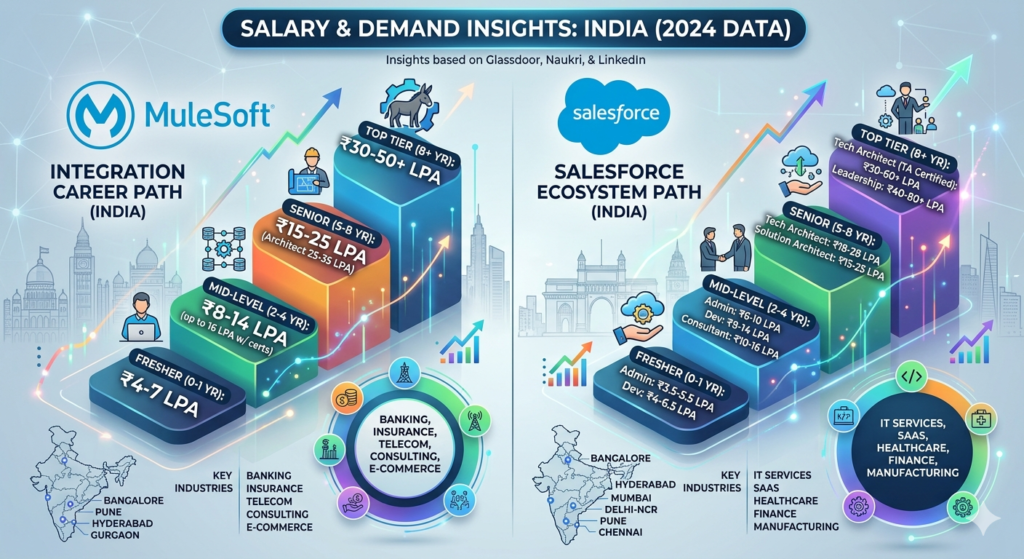
Based on 2024 data from Glassdoor, Naukri, and LinkedIn:
Fresher/Entry-level (0-1 year)
- Base salary: ₹4-7 LPA
- Caveat: Few purely “fresher” roles; most require internship or project experience
Mid-level (2-4 years)
- Base salary: ₹8-14 LPA
- With certifications and good projects: up to ₹16 LPA
Senior (5-8 years)
- Base salary: ₹15-25 LPA
- Architect-level roles: ₹25-35 LPA
Top tier (8+ years, MNCs/Product companies)
- ₹30-50+ LPA
Cities with highest demand: Bangalore, Pune, Hyderabad, Mumbai, Gurgaon
Industries hiring: Banking, insurance, telecom, e-commerce, consulting firms (Deloitte, Accenture, Wipro)
Salesforce Salary India: What to Expect
Fresher/Entry-level (0-1 year)
- Admin roles: ₹3.5-5.5 LPA
- Developer roles: ₹4-6.5 LPA
- Many entry-level opportunities available
Mid-level (2-4 years)
- Admin: ₹6-10 LPA
- Developer: ₹8-14 LPA
- Consultant: ₹10-16 LPA
Senior (5-8 years)
- Technical Architect: ₹18-28 LPA
- Consultant/Solution Architect: ₹15-25 LPA
Top tier (8+ years)
- Technical Architect (TA certified): ₹30-60+ LPA
- Leadership roles: ₹40-80+ LPA
Cities with highest demand: Bangalore, Hyderabad, Mumbai, Delhi-NCR, Pune, Chennai
Industries hiring: IT services, SaaS companies, consulting, manufacturing, healthcare, finance (virtually every sector)
Demand Analysis: Which Has More Jobs?
Salesforce: High Volume, All Levels
- Naukri.com shows 15,000+ active Salesforce jobs in India (as of 2024)
- Entry-level positions widely available
- Small and medium businesses also hire, not just enterprises
- Freelance and contract opportunities abundant
MuleSoft: Growing Demand, Selective Hiring
- Naukri.com shows 2,500+ MuleSoft jobs in India
- Fewer entry-level positions
- Primarily enterprise organizations
- Often combined with Salesforce requirements (e.g., “Salesforce + MuleSoft Developer”)
Verdict on Demand: Salesforce has significantly more job openings, especially for beginners. MuleSoft has strong demand but usually requires some prior experience or a strong programming foundation.
Learning Curve Comparison: Which is Easier to Learn?
Salesforce Learning Curve
Beginner-Friendly Factors:
- Trailhead Platform: Salesforce’s free learning platform is gamified, interactive, and extremely beginner-friendly. You earn badges and can learn entirely for free.
- Low-Code Start: You can become a Salesforce Admin with minimal coding. Much is point-and-click configuration.
- Clear Learning Path: Administrator → Developer → Consultant/Architect progression is well-defined.
- Community Support: Massive community with forums, user groups, YouTube channels, and blogs in multiple languages.
Challenges:
- Ecosystem Complexity: Salesforce has many products. Understanding where each fits can be overwhelming initially.
- Certification Costs: While learning is free, certification exams cost $200 each (₹16,000+). You need multiple certifications to advance.
- Staying Updated: Salesforce releases updates three times a year. You need to keep learning continuously.
Realistic Timeline for Job Readiness:
- Salesforce Admin: 2-3 months of focused study (4-5 hours daily)
- Salesforce Developer: 4-6 months (if learning Apex from scratch)
- First job: Many get admin roles within 3-6 months of starting
MuleSoft Learning Curve
What Makes It Challenging:
- Programming Prerequisites: While MuleSoft uses visual development (Anypoint Studio), you need to understand:
- API concepts (REST, SOAP, JSON, XML)
- Basic programming logic
- DataWeave (MuleSoft’s transformation language)
- Java helps significantly
- Enterprise Concepts: MuleSoft deals with enterprise architecture, messaging queues, security protocols — concepts that beginners may find abstract.
- Less Beginner Content: Compared to Salesforce, there’s less free, structured learning material for absolute beginners.
Beginner-Friendly Factors:
- MuleSoft Training: Official training is high-quality (though some courses are paid)
- Visual Development: Once you understand basics, building flows in Anypoint Studio is visual and intuitive
- Clear Certification Path: Developer Level 1 → Level 2 → Architect
Challenges:
- Hands-On Practice: Setting up practice environments is more complex than Salesforce’s free Developer Orgs
- Fewer Entry Points: Since most jobs require experience, breaking in is harder
- Certification Costs: MuleSoft exams cost $250 (₹20,000+)
Realistic Timeline for Job Readiness:
- If you have programming background: 3-4 months of focused learning
- If you’re a complete beginner: 6-8 months (learning programming fundamentals + MuleSoft)
- First job: Often easier if you transition from another technical role (developer, support engineer)
MuleSoft Career Scope: Is It Worth It for Freshers?
The Reality Check
MuleSoft career scope is excellent — but with a caveat. The demand for MuleSoft skills is growing faster than supply, especially as more enterprises adopt API-led connectivity and microservices architecture.
Why MuleSoft Scope is Strong:
- Enterprise Adoption: Large organizations are standardizing on MuleSoft for integration
- Future-Proof Skill: API and integration expertise is becoming more critical, not less
- High Pay Ceiling: MuleSoft salaries tend to be higher than general developer roles
- Cross-Platform Knowledge: You’ll work with multiple technologies, making you versatile
- Salesforce Synergy: Since Salesforce owns MuleSoft, having both skills is powerful
The Fresher Challenge:
Most MuleSoft career opportunities are for candidates with:
- 1-2 years of software development experience, OR
- Strong programming fundamentals and impressive projects, OR
- Prior Salesforce/integration background
Pure fresher roles exist but are less common than in Salesforce.
Strategic Entry Points for Freshers
If you’re determined to build a MuleSoft career as a fresher:
Path 1: Campus Placements
- Some consulting firms (Deloitte, PwC, Wipro) hire freshers and train them in MuleSoft
Path 2: Build a Strong Portfolio
- Learn programming basics (Java recommended)
- Complete MuleSoft training
- Build 3-5 real integration projects (use free Anypoint Platform trial)
- Get MuleSoft Developer Level 1 certification
- Showcase on GitHub and LinkedIn
Path 3: Start with Related Roles
- Join as a junior developer or API tester
- Transition to MuleSoft within 1-2 years
Path 4: Combine with Salesforce
- Start as Salesforce admin/developer
- Learn MuleSoft on the side
- Move into Salesforce-MuleSoft integration roles (high demand)
Decision Guide: Who Should Choose What?
Choose Salesforce If You:
✅ Are a complete beginner with no programming background
✅ Want to get job-ready quickly (3-6 months)
✅ Prefer a low-code/no-code start with option to learn coding later
✅ Are looking for abundant entry-level opportunities
✅ Want flexibility to work with companies of all sizes
✅ Enjoy business process thinking (how companies operate)
✅ Are interested in CRM, sales, marketing, customer service domains
✅ Want strong freelance and remote work opportunities
✅ Prefer a clear, gamified learning path (Trailhead)
✅ Are okay with continuous learning (frequent Salesforce updates)
Best for: Commerce graduates, freshers from non-CS backgrounds, career changers, people who want quick employment
Choose MuleSoft If You:
✅ Have basic programming knowledge (or strong willingness to learn)
✅ Are fascinated by how different systems connect
✅ Enjoy technical problem-solving and architecture
✅ Can invest 6-8 months in learning before job hunting
✅ Target large enterprises and consulting firms
✅ Want to become an integration/API specialist
✅ Like working with multiple technologies simultaneously
✅ Are comfortable with steeper learning curves
✅ Have a CS/IT background or prior development experience
✅ Want specialized, high-paying career trajectory
Best for: Engineering graduates (CS/IT), developers looking to specialize, technical problem-solvers, those interested in enterprise architecture
Combination Approach: The Strategic Choice
Here’s what many successful professionals do: Start with Salesforce, add MuleSoft strategically.
Why This Works:
- Fast Entry: Get a Salesforce job within months, start earning
- Natural Progression: Many Salesforce roles need integration knowledge
- Market Demand: “Salesforce + MuleSoft” is a high-demand combination
- Salary Premium: Dual-skilled professionals command 20-30% higher salaries
- Career Security: You’re valuable across the entire Salesforce ecosystem
The Strategic Learning Path:
Year 1:
- Month 1-3: Salesforce Administrator certification + job hunt
- Month 4-12: Work as Salesforce Admin, learn on the job
Year 2:
- Month 1-6: Salesforce Platform Developer I certification
- Month 7-12: Take on development tasks, learn MuleSoft basics (self-study)
Year 3:
- Month 1-6: MuleSoft Developer Level 1 certification
- Month 7-12: Look for roles combining both skills or full MuleSoft roles
By Year 3, you’re a Salesforce-MuleSoft Integration Specialist — a rare, high-value skillset.
Real-World Career Scenarios: Who Chose What and Why
Case Study 1: Priya — Commerce Graduate, Chose Salesforce
Background: B.Com graduate, no coding experience, looking for IT career
Choice: Salesforce Administrator
Path:
- Spent 3 months on Trailhead
- Got Admin certification
- Joined small Salesforce implementation company at ₹4.5 LPA
- After 18 months, moved to mid-size company as Sr. Admin at ₹8 LPA
- Now learning Platform Developer (Year 2)
Why it worked: Low barrier to entry, business-friendly skills matched her commerce background
Case Study 2: Rahul — B.Tech CS, Chose MuleSoft
Background: Computer Science graduate, internship in Java development
Choice: MuleSoft Developer
Path:
- Learned MuleSoft during final semester
- Got Developer Level 1 certification
- Joined Deloitte through campus placement at ₹6.5 LPA (MuleSoft track)
- After 2 years, salary is ₹12 LPA
- Working toward Integration Architect certification
Why it worked: Strong technical foundation, wanted specialized integration career
Case Study 3: Anjali — B.Tech IT, Chose Both Strategically
Background: IT engineering graduate, moderate programming skills
Choice: Salesforce first, then MuleSoft
Path:
- Got Salesforce Admin + Developer certifications in college
- Joined Salesforce consultancy at ₹5 LPA
- After 1 year, company sent her for MuleSoft training
- Now works as Salesforce-MuleSoft Integration Consultant at ₹14 LPA (3 years experience)
Why it worked: Combined skills made her extremely valuable to employers
Practical Learning Roadmaps
Salesforce Admin to Developer Roadmap (6 Months)
Month 1-2: Administrator Track
- Complete Trailhead: Admin Beginner, Intermediate trails
- Focus: User management, security, data modeling, automation (Flows, Process Builder)
- Practice: Get a free Developer Org, configure everything
Month 3:
- Take practice exams
- Get Salesforce Certified Administrator certification
- Start job applications
Month 4-5: Developer Fundamentals
- Learn Apex basics (Trailhead: Apex Basics, Triggers)
- Understand Salesforce DX
- Learn Lightning Web Components (LWC) basics
- Build small projects
Month 6:
- Platform Developer I certification
- Advanced job applications for developer roles
- Build portfolio of projects on GitHub
Resources:
- Trailhead (100% free)
- YouTube: Salesforce Hulk, Automation Champion, SFDCFacts
- Communities: Salesforce Stack Exchange, Trailblazer Community
MuleSoft Developer Roadmap (6 Months, with programming basics)
Month 1-2: Prerequisites
- If needed: Java basics (variables, loops, OOP concepts)
- API fundamentals: REST, HTTP methods, JSON/XML
- Basic SQL
Month 3-4: MuleSoft Fundamentals
- MuleSoft Training: “MuleSoft Fundamentals” (free)
- Install Anypoint Studio
- Learn DataWeave for transformations
- Understand connectors, flows, error handling
- Build 2-3 basic integrations
Month 5:
- MuleSoft Training: “API-Led Connectivity” and “Development Fundamentals”
- Build real projects:
- Salesforce-to-Database sync
- REST API creation
- File processing integration
- Document and upload to GitHub
Month 6:
- Practice with Developer Level 1 exam prep
- Get certified
- Job hunt with portfolio showcasing
Resources:
- MuleSoft Training portal (some free, some paid)
- YouTube: Manish Kumar MuleSoft, MuleSoft Tutorials
- Communities: MuleSoft Help Center, Stack Overflow
Combined Skills Roadmap (12-Month Strategic Plan)
Months 1-3: Salesforce Foundation
- Admin certification
- Start job hunt
Months 4-6: Salesforce Employment
- Work as Admin (ideally)
- Or continue developer learning if no job yet
Months 7-9: Salesforce Development + MuleSoft Introduction
- Platform Developer I certification
- Start MuleSoft self-study (evenings/weekends)
Months 10-12: MuleSoft Deep Dive
- Complete MuleSoft training
- Build Salesforce-MuleSoft integration projects
- Get MuleSoft Developer Level 1 certified
Result: By end of Year 1, you have both skills, 6-9 months work experience, multiple certifications, and strong portfolio.
Common Mistakes to Avoid
Salesforce Learning Mistakes
❌ Rushing to certifications without hands-on practice
- Certifications are valuable, but employers want real project experience
- Fix: Build projects, volunteer for nonprofits (Salesforce.org), do mock implementations
❌ Ignoring the business side
- Salesforce is business software; understanding business processes is crucial
- Fix: Learn sales cycles, customer service workflows, marketing funnels
❌ Not staying updated
- Salesforce updates three times a year; old knowledge becomes outdated
- Fix: Subscribe to Salesforce release notes, renew certifications (maintenance exams)
❌ Focusing only on one cloud
- Being multi-cloud (Sales + Service + Experience Cloud) increases value
- Fix: Gain exposure to multiple Salesforce products
MuleSoft Learning Mistakes
❌ Skipping programming fundamentals
- MuleSoft is easier with programming knowledge; skipping it creates struggles later
- Fix: Learn Java basics, understand APIs thoroughly before diving in
❌ Only theoretical learning
- Integration is practical; you must build actual flows
- Fix: Use free Anypoint Platform trial, build 5-7 real projects
❌ Ignoring API design principles
- MuleSoft isn’t just about connecting systems; it’s about good API design
- Fix: Study RESTful design, API security, best practices
❌ Not understanding enterprise architecture
- MuleSoft operates in complex environments
- Fix: Learn about microservices, message queues, ESB concepts
Certification Strategy: ROI and Planning
Salesforce Certifications Worth Getting
Must-Have (Foundation):
- Salesforce Certified Administrator — $200
- Entry ticket to job market
- ROI: Very high for beginners
- Platform Developer I — $200
- Opens developer roles
- ROI: High if you want to code
High-Value (Specialization):
3. Platform App Builder — $200
- Complements Admin, shows you can build apps
- ROI: Moderate
- Integration Architecture Designer — $400 (prerequisite required)
- For integration specialist path
- ROI: Very high if pursuing Salesforce-MuleSoft career
- Technical Architect — $6,000 (full review board process)
- Pinnacle of Salesforce careers
- ROI: Extremely high at senior level (salaries ₹30L+)
Total investment for strong start: ₹30,000-40,000 (Admin + Developer + one specialization)
MuleSoft Certifications Worth Getting
Must-Have:
- MuleSoft Certified Developer – Level 1 (Mule 4) — $250
- Foundation certification
- ROI: High for entry to mid-level roles
High-Value:
2. MuleSoft Certified Developer – Level 2 (Mule 4) — $250
- Shows advanced development skills
- ROI: Very high (often ₹3-5L salary jump)
- MuleSoft Certified Integration Architect – Level 1 — $250
- Architect-level certification
- ROI: Very high at 3-5 years experience
Total investment for strong start: ₹20,000-25,000 (Level 1, then Level 2 within 18-24 months)
Industry Trends: What’s Coming in 2024-2025?
Salesforce Industry Trends
- AI Integration (Einstein GPT)
- Salesforce is heavily investing in AI
- Learning Einstein capabilities will be valuable
- Hyperautomation
- Flow Builder is getting more powerful
- Low-code automation skills in high demand
- Experience Cloud Growth
- Customer portals, partner portals expanding
- Experience Cloud expertise is valuable specialization
- Data Cloud
- Customer data platform integration
- New career opportunities emerging
Career Advice: Add AI/ML awareness to your Salesforce skills, focus on Flow Builder mastery
MuleSoft Industry Trends
- API-Led Connectivity Everywhere
- More companies adopting three-layer API architecture
- Demand for proper API design is increasing
- RPA + MuleSoft Integration
- Integration between MuleSoft and RPA tools (UiPath, Automation Anywhere)
- New hybrid roles emerging
- Composable Enterprise
- Businesses using best-of-breed applications, needing strong integration
- MuleSoft as the glue layer
- Salesforce-MuleSoft Unified Roles
- More job postings requiring both skills
- Premium salaries for dual expertise
Career Advice: Learn API design patterns, understand microservices architecture, consider pairing MuleSoft with Salesforce or cloud platforms (AWS/Azure)
Financial Planning: ROI on Your Learning Investment
Salesforce ROI Calculation
Investment:
- Learning: ₹0 (Trailhead is free)
- Certifications: ₹16,000 (Admin) + ₹16,000 (Developer) = ₹32,000
- Time: 4-6 months (opportunity cost if not working)
Returns (Conservative):
- First job: ₹4.5 LPA (average admin role)
- After 2 years: ₹8-10 LPA
- After 4 years: ₹12-16 LPA
ROI: Investment of ₹32,000 leads to ₹4.5L+ annual income in 6 months. That’s 1,400% return in first year alone.
Payback period: Usually 1-2 months of first salary
MuleSoft ROI Calculation
Investment:
- Learning: ₹10,000-30,000 (if you take paid courses; can be ₹0 if self-study)
- Certifications: ₹20,000 (Developer Level 1)
- Time: 6-8 months (including prerequisites)
Returns (Conservative):
- First job: ₹5.5 LPA (if you break in as fresher) to ₹8 LPA (if lateral entry)
- After 2 years: ₹10-14 LPA
- After 4 years: ₹15-20 LPA
ROI: Investment of ₹30,000-50,000 leads to ₹5.5L+ income. Slightly longer timeline but higher growth trajectory.
Payback period: 1-2 months of first salary
Combined Skills ROI
Investment:
- Salesforce certifications: ₹32,000
- MuleSoft certification: ₹20,000
- Total: ₹52,000 + time investment
Returns (Aggressive but realistic):
- After Year 1 (Salesforce): ₹5-6 LPA
- After Year 2 (Salesforce + learning MuleSoft): ₹8-10 LPA
- After Year 3 (Salesforce + MuleSoft certified): ₹12-16 LPA
- After Year 5: ₹18-25 LPA (Integration Architect level)
ROI: Highest among all three options, but requires longer commitment
Answering Your Biggest Questions
“I’m from a non-CS background. Can I still learn Salesforce or MuleSoft?”
Salesforce: Absolutely yes. Many successful Salesforce professionals come from commerce, arts, even biotechnology backgrounds. The platform is designed to be business-friendly.
MuleSoft: Challenging but possible. You’ll need to invest more time learning programming basics first. Consider starting with Salesforce, then adding MuleSoft.
“Which has better work-life balance?”
Salesforce: Generally good work-life balance, especially in product companies and established consultancies. Implementation projects can get hectic near go-live.
MuleSoft: Similar to general software development roles. Integration projects can have tight deadlines, but overall balanced.
Verdict: Comparable, depends more on company culture than technology choice.
“Can I freelance with these skills?”
Salesforce: Excellent freelance opportunities. Many small businesses need Salesforce help but can’t afford full-time resources. Platforms like Upwork, Toptal have steady demand.
MuleSoft: Limited freelance opportunities. Most MuleSoft work is enterprise projects requiring team collaboration and long-term commitments.
Verdict: Salesforce wins for freelance flexibility.
“What about remote work opportunities?”
Both have excellent remote work options, especially post-COVID. Many companies hire Salesforce and MuleSoft professionals remotely, including international opportunities for experienced candidates.
“How long before I can switch to a product company?”
Salesforce path: After 2-3 years in service/consulting, you can target Salesforce (the company) or Salesforce ISV partners. Compensation jumps significantly (30-50%).
MuleSoft path: After 2-3 years, you can target MuleSoft (under Salesforce), tech product companies building integrations, or specialized integration firms.
“Is there age bias? I’m 28 and want to switch careers.”
Neither field has significant age bias for entry. Salesforce especially welcomes career changers. At 28, if you get certified and show strong learning ability, you’ll find opportunities.
MuleSoft might prefer candidates with prior technical background, but age itself isn’t a barrier.
Your Action Plan: Next Steps Based on Your Profile
Profile 1: College Student (Any Branch)
If CS/IT: Start with Salesforce Admin + Developer, add MuleSoft in final year
If Non-CS: Focus on Salesforce Admin, get certified before campus placements
Timeline: Start 1 year before graduation
Goal: Get placement as Salesforce Admin/Developer or join consulting firm
Profile 2: Recent Graduate (0-6 Months Since Graduation)
Action Plan:
- Choose Salesforce for faster job entry
- Spend 3 months on Admin certification + projects
- Start applying aggressively
- If no job in Month 4, add Platform Developer
- Target ₹3.5-5L roles, focus on learning not just salary
Profile 3: Working Professional (Different Field, Want to Switch)
Action Plan:
- Evenings/weekends: Salesforce Admin track (3-4 months)
- Get certified while still employed
- Build portfolio projects
- Start applying after certification
- Accept lateral salary if needed (long-term ROI is worth it)
Profile 4: Software Developer (Want to Specialize)
Action Plan:
- If you work with APIs/integrations: MuleSoft is natural fit
- If you work with business applications: Salesforce
- Best: Get certified in both over 6-8 months
- Look for integration architect roles
- Target salary jump of 30-40%
Profile 5: Ambitious Long-Term Planner
Action Plan (3-Year Vision):
- Year 1: Salesforce Admin → Developer, work in role
- Year 2: MuleSoft Developer Level 1, work on integration projects
- Year 3: Integration Architect certification, target ₹15L+ roles
- Year 5: Technical/Integration Architect, ₹20-30L range
The Honest Verdict: Which Should You Choose?
After analyzing career paths, salaries, demand, and learning curves, here’s the practical truth:
Choose Salesforce if:
- You’re a beginner with no tech background
- You want to get employed quickly
- You value flexibility and options
- You want to work across company sizes
- You prefer starting with low-code
Bottom line: Salesforce is the safer, faster path to your first tech job.
Choose MuleSoft if:
- You have programming fundamentals
- You want specialized, technical depth
- You’re patient with job hunting
- You target enterprise environments
- You enjoy pure integration and API work
Bottom line: MuleSoft is the specialist path with higher long-term ceiling, but steeper entry.
Choose Both (Strategically) if:
- You have 1-2 year timeline
- You want maximum career security
- You’re willing to invest in continuous learning
- You want to command premium salaries
- You see yourself as integration architect
Bottom line: Combined skills offer the best long-term ROI and career security.
Conclusion: Your Integration Career Starts Now
The Salesforce vs MuleSoft career debate doesn’t have to be either-or. The real question is: What’s your current situation, and what’s the smartest first step?
For 90% of beginners, that first step is Salesforce. It’s accessible, beginner-friendly, has abundant jobs, and gives you a solid foundation in business technology. You can always add MuleSoft later — and when you do, you’ll be even more valuable.
For the 10% who already have technical background or are absolutely certain they want to be integration specialists, MuleSoft is a rewarding path. The demand is strong, the work is intellectually challenging, and the salary growth is excellent.
The smartest professionals, however, don’t limit themselves. They start with one, master it, then strategically add the other. That’s how you build a recession-proof, high-paying, future-ready integration career.
Your 30-Day Challenge
Pick one path today:
Salesforce Track:
- Day 1-7: Complete “Admin Beginner” trail on Trailhead
- Day 8-14: Build your first app in Developer Org
- Day 15-21: Study for Admin exam
- Day 22-30: Take practice tests, schedule certification
MuleSoft Track:
- Day 1-7: Complete “MuleSoft Fundamentals” (free training)
- Day 8-14: Install Anypoint Studio, build first flow
- Day 15-21: Create API with DataWeave transformation
- Day 22-30: Build real integration project
Combined Track:
- Weeks 1-2: Salesforce Admin basics
- Weeks 3-4: MuleSoft fundamentals exploration
- Week 4: Decide primary focus based on which felt better
Don’t overthink. Start learning today. The integration career you want is on the other side of that first Trailhead badge or first MuleSoft flow.
The market is waiting for skilled professionals. The question is: When will you be ready?
About RizeX Labs
At RizeX Labs, we specialize in delivering advanced Salesforce solutions, including integrations, automation, and enterprise-grade implementations. Our expertise spans across both native Salesforce capabilities and external integration platforms like MuleSoft.
We combine real-world project experience with industry best practices to help businesses connect systems, streamline workflows, and unlock data-driven decision-making.
Our mission is simple: transform fragmented systems into a unified, scalable, and efficient ecosystem.
Internal Links:
- Salesforce Admin course page
Salesforce Flows vs Apex: When Should You Use Code vs No-Code Automation? - Salesforce Nonprofit Cloud: Features, Use Cases, and Career Opportunities (2026 Guide)
- Salesforce Net Zero Cloud: What It Is and Why It’s the Next Green Career Niche (2026 Guide)
- Salesforce Slack Integration: How It Works and What Developers Need to Know
- Salesforce Named Credentials: What They Are and How to Use Them Safely
- Salesforce Deployment Best Practices: Change Sets vs Salesforce CLI vs Gearset
External Links:
McKinsey Sales Growth Reports
Gartner Sales Automation Insights
