
Introduction: Why Bulkification Is the Most Important Apex Skill You Will Ever Learn {#introduction}
Imagine you are a Salesforce developer. You have just written a beautiful Apex trigger. It works perfectly when you test it with one record. Your unit tests pass. You deploy to production with confidence.
Then, on the first Monday after go-live, your company’s data migration team imports 50,000 account records using Data Loader.
Your trigger fires. Salesforce hits a governor limit after processing the first 100 records. The entire import fails. Your phone starts ringing. Your email inbox explodes. And somewhere in the org, a System Administrator is filing a support ticket with a subject line that reads: “Everything is broken.”
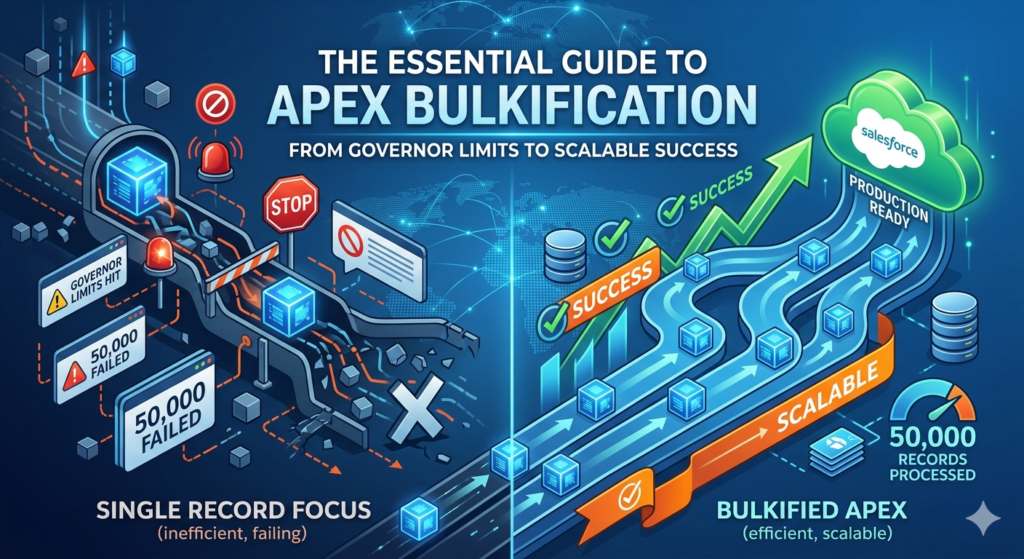
This scenario is not hypothetical. It happens in real Salesforce organizations every week. And in almost every case, the root cause is the same: the Apex code was not written to handle bulk operations.
Welcome to the world of how to write bulkified Apex code — one of the most critical, most tested, and most frequently misunderstood concepts in the entire Salesforce development ecosystem.
Bulkification is the practice of writing Apex code that can process large volumes of records efficiently, without violating Salesforce’s governor limits. It is not just a coding style preference. It is a fundamental architectural requirement that separates amateur Apex from production-grade, enterprise-ready code.
In this guide, we will cover:
- What Salesforce governor limits are and why they exist
- The 7 most important Apex best practices for writing scalable code
- Real code examples showing bad patterns versus bulkified Apex code
- A complete step-by-step transformation of a broken trigger into a properly bulkified one
- Common mistakes that even experienced developers make
- Pro tips for testing and monitoring Salesforce bulk processing at scale
Whether you are a junior developer writing your first trigger, an admin transitioning into Apex development, or an architect reviewing your team’s code quality — this guide has everything you need.
Let us start with the foundation.
Section 1: Understanding Salesforce Governor Limits First {#governor-limits}
Before you can write bulkified Apex code, you need to deeply understand why it is necessary. The answer comes down to one concept: Governor Limits.
What Are Governor Limits?
Salesforce is a multi-tenant platform. That means thousands of different organizations — from small startups to Fortune 500 enterprises — share the same underlying infrastructure. To ensure that one customer’s runaway code does not degrade performance for everyone else, Salesforce enforces strict runtime limits on every transaction.
These limits are called Governor Limits, and they are enforced by the Apex runtime engine. If your code exceeds any single governor limit, the entire transaction fails with an unhandled exception. There is no warning. There is no graceful degradation. The transaction simply stops.
The Most Critical Governor Limits for Apex Developers
Here are the limits you will encounter most frequently and need to design around:
| Governor Limit | Per-Transaction Limit | Why It Matters |
|---|---|---|
| SOQL Queries | 100 | Most commonly hit by nested queries in loops |
| SOQL Query Rows Returned | 50,000 | Large data sets without selective filters |
| DML Statements | 150 | Insert/update/delete calls inside loops |
| DML Rows Processed | 10,000 | Updating too many records in one transaction |
| CPU Time | 10,000 ms (synchronous) | Complex logic in nested loops |
| Heap Size | 6 MB (synchronous) | Large collections stored in memory |
| Callouts | 100 | External API calls |
| Future Method Calls | 50 | Async processing limit |
Why These Limits Make Bulkification Non-Negotiable
Here is the critical insight that every developer must internalize:
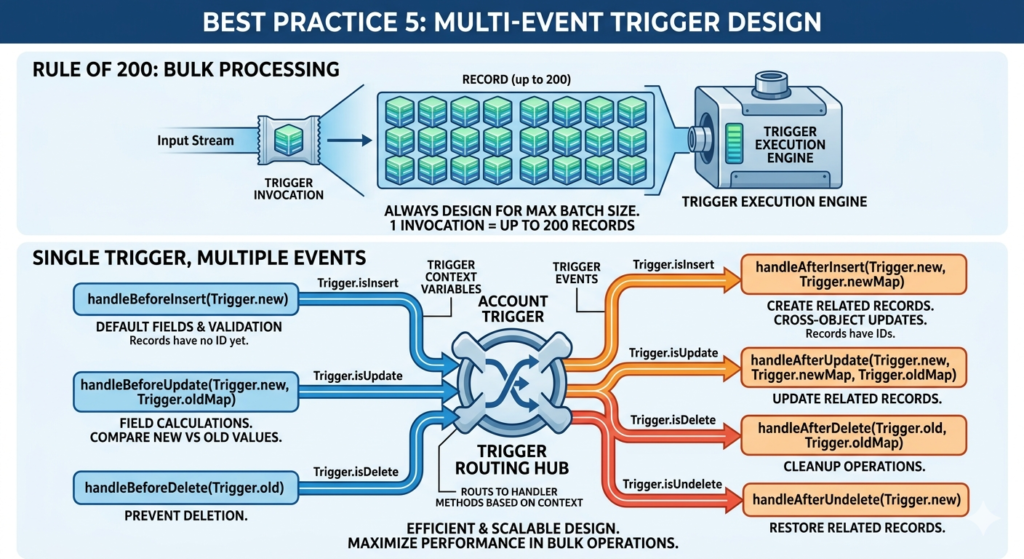
Apex triggers do not fire once per record. They fire once per batch of records — and that batch can contain up to 200 records.
When a user saves a single Account, your trigger receives 1 record. When Data Loader imports 10,000 Accounts, your trigger fires in batches of 200 records — 50 separate trigger invocations, each with up to 200 records in Trigger.new.
Now imagine a trigger with a SOQL query inside a loop that runs once per record. In the single-record case, it uses 1 SOQL query. In a 200-record batch, it uses 200 SOQL queries — hitting the 100-query limit and failing catastrophically at record 101.
This is precisely why bulkified Apex code and proper Salesforce bulk processing techniques are not optional. They are the price of admission for writing Apex that works in the real world.
The Bulkification Mindset
Before writing a single line of Apex, train yourself to ask this question:
“What happens to this code when 200 records are processed simultaneously?”
If the answer is “it breaks” — you need to bulkify. Every single Apex best practice in this guide flows from this foundational mindset shift.
Best Practice 1: Always Process Records in Collections {#practice-1}
The Core Principle
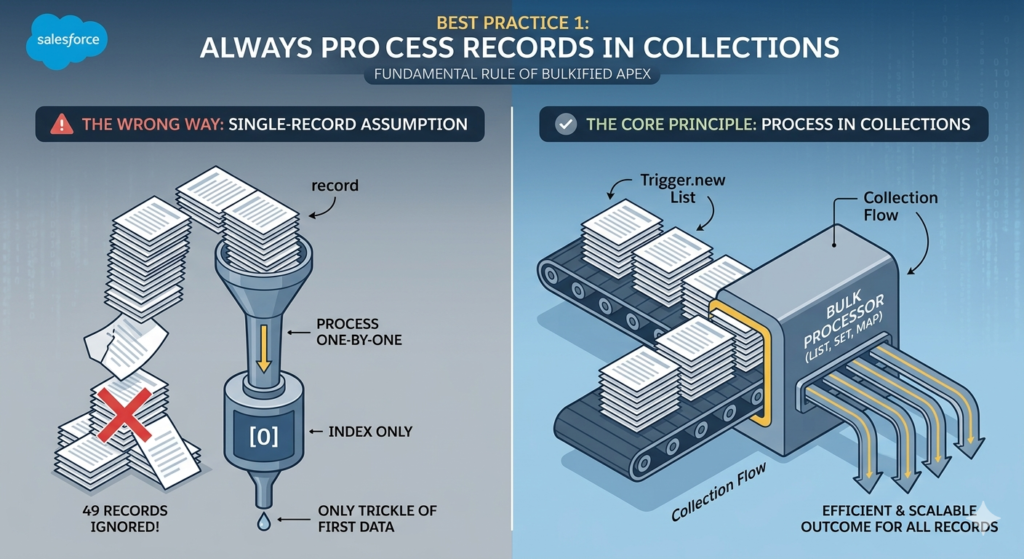
The first and most fundamental rule of bulkified Apex code is simple: never assume you are working with a single record. Always write your code to handle collections of records — lists, sets, and maps — from the very beginning.
When an Apex trigger fires, Salesforce provides your code with Trigger.new — a List of all records being processed in the current batch. Your job is to process every record in that list efficiently, as a group, rather than handling them one at a time.
Understanding Trigger Context Variables
Before looking at code examples, here are the key trigger context variables you will use for bulk processing:
| Variable | Type | When Available | Description |
|---|---|---|---|
Trigger.new | List<SObject> | Insert, Update, Undelete | New versions of records being processed |
Trigger.old | List<SObject> | Update, Delete | Previous versions of records |
Trigger.newMap | Map<Id, SObject> | Update | Map of Id to new record versions |
Trigger.oldMap | Map<Id, SObject> | Update, Delete | Map of Id to old record versions |
Trigger.size | Integer | Always | Total number of records in trigger invocation |
❌ The Wrong Way: Single-Record Assumption
Here is what non-bulkified code looks like. This is the pattern that breaks under bulk operations:
apex// BAD EXAMPLE - DO NOT USE IN PRODUCTION
trigger OpportunityTrigger on Opportunity (before insert) {

    // Assuming only ONE record is ever processed
    // This breaks immediately when multiple records are inserted
    Opportunity opp = Trigger.new[0]; // Only getting the first record!

    if (opp.Amount > 100000) {
        opp.Description = 'High Value Deal - Requires VP Approval';
    }
}
What is wrong here?
Trigger.new[0]only accesses the first record in the batch- If 50 opportunities are inserted simultaneously, 49 of them are completely ignored
- The code will silently fail for all records except the first — no error, no warning, just wrong behavior
✅ The Right Way: Collection-Based Processing
Here is the same logic written correctly as bulkified Apex code:
apex// GOOD EXAMPLE - Bulkified Apex Code
trigger OpportunityTrigger on Opportunity (before insert) {

    // Iterate over ALL records in the trigger batch
    // Trigger.new is a List<Opportunity> containing ALL records being inserted
    for (Opportunity opp : Trigger.new) {

        // This logic now runs for EVERY record in the batch
        // Whether 1 record or 200 records are being inserted
        if (opp.Amount > 100000) {
            opp.Description = 'High Value Deal - Requires VP Approval';
        }
    }
}
Why this works:
- The
forloop iterates over every record inTrigger.new - Whether 1 or 200 records are being processed, every single one is handled
- The logic is identical for single-record saves and bulk imports
- This is the foundation of Salesforce bulk processing in triggers
Working with Lists and Sets
Beyond basic loops, bulkified code frequently uses Lists and Sets to collect data from multiple records before performing any database operations:
apex// Collecting IDs from all records in the trigger for later use
Set<Id> accountIds = new Set<Id>();
List<Opportunity> oppsToUpdate = new List<Opportunity>();

for (Opportunity opp : Trigger.new) {
    // Collect account IDs from ALL records first
    if (opp.AccountId != null) {
        accountIds.add(opp.AccountId);
    }
}

// Now use the collected IDs in a SINGLE query (not inside the loop)
// This is covered in detail in Best Practice 2
List<Account> relatedAccounts = [
    SELECT Id, Name, Industry
    FROM Account
    WHERE Id IN :accountIds
];
The Key Takeaway
Always think in plurals. Not “the record” but “the records.” Not “the opportunity” but “all the opportunities.” This mental shift is the first step toward writing genuinely bulkified Apex code.
Best Practice 2: Never Use SOQL Queries Inside Loops {#practice-2}
Why This Is the Most Common Governor Limit Violation
If there is one Apex best practice that every Salesforce developer quiz, certification exam, and code review checks for — it is this one: never, ever put a SOQL query inside a for loop.
This single mistake is responsible for more governor limit violations than any other pattern in Apex development. It looks innocent when you test it with one record. It fails catastrophically in production when bulk operations run.
Understanding the Math
Salesforce allows 100 SOQL queries per transaction. A trigger batch can contain up to 200 records. If you have one SOQL query inside a loop that processes each record:
- 1 record processed = 1 SOQL query used ✅
- 50 records processed = 50 SOQL queries used ✅
- 100 records processed = 100 SOQL queries used — AT THE LIMIT ⚠️
- 101 records processed = 101 SOQL queries needed — TRANSACTION FAILS ❌
And that assumes you only have one query inside one loop. Real triggers often have multiple queries, helper class queries, validation queries, and more — all sharing the same 100-query budget.
❌ The Wrong Way: SOQL Inside a Loop
apex// BAD EXAMPLE - SOQL Inside Loop - DO NOT USE
trigger ContactTrigger on Contact (after insert) {

    for (Contact con : Trigger.new) {

        // THIS IS THE KILLER - A SOQL QUERY INSIDE A LOOP
        // For every single contact inserted, we fire a separate SOQL query
        // Insert 101 contacts = 101 SOQL queries = GOVERNOR LIMIT EXCEEDED
        Account relatedAccount = [
            SELECT Id, Name, Industry, AnnualRevenue
            FROM Account
            WHERE Id = :con.AccountId
            LIMIT 1
        ];

        // Do something with the account data
        if (relatedAccount.Industry == 'Technology') {
            // ... some logic
        }
    }
}
Why this fails:
- Every iteration of the loop fires a new, independent SOQL query
- 200 contacts inserted = 200 separate queries = 100 over the limit
- This will fail in any real data migration or bulk import scenario
✅ The Right Way: Query Once, Process Many
The fix follows a clean, three-step pattern that is at the heart of bulkified Apex code:
- Collect — Gather all the IDs you need from
Trigger.newin one pass - Query — Fire a single SOQL query that retrieves all related records at once using
IN - Map — Store the query results in a Map for O(1) lookup efficiency
- Process — Loop through
Trigger.newand use the Map to access related data
apex// GOOD EXAMPLE - Bulkified SOQL Pattern
trigger ContactTrigger on Contact (after insert) {

    // STEP 1: COLLECT - Gather all Account IDs from ALL contacts in the batch
    Set<Id> accountIds = new Set<Id>();

    for (Contact con : Trigger.new) {
        if (con.AccountId != null) {
            accountIds.add(con.AccountId);
        }
    }

    // STEP 2: QUERY - ONE single SOQL query for ALL related accounts
    // Using the IN clause to fetch all needed records in one shot
    // This uses exactly 1 SOQL query regardless of how many contacts are processed
    Map<Id, Account> accountMap = new Map<Id, Account>(
        [SELECT Id, Name, Industry, AnnualRevenue
         FROM Account
         WHERE Id IN :accountIds]
    );

    // STEP 3: PROCESS - Loop through contacts and look up data from the Map
    List<Contact> contactsToUpdate = new List<Contact>();

    for (Contact con : Trigger.new) {
        if (con.AccountId != null && accountMap.containsKey(con.AccountId)) {

            // Get the related account from our pre-built Map - no SOQL needed
            Account relatedAccount = accountMap.get(con.AccountId);

            if (relatedAccount.Industry == 'Technology') {
                // Create a new contact object to update (for after trigger context)
                Contact conToUpdate = new Contact(Id = con.Id);
                conToUpdate.Description = 'Tech Industry Contact - Fast Track Onboarding';
                contactsToUpdate.add(conToUpdate);
            }
        }
    }

    // STEP 4: DML - Single DML statement outside the loop (Best Practice 3)
    if (!contactsToUpdate.isEmpty()) {
        update contactsToUpdate;
    }
}
Why this works:
- 1 SOQL query is used regardless of whether 1 or 200 contacts are processed
- The
IN :accountIdsclause fetches all needed accounts in a single round trip - The
Mapprovides instant O(1) record lookup without any additional queries - This pattern scales from 1 record to 10,000 records with zero additional SOQL usage
The Nested Loop Problem
Be especially careful of nested loops — a loop inside a loop — where SOQL can hide in the inner loop:
apex// DANGEROUS PATTERN - Nested loops can hide SOQL violations
for (Account acc : Trigger.new) {
    for (Contact con : acc.Contacts) { // Even relationship queries can cause issues
        // Logic here
    }
}

// SAFE PATTERN - Pre-build your collections, then process
Map<Id, List<Contact>> contactsByAccount = buildContactMap(accountIds);
for (Account acc : Trigger.new) {
    List<Contact> relatedContacts = contactsByAccount.get(acc.Id);
    // Process pre-fetched contacts
}
Best Practice 3: Avoid DML Statements Inside Loops {#practice-3}
The DML Limit Problem
Just as SOQL queries have a per-transaction limit (100), DML statements — insert, update, delete, upsert, undelete — are limited to 150 per transaction. Putting DML operations inside loops creates the exact same catastrophic failure pattern as SOQL inside loops.
❌ The Wrong Way: DML Inside a Loop
apex// BAD EXAMPLE - DML Inside Loop - Serious Governor Limit Risk
trigger LeadTrigger on Lead (after insert) {

    for (Lead lead : Trigger.new) {

        // Creating a task for each lead - ONE DML PER ITERATION
        // 151 leads inserted = 151 DML statements = GOVERNOR LIMIT EXCEEDED
        Task followUpTask = new Task(
            Subject = 'Follow Up with ' + lead.FirstName,
            WhoId = lead.Id,
            ActivityDate = Date.today().addDays(1),
            Status = 'Not Started',
            Priority = 'High'
        );

        // THIS IS THE PROBLEM - insert inside a loop
        insert followUpTask; // 1 DML per lead = disaster at scale
    }
}
The failure point:
- 150 leads inserted in one batch = 150 DML statements — AT THE LIMIT
- 151st lead = 151st DML = EXCEPTION THROWN — all 151 inserts fail and roll back
✅ The Right Way: Batch DML Outside the Loop
The fix is straightforward: collect all the records you want to insert or update in a List, then perform a single DML operation outside the loop:
apex// GOOD EXAMPLE - Bulkified DML Pattern
trigger LeadTrigger on Lead (after insert) {

    // STEP 1: Create a List to collect ALL tasks we need to create
    List<Task> tasksToInsert = new List<Task>();

    // STEP 2: Loop through records and BUILD the collection - no DML here
    for (Lead lead : Trigger.new) {

        Task followUpTask = new Task(
            Subject = 'Follow Up with ' + lead.FirstName + ' ' + lead.LastName,
            WhoId = lead.Id,
            ActivityDate = Date.today().addDays(1),
            Status = 'Not Started',
            Priority = 'High',
            OwnerId = lead.OwnerId,
            Description = 'Auto-created follow-up task from lead creation'
        );

        // Add to collection - NO INSERT HERE
        tasksToInsert.add(followUpTask);
    }

    // STEP 3: Single DML statement OUTSIDE the loop
    // This inserts ALL tasks in ONE DML operation
    // Whether 1 lead or 200 leads were inserted - always exactly 1 DML
    if (!tasksToInsert.isEmpty()) {
        insert tasksToInsert; // ONE DML = 1 of our 150 DML budget used
    }
}
Why this is superior:
- 1 DML statement used regardless of batch size (1 to 200 records)
- The
insert tasksToInsertcall handles all records atomically - If any single record fails validation, Salesforce handles partial success gracefully
- We preserve 149 of our 150 DML budget for other operations
Handling Update DML in Bulk
The same principle applies to updates. Collect changed records in a list, then update them all at once:
apex// GOOD EXAMPLE - Bulk Update Pattern
trigger OpportunityTrigger on Opportunity (before update) {

    List<Opportunity> oppsToUpdate = new List<Opportunity>();

    for (Opportunity opp : Trigger.new) {
        Opportunity oldOpp = Trigger.oldMap.get(opp.Id);

        // Only process opportunities where Stage has changed
        if (opp.StageName != oldOpp.StageName && opp.StageName == 'Closed Won') {

            // In before context, modify the record directly
            // No separate update needed for before triggers
            opp.CloseDate = Date.today();
            opp.Description = 'Closed Won on ' + Date.today().format();
        }
    }

    // Note: In BEFORE triggers, you modify Trigger.new directly
    // No DML needed - Salesforce handles the save automatically
    // For AFTER triggers, collect and DML outside the loop as shown above
}
The Database.SaveResult Pattern for Error Handling
For advanced bulk processing with partial success handling:
apex// Advanced DML with Error Handling
List<Database.SaveResult> saveResults = Database.insert(tasksToInsert, false);
// false = allow partial success

for (Integer i = 0; i < saveResults.size(); i++) {
    Database.SaveResult sr = saveResults[i];
    if (!sr.isSuccess()) {
        for (Database.Error err : sr.getErrors()) {
            System.debug('Error on record ' + i + ': ' + err.getMessage());
        }
    }
}
Best Practice 4: Use Maps for Efficient Data Access {#practice-4}
Why Maps Are Essential for Bulkified Apex Code
Maps are the most powerful data structure available to Salesforce developers writing bulkified Apex code. They provide O(1) constant-time lookup — meaning retrieving a record from a Map is instantaneous regardless of how many records the Map contains. This makes them ideal for associating query results with trigger records during bulk operations.
The Core Map Pattern
The most fundamental Map pattern in Apex trigger development is building a Map<Id, SObject> from SOQL query results:
apex// Building a Map directly from a SOQL query
// The Map constructor accepts a List<SObject> and automatically uses the Id field as the key
Map<Id, Account> accountMap = new Map<Id, Account>(
    [SELECT Id, Name, Industry, AnnualRevenue, OwnerId
     FROM Account
     WHERE Id IN :accountIds]
);

// Retrieving a specific account by Id - instant lookup, no iteration needed
Account specificAccount = accountMap.get(someAccountId);

// Checking existence before retrieval to avoid null pointer exceptions
if (accountMap.containsKey(someAccountId)) {
    Account acc = accountMap.get(someAccountId);
    // Use the account safely
}
Parent-Child Record Lookups with Maps
One of the most common Salesforce bulk processing patterns involves looking up parent records for a batch of child records. Here is a complete, production-quality example:
apex// REAL-WORLD EXAMPLE: Update Contact fields based on parent Account data
trigger ContactTrigger on Contact (before insert, before update) {

    // Step 1: Collect all unique parent Account IDs
    Set<Id> accountIds = new Set<Id>();
    for (Contact con : Trigger.new) {
        if (con.AccountId != null) {
            accountIds.add(con.AccountId);
        }
    }

    // Step 2: Query all parent accounts in one SOQL call
    Map<Id, Account> accountMap = new Map<Id, Account>(
        [SELECT Id, Name, Industry, Rating, OwnerId, BillingCountry
         FROM Account
         WHERE Id IN :accountIds]
    );

    // Step 3: Process all contacts using the Map for instant parent data access
    for (Contact con : Trigger.new) {
        if (con.AccountId != null && accountMap.containsKey(con.AccountId)) {
            Account parentAccount = accountMap.get(con.AccountId);

            // Derive contact values from parent account data
            if (parentAccount.Industry == 'Healthcare') {
                con.Department = 'Healthcare Solutions';
            } else if (parentAccount.Industry == 'Technology') {
                con.Department = 'Tech Partnerships';
            }

            // Sync billing country from account to contact mailing country
            if (String.isNotBlank(parentAccount.BillingCountry)) {
                con.MailingCountry = parentAccount.BillingCountry;
            }
        }
    }
    // No DML needed - this is a before trigger, Salesforce handles the save
}
Building Custom Maps for Complex Lookups
Sometimes you need to build Maps with non-standard keys — for example, mapping by a custom field value rather than Id:
apex// Map by a custom field value (e.g., External_Id__c)
Map<String, Account> accountByExternalId = new Map<String, Account>();
for (Account acc : [SELECT Id, Name, External_Id__c FROM Account WHERE External_Id__c != null]) {
    accountByExternalId.put(acc.External_Id__c, acc);
}

// Now look up accounts by external ID during processing
for (Contact con : Trigger.new) {
    if (accountByExternalId.containsKey(con.External_Account_Id__c)) {
        Account matchedAccount = accountByExternalId.get(con.External_Account_Id__c);
        con.AccountId = matchedAccount.Id;
    }
}
Map of Lists: The One-to-Many Pattern
For parent-child relationships where one parent has multiple children, use a Map<Id, List<SObject>> pattern:
apex// Building a Map of Lists for one-to-many relationships
// Example: Get all Contacts for each Account in the trigger

// Step 1: Collect Account IDs
Set<Id> accountIds = new Set<Id>();
for (Account acc : Trigger.new) {
    accountIds.add(acc.Id);
}

// Step 2: Query all related contacts
List<Contact> allContacts = [
    SELECT Id, FirstName, LastName, Email, AccountId
    FROM Contact
    WHERE AccountId IN :accountIds
];

// Step 3: Build Map of Lists - one entry per Account, with a List of its Contacts
Map<Id, List<Contact>> contactsByAccountId = new Map<Id, List<Contact>>();

for (Contact con : allContacts) {
    if (!contactsByAccountId.containsKey(con.AccountId)) {
        contactsByAccountId.put(con.AccountId, new List<Contact>());
    }
    contactsByAccountId.get(con.AccountId).add(con);
}

// Step 4: Process using the Map
for (Account acc : Trigger.new) {
    List<Contact> accountContacts = contactsByAccountId.get(acc.Id);
    if (accountContacts != null) {
        Integer contactCount = accountContacts.size();
        acc.Number_of_Contacts__c = contactCount; // Custom field
    }
}
Best Practice 5: Design Triggers for Multiple Record Events {#practice-5}
Every Trigger Must Assume 200 Records — Always
This is a fundamental Apex best practice that many developers understand intellectually but do not always implement correctly: every trigger you write should be designed to handle 200 records simultaneously from day one.
Why 200? Because that is the maximum batch size Salesforce uses when processing records in bulk operations (Data Loader, API imports, mass updates, etc.). Your trigger fires once per batch, and that batch contains up to 200 records in Trigger.new.
Handling All Trigger Events Correctly
A single trigger on an object can — and often should — handle multiple DML events. Here is how to structure a trigger that handles all events correctly for Salesforce bulk processing:
apextrigger AccountTrigger on Account (
    before insert,
    before update,
    before delete,
    after insert,
    after update,
    after delete,
    after undelete
) {
    // Route to appropriate handler based on trigger context
    // The handler class contains all the actual logic

    if (Trigger.isBefore) {
        if (Trigger.isInsert) {
            AccountTriggerHandler.handleBeforeInsert(Trigger.new);
        }
        if (Trigger.isUpdate) {
            AccountTriggerHandler.handleBeforeUpdate(Trigger.new, Trigger.oldMap);
        }
        if (Trigger.isDelete) {
            AccountTriggerHandler.handleBeforeDelete(Trigger.old);
        }
    }

    if (Trigger.isAfter) {
        if (Trigger.isInsert) {
            AccountTriggerHandler.handleAfterInsert(Trigger.new, Trigger.newMap);
        }
        if (Trigger.isUpdate) {
            AccountTriggerHandler.handleAfterUpdate(Trigger.new, Trigger.newMap, Trigger.oldMap);
        }
        if (Trigger.isDelete) {
            AccountTriggerHandler.handleAfterDelete(Trigger.old, Trigger.oldMap);
        }
        if (Trigger.isUndelete) {
            AccountTriggerHandler.handleAfterUndelete(Trigger.new);
        }
    }
}
Understanding Before vs After Triggers
Choosing the right trigger context is part of writing efficient bulkified Apex code:
| Trigger Type | Use When | Key Characteristic |
|---|---|---|
| Before Insert | Defaulting field values, validation before save | Records not yet in database, no Id available |
| Before Update | Comparing old vs new values, field calculations | Trigger.oldMap available for comparison |
| Before Delete | Preventing deletion based on conditions | Trigger.old contains records being deleted |
| After Insert | Creating related records, cross-object updates | Records have Ids, can be used in relationships |
| After Update | Updating related records based on changes | Both old and new versions available |
| After Delete | Cleanup operations after deletion | Trigger.old contains the deleted records |
| After Undelete | Restoring related records | Trigger.new contains restored records |
Detecting Changes Efficiently in Update Triggers
A key Salesforce bulk processing technique is processing only records where a relevant field has actually changed — avoiding unnecessary computation for unchanged records:
apexpublic static void handleBeforeUpdate(
    List<Opportunity> newOpps,
    Map<Id, Opportunity> oldOppMap
) {
    for (Opportunity opp : newOpps) {
        Opportunity oldOpp = oldOppMap.get(opp.Id);

        // ONLY process records where Stage has actually changed
        // This prevents unnecessary processing for bulk updates
        // where only an unrelated field changed
        if (opp.StageName != oldOpp.StageName) {

            if (opp.StageName == 'Closed Won') {
                opp.Closed_Won_Date__c = Date.today();
            } else if (opp.StageName == 'Closed Lost') {
                opp.Close_Lost_Reason_Required__c = true;
            }
        }
    }
}
Best Practice 6: Use Helper Classes and Trigger Frameworks {#practice-6}
Why Logic Should Never Live in the Trigger File
A trigger file in Salesforce should be thin — meaning it should contain as little actual logic as possible. Its job is to detect what is happening and route control to an appropriate handler class. All the business logic lives in separate, well-organized Apex classes.
This separation is one of the most important Apex best practices for building maintainable, testable, and scalable Salesforce applications.
The Problems with Fat Triggers
apex// FAT TRIGGER - Anti-pattern, do not do this
trigger AccountTrigger on Account (before insert, before update, after insert, after update) {

    // 500 lines of mixed business logic directly in the trigger
    // Impossible to unit test individual methods
    // Impossible to reuse logic across multiple contexts
    // Impossible to debug or maintain

    if (Trigger.isBefore && Trigger.isInsert) {
        for (Account acc : Trigger.new) {
            // 100 lines of insert logic...
        }
    }

    if (Trigger.isAfter && Trigger.isInsert) {
        // 100 lines of after-insert logic...
    }

    // ...and so on for 400 more lines
}
The Handler Class Pattern
Here is the clean, professional architecture for bulkified Apex code:
The Trigger File (thin):
apex// AccountTrigger.trigger - CLEAN AND MINIMAL
trigger AccountTrigger on Account (
    before insert, before update, before delete,
    after insert, after update, after delete, after undelete
) {
    AccountTriggerHandler handler = new AccountTriggerHandler();
    handler.run();
}
The Handler Class:
apex// AccountTriggerHandler.cls - CONTAINS ALL ROUTING LOGIC
public class AccountTriggerHandler {

    public void run() {
        if (Trigger.isBefore) {
            if (Trigger.isInsert) this.handleBeforeInsert();
            if (Trigger.isUpdate) this.handleBeforeUpdate();
            if (Trigger.isDelete) this.handleBeforeDelete();
        }
        if (Trigger.isAfter) {
            if (Trigger.isInsert) this.handleAfterInsert();
            if (Trigger.isUpdate) this.handleAfterUpdate();
            if (Trigger.isDelete) this.handleAfterDelete();
            if (Trigger.isUndelete) this.handleAfterUndelete();
        }
    }

    private void handleBeforeInsert() {
        AccountService.setDefaultValues(Trigger.new);
        AccountService.validateRequiredFields(Trigger.new);
    }

    private void handleBeforeUpdate() {
        AccountService.handleFieldChanges(Trigger.new, Trigger.oldMap);
    }

    private void handleAfterInsert() {
        AccountService.createRelatedRecords(Trigger.new);
        AccountService.notifyAccountOwners(Trigger.new);
    }

    private void handleAfterUpdate() {
        AccountService.syncRelatedRecords(Trigger.new, Trigger.oldMap);
    }

    private void handleBeforeDelete() { /* deletion validation */ }
    private void handleAfterDelete() { /* cleanup logic */ }
    private void handleAfterUndelete() { /* restore logic */ }
}
The Service Class (actual business logic):
apex// AccountService.cls - CONTAINS ACTUAL BUSINESS LOGIC
// All methods are static and accept collections - fully bulkified
public class AccountService {

    // Sets default values for new accounts - bulkified for any batch size
    public static void setDefaultValues(List<Account> accounts) {
        for (Account acc : accounts) {
            if (String.isBlank(acc.Rating)) {
                acc.Rating = 'Warm';
            }
            if (acc.Type == null) {
                acc.Type = 'Prospect';
            }
        }
    }

    // Validates required fields - bulkified with meaningful error messages
    public static void validateRequiredFields(List<Account> accounts) {
        for (Account acc : accounts) {
            if (acc.Industry == null && acc.Type == 'Customer') {
                acc.addError('Industry is required for Customer account type.');
            }
        }
    }

    // Creates related records after account insert - fully bulkified
    public static void createRelatedRecords(List<Account> accounts) {
        List<Contact> primaryContactsToCreate = new List<Contact>();

        for (Account acc : accounts) {
            if (acc.Type == 'Customer') {
                Contact primaryContact = new Contact(
                    AccountId = acc.Id,
                    FirstName = 'Primary',
                    LastName = 'Contact',
                    Email = 'primary@' + acc.Name.replaceAll(' ', '').toLowerCase() + '.com'
                );
                primaryContactsToCreate.add(primaryContact);
            }
        }

        if (!primaryContactsToCreate.isEmpty()) {
            insert primaryContactsToCreate; // Single DML outside loop
        }
    }

    // Handles field change scenarios - uses oldMap for comparison
    public static void handleFieldChanges(
        List<Account> newAccounts,
        Map<Id, Account> oldAccountMap
    ) {
        for (Account acc : newAccounts) {
            Account oldAcc = oldAccountMap.get(acc.Id);

            if (acc.Rating != oldAcc.Rating && acc.Rating == 'Hot') {
                acc.Hot_Account_Date__c = Date.today();
            }
        }
    }
}
Benefits of This Architecture
- Testability — Each service method can be unit tested independently
- Reusability — Service methods can be called from multiple triggers, batch jobs, or other classes
- Readability — Clear separation of concerns makes the codebase self-documenting
- Maintainability — Adding new behavior means adding a new method, not modifying a 500-line trigger
- Scalability — Entire Salesforce bulk processing architecture scales cleanly
Popular Trigger Framework Options
Several open-source trigger frameworks take this pattern even further:
| Framework | Key Feature | Best For |
|---|---|---|
| Kevin O’Hara’s Trigger Framework | Interface-based, bypass logic | Enterprise-scale orgs |
| Salesforce DX Trigger Framework | Native Salesforce patterns | Standard implementations |
| fflib Apex Enterprise Patterns | Full enterprise architecture | Large development teams |
| TriggerX | Metadata-driven control | Orgs needing business-user trigger control |
Best Practice 7: Use Limits Methods and Monitor Governor Consumption {#practice-7}
The Limits Class — Your Real-Time Governor Limit Monitor
Salesforce provides a built-in Limits class that lets you programmatically check your current governor limit consumption at any point during execution. This is an invaluable tool for debugging, performance optimization, and defensive programming in bulkified Apex code.
Key Limits Methods
apex// Check current SOQL query usage
Integer soqlUsed = Limits.getQueries();          // How many SOQL queries used so far
Integer soqlMax = Limits.getLimitQueries();       // Maximum allowed (100)
Integer soqlRemaining = Limits.getLimitQueries() - Limits.getQueries(); // Remaining budget

// Check DML usage
Integer dmlUsed = Limits.getDMLStatements();      // DML statements used
Integer dmlMax = Limits.getLimitDMLStatements();  // Maximum allowed (150)

// Check DML row processing
Integer dmlRowsUsed = Limits.getDMLRows();        // Records processed by DML
Integer dmlRowsMax = Limits.getLimitDMLRows();    // Maximum allowed (10,000)

// Check CPU time
Integer cpuUsed = Limits.getCpuTime();            // CPU milliseconds consumed
Integer cpuMax = Limits.getLimitCpuTime();        // Maximum allowed (10,000 ms)

// Check heap size
Integer heapUsed = Limits.getHeapSize();          // Current heap usage in bytes
Integer heapMax = Limits.getLimitHeapSize();      // Maximum allowed (6 MB)

// Check SOQL rows returned
Integer rowsUsed = Limits.getQueryRows();         // Total rows returned by queries
Integer rowsMax = Limits.getLimitQueryRows();     // Maximum allowed (50,000)
Using Limits for Defensive Programming
apex// Defensive programming with Limits checks
public class AccountService {

    public static void processAccountUpdates(List<Account> accounts) {

        // Check available SOQL budget before querying
        if (Limits.getQueries() >= (Limits.getLimitQueries() - 5)) {
            // Less than 5 SOQL queries remaining - log and skip
            System.debug(LoggingLevel.WARN,
                'WARNING: SOQL limit nearly exhausted. Skipping AccountService.processAccountUpdates.');
            return;
        }

        // Log consumption at start for debugging
        System.debug('SOQL Used: ' + Limits.getQueries() + '/' + Limits.getLimitQueries());
        System.debug('DML Used: ' + Limits.getDMLStatements() + '/' + Limits.getLimitDMLStatements());
        System.debug('CPU Used: ' + Limits.getCpuTime() + 'ms / ' + Limits.getLimitCpuTime() + 'ms');

        // ... processing logic ...

        // Log consumption at end to measure method's impact
        System.debug('After processing - SOQL Used: ' + Limits.getQueries());
    }
}
Using System.debug for Performance Profiling
apex// Profiling your trigger's governor limit impact
trigger OpportunityTrigger on Opportunity (after insert) {

    System.debug('=== Trigger Start ===');
    System.debug('Records in batch: ' + Trigger.size);
    System.debug('SOQL before: ' + Limits.getQueries());
    System.debug('CPU before: ' + Limits.getCpuTime() + 'ms');

    OpportunityTriggerHandler handler = new OpportunityTriggerHandler();
    handler.run();

    System.debug('=== Trigger End ===');
    System.debug('SOQL after: ' + Limits.getQueries());
    System.debug('DML after: ' + Limits.getDMLStatements());
    System.debug('CPU after: ' + Limits.getCpuTime() + 'ms');
    System.debug('Heap after: ' + Limits.getHeapSize() + ' bytes');
}
When to Use Batch Apex Instead
When your operation genuinely requires processing millions of records — beyond what synchronous Apex can handle — Batch Apex is the right tool for Salesforce bulk processing at scale:
apex// Batch Apex for processing millions of records safely
global class AccountUpdateBatch implements Database.Batchable<SObject> {

    // Query returns ALL records to process - Batch Apex handles chunking automatically
    global Database.QueryLocator start(Database.BatchableContext bc) {
        return Database.getQueryLocator(
            'SELECT Id, Name, Industry, Rating FROM Account WHERE IsActive__c = true'
        );
    }

    // Execute is called once per batch (default 200 records per batch)
    // Each execute invocation has its OWN fresh governor limit budget
    global void execute(Database.BatchableContext bc, List<Account> scope) {

        List<Account> accountsToUpdate = new List<Account>();

        for (Account acc : scope) {
            if (acc.Industry == 'Technology' && acc.Rating == null) {
                acc.Rating = 'Hot';
                accountsToUpdate.add(acc);
            }
        }

        if (!accountsToUpdate.isEmpty()) {
            update accountsToUpdate;
        }
    }

    global void finish(Database.BatchableContext bc) {
        System.debug('Batch processing complete!');
        // Send notification email, chain next batch, etc.
    }
}

// Execute the batch
AccountUpdateBatch batchJob = new AccountUpdateBatch();
Database.executeBatch(batchJob, 200); // 200 records per batch chunk
Common Mistakes to Avoid {#common-mistakes}
Even developers who understand bulkification theory make these mistakes in practice. Watch out for all of them.
Mistake 1: Hardcoded IDs
apex// WRONG - Hardcoded ID is environment-specific and will break in other orgs
if (opp.OwnerId == '0055g00000AbCdE') {
    // This ID exists only in one sandbox - breaks in production
}

// RIGHT - Use dynamic lookups or Custom Labels/Custom Metadata
User vpSales = [SELECT Id FROM User WHERE Username = :Label.VP_Sales_Username LIMIT 1];
if (opp.OwnerId == vpSales.Id) {
    // Works in any environment
}
Mistake 2: Recursive Triggers
apex// A trigger that updates Account will fire the Account trigger again
// Which updates Account again... infinite loop until CPU limit hit

// SOLUTION: Use a static variable to prevent recursion
public class TriggerRecursionControl {
    public static Boolean isFirstRun = true; // Static = persists within transaction
}

trigger AccountTrigger on Account (after update) {
    if (TriggerRecursionControl.isFirstRun) {
        TriggerRecursionControl.isFirstRun = false;
        AccountTriggerHandler.handleAfterUpdate(Trigger.new, Trigger.oldMap);
    }
}
Mistake 3: Multiple Triggers on One Object
Having multiple triggers on the same object is problematic because the order of execution is not guaranteed. If your logic depends on one trigger running before another, you have a race condition waiting to happen.
apex// WRONG - Two separate triggers on Account with dependent logic
// Trigger1_Account.trigger and Trigger2_Account.trigger
// Execution order is unpredictable

// RIGHT - One trigger per object that routes to organized handler methods
// AccountTrigger.trigger → AccountTriggerHandler → AccountService methods
Mistake 4: Missing Null Checks
apex// WRONG - NullPointerException waiting to happen
for (Contact con : Trigger.new) {
    String accountName = accountMap.get(con.AccountId).Name; // NPE if AccountId is null
}

// RIGHT - Always check for null before dereferencing
for (Contact con : Trigger.new) {
    if (con.AccountId != null && accountMap.containsKey(con.AccountId)) {
        String accountName = accountMap.get(con.AccountId).Name; // Safe
    }
}
Mistake 5: Querying in Helper Methods Called from Loops
apex// WRONG - The helper method is called inside a loop, and it contains a SOQL query
for (Contact con : Trigger.new) {
    Account parentAcc = getAccount(con.AccountId); // This method runs a SOQL query!
}

private Account getAccount(Id accountId) {
    return [SELECT Id, Name FROM Account WHERE Id = :accountId]; // SOQL inside loop!
}

// RIGHT - Query everything before the loop, pass the Map to helper methods
Map<Id, Account> accountMap = buildAccountMap(accountIds); // One query here
for (Contact con : Trigger.new) {
    processContact(con, accountMap); // Pass the Map, not the query
}
Real-World Example: Transforming Non-Bulkified Code into Bulkified Apex {#real-world-example}
Let us walk through a complete, step-by-step transformation of a poorly written trigger into production-ready bulkified Apex code.
The Scenario
Business Requirement: When a new Opportunity is inserted with a Stage of “Closed Won,” automatically create a follow-up Onboarding Task, update the related Account’s Last_Won_Deal_Date__c field, and set the Opportunity’s Win_Notification_Sent__c to true.
❌ Version 1: The Non-Bulkified Disaster
apex// NON-BULKIFIED - BROKEN CODE - DO NOT USE IN PRODUCTION
trigger OpportunityTrigger on Opportunity (after insert) {

    for (Opportunity opp : Trigger.new) {

        if (opp.StageName == 'Closed Won') {

            // VIOLATION 1: SOQL inside loop
            Account relatedAccount = [
                SELECT Id, Name, Last_Won_Deal_Date__c
                FROM Account
                WHERE Id = :opp.AccountId
                LIMIT 1
            ];

            // VIOLATION 2: DML inside loop (update)
            relatedAccount.Last_Won_Deal_Date__c = Date.today();
            update relatedAccount;

            // VIOLATION 3: DML inside loop (insert)
            Task onboardingTask = new Task(
                Subject = 'Begin Onboarding: ' + opp.Name,
                WhoId = null,
                WhatId = opp.Id,
                ActivityDate = Date.today().addDays(7),
                Status = 'Not Started'
            );
            insert onboardingTask;

            // VIOLATION 4: DML inside loop (update)
            Opportunity oppUpdate = new Opportunity(Id = opp.Id);
            oppUpdate.Win_Notification_Sent__c = true;
            update oppUpdate;
        }
    }
}
// With 200 records: 200 SOQL queries + 600 DML statements = CATASTROPHIC FAILURE
Total governor consumption per 200-record batch:
- SOQL: 200 (limit: 100) ❌
- DML: 600 (limit: 150) ❌
✅ Version 2: Fully Bulkified Apex Code
apex// BULKIFIED TRIGGER - PRODUCTION READY
trigger OpportunityTrigger on Opportunity (after insert) {
    OpportunityTriggerHandler.handleAfterInsert(Trigger.new);
}
apex// OpportunityTriggerHandler.cls
public class OpportunityTriggerHandler {

    public static void handleAfterInsert(List<Opportunity> newOpps) {
        OpportunityService.processClosedWonDeals(newOpps);
    }
}
apex// OpportunityService.cls - Fully Bulkified Business Logic
public class OpportunityService {

    public static void processClosedWonDeals(List<Opportunity> opportunities) {

        // ============================================================
        // STEP 1: FILTER - Identify only the records we care about
        // ============================================================
        List<Opportunity> closedWonOpps = new List<Opportunity>();
        Set<Id> accountIds = new Set<Id>();

        for (Opportunity opp : opportunities) {
            if (opp.StageName == 'Closed Won' && opp.AccountId != null) {
                closedWonOpps.add(opp);
                accountIds.add(opp.AccountId);
            }
        }

        // Exit early if nothing to process
        if (closedWonOpps.isEmpty()) {
            return;
        }

        // ============================================================
        // STEP 2: QUERY - Single SOQL for all related accounts
        // Uses exactly 1 SOQL query regardless of batch size
        // ============================================================
        Map<Id, Account> accountMap = new Map<Id, Account>(
            [SELECT Id, Name, Last_Won_Deal_Date__c
             FROM Account
             WHERE Id IN :accountIds]
        );

        // ============================================================
        // STEP 3: BUILD COLLECTIONS - Prepare all changes in memory
        // No DML here - just building Lists
        // ============================================================
        List<Task> tasksToInsert = new List<Task>();
        List<Account> accountsToUpdate = new List<Account>();
        List<Opportunity> oppsToUpdate = new List<Opportunity>();

        for (Opportunity opp : closedWonOpps) {

            // Build Onboarding Task for this opportunity
            Task onboardingTask = new Task(
                Subject = 'Begin Onboarding: ' + opp.Name,
                WhatId = opp.Id,
                OwnerId = opp.OwnerId,
                ActivityDate = Date.today().addDays(7),
                Status = 'Not Started',
                Priority = 'High',
                Description = 'Auto-created onboarding task for Closed Won opportunity: ' + opp.Name
            );
            tasksToInsert.add(onboardingTask);

            // Build Account update for this opportunity's parent account
            if (accountMap.containsKey(opp.AccountId)) {
                Account accToUpdate = new Account(
                    Id = opp.AccountId,
                    Last_Won_Deal_Date__c = Date.today()
                );
                accountsToUpdate.add(accToUpdate);
            }

            // Build Opportunity update to mark notification sent
            Opportunity oppToUpdate = new Opportunity(
                Id = opp.Id,
                Win_Notification_Sent__c = true
            );
            oppsToUpdate.add(oppToUpdate);
        }

        // ============================================================
        // STEP 4: DML - Three single DML statements, all outside loops
        // Uses exactly 3 DML statements regardless of batch size
        // ============================================================
        if (!tasksToInsert.isEmpty()) {
            insert tasksToInsert;           // DML Statement 1 of 3
        }

        if (!accountsToUpdate.isEmpty()) {
            update accountsToUpdate;        // DML Statement 2 of 3
        }

        if (!oppsToUpdate.isEmpty()) {
            update oppsToUpdate;            // DML Statement 3 of 3
        }

        // Log performance metrics
        System.debug('Processed ' + closedWonOpps.size() + ' Closed Won opportunities');
        System.debug('SOQL Queries Used: ' + Limits.getQueries() + '/' + Limits.getLimitQueries());
        System.debug('DML Statements Used: ' + Limits.getDMLStatements() + '/' + Limits.getLimitDMLStatements());
    }
}
The Transformation Results
| Metric | Non-Bulkified (200 records) | Bulkified (200 records) | Improvement |
|---|---|---|---|
| SOQL Queries | 200 ❌ (limit: 100) | 1 ✅ | 200x reduction |
| DML Statements | 600 ❌ (limit: 150) | 3 ✅ | 200x reduction |
| Transaction Success | FAILS | SUCCEEDS | ✅ |
| Scalability | Breaks at 100 records | Works for any volume | ✅ |
Pro Tips for Salesforce Bulk Processing {#pro-tips}
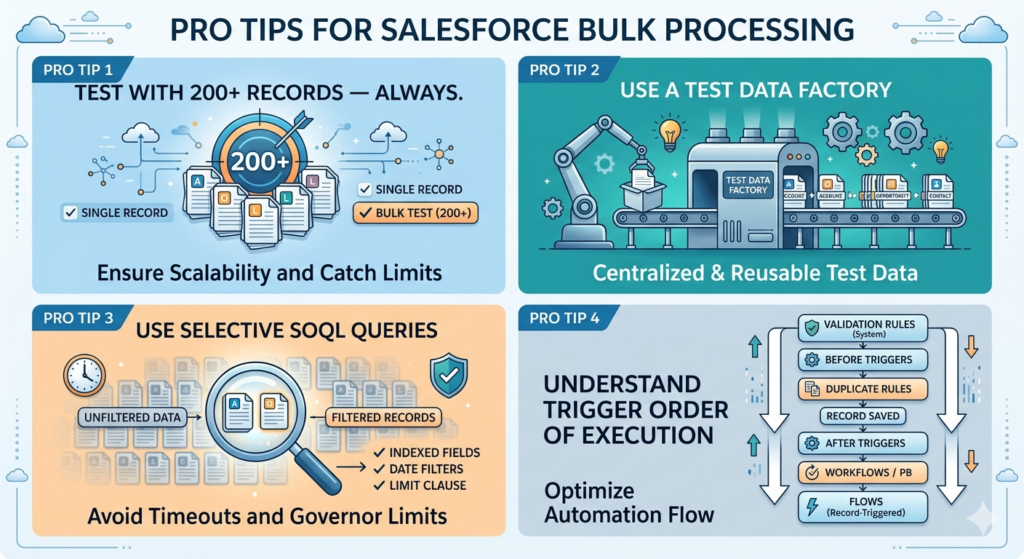
Pro Tip 1: Test with 200+ Records — Always
Your Apex tests should always include a bulk test method that processes at least 200 records. Many developers only test with 1–5 records, giving them false confidence:
apex@isTest
private class OpportunityServiceTest {

    // Test with single record (basic functionality)
    @isTest
    static void testSingleRecord() {
        Account acc = TestDataFactory.createAccount('Test Account');
        insert acc;

        Opportunity opp = TestDataFactory.createOpportunity(acc.Id, 'Test Opp', 'Closed Won');
        Test.startTest();
        insert opp;
        Test.stopTest();

        // Assertions...
    }

    // BULK TEST - This is what really matters
    @isTest
    static void testBulkProcessing200Records() {

        // Create 200 accounts
        List<Account> accounts = new List<Account>();
        for (Integer i = 0; i < 200; i++) {
            accounts.add(new Account(Name = 'Bulk Test Account ' + i));
        }
        insert accounts; // 1 DML

        // Create 200 Closed Won opportunities
        List<Opportunity> opps = new List<Opportunity>();
        for (Integer i = 0; i < 200; i++) {
            opps.add(new Opportunity(
                Name = 'Bulk Test Opp ' + i,
                AccountId = accounts[i].Id,
                StageName = 'Closed Won',
                CloseDate = Date.today(),
                Amount = 50000
            ));
        }

        Test.startTest();
        insert opps; // This triggers the trigger with 200 records
        Test.stopTest();

        // Verify all 200 tasks were created
        List<Task> createdTasks = [SELECT Id FROM Task WHERE WhatId IN :opps];
        System.assertEquals(200, createdTasks.size(),
            'Expected 200 tasks to be created for 200 Closed Won opportunities');

        // Verify account updates
        List<Account> updatedAccounts = [
            SELECT Id, Last_Won_Deal_Date__c FROM Account WHERE Id IN :accounts
        ];
        for (Account acc : updatedAccounts) {
            System.assertEquals(Date.today(), acc.Last_Won_Deal_Date__c,
                'Account Last Won Deal Date should be today');
        }
    }
}
Pro Tip 2: Use a Test Data Factory
apex// TestDataFactory.cls - Centralized test data creation
@isTest
public class TestDataFactory {

    public static Account createAccount(String name) {
        return new Account(Name = name, Industry = 'Technology', Rating = 'Hot');
    }

    public static List<Account> createAccounts(Integer count) {
        List<Account> accounts = new List<Account>();
        for (Integer i = 0; i < count; i++) {
            accounts.add(createAccount('Test Account ' + i));
        }
        return accounts;
    }

    public static Opportunity createOpportunity(Id accountId, String name, String stage) {
        return new Opportunity(
            Name = name,
            AccountId = accountId,
            StageName = stage,
            CloseDate = Date.today(),
            Amount = 10000
        );
    }
}
Pro Tip 3: Use Selective SOQL Queries
apex// UNSELECTIVE - May hit 50,000 row limit or time out
List<Account> accounts = [SELECT Id, Name FROM Account]; // Returns ALL accounts

// SELECTIVE - Filtered, indexed queries are faster and safer
List<Account> accounts = [
    SELECT Id, Name, Industry
    FROM Account
    WHERE Industry = 'Technology' // Indexed field
    AND CreatedDate = LAST_N_DAYS:30 // Date filter for selectivity
    LIMIT 1000 // Always use LIMIT when possible
];
Pro Tip 4: Understand Trigger Order of Execution
When multiple automations are configured on the same object, they execute in this order:
- Validation Rules (System)
- Before Triggers
- Duplicate Rules
- Record saved to database
- After Triggers
- Assignment Rules
- Auto-Response Rules
- Workflow Rules / Process Builder
- Flows (Record-Triggered)
- Escalation Rules
Understanding this order helps you design your trigger logic to work correctly alongside other automations.
About RizeX Labs
At RizeX Labs, we specialize in delivering cutting-edge Salesforce solutions, including scalable Apex development, trigger optimization, and enterprise-grade coding best practices. Our expertise combines deep technical knowledge, industry standards, and hands-on Salesforce implementation experience to help businesses build efficient, maintainable, and governor-limit-safe applications.
We empower organizations to transform their Salesforce development approach—from inefficient, non-scalable code to robust, bulkified Apex architectures that improve performance, prevent governor limit errors, and support large-scale business operations.
Internal Linking Opportunities:
- Link to your Salesforce course page
- How to Build a Salesforce Portfolio That Gets You Hired (With Project Ideas)
- Salesforce Admin vs Developer: Which Career Path is Right for You in 2026?
- Wealth Management App in Financial Services Cloud
- Salesforce Admin And Development Course
External Linking Opportunities:
- Salesforce official website
- Salesforce Apex Developer Guide
- Salesforce Governor Limits documentation
- Salesforce Trailhead Apex Basics
- Salesforce Best Practices for Triggers
- Stack Exchange Salesforce Developer Community
Quick Summary
Bulkified Apex Code is essential for building scalable Salesforce applications that can handle large volumes of records efficiently without exceeding governor limits. By following best practices such as avoiding SOQL and DML inside loops, using collections effectively, and writing reusable trigger frameworks, developers can significantly improve system performance and maintainability.
With proper bulkification strategies, Salesforce developers can reduce runtime errors, enhance code scalability, and ensure their automation works seamlessly in real-world enterprise environments where data operations often involve hundreds or thousands of records at once.
