
Introduction: Why Salesforce Query Languages Matter {#introduction}
Every time a Salesforce user searches for a contact, a sales rep pulls up their pipeline, or a batch job processes thousands of records — data is being retrieved from the Salesforce database. That retrieval does not happen by magic. It happens through query languages specifically designed for the Salesforce platform.
If you have ever worked with databases before, you are probably familiar with SQL — Structured Query Language. Salesforce has its own equivalents, and understanding them is one of the most foundational skills you can build as a Salesforce developer or admin.
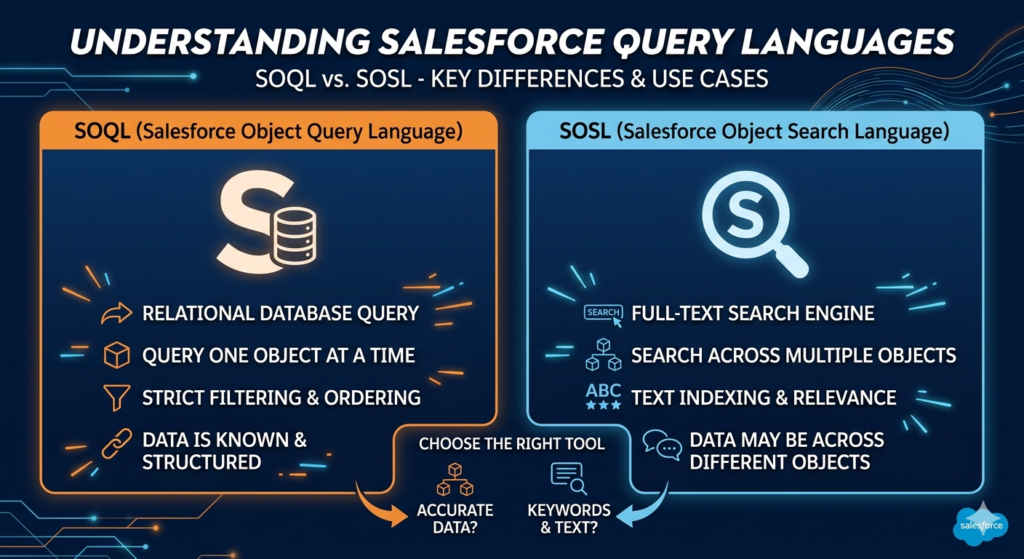
Salesforce provides two primary query languages for data retrieval:
- SOQL — Salesforce Object Query Language
- SOSL — Salesforce Object Search Language
At first glance, they sound similar. Both retrieve data. Both are used inside Apex code and developer tools. But they serve fundamentally different purposes — and using the wrong one for the wrong job leads to inefficient code, poor performance, and frustrated developers.
In this guide, we will break down Salesforce SOSL vs SOQL in complete detail. We will cover definitions, syntax, real code examples, comparison tables, practical use cases, governor limit considerations, and the most common beginner mistakes — giving you everything you need to choose the right query language for every situation.
Whether you are preparing for a Salesforce certification, studying for a developer interview, or just trying to write better Apex code, this SOQL tutorial and SOSL breakdown is the guide you have been looking for.
Section 1: What Is SOQL? (SOQL Tutorial Basics) {#what-is-soql}
Definition
SOQL stands for Salesforce Object Query Language. It is a query language designed specifically for retrieving data from the Salesforce database — and it is modeled closely after SQL (Structured Query Language), which most database developers are already familiar with.
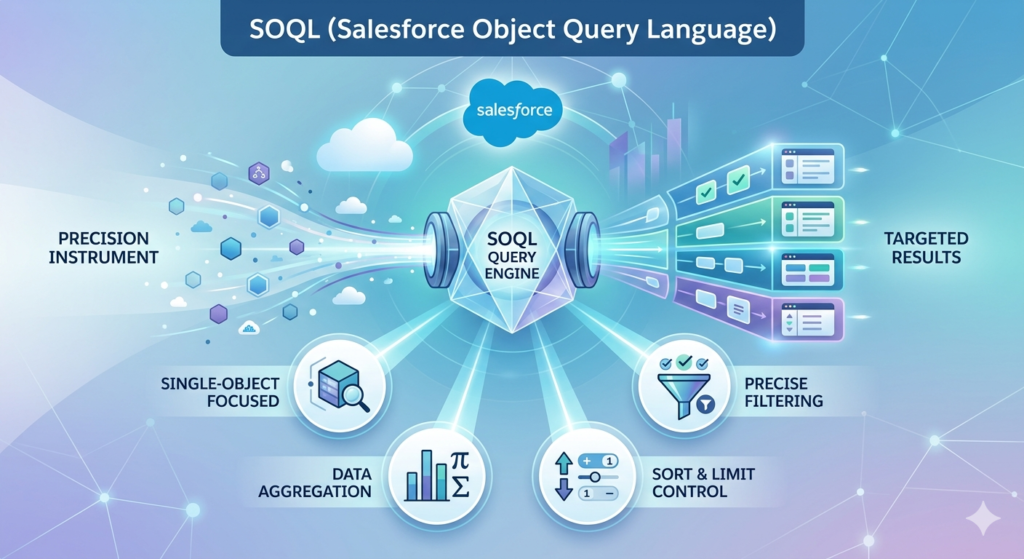
SOQL allows you to query a single Salesforce object at a time (with the ability to traverse relationships), apply precise filters, sort results, limit the number of returned records, and aggregate data using functions like COUNT, SUM, AVG, MIN, and MAX.
Think of SOQL as your precision instrument — you use it when you know exactly which object you want to query and exactly what conditions your records must meet.
SOQL Syntax Structure
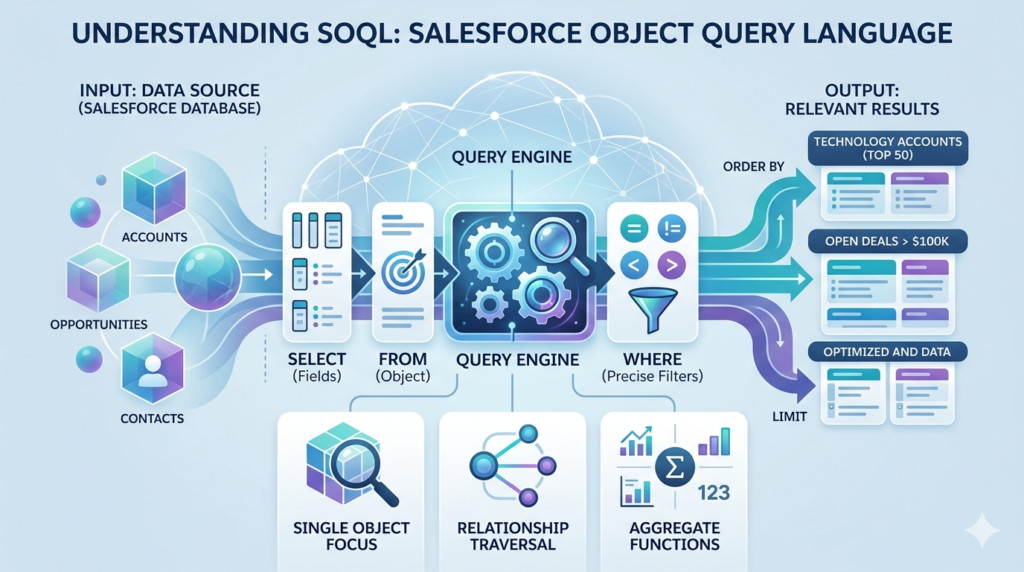
The basic SOQL syntax follows a familiar pattern:
SQLSELECT fieldList
FROM objectName
WHERE conditions
ORDER BY field ASC|DESC
LIMIT numberOfRecords
Basic SOQL Examples
Example 1: Retrieve Accounts in the Technology Industry
SQLSELECT Id, Name, Industry, AnnualRevenue
FROM Account
WHERE Industry = 'Technology'
ORDER BY Name ASC
LIMIT 50
Example 2: Retrieve Open Opportunities Over $100,000
SQLSELECT Id, Name, StageName, Amount, CloseDate, Account.Name
FROM Opportunity
WHERE StageName != 'Closed Won'
AND StageName != 'Closed Lost'
AND Amount > 100000
ORDER BY CloseDate ASC
Example 3: Parent-to-Child Relationship Query (Subquery)
SQLSELECT Id, Name, Industry,
    (SELECT Id, FirstName, LastName, Email
     FROM Contacts
     WHERE Email != null)
FROM Account
WHERE Rating = 'Hot'
Example 4: Using Aggregate Functions
SQLSELECT StageName, COUNT(Id) TotalDeals, SUM(Amount) TotalRevenue
FROM Opportunity
WHERE CloseDate = THIS_YEAR
GROUP BY StageName
Key SOQL Features
- Single-object focus — Queries one primary object at a time
- Precise field filtering — WHERE clause with exact conditions
- Relationship traversal — Query parent fields (
Account.Name) or child records (subqueries) - Aggregate functions — COUNT, SUM, AVG, MIN, MAX for analytics
- Date literals — TODAY, THIS_WEEK, THIS_MONTH, LAST_N_DAYS:n
- ORDER BY and LIMIT — Control sort order and result size
- OFFSET — Skip records for pagination
When SOQL Shines
SOQL is the right tool when you need precise, structured data retrieval based on known field values — like pulling all accounts in a specific region, finding opportunities closing this quarter, or retrieving a record by its specific ID.
Section 2: What Is SOSL? (SOSL Salesforce Query Language) {#what-is-sosl}
Definition
SOSL stands for Salesforce Object Search Language. Unlike SOQL, which queries a single object with specific field conditions, SOSL performs full-text searches across multiple Salesforce objects simultaneously — similar to how a search engine finds results across an entire website rather than a single page.
The SOSL Salesforce query language is designed for scenarios where you have a keyword or search term and want to find all records across multiple objects that contain that term — regardless of which specific field it appears in.
Think of SOSL as your search engine — use it when you know what you are looking for but not necessarily where it lives in your Salesforce data.
SOSL Syntax Structure
SQLFIND 'searchTerm'
IN SearchGroup
RETURNING ObjectName(fieldList WHERE conditions),
          AnotherObject(fieldList)
LIMIT numberOfRecords
Search Groups available in SOSL:
ALL FIELDS— Searches all text, phone, email, and URL fieldsNAME FIELDS— Searches only name fieldsEMAIL FIELDS— Searches only email fieldsPHONE FIELDS— Searches only phone fields
Basic SOSL Examples
Example 1: Search for “John” Across Contacts and Leads
SQLFIND 'John'
IN ALL FIELDS
RETURNING Contact(Id, FirstName, LastName, Email),
          Lead(Id, FirstName, LastName, Company)
Example 2: Search for a Company Name Across Multiple Objects
SQLFIND 'Acme Corporation'
IN NAME FIELDS
RETURNING Account(Id, Name, Industry),
          Contact(Id, Name, AccountId),
          Opportunity(Id, Name, StageName)
Example 3: Search with Filters in RETURNING Clause
SQLFIND 'salesforce*'
IN ALL FIELDS
RETURNING Contact(Id, Name, Email WHERE Department = 'Technology'),
          Lead(Id, Name, Company WHERE IsConverted = false)
LIMIT 20
Example 4: Search with Wildcard
SQLFIND 'tech*'
IN ALL FIELDS
RETURNING Account(Name, Phone, Industry),
          Contact(Name, Email)
Note: The
*wildcard in SOSL matches any characters at the end of the search term. Sotech*finds “technology,” “technical,” “techno,” and so on.
Key SOSL Features
- Multi-object search — Query multiple objects in a single statement
- Full-text search — Searches across many field types simultaneously
- Wildcard support —
*for suffix matching,?for single character matching - Search groups — Limit search scope to specific field types
- Filters in RETURNING — Apply WHERE conditions per object
- Fast for text matching — Uses Salesforce’s search index for speed
When SOSL Shines
SOSL is the right tool when you have a search term from a user input and need to find all records that match — across contacts, leads, accounts, and other objects — without knowing exactly which object or field contains the data you need.
Section 3: Salesforce SOSL vs SOQL — Key Differences {#key-differences}
Now that we understand both languages individually, let us compare them directly. This is the heart of the Salesforce SOSL vs SOQL discussion.
Comprehensive Comparison Table
| Feature | SOQL | SOSL |
|---|---|---|
| Full Name | Salesforce Object Query Language | Salesforce Object Search Language |
| Primary Purpose | Precise structured data retrieval | Full-text keyword search across objects |
| Objects Queried | One object at a time (with relationships) | Multiple objects simultaneously |
| Search Type | Exact field matching | Full-text / keyword-based matching |
| WHERE Clause | Rich, precise filtering | Available but limited per object |
| Relationship Queries | Parent-to-child and child-to-parent | Not supported natively |
| Aggregate Functions | Yes (COUNT, SUM, AVG, MIN, MAX) | No |
| Wildcard Support | Limited (LIKE with %) | Yes (* and ? wildcards) |
| Search Index | No — queries live database | Yes — uses Salesforce search index |
| Performance | Fast for indexed fields | Fast for full-text search |
| Governor Limit (Apex) | 100 SOQL queries per transaction | 20 SOSL queries per transaction |
| Returns Records When | Field value exactly matches condition | Any field contains the search term |
| Null Value Search | Yes — WHERE Field = null | No — cannot search for null values |
| ID-Based Query | Yes — WHERE Id = :recordId | No — cannot search by ID alone |
| Use in Apex | [SELECT...] syntax | [FIND...] syntax |
| Use in Developer Console | Yes (Query Editor) | Yes (Search tab) |
| Best For | Reports, data processing, structured logic | Global search, user input search bars |
| Similarity To | SQL | Search engine queries |
The One-Line Summary
SOQL is for structured queries when you know what you are looking for and where it lives.
SOSL is for keyword searches when you know what you are looking for but not where it lives.
Section 4: When to Use SOQL {#when-to-use-soql}
SOQL is the workhorse of Salesforce development. It is used in the vast majority of Apex triggers, classes, batch jobs, and integrations. Here are the scenarios where SOQL is clearly the right choice:
Scenario 1: Retrieve Records by Specific Field Values
SQL-- Get all Accounts in California with annual revenue over $1M
SELECT Id, Name, BillingState, AnnualRevenue, OwnerId
FROM Account
WHERE BillingState = 'CA'
AND AnnualRevenue > 1000000
AND IsActive__c = true
ORDER BY AnnualRevenue DESC
Use SOQL here because you have exact field values to filter on. SOSL cannot perform this kind of precise numeric or picklist filtering.
Scenario 2: Query Opportunities by Stage for Pipeline Reports
SQL-- Sales pipeline by stage for current quarter
SELECT StageName, COUNT(Id) DealCount, SUM(Amount) TotalValue
FROM Opportunity
WHERE CloseDate = THIS_QUARTER
AND IsClosed = false
GROUP BY StageName
ORDER BY SUM(Amount) DESC
SOQL’s aggregate functions make it the only choice for summary reports and analytics queries. SOSL has no aggregation capability.
Scenario 3: Parent-Child Relationship Queries
SQL-- Get Accounts with their related Open Cases
SELECT Id, Name,
    (SELECT Id, Subject, Status, Priority
     FROM Cases
     WHERE Status != 'Closed'
     ORDER BY Priority DESC)
FROM Account
WHERE Id IN :accountIds
SOQL is the only language that supports relationship traversal and subqueries. SOSL cannot navigate object relationships.
Scenario 4: Record-Specific Lookups in Apex Triggers
apex// In an Apex trigger, retrieve related parent records by ID
// This is always a SOQL job - precise, ID-based lookup
Set<Id> accountIds = new Set<Id>();
for (Contact con : Trigger.new) {
    if (con.AccountId != null) {
        accountIds.add(con.AccountId);
    }
}

Map<Id, Account> accountMap = new Map<Id, Account>(
    [SELECT Id, Name, Industry, Rating
     FROM Account
     WHERE Id IN :accountIds]
);
Any time you are doing ID-based lookups in trigger context — which is most of the time — SOQL is the correct tool.
Scenario 5: Checking for Record Existence
apex// Check if a duplicate lead exists with the same email
List<Lead> existingLeads = [
    SELECT Id, Email, Status
    FROM Lead
    WHERE Email = :newLead.Email
    AND IsConverted = false
    LIMIT 1
];

if (!existingLeads.isEmpty()) {
    newLead.addError('A lead with this email already exists.');
}
Section 5: When to Use SOSL {#when-to-use-sosl}
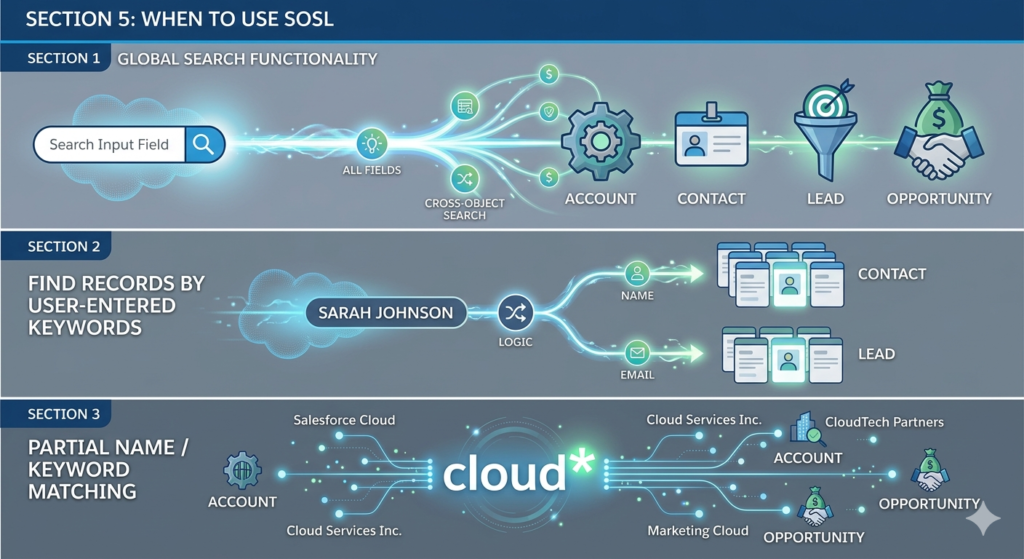
SOSL is a specialized tool that excels in specific scenarios. Here is when the SOSL Salesforce query language is clearly the better choice:
Scenario 1: Global Search Functionality
apex// User types a search term in a custom search component
// We need to find matching records across multiple objects
String searchTerm = 'Acme*';

List<List<SObject>> searchResults = [
    FIND :searchTerm
    IN ALL FIELDS
    RETURNING
        Account(Id, Name, Phone, Industry),
        Contact(Id, FirstName, LastName, Email, AccountId),
        Lead(Id, FirstName, LastName, Company, Email),
        Opportunity(Id, Name, StageName, Amount)
    LIMIT 10
];

List<Account> accounts = (List<Account>) searchResults[0];
List<Contact> contacts = (List<Contact>) searchResults[1];
List<Lead> leads = (List<Lead>) searchResults[2];
List<Opportunity> opportunities = (List<Opportunity>) searchResults[3];
This is SOSL’s signature use case — searching across four objects simultaneously with a single statement. The equivalent SOQL would require four separate queries.
Scenario 2: Find Records by User-Entered Keywords
apex// User searches for a person by name in a support portal
// They might be a Contact OR a Lead - we don't know
String userInput = 'Sarah Johnson';

List<List<SObject>> results = [
    FIND :userInput
    IN NAME FIELDS
    RETURNING
        Contact(Id, Name, Email, Phone, AccountId),
        Lead(Id, Name, Email, Phone, Company)
];

List<Contact> matchingContacts = (List<Contact>) results[0];
List<Lead> matchingLeads = (List<Lead>) results[1];
When user-entered search terms could match records in multiple objects, SOSL delivers results much more efficiently than running separate SOQL queries.
Scenario 3: Partial Name / Keyword Matching
SQL-- Find any record related to "cloud" across Accounts and Opportunities
FIND 'cloud*'
IN ALL FIELDS
RETURNING
    Account(Id, Name, Industry, Website),
    Opportunity(Id, Name, StageName, Amount)
The * wildcard makes SOSL ideal for partial text matching — finding “Salesforce Cloud,” “Cloud Services Inc.,” “CloudTech Partners,” and more with a single search term.
Scenario 4: Cross-Object Customer Lookup
apex// Customer service rep searches for a customer by phone number
// The customer could be a Contact, Lead, or Account
String phoneSearch = '415-555*';

List<List<SObject>> customerResults = [
    FIND :phoneSearch
    IN PHONE FIELDS
    RETURNING
        Account(Id, Name, Phone, BillingCity),
        Contact(Id, Name, Phone, AccountId),
        Lead(Id, Name, Phone, Company)
];
Searching IN PHONE FIELDS narrows the scope to phone fields only — making this search faster and more precise than a broad ALL FIELDS search.
Section 6: SOQL and SOSL in Apex {#in-apex}
Using SOQL in Apex
In Apex, SOQL queries are written inline within square brackets. The syntax is identical to SOQL written in the Developer Console, but with the addition of bind variables (using the : prefix) to pass Apex variables directly into queries:
apexpublic class AccountQueryService {

    // Basic SOQL query in Apex
    public static List<Account> getAccountsByIndustry(String industry) {
        // Bind variable :industry passes the Apex variable safely into the query
        // This also protects against SOQL injection attacks
        return [
            SELECT Id, Name, Industry, AnnualRevenue, Phone
            FROM Account
            WHERE Industry = :industry
            AND IsActive__c = true
            ORDER BY Name ASC
            LIMIT 200
        ];
    }

    // Dynamic SOQL using Database.query() for variable field names
    public static List<SObject> dynamicQuery(String objectName, String condition) {
        String queryString = 'SELECT Id, Name FROM ' + objectName +
                            ' WHERE ' + condition + ' LIMIT 100';
        // IMPORTANT: Always sanitize inputs for dynamic SOQL to prevent injection
        return Database.query(queryString);
    }

    // Query with relationship traversal
    public static List<Account> getAccountsWithContacts(Set<Id> accountIds) {
        return [
            SELECT Id, Name, Industry,
                (SELECT Id, FirstName, LastName, Email, Title
                 FROM Contacts
                 WHERE Email != null
                 ORDER BY LastName ASC)
            FROM Account
            WHERE Id IN :accountIds
        ];
    }
}
Using SOSL in Apex
SOSL queries in Apex also use square brackets, but they always return a List<List<SObject>> — a list of lists, where each inner list contains the results for one returned object:
apexpublic class GlobalSearchService {

    // SOSL search returning multiple object results
    public static Map<String, List<SObject>> searchAllObjects(String searchTerm) {

        // Append wildcard for partial matching
        String formattedTerm = searchTerm + '*';

        // SOSL always returns List<List<SObject>>
        List<List<SObject>> searchResults = [
            FIND :formattedTerm
            IN ALL FIELDS
            RETURNING
                Account(Id, Name, Phone, Industry LIMIT 5),
                Contact(Id, FirstName, LastName, Email LIMIT 5),
                Lead(Id, FirstName, LastName, Company LIMIT 5),
                Opportunity(Id, Name, StageName, Amount LIMIT 5)
        ];

        // Map results to named keys for clarity
        Map<String, List<SObject>> resultMap = new Map<String, List<SObject>>();
        resultMap.put('Accounts', searchResults[0]);
        resultMap.put('Contacts', searchResults[1]);
        resultMap.put('Leads', searchResults[2]);
        resultMap.put('Opportunities', searchResults[3]);

        return resultMap;
    }
}
Governor Limits: SOQL vs SOSL in Apex
This is one of the most important differences between the two languages from a practical development perspective:
| Limit | SOQL | SOSL |
|---|---|---|
| Queries per transaction | 100 | 20 |
| Rows returned per query | 50,000 | 2,000 per object, 50,000 total |
| Records returned per RETURNING object | N/A | 200 (default), up to 2,000 with LIMIT |
apex// Always check your query consumption using the Limits class
System.debug('SOQL used: ' + Limits.getQueries() + '/' + Limits.getLimitQueries());

// SOSL has a much lower transaction limit - only 20 per transaction
// Use SOSL strategically, not in every method call
Security Considerations
SOQL Injection Prevention:
apex// VULNERABLE - Never concatenate user input directly into SOQL strings
String unsafeQuery = 'SELECT Id FROM Account WHERE Name = \'' + userInput + '\'';
// A malicious user could input: ' OR '1'='1 to expose all records

// SAFE - Use bind variables (they are automatically escaped)
List<Account> accounts = [SELECT Id FROM Account WHERE Name = :userInput];

// SAFE - For dynamic SOQL, use String.escapeSingleQuotes()
String safeInput = String.escapeSingleQuotes(userInput);
String safeQuery = 'SELECT Id FROM Account WHERE Name = \'' + safeInput + '\'';
SOSL Injection Prevention:
apex// SOSL is generally safer for user input, but still sanitize
// Avoid constructing SOSL strings dynamically when possible
// Use bind variables in SOSL too
String searchTerm = String.escapeSingleQuotes(userInput);
List<List<SObject>> results = [FIND :searchTerm IN ALL FIELDS RETURNING Account(Id, Name)];
Section 7: Common Mistakes Beginners Make {#common-mistakes}
Mistake 1: Using SOQL for Broad Text Searches
apex// WRONG - Using SOQL LIKE for broad text search across the org
// This is slow, inefficient, and hits only one object at a time
List<Contact> contacts = [
    SELECT Id, Name FROM Contact WHERE Name LIKE '%John%'
];
List<Lead> leads = [
    SELECT Id, Name FROM Lead WHERE Name LIKE '%John%'
];
// Two separate queries, slow on large datasets, misses related objects

// RIGHT - Use SOSL for cross-object keyword search
List<List<SObject>> results = [
    FIND 'John*'
    IN NAME FIELDS
    RETURNING Contact(Id, Name), Lead(Id, Name)
];
// One query, both objects, faster on large datasets
Mistake 2: Using SOSL for Structured Data Filtering
apex// WRONG - Trying to use SOSL for business logic filtering
// SOSL is not designed for precise field-based conditions
List<List<SObject>> results = [
    FIND '*'
    IN ALL FIELDS
    RETURNING Opportunity(Id, Name WHERE Amount > 100000 AND StageName = 'Prospecting')
];
// SOSL WHERE clause is limited - this approach is unreliable

// RIGHT - Use SOQL for precise structured filtering
List<Opportunity> opps = [
    SELECT Id, Name, Amount, StageName
    FROM Opportunity
    WHERE Amount > 100000
    AND StageName = 'Prospecting'
    ORDER BY Amount DESC
];
Mistake 3: Ignoring Governor Limits
apex// WRONG - Calling SOSL multiple times in a class
// You only get 20 SOSL queries per transaction - use them wisely
for (String term : searchTerms) {
    List<List<SObject>> results = [FIND :term IN ALL FIELDS RETURNING Account(Id, Name)];
    // This fires a new SOSL for each term - you'll hit the limit fast
}

// RIGHT - Build one SOSL query or use a different approach
// If you must search for multiple terms, combine them using OR logic in SOSL
String combinedSearch = String.join(searchTerms, ' OR ');
List<List<SObject>> results = [FIND :combinedSearch IN ALL FIELDS RETURNING Account(Id, Name)];
Mistake 4: Forgetting That SOSL Uses a Search Index
apex// IMPORTANT: SOSL searches an INDEX, not the live database
// Newly created or recently modified records may not immediately
// appear in SOSL results during testing

// This is especially important in unit tests
// In test context, SOSL returns empty results unless you use Test.setFixedSearchResults()

@isTest
static void testSOSLSearch() {
    Account testAcc = new Account(Name = 'Test Corporation');
    insert testAcc;

    // Without this, SOSL returns nothing in test context
    Test.setFixedSearchResults(new List<Id>{ testAcc.Id });

    List<List<SObject>> results = [
        FIND 'Test Corporation'
        IN NAME FIELDS
        RETURNING Account(Id, Name)
    ];

    List<Account> accounts = (List<Account>) results[0];
    System.assertEquals(1, accounts.size());
}
Mistake 5: Not Using LIMIT
apex// WRONG - No LIMIT can return 50,000 rows and exhaust heap memory
List<Account> allAccounts = [SELECT Id, Name, Industry FROM Account];

// RIGHT - Always use LIMIT unless you explicitly need all records
List<Account> accounts = [SELECT Id, Name, Industry FROM Account LIMIT 200];

// For truly large datasets, use Database.QueryLocator in Batch Apex
Section 8: Best Practices for SOQL and SOSL {#best-practices}
1. Select Only the Fields You Need
apex// WRONG - Selecting all fields wastes heap memory and slows queries
List<Account> accounts = [SELECT FIELDS(ALL) FROM Account LIMIT 200];

// RIGHT - Select only the specific fields your code actually uses
List<Account> accounts = [SELECT Id, Name, Industry, OwnerId FROM Account LIMIT 200];
2. Always Use Selective Filters in SOQL
apex// UNSELECTIVE - Scans all records, slow on large datasets
List<Contact> contacts = [SELECT Id, Name FROM Contact WHERE Description LIKE '%manager%'];

// SELECTIVE - Uses indexed fields for fast lookups
List<Contact> contacts = [
    SELECT Id, Name, Email
    FROM Contact
    WHERE AccountId = :accountId // Foreign keys are indexed
    AND CreatedDate = LAST_N_DAYS:30 // Date fields with range are selective
];
3. Use LIMIT and OFFSET for Pagination
apex// Paginated SOQL query for large result sets
Integer pageSize = 50;
Integer pageNumber = 2; // 0-based offset calculation
Integer offset = (pageNumber - 1) * pageSize;

List<Account> pagedAccounts = [
    SELECT Id, Name, Industry, AnnualRevenue
    FROM Account
    WHERE Industry = 'Technology'
    ORDER BY Name ASC
    LIMIT :pageSize
    OFFSET :offset
];
4. Bulkify All Queries — Use Collections
apex// WRONG - SOQL inside a loop
for (Opportunity opp : opportunities) {
    Account acc = [SELECT Id, Name FROM Account WHERE Id = :opp.AccountId];
}

// RIGHT - Single query using IN with a collected Set
Set<Id> accountIds = new Set<Id>();
for (Opportunity opp : opportunities) {
    accountIds.add(opp.AccountId);
}
Map<Id, Account> accountMap = new Map<Id, Account>(
    [SELECT Id, Name FROM Account WHERE Id IN :accountIds]
);
5. Use Wildcards Carefully in SOSL
apex// Leading wildcards are NOT supported in SOSL - this will fail
List<List<SObject>> results = [FIND '*john' IN NAME FIELDS RETURNING Contact(Name)];

// Trailing wildcards are supported
List<List<SObject>> results = [FIND 'john*' IN NAME FIELDS RETURNING Contact(Name)];

// Exact match is also supported (and fastest)
List<List<SObject>> results = [FIND 'john smith' IN NAME FIELDS RETURNING Contact(Name)];
6. Use Test.setFixedSearchResults() for SOSL Unit Tests
apex// Always mock SOSL results in test methods
@isTest
static void testSearch() {
    Contact testContact = new Contact(FirstName = 'John', LastName = 'Smith');
    insert testContact;

    // REQUIRED for SOSL to return results in test context
    Test.setFixedSearchResults(new List<Id>{ testContact.Id });

    // Now your SOSL will return the mocked record
    List<List<SObject>> results = [
        FIND 'John Smith' IN NAME FIELDS RETURNING Contact(Id, FirstName, LastName)
    ];
    System.assertEquals(1, ((List<Contact>)results[0]).size());
}
7. Use Dynamic SOQL and SOSL Carefully
apex// When you must use dynamic queries, always escape user input
public static List<SObject> safeQuery(String objectType, String searchValue) {

    // Validate the object type against a whitelist first
    Set<String> allowedObjects = new Set<String>{'Account', 'Contact', 'Lead'};
    if (!allowedObjects.contains(objectType)) {
        throw new IllegalArgumentException('Invalid object type: ' + objectType);
    }

    // Escape the search value
    String safeValue = String.escapeSingleQuotes(searchValue);

    String query = 'SELECT Id, Name FROM ' + objectType +
                   ' WHERE Name LIKE \'%' + safeValue + '%\' LIMIT 100';
    return Database.query(query);
}
Conclusion: Choose the Right Tool for the Right Job {#conclusion}
The debate around Salesforce SOSL vs SOQL ultimately comes down to understanding the nature of your data retrieval task.
If you know which object holds your data, and you know which field values you want to filter on — write a SOQL query. It is precise, powerful, supports relationships and aggregations, and is the backbone of virtually every Apex trigger, batch job, and data processing workflow in Salesforce.
If you have a keyword or search term from a user and you need to find matching records across multiple objects without knowing exactly where the data lives — write a SOSL query. It is fast, flexible, multi-object, and designed exactly for search-style interactions.
Master both, and you have the complete toolkit for retrieving data efficiently in any Salesforce scenario. The best Salesforce developers do not default to one or the other — they evaluate each situation, ask the right questions, and choose the query language that best fits the business need.
About RizeX Labs
At RizeX Labs, we specialize in delivering cutting-edge Salesforce training and consulting solutions that help professionals and businesses master core Salesforce technologies—including SOQL (Salesforce Object Query Language) and SOSL (Salesforce Object Search Language).
Our expertise combines deep technical knowledge, real-world Salesforce implementation experience, and industry best practices to help learners understand when to use SOQL vs SOSL effectively for querying Salesforce data.
We empower Salesforce admins and developers to move beyond basic queries by mastering structured data retrieval, multi-object search, and performance optimization—building smarter, faster, and more scalable Salesforce applications.
Internal Linking Opportunities:
- Link to your Salesforce course page
- How to Build a Salesforce Portfolio That Gets You Hired (With Project Ideas)
- Salesforce Admin vs Developer: Which Career Path is Right for You in 2026?
- Wealth Management App in Financial Services Cloud
- Salesforce Admin And Development
External Linking Opportunities:
- Salesforce official website
- SOQL and SOSL official documentation
- Salesforce Developer documentation
- Salesforce Trailhead SOQL module
- Salesforce Trailhead SOSL module
- Salesforce Object Reference
- AppExchange tools for Salesforce developers
Quick Summary
SOQL (Salesforce Object Query Language) and SOSL (Salesforce Object Search Language) are both powerful Salesforce query tools, but they serve different purposes. SOQL is used when you need to retrieve specific records from a single object or related objects using structured conditions—similar to SQL.SOSL is used when you need to search for a keyword or phrase across multiple objects at once—ideal for global search scenarios .By understanding the key differences between SOQL and SOSL, Salesforce professionals can improve search efficiency, optimize application performance, and choose the right query language based on business requirements. SOQL is best for precise data retrieval, while SOSL excels in broad text-based searches across the Salesforce ecosystem.
