
Introduction: A Name Change That Signals So Much More
If you’ve been part of the Salesforce ecosystem for any length of time, you already know that Salesforce doesn’t stand still. The platform evolves constantly — adding new tools, deepening integrations, and reshaping how businesses connect with customers, partners, and employees.
One of the most significant — and, honestly, underappreciated — shifts in recent Salesforce history is the transition from Community Cloud to Experience Cloud. On the surface, it might look like a simple rebranding exercise. But dig a little deeper, and you’ll discover that this change reflects a fundamental evolution in how Salesforce thinks about digital engagement, personalization, and the future of connected business experiences.
For business leaders, Salesforce administrators, and decision-makers evaluating their digital strategy, understanding the Salesforce Community Cloud vs Experience Cloud comparison isn’t just a technical exercise — it’s a strategic one. The platform you choose to build your customer portals, partner networks, and employee communities on will directly influence the quality of your digital experiences and, ultimately, your competitive edge.
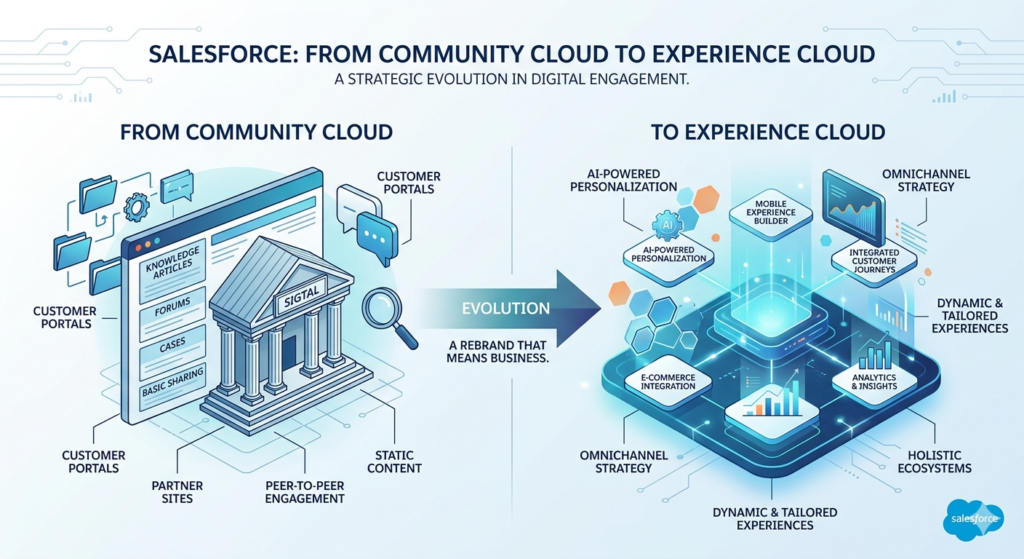
In this blog post, the team at RizeX Labs breaks down everything you need to know: what Community Cloud was, why it was renamed, what Experience Cloud brings to the table, and whether it’s time for your business to make the move.
Let’s dive in.
What Was Salesforce Community Cloud?
To appreciate where Salesforce is today, it helps to understand where it came from.
Salesforce Community Cloud was launched in 2013 as a platform designed to help organizations build branded digital spaces — often called “communities” — where different groups of users could connect, collaborate, and access information. Think of it as Salesforce’s answer to the growing demand for self-service portals and collaborative digital hubs.
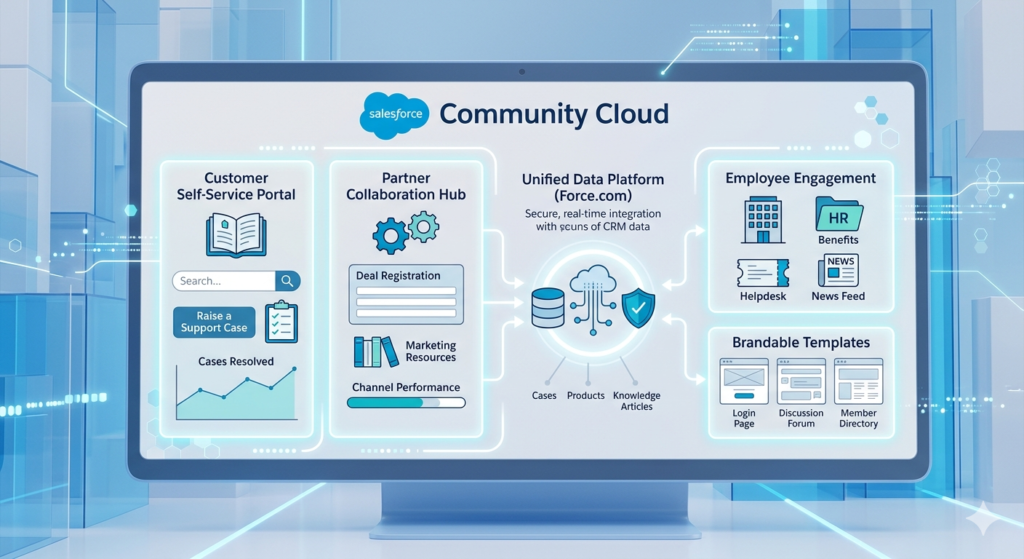
At its core, Community Cloud was built on the Salesforce platform (Force.com) and integrated natively with core Salesforce CRM data. This gave organizations a powerful advantage: they could surface real-time business data — customer cases, product information, knowledge articles — directly within the communities they built.
Key Features of Community Cloud
Community Cloud came packed with a solid set of capabilities that made it a go-to solution for many mid-sized and enterprise businesses:
- Pre-built Templates: Lightning Bolt templates allowed organizations to launch communities quickly without building from scratch.
- Salesforce CRM Integration: Deep, native integration with Sales Cloud, Service Cloud, and other Salesforce products.
- Self-Service Portals: Customers could log in, raise support cases, search a knowledge base, and track their interactions — all without calling a support agent.
- Partner Communities: Channel partners, resellers, and distributors could access deal registration, marketing materials, and sales enablement content.
- Employee Communities: Internal-facing communities brought HR portals, IT helpdesks, and company intranets to life.
- Mobile Responsiveness: Communities were designed to work across devices, which was increasingly important as mobile usage grew.
- Role-Based Access Control: Administrators could control exactly what different user groups could see and do within the community.
- Chatter Integration: Salesforce’s collaboration tool, Chatter, was woven into communities to enable conversations, file sharing, and group discussions.
Common Use Cases
Businesses deployed Community Cloud across a wide variety of scenarios:
- Customer Support Portals — Self-service hubs where customers could find answers, submit tickets, and track resolution status.
- Partner Portals — Environments where channel partners could access leads, register deals, and collaborate with the sales team.
- Employee Intranets — Internal communities that centralized HR resources, company announcements, and cross-departmental collaboration.
- B2B Commerce Communities — Digital storefronts for business buyers with personalized product catalogs and order management tools.
Limitations and Challenges
Despite its many strengths, Community Cloud had limitations that businesses began to feel as their digital ambitions grew:
- Limited Personalization: Creating truly individualized experiences for different user segments required significant customization effort.
- Design Constraints: While templates helped, deeply customized designs often demanded heavy developer involvement.
- Content Management Gaps: The platform wasn’t built as a full digital experience platform (DXP), which meant managing content at scale could be cumbersome.
- Analytics Limitations: Out-of-the-box reporting was solid but lacked the depth that modern experience platforms offer.
- Siloed Digital Channels: As businesses expanded to websites, mobile apps, and commerce platforms, Community Cloud could feel disconnected from broader digital ecosystems.
These limitations weren’t dealbreakers for every business — but they pointed to a clear opportunity for Salesforce to evolve the platform. And that’s exactly what happened.
Why Was Community Cloud Renamed? The Story Behind the Rebrand
In February 2021, Salesforce officially announced that Community Cloud was being renamed to Experience Cloud. This “community cloud renamed” moment wasn’t just a marketing decision. It was a deliberate signal from Salesforce about where the platform was heading.
The Strategic Thinking Behind the Rebrand
The word “community” had always carried a specific connotation — a forum, a group space, a place where like-minded users gathered. While that framing was useful, it was also limiting. It suggested a single type of digital environment when, in reality, businesses were using the platform to build so much more: customer-facing websites, branded mobile experiences, commerce hubs, and sophisticated partner portals.
Here’s what drove the decision:
1. The Rise of Digital Experience Platforms (DXPs)
By 2020, the DXP category was booming. Platforms like Adobe Experience Manager, Liferay, and Sitecore were competing aggressively for enterprise budgets. Salesforce recognized that its platform could — and should — compete in this space. Renaming it to Experience Cloud positioned Salesforce firmly in the DXP conversation.
2. Expanding Use Cases Beyond “Communities”
Businesses weren’t just building community forums. They were building microsites, help centers, branded partner portals, and customer account portals. The “community” label no longer captured the full breadth of what the platform could do.
3. Deeper Integration Across the Salesforce Ecosystem
The rebrand coincided with significant feature expansions that brought Experience Cloud closer to other Salesforce products — particularly Salesforce CMS (Content Management System), Marketing Cloud, Commerce Cloud, and the Einstein AI suite. The goal was to position Experience Cloud as the front-end layer that ties the entire Salesforce platform together.
4. Embracing the Headless Architecture Trend
Modern digital development increasingly favors “headless” architectures — where the front-end presentation layer is decoupled from the back-end data layer. Experience Cloud embraced this with APIs and integrations that allow developers to build custom front-end experiences powered by Salesforce data.
In short, the community cloud renamed moment wasn’t cosmetic — it was Salesforce declaring that this platform had grown up.
What Is Experience Cloud Salesforce? A Closer Look at the New Platform
So what exactly is Experience Cloud Salesforce today, and what does it offer that Community Cloud didn’t?
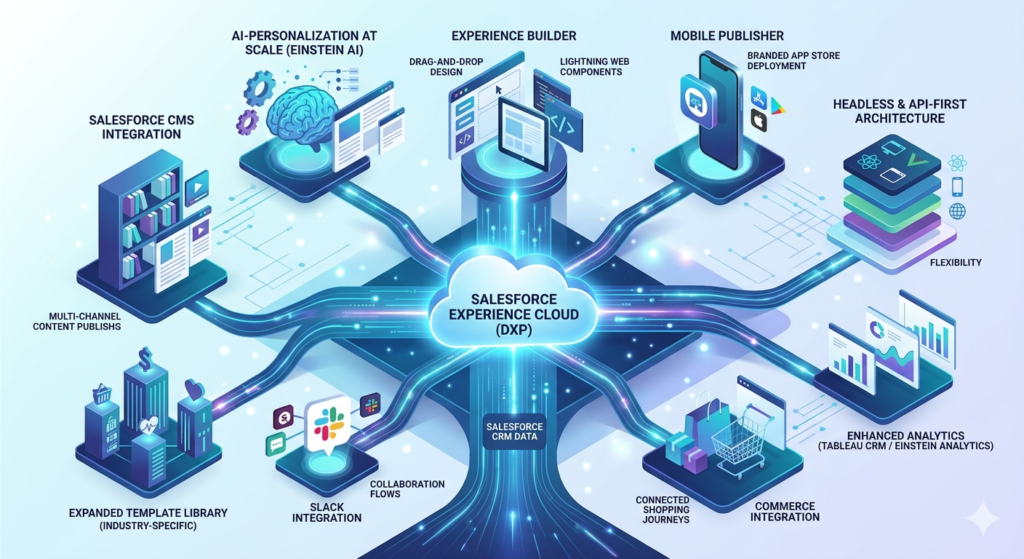
At its heart, Experience Cloud is Salesforce’s digital experience platform (DXP) — a comprehensive solution for building branded, personalized digital spaces for any audience: customers, partners, employees, and beyond. It sits at the intersection of CRM data, content management, AI-driven personalization, and digital engagement.
Core Capabilities of Experience Cloud
1. Experience Builder
The updated Experience Builder offers a drag-and-drop interface that makes it easier than ever to design responsive, branded digital experiences. Enhanced templates, Lightning Web Components, and a more intuitive layout make customization more accessible — even for less technical users.
2. Salesforce CMS Integration
Experience Cloud now works hand-in-glove with Salesforce CMS, giving content teams a dedicated space to create, manage, and publish content across multiple digital channels. This is a significant upgrade from Community Cloud’s more limited content management approach.
3. Personalization at Scale
This is where Experience Cloud truly shines. Using Salesforce’s Einstein AI capabilities and data from across the Salesforce platform, Experience Cloud can deliver personalized content, recommendations, and experiences to individual users — based on their history, preferences, and behavior.
4. Headless and API-First Architecture
Experience Cloud supports headless development, meaning developers can use front-end frameworks like React or Vue.js to build custom interfaces while pulling data from the Salesforce backend via APIs. This gives development teams far more flexibility.
5. Expanded Template Library
New, industry-specific templates for retail, financial services, healthcare, and more make it faster to launch polished, professional digital experiences without starting from scratch.
6. Enhanced Analytics
Deep integration with Salesforce Analytics (Tableau CRM / Einstein Analytics) gives Experience Cloud users powerful dashboards and insights into how users are engaging with their digital spaces — enabling data-driven decisions.
7. Commerce Integration
Experience Cloud integrates more seamlessly with Salesforce Commerce Cloud, enabling businesses to build connected shopping and service experiences within a unified platform.
8. Mobile Publisher
A standout feature: Experience Cloud allows you to package your digital experience as a branded mobile app and publish it to the Apple App Store or Google Play — without needing separate mobile development resources. This is a capability that simply didn’t exist in Community Cloud.
9. Slack Integration
Following Salesforce’s acquisition of Slack, Experience Cloud is increasingly integrated with Slack workflows — enabling real-time collaboration that extends beyond the portal itself.
Want to explore how Experience Cloud Salesforce can transform your customer and partner engagement? Explore RizeX Labs’ Salesforce Consulting Services →
Salesforce Community Cloud vs Experience Cloud: The Core Comparison
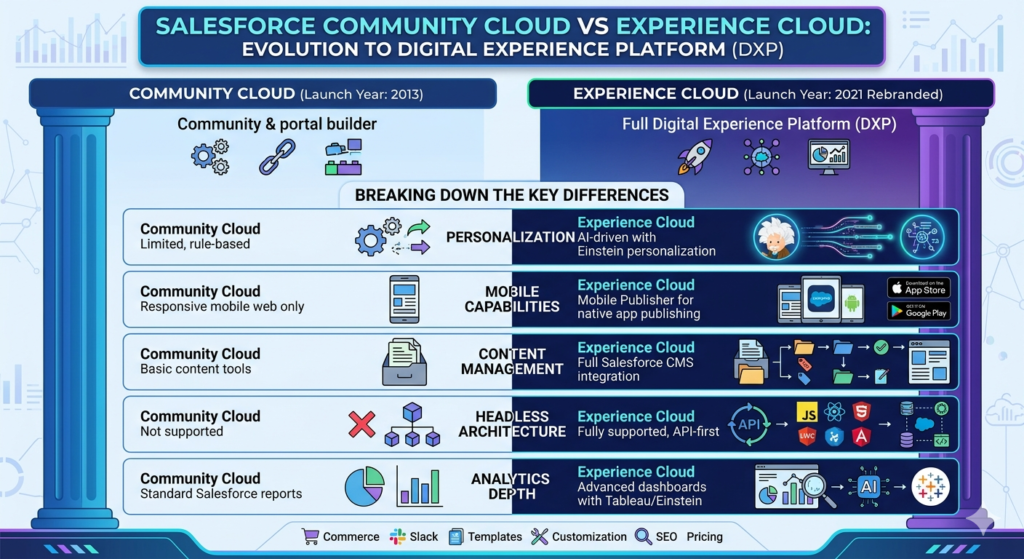
Let’s get to the heart of it. When evaluating Salesforce Community Cloud vs Experience Cloud, what are the real, tangible differences?
Side-by-Side Comparison Table
| Feature / Capability | Community Cloud | Experience Cloud |
|---|---|---|
| Launch Year | 2013 | 2021 (rebranded) |
| Platform Positioning | Community & portal builder | Full Digital Experience Platform (DXP) |
| Primary Use Cases | Customer, partner & employee communities | Communities + websites + mobile apps + portals |
| Experience Builder | Available but limited | Enhanced, more intuitive, richer components |
| Content Management | Basic content tools | Full Salesforce CMS integration |
| Personalization | Limited, rule-based | AI-driven with Einstein personalization |
| Mobile App Support | Responsive mobile web only | Mobile Publisher for native app publishing |
| Headless Architecture | Not supported | Fully supported (API-first) |
| AI & Automation | Limited Einstein features | Deep Einstein AI integration |
| Analytics | Standard Salesforce reports | Advanced dashboards with Tableau/Einstein |
| Commerce Integration | Limited | Deep Commerce Cloud integration |
| Slack Integration | Not available | Available |
| Template Library | General templates | Industry-specific + expanded templates |
| Customization Flexibility | Moderate (developer-heavy) | High (Lightning, headless, LWC support) |
| SEO Capabilities | Basic | Enhanced for public-facing sites |
| Pricing/Licensing | Community Cloud licenses | Experience Cloud licenses (restructured) |
Breaking Down the Key Differences
Personalization
This might be the single biggest differentiator. Community Cloud could deliver role-based content — showing different things to customers vs. partners, for example. But Experience Cloud takes personalization to a different level with AI-driven recommendations and dynamic content that adapts based on individual user data. For businesses trying to deliver “the right message to the right person at the right time,” this matters enormously.
Mobile Capabilities
In today’s mobile-first world, the ability to publish a branded mobile app directly from your Experience Cloud configuration is a game-changer. Community Cloud users who wanted a native mobile app had to build it separately — a costly, time-consuming process. Experience Cloud’s Mobile Publisher changes that equation significantly.
Content Management
Community Cloud treated content management as an afterthought. Experience Cloud puts it front and center with Salesforce CMS, giving content teams a real, structured workflow for creating and publishing content across multiple Experience Cloud sites — and beyond.
Headless Development
For organizations with sophisticated development teams, headless architecture support is critical. It enables the use of modern JavaScript frameworks, faster page loads, and more flexible front-end designs — none of which were possible in Community Cloud.
Analytics Depth
Understanding how users are engaging with your digital experience shouldn’t require exporting data to a separate tool. Experience Cloud’s tighter integration with Tableau CRM and Einstein Analytics means richer insights are available right within your Salesforce environment.
Key Benefits of Experience Cloud: Why Businesses Are Making the Switch
1. Dramatically Improved User Engagement
Experience Cloud is designed with the end user’s experience as the primary consideration. With cleaner interfaces, faster performance, AI-powered search, and personalized content, users are more likely to find what they need, engage with your platform, and return. For businesses, this translates directly into reduced support costs (when customers solve their own problems), higher partner productivity, and better employee satisfaction.
2. AI-Driven Personalization That Actually Works
Gone are the days of one-size-fits-all digital portals. Experience Cloud’s Einstein AI capabilities allow you to:
- Surface relevant knowledge articles based on a user’s history
- Recommend products or resources tailored to individual preferences
- Dynamically adjust portal content based on user segment, geography, or behavior
- Predict what users might need next — before they even search for it
For businesses in competitive markets where customer experience is a key differentiator, this kind of personalization isn’t a luxury. It’s a necessity.
3. Scalability Without the Headaches
Whether you’re serving 500 portal users or 5 million, Experience Cloud is built to scale. The platform’s architecture can accommodate growing user bases, expanding content libraries, and increasingly complex personalization rules — without requiring a rebuild from scratch every time your business grows.
4. Unified Data Across the Salesforce Ecosystem
One of Experience Cloud’s most underrated benefits is its native connection to the entire Salesforce platform. Your Experience Cloud portal can surface data from:
- Sales Cloud — Deal status, opportunity data
- Service Cloud — Case history, knowledge articles
- Marketing Cloud — Campaign engagement data
- Commerce Cloud — Order history, product recommendations
- Health Cloud, Financial Services Cloud, and more — Industry-specific data
This unified view means users get a seamless, consistent experience — not a patchwork of disconnected systems.
5. Faster Time to Market
With an expanded template library, improved drag-and-drop experience building, and better out-of-the-box features, businesses can launch polished Experience Cloud sites faster than building comparable solutions on Community Cloud.
6. Stronger Analytics for Smarter Decisions
Real-time dashboards and AI-generated insights help business leaders understand what’s working in their digital experiences and what isn’t. You can track user engagement, content performance, support deflection rates, and more — giving you the data you need to continuously improve.
7. Reduced Total Cost of Ownership
While the initial investment in migrating to Experience Cloud may require upfront planning, many businesses find that the platform’s enhanced capabilities reduce long-term costs. Self-service features reduce support case volumes. Better partner tools improve deal velocity. Employee communities reduce time spent searching for information. The ROI case is real.
Should You Upgrade from Community Cloud? Here’s How to Decide
This is the question we hear most often at RizeX Labs when we talk to clients about their Salesforce roadmap. The honest answer? It depends — but the tipping point is closer than many businesses realize.
Signs You Should Strongly Consider Migrating
✅ Your users are complaining about the experience.
If your customers, partners, or employees are telling you the portal feels outdated, hard to navigate, or unhelpful — that’s a signal. Experience Cloud’s improved UX and personalization features directly address these pain points.
✅ You want mobile app capabilities.
If a branded mobile app is on your digital roadmap, Experience Cloud’s Mobile Publisher makes that achievable without a separate development project.
✅ You’re scaling quickly.
If your user base is growing rapidly, or you’re expanding into new markets or partner ecosystems, Experience Cloud’s scalability and flexibility will serve you better than Community Cloud’s more constrained architecture.
✅ Personalization is a strategic priority.
If you’re investing in customer experience as a competitive differentiator, Community Cloud’s limited personalization capabilities will hold you back. Experience Cloud’s AI-driven features are built for exactly this purpose.
✅ You need better content management.
If managing content in your community feels painful and disconnected, the Salesforce CMS integration in Experience Cloud will be a meaningful improvement.
✅ You’re already on Experience Cloud licenses.
Salesforce has been migrating Community Cloud licenses to Experience Cloud as part of routine renewals. If you’re already paying for Experience Cloud, you should be taking advantage of its full capabilities.
Factors to Evaluate Before Migrating
💰 Cost
Migration isn’t free. Depending on the complexity of your current Community Cloud implementation, a migration to Experience Cloud may involve development work, data migration, testing, and user training. Work with a certified Salesforce partner (like RizeX Labs) to get an honest assessment of the investment required.
🕐 Complexity
Highly customized Community Cloud implementations can be more complex to migrate. Evaluate what custom code, integrations, and workflows you have in place and what will need to be rebuilt or rearchitected.
📈 ROI Timeline
Map out the expected benefits of migrating — reduced support costs, higher user engagement, faster partner productivity — against the migration investment. In most cases, businesses see clear ROI within 12-18 months.
🔄 Business Continuity
Plan your migration carefully to minimize disruption. A phased approach — where you migrate one community or use case at a time — is often more manageable than a big-bang cutover.
Thinking about migrating from Community Cloud to Experience Cloud? RizeX Labs offers a free Salesforce Experience Cloud readiness assessment. Get in Touch →
Real-World Use Cases: Experience Cloud in Action
1. Customer Support Portals
The challenge: A growing SaaS company was struggling with rising support ticket volumes. Customers were calling and emailing for help with issues that could be resolved through self-service — if only the resources were easy to find.
The Experience Cloud solution: By building a personalized customer support portal on Experience Cloud, the company surfaced AI-recommended knowledge articles based on each customer’s product usage and support history. Intelligent search made finding answers fast and intuitive. Case deflection rates improved by over 35%, and customer satisfaction scores climbed.
Why this works better with Experience Cloud: Community Cloud could have powered a basic knowledge base, but the AI-driven personalization and improved search capabilities are what made the difference.
2. Partner Collaboration and Channel Management
The challenge: A manufacturing company with a large network of distributors and resellers needed a better way to manage deal registration, marketing development funds (MDF), and product training — all in one place.
The Experience Cloud solution: A branded partner portal built on Experience Cloud gave distributors a single destination for everything they needed. Personalized dashboards showed each partner their pipeline, available MDF balances, and relevant training content based on their certification level. Deal registration was streamlined, and partner satisfaction improved dramatically.
Why this works better with Experience Cloud: The combination of Salesforce CRM data, personalized dashboards, and integrated content management creates a genuinely useful partner experience — not just a repository of documents.
3. Employee Communities and HR Portals
The challenge: A financial services firm with employees across multiple regions struggled with inconsistent access to HR policies, benefits information, and internal tools. Employees wasted significant time searching for information or contacting HR for routine questions.
The Experience Cloud solution: A centralized employee community built on Experience Cloud gave every employee a personalized hub — showing them relevant HR resources based on their location, role, and employment status. Integrated with Slack for real-time collaboration and Salesforce’s analytics tools to track engagement, the portal became a genuine productivity tool rather than a static intranet.
Why this works better with Experience Cloud: The Slack integration, personalization capabilities, and analytics depth made it possible to build an experience that employees actually wanted to use.
Conclusion: Experience Cloud Is the Future — And the Future Is Now
The Salesforce Community Cloud vs Experience Cloud conversation ultimately isn’t just about features or branding. It’s about recognizing that the digital landscape has changed fundamentally — and that the platforms businesses use to engage their customers, partners, and employees need to change with it.
Community Cloud was a strong product that served businesses well for nearly a decade. But the world it was built for no longer exists. Today’s users expect personalized, seamless, mobile-first digital experiences. Today’s businesses need platforms that can scale, integrate deeply, and leverage AI to deliver genuine value.
Experience Cloud Salesforce delivers on all of these expectations — and then some. The rebranding from Community Cloud wasn’t just a name change. It was Salesforce declaring that digital experience is the new competitive frontier, and committing the full weight of its platform, its AI capabilities, and its ecosystem to help businesses win there.
Key Takeaways
- Community Cloud was a powerful community and portal builder, but had limitations in personalization, content management, and scalability.
- The “community cloud renamed” moment in 2021 reflected Salesforce’s broader ambition to compete as a full digital experience platform.
- Experience Cloud Salesforce delivers AI-driven personalization, mobile app publishing, headless architecture support, Salesforce CMS integration, and far richer analytics.
- The choice isn’t really whether to move to Experience Cloud — it’s about when and how to do it effectively.
- Working with the right Salesforce partner can make the migration smooth, strategic, and ROI-positive.
About RizeX Labs
We’re Pune’s leading IT training institute specializing in emerging technologies like Salesforce and data analytics. At RizeX Labs, we help professionals master tools like Salesforce Tableau CRM through hands-on training, real-world projects, and expert mentorship. Our programs are designed to transform learners into job-ready Salesforce professionals with strong analytical and reporting skills.
Internal Links
- Salesforce Admin & Development Training
- Salesforce Apex Triggers: Beginner’s Guide with Real-Time Examples
- Salesforce Lightning Web Components (LWC) vs Aura: Which Should You Learn First
