
Introduction
In an era where data breaches cost organizations an average of $4.45 million and regulatory penalties grow steeper every year, protecting your CRM data is no longer optional. Salesforce Shield is Salesforce's premium security suite designed to give enterprises the advanced tools they need to encrypt sensitive data, monitor user activity, and maintain long-term audit trails, all within the Salesforce platform.
Whether you are a Salesforce Admin managing user permissions, a compliance officer navigating GDPR or HIPAA requirements, an IT leader evaluating salesforce data security investments, or a Salesforce architect designing secure solutions, understanding Salesforce Shield is essential. The platform's native security features, while robust, do not always satisfy the stringent requirements of heavily regulated industries like healthcare, finance, government, and insurance.
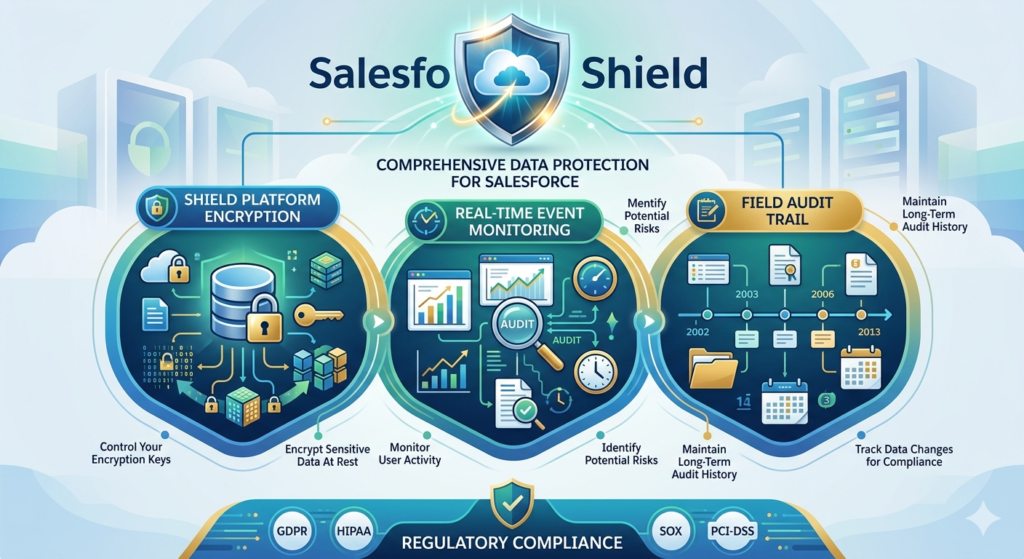
Organizations dealing with compliance mandates such as GDPR (General Data Protection Regulation), HIPAA (Health Insurance Portability and Accountability Act), SOX (Sarbanes-Oxley Act), and PCI-DSS (Payment Card Industry Data Security Standard) need capabilities that go far beyond role hierarchies, profiles, and permission sets. They need encryption at rest, real-time behavioral analytics, and the ability to retain field-level change history for years, not just months.
That is precisely what Salesforce Shield delivers.
In this comprehensive guide, we will break down every component of Salesforce Shield, explain how platform encryption Salesforce works under the hood, walk through implementation best practices, address common challenges, and help you determine whether Shield is the right investment for your organization.
What Is Salesforce Shield?
Salesforce Shield is a trio of integrated security products that layer on top of your existing Salesforce org to provide enterprise-grade data protection, visibility, and compliance capabilities. Think of it as an advanced security upgrade, not a replacement for Salesforce's built-in security model, but a powerful enhancement designed for organizations with elevated risk profiles and regulatory obligations.
The Three Core Components
Salesforce Shield consists of three distinct but complementary products:
- Platform Encryption – Encrypts data at rest within Salesforce, covering standard and custom fields, files, attachments, and search indexes.
- Event Monitoring – Provides detailed visibility into user activity, application performance, and potential security threats through granular event logs.
- Field Audit Trail – Extends field history tracking from the standard 18-month retention to up to 10 years, enabling long-term compliance and forensic analysis.
Each component can be purchased individually, but together they form a cohesive security strategy that addresses the full spectrum of salesforce data security requirements.
Standard Salesforce Security vs. Salesforce Shield
It is important to understand what Salesforce already provides before evaluating Shield:
| Security Capability | Standard Salesforce | Salesforce Shield |
|---|---|---|
| Role-based access control | ✅ | ✅ |
| Field-level security | ✅ | ✅ |
| Login IP restrictions | ✅ | ✅ |
| Two-factor authentication | ✅ | ✅ |
| Data encryption at rest | ❌ (Classic only, limited) | ✅ (AES-256, comprehensive) |
| Granular event logs | ❌ | ✅ |
| Field history beyond 18 months | ❌ | ✅ (Up to 10 years) |
| BYOK (Bring Your Own Key) | ❌ | ✅ |
| Threat detection & analytics | ❌ | ✅ |
| Transaction Security policies | ❌ | ✅ |
Standard Salesforce security is excellent for controlling who can access what. Salesforce Shield adds the ability to protect how that data is stored, track everything users do with it, and retain historical changes for as long as compliance demands.
Pro Tip: Salesforce Shield does not replace your existing security model. It enhances it. You still need well-configured profiles, permission sets, sharing rules, and field-level security as your foundation. Shield is the advanced layer you build on top.
Platform Encryption Salesforce Explained
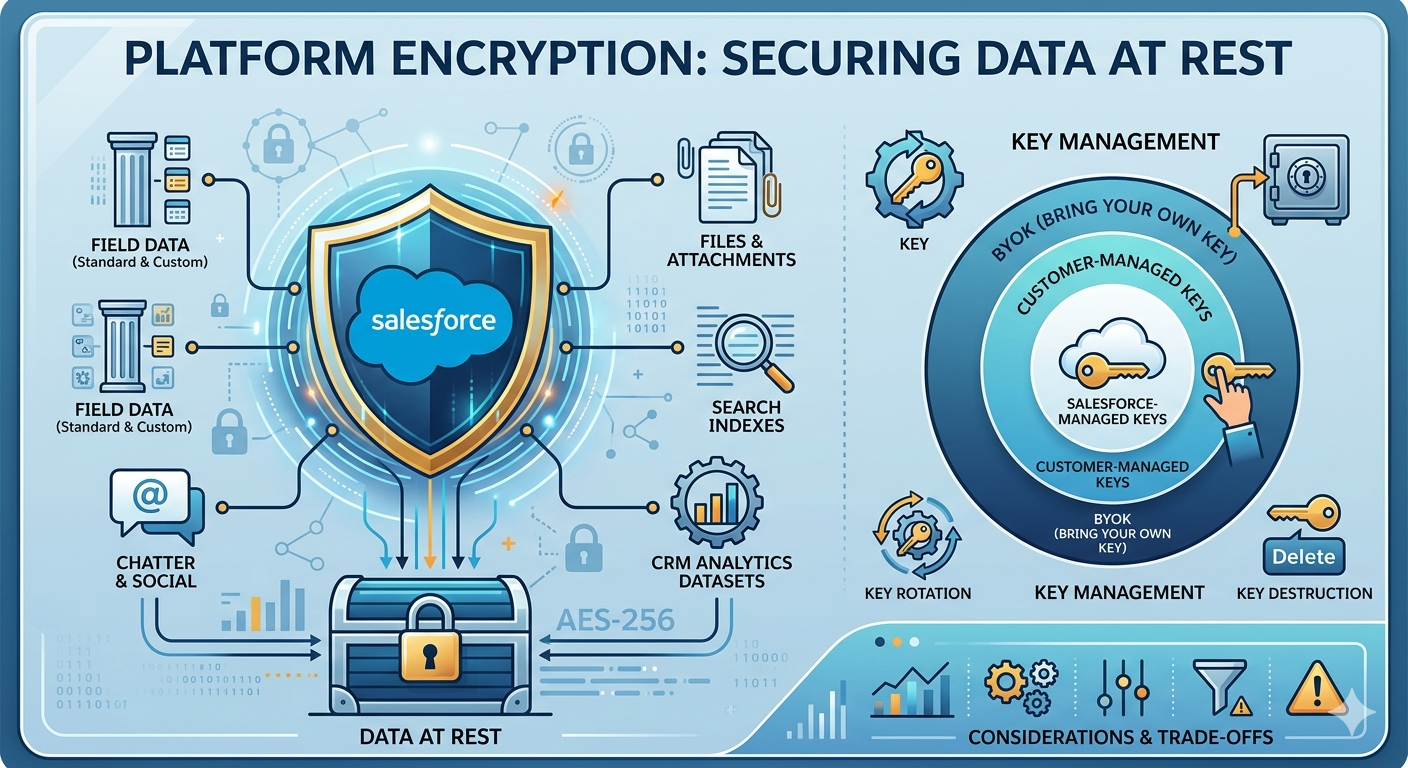
Platform encryption Salesforce (officially called Salesforce Shield Platform Encryption) is the most technically complex component of the Shield suite. It provides natively integrated encryption for data stored within Salesforce, commonly referred to as "data at rest."
What Does Platform Encryption Protect?
Platform Encryption covers a broad range of data types:
- Standard field data – Fields on standard objects like Account Name, Contact Email, Phone, and more
- Custom field data – Text, text area, email, phone, URL, and date fields on custom objects
- Files and attachments – Documents uploaded to Salesforce, including Salesforce Files, Attachments, and Content
- Search indexes – Encrypted data within search indexes so that even cached search data remains protected
- Chatter – Posts, comments, and questions in Chatter feeds
- CRM Analytics (Tableau CRM) datasets – Data within analytics datasets
Data at Rest vs. Data in Transit
Understanding the distinction is critical:
- Data at rest refers to data stored on disk in Salesforce's data centers. Platform Encryption protects this data using AES-256 bit encryption, one of the strongest encryption standards available.
- Data in transit refers to data moving between your browser (or API client) and Salesforce servers. This is protected by TLS (Transport Layer Security), which Salesforce enforces by default on all connections.
Platform Encryption specifically addresses the "at rest" component, ensuring that even if someone gained physical access to the underlying storage infrastructure, the data would be unreadable without the proper encryption keys.
Key Management
Key management is where Platform Encryption becomes truly enterprise-grade:
- Salesforce-managed keys – Salesforce generates, stores, and manages the encryption keys on your behalf. This is the simplest option and suitable for many organizations.
- Customer-managed keys – You generate the keys and upload them to Salesforce. You maintain control over key lifecycle, including rotation and destruction.
- BYOK (Bring Your Own Key) – The most advanced option. You generate and store keys in your own Hardware Security Module (HSM) or key management service. Salesforce never has access to your key material in plaintext. This is essential for organizations in highly regulated industries where key custody is a compliance requirement.
Pro Tip: Before enabling Platform Encryption, conduct a thorough impact assessment. Encryption can affect validation rules, formula fields, SOQL queries with filter conditions on encrypted fields, and certain AppExchange packages. Always test in a sandbox first.
Key Rotation and Destruction
Platform Encryption supports:
- Key rotation – Generate new keys periodically without decrypting and re-encrypting all data. Salesforce maintains a key cache that maps data to the correct key version.
- Key destruction – In extreme scenarios (such as a regulatory mandate to permanently destroy data), destroying the encryption key renders the associated data permanently unreadable.
Encryption Considerations and Trade-offs
While powerful, encryption introduces certain functional limitations:
- Encrypted fields cannot be used in
WHEREclauses in SOQL (unless using deterministic encryption) - Standard filter and sort operations on encrypted fields may be restricted
- Some AppExchange apps may not support encrypted fields
- Deterministic encryption enables filtering and grouping but provides a slightly different security profile than probabilistic encryption
These trade-offs are manageable with proper planning but must be understood before implementation.
Event Monitoring in Salesforce Shield
Event Monitoring is the visibility engine of Salesforce Shield. It captures detailed logs of user activity across your Salesforce org, giving security teams, admins, and compliance officers the data they need to detect threats, investigate incidents, and ensure accountability.
What User Activity Can Be Tracked?
Event Monitoring captures over 50 event types, including:
- Login and logout events – Who logged in, from where, when, and using what authentication method
- Report and dashboard views – Which reports were viewed, exported, or printed, and by whom
- Data exports – Bulk data exports via Data Loader, reports, or API calls
- API usage – REST, SOAP, Bulk, and Streaming API calls with detailed parameters
- Lightning page views – User navigation patterns within Lightning Experience
- Content downloads – File and document access
- URI events – Page requests in Salesforce Classic
- Apex execution – Custom code execution details
- List views – Which list views were accessed and by whom
- Knowledge article views – Content access patterns
Security Analytics Use Cases
Raw event logs are powerful, but the real value comes from analyzing patterns. Event Monitoring integrates with CRM Analytics (formerly Einstein Analytics) through the Event Monitoring Analytics App, which provides pre-built dashboards for:
- Adoption tracking – Understand which features and objects users engage with most
- Data loss prevention – Identify unusual export patterns that might indicate data theft
- Performance optimization – Pinpoint slow pages, inefficient queries, and API bottlenecks
- User behavior profiling – Establish baseline behavior patterns and flag anomalies
Threat Detection Examples
Here are real-world scenarios where Event Monitoring proves invaluable:
Scenario 1: Departing Employee Data Theft
A sales representative who recently gave notice suddenly exports five large reports containing customer contact information and deal data. Event Monitoring captures the report export events, flags the unusual volume, and alerts the security team before the data leaves the organization.
Scenario 2: Compromised Credentials
A user account logs in from two geographically distant locations within minutes, an impossibility that suggests credential compromise. Event Monitoring captures both login events with IP geolocation data, triggering an automated response through Transaction Security policies.
Scenario 3: API Abuse
An integration user begins making an abnormally high volume of API calls at unusual hours, querying sensitive objects. Event Monitoring captures every API event, enabling the team to investigate whether the integration was compromised or misconfigured.
Transaction Security Policies
Event Monitoring also powers Transaction Security, which allows you to create real-time policies that automatically respond to specific events:
- Block a login attempt from an unrecognized IP range
- Require two-factor authentication for data export operations
- Send alerts when a user accesses a sensitive report
- Terminate a session when anomalous behavior is detected
Pro Tip: Start with monitoring mode before enforcement mode. Observe the event patterns in your org for 2-4 weeks to establish baselines and avoid blocking legitimate user activity with overly aggressive policies.
Field Audit Trail
The third pillar of Salesforce Shield, Field Audit Trail, addresses a fundamental compliance requirement: how long can you retain a complete history of changes to your data?
How Field History Retention Works
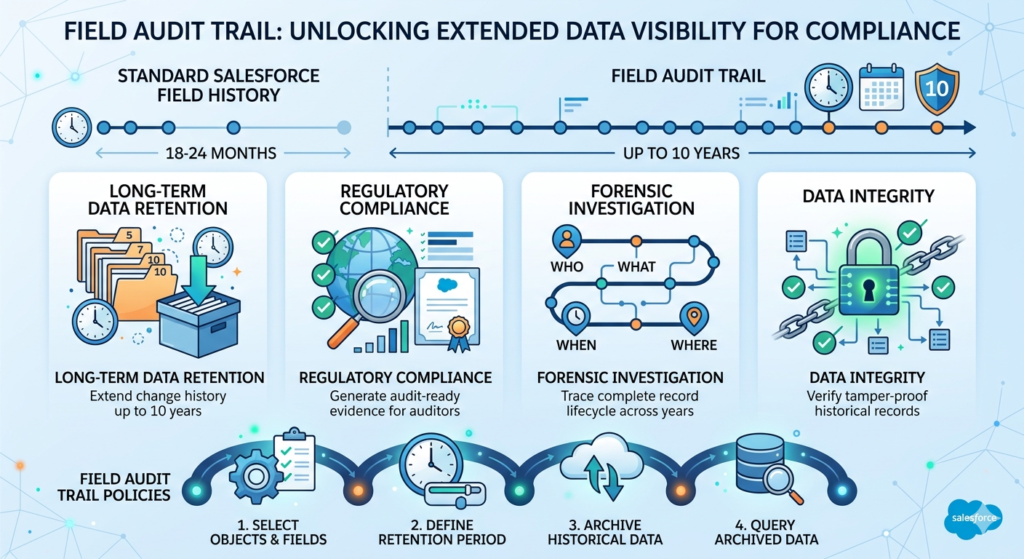
Standard Salesforce field history tracking retains data for 18 months (with some data accessible for up to 24 months through the API). For many regulated industries, this is insufficient. Auditors, regulators, and legal teams frequently require change history spanning 5 to 10 years.
Field Audit Trail extends this retention to up to 10 years, covering:
- The field that changed
- The old value
- The new value
- Who made the change
- When the change was made
You can define Field Audit Trail policies that specify:
- Which objects and fields to track
- How long to retain the data
- Archival rules for historical records
Long-Term Compliance Benefits
Field Audit Trail is not just about storing data longer. It provides:
- Regulatory evidence – Demonstrate to auditors exactly when and by whom sensitive data was modified
- Forensic investigation – Trace the complete lifecycle of a record across years of activity
- Legal hold support – Maintain complete change records for litigation or legal discovery
- Data integrity verification – Confirm that records have not been tampered with over extended periods
Audit Policies
You can configure Field Audit Trail policies through the Salesforce Setup menu:
- Navigate to Setup > Field Audit Trail
- Define retention policies for specific objects
- Select the fields you want to track on each object
- Set the retention period (up to 10 years)
- Activate the policy
Data beyond the standard retention window is archived into FieldHistoryArchive big objects, which can be queried using Async SOQL or accessed through the API.
Real-World Enterprise Scenarios
Healthcare: A hospital system using Salesforce Health Cloud needs to retain patient record changes for 7 years under HIPAA. Field Audit Trail tracks every modification to patient demographics, care plans, and consent records.
Financial Services: A wealth management firm must demonstrate to SOX auditors that client portfolio data, risk ratings, and KYC (Know Your Customer) information has not been improperly altered. Field Audit Trail provides the immutable change log.
Government: A government agency uses Salesforce for case management and must retain all case record changes for 10 years under federal records management policies.
Pro Tip: Be strategic about which fields you track. Tracking every field on every object can consume your data storage allocation quickly. Focus on fields that carry compliance significance: status fields, financial values, personal data, consent flags, and approval-related fields.
Salesforce Shield for Compliance & Risk Reduction
One of the primary drivers for adopting Salesforce Shield is regulatory compliance. Here is how Shield maps to major compliance frameworks:
GDPR (General Data Protection Regulation)
- Platform Encryption protects personal data of EU citizens at rest
- Event Monitoring tracks who accesses personal data and when
- Field Audit Trail demonstrates accountability and data processing transparency
- Supports the "right to be forgotten" by enabling key destruction for encrypted data
HIPAA (Health Insurance Portability and Accountability Act)
- Platform Encryption safeguards Protected Health Information (PHI)
- Event Monitoring provides the access logs required for HIPAA audit trails
- Field Audit Trail maintains long-term records of PHI modifications
- Combined with a Salesforce BAA (Business Associate Agreement), Shield helps achieve HIPAA compliance
SOX (Sarbanes-Oxley Act)
- Field Audit Trail provides the immutable change records auditors require
- Event Monitoring tracks access to financial data and reports
- Platform Encryption protects sensitive financial records from unauthorized access
Financial Services (PCI-DSS, FINRA, SEC)
- Encryption of payment-related data
- Monitoring of data access and export activities
- Long-term retention of all changes to client financial records
- Evidence of internal controls and separation of duties
| Compliance Framework | Platform Encryption | Event Monitoring | Field Audit Trail |
|---|---|---|---|
| GDPR | ✅ Critical | ✅ Important | ✅ Important |
| HIPAA | ✅ Critical | ✅ Critical | ✅ Critical |
| SOX | ✅ Important | ✅ Critical | ✅ Critical |
| PCI-DSS | ✅ Critical | ✅ Critical | ✅ Important |
| FINRA/SEC | ✅ Important | ✅ Important | ✅ Critical |
Salesforce Shield Pricing & Licensing Considerations
Who Should Invest?
Salesforce Shield is not a universal requirement. It is designed for organizations that:
- Operate in regulated industries (healthcare, finance, government, insurance)
- Handle sensitive personal data (PII, PHI, financial data)
- Must satisfy external audit requirements
- Have experienced or are at high risk of data breaches
- Need to demonstrate comprehensive data governance to customers or partners
Cost vs. Risk
Salesforce Shield is priced as an add-on license, typically calculated as a percentage of your total Salesforce licensing spend (often cited as approximately 30% of your total org license cost, though exact pricing varies by negotiation, edition, and contract terms).
This can represent a significant investment. However, consider the alternative costs:
- Average data breach cost: $4.45 million (IBM 2023 report)
- GDPR fines: Up to €20 million or 4% of global annual revenue
- HIPAA penalties: Up to $1.5 million per violation category per year
- Reputation damage: Incalculable
When framed against potential regulatory penalties and breach costs, Shield is often a cost-effective insurance policy.
SMB vs. Enterprise
| Factor | SMB | Enterprise |
|---|---|---|
| Regulatory exposure | Often lower | Typically high |
| Data sensitivity | Varies | Usually high |
| Budget availability | Constrained | More flexible |
| Alternative solutions | May suffice with native features | Often requires Shield |
| Recommendation | Evaluate case-by-case | Strongly consider |
Pro Tip: During contract negotiations, request Shield be bundled with your core Salesforce licenses. Some organizations successfully negotiate lower Shield pricing, especially during multi-year renewals or large-scale expansions.
Salesforce Shield Implementation Best Practices
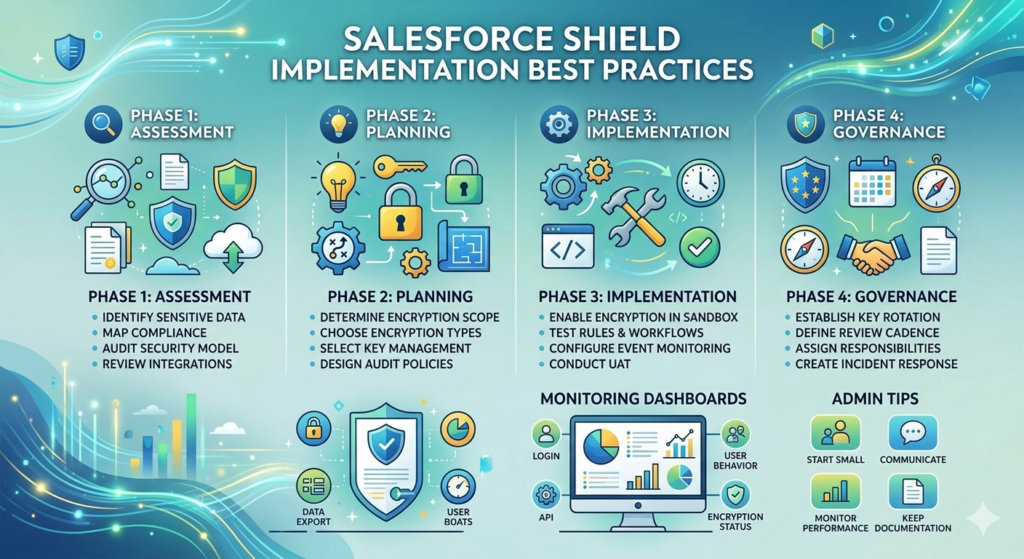
Implementing Salesforce Shield is not a flip-the-switch operation. It requires careful planning, testing, and governance. Here is a comprehensive implementation checklist:
Implementation Checklist
Phase 1: Assessment
- Identify all sensitive data fields across your Salesforce objects
- Map data sensitivity to compliance requirements (GDPR, HIPAA, SOX)
- Audit current security model (profiles, permission sets, sharing rules)
- Identify all integrations and AppExchange packages that interact with sensitive data
- Document current field history tracking configurations
Phase 2: Planning
- Determine encryption scope (which fields, files, and objects)
- Choose encryption type per field (deterministic vs. probabilistic)
- Select key management approach (Salesforce-managed vs. BYOK)
- Define Event Monitoring use cases and required event types
- Design Field Audit Trail policies (objects, fields, retention periods)
- Plan for sandbox testing timeline
Phase 3: Implementation
- Enable Platform Encryption in sandbox
- Test all validation rules, formula fields, and workflow rules against encrypted fields
- Verify integration compatibility with encrypted data
- Configure Event Monitoring and download initial event log files
- Set up Event Monitoring Analytics dashboards
- Create Transaction Security policies (start in monitoring mode)
- Define and activate Field Audit Trail policies
- Conduct user acceptance testing
Phase 4: Governance
- Establish key rotation schedule (quarterly or per policy)
- Define Event Monitoring review cadence (daily, weekly)
- Assign security monitoring responsibilities to specific team members
- Create incident response procedures for anomalous events
- Schedule quarterly security reviews
- Document all configurations and policies
Monitoring Dashboards
Set up the following dashboards for ongoing security management:
- Login Activity Dashboard – Failed logins, unusual locations, authentication methods
- Data Export Dashboard – Report exports, bulk downloads, API extractions
- User Behavior Dashboard – Page views, record access patterns, session durations
- API Usage Dashboard – API call volumes, error rates, client identification
- Encryption Status Dashboard – Encrypted field coverage, key status, encryption statistics
Admin Tips
- Start small: Encrypt your most sensitive fields first, then expand
- Communicate with users: Some encrypted fields may behave differently in filters and sorting
- Monitor performance: Encryption adds minimal but measurable processing overhead
- Keep documentation current: Track all encryption, monitoring, and audit trail configurations
Common Challenges & Limitations
No security solution is without trade-offs. Here are the most common challenges organizations face with Salesforce Shield:
Search Limitations
- Fields encrypted with probabilistic encryption cannot be searched
- Deterministic encryption enables exact-match searching but not partial matches, wildcards, or LIKE queries
- Auto-complete on encrypted fields may not function as expected
App Compatibility
- Some AppExchange packages may not support encrypted fields
- Custom integrations that rely on filtering or sorting by encrypted fields may require refactoring
- Managed packages that directly query encrypted fields may produce unexpected results
Performance Concerns
- Encryption and decryption operations add minor processing overhead
- Large-volume data loads with encryption enabled may take longer
- Event Monitoring log file downloads for high-activity orgs can be very large
Reporting Complexity
- Reports that group, sort, or filter by encrypted fields may not work as expected
- Deterministic encryption supports grouping and filtering; probabilistic does not
- Dashboard filters on encrypted fields may be limited
- Event Monitoring data requires external analytics tools or CRM Analytics for meaningful visualization
Mitigation Strategies
| Challenge | Mitigation |
|---|---|
| Search limitations | Use deterministic encryption for searchable fields |
| App compatibility | Test all packages in sandbox before production encryption |
| Performance | Encrypt only necessary fields; monitor org performance |
| Reporting complexity | Redesign reports to avoid filtering on encrypted fields |
| Storage consumption | Be selective with Field Audit Trail policies |
Salesforce Shield vs. Native Security Features
Understanding when Shield is worth the investment versus when native salesforce data security features are sufficient:
| Capability | Native Salesforce Security | Salesforce Shield |
|---|---|---|
| User authentication (MFA/SSO) | ✅ | ✅ |
| Role hierarchy & sharing | ✅ | ✅ |
| Field-level security | ✅ | ✅ |
| IP restrictions | ✅ | ✅ |
| Session settings | ✅ | ✅ |
| Login history (6 months) | ✅ | ✅ (Enhanced) |
| AES-256 encryption at rest | ❌ | ✅ |
| BYOK key management | ❌ | ✅ |
| 50+ event type monitoring | ❌ | ✅ |
| Real-time threat detection | ❌ | ✅ |
| Transaction security policies | ❌ | ✅ |
| Field history (10 years) | ❌ (18 months max) | ✅ |
| Compliance-grade audit trail | ❌ | ✅ |
When Shield Is Worth It
You likely need Salesforce Shield if:
- You store PHI, PII, or financial data in Salesforce
- You are subject to GDPR, HIPAA, SOX, PCI-DSS, or similar regulations
- Your organization has experienced a security incident
- External auditors or customers require encryption certifications
- Your industry peers consider encryption at rest a standard practice
- You need user activity visibility beyond basic login history
You may not need Salesforce Shield if:
- Your Salesforce org contains only low-sensitivity business data
- You are not subject to specific regulatory encryption mandates
- Your organization has fewer than 50 users with limited data exposure
- Native security features adequately address your risk profile
Conclusion
Salesforce Shield represents the gold standard for salesforce data security within the Salesforce ecosystem. By combining platform encryption Salesforce capabilities with comprehensive Event Monitoring and extended Field Audit Trail, Shield provides the three pillars that regulated enterprises need: data protection, visibility, and accountability.
For organizations in healthcare, financial services, government, insurance, and any industry handling sensitive personal or financial data, Shield is not a luxury but a necessity. The cost of non-compliance, whether measured in regulatory fines, breach remediation, or reputational damage, far exceeds the investment in Shield licensing and implementation.
Who needs Salesforce Shield most?
- Organizations subject to GDPR, HIPAA, SOX, or PCI-DSS
- Enterprises storing sensitive PII, PHI, or financial data in Salesforce
- Companies with large user bases where insider threat risk is elevated
- Businesses whose customers or partners contractually require encryption at rest
Your next steps:
- Assess your data – Identify all sensitive fields and objects in your Salesforce org
- Map your compliance requirements – Determine which regulations apply to your organization
- Evaluate your risk – Consider the financial and reputational cost of a potential breach or audit failure
- Engage an expert – Work with a certified Salesforce security consultant to plan and implement Shield
- Start with a sandbox – Test encryption, monitoring, and audit configurations before production deployment
About RizeX Labs
At RizeX Labs, we specialize in delivering advanced Salesforce security, compliance, and governance solutions for businesses that need enterprise-grade protection. Our expertise in Salesforce Shield, platform encryption, event monitoring, and audit compliance helps organizations secure sensitive CRM data, reduce security risks, and meet regulatory standards with confidence.
We empower organizations to strengthen their Salesforce ecosystem—from basic security controls to enterprise-level monitoring and encryption frameworks—through strategic implementation, governance planning, and real-world best practices that improve trust, compliance, and operational resilience.
Internal Linking Opportunities:
External Linking Opportunities:
- Salesforce official website
- Salesforce Shield overview
- Salesforce Help documentation
- Salesforce Security Guide
- GDPR compliance overview
- HIPAA compliance guide
- Salesforce Trust site
Quick Summary
Salesforce Shield is a powerful suite of advanced security tools designed to help organizations protect sensitive CRM data through enhanced encryption, activity monitoring, and audit tracking. By combining platform encryption salesforce, Event Monitoring, and Field Audit Trail, businesses can strengthen salesforce data security, ensure compliance, and proactively identify risks across their Salesforce environment.
With Salesforce Shield, organizations can encrypt sensitive fields, monitor user behavior in real time, retain historical field data for compliance, and build a more secure Salesforce architecture. As security and regulatory demands continue to grow, implementing Salesforce Shield becomes essential for enterprises handling financial, healthcare, legal, or customer-sensitive information.