
Introduction: Choosing the Right Tool in Salesforce Marketing Cloud
Salesforce Marketing Cloud (SFMC) is one of the most powerful digital marketing platforms available today — and with great power comes a very real challenge: knowing which tool to use and when.
If you’ve worked inside SFMC for any length of time, you’ve almost certainly faced the debate around SFMC triggered sends vs Journey Builder. Both tools send emails. Both can be automated. Both are deeply integrated into the SFMC ecosystem. But they are fundamentally different in their architecture, purpose, and ideal application.
Use the wrong one, and you risk delayed transactional messages that frustrate customers, over-engineered journeys that are brittle to maintain, or under-powered send mechanisms that can’t scale with your audience.
Use the right one — or better yet, use them together strategically — and you unlock a marketing engine that responds to customers at exactly the right moment, with exactly the right message.
In this post, we’re going to break down the core differences between triggered sends and Journey Builder in Salesforce Marketing Cloud, walk through real-world use cases for each, and give you a clear, practical framework for deciding which tool belongs in your next campaign architecture. Whether you’re a seasoned SFMC developer, a marketing ops professional, or a Salesforce consultant evaluating solutions for a client, this guide is built for you.
Let’s get into it.
What Are Triggered Sends in SFMC?
Defining Marketing Cloud Triggered Emails
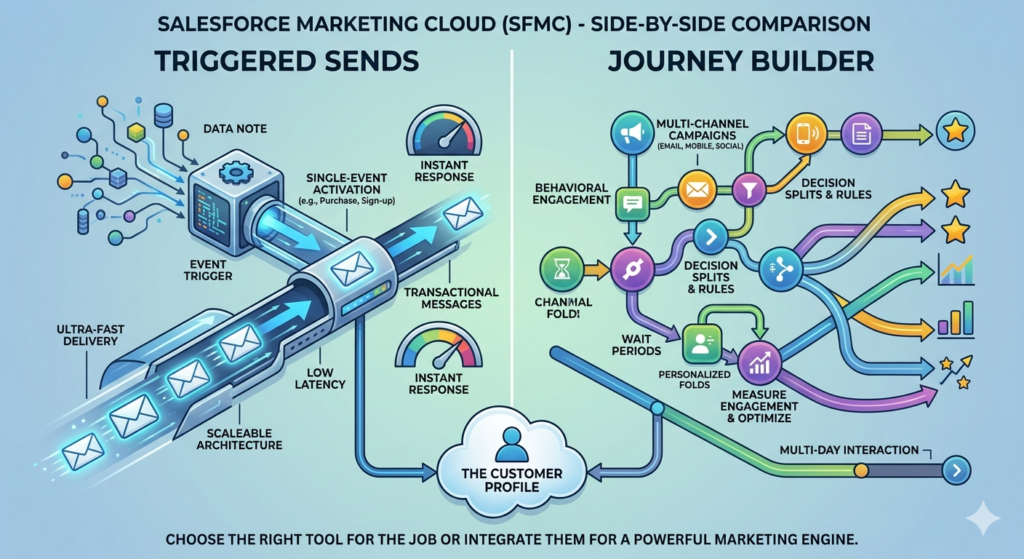
A triggered send in Salesforce Marketing Cloud is a mechanism that allows you to send a single email to a single contact in real time, in direct response to a specific event or action. The send is “triggered” — meaning it doesn’t go out on a schedule or as part of a batch. It fires immediately when the triggering condition is met.
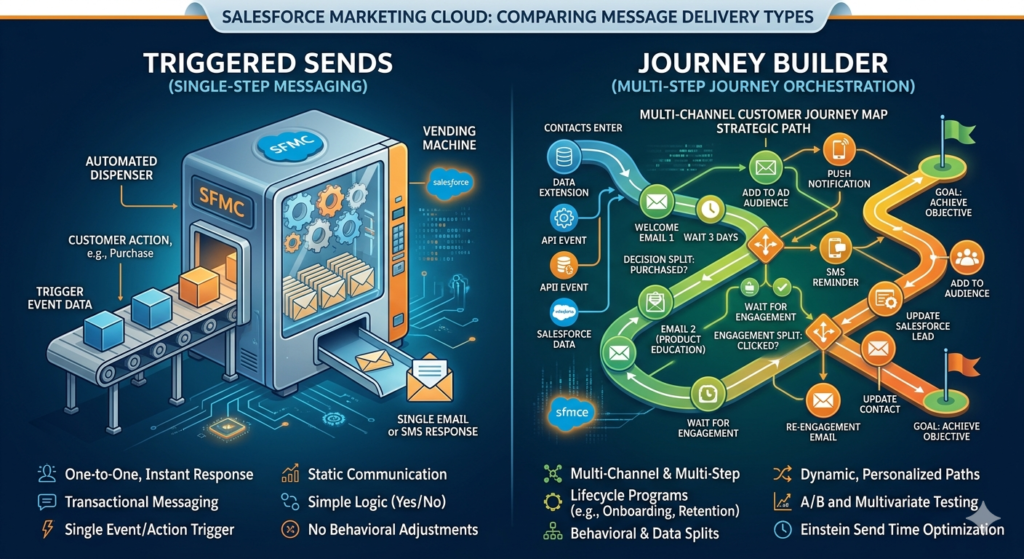
Think of it like a vending machine: someone presses a button (the triggering event), and a response is dispensed instantly (the email). No waiting, no queuing, no audience-building required.
In technical terms, triggered sends are most commonly initiated through the SFMC REST or SOAP API, though they can also be connected to automations or platform events within Salesforce CRM. They operate against a Triggered Send Definition (TSD) — a pre-configured email template, sender profile, and delivery profile that’s ready and waiting to fire on demand.
How Triggered Sends Work
Here’s the basic architecture of a triggered send workflow:
- An event occurs — a user submits a form, completes a purchase, resets a password, or any number of defined triggers.
- A system (usually an external application or Salesforce CRM) calls the SFMC API with subscriber data and any personalization attributes.
- SFMC processes the request and sends the pre-configured email to the contact in near real time.
- Tracking data (opens, clicks, bounces) is recorded back against the triggered send definition for reporting.
The entire process, from API call to email delivery, can happen in seconds.
Key Features and Benefits of Triggered Sends
- Real-time delivery: Near-instantaneous sending based on live system events
- API-driven: Easily integrated with external platforms, CRMs, e-commerce engines, and apps
- Transactional messaging support: Triggered sends can be configured as transactional, bypassing commercial unsubscribes for critical operational messages
- Lightweight setup: A single email with a single send definition — no journey canvas, no multi-step logic
- High throughput: Engineered to handle high volumes of real-time sends without batch delays
- Simple personalization: Subscriber attributes passed via API can be rendered directly in the email
Common Use Cases for Triggered Sends
Triggered sends shine in transactional and event-driven messaging scenarios. Classic examples include:
- Order confirmations — Immediately after a purchase is completed
- Password reset emails — Within seconds of a reset request
- Shipping notifications — When order status changes in the fulfillment system
- Account verification emails — After user registration
- Appointment reminders (real-time) — When a booking is created in a scheduling system
- Two-factor authentication codes — Security codes that must arrive instantly
- Form submission acknowledgements — Immediate confirmation after a lead submits a form
Notice a pattern? These are messages that customers expect immediately. A delay of even a few minutes can erode trust and create friction in the customer experience.
What Is Journey Builder?
Defining Journey Builder in SFMC
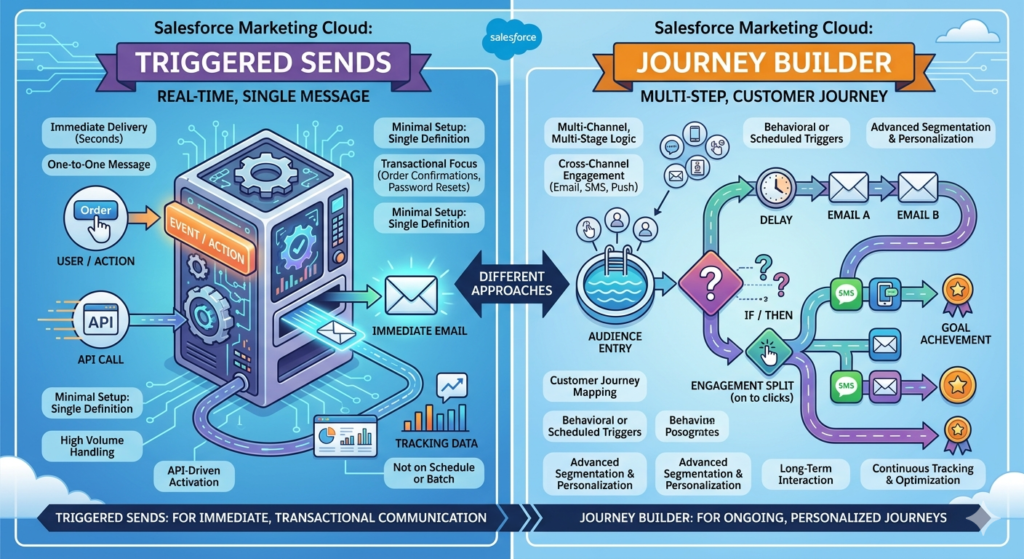
Journey Builder is SFMC’s multi-channel, multi-step customer journey orchestration tool. Rather than responding to a single event with a single email, Journey Builder allows you to design complex, automated lifecycle programs that guide contacts through a series of interactions over time — across email, SMS, push notifications, ads, and more.
If a triggered send is a vending machine, Journey Builder is a concierge: it meets the customer, learns about them, walks them through a series of curated experiences, and adjusts the path based on how the customer responds along the way.
Journey Builder operates on a visual canvas where marketers and admins drag and drop activities to build out the logical flow of a journey. These journeys can be as simple as a two-step welcome email sequence or as complex as a 12-month retention program with dozens of conditional branches.
How Journey Builder Works
Contacts enter a journey through a defined entry source. These can include:
- Data Extension Entry — contacts loaded into a journey from a data extension, either on a schedule or in real time
- API Event — contacts injected into a journey via the SFMC API in real time
- Salesforce Data Entry — contacts entering based on CRM object updates (leads, opportunities, cases)
- CloudPages — contacts entering via a form submission or landing page interaction
- Audience — pre-built segments from Contact Builder or Audience Studio
Once inside the journey, contacts move through a series of activities:
- Messages: Email, SMS, push notifications, in-app messages, ad audiences
- Wait Activities: Wait a specific number of days, wait until a date, wait until an event occurs
- Decision Splits: Branch contacts based on data attributes, engagement behavior, or journey activity
- Engagement Splits: Branch based on whether a contact opened or clicked a previous message
- Update Contact: Modify a data extension value or Salesforce record based on journey progress
- Einstein Activities: AI-powered send time optimization, engagement scoring, and more
Key Features and Benefits of Journey Builder
- Multi-step orchestration: Design sequences that span days, weeks, or months
- Multi-channel messaging: Combine email, SMS, push, and paid media in a single journey
- Behavioral branching: React to customer behavior (or inaction) with dynamic path logic
- Wait logic: Control timing between touchpoints with precision
- Lifecycle coverage: Support onboarding, nurture, retention, win-back, and post-purchase programs
- Goal tracking: Define a journey goal (e.g., a purchase) and automatically exit contacts who achieve it
- A/B and multivariate testing: Test subject lines, content, and paths within the canvas
Common Use Cases for Journey Builder
- Onboarding sequences — A welcome series that educates new customers over their first 30 days
- Lead nurture programs — A multi-touch email and ad program that moves prospects down the funnel
- Post-purchase journeys — Thank you emails, product education, and cross-sell sequences
- Re-engagement / Win-back campaigns — Identifying lapsed customers and pulling them back
- Event-based lifecycle programs — Journeys triggered by anniversaries, contract renewals, or product usage milestones
- Abandoned cart flows — Multi-message sequences responding to cart abandonment with escalating urgency
- Customer success programs — Automated touchpoints tied to customer health scores or support ticket status
SFMC Triggered Sends vs Journey Builder: Core Comparison
Now let’s get into the heart of the matter. When you put journey vs triggered send side by side, the differences become clear — and so does the decision-making logic.
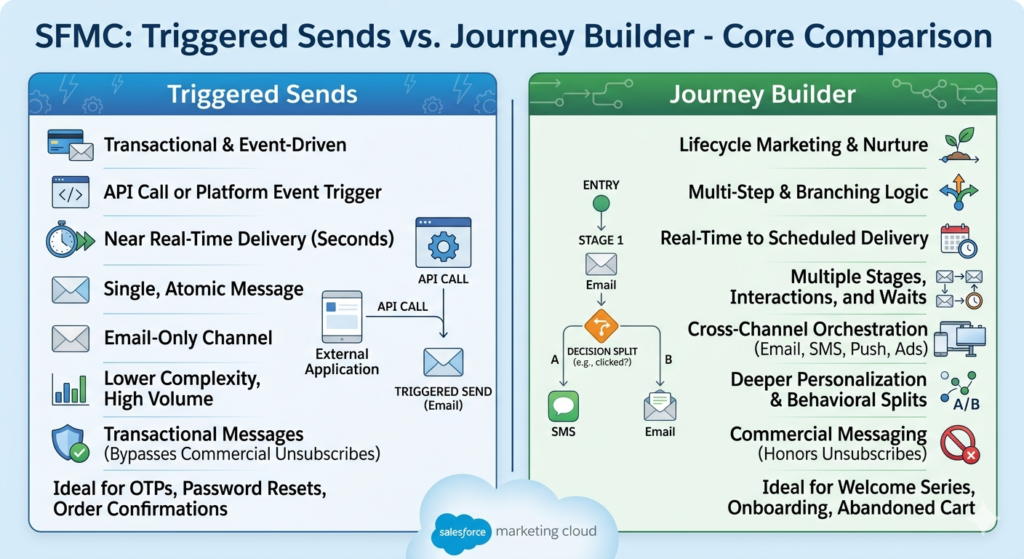
Comparison Table: Triggered Sends vs Journey Builder
| Dimension | Triggered Sends | Journey Builder |
|---|---|---|
| Primary Use Case | Transactional, event-driven messaging | Lifecycle marketing, multi-step nurture |
| Trigger Mechanism | API call, platform event | Entry source (API, data extension, CRM) |
| Number of Steps | Single message | Multiple steps, branching logic |
| Channels Supported | Email only | Email, SMS, push, ads, and more |
| Delivery Speed | Near real-time (seconds) | Real-time to scheduled; depends on wait activities |
| Complexity | Low — single email, single definition | Medium to High — canvas-based, multi-activity |
| Personalization Depth | Attribute-level, passed via API | Deep — data attributes, behavioral splits, AI |
| Transactional Messaging | Yes — can bypass commercial unsubscribes | Limited — typically commercial messaging |
| Scalability | Very high — built for high-volume real-time | High — but heavier infrastructure overhead |
| Reporting | Send-level tracking per TSD | Journey-level analytics, path reporting |
| Technical Overhead | Moderate — API integration required | Higher — canvas design, data modeling, testing |
| Re-entry Logic | Simple — based on TSD settings | Sophisticated — configurable re-entry rules |
| Ideal Team | Developers, marketing ops, SFMC admins | Marketing strategists, campaign managers, admins |
| Setup Time | Fast — can be live in hours | Longer — design, testing, QA required |
Breaking Down the Key Differences
Speed and Real-Time Responsiveness
This is where triggered sends have a decisive advantage. A marketing cloud triggered email fires within seconds of the API call. Journey Builder, even when configured with an API event entry source, introduces some latency due to contact evaluation, journey processing, and platform queue management. For truly time-sensitive messages — think OTPs, password resets, or immediate order confirmations — triggered sends are the clear choice.
Complexity and Orchestration
Journey Builder is in a completely different league when it comes to complexity and multi-step orchestration. If your campaign involves more than one message, conditional logic, timing rules, or behavioral branching, Journey Builder is the appropriate tool. Triggered sends simply don’t support these constructs.
Transactional vs Commercial Messaging
One of the most practically important distinctions: triggered sends can be configured as transactional in SFMC, meaning they can send to contacts who have unsubscribed from commercial messaging. Journey Builder journeys are typically classified as commercial sends and will respect the commercial unsubscribe status. If you need to send critical operational messages (account alerts, order updates, security notifications) regardless of marketing opt-out status, triggered sends are your only option within SFMC.
Personalization Capability
Both tools support personalization, but in different ways. Triggered sends rely on attributes passed in real time via the API payload — you can include dynamic content, but you’re limited to what’s passed at send time. Journey Builder has access to the full Contact Builder data model, can query data extensions, run Einstein AI models, and make branching decisions based on rich historical data.
Channel Support
Triggered sends are email only. Journey Builder supports email, SMS, mobile push, in-app messages, LINE, WhatsApp (via partner integrations), and can update Facebook Custom Audiences and Google Customer Match — making it the right tool whenever multi-channel orchestration is required.
When to Use Triggered Sends
The Case for Triggered Sends: Real-Time, Transactional, API-Driven
Choose triggered sends when your use case has these characteristics:
1. The message must arrive in seconds, not minutes
If the customer is actively waiting for the message to complete an action — resetting a password, confirming an account, getting an order number — any delay is a failure. Triggered sends are purpose-built for this.
2. The send is driven by a system event outside SFMC
If the triggering event lives in Salesforce CRM, an e-commerce platform, a mobile app, a fulfillment system, or any other external application, a triggered send connected via API is the cleanest architecture. You’re letting the source-of-truth system call SFMC when the event happens, rather than relying on data synchronization to propagate the event to a Journey Builder entry source.
3. The message is transactional and must reach unsubscribed contacts
Critical account and operational messages need to reach people who may have opted out of marketing. Triggered sends with a transactional classification are the only mechanism in SFMC that supports this.
4. You need extremely high volume throughput
High-volume e-commerce platforms, financial services companies, and SaaS applications may need to fire hundreds of triggered sends per minute. SFMC’s triggered send infrastructure is optimized for this. Journey Builder has concurrency limits that can create processing bottlenecks under extreme load.
5. The logic is simple: one event, one email
If there’s no branching, no multi-step sequence, no waiting — just fire an email when something happens — the simplicity of a triggered send is an advantage, not a limitation. Don’t over-engineer a solution when a triggered send does the job perfectly.
Real-World Example: E-Commerce Order Confirmation
An online retailer integrates their Shopify store with SFMC. When a customer completes checkout, Shopify sends a webhook to a middleware layer that calls the SFMC REST API, firing a triggered send with the order number, line items, shipping address, and estimated delivery date personalized in the email template. The customer receives the confirmation within 10 seconds of completing their purchase. Clean, fast, reliable — and configured as transactional so it reaches even opted-out contacts.
Real-World Example: SaaS Password Reset
A software company has SFMC connected to their auth system via API. When a user requests a password reset, the system calls the triggered send API with the reset token embedded in a personalized URL. The email arrives in under 15 seconds. No journey needed, no multi-step logic — just a critical security message delivered instantly.
When to Use Journey Builder
The Case for Journey Builder: Lifecycle, Nurture, and Behavioral Orchestration
Journey Builder is the right choice when your use case looks like this:
1. You need to send multiple messages over a period of time
Any campaign that involves more than one touchpoint — a welcome series, a nurture sequence, a re-engagement program — belongs in Journey Builder. The wait activities, goal exits, and canvas logic are specifically designed for these programs.
2. You want to branch based on customer behavior
If the customer’s next message should depend on whether they opened the last one, clicked a specific link, made a purchase, or hit a data threshold, Journey Builder’s decision splits and engagement splits handle this natively.
3. You’re running lifecycle marketing programs
Onboarding, post-purchase education, loyalty tier communications, anniversary programs, contract renewal sequences — these are lifecycle programs. They require timing logic, conditional paths, and often multi-channel messaging. Journey Builder is the only tool in SFMC built for this.
4. You need multi-channel orchestration
If your campaign involves email and SMS, or email and push notifications, or email and paid social retargeting — Journey Builder is mandatory. Triggered sends are email-only.
5. You want AI-powered optimization
Einstein Send Time Optimization, Einstein Engagement Scoring, and Einstein Copy Insights are all available within Journey Builder activities. These machine learning capabilities don’t exist in triggered sends.
Real-World Example: SaaS Onboarding Journey
A B2B SaaS company wants to guide new users through product adoption. When a user signs up (entered via API event), they enter a Journey Builder flow:
- Day 0: Welcome email with getting started guide
- Day 2: Check if user logged in (data extension query). If yes → send “Next Steps” email. If no → send “Did you get stuck?” email with support link
- Day 7: Engagement split — if they opened any email, send product tip. If not, send a re-engagement SMS
- Day 14: Check if user has connected an integration. If yes → celebrate + upsell email. If no → schedule a demo email
- Day 30: Journey goal evaluation — if user has become a paid subscriber, exit journey. If not, pass to win-back journey
This level of conditional, behavioral, multi-channel orchestration is impossible with triggered sends. Journey Builder makes it manageable.
Real-World Example: Abandoned Cart Program
A retailer uses Journey Builder to manage cart abandonment. When a contact abandons a cart (entered via data extension refresh every 30 minutes), the journey fires:
- Hour 1: Friendly reminder email with cart contents
- Wait 24 hours: Check if purchased. If yes → exit. If no → send second email with urgency messaging
- Wait 48 hours: Check if purchased. If no → send SMS with discount code
- Wait 72 hours: Exit from abandoned cart journey, flag for re-engagement journey
The timing, conditional logic, and multi-channel approach here are Journey Builder’s native strengths.
Can You Use Both Together?
The Power of Combining Triggered Sends and Journey Builder
Here’s something many SFMC practitioners overlook: triggered sends and Journey Builder are not mutually exclusive. In fact, some of the most robust SFMC architectures use both tools working in parallel — each handling the job it was designed for.
How They Complement Each Other
Consider a customer who signs up for an account on a SaaS platform:
Triggered send fires immediately → Account verification email (transactional, must arrive within seconds)
Journey Builder activates in parallel → The contact enters an onboarding journey (marketing, multi-step, behavioral)
The triggered send handles the operational moment (verify your email). Journey Builder handles the marketing moment (here’s how to get value from our product). Both are necessary. Neither can replace the other.
Example Architecture: E-Commerce Customer Lifecycle
Here’s how a sophisticated retail brand might use both tools simultaneously:
Triggered Sends Handle:
- Order confirmation (real-time, transactional)
- Shipping confirmation (real-time, transactional)
- Delivery confirmation (real-time, transactional)
- Return confirmation (real-time, transactional)
- Password reset (real-time, security)
Journey Builder Handles:
- New customer welcome series (3 emails over 7 days)
- Post-purchase product education (2 weeks after first order)
- Cross-sell program (30 days after purchase)
- Win-back journey (90 days of inactivity)
- VIP loyalty journey (triggered when customer reaches spend threshold)
The result: customers receive operationally perfect transactional messages and a thoughtfully orchestrated marketing experience — all from the same SFMC instance, with clear architectural separation between the two.
Connecting Triggered Sends to Journey Builder
You can also use Journey Builder to trigger a downstream action that fires a triggered send — though this is less common. More frequently, the pattern is the reverse: a triggered send handles the immediate transactional need while a data event simultaneously injects the contact into a Journey Builder entry source.
Using Salesforce Platform Events, Marketing Cloud Connect, or API Event triggers, you can architect systems where a single customer action simultaneously fires a triggered send (instant transactional message) and initiates a journey entry (multi-step marketing sequence).
Best Practices for SFMC Triggered Sends and Journey Builder
Best Practices for Triggered Sends
1. Always test your API integration end-to-end before go-live
Use SFMC’s triggered send activity testing tools and validate that personalization attributes are being passed correctly via the API payload. Missing attributes at send time result in broken or blank personalization — a customer-facing error that’s difficult to remediate.
2. Implement error handling and retry logic
API calls can fail. Build retry mechanisms in your integration layer so that if an API call to SFMC fails, the system retries after a defined interval before escalating to an alert.
3. Monitor your triggered send queue regularly
SFMC provides queue monitoring for triggered sends. Regularly review queue depth to catch any performance issues or integration failures before they impact customer experience.
4. Keep triggered send templates simple and performance-optimized
Heavy HTML, large images, and complex dynamic content blocks can slow render time. For transactional messages, simplicity and speed should guide your template design.
5. Use transactional classification carefully and intentionally
Only classify sends as transactional when they genuinely are. Misusing the transactional classification to bypass unsubscribes for commercial messaging violates CAN-SPAM, GDPR, and CASL regulations — and can jeopardize your SFMC sending reputation.
6. Create a naming convention for your Triggered Send Definitions
In large SFMC implementations, you can accumulate dozens of TSDs quickly. Establish a naming convention from day one (e.g., TSD_[Business Unit]_[Email Type]_[Version]) to keep your environment manageable.
Best Practices for Journey Builder
1. Map your journey on paper before building in the canvas
Rushing to the canvas before the logic is fully designed leads to rework. Map the customer decision tree, identify all data dependencies, and define the goal metric before you open Journey Builder.
2. Define your data model first
Journey Builder’s power comes from data. Before building, confirm that all the attributes you need for decision splits, personalization, and goal evaluation exist in Contact Builder and are being populated correctly.
3. Test every path in every branch
Use Journey Builder’s built-in test mode and inject test contacts to validate every branch of your journey — not just the happy path. Dormant branches with broken logic are common and often discovered only after launch.
4. Set journey goals and review them regularly
A journey without a defined goal is a journey without accountability. Set meaningful goal events (a purchase, a login, a form submission) and use goal reporting to evaluate whether your journey is actually working.
5. Use re-entry settings deliberately
Decide intentionally whether contacts should be able to re-enter an active journey. Incorrect re-entry settings can result in contacts receiving the same sequence multiple times (if re-entry is too permissive) or never receiving a follow-up (if re-entry is too restrictive).
6. Archive and version-control your journeys
As your SFMC practice matures, you’ll iterate on journeys. Use a version naming convention, document changes in your journey notes field, and deactivate (don’t delete) old versions so you retain historical reporting data.
7. Watch your concurrent journey limit
SFMC has limits on the number of contacts that can be in active journeys simultaneously. Work with your account team to understand your entitlements, and plan accordingly for large-volume programs.
Performance Tips for Both Tools
- Suppress known invalid email addresses from both triggered send subscriber lists and journey entry sources to protect sender reputation
- Set appropriate suppression lists to prevent over-messaging contacts who are active in multiple journeys simultaneously
- Monitor deliverability metrics (bounce rate, spam complaint rate) regularly — both tools contribute to your overall sending reputation
- Use IP warming schedules if launching new sending domains or dramatically increasing volume through either mechanism
Conclusion: Making the Right Choice Between Triggered Sends and Journey Builder
The SFMC triggered sends vs Journey Builder debate isn’t really a debate at all — it’s a question of matching the right tool to the right use case.
Here’s your decision-making framework in its simplest form:
Use triggered sends when:
- The message is transactional or time-critical
- You need real-time, near-instantaneous delivery
- The trigger lives in an external system via API
- The send is a single message with no follow-up logic
- You need to reach contacts regardless of marketing opt-out status
Use Journey Builder when:
- Your campaign involves multiple messages over time
- You need to branch based on customer behavior or data
- You’re running a lifecycle, nurture, or retention program
- You need multi-channel orchestration (email + SMS + ads)
- You want AI-powered optimization or goal tracking
Use both together when:
- A single customer event requires both an immediate transactional message and the start of a multi-step marketing journey
- You’re building a comprehensive customer experience that spans operational communication and relationship marketing simultaneously
The most sophisticated SFMC implementations don’t pick one or the other — they design deliberate, intentional architectures where triggered sends handle the real-time operational layer and Journey Builder manages the long-term relationship layer.
At RizeX Labs, we help Salesforce Marketing Cloud customers design exactly these kinds of thoughtful, scalable marketing architectures. Whether you’re evaluating your first SFMC implementation, optimizing an existing environment, or building a complex multi-channel lifecycle program, the goal is always the same: the right message, to the right person, at the right time, through the right channel.
And now you have the framework to make sure that happens.
About RizeX Labs
We’re Pune’s leading IT training institute specializing in emerging technologies like Salesforce and marketing automation. At RizeX Labs, we help professionals master tools like Salesforce Marketing Cloud (SFMC) through hands-on training, real-world projects, and expert mentorship. Our programs are designed to transform learners into job-ready Salesforce experts with deep technical knowledge of journey orchestration and automated messaging.
Internal Links:
- Salesforce Marketing Cloud Consultant Certification Training
- Mastering AMPScript: A Guide for SFMC Developers
- Salesforce Data Extension vs. List: Which Should You Use?
