
Introduction: Why Modern Salesforce Integrations Demand a Better Approach
Enterprise systems don't sleep. Orders are placed at midnight. Inventory updates happen by the millisecond. Customer service tickets escalate without warning. Financial transactions ripple across multiple platforms simultaneously. In this always-on, always-connected world, the way systems communicate with each other matters enormously—not just for performance, but for reliability, scalability, and the ability to respond to business events in real time.
For years, Salesforce developers and architects relied on traditional request-response integration patterns—REST APIs, SOAP web services, outbound messages, and synchronous callouts—to connect Salesforce with external systems. While these approaches work well in controlled, low-volume scenarios, they begin to crack under the pressure of modern enterprise demands. Tight coupling between systems means that if one component fails, the entire chain breaks. Synchronous calls mean that Salesforce must wait for a response before proceeding, creating bottlenecks and governor limit challenges. Scaling these architectures requires significant rework.
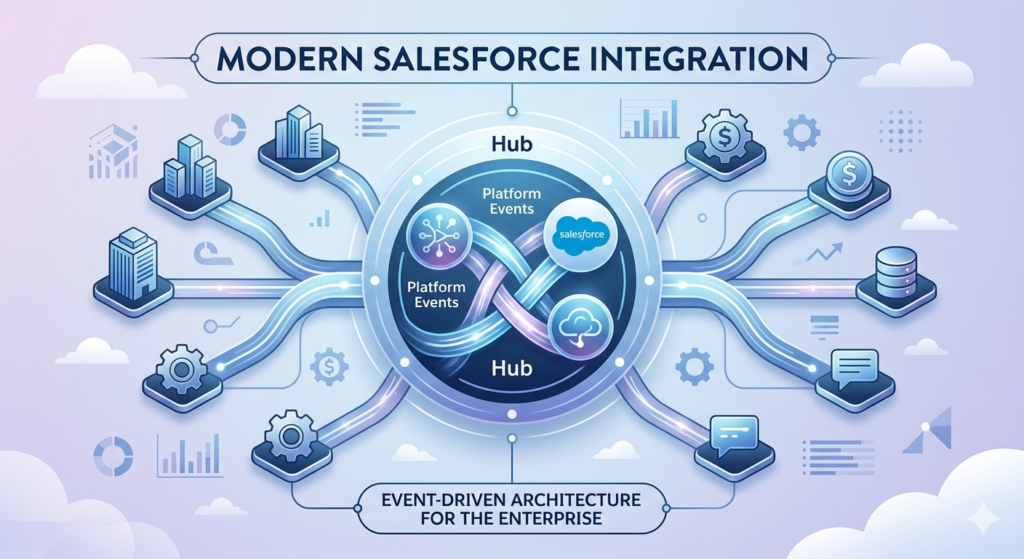
Enter Salesforce Event-Driven Architecture—a paradigm shift in how Salesforce systems communicate, integrate, and respond to business changes. At the heart of this architecture are Salesforce Platform Events, a powerful native capability that enables asynchronous, real-time, loosely coupled communication between Salesforce and any system in your enterprise landscape.
Whether you're a Salesforce developer building your first integration, an architect designing scalable enterprise systems, or a technical consultant evaluating integration patterns for a complex client environment, understanding Salesforce event architecture is no longer optional—it's essential. This guide will walk you through everything you need to know, from foundational concepts to real-world implementation strategies and best practices.
What Is Event-Driven Architecture?
Defining Event-Driven Architecture
Event-Driven Architecture (EDA) is a software design pattern in which the flow of a program is determined by events—discrete signals that indicate something has happened in a system. Rather than systems directly calling each other (as in traditional request-response patterns), they communicate by publishing and consuming events through a shared messaging infrastructure.
An event can be anything meaningful that occurs within a system:
- A new customer record is created
- An order status changes from "Processing" to "Shipped"
- A payment transaction is approved or declined
- A sensor reading exceeds a threshold
- A service ticket is escalated to a higher tier
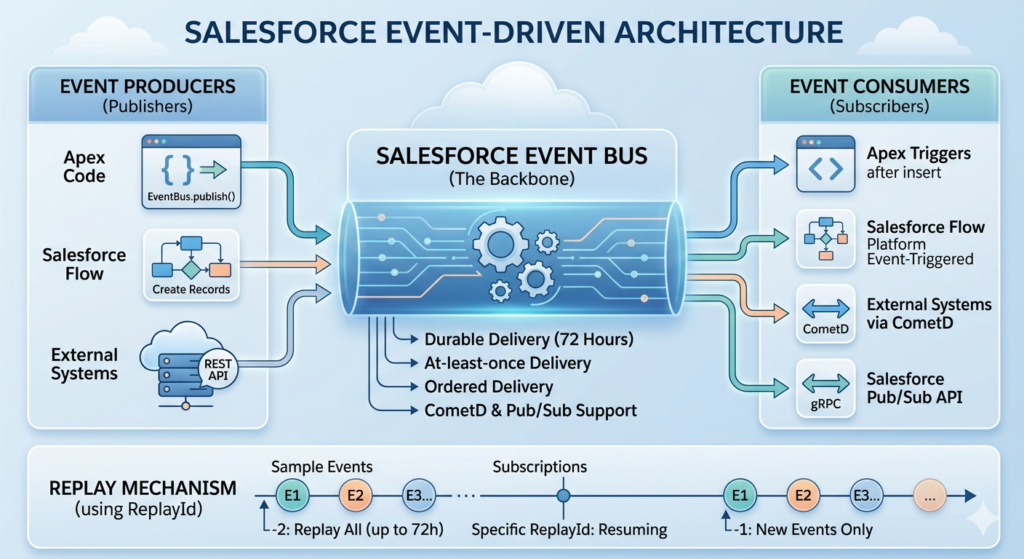
In event-driven systems, the component that detects and reports the event is called the event producer (or publisher). The component that receives and responds to the event is called the event consumer (or subscriber). Between them sits the event bus—the messaging infrastructure that routes events from producers to consumers reliably and asynchronously.
Core Architectural Concepts
Three fundamental concepts underpin every event-driven architecture:
1. Loose Coupling
Producers and consumers have no direct knowledge of each other. A producer simply fires an event and moves on—it doesn't know which consumers are listening, how many there are, or what they'll do with the event. This independence makes systems far more resilient and easier to evolve independently.
2. Asynchronous Communication
Unlike synchronous calls where the caller waits for a response, event-driven communication is asynchronous. The producer publishes an event and immediately continues its own processing without waiting. Consumers process events on their own timeline, decoupled from the producer's workflow.
3. Event Persistence and Replay
Modern event buses retain published events for a defined period, allowing late-joining consumers to catch up on missed events. This capability is invaluable for system recovery, debugging, and building new consumers that need historical event data.
These principles collectively enable scalable, resilient, and flexible Salesforce integration architecture that can handle enterprise-grade complexity without the brittleness of tightly coupled, synchronous alternatives.
What Are Salesforce Platform Events?
Overview of Platform Events
Salesforce Platform Events are Salesforce's native implementation of the event-driven messaging pattern. Introduced as part of the Salesforce Lightning Platform, Platform Events allow any Salesforce component—Apex code, Flow, Process Builder, or external system—to publish event messages, and any subscribing component—internal or external—to receive and react to those messages in real time.
Platform Events are defined as custom objects in Salesforce Setup, following a naming convention that ends with __e (for example, OrderStatusUpdate__e or PaymentProcessed__e). They have custom fields that carry the event payload—the data that describes what happened and any relevant context.
Unlike standard Salesforce records, Platform Events are not stored in the Salesforce database as persistent records (though they are retained on the event bus for a limited time). They exist purely as messages flowing through the system, making them lightweight and performant.
How Platform Events Work Inside Salesforce
The lifecycle of a Platform Event follows a straightforward pattern:
- Event Definition: A developer creates a Platform Event object in Setup, defining its fields and schema
- Event Publication: An Apex class, Flow, or external system publishes an event message with populated field values
- Event Bus Routing: Salesforce's CometD-based event bus receives the published event and makes it available to subscribers
- Event Consumption: Subscribing components—Apex triggers, Flows, external systems via CometD or Pub/Sub API—receive the event and execute their response logic
This entire process can happen within seconds, enabling genuinely real-time Salesforce integration scenarios that were difficult or impossible to achieve with traditional approaches.
How Salesforce Event-Driven Architecture Works
Understanding the mechanics of Salesforce event-driven architecture requires examining each component in the chain: producers, consumers, the event bus, and subscription mechanisms.
Event Producers
An event producer is any component that publishes a Platform Event. In Salesforce, producers can be:
Apex Code:
apexOrderStatusUpdate__e event = new OrderStatusUpdate__e(
    OrderId__c = orderId,
    Status__c = 'Shipped',
    ShippedDate__c = Date.today()
);
Database.SaveResult result = EventBus.publish(event);
Salesforce Flow: Using the "Create Records" element with a Platform Event object as the target, allowing admins to publish events without writing code.
External Systems: Any external application can publish Platform Events via the Salesforce REST API endpoint (/services/data/vXX.0/sobjects/EventName__e/), making Salesforce a consumer in scenarios where external systems drive the workflow.
Event Consumers
Consumers subscribe to Platform Events and execute logic when events arrive. Salesforce supports multiple consumer types:
Apex Triggers: The most common consumer type, written identically to standard object triggers but defined on the Platform Event object:
apextrigger OrderStatusUpdateTrigger on OrderStatusUpdate__e (after insert) {
    for (OrderStatusUpdate__e event : Trigger.New) {
        // Process the event
        OrderService.processStatusChange(
            event.OrderId__c,
            event.Status__c
        );
    }
}
Salesforce Flow: Flows can subscribe to Platform Events using the "Platform Event—Triggered Flow" type, enabling no-code event processing for common automation scenarios.
External Systems via CometD: External applications can subscribe using the CometD protocol (a Bayeux protocol implementation), receiving events through a long-polling or streaming connection. This is ideal for integrating external web applications, Node.js services, or integration platforms like MuleSoft.
Salesforce Pub/Sub API: The newer gRPC-based Pub/Sub API provides a high-performance alternative to CometD for external subscriptions, particularly suited for high-throughput enterprise integration scenarios.
The Event Bus
The Salesforce Event Bus is the messaging backbone that sits between producers and consumers. Key characteristics include:
- Durable delivery: Events are retained for 72 hours (3 days), allowing consumers that were temporarily offline to replay missed events using the
ReplayIdmechanism - At-least-once delivery: The event bus guarantees that subscribed consumers will receive each event at least once, requiring idempotent consumer design
- Ordered delivery: Events published by the same transaction are delivered in order
- CometD and Pub/Sub API support: Multiple subscription protocols ensure broad compatibility with external systems
Event Subscriptions and ReplayId
The ReplayId is a critical concept for reliable event consumption. Each published event receives a unique, incrementing ReplayId. Consumers can specify a ReplayId when subscribing, instructing the event bus to replay all events from that point forward. Three special values are significant:
- -1: Receive only new events from the time of subscription
- -2: Replay all events retained in the event bus (up to 72 hours)
- Specific ReplayId: Replay events from a specific point, useful for resuming after a failure
Benefits of Using Salesforce Platform Events
Real-Time Integration
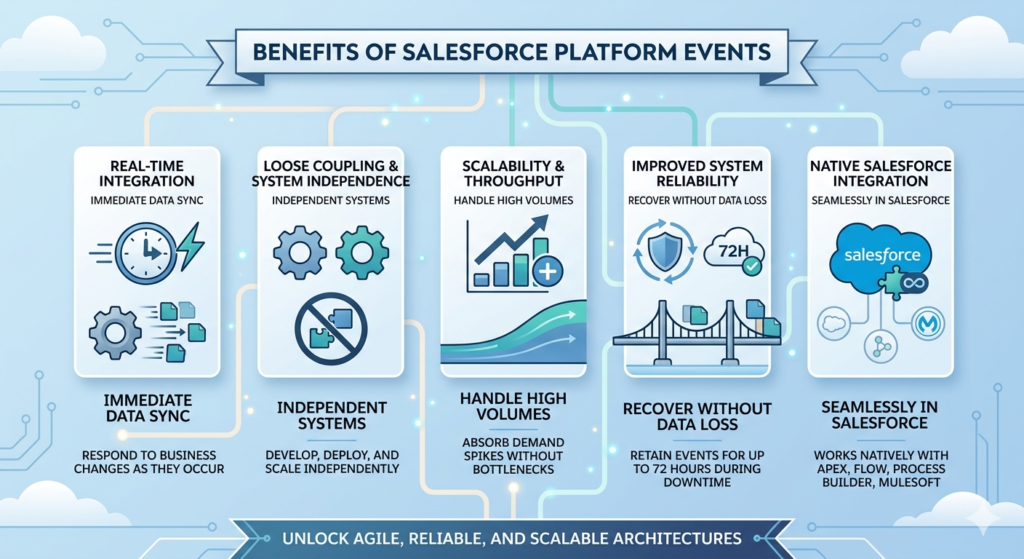
Platform Events enable real-time Salesforce integration that responds to business changes as they occur—not on a batch schedule or polling interval. When an order ships, the warehouse management system, customer notification service, and financial system can all be updated within seconds through a single published event.
Loose Coupling and System Independence
Because producers and consumers have no direct dependencies on each other, systems can be developed, deployed, and scaled independently. Adding a new consumer—say, a compliance audit service—requires no changes to the existing producer or other consumers. This architectural flexibility dramatically reduces the cost and risk of system evolution.
Scalability and Throughput
Asynchronous event processing naturally absorbs demand spikes. During peak business periods—Black Friday for retailers, quarter-end for financial services—event-driven systems can queue and process high volumes of events without the synchronous bottlenecks that plague request-response architectures.
Improved System Reliability
When a consumer system is temporarily unavailable, events aren't lost—they're retained on the event bus for up to 72 hours. Once the consumer recovers, it can replay missed events and catch up without data loss or manual intervention. This resilience is impossible to achieve with synchronous API calls.
Native Salesforce Integration
Platform Events are a first-class Salesforce feature, meaning they work seamlessly with Apex, Flow, Process Builder, and MuleSoft—no external middleware required for internal Salesforce automation scenarios.
Salesforce Platform Events Use Cases
1. ERP/CRM Synchronization
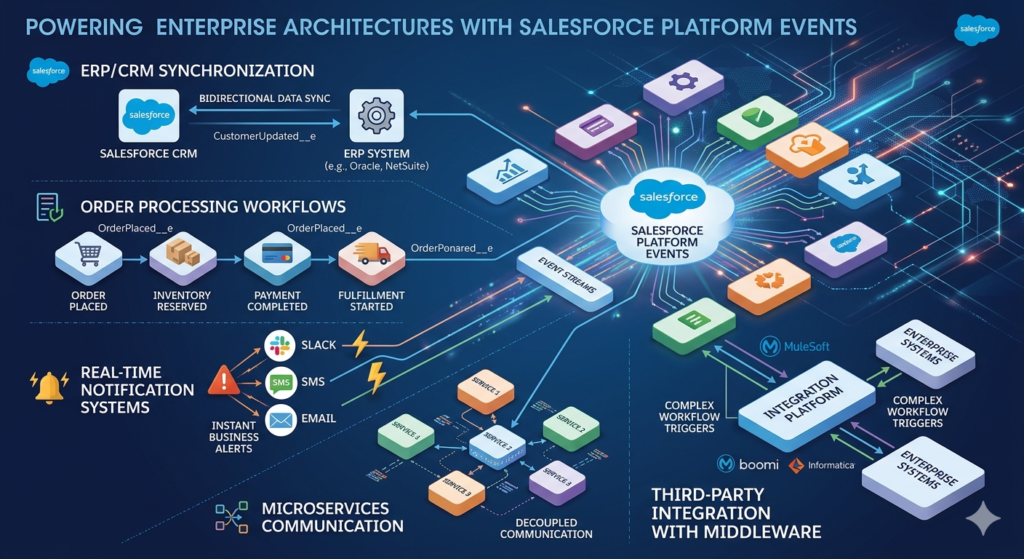
When Salesforce serves as the CRM and SAP (or Oracle, NetSuite, etc.) serves as the ERP, keeping data synchronized is a perennial challenge. Platform Events elegantly solve this by enabling bidirectional, asynchronous synchronization:
- Salesforce publishes a
CustomerUpdated__eevent when account data changes - MuleSoft or an external integration layer consumes the event and updates the ERP record
- The ERP publishes events back to Salesforce when inventory, pricing, or order data changes
This pattern eliminates polling-based synchronization, reduces API call overhead, and ensures near-real-time data consistency across systems.
2. Order Processing Workflows
In a B2C retail environment, a single order placement triggers a cascade of downstream processes—inventory reservation, payment processing, fulfillment, shipping, and customer notification. Platform Events orchestrate this cascade without tight coupling:
- The commerce system publishes an
OrderPlaced__eevent - The inventory service consumes the event and reserves stock, publishing
InventoryReserved__e - The payment service subscribes to
InventoryReserved__e, processes payment, and publishesPaymentCompleted__e - The fulfillment center receives
PaymentCompleted__eand initiates picking and packing
Each service operates independently, failures in one don't cascade to others, and the entire workflow is visible through event monitoring.
3. Real-Time Notification Systems
Platform Events power sophisticated notification architectures that alert users, systems, and external stakeholders based on business triggers. Examples include:
- Alerting sales reps via Slack or SMS when a high-value prospect visits the pricing page
- Notifying service managers when a case breaches its SLA threshold
- Triggering compliance alerts when sensitive data fields are modified
4. Microservices Communication
Organizations adopting microservices architectures within or alongside Salesforce use Platform Events as the communication backbone between services. Each microservice publishes events describing its state changes, and other services subscribe to the events relevant to their domain.
5. Third-Party Integration with Middleware
MuleSoft, Boomi, Informatica, and other integration platforms can natively subscribe to Salesforce Platform Events, making them ideal triggers for complex integration workflows that span multiple enterprise systems.
Platform Events vs Other Salesforce Integration Options
Understanding where Platform Events fit in the broader Salesforce integration architecture requires comparing them against alternative approaches.
| Feature / Criteria | Platform Events | REST API | Outbound Messages | Change Data Capture (CDC) |
|---|---|---|---|---|
| Communication Style | Asynchronous | Synchronous | Asynchronous | Asynchronous |
| Coupling | Loose | Tight | Moderate | Loose |
| Real-Time | Yes (near-real-time) | Yes (immediate response) | Near-real-time | Near-real-time |
| Triggered By | Custom business logic, Apex, Flow | External caller | Workflow/record save | Any record change (DML) |
| Data Payload | Custom-defined fields | Full or partial record | Record field values | Full record change delta |
| Retry on Failure | Via ReplayId (72-hour window) | No built-in retry | Yes (24-hour retry) | Via ReplayId |
| External Subscription | Yes (CometD, Pub/Sub API) | N/A (inbound only) | Yes (SOAP endpoint) | Yes (CometD, Pub/Sub API) |
| Governor Limit Impact | Lower (async processing) | Higher (sync callouts) | Moderate | Lower |
| Best For | Custom event-driven workflows, microservices | Simple request-response queries | Simple outbound notifications | Database change tracking |
| Complexity | Medium | Low | Low | Medium |
Key Takeaways from the Comparison:
- Use REST API when you need immediate, synchronous data retrieval or manipulation from an external system
- Use Outbound Messages for simple, declarative notifications when a record changes without custom code
- Use Change Data Capture when you need to track all database-level changes to specific Salesforce objects
- Use Platform Events when you need custom, business-logic-driven events with flexible payloads and loose coupling
Best Practices for Salesforce Event Architecture
1. Design Event Schemas Thoughtfully
Your event schema—the fields defined on your Platform Event object—is a contract between producers and consumers. Design it carefully:
- Include only the data consumers need; avoid bloated payloads
- Add a CorrelationId field to trace events across systems for debugging
- Use a EventSource field to identify which system or component published the event
- Version your events (e.g.,
OrderStatusUpdate_v2__e) when schema changes are required to maintain backward compatibility
2. Implement Idempotent Consumer Logic
Because the event bus guarantees at-least-once delivery, your consumer logic must be idempotent—processing the same event multiple times should produce the same result as processing it once. Techniques include:
- Checking for existing records before creating new ones
- Using upsert operations instead of insert
- Storing processed ReplayIds to detect and skip duplicates
3. Build Robust Error Handling
Apex trigger consumers that throw unhandled exceptions will cause the event to be retried. Implement proper error handling:
- Wrap consumer logic in try-catch blocks
- Log errors to a custom object for monitoring and alerting
- Implement dead letter queue patterns for events that consistently fail
4. Monitor and Govern Your Event Architecture
Salesforce provides the Event Monitoring feature and the Event Manager in Setup for visibility into Platform Event activity. Establish governance practices:
- Monitor event publication volumes and consumer lag
- Set up alerts when event processing falls behind
- Document all Platform Events in your architecture registry
- Establish naming conventions and schema review processes
5. Plan for Replay and Recovery
Design your architecture assuming that consumers will sometimes fail and need to replay events. Store the last successfully processed ReplayId in a custom setting or object so that recovering consumers know exactly where to resume.
Limitations and Considerations
Event Delivery Limits
Salesforce enforces daily event delivery limits based on your org edition and add-on licenses. Standard orgs receive a baseline allocation, and exceeding this limit causes event publication to fail. Monitor your usage proactively and request limit increases if needed for high-volume scenarios.
| Org Edition | Default Daily Event Delivery Limit |
|---|---|
| Developer Edition | 25,000 |
| Enterprise Edition | 250,000 |
| Unlimited Edition | 500,000 |
| Additional (add-on) | Up to 1 million+ |
72-Hour Retention Window
Events are retained on the event bus for only 72 hours. Consumers that are offline for longer than this window will miss events permanently—there's no replay capability beyond the retention period. Design recovery procedures accordingly, including fallback synchronization mechanisms for extended outages.
Throughput Considerations
While Platform Events are significantly more scalable than synchronous alternatives, they're not designed for extremely high-frequency streaming scenarios (millions of events per second). For ultra-high-throughput use cases, consider supplementing with external message brokers like Apache Kafka or Amazon Kinesis.
Governor Limits in Apex Consumers
Apex trigger consumers that process Platform Events are subject to standard Apex governor limits. For high-volume event processing, carefully manage SOQL queries, DML operations, and heap size within your trigger logic.
No Guaranteed Ordering Across Transactions
While events published within the same transaction are delivered in order, events published across different transactions may not arrive in strict chronological order. Design consumers to handle out-of-order events gracefully.
Conclusion
The evolution from tightly coupled, synchronous integrations to Salesforce event-driven architecture represents one of the most significant shifts in how enterprise Salesforce systems are designed and built. As organizations grow more complex—with more systems, more data, more users, and more demanding performance requirements—the limitations of traditional integration patterns become increasingly costly.
Salesforce Platform Events provide a native, powerful, and elegant solution to these challenges. They enable real-time communication without tight coupling, support scalable event processing without complex middleware, provide built-in durability through event replay, and integrate seamlessly with the broader Salesforce ecosystem including Apex, Flow, MuleSoft, and the Pub/Sub API.
The organizations and professionals that master Salesforce event architecture today are building the scalable, resilient, and future-proof systems that will power tomorrow's enterprise innovation. Whether you're synchronizing a global ERP with Salesforce, orchestrating microservices communication, or building real-time notification systems, Platform Events give you the architectural foundation to do it right.
The question is no longer whether to adopt event-driven patterns in your Salesforce architecture. The question is how quickly you can master them.
About RizeX Labs
At RizeX Labs, we help Salesforce professionals and enterprises design modern, scalable Salesforce architectures through expert consulting, advanced technical training, and real-world implementation guidance.
Our team specializes in enterprise integrations, platform architecture, and Salesforce development best practices—helping developers build robust, future-ready Salesforce ecosystems.
Whether you’re learning asynchronous integrations, architecting scalable systems, or implementing Platform Events, RizeX Labs provides practical expertise to help you master advanced Salesforce development.
Internal Links:
- Link to your Salesforce Developer Training page
- Salesforce Shield: Encryption, Event Monitoring and Field Audit Trail Explained
- DevOps Roadmap for Salesforce: Tools, Skills, and Certifications You Need in 2026
- How to Build a Salesforce Portfolio That Gets You Hired (With Project Ideas)
- Salesforce Admin vs Developer: Which Career Path is Right for You in 2026?
- Wealth Management App in Financial Services Cloud
External Links:
- Salesforce Official Website
- Salesforce Platform Events Documentation
- Salesforce Integration Patterns Guide
- Salesforce Event Monitoring Docs
Quick Summary
Salesforce Event-Driven Architecture with Platform Events enables developers to build scalable, loosely coupled, and real-time integration patterns within Salesforce and across external systems.
Using Salesforce Platform Events, organizations can publish and subscribe to business events asynchronously, reducing system dependencies and improving performance compared to traditional request-response integrations.
For developers and architects designing enterprise-grade Salesforce solutions, understanding event-driven architecture is essential for building modern, flexible, and highly scalable integrations in 2026 and beyond.