
Introduction (Optimized)
Salesforce Platform Events are redefining how modern systems achieve real-time data synchronization. What used to be a complex, resource-heavy problem—keeping multiple systems in sync—is now handled through scalable, event-driven architecture.
Real-time data synchronization isn't a luxury anymore—it's an expectation. When a sales rep closes a deal in Salesforce, your ERP needs to know immediately. When inventory drops below a threshold in your warehouse system, Salesforce should trigger alerts without delay. When a high-value customer submits a support case, escalation workflows must fire instantly.
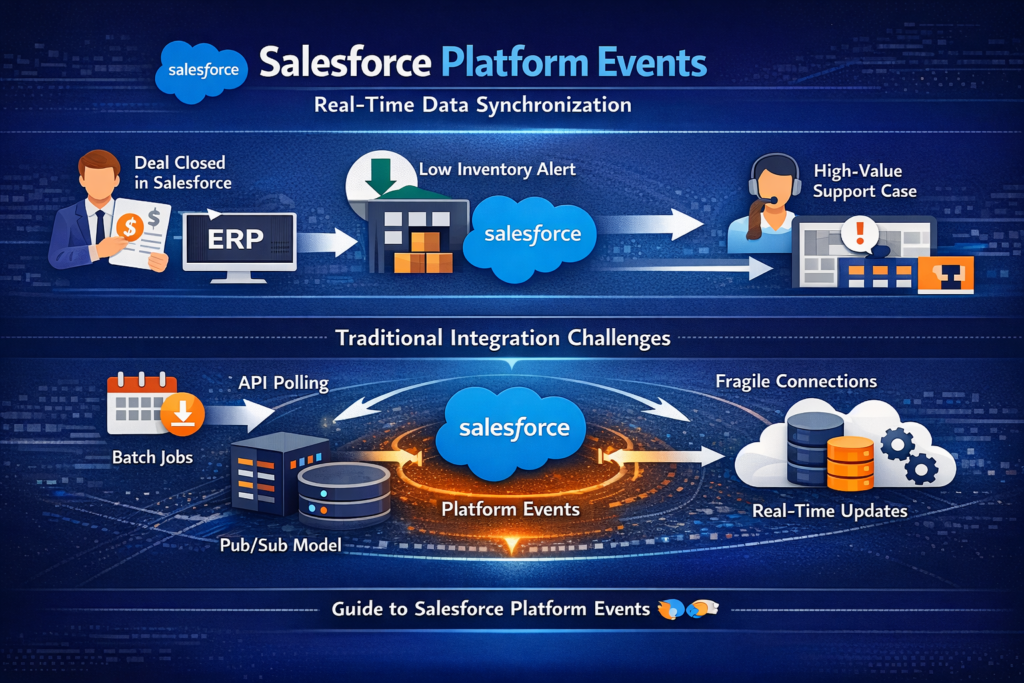
Traditional integration approaches—scheduled batch jobs, polling mechanisms, and point-to-point API calls—struggle to meet these demands. They introduce latency, consume unnecessary resources, and create brittle architectures that break under scale.
This is where Salesforce Platform Events come in. Built on an event-driven model inspired by technologies like Apache Kafka, they enable a true publish-subscribe (pub/sub) architecture within and beyond the Salesforce ecosystem. Systems can communicate asynchronously, reliably, and in near real-time.
This guide breaks down how Salesforce Platform Events work, how to implement them effectively, and when they are the right solution—and when they are not.
What Are Platform Events?
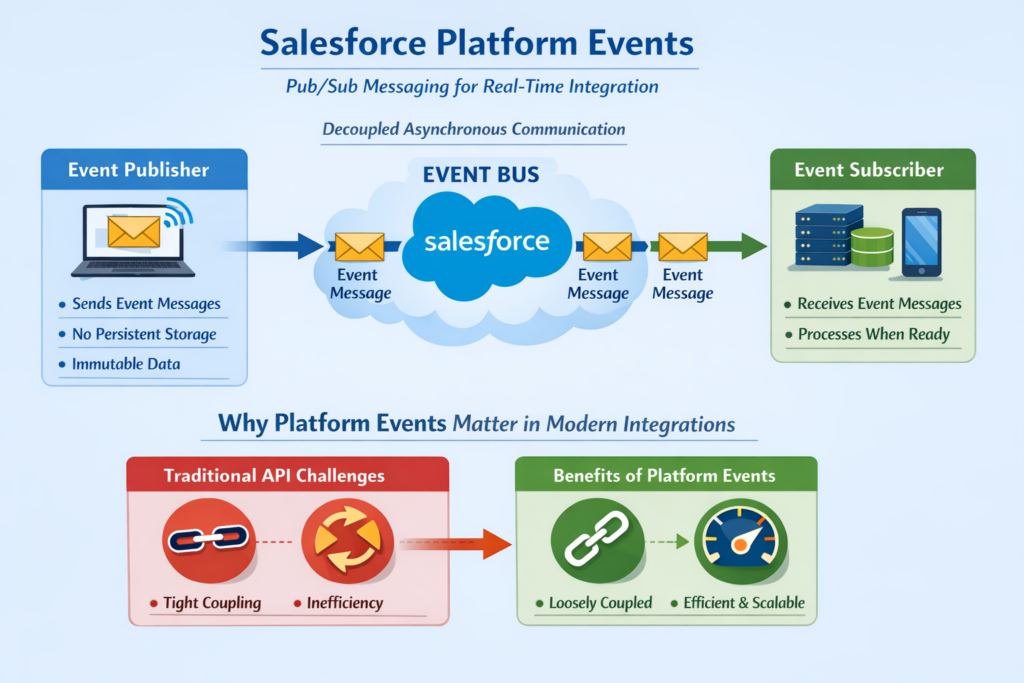
Platform Events are custom, event-driven messages that you define and publish within Salesforce. Unlike standard Salesforce objects that persist data in tables, Platform Events represent discrete occurrences—things that happen at a specific moment in time.
Think of them as lightweight notifications that flow through Salesforce's event bus. When something significant happens in your org (or in an external system), you publish an event. Any subscriber listening for that event type receives the message and can act on it.
Core Characteristics
Event-Driven Architecture
Platform Events follow the publish-subscribe model. Publishers don't know or care who's listening. Subscribers don't need to know where events originate. This decoupling creates flexible, maintainable integrations.
Built on Enterprise Messaging Infrastructure
Under the hood, Platform Events leverage the same technology that powers high-volume messaging systems. Salesforce uses an architecture similar to Apache Kafka, providing durability, ordering, and replay capabilities.
Fire-and-Forget Publishing
When you publish an event, the platform acknowledges receipt and handles delivery. Publishers don't wait for subscribers to process messages—they move on immediately.
Defined Schema
Each Platform Event type has a defined structure with custom fields. This schema provides predictability and validation, unlike generic JSON blobs.
Platform Events vs. Other Salesforce Event Types
Salesforce offers several event-driven mechanisms. Understanding the differences matters:
| Feature | Platform Events | Change Data Capture | Streaming API (PushTopic) |
|---|---|---|---|
| Custom Schema | Yes | No (mirrors object structure) | No (query-based) |
| External Publishing | Yes | No | No |
| Use Case | Custom integrations | Data replication | UI updates, legacy |
| Replay Support | Yes (72 hours) | Yes (72 hours) | Limited |
| High Volume Option | Yes | No | No |
Platform Events shine when you need custom message formats, external system publishing, or high-volume throughput.
Change Data Capture (CDC) excels at replicating Salesforce data changes to external systems with minimal code.
Streaming API (PushTopics) suits legacy scenarios but is being superseded by Platform Events for most use cases.
Why Platform Events Matter in Modern Integrations
Traditional integration patterns create problems that compound as organizations scale:
The Polling Problem
Polling-based integrations query systems repeatedly, asking "Has anything changed?" This approach wastes resources when nothing has changed and misses events between polling intervals.
Consider a system polling Salesforce every 5 minutes. If an order is placed at 10:01 and the next poll runs at 10:05, you've introduced 4 minutes of latency. For time-sensitive processes—fraud detection, inventory management, SLA compliance—this delay creates business risk.
The Point-to-Point Problem
Direct API integrations seem simple initially. System A calls System B when something happens. But as your ecosystem grows, these connections multiply exponentially. Five systems with point-to-point integrations require 20 potential connections. Ten systems require 90.
Each connection represents:
- Code to maintain
- Authentication to manage
- Error handling to implement
- Dependencies to track
How Platform Events Solve These Challenges
Near Real-Time Delivery
Events publish immediately when business actions occur. Subscribers receive notifications within seconds, not minutes.
Decoupled Architecture
Publishers and subscribers operate independently. Add a new subscriber without modifying the publisher. Remove a subscriber without breaking others.
Guaranteed Delivery
Platform Events persist for 72 hours (or 24 hours for standard volume). If a subscriber goes offline, it can replay missed events upon recovery.
Scalability
High-Volume Platform Events support massive throughput—millions of events daily—without governor limit concerns that plague synchronous approaches.
Native Salesforce Integration
Platform Events work seamlessly with Flows, Apex Triggers, Process Builder (legacy), and declarative tools. External systems connect via standard APIs.
How Platform Events Work: Step-by-Step
Let's walk through the complete lifecycle of a Platform Event.
Step 1: Define the Platform Event
First, create the event definition in Salesforce Setup.
Navigate to Setup → Platform Events → New Platform Event
Define:
- Label: Human-readable name (e.g., "Order Confirmed Event")
- Object Name: API name (e.g., "Order_Confirmed_Event__e")
- Publish Behavior: "Publish After Commit" or "Publish Immediately"
- Description: Documentation for developers
Add custom fields to define your payload:
- Order_Id__c (Text)
- Customer_Id__c (Text)
- Total_Amount__c (Number)
- Order_Date__c (DateTime)
- Line_Items__c (Long Text Area for JSON)
Step 2: Publish the Event
Publishing happens through Apex, Flow, or external API calls.
Apex Publishing Example:
apexpublic class OrderEventPublisher {

    public static void publishOrderConfirmed(Order__c order, List<Order_Line__c> lineItems) {

        // Create the event instance
        Order_Confirmed_Event__e event = new Order_Confirmed_Event__e();

        // Populate fields
        event.Order_Id__c = order.Id;
        event.Customer_Id__c = order.Customer__c;
        event.Total_Amount__c = order.Total_Amount__c;
        event.Order_Date__c = order.Order_Date__c;
        event.Line_Items__c = JSON.serialize(lineItems);

        // Publish the event
        Database.SaveResult result = EventBus.publish(event);

        // Check results
        if (result.isSuccess()) {
            System.debug('Event published successfully. Event UUID: ' + result.getId());
        } else {
            for (Database.Error error : result.getErrors()) {
                System.debug('Error publishing event: ' + error.getStatusCode() + ' - ' + error.getMessage());
            }
        }
    }

    // Bulk publishing
    public static void publishOrderConfirmedBulk(List<Order__c> orders, Map<Id, List<Order_Line__c>> lineItemsByOrder) {

        List<Order_Confirmed_Event__e> events = new List<Order_Confirmed_Event__e>();

        for (Order__c order : orders) {
            Order_Confirmed_Event__e event = new Order_Confirmed_Event__e();
            event.Order_Id__c = order.Id;
            event.Customer_Id__c = order.Customer__c;
            event.Total_Amount__c = order.Total_Amount__c;
            event.Order_Date__c = order.Order_Date__c;

            if (lineItemsByOrder.containsKey(order.Id)) {
                event.Line_Items__c = JSON.serialize(lineItemsByOrder.get(order.Id));
            }

            events.add(event);
        }

        // Publish all events
        List<Database.SaveResult> results = EventBus.publish(events);

        // Process results
        Integer successCount = 0;
        Integer failureCount = 0;

        for (Database.SaveResult result : results) {
            if (result.isSuccess()) {
                successCount++;
            } else {
                failureCount++;
                for (Database.Error error : result.getErrors()) {
                    System.debug('Publishing error: ' + error.getMessage());
                }
            }
        }

        System.debug('Published ' + successCount + ' events successfully. ' + failureCount + ' failures.');
    }
}
Step 3: Subscribe to the Event
Subscribers listen for published events and execute logic when they arrive.
Apex Trigger Subscription:
apextrigger OrderConfirmedEventTrigger on Order_Confirmed_Event__e (after insert) {

    // Collect order IDs for processing
    Set<Id> orderIds = new Set<Id>();
    List<Order_Confirmed_Event__e> eventsToProcess = new List<Order_Confirmed_Event__e>();

    for (Order_Confirmed_Event__e event : Trigger.new) {
        orderIds.add(event.Order_Id__c);
        eventsToProcess.add(event);
    }

    // Delegate to handler class
    OrderConfirmedEventHandler.processEvents(eventsToProcess);
}
Handler Class:
apexpublic class OrderConfirmedEventHandler {

    public static void processEvents(List<Order_Confirmed_Event__e> events) {

        // Collect data from events
        Set<Id> customerIds = new Set<Id>();
        List<Integration_Log__c> logs = new List<Integration_Log__c>();

        for (Order_Confirmed_Event__e event : events) {
            customerIds.add(event.Customer_Id__c);

            // Create audit log
            logs.add(new Integration_Log__c(
                Event_Type__c = 'Order_Confirmed',
                External_Id__c = event.Order_Id__c,
                Payload__c = JSON.serialize(event),
                Received_Date__c = System.now(),
                ReplayId__c = String.valueOf(event.ReplayId)
            ));
        }

        // Query related data if needed
        Map<Id, Account> customers = new Map<Id, Account>(
            [SELECT Id, Name, Customer_Tier__c FROM Account WHERE Id IN :customerIds]
        );

        // Process each event
        for (Order_Confirmed_Event__e event : events) {
            Account customer = customers.get(event.Customer_Id__c);

            if (customer != null && customer.Customer_Tier__c == 'Premium') {
                // Premium customer handling
                sendPremiumNotification(event, customer);
            }

            // Sync to external system
            queueExternalSync(event);
        }

        // Insert logs
        if (!logs.isEmpty()) {
            insert logs;
        }
    }

    private static void sendPremiumNotification(Order_Confirmed_Event__e event, Account customer) {
        // Implementation for premium customer notification
    }

    @future(callout=true)
    private static void queueExternalSync(Order_Confirmed_Event__e event) {
        // Callout to external ERP system
    }
}
Step 4: External Subscription via CometD
External systems subscribe using Salesforce's streaming API over CometD protocol.
Node.js Subscriber Example:
JavaScriptconst jsforce = require('jsforce');
const Faye = require('faye');

// Salesforce connection
const conn = new jsforce.Connection({
    loginUrl: 'https://login.salesforce.com'
});

// Login and subscribe
conn.login('username', 'password+securityToken', (err, userInfo) => {
    if (err) {
        console.error('Login error:', err);
        return;
    }

    console.log('Connected as:', userInfo.id);

    // Create streaming client
    const client = conn.streaming.createClient([
        new jsforce.StreamingExtension.Replay('/event/Order_Confirmed_Event__e', -1),
        new jsforce.StreamingExtension.AuthFailure(() => {
            console.log('Authentication failed. Reconnecting...');
        })
    ]);

    // Subscribe to platform event
    const subscription = client.subscribe('/event/Order_Confirmed_Event__e', (message) => {
        console.log('Event received:', JSON.stringify(message, null, 2));

        // Process the event
        const payload = message.payload;
        processOrderEvent({
            orderId: payload.Order_Id__c,
            customerId: payload.Customer_Id__c,
            totalAmount: payload.Total_Amount__c,
            orderDate: payload.Order_Date__c,
            lineItems: JSON.parse(payload.Line_Items__c || '[]')
        });
    });

    console.log('Subscribed to Order_Confirmed_Event__e');
});

function processOrderEvent(orderData) {
    // Business logic here
    console.log(`Processing order ${orderData.orderId} for customer ${orderData.customerId}`);
    console.log(`Amount: $${orderData.totalAmount}`);

    // Sync to your system
    syncToLocalDatabase(orderData);
    updateInventory(orderData.lineItems);
    triggerFulfillment(orderData);
}
Real-World Use Case: Order Fulfillment Integration
Let's examine a complete, production-ready scenario that demonstrates Platform Events solving a real business problem.
Business Context
RizeX Labs works with an e-commerce company running their sales operation on Salesforce. Orders originate from multiple channels—web storefront, mobile app, phone sales. Once confirmed, orders must immediately:
- Sync to the warehouse management system (WMS) for picking
- Update inventory counts in the ERP
- Notify the customer via the communication platform
- Alert the logistics partner for shipping quotes
- Update real-time dashboards
Previously, batch jobs ran every 15 minutes, causing delayed shipments and inventory discrepancies. Customers complained about late order confirmations.
Solution Architecture
text┌─────────────────────────────────────────────────────────────────┐
│                        SALESFORCE                                │
│  ┌──────────────┐    ┌──────────────────────┐                   │
│  │ Order Trigger│───▶│ Order_Confirmed_Event│                   │
│  └──────────────┘    └──────────────────────┘                   │
│                                │                                 │
│           ┌────────────────────┼────────────────────┐           │
│           ▼                    ▼                    ▼           │
│  ┌──────────────┐    ┌──────────────────┐  ┌──────────────┐    │
│  │ Apex Trigger │    │ Flow (Dashboard) │  │ Apex Trigger │    │
│  │ (Inventory)  │    │                  │  │ (Customer)   │    │
│  └──────────────┘    └──────────────────┘  └──────────────┘    │
└─────────────────────────────────────────────────────────────────┘
                                │
                    ┌───────────┴───────────┐
                    ▼                       ▼
        ┌──────────────────────┐   ┌──────────────────────┐
        │   Warehouse (WMS)    │   │   Logistics Partner   │
        │   Node.js Listener   │   │   AWS Lambda          │
        └──────────────────────┘   └──────────────────────┘
Implementation
Platform Event Definition:
textOrder_Confirmed_Event__e
├── Order_Id__c (Text 18)
├── Order_Number__c (Text 50)
├── Customer_Id__c (Text 18)
├── Customer_Email__c (Email)
├── Shipping_Address__c (Long Text Area)
├── Total_Amount__c (Currency)
├── Currency_Code__c (Text 3)
├── Order_Date__c (DateTime)
├── Requested_Ship_Date__c (Date)
├── Priority__c (Picklist: Standard, Express, Overnight)
├── Line_Items_JSON__c (Long Text Area)
├── Correlation_Id__c (Text 50 - External Reference)
└── Source_System__c (Text 50)
Order Trigger Publishing Event:
apextrigger OrderTrigger on Order__c (after update) {

    List<Order__c> confirmedOrders = new List<Order__c>();
    Set<Id> orderIds = new Set<Id>();

    for (Order__c order : Trigger.new) {
        Order__c oldOrder = Trigger.oldMap.get(order.Id);

        // Detect status change to Confirmed
        if (order.Status__c == 'Confirmed' && oldOrder.Status__c != 'Confirmed') {
            confirmedOrders.add(order);
            orderIds.add(order.Id);
        }
    }

    if (!confirmedOrders.isEmpty()) {
        // Query line items
        Map<Id, List<Order_Line__c>> lineItemsMap = new Map<Id, List<Order_Line__c>>();

        for (Order_Line__c line : [
            SELECT Id, Order__c, Product__c, Product__r.Name, Product__r.SKU__c,
                   Quantity__c, Unit_Price__c, Total_Price__c
            FROM Order_Line__c
            WHERE Order__c IN :orderIds
        ]) {
            if (!lineItemsMap.containsKey(line.Order__c)) {
                lineItemsMap.put(line.Order__c, new List<Order_Line__c>());
            }
            lineItemsMap.get(line.Order__c).add(line);
        }

        // Publish events
        OrderEventService.publishOrderConfirmedEvents(confirmedOrders, lineItemsMap);
    }
}
Event Publishing Service:
apexpublic class OrderEventService {

    public static void publishOrderConfirmedEvents(
        List<Order__c> orders,
        Map<Id, List<Order_Line__c>> lineItemsMap
    ) {
        List<Order_Confirmed_Event__e> events = new List<Order_Confirmed_Event__e>();

        for (Order__c order : orders) {
            Order_Confirmed_Event__e event = new Order_Confirmed_Event__e();

            event.Order_Id__c = order.Id;
            event.Order_Number__c = order.Order_Number__c;
            event.Customer_Id__c = order.Customer__c;
            event.Customer_Email__c = order.Customer_Email__c;
            event.Total_Amount__c = order.Total_Amount__c;
            event.Currency_Code__c = order.Currency_Code__c;
            event.Order_Date__c = order.Order_Date__c;
            event.Requested_Ship_Date__c = order.Requested_Ship_Date__c;
            event.Priority__c = order.Priority__c;
            event.Source_System__c = 'Salesforce';
            event.Correlation_Id__c = generateCorrelationId();

            // Build shipping address JSON
            event.Shipping_Address__c = buildAddressJson(order);

            // Build line items JSON
            if (lineItemsMap.containsKey(order.Id)) {
                event.Line_Items_JSON__c = buildLineItemsJson(lineItemsMap.get(order.Id));
            }

            events.add(event);
        }

        // Publish with error handling
        List<Database.SaveResult> results = EventBus.publish(events);
        handlePublishResults(results, orders);
    }

    private static String generateCorrelationId() {
        Blob randomBytes = Crypto.generateAesKey(128);
        return EncodingUtil.convertToHex(randomBytes).substring(0, 32);
    }

    private static String buildAddressJson(Order__c order) {
        Map<String, Object> address = new Map<String, Object>{
            'street' => order.Shipping_Street__c,
            'city' => order.Shipping_City__c,
            'state' => order.Shipping_State__c,
            'postalCode' => order.Shipping_Postal_Code__c,
            'country' => order.Shipping_Country__c
        };
        return JSON.serialize(address);
    }

    private static String buildLineItemsJson(List<Order_Line__c> lineItems) {
        List<Map<String, Object>> items = new List<Map<String, Object>>();

        for (Order_Line__c line : lineItems) {
            items.add(new Map<String, Object>{
                'productId' => line.Product__c,
                'productName' => line.Product__r.Name,
                'sku' => line.Product__r.SKU__c,
                'quantity' => line.Quantity__c,
                'unitPrice' => line.Unit_Price__c,
                'totalPrice' => line.Total_Price__c
            });
        }

        return JSON.serialize(items);
    }

    private static void handlePublishResults(List<Database.SaveResult> results, List<Order__c> orders) {
        List<Integration_Log__c> errorLogs = new List<Integration_Log__c>();

        for (Integer i = 0; i < results.size(); i++) {
            Database.SaveResult result = results[i];

            if (!result.isSuccess()) {
                String errorMessages = '';
                for (Database.Error error : result.getErrors()) {
                    errorMessages += error.getStatusCode() + ': ' + error.getMessage() + '; ';
                }

                errorLogs.add(new Integration_Log__c(
                    Event_Type__c = 'Order_Confirmed_Event',
                    Status__c = 'Failed',
                    Error_Message__c = errorMessages,
                    Related_Record_Id__c = orders[i].Id,
                    Timestamp__c = System.now()
                ));
            }
        }

        if (!errorLogs.isEmpty()) {
            insert errorLogs;
        }
    }
}
Internal Salesforce Subscriber (Inventory Update):
apextrigger OrderConfirmedInventoryTrigger on Order_Confirmed_Event__e (after insert) {

    // Parse line items and collect product SKUs
    Map<String, Decimal> quantityBySku = new Map<String, Decimal>();

    for (Order_Confirmed_Event__e event : Trigger.new) {
        if (String.isNotBlank(event.Line_Items_JSON__c)) {
            List<Object> lineItems = (List<Object>) JSON.deserializeUntyped(event.Line_Items_JSON__c);

            for (Object item : lineItems) {
                Map<String, Object> lineItem = (Map<String, Object>) item;
                String sku = (String) lineItem.get('sku');
                Decimal quantity = (Decimal) lineItem.get('quantity');

                if (quantityBySku.containsKey(sku)) {
                    quantityBySku.put(sku, quantityBySku.get(sku) + quantity);
                } else {
                    quantityBySku.put(sku, quantity);
                }
            }
        }
    }

    // Update inventory records
    if (!quantityBySku.isEmpty()) {
        InventoryService.decrementStock(quantityBySku);
    }
}
Results
After implementing Platform Events:
- Order-to-warehouse latency: Dropped from 15 minutes to under 5 seconds
- Inventory accuracy: Improved from 94% to 99.7%
- Customer notification time: Reduced from 20 minutes to 30 seconds
- Integration maintenance: Reduced by 60% due to decoupled architecture
Integration Patterns with Platform Events
Platform Events enable several powerful architectural patterns.
Pattern 1: Event Notification
The simplest pattern. Events notify subscribers that something happened without carrying complete data.
apex// Lightweight notification event
Customer_Status_Changed_Event__e event = new Customer_Status_Changed_Event__e();
event.Customer_Id__c = customer.Id;
event.New_Status__c = customer.Status__c;
event.Changed_By__c = UserInfo.getUserId();
event.Changed_Date__c = System.now();
// Subscribers query for full data if needed

EventBus.publish(event);
Use When:
- Full data is available in Salesforce
- Subscribers can query for details
- Minimizing event payload size matters
Pattern 2: Event-Carried State Transfer
Events carry complete data snapshots, eliminating subscriber queries.
apex// Full data payload
Account_Snapshot_Event__e event = new Account_Snapshot_Event__e();
event.Account_Id__c = account.Id;
event.Account_Name__c = account.Name;
event.Industry__c = account.Industry;
event.Annual_Revenue__c = account.AnnualRevenue;
event.Employee_Count__c = account.NumberOfEmployees;
event.Billing_Address__c = JSON.serialize(buildBillingAddress(account));
event.Shipping_Address__c = JSON.serialize(buildShippingAddress(account));
event.Owner_Email__c = account.Owner.Email;
event.Full_Payload__c = JSON.serialize(account);

EventBus.publish(event);
Use When:
- External subscribers need complete data
- Minimizing round-trip queries matters
- Data consistency at event time is critical
Pattern 3: Event Sourcing
Events become the source of truth. State is derived by replaying events.
apex// Domain event capturing business action
Case_Escalated_Event__e event = new Case_Escalated_Event__e();
event.Case_Id__c = caseRecord.Id;
event.Escalation_Level__c = newLevel;
event.Previous_Level__c = previousLevel;
event.Escalated_By__c = UserInfo.getUserId();
event.Escalation_Reason__c = reason;
event.Timestamp__c = System.now();
event.Sequence_Number__c = getNextSequence(caseRecord.Id);

EventBus.publish(event);
Use When:
- Audit trail is critical
- State reconstruction needed
- Complex domain logic benefits from event history
Pattern 4: Saga/Choreography
Multiple services coordinate through events without central orchestration.
apex// Order service publishes
Order_Created_Event__e orderEvent = new Order_Created_Event__e();
orderEvent.Order_Id__c = order.Id;
orderEvent.Saga_Id__c = sagaId;
EventBus.publish(orderEvent);

// Inventory service subscribes, reserves stock, publishes
Stock_Reserved_Event__e stockEvent = new Stock_Reserved_Event__e();
stockEvent.Order_Id__c = orderId;
stockEvent.Saga_Id__c = sagaId;
stockEvent.Reservation_Success__c = success;
EventBus.publish(stockEvent);

// Payment service subscribes, processes payment, publishes
Payment_Processed_Event__e paymentEvent = new Payment_Processed_Event__e();
paymentEvent.Order_Id__c = orderId;
paymentEvent.Saga_Id__c = sagaId;
paymentEvent.Payment_Success__c = success;
EventBus.publish(paymentEvent);
When NOT to Use Platform Events
Platform Events aren't universally appropriate. Recognize these scenarios:
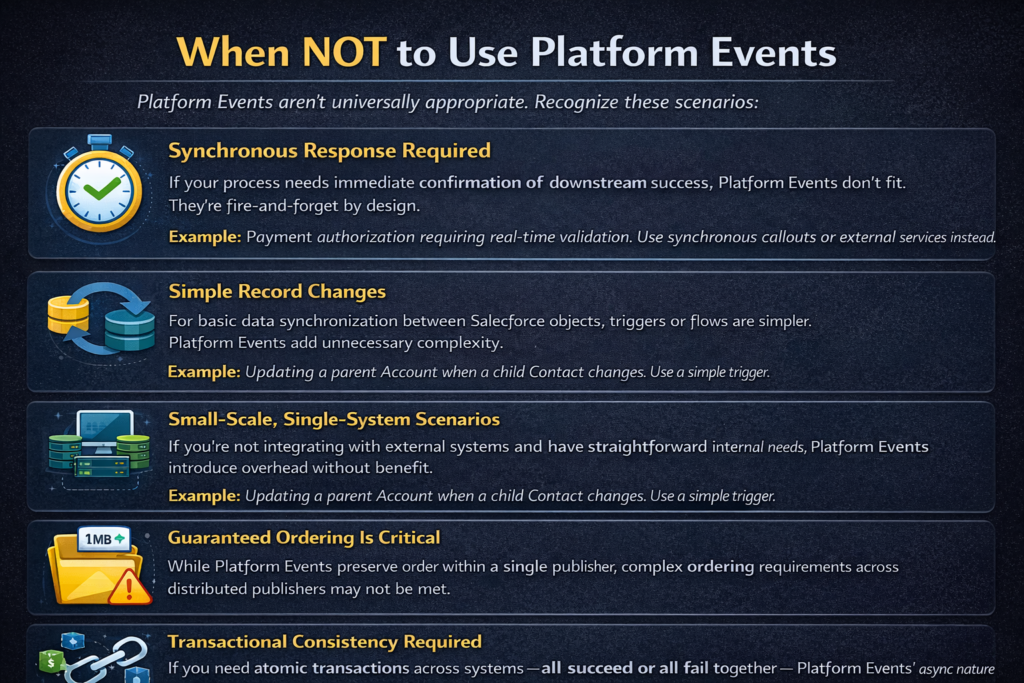
Synchronous Response Required
If your process needs immediate confirmation of downstream success, Platform Events don't fit. They're fire-and-forget by design.
Example: Payment authorization requiring real-time validation. Use synchronous callouts or external services instead.
Simple Record Changes
For basic data synchronization between Salesforce objects, triggers or flows are simpler. Platform Events add unnecessary complexity.
Example: Updating a parent Account when a child Contact changes. Use a simple trigger.
Small-Scale, Single-System Scenarios
If you're not integrating with external systems and have straightforward internal needs, Platform Events introduce overhead without benefit.
Guaranteed Ordering Is Critical
While Platform Events preserve order within a single publisher, complex ordering requirements across distributed publishers may not be met.
Large Payload Requirements
Platform Events have a 1 MB payload limit per event. Large file transfers or massive datasets need alternative approaches (Salesforce Files, external storage).
Transactional Consistency Required
If you need atomic transactions across systems—all succeed or all fail together—Platform Events' async nature prevents this. Consider synchronous integration patterns or saga patterns with compensation logic.
Best Practices
Design Principles
1. Design Events Around Business Moments
Events should represent meaningful business occurrences, not technical data changes.
apex// Good: Business-meaningful event
Opportunity_Won_Event__e

// Avoid: Technical, granular event
Opportunity_StageName_Updated_Event__e
2. Keep Events Self-Contained
Include enough information for subscribers to act without callbacks.
apex// Good: Self-contained
event.Customer_Email__c = customer.Email;
event.Customer_Name__c = customer.Name;

// Avoid: Requiring lookups
event.Customer_Id__c = customer.Id;
// Subscriber must query Salesforce for email/name
3. Version Your Events
Plan for schema evolution from the start.
apexpublic class OrderEventV2 {
    // Add version field
    event.Schema_Version__c = '2.0';

    // New fields are optional for backward compatibility
    event.Gift_Wrap_Requested__c = order.Gift_Wrap__c;
}
4. Implement Idempotent Subscribers
Events may be delivered more than once. Design handlers to handle duplicates safely.
apextrigger OrderEventTrigger on Order_Confirmed_Event__e (after insert) {
    Set<String> processedCorrelationIds = new Set<String>();

    // Check which events already processed
    for (Integration_Log__c log : [
        SELECT Correlation_Id__c FROM Integration_Log__c
        WHERE Correlation_Id__c IN :correlationIds
        AND Status__c = 'Success'
    ]) {
        processedCorrelationIds.add(log.Correlation_Id__c);
    }

    // Skip already-processed events
    for (Order_Confirmed_Event__e event : Trigger.new) {
        if (!processedCorrelationIds.contains(event.Correlation_Id__c)) {
            // Process event
        }
    }
}
Operational Practices
5. Use High-Volume Platform Events for Scale
When publishing more than 25,000 events daily, use High-Volume Platform Events. They bypass certain governor limits and provide better throughput.
6. Implement Replay Logic
Store ReplayId to recover from failures.
apex// Store last processed ReplayId
event_subscription.Last_Replay_Id__c = String.valueOf(event.ReplayId);
update event_subscription;

// On restart, resume from stored position
// External subscriber: use stored ReplayId instead of -1 or -2
7. Monitor and Alert
Track event publishing success rates, subscriber processing times, and error rates.
apexpublic class EventMonitor {

    @InvocableMethod(label='Log Event Metrics')
    public static void logMetrics(List<EventMetric> metrics) {
        List<Event_Metric__c> records = new List<Event_Metric__c>();

        for (EventMetric metric : metrics) {
            records.add(new Event_Metric__c(
                Event_Type__c = metric.eventType,
                Publish_Count__c = metric.publishCount,
                Error_Count__c = metric.errorCount,
                Avg_Processing_Time__c = metric.avgProcessingTime,
                Recorded_Date__c = System.now()
            ));
        }

        insert records;
    }
}
8. Handle Errors Gracefully
Implement dead-letter queues for failed event processing.
apexpublic class EventErrorHandler {

    public static void handleFailedEvent(Order_Confirmed_Event__e event, Exception ex) {
        // Log to dead-letter custom object
        Dead_Letter_Event__c deadLetter = new Dead_Letter_Event__c(
            Event_Type__c = 'Order_Confirmed_Event',
            Original_Payload__c = JSON.serialize(event),
            Error_Message__c = ex.getMessage(),
            Stack_Trace__c = ex.getStackTraceString(),
            Retry_Count__c = 0,
            Status__c = 'Pending_Retry',
            Created_Date__c = System.now()
        );

        insert deadLetter;

        // Alert operations team
        sendAlertEmail(deadLetter);
    }

    // Scheduled job retries failed events
    public static void retryFailedEvents() {
        List<Dead_Letter_Event__c> failedEvents = [
            SELECT Id, Event_Type__c, Original_Payload__c, Retry_Count__c
            FROM Dead_Letter_Event__c
            WHERE Status__c = 'Pending_Retry'
            AND Retry_Count__c < 3
            ORDER BY Created_Date__c
            LIMIT 100
        ];

        for (Dead_Letter_Event__c deadLetter : failedEvents) {
            try {
                // Republish event
                republishEvent(deadLetter);
                deadLetter.Status__c = 'Retried';
            } catch (Exception ex) {
                deadLetter.Retry_Count__c++;
                deadLetter.Last_Error__c = ex.getMessage();

                if (deadLetter.Retry_Count__c >= 3) {
                    deadLetter.Status__c = 'Failed_Permanently';
                }
            }
        }

        update failedEvents;
    }
}
Limitations to Know
Understanding Platform Events' constraints prevents architectural mistakes.
Technical Limits
| Limit | Standard Platform Events | High-Volume Platform Events |
|---|---|---|
| Publish per transaction | 150 (immediate) or counted against DML limits | 150 (Apex trigger) |
| Max daily published | Based on edition | Up to 50 million |
| Payload size | 1 MB per event | 1 MB per event |
| Event retention | 72 hours | 72 hours |
| Subscriber timeout | 2 hours | 2 hours |
| Concurrent subscribers | 2,000 per event | 2,000 per event |
Functional Limitations
No Guaranteed Ordering Across Transactions
Events from different transactions may arrive out of order. Design subscribers to handle this.
No Built-in Acknowledgment
Salesforce doesn't know if subscribers successfully processed events. Build your own confirmation mechanism if needed.
Limited Query Capability
You cannot query historical Platform Events like regular objects. Once published, you can only access them through subscription or replay.
Replay Window Limited to 72 Hours
Events older than 72 hours cannot be replayed. For longer retention, archive to custom objects or external systems.
No Conditional Subscription
Subscribers receive all events of a type. Filtering must happen in subscriber code, not at subscription time.
Considerations for External Subscribers
Session Timeout
External CometD connections timeout after inactivity. Implement reconnection logic.
Network Reliability
Internet connectivity issues can cause missed events. Always implement replay capability.
Rate Limits
Concurrent API limits apply to external subscribers. Monitor usage.
Testing Platform Events
Proper testing requires understanding Platform Events' asynchronous nature.
Unit Testing
apex@isTest
public class OrderEventPublisherTest {

    @isTest
    static void testPublishOrderConfirmedEvent() {
        // Setup test data
        Account testCustomer = new Account(Name = 'Test Customer');
        insert testCustomer;

        Order__c testOrder = new Order__c(
            Customer__c = testCustomer.Id,
            Status__c = 'Draft',
            Total_Amount__c = 500.00,
            Order_Date__c = Date.today()
        );
        insert testOrder;

        List<Order_Line__c> lineItems = new List<Order_Line__c>{
            new Order_Line__c(
                Order__c = testOrder.Id,
                Quantity__c = 2,
                Unit_Price__c = 250.00
            )
        };
        insert lineItems;

        // Publish event
        Test.startTest();
        OrderEventPublisher.publishOrderConfirmed(testOrder, lineItems);
        Test.stopTest();

        // Verify event was published
        // Note: In test context, events are published but
        // subscribers don't automatically fire
    }

    @isTest
    static void testSubscriberProcessesEvent() {
        // Setup test data
        Account testCustomer = new Account(Name = 'Test Customer');
        insert testCustomer;

        // Create test event
        Order_Confirmed_Event__e testEvent = new Order_Confirmed_Event__e(
            Order_Id__c = 'a00XXXXXXXXXXXXXXX',
            Customer_Id__c = testCustomer.Id,
            Total_Amount__c = 1000.00,
            Order_Date__c = System.now(),
            Line_Items_JSON__c = '[{"sku":"SKU001","quantity":5}]'
        );

        Test.startTest();

        // Directly call handler to test processing logic
        OrderConfirmedEventHandler.processEvents(
            new List<Order_Confirmed_Event__e>{ testEvent }
        );

        Test.stopTest();

        // Assert expected outcomes
        List<Integration_Log__c> logs = [
            SELECT Id, Event_Type__c
            FROM Integration_Log__c
            WHERE Event_Type__c = 'Order_Confirmed'
        ];

        System.assertEquals(1, logs.size(), 'Expected one integration log');
    }
}
Testing with Test.getEventBus()
apex@isTest
static void testEventDelivery() {
    // Setup
    Account testCustomer = new Account(Name = 'Test Account');
    insert testCustomer;

    Test.startTest();

    // Publish event
    Order_Confirmed_Event__e event = new Order_Confirmed_Event__e(
        Customer_Id__c = testCustomer.Id,
        Order_Id__c = 'TEST123',
        Total_Amount__c = 100
    );

    Database.SaveResult result = EventBus.publish(event);
    System.assert(result.isSuccess());

    // Deliver events to trigger
    Test.getEventBus().deliver();

    Test.stopTest();

    // Assert trigger effects
    // ...
}
Conclusion
Platform Events transform how Salesforce integrates with the broader enterprise ecosystem. They replace fragile, latency-prone polling architectures with elegant, event-driven designs that scale.
Key takeaways:
- Use Platform Events for real-time, decoupled integrations where multiple subscribers need to react to business moments.
- Design events around business meaning, not technical changes. "Order Confirmed" is better than "Order Status Updated."
- Build idempotent, resilient subscribers that handle duplicates and failures gracefully.
- Understand the limitations—no synchronous responses, 72-hour retention, payload size limits.
- Monitor and log extensively. Async systems require visibility into event flow.
- Don't overcomplicate simple scenarios. Not every integration needs events.
Platform Events won't solve every integration challenge. But for real-time, scalable, maintainable integrations, they're an essential tool in your Salesforce architecture toolkit
About RizeX Labs
At RizeX Labs, we specialize in building scalable, event-driven Salesforce solutions that enable real-time integrations across enterprise systems. Our expertise in Salesforce Platform Events, APIs, and modern integration patterns helps businesses move beyond outdated batch processing toward responsive, intelligent architectures.
We combine deep technical knowledge with real-world implementation experience to design systems that react instantly to business events—ensuring faster decision-making, improved automation, and seamless system communication.
Our approach focuses on creating loosely coupled, highly scalable integrations that reduce system dependencies and improve overall performance.
Internal Links:
- Salesforce Field Service Lightning (FSL): Overview, Features & Career Scope
- How Long Does It Take to Learn Salesforce and Get a Job? Honest Timeline (India, 2026)
- How to Get Your First Salesforce Job with Zero Experience in India: The 2026 Reality Check
- How to Use Salesforce Reports & Dashboards: A Beginner's Practical Guide
- Salesforce Trailhead vs Paid Training: Which Is Better for Getting a Job in India (2026)?
- Top Companies Hiring Salesforce Professionals in Pune in 2026: Your Complete Career Guide
- Salesforce Flows vs Apex: When Should You Use Code vs No-Code Automation?
- Salesforce Nonprofit Cloud: Features, Use Cases, and Career Opportunities (2026 Guide)
- Salesforce Net Zero Cloud: What It Is and Why It's the Next Green Career Niche (2026 Guide)
- Salesforce Slack Integration: How It Works and What Developers Need to Know
- Salesforce Named Credentials: What They Are and How to Use Them Safely
- Salesforce Deployment Best Practices: Change Sets vs Salesforce CLI vs Gearset
External Links:
McKinsey Sales Growth Reports
Gartner Sales Automation Insights