
Introduction: Why Transactional Messaging Matters More Than Ever
Every day, your customers expect instant confirmation. The moment they place an order, reset a password, or book an appointment, they reach for their inbox. A delay of even a few minutes erodes trust. A missing email creates a support ticket. A poorly formatted message damages your brand.

This is exactly why SFMC transactional messaging has become a mission-critical capability for businesses operating at scale.
Salesforce Marketing Cloud (SFMC) provides a robust, enterprise-grade framework for sending time-sensitive, one-to-one emails triggered by specific customer actions or system events. Unlike bulk promotional campaigns, these messages are individualized, immediate, and essential to the customer experience.
In this comprehensive guide, you will learn exactly how API triggered email Marketing Cloud works, how to configure a triggered send SFMC workflow from scratch, and how to avoid the most common mistakes that derail transactional email programs. Whether you are a Marketing Cloud administrator, a developer integrating SFMC with external systems, or a business leader evaluating transactional email solutions, this guide gives you everything you need.
Let's start from the foundation.
What Is SFMC Transactional Messaging?
SFMC transactional messaging refers to the process of sending non-commercial, event-driven emails through Salesforce Marketing Cloud in response to a specific user action or system trigger. These emails are not marketing campaigns. They are operational messages that a customer needs or explicitly expects to receive.
The Core Characteristics
Transactional messages in SFMC share several defining traits:
- One-to-one delivery: Each message is sent to a single recipient based on a specific event.
- Real-time or near-real-time: The message is triggered and delivered within seconds of the initiating action.
- Non-promotional intent: The primary purpose is informational, not persuasive.
- Regulatory distinction: Transactional emails are generally exempt from CAN-SPAM opt-out requirements (though best practices still apply).
- High priority: These messages typically receive priority sending treatment in SFMC's infrastructure.
Two Primary Mechanisms in SFMC
Salesforce Marketing Cloud supports transactional messaging through two distinct pathways:
- Triggered Send (SOAP API): The legacy but still widely used method. You define a Triggered Send Definition in Email Studio, associate it with an email template and a subscriber list, and then call the SOAP API to fire the send.
- Transactional Messaging API (REST API): The newer, more streamlined approach introduced as part of SFMC's modern API architecture. This REST-based endpoint allows you to send transactional emails without requiring a pre-existing subscriber record, giving you greater flexibility and speed.
Both approaches achieve the same end result, but they differ in configuration complexity, subscriber handling, and API architecture. We will explore both in the setup section below.
How API-Triggered Emails Work in SFMC
Understanding the mechanics of an API triggered email Marketing Cloud workflow is essential before you touch any configuration screen. Here is the end-to-end flow:
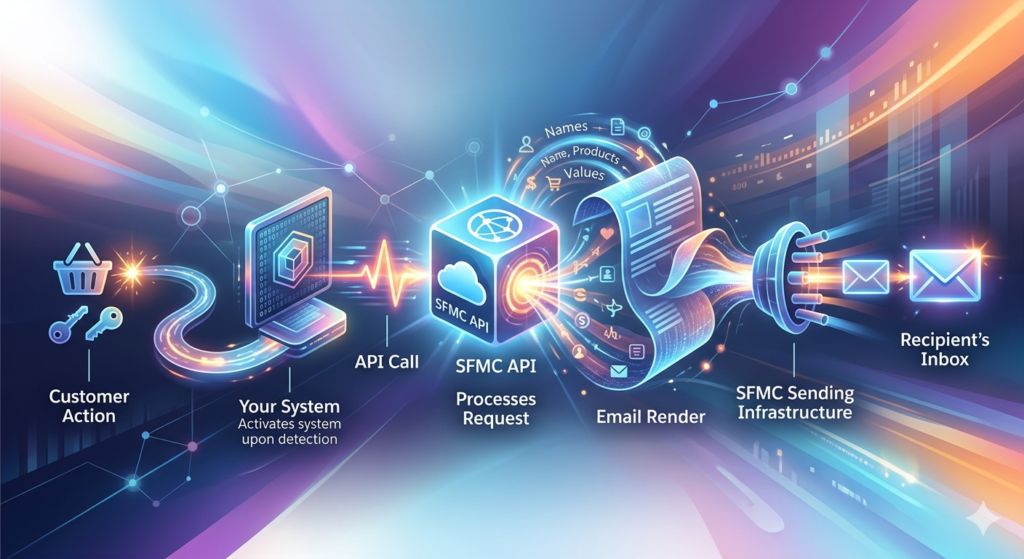
The Trigger Flow: Step by Step
textCustomer Action → Your System Detects Event → API Call to SFMC →
SFMC Processes Request → Email Rendered with Personalization →
Message Delivered to Recipient's Inbox
Let's break this down in detail.
Step 1: A Customer Takes an Action
A customer completes a purchase on your e-commerce site, resets their password, signs up for an account, or triggers any other defined event.
Step 2: Your System Detects the Event
Your application backend, CRM, ERP, or middleware platform detects the event and gathers the relevant data: recipient email address, order details, personalization tokens, and any other dynamic content.
Step 3: An API Call Is Made to SFMC
Your system sends a structured API request to Salesforce Marketing Cloud. This request includes:
- The recipient's email address and subscriber key
- The identifier of the email template (Triggered Send Definition key or message key)
- Personalization data passed as name-value pairs or JSON attributes
Step 4: SFMC Processes the Request
Marketing Cloud receives the API call, resolves the email template, injects the personalization data, and queues the message for immediate delivery.
Step 5: The Email Is Rendered and Sent
SFMC's sending infrastructure renders the final HTML email, applies tracking pixels and link tracking, and delivers the message through its high-deliverability sending infrastructure.
Step 6: Tracking Data Is Captured
Opens, clicks, bounces, and other engagement metrics are logged in SFMC's tracking data views, available for reporting and analysis.
Architecture Diagram
text┌─────────────────┐     ┌──────────────────┐     ┌─────────────────┐
│   Your System    │────▶│   SFMC API       │────▶│  Email Studio   │
│  (Web App, CRM,  │     │  (REST or SOAP)  │     │  (Template +    │
│   Mobile App)    │     │                  │     │   Send Class)   │
└─────────────────┘     └──────────────────┘     └────────┬────────┘
                                                          │
                                                          ▼
                                                 ┌─────────────────┐
                                                 │  SFMC Sending    │
                                                 │  Infrastructure  │
                                                 │  (MTA / IP Pool) │
                                                 └────────┬────────┘
                                                          │
                                                          ▼
                                                 ┌─────────────────┐
                                                 │  Customer Inbox  │
                                                 └─────────────────┘
SOAP API (Triggered Send) Example
XML<CreateRequest xmlns="http://exacttarget.com/wsdl/partnerAPI">
  <Objects xsi:type="TriggeredSend">
    <TriggeredSendDefinition>
      <CustomerKey>order_confirmation_triggered</CustomerKey>
    </TriggeredSendDefinition>
    <Subscribers>
      <EmailAddress>customer@example.com</EmailAddress>
      <SubscriberKey>CUST-98765</SubscriberKey>
      <Attributes>
        <Name>FirstName</Name>
        <Value>Sarah</Value>
      </Attributes>
      <Attributes>
        <Name>OrderNumber</Name>
        <Value>ORD-2025-44210</Value>
      </Attributes>
      <Attributes>
        <Name>OrderTotal</Name>
        <Value>$149.99</Value>
      </Attributes>
    </Subscribers>
  </Objects>
</CreateRequest>
REST API (Transactional Messaging) Example
JSONPOST /messaging/v1/email/messages/
Authorization: Bearer {access_token}
Content-Type: application/json

{
  "definitionKey": "order_confirmation_transactional",
  "recipient": {
    "contactKey": "CUST-98765",
    "to": "customer@example.com",
    "attributes": {
      "FirstName": "Sarah",
      "OrderNumber": "ORD-2025-44210",
      "OrderTotal": "$149.99",
      "EstimatedDelivery": "July 18, 2025"
    }
  }
}
Both methods achieve the same outcome, but the REST-based Transactional Messaging API is generally simpler to implement and better suited for modern, microservices-based architectures.
Transactional vs. Promotional Emails: Understanding the Critical Difference
Before you configure a single triggered send SFMC workflow, you need to understand the fundamental distinction between transactional and promotional emails. Getting this wrong can lead to compliance violations, deliverability problems, and damaged customer relationships.
Side-by-Side Comparison
| Dimension | Transactional Emails | Promotional Emails |
|---|---|---|
| Purpose | Operational, informational | Marketing, sales-driven |
| Trigger | User action or system event | Campaign schedule or segment |
| Send Volume | One-to-one | One-to-many |
| Timing | Real-time, immediate | Scheduled or batch |
| Opt-out Required | Generally exempt (CAN-SPAM) | Mandatory unsubscribe link |
| Examples | Order confirmations, password resets, shipping notifications | Newsletters, promotions, product launches |
| Send Classification | Transactional | Commercial |
| Subscriber Status | Sent regardless of marketing opt-out | Only sent to opted-in subscribers |
| SFMC Send Priority | Typically higher | Standard queue |
Why This Distinction Matters in SFMC
In Salesforce Marketing Cloud, the distinction is not merely conceptual — it is architectural. SFMC uses Send Classifications to categorize messages as either transactional or commercial. This classification determines:
- Whether unsubscribed contacts receive the email: Transactional Send Classifications bypass the standard unsubscribe flag, ensuring that a customer who unsubscribed from marketing emails still receives their order confirmation.
- Which IP pool is used for sending: Many organizations maintain separate IP addresses for transactional and commercial email to protect transactional deliverability from the reputation effects of marketing campaigns.
- Compliance behavior: The footer content, unsubscribe link behavior, and CAN-SPAM treatment differ based on classification.
The Gray Area: Hybrid Messages
Some messages blur the line. An order confirmation that includes a "Customers Also Bought" product recommendation section is technically a hybrid. The CAN-SPAM Act states that the "primary purpose" of the email determines its classification. If the primary purpose is transactional, it can be classified as such — but adding excessive promotional content to a transactional email is a risky practice that can:
- Trigger spam filters
- Violate regulatory standards in stricter jurisdictions (such as GDPR or CASL)
- Erode customer trust
Best practice: Keep your transactional emails purely transactional. If you want to include promotional elements, keep them minimal, clearly secondary, and never in the subject line.
Step-by-Step Setup Guide: Configuring SFMC Transactional Messaging
This section walks you through both methods of setting up SFMC transactional messaging: the legacy Triggered Send approach and the modern Transactional Messaging REST API.
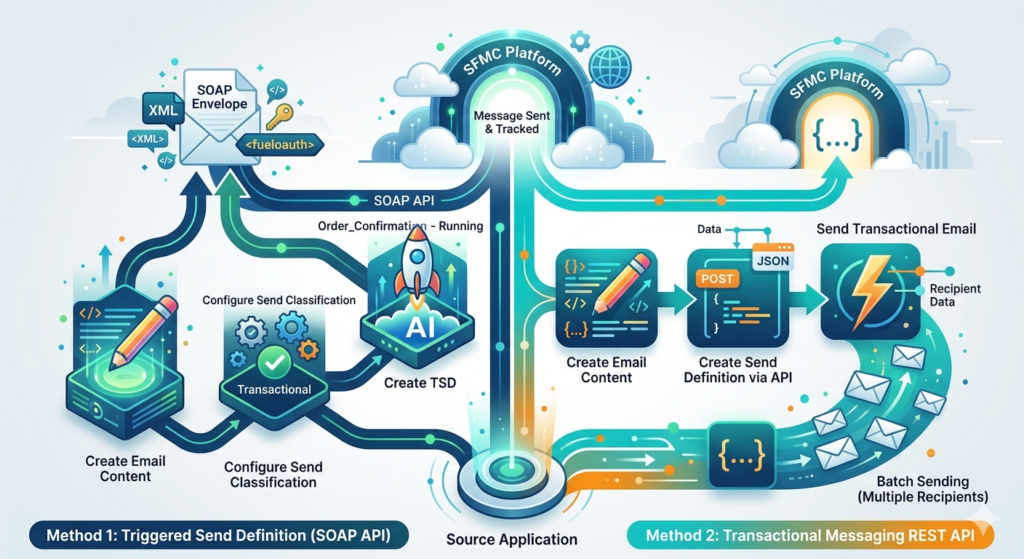
Method 1: Triggered Send Definition (SOAP API)
This is the classic method. It has been available in SFMC for years and remains widely used.
Step 1: Create the Email Content
- Navigate to Email Studio → Content → Content Builder.
- Click Create and select Email.
- Choose a template or start from scratch.
- Design your transactional email. Use personalization strings for dynamic content:text
Hello %%FirstName%%, Your order %%OrderNumber%% has been confirmed. Estimated delivery: %%EstimatedDelivery%% Order total: %%OrderTotal%% - Save the email with a clear, descriptive name (e.g.,
TXN_OrderConfirmation_v2).
Step 2: Configure the Send Classification
- Navigate to Email Studio → Admin → Send Management → Send Classifications.
- Click Create.
- Configure the following:
- Name:
Transactional Send Classification - Send Classification Type: Select Transactional
- Delivery Profile: Choose your transactional delivery profile (this controls the From Name, From Email, and physical mailing address).
- Sender Profile: Select the appropriate sender profile for transactional messages.
- Name:
- Save the Send Classification.
Important: The Transactional classification ensures that the email is sent even to subscribers who have unsubscribed from commercial messaging. This is appropriate for genuine transactional content only.
Step 3: Create a Triggered Send Definition
- Navigate to Email Studio → Interactions → Triggered Sends.
- Click Create.
- Configure the following fields:
- Name:
Order Confirmation - Triggered - External Key (Customer Key):
order_confirmation_triggered(this is the key your API call will reference) - Send Classification: Select the transactional classification you created in Step 2.
- Email: Select the email you created in Step 1.
- List: Select the appropriate subscriber list (often the "All Subscribers" list).
- Subscriber Management: Choose how SFMC should handle new subscribers — you can opt to add them to the list automatically if they don't already exist.
- Priority: Set to High for time-sensitive transactional messages.
- Name:
- Save the Triggered Send Definition.
- Publish the definition by changing its status from
DrafttoRunning/Active. Click the Start/Resume button.
Critical: A Triggered Send Definition must be in "Running" status to accept API calls. If it's in "Paused" or "New" status, API calls will fail silently or return an error.
Step 4: Configure API Access
- In SFMC Setup, navigate to Apps → Installed Packages.
- Create a new installed package or use an existing one.
- Add a Server-to-Server API component.
- Grant the following permissions:
- Email: Read, Write, Send
- Triggered Sends: Read, Write, Send
- Subscribers: Read, Write (if you want to create/update subscribers on the fly)
- Note the Client ID, Client Secret, Authentication Base URI, and REST/SOAP Base URIs.
Step 5: Make the SOAP API Call
Your backend system will authenticate and then call the SOAP API to trigger the send.
Authentication (get an OAuth token):
textPOST https://YOUR_SUBDOMAIN.auth.marketingcloudapis.com/v2/token
Content-Type: application/json

{
  "grant_type": "client_credentials",
  "client_id": "YOUR_CLIENT_ID",
  "client_secret": "YOUR_CLIENT_SECRET",
  "account_id": "YOUR_MID"
}
Trigger the Send (SOAP envelope):
XML<?xml version="1.0" encoding="UTF-8"?>
<s:Envelope xmlns:s="http://schemas.xmlsoap.org/soap/envelope/"
            xmlns:a="http://schemas.xmlsoap.org/ws/2004/08/addressing"
            xmlns:u="http://docs.oasis-open.org/wss/2004/01/oasis-200401-wss-wssecurity-utility-1.0.xsd">
  <s:Header>
    <fueloauth xmlns="http://exacttarget.com">YOUR_ACCESS_TOKEN</fueloauth>
  </s:Header>
  <s:Body xmlns:xsi="http://www.w3.org/2001/XMLSchema-instance"
          xmlns:xsd="http://www.w3.org/2001/XMLSchema">
    <CreateRequest xmlns="http://exacttarget.com/wsdl/partnerAPI">
      <Objects xsi:type="TriggeredSend">
        <TriggeredSendDefinition>
          <CustomerKey>order_confirmation_triggered</CustomerKey>
        </TriggeredSendDefinition>
        <Subscribers>
          <EmailAddress>customer@example.com</EmailAddress>
          <SubscriberKey>CUST-98765</SubscriberKey>
          <Attributes>
            <Name>FirstName</Name>
            <Value>Sarah</Value>
          </Attributes>
          <Attributes>
            <Name>OrderNumber</Name>
            <Value>ORD-2025-44210</Value>
          </Attributes>
          <Attributes>
            <Name>OrderTotal</Name>
            <Value>$149.99</Value>
          </Attributes>
        </Subscribers>
      </Objects>
    </CreateRequest>
  </s:Body>
</s:Envelope>
Step 6: Verify Delivery
- Check Email Studio → Tracking → Triggered Send Tracking for delivery status.
- Verify the recipient received the email.
- Review the Subscriber Log for the individual subscriber to confirm send details.
Method 2: Transactional Messaging REST API
This is the modern, recommended approach for new implementations. It's simpler, RESTful, and doesn't require a pre-existing subscriber record.
Step 1: Create the Email Content
Same as Method 1 — create your email in Content Builder. However, for the Transactional Messaging API, you can also use Content Builder Assets with dynamic content blocks and AMPscript.
Step 2: Create a Transactional Send Definition via API (or UI)
Via the REST API:
JSONPOST /messaging/v1/email/definitions/
Authorization: Bearer {access_token}
Content-Type: application/json

{
  "definitionKey": "order_confirmation_transactional",
  "name": "Order Confirmation - Transactional API",
  "description": "Sends order confirmation emails via Transactional Messaging API",
  "classification": "Default Transactional",
  "content": {
    "customerKey": "TXN_OrderConfirmation_v2"
  },
  "subscriptions": {
    "list": "All Subscribers",
    "dataExtension": "TransactionalSendLog",
    "autoAddSubscriber": true,
    "updateSubscriber": true
  },
  "options": {
    "trackLinks": true,
    "cc": [],
    "bcc": []
  }
}
Via the UI (if available in your SFMC edition):
- Navigate to Email Studio → Transactional Send.
- Create a new definition with the corresponding email and Send Classification.
- Note the Definition Key.
Step 3: Send a Transactional Email
JSONPOST /messaging/v1/email/messages/
Authorization: Bearer {access_token}
Content-Type: application/json

{
  "definitionKey": "order_confirmation_transactional",
  "recipient": {
    "contactKey": "CUST-98765",
    "to": "customer@example.com",
    "attributes": {
      "FirstName": "Sarah",
      "OrderNumber": "ORD-2025-44210",
      "OrderTotal": "$149.99",
      "EstimatedDelivery": "July 18, 2025"
    }
  }
}
Response (success):
JSON{
  "requestId": "f04952b5-49ae-4d1c-855a-123abc456def",
  "errorcode": 0,
  "responses": [
    {
      "messageKey": "msg-unique-key-12345"
    }
  ]
}
Step 4: Check Message Status
JSONGET /messaging/v1/email/messages/msg-unique-key-12345
Authorization: Bearer {access_token}
Response:
JSON{
  "eventCategoryType": "TransactionalSendEvents.EmailSent",
  "timestamp": "2025-07-12T14:23:45.123Z",
  "compositeStatus": "Sent",
  "statusMessage": "Message delivered successfully"
}
Batch Sending (Multiple Recipients)
The Transactional Messaging API also supports batch sends for scenarios like bulk shipping notifications:
JSONPOST /messaging/v1/email/messages/
Authorization: Bearer {access_token}
Content-Type: application/json

{
  "definitionKey": "shipping_notification_transactional",
  "recipients": [
    {
      "contactKey": "CUST-001",
      "to": "alice@example.com",
      "attributes": {
        "FirstName": "Alice",
        "TrackingNumber": "1Z999AA10123456784"
      }
    },
    {
      "contactKey": "CUST-002",
      "to": "bob@example.com",
      "attributes": {
        "FirstName": "Bob",
        "TrackingNumber": "1Z999AA10123456785"
      }
    }
  ]
}
Note: Batch sends via the Transactional Messaging API can handle up to 50 recipients per request. For larger volumes, implement queuing in your application layer.
Key Use Cases for SFMC Transactional Messaging
Understanding where SFMC transactional messaging adds the most value helps you prioritize implementation. Here are the most impactful use cases across industries:
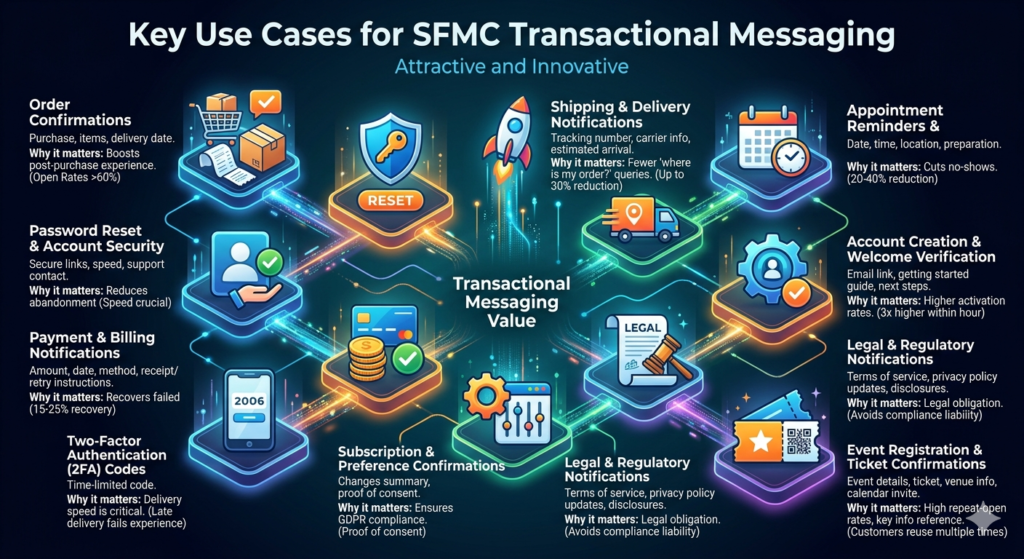
1. Order Confirmations
Industry: E-commerce, Retail, Food Delivery
Trigger: Purchase completed
Content: Order summary, items purchased, pricing, estimated delivery date, support contact
Why it matters: This is the single most-opened email type, with open rates consistently exceeding 60%. It sets the tone for the entire post-purchase experience.
2. Password Reset and Account Security
Industry: All (SaaS, Banking, Healthcare, Retail)
Trigger: User requests password reset or account lockout occurs
Content: Secure reset link (time-limited), security tips, support contact
Why it matters: Delays in password reset emails directly cause customer abandonment. Speed is non-negotiable.
3. Shipping and Delivery Notifications
Industry: E-commerce, Logistics, Retail
Trigger: Package shipped, out for delivery, delivered
Content: Tracking number, carrier information, estimated arrival, delivery confirmation
Why it matters: Proactive shipping updates reduce "Where is my order?" support inquiries by up to 30%.
4. Appointment Confirmations and Reminders
Industry: Healthcare, Professional Services, Hospitality
Trigger: Appointment booked, 24-hour reminder, 1-hour reminder
Content: Date, time, location, preparation instructions, cancellation/reschedule link
Why it matters: Appointment reminder emails reduce no-shows by 20-40%, directly impacting revenue.
5. Account Creation and Welcome Verification
Industry: SaaS, Financial Services, Social Platforms
Trigger: New user registers
Content: Email verification link, getting started guide, key next steps
Why it matters: Users who verify their email within the first hour have 3x higher activation rates.
6. Payment and Billing Notifications
Industry: Financial Services, SaaS, Utilities, Insurance
Trigger: Payment processed, payment failed, invoice generated, subscription renewal
Content: Payment amount, date, payment method, receipt, retry instructions (for failures)
Why it matters: Payment failure notifications with clear retry instructions recover 15-25% of failed transactions.
7. Two-Factor Authentication (2FA) Codes
Industry: Banking, Technology, Healthcare
Trigger: Login attempt requiring verification
Content: Time-limited verification code
Why it matters: Delivery speed is absolutely critical. A 2FA code delivered 30 seconds late is a failed user experience.
8. Subscription and Preference Confirmations
Industry: Media, Retail, SaaS
Trigger: User updates preferences, subscribes, or unsubscribes
Content: Confirmation of changes, summary of current preferences
Why it matters: Required for compliance with GDPR's "proof of consent" requirements.
9. Legal and Regulatory Notifications
Industry: Financial Services, Insurance, Legal
Trigger: Terms of service update, privacy policy change, regulatory disclosure
Content: Summary of changes, effective date, link to full document
Why it matters: Legal obligation. Delivery failure can create compliance liability.
10. Event Registration and Ticket Confirmations
Industry: Events, Entertainment, Travel
Trigger: Ticket purchased or event registration completed
Content: Event details, ticket/QR code, venue information, calendar invite link
Why it matters: Customers reference these emails multiple times before the event. High repeat-open rates make design quality especially important.
Benefits of SFMC Transactional Messaging for Businesses
Investing in a robust SFMC transactional messaging infrastructure delivers measurable returns across multiple dimensions.
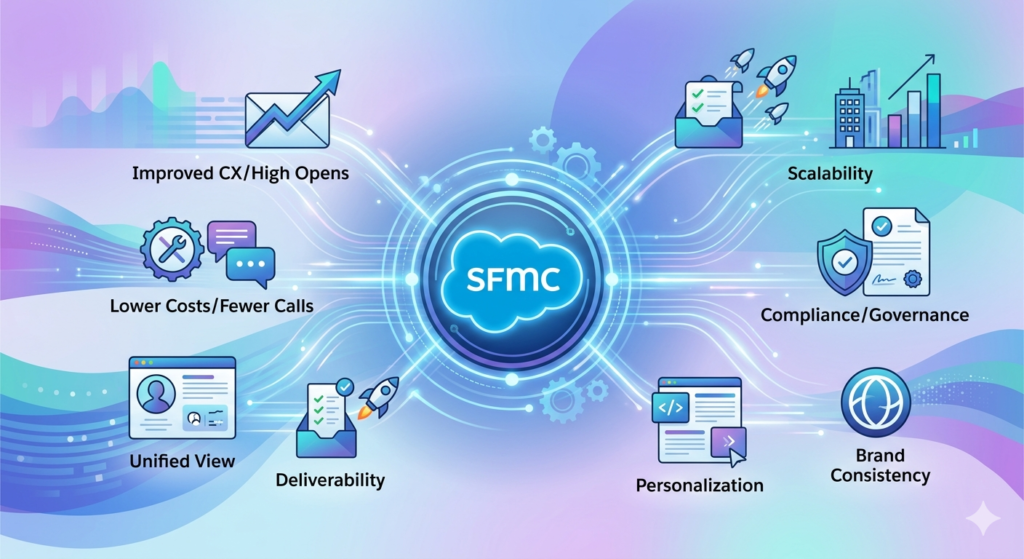
1. Dramatically Improved Customer Experience
Transactional emails are the emails customers actually want. They have the highest open rates (60-80%), the highest engagement rates, and the greatest impact on brand perception. When these emails arrive instantly, are well-designed, and contain accurate information, customers notice.
2. Reduced Support Costs
Every well-timed transactional email prevents a support interaction. Order confirmations prevent "Did my order go through?" calls. Shipping notifications prevent "Where is my package?" tickets. Password resets that arrive in seconds prevent "I can't log in" chats.
Organizations implementing comprehensive SFMC transactional messaging programs report 20-35% reductions in support ticket volume related to order status and account access.
3. Unified Customer View
When transactional emails flow through SFMC rather than a separate transactional email service, all customer interaction data lives in one platform. You can see the complete picture: which customers opened their order confirmation, clicked the tracking link, and then engaged with a promotional email three days later. This unified data powers smarter segmentation and journey orchestration.
4. Enterprise-Grade Deliverability
SFMC's sending infrastructure is built for volume and speed. With dedicated IP addresses, advanced authentication (SPF, DKIM, DMARC), and intelligent throttling, your transactional emails reach inboxes — not spam folders. The platform's deliverability tools let you monitor bounce rates, spam complaints, and inbox placement in real time.
5. Scalability Without Complexity
Whether you are sending 100 transactional emails per day or 10 million, SFMC's infrastructure scales seamlessly. You don't need to manage servers, worry about IP warming, or build retry logic. The platform handles queuing, throttling, bounce processing, and feedback loop management automatically.
6. Compliance and Governance
SFMC provides built-in compliance features that are critical for transactional messaging:
- Send logging: Every triggered send is logged with recipient, timestamp, and content version.
- Subscriber audit trails: You can trace every message sent to any subscriber.
- Classification enforcement: Send Classifications prevent accidental misuse of transactional sending channels for promotional content.
- Data retention controls: Configure how long tracking and subscriber data is retained.
7. Advanced Personalization at Scale
SFMC's Content Builder, combined with AMPscript and dynamic content blocks, allows you to create highly personalized transactional emails without compromising speed. You can pull data from Data Extensions, make real-time lookup calls, and render complex conditional content — all within milliseconds of the API trigger.
8. Brand Consistency
By routing transactional emails through SFMC rather than through development-team-managed SMTP services, marketing teams maintain control over brand standards, email design, and messaging consistency. No more plain-text order confirmations sent from a developer's test SMTP account.
Best Practices for SFMC Transactional Messaging
Following these best practices ensures your triggered send SFMC implementation is reliable, performant, and compliant.
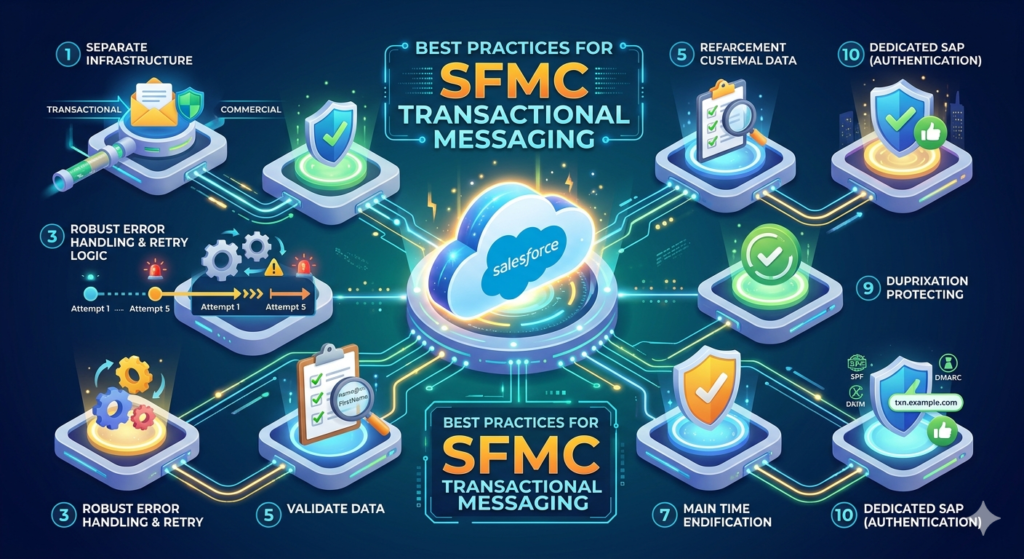
1. Separate Transactional and Commercial Sending Infrastructure
What to do: Use dedicated IP addresses and Send Classifications for transactional emails, completely separate from your promotional email infrastructure.
Why: A poorly performing promotional campaign (high bounce rates, spam complaints) can damage the reputation of your sending IP. If your transactional emails share that IP, your order confirmations and password resets will land in spam folders. Separation protects your most critical messages.
2. Keep Transactional Emails Purely Transactional
What to do: Resist the temptation to add product recommendations, upsell banners, or promotional offers to transactional emails.
Why: Beyond the compliance risks discussed earlier, adding promotional content to transactional emails trains spam filters to treat your transactional messages as commercial. It also dilutes the trust customers place in these messages. If you must include secondary content, limit it to less than 20% of the email's visual real estate and never put promotional content in the subject line.
3. Implement Robust Error Handling and Retry Logic
What to do: Build retry mechanisms into your API integration layer. If an API call to SFMC fails (network timeout, rate limit, authentication error), your system should automatically retry with exponential backoff.
Example retry pattern:
textAttempt 1: Immediate
Attempt 2: Wait 2 seconds
Attempt 3: Wait 8 seconds
Attempt 4: Wait 30 seconds
Attempt 5: Wait 120 seconds → Alert operations team
Why: Transactional emails are critical. A single failed API call without retry logic means a customer doesn't receive their order confirmation. At scale, this creates significant customer impact.
4. Monitor Triggered Send Definition Status
What to do: Build automated monitoring that checks whether your Triggered Send Definitions are in "Running" status. Set up alerts if a definition is paused, errored, or stopped.
Why: A Triggered Send Definition can be paused by an administrator, stopped due to an error threshold, or deactivated during a platform update. If this happens and your monitoring doesn't catch it, API calls will fail silently, and customers will stop receiving critical emails.
5. Validate Data Before Making API Calls
What to do: Validate email addresses, required personalization attributes, and subscriber keys on your application side before sending the API request to SFMC.
Why: Sending malformed data to SFMC wastes API calls, creates error logs, and can result in embarrassing emails (e.g., "Hello %%FirstName%%"). Validate at the source.
JavaScript// Example validation (Node.js)
function validateTransactionalPayload(payload) {
  const errors = [];

  if (!payload.recipient?.to || !isValidEmail(payload.recipient.to)) {
    errors.push('Invalid or missing email address');
  }

  if (!payload.recipient?.contactKey) {
    errors.push('Missing contactKey');
  }

  if (!payload.definitionKey) {
    errors.push('Missing definitionKey');
  }

  const requiredAttributes = ['FirstName', 'OrderNumber'];
  for (const attr of requiredAttributes) {
    if (!payload.recipient?.attributes?.[attr]) {
      errors.push(`Missing required attribute: ${attr}`);
    }
  }

  return { isValid: errors.length === 0, errors };
}
6. Use Send Logging for Audit and Troubleshooting
What to do: Configure a Send Log Data Extension for every Triggered Send Definition. This logs every send event with the recipient, timestamp, and attribute values.
Why: When a customer claims they didn't receive an email, the send log gives you definitive proof of whether the message was triggered, when it was sent, and what content it contained.
7. Implement Content Versioning
What to do: Version your email templates (e.g., TXN_OrderConfirmation_v1, TXN_OrderConfirmation_v2) and maintain a change log. Never edit a live transactional email template without testing in a sandbox first.
Why: A broken AMPscript function or a missing closing tag in a live transactional template will affect every single transactional email until the error is fixed. The blast radius is enormous.
8. Test Across Clients and Devices
What to do: Use SFMC's email preview tools, Litmus, or Email on Acid to test your transactional email templates across Gmail, Outlook, Apple Mail, Yahoo, and mobile clients before publishing.
Why: A transactional email that renders poorly on mobile (where 60%+ of emails are opened) damages your brand at the moment when the customer is most engaged.
9. Set Up Real-Time Alerts for Anomalies
What to do: Configure alerts for:
- Bounce rates exceeding 2% on transactional sends
- Send volume dropping below expected thresholds
- API error rates exceeding 1%
- Triggered Send Definition status changes
Why: Transactional email issues are time-critical. A promotional email problem can be fixed tomorrow. A broken transactional email flow must be fixed now.
10. Use Dedicated SAP (Sender Authentication Package)
What to do: Implement a dedicated Sender Authentication Package with custom domain authentication (SPF, DKIM, DMARC) for your transactional sending domain.
Why: Proper authentication is the foundation of email deliverability. Without it, your transactional emails are more likely to be flagged by spam filters or rejected by receiving mail servers. DMARC alignment, in particular, is increasingly required by major inbox providers including Google and Yahoo.
Common Mistakes to Avoid
Even experienced Marketing Cloud teams make these mistakes with API triggered email Marketing Cloud implementations. Learn from others' errors.
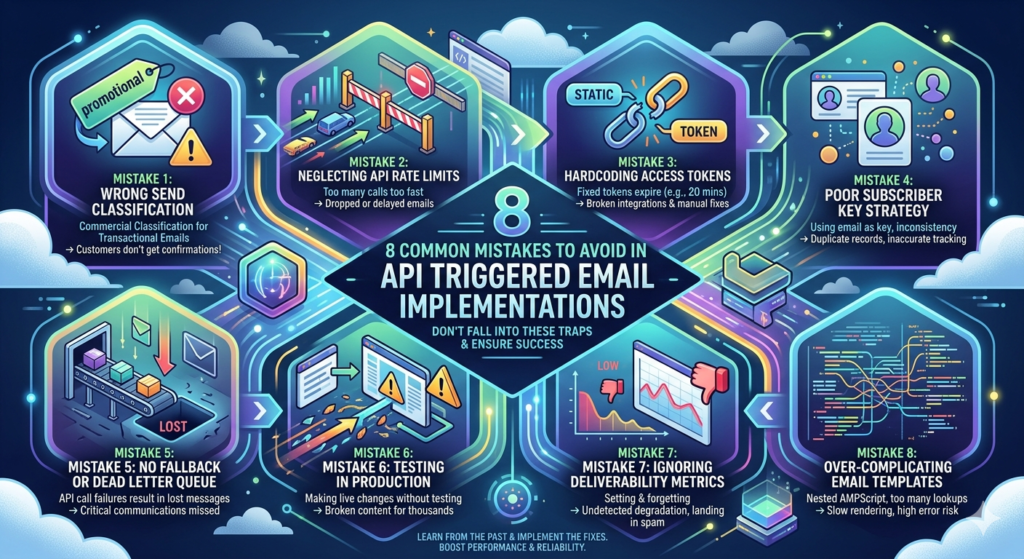
Mistake 1: Using the Wrong Send Classification
The problem: Assigning a commercial (promotional) Send Classification to a transactional email.
The consequence: Customers who have unsubscribed from marketing emails will NOT receive the transactional message. This means unsubscribed customers don't get their order confirmations, password resets, or shipping notifications.
The fix: Always verify the Send Classification type before publishing a Triggered Send Definition. Create a checklist for your team.
Mistake 2: Not Handling API Rate Limits
The problem: Your application sends API calls to SFMC faster than the platform's rate limits allow.
The consequence: API calls are throttled or rejected. Transactional emails are delayed or lost.
The fix: Implement rate limiting on your application side. SFMC's REST API typically allows 2,000 requests per minute per business unit. Build a queue with controlled throughput. For high-volume scenarios, consider the batch endpoint.
Mistake 3: Hardcoding Access Tokens
The problem: Embedding a static access token in your application code instead of dynamically requesting tokens via the OAuth flow.
The consequence: Access tokens expire (typically after 20 minutes in SFMC). Once the token expires, all API calls fail. If you've hardcoded it, you're making manual updates every 20 minutes — or more realistically, your integration is broken and you don't know it.
The fix: Always implement the full OAuth 2.0 client credentials flow with automatic token refresh.
Python# Example: Token management with caching (Python)
import requests
import time

class SFMCAuthManager:
    def __init__(self, client_id, client_secret, auth_url, account_id):
        self.client_id = client_id
        self.client_secret = client_secret
        self.auth_url = auth_url
        self.account_id = account_id
        self.token = None
        self.token_expiry = 0

    def get_token(self):
        if self.token and time.time() < self.token_expiry - 60:
            return self.token

        response = requests.post(
            f"{self.auth_url}/v2/token",
            json={
                "grant_type": "client_credentials",
                "client_id": self.client_id,
                "client_secret": self.client_secret,
                "account_id": self.account_id
            }
        )

        data = response.json()
        self.token = data["access_token"]
        self.token_expiry = time.time() + data["expires_in"]
        return self.token
Mistake 4: Ignoring Subscriber Key Strategy
The problem: Using email addresses as subscriber keys, or using inconsistent subscriber key formats across different triggered sends.
The consequence: Duplicate subscriber records, inaccurate tracking data, and broken personalization when customers change their email addresses.
The fix: Define a consistent subscriber key strategy that uses a persistent, unique identifier (customer ID, account number, GUID) that never changes, even when the customer's email address changes.
Mistake 5: No Fallback or Dead Letter Queue
The problem: When an SFMC API call fails after all retries, the message is simply lost.
The consequence: Customers don't receive critical transactional emails, and no one knows about it.
The fix: Implement a dead letter queue. After all retry attempts are exhausted, route the failed message to a persistent queue (Amazon SQS, Azure Service Bus, database table) and alert your operations team. Create a process to manually review and resend failed messages.
Mistake 6: Testing in Production
The problem: Making changes to live Triggered Send Definitions or email templates without testing in a sandbox environment first.
The consequence: A syntax error in an AMPscript block causes every transactional email to display an error message instead of personalized content. Thousands of customers receive broken emails before anyone notices.
The fix: Always maintain a sandbox Business Unit for testing. Implement a promotion workflow: Sandbox → QA review → Production. Use SFMC's "Send Preview" and "Test Send" features before publishing.
Mistake 7: Not Monitoring Deliverability Metrics
The problem: Setting up the triggered send and forgetting about it. No ongoing monitoring of bounce rates, delivery rates, or spam complaints.
The consequence: Gradual deliverability degradation goes unnoticed. Your transactional emails start landing in spam folders. Customers complain. By the time you investigate, your sending IP reputation has been damaged.
The fix: Build a weekly deliverability review into your operations workflow. Monitor these metrics for all transactional sends:
- Delivery rate (target: >98%)
- Bounce rate (target: <2%)
- Spam complaint rate (target: <0.01%)
- Time-to-delivery (target: <10 seconds for 95th percentile)
Mistake 8: Over-Complicating Email Templates
The problem: Using complex nested AMPscript, multiple API lookups, and heavy dynamic content blocks in transactional email templates.
The consequence: Increased rendering time delays email delivery. Complex logic increases the risk of rendering errors. Debugging becomes extremely difficult.
The fix: Keep transactional email templates as simple as possible. Pass all necessary data as attributes in the API call rather than requiring the template to look up data from Data Extensions at render time. Reserve complex logic for promotional emails where a few extra seconds of rendering time is acceptable.
Choosing Between Triggered Send and Transactional Messaging API
| Factor | Triggered Send (SOAP) | Transactional Messaging API (REST) |
|---|---|---|
| API Protocol | SOAP/XML | REST/JSON |
| Ease of Integration | More complex | Simpler |
| Subscriber Requirement | Subscriber must exist or be created | Can send without pre-existing subscriber |
| Status Checking | Limited | Built-in message status endpoint |
| Batch Support | Via loop in SOAP payload | Native batch endpoint (up to 50 recipients) |
| CC/BCC Support | Limited | Supported |
| SFMC Edition Required | Available in most editions | Requires specific editions (check with Salesforce) |
| Recommended For | Legacy integrations, complex subscriber management | New implementations, microservices architectures |
Our recommendation: For new implementations, use the Transactional Messaging REST API unless you have a specific requirement that only the SOAP-based Triggered Send supports. The REST API is more developer-friendly, better documented, and aligned with SFMC's strategic direction.
Conclusion: Build Transactional Email That Earns Trust
SFMC transactional messaging is not just a technical capability — it is a trust-building mechanism. Every order confirmation, every password reset, and every shipping notification is a moment where your brand either delivers or disappoints. There is no middle ground.
The tools are available. Salesforce Marketing Cloud provides enterprise-grade infrastructure for both the legacy triggered send SFMC approach and the modern API triggered email Marketing Cloud REST endpoints. The decision is not whether to invest in transactional messaging, but how well you execute it.
Here is your action checklist:
- ✅ Audit your current transactional emails: Identify which messages are truly transactional and ensure they use the correct Send Classification.
- ✅ Choose your API approach: REST (Transactional Messaging API) for new implementations, SOAP (Triggered Sends) for legacy systems with existing integrations.
- ✅ Separate your infrastructure: Dedicated IPs, dedicated Send Classifications, dedicated monitoring for transactional sends.
- ✅ Build resilient integrations: Implement retry logic, dead letter queues, token management, and input validation.
- ✅ Monitor relentlessly: Delivery rates, bounce rates, send volumes, and API error rates — every day.
- ✅ Keep it simple: Clean templates, clear content, minimal promotional elements.
The businesses that treat transactional email as a core product experience — not an afterthought — win customer loyalty at scale. With SFMC's transactional messaging capabilities properly configured, you have the infrastructure to deliver that experience reliably, every single time.
About RizeX Labs
At RizeX Labs, we specialize in delivering cutting-edge Salesforce solutions, including advanced SFMC transactional messaging within Salesforce Marketing Cloud. Our expertise combines deep technical knowledge, industry best practices, and real-world implementation experience to help businesses automate customer communication and improve engagement.
We empower organizations to shift from generic batch campaigns to real-time, API-triggered messaging systems that deliver personalized, event-driven emails at scale—ensuring reliability, speed, and customer satisfaction.
Internal Links:
- Salesforce Admin course page
- Salesforce Marketing Cloud vs Pardot: Which Is Right for You in 2026
- Salesforce Marketing Cloud Certification: Study Guide 2026
- SFMC Data Extensions vs Lists: What Every Marketer Should Know
- SFMC Email Content Builder: Best Practices & Templates 2026
- SFMC Query Activity SQL: The Complete Guide to Marketing Cloud SQL for Data-Driven Marketers
- SFMC Einstein Send Time Optimization: How It Works
External Links:
McKinsey Sales Growth Reports