
Introduction
Salesforce Agentforce represents the next evolution in customer relationship management, combining the power of generative AI with enterprise automation. But here’s the reality: even the most advanced AI is only as effective as the instructions you give it.
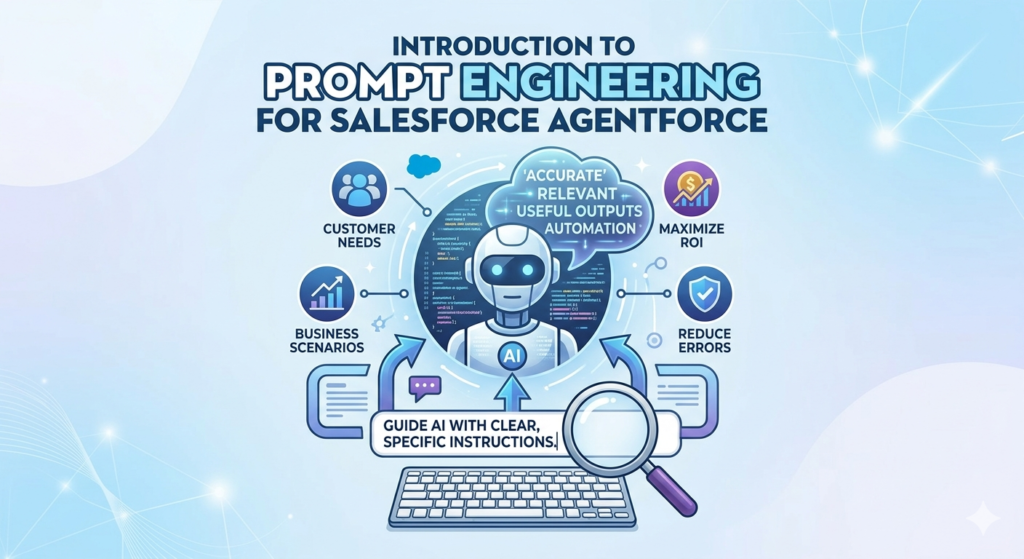
That’s where prompt engineering for Salesforce Agentforce becomes critical.
If you’re new to Salesforce or AI, you might be wondering: “What exactly is prompt engineering, and why does it matter?” Simply put, prompt engineering is the practice of crafting clear, specific instructions that guide AI systems to produce accurate, relevant, and useful outputs.
In the context of Salesforce Agentforce, mastering prompt engineering means:
- Creating AI agents that understand customer needs accurately
- Automating workflows that actually work in real business scenarios
- Reducing errors and hallucinations in AI-generated responses
- Maximizing ROI from your Salesforce AI investment
This guide will walk you through everything you need to know about Agentforce prompts, including practical examples, common mistakes, and actionable best practices. Whether you’re a Salesforce admin, developer, or business user exploring Salesforce GenAI prompts, this resource will help you build effective AI solutions.
What You’ll Learn:
- Core concepts of prompt engineering in Salesforce
- How to write effective Agentforce prompts
- Real-world use cases across sales, support, and automation
- Common pitfalls and how to avoid them
- Best practices from Salesforce AI implementations
Let’s dive in.
What is Salesforce Agentforce?
Before we explore prompt engineering, let’s establish a foundation.
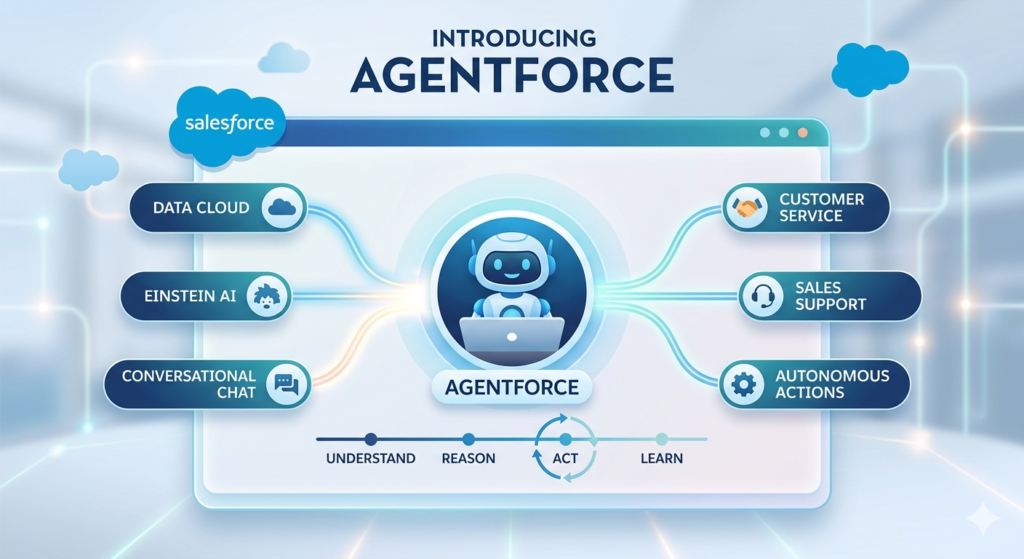
Salesforce Agentforce is Salesforce’s autonomous AI agent platform that combines Einstein AI capabilities with conversational interfaces. Unlike traditional chatbots that follow rigid decision trees, Agentforce uses large language models (LLMs) to understand context, make decisions, and take actions across your Salesforce ecosystem.
Key Capabilities:
- Autonomous decision-making: Agents can reason through complex scenarios
- Natural language understanding: Interprets customer requests in plain English
- Multi-system integration: Works across Sales Cloud, Service Cloud, Marketing Cloud, and external systems
- Action execution: Can update records, create cases, send emails, and more
- Learning and adaptation: Improves based on feedback and outcomes
Why Agentforce Needs Good Prompts:
Even sophisticated AI requires clear direction. Agentforce agents rely on prompts to:
- Understand their role (Are they a support agent? Sales assistant?)
- Define boundaries (What can they do vs. what requires human escalation?)
- Access relevant data (Which CRM fields to check, which knowledge articles to reference)
- Format responses appropriately (Professional tone, structured output, etc.)
Without well-crafted prompts, your Agentforce agents may:
- Provide irrelevant answers
- Miss critical information
- Create poor customer experiences
- Generate compliance or security risks
This is why prompt engineering for Salesforce Agentforce isn’t optional—it’s foundational.
Understanding Prompt Engineering: Core Concepts
Prompt engineering is both an art and a science. Let’s break down the essential concepts.
What Makes a Good Prompt?
Effective Agentforce prompts share four characteristics:
1. Clarity
The AI should never have to guess what you want. Ambiguous language leads to unpredictable results.
2. Context
Provide relevant background information. What data is available? What’s the business scenario?
3. Constraints
Define boundaries. What should the AI avoid? What format should it use?
4. Completeness
Include all necessary elements: role, task, context, examples, output format.
The Anatomy of a Prompt
Professional prompts typically include:
- Role definition: “You are a customer support specialist…”
- Task description: “Your job is to analyze case details and suggest solutions…”
- Input specification: “You will receive customer case data including…”
- Output format: “Provide your response as a bulleted list with…”
- Constraints: “Do not suggest solutions that require custom development…”
- Examples (when helpful): “For instance, if the customer reports login issues…”
Prompt Types in Salesforce
Salesforce offers different prompt structures:
Einstein Prompt Templates
Pre-built, reusable prompts that can be customized for specific use cases. These Einstein prompt template structures help standardize AI interactions across your organization.
Field Generation Prompts
Automatically populate CRM fields based on context (e.g., generating case summaries from customer conversations).
Flex Prompts
Dynamic prompts that adapt based on record data, user inputs, or business logic.
Copilot Prompts
Conversational prompts for guided user experiences within Salesforce interfaces.
Bad vs. Good Prompts: Practical Examples
Let’s see prompt engineering in action with real Salesforce scenarios.
Example 1: Customer Service Case Summarization
❌ Bad Prompt:
textSummarize this case.
Why it fails:
- No context about what aspects matter
- No format specification
- No guidance on length or detail level
- Doesn’t specify audience
✅ Good Prompt:
textYou are a Salesforce Service Cloud assistant helping support managers quickly understand case status.

Task: Analyze the case record and create a concise executive summary.

Include:
- Customer name and account tier
- Primary issue category
- Current status and priority
- Actions taken so far
- Recommended next steps
- Any blockers or escalation needs

Format: Use bullet points with clear headings. Keep total length under 150 words.

Tone: Professional and factual. Highlight urgency if priority is High or Critical.
Why it works:
- Defines the AI’s role and audience
- Specifies exactly what information to include
- Provides clear formatting requirements
- Sets appropriate tone and length constraints
Example 2: Lead Qualification
❌ Bad Prompt:
textIs this a good lead?
Why it fails:
- No qualification criteria specified
- Binary output isn’t actionable
- Doesn’t leverage available Salesforce data
- No reasoning provided
✅ Good Prompt:
textYou are a sales qualification assistant for a B2B SaaS company.

Task: Evaluate this lead record and provide a qualification assessment.

Analyze these fields:
- Company size (employees)
- Industry
- Annual revenue
- Lead source
- Engagement score
- Job title of contact

Qualification criteria:
- High priority: Enterprise companies (500+ employees), revenue $50M+, C-level or VP contact, engagement score 70+
- Medium priority: Mid-market (100-500 employees), revenue $10M-50M, Director level or higher
- Low priority: All others

Output format:
1. Qualification level (High/Medium/Low)
2. Three bullet points explaining the rating
3. Recommended next action
4. Suggested messaging angle based on industry and role

Always base your assessment on actual data values, not assumptions.
Why it works:
- Clear qualification framework aligned with business rules
- Leverages specific Salesforce fields
- Provides structured, actionable output
- Includes reasoning and next steps
- Prevents hallucination with data-grounding instruction
Example 3: Email Response Generation
❌ Bad Prompt:
textWrite an email response to this customer.
Why it fails:
- No tone guidance
- No reference to customer history
- No incorporation of company policies
- No structure for the response
✅ Good Prompt:
textYou are a customer success specialist for [Company Name], responding to a customer inquiry.

Context available:
- Original customer email
- Customer account history in Salesforce
- Previous case interactions
- Product/service subscriptions
- Contract terms and SLA level

Task: Draft a professional email response that:
1. Acknowledges their specific concern
2. References relevant account history if applicable
3. Provides a clear answer or next steps
4. Maintains [Company]'s friendly but professional tone
5. Includes appropriate escalation path if issue can't be fully resolved

Format requirements:
- Greeting using customer's preferred name from Account record
- 2-3 short paragraphs maximum
- Clear call-to-action
- Professional signature block

Constraints:
- Do not make commitments about features not yet released
- Do not discuss pricing unless customer is on renewal cycle
- If technical issue requires engineering, explain escalation process
- Flag for human review if customer expresses strong dissatisfaction

Tone: Empathetic, solution-focused, concise.
Why it works:
- Integrates Salesforce data context
- Provides clear structural guidance
- Sets appropriate business boundaries
- Includes escalation logic
- Specifies tone and length
Real-World Use Cases for Agentforce Prompts
Let’s explore how prompt engineering for Salesforce Agentforce applies across business functions.
Use Case 1: Automated Support Agent
Scenario: A telecommunications company receives 10,000+ support inquiries daily about billing, service issues, and account changes.
Agentforce Solution: An autonomous support agent handles tier-1 inquiries.
Sample Prompt Structure:
textRole: You are a front-line customer support agent for [Telecom Company].

Knowledge sources available:
- Salesforce Knowledge Base (billing policies, troubleshooting guides)
- Customer account data (current plan, billing history, service status)
- Known service outages (from external system)

Your responsibilities:
1. Greet customers professionally
2. Understand their issue through clarifying questions
3. Check relevant account information
4. Provide solutions from knowledge base when available
5. Create case record if issue requires human follow-up
6. Escalate immediately if customer requests cancellation or mentions legal action

Decision logic:
- Simple billing questions → Answer directly using account data
- Technical issues with known solutions → Provide troubleshooting steps
- Service outages → Check outage system, inform customer of estimated resolution
- Complex issues → Create case, set priority based on customer tier, route to appropriate queue

Response format:
- Start with empathy statement
- Provide solution or next steps
- Confirm customer understanding
- Offer case number if ticket created

Constraints:
- Never guess at billing amounts; always reference actual account data
- Don't promise resolution timeframes unless confirmed in SLA
- Escalate any security or privacy concerns immediately
Business Impact:
- 60% reduction in tier-1 support volume
- Average response time under 2 minutes
- Customer satisfaction score improvement
- Support agents freed to handle complex issues
Use Case 2: Sales Opportunity Intelligence
Scenario: Sales reps need quick insights when preparing for customer calls.
Agentforce Solution: AI assistant that analyzes opportunity records and provides call preparation briefings.
Sample Prompt:
textYou are a sales intelligence assistant helping account executives prepare for customer meetings.

Input data:
- Opportunity record (stage, amount, products, close date)
- Account information (industry, size, relationship history)
- Contact roles (decision makers, influencers)
- Recent activities (emails, calls, meetings)
- Competitor information (if available)
- Previous closed-lost opportunities with this account

Task: Generate a pre-call briefing that includes:

1. Opportunity snapshot
   - Current stage and deal value
   - Days in current stage (flag if stalled)
   - Products/solutions being evaluated

2. Relationship context
   - Key stakeholders and their roles in buying process
   - Engagement level (when last contacted, by whom)
   - Previous purchase history

3. Strategic considerations
   - Potential objections based on industry/past interactions
   - Competitive threats (if competitor mentioned in notes)
   - Urgency factors (contract renewal dates, fiscal year timing)

4. Recommended talking points
   - Value propositions aligned with their industry
   - Case studies from similar companies
   - Relevant new features or promotions

5. Risk assessment
   - Red flags (lack of engagement, budget concerns, competitor preference)
   - Confidence level for close date

Format: Concise bullet points, organized by section. Total length 300-400 words.

Critical rule: Only include information actually present in Salesforce. If data is missing, note it as "[Data not available]" rather than assuming.
Business Impact:
- Reps enter calls better prepared
- Improved win rates through targeted messaging
- Faster deal cycles
- More accurate forecasting
Use Case 3: Marketing Campaign Personalization
Scenario: Marketing team needs to personalize outreach at scale based on customer behavior and profile.
Agentforce Solution: Generate personalized email content using Salesforce data.
Sample Prompt:
textYou are a marketing content specialist creating personalized email communications.

Available data:
- Contact information (name, title, company, industry)
- Campaign member history (what campaigns they've engaged with)
- Lead/Contact scoring and grading
- Website activity (pages visited, content downloaded)
- Product interest signals (form submissions, event attendance)

Task: Create a personalized email section (150 words) that:

1. Opens with relevance
   - Reference their industry or specific interest area
   - Connect to content they've previously engaged with

2. Presents value proposition
   - Highlight solution benefits aligned with their role
   - Use industry-specific language and pain points

3. Includes clear call-to-action
   - Invite to relevant resource (webinar, demo, content)
   - Make it easy to take next step

Tone guidelines:
- Professional but conversational
- Value-focused, not feature-focused
- Respectful of their time
- Authentic, not "salesy"

Personalization rules:
- Use first name in greeting
- Reference specific industry whenever possible
- If they downloaded content, mention related topics
- Match sophistication level to job seniority

Output: Just the email body content. Subject line and signature will be added separately.
Business Impact:
- Higher email open and click rates
- Improved lead conversion
- Scale personalization without proportional headcount
- Better customer experience
Common Mistakes in Agentforce Prompt Engineering
Even experienced Salesforce professionals make these errors. Here’s what to avoid:
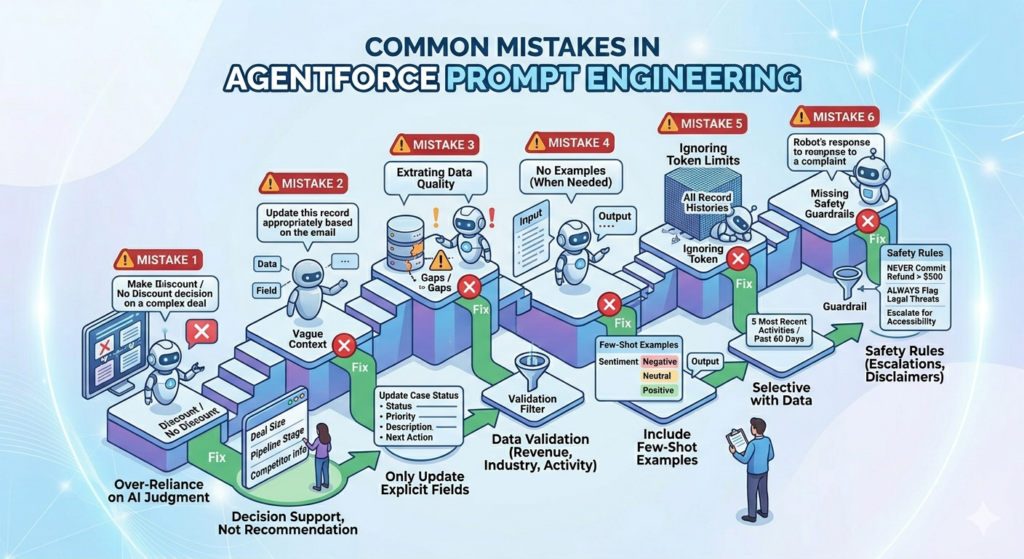
Mistake 1: Over-Reliance on AI Judgment
The Error:
textAnalyze this opportunity and tell me if we should discount the price.
The Problem:
This asks AI to make business decisions it’s not equipped to make. Pricing decisions involve strategic considerations, competitive dynamics, and margin requirements that require human judgment.
The Fix:
textAnalyze this opportunity and provide factors to consider for pricing discussion:
- Deal size relative to customer's company size
- Current stage and time in pipeline
- Competitive situation if noted
- Customer's price sensitivity signals from notes
- Similar deals (size, industry) and their discount levels

Present as decision-support information, not a recommendation.
Mistake 2: Vague Context
The Error:
textUpdate this record appropriately based on the email.
The Problem:
“Appropriately” means nothing to an AI. Which fields should be updated? What’s the data source? What validation rules apply?
The Fix:
textReview the customer email and extract information to update these specific fields:
- Case Status: Set to "In Progress" if customer provided requested information
- Case Priority: Escalate to "High" if customer mentions business impact or deadline
- Case Description: Append customer's latest message with timestamp
- Next Action: Update with logical next step based on email content

Only update fields where information is explicitly stated in the email. Leave other fields unchanged.
Mistake 3: Ignoring Data Quality
The Error:
Assuming all Salesforce data is complete and accurate.
The Problem:
Real-world CRM data has gaps, inconsistencies, and errors. Prompts that don’t account for this create unreliable outputs.
The Fix:
Include data validation instructions:
textWhen analyzing account data:
- If annual revenue is $0 or blank, note it as "Revenue data unavailable"
- If industry is "Other" or blank, don't make industry-specific assumptions
- If last activity date is over 6 months ago, flag as "Stale data - verify before acting"
- Cross-reference contact title with role field; if they conflict, note the discrepancy
Mistake 4: No Examples (When Needed)
The Error:
Complex tasks with no reference examples.
The Problem:
For nuanced tasks (tone, style, format), written descriptions aren’t enough.
The Fix:
Include few-shot examples:
textTask: Classify customer sentiment from case description.

Examples:

Input: "Your product is terrible. I've called three times and nobody helps me."
Output: Negative | High urgency | Escalation recommended

Input: "I have a question about my invoice. Can someone explain the $50 charge?"
Output: Neutral | Standard priority | Billing inquiry

Input: "Thank you so much! The support team was incredibly helpful and solved my issue quickly."
Output: Positive | Resolved | Consider for testimonial

Now classify this case: [case description]
Mistake 5: Ignoring Token Limits
The Error:
Including entire record histories or massive datasets in prompts.
The Problem:
LLMs have token limits. Excessive context gets truncated or slows performance.
The Fix:
Be selective with data:
textInstead of: "Include all activity history for this account"

Use: "Include the 5 most recent activities (calls, emails, meetings) from the past 60 days"
Mistake 6: Missing Safety Guardrails
The Error:
textGenerate a response to this customer complaint.
The Problem:
No constraints on what the AI might promise or how it might handle sensitive situations.
The Fix:
textGenerate a response to this customer complaint with these safety rules:

NEVER:
- Make commitments about refunds over $500 (escalate instead)
- Promise specific delivery dates for custom work
- Discuss other customers or competitive situations
- Share internal company information

ALWAYS:
- Flag messages containing legal threats for immediate human review
- Escalate if customer mentions accessibility, discrimination, or harassment
- Verify account status before discussing account-specific details
- Include disclaimer: "This response is preliminary; a specialist will follow up within [SLA timeframe]"
Best Practices for Salesforce Agentforce Prompts
Now let’s look at proven strategies for creating effective Salesforce GenAI prompts.
1. Start with the End in Mind
Before writing a prompt, clearly define:
- Who will use the output (sales rep, support agent, customer, manager)
- What decision or action it supports
- Where it fits in the business process
- Why AI is better than manual handling
This clarity shapes every element of your prompt.
2. Use the CRAFTER Framework
A helpful structure for building Einstein prompt templates:
- Context: What background information is relevant?
- Role: What persona should the AI adopt?
- Action: What specific task should be performed?
- Format: How should the output be structured?
- Tone: What style and voice are appropriate?
- Examples: What reference points clarify expectations?
- Restrictions: What boundaries and constraints apply?
3. Leverage Salesforce Merge Fields
Connect your prompts to actual CRM data:
textGenerate a follow-up email for this opportunity:

Account Name: {!Account.Name}
Contact: {!Contact.FirstName} {!Contact.LastName}
Title: {!Contact.Title}
Opportunity Stage: {!Opportunity.StageName}
Amount: {!Opportunity.Amount}
Products: {!Opportunity.Products}
Last Activity: {!Opportunity.LastActivityDate}
Next Steps: {!Opportunity.NextStep}

Reference these specific data points in your email to demonstrate you understand their situation.
This grounds the AI response in reality rather than generic templates.
4. Build Iteratively
Don’t try to create the perfect prompt immediately:
Version 1: Basic prompt with core requirements
Test: Run with sample data, review outputs
Version 2: Add constraints based on what went wrong
Test: Validate improvements
Version 3: Refine tone, format, edge cases
Test: User acceptance testing
Treat prompts as code—version control them, test them, and continuously improve them.
5. Create Prompt Libraries
Standardize across your organization:
Template Categories:
- Case management: Summarization, categorization, routing, response generation
- Sales support: Lead qualification, opportunity analysis, email drafting
- Data enrichment: Field population, record completion, deduplication
- Reporting: Insight generation, trend analysis, forecast commentary
Governance Structure:
- Centralized prompt repository in Salesforce
- Version control and change management
- Testing protocols before production deployment
- Usage analytics to identify improvement opportunities
6. Test with Edge Cases
Don’t just test happy paths:
Edge cases to consider:
- Missing or incomplete data
- Contradictory information
- Extreme values (very high amounts, very old dates)
- Multiple concurrent issues
- Non-standard formats or entries
- Different languages (if applicable)
- Sensitive content (complaints, legal issues)
Your prompts should handle outliers gracefully.
7. Include Escalation Paths
Always define when human intervention is needed:
textEscalation triggers - immediately flag for human review if:
- Customer sentiment is strongly negative (angry or threatening language)
- Request involves amount over $10,000
- Data is contradictory or missing critical information
- Issue involves security, privacy, or compliance matters
- Request is outside normal business processes
- AI confidence level is below 70%

When escalating, provide:
- Clear reason for escalation
- Summary of issue
- Recommended specialist team
- Urgency level
AI should augment human decision-making, not replace it in high-stakes situations.
8. Monitor and Measure Performance
Implement feedback loops:
Quantitative Metrics:
- Response accuracy rate
- Time saved per transaction
- Escalation rate
- Customer satisfaction scores
- Completion rate (% of interactions successfully handled)
Qualitative Review:
- Weekly sample review of AI-generated outputs
- User feedback collection
- Edge case analysis
- Continuous prompt refinement
Salesforce Tools:
Use Einstein Trust Layer and Prompt Builder analytics to track prompt performance over time.
9. Maintain Brand Voice Consistency
Your AI represents your brand:
textBrand voice guidelines for all generated content:

Our brand is: Professional, approachable, customer-centric, solution-oriented

We sound like: A knowledgeable colleague who genuinely wants to help

We do:
- Use clear, jargon-free language
- Acknowledge customer concerns with empathy
- Focus on solutions and next steps
- Express confidence without arrogance

We don't:
- Use overly formal or stuffy language
- Make excuses or shift blame
- Over-promise or use superlatives
- Use industry jargon without explanation
- Rush customers or dismiss concerns

Example phrases we use:
- "I understand how frustrating that must be..."
- "Here's what I can do to help..."
- "Let me look into that for you..."

Example phrases we avoid:
- "As per our policy..."
- "Unfortunately, there's nothing we can do..."
- "You should have..."
10. Document Everything
Create comprehensive documentation:
For each prompt template, document:
- Purpose and use case
- Required Salesforce fields/objects
- Expected input format
- Output format and structure
- Business rules and logic
- Escalation criteria
- Version history
- Known limitations
- Sample inputs and outputs
This enables knowledge transfer, troubleshooting, and continuous improvement.
Career Relevance: Why This Skill Matters
Prompt engineering for Salesforce Agentforce is rapidly becoming a must-have skill. Here’s why it matters for your career:
Emerging Role Opportunities
New positions are appearing in the job market:
- AI Prompt Engineer – Salesforce
- Salesforce AI Solutions Architect
- Agentforce Implementation Specialist
- Salesforce GenAI Consultant
These roles command premium compensation due to skill scarcity.
Enhanced Value for Existing Roles
If you’re already in Salesforce:
- Administrators: Configure AI agents, create prompt templates, optimize automation
- Developers: Integrate AI capabilities into custom apps, build prompt-driven workflows
- Consultants: Advise clients on AI strategy, design Agentforce solutions
- Business Analysts: Define AI use cases, create prompt requirements
Adding prompt engineering to your skillset differentiates you in a competitive market.
Future-Proofing Your Career
As AI becomes ubiquitous in enterprise software:
- Understanding how to direct AI systems is increasingly valuable
- Prompt engineering is the “new coding” for business users
- Skills translate across platforms (not just Salesforce)
Certifications and Learning Paths
Salesforce offers:
- Salesforce AI Specialist Certification
- Einstein GPT training modules
- Trailhead: Prompt Builder content
Complement these with general prompt engineering courses to build comprehensive expertise.
Getting Started: Your Action Plan
Ready to begin your prompt engineering journey? Here’s a practical roadmap:
Week 1-2: Foundation Building
Learn the basics:
- Complete Salesforce Trailhead modules on Einstein AI
- Understand your org’s data structure (objects, fields, relationships)
- Review existing business processes that could benefit from AI
Practice exercises:
- Write 5 prompts for common tasks in your role
- Test them in Salesforce Prompt Builder (if available)
- Identify what worked and what didn’t
Week 3-4: Real-World Application
Select a use case:
Choose one specific business process to enhance with AI:
- Support ticket categorization
- Lead response emails
- Opportunity summaries
- Meeting preparation briefs
Build iteratively:
- Create initial prompt
- Test with real data
- Gather feedback from end users
- Refine based on results
Month 2: Expand and Optimize
Broaden scope:
- Apply prompts to 2-3 additional use cases
- Create prompt template library
- Document best practices specific to your org
Measure impact:
- Track time savings
- Monitor accuracy and quality
- Calculate ROI
- Share wins with stakeholders
Month 3+: Advanced Techniques
Deepen expertise:
- Experiment with complex multi-step prompts
- Integrate external data sources
- Build conditional logic into prompts
- Explore apex integration for custom AI solutions
Thought leadership:
- Share learnings with Salesforce community
- Present to internal stakeholders
- Consider writing blog posts or speaking at events
Advanced Tips for Power Users
Once you’ve mastered basics, consider these advanced techniques:
Chain-of-Thought Prompting
For complex reasoning tasks, guide the AI through steps:
textAnalyze whether this opportunity should be prioritized for executive attention.

Think through this step-by-step:

Step 1: Evaluate deal size
- Is amount above $500K threshold?
- How does it compare to typical deal size for this segment?

Step 2: Assess strategic value
- Is customer in target industry for this quarter?
- Is this a net-new logo or expansion?
- Any competitive displacement opportunity?

Step 3: Evaluate timing and probability
- Is close date within current quarter?
- Is opportunity stage appropriate for timeline?
- Any risk factors in notes or activity history?

Step 4: Check relationship strength
- When was last executive engagement?
- What's the multi-threading level?
- Any champion identified?

Final: Based on your analysis of steps 1-4, provide a priority recommendation (High/Medium/Low) with brief justification.
This structured reasoning produces more reliable outputs for complex decisions.
Dynamic Prompt Assembly
Build prompts that adapt based on data:
textYou are analyzing an opportunity at {!Opportunity.StageName} stage.

[IF StageName = "Prospecting"]
Focus your analysis on: Lead quality, initial fit, next steps to qualify
[ENDIF]

[IF StageName = "Proposal" OR StageName = "Negotiation"]
Focus your analysis on: Deal risks, competitive position, key decision-makers, obstacles to close
[ENDIF]

[IF StageName = "Closed Won"]
Focus your analysis on: Implementation priorities, expansion opportunities, reference potential
[ENDIF]
This creates context-appropriate responses without maintaining separate prompts.
Confidence Scoring
Ask AI to self-assess:
textAfter providing your analysis, include a confidence score (1-10) based on:
- Data completeness (are all required fields populated?)
- Data freshness (when was information last updated?)
- Clarity of situation (any contradictory signals?)

If confidence is below 7, explicitly state what additional information would improve accuracy.
This helps users know when to verify AI outputs more carefully.
Troubleshooting Common Issues
When your Agentforce prompts don’t work as expected:
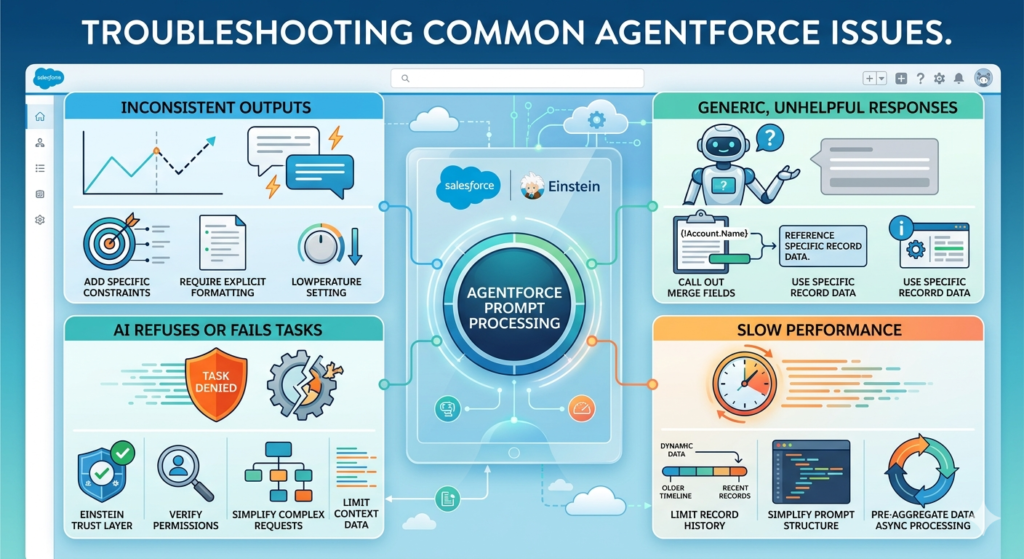
Issue: Inconsistent Outputs
Symptoms: Same input produces different results across runs
Causes:
- Prompt is too vague
- Relying on AI creativity where determinism is needed
- Temperature settings too high
Solutions:
- Add more specific constraints
- Include explicit formatting requirements
- Provide examples of desired output
- Adjust model parameters if available
Issue: Generic, Unhelpful Responses
Symptoms: AI outputs sound like templates, don’t use Salesforce data
Causes:
- Not properly referencing merge fields
- Insufficient context in prompt
- Failing to specify which data to use
Solutions:
- Explicitly call out merge fields: {!Object.Field}
- Add instruction: “Reference specific data from the record in your response”
- Show example using actual data points
Issue: AI Refuses or Fails Tasks
Symptoms: Responses like “I cannot complete this task” or errors
Causes:
- Request violates safety guidelines
- Required data not accessible
- Task beyond AI capabilities
- Token limits exceeded
Solutions:
- Review Salesforce Einstein Trust Layer policies
- Verify field-level security and permissions
- Simplify complex requests into smaller tasks
- Reduce amount of context data included
Issue: Slow Performance
Symptoms: Long wait times for AI responses
Causes:
- Excessive context data
- Complex nested logic
- Multiple API calls required
Solutions:
- Limit record history to recent/relevant items
- Simplify prompt structure
- Pre-aggregate data if possible
- Consider async processing for non-urgent tasks
Conclusion: The Future of Salesforce AI
Prompt engineering for Salesforce Agentforce represents a fundamental shift in how we interact with enterprise software. We’re moving from clicking through screens and filling forms to conversing with intelligent agents that understand intent and take action.
Key Takeaways
1. Prompt engineering is a learnable skill
You don’t need to be a developer or data scientist. Clear thinking, attention to detail, and understanding your business processes are more important than technical background.
2. Quality prompts = quality outcomes
The difference between mediocre and exceptional AI performance often comes down to prompt craftsmanship. Investing time in prompt engineering pays dividends in accuracy, efficiency, and user satisfaction.
3. Start small, iterate continuously
Don’t try to automate everything at once. Choose one high-value use case, perfect it, measure results, then expand. Treat prompts as living documents that evolve with your business.
4. Balance automation and human judgment
AI should augment human decision-making, not replace it. The best implementations keep humans in the loop for complex, sensitive, or high-stakes situations.
5. This skill is increasingly valuable
As AI becomes embedded in every business process, professionals who can effectively direct these systems will be in high demand.
What’s Next?
The field of Salesforce GenAI prompts is evolving rapidly. Expect to see:
- More sophisticated agents that can handle multi-step processes autonomously
- Better integration across Salesforce clouds and external systems
- Industry-specific models trained on domain knowledge
- Enhanced personalization that adapts to individual user preferences
- Improved explainability so you understand why AI made specific decisions
Your Next Steps
- Experiment – Access Salesforce Prompt Builder and start testing
- Learn – Complete relevant Trailhead modules and certifications
- Connect – Join Salesforce AI community groups
- Share – Document your learnings and contribute to the knowledge base
- Specialize – Develop expertise in prompts for your specific industry or role
Final Thought
The organizations and professionals who master prompt engineering now will have a significant competitive advantage. This isn’t about replacing human intelligence—it’s about amplifying it.
The best Salesforce AI implementations combine three elements:
- Domain expertise (understanding your business)
- Technical knowledge (knowing what’s possible)
- Prompt engineering skills (bringing the two together)
You’re now equipped with the foundational knowledge to start building effective Agentforce prompts. The journey from beginner to expert is one of continuous learning and iteration.
Start small. Test rigorously. Learn constantly. And remember: every expert was once a beginner who didn’t give up.
Welcome to the future of Salesforce. Now go build something remarkable.
Additional Resources
Salesforce Official Documentation:
- Salesforce Agentforce Documentation
- Einstein Prompt Builder Guide
- Prompt Template Best Practices
Trailhead Modules:
- “Get Started with Einstein for Service”
- “Build AI-Powered Apps with Einstein GPT”
- “Prompt Builder Basics”
Community:
- Salesforce AI Trailblazer Community
- Agentforce Success Community
- Einstein Platform Community
Books and Courses:
- “Prompt Engineering for LLMs” (General concepts applicable to Salesforce)
- LinkedIn Learning: Salesforce AI courses
- YouTube: Salesforce Developers channel
About RizeX Labs
At RizeX Labs, we specialize in delivering advanced Salesforce solutions, including AI-driven automation using Salesforce Agentforce. Our expertise combines real-world implementation experience with deep knowledge of Salesforce ecosystem tools to help businesses automate workflows, enhance decision-making, and improve operational efficiency.
We help organizations move from manual processes to intelligent, AI-powered systems using prompt engineering techniques that unlock the full potential of Agentforce.
Internal Links:
- Salesforce Admin course page
Salesforce Flows vs Apex: When Should You Use Code vs No-Code Automation? - Salesforce Nonprofit Cloud: Features, Use Cases, and Career Opportunities (2026 Guide)
- Salesforce Net Zero Cloud: What It Is and Why It’s the Next Green Career Niche (2026 Guide)
- Salesforce Slack Integration: How It Works and What Developers Need to Know
- Salesforce Named Credentials: What They Are and How to Use Them Safely
- Salesforce Deployment Best Practices: Change Sets vs Salesforce CLI vs Gearset
External Links:
McKinsey Sales Growth Reports
Gartner Sales Automation Insights
