
Introduction: The Learning Imperative for IT Teams in 2026
Technology never stops evolving — and neither should your IT team.
In 2026, L&D Strategy for IT Teams the pressure on IT professionals is unlike anything the industry has seen before. Artificial intelligence, cloud computing, cybersecurity threats, automation platforms, and data engineering are all advancing simultaneously at breakneck speed. The skills that made your team exceptional two years ago may already be partially obsolete today — and the skills they need for tomorrow are changing faster than traditional training programs can keep up.
Yet here is the paradox that every IT manager, HR leader, and business decision-maker faces: your team needs to learn continuously, but they also need to deliver constantly.
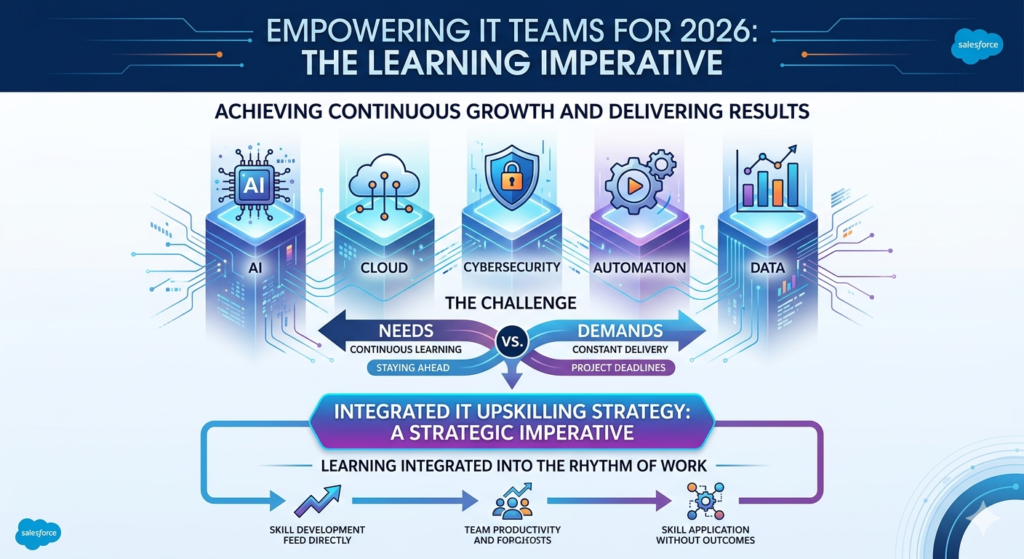
Project deadlines do not pause for training weeks. Critical system maintenance does not wait while developers complete certification courses. Clients do not extend timelines because your team is upskilling. The result is a deeply frustrating tension — organizations know they need to invest in learning, but struggle to do it without disrupting the very work that keeps the business running.
This is exactly why a smart, well-designed IT team upskilling strategy is not just a nice-to-have in 2026 — it is a strategic business imperative.
A thoughtful approach to learning and development IT does not choose between performance and growth. It integrates learning into the rhythm of work itself, making skill development a natural part of how your team operates rather than an interruption to it.
Create image for this content profesional and attractive for salesforce
i don’t want people in image and don’t want to show detail information in image
In this comprehensive guide, you will learn:
- Why upskilling is more critical than ever in the current IT landscape
- The real challenges that derail most IT training initiatives
- A step-by-step IT team upskilling strategy you can implement immediately
- How to design a personalized employee upskilling plan 2026 for different roles
- Practical techniques for enabling learning without disrupting productivity
- How to measure and communicate IT training ROI to leadership
- Real-world examples, best practices, and common mistakes to avoid
Let us build an L&D strategy that actually works.
Why Upskilling is Critical for IT Teams in 2026
The Technology Acceleration Problem
The pace of technological change in 2026 is not just fast — it is compounding. Each new technology wave builds on and accelerates the previous one, creating a continuously expanding skill gap between what IT professionals currently know and what organizations urgently need them to know.
Consider what has happened in just the last three years:
- Generative AI has moved from research novelty to production deployment, requiring IT teams to understand LLM integration, AI security, prompt engineering, and AI-assisted development
- Cloud infrastructure has matured to multi-cloud and hybrid architectures that demand expertise in AWS, Azure, Google Cloud, and the complex security and cost management challenges they create
- Automation platforms like Salesforce, ServiceNow, and custom RPA solutions have expanded dramatically, requiring administrators and developers to master new no-code and low-code paradigms
- Cybersecurity threats have grown more sophisticated, with AI-powered attacks demanding equally sophisticated defensive skills from IT security teams
- Data engineering and analytics have become core competencies for IT teams that previously focused exclusively on infrastructure and application development
According to industry research, the average half-life of a technical skill is now estimated at 2.5 years — meaning that without continuous learning and development IT investment, half of your team’s technical skills will be significantly degraded in relevance within less than three years.
The Talent Gap Reality
The IT talent shortage is not improving — it is deepening. Organizations face a dual challenge: they cannot find enough external talent with the skills they need, and the talent they have risks becoming less effective without continuous investment in development.
Key market realities driving the urgency of a strong IT team upskilling strategy:
- Hiring costs are prohibitive: Recruiting and onboarding a senior IT professional typically costs 50–200% of their annual salary when factoring in recruitment fees, onboarding time, and productivity ramp-up. Upskilling existing employees is dramatically more cost-effective.
- Retention is directly linked to growth: Research consistently shows that employees who feel their organization invests in their development are significantly more likely to stay. In a talent-scarce market, retention is a strategic advantage.
- Internal talent knows your systems: An upskilled existing employee brings institutional knowledge, established relationships, and cultural fit that a new hire cannot replicate for months or years.
- Speed to productivity: A current employee upskilled in a new technology becomes productive significantly faster than a new hire learning both the technology and your organization’s systems simultaneously.
The Structured Learning and Development IT Imperative
Many organizations approach IT training reactively — sending team members to a conference here, funding a certification there, approving an online course when someone requests it. This ad hoc approach produces ad hoc results.
What organizations need in 2026 is structured learning and development IT — a deliberate, systematic approach to skill development that is aligned with business strategy, designed around how IT professionals actually learn best, and integrated into the daily rhythm of work rather than bolted on as an afterthought.
The difference between organizations with structured L&D strategies and those without is measurable and significant across every dimension: productivity, innovation, retention, and competitive positioning.
Challenges in IT Team Upskilling — Why Most Training Programs Fail
Before designing a solution, it is essential to understand why so many IT team upskilling initiatives fail to deliver lasting results. The challenges are real, and ignoring them leads to wasted training budgets and frustrated employees.
Challenge 1: The Time Constraint Trap
This is the most cited obstacle by IT managers worldwide: there simply is not enough time.
IT teams operate in a perpetual state of demand. New feature requests, system incidents, security patches, stakeholder meetings, and project milestones consume every available hour. When training is positioned as something that happens “after the current crunch,” it almost never happens — because there is always another crunch waiting.
The result: training gets scheduled, then postponed, then cancelled, then rescheduled, in an endless cycle that leaves skills stagnant and employees frustrated that the organization talks about learning but never creates space for it.
Challenge 2: Project Deadline Pressure
Related to time constraints but distinct in character, deadline pressure creates a specific cultural problem around training. When teams are measured primarily on delivery — features shipped, incidents resolved, projects completed on time — anything that does not directly contribute to immediate delivery is perceived as a cost, not an investment.
This creates a perverse incentive where the most skilled, highest-performing employees — who are in highest demand for projects — are paradoxically the least likely to have time for learning. The people who need upskilling most are pulled away from it by their own success.
Challenge 3: Employee Burnout
IT professionals in 2026 are under enormous cognitive load. The combination of complex technical work, rapid change, project pressure, and always-on availability expectations creates fertile conditions for burnout. When employees are already stretched to their limits, adding training requirements — even valuable ones — can tip the balance from challenged to overwhelmed.
A poorly designed employee upskilling plan 2026 that ignores burnout risk does not just fail to improve skills — it actively damages morale, engagement, and retention.
Challenge 4: Budget Limitations
Despite the clear ROI of training investment, L&D budgets are frequently the first casualty of cost-cutting exercises. When business conditions tighten, training — which does not show immediate revenue impact — is often cut before headcount or technology spending.
This short-term thinking creates a long-term skill debt that becomes increasingly expensive to address as technology continues to evolve.
Challenge 5: Misalignment Between Training and Real Work
Perhaps the most insidious challenge: even when organizations invest in training, it frequently has minimal impact because it is not connected to the actual work employees are doing.
A developer sent to a three-day cloud architecture course returns to an org that is still entirely on-premise infrastructure. A security professional completes an excellent cybersecurity certification but has no opportunity to apply those skills in their current role. Without application, skills decay rapidly — and employees become cynical about training that does not translate to their real responsibilities.
These challenges make a well-designed employee upskilling plan 2026 not just valuable but essential — because without deliberate design, training will consistently fail to deliver results regardless of the budget invested.
IT Team Upskilling Strategy — A Step-by-Step Framework
This is the core section of this guide — a practical, actionable IT team upskilling strategy that addresses the real challenges organizations face while delivering measurable results.
Step 1: Conduct a Comprehensive Skill Gap Analysis
You cannot navigate to a destination without knowing your starting point. A skill gap analysis maps the distance between where your team’s skills currently are and where they need to be to execute your organization’s technology strategy.
How to conduct an effective skill gap analysis:
Define your future-state skill requirements first:
Work with technology leadership and business stakeholders to identify the skills your IT team will need 12–24 months from now. Consider:
- What new technologies are on your roadmap?
- What platforms are you planning to adopt or expand?
- What are your competitors building capability in?
- What does your technology partner ecosystem (Salesforce, Microsoft, AWS, etc.) recommend?
Assess current skills honestly:
Use a combination of methods to get an accurate picture of current capabilities:
- Self-assessment surveys — ask team members to rate their proficiency in key skill areas on a standardized scale (1–5, Beginner through Expert)
- Manager assessments — have direct managers independently rate their team members’ skill levels for comparison
- Technical assessments — use objective, tool-based skill assessments (platforms like Pluralsight Skills, LinkedIn Learning assessments, or vendor-specific certification prep tools) to get validated, unbiased skill measurements
- Performance data — review project outcomes, code quality metrics, incident resolution times, and other objective performance indicators
Map the gaps:
Create a skills matrix that plots each team member against each required skill, clearly showing:
- Skills that are fully covered (strength areas)
- Skills with moderate gaps (development opportunities)
- Skills with critical gaps (urgent training priorities)
- Skills entirely absent from the team (potential hire or contract requirements)
Prioritize gaps by business impact:
Not all skill gaps are equally urgent. Prioritize based on:
- Alignment with strategic technology roadmap
- Risk exposure from the gap (cybersecurity gaps, for example, carry immediate risk)
- Revenue or efficiency impact of addressing the gap
- Timeline — which skills are needed soonest?
Step 2: Define Clear, Measurable Learning Goals
Vague training objectives produce vague results. Every component of your IT team upskilling strategy must be tied to specific, measurable learning goals.
The SMART framework for learning goals:
| Element | Example |
|---|---|
| Specific | “Develop proficiency in Salesforce Agentforce agent development” — not “improve Salesforce skills” |
| Measurable | “Pass the Salesforce AI Specialist certification” or “Build and deploy two Agentforce agents in sandbox” |
| Achievable | Realistic given the employee’s current skill level and available learning time |
| Relevant | Directly connected to a current or upcoming project or business requirement |
| Time-bound | “Within the next 90 days” — specific deadline creates accountability |
Examples of well-defined learning goals for IT teams:
- “All cloud engineers to complete AWS Solutions Architect Associate certification within Q2 2026”
- “Salesforce developers to complete Einstein AI Specialist certification before the Einstein GPT feature rollout in Q3”
- “IT security team to complete updated CISSP training by the end of H1 to support our SOC 2 compliance initiative”
- “All senior developers to complete a prompt engineering fundamentals course before the AI-assisted development tool rollout”
Step 3: Choose the Right Learning Formats
One of the most critical decisions in any IT team upskilling strategy is selecting learning formats that fit how IT professionals actually learn best — and how they can realistically fit learning into their workdays.
Learning Format Options and When to Use Each:
Microlearning (5–15 minute modules)
- Best for: Skill reinforcement, concept introduction, just-in-time learning
- Ideal scenarios: Daily learning habits, mobile learning during commutes, quick reference before using a new feature
- Examples: Short Trailhead modules, LinkedIn Learning videos, internal knowledge nuggets
On-Demand Video Courses
- Best for: Comprehensive skill development at the learner’s own pace
- Ideal scenarios: Certification preparation, learning a new platform or technology from scratch
- Examples: Pluralsight, Udemy for Business, Coursera, Salesforce Trailhead trails
Live Instructor-Led Training (ILT)
- Best for: Complex topics requiring interaction, Q&A, and real-time feedback
- Ideal scenarios: Team-wide training on new systems, hands-on workshops, compliance training
- Examples: Vendor-delivered training, internal expert sessions, external bootcamps
Cohort-Based Learning
- Best for: Building shared language and collaborative problem-solving across a team
- Ideal scenarios: Strategic technology transitions where the whole team needs to learn together
- Examples: Team certifications, structured learning programs with peer discussion groups
On-the-Job Learning / Project-Based Learning
- Best for: Applying new skills immediately in real contexts — the highest-retention learning format
- Ideal scenarios: Pairing skill development with real project requirements (deliberate stretch assignments)
- Examples: Assigning a developer to lead their first AI feature implementation as a deliberate learning experience
Mentoring and Peer Learning
- Best for: Tacit knowledge transfer, professional development, and leadership skill building
- Ideal scenarios: Senior team members mentoring junior ones, cross-functional knowledge sharing
- Examples: Internal communities of practice, pair programming, lunch-and-learn sessions
The most effective learning and development IT programs use a blended approach — combining multiple formats to create a learning experience that is comprehensive, flexible, and engaging.
Step 4: Align Learning with Live Projects
This is the strategic insight that separates effective upskilling programs from forgotten ones: the best time to learn a skill is when you immediately need it.
Rather than treating training as separate from work, design your IT team upskilling strategy to deliberately align learning with the projects your team is actually working on.
How to implement project-aligned learning:
- Technology adoption projects: When your organization is implementing a new platform or technology, build a structured learning program around that specific implementation. Team members learn the technology while simultaneously using it on the real project — maximizing both learning retention and project value.
- Stretch assignments: Deliberately assign team members to projects that require skills just slightly beyond their current capability, then provide the learning resources and support they need to succeed. This “70-20-10” approach (70% learning from experience, 20% from others, 10% from formal training) is one of the most effective L&D frameworks in existence.
- Pre-project skill sprints: Before a major project begins, schedule a focused 2–4 week learning sprint where team members build the specific skills they will need. The immediately pending application creates urgency and relevance that dramatically improves learning outcomes.
- Learning embedded in project retrospectives: Include skill development discussions in project retrospectives — what new skills did team members need that they did not have? Use this data to inform future training planning.
Step 5: Set Measurable Outcomes and Create Accountability
Learning without accountability produces inconsistent results. Build measurement and accountability into your IT team upskilling strategy from the beginning.
Accountability mechanisms that work:
- Learning time allocation: Formally allocate a percentage of work time to learning (e.g., 10% or 4 hours per week) and treat it as a protected resource, not a nice-to-have
- Manager check-ins: Include learning progress in regular 1-on-1 discussions between managers and team members
- Team learning dashboards: Create visible dashboards showing team-wide learning progress — certifications earned, courses completed, skills developed
- Certification targets: Set clear certification goals with defined timelines and recognize publicly when they are achieved
- Learning tied to performance reviews: Include learning goal achievement as a component of performance evaluations
Designing an Employee Upskilling Plan 2026 — Personalization and Role-Based Learning
A single, uniform training program for an entire IT team is one of the most common and costly L&D mistakes. Your developers, administrators, architects, security professionals, and managers have fundamentally different skill needs, learning preferences, and career development goals.
An effective employee upskilling plan 2026 is built on personalization.
Role-Based Learning Paths
For Software Developers and Engineers:
| Priority Skills | Learning Resources | Timeline |
|---|---|---|
| AI/ML integration and prompt engineering | Coursera AI courses, OpenAI documentation, internal workshops | Q1 2026 |
| Cloud-native development (AWS/Azure/GCP) | Cloud vendor training, certification programs | Q1–Q2 2026 |
| DevSecOps and security-aware development | SANS Developer Security training, internal security reviews | Q2 2026 |
| Platform-specific skills (Salesforce, ServiceNow) | Trailhead, vendor certifications | Ongoing |
| API design and microservices architecture | Pluralsight, internal architecture reviews | Q2–Q3 2026 |
For System Administrators and Platform Specialists:
| Priority Skills | Learning Resources | Timeline |
|---|---|---|
| AI tool configuration and administration | Vendor-specific training, sandbox practice | Q1 2026 |
| Cloud infrastructure management | AWS/Azure/GCP administrator certifications | Q1–Q2 2026 |
| Automation and workflow design | Platform-specific training (Salesforce Flow, Power Automate) | Ongoing |
| Identity and access management | IAM vendor training, security certifications | Q2 2026 |
| Data management and governance | Data Cloud training, internal data governance workshops | Q2–Q3 2026 |
For IT Managers and Team Leads:
| Priority Skills | Learning Resources | Timeline |
|---|---|---|
| AI strategy and governance | Executive AI programs, industry conferences | Q1 2026 |
| Agile and product management | PMI-ACP, SAFe certifications | Q1–Q2 2026 |
| Data-driven decision making | Analytics courses, internal data literacy programs | Q2 2026 |
| Change management for technology transitions | Prosci certification, internal workshops | Ongoing |
| Vendor and partner management | Business management courses, industry events | Q2–Q3 2026 |
For IT Security Professionals:
| Priority Skills | Learning Resources | Timeline |
|---|---|---|
| AI security and adversarial ML | Specialized AI security training, SANS courses | Q1 2026 |
| Cloud security architecture | CCSP, AWS Security Specialty certifications | Q1–Q2 2026 |
| Zero Trust architecture | NIST frameworks, vendor-specific ZTA training | Q2 2026 |
| Incident response for AI-powered threats | SANS FOR courses, tabletop exercises | Ongoing |
| Compliance and regulatory frameworks | ISACA certifications, regulatory update sessions | Q2–Q3 2026 |
Personalized Learning Paths Within Roles
Even within roles, individual employees have different starting points, learning styles, and career aspirations. Build personalization into your employee upskilling plan 2026 by:
Allowing choice within structure: Define the required skills for each role, but give employees flexibility in how they develop those skills — choosing between multiple learning resources, formats, and timelines within defined boundaries.
Career-aspiration alignment: Discuss each employee’s career goals and include learning investments that develop them toward those goals, not just toward the organization’s immediate needs. This dramatically improves engagement and retention.
Learning style accommodation: Some employees learn best through video courses, others through hands-on practice, others through reading documentation. Where possible, provide multiple pathways to the same skill development outcome.
Continuous Learning vs. One-Time Training Events
One of the most important design principles of an effective employee upskilling plan 2026 is shifting from event-based to continuous learning.
Event-based training (what most organizations do):
- Annual training days or weeks
- Conference attendance once per year
- Certification courses completed and then nothing for 12 months
- Problem: Skills decay rapidly without reinforcement; training feels like an interruption; no learning culture is built
Continuous learning (what effective organizations do):
- Weekly microlearning modules embedded in workflow
- Monthly learning hours protected in schedules
- Quarterly skill assessments and learning goal reviews
- Annual certification targets as milestones within a continuous journey
- Benefit: Skills compound over time; learning becomes a habit; organizational capability grows continuously
The goal is to make learning not something your IT team does — but something your IT team is.
Learning Without Disrupting Work — Practical Strategies That Actually Work
This is the challenge at the heart of every IT team upskilling strategy: how do you enable meaningful learning without derailing the delivery your business depends on?
Here are the strategies that work in real IT organizations.
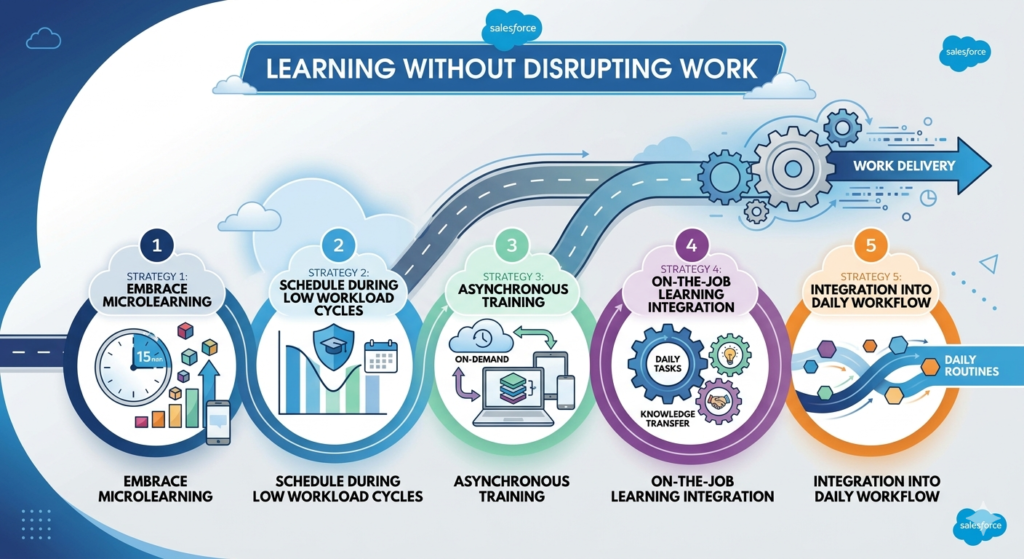
Strategy 1: Embrace Microlearning as a Daily Habit
Microlearning — structured learning in 5–15 minute sessions — is the format most compatible with the reality of IT work.
Implementation approach:
- Schedule a daily 15-minute “learning block” at the start or end of the workday — before the first meeting or after the last one
- Use platforms that support mobile learning so team members can complete modules during commutes or between meetings
- Create internal “knowledge nuggets” — short internal articles, recorded explanations, or quick reference guides that share institutional knowledge in digestible pieces
- Set a team-wide commitment: “15 minutes every day beats 4 hours once a month”
Why it works: Distributed learning with frequent repetition dramatically outperforms massed practice (long training sessions) for long-term skill retention. Small daily investments compound into significant capability over time.
Strategy 2: Schedule Learning During Low Workload Cycles
Every IT team has predictable patterns of high and low demand. Identifying and protecting low-demand periods for intensive learning is one of the most effective scheduling strategies available.
Common low-demand windows for IT teams:
- Post-release cooling-off periods (the week after a major release)
- End-of-sprint buffer days before the next sprint planning
- Holiday periods when business activity slows (December, August)
- Between-project transition windows
- Friday afternoons in teams with Monday-Thursday peak demand
Implementation approach:
- Map your team’s typical demand cycles over the year
- Pre-schedule intensive learning activities (multi-day courses, certification prep sessions) during identified low-demand windows
- Communicate these as protected learning periods to stakeholders so they are not recaptured by project work
Strategy 3: Asynchronous Training for Maximum Flexibility
Async training removes the scheduling complexity of live training while giving team members control over when they learn.
Implementation approach:
- Record internal knowledge-sharing sessions and make them available on-demand
- Use async discussion tools (Slack channels, Microsoft Teams channels) for cohort-based learning discussions that do not require everyone online simultaneously
- Choose learning platforms that support offline access so team members can learn during travel or without connectivity
- Create async “learning sprints” — a defined set of self-paced modules with a shared completion deadline — that let team members progress at their own pace within a team-wide framework
Strategy 4: On-the-Job Learning Integration
The highest-ROI form of learning is learning directly connected to real work. Build deliberate on-the-job learning into your IT team upskilling strategy.
Implementation approach:
- Pair programming and pair administration: Match a more experienced team member with a developing one on real tasks, with explicit knowledge transfer as a stated objective
- Documentation as learning: Require team members who complete training to document what they learned in an internal knowledge base — the act of teaching solidifies learning
- Innovation time: Allocate a percentage of sprint capacity (e.g., 10–20%) for exploration and learning-focused technical work — similar to Google’s famous 20% time
- Internal tech talks: Monthly 30-minute team presentations where individuals share what they have learned, technologies they are exploring, or problems they have solved in interesting ways
Strategy 5: Integration into Daily Workflow
The most sustainable learning culture is one where learning is not separate from work — it is woven into it.
Implementation approaches:
- Add a “Learning and Growth” standing agenda item to every team meeting — a brief weekly share of something a team member learned
- Create Slack or Teams channels dedicated to sharing articles, tutorials, and insights relevant to your technology stack
- Build certification achievement recognition into team rituals — celebrate and publicly acknowledge when team members earn certifications
- Include “What did I learn this week?” as a standard reflection prompt in individual weekly status updates
Measuring IT Training ROI — Proving the Value of Your L&D Investment
One of the most common reasons L&D programs lose executive support is the failure to demonstrate measurable return on investment. Every IT team upskilling strategy must include a clear framework for measuring and communicating IT training ROI.
Understanding IT Training ROI
IT training ROI measures the business value generated by your training investment relative to its cost. The formula is straightforward in concept:
textIT Training ROI = (Value Generated by Training - Cost of Training)
                  ÷ Cost of Training × 100
The challenge is quantifying “value generated” — which requires measuring the right indicators before and after training investment.
Key Metrics for Measuring IT Training ROI
1. Productivity and Delivery Metrics
- Project delivery speed: Are projects being completed faster after relevant upskilling? Measure average sprint velocity, project completion time, and feature delivery frequency before and after training.
- Code quality metrics: After developer training, track defect rates, code review pass rates, and technical debt metrics to measure quality improvement.
- Incident resolution time: After platform or security training, measure how much faster team members resolve incidents — a direct indicator of skill improvement.
- Automation rate: Track the percentage of manual tasks successfully automated after automation training — each automated task represents measurable ongoing time savings.
2. Employee Retention and Talent Metrics
- Employee retention rate: Track and compare retention rates before and after implementing your upskilling program. Given the cost of replacing an IT professional (50–200% of annual salary), even modest retention improvements generate enormous ROI.
- Internal promotion rate: What percentage of open senior positions are filled by internal candidates who were developed through your program? Each internal promotion represents avoided recruiting costs.
- Employee engagement scores: Track engagement survey results related to professional development and growth opportunities — a leading indicator of retention.
- Time to proficiency for new technologies: How long does it take your team to become productive with a new technology after formal training vs. without it?
3. Cost Avoidance Metrics
- Reduced external hiring: When internal upskilling fills a skill gap that would otherwise require an external hire, calculate the avoided recruiting and onboarding cost.
- Vendor and consultant spend reduction: Track whether upskilling your team reduces reliance on external consultants or vendor professional services — a direct, measurable cost saving.
- Reduced error and incident costs: Security training ROI can be calculated by estimating the cost of security incidents that were prevented by better-trained personnel.
4. Business Impact Metrics
- Revenue from new capabilities: Did a specific upskilling investment enable your team to deliver a new feature or capability that generated revenue? Trace the connection.
- Customer satisfaction improvement: Did service improvement from better-skilled teams result in measurable CSAT or NPS improvements?
- Competitive capability: Are you now able to deliver capabilities that you previously had to outsource, and what is the cost differential?
Tools for Tracking IT Training ROI
| Tool Category | Examples | What It Tracks |
|---|---|---|
| Learning Management Systems (LMS) | Cornerstone, Docebo, TalentLMS | Course completion, time spent learning, assessment scores |
| Skill Assessment Platforms | Pluralsight Skills, LinkedIn Learning, Degreed | Skill levels before and after training, benchmarking |
| Project Management Tools | Jira, Azure DevOps | Velocity, defect rates, delivery timelines |
| HR Analytics Platforms | Workday, BambooHR, Lattice | Retention, engagement, performance correlations |
| Custom Dashboards | Salesforce, Power BI, Tableau | Consolidated training ROI reporting |
Building Your IT Training ROI Report
Present IT training ROI to leadership with a simple, compelling structure:
- Investment summary: Total training spend (costs of platforms, courses, certifications, and learning time)
- Participation metrics: Team members trained, courses completed, certifications earned
- Skill improvement evidence: Pre/post assessment scores, certifications as skill proof points
- Business impact indicators: Productivity improvements, retention data, cost avoidance
- Calculated ROI: Using the formula above, where possible with concrete numbers
- Qualitative evidence: Employee testimonials, manager observations, project outcome stories
Real-World Examples — L&D in IT Organizations
Example 1: Global Fintech Company — Salesforce AI Upskilling Program
The Organization: A financial technology company with a 45-person Salesforce development and administration team facing a major Einstein AI feature rollout across their Sales Cloud and Service Cloud implementations.
The Challenge: The team had strong traditional Salesforce skills but zero experience with Einstein GPT, Agentforce, or prompt engineering. The rollout was 16 weeks away, and the team needed to be deployment-ready without pausing their regular sprint commitments.
The Learning and Development IT Approach:
The L&D team partnered with the Salesforce practice lead to design a structured employee upskilling plan that fit within the existing work rhythm:
- Weeks 1–4: Daily 20-minute Trailhead modules (microlearning) focused on Einstein fundamentals, completing the AI Associate certification study path
- Weeks 5–8: Weekly 2-hour hands-on lab sessions scheduled on Friday afternoons (identified low-demand period) where team members practiced in a dedicated Einstein sandbox environment
- Weeks 9–12: Project-aligned learning — each developer was assigned a specific Einstein feature to own for the rollout, creating personal accountability and immediate application
- Weeks 13–16: Peer teaching sessions where each feature owner taught their component to the team, and final certification examinations
Results — Before vs. After:
| Metric | Before Program | After Program |
|---|---|---|
| Team members with Einstein AI certification | 0 | 38 out of 45 |
| Time to configure a new Einstein feature | 3–5 days (with external consultant) | 4–6 hours (internal team) |
| External consultant spend on Einstein work | $180,000/year | $22,000/year (complex work only) |
| Team confidence in AI feature work (self-rated) | 2.1/5 | 4.3/5 |
| Einstein feature rollout completion | N/A | On time, under budget |
IT Training ROI Calculated: External consultant cost reduction alone ($158,000 savings) against a training program cost of approximately $45,000 produced an IT training ROI of 251% in the first year, not counting productivity improvements or retention benefits.
Example 2: Mid-Market Healthcare IT Team — Continuous Learning Culture
The Organization: A regional healthcare provider with a 22-person IT team responsible for maintaining and developing their Epic EHR integration, cybersecurity posture, and growing cloud infrastructure.
The Challenge: High employee turnover (30% annually) driven partly by IT professionals feeling their skills were stagnating. The reactive, project-driven culture left no room for development, and employees were leaving for organizations that invested more visibly in their growth.
The Learning and Development IT Approach:
The IT Director partnered with HR to redesign the L&D approach from reactive to continuous:
- Implemented a 10% time policy: Every team member’s sprint capacity included 4 hours per week formally protected for learning — visible in sprint planning, not recaptured by project work
- Designed role-based learning paths for each of the five IT job families in the team
- Created an internal certification incentive program: $500 bonus for each professional certification earned (capped at two per year per person)
- Launched a monthly internal tech talk: 45-minute lunch sessions where team members share learnings — voluntary but consistently attended by 85%+ of the team
- Introduced quarterly skill assessments using Pluralsight Skills to track individual and team progress objectively
Results — Before vs. After (12 months):
| Metric | Before Program | After Program |
|---|---|---|
| Annual employee turnover | 30% | 11% |
| Professional certifications held by team | 7 total | 31 total |
| Employee satisfaction with growth opportunities | 2.8/5 | 4.4/5 |
| Internal promotion rate | 5% | 32% |
| Average time to resolve P1 incidents | 4.2 hours | 2.6 hours |
IT Training ROI: Reducing turnover from 30% to 11% in a 22-person team meant retaining approximately 4 additional employees per year. At an estimated replacement cost of $120,000 per IT professional (salary, recruiting, onboarding, productivity ramp), this represented $480,000 in avoided costs against a total L&D program investment of approximately $65,000 — an IT training ROI of 638%.
Best Practices for L&D Success in IT Organizations
1. Secure Visible Leadership Support
L&D programs succeed when leaders visibly champion them and fail when learning is delegated entirely to HR or middle management.
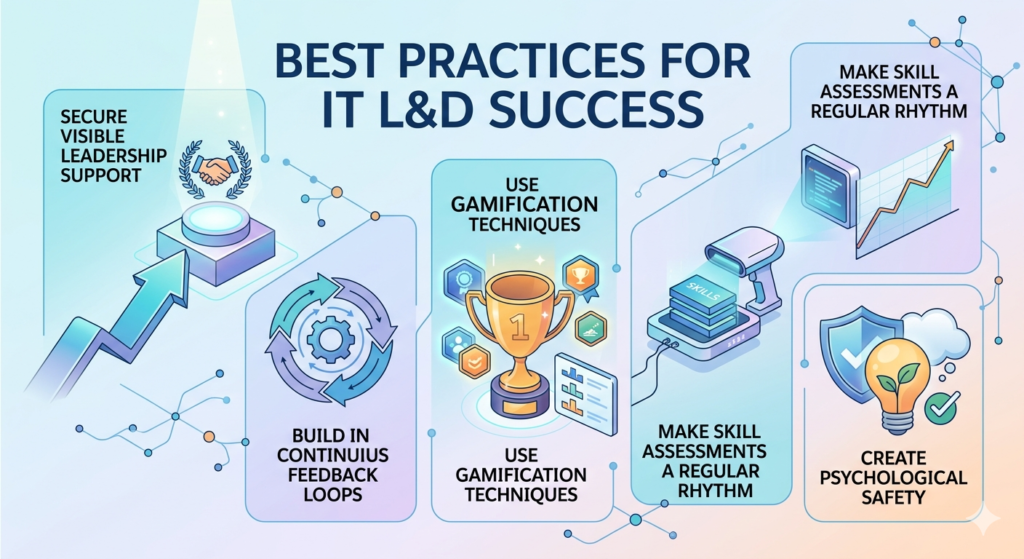
What visible leadership support looks like:
- The CTO or IT Director participates in learning programs alongside their team — not just sponsoring them from a distance
- Learning achievements are celebrated in all-hands meetings and leadership communications
- Senior leaders share their own learning journeys publicly, normalizing continuous development
- L&D investment is protected in budget discussions even when other spending is cut
2. Build in Continuous Feedback Loops
Your IT team upskilling strategy should evolve continuously based on feedback from both learners and the business.
- Collect learner feedback after every training module and program — what was valuable, what was not, what was missing
- Gather manager feedback on whether training translates to observable skill improvement on the job
- Monitor business outcome data (delivery speed, quality, retention) for signals that training is or is not working
- Run quarterly L&D reviews to adjust programs based on accumulated feedback and changing business needs
3. Use Gamification and Engagement Techniques
Engagement is the prerequisite for learning. Gamification — applying game-design elements to non-game contexts — significantly improves participation and completion rates.
Gamification techniques that work for IT teams:
- Certification leaderboards: Visible tracking of certifications earned across the team (competitive IT professionals respond well to this)
- Learning streaks: Recognition for consecutive days or weeks of learning activity
- Skill badges: Digital credentials for specific skills earned that team members can display on internal profiles and LinkedIn
- Learning challenges: Team-wide challenges to collectively earn a certain number of certifications or complete a specific learning path by a target date
- Points and rewards: Simple points systems where learning activities earn points redeemable for benefits (extra PTO, professional development budget, tech gear)
4. Make Skill Assessments a Regular Rhythm
Regular, objective skill assessments serve multiple purposes: they validate that learning is producing genuine skill development, they identify persistent gaps that need different approaches, and they give employees concrete evidence of their growth.
Assessment best practices:
- Use platform-based assessments (Pluralsight, LinkedIn Learning) rather than internal ones to reduce bias
- Conduct baseline assessments before training so improvement can be measured
- Reassess at 90-day intervals to track skill development over time
- Use assessment data to personalize learning paths — focusing resources on actual gaps rather than assumed ones
5. Create Psychological Safety Around Learning
Learning requires acknowledging what you do not know — which requires psychological safety. If your team culture punishes admitting skill gaps or asking basic questions, learning will be superficial and self-reported skill levels will be inflated.
Building psychological safety for learning:
- Leaders model vulnerability by openly discussing what they are learning and where their own skills need development
- Reward honest skill assessments rather than optimistic ones
- Create “safe to fail” learning environments (sandboxes, innovation sprints) where experimentation is encouraged
- Treat training-related mistakes as learning opportunities rather than performance failures
Common Mistakes to Avoid in IT L&D Programs
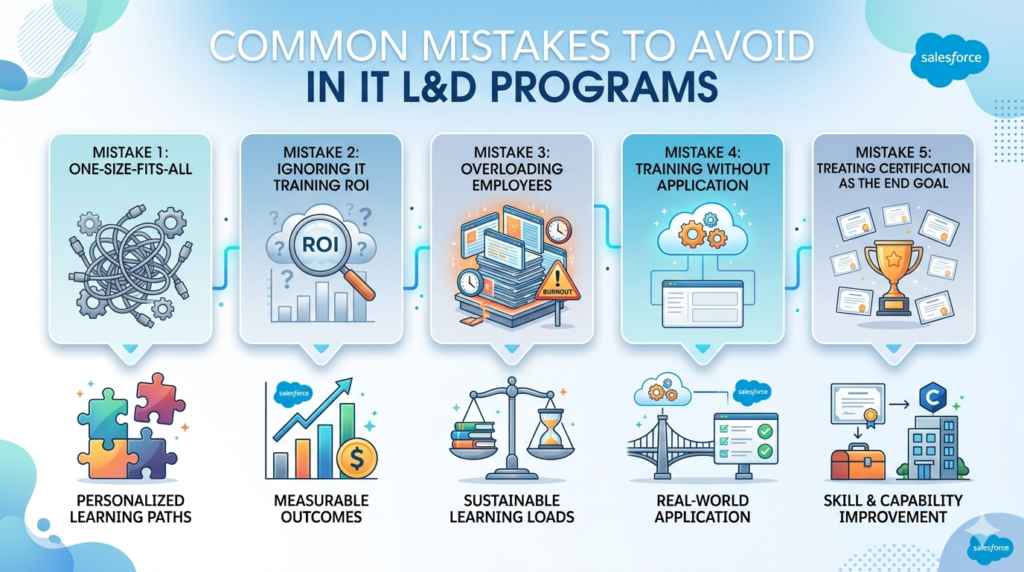
Mistake 1: One-Size-Fits-All Training
What happens: The organization purchases a company-wide subscription to a single training platform and assumes that provides adequate L&D. Everyone is assigned the same courses regardless of role, skill level, or career goals. Junior developers sit through enterprise architecture courses; senior engineers complete basic Python introductions they mastered years ago.
The result: Low completion rates, poor knowledge transfer, wasted budget, and employee frustration.
The fix: Design role-based, skill-level-appropriate, personalized learning paths. Segment your team and customize the learning experience for each segment.
Mistake 2: Ignoring IT Training ROI
What happens: Training programs are implemented based on intuition and good intentions, with no baseline measurements, no tracking framework, and no mechanism to demonstrate value to business leadership. When budgets tighten, training spend is cut because no one can demonstrate its return.
The result: L&D programs are perpetually underfunded and the first casualty of cost-cutting exercises.
The fix: Build measurement into your program from day one. Define your metrics, establish baselines, track outcomes, and present IT training ROI data to leadership regularly. Make the value of learning visible and quantifiable.
Mistake 3: Overloading Employees with Training Requirements
What happens: Enthusiastic L&D leaders design an ambitious training program that requires employees to complete hours of coursework per week on top of their full project workloads. Employees feel overwhelmed and resentful rather than developed and valued.
The result: Low completion rates, increased burnout, and employees who associate training with additional burden rather than growth opportunity.
The fix: Design realistic, sustainable learning loads. Start conservatively — even 30–60 minutes per week of quality, relevant learning produces meaningful results over time. Increase learning time allocation as the organization builds learning culture and as workload management improves.
Mistake 4: Training Without Application
What happens: Employees complete excellent training programs on new technologies — and then return to roles and projects that have no connection to what they just learned. With no opportunity to apply new skills, those skills decay rapidly (research suggests up to 70% of training content is forgotten within one week without application).
The fix: Always design learning and application together. Before approving any training investment, identify specifically how the employee will apply the new skills within 30 days of completing the training.
Mistake 5: Treating Certification as the End Goal
What happens: Organizations focus on certification counts as the primary L&D metric — tracking how many certifications the team has earned and celebrating the numbers without examining whether those certifications translate to actual capability improvement.
The result: Teams that look impressive on paper but have not actually built the practical skills to work effectively with the technologies they are certified in.
The fix: Treat certifications as important evidence of learning, but pair them with practical application assessments and project-based validation. A developer who has earned a cloud certification and deployed a real cloud solution is far more valuable than one who has only passed an exam.
Conclusion: Building an IT Team Upskilling Strategy That Delivers Real Results
The organizations that will thrive in the technology-driven economy of 2026 and beyond are not necessarily the ones with the largest hiring budgets or the most impressive technology stacks. They are the ones with the most capable, continuously developing, and deeply engaged IT teams.
A well-designed IT team upskilling strategy is the foundation of that capability. Here are the key takeaways from this comprehensive guide:
- The pace of technology change makes continuous learning and development IT investment non-optional in 2026 — the question is not whether to invest but how to invest effectively
- The biggest obstacles to successful upskilling — time constraints, deadline pressure, burnout, and budget limitations — are real but solvable with deliberate program design
- A structured employee upskilling plan 2026 built on skill gap analysis, clear learning goals, role-based personalization, and project-aligned learning dramatically outperforms ad hoc training approaches
- Learning does not have to disrupt work — microlearning, async training, low-demand period scheduling, and on-the-job learning integration make continuous development compatible with demanding project environments
- Measuring and communicating IT training ROI is not optional — it is what protects your L&D investment from budget cuts and builds executive support for continuous learning culture
- Real organizations are achieving extraordinary results from structured upskilling programs — with documented ROI ranging from 250% to 600%+ in first-year return on training investment
The competitive advantage in IT is shifting from who you can hire to who you can develop. Organizations that master the art of continuous, embedded, measurable learning and development will build IT teams that are not just keeping up with the pace of technological change — they are driving it.
The time to build your IT team upskilling strategy is not next quarter. It is now.
About RizeX Labs
At RizeX Labs, we specialize in empowering IT teams with modern learning and development (L&D) strategies that enable continuous upskilling without interrupting day-to-day operations. Our approach combines practical training methodologies, industry best practices, and real-world implementation experience to help organizations build high-performing, future-ready teams.
We help businesses transition from traditional, time-consuming training models to flexible, scalable learning frameworks that support continuous growth while maintaining productivity and operational efficiency.
Internal Links:
External Links:
Corporate learning insights (Gartner, McKinsey, etc.)
Coursera:
Udemy
Harvard Business Review (L&D articles)
ATD (Association for Talent Development)
Quick Summary
An effective L&D strategy for IT teams is essential for keeping pace with rapidly evolving technologies while maintaining ongoing business operations. Organizations today must focus on upskilling employees in a way that integrates seamlessly into their daily workflows, avoiding disruptions to productivity.
By adopting flexible learning approaches such as microlearning, on-the-job training, and self-paced modules, companies can ensure continuous development without overwhelming their teams. A well-structured L&D strategy enables IT professionals to gain new skills, stay competitive, and contribute more effectively to business goals.
As the demand for new technologies grows, implementing a scalable and efficient upskilling model becomes critical. Businesses that invest in continuous learning not only improve employee performance but also enhance innovation, retention, and long-term success.
