
In a world where the average person checks their phone over 90 times a day, mobile marketing is no longer optional — it is essential. Whether you are sending a flash sale alert, a transaction confirmation, or a personalized product recommendation, reaching customers on their mobile devices is one of the most powerful tools available to modern marketers. That is exactly where SFMC Mobile Studio comes in.
Salesforce Marketing Cloud Mobile Studio is a robust mobile engagement platform that empowers businesses to connect with their audiences through SMS, push notifications, and group messaging — all from within a single, unified ecosystem. If you have been wondering how to unlock the full potential of mobile marketing using Salesforce, this guide is built for you.
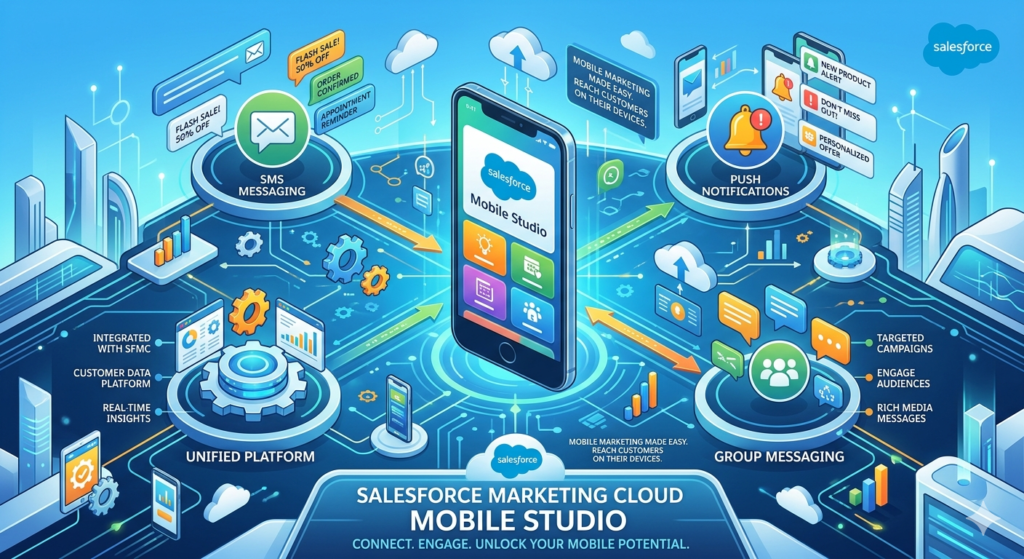
Whether you are a marketing professional just getting started with mobile campaigns or an intermediate user looking to sharpen your strategy, this blog will walk you through everything you need to know about SFMC Mobile Studio — from setup basics to advanced best practices.
Let us dive in.
1. What Is SFMC Mobile Studio?
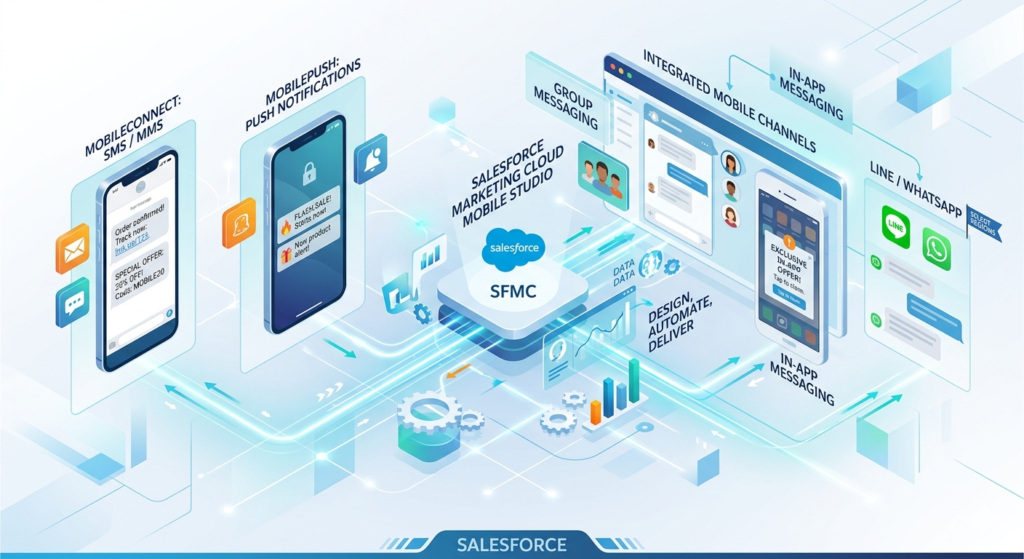
SFMC Mobile Studio is a dedicated mobile marketing solution within Salesforce Marketing Cloud (SFMC). It enables businesses to design, automate, and deliver personalized mobile experiences across multiple channels, including:
- SMS and MMS messaging (via MobileConnect)
- Push notifications (via MobilePush)
- Group messaging
- In-app messaging
- LINE and WhatsApp (in select regions)
Think of Mobile Studio as the mobile arm of your broader Salesforce Marketing Cloud strategy. Just like Email Studio handles email campaigns and Social Studio manages social channels, Mobile Studio takes ownership of everything mobile.
Where Does Mobile Studio Fit in the SFMC Ecosystem?
Salesforce Marketing Cloud is a comprehensive customer engagement platform built around the concept of the “customer journey.” It includes tools for email, social media, advertising, web personalization, and analytics. Mobile Studio fits neatly within this ecosystem, allowing marketers to:
- Integrate mobile touchpoints into Journey Builder workflows
- Use Einstein AI for predictive send-time optimization
- Leverage Contact Builder for unified customer profiles
- Connect with CRM data from Salesforce Sales Cloud or Service Cloud
This tight integration means that mobile campaigns are not isolated efforts. They are part of a cohesive, data-driven customer experience that feels seamless and personalized across every channel.
Key Benefits of Using SFMC Mobile Studio
- Real-time engagement: Reach customers instantly with time-sensitive information
- Personalization at scale: Use customer data to craft messages that feel one-to-one
- High open rates: SMS boasts open rates as high as 98%, and push notifications far outperform email click-through rates
- Automation: Set up triggered messages based on customer behavior or lifecycle stage
- Compliance tools: Built-in opt-in and opt-out management to keep you on the right side of regulations
2. Salesforce Marketing Cloud SMS: MobileConnect Explained
What Is MobileConnect?
MobileConnect is the SMS and MMS marketing tool within SFMC Mobile Studio. It allows businesses to send text messages to customers, manage two-way conversations, and automate message flows based on customer actions or data triggers.
SMS marketing may seem straightforward, but MobileConnect turns it into a sophisticated marketing channel with features that go well beyond simple bulk texting.
Key Features of MobileConnect
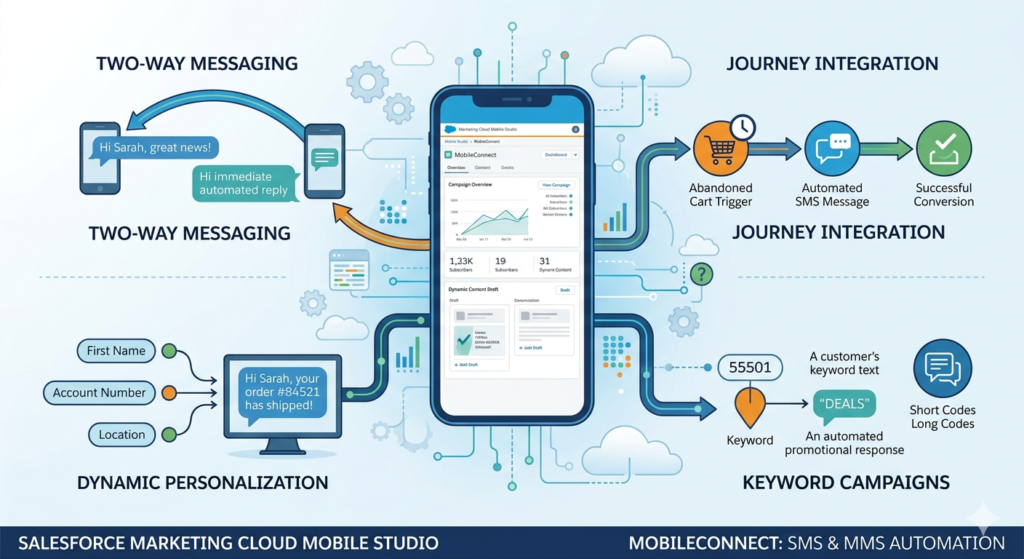
Two-Way Messaging
Unlike traditional broadcast SMS, MobileConnect supports two-way communication. This means customers can reply to your messages, and you can respond — either manually or through automated workflows. This is particularly valuable for customer service interactions, appointment confirmations, and opt-in management.
Automation and Journey Integration
MobileConnect integrates directly with Journey Builder, which means you can trigger SMS messages based on specific customer behaviors or lifecycle events. For example:
- A customer abandons their online shopping cart → they receive an SMS reminder two hours later
- A subscriber has not engaged in 60 days → they enter a re-engagement journey that includes an SMS with a special offer
- A customer makes a purchase → they receive an automated order confirmation and shipping update via text
Personalization
Using merge fields and AMPscript (Salesforce Marketing Cloud’s scripting language), you can dynamically insert customer-specific data into your messages. This could include first names, account numbers, order details, appointment times, or location-specific offers.
Instead of sending:
“Your order has been shipped.”
You can send:
“Hi Sarah, great news! Your order #84521 has shipped and will arrive by Thursday. Track it here: [link].”
The difference in customer experience is significant.
Keyword-Based Campaigns
MobileConnect allows you to set up keyword triggers. For instance, a customer can text “DEALS” to a short code, and they automatically receive your latest promotions. This creates a frictionless opt-in experience and is commonly used in advertising campaigns.
Short Codes and Long Codes
MobileConnect supports both short codes (5–6 digit numbers often used for marketing) and long codes (standard 10-digit numbers often used for conversational messaging). The right choice depends on your use case, message volume, and target geography.
Common Use Cases for Salesforce Marketing Cloud SMS
- Promotional Alerts: Flash sale announcements, discount codes, limited-time offers
- Transactional Messages: Order confirmations, shipping updates, payment receipts
- OTP and Security Alerts: One-time passwords and account verification
- Appointment Reminders: Healthcare, salon, or service booking reminders
- Survey and Feedback Requests: Post-purchase satisfaction surveys
- Event Notifications: Reminders for webinars, concerts, or retail events
- Re-engagement Campaigns: Winning back lapsed customers with personalized incentives
How to Set Up an SMS Campaign in MobileConnect: Basic Steps
Setting up your first SMS campaign in MobileConnect does not have to be overwhelming. Here is a simplified walkthrough:
Step 1: Navigate to MobileConnect
From the Salesforce Marketing Cloud dashboard, go to Mobile Studio → MobileConnect.
Step 2: Configure Your Short Code or Long Code
Set up your sending number. If you are using a short code, this typically requires provisioning through your account team, as short codes require carrier approval.
Step 3: Build a Contact List
Import or sync your subscriber list. Make sure you only include contacts who have given explicit consent to receive SMS messages (more on compliance later).
Step 4: Create Your Message
Click Create Message and choose your message type (Outbound, Mobile Originated, etc.). Write your SMS copy, insert personalization fields if needed, and add any links (shortened URLs are recommended).
Step 5: Define Audience and Send Time
Select your audience from your subscriber lists and define when the message should send — immediately, scheduled, or triggered.
Step 6: Test and Send
Use the Preview and Test function to send a test message to your device. Review everything carefully, then activate your message or campaign.
💡 Pro Tip: Always test your SMS on multiple devices and carriers before sending to your full list.
3. Push Notifications in SFMC: MobilePush Explained
What Are Push Notifications?
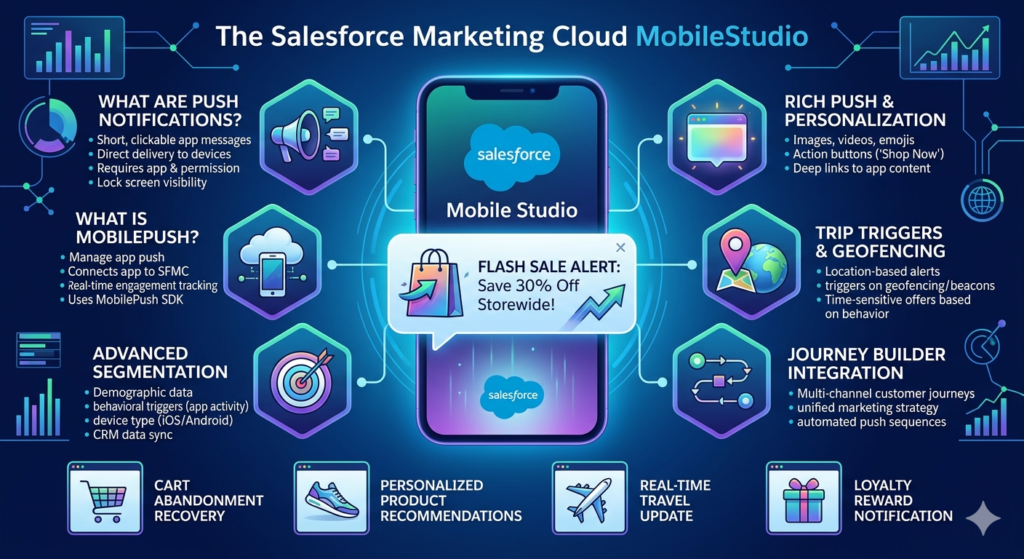
Push notifications are short, clickable messages that are delivered directly to a user’s mobile device via an app. Unlike SMS, push notifications require the user to have your brand’s mobile app installed and to have granted notification permissions.
When used effectively, push notifications are incredibly powerful. They appear on the lock screen, create a sense of urgency, and can be enriched with images, emojis, deep links, and action buttons.
What Is MobilePush?
MobilePush is the push notification management tool within SFMC Mobile Studio. It connects your mobile app to Salesforce Marketing Cloud, allowing you to send targeted, personalized push notifications and track engagement in real time.
MobilePush uses Salesforce’s MobilePush SDK, which must be integrated into your mobile app by your development team. Once integrated, the full power of SFMC push notifications becomes available to your marketing team.
Key Features of Push Notifications in SFMC
Advanced Segmentation
With MobilePush, you can segment your app users based on:
- Demographics (age, location, language)
- Behavioral data (last app open, purchase history, items viewed)
- Device data (iOS vs Android, app version, location)
- CRM data synced from Salesforce
This granular segmentation ensures that your push notifications are relevant and timely rather than generic and annoying.
Personalization
Similar to SMS, push notifications in SFMC support dynamic content and personalization. You can address users by name, reference their recent activity, or show them content specific to their location or preferences.
Behavioral Triggers and Geofencing
One of the most exciting features of push notifications in SFMC is the ability to trigger messages based on user behavior or physical location.
- Behavioral triggers: A user views a product page three times but does not purchase → trigger a push notification with a limited-time discount
- Geofencing: A customer enters a 1-mile radius of your retail store → trigger a push notification with an in-store offer
Rich Push Notifications
Beyond plain text, MobilePush supports rich push notifications that include:
- Images and videos
- Emoji characters
- Multiple action buttons (e.g., “Shop Now” / “Remind Me Later”)
- Deep links that take users directly to a specific page within the app
Journey Builder Integration
Like MobileConnect, MobilePush integrates seamlessly with Journey Builder, allowing you to include push notifications as steps within multi-channel customer journeys. [Learn more about SFMC Journey Builder and automation here.]
Examples of Effective Push Notification Campaigns
1. Cart Abandonment Recovery
“Hey Alex! 🛒 You left something behind. Your Nike Air Max 270s are still waiting — grab them before they sell out!”
2. Personalized Product Recommendations
“Based on your recent purchase, we think you’ll love these. Check out our new arrivals just for you 👟”
3. Real-Time Travel Update
“Your flight AA1234 is now boarding at Gate B12. Have a great trip! ✈️”
4. Loyalty Reward Notification
“You’ve earned 500 reward points, Maya! Redeem them on your next purchase. Tap to see your rewards.”
5. Flash Sale Alert
“⚡ 4-hour flash sale starts NOW! 30% off sitewide. Tap to shop before it ends!”
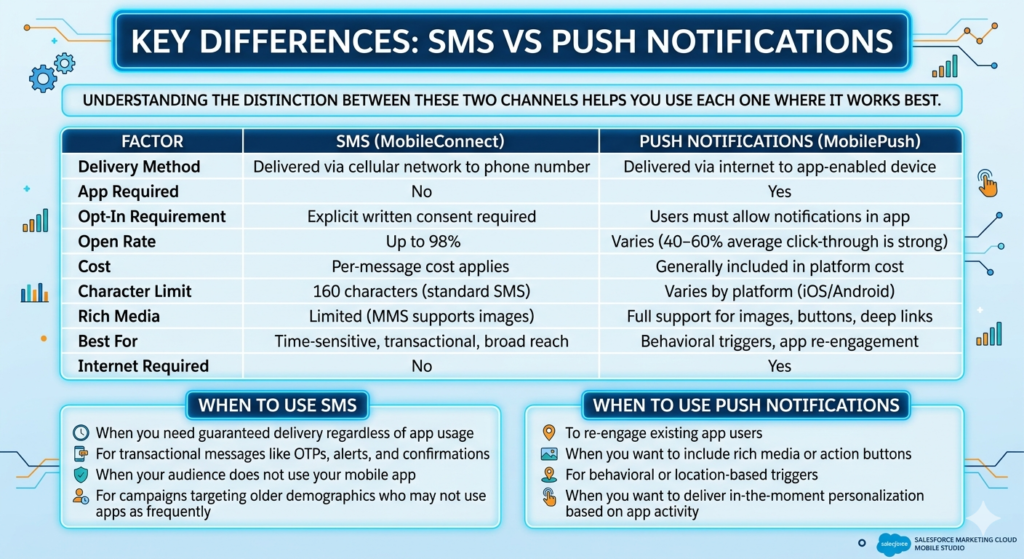
4. Key Differences: SMS vs Push Notifications
Understanding the distinction between these two channels helps you use each one where it works best.
| Factor | SMS (MobileConnect) | Push Notifications (MobilePush) |
|---|---|---|
| Delivery Method | Delivered via cellular network to phone number | Delivered via internet to app-enabled device |
| App Required | No | Yes |
| Opt-In Requirement | Explicit written consent required | Users must allow notifications in app |
| Open Rate | Up to 98% | Varies (40–60% average click-through is strong) |
| Cost | Per-message cost applies | Generally included in platform cost |
| Character Limit | 160 characters (standard SMS) | Varies by platform (iOS/Android) |
| Rich Media | Limited (MMS supports images) | Full support for images, buttons, deep links |
| Best For | Time-sensitive, transactional, broad reach | Behavioral triggers, app re-engagement |
| Internet Required | No | Yes |
When to Use SMS
- When you need guaranteed delivery regardless of app usage
- For transactional messages like OTPs, alerts, and confirmations
- When your audience does not use your mobile app
- For campaigns targeting older demographics who may not use apps as frequently
When to Use Push Notifications
- To re-engage existing app users
- When you want to include rich media or action buttons
- For behavioral or location-based triggers
- When you want to deliver in-the-moment personalization based on app activity
💡 Best Practice: Use both SMS and push notifications as complementary channels. For example, send a push notification first for a cart abandonment scenario, and follow up with an SMS if the user has not re-engaged within a few hours.
5. Best Practices for SFMC Mobile Studio
1. Prioritize Personalization
Generic messages get ignored. Use the customer data available in Salesforce Marketing Cloud — purchase history, browsing behavior, location, loyalty status — to craft messages that feel genuinely relevant. Even something as simple as including the customer’s first name and referencing their last purchase dramatically improves engagement.
2. Respect Timing and Frequency
Nobody wants a promotional text at 2 a.m. or a push notification every three hours. Use Einstein Send Time Optimization within SFMC to determine the best time to reach each individual user based on their historical engagement patterns. As a general rule:
- Send SMS messages between 9 a.m. and 8 p.m. in the recipient’s local time zone
- Limit promotional SMS messages to 4–6 per month per subscriber
- Limit push notifications to 1–3 per day at most, and only when they add real value
3. Always Get Explicit Opt-In
For Salesforce Marketing Cloud SMS, this is not just a best practice — it is a legal requirement in most regions. Under regulations like the Telephone Consumer Protection Act (TCPA) in the U.S. and GDPR in Europe, you must have explicit, documented consent before sending marketing SMS messages.
Best practices for opt-in management include:
- Using double opt-in (subscribers confirm their consent via a reply)
- Storing opt-in timestamps and sources for compliance documentation
- Making opt-out easy and immediate (e.g., replying STOP to any message)
- Clearly disclosing message frequency and data rates at the point of opt-in
MobileConnect has built-in opt-in and opt-out keyword management, making compliance easier to maintain.
For push notifications, users must grant notification permissions on their device. Never try to circumvent this — your goal is engaged subscribers, not annoyed ones.
4. Craft Compelling Copy
In mobile marketing, every word counts. Here is a quick framework for writing effective SMS and push copy:
- Lead with value: What is in it for the customer? State it immediately.
- Create urgency when appropriate: Limited-time offers drive action, but overusing urgency loses its effect.
- Use a clear call to action: “Shop now,” “Track your order,” “Claim your reward” — be specific.
- Keep it concise: For SMS, aim for under 160 characters. For push, the notification preview is often cut off after about 100 characters on mobile screens.
5. A/B Test Relentlessly
SFMC supports A/B testing across both SMS and push notification campaigns. Test variables such as:
- Message copy (different headlines or CTAs)
- Send times
- Personalization tokens vs. generic messaging
- Emoji vs. no emoji
- Rich push (with image) vs. plain text push
Even small optimizations can lead to meaningful improvements in click-through and conversion rates over time.
6. Monitor Performance Metrics
Key metrics to track for SMS campaigns:
- Delivery rate
- Click-through rate (CTR)
- Opt-out rate (a high opt-out rate signals messaging fatigue or irrelevance)
- Conversion rate
Key metrics to track for push notifications:
- Open/click rate
- App open rate post-notification
- Conversion rate
- Notification permission rate (the percentage of app users who have enabled notifications)
Use SFMC Analytics Builder and Reports to track these metrics and continually refine your strategy. [Learn more about SFMC reporting and analytics here.]
6. Real-World Use Cases
E-Commerce: Cart Abandonment and Personalized Promotions
An online fashion retailer integrates MobilePush with their shopping app. When a user adds items to their cart but does not complete checkout within two hours, Journey Builder automatically triggers a push notification:
“Still thinking it over, Jamie? 👗 Your cart is saved — and your size is almost gone. Complete your order today.”
If the user does not respond within 24 hours, a follow-up SMS is triggered:
“Hi Jamie, don’t miss out! Your cart is expiring soon. Shop now: [link] Reply STOP to unsubscribe.”
This multi-channel approach — combining push notifications in SFMC with Salesforce Marketing Cloud SMS — recovers a significant portion of abandoned carts without the user ever needing to be retargeted through expensive paid advertising.
Banking and Financial Services: Transaction Alerts and Security Notifications
A major bank uses MobileConnect to send real-time SMS alerts for account activity. When a customer makes a transaction above a certain threshold, they instantly receive:
“Alert: A transaction of $1,250 was made from your account ending in 4821 on 06/12. Not you? Call 1-800-XXX-XXXX immediately.”
These transactional messages do not require promotional opt-in in the same way, but the bank still maintains clear opt-in records for all communication preferences. The real-time nature of SMS makes it ideal for fraud prevention, where seconds matter.
The bank also uses MobilePush through their banking app to deliver personalized financial insights:
“You’ve spent 20% more on dining this month, Carlos. Want to see your full budget breakdown? 📊 Tap to view.”
Travel and Hospitality: Booking Updates and Real-Time Notifications
An airline integrates MobilePush into their mobile app to deliver real-time gate changes, boarding alerts, and baggage claim updates. Rather than relying on passengers to check the app manually, the airline proactively pushes relevant information at each stage of the journey.
Meanwhile, their loyalty program uses Salesforce Marketing Cloud SMS to send exclusive member offers:
This combination of operational push notifications and promotional SMS creates a travel experience that feels both helpful and personalized.
Healthcare: Appointment Reminders and Patient Engagement
A healthcare provider uses MobileConnect to send appointment reminders to patients:
“Reminder: You have an appointment with Dr. Patel on Thursday, June 15 at 10:30 AM. Reply C to confirm or R to reschedule.”
The two-way messaging capability of MobileConnect means patients can confirm or reschedule directly via text, reducing no-show rates significantly and freeing up staff time.
7. Getting Started: Your Mobile Studio Checklist
Before you launch your first campaign, use this checklist to make sure you are set up for success:
Mobile Studio is provisioned in your Salesforce Marketing Cloud account
MobileConnect is configured with your short code or long code
MobilePush SDK is integrated into your mobile app (if using push)
Opt-in processes are in place for both SMS and push
Subscriber lists are segmented and consent records are documented
Journey Builder is connected for automated campaign flows
A/B testing framework is defined before launch
Analytics dashboards are configured to track key performance metrics
8. Conclusion: Why SFMC Mobile Studio Belongs in Your Marketing Stack
Mobile is not the future of marketing — it is the present. Consumers are on their phones constantly, and the brands that reach them with relevant, timely, and personalized messages are the ones that earn loyalty and drive conversions.
SFMC Mobile Studio gives marketers a powerful, integrated toolkit to do exactly that. Through MobileConnect for SMS and MobilePush for push notifications, you can:
- Deliver real-time, data-driven messages across two of the highest-performing mobile channels
- Automate complex, multi-touch journeys that respond to customer behavior
- Maintain compliance with global privacy regulations
- Measure performance and continuously optimize your approach
- Create truly seamless omnichannel experiences that tie together email, social, web, and mobile
The most successful mobile marketing strategies do not treat SMS and push as separate silos. They use both channels together, intelligently and thoughtfully, as part of a unified customer journey. Salesforce Marketing Cloud SMS handles broad reach and transactional reliability, while push notifications in SFMC deliver rich, behavioral experiences to your most engaged app users.
Together, under the umbrella of SFMC Mobile Studio, they give you everything you need to meet your customers where they are — on their phones, in their pockets, at exactly the right moment.
About RizeX Labs
We’re Pune’s leading IT training institute specializing in emerging technologies like Salesforce and data analytics. At RizeX Labs, we help professionals master tools like Salesforce Marketing Cloud through hands-on training, real-world projects, and expert mentorship. Our programs are designed to transform learners into job-ready Salesforce professionals with strong campaign management and automation skills.
Internal Links:
- Salesforce Marketing Cloud (SFMC) Training & Certification
- SFMC Journey Builder: A Comprehensive Guide to Customer Journeys
- Email Studio vs. Mobile Studio: Choosing the Right Channel for Your Campaign
- Salesforce Admin & Development Training
