
Introduction
If you have ever tried to connect an external CRM, a custom web application, or a third-party data platform to Salesforce Marketing Cloud without using SFMC API integration, you already know how painful manual data workflows can become. Mismatched subscriber lists, delayed email sends, broken segmentation — these are all symptoms of a disconnected marketing stack.
SFMC API integration is the backbone of any serious, scalable marketing automation strategy. Whether you are syncing lead data from Salesforce CRM, triggering transactional emails from your e-commerce platform, or pulling campaign performance data into a custom dashboard, the Salesforce Marketing Cloud API gives you the programmatic control to make it happen — reliably, in real time, and at scale.
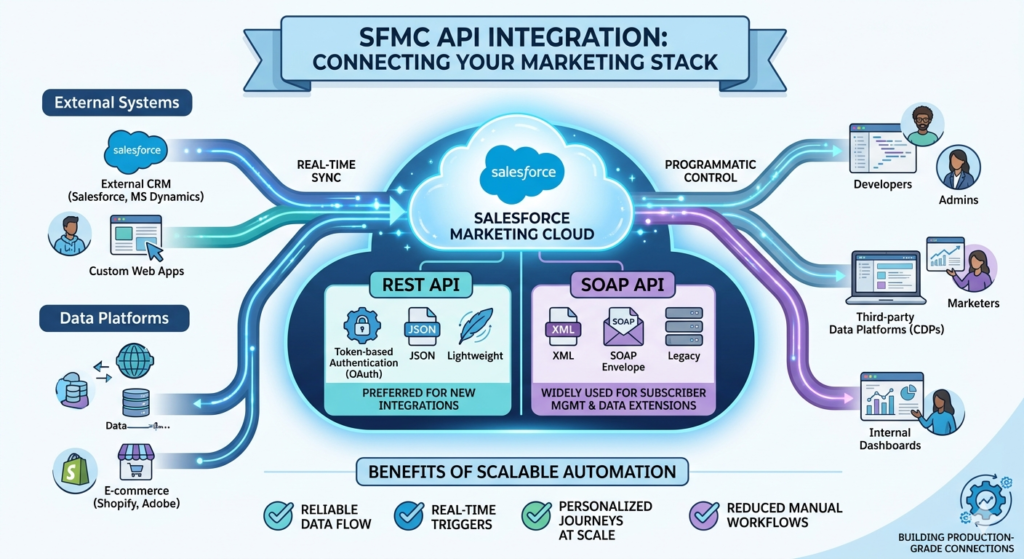
Salesforce Marketing Cloud exposes two primary API styles:
- Marketing Cloud REST API — the modern, lightweight, and token-based approach preferred for new integrations
- SFMC SOAP API — the legacy but still widely used XML-based approach for subscriber management, data extensions, and legacy send operations
This guide is built for Salesforce admins, SFMC developers, marketing automation specialists, and API integrators who want to move beyond clicking through the UI and start building real, production-grade connections. We will walk through every layer: authentication, setup, code examples, use cases, error handling, and best practices — from beginner foundations to intermediate implementation.
Let's get into it.
Section 1: Understanding SFMC APIs
What Is the Salesforce Marketing Cloud API?
At its core, the Salesforce Marketing Cloud API is a programmatic interface that allows external systems, scripts, and applications to interact directly with your SFMC instance. Instead of manually importing a CSV file or clicking "send" on a journey, you write code or configure a middleware platform to perform those actions automatically.
Think of the SFMC API as the remote control for your entire Marketing Cloud environment. You can use it to:
- Create and update subscriber records
- Insert rows into Data Extensions
- Trigger email and SMS sends
- Start or stop journeys
- Retrieve engagement and performance data
- Manage lists, contact attributes, and segmentation logic
The API speaks two languages: REST and SOAP.
Marketing Cloud REST API Overview
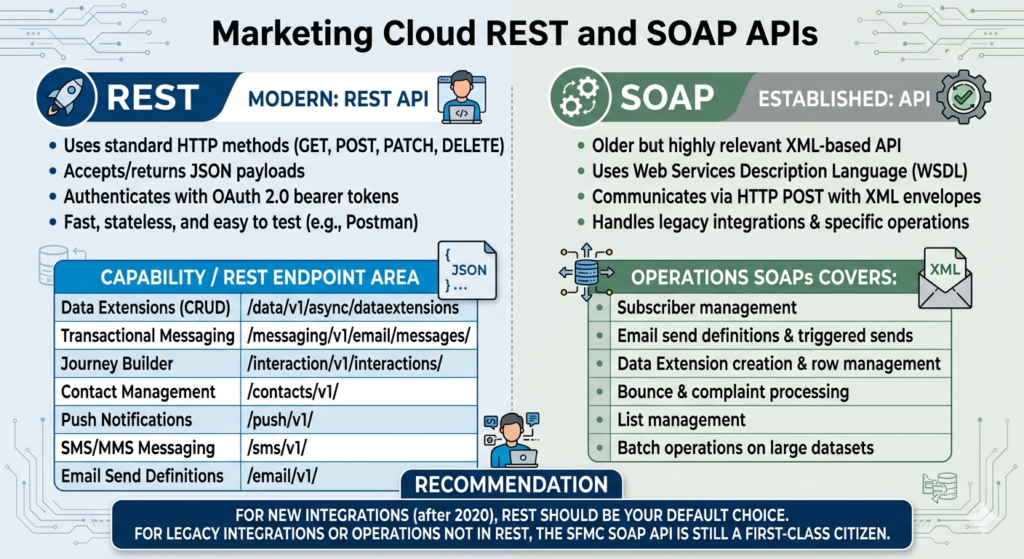
The marketing cloud rest api is the modern, recommended approach for most new SFMC integrations. It uses standard HTTP methods (GET, POST, PATCH, DELETE), accepts and returns JSON payloads, and authenticates using OAuth 2.0 bearer tokens.
REST endpoints in Marketing Cloud cover a wide and growing range of functionality:
| Capability | REST Endpoint Area |
|---|---|
| Data Extensions (CRUD) | /data/v1/async/dataextensions |
| Transactional Messaging | /messaging/v1/email/messages/ |
| Journey Builder | /interaction/v1/interactions/ |
| Contact Management | /contacts/v1/ |
| Push Notifications | /push/v1/ |
| SMS/MMS Messaging | /sms/v1/ |
| Email Send Definitions | /email/v1/ |
REST is fast, stateless, and easy to test with tools like Postman. For any integration built after 2020, REST should be your default choice.
SFMC SOAP API Overview
The SFMC SOAP API is the older but still highly relevant XML-based API that predates REST in the Marketing Cloud ecosystem. It uses Web Services Description Language (WSDL) to define its object structure and communicates via HTTP POST requests with XML envelopes.
SOAP covers many operations that REST has not yet fully replaced, including:
- Subscriber management (retrieve, create, update, delete)
- Email send definitions and triggered sends
- Data Extension creation and row management
- Bounce and complaint processing
- List management
- Batch operations on large datasets
If you are maintaining legacy integrations, working with enterprise SFMC instances that predate 2019, or dealing with operations not yet available in REST, the SFMC SOAP API is still a first-class citizen.
When to Use REST vs SOAP in SFMC
This is one of the most common questions for developers starting their SFMC journey. Here is a practical rule of thumb:
Use REST when building new integrations. Use SOAP when you need legacy compatibility or REST does not yet cover the functionality you need.
Key Differences Table: REST vs SOAP at a Glance
| Feature | Marketing Cloud REST API | SFMC SOAP API |
|---|---|---|
| Protocol | HTTP/HTTPS | HTTP/HTTPS (XML over POST) |
| Data Format | JSON | XML |
| Authentication | OAuth 2.0 Bearer Token | Username + Password + API Key (or OAuth) |
| Speed | Faster (lightweight) | Slower (verbose XML) |
| Ease of Use | Beginner-friendly | Steeper learning curve |
| Coverage | Growing (modern features) | Broad legacy coverage |
| Error Handling | Standard HTTP status codes | SOAP fault envelopes |
| Postman Friendly | Yes | Partial |
| Recommended For | New builds, transactional messaging, journeys | Subscriber mgmt, triggered sends, legacy ops |
Section 2: SFMC API Integration Prerequisites
Before you write a single line of code, you need to configure your Marketing Cloud environment correctly. Skipping this setup is the number one reason developers hit authentication walls on day one.
Step 1: Create an Installed Package in SFMC
Installed Packages are the gateway to SFMC API access. Think of them as your API application container — they hold your credentials, define your permissions, and give you the endpoints you need.
Navigation Path:Setup → Platform Tools → Apps → Installed Packages → New
Fill in:
- Name: Something descriptive (e.g., "CRM Integration API" or "Transactional Email Service")
- Description: Optional but recommended for documentation
🔵 Pro Tip: Create separate Installed Packages for separate integration purposes. Don't use one package for everything — it makes credential management and scope control much harder.
Step 2: Add an API Integration Component
Inside your new package, click Add Component and select API Integration. You will be prompted to choose:
- Server-to-Server — Recommended for most backend integrations (no user login required)
- Web App — For user-facing OAuth flows where a human logs in
- Public App — For mobile or single-page apps
For most SFMC API integrations, choose Server-to-Server.
Step 3: Collect Your Credentials
After saving, Marketing Cloud will generate your credentials. These are critical. Copy and store them securely immediately.
| Credential | Description | Where Used |
|---|---|---|
| Client ID | Unique identifier for your app | OAuth token request |
| Client Secret | Secret key for authentication | OAuth token request |
| Authentication Base URI | Your tenant-specific auth endpoint | Token generation |
| REST Base URI | Base URL for all REST API calls | REST requests |
| SOAP Base URI | Base URL for SOAP API calls | SOAP requests |
Example format of these URIs:
textAuthentication Base URI:  https://mcd0000001.auth.marketingcloudapis.com/
REST Base URI:            https://mcd0000001.rest.marketingcloudapis.com/
SOAP Base URI:            https://mcd0000001.soap.marketingcloudapis.com/
⚠️ Beginner Mistake to Avoid: Do not use the generic
https://auth.exacttarget.comendpoints. Modern SFMC tenants require tenant-specific URIs — using generic endpoints will cause authentication failures.
Step 4: Configure Permission Scopes
This is where many integrations break — not from credential issues but from missing scopes.
Scopes define what your API integration is allowed to do. In the Installed Package setup, you will see a matrix of permissions across different functional areas.
Common Scopes and Their Functions:
| Scope | What It Enables |
|---|---|
email_read | Read email send data |
email_write | Create email definitions and sends |
email_send | Trigger email sends |
data_extensions_read | Read DE data |
data_extensions_write | Insert/update DE records |
journeys_read | Read journey metadata |
journeys_write | Create/modify journeys |
list_and_subscribers_read | Read subscriber data |
list_and_subscribers_write | Create/update subscribers |
sms_read / sms_write | SMS operations |
push_read / push_write | Push notification operations |
🔵 Pro Tip: Apply the principle of least privilege — only grant the scopes your integration actually needs. Over-permissioned packages are a security risk, especially if credentials are ever leaked.
Integration Setup Checklist (First-Time)
text✅ Created a dedicated Installed Package
✅ Added API Integration component (Server-to-Server)
✅ Collected Client ID and Client Secret
✅ Saved Authentication Base URI
✅ Saved REST Base URI
✅ Saved SOAP Base URI
✅ Selected only required permission scopes
✅ Stored credentials in a secure vault (not in code)
✅ Tested token generation before building integration
✅ Documented the package purpose and owner
Section 3: Marketing Cloud REST API Setup (Step-by-Step)
Now that your Installed Package is configured, let's build a working REST API integration from scratch.
Step 1: Generate an OAuth 2.0 Access Token
The marketing cloud rest api requires an OAuth 2.0 bearer token for every authenticated request. Tokens expire after 20 minutes (1200 seconds), so your integration must handle token refresh gracefully.
Endpoint:
textPOST https://{authentication-base-uri}/v2/token
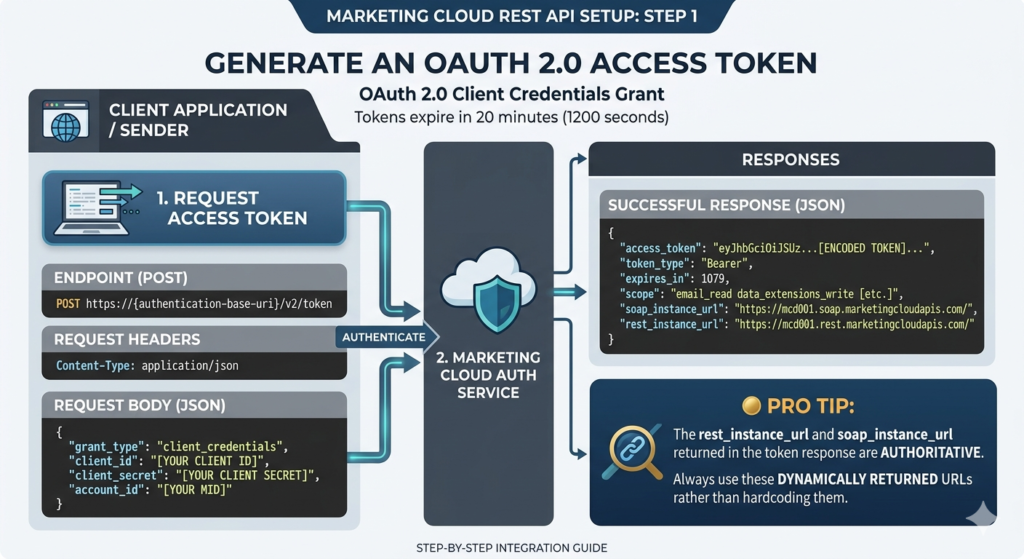
Request Headers:
textContent-Type: application/json
Request Body:
JSON{
  "grant_type": "client_credentials",
  "client_id": "your_client_id_here",
  "client_secret": "your_client_secret_here",
  "account_id": "your_mid_here"
}
Successful Response:
JSON{
  "access_token": "eyJhbGciOiJSUzI1NiIsInR5cCI6IkpXVCJ9...",
  "token_type": "Bearer",
  "expires_in": 1079,
  "scope": "email_read email_write data_extensions_read data_extensions_write",
  "soap_instance_url": "https://mcd0000001.soap.marketingcloudapis.com/",
  "rest_instance_url": "https://mcd0000001.rest.marketingcloudapis.com/"
}
🔵 Pro Tip: The
rest_instance_urlandsoap_instance_urlreturned in the token response are authoritative. Always use these dynamically returned URLs rather than hardcoding them in your application.
Step 2: Using the Access Token in API Requests
Include the token in the Authorization header of every subsequent request:
textAuthorization: Bearer eyJhbGciOiJSUzI1NiIsInR5cCI6IkpXVCJ9...
Example 1: Upsert Data into a Data Extension
The SFMC data extensions API is one of the most commonly used endpoints. This example inserts a record into a Data Extension by its External Key.
Endpoint:
textPOST https://{rest-base-uri}/hub/v1/dataevents/key:{DE_External_Key}/rowset
Request Headers:
textContent-Type: application/json
Authorization: Bearer {access_token}
Request Body:
JSON[
  {
    "keys": {
      "EmailAddress": "john.doe@example.com"
    },
    "values": {
      "FirstName": "John",
      "LastName": "Doe",
      "LoyaltyTier": "Gold",
      "LastPurchaseDate": "2025-12-15"
    }
  }
]
Success Response:
JSON{
  "requestId": "a1b2c3d4-e5f6-7890-abcd-ef1234567890",
  "responses": [
    {
      "hasErrors": false,
      "results": [],
      "operationStatus": "OK",
      "notFoundKeys": null
    }
  ]
}
⚠️ Beginner Mistake to Avoid: The endpoint above performs an upsert — it inserts new records and updates existing ones based on the primary key field. Make sure your DE has the correct field marked as the primary key.
Example 2: Fire a Journey Builder API Event
The transactional messaging API and Journey entry via API events is one of the most powerful use cases in SFMC. This fires a contact into a journey at a defined API Event entry source.
Step 1 — Get the Journey Definition Key from Journey Builder → Journey Settings.
Endpoint:
textPOST https://{rest-base-uri}/interaction/v1/events
Request Body:
JSON{
  "ContactKey": "john.doe@example.com",
  "EventDefinitionKey": "APIEvent-a1b2c3d4-e5f6-7890-abcd",
  "Data": {
    "EmailAddress": "john.doe@example.com",
    "FirstName": "John",
    "OrderId": "ORD-78523",
    "PurchaseAmount": "149.99"
  }
}
Success Response:
JSON{
  "requestId": "b2c3d4e5-f6a7-8901-bcde-f12345678901",
  "contactKey": "john.doe@example.com",
  "responses": []
}
Example 3: Send a Transactional Email via REST API
The transactional messaging API allows you to send individual, triggered emails in real time — perfect for order confirmations, password resets, and one-time notifications.
Endpoint:
textPOST https://{rest-base-uri}/messaging/v1/email/messages/{messageKey}
Where {messageKey} is a UUID you generate for idempotency.
Request Body:
JSON{
  "definitionKey": "transactional-welcome-email",
  "recipients": [
    {
      "contactKey": "john.doe@example.com",
      "to": "john.doe@example.com",
      "attributes": {
        "FirstName": "John",
        "ConfirmationCode": "ABC-12345"
      }
    }
  ]
}
Response (202 Accepted):
JSON{
  "requestId": "c3d4e5f6-a7b8-9012-cdef-g23456789012",
  "errorcode": 0,
  "responses": [
    {
      "messageKey": "unique-message-key-here",
      "hasErrors": false,
      "messages": []
    }
  ]
}
Postman Testing Guide for SFMC REST API
Postman is the fastest way to validate your credentials and test endpoints before writing production code.
Step-by-Step Postman Setup:
- Create a new Collection called "SFMC REST API"
- Add a Collection Variable for:
auth_base_uri= your Authentication Base URIrest_base_uri= your REST Base URIclient_id= your Client IDclient_secret= your Client Secretaccess_token= (leave blank; will be populated by script)
- Create a Token Request:
- Method:
POST - URL:
{{auth_base_uri}}/v2/token - Body (raw JSON): paste the token request body from above
- Method:
- Add a Pre-request Script to auto-refresh the token:
JavaScript// Pre-request Script for Postman
pm.sendRequest({
    url: pm.collectionVariables.get("auth_base_uri") + "/v2/token",
    method: 'POST',
    header: { 'Content-Type': 'application/json' },
    body: {
        mode: 'raw',
        raw: JSON.stringify({
            grant_type: "client_credentials",
            client_id: pm.collectionVariables.get("client_id"),
            client_secret: pm.collectionVariables.get("client_secret")
        })
    }
}, function(err, res) {
    pm.collectionVariables.set("access_token", res.json().access_token);
});
- Set Authorization on all other requests:
- Type:
Bearer Token - Token:
{{access_token}}
- Type:
Section 4: SFMC SOAP API Setup (Step-by-Step)
While REST is preferred for new builds, the SFMC SOAP API remains essential for many operations — particularly subscriber management, triggered sends, and legacy system compatibility.
Understanding the SOAP WSDL
The WSDL (Web Services Description Language) file describes every object, method, and data type the SOAP API exposes. You can access the SFMC SOAP WSDL at:
texthttps://{soap-base-uri}/etframework.wsdl
Most SOAP clients (SoapUI, .NET, Java, Python's Zeep) can import this WSDL and generate typed objects automatically.
SOAP Authentication
Unlike REST's OAuth 2.0 flow, the SFMC SOAP API uses a security header embedded in each XML envelope. You can authenticate using either:
- OAuth 2.0 Token (recommended for modern setups)
- Username + Password (legacy, being deprecated in some orgs)
SOAP Request with OAuth Token (Recommended):
XML<?xml version="1.0" encoding="UTF-8"?>
<s:Envelope xmlns:s="http://www.w3.org/2003/05/soap-envelope"
            xmlns:a="http://schemas.xmlsoap.org/ws/2004/08/addressing"
            xmlns:u="http://docs.oasis-open.org/wss/2004/01/oasis-200401-wss-wssecurity-utility-1.0.xsd">
  <s:Header>
    <a:Action s:mustUnderstand="1">Retrieve</a:Action>
    <a:To s:mustUnderstand="1">https://{soap-base-uri}/Service.asmx</a:To>
    <fueloauth xmlns="http://exacttarget.com">YOUR_OAUTH_ACCESS_TOKEN</fueloauth>
  </s:Header>
  <s:Body>
    <!-- Request body here -->
  </s:Body>
</s:Envelope>
Example 1: Retrieve Subscribers via SOAP
Full SOAP Retrieve Request:
XML<?xml version="1.0" encoding="UTF-8"?>
<s:Envelope xmlns:s="http://www.w3.org/2003/05/soap-envelope"
            xmlns:a="http://schemas.xmlsoap.org/ws/2004/08/addressing">
  <s:Header>
    <a:Action s:mustUnderstand="1">Retrieve</a:Action>
    <a:To s:mustUnderstand="1">https://mcd0000001.soap.marketingcloudapis.com/Service.asmx</a:To>
    <fueloauth xmlns="http://exacttarget.com">YOUR_ACCESS_TOKEN</fueloauth>
  </s:Header>
  <s:Body>
    <RetrieveRequestMsg xmlns="http://exacttarget.com/wsdl/partnerAPI">
      <RetrieveRequest>
        <ObjectType>Subscriber</ObjectType>
        <Properties>EmailAddress</Properties>
        <Properties>SubscriberKey</Properties>
        <Properties>Status</Properties>
        <Properties>CreatedDate</Properties>
        <Filter xsi:type="SimpleFilterPart"
                xmlns:xsi="http://www.w3.org/2001/XMLSchema-instance">
          <Property>Status</Property>
          <SimpleOperator>equals</SimpleOperator>
          <Value>Active</Value>
        </Filter>
      </RetrieveRequest>
    </RetrieveRequestMsg>
  </s:Body>
</s:Envelope>
Response Structure:
XML<RetrieveResponseMsg>
  <OverallStatus>OK</OverallStatus>
  <Results xsi:type="Subscriber">
    <EmailAddress>john.doe@example.com</EmailAddress>
    <SubscriberKey>john.doe@example.com</SubscriberKey>
    <Status>Active</Status>
    <CreatedDate>2024-03-15T10:30:00</CreatedDate>
  </Results>
  <!-- More results... -->
</RetrieveResponseMsg>
Example 2: Create a Data Extension via SOAP
XML<s:Body>
  <CreateRequest xmlns="http://exacttarget.com/wsdl/partnerAPI">
    <Objects xsi:type="DataExtension">
      <Name>Customer_Loyalty_2025</Name>
      <CustomerKey>CustomerLoyalty2025</CustomerKey>
      <Fields>
        <Field>
          <Name>EmailAddress</Name>
          <FieldType>EmailAddress</FieldType>
          <IsPrimaryKey>true</IsPrimaryKey>
          <IsRequired>true</IsRequired>
        </Field>
        <Field>
          <Name>FirstName</Name>
          <FieldType>Text</FieldType>
          <MaxLength>50</MaxLength>
        </Field>
        <Field>
          <Name>LoyaltyPoints</Name>
          <FieldType>Number</FieldType>
        </Field>
      </Fields>
    </Objects>
  </CreateRequest>
</s:Body>
Example 3: Trigger an Email Send via SOAP
Triggered sends are a classic SFMC SOAP API use case — particularly for transactional emails in systems not yet migrated to the REST transactional messaging API.
XML<s:Body>
  <CreateRequest xmlns="http://exacttarget.com/wsdl/partnerAPI">
    <Objects xsi:type="TriggeredSend">
      <TriggeredSendDefinition>
        <CustomerKey>OrderConfirmation_TriggeredSend</CustomerKey>
      </TriggeredSendDefinition>
      <Subscribers>
        <Subscriber>
          <EmailAddress>jane.smith@example.com</EmailAddress>
          <SubscriberKey>jane.smith@example.com</SubscriberKey>
          <Attributes>
            <Attribute>
              <Name>FirstName</Name>
              <Value>Jane</Value>
            </Attribute>
            <Attribute>
              <Name>OrderNumber</Name>
              <Value>ORD-99123</Value>
            </Attribute>
            <Attribute>
              <Name>TotalAmount</Name>
              <Value>$299.95</Value>
            </Attribute>
          </Attributes>
        </Subscriber>
      </Subscribers>
    </Objects>
  </CreateRequest>
</s:Body>
Common SFMC SOAP API Objects
| SOAP Object | Purpose |
|---|---|
Subscriber | Manage subscriber records |
DataExtension | Create/update DE schema |
DataExtensionObject | Read/write DE rows |
TriggeredSend | Trigger transactional emails |
EmailSendDefinition | Configure bulk email sends |
List | Manage subscriber lists |
BounceEvent | Retrieve bounce data |
OpenEvent | Retrieve open events |
ClickEvent | Retrieve click events |
UnsubEvent | Retrieve unsubscribe events |
Using FuelSDK for SOAP API
The Salesforce FuelSDK is an open-source library that wraps the SFMC SOAP API in a developer-friendly interface. It supports Python, Java, Ruby, PHP, and .NET.
Python FuelSDK Example — Retrieve Subscribers:
Pythonimport FuelSDK

# Configure authentication
stub = FuelSDK.ET_Client(
    params={
        'clientid': 'YOUR_CLIENT_ID',
        'clientsecret': 'YOUR_CLIENT_SECRET',
        'defaultwsdl': 'https://YOUR_TENANT.soap.marketingcloudapis.com/etframework.wsdl',
        'authenticationurl': 'https://YOUR_TENANT.auth.marketingcloudapis.com',
        'baseapiurl': 'https://YOUR_TENANT.rest.marketingcloudapis.com',
        'useOAuth2Authentication': 'True'
    }
)

# Retrieve active subscribers
subscriber = FuelSDK.ET_Subscriber()
subscriber.auth_stub = stub
subscriber.props = ["EmailAddress", "SubscriberKey", "Status"]
subscriber.search_filter = {
    'Property': 'Status',
    'SimpleOperator': 'equals',
    'Value': 'Active'
}

response = subscriber.get()
print(f"Status: {response.status}")
print(f"Results: {response.results}")
Section 5: REST API vs SOAP API — Full Comparison
Performance
The marketing cloud rest api is measurably faster than the SFMC SOAP API for most operations. JSON payloads are significantly smaller than their XML equivalents, reducing both bandwidth and parsing time. For high-volume, real-time integrations (transactional sends, live journey entries, API-driven segmentation), REST's performance advantage is critical.
SOAP, while verbose, compensates with batch processing capabilities that can be more efficient than equivalent REST operations when moving large datasets.
Flexibility and Developer Experience
REST wins decisively on developer experience. The JSON format is universally understood, Postman testing is trivial, and most modern programming languages have native HTTP client libraries that make REST integration straightforward.
SOAP requires XML parsing, WSDL understanding, and often a dedicated SOAP client library. The learning curve is steeper, and debugging raw SOAP envelopes is significantly more painful than reading JSON error responses.
Legacy vs Modern Architecture
SOAP was built first. It has broader coverage of SFMC's internal objects, particularly around subscriber management, send classification, and legacy send definitions. Many enterprise SFMC implementations built before 2018 are deeply SOAP-dependent.
REST is Salesforce's strategic direction. New SFMC features — Journey Builder's API entry events, transactional messaging, push notification management, data ingestion APIs — are all REST-only or REST-first.
Use Case Recommendations
| Use Case | Recommended API |
|---|---|
| Transactional email sends | REST (Transactional Messaging API) |
| Journey Builder entry | REST |
| Data Extension upsert (small-medium) | REST |
| Data Extension upsert (large batch) | SOAP |
| Subscriber status management | SOAP |
| Retrieve engagement events | SOAP |
| Push notifications | REST |
| SMS messaging | REST |
| Legacy triggered sends | SOAP |
| Creating DE schema | SOAP or REST |
| Real-time CRM sync | REST |
| Reporting/analytics retrieval | SOAP |
Section 6: Common SFMC API Integration Use Cases
Use Case 1: CRM to SFMC Sync
Scenario: Your Salesforce CRM creates a new lead. You want that lead in SFMC's All Contacts immediately, along with CRM attributes in a custom Data Extension.
Solution:
- Use a Salesforce CRM trigger (Flow or Apex) to fire a REST API call to SFMC
- POST to the Data Extension API to upsert the lead record
- Simultaneously fire a Journey entry event to enroll the lead in an onboarding journey
Why REST: Low latency, real-time, single API call handles both operations.
Use Case 2: Lead Capture Form Integration
Scenario: A web form on your website collects email addresses and preference data. You want contacts added to SFMC instantly and placed into a welcome nurture journey.
Solution:
- Form submission triggers a server-side script
- Script calls SFMC REST API to upsert into a Data Extension
- Secondary REST call fires the contact into a Journey via API Event entry
Pythonimport requests

def add_lead_to_sfmc(email, first_name, preference, access_token, rest_base_uri):
    # Step 1: Upsert into Data Extension
    de_endpoint = f"{rest_base_uri}/hub/v1/dataevents/key:WebLeads_DE/rowset"

    payload = [{
        "keys": {"EmailAddress": email},
        "values": {
            "FirstName": first_name,
            "Preference": preference,
            "SignupDate": "2025-12-15"
        }
    }]

    headers = {
        "Authorization": f"Bearer {access_token}",
        "Content-Type": "application/json"
    }

    de_response = requests.post(de_endpoint, json=payload, headers=headers)

    # Step 2: Fire Journey Entry Event
    journey_endpoint = f"{rest_base_uri}/interaction/v1/events"

    journey_payload = {
        "ContactKey": email,
        "EventDefinitionKey": "APIEvent-Welcome-Journey",
        "Data": {
            "EmailAddress": email,
            "FirstName": first_name
        }
    }

    journey_response = requests.post(journey_endpoint,
                                     json=journey_payload,
                                     headers=headers)

    return {
        "de_status": de_response.status_code,
        "journey_status": journey_response.status_code
    }
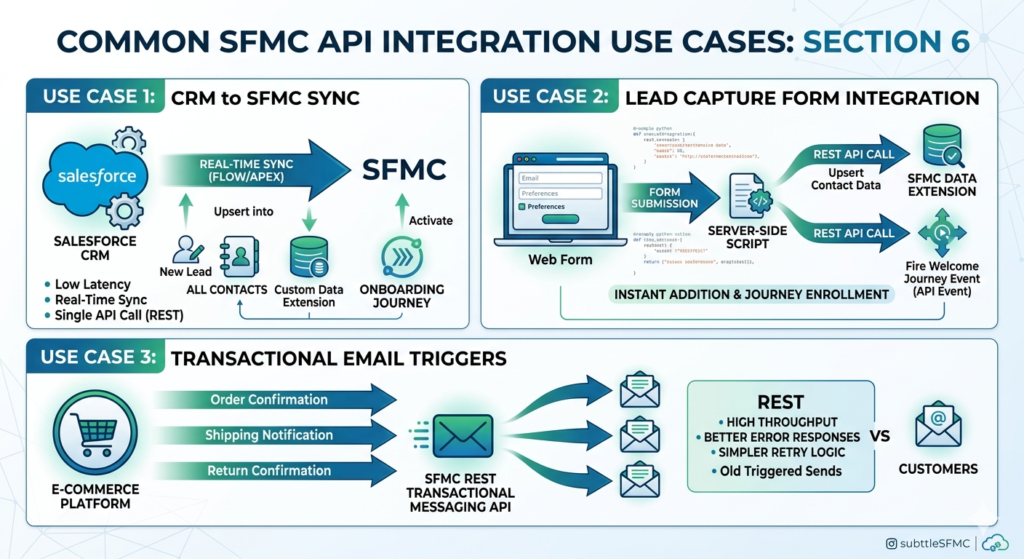
Use Case 3: Transactional Email Triggers
Scenario: Your e-commerce platform needs to send order confirmations, shipping notifications, and return confirmations in real time.
Solution:
- Use the SFMC Transactional Messaging API (REST)
- Create a Transactional Message Definition in SFMC
- Fire individual sends from your platform backend with personalization attributes
Why REST over SOAP here: The REST transactional messaging API supports higher throughput, better error responses, and simpler retry logic than the SOAP triggered send equivalent.
Use Case 4: SMS Integrations
Scenario: You want to send SMS appointment reminders triggered by events in your booking system.
Solution:
httpPOST {rest-base-uri}/sms/v1/messageContact/{messageApiKey}/send

{
  "mobileNumbers": ["+12125551234"],
  "Subscribe": true,
  "Resubscribe": true,
  "keyword": "APPT",
  "Override": true,
  "messageText": "Hi John, your appointment is confirmed for Dec 20 at 2pm. Reply STOP to opt out."
}
Use Case 5: Custom Reporting Dashboard
Scenario: Your marketing team wants a live dashboard showing campaign performance data pulled directly from SFMC.
Solution:
- Use the SFMC SOAP API to retrieve
OpenEvent,ClickEvent,BounceEvent, andSentEventobjects - Pipe data into a database or BI tool
- Refresh on a scheduled basis
Why SOAP here: The engagement event objects (OpenEvent, ClickEvent, etc.) are primarily accessible via SOAP. REST does not yet provide equivalent depth for historical engagement retrieval.
Use Case 6: Custom App Integrations
Scenario: A third-party SaaS tool (e.g., a loyalty platform, a support ticketing system, or a CDP) needs to push audiences and trigger communications through SFMC.
Solution:
- Issue the vendor scoped API credentials from a dedicated Installed Package
- Vendor uses REST for real-time events and DE upserts
- Middleware (MuleSoft, Boomi, Zapier) handles data transformation between systems
Section 7: Security & Best Practices {#section-7}
Security in SFMC API integration is not optional — a leaked client_secret can expose your entire Marketing Cloud tenant, your subscriber database, and your email infrastructure.
Token Management and Expiration
OAuth 2.0 tokens expire after 20 minutes. Your integration must:
- Cache the token and track its expiration time
- Request a new token when the current one is within 60 seconds of expiry
- Never hardcode tokens in source code
Python Token Manager Example:
Pythonimport requests
import time

class SFMCTokenManager:
    def __init__(self, client_id, client_secret, auth_base_uri):
        self.client_id = client_id
        self.client_secret = client_secret
        self.auth_base_uri = auth_base_uri
        self.access_token = None
        self.token_expiry = 0

    def get_token(self):
        # Return cached token if still valid (with 60s buffer)
        if self.access_token and time.time() < (self.token_expiry - 60):
            return self.access_token

        # Request new token
        response = requests.post(
            f"{self.auth_base_uri}/v2/token",
            json={
                "grant_type": "client_credentials",
                "client_id": self.client_id,
                "client_secret": self.client_secret
            }
        )

        data = response.json()
        self.access_token = data["access_token"]
        self.token_expiry = time.time() + data["expires_in"]

        return self.access_token
Secure Credential Storage
| ❌ Never Do This | ✅ Always Do This |
|---|---|
| Hardcode credentials in source code | Use environment variables or secrets managers |
| Store in plain text config files | Use AWS Secrets Manager, Azure Key Vault, or HashiCorp Vault |
| Commit credentials to Git | Add credential files to .gitignore |
| Share credentials across teams | Create separate Installed Packages per team/integration |
| Use production credentials in dev | Create separate SFMC Business Units for testing |
Error Handling Strategy
Every API call should have robust error handling. REST error codes follow HTTP standards:
| HTTP Status | Meaning | Action |
|---|---|---|
200 OK | Success | Proceed |
201 Created | Resource created | Proceed |
202 Accepted | Request queued | Check status later |
400 Bad Request | Invalid payload | Fix request structure |
401 Unauthorized | Token expired/invalid | Refresh token |
403 Forbidden | Insufficient scope | Add required permissions |
404 Not Found | Resource missing | Verify DE key/journey key |
429 Too Many Requests | Rate limited | Implement exponential backoff |
500 Server Error | SFMC-side issue | Retry with backoff |
Rate Limits and API Throttling
SFMC enforces rate limits. Exceeding them returns a 429 Too Many Requests response.
General Guidelines:
- REST API: Up to 2,000 requests per 5 minutes (varies by tenant)
- SOAP API: Similar limits based on transaction volume
- Transactional Messaging: Up to 500 sends per request
- Data Ingestion: Batch your DE upserts (up to 500 rows per request)
Implement Exponential Backoff:
Pythonimport time
import random

def api_call_with_retry(request_func, max_retries=3):
    for attempt in range(max_retries):
        response = request_func()

        if response.status_code == 429:
            # Exponential backoff with jitter
            wait_time = (2 ** attempt) + random.uniform(0, 1)
            print(f"Rate limited. Retrying in {wait_time:.1f} seconds...")
            time.sleep(wait_time)
            continue

        return response

    raise Exception("Max retries exceeded")
Logging and Monitoring
Every production SFMC API integration should log:
- Request timestamps
- Endpoint called
- Response status codes
- Error messages (without logging sensitive data)
- Token refresh events
- Retry attempts
Use centralized logging (Datadog, Splunk, CloudWatch) and set up alerts for elevated error rates or 401/403 spikes, which often indicate credential issues or scope changes.
Section 8: Common Errors and Troubleshooting
Error 1: Invalid or Expired Token
Symptom:
JSON{
  "error": "invalid_token",
  "error_description": "Access token expired"
}
Fix: Implement token caching with refresh logic (see Section 7). Never reuse a token beyond its expires_in window.
Error 2: Unauthorized Scope
Symptom:
JSON{
  "message": "User does not have access to this resource",
  "errorcode": 50008
}
Fix: Review your Installed Package scope configuration. Navigate to Setup → Installed Packages → Your Package → API Integration and enable the required scope. Then generate a new token (tokens carry scopes at generation time).
Error 3: Endpoint Mismatch (Wrong Base URI)
Symptom:
textHTTP 404 Not Found
Or
"resource could not be found"
Fix: Use the rest_instance_url and soap_instance_url from your OAuth token response rather than hardcoded generic URLs. Each SFMC tenant has a unique subdomain.
Error 4: SOAP FaultCode — Invalid Login
Symptom:
XML<faultcode>soapenv:Client</faultcode>
<faultstring>Invalid Login</faultstring>
Fix: Ensure your SOAP authentication header is correct. If using OAuth in the SOAP header, verify the token is fresh. If using username/password (legacy), check that API access is enabled on the user profile.
Error 5: Data Extension Key Not Found
Symptom:
JSON{
  "message": "The DataExtension key 'MyDE' does not exist",
  "errorcode": 10000
}
Fix: Verify the External Key of your Data Extension in SFMC (not the Name — they can differ). In Email Studio → Data Extensions, click your DE and find the External Key field.
Error 6: Journey Event Definition Key Mismatch
Symptom:
JSON{
  "message": "EventDefinitionKey 'APIEvent-xyz' not found"
}
Fix: In Journey Builder, ensure your journey is in Active status (not draft). The API Event Definition Key can be found in the journey's Entry Source settings.
Debugging Checklist
text✅ Verify all base URIs match your tenant
✅ Confirm token is not expired
✅ Check scope covers the required operation
✅ Validate JSON payload structure against documentation
✅ Ensure DE External Key matches exactly (case-sensitive)
✅ Confirm journey is Active and entry event is correctly configured
✅ Test the token endpoint independently before testing data endpoints
✅ Check SFMC Status Page for platform incidents
✅ Review SFMC debug logs in Setup → System Log
Section 9: Tools for SFMC API Development
1. Postman
The industry-standard API testing tool. As covered in Section 3, Postman with a properly configured collection makes SFMC REST API testing and debugging far faster than writing application code. Use Postman environments to manage credentials across dev, staging, and production.
SFMC-Specific Tip: Salesforce publishes an official SFMC Postman collection on GitHub that includes pre-built requests for common endpoints — import it as your starting point.
2. FuelSDK
Salesforce's open-source SDK for the SOAP API. Available for Python, Java, Ruby, PHP, and .NET. Dramatically reduces SOAP boilerplate code and handles authentication, WSDL parsing, and response normalization automatically.
Repository: github.com/salesforce-marketingcloud/FuelSDK-Python
3. SSJS (Server-Side JavaScript) in SFMC
Script Activities and CloudPages in SFMC support SSJS, which has native access to the Marketing Cloud core library. This allows you to make API calls directly from within SFMC's scripting environment.
SSJS REST API Call Example:
JavaScript<script runat="server">
  Platform.Load("Core","1");

  var endpoint = 'https://YOUR_TENANT.rest.marketingcloudapis.com/hub/v1/dataevents/key:MyDE/rowset';
  var token = AuthenticatedUser.getToken(); // Simplified

  var payload = [{
    "keys": { "EmailAddress": "test@example.com" },
    "values": { "FirstName": "Test" }
  }];

  var req = new Script.Util.HttpRequest(endpoint);
  req.emptyContentHandling = 0;
  req.retries = 2;
  req.setHeader("Content-Type", "application/json");
  req.setHeader("Authorization", "Bearer " + token);
  req.method = "POST";
  req.postData = Stringify(payload);

  var resp = req.send();
  Write(resp.content);
</script>
4. AMPscript API Integrations
AMPscript, SFMC's native scripting language for email and CloudPages, can interact with Data Extensions and make outbound calls in limited scenarios. While not suitable for complex API integrations, it can be used for personalization-driven data lookups and content rendering.
5. Middleware and iPaaS Tools
For enterprise integrations, middleware platforms handle the heavy lifting of data transformation, error routing, and API orchestration:
| Tool | Best For |
|---|---|
| MuleSoft | Enterprise-grade, Salesforce-native |
| Boomi | SMB to enterprise, wide connector library |
| Zapier | Simple, no-code workflows |
| Make (Integromat) | Mid-complexity, visual workflow builder |
| Jitterbit | Strong SFMC connector support |
| Workato | Enterprise automation with ML features |
For organizations already on the Salesforce platform, MuleSoft offers the deepest native SFMC connector and the most robust error handling for production-grade SFMC API integration.
Conclusion
By now, you have a complete picture of what SFMC API integration looks like from the ground up — from configuring your first Installed Package to writing production-ready token management code, from firing a SOAP triggered send to using the marketing cloud rest api to enroll contacts in a live journey.
Let's summarize the key takeaways:
Marketing Cloud REST API is the future of SFMC integration. It is fast, JSON-based, OAuth 2.0 secured, and covers an expanding set of SFMC capabilities. For any new integration — whether it is a CRM sync, a transactional messaging service, or a journey automation layer — REST should be your first choice.
SFMC SOAP API remains indispensable for enterprise environments. It handles subscriber management at scale, legacy triggered send operations, engagement event retrieval, and complex batch operations that REST has not yet fully replaced. Dismissing SOAP entirely in 2026 is premature — especially for organizations running mature, established SFMC implementations.
The best SFMC developers know both. They reach for REST when speed and simplicity matter, they reach for SOAP when coverage and legacy compatibility are needed, and they always apply security best practices — scoped credentials, token caching, secure storage, rate limit handling, and comprehensive error logging.
A well-architected SFMC API integration strategy does not just connect systems — it transforms your Marketing Cloud from a manual tool into a real-time, data-driven marketing engine that responds to customer behavior the moment it happens.
That is the power of building with the API. Go use it
About RizeX Labs
For your blog post on Salesforce Marketing Cloud (SFMC) API: REST & SOAP Integration, here is a structured layout following the style of your provided image.
About Our SFMC Expertise
At our core, we specialize in architecting high-performance Salesforce Marketing Cloud solutions, specifically focusing on seamless REST and SOAP API integrations. We help organizations move beyond basic platform usage by enabling programmatic control over messaging, data management, and complex cross-cloud workflows. +1
Our expertise bridges the gap between marketing strategy and deep technical execution. We assist businesses in building robust integrations that automate subscriber management, trigger real-time communications, and synchronize data across the enterprise without manual overhead. By leveraging the full power of SFMC APIs, we empower brands to deliver truly personalized, data-driven customer journeys at scale. +1
Internal Links:
- Link to your Salesforce course page
- How to Build a Salesforce Portfolio That Gets You Hired (With Project Ideas)
- Salesforce Admin vs Developer: Which Career Path is Right for You in 2026?
- Wealth Management App in Financial Services Cloud
- Salesforce Admin And Development course
External Links:
- Official Salesforce Marketing Cloud API Documentation
- SFMC REST API Reference
- SFMC SOAP API Developer Guide
- Salesforce AppExchange: Marketing Cloud Solutions
- MuleSoft Integration for Marketing Cloud
- Marketing Cloud API Limits and Best Practices
Quick Summary
Salesforce Marketing Cloud offers two primary APIs—REST and SOAP—each serving distinct integration needs within the ecosystem. While they share a common OAuth2 authentication mechanism, they are not functionally identical: the REST API is modern, uses JSON, and provides broad access to features like Journey Builder, MobilePush, and Content Builder. In contrast, the SOAP API remains the powerhouse for comprehensive email functionality, including subscriber lists, tracking data, and complex automations. +2
Implementing these APIs allows businesses to eliminate data silos and manual processes. By programmatically triggering emails or managing contacts in real-time, organizations can ensure their marketing efforts are as dynamic as their customers' behavior. +1
Successfully navigating SFMC's API landscape requires a clear understanding of when to use each protocol to optimize performance and adhere to platform limits. Leveraging both together creates a unified, automated marketing engine capable of handling enterprise-level complexity with precision