
Introduction
In 2026, getting your email into the inbox is harder than ever — and the stakes have never been higher.
Gmail, Yahoo, Apple Mail, and Microsoft Outlook have all tightened their filtering algorithms significantly. Privacy regulations are stricter. Subscribers are more selective. And inbox providers are using machine learning to identify low-quality senders with increasing precision. In this environment, SFMC email deliverability 2026 is not just a technical checkbox — it is the single most important determinant of whether your email marketing program succeeds or quietly fails in the spam folder.
Consider this: you can have the most beautifully designed email, a perfectly crafted subject line, and a compelling offer — but if it lands in spam, none of that matters. Poor inbox placement does not just cost you opens and clicks. It costs you revenue, customer relationships, and the sender reputation you have spent years building. A single poorly managed campaign can trigger a cascade of deliverability problems that takes months to recover from.
Salesforce Marketing Cloud is one of the most capable email marketing platforms available — but it is a tool, not a guarantee. The platform gives you everything you need to achieve excellent marketing cloud deliverability, but your configuration, your data quality, your sending practices, and your engagement strategy are what actually determine whether your emails reach the inbox. A misconfigured authentication setup or a bloated list of inactive subscribers can undermine even the most sophisticated SFMC implementation.
This guide gives you a complete, practical, and up-to-date framework for achieving top-tier SFMC email deliverability in 2026 — from technical authentication setup to audience segmentation strategy, from real-time monitoring tools to proactive engagement campaigns. Whether you are troubleshooting a sudden drop in open rates or building a deliverability-first email program from scratch, this guide has you covered.
Let’s start from the foundation.
Section 1: What Is SFMC Email Deliverability?
Deliverability vs Delivery Rate — A Critical Distinction
These two terms are frequently confused, and the confusion is costly.
Delivery rate is the percentage of emails that were accepted by the receiving mail server without a hard or soft bounce. An email can be “delivered” and still land directly in the spam folder — the receiving server accepted it, it just did not go to the inbox.
Deliverability — or more precisely, inbox placement — is what actually matters. It measures whether your email landed in the primary inbox, the promotions tab, the spam folder, or was silently discarded. This is the metric that correlates with opens, clicks, conversions, and revenue.
| Metric | What It Measures | Why It Matters |
|---|---|---|
| Delivery Rate | % of emails accepted by receiving servers | Baseline health indicator |
| Inbox Placement Rate | % of delivered emails reaching the inbox | True deliverability measure |
| Spam Placement Rate | % landing in spam/junk | Direct revenue impact |
| Bounce Rate (Hard) | Invalid/non-existent addresses | List quality indicator |
| Bounce Rate (Soft) | Temporary delivery failures | Volume and reputation signal |
| Open Rate | % of delivered emails opened | Engagement and inbox placement proxy |
| Complaint Rate | % marked as spam by recipients | Critical reputation signal |
Why Email Open Rate in SFMC Depends on More Than Sending
Many SFMC users look at declining open rates and immediately assume a content problem — the subject line was weak, the offer was not compelling, the design was off. Sometimes that is true. But far more often, a declining email open rate in SFMC is a deliverability symptom, not a content problem.
Here is the chain of causality that most marketers miss:
textPoor List Hygiene
       ↓
High Bounce Rate + High Complaint Rate
       ↓
Damaged Sender Reputation
       ↓
Inbox Providers Route Emails to Spam
       ↓
Subscribers Never See Your Email
       ↓
Open Rate Drops
       ↓
Even Lower Engagement Signals to ISPs
       ↓
Further Reputation Damage (cycle continues)
Breaking this cycle requires addressing both the technical foundation (authentication, IP reputation) and the strategic layer (list hygiene, engagement-based segmentation, sending cadence).
The Sender Reputation Framework
Your sender reputation is essentially your credit score with inbox providers. It is composed of:
- IP Reputation: The sending history of your IP address(es)
- Domain Reputation: The sending history of your From domain
- Content Reputation: Whether your email content patterns match known spam characteristics
- Engagement Signals: How recipients interact with your emails (opens, clicks, replies, deletions, spam reports)
In 2026, domain reputation has become increasingly dominant as inbox providers shift their filtering logic. This means that even if you change IP addresses, your domain reputation follows you — making domain management a long-term strategic priority.
Section 2: Key Deliverability Factors in Salesforce Marketing Cloud
1. Sender Authentication Package (SAP)
The Sender Authentication Package is Salesforce Marketing Cloud’s bundled solution for establishing authenticated sending infrastructure. It includes:
- A dedicated sending domain (e.g.,
email.yourbrand.com) - Private domain for links and images
- A dedicated IP address (on higher-tier SAP)
- Automatic configuration of SPF and DKIM alignment
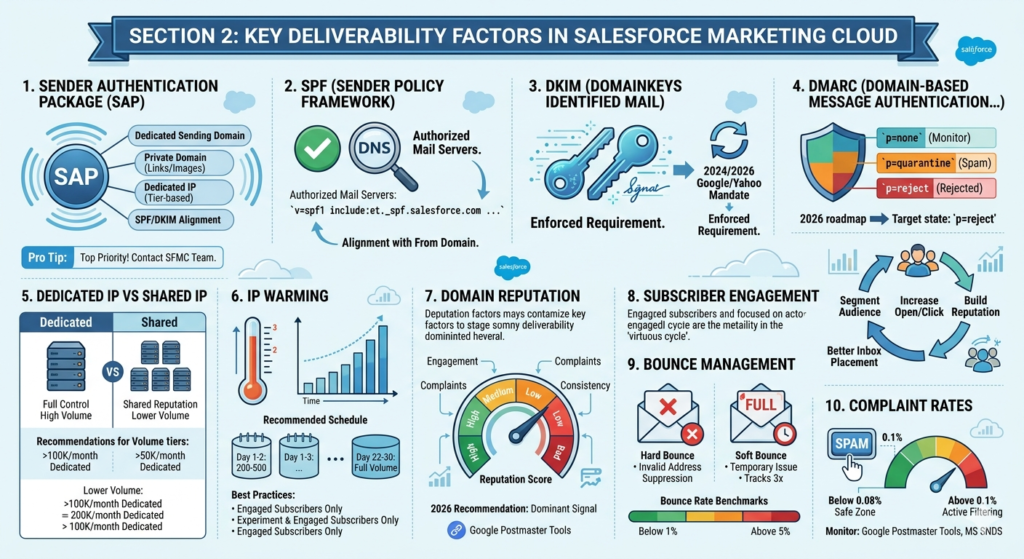
SAP is the single most important technical investment you can make for marketing cloud deliverability. Without it, your emails send from Salesforce’s shared domain infrastructure — meaning your reputation is partially tied to every other SFMC customer on that shared infrastructure.
🔵 Pro Tip: If your SFMC instance does not have SAP configured, this is your top priority before any other deliverability optimization. Contact your Salesforce account team to discuss SAP options for your tier.
2. SPF (Sender Policy Framework)
SPF is a DNS record that declares which mail servers are authorized to send email on behalf of your domain. When a receiving mail server gets an email claiming to be from @yourbrand.com, it checks your SPF record to verify that the sending server is on the authorized list.
SFMC SPF Configuration:
Your SPF record should include Salesforce’s sending infrastructure. A typical record looks like:
textv=spf1 include:et._spf.salesforce.com include:_spf.google.com ~all
SPF Alignment: For optimal marketing cloud deliverability, ensure your SPF record aligns with your From domain. Misaligned SPF is a common cause of DMARC failures.
3. DKIM (DomainKeys Identified Mail)
DKIM adds a cryptographic signature to your outgoing emails. The receiving server uses your public key (published in DNS) to verify that the email content was not tampered with in transit and that it genuinely originates from your domain.
SFMC DKIM Setup:
Within SFMC, navigate to:Setup → Email Studio → Email → Sender Authentication
SFMC will generate DKIM keys and provide CNAME records to add to your DNS. The typical setup includes:
textCNAME: s1._domainkey.yourdomain.com → s1._domainkey.exacttarget.com
CNAME: s2._domainkey.yourdomain.com → s2._domainkey.exacttarget.com
⚠️ Critical Note: In 2024, Google and Yahoo mandated DKIM authentication for bulk senders (5,000+ emails/day). In 2026, this requirement has expanded and is enforced by virtually all major inbox providers. Missing DKIM is no longer a minor oversight — it is a deliverability disqualifier.
4. DMARC (Domain-based Message Authentication, Reporting & Conformance)
DMARC builds on SPF and DKIM to give domain owners explicit control over what happens when authentication checks fail. It also provides reporting so you can see who is sending email using your domain.
DMARC Record Example:
textv=DMARC1; p=quarantine; rua=mailto:dmarc-reports@yourdomain.com; ruf=mailto:dmarc-failures@yourdomain.com; pct=100; adkim=s; aspf=s;
DMARC Policy Levels:
| Policy | Meaning | Recommended Stage |
|---|---|---|
p=none | Monitor only, no action | Initial setup / monitoring phase |
p=quarantine | Failed emails go to spam | Intermediate phase |
p=reject | Failed emails are rejected outright | Target state for mature senders |
2026 Recommendation: If you are not yet at p=reject, create a roadmap to get there. Inbox providers increasingly favor senders with enforced DMARC policies.
5. Dedicated IP vs Shared IP
| Factor | Dedicated IP | Shared IP |
|---|---|---|
| Reputation Control | Full control | Shared with other senders |
| Warming Required | Yes (new IPs) | No |
| Best For | High-volume senders (50K+/month) | Lower-volume senders |
| Cost | Higher | Lower |
| Risk | Your behavior only | Other senders’ behavior affects you |
Recommendation for 2026: If you are sending more than 100,000 emails per month, a dedicated IP is strongly recommended. For lower volumes, SFMC’s shared IP pools — which Salesforce actively manages — may be sufficient, especially with proper SAP configuration.
6. IP Warming
A new IP address has zero reputation — and zero reputation is treated almost as badly as a poor reputation by inbox providers. IP warming is the process of gradually increasing your sending volume to build a positive reputation before reaching full send velocity.
Recommended IP Warming Schedule:
| Day | Maximum Volume |
|---|---|
| 1–2 | 200–500 |
| 3–5 | 1,000–2,000 |
| 6–10 | 5,000–10,000 |
| 11–15 | 20,000–50,000 |
| 16–21 | 100,000–200,000 |
| 22–30 | Full volume |
IP Warming Best Practices:
- Send ONLY to your most engaged subscribers during warming
- Maintain consistent sending cadence (no large gaps)
- Monitor bounce rates, complaint rates, and spam trap hits daily
- Do not rush — premature volume spikes can blacklist a new IP
7. Domain Reputation
In 2026, domain reputation is the dominant deliverability signal at Gmail and Microsoft. This is a significant shift from the IP-centric model of five years ago.
Key factors affecting your domain reputation:
- Engagement rate (opens, clicks, replies)
- Spam complaint rate (must stay below 0.1% at Gmail)
- Unsubscribe rate
- Time since domain was first used for sending
- Consistency of sending patterns
🔵 Pro Tip: Use Google Postmaster Tools to monitor your domain reputation directly through Gmail’s lens. It shows reputation levels (High, Medium, Low, Bad) and spam rate trends over time — this data is invaluable for diagnosing deliverability problems.
8. Subscriber Engagement
Inbox providers — especially Gmail — use engagement signals as a primary input for routing decisions. If a large percentage of your emails are being deleted without being opened, or worse, being marked as spam, Gmail learns that your emails are unwanted and begins routing them to spam for more users.
Conversely, a highly engaged audience (opens, clicks, replies, moving emails from spam to inbox) signals that your emails are valued, improving deliverability across your entire list.
This creates a powerful virtuous cycle: better segmentation → higher engagement → better reputation → better inbox placement → higher engagement.
9. Bounce Management
SFMC has built-in bounce management, but you need to understand how it works and actively monitor it.
Hard Bounces: Invalid or non-existent email addresses. SFMC automatically suppresses hard-bounced addresses after one occurrence. These must never be mailed again.
Soft Bounces: Temporary delivery failures (full mailbox, server timeout). SFMC tracks these and converts them to hard bounces after a configurable number of consecutive failures (default: 3).
Bounce Rate Benchmarks for 2026:
| Bounce Rate | Status |
|---|---|
| Below 1% | Excellent |
| 1–2% | Acceptable |
| 2–5% | Concerning — investigate |
| Above 5% | Critical — immediate action required |
10. Complaint Rates
Complaint rate is the percentage of your emails that recipients mark as spam. This is arguably the most damaging deliverability signal.
2026 Thresholds:
| Complaint Rate | Gmail Response |
|---|---|
| Below 0.08% | Safe zone |
| 0.08–0.10% | Warning territory |
| Above 0.10% | Active filtering/spam routing |
| Above 0.30% | Potential sending block |
Monitor complaints through Google Postmaster Tools and Microsoft SNDS (Smart Network Data Services) — both provide near-real-time complaint rate data.
Section 3: Top Reasons SFMC Emails Go to Spam in 2026
1. Poor List Hygiene
This is the number one deliverability killer. Lists that include invalid addresses, inactive subscribers, role-based addresses (info@, admin@, support@), and spam traps are a direct path to inbox provider blacklisting.
Signs of poor list hygiene:
- Hard bounce rate above 2%
- Open rates below 10%
- Large numbers of addresses that have never engaged
- Data Extensions containing records imported years ago without re-validation
2. Purchased or Rented Lists
Purchased lists are a guaranteed path to deliverability disaster in 2026. These lists contain:
- People who never consented to receive your emails
- Spam trap addresses deliberately seeded to catch bad senders
- High concentrations of invalid or outdated addresses
- Recipients who will immediately mark your email as spam
⚠️ Non-negotiable Rule: Never send to a purchased list from your SFMC instance. A single blast to a purchased list can blacklist your sending IP and domain, affecting every legitimate email program running on that infrastructure.
3. High Unsubscribe Rates
An unsubscribe rate above 0.5% per campaign is a red flag. High unsubscribes signal to inbox providers that recipients are actively trying to distance themselves from your emails — which is only one step removed from marking them as spam.
Root causes of high unsubscribe rates:
- Sending too frequently
- Irrelevant content for the audience segment
- Subscriber expectations not set correctly at opt-in
- List age (people forget they subscribed)
4. Spam Trigger Words and Content Patterns
While content filtering is less dominant than engagement-based filtering in 2026, content red flags still contribute to spam routing — especially when combined with other negative signals.
Common Spam Trigger Patterns:
| Category | Examples |
|---|---|
| Financial | “Free money,” “No cost,” “Double your income” |
| Urgency | “ACT NOW,” “Limited time” (all caps) |
| Deceptive | “You have been selected,” “Congratulations” |
| Technical | Broken HTML, image-only emails, too many links |
| Structural | Missing unsubscribe link, missing physical address |
5. Low Engagement
If your subscribers are not opening your emails consistently, inbox providers interpret this as a signal that your emails are unwanted. Gmail in particular uses historical engagement data to make routing decisions on a per-recipient basis.
The Engagement Cascade:
textLow opens → Negative engagement signal
           → Gmail increases spam likelihood score
           → More emails routed to spam
           → Even lower opens
           → Further reputation damage
6. Missing or Misconfigured Authentication
Sending without properly aligned SPF, DKIM, and DMARC is like showing up to a bank without ID. In 2026, Gmail and Yahoo treat unauthenticated bulk email as inherently suspicious.
Authentication Failure Impact:
- DMARC
p=rejectfailures result in emails being outright rejected - Missing DKIM causes spam scoring increases
- SPF failures with
p=quarantineDMARC result in spam folder placement
7. Inconsistent Sending Volume
Inbox providers model your normal sending behavior. Sudden volume spikes — sending 10x your normal volume because a campaign is urgent — trigger spam filters even for senders with good reputations.
The Rule: Increase sending volume gradually. If you normally send 50,000 emails/week and need to send 500,000 for a product launch, ramp up over several weeks rather than doing it in one send.
8. Ignoring Suppression Lists
SFMC maintains suppression lists (unsubscribes, hard bounces, global unsubscribes). Sending to suppressed addresses is both a CAN-SPAM/GDPR violation and a reputation-damaging practice. Always ensure your Data Extensions are cross-referenced against all applicable suppression lists before sending.
Section 4: How to Improve Email Open Rate in SFMC
Now that you understand what causes deliverability problems, let’s focus on proactive strategies to drive your email open rate in SFMC upward.
Strategy 1: Subject Line Personalization
The subject line is the last line of defense between your email and the delete key. In 2026, generic subject lines are a strategic liability.
Data-Driven Subject Line Approaches:
| Technique | Example | Lift Potential |
|---|---|---|
| First name personalization | “John, your exclusive offer is here” | +10–15% |
| Behavioral trigger | “You left something in your cart” | +20–30% |
| Location-based | “Events happening in Austin this weekend” | +15–25% |
| Preference-based | “New arrivals in Men’s Running Shoes” | +20–35% |
| Re-engagement | “We miss you, Sarah — here’s 20% off” | +25–40% |
🔵 Pro Tip: Use SFMC’s AMPscript or Personalization Strings to dynamically populate subject line variables from Data Extension fields. Don’t just use
%%FirstName%%— leverage purchase history, engagement tier, location, and product preferences for truly relevant subject lines.
Strategy 2: Sender Name and From Address Trust
Research consistently shows that recipients make the open decision based primarily on who sent the email, before they ever read the subject line.
Best Practices for From Name:
- Use a recognizable brand name (“Acme Store” vs “noreply@acme.com“)
- For B2B: Consider person-based sending (“Sarah from Acme” vs “Acme Marketing”)
- Avoid generic names like “Marketing Team” or “Newsletter”
- Keep it consistent — changing your From name confuses subscribers and reduces recognition
From Address Guidelines:
- Never use
noreply@— it signals you do not care about responses - Use a real, monitored address that recipients can reply to
- Align your From domain with your authenticated sending domain
Strategy 3: Advanced Audience Segmentation
Segmentation is the most powerful lever for improving email open rate in SFMC. A relevant email to a smaller, targeted segment will consistently outperform a generic blast to your entire list.
SFMC Segmentation Framework:
textTier 1: Highly Engaged (opened in last 30 days)
  → Send full frequency, all campaign types
  → Priority for new product launches

Tier 2: Moderately Engaged (opened in last 31–90 days)
  → Send core campaigns, slightly reduced frequency
  → Monitor engagement trends

Tier 3: Lightly Engaged (opened in last 91–180 days)
  → Reduced frequency, high-value content only
  → Trigger re-engagement campaign

Tier 4: Inactive (no open in 180+ days)
  → Sunset campaign before full suppression
  → Do not send regular campaigns
SFMC SQL for Engagement Segmentation:
SQLSELECT
    s.EmailAddress,
    s.SubscriberKey,
    MAX(o.EventDate) AS LastOpenDate,
    DATEDIFF(DAY, MAX(o.EventDate), GETDATE()) AS DaysSinceOpen,
    CASE
        WHEN DATEDIFF(DAY, MAX(o.EventDate), GETDATE()) <= 30 THEN 'Highly Engaged'
        WHEN DATEDIFF(DAY, MAX(o.EventDate), GETDATE()) <= 90 THEN 'Moderately Engaged'
        WHEN DATEDIFF(DAY, MAX(o.EventDate), GETDATE()) <= 180 THEN 'Lightly Engaged'
        ELSE 'Inactive'
    END AS EngagementTier
FROM
    _Subscribers s
    LEFT JOIN _Open o ON s.SubscriberKey = o.SubscriberKey
GROUP BY
    s.EmailAddress, s.SubscriberKey
Strategy 4: Journey Builder Timing Optimization
Sending the right email at the wrong time is a missed opportunity. Journey Builder in SFMC gives you sophisticated timing controls to maximize the chance your email is seen when the recipient is most likely to engage.
Journey Builder Timing Best Practices:
- Wait Activities: Use wait-by-date or wait-by-time controls to send at optimal local times
- Day-of-Week Optimization: B2B audiences typically engage Tuesday–Thursday; B2C peaks Friday–Sunday
- Avoid Overnight Sends: Emails that arrive at 3 AM are buried under other inbox activity by morning
- Time Zone Awareness: SFMC supports subscriber-level time zone data — use it
Strategy 5: Send Time Optimization with Einstein
Einstein Send Time Optimization (STO) is an SFMC AI feature that analyzes each individual subscriber’s historical engagement patterns and predicts the optimal time to deliver their email for maximum open likelihood.
How Einstein STO Works:
- Analyzes each subscriber’s open history across time zones and days of week
- Calculates individual optimal send windows
- Staggers email delivery accordingly — some subscribers receive at 9 AM, others at 7 PM
- Continuously refines predictions as new engagement data arrives
Impact: Organizations using Einstein STO typically see 10–25% improvement in open rates compared to fixed-time sends.
Strategy 6: Mobile Optimization
In 2026, over 65% of emails are opened on mobile devices. An email that is not optimized for mobile is delivering a poor experience to the majority of your audience — which directly impacts engagement signals and, consequently, deliverability.
Mobile Optimization Checklist:
text✅ Single-column layout for small screens
✅ Minimum 14px font size for body text
✅ Minimum 44x44px touch targets for buttons
✅ Subject line under 40 characters (mobile preview)
✅ Preview text (preheader) configured and compelling
✅ Images with descriptive alt text (many mobile users disable images)
✅ Tested on iOS Mail, Gmail App, Samsung Mail
✅ Fast-loading (images optimized, minimal tracking pixel load time)
Strategy 7: A/B Testing Framework
Systematic A/B testing is the engine of continuous open rate improvement. SFMC has built-in A/B testing capabilities in both Email Studio and Journey Builder.
Variables Worth Testing for Open Rate:
| Variable | What to Test | Minimum Sample Size |
|---|---|---|
| Subject line | Length, personalization, emoji, question vs statement | 1,000+ per variant |
| From name | Brand vs person, formal vs casual | 1,000+ per variant |
| Send time | Morning vs afternoon, weekday vs weekend | 2,000+ per variant |
| Preview text | Present vs absent, promotional vs informational | 1,000+ per variant |
⚠️ Beginner Mistake to Avoid: Testing multiple variables simultaneously. Always test one variable at a time so you can attribute result differences to a specific change.
Strategy 8: Re-Engagement Campaigns
Before suppressing inactive subscribers, a well-designed re-engagement campaign gives them one more opportunity to reconnect — and signals to inbox providers that you are actively managing engagement quality.
Re-Engagement Campaign Framework:
Email 1 (Day 1): “We miss you” — soft emotional reconnection
Email 2 (Day 7): Value reminder — “Here’s what you’ve been missing”
Email 3 (Day 14): Incentive — “Come back with 20% off your next purchase”
Email 4 (Day 21): Final notice — “This is our last email to you”
Post-Campaign: Suppress all non-responders from regular campaigns
Section 5: SFMC Deliverability Best Practices Checklist for 2026
Use this checklist to audit your current SFMC setup and identify gaps in your deliverability strategy.
🔐 Authentication & Infrastructure
text✅ Sender Authentication Package (SAP) configured
✅ SPF record published and includes SFMC infrastructure
✅ DKIM configured with SFMC-provided CNAME records
✅ DMARC record in place (target: p=reject)
✅ DMARC reporting email address configured and monitored
✅ Dedicated IP configured (if sending 100K+/month)
✅ IP warming completed before full-volume sends
✅ Sending domain aligned with brand domain
✅ Reply-to address is monitored and functional
📋 List Hygiene & Data Quality
text✅ Email validation at point of collection (real-time API validation)
✅ Double opt-in enabled for new subscribers
✅ Hard bounce suppression active and enforced
✅ Soft bounce monitoring with auto-suppression after threshold
✅ Global unsubscribe list honored across all Business Units
✅ Complaint feedback loop (FBL) data integrated
✅ Inactive subscribers identified and segmented
✅ Suppression lists reviewed and updated quarterly
✅ No purchased or rented lists in use
✅ Role-based addresses (info@, admin@) excluded
📊 Engagement & Segmentation
text✅ Engagement-based segmentation active (tiers defined)
✅ Re-engagement campaign configured for inactive subscribers
✅ Sunset policy defined (clear suppression threshold)
✅ Sending frequency appropriate for each engagement tier
✅ Preference center allowing subscribers to set frequency/topics
✅ Journey Builder wait activities optimizing send timing
✅ Einstein Send Time Optimization enabled (if licensed)
📧 Content & Campaign Setup
text✅ Subject lines tested before deployment
✅ Preview/preheader text configured
✅ Physical mailing address in email footer (CAN-SPAM requirement)
✅ Unsubscribe link present and functional
✅ HTML/CSS validated and mobile-tested
✅ Image-to-text ratio balanced (not image-only)
✅ Links tested and functional
✅ Tracking parameters configured correctly
✅ A/B testing in place for key campaigns
📈 Monitoring & Governance
text✅ Google Postmaster Tools domain verified and monitored
✅ Microsoft SNDS account configured
✅ Sender Score (senderscore.org) monitored monthly
✅ Blacklist monitoring service active (MXToolbox or similar)
✅ Complaint rate monitored (target: below 0.08%)
✅ Bounce rates reviewed after every campaign
✅ Deliverability review scheduled quarterly
✅ SFMC Tracking Extracts automated for data analysis
Section 6: SFMC Tools to Monitor Deliverability
1. Einstein Engagement Scoring
Einstein Engagement Scoring uses machine learning to predict how likely each individual subscriber is to engage with your emails. It assigns a score from 1–10 and categorizes subscribers as:
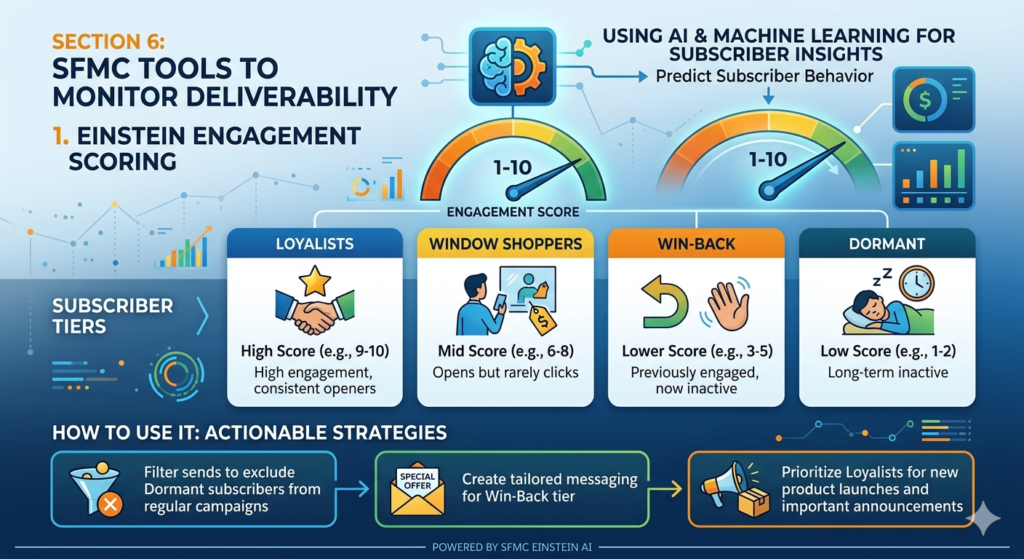
- Loyalists — High engagement, consistent openers
- Window Shoppers — Opens but rarely clicks
- Win-Back — Previously engaged, now inactive
- Dormant — Long-term inactive
How to Use It:
- Filter sends to exclude Dormant subscribers from regular campaigns
- Create tailored messaging for Win-Back tier
- Prioritize Loyalists for new product launches and important announcements
Navigation: Email Studio → Overview → Einstein Engagement Scoring
2. Tracking Extracts and Data Views
SFMC’s Data Views are system-generated tables that give you direct SQL access to campaign performance data. These are critical for building custom deliverability dashboards.
Key Data Views for Deliverability Monitoring:
SQL-- Bounce Analysis by Domain
SELECT
    Domain = SUBSTRING(EmailAddress, CHARINDEX('@', EmailAddress) + 1,
              LEN(EmailAddress)),
    BounceType,
    COUNT(*) AS BounceCount
FROM _Bounce
WHERE EventDate >= DATEADD(DAY, -30, GETDATE())
GROUP BY
    SUBSTRING(EmailAddress, CHARINDEX('@', EmailAddress) + 1, LEN(EmailAddress)),
    BounceType
ORDER BY BounceCount DESC

-- Complaint Rate Calculation
SELECT
    JobID,
    COUNT(CASE WHEN EventType = 'ComplainEvent' THEN 1 END) AS Complaints,
    COUNT(CASE WHEN EventType = 'SentEvent' THEN 1 END) AS TotalSent,
    CAST(COUNT(CASE WHEN EventType = 'ComplainEvent' THEN 1 END) AS FLOAT) /
    NULLIF(COUNT(CASE WHEN EventType = 'SentEvent' THEN 1 END), 0) * 100
    AS ComplaintRate
FROM (
    SELECT JobID, SubscriberKey, 'ComplainEvent' AS EventType FROM _Complaint
    UNION ALL
    SELECT JobID, SubscriberKey, 'SentEvent' AS EventType FROM _Sent
) Events
GROUP BY JobID
HAVING COUNT(CASE WHEN EventType = 'SentEvent' THEN 1 END) > 0
ORDER BY ComplaintRate DESC
3. Google Postmaster Tools
Google Postmaster Tools provides direct insight into how Gmail views your sending domain and IP. It is free and invaluable.
Metrics Available:
- Domain Reputation (High/Medium/Low/Bad)
- IP Reputation
- Spam Rate (percentage of Gmail users marking your email as spam)
- Authentication (SPF, DKIM, DMARC pass rates)
- Delivery Errors
- Encryption (TLS)
Setup:
- Go to
postmaster.google.com - Add and verify your sending domain via DNS TXT record
- Begin monitoring within 24–48 hours of sending
4. Microsoft SNDS (Smart Network Data Services)
SNDS provides equivalent insight for Microsoft’s email ecosystem (Outlook.com, Hotmail, Live.com). It shows:
- IP reputation status (Green/Yellow/Red)
- Complaint rates
- Spam trap hit data
- Filter block information
Access: postmaster.live.com/snds/
5. Inbox Placement Testing Tools
Before major campaigns, use inbox placement testing tools to see where your email lands across major providers:
| Tool | Key Features |
|---|---|
| Litmus | Inbox placement, rendering, spam testing |
| Email on Acid | Rendering across 100+ clients, spam analysis |
| GlockApps | Inbox/spam/promotions tab placement testing |
| MXToolbox | Blacklist monitoring, DNS diagnostics |
6. SFMC Deliverability Dashboard in Analytics Builder
SFMC’s Analytics Builder allows you to create custom dashboards combining tracking data with deliverability metrics. Build a weekly deliverability report that tracks:
- Open rate trend by week
- Bounce rate by campaign type
- Unsubscribe rate trend
- Complaint rate (if FBL data integrated)
- Send volume vs engagement rate
Section 7: Common SFMC Deliverability Mistakes to Avoid
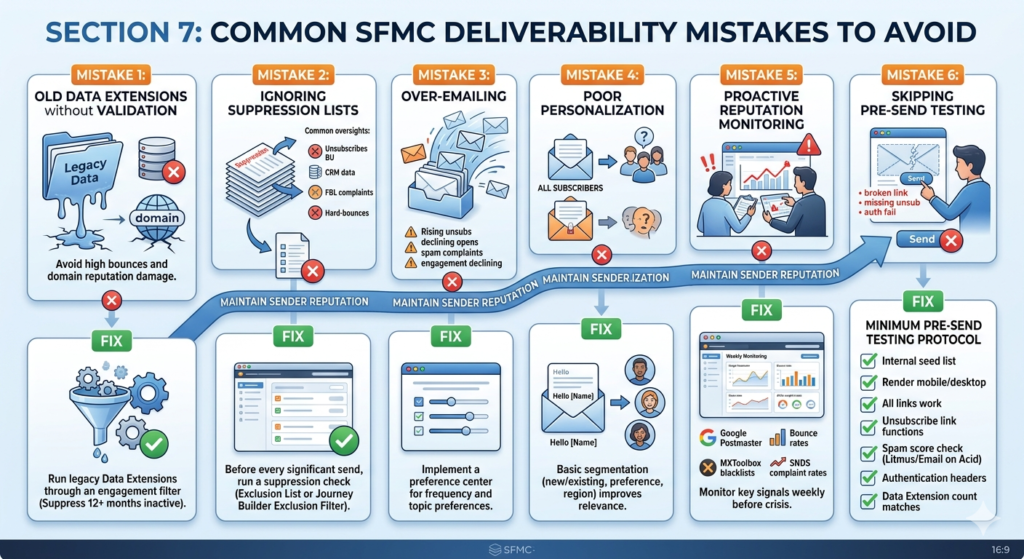
Mistake 1: Sending to Old Data Extensions Without Validation
That Data Extension you built in 2022 with 200,000 records? Without re-engagement validation, it is likely 30–40% invalid or inactive. Blasting it without cleaning first will spike your bounce rate and damage your domain reputation immediately.
Fix: Run all legacy Data Extensions through an engagement filter. Suppress anyone who has not engaged in 12+ months before sending.
Mistake 2: Ignoring Suppression Lists
Suppression list management is not glamorous, but it is essential. Common oversights include:
- Not honoring Global Unsubscribes across Business Units
- Failing to import external opt-out data from CRM systems
- Not suppressing FBL complaint data
- Sending to previously hard-bounced addresses after a list import
Fix: Before every significant send, run a suppression check using an Exclusion List or Journey Builder Exclusion filter that cross-references all suppression Data Extensions.
Mistake 3: Over-Emailing
Sending too frequently is the fastest way to generate spam complaints and unsubscribes — even from subscribers who genuinely like your brand. There is no universal “right” frequency, but the wrong frequency is the one that makes your subscribers feel harassed.
Warning Signs of Over-Emailing:
- Rising unsubscribe rates
- Declining open rates despite clean lists
- Increasing spam complaints
- Engagement rate declining week-over-week
Fix: Implement a preference center where subscribers can set their own frequency and topic preferences.
Mistake 4: Poor Personalization (or No Personalization)
Sending the same email to your entire subscriber base in 2026 is not just a missed opportunity — it is actively harmful to your deliverability. Generic emails generate lower engagement, which degrades your sender reputation.
Fix: Even basic segmentation (new vs existing customers, product category preference, geographic region) meaningfully improves relevance and engagement.
Mistake 5: Not Monitoring Sender Reputation Proactively
Most deliverability crises are detectable weeks before they become critical — if you are monitoring the right signals. Waiting until your open rate collapses to start investigating is reactive and expensive.
Fix: Set up weekly monitoring of:
- Google Postmaster Tools domain reputation
- Bounce rate trends in SFMC Data Views
- MXToolbox blacklist status
- Complaint rate data from SNDS
Mistake 6: Skipping Pre-Send Testing
Sending without testing is gambling with your sender reputation. A broken template, a missing unsubscribe link, or an authentication failure can turn a major campaign into a deliverability disaster.
Minimum Pre-Send Testing Protocol:
text✅ Send test to internal seed list (10–15 real email accounts)
✅ Check rendering on mobile and desktop
✅ Verify all links work
✅ Confirm unsubscribe link functions
✅ Run spam score check (Litmus or Email on Acid)
✅ Verify authentication headers in a test email (check email source)
✅ Confirm Data Extension count matches expected send volume
Section 8: Future Trends: Marketing Cloud Deliverability in 2026
AI-Driven Sender Reputation
Inbox providers are rapidly advancing their machine learning models for spam detection. In 2026, Gmail’s filtering algorithms analyze hundreds of signals simultaneously — far beyond traditional content and authentication checks. They model sending patterns, engagement velocity, domain age, content consistency, and even the network relationships between sending domains.
Implication: Senders who focus on genuine engagement — relevant content, proper segmentation, earned subscribers — will benefit as these systems increasingly reward good actors. Senders who try to game metrics with open-tracking manipulation or engagement pods will face increasingly sophisticated countermeasures.
Gmail and Yahoo Bulk Sender Requirements (2024 → 2026 Enforcement)
The requirements Google and Yahoo announced in 2024 have matured into strict enforcement standards in 2026:
- SPF + DKIM authentication is mandatory for all bulk senders
- DMARC at minimum
p=noneis required;p=rejectis increasingly incentivized - One-click unsubscribe (RFC 8058) must be supported and honored within 2 days
- Spam rate must stay below 0.10% — Google now provides real-time threshold alerts in Postmaster Tools
SFMC Action Items:
- Verify one-click unsubscribe headers are configured in your SFMC sending setup
- Process unsubscribe requests within 24 hours (SFMC’s native processing typically handles this automatically)
- Monitor your Gmail spam rate in Postmaster Tools as a non-negotiable weekly task
Privacy Regulations Impact on Deliverability
GDPR, CCPA, CAN-SPAM, and an expanding patchwork of global privacy regulations continue to shape email marketing practices in 2026. Several trends are directly affecting deliverability:
Apple MPP (Mail Privacy Protection): Apple’s open pixel blocking (introduced in iOS 15) has fully matured, making open rate data unreliable for a significant portion of email opens. In 2026, click rate, conversion rate, and revenue-per-email are more reliable engagement indicators for Apple device users.
Implication for SFMC: If you are using open rate as your primary engagement signal for segmentation (including Einstein Engagement Scoring), Apple MPP is inflating your apparent open rates. Supplement with click-based engagement signals for more accurate segmentation.
Predictive Segmentation
AI-driven predictive segmentation is moving from enterprise novelty to standard practice in 2026. Tools like Einstein for SFMC, combined with CDP data, can predict:
- Which subscribers are most likely to convert in the next 7 days
- Which are at risk of churning
- Which products each individual is most likely to purchase
- Optimal messaging frequency for each subscriber
This level of precision means more relevant emails, higher engagement, and — critically — better deliverability because your emails are genuinely wanted.
Zero-Party Data and Preference-Driven Sending
With third-party cookies largely deprecated and first-party data under regulatory scrutiny, zero-party data — information subscribers voluntarily and explicitly share — is becoming the gold standard for personalization.
SFMC Application:
- Build robust preference centers that capture interests, communication preferences, and frequency settings
- Use CloudPages to host interactive preference update forms
- Feed zero-party data into Data Extensions for segmentation
- Acknowledge and act on stated preferences immediately — subscribers who feel heard have far lower unsubscribe rates
2026 Email Deliverability Benchmarks
| Metric | Excellent | Good | Concerning | Critical |
|---|---|---|---|---|
| Inbox Placement Rate | >95% | 90–95% | 80–90% | <80% |
| Open Rate (B2C) | >30% | 20–30% | 10–20% | <10% |
| Open Rate (B2B) | >35% | 25–35% | 15–25% | <15% |
| Click Rate | >3% | 1.5–3% | 0.5–1.5% | <0.5% |
| Hard Bounce Rate | <0.5% | 0.5–1% | 1–2% | >2% |
| Unsubscribe Rate | <0.1% | 0.1–0.3% | 0.3–0.5% | >0.5% |
| Complaint Rate | <0.05% | 0.05–0.08% | 0.08–0.1% | >0.1% |
Note: Open rate benchmarks should be interpreted with caution due to Apple MPP inflation. Click rate is a more reliable engagement indicator in 2026.
Conclusion
Email deliverability in Salesforce Marketing Cloud is not a single setting you configure once and forget. It is a dynamic, ongoing discipline that sits at the intersection of technical infrastructure, data quality, content strategy, and audience engagement — and all four dimensions must be managed consistently to achieve and maintain excellent inbox placement.
The technical foundation — SAP, SPF, DKIM, DMARC, dedicated IP warming — is non-negotiable. Without it, no amount of content optimization or segmentation strategy will compensate. But the technical foundation alone is also not enough. A perfectly authenticated email sent to an unengaged, bloated list will still fail.
True SFMC email deliverability in 2026 requires both layers working together: airtight authentication infrastructure supporting a thoughtful, engagement-first sending strategy. When these two dimensions align, the results are transformative — higher inbox placement, higher open rates, higher click rates, and ultimately, higher marketing ROI.
The path forward is clear: audit your current setup against the checklist in this guide, address your authentication gaps first, then systematically improve your list quality, segmentation strategy, and engagement monitoring. Treat deliverability not as a technical task but as a strategic priority that lives at the executive level of your marketing program.
Your marketing cloud deliverability is, ultimately, your organization’s digital reputation. Protect it with the same rigor you bring to any other critical business asset — because in 2026, inbox placement is the difference between a marketing program that drives growth and one that silently wastes budget in spam folders.
Start your deliverability audit today. Your subscribers — and your ROI — will thank you.
About RizeX Labs
At RizeX Labs, we specialize in delivering cutting-edge Salesforce Marketing Cloud (SFMC) solutions, including advanced email deliverability strategies and system integrations.
Our expertise combines deep technical knowledge of the SFMC ecosystem, industry best practices, and real-world implementation experience to help businesses maximize their inbox placement without compromising data security.
We empower organizations to transform their email performance—from low engagement and spam triggers to high-converting, fully authenticated communication streams that ensure scalability, brand trust, and consistent growth.
Internal Links:
- Link to your Salesforce Marketing Cloud course page
- How to Build a Salesforce Portfolio That Gets You Hired (With Project Ideas)
- Salesforce Admin vs Developer: Which Career Path is Right for You in 2026?
- Wealth Management App in Financial Services Cloud
- Salesforce Admin And Developer Course
External Links:
- Salesforce Marketing Cloud official website
- Email Authentication Best Practices (SPF, DKIM, DMARC)
- Google Postmaster Tools for Sender Reputation
- Salesforce Help: Sender Authentication Package (SAP)
- Guide to Email Marketing Benchmarks 2026
- Understanding DMARC Alignment in SFMC
Quick Summary
Salesforce Marketing Cloud deliverability relies on a combination of technical authentication and subscriber engagement. By 2026, mailbox providers like Gmail and Yahoo require strict adherence to SPF, DKIM, and DMARC protocols; failing these non-negotiable standards often results in immediate rejection rather than just a “spam” folder placement.
Effective deliverability starts with a clean list. Organizations must maintain a bounce rate below 2% and a spam complaint rate under 0.1% to stay in the top tier of senders. Leveraging tools like Einstein STO (Send Time Optimization) and behavioral segmentation ensures that messages are relevant and timely, which are the primary drivers of improved open rates. +1
By leveraging SFMC’s robust infrastructure—such as Private Domains and Dedicated IPs—businesses can maintain a single source of truth for their sender reputation. This proactive approach to deliverability not only improves immediate performance but also builds the long-term domain authority necessary for a modern, scalable email architecture.
