
Why SQL Is the Secret Weapon Inside Salesforce Marketing Cloud
Here’s an uncomfortable truth most marketers don’t want to hear: if you’re using Salesforce Marketing Cloud (SFMC) without writing SQL, you’re leaving at least 60% of the platform’s power on the table.
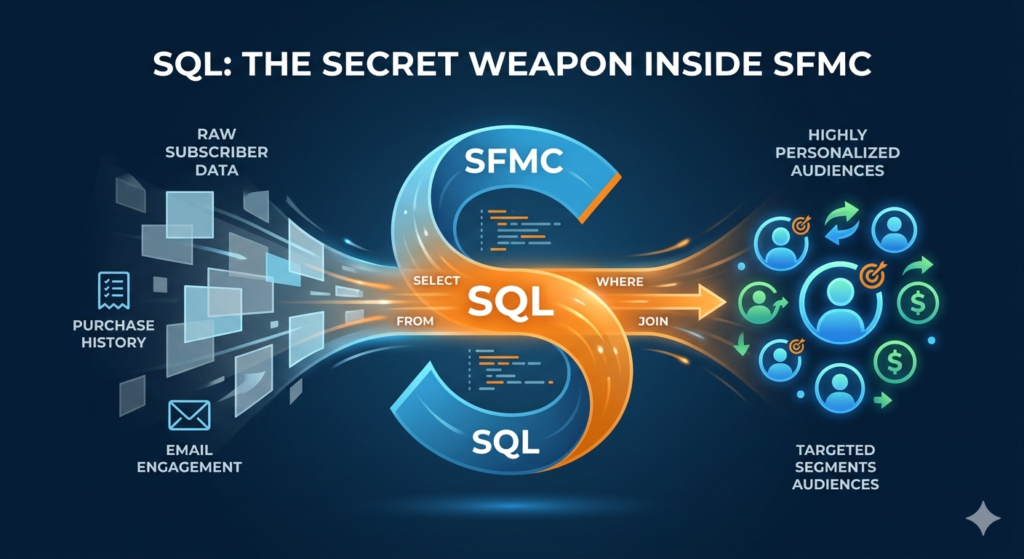
Drag-and-drop filters are fine for basic segmentation. But the moment you need to cross-reference purchase history with email engagement, exclude subscribers who converted in the last 72 hours, or build a dynamic audience from three separate data extensions — you’ve hit a wall that only SQL can break through.
That’s exactly where SFMC Query Activity SQL enters the picture.
Query Activity is the built-in SQL engine inside Marketing Cloud’s Automation Studio. It lets you write standard SQL queries against your data extensions, transforming raw subscriber data into precisely targeted, highly personalized audiences — all without ever leaving the platform.
Whether you’re a marketing operations specialist trying to build smarter automations, a developer looking to master SFMC’s data layer, or a marketing leader evaluating whether your team has the right skills, this guide is for you. We’ll cover everything: what SFMC Query Activity is, how it works, real-world use cases, sample queries, limitations, best practices, and the mistakes that trip up beginners.
Let’s dive in.
What Is SFMC Query Activity? A Simple Explanation
At its core, SFMC Query Activity is a tool inside Salesforce Marketing Cloud that allows you to write SQL (Structured Query Language) queries to retrieve, combine, filter, and manipulate data stored in Data Extensions. The results of those queries are then written into a target Data Extension, which you can use for email sends, journey entries, reporting, and more.
Think of it this way:
- Data Extensions are your database tables — they hold subscriber records, purchase data, engagement metrics, product catalogs, and anything else you’ve imported or collected.
- Query Activity is the question you ask those tables — “Show me all subscribers who opened an email in the last 30 days but haven’t made a purchase” or “Give me everyone in the loyalty program who lives in Texas.”
- The target Data Extension is where the answer gets stored — a clean, filtered list ready for action.
If you’ve ever used SQL in any other context — whether that’s a traditional database, Google BigQuery, or even Microsoft Access — the syntax inside SFMC will feel familiar. However, SFMC uses a specific dialect of SQL (based on T-SQL / SQL Server) with some important limitations and quirks that we’ll cover later.
The key takeaway: SFMC Query Activity SQL is the bridge between your raw marketing data and actionable audience segments. Without it, you’re stuck with manual filters, CSV uploads, and guesswork. With it, you unlock precision marketing at scale.
How SFMC Query Activity Works Inside Automation Studio
Query Activity doesn’t exist in isolation. It lives inside Automation Studio, which is SFMC’s automation and workflow engine. Understanding where Query Activity fits in the broader automation workflow is critical to using it effectively.
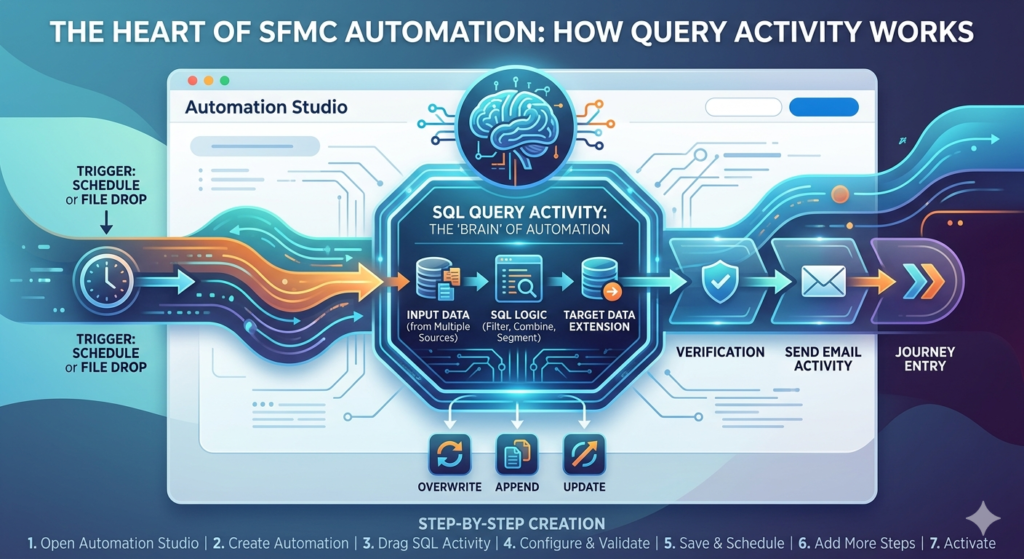
Step-by-Step: Creating a Query Activity
Here’s the process from start to finish:
Step 1: Open Automation Studio
Navigate to Automation Studio from the SFMC top navigation bar under “Journey Builder” or “Platform Tools” (depending on your SFMC configuration).
Step 2: Create a New Automation (or open an existing one)
Click “New Automation” and choose “Scheduled” (for time-based triggers) or “Triggered” (for event-based execution). Most Query Activities run on scheduled automations — daily, hourly, or weekly.
Step 3: Drag “SQL Query” Activity onto the Canvas
In the automation workflow canvas, you’ll see a list of available activities on the left side. Drag the “SQL Query” activity into the desired step of your workflow.
Step 4: Configure the Query Activity
Click on the SQL Query activity to open its configuration panel. Here’s what you’ll set up:
- Name: Give your query a descriptive name (e.g., “Active_Subscribers_Last30Days”).
- SQL Query: Write your SQL statement in the query editor.
- Target Data Extension: Select the Data Extension where results will be written.
- Query Action: Choose Overwrite, Append, or Update (more on these later).
Step 5: Validate and Save
SFMC provides a “Validate” button that checks your SQL syntax. Note: validation only checks syntax, not logic — your query can be syntactically correct but return wrong results.
Step 6: Add Additional Steps (Optional)
You can chain multiple Query Activities together in a single automation. For example:
- Step 1: Query to identify active subscribers
- Step 2: Query to exclude recent purchasers
- Step 3: Query to enrich the audience with product recommendations
Step 7: Schedule and Activate
Set your automation schedule and activate it. Your Query Activity will now run automatically at the designated time.
Where Query Activity Fits in the Automation Workflow
A typical SFMC automation might look like this:
- File Drop or Schedule Trigger → Starts the automation
- Import Activity → Pulls new data into a Data Extension
- SFMC Query Activity SQL → Filters, combines, and segments the data
- Verification Activity → Validates the output Data Extension
- Send Activity or Journey Entry → Sends an email or pushes subscribers into a journey
Query Activity is almost always the “brain” of the automation — the step where raw data becomes a usable marketing audience.
Understanding Data Extensions: The Foundation of SFMC Query Activity SQL
Before you can write effective queries, you need to understand Data Extensions (DEs) — because they’re the tables your SQL queries operate on.
What Are Data Extensions?
Data Extensions are tabular data storage objects in SFMC. They function like database tables with defined columns (fields) and rows (records). Every piece of data in SFMC — subscriber records, transactional data, behavioral data, product catalogs — lives in a Data Extension.
Types of Data Extensions
| Type | Description | Use Case |
|---|---|---|
| Standard DE | Basic data storage created manually or via API | Subscriber lists, product data, custom attributes |
| Sendable DE | A DE linked to a subscriber relationship (usually via SubscriberKey or EmailAddress) | Used as the send audience for email campaigns |
| Shared DE | A DE accessible across multiple Business Units in an Enterprise account | Cross-BU segmentation, centralized data management |
| Data Views | System-generated “virtual” DEs that contain engagement and tracking data | Open, click, bounce, send, and subscriber-level data |
Data Views: SFMC’s Hidden Gold Mine
Data Views are especially important for SFMC Query Activity SQL because they give you access to engagement data that doesn’t exist in any regular Data Extension. The most commonly queried Data Views include:
- _Open: Records of email opens
- _Click: Records of link clicks
- _Bounce: Bounce records
- _Sent: Send-level records
- _Subscribers: Master subscriber list
- _Unsubscribe: Unsubscribe events
- _Complaint: Spam complaint records
- _Job: Email job (campaign) metadata
- _Journey: Journey entry and exit data
- _JourneyActivity: Journey activity-level engagement
These Data Views are prefixed with an underscore and are read-only — you can query them, but you can’t write to them directly. They retain data for approximately six months (though this varies), so if you need historical data beyond that window, you should use Query Activities to periodically extract and store data in your own Data Extensions.
The Role of Data Extensions in Query Activity
Every SFMC Query Activity SQL statement follows this pattern:
- SELECT data FROM one or more source Data Extensions (or Data Views)
- WHERE certain conditions are met
- Write the results INTO a target Data Extension
The source DEs are your inputs. The target DE is your output. The SQL query is the transformation logic in between. Simple in concept, powerful in execution.
Real-World Use Cases for SFMC Query Activity SQL
Let’s move from theory to practice. Here are the most common and high-impact use cases for SFMC Query Activity SQL in real marketing operations.
1. Audience Segmentation
The most fundamental use case. Instead of using drag-and-drop filters (which can be slow and limited), you write SQL to segment your audience based on any combination of attributes.
Example: Identify female subscribers aged 25–40 in the United States who have opted into marketing communications.
SQLSELECT
    s.SubscriberKey,
    s.EmailAddress,
    s.FirstName,
    s.LastName
FROM
    Master_Subscriber_DE AS s
WHERE
    s.Gender = 'Female'
    AND s.Age BETWEEN 25 AND 40
    AND s.Country = 'US'
    AND s.OptInStatus = 'True'
This query pulls a targeted segment from a master subscriber Data Extension and writes the results into a sendable DE for campaign use.
2. Engagement-Based Filtering
Using Data Views, you can build segments based on actual email engagement behavior — something drag-and-drop filters handle poorly.
Example: Find subscribers who opened at least one email in the last 30 days.
SQLSELECT DISTINCT
    o.SubscriberKey
FROM
    _Open AS o
WHERE
    o.EventDate >= DATEADD(day, -30, GETDATE())
Example: Find subscribers who have NOT opened any email in the last 90 days (for a re-engagement campaign).
SQLSELECT
    s.SubscriberKey,
    s.EmailAddress
FROM
    Master_Subscriber_DE AS s
WHERE
    s.SubscriberKey NOT IN (
        SELECT DISTINCT o.SubscriberKey
        FROM _Open AS o
        WHERE o.EventDate >= DATEADD(day, -90, GETDATE())
    )
3. Combining Data from Multiple Sources (JOINs)
One of the most powerful capabilities of Marketing Cloud SQL is joining data from multiple Data Extensions. This is something you simply cannot do with SFMC’s native filter tools.
Example: Join subscriber data with purchase history to find high-value customers.
SQLSELECT
    s.SubscriberKey,
    s.EmailAddress,
    s.FirstName,
    p.TotalPurchaseAmount,
    p.LastPurchaseDate
FROM
    Master_Subscriber_DE AS s
INNER JOIN
    Purchase_History_DE AS p
    ON s.SubscriberKey = p.SubscriberKey
WHERE
    p.TotalPurchaseAmount > 500
    AND p.LastPurchaseDate >= DATEADD(month, -6, GETDATE())
This data extension query SFMC operation creates a segment of high-value recent purchasers — perfect for a VIP loyalty campaign.
4. Data Enrichment and Personalization
Query Activities aren’t just for filtering — they’re for enriching your send audience with additional data fields that power personalization.
Example: Build a send-ready DE that includes the subscriber’s most recently purchased product category.
SQLSELECT
    s.SubscriberKey,
    s.EmailAddress,
    s.FirstName,
    r.ProductCategory AS RecentCategory,
    r.PurchaseDate AS RecentPurchaseDate
FROM
    Master_Subscriber_DE AS s
INNER JOIN (
    SELECT
        SubscriberKey,
        ProductCategory,
        PurchaseDate,
        ROW_NUMBER() OVER (PARTITION BY SubscriberKey ORDER BY PurchaseDate DESC) AS rn
    FROM
        Purchase_Detail_DE
) AS r
    ON s.SubscriberKey = r.SubscriberKey
WHERE
    r.rn = 1
This query uses a ROW_NUMBER() window function to grab each subscriber’s most recent purchase — a technique that’s incredibly useful for personalization but impossible without SQL.
5. Suppression Lists
Building exclusion lists is a critical use case. You might need to suppress subscribers who have already received a specific campaign, who have unsubscribed, or who have complained.
Example: Create a suppression list of subscribers who received a specific email in the last 7 days.
SQLSELECT DISTINCT
    s.SubscriberKey
FROM
    _Sent AS s
INNER JOIN
    _Job AS j
    ON s.JobID = j.JobID
WHERE
    j.EmailName = 'Summer_Sale_2025'
    AND s.EventDate >= DATEADD(day, -7, GETDATE())
6. Data Hygiene and Deduplication
Marketing databases get messy. Query Activity helps you clean up.
Example: Deduplicate a Data Extension, keeping only the most recently updated record per email address.
SQLSELECT
    SubscriberKey,
    EmailAddress,
    FirstName,
    LastName,
    UpdatedDate
FROM (
    SELECT
        *,
        ROW_NUMBER() OVER (PARTITION BY EmailAddress ORDER BY UpdatedDate DESC) AS rn
    FROM
        Raw_Import_DE
) AS deduped
WHERE
    rn = 1
7. Reporting and Analytics
Query Activities can power custom reporting by aggregating data across Data Views and Data Extensions.
Example: Count email opens by campaign for the current month.
SQLSELECT
    j.EmailName,
    COUNT(o.SubscriberKey) AS TotalOpens,
    COUNT(DISTINCT o.SubscriberKey) AS UniqueOpens
FROM
    _Open AS o
INNER JOIN
    _Job AS j
    ON o.JobID = j.JobID
WHERE
    o.EventDate >= DATEADD(month, DATEDIFF(month, 0, GETDATE()), 0)
GROUP BY
    j.EmailName
ORDER BY
    UniqueOpens DESC
Query Actions Explained: Overwrite, Append, and Update
When you configure an SFMC Query Activity SQL step, you must choose a Query Action that determines how results are written to the target Data Extension. This choice has significant implications.
Overwrite
What it does: Deletes all existing records in the target DE and replaces them with the query results.
When to use it:
- Building daily/weekly audience segments that should be refreshed completely
- Creating send lists for one-time campaigns
- Any scenario where the target DE should only contain “current” data
Example scenario: Every morning at 6 AM, an automation runs a query to identify today’s birthday subscribers. The target DE is overwritten with only today’s birthday list — yesterday’s list is gone.
Risk: If your query fails or returns zero results, the target DE will be emptied. Always consider adding verification steps after an Overwrite query.
Append
What it does: Adds the query results to the target DE without deleting existing records.
When to use it:
- Building historical/cumulative data sets
- Logging events or transactions over time
- Adding new records to an existing audience without removing previous entries
Example scenario: You run a weekly query to capture all new subscribers from the past 7 days and append them to a “New_Subscribers_2025” DE. Over the year, this DE grows to contain every new subscriber added throughout the year.
Risk: Duplicates. If a subscriber appears in multiple query runs, they’ll have multiple rows in the target DE. Make sure your target DE has a primary key defined to prevent duplicates, or use the Update action instead.
Update
What it does: Updates existing records in the target DE where the primary key matches, and inserts new records that don’t already exist (an “upsert” operation).
When to use it:
- Maintaining a master audience DE that needs to stay current
- Updating subscriber attributes (e.g., preference changes, engagement scores)
- Any scenario where you want to keep existing records and add/modify as needed
Example scenario: You have a “Subscriber_Profile_DE” with a primary key of SubscriberKey. Your query pulls the latest engagement score for each subscriber. Using the Update action, existing subscribers get their scores refreshed, and any brand-new subscribers are inserted.
Risk: The Update action requires that the target DE has a properly defined primary key. Without it, SFMC won’t know which records to update, and the behavior becomes unpredictable.
Quick Comparison Table
| Action | Existing Data | New Data | Primary Key Required? | Best For |
|---|---|---|---|---|
| Overwrite | Deleted | Inserted | No | Fresh daily/weekly segments |
| Append | Preserved | Added (may duplicate) | Recommended | Historical data accumulation |
| Update | Updated if key matches | Inserted if new | Yes | Master data maintenance |
Choosing the right query action is one of the most important decisions you’ll make when configuring an SFMC Query Activity SQL step. Choose wrong, and you’ll either lose data or create duplicates.
Limitations of SFMC SQL: What You Can’t Do
Marketing Cloud SQL is powerful, but it’s not full-featured SQL Server. Understanding these limitations upfront will save you hours of frustration.
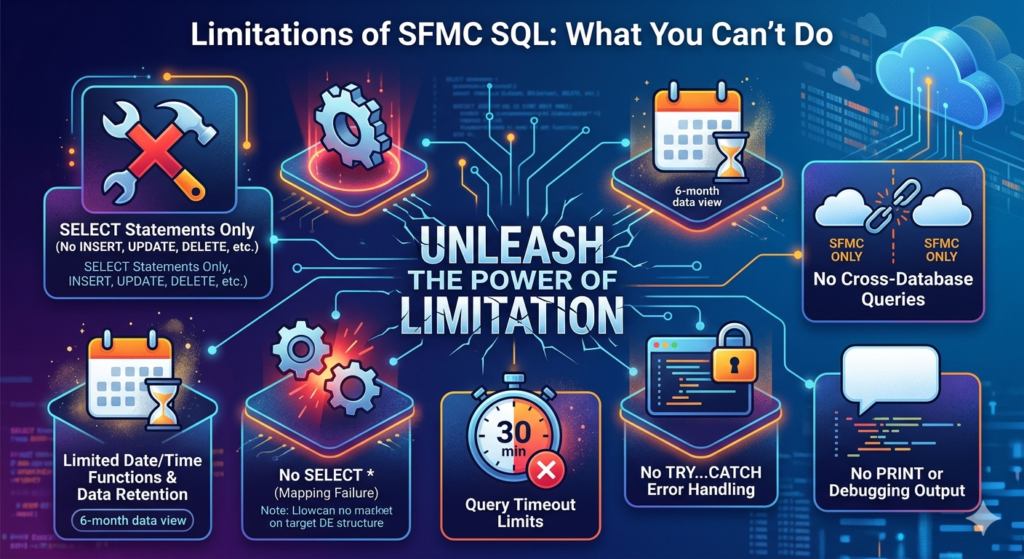
1. SELECT Statements Only
This is the biggest limitation. SFMC Query Activity supports only SELECT statements. You cannot use:
INSERT,UPDATE, orDELETEstatementsCREATE TABLEorALTER TABLETRUNCATE- Stored procedures
- Variables (
DECLARE,SET) - Temporary tables (
#temp) WHILEloops or cursorsEXECor dynamic SQL
All data manipulation happens through the SELECT query and the Query Action (Overwrite/Append/Update) that writes results to the target DE.
2. No SELECT * (with Target DE Mapping)
While SELECT * technically works, it’s strongly discouraged. The query results must map to the target DE’s column structure. If your SELECT columns don’t match the target DE’s fields (in name and compatible data types), the query will fail or produce unexpected results.
3. Limited Date/Time Functions
SFMC supports common T-SQL date functions (GETDATE(), DATEADD(), DATEDIFF(), DATEPART(), CONVERT(), CAST()), but some advanced functions available in full SQL Server may not work. Always test date-related functions thoroughly.
4. Data View Retention Limits
As mentioned earlier, Data Views typically retain data for approximately six months. If you need historical engagement data beyond that window, you must proactively query and store it in your own Data Extensions before it expires.
5. No Cross-Database Queries
You can’t query data outside of SFMC (e.g., directly querying Salesforce CRM objects, external databases, or other cloud platforms). Data must first be imported into SFMC Data Extensions via Marketing Cloud Connect, import activities, or API calls.
6. Query Timeout Limits
SFMC imposes a 30-minute timeout on Query Activities. If your query hasn’t finished executing in 30 minutes, it will be killed. This is a hard limit that you must design around when working with large data sets.
7. No CTEs in Older Accounts (Mostly Resolved)
Common Table Expressions (CTEs) using the WITH clause were historically unsupported in SFMC. As of recent updates, CTEs are supported in most accounts, but if you’re on an older SFMC instance, you might encounter issues. Subqueries are always a reliable alternative.
8. Case-Insensitive Field Names (But Case-Sensitive Data)
Field names in SFMC are case-insensitive, but the data within fields is case-sensitive by default. This means WHERE Status = 'active' and WHERE Status = 'Active' may return different results. Always be mindful of data case when writing WHERE clauses.
9. No TRY…CATCH Error Handling
SFMC SQL doesn’t support error handling. If a query fails mid-execution, the automation step fails, and you’ll need to check the automation log to understand what went wrong. There’s no way to build graceful error handling into the query itself.
10. No PRINT or Debugging Output
There’s no way to output debug messages or intermediate results. Debugging SFMC SQL queries is often a process of trial and error — running modified versions of your query and checking the output DE.
Best Practices for Writing Optimized SFMC Query Activity SQL
Now that you know what’s possible and what isn’t, let’s talk about how to write queries that are fast, reliable, and maintainable.
1. Always Specify Column Names Explicitly
Never use SELECT *. Always list out the exact columns you need. This ensures:
- Your query maps correctly to the target DE
- You don’t pull unnecessary data (which slows performance)
- Your query remains functional even if source DE schemas change
SQL-- Bad
SELECT * FROM Subscriber_DE

-- Good
SELECT SubscriberKey, EmailAddress, FirstName, LastName FROM Subscriber_DE
2. Use Table Aliases
Aliases make your queries shorter, more readable, and easier to maintain — especially when joining multiple tables.
SQL-- Without aliases (verbose)
SELECT
    Master_Subscriber_Data_Extension.SubscriberKey,
    Master_Subscriber_Data_Extension.EmailAddress
FROM
    Master_Subscriber_Data_Extension

-- With aliases (clean)
SELECT
    s.SubscriberKey,
    s.EmailAddress
FROM
    Master_Subscriber_Data_Extension AS s
3. Filter Early with WHERE Clauses
The more you can reduce your dataset early in the query, the faster it will run. Apply WHERE conditions to filter out irrelevant records before joins or aggregations.
SQL-- Less efficient: joins everything, then filters
SELECT s.SubscriberKey, o.EventDate
FROM Subscriber_DE AS s
INNER JOIN _Open AS o ON s.SubscriberKey = o.SubscriberKey
WHERE o.EventDate >= DATEADD(day, -30, GETDATE())

-- More efficient: filter in subquery first
SELECT s.SubscriberKey, r.EventDate
FROM Subscriber_DE AS s
INNER JOIN (
    SELECT SubscriberKey, EventDate
    FROM _Open
    WHERE EventDate >= DATEADD(day, -30, GETDATE())
) AS r ON s.SubscriberKey = r.SubscriberKey
4. Use INNER JOIN Instead of NOT IN When Possible
NOT IN subqueries can be slow on large datasets. Consider using LEFT JOIN ... WHERE ... IS NULL as an alternative for exclusion logic.
SQL-- Slower with NOT IN
SELECT s.SubscriberKey
FROM Subscriber_DE AS s
WHERE s.SubscriberKey NOT IN (
    SELECT SubscriberKey FROM Suppression_DE
)

-- Faster with LEFT JOIN
SELECT s.SubscriberKey
FROM Subscriber_DE AS s
LEFT JOIN Suppression_DE AS sup
    ON s.SubscriberKey = sup.SubscriberKey
WHERE sup.SubscriberKey IS NULL
5. Use TOP for Testing
When developing and testing queries, use TOP to limit the result set. This lets you validate logic without writing thousands of records or hitting timeout limits.
SQLSELECT TOP 100
    s.SubscriberKey,
    s.EmailAddress
FROM
    Master_Subscriber_DE AS s
WHERE
    s.Country = 'US'
Remove TOP when you’re ready to run the query in production.
6. Be Careful with DISTINCT
DISTINCT is often overused. It forces SFMC to compare every row in the result set, which is computationally expensive. Only use DISTINCT when you genuinely expect duplicates and need to remove them.
If your query produces duplicates, first understand why — it’s often a sign that your JOIN logic is incorrect (e.g., a one-to-many relationship that you didn’t account for).
7. Mind Your Data Types
When comparing values in WHERE clauses, make sure you’re comparing compatible data types. Comparing a text field to a number, or using the wrong date format, can cause errors or unexpected results.
SQL-- If Age is stored as text, this comparison might not work as expected
WHERE Age > 25

-- Safer: cast explicitly
WHERE CAST(Age AS INT) > 25
8. Name Your Data Extensions Thoughtfully
This isn’t a SQL syntax tip, but it’s critical for maintainability. Use consistent naming conventions:
SEND_WeeklyNewsletter_ActiveSubscribersSEG_HighValue_Purchasers_Last90DaysRPT_EmailEngagement_Monthly
Prefixes like SEND_, SEG_, RPT_, SRC_, and TMP_ help you quickly identify a DE’s purpose.
9. Document Your Queries
SFMC’s query editor doesn’t support comments elegantly, but you can use standard SQL comments (-- for single line, /* */ for multi-line) in your queries. Use them to explain complex logic.
SQL/*
Query: Active Subscribers with Recent Purchases
Author: RizeX Labs
Last Updated: 2025-06-15
Purpose: Builds the weekly VIP audience for the loyalty email program
*/
SELECT
    s.SubscriberKey,
    s.EmailAddress,
    s.FirstName,
    p.TotalSpend
FROM
    Master_Subscriber_DE AS s
INNER JOIN
    Purchase_Summary_DE AS p
    ON s.SubscriberKey = p.SubscriberKey
WHERE
    p.TotalSpend > 1000
    AND p.LastPurchaseDate >= DATEADD(day, -90, GETDATE())
10. Test in a Non-Production Environment
If your SFMC instance has a sandbox or test Business Unit, always test new queries there before running them in production. A misconfigured query with an Overwrite action can wipe out a critical send list.
Common Mistakes Beginners Make with SFMC Query Activity SQL
Learning SFMC Query Activity SQL has a learning curve, and certain mistakes come up again and again. Here’s what to watch out for.
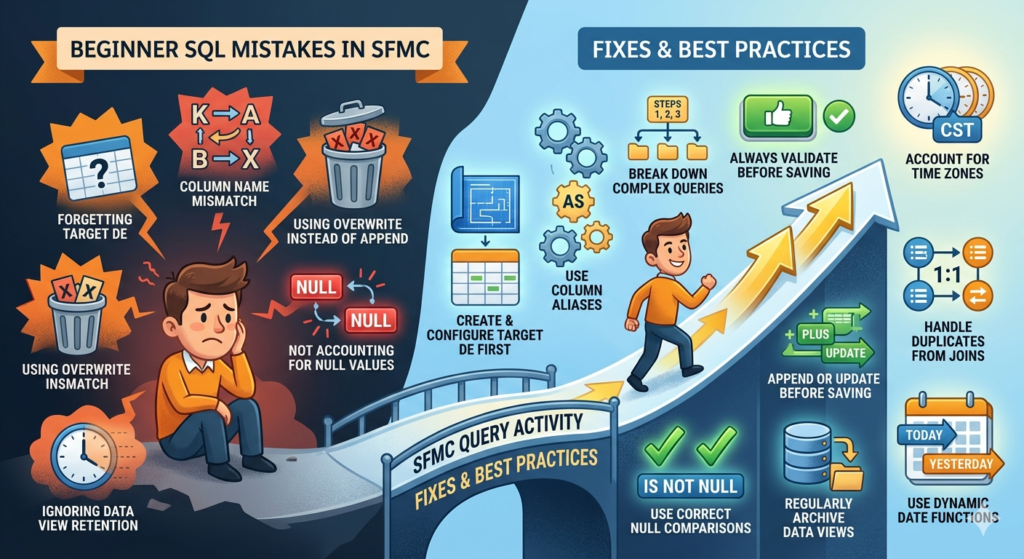
Mistake 1: Forgetting to Create the Target Data Extension First
Unlike traditional SQL where you can create tables on the fly, SFMC requires the target Data Extension to already exist before you run a Query Activity. If the target DE doesn’t exist, your query will fail.
Fix: Always create and configure your target DE (with the correct field names, data types, and primary key) before setting up the Query Activity.
Mistake 2: Column Name Mismatches Between Query and Target DE
If your SELECT statement returns a column named “Email” but your target DE has a field named “EmailAddress,” the data won’t map correctly.
Fix: Use column aliases in your SELECT statement to match the target DE’s field names exactly.
SQLSELECT
    s.SubscriberKey,
    s.Email AS EmailAddress  -- Alias to match target DE field name
FROM
    Source_DE AS s
Mistake 3: Using Overwrite When Append or Update Is Needed
New users often default to Overwrite without considering the implications. If you’re building a cumulative dataset (like a log of all email sends), Overwrite will destroy all historical data every time the query runs.
Fix: Think carefully about whether your use case requires Overwrite, Append, or Update. When in doubt, start with a test DE using Append so you don’t lose data.
Mistake 4: Not Accounting for NULL Values
NULL values in SFMC data are extremely common, and they don’t behave the way you might expect. NULL is not equal to anything — not even another NULL. This means WHERE Field = NULL will never return results.
Fix: Use IS NULL or IS NOT NULL for NULL comparisons.
SQL-- Wrong
WHERE LastPurchaseDate = NULL

-- Right
WHERE LastPurchaseDate IS NULL
Also, be aware that NULLs in JOIN conditions can cause unexpected results. If your join key might contain NULLs, add an IS NOT NULL filter.
Mistake 5: Ignoring Data View Retention Limits
Beginners often write queries against Data Views expecting years of historical data, only to find that data beyond six months is gone.
Fix: Set up scheduled automations to regularly extract Data View data into persistent Data Extensions. For example, run a daily query that appends yesterday’s opens, clicks, and bounces to a permanent archive DE.
Mistake 6: Writing Overly Complex Queries
It’s tempting to write a single massive query that does everything: joins five tables, applies ten filters, uses multiple subqueries, and aggregates data. These queries are hard to debug, slow to execute, and likely to hit the 30-minute timeout.
Fix: Break complex logic into multiple sequential Query Activities within the same automation. Each step can write to an intermediate DE, and the next step can read from it.
Mistake 7: Not Using the Validate Button
SFMC provides a “Validate Syntax” button in the Query Activity editor. Beginners often skip this step, save the query, and don’t discover errors until the automation fails at 3 AM.
Fix: Always validate before saving. And remember, validation only checks syntax — it won’t catch logical errors, wrong table names (in some cases), or data type mismatches.
Mistake 8: Forgetting Time Zones
GETDATE() in SFMC returns the time in Central Standard Time (CST/CDT) — not UTC, and not your local time zone. If your data uses a different time zone, your date-based filters might exclude or include records unexpectedly.
Fix: Account for the CST offset in your date calculations, or standardize all dates to CST when importing data.
Mistake 9: Not Handling Duplicates from JOINs
When you JOIN a subscriber DE to a transactional DE (like purchases), a one-to-many relationship can produce duplicate subscriber rows in the result. If your target DE doesn’t have a primary key, you’ll end up with duplicate sends.
Fix: Use DISTINCT, GROUP BY, or window functions like ROW_NUMBER() to deduplicate results. And always set a primary key on your target DE.
Mistake 10: Hardcoding Dates Instead of Using Dynamic Date Functions
Writing WHERE EventDate >= '2025-01-01' works once, but it becomes stale. If this query runs in an automation, it will keep filtering against January 1, 2025 forever.
Fix: Use dynamic date functions like GETDATE() and DATEADD().
SQL-- Hardcoded (bad for automations)
WHERE EventDate >= '2025-06-01'

-- Dynamic (always references "last 30 days")
WHERE EventDate >= DATEADD(day, -30, GETDATE())
Advanced SFMC Query Activity SQL Techniques
Once you’ve mastered the basics, these advanced techniques will elevate your Marketing Cloud SQL skills.
Window Functions
Window functions like ROW_NUMBER(), RANK(), and DENSE_RANK() are supported in SFMC and are invaluable for deduplication and ranking.
SQL-- Get each subscriber's most recent click
SELECT
    SubscriberKey,
    URL,
    EventDate
FROM (
    SELECT
        SubscriberKey,
        URL,
        EventDate,
        ROW_NUMBER() OVER (
            PARTITION BY SubscriberKey
            ORDER BY EventDate DESC
        ) AS rn
    FROM _Click
    WHERE EventDate >= DATEADD(day, -30, GETDATE())
) AS ranked
WHERE rn = 1
CASE Statements for Conditional Logic
Use CASE statements to create calculated fields and apply conditional logic within your queries.
SQLSELECT
    s.SubscriberKey,
    s.EmailAddress,
    s.TotalSpend,
    CASE
        WHEN s.TotalSpend >= 1000 THEN 'Platinum'
        WHEN s.TotalSpend >= 500 THEN 'Gold'
        WHEN s.TotalSpend >= 100 THEN 'Silver'
        ELSE 'Bronze'
    END AS LoyaltyTier
FROM
    Subscriber_Spend_DE AS s
COALESCE and ISNULL for Default Values
Handle NULL values gracefully by providing default values.
SQLSELECT
    s.SubscriberKey,
    ISNULL(s.FirstName, 'Valued Customer') AS FirstName,
    COALESCE(s.PreferredCategory, s.LastPurchaseCategory, 'General') AS ContentCategory
FROM
    Subscriber_DE AS s
Aggregation with GROUP BY
Aggregate data for reporting or to compute subscriber-level metrics.
SQLSELECT
    c.SubscriberKey,
    COUNT(*) AS TotalClicks,
    COUNT(DISTINCT c.URL) AS UniqueLinksClicked,
    MAX(c.EventDate) AS LastClickDate
FROM
    _Click AS c
WHERE
    c.EventDate >= DATEADD(day, -90, GETDATE())
GROUP BY
    c.SubscriberKey
HAVING
    COUNT(*) >= 5
This query finds subscribers who clicked five or more times in the last 90 days — a strong signal of engagement.
UNION for Combining Result Sets
Combine results from multiple queries into a single result set.
SQL-- Combine subscribers from two different source DEs
SELECT SubscriberKey, EmailAddress, 'Source_A' AS SourceSystem
FROM Source_A_Subscribers
WHERE Status = 'Active'

UNION

SELECT SubscriberKey, EmailAddress, 'Source_B' AS SourceSystem
FROM Source_B_Subscribers
WHERE Status = 'Active'
Note: Use UNION to deduplicate, or UNION ALL to keep duplicates (faster performance).
Building a Complete Automation: A Practical Example
Let’s put it all together with a real-world scenario.
Scenario: You run a weekly “Win-Back” email campaign targeting subscribers who were previously engaged but have gone quiet in the last 60 days. You want to exclude anyone who has purchased in the last 30 days or unsubscribed.
Automation Structure:
Step 1: Query — Identify Previously Engaged Subscribers
SQL/*
Step 1: Find subscribers who opened or clicked an email
between 60-180 days ago (were engaged, now quiet)
*/
SELECT DISTINCT
    s.SubscriberKey,
    s.EmailAddress,
    s.FirstName
FROM
    Master_Subscriber_DE AS s
INNER JOIN (
    SELECT DISTINCT SubscriberKey
    FROM _Open
    WHERE EventDate BETWEEN DATEADD(day, -180, GETDATE()) AND DATEADD(day, -60, GETDATE())

    UNION

    SELECT DISTINCT SubscriberKey
    FROM _Click
    WHERE EventDate BETWEEN DATEADD(day, -180, GETDATE()) AND DATEADD(day, -60, GETDATE())
) AS engaged
    ON s.SubscriberKey = engaged.SubscriberKey
WHERE
    s.Status = 'Active'
Target DE: TMP_WinBack_Engaged | Action: Overwrite
Step 2: Query — Exclude Recent Activity and Purchasers
SQL/*
Step 2: Remove anyone who opened/clicked in last 60 days,
purchased in last 30 days, or is on the suppression list
*/
SELECT
    e.SubscriberKey,
    e.EmailAddress,
    e.FirstName
FROM
    TMP_WinBack_Engaged AS e
LEFT JOIN (
    SELECT DISTINCT SubscriberKey
    FROM _Open
    WHERE EventDate >= DATEADD(day, -60, GETDATE())
) AS recent_open
    ON e.SubscriberKey = recent_open.SubscriberKey
LEFT JOIN (
    SELECT DISTINCT SubscriberKey
    FROM Purchase_History_DE
    WHERE PurchaseDate >= DATEADD(day, -30, GETDATE())
) AS recent_purchase
    ON e.SubscriberKey = recent_purchase.SubscriberKey
LEFT JOIN
    Global_Suppression_DE AS sup
    ON e.SubscriberKey = sup.SubscriberKey
WHERE
    recent_open.SubscriberKey IS NULL
    AND recent_purchase.SubscriberKey IS NULL
    AND sup.SubscriberKey IS NULL
Target DE: SEND_WinBack_Weekly | Action: Overwrite
Step 3: Email Send Activity
The SEND_WinBack_Weekly DE is now a clean, deduplicated, suppression-filtered audience ready for the win-back email. This DE can be used as the send audience or as a Journey Entry source.
This three-step automation demonstrates the power of chaining SFMC Query Activity SQL steps — each step refines the audience further, and the final output is a precisely targeted segment.
SFMC Query Activity SQL vs. Other SFMC Tools
You might be wondering: when should I use Query Activity versus other segmentation tools in SFMC?
Query Activity vs. Data Filters
Data Filters are SFMC’s drag-and-drop filtering tool. They’re simpler to use but far less powerful.
| Feature | Query Activity | Data Filters |
|---|---|---|
| Multi-table JOINs | ✅ Yes | ❌ No |
| Data View access | ✅ Yes | ❌ No |
| Complex logic (CASE, subqueries) | ✅ Yes | ❌ No |
| Aggregation (GROUP BY, COUNT) | ✅ Yes | ❌ No |
| Ease of use | Moderate | Easy |
| Best for | Complex segmentation | Simple single-DE filters |
Query Activity vs. Audience Builder (Contact Builder)
Audience Builder provides a visual interface for creating segments across multiple Data Extensions and Data Views. It’s more powerful than Data Filters but still less flexible than raw SQL.
Use Audience Builder when: You need a quick visual segment and don’t require complex transformations.
Use Query Activity when: You need precise control, complex joins, calculated fields, deduplication logic, or aggregation.
Query Activity vs. Journey Builder Decision Splits
Decision Splits in Journey Builder can filter audiences within a journey, but they operate on individual contacts as they flow through. Query Activity operates on the entire dataset at once, making it more efficient for batch segmentation.
Why Learning SFMC Query Activity SQL Matters for Your Career
If you’re a marketer or marketing technologist, SQL skills in the context of SFMC are rapidly becoming non-negotiable. Here’s why:
- Demand is high: SFMC administrators and developers who can write SQL are among the most sought-after roles in the Salesforce ecosystem.
- Efficiency gains are massive: Tasks that take hours with manual filtering take minutes with SQL. A well-written query replaces dozens of clicks and eliminates human error.
- Personalization at scale: The level of personalization that modern consumers expect — product recommendations based on purchase history, engagement-triggered content, dynamic suppression — requires SQL.
- Data-driven decision making: SQL enables you to build custom reports and dashboards that go far beyond SFMC’s out-of-the-box analytics.
- Cross-platform relevance: SQL skills transfer directly to other platforms — Google BigQuery, Snowflake, Amazon Redshift, and virtually every modern data tool uses SQL.
Conclusion: Start Writing SQL in SFMC Today
If you’ve read this far, you now understand the full picture of SFMC Query Activity SQL — what it is, how it works, why it matters, and how to use it effectively. Let’s recap the key takeaways:
- SFMC Query Activity is the SQL engine inside Automation Studio that lets you query Data Extensions and Data Views to build targeted, personalized marketing audiences.
- Data Extensions are your tables; Data Views give you access to engagement data like opens, clicks, and bounces.
- Query Actions (Overwrite, Append, Update) determine how results are written to your target DE — choose wisely.
- Real-world use cases span segmentation, engagement filtering, data enrichment, suppression, deduplication, and reporting.
- Limitations exist — SELECT only, 30-minute timeout, no variables, limited Data View retention — but they’re manageable once you understand them.
- Best practices like explicit column names, table aliases, early filtering, and dynamic dates will make your queries faster and more reliable.
- Common mistakes like column mismatches, NULL handling, and hardcoded dates are easy to avoid once you’re aware of them.
The gap between marketers who can write Marketing Cloud SQL and those who can’t is widening every day. On one side, you have teams manually building segments, uploading CSVs, and hoping their data is accurate. On the other side, you have teams running automated, SQL-powered workflows that deliver the right message to the right person at exactly the right time.
Which side do you want to be on?
Start small. Write a simple SELECT query against one Data Extension. Then add a WHERE clause. Then try a JOIN. Before you know it, you’ll be writing multi-step automations that would have been unthinkable without SQL.
And if you need help getting started, optimizing your existing SFMC queries, or building a complete automation framework for your marketing operations — RizeX Labs is here to help. Our team specializes in Salesforce Marketing Cloud implementation, data architecture, and automation strategy. We’ve helped teams across industries unlock the full power of SFMC, and we’d love to help you do the same.
Ready to level up your SFMC game? Contact RizeX Labs today and let’s build something powerful together.
About RizeX Labs
At RizeX Labs, we specialize in delivering advanced Salesforce Marketing Cloud (SFMC) solutions that help businesses unlock the true power of data-driven marketing. Our expertise in SFMC Query Activity SQL, automation, and data architecture enables organizations to streamline marketing operations, improve segmentation, and drive higher engagement.
We combine deep technical knowledge with real-world implementation experience to help businesses transform raw data into actionable insights. From building scalable data extensions to optimizing SQL queries, we ensure your marketing campaigns are efficient, targeted, and results-driven.
Internal Links:
- Salesforce Admin course page
- Salesforce Marketing Cloud vs Pardot: Which Is Right for You in 2026
- Salesforce Data Import Wizard vs Data Loader: Full Comparison (2024 Guide)
- SFMC Data Extensions vs Lists: What Every Marketer Should Know
- SFMC Email Content Builder: Best Practices & Templates 2026
- Salesforce Mobile App: Complete Admin Configuration Guide for Enterprise Deployment
- Salesforce Marketing Cloud Automation Studio: Complete Guide
External Links:
McKinsey Sales Growth Reports
