
The Future of AI Automation Is Already Here — And It Lives Inside Salesforce
Imagine having an AI-powered assistant that never sleeps, never gets frustrated with repetitive questions, and can resolve customer issues in seconds — all without human intervention. That is exactly what Salesforce Agentforce promises to deliver.
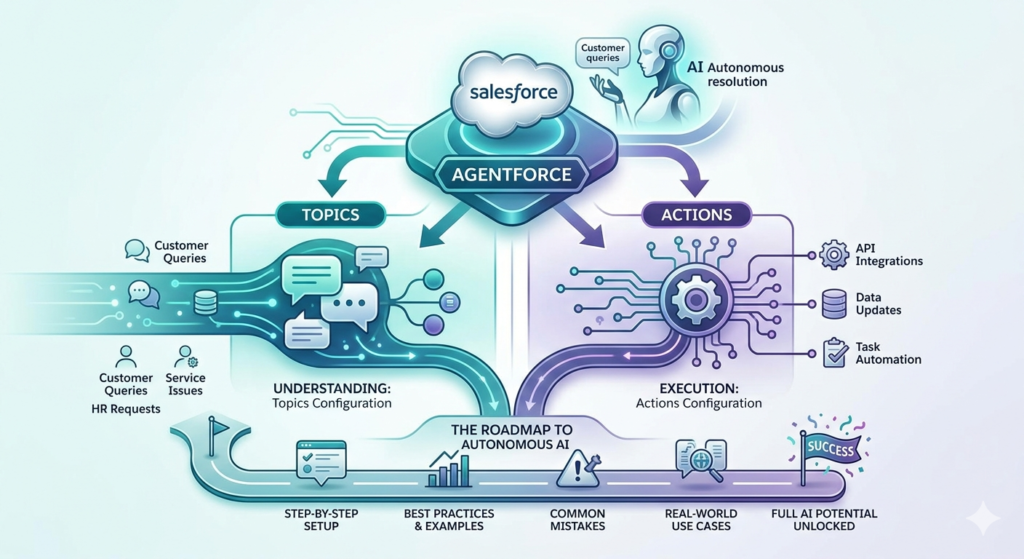
Agentforce is Salesforce’s next-generation AI agent platform that allows businesses to deploy autonomous AI agents capable of handling real conversations, making decisions, and taking actions — all within the Salesforce ecosystem. Whether you are managing customer service queries, automating sales follow-ups, or streamlining internal HR processes, Agentforce brings intelligent automation to the forefront.
But here is the thing: the true power of Agentforce does not come from simply turning it on. It comes from properly configuring its two most critical components — Topics and Actions.
This guide is your complete roadmap to agentforce topics configuration, covering everything from basic concepts to step-by-step setup, best practices, real-world use cases, and common mistakes to avoid. Whether you are a Salesforce admin, a seasoned developer, or someone just stepping into the world of AI automation, this guide will help you unlock the full potential of Agentforce.
Let us dive in.
What Is Agentforce? A Quick Overview
Before jumping into configuration, it helps to understand what Agentforce actually is and how it fits into the broader Salesforce landscape.
Agentforce is an AI agent framework built natively into Salesforce. It goes far beyond traditional chatbots. Unlike simple rule-based bots that follow predefined scripts, Agentforce agents use large language models (LLMs) combined with Salesforce data and metadata to understand intent, reason through problems, and take meaningful actions.
Agentforce agents can be deployed across multiple channels — including Experience Cloud sites, Salesforce Service Cloud, Slack, and even mobile apps. They can look up records, update data, escalate issues, send emails, run flows, and more.
The backbone of all this capability? Topics and Actions — the two configuration pillars that define what an agent knows and what it can do.
Understanding Agentforce Topics and Actions
What Are Agentforce Topics?
In the context of agentforce topics configuration, a Topic is essentially a domain of knowledge or a scope of responsibility assigned to an agent. Think of a topic as a focused area the agent is trained to handle.
For example:
- A “Billing Support” topic teaches the agent to handle questions about invoices, payment failures, and refund requests.
- A “Product Information” topic helps the agent answer questions about features, pricing, and availability.
- An “Order Management” topic enables the agent to look up and update order statuses.
Each topic includes:
- A clear description that tells the LLM what this topic covers
- Scope instructions that define what the agent should and should not do within that topic
- Associated Actions that the agent can execute when handling conversations related to the topic
Topics act as guardrails. They help the AI stay focused, relevant, and accurate rather than wandering into areas it was not designed to handle.
What Are Agentforce Actions?
Actions are the specific tasks an Agentforce agent can perform. If Topics define what the agent knows, Actions define what the agent can do.
Actions are the operational backbone of every Agentforce deployment. They connect the agent’s conversational intelligence to real Salesforce functionality.
Common types of Agentforce actions include:
- Flow Actions — Triggering Salesforce Flows to automate complex multi-step processes
- Apex Actions — Running custom Apex code for advanced logic
- Prompt Template Actions — Generating AI-powered responses using Einstein Prompt Builder
- Standard Salesforce Actions — Creating records, updating fields, running reports
- External API Actions — Calling external systems via Named Credentials and HTTP callouts
Each action is linked to one or more topics, meaning the agent only uses relevant actions in the right context.
Why Agentforce Topics Configuration Matters So Much
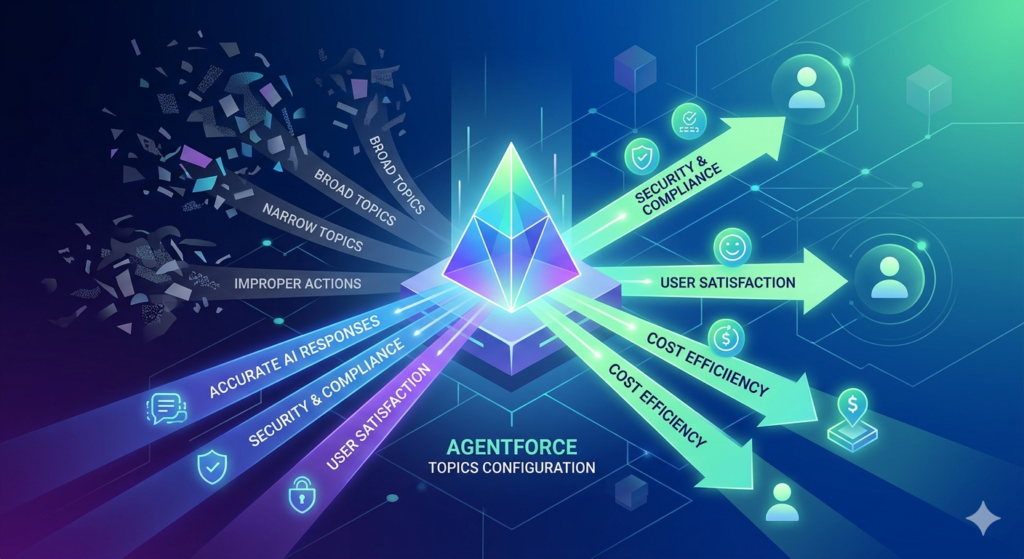
Poor topic configuration is the number one reason Agentforce deployments underperform.
When topics are too broad, the agent becomes confused and gives irrelevant responses. When they are too narrow, the agent constantly fails to match user intent. When actions are improperly mapped, the agent tries to do things it should not — or fails to do things it absolutely should.
Proper agentforce topic setup is the difference between an AI agent that wows your customers and one that frustrates them.
Getting this right also directly impacts:
- Accuracy of AI responses — Well-scoped topics improve LLM reasoning
- Security and compliance — Topics prevent agents from accessing unrelated data
- User satisfaction — Focused agents resolve issues faster
- Cost efficiency — Properly scoped agents reduce unnecessary LLM calls
Step-by-Step Guide to Agentforce Topics Configuration
Step 1: Access Agentforce in Salesforce Setup
To begin your agentforce topics configuration journey, you need to navigate to the right area in Salesforce.
- Log in to your Salesforce org (ensure you have Agentforce enabled and the appropriate licenses)
- Click the Setup gear icon in the top right
- In the Quick Find box, type “Agentforce”
- Select Agentforce Agents from the results
- Click New Agent or select an existing agent to edit
If you do not see the Agentforce option, confirm that:
- Your org has Einstein Platform enabled
- You have the Agentforce license assigned to your user profile
- The Agentforce feature flag is turned on under Einstein Settings
Step 2: Create or Select an Agent
Once inside Agentforce, you will either create a new agent or configure an existing one.
To create a new agent:
- Click New Agent
- Give your agent a descriptive name (e.g., “Customer Service Agent” or “HR Assistant”)
- Add a System Prompt — this is the high-level instruction that defines the agent’s persona, tone, and overall purpose
- Set the Primary Language and any fallback behaviors
- Click Save
Your system prompt is critically important. It sets the agent’s personality, communication style, and overarching goals. A good system prompt might read:
“You are a helpful and professional customer service agent for [Company Name]. Your goal is to resolve customer issues efficiently and accurately. Always be empathetic, clear, and solution-focused. Do not discuss topics unrelated to customer support.”
Step 3: Create Your First Topic
Now comes the core of agentforce topic setup. This is where you define the specific domains your agent will handle.
- Inside your agent configuration, navigate to the Topics tab
- Click New Topic
- Fill in the following fields:
Topic Name: Give it a clear, descriptive name.
Example: Billing and Payment Support
Topic Description: This is the most critical field. The LLM uses this description to determine when to apply this topic. Be specific and use natural language.
Example: “This topic handles all questions related to customer billing, invoices, payment methods, overdue accounts, refund requests, and subscription renewals. Use this topic when a customer mentions anything about charges, payments, or their bill.”
Scope (Instructions): Define boundaries — what the agent should do and should not do within this topic.
Example: “Only discuss billing-related matters. Do not provide specific legal or tax advice. If a customer requests a refund over $500, escalate to a human agent. Always verify the customer’s account before sharing billing details.”
- Click Save
Repeat this process for each major area your agent will cover. A well-structured agent typically has between 3 and 10 topics depending on complexity.
Step 4: Add Actions to Your Topics
With topics created, now it is time to add actions — the actual capabilities your agent will use.
- Inside a topic, click Add Action
- You will see a library of available actions including:
- Salesforce standard actions
- Flow-based actions
- Apex-defined actions
- Prompt template actions
- Select the relevant actions for the topic
- For each action, review the Action Description — this is what the LLM reads to decide when to invoke the action
- Configure any required input parameters
- Click Save
Example for Billing Topic:
- Action 1: Look Up Customer Account — Retrieves account details using the customer’s email or ID
- Action 2: Get Invoice Details — Fetches recent invoice records from Salesforce
- Action 3: Process Refund Request — Triggers a Salesforce Flow to initiate refund processing
- Action 4: Escalate to Human Agent — Transfers the conversation to a live agent queue
Step 5: Write Strong Action Descriptions
This step is often overlooked but is absolutely vital to successful salesforce agent topics configuration.
Each action has a description field. The LLM reads this description to decide:
- Whether the action is relevant to the current conversation
- When to invoke the action
- What information to pass into the action
A weak action description: “Gets account info.”
A strong action description: “Use this action when the customer asks to view their account details, profile information, contact preferences, or subscription status. This action retrieves complete account data from Salesforce using the customer’s verified email address or account ID.”
The more specific and context-rich your descriptions, the more accurately the agent will invoke the right actions at the right time.
Step 6: Configure Topic Classification Settings
Agentforce uses AI to classify incoming messages into the most relevant topic. You can influence this classification by:
- Going to Agent Settings
- Navigating to Topic Classification
- Adjusting the confidence threshold — the minimum confidence score required before the agent acts on a topic
- Enabling multi-topic routing if conversations may span multiple topics
- Setting a fallback topic for when no topic matches — typically a general information or escalation topic
A confidence threshold of around 70-80% works well for most deployments. Too high and the agent will frequently fail to match topics. Too low and it may misclassify messages.
Step 7: Test Your Configuration
Before going live, thoroughly test your agentforce topics configuration.
- Use the Conversation Preview tool inside the Agent Builder
- Test at least 10-15 different user inputs per topic
- Verify that:
- The correct topic is being selected
- The right actions are being triggered
- Action inputs are being populated correctly
- Edge cases and unusual phrasings are handled well
- Review the reasoning trace (if available) to see how the LLM is interpreting inputs
- Adjust topic descriptions and action descriptions based on test results
Step 8: Activate and Deploy Your Agent
Once testing is complete:
- Click Activate Agent in the Agent Builder
- Select your deployment channel (Experience Cloud, Service Cloud, etc.)
- Configure session settings — session timeout, greeting messages, and escalation rules
- Enable conversation logging for ongoing monitoring
- Assign the agent to the appropriate channels and queues
- Click Deploy
Best Practices for Agentforce Topics Configuration
Keep Topics Focused and Distinct
Each topic should have a clear, non-overlapping scope. If two topics are too similar, the agent will struggle to classify conversations correctly.
Good: Separate topics for “Billing” and “Technical Support”
Bad: One broad topic called “Customer Help” that covers everything
Use Real Customer Language in Descriptions
Write topic and action descriptions using the same language your customers actually use. Avoid internal jargon. If customers say “my bill” rather than “invoice,” use that language in your descriptions.
Always Define a Fallback Topic
Every agent should have a fallback topic for conversations that do not match any defined topic. This topic should gracefully inform the customer and either ask for clarification or escalate to a human agent.
Limit Actions Per Topic
Keep each topic focused with 5-8 relevant actions maximum. Too many actions per topic overwhelm the LLM and reduce accuracy. If a topic needs more than 10 actions, consider splitting it into two topics.
Test With Real Users Before Full Launch
Involve actual customers or internal staff in user acceptance testing before going live. Real conversations reveal gaps that internal testing often misses.
Monitor and Iterate Continuously
Agentforce is not a set-and-forget tool. Monitor conversation logs regularly, track topic classification accuracy, and update your configuration based on real usage patterns.
Common Mistakes in Agentforce Topic Setup
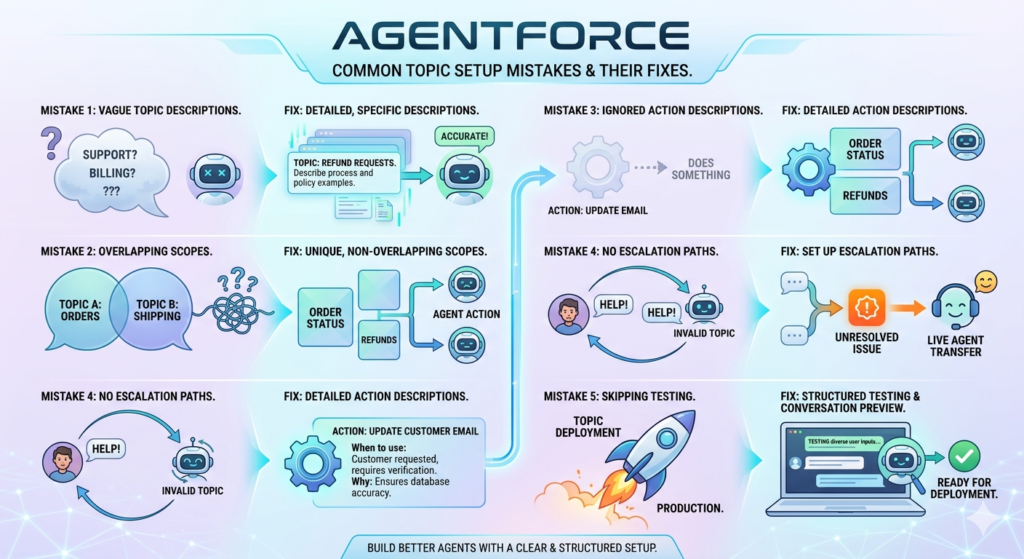
Mistake 1: Writing Vague Topic Descriptions
The most common and damaging mistake. If the LLM cannot clearly understand what a topic covers from its description, it will misclassify conversations constantly.
Fix: Spend significant time crafting detailed, specific topic descriptions with clear examples of what belongs in the topic.
Mistake 2: Overlapping Topic Scopes
When two topics could both apply to the same message, the agent gets confused. This leads to inconsistent behavior and poor user experience.
Fix: Map out all your topics on paper before building them. Ensure each topic has a unique, non-overlapping scope.
Mistake 3: Ignoring Action Descriptions
Many admins configure actions but leave the description field vague or empty. This severely reduces action accuracy.
Fix: Write detailed, context-rich action descriptions that clearly explain when and why each action should be used.
Mistake 4: Not Setting Up Escalation Paths
Some teams deploy agents without clear escalation actions. When the agent cannot resolve an issue, customers get stuck in a loop with no way to reach a human.
Fix: Every topic should have an escalation action that transfers difficult conversations to appropriate human agents or queues.
Mistake 5: Skipping the Testing Phase
Rushing to deploy without thorough testing leads to embarrassing failures in production.
Fix: Always conduct structured testing with diverse inputs before going live. Use the Conversation Preview tool extensively.
Real-World Use Cases for Salesforce Agent Topics
Use Case 1: E-Commerce Customer Service
Topics configured:
- Order Status and Tracking
- Returns and Refunds
- Product Information
- Shipping and Delivery
- Account Management
Result: A large online retailer deployed Agentforce with these five topics, reducing their customer service ticket volume by 45% and improving first-contact resolution rates significantly.
Use Case 2: Financial Services Client Onboarding
Topics configured:
- Account Opening Requirements
- Document Submission Guidance
- Compliance and KYC Questions
- Product Eligibility
- Appointment Scheduling
Result: A regional bank automated 60% of their onboarding support queries, reducing onboarding time from 5 days to under 2 days on average.
Use Case 3: Internal IT Helpdesk
Topics configured:
- Password Reset and Access Issues
- Software Installation Requests
- Hardware Support
- VPN and Remote Access
- IT Policy Questions
Result: An enterprise IT team deployed an internal Agentforce agent that handled 70% of tier-1 support requests automatically, freeing their IT staff to focus on complex issues.
Use Case 4: Healthcare Patient Support
Topics configured:
- Appointment Booking and Rescheduling
- Insurance and Billing Questions
- Prescription Refill Requests
- Test Results Information
- General Health FAQs
Result: A healthcare provider improved patient satisfaction scores while reducing call center volume by 35% during peak hours.
Advanced Configuration Tips for Developers
Using Apex to Create Custom Actions
For complex business logic that Salesforce Flows cannot handle, developers can create Invocable Apex methods and expose them as Agentforce actions.
apex@InvocableMethod(label='Get Customer Risk Score'
                 description='Calculates and returns the risk score for a customer based on their account history. Use this when a customer asks about their risk profile or when processing a refund over $1000.')
public static List<RiskResult> calculateRiskScore(List<String> accountIds) {
    // Custom logic here
}
Notice how the description field directly addresses when the action should be used — this is critical for accurate LLM invocation.
Leveraging Prompt Templates for Dynamic Responses
Use Einstein Prompt Builder to create sophisticated prompt templates that generate personalized, context-aware responses. These templates can reference Salesforce data merge fields to create truly dynamic outputs.
Multi-Agent Orchestration
For enterprise deployments, consider creating multiple specialized agents — each with a narrow set of topics — and using an orchestration layer to route customers to the right agent. This is similar to how call centers route customers to specialized departments.
The Future of Agentforce AI: What Is Coming Next?
Salesforce is investing heavily in Agentforce, and the roadmap is exciting.
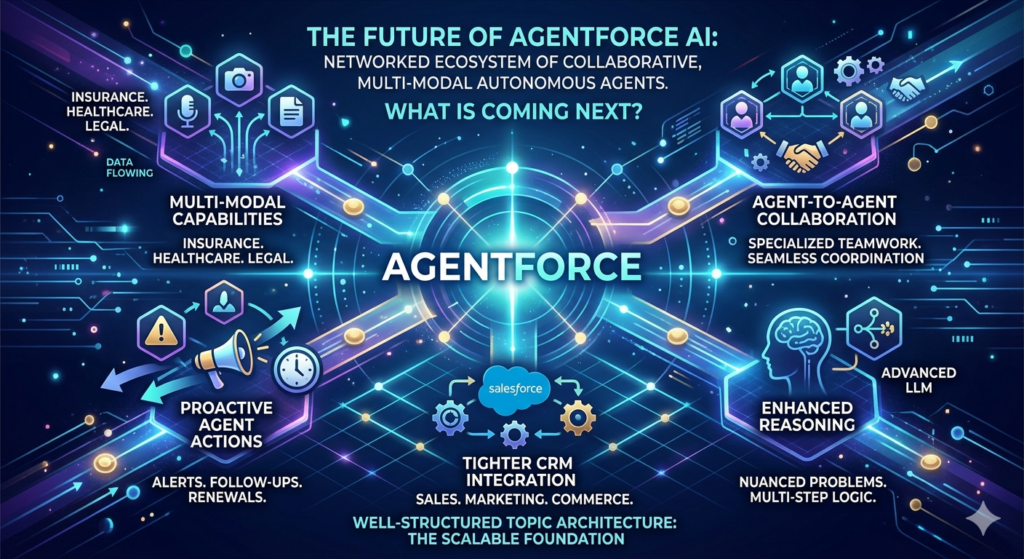
Multi-modal capabilities will allow agents to process images, documents, and even voice inputs — opening up entirely new use cases in insurance, healthcare, and legal services.
Proactive agent actions will enable agents to initiate outreach rather than just responding — sending alerts, following up on open cases, and prompting customers about upcoming renewals without waiting to be asked.
Agent-to-agent collaboration will allow specialized Agentforce agents to work together on complex tasks, passing context and coordinating actions seamlessly.
Enhanced reasoning capabilities powered by more advanced LLMs will improve the agent’s ability to handle nuanced, multi-step problems that currently require human intervention.
Tighter CRM integration will make it even easier to build actions that span Salesforce’s entire product suite — from Sales Cloud to Marketing Cloud to Commerce Cloud.
The organizations that invest time in proper agentforce topics configuration today will be best positioned to take advantage of these capabilities as they arrive. Building a well-structured topic architecture now creates a foundation that scales and evolves with the platform.
AI automation in Salesforce is not just a trend — it is a fundamental shift in how businesses operate. Agentforce is at the center of that shift, and Topics and Actions are its beating heart.
Conclusion
Mastering agentforce topics configuration is one of the most valuable skills a Salesforce professional can develop right now. As AI agents become central to customer experience strategies across every industry, the ability to design, build, and optimize these intelligent systems is increasingly in demand.
Remember the key principles:
- Topics define scope — keep them focused, specific, and distinct
- Actions define capability — describe them clearly so the LLM knows when to use them
- Testing is non-negotiable — thorough testing prevents costly failures in production
- Monitoring drives improvement — treat your agent as a living system that evolves over time
Whether you are doing your first agentforce topic setup or optimizing an existing enterprise deployment, the investment you make in proper configuration pays dividends in customer satisfaction, operational efficiency, and competitive advantage.
The age of intelligent AI agents in Salesforce is here. Configure it well, and it will transform how your business operates.
About RizeX Labs
At RizeX Labs, we specialize in delivering advanced Salesforce AI solutions with deep expertise in Agentforce implementation, topic configuration, and intelligent automation workflows. Our team combines technical Salesforce knowledge, real-world deployment experience, and industry best practices to help businesses build scalable AI-powered customer engagement systems.
We help organizations streamline support operations, automate repetitive interactions, and improve customer experiences through properly configured Agentforce Topics and Actions inside Salesforce.
Internal Links:
- Salesforce Admin course page
- Salesforce Marketing Cloud vs Pardot: Which Is Right for You in 2026
- Salesforce Marketing Cloud Certification: Study Guide 2026
- SFMC Data Extensions vs Lists: What Every Marketer Should Know
- SFMC Email Content Builder: Best Practices & Templates 2026
- SFMC Query Activity SQL: The Complete Guide to Marketing Cloud SQL for Data-Driven Marketers
- SFMC Einstein Send Time Optimization: How It Works
External Links:
McKinsey Sales Growth Reports
