
Introduction: Why Lead Scoring Is No Longer Optional
In today's hyper-competitive sales environment, your sales team cannot afford to waste time chasing leads that will never convert. Every minute spent on a cold prospect is a minute taken away from a warm one. This is where Salesforce Einstein Lead Scoring becomes a game-changer.
Einstein Lead Scoring is an artificial intelligence feature built directly into Salesforce CRM that automatically assigns a score to every lead based on its likelihood to convert. Unlike traditional manual lead scoring, which relies on gut instinct or rigid rule-based systems, Salesforce Einstein Lead Scoring uses machine learning to analyze historical data patterns and continuously refine its predictions.

For businesses using Salesforce Sales Cloud, this means your sales representatives always know which leads deserve immediate attention and which ones need more nurturing. For Salesforce admins, it means less manual configuration and more intelligent automation. For sales managers, it means better forecasting and smarter resource allocation.
In this comprehensive guide, we will walk you through everything you need to know about Salesforce Einstein Lead Scoring — from how it works and why it matters, to step-by-step Einstein scoring setup, configuration tips, common mistakes to avoid, and real-world business use cases.
Whether you are a Salesforce admin setting this up for the first time or a sales leader evaluating AI-powered tools for your organization, this blog will give you the practical knowledge to get started and succeed.
What Is Salesforce Einstein Lead Scoring?
Salesforce Einstein Lead Scoring is a predictive analytics feature powered by the Einstein AI engine embedded within Salesforce Sales Cloud. It uses machine learning algorithms to analyze your existing lead and conversion data and then assigns a score between 1 and 99 to each new lead based on how similar they are to leads that previously converted.
Think of it this way: If your highest-converting leads over the past two years have been mid-sized technology companies with more than 200 employees, located in North America, and acquired through a webinar campaign, Einstein will recognize this pattern. When a new lead matching those criteria comes in, Einstein assigns it a high score. A lead from a one-person startup in a non-target geography acquired from a generic social media click would score significantly lower.
The Core Components of Einstein Lead Scoring Include:
- Einstein Score: A numerical value from 1 to 99 indicating conversion likelihood
- Score Reason Fields: Short explanations of why a lead received its score (both positive and negative factors)
- Score Trend: Whether a lead's score is improving, declining, or staying flat
- Global vs. Segmented Models: Einstein can build one global scoring model or multiple models for different lead segments
This is not a static system. The model retrains itself regularly (typically every 10 days) using the latest data, which means it keeps learning and improving automatically.
How Predictive Lead Scoring Salesforce Works
Understanding the mechanics behind predictive lead scoring Salesforce helps you trust the process and configure it more effectively.
Step 1: Data Collection
Einstein analyzes your Salesforce data, specifically leads and their associated fields such as industry, company size, lead source, job title, geography, and more. It also looks at activity data like email opens, form submissions, and page visits if Salesforce is connected to marketing automation tools.
Step 2: Pattern Recognition
The AI engine identifies which combinations of lead attributes are most commonly associated with converted leads versus lost or unqualified leads. This is done through a machine learning technique called logistic regression combined with gradient boosting models.
Step 3: Model Training
Einstein builds a predictive model based on these patterns. It requires a minimum dataset to function accurately. Salesforce recommends at least 1,000 leads created in the past 6 months with a reasonable conversion rate (at least a few percent). Without sufficient historical data, the model may not be reliable.
Step 4: Score Assignment
Once the model is trained, Einstein scores every existing and incoming lead automatically. These scores appear directly on the lead record inside Salesforce without any manual intervention.
Step 5: Continuous Retraining
Every 10 days, Einstein retrains the model using newer data. As your business evolves — new markets, new campaigns, new buyer personas — the model evolves with it.
This dynamic, self-updating nature is what makes predictive lead scoring Salesforce fundamentally different from and superior to traditional rule-based scoring systems that become outdated the moment they are published.
Key Benefits of Salesforce Einstein Lead Scoring
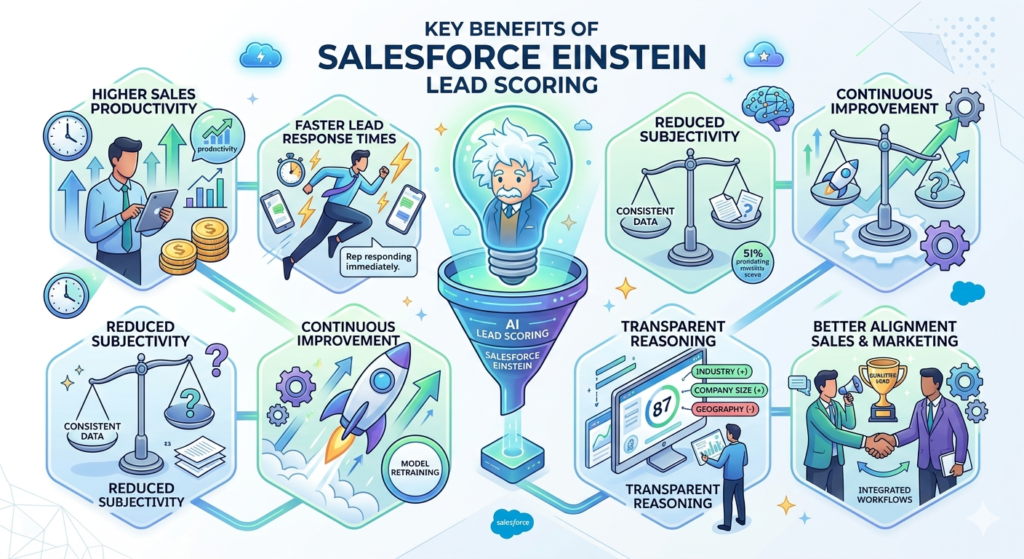
1. Higher Sales Productivity
Your sales team spends more time on leads most likely to close and less time on low-potential prospects. Industry data consistently shows that AI-driven prioritization can improve sales rep productivity by 20 to 30 percent.
2. Faster Lead Response Times
When high-scoring leads are automatically surfaced, sales reps can respond immediately rather than waiting to manually review their queue. Faster response times significantly improve conversion rates.
3. Reduced Subjectivity
Manual lead scoring relies on individual judgment, which varies by rep and changes over time. Einstein creates a consistent, data-driven standard across the entire team.
4. Continuous Improvement
Because the model retrains regularly, it improves as your business grows and your lead data becomes richer. There is no need to manually recalibrate scoring rules every quarter.
5. Transparent Reasoning
The score reason fields give sales reps context. A rep can see that a lead scored 87 because of their company size and industry, but that their geographic region is a negative factor. This allows for more intelligent outreach and conversation strategy.
6. Better Alignment Between Sales and Marketing
When both teams use the same AI-generated scores, they can agree on what a "qualified lead" looks like. This reduces friction and improves the handoff process between marketing and sales.
Prerequisites Before You Begin Einstein Scoring Setup
Before you start the Einstein scoring setup, make sure the following requirements are in place.
Licensing Requirements
- Salesforce Sales Cloud Einstein or Einstein Predictions license is required
- Einstein Lead Scoring is available in Performance, Unlimited, and Enterprise Editions with the Einstein add-on
Data Requirements
- A minimum of 1,000 lead records created within the past six months
- At least 120 converted leads within that same period for model training
- Consistent field usage across lead records (avoid fields that are frequently empty)
Permission Requirements
- System Administrator profile or a profile with Customize Application permission
- Einstein Lead Scoring permission set must be assigned to users who will view scores
Integration Considerations
- If you use Pardot or Marketing Cloud, connecting them to Salesforce enriches the data and can significantly improve scoring accuracy
- Ensure your Salesforce data is clean — duplicate leads and missing fields reduce model accuracy
Step-by-Step Einstein Scoring Setup Guide
Now let us walk through the actual Einstein scoring setup process inside Salesforce.
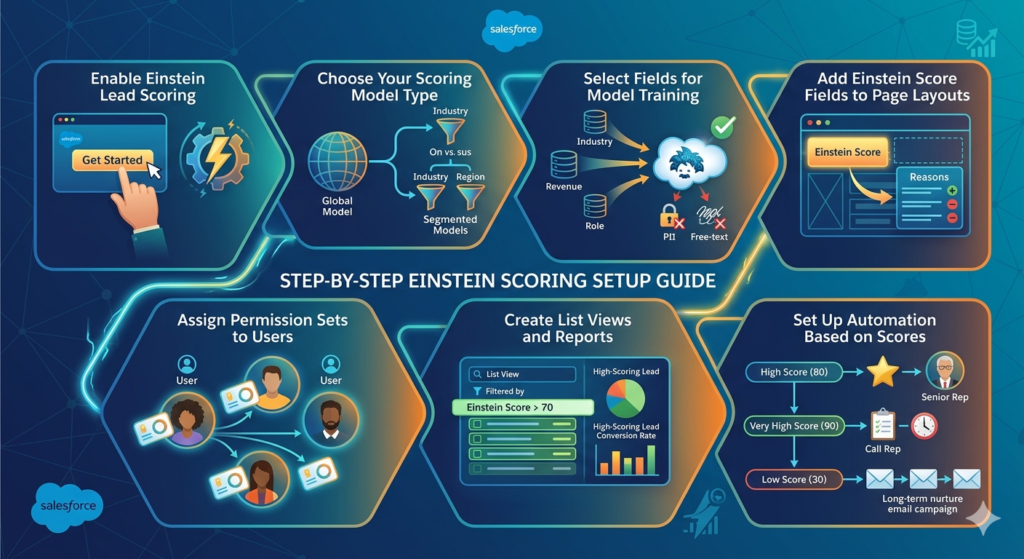
Step 1: Enable Einstein Lead Scoring
- Navigate to Setup in your Salesforce org
- Search for Einstein Lead Scoring in the Quick Find box
- Click on Einstein Lead Scoring under the Einstein section
- Click Get Started and follow the on-screen prompts to enable the feature
- Accept the Data Processing Agreement if prompted
Step 2: Choose Your Scoring Model Type
Salesforce gives you two options:
- Global Model: One model trained on all your leads. Best for businesses with a single target market.
- Segmented Models: Multiple models, each trained on a specific segment of leads. Ideal for businesses selling to different industries, company sizes, or geographies.
For most small to mid-sized businesses, starting with a global model is recommended. Larger enterprises with diverse sales motions should explore segmented models.
Step 3: Select Fields for Model Training
Einstein automatically includes the most predictive fields from your lead object. However, you can customize which fields are included or excluded.
Fields to include:
- Industry
- Annual Revenue
- Number of Employees
- Lead Source
- Title/Job Role
- Country or State
Fields to exclude:
- Fields with more than 70% empty values
- Personally Identifiable Information (PII) fields
- Free-text fields (they add noise, not signal)
- Fields you manually set after conversion (these create data leakage)
Step 4: Add Einstein Score Fields to Page Layouts
- Navigate to Object Manager > Lead > Page Layouts
- Edit the relevant page layout
- Drag the following fields onto the layout:
- Einstein Score
- Einstein Score Reasons (shows top positive and negative factors)
- Einstein Score Trend (if available in your edition)
- Save the layout
Step 5: Assign Permission Sets to Users
- Go to Setup > Permission Sets
- Find the Einstein Lead Scoring permission set
- Assign it to all Salesforce users who need to view lead scores
Step 6: Create List Views and Reports
To make scores actionable, create a lead list view filtered by Einstein Score.
- Go to the Leads tab and create a new list view
- Add filters like Einstein Score greater than 70
- Sort by Einstein Score descending
- Share the view with the sales team
Also create a Salesforce report to track score distribution, high-scoring leads by region or source, and conversion rates by score tier.
Step 7: Set Up Automation Based on Scores
Use Salesforce Flow or Process Builder to automate actions based on Einstein Score.
Examples:
- If Einstein Score > 80, assign lead to senior sales rep automatically
- If Einstein Score > 90, trigger an immediate task for the rep to call within one hour
- If Einstein Score < 30, add lead to a long-term nurture email campaign
Configuration Tips for Better Scoring Accuracy
Tip 1: Enrich Your Lead Data
The more complete and accurate your lead records are, the more accurate the model will be. Use data enrichment tools like Clearbit, ZoomInfo, or Salesforce's own Data.com Connector to fill in missing company data like employee count, industry, and annual revenue.
Tip 2: Use Consistent Field Values
Avoid using free-form text where a picklist would work better. If your Industry field has values like "Tech," "Technology," "tech company," and "Information Technology," Einstein cannot identify them as the same segment. Standardize your field values using validation rules or data cleansing workflows.
Tip 3: Connect Marketing Automation
If you use Pardot, Marketing Cloud, or HubSpot integrated with Salesforce, ensure that engagement data (email opens, website visits, webinar attendance) syncs to the lead record. Behavioral data is highly predictive and significantly improves score accuracy.
Tip 4: Review Score Reasons Regularly
The score reason fields tell you what the model considers most important. Review these in team meetings. If the model is weighting factors that do not align with your ideal customer profile, revisit your field selection or data quality.
Tip 5: Do Not Over-Segment Too Early
Segmented models require more data. If you do not have enough data in each segment, the model's predictions will be less reliable. Start with a global model and move to segmented models after 6 to 12 months of data accumulation.
Common Mistakes to Avoid With Salesforce Einstein Lead Scoring
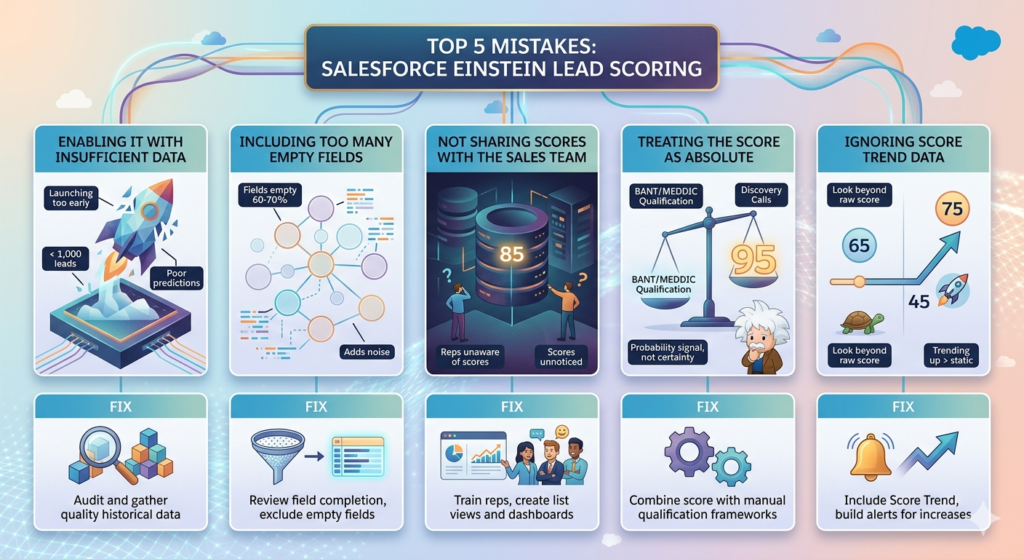
Mistake 1: Enabling It With Insufficient Data
Many admins enable Einstein Lead Scoring too early before enough lead and conversion data exists. The model needs quality historical data to learn from. Launching with fewer than 1,000 leads or a near-zero conversion rate will result in poor predictions.
Fix: Audit your lead data before enabling. If necessary, wait until you have sufficient volume or manually export and re-import historical data.
Mistake 2: Including Too Many Empty Fields in the Model
If a field is empty for more than 60 to 70 percent of your leads, including it in the model adds noise rather than signal.
Fix: Review field completion rates before model training. Exclude fields with low completion and focus on enriching the ones you do include.
Mistake 3: Not Sharing Scores With the Sales Team
Some organizations configure Einstein Lead Scoring but never properly train the sales team on how to use it. Scores sit on records unnoticed.
Fix: Create dedicated list views, include scores in daily stand-ups, and build dashboard reports that surface high-scoring leads prominently.
Mistake 4: Treating the Score as Absolute
A high Einstein Score does not guarantee a conversion. A score of 85 means the lead shares attributes with historically converted leads. It is a probability signal, not a certainty.
Fix: Train reps to use the score as one input among many. Combine Einstein Score with their own discovery calls and qualification frameworks like BANT or MEDDIC.
Mistake 5: Ignoring Score Trend Data
Many users look only at the raw score and ignore whether it is trending up or down. A lead with a score of 65 that was 45 last week is more interesting than one that has been at 65 for a month with no activity.
Fix: Include the Score Trend field on lead records and list views. Build automation that alerts reps when a lead's score increases significantly.
Best Practices for Improving Salesforce Einstein Lead Scoring Accuracy
Practice 1: Align Your Ideal Customer Profile With Your Data
Work with your marketing and sales leadership to define your Ideal Customer Profile (ICP). Then audit your Salesforce lead fields to ensure the data that defines your ICP is being consistently captured. If ICP attributes are missing from lead records, the model cannot learn from them.
Practice 2: Audit Lead Conversion Standards
Einstein learns from which leads were marked as "Converted" in Salesforce. If different reps convert leads for different reasons or if non-genuine conversions are being recorded, the model learns the wrong lessons.
Establish a clear, organization-wide definition of lead conversion and enforce it through training and validation rules.
Practice 3: Segment Your Leads Logically
If your business serves fundamentally different buyer types — for example, enterprise companies and small businesses — consider using segmented models after you have accumulated enough data. The factors that predict conversion for an enterprise buyer are often very different from those for an SMB.
Practice 4: Review the Model Report Quarterly
Salesforce provides a model insight report that shows which fields are most influential in the scoring model. Review this report every quarter. If surprising factors are driving scores, investigate why and address underlying data quality issues.
Practice 5: Combine Einstein Score With Engagement Signals
Pair Einstein's predictive score with real-time engagement signals. A lead with an Einstein Score of 75 who just opened three emails this week and visited your pricing page is more urgent than one with a score of 90 who has not engaged in 60 days. Configure Salesforce to surface both signals together.
Real Business Use Cases for Salesforce Einstein Lead Scoring
Use Case 1: SaaS Company Reduces Lead Response Time by 40%
A mid-sized SaaS company with a large inbound lead volume was struggling with response time. Reps spent the first two hours of their day manually reviewing and sorting leads. After implementing Salesforce Einstein Lead Scoring, they configured a list view showing only leads with scores above 75. Sales reps began their day calling the top 10 high-scoring leads first. Average response time dropped from 4.2 hours to 2.5 hours, and first-month close rates improved by 18%.
Use Case 2: Manufacturing Firm Improves Marketing-Sales Alignment
A manufacturing company's marketing team was generating hundreds of leads monthly, but the sales team considered most of them unqualified. Einstein Lead Scoring created a shared, objective definition of lead quality. Marketing focused campaigns on channels producing high-scoring leads. Sales received fewer but better-qualified leads. Both teams adopted the score as their shared qualification language.
Use Case 3: Financial Services Firm Prioritizes Upsell Opportunities
A financial services firm used Einstein Lead Scoring not just for new business leads but also for upsell opportunities by treating existing customers who requested new product information as "leads." The model identified which existing customers were most likely to upgrade, allowing the account management team to prioritize their outreach effectively.
Use Case 4: Staffing Agency Reduces Wasted Outreach
A regional staffing agency was calling every lead within 24 hours regardless of quality. Einstein Lead Scoring helped them focus on leads with scores above 60. Leads below 40 were automatically enrolled in a 30-day email nurture sequence. The sales team's call volume decreased while their connect rate improved significantly because they were spending time on more relevant prospects.
Salesforce Einstein Lead Scoring vs. Traditional Lead Scoring
| Feature | Traditional Lead Scoring | Einstein Lead Scoring |
|---|---|---|
| Based On | Manual rules and weights | Machine learning patterns |
| Update Frequency | Manual, infrequent | Automatic every 10 days |
| Scalability | Low — requires manual maintenance | High — scales with data |
| Accuracy | Moderate, based on assumptions | High, based on actual conversions |
| Transparency | Varies by setup | Score reasons provided automatically |
| Time to Implement | Weeks to months | Hours to days |
| Bias | High (human subjectivity) | Low (data-driven) |
The comparison makes it clear why organizations are moving from traditional rule-based systems to AI-driven predictive lead scoring Salesforce solutions.
How RizeX Labs Can Help You Implement Salesforce Einstein Lead Scoring
At RizeX Labs, we specialize in Salesforce implementation, optimization, and AI-powered sales transformation. Our certified Salesforce consultants have helped businesses across industries configure Salesforce Einstein Lead Scoring in ways that align with their unique sales processes and data landscapes.
We go beyond basic Einstein scoring setup by helping you:
- Audit and cleanse your lead data before model training
- Design segmented scoring models for complex sales organizations
- Integrate marketing automation tools for richer data signals
- Train your sales team on using scores effectively
- Build dashboards and automation workflows that make scores actionable
Whether you are starting from scratch or looking to optimize an existing Einstein configuration, RizeX Labs brings both technical depth and strategic insight to your Salesforce investment.
Conclusion: The Future of Lead Management Is AI-Driven
The days of manually ranking leads by gut instinct or rigid point systems are behind us. Salesforce Einstein Lead Scoring represents a smarter, faster, and more accurate way to qualify leads — one that gets better over time as it learns from your business's unique data.
For sales teams, it means spending time on the right conversations. For admins, it means a manageable, self-improving system. For business leaders, it means better forecasting, higher conversion rates, and a more efficient sales organization.
The Einstein scoring setup is not technically complex — but getting it right requires clean data, thoughtful configuration, and a commitment to making scores actionable across your team.
If you are serious about improving your pipeline quality and giving your sales team an AI-powered edge, there has never been a better time to adopt Salesforce Einstein Lead Scoring. Start with your data audit today, and take the first step toward a smarter sales process.
Ready to get started? Contact RizeX Labs to schedule a free Salesforce AI readiness assessment.
About RizeX Labs
At RizeX Labs, we specialize in delivering advanced Salesforce solutions that help businesses automate processes, improve customer engagement, and drive smarter sales decisions using AI-powered technologies like Salesforce Einstein.
Our expertise combines deep Salesforce knowledge, real-world implementation experience, and industry best practices to help organizations improve lead conversion, sales productivity, and forecasting accuracy through intelligent automation.
We empower businesses to move from traditional lead qualification methods to AI-driven lead scoring systems that help sales teams focus on the highest-value opportunities and close deals faster.
Internal Links:
- Salesforce Admin course page
- Salesforce Marketing Cloud vs Pardot: Which Is Right for You in 2026
- Agentforce Topics and Actions: Complete Configuration Guide
- SFMC Data Extensions vs Lists: What Every Marketer Should Know
- SFMC Email Content Builder: Best Practices & Templates 2026
- SFMC Query Activity SQL: The Complete Guide to Marketing Cloud SQL for Data-Driven Marketers
- SFMC Einstein Send Time Optimization: How It Works
External Links:
McKinsey Sales Growth Reports